HAL Id: hal-01119005
https://hal.inria.fr/hal-01119005
Submitted on 20 Feb 2015
HAL
is a multi-disciplinary open access
archive for the deposit and dissemination of
sci-entific research documents, whether they are
pub-lished or not. The documents may come from
teaching and research institutions in France or
abroad, or from public or private research centers.
L’archive ouverte pluridisciplinaire
HAL, est
destinée au dépôt et à la diffusion de documents
scientifiques de niveau recherche, publiés ou non,
émanant des établissements d’enseignement et de
recherche français ou étrangers, des laboratoires
publics ou privés.
Adopting Design Practices for Programming
Bastian Steinert, Marcel Taeumel, Damien Cassou, Robert Hirschfeld
To cite this version:
Bastian Steinert, Marcel Taeumel, Damien Cassou, Robert Hirschfeld. Adopting Design Practices
for Programming. Design Thinking Research, pp.16, 2012, �10.1007/978-3-642-31991-4_14)�.
�hal-01119005�
Adopting Design Practices for Programming
Bastian Steinert, Marcel Taeumel, Damien Cassou, and Robert Hirschfeld
AbstractProgrammers continuously design the programs under development. For example, programmers strive for simplicity and consistency in their constructions, like practitioners in most design fields. A simple program design supports working on current and future development tasks. While many problems addressed by pro-grammers have characteristics similar to design problems, propro-grammers typically do not use similar principles and practices developed to address these problems. In this chapter, we report on the adoption of design practices for programming. At first, we propose a new concept for integrated programming environments that encour-ages programmers to work with concrete representations of abstract thoughts within a flexible canvas. Secondly, we present continuous versioningas our approach to support the need for withdrawing changes during program design actitivities.
1 Introduction
According to Herbert Simon, design should be considered a meta-discipline:
Everyone designs who devise courses of action aimed at changing existing situations into preferred ones. The intellectual activity that produces material artifacts is no different fun-damentally from the one that prescribes remedies for a sick patient or the one that devises a new sales plan for a company or a social welfare policy for a state ... [20, p. 130]
Programming arguably involves design in various respects. In particular, devel-opers design for end-users but also for develdevel-opers. They continuously prepare the code base for current and future coding activities. Programmers thus conduct intel-lectual activities that are similar to the activities of designers in other fields. Also, the general understanding of programming matches well to the general descriptions of the design concept.
Software Architecture Group
Hasso Plattner Institute, University of Potsdam, Germany
e-mail:[email protected]
1
Design Thinking Research: Measuring Performance in Context (pages 247-262) Springer 2012 (doi:10.1007/978-3-642-31991-4_14)
Design as a noun informally refers to a plan or convention for the construction of an object or a system [...] while ”to design” (verb) refers to making this plan. [...] However, one can also design by directly constructing an object (as in pottery, engineering, [...], graphic design) [22]
In this sense, programmers design by constructing the program. Unfortunately, there is no well-accepted formal definition of the design concept, for example, mea-sured in terms of citation. However, the following recent attempt allows for high-lighting the connection to programming. (Concepts related to programming are in-serted in angle brackets.)
(noun) a specification of an object<the program>, manifested by an agent<the developer>,
intended to accomplish goals, in a particular environment, using a set of primitive compo-nents<programming language, libraries, ...>, satisfying a set of requirements, subject to
constraints<readability, performance, ...>; (verb, transitive) to create a design, in an
envi-ronment (where the designer operates) [16]
Experience teaches us to approach similar problems in similar ways. What would it mean for a developer to work like a designer? While many problems addressed by developers have characteristics similar to design problems, developers typically do not use methods developed to address these problems. Divergent and convergent thinking, externalizing thoughts, supporting thinking by doing, working on parallel lines of thought—we believe that such design methods can significantly improve program design outcomes, which are increasingly important for software develop-ment and evolution.
In this chapter, we report on our ongoing work of adopting design practices to programming. After introducing the reader to program design - what is designed and for whom -, we present two results of our research efforts that support developers in conducting program design activities. First, we describe a new concept for pro-gramming environments that encourages programmers to work with concrete rep-resentations of abstract thoughts within a flexible canvas. Second, we will discuss that prototyping activities typically interleave with the advancement of the program. This raises the need for going back to previous states of work. We will describe the lack of appropriate support and will propose our approach to meet this important need.
2 Program Design
Developers continuously redesign their programs. A canonical reference about best practices in programming starts by listing some crucial questions a developer faces everyday [2]:
• How do you choose names for objects, variables, and methods? • How do you break up the logic into methods?
In this section, we briefly introduce the need for program design explaining who is targeted during design activities and exemplifying some aspects of program de-sign that are to be considered.
2.1 Design for Whom? – End-users vs. Developers
By definition, design activities are targeted to the needs of users, having the goal of changing existing situations into preferred ones. According to this understanding, it is meaningful to distinguish between two kinds of users that are the target of design activities during software development:
• User-experience designtargets end-users and involves the graphical layout and workflows that guide users;
• Program designtargets developers and involves meaningful names, indentation and code layout, abstractions, separation into modules;
This report mainly deals withdesignactivities that target developers.
2.2 Proper Arrangement and Meaninful Names
We now discuss the need for meaningful names and abstractions by means of a typical example.
Goal 1
Given a list of numbers: 3, 6, 1, 9 10, ... Find all numbers smaller than 5.
A possible way to fulfill this goal is by writing the following piece of Smalltalk code: s :=”... a list of numbers ...” r := OrderedCollection new. 1 to: s size do: [:i| e := s at: i. e<5 ifTrue: [r add: e]]
This piece of code basically creates a container (calledr), iterates over the list of provided numbers, and insert each number satisfying the criteria into the container. The piece of code presents exactly the same behavior but is non-arguably easier to read. First, names can increase the readability of a program if they clearly express the role of the identified constructs. Second, indentation of lines better convey the structure of the source code:
givenNumbers :=”... a list of numbers ...”
result := OrderedCollection new.
1 to: givenNumbers size do: [:i| |eachNumber|
eachNumber := givenNumbers at: i. eachNumber<5
ifTrue: [result add: eachNumber]]
Such a readable code also helps future developers that might need to read and un-derstand the code long after it has been written. Consider, for example, the following goal, which is very similar to the one stated above:
Goal 2
Given a list of names: Simon P. Jones, Paul Graham, Guy Steele, ... Find all names matching ’jones’.
As the code above is well written, it becomes easy to identify the code fragments that need to be adapted for the new goal. The new goal can now be fulfilled by the following piece of code:
givenNames :=”... a list of names ...”
result := OrderedCollection new.
1 to: givenNames size do: [:i| |eachName|
eachName := givenNames at: i. (eachName matches: 'jones')
ifTrue: [result add: eachName ]]
2.3 The Invention of Abstractions
Lets assume there is a third goal that is similar to the ones above:
Goal 3
Given a list of dates: 09/09/1999, 11/11/2011 ... Find all dates before today.
A developer could certainly copy the previous piece of code and adapt it for the new goal. However, it becomes clear that a pattern emerges from the previous pieces of code. Such kind of repetition often encourages developers to think about new abstractions, which can express such a common need more precisely. The following source code abstracts over iterating elements and filtering according to a predicate.
Collection>>select: aBlock
newCollection := OrderedCollection new. self do: [:each|
(aBlock value: each)
ifTrue: [newCollection add: each]].
While the code is arguably harder to read, it allows for fulfilling all goals in much less code and is more expressive.
”Given a list of numbers: 3, 6, 1, 9 10... find all numbers smaller than 5”
givenNumbers select: [:each|each<5]
”Given a list of names: Simon P. Jones, Paul Graham, Guy Steele... find all names matching 'jones'”
givenNames select: [:each|each matches: 'jones']
”Given a list of dates: 09/09/1999, 11/11/2011... find all dates before today”
givenDates select: [:each|each isBefore: Date today]
The new abstraction increases expressiveness of the previous code snippets that makes them easier to read and understand, given the reader understands the new abstraction.
2.4 Conceptual Models
Designing programsrefers to the intentional effort of structuring an application’s code base beyond the strict needs of correctness and completeness. Thereby, like practitioners in most design fields, programmers strive for simplicity and consis-tency in their constructions, which seems reasonable because of the following: • Structure helps manage immense amounts of information, which can easily
add up to the size of thousands of books or even an entire library [10],
• Modularization eases change, which can reduce the number of elements to be understood and touched in subsequent development steps,
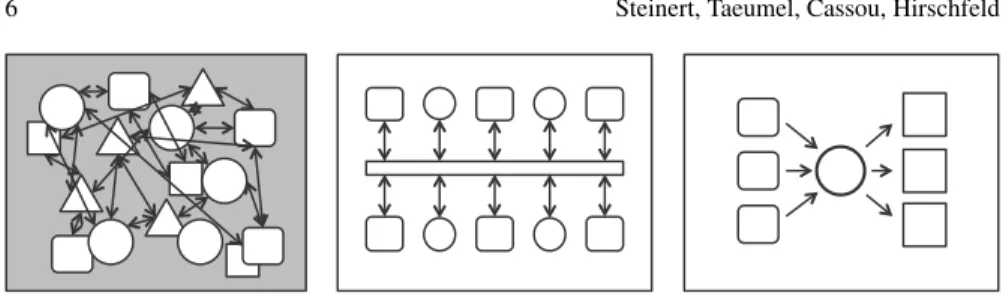
• Order and simplicity support thinking:Simplicity seems like a natural desire— it enables one to see clearly. The arrangement of elements partially determines our perception and thoughts. Conceptual models like those presented in Figure 1 implicitly act as frames that we use to understand the problem and solution spaces. Moreover, simplicity and order make us arguably feel better, which in turn positively affects creative thinking [1].
These aspects do not affect the correctness of a program, but they render program design activities important; their outcomes determine how the program is perceived, analyzed, and processed, which in turn affects subsequent development steps and their success.
3 Interactive Access to Program Run-time Information
In software development, program comprehension is an ongoing challenge that pro-grammers need to face day by day. While complex software systems are developed,
Fig. 1: Three different conceptual models of programs. The left model is less structured and ex-hibits less order than the other two, thereby rendering development tasks more difficult.
more and more essential knowledge about the corresponding problem domain is col-lected. A better understanding of the underlying problems leads to new or changed requirements, which themselves need to be fulfilled by programmers. Generally speaking, software systems spend over 60% of their lifetime within this iterative process of perfective and corrective maintenance [13]. As periods of days, months, and even years pass by, chances become very low that programmers write any new source code without having to consider formerly created work. Such existing work often raises challenges in understanding the underlying ideas and hence impedes programmers’ current maintenance tasks.
Programmers rely on effective tool support to accomplish comprehension tasks [19]. Ideally, integrated programming environments should offer this support and enable them to fully understand highly dynamic run-time behavior of complex software systems. If programmers understand such systems in-depth, they will maintain and extend those within shorter periods of time while making less mistakes. Unfortu-nately, existing tools provide only limited support for program comprehension ac-tivities.
In this section, we illustrate how programmers should comprehend parts of ex-isting software systems and we explain, which options they really have using tradi-tional environments such as Visual Studio. Based on these insights, we describe the concept of a new programming environment that overcomes present limitations and that strives for better program comprehension support.
3.1 The Need for Accessing And Arranging Run-time Data
Programmers access and process program-related information to understand ab-stractions that are described with programming language constructs. There are sev-eral sources of such information that differ in accessibility, actuality, and correct-ness:
• The knowledge about the source code in question should be possessed by its author. Unfortunately, this knowledge may not be accessible because the person
could not be available, could not be allowed to expose details, or could have already forgotten important aspects.
• Externaldocumentationprovides a high-level source of information about ba-sic ideas of and guidelines for the system. This includes end-user or developer manuals that are supported with illustrative examples and code snippets. Unfor-tunately, this information needs to be created and updated concurrently to system development. Having this, chances are high that it is outdated and incomplete. • The programsource codeis the most accurate and up-to-date information about
a software system. Unfortunately, the mental reconstruction of abstractions that are described with programming language constructs is very challenging. Any program control flow and its effects can be distributed in space and time, which poses high expectations to programmers’ imagination abilities as well as working and short-term memory.
• Therunning programitself enables programmers to experience concrete behav-ior making less demands to mental capabilities. Unfortunately, the connection between observable run-time behavior and the source code can be challenging. Programmers need access to information about the concrete run-time behavior of a program. As abstract descriptions require interpretation, they would like to reduce error-prone guess-work and access as much concrete data as possible. They would like to work with specific objects, situations, and scenarios like the ones the author of the particular piece of code had in mind. Although programmers ease this comprehension activity by making use of their former experiences, they keep on looking for clues to identify program behavior that differs from the default case. By doing so, many questions arise, which could be answered with the help of run-time information [19], such as“How does this [...] [object] look at run-time?”.
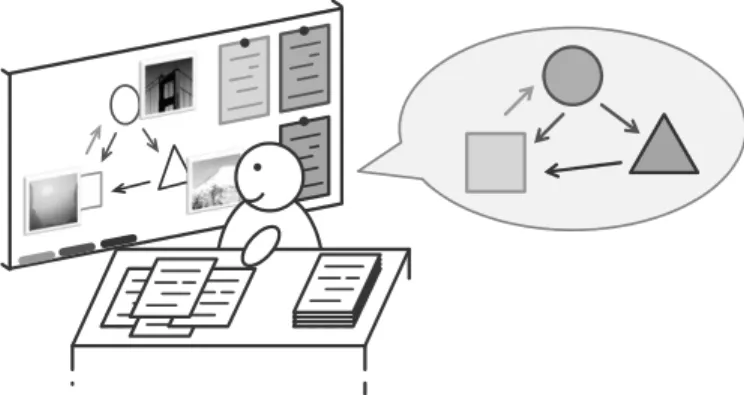
Fig. 2: Similar to design thinking methods, programmers would like to externalize their thoughts (here: using a whiteboard) in order to better reflect and talk about their understanding of a system part. All artifacts (here: documents, photographs, and drawings) are visible and freely arrangeable in order to conclude new insights more easily.
As programmers continue to get a software system to know in order to accom-plish a task, they would like to make notes of their findings and insights in order to recall them later on (Figure 2). Otherwise it would be difficult to conclude new thoughts while keeping many complex information in mind. Externalization of ex-isting knowledge helps here. In case of interruptions, programmers could use these notes to continue quickly where they left off. Besides interruption recovery, this information offloading also reduces the mental workload and allows for easy reflec-tion. Once visible, the notes are supposed to be freely arrangeable in order to work with appropriate point of views by means of grouping and sorting.
As programmers have an own notion of an ideal comprehension process, pro-gramming environments should support this process and must not dictate a different one due to technical limitations or historical reasons. Thus, tools should provide access to concrete run-time information and should enable programmers to arrange all externalized findings in a free manner. We will now illustrate those limitations of traditional programming environments.
3.2 The Lack of Integrated Tool Support
Programmers prefer to use integrated programming environments instead of many separate tools. Although there are programmers that feel comfortable using sepa-rate text editors, compilers, debuggers, and version control tools, Sillito et al. con-cluded [19] that iterative and connected program comprehension questions benefit from co-operative tools collaborating within one environment. Therefore we focus on arguing limitations in integrated programming environments only.
Integrated programming environments provide access to run-time information by means of program execution within adebugging mode. After entering this mode, execution stops at a selected line in the source code—a so-calledbreakpoint. Such a halt in the execution represents one point in time where programmers can explore program state and access concrete data in order to better understand abstractions. Unfortunately, this level of program comprehension support is limited:
• Run-time information is not directly accessible. Programmers make educated guesses to select breakpoints, but they cannot always be sure that those are really encountered during program execution. This trial-and-error method could lead to focus loss and increased comprehension effort.
• There is only one point in execution time accessible simultaneously. For example, a comparison between program states at multiple points in time is difficult and requires increased mental capabilities or additional tools.
• Access to context information for one point in execution time is limited. Pro-grammers can only see the direct path of method calls, which led to the break-point. There are no side effects visible, for example, that are caused by con-ditional branching. Technically speaking, there are no call trees, but only call stacks.
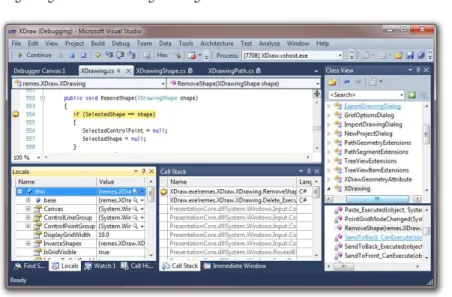
Fig. 3: Traditional programming environments (here: Visual Studio 2010) do not use an appropriate interface metaphor to display information. In addition, they provide only limited access to run-time data by means of breakpoint debugging.
Integrated programming environments address a visualization problem. Such tools need to present data in an interactive way so that programmers can process them. Due to limited screen space, it is not possible to show all available static and dynamic information simultaneously. Basically, the user interface of these environ-ments provides only document-centered workflows within thedesktop metaphor. By doing so, informational units can be arranged freely like document papers or stacked conveniently like an address card index—all on a two-dimensional area mimicking a physical desk. Unfortunately, this approach dictates a comprehension process that is different to what programmers would like to follow:
• Programmers cannot treat all available information equally. The bento-box-like arrangement of information is centered around a source code area (Figure 3). Having this, programmers are guided to return to the source code view constantly, whether or not they really need to.
• Programmers cannot explicitly see relationships between visible information. All data boxes are meant to be used in an isolated fashion. Programmers have to find clues by means of text labels in order to reveal connections, for example, between a call stack and the currently called method source code.
• As a result, programmers cannot externalize their thoughts in the IPE and inter-ruptions could become problematic [11].
Traditional programming environments dictate a comprehension process that im-pedes efficient software maintenance. On the one hand, programmers cannot access valuable run-time information directly. On the other hand, they cannot process avail-able information as needed; graphical user interfaces are limited due to an
inappro-priate user interface metaphor. Externalization of thoughts is not possible and hence the limited metal capacity lets transient insights dissolve. In the end, this compre-hension process promotes error-prone guess work.
3.3 Applying Design Methods to Programming Environments
We propose a concept for next-generation programming environments to better sup-port program comprehension activities according to programmers’ needs. The con-cept addresses two major issues of traditional IPEs: explicit run-time data access using a debugging mode and inappropriate visualization of all accessible data.
code data covered code data ClassA >> messageA1 ClassB >> messageB1 ClassC >> messageC1 ClassA >> messageA2 anObject : ClassB instVarB1 instVarB2 instVarB3
Fig. 4: Automated access to run-time information: Test coverage (left) is used to find relevant entry points for program execution (middle). Each node in the accessible call tree is connected with more detailed system state (right).
We avoid the need for the explicit debugging mode and make use of tests to access run-time information implicitly. As complex software systems benefit from automated tests to ensure functionality [4], we assume that the system under de-velopment is covered with tests to a certain extent. Having this, we can select all tests that cover a piece of code to access valuable run-time information when needed [15] (Figure 4). In a first step, full call trees of involved test runs are cap-tured and provide context information to programmers. In a second step, any call in the tree is connected to more detailed system state. Having this, programmers benefit from the fact that all static source code information are directly connected to available run-time data and vice versa. The whole automatism even allows for accessing multiple points in execution time simultaneously—from a programmer’s perspective.
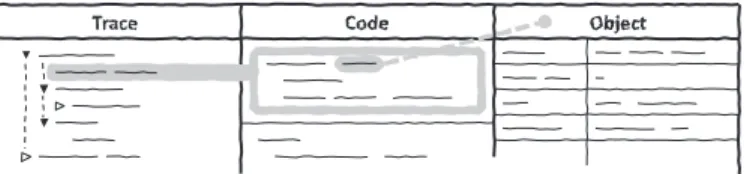
Fig. 5: Layout of the new concept: All kinds of information are displayed consistently in columns, for example, call trees (left), source code (middle), object states (right). Overlay annotations make collaboration and dependency information explicit.
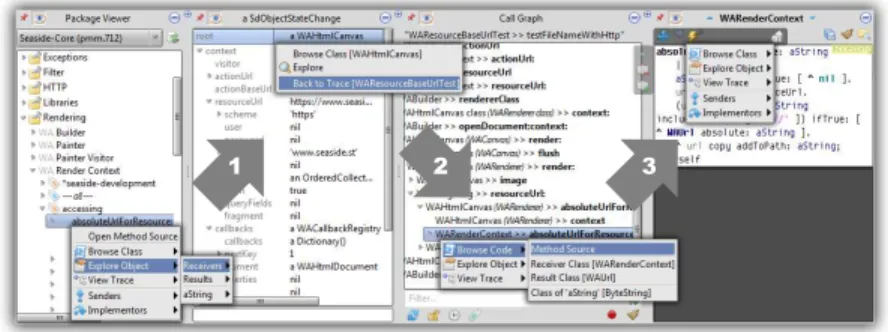
We propose a new user interface metaphor to create a visual space that allows programmers to follow a better comprehension process. All information can be ar-ranged column-wise on an unlimited, horizontal tape (Figure 5). Each column dis-plays either static source code or dynamic run-time information. Columns appear and vanish as expected while programmers explore system behavior. The clear sep-aration of horizontal and vertical screen axis supports programmers’ orientation: The horizontal axis shows different kinds of information and the vertical one offers details for each kind.
1 2 3
Fig. 6: Screenshot of the prototypical implementation, calledvivide. Each column offers context menus to access further static or dynamic data. Having this, direct navigation between source code and run-time is possible. For example, accessing an example object of a class (1), browsing the run-time context (2), and going back to the source code (3).
Our new concept for integrated programming environments enables program-mers to experience a story—the story of a software system. The column-oriented display for static and dynamic information is supplemented with interactive naviga-tion facilities that allow for switching directly between source code and run-time. This means, that valuable run-time information is omnipresent. Additionally, the principle ofdirect manipulation[18] is pursued, which objectifies visible informa-tion. This makes programmers to be more immersed in the program comprehension process because they do no longer work with abstract containers that present infor-mation, but manipulate the information itself directly. They are able to externalize their mental model in order to better reflect about their thoughts. In the end, pro-grammers can collect information conveniently to gain the relevant knowledge that is needed to accomplish programming tasks successfully—even when facing large and complex programs.
4 Prototyping Support for Program Design Activities
Prototyping is considered a valuable practice to explore a design space [12]. They are sources for inspiration and help to reflect on design activities. This suggests that
programmers should follow a trial and failure approach to program design tasks. In this section, we discuss that such an approach naturally increases the need for withdrawing changes and starting over from a previous state of development. We presentcontinuous versioningas our approach to address this specific need. Such dedicated tool support arguably encourages programmers to follow a trial and failure approach.
4.1 The need for going back
In software development, the addition of new features to a software interleaves with the adaptation of its design according to new information and understanding. As a result, developers often have to go back, either to cancel their recent work or to study a previous version of the implementation.
Software development is an activity that typically produces high-level plans that are fragile to the arrival of new information during the implementation [17]. During the time when the software is implemented, it is common that requirements change and that new details are revealed. New requirements can be imposed on the project as the final users get a better understanding of what they want from the software. Additionally, existing requirements can be adapted, or even become obsolete, as the problem understanding by the developers and the implementation realization co-evolve [5]. Similarly, developers can reveal new technical details as the imple-mentation progresses.
All of this new information can potentially break the original plan and require agile adaptations to both the plan and the implementation [3]. Because of this new information that shows up all along the software realization, software development is rarely straightforward but often composed of numerous incremental iterations [8, 17]. As a result, developers have to review, alter, and amend the program’s design continuously. For this reason, along with the addition of new features, developers have to modify the code base to make it more amenable to this new information. This activity is namedrefactoring[9, 14].
Best practices have emerged suggesting that both activities, namely adding fea-tures and refactoring, must interleave. For example, Martin Fowler, the author of the canonical reference on refactorings [6], proposes to conduct refactorings on various occasions including [7]:
• when encountering some code that seems less clear than it could be;
• when prepararing for upcoming activities such as implementing a new feature or fixing a bug;
• when realizing that new code duplicates existing one.
As the advancement of a software interleaves with the adaptation of its design, developers regularly encounter the need for going back to a previous state of devel-opment. We will discuss this need by means of a simplified development scenario:
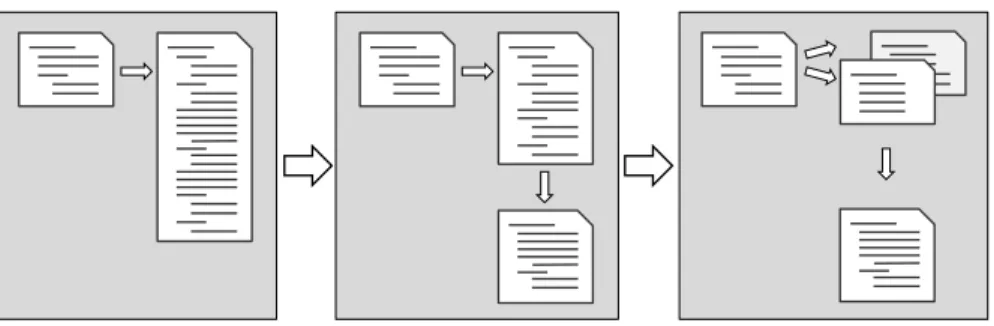
Figure 7 presents a typical refactoring where the developer discovers a very long piece of code and iteratively decomposes it into smaller pieces.
Fig. 7: A typical refactoring: Breaking up a large piece of source code into smaller parts
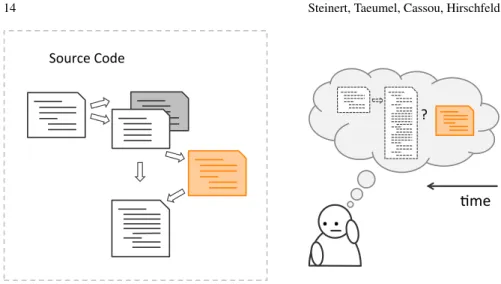
While being in the middle of a refactoring, a developer is likely to get a better understanding of either the existing code base or of the planned improvements and its consequences. As a result, there are two reasons that make developers want to go back to a previous state of the code base: they might want to cancel some work or they might want to study a previous state. In the former case, the developer wants to go back to cancel his recent changes and to restart working from a previous state. In the latter case, the developer wants to temporarily study a previous state of the code to port the new understanding to his current code base. Additionaly to the code, a developer might be interested in the execution of this code in a previous state. Figure 8 illustrates this aspect. The developer discovers an additional detail that was missing from his understanding but impacts his current idea of the refactoring.
4.2 The lack of tool support
While developers often encounter the need for going back, current tools lack ap-propriate support to do so. Development environements and text editors in general typically provide an undo/redo feature. This feature allows the developer to cancel the latest entered text. It makes typing on a computer a pleasure compared to hand-writing and typewriters as, for example, typos can be undone without requiring a complete rewrite of the current page. Such feature works on the level of characters and handles files independent of each other.
While an undo/redo feature is very convenient for changing recently entered text, going back to a less recent version of a file is tedious. Moreover, refactoring code or implementing a feature typically requires the manipulation of various files which can not be undone easily as it requires the developer to manually apply the undo feature an unknown and different amount of time for each changed file.
Source'Code'
."."
?'
+me'
Fig. 8: While being in the middle of a refactoring, a detail becomes apparent that impacts the developer’s current idea of his refactoring
Version control systems (VCS) [21] can manage multiple files of on project and allows for reverting all files to a state where they were at a given point in time. Dur-ing development, developers can snapshot the current state of all files that belong to the project, and the VCS will assign a version number to this snapshot. Such a snap-shot, which mainly consists of the differences to the previous version, can also be shared with co-workers. Having created a series of snapshots during development, developers can always go back to a previous snapshot and continue working from there.
While such VCS allows for switching the state of a project, creating a snapshot requires conscious effort. Developers always have to consider whether they should snapshot the current state of development, that is, whether there might be a need of going back to exactly this state. Of course they don’t know, which renders these considerations an assessment of risks. Moreover, when you are in a creative process you typically don’t think of something else at the same time. So, developers might miss important opportunities to take a snapshot. And, if there unconsciousness re-minds them to consider snapshotting, this is likely to interrupt creative thoughts, and will require a significant amount of time to restart the creative process.
Furthermore, a VCS lacks support for reverting multiple interdependent projects. An application typically consists of multiple components that are managed as dif-ferent projects, for example, to support re-use of components, which might be de-veloped independently. In such a scenario a VCS does not help to revert the whole application as its scope is limited to one project.
Because developers don’t know what snapshots will be required later, they tend to choose one of the following two approaches. Either they snapshot very often or they try to avoid mistakes that would require going back. Both options have con-sequences that render them suboptimal. The former, taking snapshots continuously,
has the benefit that there will always be a snapshot to go back to. However, a VCS does not make it convenient to find a particular snapshot as the only information about a snapshot is the time at which the snapshot has been created and a comment that the developer has to write. Also snapshotting very often requires commenting snapshots very often, which is tedious.
The latter, avoiding mistakes, requires developers to contemplate ideas in detail before implementing them. They avoid making changes that are likely not to pro-duce any meaningful result, even if they can not be sure about it. As a result, they might decide to implement the idea or to throw the idea away. If they decide to change the code base they might forget to snapshot and in both cases their decisions might be wrong. So, developers consider whether an idea is worth implementing. Also, if they decide to implement the idea, they tend to study the current state of the code base in detail to be sure they have understood all relevant aspects.
We can observe that the lack of dedicated tool support for going back results in habits that try to avoid bad situations, but are likely to impede creative work. Whatever a developer is doing, he has to continuously consider available options and their consequences: doing a snapshot or going ahead without.
4.3 Proposed Approach
We proposecontinuous versioningto encourage a trial and failure approach during program design activities. Our approach provides support for withdrawing changes and thus allows for starting over from a previous state of development. It arguably enables programmers to enjoy failures and to learn from them, as they can get back to a desireable state of the program with little effort.
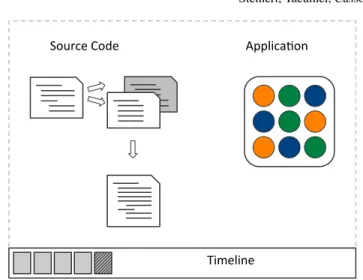
The concept ofcontinuous versioningbasically means that the development envi-ronment takes a snapshot of the program after each modification. More specifically, when programmers save recent modifications, the development environment will create a new version for the current state of development. Implementing a feature or trying to improve a program’s design will result in several version entries. Similar to traditional undo/redo of editors, the version history is maintained by the tools in the background without any notice. A program’s history can be visualized using a time-line metaphor as shown in Figure. 9. The timetime-line lists all previous created version of the program under development. Programmers can make their changes undone by going back to a previous version, for example by using offered short-cuts. Im-mediately after switching to another version, all integrated tools are updated to the content of the newly selected version.
Our proposed approach brings a convenience to editing programs, like regular undo/redo features do for editing files. Since the invention of undo/redo, authors no longer have to worry about the right order of each letter. The effort to correct typos has been considerably reduced and mistakes can now be corrected easily. Similarly,
continuous versioningincreases the convenience during writing and designing pro-grams. When a promising idea becomes unsuitable after a couple of modifications,
Applica'on* Source*Code*
Timeline*
Fig. 9: Timeline metaphor visualizes a program’s history
programmers can get back to a (more) desirable state of the source code with just a few keystrokes.
5 Summary
In this chapter, we have discussed the need for designing programs. We have il-lustrated some aspects of program design and explained their meaning for future development tasks. We have then reported on our ongoing work of adopting design practices for programming in two respects: First, we proposed a new concept and a prototypical implementation for programming environments that should improve the program comprehension process by means of directly accessing program run-time and freely arranging information on an unlimited horizontal tape. Second, we have presented dedicated prototyping support for programmers, which allows for withdrawing recent changes. We can conclude that principles and practice of De-sign Thinkingare of significant interest for software development in general, and program design activities in particular.
References
1. F. Gregory Ashby, Alice M. Isen, and And U. Turken. A neuropsychological theory of positive affect and its influence on cognition.Psychological Review, 106(3):529, 1999.
2. Kent Beck.Smalltalk Best Practice Patterns. Prentice-Hall, 1997.
4. Kent Beck.Test-driven development: by example. Addison-Wesley Professional, 2003. 5. Kees Dorst and Nigel Cross. Creativity in the design process: co-evolution of
problem-solution.Design Studies, 22(5):425–437, 2001.
6. Martin Fowler. Refactoring: improving the design of existing code. Addison-Wesley Profes-sional, 1999.
7. Martin Fowler. Opportunistic refactoring, November 2011.
http://martinfowler.com/bliki/OpportunisticRefactoring.html.
8. Martin Fowler and Jim Highsmith. The Agile manifesto. Software Development Magazine, 9(8):29–30, August 2001.
9. Ralph E. Johnson and William F. Opdyke. Refactoring and aggregation. InObject Technolo-gies for Advanced Software, First JSSST International Symposium, volume 742 ofLecture Notes in Computer Science, pages 264–278. Springer-Verlag, November 1993.
10. Alan Kay et al. STEPS toward expressive programming systems, 2010 progress report sub-mitted to the national science foundation. Technical report, Viewpoints Research Institute, 2010.
11. Andrew J. Ko, Brad A. Myers, Michael J. Coblenz, and Htet Htet Aung. An Exploratory Study of How Developers Seek, Relate, and Collect Relevant Information during Software Maintenance Tasks.IEEE Trans. Softw. Eng., 32:971–987, December 2006.
12. Youn-Kyung Lim, Erik Stolterman, and Josh Tenenberg. The anatomy of prototypes: Proto-types as filters, protoProto-types as manifestations of design ideas.ACM Transactions on Computer-Human Interaction (TOCHI), 15(2):1–27, 2008.
13. Bertrand Meyer.Object-oriented Software Construction. Prentice Hall, 2000.
14. William F. Opdyke. Refactoring Object-Oriented Frameworks. Ph.D. thesis, University of Illinois, 1992.
15. Michael Perscheid, Bastian Steinert, Robert Hirschfeld, Felix Geller, and Michael Haupt. Im-mediacy through Interactivity: Online Analysis of Run-time Behavior. In17th Working Con-ference on Reverse Engineering, pages 77 – 86, Beverly, USA, 2010. IEEE.
16. Paul Ralph and Yair Wand. A proposal for a formal definition of the design concept. Design Requirements Engineering: A Ten-Year Perspective, pages 103–136, 2009.
17. Ken Schwaber and Mike Beedle.Agile Software Development with Scrum. Alan R. Apt, first edition, 2001.
18. Ben Shneiderman and Catherine Plaisant.Designing the User Interface: Strategies for Effec-tive Human-Computer Interaction (5th Edition). Addison Wesley, 2009.
19. Jonathan Sillito, Gail C. Murphy, and Kris De Volder. Asking and Answering Questions during a Programming Change Task. IEEE Transactions on Software Engineering, 34:434– 451, 2008.
20. Herbert A. Simon.The sciences of the artificial. The MIT Press, 1996.
21. Diomidis Spinellis. Version Control Systems.IEEE Software, pages 108–109, 2005.
22. Wikipedia: the free encyclopedia. Design, November 2011.