(IJSBAR)
ISSN 2307-4531
(Print & Online)
http://gssrr.org/index.php?journal=JournalOfBasicAndApplied
---
199
Using Computer Algebra Systems as Instructional Tools
Tufan Şirin*
Turgut Özal University Takdir Mah. No:5, Ankara 06170, Turkey Email: [email protected]
Abstract
Computer algebra systems are in the agenda of the educators since many years. Besides the positive remarks negative notions are reported by the researchers. Performing them as pedagogical tools is directly proportional with the performance of the instructors. In this study, after reviewing the literature related to the instructional applications done with these systems, some examples that we performed during our undergraduate physics lessons is given. The points as listed at the end must be considered in order to make a well-designed CAS aided math and physics course.
Keywords: Computer Technology in Education; Computer Algebra Systems; Instructional Computer Applications; Physics Teaching with Computer Algebra Systems.
1.Introduction
Computer technologies have presenting various innovative tools to perform in education system. The software called computer algebra system (CAS) is one of these tools. Since the eighties, many experiments reporting advantages and disadvantages have been done about the use of them in teaching and learning mathematics and math-related courses such as physics, statics, economics and etc. They are described as enhancing tools in math instruction [4] and proper tools in constructivist and collaborative learning scenarios [3, 8]. Due to some reasons such as policies of educational ministries, technical infrastructure of educational institutions, problems related to students [1] and teachers [2, 9], the integration of CAS with teaching and learning is a very slow process.
--- * Corresponding author.
200
On the other hand, it is observed that the institutions in which the disadvantages are minimized get successful results (Lavizca International survey). Successful CAS applications done by the instructors make these technological tools more pedagogical and productive [10]. In this literature survey, after giving the definition of the terms Computer Algebra and Computer Algebra System, the results of the experiments giving ideas about the use of these tools in teaching and learning will be focused. We will give a short summary about the studies exploring the role of these systems in instructional process; advantages and disadvantages that have been put forward by the researchers. The principles of successful CAS applications will be mentioned. Some applications expressing our experiences in utilizing this software in our physics courses are given. At last, some principles on the effective use of CAS are listed.
2.Computer Technologies in Education
Properly designed and performed computer based cognitive tools enhance the learning and teaching process in and out of the classroom. These tools act as intelligent partners to empower explorative attempts and intensify the learner’s cognition. The sources available through the web and other digital materials unchain the instruction from the time and place constriction. These technological tools co-operate with the teachers to deliver the content, disburden the load of the teachers and give more opportunities to students get the information and construct their own knowledge wherever and whenever they want and study at their pace [25].
The use of computers as an instructional tool in education has caused to explore new teaching and learning methods for approximately sixty years. Computer- aided Learning (CAL) introduced by a team of researchers at IBM in 1950’s [20]. assisted Instruction (CAI), based Instruction (CBI) and Computer-based Learning Environment (CBLE) were followed in sequence. E-learning is an actual method Computer-based on computer technologies reaching the learners all over the world. All these converge on the use of computers to teach and learn with nuances related to the developments in digital technology such as hardware, software, web technologies, CD and DVD’s etc. These methods are based on the interaction between the learners and computers [18].
Computer based cognitive tools is used as a delivery system of information in the form of text and other multimedia formats including photos, films, course videos, animations etc. Computer programs such as guided drills that interacts with the learners by asking questions and returning the feedback immediately. Visualization of the objects that are difficult to observe like the human anatomy, molecular structures etc., is one of the most appreciated capabilities of the computers. Virtual laboratory software allows doing difficult, expensive and dangerous experiments in safe [22].
Computer based tools and platforms are available (through the web for example https://www.kidscodecs.com/resources/programming/education/) for almost every courses. These tools are established parallel to the development of the technology and needs and the opinions of the instructors and learners. Teaching mathematics with computers is the most researched area in education Today we can find many applications for math instruction. They can be grouped in [13] as
201
• Computer Assisted Instruction tools (drills, tutorials, simulations)
• Educational Programming Languages (Basic, Logo, Robomind, Stratch etc.) • General purpose tools (spreadsheets, databases, computer algebra systems) 2.1.Computer Algebra
The term of Computer Algebra (similar terms that are used are Symbolic Computation, Algebraic Manipulation or Formula Manipulation) is in the cross-sectional area of computer science and mathematics in which computations are performed on symbols representing the mathematical objects instead of the numerical values of them. These mathematical objects can be symbols represented by variables such as “x, y and z” and operators like “sin(x), tan(x), series, polynomials, matrices, limit, differentiate and integrate”. It is concerned with the development, implement and application of algorithms that manipulate and analyze mathematical expressions [12].
2.2.Computer Algebra Systems
Computers Algebra Systems (CASs) are the software which was developed for the complex and exhausting computations of engineers. They are used in many high level mathematics included areas such as theoretical physics, nuclear physics etc. One of the pioneers of CAS is “Schoonship” developed for the use in particle physics in 1963. Another pioneer was “REDUCE” was developed for high-energy physics. In 1969 the first general purpose CAS; MACSYMA was presented as the product of Artificial Intelligence (AI) studies in MAC project of MIT [14]. The major difference between a hand-held calculator and a CAS is to manipulate mathematical operations and equations symbolically besides doing numerical calculations. A CAS has graphing abilities of cumbersome calculations and give programming opportunities to the user to set up his/her own procedures.
Developments in the computer infrastructure and hardware have been followed by the developments in computer programs. CAS also has got varied as the years passed. There are various CASs that can be classified as free and open source software (FOSS) like Maxima and Scilab that can be available freely by teachers and students, and propriety ones like Maple and Matlab that have many interesting features and supports for the users. But the cost of commercial software is an obstacle for the teachers and the students [2]. Another classification is general purpose systems like Mathematica, Derive, Scilab and Maxima and specific purpose systems like GAP and Cadabra. Another classification is numeric CAS like Matlab and Scilab and symbolic software like Maxima, Maple and Mathematica. One can found many studies on different topics and tasks guiding the use of CAS easing to teach and to improve students’ motivation and learning in the official sites of the software and throughout the web.
3.Integration of CAS with Education
CAS developed for the needs of engineers and scientists are in the use of producing and teaching/learning of science since the microcomputers’ invention. The educators seeking the solutions of the problems in calculus
202
teaching started to make experiments with the use of such software in their classes. Many educational experiments have been done about the integration of instruction with CAS up to now. The first researches about the effects of CAS in calculus teaching were made with ”muMath”, the first CAS run on the microcomputer published in 1979, by M.K. Heid in 1984. She put forward positive remarks about the use of CAS in teaching calculus in her dissertation thesis. Some other pioneer experiments were done by Zorn, P. in 1986. The first summit (in USA), in which the use of CAS and hand-held calculators had been discussed, was “Workshop to Develop Curriculum and Teaching Methods for Calculus at the College Level”. It was held in Tulane University in 1986 [15]. In this workshop Small and Hosack presented the results of their experiments with CAS in their courses and claimed that CAS could be used to
a) Improve conceptual understanding
b) Teach approximation and error bound analysis
c) Improve exercises and test questions
d) Overcome limitations imposed by poor algebraic skills and
e) Explore big ideas of calculus to solve more realistic real-world problems.
In the next two years later, five projects realized about “Calculus Reform”. Five different CAS were used in these studies. They were MathCAD and Derive (Smith and Moore in 1990), MicroCalc (Hoft and James in 1990), SMP (Ostebee and Zorn in 1990) and Mathematica (Brown, Porta and Uhl in 1990) [15]. In spite of different CAS utilized, they reported the common significant points about the use of CAS in teaching mathematics:
a) Enabling the students to explore complicated problems due to reducing the manipulations by hand
b) Graphing facility of these systems make many calculus concepts concrete
c) Enabling the students to construct their own learning experience
d) Allowing collaborative and cooperative group studies [15].
Kutzler [16] made a comparison between the movement and the technology use in teaching/learning (including graphic calculators and computers). He made three analogies as
• walking = mental calculation with brain power, • riding a bicycle = paper- pen calculation • driving a car = calculator / computer calculation
He offered the use of technology in math courses as an accelerator and a promotive tool to deal with big and more complex math concepts. “If one will multiply two one-digit numbers, it is best to do it mentally. The
203
multiplication of two two-digit numbers can be done with paper- pen and calculator will be needed if you multiply two five- digit numbers”.
He asserted four basic reasons to use digital tools in teaching/learning math:
1- Technology enables us to deal with more “complex and real- world problems”. ” A man can walk 600 m or ride a bicycle 5 km , if you want to go far away you get on a car”
2- He pointed out the “experimentation” in instruction. Technology allows the students do limitless number of exercises. Students who trust on this intelligent partner giving always correct answers will encourage do more exercises. “Learning through doing and observing” can be realized using technology.
3- “Visualization” is another useful capability of digital calculation tools. Teaching the difference between the functions 𝑦𝑦=𝑎𝑎𝑎𝑎2 and 𝑦𝑦=−𝑎𝑎𝑎𝑎2 and the role of the constant number “a” in the function 𝑦𝑦=𝑎𝑎𝑎𝑎2 is better to show it with a graph.
Let us visualize what Kutzler mentioned with plotting the graph of 𝑦𝑦=𝑎𝑎𝑎𝑎2 and 𝑦𝑦=−𝑎𝑎𝑎𝑎2. Let the values of “a” be {-3,-2,-1,0,1,2,3} and “x” varies from {-3,3}.
4- “Motivation” is the fourth advantage of digital tools “for the following exercises”. Students encourage dealing with many other additional exercises.
In the conclusion part of his paper he mentioned about the project done with a CAS called REDUCE in Austria. He said “the Austrian and other investigations showed that if the technology is used properly it leads to
a) More efficient teaching and learning
b) More independent and productive student activities c) More student creativity and
d) An increased importance of the teacher”.
204
He finished by saying; “Not technology changes teaching, but technology is a catalyst for teachers to change their teaching methods and focus on topics and skills, aiming at a better teaching of mathematics”.
Here we have to note that the investigations on the use of CAS were started in USA earlier than Europe [13]. The first announcement was made in 1996 8th International Congress on Mathematical Education (ICME-8) in Seville. We witness that in the following years educators from all over the world discussed this topic in different countries. CAS and instruction oriented symposium is CAME (Communicating Mathematics through Computer Algebra Systems) Symposium. Some of the topics that are evaluated are
• CAS and techniques- Learning to do mathematics using a computer algebra system.
• CAS and teachers-The role of teachers in effective teaching through CAS.
• Learning Theories and CAS- How can they be applied with a CAS?
• Features of CAS- Using these systems as instructional tool [17].
4.Advantages and Disadvantages of the Use of CAS
Utilizing a CAS in instructional institutions has many components. Some of them are technical infrastructure of the institution, technical and administrative support, and compatibility with the instructional aims, instructional design of the CAS supported courses, financial problems, students and teachers [2, 4, 5, 7, 8]. Due to these and many other local reasons, the integration of computers into education system is very slow process. Some factors are
• The prices of hardware and software
• Engagement of the students and teachers with the technology • Teachers who were not trained in the use of technology • Students who do not “want” to use computers
The research [8] examined the problem from the teachers’ view. Results were grouped in five titles
• Accessibility of computers (hardware and software) • Availability of technical support by the administration • Perceptions regarding the usefulness of the use of computers • Appropriate software for teachers’ use
• Factors encouraging teachers to utilize the computers.
[1, 3, 5, 6, 11] and many others mentioned about the negative and positive remarks of CASs in educations as advantages and disadvantages are listed below.
205
• Improving students’ attitude towards math
• Assisting students to develop generalized algorithms for problem solving • Encouraging students to perform more complicated problems
• Facilitating students load in long solutions by reducing time and effort • Making math fun, interesting and enjoyable
• Aiding students to concrete abstract math concepts • Providing immediate feedback to students
• Allowing students more complicated and real-world problems • Enabling students constructing their own knowledge
• Supporting collaborative work in and out of the class 4.2.Disadvantages
• Technical and financial insufficiencies • Lack of familiarity with the use of computer • Reduce of student’s paper-pen skills • CAS syntax
• Much time for class preparation 5.How to use a CAS in Classroom
The method used to utilize a CAS in classroom activities is the most important point. It is not possible to offer any “best” method. It will alter depending on the factors related to e.g. technical infrastructure and support of institution, computer literacy of the students, efficiency of the teacher in use of CAS, and the selected CAS etc. One has to not ignore that CAS and computer is just a tool that will support teaching and learning. The main role in teaching is teachers’ role. If the teacher wants to use CAS in the lesson, he/she must decide when and how to use it.
CAS is employed in math and math-related courses such as calculus, physics, and statics etc. At the beginning we have to consider that we cannot expect the students to be an expert user of the CAS. So our instructional design must be based on the minimal proficiency of the students in use of that software. Otherwise many students will pull back themselves loosing motivations.
For example, a physics course is composed of concepts which can be expressed through the formula, texts, pictures, videos, animations and graphics. Second part is mathematical application stage including exercises and problems related to the physical concept. The matter is to develop materials that will be taught through the CAS using graphs and animations and to determine which examples and exercises will be employed with CAS for an effective teaching. The role of pen and board mustn’t be omitted during the starting part of the course. That is, it is redundant to write a formula such as E=V/d with CAS.
206
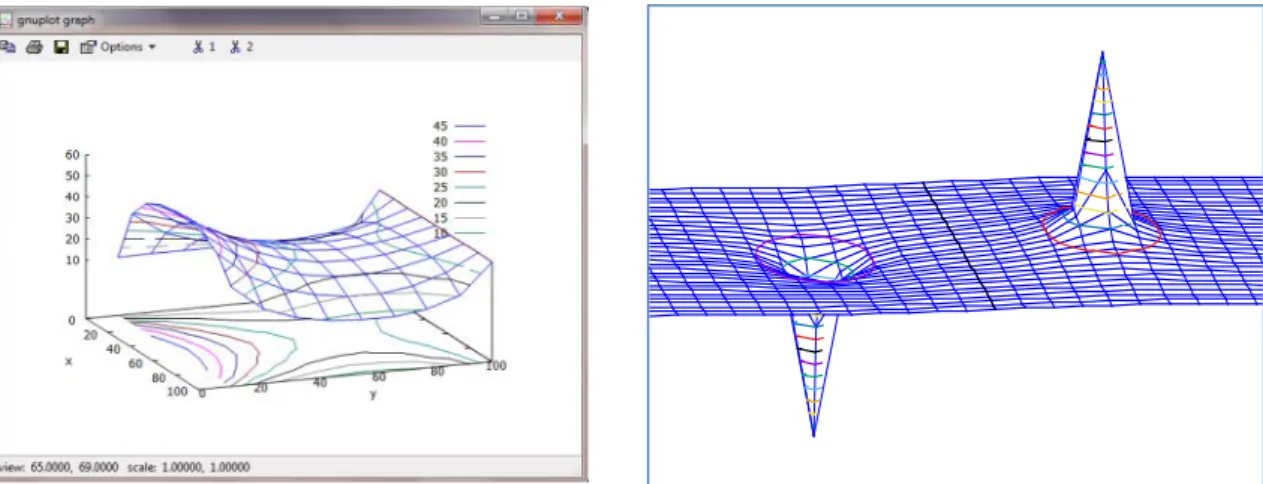
CAS are found more attractive by the students. CAS must be used more complex illustrations. For example the electric field lines between two parallel plates can be drawn by hand on the board easily or (if you have computer and projection apparatus) you can reflect any image on the screen. E.g. MS Word and Power Point are very good at such drawings. Here it is redundant to plot the lines with CAS. As an additional sample, plotting the electric potential lines between three perpendicular plates carrying different electric charges with CAS can be a more suitable activity. Below, in figure 2 the electric potential between four perpendicular plates carrying 10 V, 60V, 0V and 30V is illustrated below. In the figure 3, electric potential of a dipole is illustrated.
6.Principles for a Successful CAS session in the Classroom
CASs are technical tools that have powerful math-engines and they are very good formula crunchers, graph and animation makers. They include many built-in commands and packages to use various math objects. Using these commands is an input and out relation between the user and software. Such type of use is using them as a calculator and is important for the engineers who deal with the result of the operation. It is called as “black-box”. However, mostly, it has no-valuable pedagogical value. A teacher is related not only the last line of the solution he/she cares about the sub-steps of the solution, too. A few CASs like “MathCAD” have this property. Teachers must be attentive to organize their lesson-scenario to utilize the CAS as a pedagogical tool. Some principles are given below.
The implementation of any CAS is directly related to the CAS literacy of the students. We do not and mustn’t expect the students to be expert users of the CAS. It is another additional discouraging load of work for them. We must prepare well-designed lesson plan with structured CAS worksheets. The materials such as texts, pictures, tables, calculations that must be delivered through the course time must be included in these worksheets. These worksheets must be well-organized that at the end students can get the taste of the success of starting and finishing something in a difficult lesson like physics.
In our experiences, we have seen that the weaker students are getting motivated and encouraged to learn new Figure 2: Electric Potential between
Perpendicular Plates
207
topics as expressed the researches.
[24] offered some principles for preparing a well- structured CAS worksheet without the need of the students being an expert-user of CAS (Maple in his experience).
i.
The worksheet must include the explanatory text about the topic that students do not need other sources to look at.ii.
The first experience must be passed by pressing return key. The initial codes must be ready to execute by pressing just return key to encourage the students. For example, the codes of any animation must be included by the teacher.iii.
In the worksheets various types of examples and exercises must be included. So that the students willbelieve that CAS is applicable during self-studies and exam preparations.
iv.
The raw output of a CAS, which is one of the unpleasant manners for the teachers, may not be the correct expression of the result. Some of the results must be redesigned with additional simplifications to be more understandable.v.
The length of well- structured worksheets must be parallel with the course period. Students must start and finish them during the course time under the control of the teacher. In our experiences we have found that the period of homework and other assignments can be limited with 10- 15 minutes.vi.
Any variable (a, b, x, y etc.) can be assigned to some numerical values along a worksheet repeatedly. CAS do not forget these values. This is one of the most mistakes done by non-expert users. Teachers must warn the students “kill” the variable if they will use it again in the next exercise in the same worksheet. Every new worksheet must be started with “restart” command.7.Small Instructional Packages
Another ability of CAS that the teachers can benefit is to allow programing to the users. Many CAS allow the user to prepare small programs/packages for complex tasks. This is our way that we follow when it is needed. Here, we can mention two types of use of a CAS.
One of them (we called) is passive use that to perform just the CAS commands. In such implementation, the worksheet can be full of commands that look like a crowded street. The other one that (we called) active use that putting many commands into a single command by writing small programs and small packages. Consider that you want to make a table for listing the data of the motion of the object fired at angle. You need to write many command lines. Students will be shocked when they see these lines.
Here we include some examples of small packages that we use during lessons for undergraduate level courses.
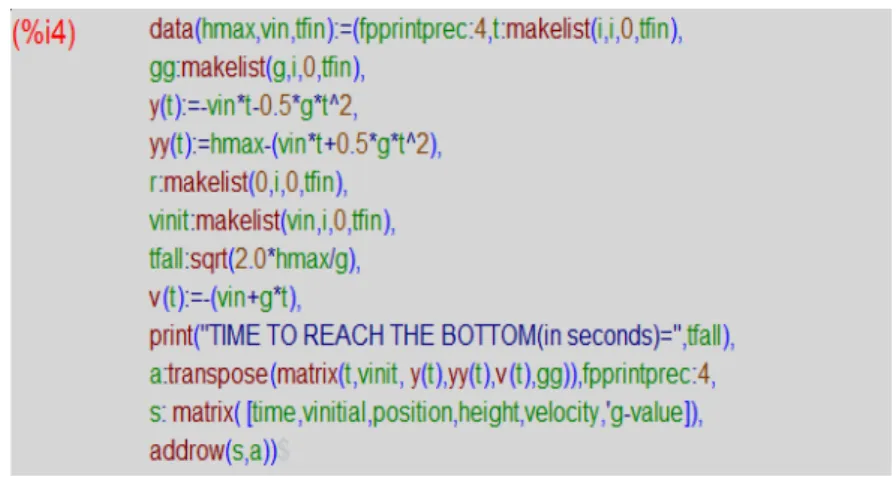
Example 1: This program gives the data of an object which is thrown with an initial velocity “vin” from the height of “hmax” during “tfin” in a table. Many commands are gathered in a single command of “data(hmax,vin,tfin)”. By replacing the values hmax=225, vinitial=20 and tfinal=8 into the bracket as (225,20,8), the output is got immediately.
208
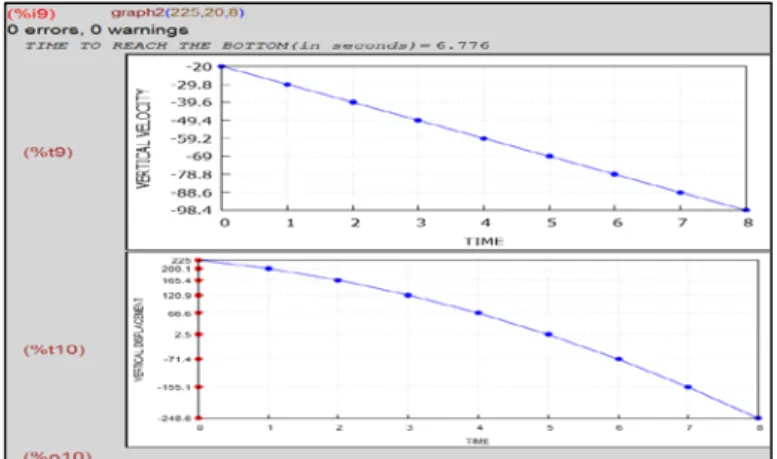
Example 2- Another application is to illustrate the graphs of the object which is thrown downward with an initial velocity. The sample program is
Figure 4: Small Program Giving Data-Table
Figure 5: The Output as a Data-Table
209
The output of this program gives the level of the object at every second, plots the displacement-time and the velocity-time graphs together.
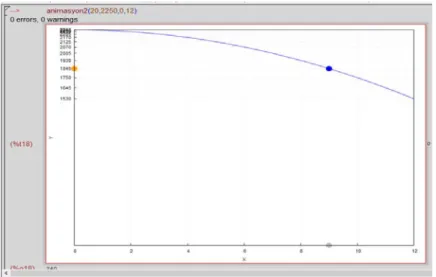
Example 3- Another common visual worth of a CAS is animations. The small Maxima program animates the motion of an object thrown vertically with an initial velocity of “vin”, from a maximum height of “hmax” and initial time as “tin” and final time that we are interested in “tfin”.
By inserting the values in the expression of animasyon2(vin,hmax,tin,tfin) as animasyon2(20,2250,0,12) students succeed to set up an animation!
The name of the function is “animasyon2”, in Turkish, the mother language of the students. In the figure there are three colored points; blue point shows the vertically thrown object. Yellow point represents the motion of the object along y-axis and the grey one represents distance covered by the object along the x-axis. The numbers are calculated automatically and printed on the axis.
Teachers can realize the instructional aims of the topic faster and easier by programming the ideas in their plans.. For example, in the first graph, the graph of velocity-time is given. The points represent the fall of the
Figure 7: The Output for Two-Graphs
210
object as the time passes. At the same time the line, representing the velocity change versus time change is drawn. The idea of “At every second the object falls and its velocity increases” is plotted. In the second graph, there are two groups of dots. The group of dots on the y-axis shows the fall of the object. The other dots are on the curve which depictures the displacement versus time curve. Two groups of points are illustrated at the same parallel level. This material can be used in plotting displacement versus time graph as the object falls. The idea of “as the object falls its displacement increases as a curve” is plotted.
On the other hand programmer can use his/her own language instead of terms “TIME”, “VERTICAL VELOCITY”. This is another attractive point that is to be familiar to the students.
As a physics instructor I prefer to prepare and use such packages in my courses. I use “wxMaxima” which is the graphical user interface of an open source CAS “Maxima”. “Maxima” is written CLISP programming language. But it has a simple user language that provides a simple programming syntax and algorithm as any teacher use in solving a physics problem on the board. After a little bit effort (9-10 hours) any teacher can be an intermediate-level user and a programmer.
Of course we cannot expect all the teachers to be an expert user/programmer. What kind of materials can be prepared to use in, for example, physics courses can be decided by the physics teachers in educational institutions. A special staff, including teachers and technology advisers [21], can be trained on any CAS, which is chosen by the branch teachers’ committee. Such packages can be prepared and delivered to the teachers to use in their courses. These materials can be collected in a “repository” and updated every time.
8.Conclusion
A CAS is a very intelligent tool and a math-toolbox that enables working with complex and time consuming tasks for engineers. Many features of them are applicable in instructional process. Visualization and other capabilities are found very attractive by the users. They are very suitable tools in the use of learner-centered teaching methods. Passive use reduces these systems to a simple calculator level. The built-in commands and
211
libraries are built for the engineers and have no pedagogical values. These expert systems enable to set up structured dynamic worksheets consist of texts, figures and math operation lines in the same medium. Most of them have special features for doing experiments. Also, they offer programming feasibility for special aims. Teacher centered traditional teaching methods can be enhanced by using such materials. Such an active use is the way in which this instrument is used to support learning and teaching. The main role is the teachers’ role that is to design a CAS aided course scenario. Our students find this type of CAS applications exciting and enjoyable. They are very eager to use in the physics courses although they have a lack of knowledge in mathematics and physics.
In order to make a well-designed CAS aided math and physics, we have to work on the some points as listed below.
a. The technical infrastructure must be established for CAS aided courses.
b. Every instructional institution must choose a CAS to utilize in their math-related courses. c. Teachers must be trained to use that software.
d. A well-trained technical advisory staff must be established in every institution.
e. This technical staff must help in producing the innovative materials that the teachers need. f. Teaching staff must determine the materials and methodology for teaching with CAS. g. These materials can be collected in a repository and updated every time.
h. Regular workshops and training courses for teachers must be arranged. i. Course curriculum must be redesigned.
j. The process must be observed with the researches on the effect of CAS aided courses to the learning attitudes of the students and their psychology of learning.
References
[1] P. Drijvers. “Students Encountering Obstacles Using CAS”. International Journal of Computers for Mathematical Learning, vol: 5, pp: 189-209, 2000.
[2] L. Zsolt. “The use of Computer Algebra Systems” Internet: http://tsg.icme11.org/document/get/238 [Feb.5,2016]
[3] D. Baumbach, T. Christopher, K. Fasimpaur, K. Oliver. “Personal Literacy Assistants”, Learning and Leading with Technology”, vol. 32(2), pp. 16 –21, Oct. 2004.
[4] P Galbraith and M. Pemberton. “Convergence or Divergence? Students, Maple, and Mathematics
Learning” in Mathematics Education in the South Pacific, pp.285-292, 2002.
[5] R. Pierce and K. Stacey “Monitoring Effective Use of Computer Algebra Systems,” in 25th Mathematics Education in the South Pacific, 2002, pp.575-582.
212
http://staff.edfac.unimelb.edu.au/~kayecs/publications/2001/PierceStacey-ObservationOn.pdf , [Jan,6,2015]
[7] P. Drijvers, “Learning mathematics in a computer algebra environment: obstacles are opportunities” Internet:
https://www.researchgate.net/publication/226996540_Learning_mathematics_in_a_computer_algebra_ environment_Obstacles_are_opportunities, [Jun,3,2014].
[8] S.M. D’Souza, L.N. Wood. “Tertiary students’ views of group work in mathematics”, Educational Research, Risks and Dilemmas – AARE/NZARE Joint Conference, 2002, pp:154-164.
[9] M. Shi and B. Bichelmeyer. “Teachers’ experiences with computers: A comparative study”, Educational Technology & Society vol.10 (2), pp.180-190, 2007.
[10] G.D. Allen and et al. “Strategies and Guidelines for Using a Computer Algebra System in the Classroom” International Journal of Engineering and Education, vol.15, No.6, pp. 411-416, 1999.
[11] M. K. Heid and M. Edwards. “Computer algebra systems: Revolution or retrofit for today’s mathematics classrooms?” Theory into Practice, vol. 40(2), pp.128 – 136, June, 2001.
[12] B. Buchberger. “Editorial Journal of Symbolic Computation,” Journal of Symbolic Computation, vol.1, p.1-6, March, 1985.
[13] E. Aydin. 2005 “The Use Of Computers In Mathematics Education: A Paradigm Shift From “Computer Assisted Instruction” Towards “Student Programming”” The Turkish Online Journal of Educational Technology vol. 4 (2) pp.27-34, April, 2005
[14] John McCarthy, “What is AI?”, Internet: http://www-formal.stanford.edu/jmc/whatisai/ , Nov.12,2007, [May.10, 2012]
[15] L. Murphy. “Computer Algebra Systems in Calculus Reform” Internet: http://mste.illinois.edu/users/Murphy/Papers/CalcReformPaper.html, Feb.3, 1999, [May.12, 2015]
[16] B. Kutzler. The Algebraic Calculator as a Pedagogical Tool for Teaching Mathematics International Journal of Computer Algebra in Mathematics Education, vol.7(1), pp. 5-23, Aug.6-8, 2000.
[17] M. Aktümen. “Belirli İntegral Kavraminin Öğretiminde Bilgisayar Cebiri Sistemlerinin Etkisi.” PhD. Thesis, Gazi University, Ankara, 2007.
[18] D. N. Arnold. "Computer-Aided Instruction," Microsoft® Encarta® Online Encyclopedia 2000
[19] D. Clements. “Computer Algebra for Engineers - the Maple Alternative” IEEE Journal of Engineering Science and Education, vol. 6, pp. 233-238, 1997.
213
[20] C. Papas. Internet: http://elearningindustry.com/computer-based-instruction-theory, Apr. 2014, [Jun.12, 2016]
[21] A. Kuzu. “Need of School Technology Adviser of Primary And Secondary Schools in Turkey”, Online Submission , (2007).
[22] D. Watson. “Microcomputers in secondary education- A perspective with particular reference to the humanities”, Microcomputers and the Curriculum. London: Harper and Row, pp.125-144, 1984.
[23] D. Picardi. “Motivating Constraints of Embedded Computer Algebra System.” International Journal of Science and Mathematics Education, vol.5, pp. 217-235, May.2007.
[24] M.S.J. May. “Designing a Computer Classroom” Internet: http://archives.math.utk.edu/ICTCM/VOL12/P014/paper.pdf, [Apr.20,2016]
[25] D.H. Jonassen. “Computers as Cognitive Tools: Learning with Technology, Not from Technology”Journal of Computing in Higher Education, vol. 6(2), pp.40-73, spring 1995.
[26] Maxima Manual. Maxima.sourceforge.net. Maxima, a Computer Algebra System. Version 5.34.1 (2014). http://maxima.sourceforge.net/