Documentation
January 21, 2016
Apache, Apache Cassandra, Apache Hadoop, Hadoop and the
eye logo are trademarks of the Apache Software Foundation
Contents
Introduction to Cassandra Query Language... 5
CQL data modeling...6
Data Modeling Concepts... 6
Data modeling example... 9
Example of a music service... 9
Compound keys and clustering... 11
Collection columns...11
Adding a collection to a table...12
Updating a collection... 12
Indexing a collection... 13
Filtering data in a collection... 14
When to use a collection...14
Indexing... 15
When to use an index... 15
Using an index...16
Using multiple indexes...16
Building and maintaining indexes... 16
Working with legacy applications... 17
Using a CQL query... 17
Using CQL... 18
Starting cqlsh...18
Starting cqlsh on Linux...18
Starting cqlsh on Windows...18
Using tab completion...19
Creating and updating a keyspace... 19
Example of creating a keyspace... 20
Updating the replication factor... 20
Creating a table...20
Using a compound primary key... 21
Inserting data into a table... 21
Using a user-defined type... 21
Querying a system table... 23
Keyspace, table, and column information... 24
Cluster information...25
Retrieving and sorting results... 25
Retrieval using the IN keyword... 27
Slicing over partition rows... 28
Batching conditional updates to a static column...29
Using and misusing batches... 30
Using the keyspace qualifier... 31
Adding columns to a table... 31
Expiring data...31
Expiring data example... 32
Deleting columns and rows... 33
Determining the date/time of a write...34
Altering the data type of a column... 35
Using collections...35
Using the set type... 35
Using the list type...36
Using the map type... 38
Indexing a column... 39
Using lightweight transactions...39
Paging through unordered partitioner results...40
Using a counter... 40
Tracing consistency changes... 41
Setup to trace consistency changes... 42
Trace reads at different consistency levels...42
How consistency affects performance...48
CQL reference... 48
Introduction... 48
CQL lexical structure... 48
Uppercase and lowercase... 49
Escaping characters... 50 Valid literals... 50 Exponential notation... 50 CQL code comments...51 CQL Keywords...51 CQL data types... 54 Blob type...56 Collection type... 57 Counter type... 57
UUID and timeuuid types... 57
uuid and Timeuuid functions... 58
Timestamp type... 58
Tuple type... 59
User-defined type... 60
CQL keyspace and table properties... 60
Table properties... 61 Compaction subproperties... 65 Compression subproperties... 68 Functions... 69 CQL limits... 69 cqlsh commands...70 cqlsh... 70 CAPTURE... 73 CONSISTENCY... 73 COPY... 74 DESCRIBE... 79 EXPAND... 81 EXIT... 82 PAGING... 82 SHOW... 82 SOURCE... 83 TRACING... 84 CQL commands...88 ALTER KEYSPACE... 88 ALTER TABLE... 89
ALTER TYPE... 92 ALTER USER... 94 BATCH... 94 CREATE INDEX... 97 CREATE KEYSPACE... 99 CREATE TABLE... 102 CREATE TRIGGER... 108 CREATE TYPE... 109 CREATE USER... 110 DELETE... 111 DESCRIBE... 113 DROP INDEX... 114 DROP KEYSPACE... 115 DROP TABLE... 116 DROP TRIGGER... 116 DROP TYPE... 117 DROP USER... 117 GRANT...118 INSERT... 119 LIST PERMISSIONS... 122 LIST USERS... 124 REVOKE... 125 SELECT... 126 TRUNCATE...133 UPDATE...134 USE... 137
Introduction to Cassandra Query Language
Cassandra Query Language (CQL) is a query language for the Cassandra database.The Cassandra Query Language (CQL) is the primary language for communicating with the Cassandra database. The most basic way to interact with Cassandra is using the CQL shell, cqlsh. Using cqlsh, you can create keyspaces and tables, insert and query tables, plus much more. If you prefer a graphical
tool, you can use DataStax DevCenter. For production, DataStax supplies a number drivers so that CQL
statements can be passed from client to cluster and back. Other administrative tasks can be accomplished
using OpsCenter.
Important: This document assumes you are familiar with either the Cassandra 2.1 or Cassandra 2.0
documentation.
Cassandra 2.1 features
Cassandra 2.1 new CQL features include: • Nested user-defined types
• Improved counter columns that maintain the correct count when Cassandra replays the commit log
• Configurable counter cache
• Support for indexes on collections, including using map keys to filter query results
• Timestamps precise to the millisecond
• The new tuple type that holds fixed-length sets of typed positional fields
The cqlsh utility also has been improved:
• Capability to accept and execute a CQL statement from the operating system command line
• Support for describing types using the DESCRIBE command
DataStax Java Driver 2.0.0 supports Cassandra 2.1 with limitations. This version of the driver is incompatible with the new features.
Other notable changes:
• Cassandra rejects USING TIMESTAMP or USING TTL in the command to update a counter column,
and now generates an error message when you attempt such an operation.
• In Cassandra 2.1, the CQL table property index_interval is replaced by min_index_interval and
max_index_interval. The max_index_interval is 2048 by default. The default would be reached only when SSTables are infrequently-read and the index summary memory pool is full. When upgrading from earlier releases, Cassandra uses the old index_interval value for the min_index_interval.
Cassandra 2.0.x features
Cassandra 2.0.x key features are:
• Lightweight transactions using the IF keyword in INSERT and UPDATE statements.
• Prevention of application errors by performing conditional tests for the existence of a table, keyspace, or
index.
Simply include IF EXISTS or IF NOT EXISTS in DROP or CREATE statements, such as DROP
KEYSPACE or CREATE TABLE.
• Initial support for triggers that fire events executed in or out of a database cluster.
• The ALTER TABLE DROP command, which had been removed in the earlier release. • Column aliases, similar to aliases in RDBMS SQL, in a SELECT statement.
• Indexing of the part, partition key or clustering columns, portion of a compound primary key.
CQL for Cassandra 2.0 deprecated super columns. Cassandra continues to support apps that query super columns, translating super columns on the fly into CQL constructs and results.
Some changes were made to the cqlsh commands in CQL Cassandra 2.0:
• The ASSUME command has been removed.
Use the blobAsType and typeAsBlob conversion functions instead of ASSUME.
• The COPY command now supports for collections.
Several CQL table attributes were added in CQL included with Cassandra 2.0:
• default_time_to_live
• memtable_flush_period_in_ms
• populate_io_cache_on_flush
• speculative_retry
CQL data modeling
Data modeling topics.Note: DataStax Academy provides a course in Cassandra data modeling. This course presents
techniques using the Chebotko method for translating a real-world domain model into a running Cassandra schema.
Data Modeling Concepts
How data modeling should be approached for Cassandra. A music service example is used throughout the CQL document.
For a very basic explanation of CQL, see the Data model distilled in Cassandra & DataStax Enterprise
Essentials.
Note: DataStax Academy provides a course in Cassandra data modeling. This course presents
techniques using the Chebotko method for translating a real-world domain model into a running Cassandra schema.
Data modeling is a process that involves identifying the entities, or items to be stored, and the relationships between entities. In addition, data modeling involves the identification of the patterns of data access and the queries that will be performed. These two ideas inform the organization and structure of how storing the data, and the design and creation of the database's tables. In some cases, indexing the data improves the performance, so judicious choices about secondary indexing must be considered.
Data modeling in Cassandra uses a query-driven approach, in which specific queries are the key to organizing the data. Cassandra's database design is based on the requirement for fast reads and writes, so the better the schema design, the faster data is written and retrieved. Queries are the result of selecting data from a table; schema is the definition of how data in the table is arranged.
Cassandra's data model is a partitioned row store with tunable consistency. Rows are organized into
tables; the first component of a table's primary key is the partition key; within a partition, rows are clustered by the remaining columns of the key. Other columns can be indexed separately from the primary key. Because Cassandra is a distributed database, efficiency is gained for reads and writes when data is grouped together on nodes by partition. The fewer partitions that must be queried to get an answer to a question, the faster the response. Tuning the consistency level is another factor in latency, but is not part of the data modeling process.
For this reason, Cassandra data modeling focuses on the queries. Throughout this topic, the music service example demonstrates the schema that results from modeling the Cassandra tables for specific queries.
One basic query for a music service is a listing of songs, including the title, album, and artist. To uniquely identify a song in the table, an additional column id is added. For a simple query to list all songs, a table that includes all the columns identified and a partition key (K) of id is created.
A related query searches for all songs by a particular artist. For Cassandra, this query is more efficient if a table is created that groups all songs by artist. All the same columns of title, album, and artist are required, but now the primary key of the table includes the artist as the partition key (K) and groups within the partition by the id (C). This ensures that unique records for each song are created.
Notice that the key to designing the table is not the relationship of the table to other tables, as it is in relational database modeling. Data in Cassandra is often arranged as one query per table, and data is repeated amongst many tables, a process known as denormalization. The relationship of the entities is important, because the order in which data is stored in Cassandra can greatly affect the ease and speed of data retrieval.
Data modeling example
The music service example shows the how to use compound keys, clustering columns, and collections to model Cassandra data.
Cassandra's data model is a partitioned row store with tunable consistency. Rows are organized into tables; the first component of a table's primary key is the partition key; within a partition, rows are clustered by the remaining columns of the key. Other columns can be indexed separately from the primary key. Tables can be created, dropped, and altered at runtime without blocking updates and queries.
The example of a music service shows the how to use compound keys, clustering columns, and collections
to model Cassandra data.
Note: DataStax Academy provides a course in Cassandra data modeling. This course presents
techniques using the Chebotko method for translating a real-world domain model into a running Cassandra schema.
Example of a music service
The social music service example uses a UUID as a primary key.
This example of a social music service requires a songs table having a title, album, and artist column, plus a column (called data) for the actual audio file itself. The table uses a UUID as a primary key.
CREATE TABLE songs ( id uuid PRIMARY KEY, title text,
album text, artist text, data blob
);
In a relational database, you would create a playlists table with a foreign key to the songs, but in
Cassandra, you denormalize the data because joins are not performant in a distributed system. Later, this document covers how to use a collection to accomplish the same goal as joining the tables to tag songs. To represent the playlist data, you can create a table like this:
CREATE TABLE playlists ( id uuid, song_order int, song_id uuid, title text, album text, artist text,
PRIMARY KEY (id, song_order ) );
The combination of the id and song_order in the playlists table uniquely identifies a row in the playlists table. You can have more than one row with the same id as long as the rows contain different song_order values.
Note: The UUID is handy for sequencing the data or automatically incrementing synchronization across
multiple machines. For simplicity, an int song_order is used in this example.
Here's an example of inserting a single record into the playlist: inserting the example data into playlists
INSERT INTO playlists (id, song_order, song_id, title, artist, album) VALUES (62c36092-82a1-3a00-93d1-46196ee77204, 4,
7db1a490-5878-11e2-bcfd-0800200c9a66,
'Ojo Rojo', 'Fu Manchu', 'No One Rides for Free');
After inserting the remaining records, use the following SELECT query to display the table's data:
SELECT * FROM playlists;
The example below illustrates how to create a query that uses the artist as a filter:
SELECT album, title FROM playlists WHERE artist = 'Fu Manchu';
Cassandra will reject this query because the query requires a sequential scan across the entire playlists dataset, because artist is not a partition key or clustering column. By creating an on artist, Cassandra can now pull out the records.
CREATE INDEX ON playlists( artist );
Compound keys and clustering
A compound primary key includes the partition key, which determines which node stores the data, and includes one or more additional columns that can be used to sort data within the partition.
A compound primary key consists of the partition key and one or more additional columns that determine clustering. The partition key determines which node stores the data. It is responsible for data distribution across the nodes. The additional columns determine per-partition clustering. Clustering is a storage engine process that sorts data within the partition.
In a simple primary key, Cassandra uses the first column name as the partition key. (Note that Cassandra
can use multiple columns in the definition of a partition key.) In the music service's playlists table, id is the
partition key. The remaining columns can be defined as clustering columns. In the playlists table below, the song_order is defined as the clustering column column:
PRIMARYKEY (id, song_order));
The data for each partition is clustered by the remaining column or columns of the primary key definition. On a physical node, when rows for a partition key are stored in order based on the clustering columns, retrieval of rows is very efficient. For example, because the id in the playlists table is the partition key, all the songs for a playlist are clustered in the order of the remaining song_order column. The others columns are displayed in alphabetical order by Cassandra.
Insertion, update, and deletion operations on rows sharing the same partition key for a table are performed atomically and in isolation.
You can query a single sequential set of data on disk to get the songs for a playlist.
SELECT * FROM playlists WHERE id = 62c36092-82a1-3a00-93d1-46196ee77204 ORDER BY song_order DESC LIMIT 50;
The output looks something like this:
Cassandra stores an entire row of data on a node by partition key. If you have too much data in a partition
and want to spread the data over multiple nodes, use a composite partition key.
Collection columns
CQL contains several collection types.
CQL contains these collection types:
• set
• list
• map
In a relational database, to allow users to have multiple email addresses, you create an email_addresses table having a many-to-one (joined) relationship to a users table. CQL handles the classic multiple email
addresses use case, and other use cases, by defining columns as collections. Using the set collection type to solve the multiple email addresses problem is convenient and intuitive.
Another use of a collection type can be demonstrated using the music service example. Also see Using
frozen in a collection.
Adding a collection to a table
The music service example includes the capability to tag the songs.
The music service example includes the capability to tag the songs. From a relational standpoint, you can think of storage engine rows as partitions, within which (object) rows are clustered. To tag songs, use a collection set. Declare the collection set using the CREATE TABLE or ALTER TABLE statements. Because the playlists table already exists from the earlier example, just alter that table to add a collection set, tags:
ALTER TABLE playlists ADD tags set<text>;
Updating a collection
Updating the playlists table to insert the tags data.
Update the playlists table to insert the tags data:
UPDATE playlists SET tags = tags + {'2007'}
WHERE id = 62c36092-82a1-3a00-93d1-46196ee77204 AND song_order = 2; UPDATE playlists SET tags = tags + {'covers'}
WHERE id = 62c36092-82a1-3a00-93d1-46196ee77204 AND song_order = 2; UPDATE playlists SET tags = tags + {'1973'}
WHERE id = 62c36092-82a1-3a00-93d1-46196ee77204 AND song_order = 1; UPDATE playlists SET tags = tags + {'blues'}
WHERE id = 62c36092-82a1-3a00-93d1-46196ee77204 AND song_order = 1; UPDATE playlists SET tags = tags + {'rock'}
WHERE id = 62c36092-82a1-3a00-93d1-46196ee77204 AND song_order = 4;
A music reviews list and a schedule (map collection) of live appearances can be added to the table:
ALTER TABLE playlists ADD reviews list<text>;
ALTER TABLE playlists ADD venue map<timestamp, text>;
Each element of a set, list, or map is internally stored as one Cassandra column. To update a set, use the UPDATE command and the addition (+) operator to add an element or the subtraction (-) operator to remove an element. For example, to update a set:
UPDATE playlists
SET tags = tags + {'punk rock'}
WHERE id = 62c36092-82a1-3a00-93d1-46196ee77204 AND song_order = 4;
To update a list, a similar syntax using square brackets instead of curly brackets is used.
UPDATE playlists
SET reviews = reviews + [ 'best lyrics' ]
WHERE id = 62c36092-82a1-3a00-93d1-46196ee77204 and song_order = 4;
To update a map, use INSERT to specify the data in a map collection.
INSERT INTO playlists (id, song_order, venue) VALUES (62c36092-82a1-3a00-93d1-46196ee77204, 4, { '2013-9-22 22:00' : 'The Fillmore',
'2013-10-1 21:00' : 'The Apple Barrel'}); INSERT INTO playlists (id, song_order, venue)
'2014-01-12 20:00' : 'Mohawk'});
Inserting data into the map replaces the entire map.
Selecting all the data from the playlists table at this point gives you output something like this:
Indexing a collection
You can index collections and query the database to find a collection containing a particular value.
In Cassandra 2.1 and later, you can index collections and query the database to find a collection containing a particular value. Continuing with the music service example, suppose you want to find songs tagged blues and that debuted at the Fillmore. Index the tags set and venue map. Query for values in the tags set and the venue map, as shown in the next section.
CREATE INDEX ON playlists (tags);
CREATE INDEX mymapvalues ON playlists (venue);
Specifying a name for the index, such as mymapindex, is optional.
Indexing collection map keys
The last example created the index on the venue collection values by using the venue map column name to create the index. You can also create an index on map collection keys. A map key is the literal to the left of the colon in the JSON-style array. A map value is the literal to the right of the colon.
{ literal : literal, literal : literal ... }
For example, the collection keys in the venue map are the timestamps. The collection values in the venue map are 'The Fillmore' and 'Apple Barrel'.
Indexes on the keys and values of a map cannot co-exist. For example, if you created mymapindex, you would need to drop it to create an index on the map keys using the KEYS keyword and map name in nested parentheses:
DROP INDEX mymapvalues;
Filtering data in a collection
Different ways to filter a collection.
After adding data to the tags set collection, selecting the tags set returns the set of tags:
SELECT album, tags FROM playlists;
Assuming you indexed the collection, to filter data using a set collection value, include the name of the
collection column in the select expression. For example, find the row containing a particular tag, say "blues", using the CONTAINS condition in the WHERE clause.
SELECT album, tags FROM playlists WHERE tags CONTAINS 'blues';
The output is the row from the playlists table containing the blues tag.
Filtering by map value or map key
You can create two types of map collection indexes: an index of map values and an index of map keys.
The two types cannot co-exist on the same collection. Assuming an index on map values is created,
filter the data using a value in the venue map using the CONTAINS condition in the WHERE clause. The statement is the same one you use to filtering the data in a set or list:
SELECT artist, venue FROM playlists WHERE venue CONTAINS 'The Fillmore';
The output is the requested data for the song that debuted at The Fillmore.
Assuming an index on map keys is created, filter the data using a key in the venue map:
SELECT album, venue FROM playlists WHERE venue CONTAINS KEY '2013-09-22 22:00:00-0700';
When to use a collection
Use collections when you want to store or denormalize a small amount of data.
Use collections when you want to store or denormalize a small amount of data. Values of items in
collections are limited to 64K. Other limitations also apply. Collections work well for storing data such as
the phone numbers of a user and labels applied to an email. If the data you need to store has unbounded growth potential, such as all the messages sent by a user or events registered by a sensor, do not use
Indexing
An index provides a means to access data in Cassandra using attributes other than the partition key for fast, efficient lookup of data matching a given condition.
An index provides a means to access data in Cassandra using attributes other than the partition key. The benefit is fast, efficient lookup of data matching a given condition. The index indexes column values in a separate, hidden table from the one that contains the values being indexed. Cassandra has a number of
techniques for guarding against the undesirable scenario where a data might be incorrectly retrieved during a query involving indexes on the basis of stale values in the index.
As mentioned earlier, in Cassandra 2.1 and later, you can index collection columns.
When to use an index
When and when not to use an index.
Cassandra's built-in indexes are best on a table having many rows that contain the indexed value. The more unique values that exist in a particular column, the more overhead you will have, on average, to query and maintain the index. For example, suppose you had a playlists table with a billion songs and wanted to look up songs by the artist. Many songs will share the same column value for artist. The artist column is a good candidate for an index.
When not to use an index
Do not use an index in these situations:
• On high-cardinality columns because you then query a huge volume of records for a small number of
results. See Problems using a high-cardinality column index below.
• In tables that use a counter column
• On a frequently updated or deleted column. See Problems using an index on a frequently updated or
deleted column below.
• To look for a row in a large partition unless narrowly queried. See Problems using an index to look for a
row in a large partition unless narrowly queried below.
Problems using a high-cardinality column index
If you create an index on a high-cardinality column, which has many distinct values, a query between the fields will incur many seeks for very few results. In the table with a billion songs, looking up songs by writer (a value that is typically unique for each song) instead of by their artist, is likely to be very inefficient. It would probably be more efficient to manually maintain the table as a form of an index instead of using the Cassandra built-in index. For columns containing unique data, it is sometimes fine performance-wise to use an index for convenience, as long as the query volume to the table having an indexed column is moderate and not under constant load.
Conversely, creating an index on an extremely low-cardinality column, such as a boolean column, does not make sense. Each value in the index becomes a single row in the index, resulting in a huge row for all the false values, for example. Indexing a multitude of indexed columns having foo = true and foo = false is not useful.
Problems using an index on a frequently updated or deleted column
Cassandra stores tombstones in the index until the tombstone limit reaches 100K cells. After exceeding the tombstone limit, the query that uses the indexed value will fail.
Problems using an index to look for a row in a large partition unless narrowly queried
A query on an indexed column in a large cluster typically requires collating responses from multiple data partitions. The query response slows down as more machines are added to the cluster. You can avoid a
performance hit when looking for a row in a large partition by narrowing the search, as shown in the next
Using an index
Using CQL to create an index on a column after defining a table.
Using CQL, you can create an index on a column after defining a table. In Cassandra 2.1 and later, you can index a collection column. The music service example shows how to create an index on the artists column of playlist, and then query Cassandra for songs by a particular artist:
CREATE INDEX artist_names ON playlists( artist );
An index name is optional. If you do not provide a name, Cassandra assigns a name such as artist_idx. If you provide a name, such as artist_names, the name must be unique within the keyspace. After creating an index for the artist column and inserting values into the playlists table, greater efficiency is achieved when you query Cassandra directly for artist by name, such as Fu Manchu:
SELECT * FROM playlists WHERE artist = 'Fu Manchu';
As mentioned earlier, when looking for a row in a large partition, narrow the search. This query, although a contrived example using so little data, narrows the search to a single id.
SELECT * FROM playlists WHERE id = 62c36092-82a1-3a00-93d1-46196ee77204 AND artist = 'Fu Manchu';
The output is:
Using multiple indexes
About using multiple indexes.
For example, you can create multiple indexes, such as on album and title columns of the playlists table, and use multiple conditions in the WHERE clause to filter the results. In a real-world situation, these
columns might not be good choices, depending on their cardinality as described later:
CREATE INDEX album_name ON playlists ( album ); CREATE INDEX title_name ON playlists ( title ); SELECT * FROM playlists
WHERE album = 'Roll Away' AND title = 'Outside Woman Blues' ALLOW FILTERING ;
When multiple occurrences of data match a condition in a WHERE clause, Cassandra selects the least-frequent occurrence of a condition for processing first for efficiency. For example, suppose data for Blind Joe Reynolds and Cream's versions of "Outside Woman Blues" were inserted into the playlists table. Cassandra queries on the album name first if there are fewer albums named Roll Away than there are songs called "Outside Woman Blues" in the database. When you attempt a potentially expensive query, such as searching a range of rows, Cassandra requires the ALLOW FILTERING directive.
Building and maintaining indexes
Indexes provide operational ease for populating and maintaining the index.
An advantage of indexes is the operational ease of populating and maintaining the index. Indexes are built in the background automatically, without blocking reads or writes. Client-maintained tables as indexes
must be created manually; for example, if the artists column had been indexed by creating a table such as songs_by_artist, your client application would have to populate the table with data from the songs table.
To perform a hot rebuild of an index, use the nodetool rebuild_index command.
Working with legacy applications
Internally, CQL does not change the row and column mapping from the Thrift API mapping. CQL and Thrift use the same storage engine.
Internally, CQL does not change the row and column mapping from the Thrift API mapping. CQL and Thrift use the same storage engine. CQL supports the same query-driven, denormalized data modeling principles as Thrift. Existing applications do not have to be upgraded to CQL. The CQL abstraction layer
makes CQL easier to use for new applications. For an in-depth comparison of Thrift and CQL, see "A Thrift
to CQL Upgrade Guide" and CQL for Cassandra experts.
Creating a legacy table
You can create legacy (Thrift/CLI-compatible) tables in CQL using the COMPACT STORAGE directive. The compact storage directive used with the CREATE TABLE command provides backward compatibility with older Cassandra applications; new applications should generally avoid it.
Compact storage stores an entire row in a single column on disk instead of storing each non-primary key column in a column that corresponds to one column on disk. Using compact storage prevents you from adding new columns that are not part of the PRIMARY KEY.
Using a CQL query
Using CQL to query a legacy table.
Using CQL, you can query a legacy table. A legacy table managed in CQL includes an implicit WITH COMPACT STORAGE directive. When you use CQL to query legacy tables with no column names defined for data within a partition, Cassandra generates the names (column1 and value1) for the data. Using the
RENAME clause, you can change the default column name to a more meaningful name.
ALTER TABLE users RENAME userid to user_id;
CQL supports dynamic tables created in the Thrift API, CLI, and earlier CQL versions. For example, a
dynamic table is represented and queried like this:
CREATE TABLE clicks ( userid uuid,
url text, timestamp date
PRIMARY KEY (userid, url ) ) WITH COMPACT STORAGE; SELECT url, timestamp
FROM clicks
WHERE userid = 148e9150-1dd2-11b2-0000-242d50cf1fff; SELECT timestamp
FROM clicks
WHERE userid = 148e9150-1dd2-11b2-0000-242d50cf1fff AND url = 'http://google.com';
Using CQL
CQL provides an API to Cassandra that is simpler than the Thrift API for new applications.CQL provides an API to Cassandra that is simpler than the Thrift API for new applications. The Thrift API and legacy versions of CQL expose the internal storage structure of Cassandra. CQL adds an abstraction layer that hides implementation details of this structure and provides native syntaxes for collections and other common encodings.
Accessing CQL
Common ways to access CQL are:
• Start cqlsh, the Python-based command-line client, on the command line of a Cassandra node.
• Use DataStax DevCenter, a graphical user interface.
• For developing applications, you can use one of the official DataStax C#, Java, or Python open-source
drivers.
• Use the set_cql_version Thrift method for programmatic access.
This document presents examples using cqlsh.
Starting cqlsh
How to start cqlsh.
Starting cqlsh on Linux
A brief description on starting cqlsh on Linux.
This procedure briefly describes how to start cqlsh on Linux. The cqlsh command is covered in detail later.
Procedure
1. Navigate to the Cassandra installation directory. 2. Start cqlsh on the Mac OSX, for example.
bin/cqlsh
If you use security features, provide a user name and password.
3. Optionally, specify the IP address and port to start cqlsh on a different node.
bin/cqlsh 1.2.3.4 9042
Starting cqlsh on Windows
A brief description on starting cqlsh on Windows.
This procedure briefly describes how to start cqlsh on Windows. The cqlsh command is covered in detail
later.
Procedure
1. Open Command Prompt.
3. Type the command to start cqlsh.
python cqlsh
Optionally, specify the IP address and port to start cqlsh on a different node.
python cqlsh 1.2.3.4 9042
Using tab completion
You can use tab completion to see hints about how to complete a cqlsh command.
You can use tab completion to see hints about how to complete a cqlsh command. Some platforms, such
as Mac OSX, do not ship with tab completion installed. You can use easy_install to install tab completion
capabilities on Mac OSX:
easy_install readline
Creating and updating a keyspace
Creating a keyspace is the CQL counterpart to creating an SQL database.
Creating a keyspace is the CQL counterpart to creating an SQL database, but a little different. The
Cassandra keyspace is a namespace that defines how data is replicated on nodes. Typically, a cluster has one keyspace per application. Replication is controlled on a per-keyspace basis, so data that has different replication requirements typically resides in different keyspaces. Keyspaces are not designed to be used as a significant map layer within the data model. Keyspaces are designed to control data replication for a set of tables.
When you create a keyspace, specify a strategy class for replicating keyspaces. Using the SimpleStrategy
class is fine for evaluating Cassandra. For production use or for use with mixed workloads, use the NetworkTopologyStrategy class.
To use NetworkTopologyStrategy for evaluation purposes using, for example, a single node cluster, specify
the default data center name. To determine the default data center name, use the nodetool status
command. On Linux, for example, in the installation directory:
$ bin/nodetool status
The output is:
Datacenter: datacenter1 ======================= Status=Up/Down
|/ State=Normal/Leaving/Joining/Moving
-- Address Load Tokens Owns (effective) Host ID Rack UN 127.0.0.1 41.62 KB 256 100.0% 75dcca8f... rack1
To use NetworkTopologyStrategy for production use, you need to change the default snitch, SimpleSnitch, to a network-aware snitch, define one or more data center names in the snitch properties file, and use the data center name(s) to define the keyspace; otherwise, Cassandra will fail to complete any write request, such as inserting data into a table, and log this error message:
Unable to complete request: one or more nodes were unavailable.
You cannot insert data into a table in keyspace that uses NetworkTopologyStrategy unless you define the data center names in the snitch properties file or you use a single data center named datacenter1.
Example of creating a keyspace
A simple example of querying Cassandra by creating a keyspace and then using it.
To query Cassandra, create and use a keyspace. Choose an arbitrary data center name and register the name in the properties file of the snitch. Alternatively, in a cluster in a single data center, use the default data center name, for example, datacenter1, and skip registering the name in the properties file.
Procedure
1. Create a keyspace.
cqlsh> CREATE KEYSPACE demodb WITH REPLICATION = { 'class' : 'NetworkTopologyStrategy', 'datacenter1' : 3 };
2. Use the keyspace.
USE demodb;
Updating the replication factor
Increasing the replication factor increases the total number of copies of keyspace data stored in a Cassandra cluster.
Increasing the replication factor increases the total number of copies of keyspace data stored in a Cassandra cluster. If you are using security features, it is particularly important to increase the replication factor of the system_auth keyspace from the default (1) because you will not be able to log into the cluster if the node with the lone replica goes down. It is recommended to set the replication factor for the system_auth keyspace equal to the number of nodes in each data center.
Procedure
1. Update a keyspace in the cluster and change its replication strategy options.
ALTER KEYSPACE system_auth WITH REPLICATION =
{'class' : 'NetworkTopologyStrategy', 'dc1' : 3, 'dc2' : 2};
Or if using SimpleStrategy:
ALTER KEYSPACE "Excalibur" WITH REPLICATION =
{ 'class' : 'SimpleStrategy', 'replication_factor' : 3 };
2. On each affected node, run the nodetool repair command.
3. Wait until repair completes on a node, then move to the next node.
Creating a table
Steps for creating a table with a single primary key.
Tables can have single and compound primary keys. To create a table having a single primary key, use the PRIMARY KEY keywords followed by the name of the key, enclosed in parentheses.
Procedure
2. Create this users table in the demodb keyspace, making the user name the primary key.
CREATE TABLE users ( user_name varchar, password varchar, gender varchar, session_token varchar, state varchar, birth_year bigint,
PRIMARY KEY (user_name));
Using a compound primary key
Use a compound primary key to create columns that you can query to return sorted results.
Use a compound primary key to create columns that you can query to return sorted results.
Procedure
To create a table having a compound primary key, use two or more columns as the primary key.
CREATE TABLE emp ( empID int,
deptID int,
first_name varchar, last_name varchar,
PRIMARY KEY (empID, deptID));
The compound primary key is made up of the empID and deptID columns in this example. The empID acts as a partition key for distributing data in the table among the various nodes that comprise the
cluster. The remaining component of the primary key, the deptID, acts as a clustering mechanism and
ensures that the data is stored in ascending order on disk (much like a clustered index in Microsoft SQL Server).
Inserting data into a table
Inserting data with the INSERT command for testing queries.
In a production database, inserting columns and column values programmatically is more practical than using cqlsh, but often, being able to test queries using this SQL-like shell is very convenient.
Procedure
To insert employee data for Jane Smith, use the INSERT command.
INSERT INTO emp (empID, deptID, first_name, last_name) VALUES (104, 15, 'jane', 'smith');
Using a user-defined type
An example of creating a user-defined type to attach multiple data fields to a column.
In Cassandra 2.1 and later, you can create a user-defined type to attach multiple data fields to a column. This example shows how to accomplish these tasks:
• Create a table that defines map and set collection columns of the address and fullname types, respectively.
• Include a name column, also of the fullname type, in the table.
• Insert the street, city, and postal code in the addresses column.
• Insert the first and last name of a person in the name column.
• Filter data on a column of a user-defined type.
• Insert a names of direct reports in the set collection.
Procedure
1. Create a keyspace.
CREATE KEYSPACE mykeyspace WITH REPLICATION = { 'class' : 'NetworkTopologyStrategy', 'datacenter1' : 1 };
2. Create a user-defined type named address.
CREATE TYPE mykeyspace.address ( street text,
city text, zip_code int, phones set<text> );
3. Create a user-defined type for the name of a user.
CREATE TYPE mykeyspace.fullname ( firstname text,
lastname text );
4. Create a table for storing user data in columns of type fullname and address. Use the frozen keyword in the definition of the user-defined type column.
CREATE TABLE mykeyspace.users ( id uuid PRIMARY KEY,
name frozen <fullname>,
direct_reports set<frozen <fullname>>, // a collection set addresses map<text, frozen <address>> // a collection map );
5. Insert a user's name into the fullname column.
INSERT INTO mykeyspace.users (id, name) VALUES
(62c36092-82a1-3a00-93d1-46196ee77204, {firstname: 'Marie-Claude', lastname: 'Josset'});
6. Insert an address labeled home into the table.
UPDATE mykeyspace.users SET addresses = addresses + {'home': { street: '191 Rue St. Charles', city: 'Paris', zip_code: 75015, phones: {'33 6 78 90 12 34'}}} WHERE id=62c36092-82a1-3a00-93d1-46196ee77204;
7. Retrieve the full name of a user.
SELECT name FROM mykeyspace.users WHERE id=62c36092-82a1-3a00-93d1-46196ee77204;
Using the column name of a user-defined type retrieves all fields: firstname and lastname.
name
{firstname: 'Marie-Claude', lastname: 'Josset'}
Using dot notation, you can retrieve a component of the user-defined type column, for example just the last name.
SELECT name.lastname FROM mykeyspace.users WHERE id=62c36092-82a1-3a00-93d1-46196ee77204;
name.lastname Josset
8. Filter data on a column of a user-defined type. Create an index and then run a conditional query. In
Cassandra 2.1.x, you need to list all components of the name column in the WHERE clause.
CREATE INDEX on mykeyspace.users (name);
SELECT id FROM mykeyspace.users WHERE name = {firstname: 'Marie-Claude', lastname: 'Josset'};
Output is:
id
62c36092-82a1-3a00-93d1-46196ee77204
9. Insert names of people who report to Marie-Claude. Use the UPDATE command. Insert the name of a
person who reports to another manager using the INSERT command.
When using the frozen keyword, you cannot update parts of a user-defined type value. The entire value must be overwritten. Cassandra treats the value of a frozen, user-defined type like a blob.
UPDATE mykeyspace.users SET direct_reports = { ( 'Naoko', 'Murai'), ( 'Sompom', 'Peh') } WHERE id=62c36092-82a1-3a00-93d1-46196ee77204; INSERT INTO mykeyspace.users (id, direct_reports) VALUES
( 7db1a490-5878-11e2-bcfd-0800200c9a66, { ('Jeiranan', 'Thongnopneua') } );
10.Query the table for the direct reports to Marie-Claude.
SELECT direct_reports FROM mykeyspace.users; direct_reports
{{firstname: 'Jeiranan', lastname:
'Thongnopneua'}}
{{firstname: 'Naoko', lastname: 'Murai'}, {firstname: 'Sompom', lastname: 'Peh'}}
Querying a system table
Details about Cassandra database objects and cluster configuration in the system keyspace tables.
The system keyspace includes a number of tables that contain details about your Cassandra database objects and cluster configuration.
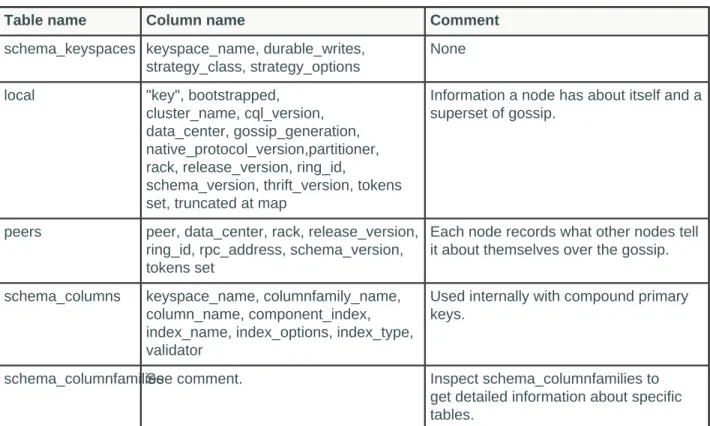
Cassandra populates these tables and others in the system keyspace.
Table: Columns in System Tables
Table name Column name Comment
schema_keyspaces keyspace_name, durable_writes, strategy_class, strategy_options
None
local "key", bootstrapped,
cluster_name, cql_version, data_center, gossip_generation, native_protocol_version,partitioner, rack, release_version, ring_id,
schema_version, thrift_version, tokens set, truncated at map
Information a node has about itself and a superset of gossip.
peers peer, data_center, rack, release_version,
ring_id, rpc_address, schema_version, tokens set
Each node records what other nodes tell it about themselves over the gossip.
schema_columns keyspace_name, columnfamily_name,
column_name, component_index, index_name, index_options, index_type, validator
Used internally with compound primary keys.
schema_columnfamiliesSee comment. Inspect schema_columnfamilies to
get detailed information about specific tables.
Keyspace, table, and column information
Querying system.schema_keyspaces directly.
An alternative to the Thrift API describe_keyspaces function is querying system.schema_keyspaces directly. You can also retrieve information about tables by querying system.schema_columnfamilies and about column metadata by querying system.schema_columns.
Procedure
Query the defined keyspaces using the SELECT statement.
SELECT * from system.schema_keyspaces;
The cqlsh output includes information about defined keyspaces.
keyspace | durable_writes | name | strategy_class | strategy_options
---+---+---+---
history | True | history | SimpleStrategy | {"replication_factor":"1"}
ks_info | True | ks_info | SimpleStrategy | {"replication_factor":"1"}
Cluster information
Querying system tables to get cluster topology information.
You can query system tables to get cluster topology information. You can get the IP address of peer
nodes, data center and rack names, token values, and other information. "The Data Dictionary" article
describes querying system tables in detail.
Procedure
After setting up a 3-node cluster using ccm on the Mac OSX, query the peers and local tables.
USE system;
SELECT * FROM peers;
Output from querying the peers table looks something like this:
peer | data_center | host_id | preferred_ip | rack | release_version | rpc_address | schema_version | tokens
---+---+---+---+---
127.0.0.3 | datacenter1 | edda8d72... | null | rack1 | 2.1.0 | 127.0.0.3 | 59adb24e-f3... | {3074...
127.0.0.2 | datacenter1 | ef863afa... | null | rack1 | 2.1.0 | 127.0.0.2 | 3d19cd8f-c9... | {-3074...}
(2 rows)
Retrieving and sorting results
Using the SELECT command.
Querying tables to select data is the reason data is stored in databases. Similar to SQL, CQL can SELECT
data using simple or complex qualifiers. At its simplest, a query selects all data in a table. At its most complex, a query delineates which data to retrieve and display.
Procedure
• The example below illustrates how to create a query that uses first_name and last_name as a filter.
cqlsh> SELECT * FROM users_by_name WHERE first_name = 'jane';
Note that Cassandra will reject this query if first_nameand last_name are not part of the primary key, either a partition key or clustering column. Queries require a sequential retrieval across the entire users table. In a distributed database like Cassandra, this is a crucial concept to grasp; scanning all data across all nodes is prohibitively slow and thus blocked from execution. The use of partition key and
• You can also pick the columns to display instead of choosing all data.
cqlsh> SELECT first_name, age FROM users_by_name WHERE first_name = 'jane';
• For a large table, limit the number of rows retrieved using LIMIT. The default limit is 10,000 rows. To
sample data, pick a smaller number. To retrieve more than 10,000 rows set LIMIT to a large value.
cqlsh> SELECT * FROM users LIMIT 10;
• You can fine-tune the display order using the ORDER BY clause, either descending or ascending. The
partition key must be defined in the WHERE clause and the ORDER BY clause defines the clustering
column to use for ordering.
Retrieval using the IN keyword
The IN keyword can define a set of clustering columns to fetch together, supporting a "multi-get" of CQL rows.
Similar to a SQL query, in CQL queries the IN keyword can define a set of clustering columns to fetch
together, supporting a "multi-get" of CQL rows. A single clustering column can be defined if all preceding columns are defined for either equality or group inclusion. Alternatively, several clustering columns may be defined to collect several rows, as long as all preceding columns are queried for equality or group inclusion. The defined clustering columns can also be queried for inequality.
Note that using both IN and ORDER BY will require turning off paging with the PAGING OFF command in
cqlsh.
Procedure
• Turn off paging
cqlsh> PAGING OFF
• Retrieve and sort results in descending order.
cqlsh> SELECT * FROM users WHERE userID IN (100,102,104) ORDER BY age DESC;
• Retrieve rows using multiple clustering columns event_start_date and event_end_date. This example
searches the partition key event_ids for several events, but the partition key can also be composed as an equality for one value.
cqlsh> SELECT * FROM calendar WHERE event_id IN (100, 101, 102) AND (event_start_date, event_end_date) IN (('2015-05-09','2015-05-31'), ('2015-05-06', '2015-05-31'));
• Retrieve rows using multiple clustering columns event_start_date and event_end_date and inequality.
cqlsh> SELECT * FROM calendar WHERE event_id IN (100, 101, 102) AND (event_start_date, event_end_date) >= ('2015-05-09','2015-05-24');
Slicing over partition rows
Slicing over rows of a partition when the table has more than one clustering column and comparing groups of clustering keys to certain values.
In Cassandra 2.0.6 and later, you can use a new syntax for slicing over rows of a partition when the table has more than one clustering column. Using a conditional operator, you can compare groups of clustering keys to certain values. For example:
CREATE TABLE timeline ( day text,
hour int, min int, sec int, value text,
PRIMARY KEY (day, hour, min, sec) );
INSERT INTO timeline (day, hour, min, sec, value) VALUES ('12 Jan 2014', 3, 43, 12, 'event1'); INSERT INTO timeline (day, hour, min, sec, value) VALUES ('12 Jan 2014', 3, 52, 58, 'event2'); INSERT INTO timeline (day, hour, min, sec, value) VALUES ('12 Jan 2014', 4, 37, 01, 'event3'); INSERT INTO timeline (day, hour, min, sec, value) VALUES ('12 Jan 2014', 4, 37, 41, 'event3'); INSERT INTO timeline (day, hour, min, sec, value) VALUES ('12 Jan 2014', 6, 00, 34, 'event4');
SELECT * FROM timeline;
day | hour | min | sec | value 12 Jan 2014 | 3 | 43 | 12 | event1 12 Jan 2014 | 3 | 52 | 58 | event2 12 Jan 2014 | 4 | 37 | 1 | event3 12 Jan 2014 | 4 | 37 | 41 | event3 12 Jan 2014 | 6 | 0 | 34 | event4
To retrieve events for the 12th of January 2014 between 3:50:00 and 4:37:30, use the new syntax as follows:
SELECT * FROM timeline WHERE day='12 Jan 2014' AND (hour, min) >= (3, 50)
AND (hour, min, sec) <= (4, 37, 30); day | hour | min | sec | value
12 Jan 2014 | 4 | 37 | 1 | event3
The new syntax, in this example, uses a conditional operator to compare groups of clustering keys, such as hour, min, and sec, to certain values.
In the WHERE clause, you need to use sequential clustering columns. The sequence must match the sequence of the columns in the table definition. For example:
CREATE TABLE no_column_skipping (a int, b int, c int, d int, e int, PRIMARY KEY (a, b, c, d))
This WHERE clause does not work:
SELECT ... WHERE a=0 AND (b, d) > (1, 2)
This WHERE clause works:
SELECT ... WHERE a=0 AND (b, c) > (1, 2)
Batching conditional updates to a static column
An example of batching conditional updates combined with static columns.
As explained in the BATCH statement reference, in Cassandra 2.0.6 and later, you can batch conditional
updates. This example shows batching conditional updates combined with using static columns, also
introduced in Cassandra 2.0.6. The example stores records about each purchase by user and includes the running balance of all a user's purchases.
CREATE TABLE purchases ( user text,
balance int static, expense_id int, amount int,
description text, paid boolean,
PRIMARY KEY (user, expense_id) );
Because the balance is static, all purchase records for a user have the same running balance. The statements for inserting values into purchase records use the IF conditional clause.
BEGIN BATCH
INSERT INTO purchases (user, balance) VALUES ('user1', -8) IF NOT EXISTS; INSERT INTO purchases (user, expense_id, amount, description, paid)
VALUES ('user1', 1, 8, 'burrito', false); APPLY BATCH;
BEGIN BATCH
UPDATE purchases SET balance = -208 WHERE user='user1' IF balance = -8; INSERT INTO purchases (user, expense_id, amount, description, paid) VALUES ('user1', 2, 200, 'hotel room', false);
APPLY BATCH;
Because the column is static, you can provide only the partition key when updating the data. To update a non-static column, you would also have to provide a clustering key. Using batched conditional updates, you can maintain a running balance. If the balance were stored in a separate table, maintaining a running
balance would not be posssible because a batch having conditional updates cannot span multiple partitions.
SELECT * FROM purchases;
At this point, the output is:
user | expense_id | balance | amount | description | paid user1 | 1 | -208 | 8 | burrito | False user1 | 2 | -208 | 200 | hotel room | False
You could then use a conditional batch to update records to clear the balance.
BEGIN BATCH
UPDATE purchases SET balance=-200 WHERE user='user1' IF balance=-208; UPDATE purchases SET paid=true WHERE user='user1' AND expense_id=1 IF paid=false;
APPLY BATCH;
SELECT * FROM purchases;
user | expense_id | balance | amount | description | paid user1 | 1 | -200 | 8 | burrito | True user1 | 2 | -208 | 200 | hotel room | False
Using and misusing batches
When to use batches.
Batches are often mistakenly used in an attempt to optimize performance. Unlogged batches require the coordinator to manage inserts, which can place a heavy load on the coordinator node. If other nodes own partition keys, the coordinator node needs to deal with a network hop, resulting in inefficient delivery. Use unlogged batches when making updates to the same partition key.
Using a primary key of (date, timestamp) for example, this unlogged batch resolves to only one write internally, regardless of the number of writes, assuming all have the same date value.
BEGIN UNLOGGED BATCH;
INSERT INTO sensor_readings (date, time, reading) values (20140910,'2014-09-10T11:00:00.00+0000', 6335.2);
INSERT INTO sensor_readings (date, time, reading) values (20140910,'2014-09-10T11:00:15.00+0000', 5222.2);
APPLY BATCH;
The coordinator node might also need to work hard to process a logged batch while maintaining
consistency between tables. For example, upon receiving a batch, the coordinator node sends batch logs to two other nodes. In the event of a coordinator failure, the other nodes retry the batch. The entire cluster is affected. Use a logged batch to synchronize tables, as shown in this example:
BEGIN BATCH; UPDATE users
SET state = 'TX'
WHERE user_uuid = 8a172618-b121-4136-bb10-f665cfc469eb; UPDATE users_by_ssn
SET state = 'TX'
For information about the fastest way to load data, see "Cassandra: Batch loading without the Batch keyword."
Using the keyspace qualifier
To simplify tracking multiple keyspaces, use the keyspace qualifier instead of the USE statement.
Sometimes issuing a USE statement to select a keyspace is inconvenient. If you use connection pooling, for example, you have multiple keyspaces to juggle. To simplify tracking multiple keyspaces, use the keyspace qualifier instead of the USE statement. You can specify the keyspace using the keyspace qualifier in these statements:
• ALTER TABLE • CREATE TABLE • DELETE • INSERT • SELECT • TRUNCATE • UPDATE
Procedure
To specify a table when you are not in the keyspace containing the table, use the name of the keyspace followed by a period, then the table name. For example, Music.playlists.
INSERT INTO Music.playlists (id, title, artist, album)
VALUES (62c36092-82a1-3a00-93d1-46196ee77204, 'La Grange', 'ZZ Top', 'Tres Hombres');
Adding columns to a table
Adding columns to a table with the ALTER TABLE command.
The ALTER TABLE command adds new columns to a table.
Procedure
Add a coupon_code column with the varchar data type to the users table.
cqlsh:demodb> ALTER TABLE users ADD coupon_code varchar;
This creates the column metadata and adds the column to the table schema, but does not update any existing rows.
Expiring data
Data in a column, other than a counter column, can have an optional expiration period called TTL (time to live).
Data in a column, other than a counter column, can have an optional expiration period called TTL (time to live). The client request specifies a TTL value, defined in seconds, for the data. TTL data is marked with
a tombstone after the requested amount of time has expired. A tombstone exists for gc_grace_seconds.
After data is marked with a tombstone, the data is automatically removed during the normal compaction and repair processes.
Use CQL to set the TTL for data.
If you want to change the TTL of expiring data, you have to re-insert the data with a new TTL. In
Cassandra, the insertion of data is actually an insertion or update operation, depending on whether or not a previous version of the data exists.
TTL data has a precision of one second, as calculated on the server. Therefore, a very small TTL probably does not make much sense. Moreover, the clocks on the servers should be synchronized; otherwise reduced precision could be observed because the expiration time is computed on the primary host that receives the initial insertion but is then interpreted by other hosts on the cluster.
Expiring data has an additional overhead of 8 bytes in memory and on disk (to record the TTL and expiration time) compared to standard data.
Expiring data example
Using the INSERT and UPDATE commands for setting the expire time for data in a column.
Both the INSERT and UPDATE commands support setting a time for data in a column to expire. The expiration time (TTL) is set using CQL.
Procedure
1. Use the INSERT command to set a password column in the users table to expire in 86400 seconds, or
one day.
cqlsh:demodb> INSERT INTO users
(user_name, password)
VALUES ('cbrown', 'ch@ngem4a') USING TTL 86400;
2. Extend the expiration period to five days by using the UPDATE command/
cqlsh:demodb> UPDATE users USING TTL 432000 SET password = 'ch@ngem4a' WHERE user_name = 'cbrown';
Determining time-to-live for a column
Steps for creating a table, inserting data into two columns, and calling the TTL function to retrieve the date/time of the writes to the columns.
This procedure creates a table, inserts data into two columns, and calls the TTL function to retrieve the date/time of the writes to the columns.
Procedure
1. Create a users table named clicks in the excelsior keyspace.
CREATE TABLE excelsior.clicks ( userid uuid,
url text,
date timestamp, //unrelated to WRITETIME discussed in the next section name text,
PRIMARY KEY (userid, url) );
2. Insert data into the table, including a date in yyyy-mm-dd format, and set that data to expire in a day
userid, url, date, name) VALUES ( 3715e600-2eb0-11e2-81c1-0800200c9a66, 'http://apache.org', '2013-10-09', 'Mary') USING TTL 86400;
3. Wait for a while and then issue a SELECT statement to determine how much longer the data entered in
step 2 has to live.
SELECT TTL (name) from excelsior.clicks
WHERE url = 'http://apache.org' ALLOW FILTERING;
Output is, for example, 85908 seconds:
ttl(name) 85908
(1 rows)
Removing a keyspace, schema, or data
Using the DROP and DELETE commands.
To remove data, you can set column values for automatic removal using the TTL (time-to-expire) table
attribute. You can also drop a table or keyspace, and delete keyspace column metadata.
Dropping a table or keyspace
Steps for dropping table or keyspace using the DROP command.
You drop a table or keyspace using the DROP command.
Procedure
1. Drop the users table.
cqlsh:demodb> DROP TABLE users;
2. Drop the demodb keyspace.
cqlsh:demodb> DROP KEYSPACE demodb;
Deleting columns and rows
Using the DELETE command to delete a column or row.
CQL provides the DELETE command to delete a column or row. Deleted values are removed completely by the first compaction following deletion.
Procedure
1. Deletes user jsmith's session token column.
2. Delete jsmith's entire row.
cqlsh:demodb> DELETE FROM users where pk = 'jsmith';
Determining the date/time of a write
Using the WRITETIME function in a SELECT statement to determine when the date/time that the column was written to the database.
A table contains a timestamp representing the date/time that a write occurred to a column. Using the WRITETIME function in a SELECT statement returns the date/time that the column was written to the database. The output of the function is microseconds except in the case of Cassandra 2.1 counter columns. Counter column writetime is milliseconds. This procedure continues the example from the previous procedure and calls the WRITETIME function to retrieve the date/time of the writes to the columns.
Procedure
1. Insert more data into the table.
INSERT INTO excelsior.clicks ( userid, url, date, name) VALUES (
cfd66ccc-d857-4e90-b1e5-df98a3d40cd6, 'http://google.com',
'2013-10-11', 'Bob' );
2. Retrieve the date/time that the value Mary was written to the name column of the apache.org data. Use
the WRITETIME function in a SELECT statement, followed by the name of a column in parentheses:
SELECT WRITETIME (name) FROM excelsior.clicks WHERE url = 'http://apache.org' ALLOW FILTERING;
The writetime output in microseconds converts to Sun, 14 Jul 2013 21:57:58 GMT or to 2:57 pm Pacific time.
writetime(name) ---1373839078327001
3. Retrieve the date/time of the last write to the date column for google.com data.
SELECT WRITETIME (date) FROM excelsior.clicks WHERE url = 'http://google.com' ALLOW FILTERING;
The writetime output in microseconds converts to Sun, 14 Jul 2013 22:03:15 GMT or 3:03 pm Pacific time.
writetime(date) ---1373839395324001
Altering the data type of a column
Changing the data type of a column after it is defined or added to a table using ALTER TABLE.
Using ALTER TABLE, you can change the data type of a column after it is defined or added to a table.
Procedure
Change the coupon_code column to store coupon codes as integers instead of text by changing the data type of the column.
cqlsh:demodb> ALTER TABLE users ALTER coupon_code TYPE int;
Only newly inserted values, not existing coupon codes are validated against the new type.
Using collections
Collection types provide an improved way of handling tasks, such as building multiple email address capability into tables.
Cassandra includes collection types that provide an improved way of handling tasks, such as building
multiple email address capability into tables. Observe the following limitations of collections:
• The maximum size of an item in a collection is 64K or 2B, depending on the native protocol version.
• Keep collections small to prevent delays during querying because Cassandra reads a collection in its
entirety. The collection is not paged internally.
As discussed earlier, collections are designed to store only a small amount of data.
• Never insert more than 64K items in a collection.
If you insert more than 64K items into a collection, only 64K of them will be queryable, resulting in data loss.
Note: For detailed limits on collections, see CQL limits.
You can expire each element of a collection by setting an individual time-to-live (TTL) property.
Using the set type
Using the set data type, you can solve the multiple email problem in an intuitive way that does not require a read before adding a new email address.
A set stores a group of elements that are returned in sorted order when queried. A column of type set consists of unordered unique values. Using the set data type, you can solve the multiple email problem in an intuitive way that does not require a read before adding a new email address.
Procedure
1. Define a set, emails, in the users table to accommodate multiple email address.
CREATE TABLE users (
user_id text PRIMARY KEY, first_name text,
last_name text, emails set<text> );
2. Insert data into the set, enclosing values in curly brackets.
Set values must be unique.
VALUES('frodo', 'Frodo', 'Baggins', {'[email protected]', '[email protected]'});
3. Add an element to a set using the UPDATE command and the addition (+) operator.
UPDATE users
SET emails = emails + {'[email protected]'} WHERE user_id = 'frodo';
4. Retrieve email addresses for frodo from the set.
SELECT user_id, emails FROM users WHERE user_id = 'frodo';
When you query a table containing a collection, Cassandra retrieves the collection in its entirety; consequently, keep collections small enough to be manageable, or construct a data model to replace collections that can accommodate large amounts of data.
Cassandra returns results in an order based on the type of the elements in the collection. For example, a set of text elements is returned in alphabetical order. If you want elements of the collection returned in insertion order, use a list.
user_id | emails
--- frodo |
{"[email protected]","[email protected]","[email protected]"}
5. Remove an element from a set using the subtraction (-) operator.
UPDATE users
SET emails = emails - {'[email protected]'} WHERE user_id = 'frodo';
6. Remove all elements from a set by using the UPDATE or DELETE statement.
A set, list, or map needs to have at least one element; otherwise, Cassandra cannot distinguish the set from a null value.
UPDATE users SET emails = {} WHERE user_id = 'frodo'; DELETE emails FROM users WHERE user_id = 'frodo';
A query for the emails returns null.
SELECT user_id, emails FROM users WHERE user_id = 'frodo'; user_id | emails
frodo | null
Using the list type
Use a list when the order of elements matter or when you need to store same value multiple times.
When the order of elements matters, which may not be the natural order dictated by the type of the elements, use a list. Also, use a list when you need to store same value multiple times. List values are returned according to their index value in the list, whereas set values are returned in alphabetical order, assuming the values are text.
Using the list type you can add a list of preferred places for each user in a users table, and then query the database for the top x places for a user.
Procedure
1. Add a list declaration to a table by adding a column top_places of the list type to the users table.
ALTER TABLE users ADD top_places list<text>;
2. Use the UPDATE command to insert values into the list.
UPDATE users
SET top_places = [ 'rivendell', 'rohan' ] WHERE user_id = 'frodo';
3. Prepend an element to the list by enclosing it in square brackets, and using the addition (+) operator.
UPDATE users
SET top_places = [ 'the shire' ] + top_places WHERE user_id = 'frodo';
4. Append an element to the list by switching the order of the new element data and the list name in the
UPDATE command.
UPDATE users
SET top_places = top_places + [ 'mordor' ] WHERE user_id = 'frodo';
These update operations are implemented internally without any read-before-write. Appending and prepending a new element to the list writes only the new element.
5. Add an element at a particular position using the list index position in square brackets
UPDATE users SET top_places[2] = 'riddermark' WHERE user_id = 'frodo';
When you add an element at a particular position, Cassandra reads the entire list, and then writes only the updated element. Consequently, adding an element at a particular position results in greater latency than appending or prefixing an element to a list.
6. Remove an element from a list using the DELETE command and the list index position in square
brackets. For example, remove mordor, leaving the shire, rivendell, and riddermark.
DELETE top_places[3] FROM users WHERE user_id = 'frodo';
7. Remove all elements having a particular value using the UPDATE command, the subtraction operator
(-), and the list value in square brackets. For example, remove riddermark.
UPDATE users
SET top_places = top_places - ['riddermark'] WHERE user_id = 'frodo';
The former, indexed method of removing elements from a list requires a read internally. Using the UPDATE command as shown here is recommended over emulating the operation client-side by reading the whole list, finding the indexes that contain the value to remove, and then removing those indexes. This emulation would not be thread-safe. If another thread/client prefixes elements to the list between the read and the write, the wrong elements are removed. Using the UPDATE command as shown here does not suffer from that problem.
8. Query the database for a list of top places.
Results show:
user_id | top_places
frodo | ['the shire', 'rivendell']
Using the map type
Using the map type, you can store timestamp-related information in user profiles. A map is a name and a pair of typed values that maps one thing to another.
As its name implies, a map maps one thing to another. A map is a name and a pair of typed values. Using the map type, you can store timestamp-related information in user profiles. Each element of the map is internally stored as one Cassandra column that you can modify, replace, delete, and query. Each element can have an individual time-to-live and expire when the TTL ends.
Procedure
1. Add a todo list to every user profile in an existing users table using the CREATE TABLE or ALTER
statement, specifying the map collection and enclosing the pair of data types in angle brackets.
ALTER TABLE users ADD todo map<timestamp, text>;
2. Set or replace map data, using the INSERT or UPDATE command, and enclosing the timestamp and
text val