Pepperdine Digital Commons
Pepperdine Digital Commons
Theses and Dissertations
2016
Bring Your Own Device (BYOD) programs in the classroom:
Bring Your Own Device (BYOD) programs in the classroom:
teacher use, equity, and learning tools
teacher use, equity, and learning tools
Derrel FincherFollow this and additional works at: https://digitalcommons.pepperdine.edu/etd Recommended Citation
Recommended Citation
Fincher, Derrel, "Bring Your Own Device (BYOD) programs in the classroom: teacher use, equity, and learning tools" (2016). Theses and Dissertations. 688.
https://digitalcommons.pepperdine.edu/etd/688
This Dissertation is brought to you for free and open access by Pepperdine Digital Commons. It has been accepted for inclusion in Theses and Dissertations by an authorized administrator of Pepperdine Digital Commons. For more information, please contact [email protected] , [email protected].
Pepperdine University
Graduate School of Education and Psychology
BRING YOUR OWN DEVICE (BYOD) PROGRAMS IN THE CLASSROOM: TEACHER USE, EQUITY, AND LEARNING TOOLS
A dissertation submitted in partial satisfaction of the requirements for the degree of Doctor of Education in Educational Technology
by Derrel Fincher
July, 2016
This dissertation, written by
Derrel Vaughn Fincher
under the guidance of a Faculty Committee and approved by its members, has been submitted to and accepted by the Graduate Faculty in partial fulfillment of the requirements for the degree of
DOCTOR OF EDUCATION
Doctoral Committee:
Margaret Riel, Ph.D., Chairperson Paul Sparks, Ph.D.
© Copyright by Derrel Fincher (2016) All Rights Reserved
TABLE OF CONTENTS
TABLE OF CONTENTS ... iv
LIST OF TABLES ... viii
LIST OF FIGURES ... x
ACKNOWLEDGMENTS ... xi
VITA ... xii
ABSTRACT ...xiii
Chapter 1. The Problem ... 1
Genesis: An Early Bring Your Own Device (BYOD) Project ... 1
Challenges in an Early BYOD Project ... 2
Statement of the Problem ... 4
Purpose of the Study ... 5
Conceptual Framework ... 6
Significance of the Study ... 7
Limitations of the Study ... 8
Research Questions ... 8
Proposed Method ... 9
Conclusion ... 10
Chapter 2. Literature Review ... 11
Introduction ... 11
A Brief History of Mobile Computers in Education ... 13
From School-Provided Computers to Bring Your Own Laptop (BYOL). ... 13
From Mobiles to BYOD. ... 16
BYOD as a One-To-One Program. ... 18
Conceptual Framework Overview ... 18
Dimension 1: Teachers’ Use of Digital Technology ... 19
Teacher Beliefs ... 19
Teacher Professional Development. ... 22
Technology Integration Barriers ... 31
Summary: Teacher Technology Use... 34
Dimension 2: Student Access to Digital Technology ... 34
Funding Equity ... 35
Access Equity... 36
Opportunity Equity ... 38
Home Access Equity ... 40
Summary: Equity in BYOD Implementation. ... 41
Dimension 3: Student Ability to Learn to Use Their Devices for Learning ... 42
Student Learning Without Adult Intervention ... 42
Student Learning and Technology Affordances ... 47
Summary: Student Ability to Learn to Use Their Devices for Learning ... 49
Summary... 50
Chapter 3. Methods ... 52
Research Design Overview ... 52
Research Questions ... 53
Data Collection Tools ... 54
Teacher Survey ... 54
Teacher Interviews ... 56
Data Collection Strategies ... 56
Sources of Data. ... 56 Recruiting Participants ... 56 Survey Participants ... 58 Interview Participants. ... 58 Incentives ... 59 Internal Reliability ... 59 External Reliability ... 60
Considerations of Human Subjects ... 60
Plan of Analysis ... 61
Online Survey Analysis ... 61
Preparing Interviews for Analysis ... 62
Triangulation ... 62
Limitations of the Study. ... 63
Summary... 63
Chapter 4. Results ... 65
Purpose of the Study ... 65
Research Questions ... 65
Research Design Overview ... 65
Anonymous Online Survey ... 66
Confidential Teacher Interviews ... 67
Recruiting Participants ... 67
Preparing the Data for Analysis ... 69
Interview Analysis ... 69
Pearson Product Moment Correlation ... 70
Item Identifiers ... 71
Survey Completion ... 71
Final Participants ... 72
Survey Participant Demographics ... 72
Interview Participant Demographics ... 75
BYOD Programs ... 76
Findings: Teacher Technology Use, Student Access, and Student Device Learning ... 77
Dimension 1: Teacher Technology Use ... 78
Dimension 2: Equity and Access ... 87
Findings Summary ... 100
Chapter 5. Implications of This Research ... 103
Introduction ... 103
Research Questions ... 104
Research Overview ... 104
Conceptual Framework ... 105
Findings... 106
Finding 1: Teacher Use ... 107
Finding 2: BYOD Equity ... 108
Finding 3: Student Device Learning ... 108
Conceptual Framework Refinement ... 109
Implications ... 110
General ... 110
District and State Policy. ... 111
Teacher Role in Student Learning: A Model ... 113
Limitations of the Study ... 116
Design... 116
Measurement ... 117
Sample ... 117
Areas for Further Study ... 119
Device Capability ... 119
Longitudinal BYOD Benefits. ... 119
Equity. ... 119
Role of Technology Courses ... 120
BYOD Program Design ... 120
Support Requirements ... 120
Standardized Test Support ... 121
Conclusion ... 121
REFERENCES ... 124
APPENDIX A. Online Survey... 137
Survey Key ... 137
Screen 1: Pre-qualification ... 138
Screen 1A: Disqualification ... 138
Screen 2: Informed Consent ... 138
Screen 3: Survey invitation and explanation ... 140
Screen 4: Teacher Knowledge and Use of Digital Technology ... 141
Screen 5: Student Use of Digital Technology ... 143
Screen 6: BYOD Specifics ... 145
Screen 7: Factors Supporting Technology Use ... 149
Screen 8: Demographics ... 151
Survey 2, Screen 1: Interview Request ... 153
Survey 2, Screen 1: Thank You! ... 154
Research Questions ... 156
APPENDIX C. Interview Protocol ... 171
Interview Request Email ... 171
Informed Consent ... 172
Interview Prompts for Interview Request Email ... 174
Interview Script ... 174
Post Interview Actions ... 177
Proofing Message to Participant ... 177
APPENDIX D. Recruiting Messages ... 178
Classroom Teacher Invitation ... 178
Educator Invitation ... 179
Public Forum Invitation ... 180
BYOD Research Website ... 180
Tweets ... 182
Completion Message ... 182
APPENDIX E. Institutional Review Board Approval ... 184
APPENDIX F. Online Survey Analysis Cross Reference ... 187
Research Questions ... 188
APPENDIX G. Transcript Code Book ... 203
Transcript Code Book Instructions. ... 203
Constructivist Category ... 203
Demographics Category ... 203
Equity Category ... 203
Perceptions Category ... 204
Strengths and Challenges Category ... 204
Student Access Category ... 204
Student Device Learning Category ... 204
Student Device Uncertainty Category ... 205
Technology Use Category ... 205
APPENDIX H. Permissions ... 206
TPACK Image Permission ... 206
LIST OF TABLES
Table 1. Conceptual Framework Dimensions ... 51
Table 2. Relationship Between Interview Prompts and Research Questions (RQ) ... 57
Table 3. Research Questions With Mapping to Framework Dimensions ... 66
Table 4. Participant School Demographics: School Type ... 73
Table 5. Participant School Demographics: School Setting ... 73
Table 6. Participant School Demographics: School Location ... 73
Table 7. Participant Years of Experience... 74
Table 8. Participant Primary Teaching Assignment ... 75
Table 9. Participant Desired Charity Contributions ... 75
Table 10. Interview Participant Demographics ... 76
Table 11. Years BYOD in School ... 77
Table 12. BYOD Policy Accessibility ... 77
Table 13. Correlations Between Teacher Beliefs and Teacher Practices ... 80
Table 14. Teacher Practices Correlated With School Support for Technology ... 81
Table 15. Teacher BYOD Evaluation and Attitudes Correlated With General External Factors ... 84
Table 16. BYOD Effectiveness from Coding Open Response Items ... 85
Table 17. Equity Belief and Practice ... 88
Table 18. Analysis of Number of Characters in the Open Response Question on Equity ... 89
Table 19. School Approach to Equity From Survey Open Response Questions ... 90
Table 20. Equity Open Responses Grouped by School Approach to Providing Device Access ... 91
Table 21. Student Device Learning and Behavior ... 96
Table 22. Student Actions When the Student Does Not Know How To Do a Task With Their Device ... 97
Table 23. Conceptual Framework Dimensions ... 105
Table B1. Teacher Knowledge and Use of Digital Technology ... 156
Table B3. Bring Your Own Device Program Specifics ... 162
Table B4. Factors Supporting Technology Use ... 166
Table B5. Demographics ... 169
Table E1. Teacher Knowledge and Use of Digital Technology ... 189
Table E2. Student Use of Digital Technology ... 191
Table E3. Bring Your Own Device Program Specifics ... 193
Table E4. Factors Supporting Technology Use ... 196
Table E5. Demographics ... 199
Table E6. Summative Factors: Teacher Knowledge and Use of Digital Technology ... 200
Table E7. Summative Factors: Student Use of Digital Technology ... 200
Table E8. Summative Factors: Bring Your Own Device Program Specifics ... 200
Table E9. Summative Factors: Factors Supporting Technology Use ... 201
LIST OF FIGURES
Figure 1. Relationships of conceptual framework dimensions in support of effective BYOD programs. .... 7
Figure 2. Relationship of research questions to conceptual framework dimensions. ... 9
Figure 3. Conceptual framework dimensions’ relationship to BYOD program effectiveness. ... 19
Figure 4. Dimension 1: Teachers’ use of digital technology. ... 19
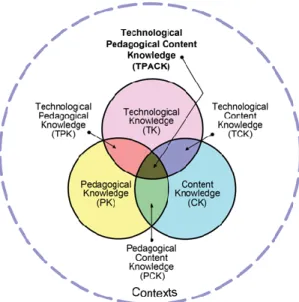
Figure 5. Image of TPACK concept. Image reproduced with permission of TPACK.org. . ... 31
Figure 6. Dimension 2: Student access to digital technology. ... 34
Figure 7. Dimension 3: Student ability to learn to use their devices for learning. ... 42
Figure 8. Relationship of research questions to conceptual framework dimensions. ... 54
Figure 9. Relationship of research questions to conceptual framework dimensions. ... 64
Figure 10. Teacher BYOD Evaluation on a five-point scale ranked from Least Favorable to Most Favorable. ... 83
Figure 11. Teacher BYOD Attitude, derived from semantic differential questions, on a seven-point scale ranked from Very Negative to Very Positive. ... 83
Figure 12. Conceptual framework dimensions and relationship to BYOD program effectiveness. ... 106
Figure 13. Relationship of research questions to conceptual framework dimensions. ... 107
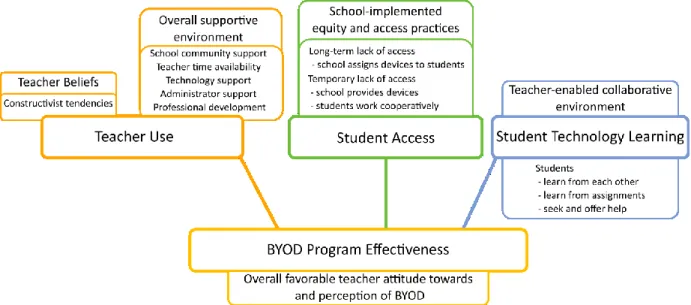
Figure 14. BYOD Framework illustrating factors in each of the three dimensions (teacher use, student access, and student technology learning) that contribute to teachers having an overall favorable perception of BYOD programs. ... 110
Figure H1. Permission to use survey instrument for teacher pedagogical beliefs. ... 206
Figure H2. Permission to use the Constructivist Learning Environment Survey in the research. ... 207
Figure H3. Permission to use survey on teacher beliefs. . ... 208
Figure H4. Permission to use the Teacher Attitude toward Computers (TAC) and Teacher Attitude toward Technology (TAT) instruments. ... 208
ACKNOWLEDGMENTS
I would like to acknowledge all of the people who have helped me. First, thank you to all of the participants in the research - you gave selflessly of your time and expertise. And a special thank you to the teachers who volunteered to let me interview them and being flexible as we coordinated across time zones. I am indebted to the researchers before me who have kindly let me use portions of their instruments and took the time to explain how they worked: Dr. Dominik Petko, Dr. Sarah Prestridge, Dr. Bruce Johnson, Dr. Jason Osbourne, and all of their collaborators.
I am grateful for Dr. Margaret Riel’s wise counsel and mentoring throughout this time. I am also indebted to my committee members, Dr. Paul Sparks and Dr. Linda Purrington, who gave valuable feedback on my research design and helped me connect the emergent themes.
I would also like to acknowledge the invaluable support of James Liggins, who spent many hours encouraging me, motivating me, and providing suggestions for moving forward. And finally, to Bridgette. You were there when I started and you are here when I finished. I could always count on you to provide insight into my work or a reference that supported a point I wanted to make, proof my writing on the spur of the moment, or take time from your own research to code. Without you, I could not have done this.
VITA
DERREL VAUGHN FINCHER EDUCATION
Doctor of Education Educational Technology Pepperdine University 2016
Master of Arts Educational Technology Pepperdine University 2002
Teacher Certification Mathematics (K-12) and Elementary Education The College of New Jersey 1998
Master of Science Mechanical Engineering Utah State University 1991
Bachelor of Science Mechanical Engineering Oklahoma State University 1980
WORK HISTORY
Oklahoma Corporation Commission, Public Utility Division* Oklahoma Universal Service Fund Recertification
Coordinator
Oklahoma City, Oklahoma 2015-2016
Oklahoma Office of Management and Enterprise Services – Information Services*
Education Projects Manager Oklahoma City, Oklahoma 2014-2015
Oklahoma State Department of Education*
Director of Learning Technologies Oklahoma City, Oklahoma 2012-2014
Department of State World Virtual Schools Project
South America Project Coordinator Virtual 2006-2012
Graded - The American School of Sao Paulo
Director of Information Technology Sao Paulo, Brazil 2006-2011
Taipei American School
Academic Technology Coordinator Taipei, Taiwan 2004-2006
The American School in Japan
Middle School Math Teacher Tokyo, Japan 1996-2004
Schlumberger Technology, Ltd.
Engineering Project Manager Tokyo, Japan; Sugar Land Texas 1988-1996
Manufacturing Engineer Houston, Texas 1987-1988
Field Engineer Oklahoma; New Mexico; Wyoming 1981-1987
*Also served as State E-Rate Coordinator
CERTIFICATIONS
New Jersey Teaching Certification: Elementary Education and N-12 Mathematics
Oklahoma Teacher Certification: Elementary Education, Intermediate and Advanced Mathematics Certified Education Technology Leader (CETL)
ABSTRACT
This study explores teacher perceptions of Bring Your Own Device (BYOD) programs in the classroom, with a focus on teacher use, student equity of access, and student ability to use their devices as learning tools. While one-to-one laptop programs (students assigned identical school-owned laptop or tablet) has an extensive body of literature behind it, BYOD has relatively little peer-reviewed research.
A framework was developed to guide this research that related teacher technology use, equity of student access, and student ability to learn to use the devices they brought. Two instruments were created to collect data: (a) an anonymous online survey to collect information from 108 teachers already incorporating BYOD into their classes, (b) a semi-structured interview with eleven teachers who
volunteered after completing the first instrument.
Findings suggested that teachers with constructivist compatible beliefs were likely to have more positive perceptions of BYOD, as were those who worked in schools with a more positive atmosphere. Very few teachers (12%) thought that BYOD programs were inherently inequitable, although 25% thought the programs in their own school was inequitable. Teachers were concerned that all students have access to an effective device when the student did not bring one and they primarily looked to school-owned technology to be available. Teachers also reported that students could learn to use their individual devices by working with other students and through working on assignments, while teachers had specific techniques they used to support this learning. Teachers overall did not view themselves as being responsible for providing technology support to students, and instead expected students to resolve their own technology problems. Many teachers (42%) liked that students had different types of devices.
A key advantage of BYOD is the knowledge the students bring when they bring their own device. These results provide tentative support for Bring Your Own Device programs as a viable, cost- effective way for students to use their own technology for learning.
Chapter 1. The Problem
In spite of efforts by schools to purchase more technology for use in learning, students frequently use technology in school much less and have less access than they do out of school (Lim, Yong, Tondeur, Sing, & Tsai, 2013). Yet, in a nationwide survey, almost 90% of high school students owned a smartphone, two-thirds owned a laptop, and half owned a tablet. For middle school students in grades 6-8, almost three-quarters owned a smartphone, two-thirds owned a laptop, and 61% owned a tablet (Project Tomorrow, 2014). Over half of the surveyed students grade 6 -12 students wanted their schools to incorporate their personal mobile devices in instruction (Project Tomorrow & Blackboard K-12, 2014). Those students wanted their schools to participate in a Bring Your Own Device (BYOD) program so that they could bring their own devices to use in instruction as learning tools. While schools have started to implement BYOD programs, there is only limited research to help schools decide how to develop and structure such BYOD programs, how to address equity among students when some may not have a device to bring, or how to support their teachers. The intent of this research project is to provide some of that guidance to schools.
Genesis: An Early Bring Your Own Device (BYOD) Project
A short overview of an early BYOD project, can illustrate some of the issues and tensions that might arise when students use their own devices. That early BYOD program was begun during my tenure as a technology director for an independent international school. There, middle school administrators, teacher volunteers, and technology staff collaborated to form a pilot team to implement a one student to one laptop (one-to-one) program where middle school students brought their personal laptops to school. This was a BYOD program as students’ personal mobile devices were being used in instruction, although the term was not known then. Unlike a one-to-one laptop program where the school provides the laptops (Silvernail & Lane, 2004), or where the parents purchase a laptop chosen by the school (Brass, 2008), the middle school students could bring whichever type of laptop their parents allowed as
a long as it met school-specified performance and capability minimums. The goal of the teachers who volunteered for the pilot program was to take advantage of the benefits a one-to-one program provided while avoiding problems inherent in school-owned computers. This goal arose from the belief that having students bring their own laptops was a logical implementation of a one-to-one program, even though no research existed on the topic. Other educators, both in the school and out, disagreed with the idea that having students bring their own laptops was a logical extension of a one-to-one program. The excitement and successes, along with the inevitable difficulties, disagreements, and occasional
discouragement, of the project revealed both the potential and the challenges of using student-owned computers in the classroom. Ultimately, the school administration demonstrated their confidence in the program by requiring all middle and high school students to bring their personal laptops.
At the time of the pilot program, a nascent movement arose in independent and some public schools to allow students to bring their own electronic devices, not just computers but Internet-connected phones and other Internet-enabled computers, and use them in the classroom. Yet, almost no research existed on the efficacy of using personal devices in instructional contexts.
Challenges in an Early BYOD Project
With no published research on Bring Your Own Laptop (BYOL), teachers in the pilot program knew they were innovating. Even so, the pilot team did not approach BYOL atheoretically. The pilot team used various research articles and reports (Bebell, 2005; Bonifaz & Zucker, 2004; Donovan, Hartley, & Strudler, 2007; Lei & Zhao, 2008; Penuel, 2006; Warschauer, 2008) from other laptop
program implementations to guide them. Yet, when the pilot team discussed BYOL with other educators who were familiar with one-to-one programs, even if the others had not participated in such a program, the description of the BYOL program elicited dichotomous responses. Some educators quickly
understood and concurred with the reasoning the pilot team were using to guide their implementation of the BYOL program. Other educators, even some who were strong proponents of one-to-one
programs, struggled with the concept of BYOL. These latter educators still had strong reservations, even when the pilot team discussed the research literature used to help design the program and explained why they viewed BYOL as a logical extension of a one-to-one program. While not obvious at the time to the pilot team, the resistance they encountered an indicator that they were early adopters of an innovation (Rogers, 2003).
Part of the divide among the staff and other educators inside and outside the school became evident as pedagogical and implementation issues arose during the pilot and roll-out. Proponents of school-provided laptops for one-to-one programs asked, for example, how teachers would be able to teach when students had different computers and different software, and how teachers could show students how to use a program, such as a movie editing program, when the programs on student computers would not only be different, but could look different and operate differently.
Those questions revealed three implicit assumptions on the part of the questioners. The first assumption was that teaching with technology in the classroom requires uniformity of the technology used by students. The second assumption was that teaching students how to use technology requires direct instruction to students about how to use their computers and software. The third assumption was that software was so different between computers that teachers had to show students how to use their specific software and computers. The pilot team, in trying to challenge those assumptions, could not find research that addressed these questions. Even the research and reports addressing traditional one-to-one programs, such as Dunleavy, Dexter, and Heinecke (2007), Russell, Bebell, and Higgins (2004), and Silvernail and Lane (2004), had the implicit assumption that the computers used by students were identical in the classroom. That is, the computers were the same model and operating system;
uniformity was a hallmark of those programs. Without research that directly addressed the BYOL implementation, teachers used experience and passion to address those pedagogical and process questions in planning and practice; they were the innovators (Rogers, 2003). The questioners also had a
fourth assumption, never explicitly stated but evident to the pilot team through tone and choice of words, that the team had undertaken a pilot without considering issues that would arise when students were using different computers with different capabilities, and with operating systems in different languages.
The term for the pilot program would now be a BYOD (Bring Your Own Device), BYOT (Bring Your Own Technology), or BYOL (Bring Your Own Laptop) program, but at the time the pilot planning began in the second half of 2009, these terms were not in common use and the administrators, teachers, and the technology staff on the pilot team were unaware of them. The team modeled the program, where students brought their own chosen laptops, after one already implemented in an independent school in the United States and referred to as the y’all come model, as in, “y’all come with whatever you have” (Hudkins, 2005). As of this writing, the most common shorthand convention for referring to programs where students bring whatever technology they have, whether smart phones, tablets, or more powerful devices, is to use the term Bring Your Own Device (BYOD). For the purposes of this current research, a program where the school requires students to bring their laptops is a Bring Your Own Laptop (BYOL) program.
Statement of the Problem
Schools that implement a Bring Your Own Device (BYOD) program in their schools still do so with very little research evidence directly related to BYOD. Currently, they have to rely on research that describes a similar effort of matching each student with a school-provided laptop. While there are articles in education trade publications and blogs suggesting BYOD as a practice schools should adopt, there are also dissenters who raise concerns in blogs and online forums that implementing a BYOD program will reduce learning possibilities or increase inequity.
In my roles as a school technology director, state educational technology director, and state education project manager, I have had opportunities to discuss BYOD with local, state, and federal policy
makers. Some see BYOD as a way for schools to use more digital technologies by having student bring devices so that schools have can use their limited funding to support students who may not have a device. Others see BYOD as anathema to equity and effective digital learning. Those who are uneasy about BYOD seem to be concerned that most schools, when implementing BYOD programs, will end up with one of two results. The first result would be that schools fail to provide for those students who do not have a device, resulting in increased inequity in classrooms and schools. The second result would be that the devices that students bring would only be suitable for consuming content from the Internet, not for creation and collaboration. In this second scenario, schools might believe that their students were effective technology users and that the school was preparing students to use emerging technologies but, in reality the school would be far from realizing the potential technology in the classroom. The diverse views surrounding BYOD make it plain that BYOD is receiving serious consideration by schools, but school administrators and teachers have little research to guide them on BYOD. Additional research on BYOD programs has the potential to provide administrators and teachers a better framework to understand effective practices and effects on learning when students bring their own devices.
Purpose of the Study
The purpose of the study is to understand how teachers in K-12 schools implement a Bring Your Own Device (BYOD) program in their classroom and their perception of students learning with, or the successes and challenges of, their BYOD program. Implementation includes how teachers have students use their devices, the challenges teachers face, and how teachers address students’ technology skills. Teachers’ perceptions of the successes and challenges of their BYOD program includes their perception of students’ equitable access to devices when some students may not be able to bring one, as well as teachers’ overall perceptions of how BYOD is enabling learning in the classroom.
Conceptual Framework
The conceptual framework developed to guide this study is rudimentary and exploratory (Miles & Huberman, 1994) as no well-developed theories or research findings specific to BYOD exist. While research does exist on one-to-one implementations using laptops or tablet devices, BYOD includes all Internet-enabled devices, not just BYOL and tablets and, as noted previously, one-to-one research implicitly assumes that students use the same device. However, drawing on what is known about the implementation and effectiveness of other student technology programs, I have created a conceptual framework to explore in this research.
This conceptual framework study suggests that the effectiveness of BYOD programs is likely to be related to the interaction among three primary dimensions.
1. Teachers’ use of digital technology for their professional work and for instruction. 2. Student access to digital technology.
3. Student ability to learn to use their devices for learning.
Research on teacher technology use in schools has shown that teachers’ face extrinsic and intrinsic barriers when they try to use digital technology (Bingimlas, 2009; Ertmer, 1999); that teacher beliefs affect how teachers implement digital technology and use it for instruction (Riel & Becker, 2000; Tondeur, Hermans, van Braak, & Valcke, 2008); and that professional development has the potential to change teacher beliefs and practices with regard to digital technology use in the classroom (Harris & Hofer, 2011; Voogt et al., 2011). Asking students to provide their own access to technology by bringing a device, even if it is not required, may lead to inequity and access issues among students (Baule, 2012; Watters, 2012). How students learn to use their devices for learning in the classroom where every student may have a different device has not been studied, but students can learn to use digital technologies with limited or no instruction (Lei & Zhao, 2008; Mitra et al., 2005; Negroponte, 2009;
Papert, 1993). Figure 1 illustrates the relationships among the three dimensions of the framework that are explored in this research.
Figure 1. Relationships of conceptual framework dimensions in support of effective BYOD programs.
Significance of the Study
Many trade publications and online resources have published articles on BYOD, e.g., Raths (2012) and Devaney (2012), with the mainstream press following, e.g., St. George (2014). Such publications may discuss successes and challenges, but the results frequently come from anecdotes in individual schools rather than purposeful inquiry. Help guides are also available to schools who are considering a BYOD program, such as those available from education agencies (Alberta Education, 2012; New South Wales Department of Education, 2013), teacher magazines, or blogs that attempt to address BYOD and learning. Vendors also produce white papers and other literature in an attempt to convince school personnel to purchase their solution for network management for mobile devices, (Cisco, n.d.; Dixon & Tierney, n.d.). While education trade journals have contained articles favorable to BYOD, the U.S. Department of Education has issued a warning on BYOD without including research or citations (United States Department of Education Office of Educational Technology, 2016). Creating a formal research base for BYOD may guide effective implementation, but creating that base necessitates a shift in focus from technical tools to learning (Islam & Grönlund, 2016).
With the current paucity of peer-reviewed research, this study will increase understanding of how teachers incorporate student selected devices in their planning and instruction, the challenges they face, and how they perceive that students learn with their devices as well as learn to use all the
Teacher Use Student Access Student Technology Learning
capabilities of their devices. Results from this study will be useful to schools and teachers as they plan a BYOD program or work to improve current BYOD programs.
Limitations of the Study
This study is limited as data collection depended on teachers volunteering to participate in the research, and all analysis was filtered through their perceptions. Teachers who were interested in having their students use technology in the classroom were possibly more likely to participate. With volunteers as participants, it was also possible that certain K-12 education sectors may be over-represented or under-represented. Generalizing the results may also be problematic for schools with special needs, such as those with a large number of migrant students or inner city schools.
Another limitation may be that teachers in schools with well-developed BYOD programs did not participate, either because they were already reporting on their instructional use of BYOD, or because they have been doing BYOD long enough that they did not believe their practice was worthy of contributing to a survey. Conversely, teachers who have a BYOD program that is not functioning well may also have chosen not to participated.
Research Questions
The conceptual framework guided the development of the research questions. This study seeks to answer the following research questions with regards to BYOD programs:
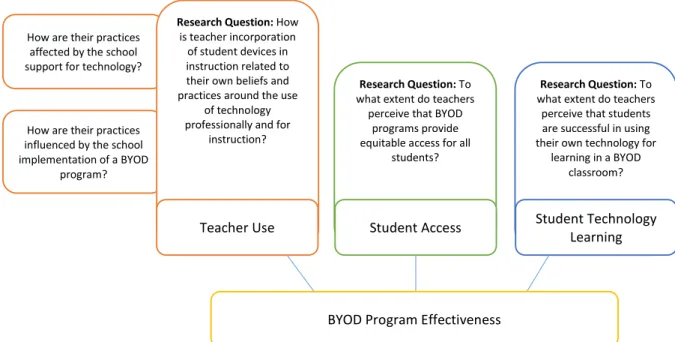
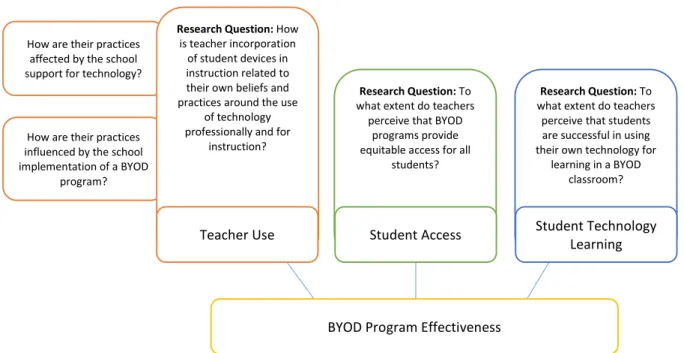
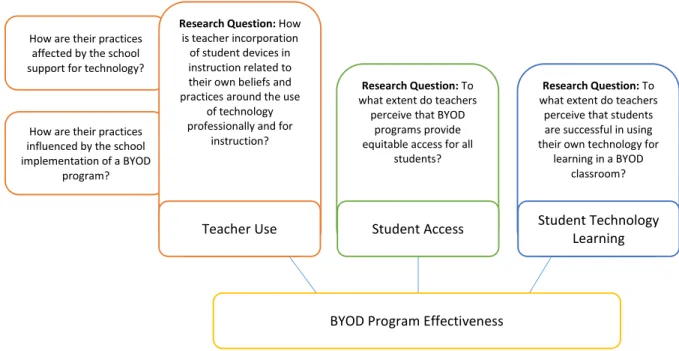
1. How is teacher incorporation of student devices in instruction related to their own beliefs and practices around the use of technology professionally and for instruction?
How are their practices affected by the school support for technology?
How are their practices influenced by the school implementation of a BYOD program? 2. To what extent do teachers perceive that BYOD programs provide equitable access for all
3. To what extent do teachers perceive that students are successful in using their own technology for learning in a BYOD classroom?
As this study was not longitudinal, the efficacy of professional development to change teacher beliefs was not included in the research questions, although it is important to consider in the
framework. Figure 2 illustrates the mapping of the research questions to the conceptual framework dimensions.
Proposed Method
The proposed research method is a mixed method study using a triangulation design of a data transformation model, that is, quantitative and qualitative data was collected and analyzed, then qualitative data was transformed into quantitative data in order to compare and interrelate the now-quantitative data sets. The now-quantitative data was collected through a survey of teachers who have experience in BYOD programs. The qualitative data was primarily collected through interviews with teachers who complete the initial survey and volunteer for the interviews.
Figure 2. Relationship of research questions to conceptual framework dimensions.
How are their practices influenced by the school implementation of a BYOD
program? How are their practices
affected by the school support for technology?
Research Question: To
what extent do teachers perceive that students are successful in using their own technology for
learning in a BYOD classroom?
Research Question: To
what extent do teachers perceive that BYOD
programs provide equitable access for all
students?
Research Question: How
is teacher incorporation of student devices in instruction related to their own beliefs and practices around the use
of technology professionally and for
instruction?
Teacher Use Student Technology
Learning Student Access
Conclusion
The purpose of the study was to understand how teachers in K-12 schools implement a Bring Your Own Device (BYOD) program in their classroom and their perception of students learning with, or the successes and challenges of, their BYOD program. The conceptual framework for this study is that the effectiveness of BYOD programs is related to the interaction among three dimensions: teachers’ uses of digital technology for their professional work and for instruction; student access to digital technology; and student ability to use their devices for learning in school. The mixed methods research design was intended to address three main questions about how teachers incorporate students’ devices in their classrooms, where the questions are tied to the conceptual framework dimensions of teacher use, student access, and student technology learning.
As schools adopt BYOD programs, more research is needed to help the teachers and schools implement effective programs, and the results of this study will be one piece of this research.
Chapter 2. Literature Review Introduction
Students in elementary and secondary schools are acquiring their own Internet-connected devices in greater numbers each year (Madden, Lenhart, Duggan, Cortesi, & Gasser, 2013; Project Tomorrow, 2013b), yet most schools are unsure how to incorporate these student-owned devices into school. Over 60% of U.S. schools have policies restricting student-owned device use that teachers believe has an impact on their teaching (Purcell, Heaps, Buchanan, & Friedrich, 2013), while other schools embrace them. Research on student use of technology often assumes that students all have the same type of device and current research provides little guidance on conditions necessary for effective use of student-owned devices.
Yet some schools are trying to harness the power of student-owned devices in their schools through Bring Your Own Device (BYOD) programs, sometimes known as Bring Your Own Technology (BYOT) programs, where students can use their own devices as learning tools. These programs have the potential to improve student access to technology for learning in schools by allowing every student to have access to a powerful device in school. Unlike traditional laptop or one-to-one programs where schools, districts, or governments provide identical devices to all students in a grade or in a school, BYOD programs depend on students bringing their own Internet-capable devices.
While the effects of technology in the classroom on student learning have been widely
researched for programs where the students have identical devices, almost no research exists for cases where students have devices with different capabilities. The primary approach to student technology use in schools with one-to-one programs has been to have essentially identical computers or tablets in a class, whether provided through the school or government or, frequently in the case of independent schools, by the parents. Yet the research does not cover some of the factors that may occur in a BYOD environment where the devices the students bring are not specified by the school and have different
capabilities and affordances. For example, teachers, unfamiliar with the operating details of the variety of devices their students bring, may feel unsure of how to help students learn to use those devices. They may also be unsure about how to structure assignments and manage a classroom when devices have different capabilities. Such differences in capability may include suitability for content creation, such as an appropriate screen size or input method for documents, the ability to do meaningful work in programming, video editing, or media, and the ability to collaborate. Furthermore, if students provide their own devices, schools and teachers may be unsure how to handle the situations where some of the students, for whatever reason, do not have access to such a device.
Allowing students to use their own technology in class and in school can bring benefits to students, teachers, and schools. Students can access information through the Internet or collaborate online without going to the school library or computer lab and they can do so when the need arises. Teachers can design all lessons with the assumption that access to online resources will be available during class rather than having to limit lessons when no technology is available. Schools can direct more resources to helping students who do not have access as students who bring their own device will not need as many technology resources.
How students learn in classrooms where students use their own devices potentially depends on whether students have a useful device available, how students learn to effectively use their devices, and how well teachers are able to take advantage of the presence of the devices to improve student
learning.
The purpose of this chapter is to review literature that is applicable to BYOD programs. The chapter begins by situating BYOD within the historical context of one-to-one programs and mobile devices, followed by a review of literature that supports the conceptual framework of this research.
A Brief History of Mobile Computers in Education
A program where every child has a computer is usually referred to as laptop program because each student has a laptop (Alberta Education, 2010; Barrios et al., 2004; Bird, 2009; Warschauer, 2007), or a one-to-one program because the ratio of students to laptops is one-to-one (Bebell & Kay, 2010; Bielefeldt, 2006; Dunleavy & Heinecke, 2007; Livingston, 2006). In all these programs, the core concept is that the computers are ubiquitous, that is, always available, so that teachers can incorporate them into their lessons.
From school-provided computers to bring your own laptop (BYOL). The genesis of the idea that
students should have a powerful personal computer began in the 1970s in the work of Seymour Papert (1993) and Alan Kay (1972). Papert addressed the issue from the perspective of how children could create and connect to the world. One of his key contributions to the discussion was the introduction of Logo into schools. Logo was, and is, a programming language where children could program a turtle (a location indicator, often in the shape of a triangle) to move on the screen, which allowed them to advance from simple geometric figures to sophisticated programs. Logo originated as version of LISP, a programming language developed in the late 1950’s to overcome some of the shortcomings of
FORTRAN programming language, with one of the powerful features being the ability to assign one or several values to a variable (McCarthy, 1979). That ability to assign multiple values to a program variable allowed children to use features of arrays, such as having one variable contain several values, in their programming without having to learn the complexity of arrays. A computer that ran Logo only needed a keyboard for typing commands, and a monitor for viewing the work and the results. Papert did not see Logo as a goal, but as an aide to exploration.
Alan Kay, at that time with the Xerox Palo Alto Research Center (PARC), conceived of the idea of making the computer portable so that it could be ubiquitous, and his initial sketches (Kay, 1972) and mockup (Kay & Goldberg, 1977) of the DynaBook look similar to current tablet devices, albeit with a
keyboard. If the screen/keyboard junction were hinged so that the screen folded to cover the keyboard, the DynaBook would look like laptops in use from the early 1990’s. At the time, they projected that according to Moore’s Law, a rule of thumb often used to indirectly project that processing power for a given size of integrated circuit chip will double every 18 months (Kanellos, 2003), the necessary processing power and hardware would be available in about twenty years. The DynaBook concept included a graphical user interface controlled by a mouse. PARC had developed the mouse and graphical user interfaces, which were the elements that were later licensed to Apple computer for inclusion in the original Macintosh computer.
However, Kay, undeterred by the limited technology of the day or the long projected time for suitable portable technology, developed a prototype to test DynaBook functions and installed several in a local junior high school. The computers were minicomputers with a processing unit and disk system about the size of a small file cabinet, but they did have a graphical user interface. Like Papert, Kay envisioned that programming would be a key tool for students to discover and explore, although his focus was the programming language Smalltalk (Goldberg & Kay, 1977). Even then the benefits of using such devices were starting to be known, as Kay wrote, “It is now within the reach of current technology to give all the Beths and their dads [characters in the vignette] a ‘DynaBook’ to use anytime, anywhere as they may wish” (Kay, 1972, p. 3).
Apple Computer launched the Apple Classroom of Tomorrow (ACOT) in 1985, with the goal of exploring integration of technology in the classroom. While technically not a laptop program as students used either Apple IIE or Apple Macintosh desktop computers, the students and teachers were provided with a desktop at school and a desktop at home in a one-to-one approach (Sandholtz, Ringstaff, & Dwyer, 1997). In this way the program shared a key feature of later laptop programs: Students had home and near ubiquitous school access, even if the computers were in fixed locations. In a departure from the work of Papert and Kay, the focus was no longer on students learning to program but on using
the computers for whatever the teacher deemed appropriate. Student achievement measured through standardized tests did not increase, but neither did it decrease. Since computers were new to both teachers and students, they needed extra time learn how to use the machines and then to use them for learning school content. In effect, the no difference finding implies that the students learned faster with the computers but used the time saved for the development of new technical skills, which were not tested. Among significant findings in the project, the researchers found that computers in the classroom could transform how some teachers taught, yet that transformation did not apply to all teachers. They also found that many teachers began to move from teacher-directed instruction to more student-centered learning. A key result of the project was the development of the model of five stages of instructional evolution of entry, adoption, adaptation, evolution, and invention (Sandholtz et al., 1997). Variations of the model are still used to evaluate technology integration and one-to-one programs (Cavanaugh & Dawson, 2010; Windschitl & Sahl, 2002).
The first documented laptop program began in early 1990 at Methodist Ladies College in Melbourne, Australia, when the school issued laptops to all students in grades five through twelve (Johnstone, 2003). Then, users exchanged information between laptops using floppy disk storage media. Shortly after, networking improvements and the Internet made the floppy disk less important, with Apple computer electing to omit the floppy disk on some of its computers in 1998 (Gore & Epler, 1998). The innovation of providing laptops to students diffused to more schools, coinciding with these
improvements in networking. The state of Maine implemented one of the largest one-to-one programs in 2002, when the Maine Learning Technology Initiative began with the initial goal of providing Internet-connected laptops to all the state’s seventh and eighth grade students (Silvernail & Lane, 2004).
Nicholas Negroponte began his One Laptop per Child (OLPC) program in 2005 with the aim of providing laptops to all the world’s poor children. Unlike prior one-to-one programs where the school or parents
would provide the laptops, Negroponte envisioned a country-wide model where the government purchased the laptops and distributed them directly to all students (Warschauer & Ames, 2010).
All the original one-to-one programs, except for the OLPC, were developed with the idea that the school would either own the laptops or, if the parents purchased the laptops, that the school would specify the laptop model and installed software. None of the programs were developed in such a way as to allow students to bring their own laptops or computers. However, the Harker School in California, began to do just that in the early part of the 21st century as they required students to bring their own computer, referring to it at the time as the y’all come model to mean that students were to come to school with whatever they had (Hudkins, 2005). While the school required students to provide their own laptop, it did not need to be a specified model, or even run a particular operating system. Over time, programs where students brought their own device became known as Bring Your Own Device (BYOD), Bring Your Own Technology (BYOT), or Bring Your Own Laptop (BYOL).
From mobiles to BYOD. At the time of the planning and pilot for the Bring Your Own Laptop
program mentioned in Chapter One, forecasts of technology use in education predicted increased use of mobile devices (Johnson, Smith, Levine, & Haywood, 2010; Lowendahl et al., 2009). The term mobile
device in this context were Internet-enabled feature phones (mobile phones that could access the
Internet) and the then-relatively-new smartphone (mobile phones with a touch screen, downloadable applications to customize the phone, and high speed Internet access). One of the organizations
predicting increased use of mobile devices was The New Media Corporation (NMC) through its Horizon Project.
This NMC Horizon Project, started in 2002, recruited educational technologists and other experts from around the world to create the forecast (Johnson, Adams, & Cummins, 2012). Martin et al. (2011) conducted a meta-analysis of the forecasts in the report through 2010, part of which included defining and matching keywords across the years. The closest concept to the portability implied in BYOD
was the keyword mobiles. The focus on mobiles in the reports was not on the concept inherent in students’ bringing their own devices such as laptops, but was more focused on students having ubiquitous access to the Internet through then-current cellular technology using smaller devices like smart phones (Johnson et al., 2010; Lowendahl, 2010). Yet none of the predictions focused on pedagogy or an intentional strategy of incorporating the use of mobiles in classrooms. Rather, the focus was the access to the Internet that mobile devices allowed. While just having technology in the classroom does not mean that students or teachers will use it, or even that teachers will allow students to use it (Chen, 2008; Cuban, 1993, 2006), increased access to technology in the classroom makes it more likely to be used (Norris, Sullivan, Poirot, & Soloway, 2003).
In 2011, references in the literature shifted from the term mobiles, implying an individualistic, unplanned use, to the term BYOD, as in Bring Your Own Device, which quickly became the predominant acronym used to define an intentional strategy of incorporating student-provided mobile devices in the classroom (Lowendahl, 2011). This change happened during increasing ownership of mobile technology by teens, with a 2012 survey showing that 78% of teens had a mobile phone, with 37% of all teens owning a smartphone, and quarter of all teens owning tablet computer (Madden et al., 2013). BYOD was first mentioned as part of mobile computing in the Horizon Report for 2012 (Johnson et al.) and 2013 (Johnson, Adams Becker, Cummins, Estrada, & Freeman), while the reports for 2014 (Johnson, Adams Becker, Estrada, & Freeman) and 2015 (Johnson, Adams Becker, Estrada, & Freeman) had a separate category for BYOD. In all four reports, BYOD was listed as part of the near term horizon, that is, technologies likely to be adopted within the twelve months. Like the BYOL program described in an earlier chapter, BYOD implies that the devices are not specified by the school except in the broad generic terms, e.g., smartphone or laptop rather than iPhone or MacBook Air.
BYOD is not just a K-12 or education issue as companies and other organizations are now permitting or encouraging employees to bring their own devices. With the increased availability and
power of mobile devices, corporations are having to address network security and develop policies for employees who bring their own devices (Willis, 2012).
BYOD as a one-to-one program. Most of the discussion around BYOD currently focuses on
handheld or small mobile devices, such as mobile phones or iPads. However, schools are now starting to implement BYOD programs as laptop programs where students bring their own laptop. In independent schools, all students may be required to bring such a device, with the school arranging for donations of equivalent devices for those who cannot afford one, as in the BYOL project in Chapter One. In some public schools as well, students were asked to bring laptops, with the school using laptops from existing mobile labs for those students who could not afford a device. In that case, the school laptops often remained at school (C. Harrod, personal communication, April 29, 2011). The changes in the personal computer market that resulted in more powerful, lighter computers with a touch interface have made
laptop an imprecise term.
Conceptual Framework Overview
Not finding any well-developed theories of BYOD implementation in the literature research, the following conceptual framework evolved out of the readings and then was used to organize the
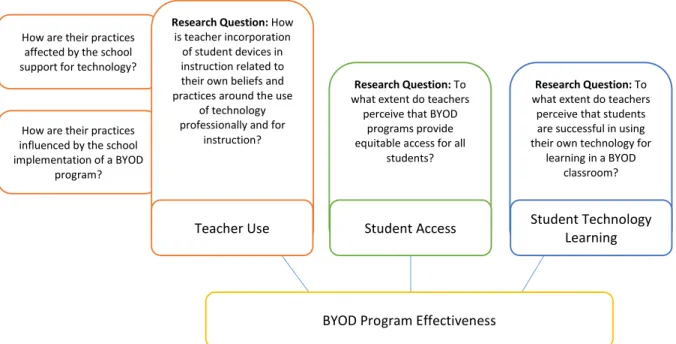
discussion of the findings. In considering the success or failure of BYOD programs as well as critical issues that evolve in the implementation process, I propose a framework to explore three overlapping dimensions (Figure 3).
Framework Dimensions:
1: Teachers’ use of digital technology for their professional work and for instruction. 2: Student access to digital technology.
Figure 3. Conceptual framework dimensions’ relationship to BYOD program effectiveness.
The relevant literature that provides support for each framework dimension is organized in the following sections.
Dimension 1: Teachers’ Use of Digital Technology
Figure 4. Dimension 1: Teachers’ use of digital technology.
Teacher use of digital technology for instructional and professional uses is affected by their beliefs and barriers that they encounter when trying to use technology for these purposes. Beliefs can be changed with effective professional development. This section on teachers’ use of digital technology will review literature that examines (a) teacher beliefs, (b) teacher professional development, and (c) barriers teachers face when using technology in schools.
Teacher beliefs. In classrooms that become BYOD classrooms, teacher beliefs about technology
and pedagogy may tend to guide the way teachers integrate the devices in their instructional practice and the extent they allow students to use them (Churchill, 2006; Petko, 2012; Voogt, 2010). However, computers and technology offer many ways that teachers with various pedagogical beliefs can use the technology with their students in ways consistent with their own beliefs (Tondeur et al., 2008). Teachers may choose to supplement, extend, or morph the curriculum, depending on their beliefs (Ertmer, 1999; Ertmer, Ottenbreit-Leftwich, Sadik, Sendurur, & Sendurur, 2012). Supplementing happens when
teachers use the technology to replace an existing activity, such as replacing math worksheets with a
Teacher Use Student Access Student Technology Learning
BYOD Program Effectiveness
Teacher Use Student Access Student Technology Learning
software program that drills students in math. Extension happens when a teacher has students use the technology to bring extra information, such as external data sets, into the classroom while still following the curriculum. Morphing happens when the teacher transforms the curriculum to take advantage of the additional affordances of the technology.
Students benefit from collaborating, from engaging in authentic environments, and from being engaged in their own learning (Voogt et al., 2011), which, when implemented in a classroom, frames constructivist pedagogical practice. In a constructivist practice, students collaborate, create, and solve authentic problems together, and hence construct their own knowledge (Becker & Riel, 2000). From earlier research on computers in classrooms, teachers who use computers in the classroom often change to a more constructivist pedagogical practice over time and teachers who transition to constructivist beliefs tend to also be effective computer users (Tondeur et al., 2008). Teachers who “experiment, implement, and refine” the ways they use technology with students also appeared to engage in more student-centered practices and more authentic work (Ertmer et al., 2012, p. 431).
Having access to technology is not enough to change a teacher’s beliefs to reflect more
constructivist attitudes (Windschitl & Sahl, 2002). Furthermore, teachers’ confidence in their abilities to use technology is not indicative of constructivist beliefs or actions (Prestridge, 2012), as teachers tend use technology to support their existing beliefs about teaching (Ertmer et al., 2012). Even teachers who have student centered beliefs about teaching may not use technology in the classroom in a way that exhibits those beliefs as the teachers may have barriers that make it difficult for them to use technology to support their beliefs (Sandholtz et al., 1997). Limited access is one barrier that may keep teachers from using technology to support their beliefs (Ertmer et al., 2012).
Teachers who voluntarily implement technology in their classrooms are also more likely to be willing to change their approach to effectively incorporate technology, and are more likely to be
professionally engaged and more collaborative teachers (Riel & Becker, 2008). These teachers may prove to be very effective in leading BYOD implementation in their schools.
Furthermore, Tondeur et al. (2008) found that not only do teacher beliefs affect and guide teacher technology use in the classroom, but that teachers who score high in both constructivist beliefs and teacher-directed (traditionalist beliefs) tend to use technology more with students. The authors speculated that this might be due to teachers having a wider range of beliefs to draw from.
Teachers can report technology use on a survey and they might all agree with each other that they are using that particular technology, but how they are using the technology can vary widely, with some potentially barely using the technology and others innovating uses for the technology (Hall, 2010). Even the concept of use varies, with one possibly apocryphal story relating that when personal
computers were first introduced to a group of ten university faculty members with the request to “explore ways to use them” an art department faculty member proceeded to disassemble the machine and hang it as a mobile (Hall, 2010, p. 238).
With students, teachers in the same school can use the available technology resources for quite different approaches, from replacement of existing activities, such as using laptop computers to word process assignments rather than hand writing, to extending and changing the curriculum by trying to integrate the technology into all lessons and activities (Donovan et al., 2007). Similarly, one teacher in a BYOD school may do little integration with the technology even though students have it with them, and another may be pushing the limits of all the students’ devices and asking students to bring in more devices if they have them. These differing approaches also affect opportunity equity for students in those classes.
Technology integration in the classroom is an innovation and BYOD is one manifestation of that innovation. The way in which innovations are recognized and adopted by more people or organizations over time is diffusion of innovation. Diffusion of innovation, Rogers (2003) is usually illustrated with an
S-shaped curve that shows total innovation adoption as a function of time. The curve is S-S-shaped, in that a new innovation is first taken up by innovators, then early adopters. During this beginning period, there is only limited diffusion of the innovation over time (the bottom of the S). As time goes on and the innovation diffuses, adoption reaches a critical point where diffusion becomes much more rapid as the majority of potential users adopt the (the rising spine of the S). As innovation adoption approaches saturation, the diffusion rate decreases, yielding an almost horizontal diffusion curve (the top of the S) as laggards slowly adopt the innovation. At the top of the S curve, the innovation is relatively stable until it is replaced by a new innovation. This classic innovation diffusion curve was developed around
innovations that changed little as they diffused.
Technology diffusion is different from the classic concept of diffusion in that technology is an umbrella term that encompasses numerous innovations. As the capabilities inherent in technology change, new innovations can arise at any time and interrupt or supplant that adoption of another technological innovation (Hall, 2010). BYOD, where students bring their own technology to school, is an innovation in itself, but the very devices that students may bring were innovations at one time, e.g., smart phones, laptops, iPads. During a BYOD implementation, students may arrive with a new
innovative device at any time that has sufficiently new and improved affordances that it disrupts how existing devices are used in the classroom. The possible effect is that a new innovation adoption cycle starts in the class or in the school.
Teacher professional development. Teacher professional development can help teachers
develop skills using digital technologies and improving teacher knowledge of technology use can improve their ability to integrate the technology in the classroom (Harris & Hofer, 2011). However, the update model of professional development, where the goal is to update teachers with the latest information in their field, is only minimally effective (Nowlen, 1988) and professional development
opportunities that are focused on showing teachers how to use various technology tools also have only limited effectiveness (Harris, Mishra, & Koehler, 2009).
A BYOD environment may be sufficiently different from a teacher’s existing environment that making full use of that environment may require teachers to change their beliefs and practice. For example, teachers who decide to allow students to use their personal devices in class may find their beliefs about teaching content challenged when their students can now just search for facts on the Internet.
Prior research suggested several areas professional development should address to help teachers change their practice: help teachers develop expertise in their subject as well as in the pedagogy of their subject; embed actual classroom examples; embed the professional development within teacher practice rather than as a demonstration; help teachers own their practice by developing collaboration with experts and peers; do so in the context of teacher professional and pedagogical objectives; and provide support and professional development over time rather than as a “drive by” (Voogt et al., 2011, p. 1235). This suggests that professional development involving BYOD, if teachers are to change practice, requires time, resources, and support. Just as having access to technology does not alone change a teacher’s belief to reflect more constructivist attitudes (Windschitl & Sahl, 2002), just having students bring their own devices does not mean that teachers will incorporate the devices in their practice.
Self-reflection is important in helping teachers change their lessons in the short term and change their teaching in the long term. Self-reflection can change a teacher’s practice as such reflection affects beliefs that guide tactics and strategy (Hall & Smith, 2006). This implies that professional
development opportunities for teachers implementing BYOD programs should incorporate reflection. Incorporation may include helping teachers who are not familiar or comfortable with reflection develop reflection actions that work for them, and creating time that is specifically identified as being for
reflection. Action research, where teachers purposefully identify an issue, then follow a defined process that incorporates reflection, can be an effective approach for affecting teacher beliefs (The National Academy of Education Committee on Teacher Education, Darling-Hammond, & Baratz-Snowden, 2007). Expanding teacher’s actions from reflection to action research, where teachers problematize their BYOD implementation, may not only affect the beliefs of the teachers participating, but bring wider benefits to the schools as action research
However, offering professional development to help teachers change their beliefs and practice does not mean teachers will take advantage of the professional development opportunity. Even when workshops are held during school hours, it is not easy to get teachers to attend (Rosaen & Hobson, 2007), which is another barrier to overcome.
How teachers learn to integrate technology in a BYOD classroom has not been the subject of much research. One way of examining teacher integration of technology is to examine teacher lesson plans and map their lesson plans against some measure of technology integration, such as the Technology Integration Matrix (Cavanaugh & Dawson, 2010). However, even when lesson plans are collected, experienced teachers write much less than novice teachers as experienced teachers tend to do more planning in the head yet are much better at anticipating key problems in either student understanding or student behavior; having a mental plan of how to address those problems when they do occur; and modifying a lesson on the fly to address those problems (Hall & Smith, 2006).
As a result, written lesson plans might not reveal the depth of integration that actually happens in the classroom, and classroom observations or interviews may yield more robust results (Cavanaugh, Dawson, & Ritzhaupt, 2011). Formal written plans can even have the undesirable effect of stifling creativity as teachers tend to focus more on following the plan instead of adjusting the plan based on how effective it appears to be with the students (Hall & Smith, 2006).
With the innovation of BYOD, using lessons plans as a proxy for how teachers incorporate the devices into their lessons may yield inaccurate results, and asking for teachers to create formal written plans may tend to reduce teacher innovation during the lesson, again yielding research results that do not match practice. Administrators working with teachers to implement a BYOD program should consider the affect that asking for written lesson plans may have on the innovation; they may
inadvertently create a barrier. Research on BYOD implementation using teacher lesson plans my only capture the planning and miss the richness that occurs in the classroom.
Implementing a BYOD program, or any new program of teaching, typically requires schools to determine ways to create effective professional learning opportunities for teachers. As with other professions, teachers in a school are in a local community of practice where professional learning occurs. However, learning that happens in a community of practice is not automatically effective, or even useful (Lave & Wenger, 1991). Learning communities—intentional collaborative communities of the educators in a school—focus on continuous improvement of teacher practice in service of the principle that all students will learn (Lieberman, 2009). Schools can help the communities of practice potentially become more effective by helping the teachers adopt some of the benefits of a learning community.
In one approach to professional development, Koehler and Mishra (2005) proposed a form of learning communities, called communities of designers, where teachers would employ the principals of design as means of professional development (Mishra, Koehler, & Zhao, 2007a). When working as communities of designers, teachers identify authentic pedagogical problems, then develop and
implement solutions (products) to solve these authentic problems. Design is the interwoven interactions among the participants, their tools, the goal, and the context in which they are creating and producing these products (Anagnostopoulos, Brass, & Subedi, 2007). Koehler and Mishra (2005) referred to the process as learning technology by design.
When a design effort begins, members of the community of designers usually know little about the technology they will need to create the product. Instead, effective design requires technology support personnel available when teachers need help with unfamiliar tasks, such as video streaming or creating a database to support learning. The goal of the technology support personnel is to help the teachers do the tasks, not do the tasks for the teachers. If the technology support personnel transition from providing support and assistance to actually doing part of the work, the teachers fail to learn the everyday part of what they are working on. Instead, technology support personnel should work on technical aspects, such as configuring video streaming, and only consulting on other tasks (Burns & Koziol, 2007). In BYOD environments, such technology support might include solving networking issues or configuring the databases in the school to automatically enroll students in an online collaborative system that teachers select.
Teachers who engage in design are using their own environments and own practice as a test bed for becoming better teachers as they design products for use with their students. Such design is not a lonely process, but also involves teachers working and exploring with each other, which begins to approach knowledge of practice, where teachers use what they have learned from experts outside the field of teaching, master teachers, and investigating their practice with other teachers in order to improve their own practice (Cochran-Smith & Lytle, 1999). However, in professional development where teachers are engaged in design, providing a structure or framework to help guide the teachers, who are also now learners, through the design is more helpful than just turning them loose on an assignment (Voogt et al., 2011). In a BYOD environment, such a framework might start with teachers choosing something they want to investigate that would be enabled by students having devices in their class. (An example might be in a humanities class where a teacher wants to focus on writing and peer editing where the teacher or peers can look at the work in progress at any time and comment on it.) The framework then has a process where teachers get the technology support they need to design a