Boca Raton, FL 33487‑2742
© 2009 by Taylor & Francis Group, LLC
Auerbach is an imprint of Taylor & Francis Group, an Informa business No claim to original U.S. Government works
Printed in the United States of America on acid‑free paper 10 9 8 7 6 5 4 3 2 1
International Standard Book Number‑13: 978‑1‑4200‑8073‑5 (Hardcover)
This book contains information obtained from authentic and highly regarded sources. Reasonable efforts have been made to publish reliable data and information, but the author and publisher can‑ not assume responsibility for the validity of all materials or the consequences of their use. The authors and publishers have attempted to trace the copyright holders of all material reproduced in this publication and apologize to copyright holders if permission to publish in this form has not been obtained. If any copyright material has not been acknowledged please write and let us know so we may rectify in any future reprint.
Except as permitted under U.S. Copyright Law, no part of this book may be reprinted, reproduced, transmitted, or utilized in any form by any electronic, mechanical, or other means, now known or hereafter invented, including photocopying, microfilming, and recording, or in any information storage or retrieval system, without written permission from the publishers.
For permission to photocopy or use material electronically from this work, please access www.copy‑ right.com (http://www.copyright.com/) or contact the Copyright Clearance Center, Inc. (CCC), 222 Rosewood Drive, Danvers, MA 01923, 978‑750‑8400. CCC is a not‑for‑profit organization that pro‑ vides licenses and registration for a variety of users. For organizations that have been granted a photocopy license by the CCC, a separate system of payment has been arranged.
Trademark Notice: Product or corporate names may be trademarks or registered trademarks, and are used only for identification and explanation without intent to infringe.
Library of Congress Cataloging‑in‑Publication Data
Lewis, William E.
Software testing and continuous quality improvement / William E. Lewis. ‑‑ 3rd ed.
p. cm.
Includes bibliographical references and index. ISBN 978‑1‑4200‑8073‑5 (alk. paper)
1. Computer software‑‑Testing. 2. Computer software‑‑Quality control. I. Title.
QA76.76.T48L495 2008
005.1’4‑‑dc22 2008046201
Visit the Taylor & Francis Web site at
http://www.taylorandfrancis.com
and the Auerbach Web site at
v
Acknowledgments ...xxi
Introduction ... xxiii
About the Author ... xxv
1
SeCtion Software Quality in PerSPeCtive
1
A Brief History of Software Testing ...3Historical Software Testing and Development Parallels ...6
Extreme Programming...8
Evolution of Automated Testing Tools ...8
Static Capture/Replay Tools (without Scripting Language) ...10
Static Capture/Replay Tools (with Scripting Language)...10
Variable Capture/Replay Tools ...10
2
Quality Assurance Framework ...13What Is Quality? ...13
Prevention versus Detection ...14
Verification versus Validation ...15
Software Quality Assurance ...16
Components of Quality Assurance ...17
Software Testing ...17
Quality Control ...18
Software Configuration Management ...19
Elements of Software Configuration Management ...20
Software Quality Assurance Plan ...23
Steps to Develop and Implement a Software Quality Assurance Plan ...23
Step 1: Document the Plan ...23
Step 2: Obtain Management Acceptance ...25
Step 4: Plan for Implementation of the SQA Plan...26
Step 5: Execute the SQA Plan ...26
Quality Standards ...26
Sarbanes–Oxley ...26
ISO9000...29
Capability Maturity Model (CMM) ...29
Level 1: Initial ...30
Level 2: Repeatable ...31
Level 3: Defined ...31
Level 4: Managed ...32
Level 5: Optimized ...32
People CMM ...33
CMMI ...33
Malcolm Baldrige National Quality Award ... 34
Notes ...37
3
Overview of Testing Techniques...39Black-Box Testing (Functional)...39
White-Box Testing (Structural) ... 40
Gray-Box Testing (Functional and Structural) ...41
Manual versus Automated Testing ...41
Static versus Dynamic Testing ...41
Taxonomy of Software Testing Techniques ... 42
4
Transforming Requirements to Testable Test Cases ...51Introduction ...51
Software Requirements as the Basis of Testing ...51
Requirement Quality Factors ...52
Understandable ...52
Necessary ...53
Modifiable ...53
Nonredundant ...53
Terse ...54
Testable ...54
Traceable ...54
Within Scope ...54
Numerical Method for Evaluating Requirement Quality ...54
Process for Creating Test Cases from Good Requirements ...55
Step 1: Review the Requirements ...55
Step 2: Write a Test Plan ...58
Step 3: Identify the Test Suite ...58
Step 4: Name the Test Cases ...59
Step 6: Create the Test Cases ...62
Step 7: Review the Test Cases ...63
Transforming Use Cases to Test Cases ... 64
Step 1: Draw a Use Case Diagram ... 64
Step 2: Write the Detailed Use Case Text ... 64
Step 3: Identify Use Case Scenarios ... 66
Step 4: Generating the Test Cases ... 66
Step 5: Generating Test Data ...68
Summary ...68
What to Do When Requirements Are Nonexistent or Poor? ...68
Ad Hoc Testing ...68
The Art of Ad Hoc Testing ...68
Advantages and Disadvantages of Ad Hoc Testing ...71
Exploratory Testing ...72
The Art of Exploratory Testing ...72
Exploratory Testing Process ...72
Advantages and Disadvantages of Exploratory Testing ...73
5
Quality through Continuous Improvement Process ...75Contribution of Edward Deming...75
Role of Statistical Methods ...76
Cause-and-Effect Diagram ...76
Flowchart...76
Pareto Chart ...76
Run Chart ... 77
Histogram ... 77
Scatter Diagram ... 77
Control Chart ... 77
Deming’s 14 Quality Principles ... 77
Point 1: Create Constancy of Purpose... 77
Point 2: Adopt the New Philosophy ...78
Point 3: Cease Dependence on Mass Inspection ...78
Point 4: End the Practice of Awarding Business on Price Tag Alone ...79
Point 5: Improve Constantly and Ceaselessly the System of Production and Service ...79
Point 6: Institute Training and Retraining ...79
Point 7: Institute Leadership ...80
Point 8: Drive Out Fear ...80
Point 9: Break Down Barriers between Staff Areas ...81
Point 10: Eliminate Slogans, Exhortations, and Targets for the Workforce ...81
Point 12: Remove Barriers to Pride of Workmanship ...82
Point 13: Institute a Vigorous Program of Education and Retraining ...82
Point 14: Take Action to Accomplish the Transformation ...82
Continuous Improvement through the Plan, Do, Check, Act Process ...83
Going around the PDCA Circle ... 84
2
SeCtion waterfall teSting review
6
Overview ...87Waterfall Development Methodology ...87
Continuous Improvement “Phased” Approach ...88
Psychology of Life-Cycle Testing ...89
Software Testing as a Continuous Improvement Process...89
The Testing Bible: Software Test Plan ...92
Major Steps in Developing a Test Plan ...93
Step 1: Define the Test Objectives ...93
Step 2: Develop the Test Approach ...93
Step 3: Define the Test Environment ...95
Step 4: Develop the Test Specifications ...95
Step 5: Schedule the Test ...95
Step 6: Review and Approve the Test Plan ...95
Components of a Test Plan ...95
Technical Reviews as a Continuous Improvement Process ...96
Motivation for Technical Reviews ...101
Types of Reviews ...101
Structured Walkthroughs ...101
Inspections ...102
Participant Roles ...103
Steps for an Effective Review ...105
Step 1: Plan for the Review Process ...105
Step 2: Schedule the Review ...105
Step 3: Develop the Review Agenda ...106
Step 4: Create a Review Report...106
7
Static Testing the Requirements ...107Testing the Requirements with Ambiguity Reviews ...108
Testing the Requirements with Technical Reviews ...109
Inspections and Walkthroughs ...109
Checklists ...109
Methodology Checklist ...109
Requirements Traceability Matrix ...110
8
Static Testing the Logical Design ...115Data Model, Process Model, and the Linkage ... 115
Testing the Logical Design with Technical Reviews ... 117
Refining the System/Acceptance Test Plan... 118
9
Static Testing the Physical Design...121Testing the Physical Design with Technical Reviews ...121
Creating Integration Test Cases ...122
Methodology for Integration Testing ...123
Step 1: Identify Unit Interfaces ...123
Step 2: Reconcile Interfaces for Completeness ...124
Step 3: Create Integration Test Conditions ...124
Step 4: Evaluate the Completeness of Integration Test Conditions ...124
10
Static Testing the Program Unit Design ...127Testing the Program Unit Design with Technical Reviews ...127
Sequence ...127
Selection ...128
Iteration ...128
Creating Unit Test Cases ...128
11
Static Testing and Dynamic Testing the Code ...131Testing Coding with Technical Reviews ...131
Executing the Test Plan ...132
Unit Testing ...133
Integration Testing ...134
System Testing ...134
Acceptance Testing ...134
Defect Recording ...135
3
SeCtion SPiral (agile) Software teSting
Methodology: Plan, do, CheCk, aCt
12
Development Methodology Overview ...139Limitations of Life-Cycle Development ...139
The Client/Server Challenge ...140
Psychology of Client/Server Spiral Testing ...141
The New School of Thought ...141
Tester/Developer Perceptions ...142
Project Goal: Integrate QA and Development...143
Iterative/Spiral Development Methodology ...144
Role of JADs ...146
Methodology for Developing Prototypes ...148
Step 1: Develop the Prototype ...148
Step 2: Demonstrate Prototypes to Management ...149
Step 3: Demonstrate Prototype to Users ...150
Step 4: Revise and Finalize Specifications ...150
Step 5: Develop the Production System ... 151
Continuous Improvement “Spiral” Testing Approach ... 151
13
Information Gathering (Plan) ...155Step 1: Prepare for the Interview ...156
Task 1: Identify the Participants ...156
Task 2: Define the Agenda ...156
Step 2: Conduct the Interview ...156
Task 1: Understand the Project ...158
Task 2: Understand the Project Objectives ...159
Task 3: Understand the Project Status ...160
Task 4: Understand the Project Plans ...160
Task 5: Understand the Project Development Methodology ...161
Task 6: Identify the High-Level Business Requirements ...161
Task 7: Perform Risk Analysis...162
Computer Risk Analysis ...163
Method 1: Judgment and Instinct ...163
Method 2: Dollar Estimation ...163
Method 3: Identifying and Weighting Risk Attributes ...164
Step 3: Summarize the Findings ...165
Task 1: Summarize the Interview ...165
Task 2: Confirm the Interview Findings ...165
14
Test Planning (Plan) ...167Step 1: Build a Test Plan ...168
Task 1: Prepare an Introduction ...168
Task 2: Define the High-Level Functional Requirements (in Scope) ...170
Task 3: Identify Manual/Automated Test Types ...171
Task 4: Identify the Test Exit Criteria ...171
Task 5: Establish Regression Test Strategy ...172
Task 6: Define the Test Deliverables ...174
Task 7: Organize the Test Team ...175
Task 8: Establish a Test Environment ...177
Task 9: Define the Dependencies ...177
Task 10: Create a Test Schedule ...178
Task 11: Select the Test Tools ...178
Task 13: Establish Change Request Procedures ...184
Task 14: Establish Version Control Procedures ...185
Task 15: Define Configuration Build Procedures ...186
Task 16: Define Project Issue Resolution Procedures ...186
Task 17: Establish Reporting Procedures ...187
Task 18: Define Approval Procedures ...187
Step 2: Define the Metric Objectives ...188
Task 1: Define the Metrics ...188
Task 2: Define the Metric Points ...189
Step 3: Review/Approve the Plan ...194
Task 1: Schedule/Conduct the Review ...194
Task 2: Obtain Approvals ...194
15
Test Case Design (Do) ...195Step 1: Design Function Tests ...195
Task 1: Refine the Functional Test Requirements ...195
Task 2: Build a Function/Test Matrix ... 200
Step 2: Design GUI Tests ... 200
Ten Guidelines for Good GUI Design ... 200
Task 1: Identify the Application GUI Components ...202
Task 2: Define the GUI Tests ...202
Step 3: Define the System/Acceptance Tests ...203
Task 1: Identify Potential System Tests ...203
Task 2: Design System Fragment Tests ...205
Task 3: Identify Potential Acceptance Tests ... 206
Step 4: Review/Approve Design ... 206
Task 1: Schedule/Prepare for Review ... 206
Task 2: Obtain Approvals ... 206
16
Test Development (Do)...209Step 1: Develop Test Scripts ...209
Task 1: Script the Manual/Automated GUI/Function Tests ...209
Task 2: Script the Manual/Automated System Fragment Tests ...210
Step 2: Review/Approve Test Development ...210
Task 1: Schedule/Prepare for Review ...210
Task 2: Obtain Approvals ...212
17
Test Coverage through Traceability ...213Use Cases and Traceability ...214
Summary ...216
18
Test Execution/Evaluation (Do/Check)...217Step 1: Setup and Testing ...217
Task 2: Execute the Manual/Automated New Spiral Tests ...219
Task 3: Document the Spiral Test Defects ...219
Step 2: Evaluation ...219
Task 1: Analyze the Metrics ...219
Step 3: Publish Interim Report ... 220
Task 1: Refine the Test Schedule ... 220
Task 2: Identify Requirement Changes ...221
19
Prepare for the Next Spiral (Act) ...223Step 1: Refine the Tests ...223
Task 1: Update the Function/GUI Tests ...223
Task 2: Update the System Fragment Tests ...225
Task 3: Update the Acceptance Tests ...225
Step 2: Reassess the Team, Procedures, and Test Environment ...225
Task 1: Evaluate the Test Team ...225
Task 2: Review the Test Control Procedures ... 226
Task 3: Update the Test Environment ...227
Step 3: Publish Interim Test Report ...227
Task 1: Publish the Metric Graphics ...227
Test Case Execution Status ...227
Defect Gap Analysis ... 228
Defect Severity Status ... 228
Test Burnout Tracking ... 228
20
Conduct the System Test (Act) ...233Step 1: Complete System Test Plan ...233
Task 1: Finalize the System Test Types ...233
Task 2: Finalize System Test Schedule ...235
Task 3: Organize the System Test Team ...235
Task 4: Establish the System Test Environment ...238
Task 5: Install the System Test Tools ...239
Step 2: Complete System Test Cases ...239
Task 1: Design/Script the Performance Tests ...239
Monitoring Approach ...240
Probe Approach ...241
Test Drivers ...241
Task 2: Design/Script the Security Tests ...242
A Security Design Strategy ...242
Task 3: Design/Script the Volume Tests ...243
Task 4: Design/Script the Stress Tests ...243
Task 5: Design/Script the Compatibility Tests ... 244
Task 6: Design/Script the Conversion Tests ...245
Task 8: Design/Script the Documentation Tests ... 246
Task 9: Design/Script the Backup Tests ...247
Task 10: Design/Script the Recovery Tests ...248
Task 11: Design/Script the Installation Tests ...248
Task 12: Design/Script Other System Test Types...249
Step 3: Review/Approve System Tests ...250
Task 1: Schedule/Conduct the Review ...250
Task 2: Obtain Approvals ...250
Step 4: Execute the System Tests ...251
Task 1: Regression Test the System Fixes ...251
Task 2: Execute the New System Tests ...251
Task 3: Document the System Defects ...251
21
Conduct Acceptance Testing ...253Step 1: Complete Acceptance Test Planning ...253
Task 1: Finalize the Acceptance Test Types ...253
Task 2: Finalize the Acceptance Test Schedule ...255
Task 3: Organize the Acceptance Test Team ...255
Task 4: Establish the Acceptance Test Environment ...256
Task 5: Install Acceptance Test Tools ...256
Step 2: Complete Acceptance Test Cases ...256
Task 1: Identify the System-Level Test Cases ...257
Task 2: Design/Script Additional Acceptance Tests ...257
Step 3: Review/Approve Acceptance Test Plan ...257
Task 1: Schedule/Conduct the Review ...257
Task 2: Obtain Approvals ...258
Step 4: Execute the Acceptance Tests ...258
Task 1: Regression Test the Acceptance Fixes ...258
Task 2: Execute the New Acceptance Tests ...259
Task 3: Document the Acceptance Defects ...259
22
Summarize/Report Test Results ...261Step 1: Perform Data Reduction ...261
Task 1: Ensure All Tests Were Executed/Resolved ...261
Task 2: Consolidate Test Defects by Test Number ...261
Task 3: Post Remaining Defects to a Matrix ...262
Step 2: Prepare Final Test Report ...263
Task 1: Prepare the Project Overview ...263
Task 2: Summarize the Test Activities ...263
Task 3: Analyze/Create Metric Graphics ...263
Defects by Function ... 264
Defects by Tester ... 264
Defect Severity Status ... 264
Test Burnout Tracking ... 264
Root Cause Analysis ... 266
Defects by How Found ... 266
Defects by Who Found ...267
Functions Tested and Not Tested ...267
System Testing Defect Types ... 268
Acceptance Testing Defect Types ... 268
Task 4: Develop Findings/Recommendations ...269
Step 3: Review/Approve the Final Test Report ...272
Task 1: Schedule/Conduct the Review ...272
Task 2: Obtain Approvals ...273
Task 3: Publish the Final Test Report ...273
4
SeCtion ProjeCt ManageMent Methodology
23
The Project Management Framework ...279The Project Framework ...279
Product Quality and Project Quality ...279
Components of the Project Framework ... 280
The Project Framework and Continuous Quality Improvement... 280
The Project Framework Phases ...281
Initiation Phase ...281
Planning Phase ...282
Executing, Monitoring, and Controlling Phases ...282
Implement Phase ...283
Scoping the Project to Ensure Product Quality ...283
Product Scope and Project Scope ...283
The Project Charter... 284
The Scope Statement ...285
The Role of the Project Manager in Quality Management ...285
The Role of the Test Manager in Quality Management ... 286
Analyze the Requirements ... 286
Perform a Gap Analysis ... 286
Avoid Duplication and Repetition ...287
Define the Test Data ...287
Validate the Test Environment ...287
Analyze the Test Results ...288
Deliver the Quality ...288
Advice for the Test Manager ...288
Request Help from Others ...288
Communicate Issues as They Arise ...288
Learn the New Testing Technologies and Tools ...289
Improve the Process ...289
Create a Knowledge Base ...289
The Benefits of the Quality Project Management and the Project Framework ...290
24
Project Quality Management ...291Project Quality Management Processes ...291
Quality Planning ...292
Identifying the High-Level Project Activities ...292
Estimating the Test Work Effort ...292
Test Planning ...293
Effort Estimation: Model Project ...294
Quality Standards ...296
25
The Defect Management Process ...301Quality Control and Defect Management ...301
Defect Discovery and Classification ...301
Defect Priority ...302
Defect Category ...303
Defect Tracking ...303
Defect Reporting ... 304
Defect Summary ... 304
Defect Meetings...305
Defect Metrics ...305
Quality Standards ... 306
26
Integrated Testing and Development ...309Quality Control and Integrated Testing ...309
Integrated Testing ...309
Step 1: Organize the Test Team ...310
Step 2: Identify the Tasks to Integrate...310
Step 3: Customize Test Steps and Tasks ... 311
Step 4: Select Integration Points ... 311
Step 5: Modify the Development Methodology ...312
Step 6: Test Methodology Training ...312
Step 7: Incorporate Defect Recording ...313
The Integrated Team ...313
27
Test Management Constraints ...315Organizational Architecture ... 315
Traits of a Well-Established Quality Organization ... 315
Division of Responsibilities ...316
Using the Project Framework Where No Quality Infrastructure Exists ...317
Ad Hoc Testing and the Project Framework ...318
Using a Traceability/Validation Matrix ...319
Reporting the Progress ...319
5
SeCtion eMerging SPeCialized areaS in teSting
28
Test Process and Automation Assessment ...323Test Process Assessment ...323
Process Evaluation Methodology ...324
Step 1: Identify the Key Elements ...324
Step 2: Gather and Analyze the Information ...325
Step 3: Analyze Test Maturity ...326
The Requirements Definition Maturity ...326
Test Strategy Maturity ...327
Test Effort Estimation Maturity ...328
Test Design and Execution Maturity ...328
Regression Testing Maturity ...329
Test Automation Maturity ...329
Step 4: Document and Present Findings ...330
Test Automation Assessment ...330
Identify the Applications to Automate ...332
Identify the Best Test Automation Tool ...332
Test Scripting Approach ...333
Test Execution Approach ...333
Test Script Maintenance ...334
Test Automation Framework...334
Basic Features of an Automation Framework ...335
Define the Folder Structure ...335
Modularize Scripts/Test Data to Increase Robustness ...336
Reuse Generic Functions and Application-Specific Function Libraries ...336
Develop Scripting Guidelines and Review Checklists ...336
Define Error Handling and Recovery Functions ...337
Define the Maintenance Process ...337
Standard Automation Frameworks ...337
Data-Driven Framework ...338
Modular Framework ...338
Keyword-Driven Framework ...339
Hybrid Framework ...341
29
Nonfunctional Testing ... 343Load Testing ... 344
Stress Testing ... 344
Volume Testing ... 344
Performance Monitoring ... 344
Performance Testing Approach ... 344
Knowledge Acquisition Process ...345
Test Development ... 346
Performance Deliverables ...350
Security Testing ...351
Step 1: Identifying the Scope of Security Testing ...352
Step 2: Test Case Generation and Execution...353
Types of Security Testing ...353
Network Scanning ...353
Purpose ...354
Tools ...354
Approach ...354
Vulnerability Scanning ...354
Purpose ...355
Tools ...355
Approach ...355
Password Cracking ...355
Tools ...356
Log Reviews ...356
Approach ...356
File Integrity Checkers ...356
Purpose ...356
Tools ...357
Virus Detectors ...357
Tools ...357
Approach ...357
Penetration Testing ...357
Purpose ...358
Approach ...358
Usability Testing ...358
Goals of Usability Testing ...359
Approach and Execution ... 360
Guidelines for Usability Testing ...361
Accessibility Testing and Section 508 ...361
Compliance Testing ... 364
30
SOA Testing ...36731
Agile Testing ...371Agile User Stories Contrasted to Formal Requirements ...371
What Is a User Story? ...372
Agile Planning ...372
Types of Agile Testing ...374
Compliance Testing ...375
32
Testing Center of Excellence ...377Industry Best Processes ...381
Testing Metrics ...381
Operating Model ...381
Test Automation Framework...382
Continuous Competency Development ...382
33
On-Site/Offshore Model ...383Step 1: Analysis ...384
Step 2: Determine the Economic Trade-Offs ...384
Step 3: Determine the Selection Criteria ...385
Project Management and Monitoring ...385
Outsourcing Methodology ...385
On-Site Activities...386
Offshore Activities ...387
Implementing the On-Site/Offshore Model ...388
Knowledge Transfer ...388
Detailed Design ...388
Milestone-Based Transfer ...388
Steady State ...389
Application Management...389
Prerequisites ...389
Relationship Model ...389
Standards ...391
Benefits of On-Site/Offshore Methodology ...392
On-Site/Offshore Model Challenges ...393
Out of Sight ...393
Establish Transparency ...394
Security Considerations ...394
Project Monitoring ...394
Management Overhead ...394
Cultural Differences ...394
Software Licensing ...394
6
SeCtion Modern Software teSting toolS
34
Software Testing Trends ...399Automated Capture/Replay Testing Tools ...399
Test Case Builder Tools ... 400
Necessary and Sufficient Conditions ... 400
Test Data Generation Strategies ...401
Sampling from Production ...401
Starting from Scratch...402
Seeding the Data ...402
Generating Data Based on the Database ...403
A Cutting-Edge Test Case Generator Based on Requirements ... 404
35
Taxonomy of Software Testing Tools ... 409Testing Tool Selection Checklist ... 409
Commercial Vendor Tool Descriptions ...410
Open-Source Freeware Vendor Tools ...410
When You Should Consider Test Automation ...410
When You Should NOT Consider Test Automation ... 428
36
Methodology to Evaluate Automated Testing Tools ...431Step 1: Define Your Test Requirements ...431
Step 2: Set Tool Objectives ...432
Step 3a: Conduct Selection Activities for Informal Procurement ...432
Task 1: Develop the Acquisition Plan ...432
Task 2: Define Selection Criteria ...432
Task 3: Identify Candidate Tools ...433
Task 4: Conduct the Candidate Review ...433
Task 5: Score the Candidates ...433
Task 6: Select the Tool ... 434
Step 3b: Conduct Selection Activities for Formal Procurement ... 434
Task 1: Develop the Acquisition Plan ... 434
Task 2: Create the Technical Requirements Document ... 434
Task 3: Review Requirements ... 434
Task 4: Generate the Request for Proposal ... 434
Task 5: Solicit Proposals ...435
Task 6: Perform the Technical Evaluation ...435
Task 7: Select a Tool Source ...435
Step 4: Procure the Testing Tool ...436
Step 5: Create the Evaluation Plan ...436
Step 6: Create the Tool Manager’s Plan ...436
Step 7: Create the Training Plan ...437
Step 9: Perform the Acceptance Test ...437
Step 10: Conduct Orientation ...437
Step 11: Implement Modifications ...438
Step 12: Train Tool Users ...438
Step 13: Use the Tool in the Operating Environment ...438
Step 14: Write the Evaluation Report ...439
Step 15: Determine Whether Goals Have Been Met ...439
7
SeCtion aPPendiCeS
Appendix A: Spiral (Agile) Testing Methodology ... 443Appendix B: Software Quality Assurance Plan ...453
Appendix C: Requirements Specification ...455
Appendix D: Change Request Form ...457
Appendix E: Test Templates ...459
Appendix F: Checklists ...493
Appendix G: Software Testing Techniques ...557
Bibliography ...629
xxi I would like to express my sincere gratitude to Carol, my wife, who has demon-strated loving patience in the preparation of this third edition, and my mother and father, Joyce and Bill Lewis, whom I will never forget for their support.
I thank John Wyzalek, senior acquisitions editor at Auerbach Publications, for recognizing the importance of developing a third edition of this book. Gunasekaran Veerapillai was a technical contributor for “Emerging Specialized Areas in Testing” and David (Rusty) Dobbs was the technical contributor for “Project Management Methodology.” Both demonstrated an in-depth knowledge of software testing and project management, respectively.
xxiii Numerous textbooks address software testing in a structured development envi-ronment. By “structured” is meant a well-defined development cycle in which dis-cretely defined steps provide measurable outputs at each step. It is assumed that software testing activities are based on clearly defined requirements and software development standards, and that those standards are used to develop and imple-ment a plan for testing. Unfortunately, this is often not the case. Typically, testing is performed against changing, or even wrong, requirements.
This text aims to provide a quality framework for the software testing process in traditional structured as well as unstructured environments. The goal is to provide a continuous quality improvement approach to promote effective testing methods and provide tips, techniques, and alternatives from which the user can choose.
The basis of the continuous quality framework stems from Edward Deming’s quality principles. Deming was the pioneer in quality improvement, which helped turn Japanese manufacturing around. Deming’s principles are applied to software testing in the traditional “waterfall” and rapid application “spiral (or agile)” devel-opment (RAD) environments. The waterfall approach is one in which predefined sequential steps are followed with clearly defined requirements. In the spiral approach, these rigid sequential steps may, to varying degrees, be lacking or different.
Section 1, “Software Quality in Perspective,” reviews modern quality assur-ance principles and best practices. It provides the reader with a historical sketch of software testing, followed by a description of how to transform requirements to test cases when there are well-defined or not so well-defined requirements. Basic software testing techniques are discussed, followed by an introduction to Deming’s concept of quality through a continuous improvement process. The Plan, Do, Check, Act (PDCA) quality wheel is applied to the software testing process.
The Do step addresses how to design or execute the tests included in the test plan. A cookbook approach describes how to perform component, integration, and system acceptance testing in a spiral environment.
The Check step emphasizes the importance of metrics and test reporting. A test team must formally record the results of tests and relate them to the test plan and system objectives. A sample test report format is provided, along with several graphic techniques.
The Act step of the continuous improvement process provides guidelines for updating test cases and test scripts. In preparation for the next spiral, suggestions for improving the people, process, and technology dimensions are provided.
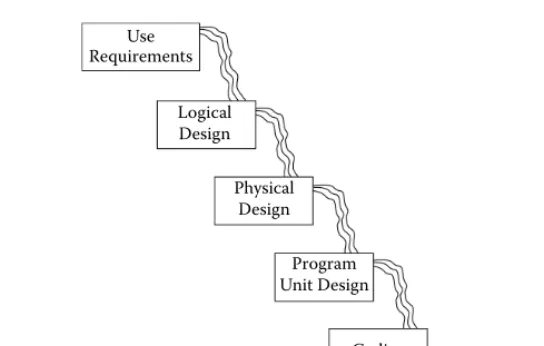
Section 2, “Waterfall Testing Review,” reviews the waterfall development meth-odology and describes how continuous quality improvement can be applied to the phased approach through technical reviews and software testing. The require-ments, logical design, physical design, program unit design, and coding phases are reviewed. The roles of technical reviews and software testing are applied to each. Finally, the psychology of software testing is discussed.
Section 3, “Spiral Software Testing Methodology,” contrasts the waterfall devel-opment methodology with the rapid application spiral environment from a techni-cal and psychologitechni-cal point of view. A spiral testing approach is suggested when the requirements are rapidly changing. A spiral methodology is provided, and broken down into parts, steps, and tasks, applying Deming’s continuous quality improve-ment process in the context of the PDCA quality wheel.
Section 4, “Project Management Methodology,” describes the practices and methods of software testing by describing basic test management processes and organizational approaches that achieve project quality. A Project Framework is out-lined to unite quality processes with project phases, and synchronize project quality management with the system, or software—the development approach.
Section 5, “Emerging Specialized Areas in Testing,” describes how modern software testing must view the whole target business holistically, assuring that the pieces of that business process interact according to customers’ expectations. The focus of this section is to discuss other forms of nonfunctional testing such as per-formance, usability, interoperability, etc. Also discussed are how to evaluate soft-ware testing processes, how to set up an automation framework, steps to implement Service Orientated Architecture (SOA) testing, the building blocks of a Testing Center of Excellence (COE), how to test in an Agile development environment, and how to evaluate on-site versus offshore alternatives.
xxv William E. Lewis holds a B.A. in mathematics and an M.S. in oper-ations research and has 38 years of experience in the computer indus-try. Currently, he is the founder, president, and CEO of Smartware Technologies, Inc., a quality assurance consulting firm that special-izes in software testing. He is the inventor of SmartTestTM, a
patent-pending software testing tool that creates optimized test cases/data based upon the requirements (see www.smartwaretechnologies.com for more information about the author).
He is a certified quality analyst (CQA) and certified software test engineer (CSTE) sponsored by the Quality Assurance Institute (QAI) of Orlando, Florida. Over the years, he has presented several papers to conferences. In 2004 he presented a paper to QAI’s Annual International Information Technology Quality
Conference, entitled “Cracking the Requirements/Test Barrier.” He also speaks at
meetings of the American Society for Quality and the Association of Information Technology Practitioners.
Mr. Lewis was a quality assurance manager for CitiGroup where he managed the testing group; documented all the software testing, quality assurance processes and procedures; actively participated in the CitiGroup CMM effort; and designed numerous WinRunner automation scripts.
Mr. Lewis was a senior technology engineer for Technology Builders, Inc., of Atlanta, where he trained and consulted in the requirements-based testing area, focusing on leading-edge testing methods and tools.
Lewis also worked for the Saudi Arabian Oil Company (Aramco) in Jeddah, Saudi Arabia, on an overseas contract assignment as a quality assurance consultant. His duties included full integration and system testing, and he served on the auto-mated tool selection committee and made recommendations to management. He also created software testing standards and procedures.
In 1998 Lewis retired from IBM after 28 years. His jobs included 12 years as a curriculum/course developer and instructor, and numerous years as a system pro-grammer/analyst and performance analyst. An overseas assignment included service in Seoul, Korea, where he was the software engineering curriculum manager for the Korean Advanced Institute of Science and Technology (KAIST), which is consid-ered the MIT of higher education in Korea. Another assignment was in Toronto at IBM Canada’s headquarters, where he was responsible for upgrading the corporate education program. In addition, he has traveled throughout the United States and to Rome, Amsterdam, Southampton, Hong Kong, and Sydney, teaching software development and quality assurance classes with a specialty in software testing.
After serving in the air force, he worked for Radiation, Inc., a space company in Melbourne, Florida, on a Nimbus B&D satellite contract as a real-time programmer.
Lewis’s first job was as a real-time programmer for General Electric and the Kennedy Space Center in Florida. He wrote down-link real-time programs to mon-itor and feedback Apollo Space Craft telemetry to the up-link computers. His first professional program was to sample the Apollo hydrogen tanks’ PSIs to trigger the hydrogen tanks to be emptied during a launch abort.
He has also taught at the university level for 5 years as an adjunct professor, publishing during that time a five-book series on computer problem solving.
For further information about the training and consulting services provided by Smartware Technologies, Inc., contact: [email protected].
technical Contributors
Gunasekaran (Guna) Veerapillai is a Certified Software Quality Analyst (CSQA) and Project Management Professional (PMP) from PMI USA. After 15 years of retail banking experience in Canara Bank, India, he moved to IT in 1995, and has managed the EDP Section at Bangalore. He has been working in various roles in the testing arena and has turned out several testing projects in the banking domain for various clients around the globe. He specializes in niche areas such as test process assessment and automation assessment. He has worked for compa-nies such as Thinksoft, HCL Technologies, and Covansys. He also completed the Certified Ethical Hacker certification from EC. He headed the testing division at the Bangalore unit of Covansys before moving to his current assignment.
apart from executing end-to-end test automation projects. He has contributed papers and presentations to international software testing conferences conducted by QAI, Swiss Testing Conference, ISQT, QSIT, Stickyminds.com. etc.
He dedicates his contribution in this book to his life partner, Manimala, who always supported and motivated him to reach the position where he is now. Guna can be reached at [email protected].
David D. Dobbs, a project management professional (PMP) and a ISTQB Certified Tester–Foundation Level (CTFL), draws on over 25 years of project management experience and quality management in the construction, software development, telecommunication, and information technology industries.
David managed construction projects as partner/president of Exterior Designs Landscape for fourteen years. During that time, his completed projects appeared in the Dallas Morning News and were featured by Dallas–Ft. Worth Home and
Gardens.
David began his career in technology in 1993 as a software test engineer for Aldus software products before moving to the telecommunication industry. During his telecommunication career, he progressed from a senior test engineer for SONET access and transmission craft tools to the senior manager of network validation infrastructure for Fujitsu Network Communications.
In 2002, David began teaching applied project management in academic and corporate settings. In the same year, he started developing the Agile Project Office approach to project management that integrates quality management methodolo-gies with Project Office architecture.
1
Software
Quality in
PerSPeCtive
The general view of software testing is that it is an activity to “find bugs.” The author believes the objectives of software testing are to qualify a software program’s quality by measuring its attributes and capabilities against expectations and appli-cable standards. Software testing also provides valuable information to the software development effort.
Software quality is something everyone wants. Managers know that they want high quality, software developers know they want to produce a quality product, and users insist that software work consistently and be reliable.
Many software quality groups develop software quality assurance plans, which are similar to test plans. However, a software quality assurance plan may include a variety of activities beyond those included in a test plan. Although the quality assurance plan encompasses the entire quality gamut, the test plan is one of the quality control tools of the quality assurance plan.
The objectives of this section are to:
Define quality and its cost. N
Differentiate quality prevention from quality detection. N
Differentiate verification from validation. N
Outline the components of quality assurance. N
Outline common testing techniques. N
Describe how the continuous improvement process can be instrumental in N
achieving quality.
3
a Brief history of
Software testing
Modern testing tools are becoming more and more advanced and user-friendly. The following describes how software testing activity has evolved, and is evolving, over time. This sets the perspective on where automated testing tools are going.
Software testing is the activity of running a series of dynamic executions of software programs after the software source code has been developed. It is per-formed to uncover and correct as many potential errors as possible before delivery to the customer. As pointed out earlier, software testing is still an “art.” It can be considered a risk management technique; the quality assurance technique, for example, represents the last defense to correct deviations from errors in the specifi-cation, design, or code.
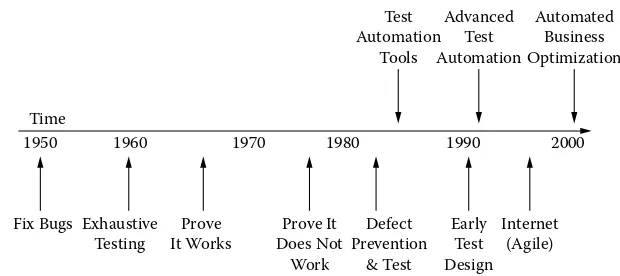
Throughout the history of software development, there have been many defi-nitions and advances in software testing. Figure 1.1 graphically illustrates these evolutions. In the 1950s, software testing was defined as “what programmers did to find bugs in their programs.” In the early 1960s the definition of testing underwent a revision. Consideration was given to exhaustive testing of the software in terms of the possible paths through the code, or total enumeration of the possible input data variations. It was noted that it was impossible to completely test an applica-tion because (1) the domain of program inputs is too large, (2) there are too many possible input paths, and (3) design and specification issues are difficult to test. Because of the foregoing points, exhaustive testing was discounted and found to be theoretically impossible.
defined as “what is done to demonstrate correctness of a program” or as “the process of establishing confidence that a program or system does what it is supposed to do” in the early 1970s. A short-lived computer science technique that was proposed dur-ing the specification, design, and implementation of a software system was software verification through “correctness proof.” Although this concept was theoretically promising, in practice it was too time consuming and insufficient. For simple tests, it was easy to show that the software “works” and prove that it will theoretically work. However, because most of the software was not tested using this approach, a large number of defects remained to be discovered during actual implementation. It was soon concluded that “proof of correctness” was an inefficient method of soft-ware testing. However, even today there is still a need for correctness demonstra-tions, such as acceptance testing, as described in various sections of this book.
In the late 1970s it was stated that testing is a process of executing a program with the intent of finding an error, not proving that it works. The new definition emphasized that a good test case is one that has a high probability of finding an as-yet-undiscovered error. A successful test is one that uncovers an as-as-yet-undiscovered error. This approach was the exact opposite of that followed up to this point.
The foregoing two definitions of testing (prove that it works versus prove that it does not work) present a “testing paradox” with two underlying and contradictory objectives:
1. To give confidence that the product is working well
2. To uncover errors in the software product before its delivery to the customer (or the next state of development)
If the first objective is to prove that a program works, it was determined that “we shall subconsciously be steered toward this goal; that is, we shall tend to select test data that have a low probability of causing the program to fail.”
1950 1960 1970 1980 1990 2000 Time
Test Automation
Tools
Advanced Test Automation
Automated Business Optimization
Internet (Agile) Early
Test Design Defect
Prevention & Test Process Prove It
Does Not Work Prove
It Works Exhaustive
[image:29.441.50.360.53.191.2]Testing Fix Bugs
If the second objective is to uncover errors in the software product, how can there be confidence that the product is working well, inasmuch as it was just proved that it is, in fact, not working! Today it has been widely accepted by good testers that the second objective is more productive than the first objective, for if one accepts the first one, the tester will subconsciously ignore defects trying to prove that a program works.
The following good testing principles were proposed:
A necessary part of a test case is a definition of the expected output or result. N
Programmers should avoid attempting to test their own programs. N
A programming organization should not test its own programs. N
Thoroughly inspect the results of each test. N
Test cases must be written for invalid and unexpected, as well as valid and N
expected, input conditions.
Examining a program to see if it does not do what it is supposed to do is only N
half the battle. The other half is seeing whether the program does what it is not supposed to do.
Avoid throwaway test cases unless the program is truly a throwaway program. N
Do not plan a testing effort under the tacit assumption that no errors will N
be found.
The probability of the existence of more errors in a section of a program is N
proportional to the number of errors already found in that section.
The 1980s saw the definition of testing extended to include defect prevention. Designing tests is one of the most effective bug prevention techniques known. It was suggested that a testing methodology was required, specifically, that testing must include reviews throughout the entire software development life cycle and that it should be a managed process. Promoted was the importance of testing not just a program but the requirements, design, code, tests themselves, and the program.
Unfortunately, even today, many software development organizations believe that software testing is a back-end activity.
In the mid-1980s, automated testing tools emerged to automate the manual testing effort to improve the efficiency and quality of the target application. It was anticipated that the computer could perform more tests of a program than a human could perform manually, and more reliably. These tools were initially fairly primitive and did not have advanced scripting language facilities (see the section, “Evolution of Automated Testing Tools,” later in this chapter for more details).
In the early 1990s the power of early test design was recognized. Testing was redefined to be “planning, design, building, maintaining, and executing tests and test environments.” This was a quality assurance perspective of testing that assumed that good testing is a managed process, a total life-cycle concern with testability.
Also, in the early 1990s, more advanced capture/replay testing tools offered rich scripting languages and reporting facilities. Test management tools helped manage all the artifacts from requirements and test design, to test scripts and test defects. Also, commercially available performance tools arrived to test system performance. These tools tested stress and load-tested the target system to determine their break-ing points. This was facilitated by capacity plannbreak-ing.
Although the concept of a test as a process throughout the entire software development life cycle has persisted, in the mid-1990s, with the popularity of the Internet, software was often developed without a specific testing standard model, making it much more difficult to test. Just as documents could be reviewed without specifically defining each expected result of each step of the review, so could tests be performed without explicitly defining everything that had to be tested in advance. Testing approaches to this problem are known as “agile testing.” The testing tech-niques include exploratory testing, rapid testing, and risk-based testing.
In the early 2000s Mercury Interactive (now owned by Hewlett-Packard [HP]) introduced an even broader definition of testing when they introduced the con-cept of business technology optimization (BTO). BTO aligns the IT strategy and execution with business goals. It helps govern the priorities, people, and processes of IT. The basic approach is to measure and maximize value across the IT service delivery life cycle to ensure applications meet quality, performance, and availability goals. Interactive digital cockpit revealed vital business availability information in real-time to help IT and business executives prioritize IT operations and maximize business results. It provided end-to-end visibility into business availability by pre-senting key business process indicators in real-time, as well as their mapping to the underlying IT infrastructure.
development and shows how deviations from prior best practices are also being observed in the software testing process.
The first computers were developed in the 1950s, and FORTRAN was the first 1GL programming language. In the late 1960s, the concept of “structured pro-gramming” stated that any program can be written using three simple constructs: simple sequence, if-then-else, and do while statements. There were other prerequi-sites such as the program being a “proper program” whereby there must exist only one entry and one exit point. The focus was on the process of creating programs.
In the 1970s the development community focused on design techniques. They realized that structured programming was not enough to ensure quality—a program must be designed before it can be coded. Techniques such as Yourdon’s, Myers’, and Constantine’s structured design and composite design techniques flourished and were accepted as best practice. The focus still had a process orientation.
The philosophy of structured design was partitioning and organizing the pieces of a system. By partitioning is meant the division of the problem into smaller sub-problems, so that each subproblem will eventually correspond to a piece of the system. Highly interrelated parts of the problem should be in the same piece of the system; that is, things that belong together should go together. Unrelated parts of the problem should reside in unrelated pieces of the system; for example, things that have nothing to do with one another do not belong together.
In the 1980s, it was determined that structured programming and software design techniques were still not enough: the requirements for the programs must first be established for the right system to be delivered to the customer. The focus was on quality that occurs when the customer receives exactly what he or she wanted in the first place.
Many requirement techniques emerged, such as data flow diagrams (DFDs). An important part of a DFD is a store, a representation of where the application data will be stored. The concept of a store motivated practitioners to develop a logical-view rep-resentation of the data. Previously the focus was on the physical view of data in terms of the database. The concept of a data model was then created: a simplified descrip-tion of a real-world system in terms of data, for example, a logical view of data. The components of this approach included entities, relationships, cardinality, referential integrity, and normalization. These also created a controversy as to which came first: the process or data, a chicken-and-egg argument. Prior to the logical representation of data, the focus was on the processes that interfaced to databases. Proponents of the logical view of data initially insisted that the data was the first analysis focus point and then the process. With time, it was agreed that both the process and data must be considered jointly in defining the requirements of a system.
problem-solving techniques, with the help of mathematics and other related theories, were applied to the engineering design problems. Information engineering stressed the importance of taking an enterprise view of application development rather than a specific application. By modeling the entire enterprise in terms of processes, data, risks, critical success factors, and other dimensions, it was proposed that manage-ment would be able to manage the enterprise in a more efficient manner.
During this same time frame, fourth-generation computers embraced micro-processor chip technology and advanced secondary storage at fantastic rates, with storage devices holding tremendous amounts of data. Software development tech-niques had vastly improved, and 4GLs made the development process much easier and faster. Unfortunately, the emphasis on quick turnaround of applications led to a backward trend of fundamental development techniques to “get the code out” as quickly as possible. This led to reducing the emphasis on requirement and design and still persists today in many software development organizations.
extreme Programming
Extreme programming (XP) is an example of such a trend. XP is an unorthodox approach to software development, and it has been argued that it has no design aspects. The extreme programming methodology proposes a radical departure from commonly accepted software development processes. There are really two XP rules: (1) Do a Little Design and (2) No Requirements, Just User Stories. Extreme programming disciples insist that “there really are no rules, just suggestions. XP methodology calls for small units of design, from ten minutes to half an hour, done periodically from one day between sessions to a full week between sessions. Effectively, nothing gets designed until it is time to program it.”
Although most people in the software development business understandably consider requirements documentation to be vital, XP recommends the creation of as little documentation as possible. No up-front requirement documentation is cre-ated in XP, and very little is crecre-ated in the software development process.
With XP, the developer comes up with test scenarios before she does anything else. The basic premise behind test-first design is that the test class is written before the real class; thus, the end purpose of the real class is not simply to fulfill a requirement, but simply to pass all the tests that are in the test class. The problem with this approach is that independent testing is needed to find out things about the product the developer did not think about or was not able to discover during her own testing.
evolution of automated testing tools
Such tools record every keystroke, mouse movement, and response that was sent to the screen during the scenario. Later, the tester may replay the recorded scenar-ios. The capture/replay tool automatically notes any discrepancies in the expected results. Such tools improved testing efficiency and productivity by reducing manual testing efforts.
The cost justification for test automation is simple and can be expressed in a single figure (Figure 1.2). As this figure suggests, over time the number of func-tional features for a particular application increases owing to changes and improve-ments to the business operations that use the software. Unfortunately, the number of people and the amount of time invested in testing each new release either remain flat or may even decline. As a result, the test functional coverage steadily decreases, which increases the risk of failure, translating to potential business losses.
For example, if the development organization adds application enhancements equal to 10 percent of the existing code, this means that the test effort is now 110 percent as great as it was before. Because no organization budgets more time and resources for testing than they do for development, it is literally impossible for testers to keep up.
This is why applications that have been in production for years often experience failures. When test resources and time cannot keep pace, decisions must be made to omit the testing of some functional features. Typically, the newest features are tar-geted because the oldest ones are assumed to still work. However, because changes in one area often have an unintended impact on other areas, this assumption may not be true. Ironically, the greatest risk is in the existing features, not the new ones, for the simple reason that they are already being used.
Test automation is the only way to resolve this dilemma. By continually adding new tests for new features to a library of automated tests for existing features, the test library can track the application functionality.
The cost of failure is also on the rise. Whereas in past decades software was primarily found in back-office applications, today software is a competitive weapon that differentiates many companies from their competitors and forms the
Features Gap
Tests
Time
figure 1.2 Motivation for test automation. (from “why automate,” linda hayes,
backbone of critical operations. Examples abound of errors in the tens or hun-dreds of millions—even billions—of dollars in losses due to undetected software errors. Exacerbating the increasing risk is the decreasing cycle times. Product cycles have compressed from years into months, weeks, or even days. In these tight time frames, it is virtually impossible to achieve acceptable functional test coverage with manual testing.
Capture/replay automated tools have undergone a series of staged improve-ments. The evolutionary improvements are described in the following sections.
Static Capture/Replay Tools (without Scripting Language)
With these early tools, tests were performed manually and the inputs and outputs were captured in the background. During subsequent automated playback, the script repeated the same sequence of actions to apply the inputs and compare the actual responses to the captured results. Differences were reported as errors. The GUI menus, radio buttons, list boxes, and text were stored in the script. With this approach the flexibility of changes to the GUI was limited. The scripts resulting from this method contained hard-coded values that had to change if anything at all changed in the application. The costs associated with maintaining such scripts were astronomical, and unacceptable. These scripts were not reliable even if the applica-tion had not changed, and often failed on replay (pop-up windows, messages, and other “surprises” that did not happen when the test was recorded could occur). If the tester made an error entering data, the test had to be rerecorded. If the applica-tion changed, the test had to be rerecorded.
Static Capture/Replay Tools (with Scripting Language)
The next generation of automated testing tools introduced scripting languages. Now the test script was a program. Scripting languages were needed to handle conditions, exceptions, and the increased complexity of software. Automated script development, to be effective, had to be subject to the same rules and standards that were applied to software development. Making effective use of any automated test tool required at least one trained, technical person—in other words, a programmer.
Variable Capture/Replay Tools
tools that use a script language with variable data capability. Variable capture/replay and extended methodologies reduce the risk of not performing regression testing on existing features, improving the productivity of the testing process.
However, the problem with variable capture/replay tools is that they still require a scripting language that needs to be programmed. However, just as development programming techniques improved, new scripting techniques emerged.
The following are four popular techniques:
Data-driven: The data-driven approach uses input and output values that are N
read from data files (such CVS files, Excel files, text files, etc.) to drive the tests. This approach to testing with variable data re-emphasizes the criticality of
addressing both process and data as discussed in the “Historical Software Testing and Development Parallels” section. It is necessary to focus on the test scripts AND test automation data, i.e., development data modeling. Unfortunately, the creation of test automated data is often a challenge. The creation of test data from the requirements (if they exist) is a manual and “intuitive” process. In the future, futuristic tools such as Smartwave Technologies’ “Smart Test,” a test data generator tool, solves the problem by scientifically generating intelligent test data that can be imported into automated testing tools as variable data (see Chapter 34, “Software Testing Trends,” for more details).
Modular: The modular approach requires the creation of small, independent N
automation scripts and functions that represent modules, sections, and func-tions of the application under test.
Keyword: The keyword-driven approach is one in which the different screens, N
functions, and business components are specified as keywords in a data table. The test data and the actions to be performed are scripted with the test auto-mation tool.
Hybrid: The hybrid is a combination of all of the foregoing techniques, inte-N
grating from their strengths and trying to mitigate their weaknesses. It is defined by the core data engine, the generic component functions, and the function libraries. Whereas the function libraries provide generic routines useful even outside the context of a keyword-driven framework, the core engine and component functions are highly dependent on the existence of all three elements.
13
Quality assurance
framework
what is Quality?
In Webster’s dictionary, quality is defined as “the essential character of something, an inherent or distinguishing character, degree, or grade of excellence.” If you look at the computer literature, you will see that there are two generally accepted mean-ings of quality. The first is that quality means “meeting requirements.” With this definition, to have a quality product, the requirements must be measurable, and the product’s requirements will either be met or not met. With this meaning, quality is a binary state; that is, a product is either a quality product or it is not. The require-ments may be complete or they may be simple, but as long as they are measurable, it can be determined whether quality requirements have or have not been met. This is the producer’s view of quality as meeting the producer’s requirements or specifica-tions. Meeting the specifications becomes an end in itself.
of the system to be executed across a diverse range of hardware architectures; and reusability, the ability to transfer software components constructed in one software system into another.
Everyone is committed to quality; however, the following show some of the confus-ing ideas shared by many individuals that inhibit achievconfus-ing a quality commitment:
Quality requires a commitment, particularly from top management. Close N
cooperation between management and staff is required to make it happen. Many individuals believe that defect-free products and services are impos-N
sible, and accept certain levels of defects as normal and acceptable.
Quality is frequently associated with cost, meaning that high quality equals high N
cost. This is a confusion between quality of design and quality of conformance. Quality demands requirement specifications in sufficient detail that the N
products can be quantitatively measured against those specifications. Many organizations are not capable or willing to expend the effort to produce speci-fications at the level of detail required.
Technical personnel often believe that standards stifle their creativity, and N
thus do not abide by standards compliance. However, to ensure quality, well-defined standards and procedures must be followed.
Prevention versus detection
Quality cannot be achieved by assessing an already completed product. The aim, therefore, is to prevent quality defects or deficiencies in the first place, and to make the products assessable by quality assurance measures. Some quality assurance measures include structuring the development process with a software development standard and supporting the development process with methods, techniques, and tools. The undetected bugs in the software that caused millions of losses to busi-ness have necessitated the growth of independent testing, which is performed by a company other than the developers of the system.
In addition to product assessments, process assessments are essential to a qual-ity management program. Examples include documentation of coding standards, prescription and use of standards, methods, and tools, procedures for data backup, test methodology, change management, defect documentation, and reconciliation.
Quality management decreases production costs because the sooner a defect is located and corrected, the less costly it will be in the long run. With the advent of automated testing tools, although the initial investment can be substantial, the long-term result will be higher-quality products and reduced maintenance costs.
for conformance to standards and specifications. Internal failure costs are those incurred in fixing defective products before they are delivered. External failure costs consist of the costs of defects discovered after the product has been released. The latter can be devastating because they may damage the organization’s reputa-tion or result in the loss of future sales.
The greatest payback is with prevention. Increasing the emphasis on prevention costs reduces the number of defects that go to the customer undetected, improves product quality, and reduces the cost of production and maintenance.
verification versus validation
Verification is proving that a product meets the requirements specified during previous activities carried out correctly throughout the development life cycle. Validation confirms that the system meets the customer’s requirements at the end of the life cycle. It is a proof that the product meets the expectations of the users, and it ensures that the executable system performs as specified. The creation of the test product is much more closely related to validation than to verification. Traditionally, software testing has been considered a validation process, that is, a life-cycle phase. After programming is completed, the system is validated or tested to determine its functional and operational performance.
When verification is incorporated into testing, testing occurs throughout the development life cycle. For best results, it is good practice to combine verification with validation in the testing process. Verification includes systematic procedures of review, analysis, and testing, employed throughout the software development life cycle, begin-ning with the software requirements phase and continuing through the coding phase. Verification ensures the quality of software production and maintenance. In addi-tion, verification imposes such an organized, systematic development practice that the resulting program can be easily understood and evaluated by an independent party.
Verification emerged about 20 years ago as a result of the aerospace industry’s need for extremely reliable software in systems in which an error in a program could cause mission failure and result in enormous time and financial setbacks, or even life-threatening situations. The concept of verification includes two funda-mental criteria: the software must adequately and correctly perform all intended functions, and the software must not perform any function that either by itself or in combination with other functions can degrade the performance of the entire system. The overall goal of verification is to ensure that each software product developed throughout the software life cycle meets the customer’s needs and objec-tives as specified in the software requirements document.
be repeated after changes are installed. Verification is a “continuous improvement process” and has no definite termination. It should be used throughout the system life cycle to maintain configuration and operational integrity.
Verification ensures that the software functions as intended and has the required attributes (e.g., portability), and increases the chances that the software will contain few errors (i.e., an acceptable number in the final product). It provides a method for closely monitoring the software development project and provides management with a detailed status of the project at any point in time. When verification pro-cedures are used, management can be assured that the developers have followed a formal, sequential, traceable software development process, with a minimum set of activities to enhance the quality of the system.
One criticism of verification is that it increases software development costs con-siderably. When the cost of software throughout the total life cycle from inception to the final abandonment of the system is considered, however, verification actually reduces the overall cost of the software. With an effective verification program, there is typically a four-to-one reduction in defects in the installed system. Because error corrections can cost 20 to 100 times more during operations and maintenance than during design, overall savings far outweigh the initial extra expense.
Software Quality assurance
A formal definition of software quality assurance is that it is the systematic activi-ties providing evidence of the fitness for use of the total software product. Software quality assurance is achieved through the use of established guidelines for quality control to ensure the integrity and long life of software. The relationships between quality assurance, quality control, the auditing function, and software testing are often confused.
Quality assurance is the set of support activities needed to provide adequate confidence that processes are established and continuously improved to ensure products that meet specifications and are fit for use. Quality control is the process by which product quality is compared with applicable standards and action taken when nonconformance is detected. Auditing is the inspection/assessment activity that verifies compliance with plans, policies, and procedures.
Software quality assurance is a planned effort to ensure that a software p