Usability Evaluation of Touchless
Mouse Based on Infrared Proximity
Sensing
Young Sam Ryu Assistant Professor
Ingram School of Engineering Texas State University-San Marcos 601 University Drive
San Marcos, TX 78666 USA
[email protected] Do Hyong Koh Graduate Student
Department of Computer Science Texas State University-San Marcos 601 University Drive
San Marcos, TX 78666 USA
Dongseok Ryu Visiting Professor Mechanical Engineering Texas A&M University-Corpus Christi
6300 Ocean Drive Corpus Christi, TX 78412 USA
[email protected] Dugan Um
Assistant Professor Mechanical Engineering Texas A&M University-Corpus Christi
6300 Ocean Drive Corpus Christi, TX 78412 USA
Abstract
In this work, we examined a touchless mouse, which is a Human-Machine Interface (HMI) device for non-contact gesture inputs to a computer system. The touchless or T-less mouse is used by moving a finger without touching any device or surface. We evaluated it according to the guidelines and testing procedures for evaluating computer pointing devices. Via data collection and statistical techniques, the T-less mouse was compared to a conventional mouse. The results indicated that the average completion time with the T-less mouse is longer than that with a conventional mouse. The number of errors with the T-less mouse were not significantly higher than that with a conventional mouse. A majority of the participants indicated that the T-less mouse could be a useful alternative in special situations in which a conventional mouse cannot be used.
Keywords
Introduction
The following sections discuss a pointing device that uses infrared proximity sensing and standards for evaluating pointing devices.
Pointing Device Using Infrared Proximity Sensing
While the finger-tip touch based user interface has become mainstream in mobile electronics, the conventional mouse, touchpad, and isometric pointing device are the main pointing devices in desktop and laptop computers. However, these input devices cannot be operated by a wet, oily, or dusty hand in environments such as hospital operating rooms, clean rooms, petroleum plants, or combat environments. An effective touchless interface device would alleviate this limitation, allowing operators under difficult or less-than-tidy circumstances to provide inputs to computers. Although many studies have been conducted on touchless interfaces, a functioning pointing device has yet to be introduced in the market. The delay is primarily due to the high cost and lack of operational reliability.
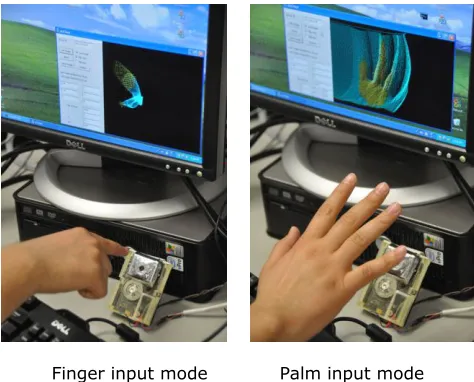
Currently 3D stereo cameras in conjunction with markers and virtual reality gloves are more typical for touchless Human-Machine Interface (HMI) experiences; nevertheless, cost and reliability issues still remain. Ryu et al. (2010) introduced a novel HMI device to offer a non-contact gesture input capability using finger or palm movements. The enabling technology of the proposed device (Touchless Mouse or T-less Mouse) is the Infrared Proximity Array (IPA) sensor. Using an IPA sensor, real-time, 3-D depth information can be captured for machine control. The uniqueness of the T-less mouse is that it uses only one camera, which reduces the cost significantly, while still providing acceptable operational reliability (Figure 1).
To examine the viability of this novel input device, we conducted a standards-based usability evaluation of the T-less mouse and compared the performance of the T-less mouse with a conventional mouse. The usability evaluation followed the standards and guidelines set for pointing device evaluations by ISO 9241-9 based on Fitts’ Law tasks. Additionally, a subjective questionnaire was administered to assess user satisfaction. Although two input modes were introduced by Ryu et al. (2010), only the finger input mode was evaluated in this study.
Finger input mode Palm input mode
Standards for Evaluating Pointing Devices
ISO 9241-9 (2000) establishes uniform guidelines and testing procedures for evaluating computer pointing devices. The metric for comparison is throughput, in bits per second (bits/s), which includes both the speed and accuracy of the user’s performance. The equation for
throughput is Fitts’ Index of Performance using an effective index of difficulty (IDe). Specifically, Throughput = IDe / MT (1)
where MT is the mean movement time, in seconds, for all trials within the same condition, and IDe = log2 (D / We + 1) (2)
IDe, in bits, is calculated from D, the distance to the target, and We, the effective width of the target. We is calculate as
We = 4.133 × SD (3)
where SD is the standard deviation in the selection coordinates measured along the line from the center of the home square to the center of a target.
Methods
The following sections discuss the design, participants, equipment, and task and procedure methods used in this study.
Design
The experiment was within-subject, in which the dependent variables were the completion time, throughput, and number of errors. The independent variable was the type of input method (conventional mouse vs. T-less mouse).
Participants
A total of 18 participants were recruited to participate in the experiment. The average age of participants was 25 years old, with a standard deviation of 4.8 years. There were 4 female and 14 male participants. Among the 18 participants, two participants claimed they were left-handed. However, both of them indicated they use their right hand to control a computer mouse. Thus, every participant used their right hand to control the T-less mouse in this study. Fifteen participants indicated they have used a track-ball mouse in addition to a conventional mouse. The average rating of the level of comfort using a conventional mouse was 6.5 (1=lowest, 7=highest) with 0.70 standard deviation. Self-rated proficiency in using a
conventional mouse was 6.27 (1=lowest, 7=highest) in average with 0.89 standard deviation.
Equipment
A participant was seated in front of a computer with two extended monitors. One screen was used to display practice and test information; the other screen was used to display the T-less mouse interface. Both monitors were 19 inch flat panel screens with resolution of 1600x1200. The experiment was conducted with a T-less mouse interface that recognizes the finger motion and generates commands to control the computer’s cursor. The distance information detected by the IPA subsystem of the T-less mouse is fully utilized to distinguish the finger gestures. In addition, in order to reduce unnecessary motion and fatigue, the participants were instructed to put their hands on the desk between trials.
Task and Procedure
The procedure consisted of four parts: pre-test survey, practice session, test sessions, and post-test survey. Each participant completed a pre-test survey first. Then, they completed the practice and test sessions. After the test session, the participants were asked to complete a post-test survey.
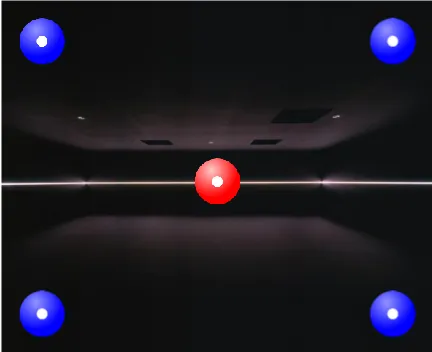
demonstrated how to move the cursor to hit a target. After the demonstration, participants familiarized themselves with the use of the T-less mouse for five minutes. In order to preclude any learning effects, the facilitator did not provide any information about the actual tasks contained in subsequent sections of the experiment. Instead, a practice task was presented to participants to simulate selection of targets. The dummy task screen contained four targets and one home target. The facilitator verbally asked participants to move the cursor to multiple targets, including the home target. Figure 2 shows a screen shot of the practice task.
Figure 2. The practice session screen
A)
B)
C)
D)
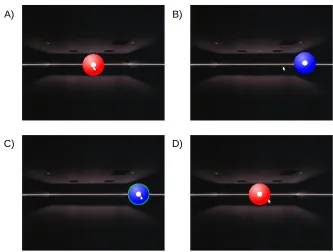
Figure 3. Multi-directional Fitts’ Law test: A) Home target appears in the center. B) A cursor is
moving toward a target. C) The cursor is now on the target and target is selected. D) Home target appears again.
At the end of the task trials, participants were asked to complete a survey containing a Device Assessment Questionnaire suggested by ISO 9241-9 guidelines, with some questions modified to be more related to the T-less mouse. All questions were rated on a 7-point Likert scale from strongly agree to strongly disagree. The following were the questions asked on the
questionnaire:
1. The mental effort required for operation was (low=1 to high=7) 2. Wrist fatigue was (low to high)
3. Shoulder fatigue was (low to high) 4. Arm fatigue was (low to high)
5. The physical effort required for operation was (low to high) 6. Smoothness during operation was (rough to smooth) 7. Accurate pointing was(difficult to easy)
8. Operation speed was (slow to fast)
9. Ease of target selection was (difficult to easy)
10. Which will you prefer the T-less mouse or a mouse? (mouse=1 to T-less mouse=7) 11. General comfort was (uncomfortable to comfortable)
12. Overall, the interaction was (difficult to easy)
Results
The following sections discuss the Fitt’s law test and the post-test survey.
Fitts’ Law Test
The following sections discuss the performance of each device based on the results from the Fitts’ law tests in terms of completion time, throughput, and error rate.
Completion Time
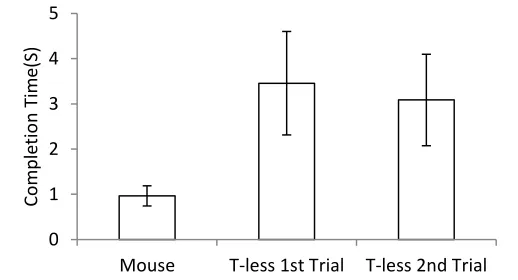
Because targets were selected (clicked) automatically following a cursor dwell-time of two seconds, two seconds were subtracted from each completion time to provide a fair comparison. The test results showed that the average completion time of the multi-directional Fitts’ Law discrete tasks with conventional mouse was 0.97 seconds (SD=0.22), while the average completion time with the T-less mouse for the first trial was 3.45 seconds (SD=1.14), which was reduced down to 3.09 seconds (SD=1.01) in the second trial (Figure 4). The difference in completion times between the three types of trials was statistically significant F(2,34)=57.71, p<0.0001. Post-hoc analyses using the Scheffé criterion for significance indicated that T-less first trial completion time was significantly longer than for a conventional mouse, p<0.05, but not significantly longer than T-less second trial, p>0.05.
Figure 4. Average completion time for three types of trials
Throughput
The throughput from the multi-directional Fitts’ Law discrete tasks with a conventional mouse was 2.85 bps (SD=0.41), while the throughput with the first T-less mouse trial was 0.72 bps (SD=0.26), and with the second T-less mouse trial was 0.83 seconds (SD=0.25), respectively (Figure 5). The difference in throughput between the three trial types was statistically
significant, F(2,34)=298.63, p<0.0001. Post-hoc analyses using the Scheffé criterion for
significance indicated that the conventional mouse throughput was significantly higher than both T-less trials, p<0.05, but throughput of the T-less second trial was not significantly higher than the T-less first trial, p>0.05.
0
1
2
3
4
5
Mouse
T-less 1st Trial
T-less 2nd Trial
Com
p
le
tio
n
T
im
Figure 5. Throughput for each type of trial
Error Rate
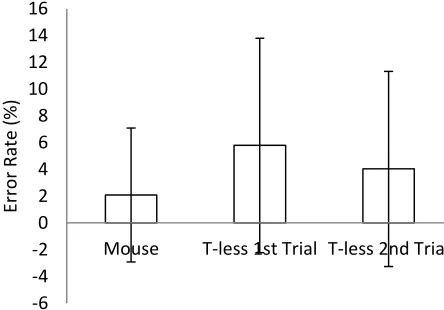
The error rate was computed as the number of error clicks divided by the total number of clicks, where an error click was defined as a click outside of the target. The average error rate with the conventional mouse was 2.09% (SD=5.00), while the error with the T-less first trial was 5.79% (SD=8.01), and with the T-less second trial was 4.03% (SD=7.28), respectively (Figure 6). However, the differences in error rate between the three types of trials were not statistically significant, F(2,34)=1.80, p=0.1810. Post-hoc analyses using the Scheffé criterion for significance also indicated that there were no significant differences in error rate among the three types of trials. It should be noted that 14 participants out of 18 with the conventional mouse committed no error at all, 10 participants with the T-less first trial committed no error, and 12 participants with the T-less second trial committed no error.
Figure 6. Error rate for each type of trial
Post-Test Survey
In the post-test survey about the T-less mouse, all questions were rated on a 7-point Likert
0
0.5
1
1.5
2
2.5
3
3.5
Mouse
T-less 1st Trial T-less 2nd Trial
Th
ro
u
gh
p
u
t(b
p
s)
-6
-4
-2
0
2
4
6
8
10
12
14
16
Mouse
T-less 1st Trial T-less 2nd Trial
Erro
r
Rat
e (%
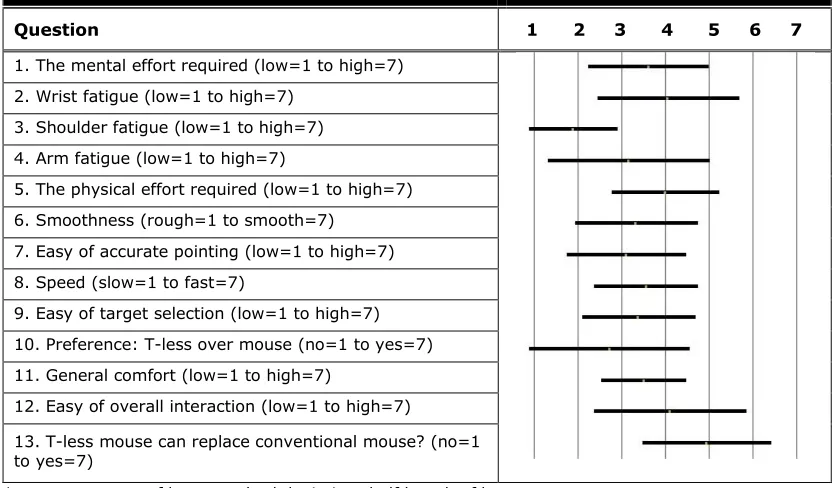
Table 1. Summary of the Post-Test Ratings of the T-less Mouse
Question 1 2 3 4 5 6 7
1. The mental effort required (low=1 to high=7) 2. Wrist fatigue (low=1 to high=7)
3. Shoulder fatigue (low=1 to high=7) 4. Arm fatigue (low=1 to high=7)
5. The physical effort required (low=1 to high=7) 6. Smoothness (rough=1 to smooth=7)
7. Easy of accurate pointing (low=1 to high=7) 8. Speed (slow=1 to fast=7)
9. Easy of target selection (low=1 to high=7) 10. Preference: T-less over mouse (no=1 to yes=7) 11. General comfort (low=1 to high=7)
12. Easy of overall interaction (low=1 to high=7)
13. T-less mouse can replace conventional mouse? (no=1 to yes=7)
*average=center of bar, standard deviation=half length of bar
Conclusion
In this study, the usability of the T-less mouse was evaluated. The T-less mouse was compared to a conventional mouse. Completion time, throughput, and number of errors were used to objectively measure the efficiency and accuracy of the T-less mouse in a
multi-directional Fitts’ Law task. In addition, subjective measurements including user satisfaction were assessed. In summary:
Using a T-less mouse with finger input mode is about three times slower than using a conventional mouse.
The number of errors with a T-less mouse with finger input mode was not significantly higher than that with conventional mouse.
The performance of a T-less mouse in terms of throughput is inferior to that of a conventional mouse; thus, continuous improvement is necessary.
The participants agreed that the T-less mouse could be an alternative to a conventional mouse when users have to operate computers with a wet, oily, or dusty hand in
environments such as hospital operation rooms, clean rooms, petroleum plants, combat environments, etc.
Future Research
In this study, we used a two second dwell-time as the definition of selection (click) for the T-less mouse. An intuitive and effective selection (click) scheme could be developed for the finger input mode of the T-less mouse. Usability evaluation of the palm input mode should be
performed as well, along with effective selection schemes. In order to overcome the input speed issue, a faster frame rate of the T-less mouse is needed. Also, usability testing in an outdoor environment and testing with users wearing gloves should be conducted to increase ecological validity of the findings.
mouse. However, finding the optimized speed or accelerated speed for cursor movement could increase the performance of T-less mouse and should be investigated.
Practitioner’s Take Away
The speed of using a T-less mouse was about three times slower than using a conventional mouse, while there was no significant difference in error rate. There were signs of some training effect in using the T-less mouse, because the second trial set of T-less mouse showed improved speed, although it was not significant. Consequently, the T-less mouse as currently designed is not an alternative to a conventional mouse under standard office or home environments. However, considering that the majority of the participants agreed that the T-less mouse can be a useful alternative in special circumstances, the T-less mouse may be useful in situations where users need to operate computers with wet, oily, or dusty hands. The T-less mouse can be a reliable input device, but it takes a longer time to complete tasks compared to a
conventional mouse.
References
ISO 9241-9 (2000). Ergonomic requirements for office work with visual display terminals (VDTs) -- Part 9: Requirements for non-keyboard input devices. International Organization for Standardization.
Ryu, D. , Um, D., Tanofsky, P. , Koh, D. H., Ryu, Y. S., & Kang, S. (2010). T-less: A novel touch less Human-Machine Interface based on Infrared Proximity Sensing. In Proceedings of 2010 IEEE/RSJ International Conference on Intelligent Robots and Systems (pp.5220-5225). Taipei, Taiwan.
Zhang, X., & MacKenzie, I. S. (2007). Evaluating eye tracking with ISO 9241, Part 9 Human-Computer Interaction. HCI Intelligent Multimodal Interaction Environments (pp. 779-788). Springer Berlin / Heidelberg.
About the Authors
Young Sam Ryu
Ryu is an Assistant Professor of Ingram School of Engineering at Texas State University-San Marcos. His research area includes human-computer interaction and usability.
Do Hyong Koh
Koh is a graduate student of Computer Science Department at Texas State University-San Marcos.
Dongseok Ryu
Ryu is a Visiting Professor of Computing Sciences, Mechanical Engineering at Texas A&M University-Corpus Christi.
Dugan Um