INTRODUCTION
The Point-to-Point Protocol (PPP) provides IP packet transport over a serial link. The serial link can be a direct serial connection using a serial cable, a connection using a modem and telephone lines, or a cellular handset using wireless technologies.
Being a point-to-point protocol, PPP does not distinguish between client and server operations. For the purposes of this application note, a peer that requires a remote peer to provide authentication and provides an IP address to the remote peer is known as a server. Whereas, a peer that does not require a remote peer to authenticate and accepts an IP address is known as a client.
On TINI, the PPP physical interface is a serial port, which can be connected to a modem and allows the use of the Public Switched Telephone Network (PSTN) for global access to the TINI. However, the use of a modem is not required. Devices such as cellular phones and PDAs with PPP support can be connected to a TINI with the proper serial cable.
System Description
The TINI system referenced in this
Using TINI Point-to-Point Protocol (PPP)
SAGAR SHANKARRAO SHILLEWAR
Chatrapati Shivaji Raje College, Kinwat Dist. Nanded (India).
(Received: March 18, 2011; Accepted: April 20, 2011)
ABSTRACT
This application note shows how to use Point-to-Point Protocol (PPP) networking with the Tiny Inter Net Interfaces (TINI) runtime environment for dial-up networking. Includes detailed configuration of Windows® 2000 dial-up client software.
Key words: Point to point protocol, Networking, TINI.
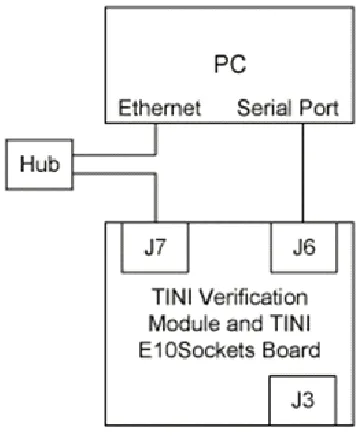
application note is composed of a TINIm390 Verification Module (DS-TINI-1) and TINI E10 Sockets board. The TINI E10 Sockets board provides physical connectors to the various ports available on the TINI module. Connectors J3 and J6 provide DTE and DCE interfaces to TINI serial port0. Being a DTE interface, J3 can easily be connected to a DCE port with a straight through serial cable. A standard PC provides DTE serial ports. Whereas J6 is a DCE interface and can easily be connected to a DTE port with a straight through serial cable. A standard modem implements a DCE interface. Connectors J3 and J6 are mutually exclusive and should not be used at the same time.
Examples
This application note provides two PPP connection examples. The first example shows the steps required to establish a PPP connection between TINI and a Windows 2000 host using a serial cable. The second example shows the steps required to establish a connection between TINI and an Internet Service Provider (ISP) using a modem.
is part of the TINI runtime environment. Starting with TINI 1.1x, PPP examples are provided as TINI applications. The server and client functionality have been separated and the PPP fir mware is implemented as a native librar y. The PPP applications can be found in the examples directory included in the TINI distribution.
The Java™ source code, PPPCommand.java, referenced herein is provided with the standard TINI software distribution. The source file PPPCommand.java complies with the Slush shell command interface and is intended to be compiled into Slush. Once part of the Slush binary, the PPP command is available from the Slush command line. The PPP command implements both a PPP client and server. Only one mode of operation, client or server is allowed at any one time. The PPP command is setup to control a modem connected to the serial port and as such issues some basic modem configuration commands. These commands may not be appropriate or necessary for all modems or other devices and should be verified against the documentation of the modem or device in use.
Example 1: Direct Serial Connection
This example demonstrates the capability of a TINI system to use a serial cable to establish a PPP link with a Windows 2000 host. In this example, TINI is the PPP server and the Windows host is the client. Before a PPP link can be established, the Windows host must be configured to use a direct serial device for dial-up network connections. The PPP command source must also be modified to operate with the Windows direct serial driver.
A new Windows direct serial dial-up connection is configured in two steps. The first step is to add a direct serial connection device and the second step adds a new Internet connection that uses the direct serial device.
Adding Direct Serial Link Device
To add the direct serial device, open the Phone and Modem Options applet found in the control panel. Select Add from the Modems tab of the Phone and Modem Options applet. The Add/ Remove Hardware Wizard dialog should now be shown ( Figure 2 ). Check the Don’t detect my
modem... check box and click Next.
From the next dialog ( Figure 3 ) select (Standard Modem Types) in the left column and Communications cable between two computers from the right column and click Next.
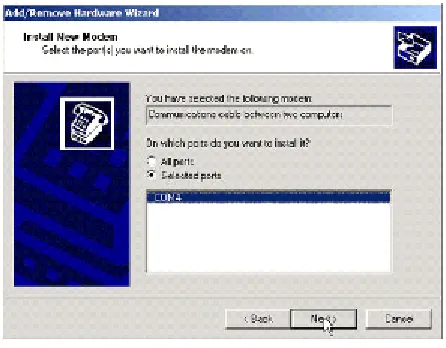
From the next dialog ( Figure 4 ) select the appropriate communications port and click Next.
From the next dialog click Finish to complete the installation of the Direct Serial Link device. After the new device is installed, click OK to dismiss the Phone and Modem Options applet.
Adding a New Dial-Up Connection
To add a new dial-up connection, open the Network and Dial-Up Connections applet located in the control panel. Open Make New Connection to start the Network connection Wizard ( Figure 5), and click Next.
From the connection wizard dialog, select Connect directly to another computer ( Figure 6), and click Next.
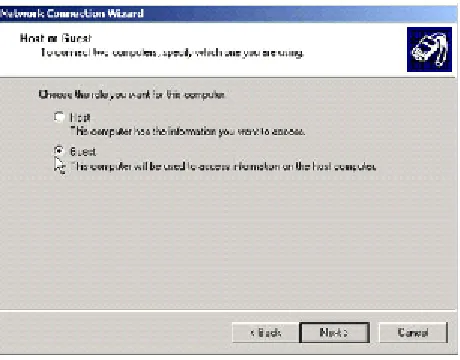
From the connection wizard dialog, select Guest ( Figure 7 ) and click Next.
Fig. 2: Phone and modem options/install new modem (1)
Fig. 3: Install new modem (2)
Fig. 5: Network and dial-up connections
Fig. 6: Connect directly to another computer
Fig. 8: Communication device
Fig. 9: Connect tini direct connection. With the General tab selected, click Configure ( Figure 10 ) From the connection wizard dialog (Figure
8), select the Communication cable between two computers...device that was installed in the previous step then click Next.
From the current Connection Wizard dialog click Next to allow all users to use this connection. From the next dialog name the new connection and click Finish. The new dial-up connection dialog should now be displayed ( Figure 9 ). Before the new dial-up connection can be used, the serial port speed must be verified. To verify the serial port speed click Properties from the dial-up connection dialog (Figure 9).
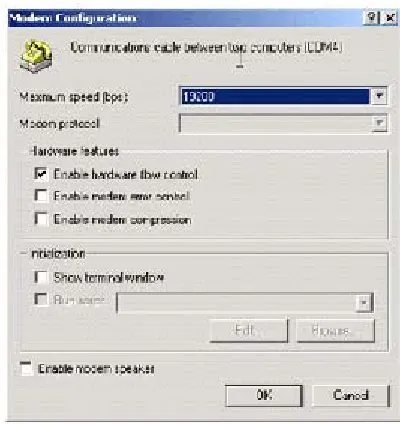
Ensure that the Maximum speed is set properly and click OK. The default TINI speed is 19200 ( Figure 11 ).
Click OK to dismiss the options dialog. The new dial-up connection is now ready for use.
Common Pitfalls
Listed here are some common problems while using TINI PPP
networking interface list starting with the Ethernet, then loopback, then PPP. The first interface that matches an outgoing packet is selected. If the Ether net and PPP interfaces are on the same network, the Ethernet interface receives all outgoing PPP traffic.
2. Passive mode for direct serial connections. When TINI is configured as a server using a direct serial connection with a non-Windows host, set the passive option to true. This allows TINI to wait for a connection without timing out.
Fig. 11: Modem configuration Fig. 10: TINI direct connection
REFERENCES
1. Computer Netwrok By Tennumbum 2. Communication Networks ( S. Hekmat ) 3. Computer Networks (S.Bischof)
4. Introduction to Networking and Data Communications (E.Blanchard)