Graphical User Interface Control using Blink
Detector for Augmentative and Alternative
Communication
Renuka Ganesh Sonal Chavhan
B. Tech Student B. Tech Student
Department of Electrical Engineering Department of Electrical Engineering Veermata Jijabai Technological Institute(VJTI), Matunga,
Mumbai, Maharashtra, India
Veermata Jijabai Technological Institute(VJTI), Matunga, Mumbai, Maharashtra, India
Shweta Shah Khushaboo Kothari
B. Tech Student B. Tech Student
Department of Electrical Engineering Department of Electrical Engineering Veermata Jijabai Technological Institute(VJTI), Matunga,
Mumbai, Maharashtra, India
Veermata Jijabai Technological Institute(VJTI), Matunga, Mumbai, Maharashtra, India
Dr. Meena S. Panse Faculty Guide
Department of Electrical Engineering
Veermata Jijabai Technological Institute(VJTI), Matunga, Mumbai, Maharashtra, India
Abstract
This paper explains the development of Graphical User Interface (GUI) by taking eye-blink as input. This method of communication between a user and a device employing this GUI can prove to be useful to a larger extent as compared to hand-controlled mechanisms since, hand-hand-controlled devices require the user to possess the ability to control the device using their limbs. Hand-controlled devices are inconvenient to those users who are unable to control the movements of their arms (e.g. aged individuals), unable to move them at all (in case of paralyzed patients or patients suffering from Motor Neuron Diseases (MNDs) like Amyotrophic Lateral Sclerosis (ALS)) and amputees. A device using a GUI that requires eye-blink as input will be a more convenient option for such individuals; particularly the ones suffering from MNDs, since, most of the MND patients have difficulties with speech or cannot speak in addition to loss of mobility of limbs. The GUI described in this paper iteratively displays options related to the daily activities that an MND patient needs to communicate to his/her caretaker. We propose taking eye-blink as input using a blink detector to control the selection of an option displayed on the GUI for an Augmentative and Alternative Communication System.
Keywords: Graphical User Interface, Eye Aspect Ratio, Blink Detector, Augmentative and Alternative Communication (AAC)
________________________________________________________________________________________________________
I. INTRODUCTION
Augmentative and Alternative Communication (AAC) is a term that includes the communication methods used to supplement or replace speech or writing for those with impairments in the production or comprehension of spoken or written language. AAC is used by individuals suffering from a wide range of speech, language and physical impairments, including congenital conditions such as cerebral palsy, intellectual impairment and autism, and acquired conditions such as Amyotrophic Lateral Sclerosis and Parkinson’s disease. AAC can be a permanent addition to a person’s communication or a temporary aid. The symbols used in the graphic user interface (GUI) may include gestures, photographs, pictures, line drawings or words, which can be used alone or in combination. Pointers, adapted mice, etc can only be used to give input if the user is able to voluntarily move his/her hands or fingers. However, a large number of the people suffering from MNDs, aged people having problems in controlling the movements of their hands or amputees may not be able to use such input methods airment will not be able to give voice commands.
(IJSTE/ Volume 4 / Issue 9 / 007)
II. LITERATURE SURVEY
In the people suffering from MNDs, in most of the cases, intellect, memory, sight, hearing, touch and taste remains unaffected [12], i.e. the sensory functions remain intact. ALS mainly affects adults and is usually seen more in men (1:350) than women (1:400) with age of 58-63years (sporadic disease) and 47-52years (familial disease), results in rapid loss of function[13].
People with MND are likely to be faced with technology use in areas of their lives, such as mobility, daily living tasks and home modifications. A large proportion of patients feels the need of technology that involves less hardware and minimum training. For the people suffering from MND, who can’t move any part of their body except their eyes have no convenient technology as such. The communication devices available these days that involve eye gaze [7] as a main feedback from the patient, face problems in selection of small objects. Also, a few patients are not capable of providing steady eye gaze response. Technologies such as a thumb switch were used for giving input to the AAC device by Stephen Hawking to compensate for mobility and speech difficulties, in addition to this by squeezing cheek muscles and blinking to activate infra-red switch are used to perform task such as sending e-mails and speak through voice synthesizer [14].
Acceptance of new technology can be an issue for some users as it is influenced by the comfort level of patient as well as caretaker. Timely help and monitoring is crucial, therefore, identifying an AAC system should be client centred; their needs as well as their priority of those needs have to be considered.
[6] Discusses use of Windows Presentation Foundation (WPF) technology and demonstrates the advantages of building test operator interfaces using this modern design framework.
The designed system proposed in this paper uses a Facial Landmarks Detector for blink detection. A comparative study on different Facial Landmarks detector yielded the following results –
Table – 1
Comparative Study of Facial Landmarks Detectors
Type of Detector Application Comparative Study
Haar Cascade Classifier
Face Recognition and object
detection applications Problem of false detection[15]
HOG+SVM classifiers
Face Recognition and object detection applications
Does not give excellent results for Eye Aspect Ratio calculations in real time. Performance improved using SVM classifiers. But still, very slow[3][4] Ensemble
Regression Trees
Face Recognition, Pattern
Recognition applications High quality real time detection[5]
III. BLINK DETECTOR MODULE
A camera is placed at a predetermined distance from the patient, which is focused on the patient’s face to capture the activity of the patient’s eyes in real-time. A facial landmarks detector which is a shape predictor to detect important facial structures on the face is used to detect the eyes [9]. For detecting the deliberate closing and opening of the eyes (i.e. forced blinking) a quantity called Eye Aspect Ratio (EAR) is calculated [8]. The calculation of EAR is faster, simpler and more efficient in comparison to the traditional methods of eyeball detection which involve localizing the eyes, detecting the sclera (white coloured parts) by using a threshold value and determining the period for which the sclera is not visible (when eyes are closed).
From the facial landmarks detector, six (x,y) co-ordinates for each eye are obtained – two coordinates for locating the two corner points of each eye, and four coordinates (two on the upper rim and two on the bottom rim of the eye) marking the beginning and end of the iris.
Fig. 1: The six Facial Landmarks of the eye [8]
The relation between these coordinates gives the EAR. The relationship is given by [8]
EAR = ||p2−p6||+ ||p3−p5||
2||𝑝1−𝑝4|| (1)
The numerator of this equation computes the distance between the vertical eye landmarks while the denominator computes the distance between horizontal eye landmarks. The factor 2 in the denominator balances the equation appropriately since there is only one set of horizontal points but two sets of vertical points.
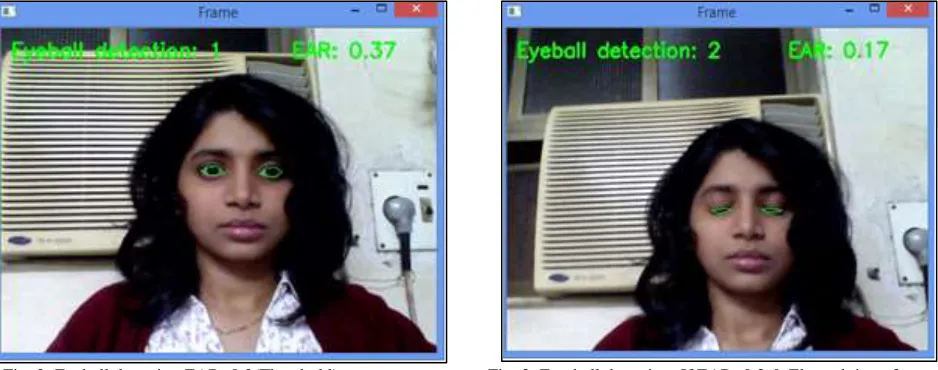
The EAR thus, obtained is used as the threshold value to detect forced blinking. The number of frames in which the EAR is less than the threshold value is recorded. If the number of frames, for which EAR< threshold value (EAR threshold = 0.2 [8]), is greater than the frame-threshold (i.e. minimum number of frames) to detect the forced blinking, then the forced blinking is detected. The frame-threshold is used to avoid false selection of an option by normal blinks.
Fig. 2: Eyeball detection EAR>0.2(Threshold) Fig. 3: Eye-ball detection: If EAR<0.2 & Elapsed time>3 sec
Note: No. of times deliberate blinking is detected and the eye aspect ratio in Figures 4 and 5 are shown only for illustrative purpose only.
IV. GRAPHICAL USER INTERFACE
The GUI is implemented by using Software Platform which is WPF (Windows Presentation Foundation).
Software Platform used:
Windows Presentation Foundation (WPF) is Microsoft's latest approach to a GUI framework, used with the .NET framework [6]. A GUI framework enables the creation of an application with a wide range of GUI elements, like labels, textboxes and other well-known elements. Without a GUI framework, these elements would have to be drawn manually and all of the user interaction scenarios like text and mouse input has to be handled. This process would become tedious, so instead, most developers use a GUI framework which will handle all the basic functions and allow the developers to focus on making the actual application [7].
Initial GUI Layout:
The initially designed GUI was a basic GUI which only consisted of one slide with all options. Each option is selected by clicking on particular option. After click this will play an audio clip which path is included in WPF c# code.
(IJSTE/ Volume 4 / Issue 9 / 007)
Iterative GUI Layout:
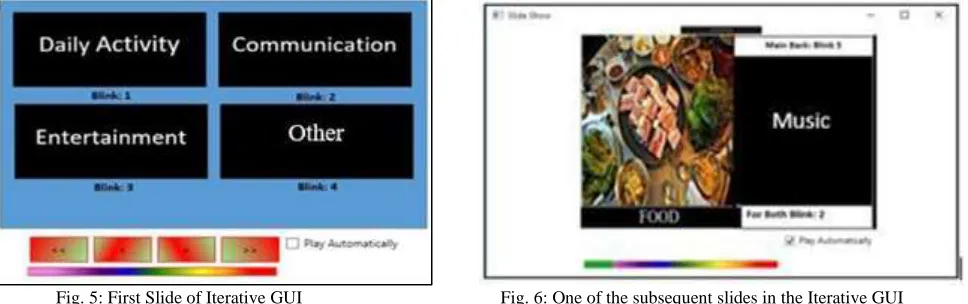
To make GUI more flexible this system consists of Iterative GUI which uses Divide and Conquer Algorithm. The GUI iteratively displays each option for a period of 5 seconds after which the next option is displayed.
The GUI displays five options, namely – 1) Daily Activity
2) Communication 3) Entertainment 4) Others
Each main option consists of sub-options and each slide consists of Main Back option. To select an option, the user has to blink certain number of times as specified on the GUI. First slide consists of four options; each option gets selected when the user blinks. The number of blinks required to select each option is also displayed on slides. When an option is selected, the corresponding audio clip will be played. Each subsequent slide is followed by an option to go back to the primary slides in case the user mistakenly selects an option.
Fig. 5: First Slide of Iterative GUI Fig. 6: One of the subsequent slides in the Iterative GUI
For customization of GUI, the ‘other’ option is provided considering that the needs of different users are different. Despite being time consuming, problem of false selection is reduced to a great extent.
V. RESULTS
1) Response was collected through blinks obtained for a stipulated amount of time of 5 seconds with duration of each blink being 1 second (minimum), which is more than normal blink period of 100ms to 400ms[16], to avoid accidental blink.
2) For making GUI customized, ‘other’ option is provided considering that the needs of different users would be different.
VI. CONCLUSION
1) Eye Blink detection using EAR was successfully implemented and tested. 2) The basic and iterative GUI were designed, implemented and tested successfully.
VII.FUTURE SCOPE
In addition to its use for Augmentative and Alternative Communication, this GUI can be used along with a wheelchair by providing additional options for navigation and giving the signals from the blink detector module to an embedded system which will control the motion of the wheelchair, which will further be helpful to MND patients.
Internet of Things (IOT) technology can be incorporated into this system to remotely monitor the vital signs of the patient using appropriate sensors. If an abnormality is detected by the sensors, a message can be sent to the patient’s caretaker using IOT.
REFERENCES
[1] Peizhong Liu, Jing-Ming Guo, Szu-Han Tseng, KokSheik Wong, Jiann-Der Lee, Chen-Cheih Yao, Daxin Zhu, Ocular Recognition for Blinking Eyes, IEEE
Transactions on Image Processing, Vol. 26, 2017
[2] Autom. Test & Control Inst., Harbin Inst. of Technol., Harbin, Design of the Instrument Soft Panel Using Windows Presentation Foundation, IEEE Xplore,
2016
[3] Yong Zhao, Yongjun Zhang, Ruzhong Cheng, Daimeng Wei, Guoliang Li, An Enhanced Histogram of Oriented Gradients for Pedestrian Detection, IEEE
Intelligent Transportation Systems Magazine, Vol. 7, 2015
[4] Leo Pauly, Deepa Sankar, Detection of drowsiness based on HOG features and SVM classifiers, Research in Computational Intelligence and Communication
[6] Anna Kozminski Software Product Management, Windows Presentation Foundation (WPF) Technology Meets the Challenges of Operator Interface Design in Automatic Test Systems, IEEE Paper Of National Instruments, 2012
[7] Mohamad A. Eid, Nikolas Giakoumidis, Abdulmotaleb El Saddik, A Novel Eye-Gaze-Controlled Wheelchair System for Navigating Unknown Environments,
IEEE, 2016
[8] Tereza Soukupová and Jan Čech, Real-Time Eye Blink Detection using Facial Landmarks, 21st Computer Vision Winter Workshop, Luka Čehovin, Rok
Mandeljc, Vitomir Struc (eds.), Rimske Toplice, Slovenia, 2016
[9] http://www.pyimagesearch.com/2017/04/03/facial-landmarks-dlib-opencv-python/
[10] Nick Ebor, Digital Image Processing: A Practical Introduction Using Java, Pearson Education, 2000
[11] http://www.wpf-tutorial.com
[12] https://www.mndassociation.org/about-mnd/where-do-i-start/what-is-mnd/
[13] G. Logroscino, B.J. Traynor, O. Hardiman, et al., Incidence of amyotrophic lateral sclerosis in Europe, J. Neurol Neurosurg Psychiatry, 2009, pp. 385-390
[14] https://www.scienceabc.com/innovation/stephen-hawking-cheek-communication-help-computer-speech-generating-device.html
[15] https://www.pyimagesearch.com/2014/11/10/histogram-oriented-gradients-object-detection/
[16] http://bionumbers.hms.harvard.edu/bionumber.aspx?s=y&id=100706&ver=0
[17] Tanmay Rajpathak, Ratnesh Kumar, Eric Schwartz, Eye Detection using morphological and colour image processing, Florida Conference on Recent Advances
![Fig. 1: The six Facial Landmarks of the eye [8]](https://thumb-us.123doks.com/thumbv2/123dok_us/7798587.1659881/2.612.196.416.512.623/fig-facial-landmarks-eye.webp)