Italian Journal of Science & Engineering
Vol. 1, No. 3, October, 2017
Optimizing Raytracing Algorithm Using CUDA
Sayed Ahmadreza Razian
a*, Hossein MahvashMohammadi
aa Computer Engineering Department, University of Isfahan, Isfahan, Iran
Abstract
Now, there are many codes to generate images using raytracing algorithm, which can run on CPU or GPU in single or multi-thread methods. In this paper, an optimized algorithm has been designed to generate image using raytracing algorithm to run on CPU or GPU in multi-thread algorithm.
This algorithm employs light with depth of 8 to generate images. It is optimized by changing pixel travel priority and ray of light to thread, dedicating depth function to empty threads, and using optimized functions from MSDN library. Its code has been written in C++ and CUDA. In addition, we do the following to show its performance: comparing implementation in different compiler mode, changing thread number, examining different resolution, and investigating data bandwidth.
The results show that one can generate at least 11 frames per second in HD (720p) resolution by GPU processor and GT 840M graphic card, using trace method. If better graphic card employ, this algorithm and program can be used to generate real-time animation.
Keywords:
CUDA; Raytracing; GPU; Modeling; Parallel Processing.
Article History:
Received: 13 July 2017
Accepted: 28 October 2017
1-
Introduction
The main concerns of researchers and scientists are increasing speed, enhancing live systems efficiency, and making systems real-time with minimum error. Thus, many attempts have been made to achieve this, and CPU process speed has increased very much. Yet, advances has been made to manufacture graphic cards with multicore processors, and their parallel processing techniques result in some operations can be done using them. In addition, efficiency enhancements and using 3D virtual simulation systems for computer games and entertainment software, medical sciences, engineering sciences, astronavigation result in more realistic rendered images using different lighting techniques has become an important subject to generate faster algorithms. Raytracing lightening method is one of these algorithms.
This method has high precision and quality, and considers various interactions between light sources and reflection pages, since images are much more realistic. In addition, it has high cost and long processing time. Also, users are more demanding to higher resolution than HD, since it is difficult to perform, and it is employed just in offline mode.
In this paper, we implement raytracing algorithm by function of Cuda library on graphic card to compare CPU and GPU maximum ability. In last, results show that graphic card processor and its core threads can be used to generate 3D images (720p (1280 × 720 (progressive) in pixels) and 1080p (1920 × 1080 (progressive) in pixels)) using raytracing algorithm rather CPU processors. This alternative decrease computation time considerably.
There are several methods to generate 3D images such as following:
Scanline rendering and rasterization: this method is based on mapping objects in space on image. It is fast and has ability to represent several million primary objects in a second, while it can’t represent reflection, refraction, and shadows, and it hasn’t effects [1].
Ray casting: In this method, rays are traced from the eye of the observer to space. Colour of pixels is determined when a ray intersects first object [2].
*CONTACT: [email protected]
DOI:http://dx.doi.org/10.28991/ijse-01119
Raytracing: This method can simulate actual reflection a ray on objects, and generate realistic images. In these images, reflection, refraction, absorption, and shadow are represented well, and after a ray intersect object, also rays of light are computed. In this method, generating images is costly and depend on depth number of a ray of light [3].
Radiosity: In this method, we examine object surfaces intersected by a ray of light. In some cases, it is called global illumination. In fact, it generates images based on accurate analyzing of light reflection on distributed surfaces. In this method, shadows are very natural and have been represented softly [4].
2-
Importance of Research
In generating 3D images, which are used in games and virtual space simulations, more realistic images has an important role to persuade audiences. Thus, to achieve this, various methods are created to generate such images. Generally, these methods are classified to two groups: object-based and based methods. Raytracing is a main pixel-based method [5, 6]. In this method, it is tried to trace path of a light source to object and from other object to it a few stages. It is better than other method concerning examining shadow, reflection, and brilliance of objects on each other.
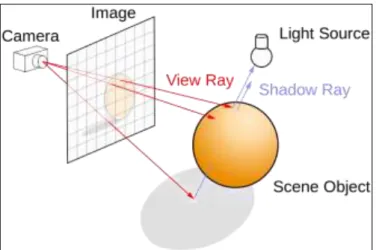
This technique result in much realistic and natural reflection, which generally have very complicated computationally. Since, running them is possible only in offline mode. In this method, to generate a pixel, various path of ray of lights from light source to an object are examined to determine colour intensity (Figure 1). This result in images appears to be more realistic, and reflection of an object on a shiny object can be observed. Figure 2 shows a graphical environment, which generated by this method.
Figure 1. Raytrace Technique (https://en.wikipedia.org)
Figure 2. Result of create an image by raytrace technique (http://sio2.g0dsoft.com)
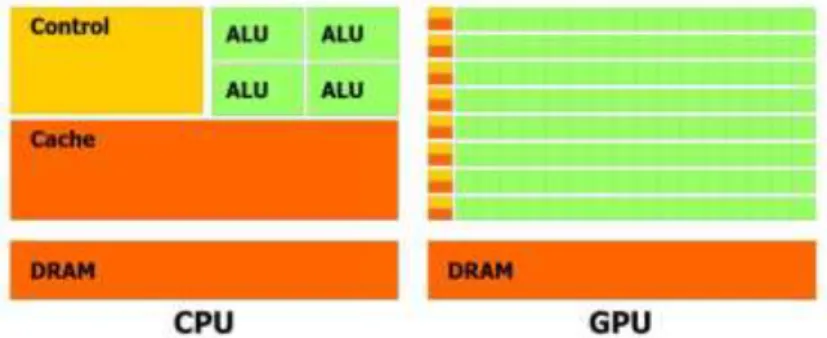
Figure 2. Compare the architecture of CPU and GPU
Figure 3. Software architecture of CUDA
New graphic cards have thread architecture in one to three dimensional, which have many applications in image generation. In this method, position and color, and vertices of objects are processed in parallel. It is faster than CPU in regard to generate images (Figure 4).
Figure 4. The grid of threads in GPU - This can be one , two and three dimensions has
3-
Related Works
Various papers have been published about images generation using ray-trace method by GPU processor [13-16]. In [14], it is asserted that CPU computational power is much lower than GPU. In [14], implementation method, image generation codes, and method by which functions assigned to threads is not mentioned.
Because, these factors have not mentioned in many papers on raytracing method, it is difficult to test this methods by implement them again, and verify experiment and results. On the other hand, the type of call functions in graphic card, GPU synchronization with CPU when running is completed, functions which are used to determine time, version and technical specification of graphic card, and number of experiments are important factors, which influence on comparison between running time of CPU and GPU. Unfortunately, many papers haven’t mentioned impacting factors on running time of CPU and GPU [17-19].
4-
Method
Firstly, a procedure is employed to generate 3D images using raytrace method in order to generate an image with 20 objects. Raytrace (int x, int y) function has designed to run on CPU and GPU. Its design is based on Cuda’s library functions. In order that results have more validity, source codes, which run program on CPU and GPU, are exactly same. After preparing codes, executable program has multi parallel procession with various threads.
In this stage, computation of any pixel of image has assigned to one thread, and a variable, which is counter of last pixel, has used to optimize procedure. After that, next pixel assign to a thread performs its task sooner, and counter increase. In order to same counter don’t assign to two thread simultaneously, we have used two functions: EnterCriticalSection and LeaveCriticalSection [20]. In this way, CPU has most efficiency.
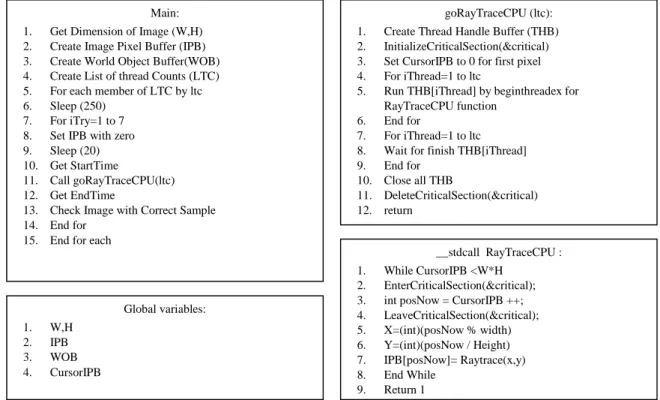
A function has created to manage threads. Based on demands, it creates target number of threads in any test, then activate them, and free generated images. In this way, it has designed to generate images with 1, 16, 32, 64, 96, 128, 256, 384, and 512 threads (Figure 6- goRayTraceCPU structure). They have created because we want obtain performance of different CPU with different number of threads, and obtain optimized performance of CPU processor [21].
To ensure that actual time has computed for a thread, image generation repeated 6 times. In the meantime, to obtain actual running time of program (continuously and without interruption) requires whole activities of operating system stop, in turn, leading to difficulty for operating system. To solve this problem, we run sleep function (100 ms) between tests. Running time of sleep function has considered, regardless of CPU computations time (Figure 6- Main structure).
In this test, to ensure that computed time is only processing time, we have ignored transfer time to memories (RAM and graphic card’s RAM), and considered computations time. Two functions QueryPerformanceFrequency (computation of frequqncy) and QueryPerformanceCounter (obtaining last value of counter) have used to compute time accurately [22] . They have used in EndTime and StartTime Functions.
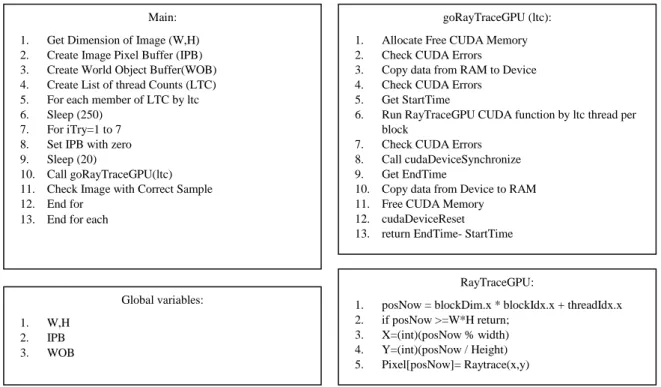
Figure 6 shows whole procedure of running in the form of pseudo-code.
Figure 6. Pseudocode of raytrace alghorithm by CPU
Since quality and resolution of images of videos and games is HD and Full HD, in this test, we have used images
Main: 1. Get Dimension of Image (W,H) 2. Create Image Pixel Buffer (IPB) 3. Create World Object Buffer(WOB) 4. Create List of thread Counts (LTC) 5. For each member of LTC by ltc 6. Sleep (250)
7. For iTry=1 to 7 8. Set IPB with zero 9. Sleep (20) 10. Get StartTime
11. Call goRayTraceCPU(ltc) 12. Get EndTime
13. Check Image with Correct Sample 14. End for
15. End for each
goRayTraceCPU (ltc): 1. Create Thread Handle Buffer (THB) 2. InitializeCriticalSection(&critical) 3. Set CursorIPB to 0 for first pixel 4. For iThread=1 to ltc
5. Run THB[iThread] by beginthreadex for RayTraceCPU function
6. End for
7. For iThread=1 to ltc 8. Wait for finish THB[iThread] 9. End for
10. Close all THB
11. DeleteCriticalSection(&critical) 12. return
__stdcall RayTraceCPU : 1. While CursorIPB <W*H
2. EnterCriticalSection(&critical); 3. int posNow = CursorIPB ++; 4. LeaveCriticalSection(&critical); 5. X=(int)(posNow % width) 6. Y=(int)(posNow / Height) 7. IPB[posNow]= Raytrace(x,y) 8. End While
9. Return 1 Global variables:
with 720p and 1080p resolutions.
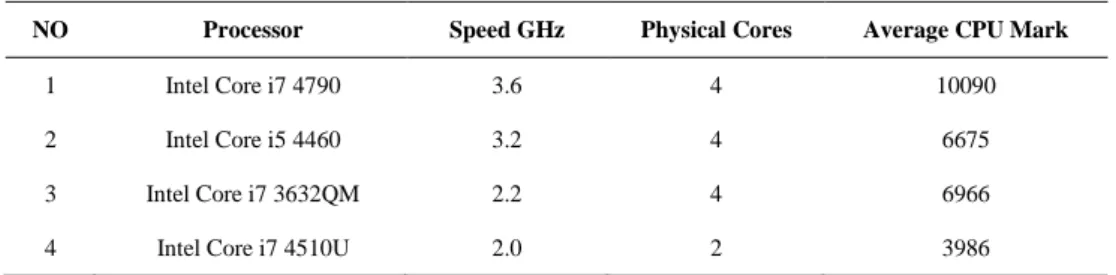
Firstly, to test processor speed, we have used 4 CPUs with different specifications and different number of cores. We have considered processor score in [23] as computational rank. In addition, we have used Gb-DDR3-1600MHz as RAM memory. Table 1 shows specifications of processors.
Table 1. Specifictions of proccesors
NO Processor Speed GHz Physical Cores Average CPU Mark
1 Intel Core i7 4790 3.6 4 10090
2 Intel Core i5 4460 3.2 4 6675
3 Intel Core i7 3632QM 2.2 4 6966
4 Intel Core i7 4510U 2.0 2 3986
These processors are most common and appropriate one for computational programs. At the time of testing, we used i7 4790 model, which is best and most powerful CPU on the shelf. Its overall rank in [23] is 64. If, Intel Xeon and AMD FX have been ignored (they are used in servers), it is very powerful processor. It is worth noting that for other available processors, we have used information in “cpubenchmark.net” and “videocardenchmark.net”, which own by PassMark Company . PassMark Software is a Microsoft Registered Partner and an Intel Software Partner [24].
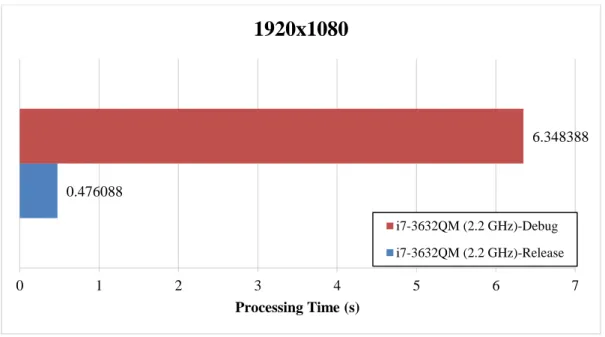
Final program (release configuration) has been compiled and running time has been recorded for different number of threads and resolution. To record best running time, all current programs excluded from memory, the test repeated 6 times, and minimum time recorded as final value. Figure 5 shows final image with this program.
Figure 5. Image created from 19 spheres and a light source with a depth of 8 reflection in 1080p resulation
Figure 6. Compare the behavior of the application in Debug and Release modes to generate an image in 1080p resulation by different threads
Figure 7. Compare the best runtime CPU in Debug and Release modes
On the other hand, Cuda libraries (introduced by NVIDIA) are used to run programs on graphic card (GPU). We have altered functions and statements, which have been called from raytrace library, according to environment and Cuda library for parallel processing. None of statements of main functions was not changed, and source code to generate images and source code to generate by CPU remained unchanged.
Since, Cuda’s library prepares threads to computation based on power of graphic card, therefore we can’t activate some of top and down threads, and they are recorded in complete threads list. Resolution of images was HD and Full HD.
We have used three common graphic cards listed in Table 2 . Table 2 shows their scores in reference [25] . These graphic cards perform less than current cards such as GeForceGTX 780, GeForceGTX 770, GeForceGTX 960, and their processing speed are very lower than latter.
0 5 10 15 20 25 30
1 2 3 4 5 6 7 8 9 10 11 12 13 14 15 16 32 64 96 128 256 384 512
Tim
e
p
er
Fra
m
e
Threads
1920x1080
i7-3632QM (2.2 GHz)-Release i7-3632QM (2.2 GHz)-Debug
0.476088
6.348388
0 1 2 3 4 5 6 7
Processing Time (s)
1920x1080
Table 2. Specifictions of graphic proccesors
NO Graphic Processor Speed GHz Memory Average G3D Mark
1 GeForce GTX 650 1.1 1Gb DDR5 1833
2 GeForce 840M 1.0 1Gb DDR3 844
3 GeForce GT 635M 0.65 2Gb DDR3 710
In [25], GeForceGTX 650 has rank 131 with score 1833. It has good position in comparison with other graphic cards. However, in comparison with GeForce GTX 780 with score 9022, it has very lower score, thus GeForceGTX 880 Ti outperform it significantly.
After completing the program, we have compiled release version for any graphic card, and computed and recorded processing time with different number of threads and resolution.
Since, the test aims to compute processing time and speed, we ignore transfer time of information from RAM memory of system to RAM memory of graphic card and vice versa. Now, it is worth noting that when running functions in graphic card, we don’t know when program is completed, therefore, we have used cudaDeviceSynchronize.
In fact, it creates an interruption in CPU until graphic card completes his task, and function is completed when graphic card ends his operations (Figure 8). Thus, starting time is before the running RayTraceGPU, and after calling cudaDeviceSynchronize, program is completed. Difference between both computed and recorded. The rest of function is concerned with copying data in graphic card’s memory to internal storage, and freeing allocated memories (Figure 8- goRayTraceGPU procedure).
Now, we transfer data in RAM to graphic card’s RAM, and then call the function, which generate image in graphic card with memory addresses of parameters. Time of processor utilization by graphic card is difference between starting time of running and end time of function. Lastly, we transfer data in graphic card’s RAM to system’s RAM, and free graphic card memories.
We have used values of blockDim, blockldx, and threadldx parameters to compute current position of pointer, and call RayTraceGPU function after computing width and height (Figure 8- RayTraceGPU procedure).
Figure 8. Pseudocode of raytrace alghorithm by GPU
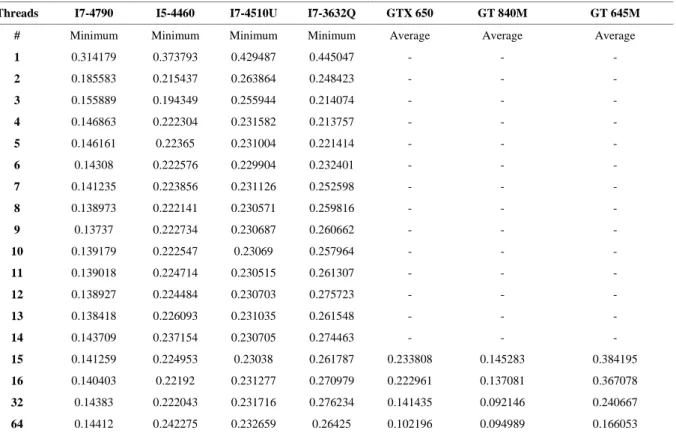
Lastly, we present the following tables and figures (Table 3-Table 4) (Figure 9-Figure12), which shows information about running the program on different CPU and GPU and for different threads. When running the program, we have closed all unnecessary programs of operating system. We have repeated test 6 time, and recorded average time for any resolution and threads for graphic card and minimum time for CPU.
Main:
1. Get Dimension of Image (W,H) 2. Create Image Pixel Buffer (IPB) 3. Create World Object Buffer(WOB) 4. Create List of thread Counts (LTC) 5. For each member of LTC by ltc 6. Sleep (250)
7. For iTry=1 to 7 8. Set IPB with zero 9. Sleep (20)
10. Call goRayTraceGPU(ltc) 11. Check Image with Correct Sample 12. End for
13. End for each
goRayTraceGPU (ltc):
1. Allocate Free CUDA Memory 2. Check CUDA Errors
3. Copy data from RAM to Device 4. Check CUDA Errors
5. Get StartTime
6. Run RayTraceGPU CUDA function by ltc thread per block
7. Check CUDA Errors 8. Call cudaDeviceSynchronize 9. Get EndTime
10. Copy data from Device to RAM 11. Free CUDA Memory
12. cudaDeviceReset 13. return EndTime- StartTime
RayTraceGPU:
1. posNow = blockDim.x * blockIdx.x + threadIdx.x 2. if posNow >=W*H return;
3. X=(int)(posNow % width) 4. Y=(int)(posNow / Height) 5. Pixel[posNow]= Raytrace(x,y) Global variables:
Table 3. Time consumed for image generation in 1080p (in seconds) for CPU and GPU
Threads I7-4790 I5-4460 I7-4510U I7-3632Q GTX 650 GT 840M GT 645M
# Minimum Minimum Minimum Minimum Average Average Average 1 0.695528 0.820396 0.893412 0.999228 - - -
2 0.401127 0.486939 0.585698 0.56015 - - -
3 0.346617 0.427676 0.580105 0.476088 - - -
4 0.32397 0.462727 0.521141 0.481387 - - -
5 0.324967 0.460111 0.521363 0.478693 - - -
6 0.318503 0.462873 0.522432 0.492961 - - - 7 0.311319 0.462502 0.521903 0.564989 - - -
8 0.307968 0.465548 0.523018 0.581722 - - - 9 0.308173 0.469619 0.522194 0.580295 - - -
10 0.30679 0.47094 0.522065 0.580766 - - -
11 0.308213 0.476522 0.523217 0.596155 - - -
12 0.308677 0.499486 0.523162 0.581727 - - - 13 0.307169 0.462428 0.524425 0.605497 - - -
14 0.306563 0.46391 0.526204 0.598913 - - - 15 0.309082 0.518888 0.521874 0.607529 - - -
16 0.307423 0.472505 0.545148 0.634072 - - - 32 0.309687 0.487009 0.543526 0.657048 0.282855 0.189197 0.481744
64 0.308304 0.463364 0.52512 0.637412 0.202116 0.191502 0.326614 96 0.308919 0.46657 0.545377 0.585703 0.199024 0.202683 0.318356
128 0.31034 0.522144 0.547631 0.667465 0.192983 0.200104 0.329752 256 0.310854 0.481799 0.551629 0.646758 0.216074 0.345308 0.421372 384 - 0.475016 0.536905 0.694873 0.26635 0.253347 0.576244 512 - 0.549487 0.53855 0.704896 0.288551 - 0.522649
Best 0.306563 0.427676 0.521141 0.476088 0.192983 0.189197 0.318356
Table 4 . Time consumed for image generation in 720p (in seconds) for CPU and GPU
Threads I7-4790 I5-4460 I7-4510U I7-3632Q GTX 650 GT 840M GT 645M # Minimum Minimum Minimum Minimum Average Average Average
1 0.314179 0.373793 0.429487 0.445047 - - -
2 0.185583 0.215437 0.263864 0.248423 - - -
3 0.155889 0.194349 0.255944 0.214074 - - -
4 0.146863 0.222304 0.231582 0.213757 - - -
5 0.146161 0.22365 0.231004 0.221414 - - -
6 0.14308 0.222576 0.229904 0.232401 - - -
7 0.141235 0.223856 0.231126 0.252598 - - -
8 0.138973 0.222141 0.230571 0.259816 - - -
9 0.13737 0.222734 0.230687 0.260662 - - -
10 0.139179 0.222547 0.23069 0.257964 - - -
11 0.139018 0.224714 0.230515 0.261307 - - -
12 0.138927 0.224484 0.230703 0.275723 - - -
13 0.138418 0.226093 0.231035 0.261548 - - -
14 0.143709 0.237154 0.230705 0.274463 - - -
15 0.141259 0.224953 0.23038 0.261787 0.233808 0.145283 0.384195
16 0.140403 0.22192 0.231277 0.270979 0.222961 0.137081 0.367078
32 0.14383 0.222043 0.231716 0.276234 0.141435 0.092146 0.240667
96 0.144661 0.227757 0.235156 0.278369 0.097897 0.099897 0.160196
128 0.145159 0.228203 0.234394 0.298117 0.099155 0.100978 0.167897
256 0.142522 0.242579 0.238672 0.280703 0.104543 0.166054 0.205327
384 - 0.239906 0.24274 0.28309 0.128571 0.140076 0.322207
512 - 0.239318 0.248375 0.282848 0.145405 - 0.26393
Best 0.13737 0.194349 0.229904 0.213757 0.097897 0.092146 0.160196
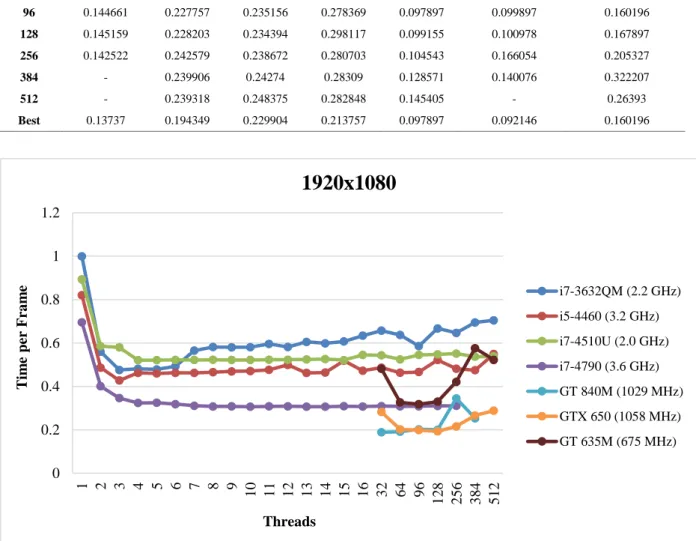
Figure 9. Compare the runtime of different threads for different CPU and GPU to generate an image in 1080p resolution
Figure 10. Compare the runtime of different threads for different CPU and GPU to generate an image in 720p resolution 0 0.2 0.4 0.6 0.8 1 1.2
1 2 3 4 5 6 7 8 9
10 11 12 13 14 15 16 32 64 96
1 2 8 2 5 6 3 8 4 5 1 2 T im e per F ra m e Threads
1920x1080
i7-3632QM (2.2 GHz) i5-4460 (3.2 GHz) i7-4510U (2.0 GHz) i7-4790 (3.6 GHz) GT 840M (1029 MHz) GTX 650 (1058 MHz) GT 635M (675 MHz)
0 0.05 0.1 0.15 0.2 0.25 0.3 0.35 0.4 0.45 0.5
1 2 3 4 5 6 7 8 9 10 11 12 13 14 15 16 32 64 96
1 2 8 2 5 6 3 8 4 5 1 2 Tim e p er Fra m e Threads
1280x720
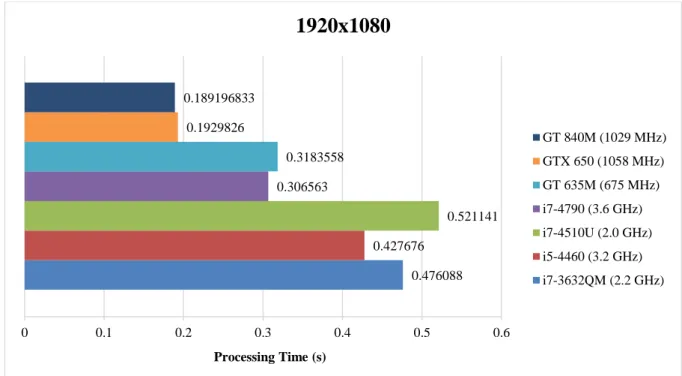
Figure 11. Compare the best runtime of different threads for different CPU and GPU to generate an image in 1080p resolution
Figure 12. Compare the best runtime of different threads for different CPU and GPU to generate an image in 720p resolution
5-
Results
According the results shown in figures 3 and 4, graphic card performs better than CPU processor significantly. In comparison, image generation speed in GPU (GT 840M) to CPU (i7-4790) has been increased 162% (1080p; see Figure 11), and 148% (720p; see Figure 12). Consecutive image generation (1080p) is 5.3 frames per second (1080p), and 10.8 frames per second (720p) using GPU.
On the other hand, it can be said that CPU processing on data underperform GPU processing, when data traffic increase. Because, according to the equation (1) and (2)), in 720p and 1080p, image generation time ratio (CPU/GPU) has increased 49% and 62% respectively. While, according to the equation (3), pixel computations ratio has increased 125% in both resolutions. This is also true for the CPU i5-4460 by 125% (1080p) and 110% (720p).
0.476088 0.427676
0.521141 0.306563
0.3183558 0.1929826
0.189196833
0 0.1 0.2 0.3 0.4 0.5 0.6
Processing Time (s)
1920x1080
GT 840M (1029 MHz) GTX 650 (1058 MHz) GT 635M (675 MHz) i7-4790 (3.6 GHz) i7-4510U (2.0 GHz) i5-4460 (3.2 GHz) i7-3632QM (2.2 GHz)
0.213757 0.194349
0.229904 0.13737
0.160196 0.0978968
0.092145833
0 0.05 0.1 0.15 0.2 0.25
Processing Time (s)
1280x720
𝑅𝑎𝑡𝑖𝑜 𝑜𝑓 𝑅𝑒𝑛𝑑𝑒𝑟 𝑇𝑖𝑚𝑒 ∶ (𝐺𝑃𝑈 𝑅𝑒𝑛𝑑𝑒𝑟𝑇𝑖𝑚𝑒 𝐺𝑇 840𝑀𝐶𝑃𝑈 𝑅𝑒𝑛𝑑𝑒𝑟𝑇𝑖𝑚𝑒 ) × 100% (1)
𝑃𝑒𝑟𝑐𝑒𝑛𝑡𝑎𝑔𝑒 𝑖𝑛𝑐𝑟𝑒𝑎𝑠𝑒 ∶ 100 − [𝑅𝑎𝑡𝑖𝑜 𝑜𝑓 𝑅𝑒𝑛𝑑𝑒𝑟 𝑇𝑖𝑚𝑒] (2)
𝑖7 − 4790 (3.6 𝐺𝐻𝑧) 1920 × 1080: 100 − (0.306
0.189) × 100 = 61.9%
𝑖7 − 4790 (3.6 𝐺𝐻𝑧) 1280 × 720 ∶ 100 − (0.137
0.092) × 100 = 48.9%
𝑖5 − 4460 (3.2 𝐺𝐻𝑧)1920 × 1080 ∶ 100 − (0.427
0.189) × 100 = 125.9%
𝑖5 − 4460 (3.2 𝐺𝐻𝑧)1280 × 720 ∶ 100 − (0.194
0.092) × 100 = 110.8%
𝑅𝑎𝑡𝑖𝑜 𝑜𝑓 𝑃𝑖𝑥𝑒𝑙 𝐵𝑎𝑛𝑑𝑤𝑖𝑐ℎ ∶1920×10801280×720 × 100 = 225% (3)
In this experiment, only gt 635m has longer processing time than i7-4790. Considering the time of manufacturing, comparing processors speed (675 MHz to 3.6 GHz), and given that the graphic card has very lower level than CPU, the comparison is absurd, and we can ignore it. Nevertheless, as Figure 11 and Figure 12 show, this graphic card overperform other processors. Thus, we can perform parallel process better, since increased power of graphic cards, using Cuda programming, and optimal and appropriate selection of thread number.
6-
Conclusion
Based on results, it is showed that despite time cost and high computational works needed to generate images using Ray-trace algorithms, we can optimize codes to run in multi-threads method, and use parallel processing in a graphic card to generate HD and Full HD images in real time. We save time by transfer computations from CPU to GPU. We achieved better performance, when data traffic increased. This means that, in near future, we can employ Ray-trace technique in online and real time.
7-
References
[1] Schweitzer, Dino, and Elizabeth S. Cobb. "Scanline rendering of parametric surfaces." In ACM SIGGRAPH Computer Graphics, vol. 16, no. 3, pp. 265-271. ACM, 1982.
[2] Roth, Scott D. "Ray casting for modeling solids." Computer graphics and image processing 18, no. 2 (1982): 109-144. [3] Glassner, Andrew S. "An Introduction to Ray Tracing Morgan Kaufmann." (1989).
[4] Sillion, F. X., and C. Puech. "Radiosity and global illumination. The Morgan Kaufmann series in computer graphics." (1994): 978-1558602779.
[5] Lensch, Hendrik, Michael Goesele, Philippe Bekaert, Jan Kautz, Marcus A. Magnor, Jochen Lang, and Hans‐Peter Seidel. "Interactive rendering of translucent objects." In Computer Graphics Forum, vol. 22, no. 2, pp. 195-205. Blackwell Publishing, Inc, 2003.
[6] Shum, Harry, and Sing Bing Kang. "Review of image-based rendering techniques." In VCIP, pp. 2-13. 2000. [7] C. Don, Fundamentals of Ray Tracing, 2013.
[8] Parker, Steven, Michael Parker, Yarden Livnat, Peter-Pike Sloan, Charles Hansen, and Peter Shirley. "Interactive ray tracing for volume visualization." In ACM SIGGRAPH 2005 Courses, p. 15. ACM, 2005.
[9] Cullinan, Christopher, Christopher Wyant, Timothy Frattesi, and Xinming Huang. "Computing performance benchmarks among cpu, gpu, and fpga." Internet: www. wpi. edu/Pubs/E-project/Available/E-project-030212-123508/unrestricted/Benchmarking Final (2013).
[10] Ghorpade, Jayshree, Jitendra Parande, Madhura Kulkarni, and Amit Bawaskar. "GPGPU processing in CUDA architecture." arXiv preprint arXiv:1202.4347 (2012).
[11] Bakkum, Peter, and Kevin Skadron. "Accelerating SQL database operations on a GPU with CUDA." In Proceedings of the 3rd Workshop on General-Purpose Computation on Graphics Processing Units, pp. 94-103. ACM, 2010.
[13] T. A. Pitkin, GPU ray tracing with CUDA, Eastern Washington University, 2013. [14] Allgyer, Michael. "Real-time Ray Tracing using CUDA." Master's Project Report (2008).
[15] Britton, Andrew D. "Full CUDA implementation of GPGPU recursive ray-tracing." PhD diss., Purdue University, 2010. [16] Gupta, Shubham, and M. Rajasekhara Babu. "Performance Analysis of GPU compared to Single-core and Multi-core CPU for Natural Language Applications." International Journal of Advanced Computer Science and Applications 2, no. 5 (2011): 50-53. [17] Inoue, Hiroshi, and Toshio Nakatani. "Performance of multi-process and multi-thread processing on multi-core SMT processors." In Workload Characterization (IISWC), 2010 IEEE International Symposium on, pp. 1-10. IEEE, 2010.
[18] Fedorova, Alexandra, Margo I. Seltzer, Christopher A. Small, and Daniel Nussbaum. "Performance of multithreaded chip multiprocessors and implications for operating system design." (2005).
[19] Sulatycke, Peter D., and Kanad Ghose. "A fast multithreaded out-of-core visualization technique." In Parallel Processing, 1999. 13th International and 10th Symposium on Parallel and Distributed Processing, 1999. 1999 IPPS/SPDP. Proceedings, pp. 569-575. IEEE, 1999.
[20] Microsoft-Using Critical Section Objects, "Using Critical Section Objects," [Online]. Available: https://msdn.microsoft.com/en-us/library/windows/desktop/ms686908%28v=vs.85%29.aspx.
[21] M. Righini, How Processor Core Count Impacts Virtualization Performance and Scalability, Intel, 2012.
[22]Microsoft-Acquiring high-resolution time stamps, "Acquiring high-resolution time stamps," [Online]. Available: https://msdn.microsoft.com/en-us/library/windows/desktop/dn553408%28v=vs.85%29.aspx.
[23] PassMark, "CPU Benchmarks," 2015. [Online]. Available: http://www.cpubenchmark.net/index.php.
[24] PassMark® Software Pty Ltd, "About PassMark Software," [Online]. Available: http://www.passmark.com/about/index.htm. [25] PassMark, "Videocard Benchmarks," 2015. [Online]. Available: http://www.videocardbenchmark.net/.