Madeeha Khan. Using User-Centered Design Methodologies to Redesign the Office of International Student and Scholar Services Website. A Master’s paper for the M.S. in I.S. degree. July, 2014. 73 pages. Advisor: Ronald E. Bergquist
The Office of International Student and Scholar Services (ISSS), is the administrative office that serves international students, research scholars, and visiting professors at the University of North Carolina at Chapel Hill. ISSS spent the fall 2013 – spring 2014 academic school year redesigning their website using user-centered design methodologies with the assistance of a SILS graduate student. User-centered design is an approach where the needs and requirements of the users are put in focus throughout each stage of the design process. This study describes how user-centered design principles were incorporated into the final design of the website.
In addition, this study examines to see if incorporating user-centered design
methodologies in the redesign of the website can allow for international students to successfully complete common tasks on the website at an above average user task
completion rate of 80% or above. The study tested the task completion rate by conducting a series of user-testing sessions on the redesigned ISSS website with eight UNC
international students.
Headings:
Web design
User interface design
USING USER-CENTERED DESIGN METHODOLOGIES TO REDESIGN THE OFFICE OF INTERNATIONAL STUDENT AND SCHOLAR SERVICES WEBSITE
by Madeeha Khan
A Master’s paper submitted to the faculty of the School of Information and Library Science of the University of North Carolina at Chapel Hill
in partial fulfillment of the requirements for the degree of Master of Science in
Information Science.
Chapel Hill, North Carolina
July 2014
Approved by
TABLE OF CONTENTS
INTRODUCTION ... 1
RESEARCH QUESTION ... 4
LITERATURE REVIEW ... 5
METHODS ... 11
REDESIGN PROCESS ... 11
MAJOR DESIGN DECISIONS ... 14
USER TEST METHODS ... 26
RESULTS ... 31
ANALYSIS ... 35
LIMITATIONS ... 39
CONCLUSION ... 40
REFERENCES ... 41
APPENDICES ... 47
TABLE OF FIGURES
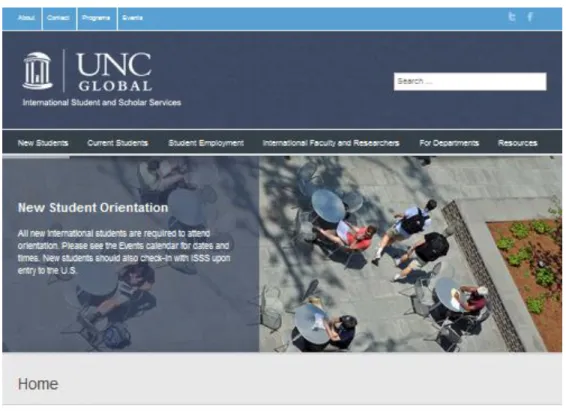
Figure 1: Old Website Homepage ... 3Figure 2: Homepage Layout ... 15
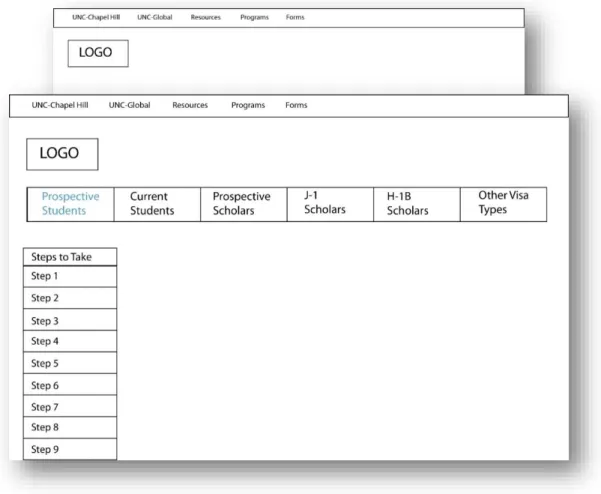
Figure 3: Subpage Layout 1 ... 16
Figure 4: Subpage Layout 2 ... 17
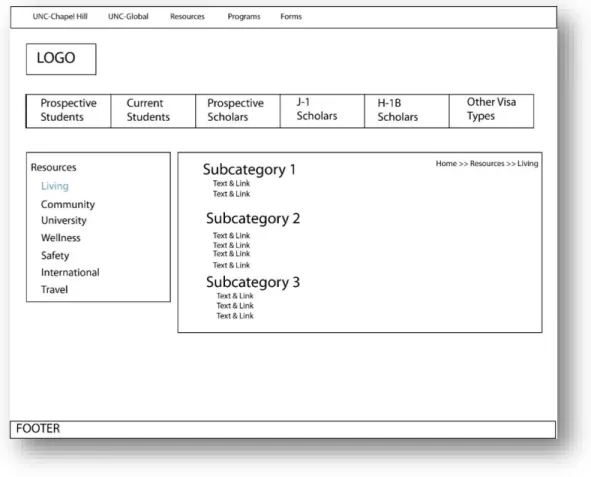
Figure 5: Resource Layout 1 ... 19
Figure 6: Resource Layout 2 ... 20
Figure 7: Navigation Option 1 ... 22
Figure 8: Navigation Option 2 ... 22
Figure 9: Top Navigation Bar goes missing when user scrolls down the site ... 36
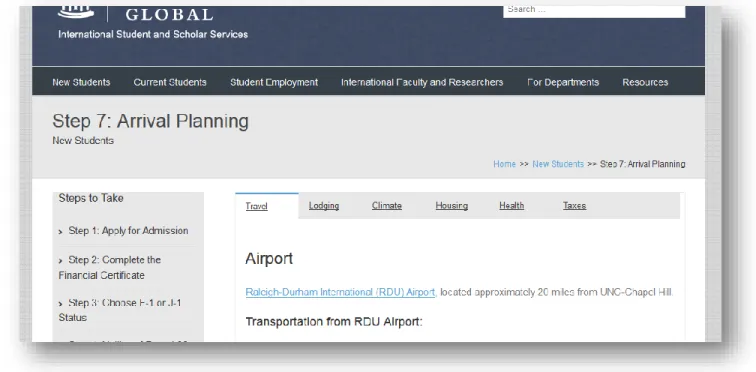
Figure 10: User is confused between selecting lodging and housing to find motel information .. 38
Figure 11: Homepage ... 62
Figure 12: New Student Section ... 63
Figure 13: Current Student Section ... 64
Figure 14: Resource Page ... 65
INTRODUCTION
The Office of International Student and Scholar Services (ISSS), is the
administrative office that serves international students, research scholars, and visiting
professors at the University of North Carolina at Chapel Hill. The office assists these
individuals by doing such tasks as issuing visa related documents, counseling individuals
on immigration matters, and conducting various types of orientation and cultural
programs. Currently, the office serves an estimated 3,200 students, scholars, and visiting
professors from over 100 different countries around the world.
For information rich organizations such as ISSS, having a presence on the web is
no longer a luxury, but a necessity. In fact, the web now serves as a primary source of
information for individuals. According to the Pew Research Center, 85% of American
adults use the internet, of which 78% use the internet to get information about services
they are interested in learning more about (Pew Research Center, 2013).
The popularity of the web has also contributed to the rise in user expectations of
websites. Users expect faster, richer and more up-to-date web applications (Jakober,
2012). Therefore, it is important that the ISSS website be a place where questions can be
The incorporation of concepts taken from user-centered design disciplines such as
visual design, system analysis, and human computer interaction has been suggested to
add value to websites (Nielsen, 2007). According to the Usability Professional’s
Association, user-centered design is defined to be “an approach to design that grounds the
process in information about the people who will use the product. User-centered design processes focus on users through the planning, design and development of a product”
(Usability Professionals’ Association, n.d).
It is often difficult for university departments such as ISSS to incorporate and test
user-centered design concepts on their website because there is often a lack of technical
skills, design expertise, and time among staff members. However, because ISSS is
located at a major research university, there is ample opportunity for ISSS to obtain
assistance from knowledgeable students, faculty, and staff, located in other departments
on campus, in incorporating and testing these principles on the ISSS website. ISSS is a
particularly interesting organization to conduct this study with because its users represent
over 100 countries around the world, and thus the website must appeal to a broad
audience.
BACKGROUND
The old ISSS website had proven to be ineffective in several ways. Resources on
the website were not easy to locate, the site was difficult to maintain, and the site as a
A poor website led to a number of problems for the office such as an increased
workload for the staff since individuals called or visited the office for questions that
could easily be answered online. In addition, international student, scholars, and visiting
professors were frustrated with not being able to locate information that they needed in an
easy and quick manner. Results from a spring 2013 UNC international student focus
group report showed that several international students expressed that they found the
process of finding and using resources to be challenging and that they desired that
resources be presented to them in a checklist and or consolidated format (Heiser, 2013).
At the beginning of the 2013 – 2014 academic year, ISSS expressed interest in
redesigning their website because users had expressed dissatisfaction with the current
site. Based on the positive experiences that certain organizations have had with using a
user-centered design approach in the redesign of their website (Nielsen, 2003), it was
suggested that ISSS seek the assistance of the campus community in incorporating
program to help redesign the website using user-centered design principles. The graduate
student spent the academic year redesigning the ISSS website.
PURPOSE
Thus, the purpose of this project was two-fold. One was to redesign the website
using user-centered design principles, and the second purpose was to see whether
incorporating these user-centered design principles on the ISSS website allows users to
achieve an above average task completion rate during usability testing of the website. An
above average task completion rate is defined to be a task completion rate of above 78%,
since 78% is considered to be the average task completion rate (Measuring Usability,
2011). For simplicity’s sake, the goal will be to achieve a task completion rate of 80%.
The task completion rate is an important measure because most websites are designed so
that users can complete various tasks on the website. Thus, the task completion rate will
be used to measure the success of the incorporation of user-centered design principles on
the website.
RESEARCH QUESTION
Does incorporating user-centered design principles in the redesign process of a
LITERATURE REVIEW
Taking a look at past research studies involving the goal of creating websites that
are user-centric is an important way to gain a better understanding of the various
viewpoints and concepts that have been raised in relation to developing a user-friendly
website. In the subsequent paragraphs, literature dating back to the early 2000s to the
present will be reviewed concerning user-centered design practices for websites. The
literature reveals that factors such as the method one uses, how information is organized,
the content management plan, aesthetics, and user design needs are fundamental to
redesigning a website that will increase the satisfaction of users.
Methods to Redesigning a Website
Redesigning a website takes a lot of effort and planning. Organizations have to
plan their redesign in a way that is least disruptive to users, balances the needs of
stakeholders, and follows a timeline that is feasible to live up to. As a result, the
approach and strategy an organization decides to undertake is critical to the success of a
website redesign project. The literature discusses the importance of adopting an approach
that is feasible, that allows for user feedback, and allows for the website to be easily
modifiable.
the Agile methodology when developing a website. The Agile method proposes that
software be built in an iterative and incremental approach through the use of rapid and
reactive prototyping (Braun, 2005). According to Braun, this type of approach is suitable
for the creation of a user-centered website because rapid prototyping allows for constant
user feedback, the development of well-defined goals, and allows for exploration before
one fully commits themselves to a certain idea (2005). It is believed that the Agile
framework is a natural fit for user-centered design because user-centered design
practitioners can work hand in hand with developers to ensure that the end product caters
to needs of the user (Williams & Ferguson, 2007).
Reviewing website redesign case studies, one sees that organizations that have
incorporated user testing throughout the design process were able to create a website that
truly reflected user preferences rather than a website that was based on assumptions about
the user. (Becker & Yannotta, 2013). Jeff Wisniewski mentions that certain organizations
such as libraries often favor completely tearing down their existing site and rebuilding
from the ground up. She argues that this approach is oftentimes impractical because it
requires organizations to devote more time and energy to the project than they have and
can be disruptive to the user since the user will suddenly have to adapt to the new
website, when they might be used to accessing the website in a certain way (Wisniewski,
2008). Thus, based on the literature one can see that it is recommended that one adopts an
adaptable and user-centric approach when redesigning a website.
Information Organization
It is important to review the literature to learn effective strategies for how to
determining how easily the user can locate resources on a website. Organizing
information on a website can be tricky because each website has unique requirements
based on its users’ needs. Thus, the literature places an importance in taking the user into
consideration when planning the content management strategy of the website. Users have
been found to be task oriented and believe that the categories used to organize
information on a website should map to their goals and tasks (Davidson, Bernhardt,
McLeo, Rife, & Grabil, 2008). Thus, organizations should create user profiles to better
understand the types of users that will be visiting their website (Proctor, Vu, & Salvendy,
2002).
A website’s navigation bar, use of hyperlinks, categories, and tags are often used
to organize web content. The navigation bar is used to help steer the user to the
information they are looking for. A website’s navigation has often been found to be a root
of most major web usability problems since improper navigation can result in the user
getting lost on the site and not finding the resources they are looking for (Rahmat &
Zulzalil). Therefore, it is important that the navigation of the website be highly visible to
the user and that navigational text avoid jargon (Proctor & et al., 2008). In addition, the
literature cautions that users can feel frustrated when they encounter broken links and
outdated information since accuracy and the timeliness of information on the website is
critical to the user (Titoko & York, 2005). The importance of proper placement of objects
in a website has also been emphasized in the literature (Kothainayaki, Sivakumaren, &
Gopalakrishnan, 2012).
It is also important for organizations to be cognizant of the types of information
inventory can allow an organization to uncover patterns, spot any inconsistencies,
outdated information, etc. on the site (Davidson et al., 2008). In addition, a content
inventory can allow an organization to easily share their findings with other staff, learn
about who is responsible for what content, and provide an overview of the site’s content
problems (Blakiston, 2013).
Content Management Plan
Once a website’s content has been organized, the literature stresses the
importance of creating a sustainable content management plan. Titoko and York advocate a less is more approach by avoiding unnecessary “bells and whistles” so that only the
most important pieces of information on a site need to be updated (2005). Because many
organizations are unable to have a dedicated staff that can be responsible for managing
the website, it is important to adapt a distributed and collaborative approach to
maintaining the website since this approach allows for information to be updated in a
timely fashion by the most knowledgeable individuals in an organization (Slater, 2008).
Aesthetics
One of the most important elements to consider when designing a website is the
overall aesthetic of the site. In fact, a study conducted showed that adding some type of
aesthetic treatment to content on a website increases the perceived credibility of the
website for the first few seconds that a user is on the webpage (Robins & Holmes, 2007).
Other literature similarly state that the overall look of the website is an important factor
in determining how a user will perceive the organization (Thorlacius, 2007).
The literature shows that the design of the website should be simple and
consistent. The website should require a minimal amount of effort, not overwhelm the
where they are on the site, and should manage guess work (Guenther, 2004). The design
of a website should be catered to the site’s different audiences. An example was provided
of how Nike’s website is organized into sections that each contain different design
elements based on a section’s intended audience (Thorlacius, 2007).
The literature also discusses the use of color as being an integral part to the
overall look of a website and recommends that color choices be made so that content is
readable, is accessible, and that important points are highlighted (Holtze, 2006). From the
literature, we can see that a website’s design choices should be kept simple, be
purposeful, and be mindful of the user’s needs.
User Design Preferences
When designing a website that is user-centered, one should take steps to learn
about how to cater to the design preferences of the user. In this study, the focus will be on
international students, so it is important to look at the literature to see how culture can
affect website design preferences. In the study Gevorgyan and Manucharova conducted,
it was found that users from collectivist societies may prefer website features such as
blogs, chat rooms, etc. (2009). High context societies in a different study were found to
enjoy having animation, images promoting a collectivist society, an exploratory
navigation, and many sidebars on their web pages (Wurtz, 2006).
Societies that display a high power distance appreciate website features that
provide a sense of authority such as an organization’s vision statement (Gevorgyan &
Porter, 2007). In addition, it is believed that high power distance societies might prefer
websites that provide information organized in a hierarchy, whereas low level power
The literature also mentioned the importance of being cognizant of graphics used
on websites such as icons and gave an example of a how a mail icon could be interpreted
in different ways depending on the user’s culture since different cultures can have
different symbols for mail (Amant, 2005). A study that compared university websites
from different countries had some interesting findings that further confirm how certain
design features such as the page orientation, color scheme, and use of graphics can differ
among the countries (Callahan, 2006). Thus, the literature shows that when one is
designing a website that targets different cultures, one should be aware that cultural
differences should be taken into consideration when designing a webpage.
Based on the literature review one can see that the methodology one adopts, how
information is organized, the content management plan, the aesthetics, and user
preferences are important to redesigning a website that satisfies and fulfills user needs.
The information from the literature review was incorporated into formulating a plan to
METHODS
The research question was addressed by using a mixed-method approach, utilizing
both quantitative and qualitative approaches. The qualitative aspect of the study provided
in-depth user insight into the website during the redesign process, whereas, the
quantitative aspect of the provided measurable outcomes to the usability testing phase of
the study.
REDESIGN PROCESS
The first step of the study was to redesign the ISSS website using user centered
design principles. User-centered design principles was incorporated into the design phase
of the new website through several ways.
Selecting a Platform for the Website
A major decision of the redesign process was to select a platform to build the
website upon. The designer felt that it was important to keep the needs of ISSS staff
members in mind since the staff members would ultimately be responsible for
maintaining the site. Many of the ISSS staff members lack technological skills and also
do not have the time to invest and learn a highly technical system. Based on staff needs, it
As a result, the web.unc.edu platform was chosen. The web.unc.edu platform is a
service provided to the UNC community that assists with the creation of Wordpress
websites. Wordpress is a content management system that allows multiple users to update
information in a user friendly manner. The web.unc.edu service has a staff of individuals
who are well-versed in Wordpress technology, who help ensure that the latest version of
Wordpress is installed and answer any technical questions asked by UNC users.
The designer selected the Avada theme offered by Web.unc.edu. The theme was
selected because it provided ample customization opportunities and features. In addition,
the theme is responsive, which is particularly important for the ISSS website since the
website will be accessed by individuals all around the world using various devices.
Personas
Once the platform for the website was built, the next step was to develop personas
for the primary users of the website: current students, prospective students, current
scholars and prospective scholars were created (Appendix D) These personas helped give
the redesign process a personal touch as each persona was given a name, age, occupation,
a story that provided context to what they would use the website for, and an image.
Throughout the redesign phase of the website, the personas were consulted and provided
a mechanism of checking to see if the website was meeting the needs of the users created
through the personas.
Task Analysis
A task analysis was also conducted to examine common tasks that users would
need to complete on the website. A task analysis for prospective students, current
students, and current scholars were created (Appendix H). A task analysis for prospective
analysis takes one common task for each type of user and outlines this task into a series
of sub-tasks. The task analysis helped provide focus to the redesign process because the
outlined tasks provided a deep understanding of what type of content and structure would
be needed to support common tasks for various users.
Content Inventory
Third, a content inventory was conducted on the old ISSS website to assess what
resources are currently made available on the website and how they are organized. The
content inventory was very important and provided a lot of insight. This content
inventory was used to figure out an organizational schema for the website (Appendix I).
Based on the content inventory, the left sidebar content of the page was determined. For
example, after doing a content inventory of pages geared towards prospective students on
the old ISSS website, it was determined that the information could be broken down into a
series of steps that students could follow.
Iterative User Tests
A series of informal user tests were also conducted throughout the redesign
process. These tests asked users to casually browse through the site and provide their
honest opinions on certain components of the site. In addition, sometimes users were
asked to complete a simple task to gauge whether the information was being organized in
an effective manner. One profound finding from these informal tests were that the student
employment section should be its own separate menu item in the navigation bar. In
previous draft versions of the site, the student employment section was contained in the
visited the website for employment related questions. Thus, it was decided to create a
separate student employment section on the website.
MAJOR DESIGN DECISIONS
During the redesign process several design decisions had to be made related to the
layout of pages on the site such as the homepage, subpages and resources page, the
structure of the navigation menu, the color scheme of the site, etc.
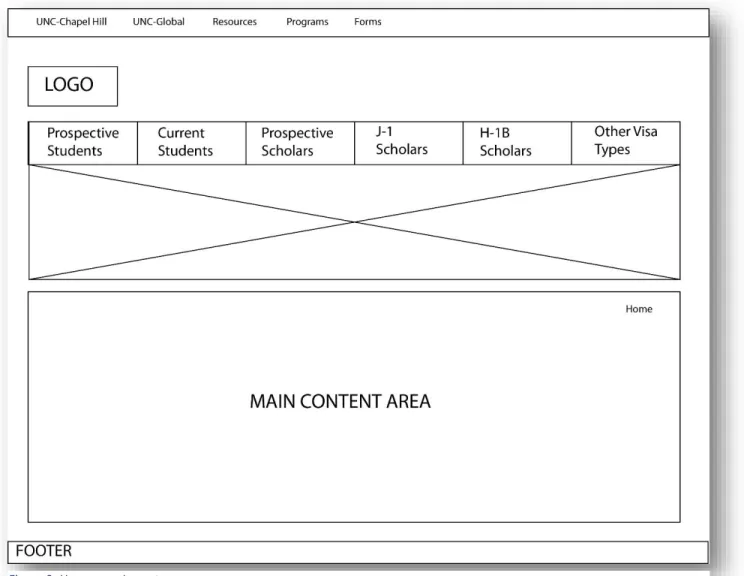
Homepage
The homepage is the place that provides users with the first impression of the
website. Thus, a lot of time and thought was given to determining the design needs of this
page. The staff wanted an easy way to display announcements on the homepage and
wanted to include text on the page that introduced users to ISSS. After going through
various options, it was decided to put the announcements on a slider. The slider would
contain relevant images and then a text overlay on top of each image that includes the
announcement text. A slider allows the opportunity to display a lot of information and
images in a compact manner on a webpage, while also providing visual interest to the
page. Beneath the slider, a paragraph that contains introductory information on ISSS was
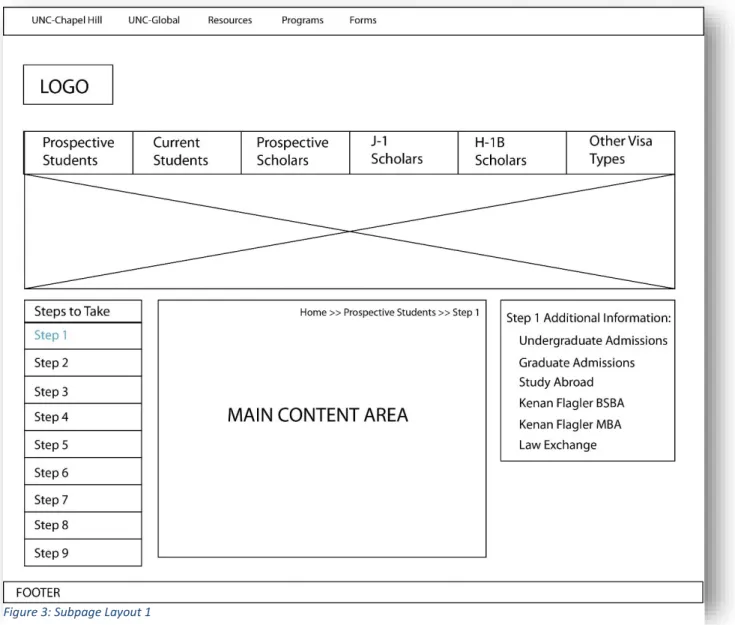
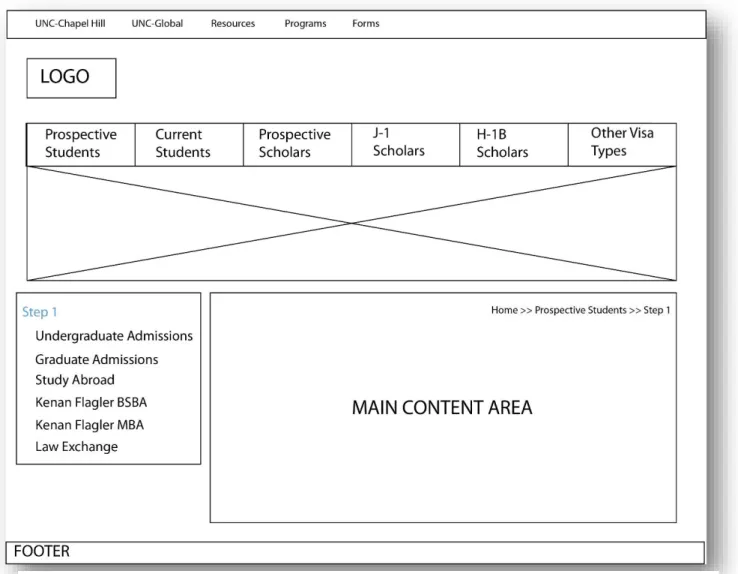
Subpage
A considerable amount of effort was given in determining the layout of all
subpages. Two types of layout were proposed by the designer. The first layout was a
three column layout. In this type of layout, the left sidebar is where the main navigation
of a section would be placed. The main content area would be in the middle of the page
and the right sidebar would contain any secondary links that apply to a particular page.
The second type proposed layout was the two column layout. The two column layout
menu and to the right of this sidebar would be the main content area, where the body of
the page would be placed.
In the end, the two column layout was chosen for two major reasons. First,
Ockham’s Razor states that given a choice between two functionally equivalent designs,
the simplest design should be selected. A three column layout can be confusing and
distracting to the user since they are surrounded by links to the right and left of the page.
The content might overwhelm and frustrate the user. A two column layout is simpler,
easier to understand, and cleaner (William, Holden, & Butler, 2010).
Second, a three column layout requires users to exert more mental effort in order
to process the content on the site because a three column layout has more information on
the page and can make the page feel more cluttered. Putting more cognitive load on the
user would impact how easily users find the content and complete tasks on the website
(William, Holden, & Butler, 2010). Third, cursory user tests with users found that many
of the users found the three-column layout confusing and preferred the simplicity of the
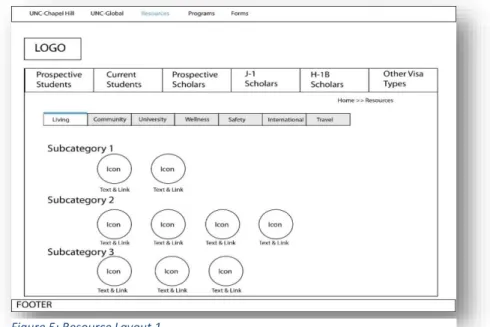
Resources Page
The ISSS staff was very concerned about creating a user-friendly page that
displayed resources for the international community at UNC. Other departments at UNC
were also particularly interested in the design of this page because they wanted a place to
point their international student and scholars to informative resources that can assist them
with adjusting to life in the US. There were two proposed designs for the resources page.
In the first layout, the various categories of resources were featured using a tab layout.
Within each tab, there was a list of sub-categories that list links to the various resources.
In this layout, different colored icons would be used to represent the various resources.
In the second layout, each resource category has its own page and one can access these
pages using the left sidebar navigation. Each resource category page features
subcategories that would use unordered lists to display links to resources.
The first layout was chosen for several reasons. First, when elements are arranged
in a straight line, they are perceived as a related. The tabbed layout, instantly provides a
sense of cohesiveness to the various resource categories. It allows the resources section of
the site to look more like a tool-kit, rather than a series of pages. In addition, a top blue
border would be displayed on the active tab, whereas the inactive tabs would have a grey
background color. This was thought to help differentiate what resource is being viewed.
Second, tabs allow for related information to be grouped together in an easy to
understand user interface. Tabs allow the user to easily view different categories of
resources, without worrying about issues such as a new page loading. Third, using icons
in the tabbed page layout, allows for the page to be more visually appealing and allows
for users to easily recognize what a link is about. For example, a link to the housing page
at UNC would use an image of a house as the icon. Using icons, is particularly important,
because the website will be used by an international audience who have varying degrees
of English proficiency. The type of icons used on the site were carefully chosen with an
Navigation Menu
For the navigation, the decision was between two different options. The first option was a
down menu. If a user hovers over a menu item in a navigation bar, then a
drop-down menu would appear with links to sub-pages that fall under that section
The second option was to not have a drop-down menu but rather have subpages for the
section be displayed in a navigation bar on the left-hand side of the page. Figure 7: Navigation Option 1
A navigation bar without drop-downs was chosen for several reasons. First, the
Nielsen Norman Group has noted that nearly every test session they conducted showed
that users found drop down menus to be annoying (Nielsen, 2007). Second, drop down
menus should be used sparingly as they cause confusion to the user since options come
and go depending on where the user clicks or hovers their mouse. In addition, if the list
of options are long, it doesn’t allow the user to easily see all their options at one glance
(Nielsen, 2000).
Third, user tests show that drop down menus often cause cognitive strain for the
user because they require the user to use their motor skills to successfully select a
particular item from the navigation menu. Many drop down navigation menus require
that users keep their cursor in the drop down selection area while they select a particular
menu item. This process can be particularly difficult for very long drop down menus
Color Scheme
A monochromatic color scheme was chosen for the foundation of the site because
it is simple and makes the site cohesive. However, pops of color in the form of the icons
were added to provide visual interest and highlight important links.
Top Navigation Bar and Link Color: #56A0D3
Left Sidebar: #E8E8E8
Main Navigation: # 364049
Icon Color: # c2c045
Icon Color: #E9A024
Quick Links
Another decision was to determine how to highlight important links. Options such
as a simple text underline and a right sidebar for these links were considered. However,
ultimately, it was decided that these links should be highlighted in a similar manner to
how resources were highlighted by using a set of color icons that contain hyperlinks to a
particular page or form.
USER TEST METHODS
Once the website was redesigned (See Appendix G for screenshots of pages from
the redesigned website), a usability test was conducted to test whether the user-centered
design principles can help result in a website where users can complete tasks at an above
average rate.
Subjects were recruited via a convenience sample for the usability study. For this
study, the only criteria that was used to determine if one can participate in the study was
whether the user was a current international student. Students were recruited voluntarily
for the study by sending out an email through the ISSS’s international student mailing
list. The email contained information about the study and allowed interested users to
schedule an appointment and location with the researcher to conduct the test. See
Appendix B to view the sample email that was sent out to students on the international
student mailing list.
While the users of the website include scholars, departments, and other
individuals from the UNC community, it was decided for the sake of simplicity that only
students should be recruited for the study and that only the student sections of the website
provide clarity and focus to the study because the student population and student sections
of the website are the most popular and important part of the website.
Eight students ended up being recruited for the study. This range is a suitable
amount because research shows that 5 users is a sufficient amount of users for usability
testing (Nielsen, 2000). The study was completed on a Macintosh laptop, so that the
researcher could meet participants at a convenient location on campus. Meeting
participants at a location of their choice helped boost recruitment numbers, since the
researcher found it difficult to recruit international students during the summer.
The usability study was completed as follows. An informed consent statement
was given to users before the start of the user testing session (Appendix C). The informed
consent form told users that their participation in the study is voluntary and that their
identifying information will be removed and will be replaced with an id number that will
help link responses. The informed consent statement also told users about the purpose of
the study, how long it will take for users to complete the survey, that all questions are
optional, and that all responses will be kept confidential and will not be linked to
identifying information.
Next, users were given a pre-test questionnaire that asked demographic questions
and questions to gauge their comfort level with technology (Appendix E). Then, users
were given a set of ten tasks that they were asked to conduct on the redesigned website.
These tasks were evaluated using a binary scale, where 1 means that the task was
completed successfully and 0 means that the task was not completed successfully. Thus,
completion rate (Measuring Usability, 2011). Thus, the study aimed to see if users can
get above the average task completion rate when user centered design principals are used.
Ten tasks were chosen that covered a range of different aspects of the website
(Appendix A).
The first task asked users to list out the ten steps a student need to take to come to
the UNC in a student immigration status. This question was asked to see if students were
able to understand that the student visa process was broken down into a series of steps on
the website.
The second task asked users to locate the chart that describes the differences
between an F-1/J-1 Visa. Users were asked to complete this task to since ISSS staff
members have mentioned that students are often confused by the differences between the
two visas.
The third task asked users what items new international students needed to bring
in to check in with ISSS. This task was asked to see if users were able to locate this
information quickly since students often forget to bring the correct documentation with
them to check in.
The fourth task asked users to pretend as if they were new international students,
who were preparing to arrive to the US, and needed to find a motel they could stay in
temporarily. The task asked them to locate at least one expensive motel that they could
spend the night in. This task was asked to see if users could locate the information via a
tabbed interface.
The fifth task told users that they were current international students who wanted
traveled. This task was asked because ISSS staff members mentioned that it is a question
asked frequently by international students at UNC.
The sixth task asked users to provide a definition of a dependent. Users were
asked to complete this task to see if users were able to locate the definition highlighted in
a light blue box at the top of the page.
The seventh task asked users to pretend as though they were current students who
were interested in finding information on the site about how to change their major. This
task was asked to see if users were able to scroll all the way down to the end of the page
and locate the paragraph about changing ones major.
The eighth task asked users to find where on the site information about how many
hours per week students can work on campus was located. Users were asked to complete
this task to see if they were able to determine that this information was organized under
the student employment category section of the site.
The ninth task asked users to find out where information about campus wellness
resources could be found on the site. The task was asked to see if users were able to
locate the resources category in the navigation bar and if they were able to understand the
tabbed interface of the resources section.
The final task asked users to provide a list of programs that ISSS offers to the
international community at UNC. Users were asked to complete this task to see if they
were able to find information located at the top navigation bar.
As the users completed the tasks, the screen they used to access the website and
the conversation they had with the researcher were recorded with QuickTime player.
During the study, all responses, recordings, and feedback from the surveys and
from the user testing were kept on an external hard drive. Qualitative feedback obtained
during the user testing was evaluated by examining notes and by replaying the recording
from user actions during the task based portion of the study to uncover common themes
and patterns. At the completion of the study, all information related to the study was
RESULTS
Participant Demographics and Background
Eight Participants participated in the usability test between June 6th and July 1st.
The average participant age was 27 years old and 62.5% of the participants were male,
whereas 37.5% were female. All 8 participants described themselves as Asian and said
that they were graduate students at UNC-Chapel Hill.
The majority (62.5%) of participants said they spent 6-9 hours on the internet
each day and the majority of participants (75%) said they used Chrome as their primary
web browser. The remaining participants used Fire Fox and Internet Explorer. The
Pre-Test Questionnaire Technology Skill Level Overview
Question 1
(No Experience)
2 3 4 5
(Expert) Mean Participant Skill Level with Computers in General
0 0 0 4 4 4.0
Participant Skill Level with the Internet
0 0 0 3 5 4.625
Participant Skill Level with Watching Videos Online
0 0 1 3 4 4.375
Participant Skill Level with Blogging
1 0 2 5 0 3.375
Participant Skill Level with Social Media
0 1 1 5 1 3.75
As a part of the pre-test questionnaire, participants also listed a number of UNC-Chapel Hill affiliated websites that they considered to be their favorites. The UNC Career
Service, the UNC School of Information and Library Science homepage, and the UNC
Libraries homepage were three websites that were mentioned by more than one
participant. Some other websites that were listed by participants were the:
UNC Sakai website
UNC Writing Center’s website
Summary of Task Completion
Note: The top row shows each participant. Example P1 means participant 1
Task P1 P2 P3 P4 P5 P6 P7 P8
You are a new international student. List out the 10 steps you need to take to come to the US in a student immigration status in order to attend UNC.
You are a new international student, locate the chart that describes the differences between F-1/J-1 Student Visas.
You are a new international student, what items do you need to bring to check in with ISSS?
You are a new international student who needs to prepare for your arrival to the US. List one most expensive motel you can stay in.
X X
You are a current international student who wants to travel. What are the required travel documents?
You are a current international student who wishes to bring a dependent to the US. What is the definition of a dependent?
You are a current international student, who wants to change your major. Go to the page that discusses the process.
How many hours per week can a student work on-campus at UNC-Chapel Hill?
You are looking for resources to help you adjust to life at UNC. You want to find more
information on wellness
resources at UNC. Where is this information located?
List the programs that ISSS offers to the international community at UNC?
X X X X X
Post-Test Questionnaire Result Overview
Question 1
(Strongly Disagree)
2 3 4 5
(Strongly Agree)
Mean
I think that I would like to use this Website Frequently
0 0 1 4 3 4.25
I found the website unnecessarily complex
3 4 1 0 0 1.75
I thought the
website was easy to use
0 0 1 2 5 4.5
I thought there was too much
inconsistency in this website
1 3 2 1 0 2.125
I would imagine that most people would learn to use this website very quickly
0 2 0 2 4 4
I found the website very cumbersome to use
5 3 0 0 0 1.375
I needed to learn a lot of things before I could get going with this website
ANALYSIS
Based on the results, one can see that the average task completion rate for the
participants was 91.25%, which exceeds the goal of 80% that this study sought to
achieve. In addition, one can see based on the post-test questionnaire, that the overall
impression of the site was generally positive. After taking the test, the majority of users
said they would like to use the website frequently, that they considered the website to be
easy to use, they thought the website to not be complex, and that the website was not
cumbersome.
In addition, participants made several positive comments about the design of the
website. Several participants appreciated the color scheme, layout of the website, and the
use of pictures. One user said she appreciated the organization of the website and said
that it was clear that the website was organized in a hierarchical fashion. Finally, most of
the participants appreciated the content made available on the website.
It can be said that incorporating user-centered design principles played a key role
in helping users achieve an above average task completion rate and a favorable
impression of the website. Throughout the redesign process, user needs were considered
to be a priority. Engaging in activities such as writing personas and conducting user
research helped ensure that the user’s voice was present while designing the website. In
information organization of the site.Not only did the user testing sessions help provide
two measurable ways of determining how user friendly the ISSS website is, but the user
testing session also helped provide valuable feedback on how to further improve the
website.
Major Problem Areas
There were two major problems areas discovered during the user testing sessions.
The first problem area involves the top navigation bar on the website. Out of 8
participants, only 3 students were able to complete the task involving locating
information on this bar. As can be seen from the screenshot below, many users simply
scrolled down the page at a point where the top navigation bar was no longer visible.
Participants who were unable to complete the task involving the top navigation
bar were genuinely surprised when the researcher pointed out the top navigation bar since
they couldn’t believe they missed it when it was simply at the top of the page.
Interestingly, the top navigation bar was one area of the design that was not tested
Thus, one can see that engaging in user-centered design practices such as informal
user tests are important so that problem areas such as this one can be mitigated.
Fortunately this problem area can be easily solved by either completely doing away with
the top navigation bar or by only including secondary information in the top navigation
bar.
The second major problem area discovered was use of wording on the website.
While for the most part users said the website was very clear and straightforward, some
of the wording used on the site caused users confusion. An example of this can be seen
with task number 3, where users were asked to find an expensive motel they could stay
in. As can be seen from the screenshot below, one of the users arrived to the correct
location on the site, but was not able to figure out that the tab entitled “lodging” was where the information on motels was located and instead clicked on the “housing” tab.
After the researcher showed the participant the correct answer, the participant explained
This problem can be solved by simply changing the word “lodging” to a word like
motels and or hotels. However, to ensure that other areas of the site do not contain
language that might be confusing to an international audience, it is recommended that
additional user tests (formal or informal) be conducted with international students to
resolve any similar issues.
Suggestions for Improvement by Participants
While users were able to complete the majority of tasks with ease, during the user
testing sessions, some of the participants brought up a few important points that can be
used to improve the website. One suggestion was to increase the size of the words
“International Student and Scholar Services” in the logo. Even though the participant was
able to determine the correct audience for the website, she believed that some users could
get the impression that the website was for Global Studies instead of for the international
community at UNC. Another suggestion was to have a site map page on the website so
also believed that ISSS should market the website more to UNC international students.
Finally, one participant would like to see more resources be available in the resource
section of the website.
LIMITATIONS
The study had several limitations. First, the redesigned version of the ISSS
website was subject to certain constraints since it used web.unc.edu’s Wordpress
platform, which does not allow for much customization in terms of layouts and plugins
used. Thus, the redesign of the website had to be adapted to whatever was made available
through web.unc.edu. Second, the user tests only tested international students and not
scholars. Students were tested because they are generally more available and willing to
participate in a user test in comparison to international scholars. As a result, only the
student sections of the website were primarily tested. In further user tests of the site,
scholars should also be recruited.
Next, when users were asked to conduct tasks during the user testing phase of the
study, the conditions under which a user typically would conducts tasks on their own was
difficult to reciprocate and may consequently have impacted the task completion scores.
Third, the task completion scores and user feedback may have been affected by
user motivation at the time of the study. Finally, since a convenience sample was used,
users who tested the site, may not have been representative of the international
CONCLUSION
The long-run goal of the project is to make the ISSS website a usable and a
valuable resource for the international community at UNC-Chapel Hill. The completion
of this project has helped ISSS move one step closer towards this goal. User-testing of
the ISSS website shows that ISSS website is a usable website based on the above average
user task completion rate of 91.25% and post-test questionnaire answers. In addition, the
user-testing sessions of the website have provided further ways to improve the ISSS
website with user needs in mind.
From a design and technical point of view, user-centered design is an important
methodology that should be used when designing all types of websites since it can help
pin-point problem areas before they become major problems that are costly to fix and
because they can help create an end product that satisfies user needs.
A usable website benefits ISSS in many ways, the most important being that users
of the website are now able to find and learn about international policies and regulations
in an easier manner.
The insights gained from this research study can be used to assist UNC
organizations similar to ISSS with creating a user-centered website. Usable websites will
benefit UNC-Chapel Hill since it can help create a campus community that can utilize
REFERENCES
Amant, K. S. (2005). A prototype theory approach to international Website Analysis and
design. Technical Communication Quarterly, 14(1), 73-91. doi:10.1207/s15427625tcq1401_6
Becker, D., & Yannotta, L. (March 2013). Modeling a library website redesign process:
Developing a user-centered website through usability testing. Information Technology & Libraries, 32(1), 6.
Blakiston, R. (2013). Developing a content strategy for an academic library website.
Journal of Electronic Resources Librarianship, 25(3), 175-191.
Bordac, S., & Rainwater, J. (2008). User-centered design in practice: The Brown
university experience. Journal of Web Librarianship, 2(n2-n3), 109-138.
Braun, E. (2005). Lean/Agile methods for web site development. Online, 29(5), 58. Retrieved from
https://auth.lib.unc.edu/ezproxy_auth.php?url=http://search.ebscohost.com/login.asp x?direct=true&db=f6h&AN=17980378&site=ehost-live&scope=site
Callahan, E. (2005). Cultural similarities and differences in the design of university web
Cardello, J. (2013). Four dangerous navigation approaches that can increase cognitive
strain http://www.nngroup.com/articles/usability-101-introduction-to-usability/
Davidson, B., Bernhardt, G., McLeo, M., Rife, M., & Grabil, J. (2008). Coming to
content management:Inventing infrastructure for organizational knowledge work.
Technical Communication Quarterly, 17(1), 10-34.
Gevorgyan, G., & Manucharova, N. (2009). Does culturally adapted online
communication work? A study of American and Chinese internet users’ attitudes and
preferences toward culturally customized web design elements. Journal of Computer-Mediated Communication, 14(2), 393-413. doi:10.1111/j.1083-6101.2009.01446.x
Gevorgyan, G., & Porter, L. V. (2008). One size does not fit all: Culture and perceived
importance of web design features. Journal of Website Promotion, 3(1), 25-38. doi:10.1080/15533610802052589
Guenther, K. (2004). Know the fundamentals and good design will follow. Online, 28(1), 54. Retrieved from
https://auth.lib.unc.edu/ezproxy_auth.php?url=http://search.ebscohost.com/login.asp x?direct=true&db=f6h&AN=11796303&site=ehost-live&scope=site
Heiser, C. (2013). International student focus group results. UNC.
Jakober, L. (2012). End-users’ web experience expectations just keep getting higher.
Message posted to https://blogs.akamai.com/2012/11/end-users-web-experience-expectations-just-keep-getting-higher.html
Kothainayaki, S., Sivakumaren, K. S., & Gopalakrishnan, S. (2012). User preferences on
university websites: A study. Library Philosophy and Practice.
Luna, D., Peracchio, L. A., & de Juan, M. D. (2002). Cross-cultural and cognitive aspects
of web site navigation. Journal of the Academy of Marketing Science, 30(4), 397-410. Retrieved from
https://auth.lib.unc.edu/ezproxy_auth.php?url=http://search.ebscohost.com/login.asp x?direct=true&db=ufh&AN=7490676&site=ehost-live&scope=site
Measuring Usability. (2011). What is A good task-completion rate? Message posted to
http://www.measuringusability.com/blog/task-completion.php
Nielsen, J. (2000). Drop down menus: use sparingly
http://www.nngroup.com/articles/why-you-only-need-to-test-with-5-users/
Nielsen, J. (2000). Why you only need to test with 5 users. Message posted to
http://www.nngroup.com/articles/why-you-only-need-to-test-with-5-users/
Nielsen, J. (2007). Do government agencies and non-profits get ROI from usability?.
Message posted to http://www.nngroup.com/articles/government-non-profits-usability-roi/
Nielsen, J. (2007). Does user annoyance matter?
http://www.nngroup.com/articles/usability-101-introduction-to-usability/ Nielsen, J. (2012). Usability 101: Introduction to usability. Message posted to
http://www.nngroup.com/articles/usability-101-introduction-to-usability/
Proctor, R., Vu, K., & Salvendy, G. (2002). Content preparation and management for
web design: Eliciting, structuring, searching, and displaying information..
International Journal of Human-Computer Interaction, 14(1), 25-92.
Rahmat, H., & Zulzalil, H. (2013). Deriving objective navigational measures for web
usability. International Review on Computers and Software, 8(1), 144-151.
Robins, D., & Holmes, J. (2008). Aesthetics and credibility in web site design.
Information Processing & Management, 44(1), 386-399. doi:http://dx.doi.org/10.1016/j.ipm.2007.02.003
Slater, R. (2008). The library web site: Collaborative content creation and management.
Journal of Web Librarianship, 2(4), 567-577.
Suresh, K., & Gopalakrishnan, S. (2012). Content organization in websites of agricultural
Thorlacius, L. (2007). The role of aesthetics in web design. NORDICOM Review, 28(1), 63-76. Retrieved from
https://auth.lib.unc.edu/ezproxy_auth.php?url=http://search.ebscohost.com/login.asp x?direct=true&db=ufh&AN=25472211&site=ehost-live&scope=site
Titoko, J., & York, V. (2005). Re-designing a library website for sustainability. World Library and Information Congress:
71th IFLA General Conference and Council, Oslo, Norway.
Usability Professionals. What is user-centered design. Retrieved 10/29, 2013, from
http://www.usabilityprofessionals.org/usability_resources/about_usability/what_is_u cd.html
Usability.Gov. System usability scale (SUS). Retrieved 12/2, 2013, from
http://www.usability.gov/how-to-and-tools/methods/system-usability-scale.html
Williams, H., & Ferguson, A. (2007). The UCD perspective: Before and after agile. Paper
presented at the Agile Conference (AGILE), 2007, 285-290. doi:10.1109/AGILE.2007.61
Würtz, E. (2005). Intercultural communication on web sites: A cross-cultural analysis of
APPENDICES APPENDIX A:
Tasks Given to Users during User Testing Sessions
Note: Users were given a 0 if they completed a task and 1 if they did not complete a task.
1. You are a new international student, locate the chart that describes the differences between F-1/J-1 Student Visas.
2. You are a new international student, what items do you need to bring to check in with ISSS?
3. You are a new international student who needs to prepare for your arrival to the US. List one most expensive motel you can stay in.
4. You are a current international student who wants to travel. What are the required travel documents?
5. You are a current international student who wishes to bring a dependent to the US. What is the definition of a dependent?
6. You are a current international student, who wants to change your major. Go to the page that discusses the process.
7. How many hours per week can a student work on-campus at UNC-Chapel Hill?
8. You are looking for resources to help you adjust to life at UNC. You want to find more information on wellness resources at UNC. Where is this information located?
APPENDIX B:
Recruitment Email Used for User Testing Sessions
Note: Template Adapted from Usability.gov Hello,
My name is Madeeha Khan, and I’m helping to run a usability study of the UNC Office of International Student and Scholar Services’ (ISSS) website. In an effort to improve the website, we’re looking for people to participate in a research study, where users will be asked to test a redesigned version of the ISSS website and provide feedback after using it.
What will I be doing in a usability study?
You will be asked to do several short tasks using the ISSS website. As you go through the tasks, the computer screen that you will be using to access the site and the conversation you have with the researcher will be recorded. You will also be asked questions about your experience and perceptions of the website.
How long is a session? 30-45 minutes When and where?
You will be asked to participate in person by scheduling a time and location with the researcher via email.
Interested in participating?
Please reply to this email with your contact information and a few dates/timings of when you will be available. I’ll email you some questions to help us determine if you qualify for the study.
If you have any questions, please contact me at [email protected]
Thank you for interest,
Madeeha Khan
APPENDIX C:
Consent and Recording Release Form for User Testing Sessions
University of North Carolina at Chapel Hill Consent to Participate in a Research Study Adult Participants
Consent Form Version Date: 5/12/14 IRB Study # 14-1321
Title of Study: Usability Test of the Office of International Student and Scholar Services Website at UNC-Chapel Hill
Principal Investigator: Madeeha Khan
Principal Investigator Department: School of Information and Library Science Principal Investigator Phone number: 919-672-1825
Principal Investigator Email Address: [email protected] Faculty Advisor: Ron Bergquist
Faculty Advisor Contact Information: [email protected]
What are some general things you should know about research studies?
You are being asked to take part in a research study. To join the study is voluntary. You may refuse to join, or you may withdraw your consent to be in the study, for any reason, without penalty.
Research studies are designed to obtain new knowledge. This new information may help people in the future. You may not receive any direct benefit from being in the research study. There also may be risks to being in research studies.
Details about this study are discussed below. It is important that you understand this information so that you can make an informed choice about being in this research study.
The purpose of this research study is to see if incorporating user-centered design
principles can result in a redesigned Office of International Student and Scholar Services’ (ISSS) website that allows for international students to successfully complete common tasks on the website.
You are being asked to be in the study because you are an international student at UNC-Chapel Hill.
Are there any reasons you should not be in this study?
You should not be in this study if you are not an international student currently enrolled at UNC-Chapel Hill.
How many people will take part in this study?
There will be approximately 5 people who will partake in user testing sessions with the researcher.
How long will your part in this study last? This study will take an estimated 30-45 minutes.
What will happen if you take part in the study?
You will be first given some background information on the study by the researcher. Afterwards, you will answer a series of short questions that will provide the researcher with some general demographical information and information on your internet usage. Next, you will be taken to the ISSS website and will be asked to complete a series of tasks on the website. Audio and screen recording software will be used to analyze your thought process as you go through each task. Once you have finished completing the tasks, you will then be asked to complete a follow-up survey that will gauge your overall impression of the site. At any time during the study, you may choose not to answer a survey question or complete a task for any reason.
What are the possible benefits from being in this study?
Research is designed to benefit society by gaining new knowledge. You will not benefit personally from being in this research study.
What are the possible risks or discomforts involved from being in this study? You will be asked to complete tasks on the website. It is important to remember these tasks are not a test of your aptitude, but rather they are used to assess the design and organization of the website.
There may be uncommon or previously unknown risks. You should report any problems to the researcher.
What if we learn about new findings or information during the study?
affect your willingness to continue your participation.
How will information about you be protected?
Survey data will be secured by allowing only the principle investigator access to the data using a password protected account. Survey data and the account on which the survey is stored will be deleted at the completion of the study.
Each user will be assigned a number so that identifying information will be not be stored alongside information obtained through the study. The linkage file between names and numbers will be stored securely on a separate external memory stick that will be destroyed at the conclusion of the study.
Participants will not be identified in any report or publication about this study. Although every effort will be made to keep research records private, there may be times when federal or state law requires the disclosure of such records, including personal
information. This is very unlikely, but if disclosure is ever required, UNC-Chapel Hill will take steps allowable by law to protect the privacy of personal information. In some cases, your information in this research study could be reviewed by representatives of the University, research sponsors, or government agencies (for example, the FDA) for
purposes such as quality control or safety.
The audio and screen recordings software will be stored on an external memory stick that only the principle investigator and faculty advisor will have access to. At the conclusion of the study, this memory stick will be destroyed at the completion of the study.
During the study, you may request to turn the audio and screen recordings off for any reason.
Check the line that best matches your choice:
_____ OK to record me during the study
_____ Not OK to record me during the study
What will happen if you are injured by this research?
What if you want to stop before your part in the study is complete?
You can withdraw from this study at any time, without penalty. The investigators also have the right to stop your participation at any time. This could be because you have had an unexpected reaction, or have failed to follow instructions, or because the entire study has been stopped.
Will you receive anything for being in this study?
You will not receive anything for participation in the study.
Will it cost you anything to be in this study?
It will not cost you anything to be in this study.
What if you are a UNC student?
You may choose not to be in the study or to stop being in the study before it is over at any time. This will not affect your class standing or grades at UNC-Chapel Hill. You will not be offered or receive any special consideration if you take part in this research.
What if you have questions about this study?
You have the right to ask, and have answered, any questions you may have about this research. If you have questions about the study (including payments), complaints, concerns, or if a research-related injury occurs, you should contact the researchers listed on the first page of this form.
What if you have questions about your rights as a research participant?
All research on human volunteers is reviewed by a committee that works to protect your rights and welfare. If you have questions or concerns about your rights as a research subject, or if you would like to obtain information or offer input, you may contact the Institutional Review Board at 919-966-3113 or by email to [email protected].
Participant’s Agreement:
___________________________________________________ Signature of Research Participant
________________ Date
______________________________________________________ Printed Name of Research Participant
___________________________________________________ Signature of Research Team Member Obtaining Consent
________________ Date
______________________________________________________ Printed Name of Research Team Member Obtaining Consent
APPENDIX D: Personas
Prospective Student Name: Zei Wang Age: 18
Zei is a prospective international student who lives in Shanghai China with his family. He has one older brother, who is 25 years old and is working in Beijing as a banker. He is very close with his family and has a number of interests such as painting, writing, biking, and spending time on social media websites.
Zei’s parents have made academics a priority for their children and have invested a lot of money in ensuring that their children get the best education as possible. While, Zei enjoys his studies, He feels a lot of pressure due to his heavy academic load and his parents consistently asking his about his college plans.
His daily routine consists of school, private tutoring sessions, and doing extracurricular activities, so that he can make sure that he gets admitted to a good college. Getting admitted to a reputable college is very important for Zei because He wants to be a social entrepreneur someday.
Zei has started to look at different colleges. As he does when trying to find any type of information, he first relies on using the internet. He usually starts his search on Google, but also turns to websites such as Baidu and Reuters.
He hates websites where he has to constantly click on links to locate information. Zei is a busy person, he gets annoyed if he has to spend a longer time on a website than he has to. Zei’s artistic side, makes him have an extra appreciation for websites that are
aesthetically pleasing.
Through the research he conducted on the web, he discovered that UNC’s School of Business is very reputable and has the type of program he is looking for. He has spent a lot of time perusing the School of Business’s website to learn more about the program, the classes offered, and the types of internships and jobs alumni of the program have obtained.
knows he will have to make several visits to the website because he has a short attention span.
Zei is excited about the possibility of studying outside of the US, but is also nervous to leave the familiar. However, he is confident that he will be able to adjust to life in the US, but would appreciate all the help he can get as he prepares for this transition.