Jiangping Yu. Features in “Ask the Expert” Forums, and Future Consideration. A Master’s paper for the M.S. in I.S. degree. April, 2001. 43 pages. Advisor: Jane Greenberg
This research is a case study that identified features found in “Ask the Expert” online forms. The research is based on an analysis of a sample of 20 “Ask the Expert” forums and previous investigations. The research identified a total of 21 features found in the sample of 20 online forums. These features were categorized as very common, common, uncommon, and very uncommon based on the percentage of the forums that exhibited them. The results did not find a relationship between the number of features a forum has and the topic of discipline of the forum. The discussion examines the advantages, user interface design issues, and possible problems with various features. The research concludes with a discussion of features that might be implemented in online forums and the identification of related research topics.
Headings:
FEATURES IN “ASK THE EXPERT” FORUMS, AND FUTURE CONSIDERATION
by Jiangping Yu
A Master’s paper submitted to the faculty of the School of Information and Library Science of the University of North Carolina at Chapel Hill
in partial fulfillment of the requirements for the degree of Master of Science in
Information Science.
Chapel Hill, North Carolina April, 2001
Table of Contents
Introduction 1
Literature Review 4
Methodology 8
Data Analysis and Discussion 11
Future Consideration 29
Bibliography 33
Appendix A: URLs of the Twenty “Ask the Expert” Forums 34 Appendix B: A List of Twenty-one Forum Features 38
Appendix C: Table of Features Analysis 41
Introduction
“Ask the Expert” forums are online forums that offer users answers and expert advice in a specific field or discipline. Users work with the forum to submit their questions and participate in interactive discussions on a topic within the forum’s scope. Users also answers questions and make suggestions about related issues, but generally an expert or person with advanced knowledge offers the most authoritative responses in these virtual communities. The expert or knowledgeable person takes part in the interactive discussions and helps solve problems by giving better and more pertinent answers to question, sharing opinion, and making suggestions.
“Ask the Expert” forums help improve user knowledge by interactive learning and active participation. This kind of forum is very common online, and “Ask the Expert” forums are available on almost any topic. The majority of these forums are found in health related fields, computer science, life-style related issues, physical science, adolescent learning, law, finance, and tax problems.
expert. (See http://forumone.com/index/define.htm for more discussion). Online forums of any sort are widely used because they are dynamic, interactive and they offer users a virtual chatting and communicating environment. They can also improve our knowledge horizon, strengthen interpersonal relationships and help facilitate the information retrieval and search processes.
There are many active online forums on the Internet right now. All the online forums functions are supported by a series of features. These features are important, but little research has been done on the number, range of, and diversity of features, particularly on “Ask the Expert” forums.
This paper studied online forum features by sampling twenty online forums with a title similar to “Ask the Expert”. The objective of the study was to review features in online forums currently available on the Web with a name similar to “Ask the Expert”.
Literature Review
Developments in the fields of Internetworking and Information Technology have had significant impact on the way people learn and communicate information. As a result, more and more people have utilized the Internet to extend their knowledge base and as a means of communication. The Internet has become an important information resource, especially since many traditional journals and newspapers have started to put their content online. A research project by professor Harry Bruce (1998) concluded that the Internet had established an information superhighway for end-users. A person, with or without web training, was able to retrieve satisfactory results when he or she used the Internet to get answers to questions or learn about a particular topic. With the increasing number of digital libraries and online search tools available, users have more choices and often require less time to search for information than in the traditional information environment.
users can now talk in these interactive, virtual communities. Information technology offered many other ways to improve human communication: E-mail, voice-mail, video conferencing, LAN/WAN, the Internet, discussion and news groups, online forums, bullion boards (BBS), etc.
Online communities have been an important development in the exchange of intellectual knowledge across the Internet. They provided people with a virtual workspace for rapid acquisition of information and feedback. Virtual communities have also saved people the time spent communicating in face-to-face meetings, phone calls, faxes, etc. Moreover, they have allowed people a chance to connect with as many people as possible. A Web-based Group Support System built by Professor Romano (1998) served as an example of online community. It allowed a user to ask questions, participate in discussions, create documents and do other things without meeting face-to-face. This model was much more complex through, it took him two years to design and implement the whole system. A virtual community, ChemWeb (William Town, 1998) built for the chemists focused on chemistry related topics. ChemWeb integrated content and communication while providing user access to a broad range of information. It featured both generic and member specific regions and remains a place for chemists seeking authoritative chemical information.
information–seeking strategies when looking for information. Among the searching methods examined in Xie’s study, the online-forum emerged as one very useful way for users to learn. The online forum allowed users to improve their knowledge base by asking questions, offering answers and receiving authoritative responses from experts. The forum’s interactive information seeking system provided users with a better and faster way of retrieving information. An online forum served as a good knowledge gateway accessible to end-users across the Internet.
Daniel LaLiberte ([email protected]) (refer to
http://www.december.com/cmc/mag/1997/may/lalib.html) from the National Center for Supercomputing Applications and David Woolley ([email protected]) from Chrysalis Software, Inc. published a paper in 1997 about online discussion forums. Their paper examined the structure and the technique of the online conferencing systems thoroughly. In the three years since their study, the techniques used in building an online forum system have developed significantly, resulting in versatile forums with a multitude of features.
Expanding on the investigations of LaLiberte and Woolley, the research project reported on in this paper examined the features of a specific type of on-line forums.
Methodology
The research project was a case study that examined features of the “Ask the Expert” forums. A sample of twenty “Ask the Expert” forums was selected from the results of a web search using four commercial search engines. Twenty-one forum features were analyzed to determine the common and uncommon features used by “Ask the Expert” forums. Data analysis was performed on the features, examining their advantages, user interface considerations, and possible problems. This analysis combined with previous research on the field resulted in a discussion of future considerations and potential research topics.
The selection criteria used to create the sample included: 1) the forum must concentrate on one area of special interest; 2) the forum must be interactive, not static and email-based; 3) the forum should involve at least one expert who could offer more professional answers and suggestions to the forum discussions; 4) the forum should still be in use or at least in use in 2000.
After conducting the initial exploration of the Internet using the commercial search engines, the top 50 results from each search engine were examined one by one and forums that fit the criteria detailed in the above paragraph for selected for the sample. More than 200 online forums were examined and twenty of them were selected for the criteria (listed in Appendix A).
These twenty forum samples were then divided into four categories based on subject matter. Of the twenty forums I selected, three of them (No. 1, 3 and 16) were health related forums; six of them (No.2, 5, 9, 18, 19, and 20) were computer science related forums; nine of them (No. 4, 7, 8, 10, 11, 12, 13, 14, and 15) were knowledge improvement forums about life-style, entertainment and home improvement; the rest (No. 6 and 17) were other science related forums.
examining those features. Consistency was maintained in the examination if the feature was the same, but the wording was different, it was still given the same evaluation. A list of features was given in appendix B.
Data Analysis and Discussion
The data analysis for this study looked at every feature available in the sampled forums. The total number of features in the “Ask the Expert” forums and the percentage rate for every feature in the forums were calculated. Descriptive statistics were used for this data analysis. Feature findings were pointed out and discussed further in the result discussion section.
The discussion of the results examined the common features found in the sample online forums: their advantages, possible problems, important findings, and thoughts. Some thoughts about the forums’ uncommon features were also recorded. All of the analyzed features were categorized as either a common feature or an uncommon feature based on data analysis results. Future development possibilities and potential research directions were developed as well, based on this analysis and the previously recorded results of other forum researchers.
A total of twenty-one features (listed in Appendix B) were used to analyze the twenty sample forums I selected.
Table 1 and 2 summarize the results. (Detailed result are listed in appendix C)
Table 1. List of the number of sites with common features and the percentage rate for each feature
Feature Register Login Archived Post
Time Prev. /Next Topic No. Of Posts
Search Help Email Post
New
Poster
Name
No. 12 10 15 18 17 15 13 12 10 20 19
% 60% 50% 75% 90% 85% 75% 65% 60% 50% 100% 95%
Table 2. List of the number of sites with uncommon features and percentage rate for each feature
Feature Read/unread Active/dead Indicate
new User profile Personalization Access others Color About
No. 3 4 5 8 3 8 4 9
% 15% 20% 25% 40% 15% 40% 20% 45%
or common (Table 1) while eight features were designated uncommon or very uncommon (Table 2).
Most common features: Of those features listed above in Table 1, post time, poster’s
name, links to the previous or next message and menu buttons that allow forum users post new messages were considered essential. More than 85% of forums have these three features.
Common features: Seven features were displayed in no less than half of the twenty
forums sampled and were considered common. These features were: register, login, archived, number of posts, search, help, and e-mail.
Uncommon features: Three features appeared in about 40 to 45% of the twenty sampled
forums and were classified as uncommon. The less frequent features were: about the forum, user profile, and access to other forums menu buttons.
Very uncommon features: The remaining five features listed above in Table 2 were
seen in less than 25% of the sampled forums and considered very uncommon. These features were: read/unread, active/dead, indicate new, personalization, and color.
Most Common Features with Multiple Options: These two other features were not
messages. These forum listing methods and the capability to list one or more messages in one page were analyzed in the following charts.
Forum Listing Methods
Pie Chart of Listing Methods
40%
45% 5%
5% 5%
Thread Topic Date All
Thread/Date
Chart 1: Forum listing methods.
The forum postings can be listed in one of three ways: by thread, by topic, or by date. The forums allowed the user to select from one, two or three of the three ways. The results show that thread and topic listings were more common than listing by date.
One or More Postings in One Page
55%
45%
0% 10% 20% 30% 40% 50% 60%
One More
Chart 2: Number of postings in one page
No. of Forum s With No. of Features 0 1 2 3 4 5 6 7 8 9 10
16 and more 11 to 15 10 and less
No. of Features
N
o
. of Forums
Chart 3. No. of Forum with No. of Features
Chart 3 compares the total number of features for each of the twenty sample forums. The forums were categorized as having 16 or more features, 11 to 15 features, and 10 or fewer features. The forum that had most features, nineteen, was a computer science related forum about Linux questions. The forum with the least number of features, six, was the one named “Garden Talk” about home improvement. No difference was found in the number of features in an online forum based on the forum topic.
Common Features
Of all the features, a total of about thirteen common features were found based on the data analysis results. Eleven of the common features were Yes/No features listed in Table 1. Four of these features were discussed as very common features and seven of them were discussed as common features.
Most common features
The four very common features included posting time, a menu button that can let you go to previous and next topic, a menu button that can let you post new message, and listing of the poster name.
1. Post Time: 90% of the forums had posting date and time of each post. But some forums just gave posting date information. This date information shows the user activity of the forum, and was usually ordered from most recent to older posts. This feature was important because it let users know if others still actively post messages on the topic.
options. In web page interface design, navigation links between high-priority pages are key in facilitating user access. The links to the previous or next topic in online forums were similarly significant and have high priority to the forum itself and users. Without menu bars to previous and next topic, users take more clicks to reach the next and previous topics.
.(http://usability.gov/guidelines/guidelines.html#links)
3. Post New: Every forum had this interface design feature. It gave users a direct
option to post a new topic, or start a new thread. This feature was also listed by Jim Cashel as one moderator feature to consider while choosing forum softwares.
4. Poster name: With the exception of #10 “Ask the Expert” forum, every forum
sampled listed a poster name. It was either a real name, an email address, a user name, a nickname or a fake name. Listing of the poster names helped the forum keep records of user participation and allowed users to evaluate whether the message was reliable.
Most common features with multiple options
Two other most common features were list of the message by thread, topic or date, and list one or more posts in a page.
Heather Duggan presented several tips on how to choose between a thread and a topic
based forum structure. (http://www.bigbangworkshops.com/html/faq__virtual_community.html) While
some recent online forums offered the user a selection between the first two or even all three posting structures, there were apparently no significant advantages in selecting one type over the others.
2. One or more message in one page
Common features
The seven common features included: a registration option; a login option; whether previous messages are archived or not; listing of number of posts in one topic/thread; a search option; a help button; and an email option.
feature saved time and helped the user to avoid numerous similar registrations at each forum.
2. Login: 50% of the sample forums had a login option. Therefore, not every forum that had a registration option had login option. The login feature helped forum administrators control user access. David Woolley said that an online conference system should have flexible control over who can access the conference and what level of access each participant has in order to be considered useful. Some of the forums do not allow users to post a message until they have logged in as a registered user. Meanwhile other forums allowed non-members to send in contributions to the interactive discussions. The login feature also helped forum administrators keep records of user involvement and activities.
when using the forum. Archiving postings obeyed the user interface design rules for developing usable page layouts. The general rule is to limit page length to two or three screens if possible, a standard that is hard to achieve when active forums do not archive their numerous postings.
4. Number of Posts: 75% of the sampled forums provided the total number of posts in one thread. The number of posts information indicated whether the topic was intensely discussed or not. This feature gave users a clear idea of what they could expect from the forum: numerous messages sent to the interactive discussions debating an issue or just a few postings about the topic.
6. Help: 60% of the sampled forums had a FAQ or help option. This feature generally answered common questions about how to use the forum. It also gave the user rules and tips for using the forum and participating in the interactive discussions. “Help should be available from anywhere users might need it.” (http://usability.gov/guidelines/guidelines.html#note027) The help option provided first time visitors and infrequent users with a general idea of the forum topics and related discussions. Easy-to-find lists of FAQs (frequently asked questions) were another useful aspect of the help feature.
7. E-mail: 50% of the “Ask the Expert” forums had an e-mail option. The email
option allowed users to send a copy of particular message to themselves or their friends for future reference.
Uncommon Features
If a feature was present in no more than 45% of the online forums analyzed, it was classified as uncommon or very uncommon.
Uncommon features
1. User profile: 40% of the “Ask the Expert” forums had this option. User profiles provided each user with a unique computing experience. All users had to do was enter a password, and they were taken into a custom-tailed session specifically designed for them according to their preferences. This was directly related to the personalization feature in the online forums. Every forum offered a personalization feature has a user profile option. (
http://datamation.earthweb.com/dlink.resource-jhtml.72.1083.%7Crepository%7C%7Cnetworking%7Ccontent%7Carticle%7C20
00%7C12%7C04%7CNTPoseyUserProfiles1%7CNTPoseyUserProfiles1~xml.0.j
html?cda=true )
Askme.com and the above mentioned Linux questions site are offering multiple forums now.
3. About: 45% of the forums studied had information about the forum: what the forum is about, it’s focus, possible experts names, etc. For some forums the about feature was immaterial since the user was able to find relevant information in the forum name. Names such as “CGI expert forum” and “Computer Newbies forum” were straight forward enough to eliminate user needs for the about option.
Very uncommon features
The five very uncommon features discussed in this research study were: the ability to mark message as read or unread; an indication of whether the thread is active or dead; an indication of whether there are new postings; personalization of the forum page; and the use of color to differentiate multiple messages displayed on a page.
1. Read/unread: Only 15% of the forums had this option. The ability to mark messages as either read or unread promptly indicated to the user what postings he or she still had not read yet. This expedient feature however, was not available in most of the current online forums.
were still engaged in a particular forum discussion. It prevented users from posting a reply to an old discussion. (David Woolley) (http://thinkofit.com/webconf/wcfuture.htm#identity)
3. Indicate new: Only 25% of the forums had this option that let a user know whether there were any new messages posted since their last visit. By indicating what postings were new, this feature eliminated the time users spent trying to determine what had been updated.
4. Personalization: Only 15% of the forums had this option. David R. Woolley discussed in his paper that customizability was one of the features considered when choosing forum software. This feature gave users the freedom to set the forum environment according to their own preferences. The feature requires that the forum also have user registration and login options that will retrieve a user’s specific profile. http://thinkofit.com/webconf/wcchoice.htm#considerations
5. Color: Only 20% of all the forums had this option. The color scheme differentiated multiple messages displayed on one page. This color schema was not widely used though. Approximately half of the forums with multiple postings per page used colors to distinguish separate messages.
1. User information features: user registration, user login, user profile edition, personalization of the forum, and user activity records.
2. Main features: post new thread, go to archives, link to other forums, search archives/users, email message, show thread/topic/date listings, go to previous/next topic, and show number of postings in each thread.
3. Other features: indicate new postings, indicate active/dead thread, use color scheme, mark read/unread messages, and edit.
4. Help features: FAQ, about the forum, and user comment to forum administrator.
Future Consideration
It is increasingly likely that in the future every business, government office, classroom, and non-profit organization will have an online forum area associated with its web site.
David R. Woolley talked about the future of web conferencing in his to-be-published book about web-based computer conferencing. He discussed four trends in Web conferencing that are already in progress: merging of Web conferencing with e-mail lists; merging of text with other media like audio, video, and images; merging of threaded and linear discussion structures; and merging of real-time chat with asynchronous conferencing.
linear structures were two main structures used in online forums. In general, threaded structures seemed to be better for question-and-answer applications like technical support, while linear structures were more contusive for extended, deep conversations. As online forum software evolved, it’s likely that both of structures will be supported to give users more choices. The February 28, 1998 issue of PC magazine supported Woolley’s research on the future trends in online forums. The editor’s review discussed online forum software and the significant features it displayed.
According to Woolley, a forum is an asynchronous medium, meaning that it is independent of time. The advantage of this medium is that a user can participate at his or her convenience. It also allows users to take their time when reading messages and posting questions, answers or suggestions to the forum. But this type of medium can increase the amount of time required to complete a discussion. Messages can be misunderstood or taken out of context and it’s makes reaching a consensus more difficult. The seamless integration of real-time media into a conferencing environment will allow participants to move fluidly between synchronous and asynchronous communication in the future.
tracking. User statistics and tracking were of vital importance for prioritizing future forum features and enhancements. (http://www.onlinecommunityreport.com/features/30/)
Based on the results of this study reported on here and others like David Woolley, it can be concluded that future forums should have features that include several parts:
1. User information features: user registration, user login, user profile edition, and personalization of the forum, user activity records.
2. Main features: real-time/asynchronous discussion, post new thread, go to archives, link to other forums, search archives/users, email message, show thread/topic/date listings, go to previous/next topic, show number of postings in each thread.
3. Other features: attach image/audio/video clips to the message, indicate new postings, indicate active/dead thread, use color scheme, mark read/unread messages, and edit, spell-check and delete message.
4. Help features: FAQ, about the forum, user comment to forum builder.
of the above features. A further list of commercial and free forum softwares can be found on David Woolly’s website (http://www.thinkofit.com).
Bibliography
Anagnstelis, Betsy, et al. Evaluation Criteria for different versions of the same database – a comparison of Medline service available via the World Wide Web. Page 165-173. Online information 97 Proceedings, 21st International Online Information Meeting
Bishop, Nicole. Three Basic Web Forum Structures.
http://www.workz.com/content/142.asp
Bruce, Harry. User Satisfaction with Information Seeking on the Internet. Journal of the American Society for Information Science. 49(6): 541-556, 1998
Cashel, Jim. 30 Features To Consider When Choosing Forum Software.
http://www.onlinecommunityreport.com/features/30/
Duggan, Heather. Building a Virtual Community.
http://www.bigbangworkshops.com/html/faq__virtual_community.html
Meeting of the Minds. http://www.zdnet.com/pcmag/features/discussion/_intro.htm
Romano, Nicholas, et. al. Architecture, Design, and development of an HTML/JavaScript Web-based Group Support System. Journal of the American Society for Information Science. 49(7): 649-667, 1998
Town, William G., Creating virtual communities for chemists on the web. Page: 75-78. Online information 98 proceedings, 22nd International Online Information Meeting
Web Site Design and Usability Guidelines.
http://usability.gov/guidelines/guidelines.html#links
Woolley, David R. Choosing Web Conferencing Software.
http://thinkofit.com/webconf/wcchoice.htm
Woolley, David R. The Future of Web Conferencing.
http://thinkofit.com/webconf/wcfuture.htm
Xie, Hong (2000). Shifts of Interactive Intentions and Information –Seeking Strategies in Interactive Information Retrieval. Journal of the American Society for Information Science. 51(9): 841-857, 2000
Appendix
Appendix A: URLs of the Twenty “Ask the Expert” Forums
1. http://www.askisadora.com/smartconf/login.asp Ask Isadora forum
2. http://www.linuxquestions.org/questions/index.php Ask Linux questions
3. http://pub34.ezboard.com/bmomstobeclub Choose Ask an OB
4. http://www.extension.ualberta.ca/forum/aca-4/dispatch.cgi/ask Ask an legal expert
5. http://www.cgiexpert.com/scripts/userforum.exe CGI expert forum
6. http://patentcafe.community.everyone.net/commun_v3/scripts/topics.pl?NodeID=183 612&ClientID=258608 Get a patent forum
7. http://www.meadowview.com/bb.htm Garden talk
8. http://www.improvenet.com/plan/expertadvice/messageboards/topic.html?id=31
9. http://boards2.ivillage.com/messages/get/phadvanced22.html Advance HTML help forum
10. http://members.sailnet.com/messageboard/ Choose learn to sail forum
11. http://www.cashpile.com/CashCorner/messages/index.cfm?thread=128 CashCorner Discussion Board
12. http://www.medsch.wisc.edu/cgi-netforum/expert/a/3--5 General questions for Mr. Peabody
13.
http://209.238.91.227/cgi-local/forumdisplay.cgi?action=topics&forum=Motors&number=3&DaysPrune=365&
LastLogin= Motors forum
14. http://www.cartalk.cars.com/Mail/BBS/Ask-The-Cyberbabes/index4.html Car talk: Ask the Cyberbabes
15. http://www1.askme.com/browseqb.asp?cid=1501 Careers question board
16. http://chat.mhsource.com/eshare/server?action=130&board=8&article=0&expand=1
17.
http://www.physlink.com/private-cgi-bin/dcforum/dcboard.cgi?az=list&forum=general_eandm Light electricity & magnetism
18.
http://www.experts-exchange.com/jsp/qList.jsp?ta=webdevgen&jsessionid=243880982608447323 Web development topic forum
19. http://forums.monster.ie/forum.asp?forum=1424 IT message board
Appendix B: A List of Twenty-one Forum Features
1. Register: whether a user registration was available for the forum.
2. Login: whether there was a user login option for the forum.
3. List by Thread/Topic/Date: what kind of structure the forum had, was it list by thread or by topic (linear) or by post date or combinations or those options
4. One or more: whether the forum listed one message per page or listed more messages in one thread in the same page.
5. Archived or not: whether the forum archived previous old messages so users saw a shorter list of the whole forum and were still able to access archived messages by going to the archive.
6. Post Time: whether each post had the post time and date information.
7. Prev./Next Topic: on the message page, whether there were two menu buttons for users to go to the next or previous topic.
9. Search: whether there was a search function on the forum page to let users search certain topics and possible users.
10. Help: whether there was a user help section. It was named either FAQ, help or something similar and helped users understand the forum’s various features.
11. Email: whether a user was allowed to e-mail a posting to himself/herslef or to someone else.
12. New topic: whether there was a menu button that allowed a user to start a new topic.
13. Poster Name: whether the poster’s real name or nick name or some other identification was listed for the posted message.
14. Read/unread: whether there was an option for users to mark all massages as read or unread.
15. Active/dead: whether there was an indication of whether the thread was currently active or dead.
17. User profile: whether a user could go to their user profile and change their information or even take a look at another poster’s user information.
18. Personalization: whether there was a personalization/customization function so that users could customize the forum environment to meet their own taste.
19. Access others: whether the forum provided the user with links to other similar forums or if the “Ask the Expert” forum displayed several forums on a multitude of topics.
20. Color: whether the forum used a color scheme to differentiate one message from the other when multiple messages were listed on one page.
Appendix C: Table of Features Analysis
Register Login Thread/Topic
/Date One Or more Archived Or not Post Time Prev./Next Topic No. Of Posts
Search Help About
1 Yes Yes All One Yes Yes No Yes Yes Yes Yes
2 Yes Yes Thread More Yes Yes Yes Yes Yes Yes Yes
3 Yes Yes Topic More No Yes Yes Yes Yes Yes No
4 No No Date One Yes Yes Yes Yes Yes Yes Yes
5 No No Thread More Yes Yes No No No No No
6 Yes Yes Topic More Yes Yes Yes Yes Yes No No
7 No No Thread One No Yes No Yes No No No
8 Yes No Topic One Yes Yes Yes Yes No Yes No
9 Yes No Thread One No Yes Yes Yes No Yes Yes
10 Yes Yes Topic More Yes Yes Yes Yes Yes Yes Yes
11 No No Thread More Yes Yes Yes Yes No No No
12 No No Thread One No Yes Yes No No Yes Yes
13 Yes No Topic More Yes Yes Yes Yes Yes Yes No
14 No No Thread One Yes Yes Yes No Yes No No
15 Yes Yes Topic One Yes Date Next Yes No Yes No
16 No No Topic One No Yes Yes Yes Yes Yes Yes
17 Yes Yes Topic More Yes Yes No Yes Yes Yes No
18 Yes Yes Topic More Yes Date No No Yes Yes Yes
19 Yes Yes Thread/date One Yes Yes Yes No Yes No Yes
Table of Feature Analysis (continue)
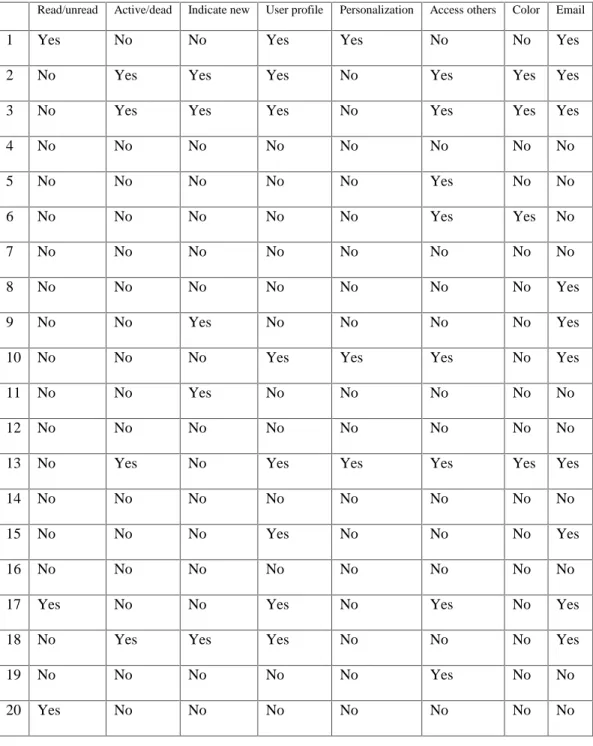
Read/unread Active/dead Indicate new User profile Personalization Access others Color Email
1 Yes No No Yes Yes No No Yes
2 No Yes Yes Yes No Yes Yes Yes
3 No Yes Yes Yes No Yes Yes Yes
4 No No No No No No No No
5 No No No No No Yes No No
6 No No No No No Yes Yes No
7 No No No No No No No No
8 No No No No No No No Yes
9 No No Yes No No No No Yes
10 No No No Yes Yes Yes No Yes
11 No No Yes No No No No No
12 No No No No No No No No
13 No Yes No Yes Yes Yes Yes Yes
14 No No No No No No No No
15 No No No Yes No No No Yes
16 No No No No No No No No
17 Yes No No Yes No Yes No Yes
18 No Yes Yes Yes No No No Yes
19 No No No No No Yes No No
Appendix D: Examples of Posts Listing Methods for Online Forums
1. Thread listings: http://boards2.ivillage.com/messages/get/phadvanced22.html
2. Topic listings:
http://209.238.91.227/cgi-local/forumdisplay.cgi?action=topics&forum=Motors&number=3&DaysPrune=365&Las
tLogin