Accessible and Responsive Website Design
for Cal Poly DBS Marine Education Program
A Senior Project Report
presented to
the Faculty of California Polytechnic State University
San Luis Obispo
In Partial Fulfillment
of the Requirements for the Degree
Bachelor of Science in Computer Engineering
By
Abstract
In this project, I demonstrate how accessible and responsive designs are followed
in order to implement a modern, multipage website which both adapts to the size
of the screen as well as has the logical, semantic structure needed for accessible
technologies to accurately use the site. This website is designed for a marine
education program, Dive Beneath the Surface, which hosts live streams of
scientific divers as they interact in real time with students many miles away.
Although this site will not be the streaming platform, it needs to host a repository
i
Introduction ... 1
Client & Stakeholders ... 1
Framed Insights & Opportunities ... 1
Project Deliverables ... 2
Background ... 2
Formal Project Definition ... 2
Value Propositions, Customer Requirements, & Engineering Requirements ... 3
Table 1 – Value Propositions ... 3
Table 2 – Customer Requirements ... 3
Table 3 – Engineering Requirements ... 4
Engineering Requirements Process ... 4
User Stories... 5
Figure 1 – Anna’s User Diagram ... 5
Figure 2 – Kenji’s User Diagram ... 5
Design ... 6
Design Development Overview ... 6
Web Hosting ... 6
DBS Website Review ... 6
Figure 3 – Site Architecture Diagram. ... 7
Accessible Iterations ... 7
Content Integration ... 8
Conclusion and Future Work ... 8
Bibliography ... 9
HTML & CSS Design ... 9
Hosting Help ... 9
Contact Backend ... 9
CSS Organization ... 9
Appendix A - Procedures ...10
Setting up new credentials for EC2 Server ...10
SSHing into EC2 Server ...10
Transferring Files from Local Drive to EC2 Server ...10
Moving files from user directory to root, host directory ...10
1
Introduction
Websites are a vital form of communication which provide access to information
otherwise unavailable because of geographic, economic, or other mitigating factors. Dive
Beneath the Surface (DBS) is an educational marine diving program partnered with faculty and
students at Cal Poly SLO which provides a unique experience to K-12 institutions by streaming
their dives live to students thereby engaging them in real time. Although Youtube provides a
substantial framework for hosting these videos, DBS needs a website to host their own
information including contact information and detailed lesson plans for use by the teachers. The
primary focus of this project is to investigate different hosting services, modify the existing
website design, create a simple website architecture in order to have a fully, functional site for
DBS.
Client & Stakeholders
Professor Lynne Slivovsky of the CPE department is also an educational diver who
works in conjunction with the DBS program at Cal Poly SLO. As the point of contact, she is
coordinating the features and style of the website. However, the full team DBS consists of all
those mentioned in the “About” section on the website [insert link]. In addition to the clients
themselves, the program affects all those interested in the marine-based research, especially
K-12 schools which don’t have immediate access to the coast.
Framed Insights & Opportunities
As the site is to be designed primarily for use by young students and teachers, the two
most critical aspects of the site are that it is simple and mobile-friendly. Professor Slivovsky
expressed that there will not be many resources with which to maintain the site, so it is critical
that it is simple enough for programmers in the future to quickly understand to make changes.
2 generations are more likely to have and favor smartphone use over using tradition computers or
laptops.
Project Deliverables
This project promises to deliver a fully functional and responsive website with which to
host materials created by the rest of the DBS team. The website will be simply developed to be
both accessible and conventional for users and programmers alike.
Background
The conventional state of website design requires three major considerations. The first is
a navigation tool which links every page of the website together, commonly referred to as a “nav
bar.” The second is that the website be responsive to the size of the device. Because devices
come with different screen and view sizes, websites must be able to adapt to fit the user’s
preferred method of browsing. The third major design consideration highlights being conscious
of users with accessibility issues. This generally refers to some form of vision impairment. As
such, good website design includes a semantic html structure by which those with impaired
vision may be able to navigate screen readers with minimal difficulty as well as being conscious
of color choices in order to increase background/foreground contrasts for text.
Formal Project Definition
After discussing the website with Professor Slivovsky, we concluded two overriding
requirements were that the websites be simple and responsive. The majority of users on this
site would be educators and young students, so we decided it was imperative that resources be
3
Value Propositions, Customer Requirements, & Engineering Requirements
Value Propositions
People should be able to find what they want quickly.
The site will be very static. There won’t be many changes or moving parts.
As many people as possible should be able to use it.
Ideally, we can host for free.
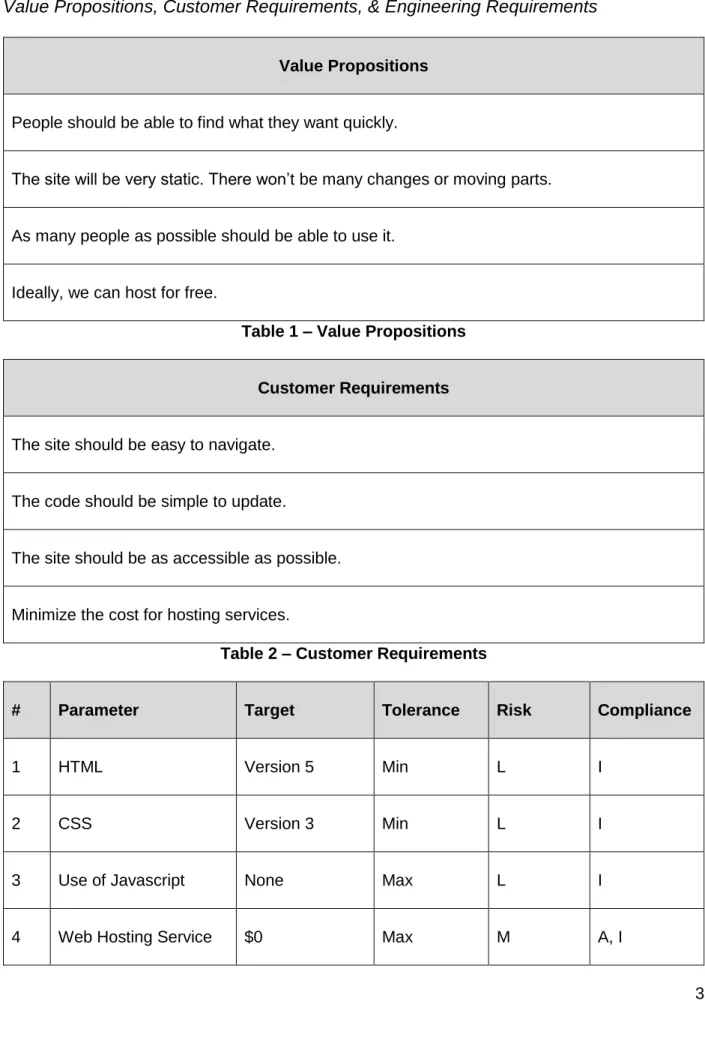
Table 1 – Value Propositions
Customer Requirements
The site should be easy to navigate.
The code should be simple to update.
The site should be as accessible as possible.
Minimize the cost for hosting services.
Table 2 – Customer Requirements
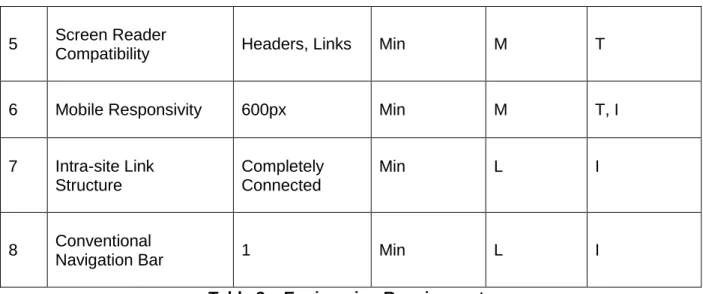
# Parameter Target Tolerance Risk Compliance
1 HTML Version 5 Min L I
2 CSS Version 3 Min L I
3 Use of Javascript None Max L I
4 5 Screen Reader
Compatibility Headers, Links Min M T
6 Mobile Responsivity 600px Min M T, I
7 Intra-site Link Structure
Completely Connected
Min L I
8 Conventional
Navigation Bar 1 Min L I
Table 3 – Engineering Requirements
Engineering Requirements Process
According to the client, there were four major value propositions that stood out as seen
in Table 1. These directly translated into the customer requirements seen in Table 2. Next, each
customer requirement was broken down into one or multiple engineering requirements. The first
customer requirement (CR) is broken down into #7, 8 engineering requirements (ER). That is, a
site is easy to navigate if the user interface has a tool by which to go to every page from any
page. So, a navigation bar which links to each page fulfills this CR. The second CR is broken
down into the languages used to code the site (ER #1, 2, 3). HTML5 & CSS3 are the newest
and most common languages by which to create a website. Although Javascript is popular, it
adds an unneeded complexity for this project and was consciously avoided to make the code as
simple as possible. The third CR is broken down into how users will view the site (ER #5, 6). In
this, using html semantic tags, such as headers and links, properly allow screen readers to
navigate the site. In addition, designing for mobile responsivity allows users with a wide array of
devices navigate the site. The last CR translates to a single cost (ER #4) in which a price
5
User Stories
Anna is a biology teacher at Simi Valley High School. She hears about Cal Poly DBS
from a colleague. To motivate her students’ interest in marine life, she visits the Cal Poly DBS
website to learn more about the program. After watching some of the introductory video and
reading about the different lessons for her class, she decides to contact Cal Poly DBS in order
to let them know that her class will be tuning in to the next live video stream.
Figure 1 – Anna’s User Diagram
Kenji is an 8th grade student at Monterey Middle School. His teacher is trying to pull up
the live video stream on the classroom projector, but he is having technical difficulties. Kenji
suggests that the students can tune into the stream on their own phones and asks his teacher
for the website. The teacher puts the website URL on the board and tells the students to follow
the calendar link to the current live stream.
Figure 2 – Kenji’s User Diagram
Alex is part of the Sea Life Stewards, an organization that raises awareness about the
state of marine life. They travel to various high schools to give lectures and supplement learning
6 lessons. They download the available lessons from the website and use them to prepare their
next talk at Ramona High School.
Design
Design Development Overview
There were four major parts to the design development. These include:
1. Researching web hosting services.
2. Reviewing the previous DBS website design.
3. Iterating new accessible website designs.
4. Integrating externally created content into the website.
Web Hosting
The primary web hosting services investigated were Microsoft’s Azure, Amazon’s AWS,
and InfinityFree. All of the services offer a freemium version by which websites can be hosted
with certain limitations. After considering the different limits, Amazon’s AWS was chosen for
being the most flexible and reliable service offered. Within the AWS framework, an EC2 server
has been made accessible via an SSH connection.
DBS Website Review
While researching web hosting services, I also reviewed the previous design of the DBS
website provided by a previous student. After discussing some of the design choices with
Professor Slivovsky, we decided to keep most of the architecture the same. We decided there
were two major resources (“lessons” and “videos”) and that there should be a page for each.
The “home”, “about”, and “contact” pages are conventional, information pages which constitute
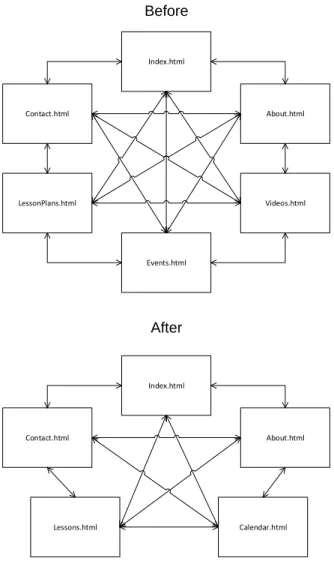
the rest of the site. As shown in the site architecture diagram (Figure 3), the previous design
was a completely connected graph with six distinct pages, whereas the new design only has five
7 Index.html
LessonPlans.html
About.html
Events.html
Videos.html Contact.html
Before
Index.html
Lessons.html
About.html
Calendar.html Contact.html
After
Figure 3 – Site Architecture Diagram.
Accessible Iterations
Another improvement from the original design involved the sites semantic and mobile
structure. In the HTML, there are now descriptive tags such as, <header>, <nav>, <article>,
<section>, <footer>, and header levels that were previously missing. These descriptive tags
allow screen readers such as NVDA and Microsoft’s JAWS to parse through the content of the
site and better inform users with vision impairment. In addition, the site uniformly uses flexbox
as the CSS way to organize the content. While before there was a combination of tables,
flexbox, and relative positioning for the display styles, having a singular style to adhere to is
8
Content Integration
The content integration as of this report is unfinished. It will be handed off to the next
person or group who will update and maintain the site.
Conclusion and Future Work
Although much of the site is finished, website design is very much a living process as
content and styles change over time. I have used the latest version of HTML and CSS in an
effort to insulate the site form any necessary immediate updates. In addition, the Bibliography
and Appendixes contain online resources and written procedures to facilitate any updates to the
9
Bibliography
HTML & CSS Design
CSS Reference
https://www.w3schools.com/cssref/default.asp
HTML Accessibility Reference
https://www.w3schools.com/html/html_accessibility.asp
Hosting Help
https://www.brianshim.com/webtricks/host-multiple-sites-amazon-ec2/comment-page-2/
Contact Backend
http://form.guide/email-form/html-email-form.html
CSS Organization
Navbar Guide
https://medialoot.com/blog/how-to-create-a-responsive-navigation-menu-using-only-css/
Flexbox Guide
10
Appendix A - Procedures
Setting up new credentials for EC2 Server
1. Go to https://aws.amazon.com/
2. Select “My Account” -> “AWS Management Console”
3. Input username & password.
4. Select “Services” -> “EC2” -> “Security Groups”.
5. In the list of groups, find and select “dbs-security”.
6. In a panel below, select the tab “Inbound”.
7. Select “Edit” -> “Add rule”.
8. Input the fields, Type: “SSH”, Port: “22”, Source: “My IP”.
9. Now, you have allowed yourself to SSH/FTP from your current IP address location.
10. If you find yourself on a different IP network, you may not be able to SSH into the EC2
until you have followed these steps.
11. Be sure to log out when finished making changes.
SSHing into EC2 Server
1. Open an SSH/FTP program such as Bitvise SSH Client.
2. Input host name. Host: ec2-[ip address].us-east.2.compute.amazonaws.com
3. Input username. Username: ec2-user
4. Input credential method. Method: publickey
Transferring Files from Local Drive to EC2 Server
1. Log in using an FTP/SSH program such as Bitvise SSH Client.
2. Copy the desired files from local drive to the remote drive using the FTP program.
3. Be sure to log out when finished.
Moving files from user directory to root, host directory
11 2. Enter the following command: sudo cp ~/www/calpolydbs/* -r /var/www/html/calpolydbs
3. Verify the files have been moved.
Appendix B – Bill of Materials
BOM # Part Description Qty Part Cost
1 Amazon EC2 Server 1 $0
2 Domain Name $14.98
Analysis of Senior Project Design
Please provide the following information regarding your Senior Project and submit to your advisor along with your final report. Attach additional sheets for your responses to the questions below.
Project Title: __________________________________________________________________ ___________________________________________ Quarter / Year Submitted: ___________ Student: (Print Name) ______________________ (Sign) ___________________________ Advisor: (Print Name) ______________________ (Initial) _________ Date: __________ • Summary of Functional Requirements
Describe the overall capabilities of functions of your project or design. Describe what your project does. (Do not describe how you designed it.)
• Primary Constraints
Describe significant challenges or difficulties associated with your project or implementation. For example, what were limiting factors or other issues that impacted your approach? What made your project difficult? What parameters or specifications limited your options or directed your approach?
• Economic
o Original estimated cost of component parts (as of the start of your project)
o Actual final cost of component parts (at the end of your project)
o Attach a final bill of materials for all components
o Additional equipment costs (any equipment needed for development?)
o Original estimated development time (as of the start of your project)
o Actual development time (at the end of your project)
• If manufactured on a commercial basis: o Estimated number of devices to be sold per year
o Estimated manufacturing cost for each device
o Estimated purchase price for each device
o Estimated profit per year
o Estimated cost for user to operate device, per unit time (specify time interval)
• Environmental
Describe any environmental impact associated with manufacturing or use.
• Manufacturability
Describe any issues or challenges associated with manufacturing.
• Sustainability
o Describe any issues or challenges associated with maintaining the completed device or system.
o Describe how the project impacts the sustainable use of resources.
o Describe any upgrades that would improve the design of the project.
o Describe any issues or challenges associated with upgrading the design.
• Ethical
Describe ethical implications relating to the design, manufacture, use or misuse of the project.
• Health and Safety
Describe any health and safety concerns associated with design, manufacture or use.
• Social and Political
Describe any social and political concerns associated with design, manufacture or use.
• Development
Analysis of Senior Project Design
Summary of Functional Requirements
This project serves as an informational repository for a marine research education
program. It is a website which is coded strictly in HTML5 and CSS3 designed with accessibility
and mobility in mind.
Primary Constraints
The primary constraints of this project included not using Javascript in any capacity for
the website. It required that the website cost as little as possible. The biggest challenge though
is making the website responsive for any screen size while also being aesthetically pleasing.
Economic
Original estimated cost: $10
Actual cost: $15
BOM included in Appendix B
Original estimated development time: 10 weeks
Actual development time: > 10 weeks
Social & Political
I think this project has great potential for positive impact by spreading information and
awareness about the oceans and state of marine wildlife. By giving DBS a platform to
communicate with students, this project fosters learning and exploration into new experiences