Windows
Installation Guide
Release 14.10 B035-2407-082K March 2013Claraview, DecisionCast, Gridscale, MyCommerce, SQL-MapReduce, Teradata Decision Experts, "Teradata Labs" logo, Teradata
ServiceConnect, Teradata Source Experts, WebAnalyst, and Xkoto are trademarks or registered trademarks of Teradata Corporation or its affiliates in the United States and other countries.
Adaptec and SCSISelect are trademarks or registered trademarks of Adaptec, Inc. AMD Opteron and Opteron are trademarks of Advanced Micro Devices, Inc.
Apache, Apache Hadoop, Hadoop, and the yellow elephant logo are either registered trademarks or trademarks of the Apache Software Foundation in the United States and/or other countries.
Apple, Mac, and OS X all are registered trademarks of Apple Inc.
Axeda is a registered trademark of Axeda Corporation. Axeda Agents, Axeda Applications, Axeda Policy Manager, Axeda Enterprise, Axeda Access, Axeda Software Management, Axeda Service, Axeda ServiceLink, and Firewall-Friendly are trademarks and Maximum Results and Maximum Support are servicemarks of Axeda Corporation.
Data Domain, EMC, PowerPath, SRDF, and Symmetrix are registered trademarks of EMC Corporation. GoldenGate is a trademark of Oracle.
Hewlett-Packard and HP are registered trademarks of Hewlett-Packard Company.
Hortonworks, the Hortonworks logo and other Hortonworks trademarks are trademarks of Hortonworks Inc. in the United States and other countries.
Intel, Pentium, and XEON are registered trademarks of Intel Corporation.
IBM, CICS, RACF, Tivoli, and z/OS are registered trademarks of International Business Machines Corporation. Linux is a registered trademark of Linus Torvalds.
LSI is a registered trademark of LSI Corporation.
Microsoft, Active Directory, Windows, Windows NT, and Windows Server are registered trademarks of Microsoft Corporation in the United States and other countries.
NetVault is a trademark or registered trademark of Dell Inc. in the United States and/or other countries. Novell and SUSE are registered trademarks of Novell, Inc., in the United States and other countries. Oracle, Java, and Solaris are registered trademarks of Oracle and/or its affiliates.
QLogic and SANbox are trademarks or registered trademarks of QLogic Corporation.
Quantum and the Quantum logo are trademarks of Quantum Corporation, registered in the U.S.A. and other countries. Red Hat is a trademark of Red Hat, Inc., registered in the U.S. and other countries. Used under license.
SAS and SAS/C are trademarks or registered trademarks of SAS Institute Inc. SPARC is a registered trademark of SPARC International, Inc.
Symantec, NetBackup, and VERITAS are trademarks or registered trademarks of Symantec Corporation or its affiliates in the United States and other countries.
Unicode is a registered trademark of Unicode, Inc. in the United States and other countries. UNIX is a registered trademark of The Open Group in the United States and other countries.
Other product and company names mentioned herein may be the trademarks of their respective owners.
The information contained in this document is provided on an "as-is" basis, without warranty of any kind, either express or implied, including the implied warranties of merchantability, fitness for a particular purpose, or non-infringement. Some jurisdictions do not allow the exclusion of implied warranties, so the above exclusion may not apply to you. In no event will Teradata Corporation be liable for any indirect, direct, special, incidental, or consequential damages, including lost profits or lost savings, even if expressly advised of the possibility of such damages.
The information contained in this document may contain references or cross-references to features, functions, products, or services that are not announced or available in your country. Such references do not imply that Teradata Corporation intends to announce such features, functions, products, or services in your country. Please consult your local Teradata Corporation representative for those features, functions, products, or services available in your country.
Information contained in this document may contain technical inaccuracies or typographical errors. Information may be changed or updated without notice. Teradata Corporation may also make improvements or changes in the products or services described in this information at any time without notice.
To maintain the quality of our products and services, we would like your comments on the accuracy, clarity, organization, and value of this document. Please e-mail: [email protected]
Any comments or materials (collectively referred to as "Feedback") sent to Teradata Corporation will be deemed non-confidential. Teradata Corporation will have no obligation of any kind with respect to Feedback and will be free to use, reproduce, disclose, exhibit, display, transform, create derivative works of, and distribute the Feedback and derivative works thereof without limitation on a royalty-free basis. Further, Teradata Corporation will be free to use any ideas, concepts, know-how, or techniques contained in such Feedback for any purpose whatsoever, including developing, manufacturing, or marketing products or services incorporating Feedback.
Preface
...9Purpose... 9
Audience... 9
Supported Releases...9
Prerequisites... 9
Changes to This Documentation...10
Technical Assistance...10
Chapter 1:
Preparing for Installation
... 11What's New...11
About Product Suites... 11
About Installing a Product Suite...11
About Log Files...11
About Uninstalling a Product Suite... 11
About efixes...12
About Standalone Products...12
About Installing Teradata Tools and Utilities from DVD...12
Installation Kit Contents... 12
DVD Contents... 13 Product Descriptions... 14 Product Dependencies...19 Dependent Products... 23 System Requirements...23
Chapter 2:
Uninstalling Software
...25About Uninstalling Previous Versions of Teradata Tools and Utilities... 25
About Retaining Existing Files for TeraGSS Client Package...25
Generating a List of Installed Products... 26
Silently Uninstalling Teradata Tools and Utilities...26
Using a Script to Silently Uninstall Teradata Tools and Utilities...28
Using a Batch File to Silently Uninstall Teradata Tools and Utilities 14.10...31
Product Parameter Values for Use With Batch Files...31
Interactively Uninstalling Teradata Tools and Utilities... 33
Chapter 3:
Installing New Software
...35About Installing Third-Party Software... 35
Determining the Current Version of .NET Framework...35
Installing Third-Party Software for Teradata Parallel Transporter Base...35
Installing Third-Party Software for Teradata Parallel Transporter Wizard...35
Downloading and Installing Third-Party Software for Teradata SQL Assistant...36
Installing Third-Party Software for Teradata WebSphere MQ Access Module...36
About Installing Teradata Tools and Utilities... 36
Interactively Installing Teradata Tools and Utilities Products...37
About Installation Log Files... 38
Silently Installing Teradata Tools and Utilities Products... 39
Installing .NET Data Provider for Teradata...39
About Installing .NET Data Provider for Teradata...39
About Security Requirements for .NET Data Provider for Teradata...40
Known Issues for .NET Data Provider for Teradata...40
Uninstalling .NET Data Provider for Teradata...41
Installing Third-Party Microsoft .NET Framework...41
Downloading .NET Data Provider for Teradata... 41
Installing .NET Data Provider for Teradata...42
Verifying Installation of the .NET Data Provider for Teradata...43
About Teradata Developer Exchange...44
Products Available from Teradata Developer Exchange...44
Connectivity...44
Tools... 45
Downloading a Product from the Teradata Developer Exchange... 45
Installing Products Downloaded from Teradata Developer Exchange...45
About Teradata Software Server (Patch Server)... 46
Downloading Updated Software Packages...46
Installing Updated (Patched) Software Packages... 46
Chapter 4:
Configuring New Software
... 49About Setting Network Parameters...49
About Configuring Teradata Call-Level Interface version 2...49
Verifying the Existence of the hosts File... 49
Identifying a Teradata Database... 50
Adding and Editing AP Entries in the hosts File...50
About Setting Up Environment Parameters...51
Defining Paths to System Files... 51
Setting Up Environment Variables... 52
Speeding Up the CLIv2 Logon Process...52
Setting Up Port Number, Netrace, and Threadlogging...53
About clispb.dat...53
Setting System Parameters...54
About Configuring ODBC Driver for Teradata...54
Configuring ODBC Driver for Teradata...54
Configuring Data Source for ODBC Driver for Teradata... 54
About Configuring Teradata Query Scheduler Administrator...54
Modifying the hosts File... 54
Configuring Teradata Query Scheduler Client...55
About Configuring Teradata Query Scheduler Server...55
Specifying a Default Teradata Query Scheduler Server...55
Changing Teradata Query Scheduler Server Configurations...56
Configuring Teradata Administrator... 57
Configuring Teradata Parallel Transporter... 57
Editing the Teradata Parallel Transporter Configuration File...57
Editing the Teradata Parallel Transporter Properties File...58
Configuring Teradata Access Module for JMS...58
Chapter 5:
Verifying the Complete Installation
...59About Verifying the Installation... 59
Verifying the Installation Using CLI Sample Program...59
Generating a List of Installed Products... 60
List of Files... 61
About the program-files Variable in the Default Installation Path...61
Named Pipes Access Module Files and Folders...62
.NET Data Provider for Teradata Files and Folders...62
ODBC Driver for Teradata Files and Folders... 64
OLE DB Provider for Teradata Files and Folders...65
Shared ICU Libraries for Teradata Files and Folders...65
Teradata Administrator Files and Folders...66
Teradata Archive/Recovery Utility Files and Folders... 66
Teradata C Preprocessor2 Files and Folders... 66
Teradata Call-Level Interface version 2 Files and Folders...67
Teradata Data Connector API Files and Folders...68
Teradata FastExport Files and Folders...68
Teradata FastLoad Files and Folders...69
Teradata Generic Security Services Files and Folders... 69
Teradata Index Wizard Files and Folders... 71
Teradata JDBC Driver Files and Folders... 75
Teradata MultiLoad Files and Folders... 75
Teradata OLE DB Access Module Files and Folders...75
Teradata Parallel Data Pump Files and Folders (32-bit Platform)...76
Teradata Performance Monitor Object Files and Folders...76
Teradata Query Scheduler Administrator Files and Folders... 76
Teradata Query Scheduler Client Files and Folders...76
Teradata Query Scheduler Server Files and Folders...77
Teradata SQL Assistant Files and Folders... 77
Teradata Statistics Wizard Files and Folders...79
Teradata System Emulation Tool Files and Folders... 82
Teradata Visual Explain Files and Folders...86
Teradata Wallet Files and Folders...90
Teradata WebSphere MQ Access Module Files and Folders...90
Teradata Workload Analyzer Files and Folders...90
Chapter 6:
Deploying Teradata Tools and Utilities with SCCM
... 93About Deploying Products with SCCM... 93
Third-Party Dependency Products on Client Computers... 93
Uninstalling Existing Products from Client Computers... 94
Creating a Software Repository... 94
Creating a Batch File to Install the Products...95
Chapter 7:
Deploying Teradata Tools and Utilities with TAR
...101About Deploying Applications with TAR...101
About the TAR File...101
TAR Script Compatibility with Platform Operating Systems... 101
Verifying TAR Script Dependencies are Installed...101
The TAR Script Command...102
TAR Script Usage Considerations...103
Downloading Windows Utility Software for TAR Deployment...105
TAR Script Examples... 106
Archiving Oracle Solaris SPARC Packages... 106
Archiving an HP-UX Package... 108
Purpose
This book describes how to install and deploy Teradata Tools and Utilities Release 14.10 software on a computer that runs on a supported operating system. Teradata Tools and Utilities is a group of products designed to work with the Teradata Database.
Audience
This guide is intended for use by:
• Database administrators and relational database developers • System administrators
• System and application programmers
• System operators and other database specialists
Supported Releases
This document supports the following versions of Teradata products: • Teradata Database Release 14.10
• Teradata Tools and Utilities Release 14.10
1 To locate detailed information about supported releases, refer to the spreadsheet Teradata Tools and Utilities Supported Platforms and Product Versions, B035-3119 . The spreadsheet contains detailed information about supported Teradata Database releases, platforms, and product release numbers.
Prerequisites
You should be familiar with:
• Computer technology and terminology • Relational database management systems • Utilities that load and retrieve data
Changes to This Documentation
Date Description March 2013 14.10 Initial releaseTechnical Assistance
For more information, see Teradata Tools and Utilities Release Definition, B035-2029 . If you need additional information or assistance, contact your Teradata Customer Service Representative. If you purchased an Enterprise System Support (ESS) contract, a customized support plan was created for you. For contact information, refer to your support plan. To learn more about Teradata Customer Services, go to Teradata @ Your Service, http:// tays.teradata.com.
What's New
About Product Suites
Beginning with version 14.10, all Teradata Tools and Utilities products are bundled in one of the following three suites. Each suite is on a separate DVD:
• Teradata Tools and Utilities - Base 14.10
• Teradata Tools and Utilities - Database Management 14.10 • Teradata Tools and Utilities - Tape Storage Management 14.10 For more information, see DVD Contents.
About Installing a Product Suite
The Installer window contains a list of each product name in the suite. A checkbox next to each product allows you to install a subset of products. The following dependent products are automatically installed:
• Shared ICU Libraries for Teradata • Teradata Call-Level Interface version 2 • Teradata Data Connector API
• Teradata Generic Security Services Client
About Log Files
When you silently install products or when you perform a special interactive installation using the setup.exe /debuglog command, log files are created. These files include a main log file named InstallShield.log and a log file for each individual product that is installed. You can use these files if you need to debug the installation.
About Uninstalling a Product Suite
When you uninstall a suite, all of the primary products in that suite are uninstalled. In the Add/Remove programs applet, the name of the suite is removed. All of the dependent products are uninstalled when the last suite is uninstalled.
About efixes
Suites that include efixes are available for download from Teradata Software Server (Patch Server). For products that are available in a 32-bit version and a 64-bit version, each suite contains both versions (bitnesses) of the products. When you install a new version of the suite, efixes are applied automatically. The installer recognizes products that need to be upgraded and it upgrades them. efixes can be installed via SCCM.
About Standalone Products
You can still download the following standalone products from Teradata Developer Exchange:
• .NET Data Provider for Teradata • ODBC Driver for Teradata • Shared ICU Libraries for Teradata • Teradata Call-Level Interface version 2 • Teradata Data Connector API
• Teradata Generic Security Services Client • Teradata Wallet
Note: If you download these products from Teradata Developer Exchange, they are intended to be used only for connecting to Teradata Database via non-Teradata products. They are not intended to be used for updating the Teradata Tools and Utilities suite of products available on DVD.
About Installing Teradata Tools and Utilities from
DVD
Before performing the procedures in this document, you must have: • Internet access
• Network access
• Administrative privileges on the target machine
• Knowledge of which Teradata Tools and Utilities are to be installed • Familiarity with Windows file and path name conventions
• Access to a bill of materials or similar list of Teradata Tools and Utilities software that was ordered
• Familiarity with software installation
Installation Kit Contents
The installation kit contains the following documentation media and application media: • Teradata User Documentation CD (Teradata Database 14.0, Teradata Tools and Utilities
• Teradata Tools and Utilities AIX - HP-UX - LINUX - Solaris - Windows Release 14.10.00 DVD
• Teradata Tools and Utilities Database Management WINDOWS Release 14.10.00 DVD • Teradata Tools and Utilities Tape Storage Management Enablers Linux & WINDOWS
Release 14.10.00 DVD
If you did not receive all the installation media that you ordered, contact your Teradata Sales Representative.
DVD Contents
The table below contains a list of the Teradata Tools and Utilities products that are on the media in the installation kit.
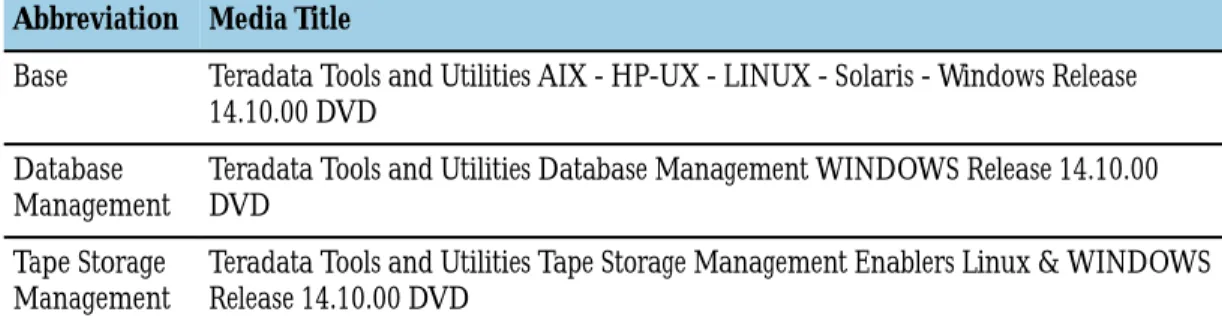
Note: In the table, the media titles are abbreviated:
Abbreviation Media Title
Base Teradata Tools and Utilities AIX - HP-UX - LINUX - Solaris - Windows Release 14.10.00 DVD
Database
Management Teradata Tools and Utilities Database Management WINDOWS Release 14.10.00DVD
Tape Storage
Management Teradata Tools and Utilities Tape Storage Management Enablers Linux & WINDOWSRelease 14.10.00 DVD
Table 1: Products and the Media They Reside On
Product Media Title (Abbreviated)
Base Database
Management Tape StorageManagement
.NET Data Provider for Teradata X
Basic Teradata Query X X
ODBC Driver for Teradata X X
Shared ICU Libraries for Teradata X X X
Teradata Access Module for JMS X
Teradata Administrator X
Teradata Archive/Recovery Utility X
Teradata C Preprocessor2 X X
Teradata Call-Level Interface version 2 X X X
Teradata Data Connector API X X X
Teradata FastExport X
Teradata FastLoad X
Product Media Title (Abbreviated)
Base Database
Management Tape StorageManagement
Teradata Index Wizard X
Teradata MultiLoad X
Teradata Named Pipes Access Module X
Teradata OLE DB Access Module X
Teradata Parallel Data Pump X
Teradata Parallel Transporter Base X
Teradata Parallel Transporter Stream X
Teradata Performance Monitor Object X
Teradata Query Scheduler Administrator X
Teradata Query Scheduler Client X
Teradata Query Scheduler Server X
Teradata SQL Assistant X
Teradata Statistics Wizard X
Teradata System Emulation Tool X
Teradata Visual Explain X
Teradata Wallet X X X
Teradata WebSphere MQ Access Module X
Teradata Workload Analyzer X
Related Topics
Products Available from Teradata Developer Exchange, on page 44
Product Descriptions
Product Description
.NET Data Provider for Teradata .NET Data Provider for Teradata is a library of routines that Microsoft .NET Framework applications use for uniform and standard-based (ADO.NET) access to data sources such as a Teradata Database. This is the data access component of the .NET Framework Class Library.
Basic Teradata Query Basic Teradata Query (BTEQ) is a general-purpose utility that allows users on a workstation to communicate with one or more Teradata Database systems and to format reports for output to print and screen. This utility is accessible from the command line or a script.
Product Description
ODBC Driver for Teradata ODBC Driver for Teradata is a library of routines that enables UNIX, Linux, and Windows applications to communicate with a Teradata Database across local area networks (LANs) using the open standards ODBC interface.
OLE DB Provider for Teradata OLE DB Provider for Teradata is a set of Component Object Model (COM) interfaces and objects that provides applications with uniform, standard access to any data store. In this case, the data store is in the Teradata Database. This library of routines allows access to data stores that do not use Structured Query Language (SQL). Using this utility, an application requests database information from an intermediate program, which in turn accesses the Teradata Database. The intermediate program receives the response from the Teradata Database and returns a copy of the desired data to the application.
Shared ICU Libraries for Teradata Shared ICU Libraries for Teradata is a library of routines based on IBM International Components for Unicode. The library provides Unicode support. Note: Shared ICU Libraries for Teradata is a core product that must be installed in the correct sequence with other core products. Normally when you install the suite of Teradata Tools and Utilities products from media, the library is automatically installed as a dependency for other Teradata Tools and Utilities products. Teradata Access Module for JMS Teradata Access Module for JMS is a command line utility that provides a fast,
reliable, asynchronous way to transfer data between any JMS-enabled messaging system and a Teradata Database. This utility works with the Teradata Parallel Transporter products and with Teradata FastExport, Teradata FastLoad, Teradata MultiLoad, and Teradata Parallel Data Pump.
Teradata Administrator Teradata Administrator (TDAdmin) is a Windows-based GUI application that allows you to perform database administration tasks on a Teradata Database. It provides access to the Teradata Database Data Dictionary.
Teradata Archive/Recovery Utility Teradata Archive/Recovery Utility (ARC) is a command line utility that writes and reads sequential files on a Teradata client system to archive, restore, recover, and copy data in a Teradata Database table. Through its associated script language, it also provides an interface between the Teradata backup applications solutions and the Teradata Database.
Note: Teradata Archive/Recovery Utility is included to support the Teradata third-party backup applications.
Teradata C Preprocessor2 Teradata C Preprocessor2 (PP2) is a command line utility that provides the programmer of a C-based application a simplified way to read and change
information stored in a Teradata Database. This utility interprets and expands SQL statements that have been incorporated in an application program.
Teradata Call-Level Interface version 2 Teradata Call-Level Interface version 2 (CLIv2) is a library of routines that enable an application program to access data in a Teradata Database.
Teradata Data Connector API Teradata Data Connector API is a component that reads and writes flat files to provide the input/output interface for access modules. For additional information about Teradata Data Connector API, see the following documents:
Product Description
• Teradata Tools and Utilities Access Module Reference, B035-2425
Teradata FastExport Teradata FastExport uses multiple sessions to quickly transfer large amounts of data from tables and views of a Teradata Database to a client-based application. This utility is accessible from the command line or a script.
Teradata FastLoad Teradata FastLoad quickly loads large amounts of data to empty tables in a Teradata Database. This utility uses multiple sessions to load data. However, it loads data into only one table in the database per job. This utility is accessible from the command line or a script.
Teradata GSS Client Teradata GSS Client is the Teradata implementation of industry-standard Generic Security Services APIs in C language. This utility provides enhanced security services interfaces between Teradata network clients and a Teradata Database. Teradata Index Wizard Teradata Index Wizard (TIWiz) is a Windows-based GUI application that allows a
Teradata Database administrator to create or identify a workload, perform index analysis for a workload, and then verify and apply index recommendations. This utility helps to increase efficiency and maximize system performance.
Teradata JDBC Driver Teradata JDBC Driver is a library of routines that enables Java applications to connect to a Teradata Database.
Teradata MultiLoad Teradata MultiLoad (MultiLoad) provides an efficient way to deal with batch maintenance of large databases. Useful for performing fast, high-volume maintenance on multiple tables and views of a Teradata Database. This utility is accessible from the command line or a script.
Teradata Named Pipes Access Module Teradata Named Pipes Access Module is a component that provides an interprocess communication link between a writer process (such as Teradata FastExport) and a reader process (such as Teradata FastLoad). This utility works with the Teradata Parallel Transporter products and with Teradata FastExport, Teradata FastLoad, Teradata MultiLoad, and Teradata Parallel Data Pump. It is accessible from the command line.
Teradata OLE DB Access Module Teradata OLE DB Access Module is a command line utility that acts as an interface between Teradata load and export utilities (Teradata FastLoad, Teradata
FastExport, Teradata MultiLoad, Teradata Parallel Data Pump, Teradata Parallel Transporter, and Basic Teradata Query) and data sources for which an OLE DB provider is available. The access module quickly moves data between an OLE DB data source and a Teradata Database without requiring intermediate storage. Teradata Parallel Data Pump Teradata Parallel Data Pump (TPump) is a data loading utility that helps maintain
(update, delete, insert, and atomic upsert) the data in a Teradata Database. This utility uses standard Teradata SQL to achieve moderate to high data loading rates. Multiple sessions and multi-statement requests are typically used to increase throughput. It is accessible from the command line.
Product Description
Teradata Parallel Transporter Base Teradata Parallel Transporter Base is a package that contains the script-driven interface (Teradata Parallel Transporter) and the application programming interface (Teradata Parallel Transporter API). An object-oriented, scalable, command line client application allows you to perform high-speed, parallel data operations (extraction, loading, and updating) on a Teradata Database.
Note: The following Teradata Parallel Transporter Operators are installed as part of the Teradata Parallel Transporter Base:
• DataConnector Operator • DDL Operator
• Export Operator
• FastExport OUTMOD Adapter Operator • FastLoad INMOD Adapter Operator • Load Operator
• MultiLoad INMOD Adapter Operator • ODBC Operator
• Operator Support Library • OS Command Operator • Schema Mapping Operator • SQL Inserter Operator • SQL Selector Operator
• Teradata Parallel Transporter API • Teradata Parallel Transporter ICU Library • Teradata Parallel Transporter Wizard • Update Operator
Teradata Parallel Transporter Stream Teradata Parallel Transporter Stream (Teradata PT Stream) contains the Teradata Parallel Transporter Stream Operator. Before you install Teradata Parallel Transporter Stream, Teradata Parallel Transporter Base must be installed. The Stream Operator emulates the Teradata Parallel Data Pump utility to perform high-speed DML transactions (SQL INSERT, UPDATE, DELETE, or UPSERT). Transactions are executed in a near-real-time mode on one or more tables in a Teradata Database while queries are performed on those tables.
Teradata Performance Monitor Object Teradata Performance Monitor Object is a COM object that makes real-time Teradata Database performance information available to a Windows application in a simple object-oriented manner. The data is generally returned as a collection of performance objects. Each object contains many performance-related properties. Teradata Query Scheduler
Administrator Teradata Query Scheduler Administrator (TQS Administrator) is a Windows-based GUI application that enables the database administrator to manage workloads submitted to a Teradata Database.
Teradata Query Scheduler Client Teradata Query Scheduler Client (TQS Client) is a Windows-based GUI application that allows you to submit scheduled SQL requests to Teradata Query Scheduler Server and view information about scheduled jobs.
Product Description
Teradata Query Scheduler Server Teradata Query Scheduler Server (TQS Server) is a Windows service that saves, processes, and executes requests that are scheduled from the Teradata Query Scheduler Client.
Teradata SQL Assistant Teradata SQL Assistant is a Windows-based GUI application that allows you to retrieve, manipulate, and store data from ODBC-compliant database servers. Teradata Statistics Wizard Teradata Statistics Wizard (TSWiz) is a Windows-based GUI application that that
can improve the performance of queries and, as a result, improve the efficiency of the entire Teradata Database. This utility can also reduce the time required to collect data and can eliminate the need for frequent customization.
Teradata Studio Express Teradata Studio Express formerly known as Teradata SQL Assistant Java Edition, is an information discovery tool that retrieves data from Teradata Database systems and allows the data to be manipulated and stored on the desktop. It is built on top of the Eclipse Rich Client Platform (RCP). This allows the product to take advantage of the RCP framework for building and deploying native GUI applications to a variety of desktop operating systems.
Teradata System Emulation Tool Teradata System Emulation Tool is a Windows-based GUI application that emulates (imitates) Optimizer-generated data from a target system, generates query plans, and then imports that information to a test system where queries can be run without impacting the production system.
Teradata Visual Explain Teradata Visual Explain is a Windows-based GUI application that adds another dimension to the EXPLAIN modifier by depicting the execution plan of complex SQL statements in a simplified manner. It presents a graphical view of the statement broken down into discrete steps that show the flow of data during execution.
Teradata Wallet Teradata Wallet is a package that contains a library and a command line tool (tdwallet) that allows users to securely store private information such as Teradata Database passwords on client computers. The stored information can then be recalled when logging in to a Teradata Database.
Teradata WebSphere MQ Access
Module Teradata WebSphere MQ Access Module is a component that allows Teradatautilities to import data using IBM WebSphere MQ Access Module message queuing middleware. This utility works with the Teradata Parallel Transporter products and with Teradata FastLoad, Teradata MultiLoad, and Teradata Parallel Data Pump. It is accessible from a command line.
Teradata Workload Analyzer Teradata Workload Analyzer (TWA) is a Windows-based GUI application that analyzes and generates candidate workloads. This utility provides three major areas of guidance:
• Recommends workload group definitions (the database administrator guides these definitions based on business knowledge and existing workload mix and characteristics)
• Recommends appropriate workload goals
• Recommends mapping of workloads to allocation groups (AGs) and priority scheduler weights
Product Dependencies
Product Teradata Tools and Utilities Dependencies Third-party Dependencies Basic Teradata Query Shared ICU Libraries for Teradata
Teradata Call-Level Interface version 2 Teradata Data Connector API
Teradata GSS Client
None
Teradata Named Pipes
Access Module None None
.NET Data Provider for
Teradata None MicrosoftRedistributable Package .NET Framework Version 3.5 SP1or Microsoft .NET Framework Version 4.0 Redistributable Package ODBC Driver for
Teradata Shared ICU Libraries for TeradataTeradata GSS Client None OLE DB Provider for
Teradata Shared ICU Libraries for TeradataTeradata GSS Client Note: During the silent installation of the OLEDB Provider for Teradata package, when the user is part of the administrator group, but not an inbuilt administrator on Windows 7, Windows 2008 R2, or Windows Vista, a User Account Control dialog box appears. The dialog prompts you to allow the program to make changes to the computer. Click OK. Shared ICU Libraries
for Teradata None None
Teradata Administrator ODBC Driver for Teradata Shared ICU Libraries for Teradata Teradata GSS Client
None
Teradata Archive/
Recovery Utility Shared ICU Libraries for TeradataTeradata Call-Level Interface version 2 Teradata Data Connector API
Teradata GSS Client
None
Teradata C
Preprocessor2 Shared ICU Libraries for TeradataTeradata Call-Level Interface version 2 Teradata GSS Client
None
Teradata Call-Level
Interface version 2 Shared ICU Libraries for TeradataTeradata GSS Client None Teradata Data
Product Teradata Tools and Utilities Dependencies Third-party Dependencies Teradata FastExport Shared ICU Libraries for Teradata
Teradata Call-Level Interface version 2 Teradata Data Connector API
Teradata GSS Client
None
Teradata FastLoad Shared ICU Libraries for Teradata Teradata Call-Level Interface version 2 Teradata Data Connector API
Teradata GSS Client
None
Teradata Generic
Security Services Client None None
Teradata Index Wizard Shared ICU Libraries for Teradata
Teradata Call-Level Interface version 2 or ODBC Driver for Teradata
Teradata GSS Client
None
Teradata JDBC Driver None JDK 1.4 , JDK 5.0, or JDK 6.0
Note:
• JDK 5.0 is certified for Windows 32-bit. • JDK 5.0 is certified for Windows XP
Professional x64 using EM64T. • JDK 6.0 is certified for Windows 64-bit. Note: The environment can be downloaded from Java Downloads.
Teradata Access
Module for JMS None None
Teradata MultiLoad Shared ICU Libraries for Teradata Teradata Call-Level Interface version 2 Teradata Data Connector API
Teradata GSS Client
None
Teradata OLE DB
Access Module ODBC Driver for TeradataShared ICU Libraries for Teradata Teradata GSS Client
None
Teradata Parallel Data
Pump Shared ICU Libraries for TeradataTeradata Call-Level Interface version 2 Teradata Data Connector API
Teradata GSS Client
Product Teradata Tools and Utilities Dependencies Third-party Dependencies Teradata Parallel
Transporter Base Shared ICU Libraries for TeradataTeradata Call-Level Interface version 2 Teradata GSS Client
Java 2 Runtime Environment 1.4.2_06 or later Note: The environment can be downloaded from Java Downloads.
Progress DataDirect ConnectXE ODBC driver for Teradata (required only if you will use the ODBC operator)
Teradata Parallel
Transporter Stream Shared ICU Libraries for TeradataTeradata Call-Level Interface version 2 Teradata GSS Client
Teradata Parallel Transporter Base
None
Teradata Performance
Monitor Object Shared ICU Libraries for TeradataTeradata Call-Level Interface version 2 Teradata GSS Client
None
Teradata Query Scheduler Administrator
Shared ICU Libraries for Teradata Teradata Call-Level Interface version 2 Teradata GSS Client
Teradata Query Scheduler Administrator has dependencies on TCP/IP and Ethernet drivers. Although the standard networking-enabled Windows installation includes a TCP/IP driver with WinSock support for Windows version 2.0 or later and an Ethernet driver that is compatible with the TCP/IP driver, ensure that these drivers are also on the Windows client system.
Teradata Query
Scheduler Client Shared ICU Libraries for TeradataTeradata Call-Level Interface version 2 Teradata GSS Client
None
Teradata Query
Scheduler Server Shared ICU Libraries for TeradataTeradata Call-Level Interface version 2 Teradata GSS Client
Teradata Query Scheduler Client
None
Teradata SQL Assistant Install at least one of the following:
• .NET Data Provider for Teradata version 14.00 or later
• ODBC Driver for Teradata
Note: Teradata SQL Assistant uses ODBC Driver for Teradata or .NET Data Provider for Teradata to connect to the Teradata Database. ODBC Driver for Teradata and .NET Data Provider for Teradata can be installed concurrently.
Microsoft .NET Framework Version 3.5 SP1 Redistributable Package or Microsoft .NET Framework Version 4.0 Redistributable Package
Teradata Statistics
Product Teradata Tools and Utilities Dependencies Third-party Dependencies Teradata Call-Level Interface version 2 or ODBC
Driver for Teradata Teradata GSS Client Teradata Studio
Express Java Runtime Environment (JRE) 1.6 or laterNote: JRE can be downloaded from Java Downloads.
Teradata System
Emulation Tool Shared ICU Libraries for TeradataTeradata Call-Level Interface version 2 or ODBC Driver for Teradata
Teradata GSS Client
None
Teradata Visual Explain Shared ICU Libraries for Teradata
Teradata Call-Level Interface version 2 or ODBC Driver for Teradata
Teradata GSS Client
None
Teradata Wallet None
Note: If Teradata Call-Level Interface version 2 (CLIv2) is installed before Teradata Wallet and if Teradata Wallet is installed using a different directory prefix than the default /opt, CLIv2 will not be able to use Teradata Wallet. • To avoid this situation, do either of the
following:
• Install Teradata Wallet before you install CLIv2
• Install Teradata Wallet using the default directory prefix
• To rectify this situation, reinstall CLIv2. For Teradata Wallet help, at the command prompt enter tdwallet help.
For more information about Teradata Wallet, see
Security Administration , B035-1100 .
None
Teradata WebSphere
MQ Access Module Teradata Data Connector API IBM WebSphere MQ 7.5Note: To display the version of WebSphere that is installed on the system, run the dspmqver command from the command line.
Teradata Workload
Analyzer Shared ICU Libraries for TeradataTeradata Call-Level Interface version 2 Teradata GSS Client
Dependent Products
During installation of Teradata Tools and Utilities, the following dependent products are automatically installed:
• Shared ICU Libraries for Teradata • Teradata Call-Level Interface version 2 • Teradata Data Connector API
• Teradata Generic Security Services Client
System Requirements
Note: You must have administrator privileges for the computer you will install the software on.
Note: The client computer must be able to communicate with a network-attached Teradata Database that is using the TCP/IP protocol with Winsock version 2.0 support.
To find out which version of Teradata Database is compatible with Teradata Tools and Utilities, refer to Teradata Tools and Utilities Release Definition, B035-2029 .
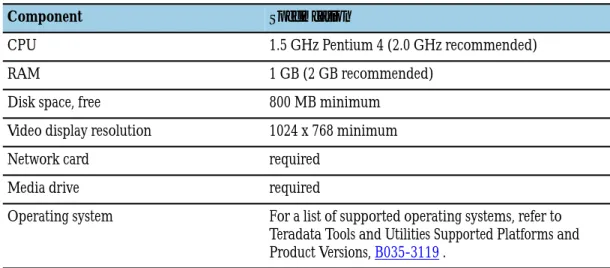
Table 2: Hardware Specifications for Client and Server Systems
Component Specification
CPU 1.5 GHz Pentium 4 (2.0 GHz recommended)
RAM 1 GB (2 GB recommended)
Disk space, free 800 MB minimum
Video display resolution 1024 x 768 minimum
Network card required
Media drive required
Operating system For a list of supported operating systems, refer to
Teradata Tools and Utilities Supported Platforms and Product Versions, B035-3119 .
About Uninstalling Previous Versions of Teradata
Tools and Utilities
Before you install a new version of Teradata Tools and Utilities products, you must uninstall all existing Teradata Tools and Utilities products.
Note: If you need to reinstall v14.10, you must use the Add/Remove Programs applet to
uninstall the existing instance of the product. For more information, see Interactively Uninstalling Teradata Tools and Utilities.
Note: Before you uninstall the Teradata Generic Security Services Client package, see About Retaining Existing Files for TeraGSS Client Package for special considerations.
About Retaining Existing Files for TeraGSS Client
Package
Before you uninstall any older versions of the Teradata Generic Security Services Client package in preparation for installing a new version, determine whether to retain any of the files for the old version. You might need to retain existing files if you need to do either of the following:
• Return to an older version of the client package later for client compatibility with an older version of the Teradata Database system: If you require such compatibility, you need to retain the entire set of client package files for the older version(s), rather than uninstall them. Then you can use the version switching tool (tdgssversion) to switch from the new version to an older version to allow access to a compatible older Teradata
Database system. For information on using the tdgssversion tool, refer to Security Administration , B035-1100 .
• Retain custom configuration information in the TdgssUserConfigFile.xml file and transfer it to the new version of the client package: If you do not need the version
compatibility mentioned above, simply copy the configuration file for the old version and make the corresponding changes to the configuration file for the new version. For information on accessing and making changes to the TdgssUserConfigFile.xml file, refer to Security Administration , B035-1100 .
Generating a List of Installed Products
Note: The application that generates the list of products is available in Teradata Tools and Utilities version 14.10, so version 14.10 must be installed in order to use this application. However, when you run the application, any version of products that are installed will be listed.
1 Start the application that generates a list of products using either of the following methods:
Method Procedure
From the Start menu a. Choose Start > All Programs > Teradata Client version > Teradata List Products.
Alternatively, in the \Windows\TTU\version\ folder, double-click TTUListProducts.exe.
From a command prompt a. Open a command prompt.
b. Change directory to the \Windows\TTU\ folder (or to the appropriate folder on the physical media):
cd Windows\TTU\ c. Run the following command:
TTUListProducts.exe -s -f filename Options:
• -s causes the application to run in silent mode
• -ffilename allows you to specify the name of the output file
• /help displays information about how to use the command
You can specify -s and -ffilename at the same time. A file named TTUListProductstimestamp.txt is created on the Desktop, where
timestamp is the time (MM-DD-YYYY_HHMMSS) the file was created. It contains a list of all of the Teradata Tools and Utilities products that are installed on the system.
Note: If you started the application from a command prompt and if you used the -ffilename option to specify the name of the output file, the filename matches what you specified.
Silently Uninstalling Teradata Tools and Utilities
Uninstallation Script Prerequisites
Note: Use the uninstall_TTU.vbs script to uninstall pre-14.10 products. To uninstall 14.10 products, use the Add/Remove Programs applet.
To run the uninstall_TTU.vbs script, the following software is required on the target machine.
• Windows Installer version must be 3.0 or above. To see the version of Windows Installer, enter the msiexec command at the command prompt.
• Windows Script Host (WSH) version must be 5.6 or above. To see the version of Windows Script Host, enter the cscript command at the command prompt.
Uninstallation Script Overview
Note: It is not necessary to uninstall previous versions of Teradata Wallet before you install
another version of it.
Before you install a new version of Teradata Tools and Utilities packages, you must use the uninstallation script to uninstall previous versions of the packages. The script is on the installation media:
\Windows\uninstall_TTU.vbs
It creates a log file that contains a record of all of the steps taken during execution. %TEMP%\uninstall_script_timestamp.log
msi logging is turned on during package installation from the media. The msi uninstallation log files are stored in the %TEMP% folder in the following file format:
uninstall_package_name_package_version.log
These logs provide useful information to support personnel if any issues are observed in the uninstallation of Teradata Tools and Utilities packages.
Run the uninstallation script before you do any of the following: • install a new version of a package
• install a specific version of a package (a version other than the latest version) • decommission Teradata Tools and Utilities software on a particular system
Note: In order to use Teradata Wallet, the version of the product that uses Teradata Wallet
and the version of Teradata Wallet must match. This applies to the following products: • Teradata Call-Level Interface version 2
• ODBC Driver for Teradata
When you run the script, you can specify individual packages to be uninstalled. Teradata recommends that you uninstall the dependency products (CLIv2, PIOM, TDICU,
TDODBC, and TeraGSS) last; however they can be uninstalled individually regardless of the order.
Caution: If a dependency product is uninstalled without reinstalling a new version, the products that depend on that product stop functioning. For example, if CLIv2 is uninstalled, all products that depend on CLIv2 stop functioning.
In order for the script to run, the command must include the PRODUCT parameter.
Without it, the script displays usage information. The script supports two parameters: /PRIORTOVERSION
/FORCE
As an argument to the script, a version can be specified using the /PRIORTOVERSION parameters (for example: /PRIORTOVERSION:14.10.00.00). The uninstallation script only uninstalls versions of the specified packages that are earlier than the version specified in the / PRIORTOVERSION parameter. When the /PRIORTOVERSION parameter is not specified, the default value is /PRIORTOVERSION:14.10.00.00.
The default behavior handles uninstallations of Teradata Tools and Utilities packages, except corrupted installations which are handled using the /FORCE parameter. When this
parameter is specified, the uninstallation script performs an extensive registry search for all versions and components that were installed by a particular Teradata Tools and Utilities package. If the registry entries are found, the script deletes them. This parameter should be used with care because it takes time to search the registry for versions and components of a package. If multiple packages are passed as arguments, the script can take a long time to run. When both parameters are specified, the /FORCE:TRUE parameter performs uninstallation and cleanup of only the versions of the packages that are earlier than those specified using the /PRIORTOVERSION parameter.
The script uses system packaging commands to uninstall packages, so it must be executed by an admin user (or by someone with admin privileges) .
Using a Script to Silently Uninstall Teradata Tools and Utilities
1 Run the uninstall_ttu.vbs script.Command Description
cscript uninstall_ttu.vbs Displays usage information
cscript uninstall_ttu.vbs PRODUCT Uninstalls the product(s) that you specify cscript uninstall_ttu.vbs ALL [14.10 only] Uninstalls all products
PRODUCT
One or more products that will be uninstalled
The values of the packages must be listed in their order of dependency as specified in the table below. The values are case sensitive.
Example of uninstalling BTEQ and its dependencies:
cscript uninstall_ttu.vbs BTEQ PIOM CLIv2 TDICU TERAGSS Example of uninstalling SQLA and its dependencies:
cscript uninstall_ttu.vbs SQLA TDODBC TDICU TERAGSS TDNETDP Table 3: Products and their Parameter Values
Note: Teradata Parallel Transporter Base and Teradata Parallel Transporter Stream
are part of Teradata Tools and Utilities 14.10. All of the other Teradata Parallel Transporter products that are listed in the table are legacy products (they are part of earlier versions of Teradata Tools and Utilities). They are listed in case you need to uninstall them.
Product Name Parameter Value
[14.10 only] (All products) ALL
Teradata Wallet TDWALLET
Teradata Parallel Transporter Selector Operator TPTSELECTOP Teradata Parallel Transporter OS Command Operator TPTOSCMDOP Teradata Parallel Transporter ODBC Operator TPTODBCOP Teradata Parallel Transporter Inserter Operator TPTINSERTOP Teradata Parallel Transporter DDL Operator TPTDDLOP Teradata Parallel Transporter Data Connector Operator TPTDATACONOP Teradata Parallel Transporter Operator Support Library TPTOSL
Teradata Parallel Transporter ICU TPTICU
Teradata Parallel Transporter Stream Operator TPTSTREAMOP Teradata Parallel Transporter Update Operator TPTUPDATEOP Teradata Parallel Transporter Export Operator TPTEXPORTOP Teradata Parallel Transporter Load Operator TPTLOADOP Teradata Parallel Transporter Infrastructure TPTINFRA
Teradata Parallel Transporter API TPTAPI
Teradata Parallel Transporter Base TPTBASE
Teradata Parallel Transporter Stream TPTSTREAM
Teradata Administrator TDADMIN
Teradata Workload Analyzer TWA
Teradata Query Scheduler Client TQSCLIENT
Teradata Query Scheduler Server TQSSERVER
Teradata Query Scheduler Administrator TQSADMIN
Teradata Performance Monitor Object MONITOROBJ
Teradata Statistics Wizard TSWIZ
Teradata Index Wizard TIWIZ
Teradata Visual Explain VECOMP
Product Name Parameter Value
Teradata SQL Assistant SQLA
Teradata Access Module for JMS JMSAXSMOD
Teradata OLE DB Access Module OLEDBAXSMOD
Teradata WebSphere MQ Access Module MQAXSMOD
Teradata Named Pipes Access Module NPAXSMOD
Teradata C Preprocessor2 SQLPP
OLE DB Provider for Teradata TDOLEDB
Teradata Archive/Recovery Utility ARC
Teradata Parallel Data Pump TPUMP
Teradata FastExport FASTEXP
Teradata MultiLoad MLOAD
Teradata FastLoad FASTLD
Basic Teradata Query BTEQ
Teradata Data Connector API PIOM
ODBC Driver for Teradata TDODBC
.NET Data Provider for Teradata TDNETDP
Teradata Call-Level Interface version 2 CLIv2
Teradata Wallet TDWALLET
Shared ICU Libraries for Teradata TDICU
Teradata Generic Security Services Client package TERAGSS
PRIORTOVERSION
Removes products prior to a specified version
For example, if you are installing BTEQ from Teradata Tools and Utilities 14.10 and you need to uninstall packages prior to this version (for example, 14.00, 13.10, or 13.0), enter the following command:
cscript uninstall_ttu.vbs BTEQ PIOM CLIv2 TDICU TERAGSS / PRIORTOVERSION:14.10.00.00
The number parameter must contain all four pairs of digits, and can be specific enough to remove all packages before, for example, 14.10.00.01. Typically the last two pair of digits would just be 00.00.
FORCE
Removes all traces of the product(s) by force
The default is /FORCE:FALSE. If you specify /FORCE:TRUE, the installation process performs a thorough investigation of the registry for all known product keys and removes all traces. The process can take a long time. It is recommended that you use the /FORCE:TRUE
option only if the default /FORCE:FALSE option did not successfully uninstall the products that you specified.
For example, to force uninstallation of BTEQ, enter the following command:
cscript uninstall_ttu.vbs BTEQ PIOM CLIv2 TDICU TERAGSS / FORCE:TRUE
Using a Batch File to Silently Uninstall Teradata Tools and Utilities 14.10
You can use a single DOS command to silently uninstall Teradata Tools and Utilities 14.10 products.1 Close all active Windows programs and disable any virus protection software running on the client computer.
2 Open a command prompt.
3 Change directory to the folder that contains the silent_uninstall.bat file. 4 Enter the appropriate command to uninstall the products.
To uninstall all products:
silent_uninstall.bat ALL To uninstall fewer than all products:
silent_uninstall.bat "PRODUCT"
For a list of PRODUCT parameter values and other details about the command syntax to run the batch file, see Product Parameter Values for Use With Batch Files.
Product Parameter Values for Use With Batch Files
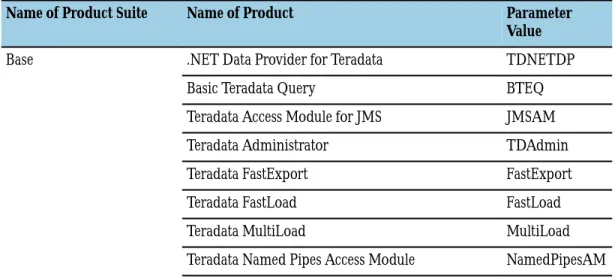
You can use batch files to silently uninstall and install Teradata Tools and Utilities products. The command to run the batch file must include a value for the PRODUCT parameter. Table 4: Product Parameter Values
Name of Product Suite Name of Product Parameter
Value
Base .NET Data Provider for Teradata TDNETDP
Basic Teradata Query BTEQ
Teradata Access Module for JMS JMSAM
Teradata Administrator TDAdmin
Teradata FastExport FastExport
Teradata FastLoad FastLoad
Teradata MultiLoad MultiLoad
Name of Product Suite Name of Product Parameter Value
Teradata OLE DB Access Module OLEDBAM
Teradata C Preprocessor2 Preprocessor
Teradata Parallel Data Pump TPump
Teradata Parallel Transporter Base TPTBase Teradata Parallel Transporter Stream TPTStream
Teradata SQL Assistant SQLA
Teradata Wallet TDWallet
Teradata WebSphere MQ Access Module WebsphereAM
Database Management Basic Teradata Query BTEQ
Teradata Index Wizard IndexWizard
Teradata Performance Monitor Object PMonObject
Teradata Statistics Wizard StatWizard
Teradata Query Scheduler Administrator TQSAdmin Teradata Query Scheduler Client TQSClient Teradata Query Scheduler Server TQSServer Teradata System Emulation Tool TSET
Teradata Visual Explain VisualExplain
Teradata Wallet TDWallet
Teradata Workload Analyzer TWA
Tape Storage Management Teradata Archive/Recovery Utility ARC
Teradata C Preprocessor2 Preprocessor
Teradata Wallet TDWallet
Note: For your convenience, a text string that contains a set of parameter values for each
product in a suite is in the following table. You can copy the appropriate text string for use with batch file commands.
Name of Product Suite Text String (set of parameter values)
Base BTEQ,FastExport,FastLoad,JMSAM,MultiLoad,NamedPipes
AM,OLEDBAM,Preprocessor,SQLA,TDAdmin,TDNETDP,T DWallet,TPTBase,TPTStream,TPump,WebsphereAM Database Management BTEQ,IndexWizard,PMonObject,StatWizard,TDWallet,TQSA
dmin,TQSClient,TQSServer,TSET,TWA,VisualExplain Tape Storage Management ARC,Preprocessor,TDWallet
batch_file_name "PRODUCT"
where batch_file_name is the name of the batch file: • silent_uninstall.bat
• silent_install.bat
and where PRODUCT is a set of parameter values associated with the suite of products you are uninstalling.
The parameter values are case-sensitive. Be sure to include the quote marks (""). Separate the parameter values with a comma, but do not include a space. For example, to install the products that are part of the Tape Storage Management suite, use the following command:
silent_uninstall.bat "ARC,Preprocessor,TDWallet"
Note: When you run a batch file, all of the dependent products are handled automatically (they are uninstalled or installed, depending on whether you are uninstalling products or installing products). You do not have to specify their parameter values.
Interactively Uninstalling Teradata Tools and
Utilities
1 Open the Add/Remove Programs applet.
Tip: To open the applet, open a command prompt and type APPWIZ.CPL. 2 Uninstall the Teradata Tools and Utilities products.
[pre-14.10] Because of dependencies between Teradata Tools and Utilities products, you must manually uninstall products in a specific order. Uninstall the following products last (after you uninstall all other products) and uninstall them in the order that they are listed. You can uninstall all other Teradata Tools and Utilities products in any order.
a. Teradata Query Scheduler Server b. Teradata Query Scheduler Client c. Teradata Parallel Transporter Stream d. Teradata Parallel Transporter Base e. Teradata SQL Assistant
f. ODBC Driver for Teradata g. .NET Data Provider for Teradata h. Teradata Call-Level Interface version 2 i. Shared ICU Libraries for Teradata
j. Teradata Generic Security Services Client package
[14.10] Teradata Tools and Utilities products are part of one of three suites. When you uninstall a suite, all of the Teradata Tools and Utilities primary products are uninstalled. Dependent products are uninstalled when the last suite is uninstalled.
• Teradata Tools and Utilities - Base 14.10
• Teradata Tools and Utilities - Database Management 14.10 • Teradata Tools and Utilities - Tape Storage Management 14.10
About Installing Third-Party Software
Some Teradata Tools and Utilities products require the installation of third-party software. Before you install Teradata Tools and Utilities, install all of the required third-party software. You can download most third-party software from the developer's website.
Determining the Current Version of .NET Framework
Prerequisite: You must install Microsoft .NET Framework 3.5 SP1 or later before you install .NET Data Provider for Teradata.
1 Determine the current version of Microsoft .NET Framework installed on the system by doing one of the following:
• Open a command prompt and type APPWIZ.CPL. The version of Microsoft .NET Framework is displayed in the list of installed programs.
• See the article How to determine which versions and service pack levels of the Microsoft .NET Framework are installed.
2 If the system does not have the correct version installed, download the Microsoft .NET Framework Version 3.5 SP1 Redistributable Package or Microsoft .NET Framework Version 4.0 Redistributable Package.
3 Select the Microsoft .NET Framework Redistributable Package for your platform. 4 Follow recommendations on the installation page for installing Microsoft .NET
Framework.
Installing Third-Party Software for Teradata Parallel Transporter Base
1 Download and install Java 2 Runtime Environment 1.4.2_06 or later from JavaDownloads.
2 Download and install Progress DataDirect ConnectXE ODBC driver for Teradata.
Installing Third-Party Software for Teradata Parallel Transporter Wizard
The Teradata Parallel Transporter Wizard software must use the 32-bit Java SE Runtime Environment (JRE) version 1.4.2_06 or later on the 32-bit and 64-bit Windows platforms, but the PATH to the JRE is not added automatically.
On the 64-bit Windows platform, the Teradata Parallel Transporter Wizard cannot use the 64-bit JRE version.
1 Download and install the 32-bit JRE from Java SE Downloads on the 32-bit or 64-bit Windows platform.
2 On a 64-bit Windows platform, add the path to the 32-bit JRE java.exe command to the front of the PATH system environment variable.
Downloading and Installing Third-Party Software for Teradata SQL
Assistant
Prerequisite: You must install Microsoft .NET Framework 3.5 SP1 or later before you install Teradata SQL Assistant.
1 Determine the current version of Microsoft .NET Framework installed on the system by doing one of the following:
• Open a command prompt and type APPWIZ.CPL. The version of Microsoft .NET Framework is displayed in the list of installed programs.
• See the article How to determine which versions and service pack levels of the Microsoft .NET Framework are installed.
2 If the system does not have the correct version installed, download the Microsoft .NET Framework Version 3.5 SP1 Redistributable Package .
3 Select the Microsoft .NET Framework Redistributable Package for your platform. 4 Follow recommendations on the installation page for installing Microsoft .NET
Framework.
Installing Third-Party Software for Teradata WebSphere MQ Access
Module
Note: To display the version of WebSphere that is installed on the system, run the dspmqver
command from the command line.
1 Before you run Teradata WebSphere MQ Access Module, download IBM WebSphere MQ 7.5 and install it according to the instructions in the downloaded package.
About Installing Teradata Tools and Utilities
Note: Before you install Teradata Tools and Utilities products, you must first uninstall all earlier versions of the products (except TeraGSS). This helps prevent problems that might be caused by having different versions of products installed.
Note: Client applications can cause a Windows path overrun if the PATH system environment
variable or a user environment variable exceeds 1024 characters, causing programs not to run. If the problem is encountered, upgrade the system to the latest service pack for Windows XP or install the Microsoft hotfix to increase the PATH size to 2048 characters.
Note: For ODBC on all platforms, because the installation process installs both 32-bit and
64-bit versions of the ODBC Driver for Teradata, both the 32-bit and 64-bit versions of Teradata GSS Client must be installed before installing ODBC Driver for Teradata. Teradata Tools and Utilities package files are digitally signed.
Interactively Installing Teradata Tools and Utilities Products
Note: When you install Teradata Tools and Utilities products from media, all dependent
products for your selection are installed in silent mode. On a 64-bit system, both 32-bit and 64-bit versions of the dependent products are installed.
1 Close all active Windows programs and disable any virus protection software running on the client computer.
2 If the installation source files are not on the system disk, insert the appropriate media into the media drive.
Note: For a list of products and the media each one resides on, see DVD Contents. 3 In the Welcome to Teradata Tools and Utilities dialog box, click Install Product.
Note: If the Welcome dialog box does not appear shortly after the media is inserted, use Windows Explorer to navigate to the main folder of the DVD. Double-click setup.bat to start the installation process.
4 If you want an installation log file to be created, perform the following steps: a If the Windows installer automatically starts, exit the installer.
b On the system disk where the source files and folders are located, be sure the folder where the setup.exe file is located is writable.
c Open a command prompt.
d On the system disk, change directory to the folder where the setup.exe file is located.
e Run either of the following commands as appropriate: • setup.exe /debuglog
A log file named InstallShield.log will be created in the folder where the setup.exe file is located.
• setup.exe /debuglog"path\filename"
where path is the path (absolute or relative) where you want the log file to be created and filename is the name of the log file. Be sure to add the quote marks (").
f Wait for the Windows installer to start.
5 In the Choose Setup Language dialog box, select the desired language, then click Next.
6 In the Welcome dialog box, click Next.
7 Read the terms of the software license agreement, accept them (click the appropriate radio button), and then click Next.
8 In the Choose Destination Location dialog box, if the default path shown in the
Destination Folder block is acceptable, click Next. (Recommended)
Note: To use a destination location other than the default, click Browse, navigate to the
location where the files are installed, click OK, then click Next to end the procedure.
Note: You must have write access to the destination folder, the Windows root folder, and
the Windows system folder.
Progress monitors appear during the installation process. No action is required. 9 In the Select Features dialog box, select the products that you want to install.
Note: The checkbox for ODBC Driver for Teradata is always selected and you cannot deselect it because this product is always installed.
10 Choose whether you want the installation process to uninstall previous versions of the following products:
• Teradata Administrator • Teradata Index Wizard
• Teradata Performance Monitor Object • Teradata Query Scheduler
• Teradata SQL Assistant • Teradata Statistics Wizard • Teradata System Emulation Tool • Teradata Visual Explain
• Teradata Workload Analyzer
At the bottom of the Select Features dialog box, the Uninstall previous versions
checkbox is selected by default. If you leave it selected, these products will be uninstalled. If you deselect it, these products will remain on the system.
11 Click Install.
12 When the installation is complete, click Finish. 13 Click Exit to dismiss the Welcome dialog box. 14 Remove the media from the drive.
Note: Beginning with Teradata Tools and Utilities 14.10, you can start Teradata Wallet
from the Start menu.
About Installation Log Files
When you install Teradata Tools and Utilities, you can choose to have a log file named InstallShield.log created. You can use the log file to troubleshoot problems with the installation if necessary.
To have a log file created, you need to start the installation from the command line (DOS prompt). When you insert the DVD to install Teradata Tools and Utilities, if the Windows installer automatically starts, you will need to exit it, open a command line window, and run the setup.exe command with the /debuglog parameter.
Silently Installing Teradata Tools and Utilities Products
You can use a single DOS command to silently install all Teradata Tools and Utilities products.
1 Close all active Windows programs and disable any virus protection software running on the client computer.
2 Uninstall previous versions of the Teradata Tools and Utilities software.
3 If the installation source files are not on the system disk, insert the appropriate media into the media drive.
Note: For a list of products and the media each one resides on, see DVD Contents. 4 Open a command prompt.
5 If the installation source files are not on the system disk, change directory to the media drive.
6 Change directory to \Windows\TTU\. 7 Run the batch file:
silent_install.bat "PRODUCT"
For a list of PRODUCT parameter values and other details about the command syntax to run the batch file, see Product Parameter Values for Use With Batch Files.
Note: Some products include a 32-bit version and a 64-bit version. On a 32-bit system,
only the 32-bit version of the product is installed. On a 64-bit system, both versions of the product are installed.
Note: Beginning with Teradata Tools and Utilities 14.10, you can start Teradata Wallet
from the Start menu. Related Topics
About Uninstalling Previous Versions of Teradata Tools and Utilities, on page 25
Installing .NET Data Provider for Teradata
About Installing .NET Data Provider for Teradata
When you install .NET Data Provider for Teradata, you must perform several tasks:
1. Review security requirements for using Microsoft .NET Framework.
2. Check that the required version of Microsoft .NET Framework is installed on your