BMC
®
Impact Manager
Knowledge Base
Reference Guide
Version 3.2.00
Copyright 2003 BMC Software, Inc. All rights reserved.
BMC Software, the BMC Software logos, and all other BMC Software product or service names are registered trademarks or trademarks of BMC Software, Inc. All other trademarks belong to their respective companies. BMC Software considers information included in this documentation to be proprietary and confidential. Your use of this information is subject to the terms and conditions of the applicable End User License Agreement for the product and the proprietary and restricted rights notices included in this documentation.
Restricted Rights Legend
U.S. Government Restricted Rights to Computer Software. UNPUBLISHED -- RIGHTS RESERVED UNDER THE COPYRIGHT LAWS OF THE UNITED STATES. Use, duplication, or disclosure of any data and computer software by the U.S. Government is subject to restrictions, as applicable, set forth in FAR Section 52.227-14, DFARS 252.227-7013, DFARS 252.227-7014, DFARS 252.227-7015, and DFARS 252.227-7025, as amended from time to time. Contractor/Manufacturer is BMC Software, Inc., 2101 CityWest Blvd., Houston, TX 77042-2827, USA. Any contract notices should be sent to this address.
Contacting BMC Software
You can access the BMC Software Web site at http://www.bmc.com. From this Web site, you can obtain information about the company, its products, corporate offices, special events, and career opportunities.
United States and Canada Outside United States and Canada
Address BMC Software, Inc. 2101 CityWest Blvd. Houston TX 77042-2827
Telephone Fax
(01) 713 918 8800 (01) 713 918 8000 Telephone 713 918 8800 or
Customer Support
You can obtain technical support by using the Support page on the BMC Software Web site or by contacting Customer Support by telephone or e-mail. To expedite your inquiry, please see “Before Contacting BMC Software.”
Support Web Site
You can obtain technical support from BMC Software 24 hours a day, 7 days a week at http://www.bmc.com/support.html. From this Web site, you can
• read overviews about support services and programs that BMC Software offers • find the most current information about BMC Software products
• search a database for problems similar to yours and possible solutions • order or download product documentation
• report a problem or ask a question
• subscribe to receive e-mail notices when new product versions are released
• find worldwide BMC Software support center locations and contact information, including e-mail addresses, fax numbers, and telephone numbers
Support by Telephone or E-mail
In the United States and Canada, if you need technical support and do not have access to the Web, call
800 537 1813. Outside the United States and Canada, please contact your local support center for assistance. To find telephone and e-mail contact information for the BMC Software support center that services your location, refer to the Contact Customer Support section of the Support page on the BMC Software Web site at
www.bmc.com/support.html.
Before Contacting BMC Software
Before you contact BMC Software, have the following information available so that Customer Support can begin working on your problem immediately:
• product information — product name
— product version (release number)
— license number and password (trial or permanent) • operating system and environment information
— machine type
— operating system type, version, and service pack or other maintenance level such as PUT or PTF — system hardware configuration
— serial numbers
— related software (database, application, and communication) including type, version, and service pack or maintenance level
• sequence of events leading to the problem • commands and options that you used
• messages received (and the time and date that you received them) — product error messages
— messages from the operating system, such as file system full — messages from related software
Contents
Contents
About This Book . . . ix
Chapter 1 BMC Impact Manager Overview
Understanding BMC Impact Manager . . . 1-2 Event Management with BMC EM . . . 1-2 Service-Impact Management with BMC SIM . . . 1-3 BMC Impact Manager Product Components . . . 1-4 About BMC Impact Manager . . . 1-5 About BMC Impact Explorer . . . 1-8 About BMC Impact Explorer Server . . . 1-9 About BMC Impact Event Adapters . . . 1-9 BMC Impact Manager Concepts . . . 1-10 Understanding BMC Impact Manager Event Processing . . . 1-12 Event Flow Between Cells . . . 1-13 Rule Phases for Event Processing . . . 1-15 Understanding the BMC Impact Manager Knowledge Base . . . 1-18 Knowledge Base Installation and Upgrade . . . 1-18 Components of the BMC Impact Manager Knowledge Base . . . 1-19 Knowledge Base Files . . . 1-20 Knowledge Base Directories . . . 1-22
Chapter 2 The BAROC Language
Basic Concepts . . . 2-2 Inheritance . . . 2-2 BAROC Syntax Generalities . . . 2-4 Symbols . . . 2-4 Syntax Rules . . . 2-5 Class Definitions . . . 2-6
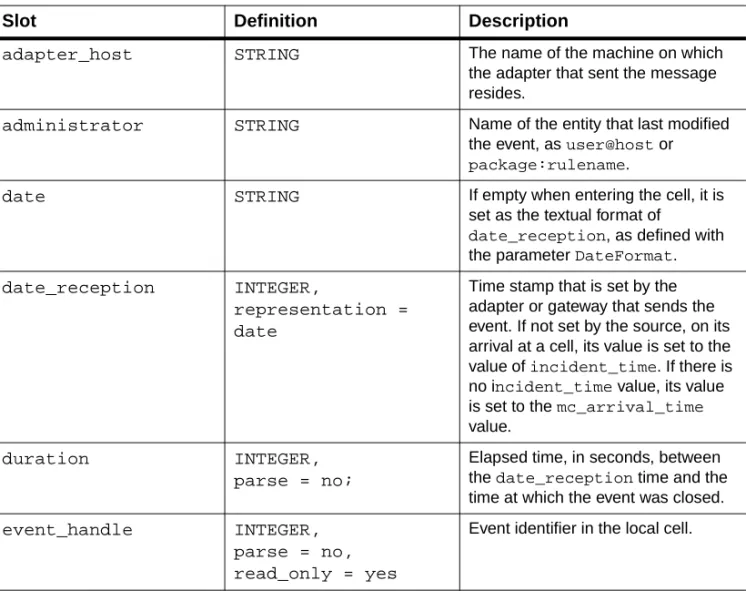
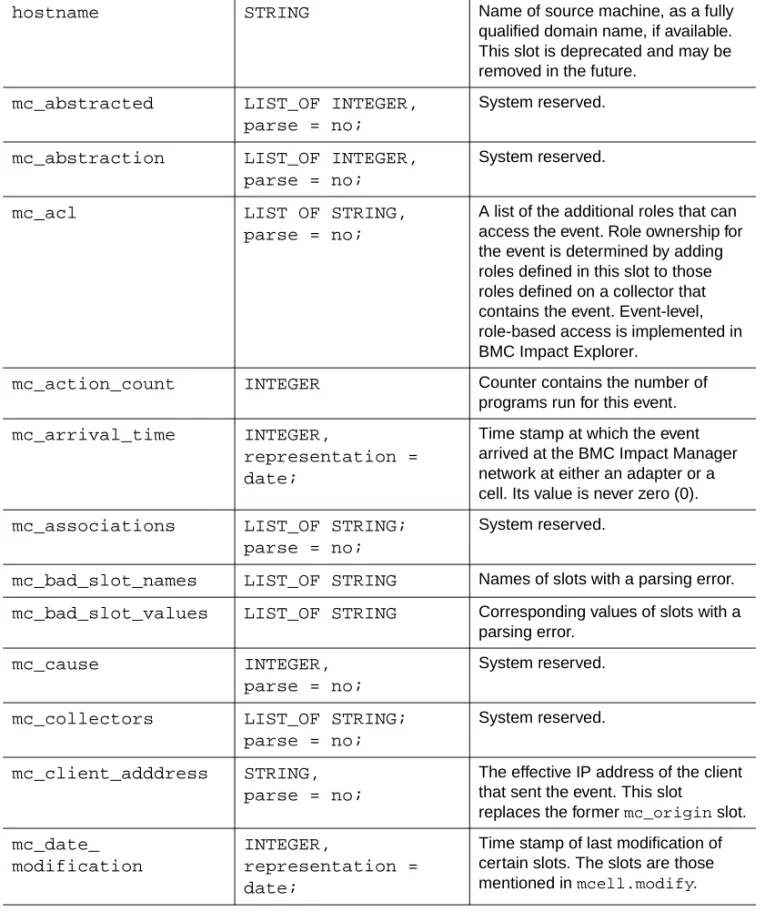
Class Definition Basic Syntax . . . .2-6 Slots . . . .2-7 Slot Types . . . .2-7 Universal Event and Data Identifiers . . . .2-7 Facets . . . .2-9 Class Definition Examples . . . .2-10 Class Instances . . . .2-12 Instance Syntax . . . .2-12 Instance Definition Example . . . .2-13 Enumerations . . . .2-13 Enumeration Syntax . . . .2-13 Enumeration Definition Example . . . .2-14 Global Records . . . .2-14 Record Syntax . . . .2-14 Record Definition Example . . . .2-15 Addressing Global Records . . . .2-15 Product Internals . . . .2-16 Product Base Internal Classes . . . .2-16 EVENT Root Class . . . .2-17 DATA Root Class . . . .2-24 Internal Enumerations . . . .2-25 Other Internal Definitions . . . .2-26
Chapter 3 The Cell Rule Engine
Order of Rule Evaluation in the Knowledge Base . . . .3-2 Incoming Event Processing . . . .3-4 Internal Event Processing . . . .3-5 Internal Requests . . . .3-5 Propagation . . . .3-6
Chapter 4 The Master Rule Language
General Rule Syntax . . . .4-2 Objects, Types, and Variables . . . .4-4 Events . . . .4-4 Data . . . .4-5 Global Records . . . .4-7 Interfaces . . . .4-7 Types . . . .4-9 Selection Criteria . . . .4-11
Where Clauses . . . 4-13 Using Clause . . . 4-16 When Clauses . . . 4-19 Body Clauses . . . 4-20 The if-then-else Construct . . . 4-21 General Rule Writing Constraints . . . 4-23
Chapter 5 The Rule Phases
Refine Rule Phase . . . 5-2 Syntax: Refine Rules . . . 5-2 Semantics: Refine Rules . . . 5-3 Examples: Refine Rules . . . 5-4 Filter Rule Phase . . . 5-6 Syntax: Filter Rules . . . 5-6 Semantics: Filter Rules . . . 5-6 Examples: Filter Rules . . . 5-7 Regulate Rule Phase . . . 5-9 Syntax: Regulate Rules . . . 5-10 Semantics: Regulate Rules . . . 5-11 Examples: Regulate Rules . . . 5-12 New Rule Phase . . . 5-14 Syntax: New Rules . . . 5-15 Semantics: New Rules . . . 5-16 Examples: New Rules . . . 5-16 Abstract Rule Phase . . . 5-18 Syntax: Abstract Rules . . . 5-19 Semantics: Abstract Rules . . . 5-19 Examples: Abstract Rules . . . 5-21 Correlate Rule Phase . . . 5-23 Syntax: Correlate Rules . . . 5-23 Semantics: Correlate Rules . . . 5-24 Examples: Correlate Rules . . . 5-25 Execute Rule Phase . . . 5-28 Syntax . . . 5-28 Semantics . . . 5-29 Examples . . . 5-31 Propagate Rule Phase . . . 5-33 Syntax . . . 5-33 Semantics . . . 5-33 Examples . . . 5-35
Timer Rule Phase . . . .5-35 Syntax . . . .5-36 Semantics . . . .5-36 Examples . . . .5-38 Delete Rule Phase . . . .5-40 Syntax . . . .5-40 Semantics . . . .5-40 Examples . . . .5-41
Chapter 6 Collectors
Collector Operation . . . .6-3 Collector Security . . . .6-4 Setting Up Collector Permissions . . . .6-5 How Collector Permissions Work . . . .6-6 Static and Dynamic Collectors . . . .6-8 Collector Definition . . . .6-8 BMC Impact Manager Default Collectors . . . .6-8 Collector Syntax . . . .6-9 Static Collector Examples . . . .6-13 Dynamic Collector Examples . . . .6-15 Performance Considerations . . . .6-17
Appendix A Master Rule Language Reference
Data Types . . . A-2 Operators . . . A-3 Operator Definitions . . . A-4 Boolean (Logical) Operators . . . A-12 String Operators . . . A-13 Arithmetic Operators . . . A-14 Primitives . . . A-14 Cell Operation Control . . . A-16 Conversion Primitives . . . A-17 Instance Control Primitives . . . A-19 List Primitives . . . A-24 Run Program Primitives . . . A-29 Retrieve Data Primitives . . . A-32 String Primitives . . . A-33 Time Primitives . . . A-38 Functions . . . A-42 Conditional Function . . . A-45
Conversion Functions . . . A-45 Enumeration Functions . . . A-46 List Functions . . . A-47 Mathematical Functions . . . A-49 Retrieve Data Functions . . . A-51 String Functions . . . A-52 Time Functions . . . A-58 Trigonometric Functions . . . A-59 MRL Syntax . . . A-60 BMC Impact Manager Base Classes . . . A-87
Glossary Index
About . . .
About This Book
This book contains detailed information about BMC® Impact Manager and is intended for anyone who will be creating BMC Impact Manager Knowledge Bases and collectors to be used by the cell and the Console.
Note
This book assumes that you are familiar with your host operating system. You should know how to perform basic actions in a window
environment, such as choosing menu commands and dragging and dropping icons.
How This Book Is Organized
This book is organized as follows. In addition, this book contains a glossary of terms and an index.
Chapter/Appendix Description
Chapter 1, “BMC Impact Manager Overview”
provides an overview of BMC Impact Manager and defines the Knowledge Base and provides information on how to configure the Knowledge Base files Chapter 2, “The BAROC Language” describes the BMC Impact Manager
classes, their definitions and how they are used in the Knowledge Base rules and collectors
Chapter 3, “The Cell Rule Engine” describes the general behavior of the rule engine
Chapter 4, “The Master Rule Language”
introduces the Master Rule Language (MRL) and how to use it in creating and using BMC Impact Manager rules and collectors in the Knowledge Base Chapter 5, “The Rule Phases” discusses the ten BMC Impact Manager
rule phases and the event processing procedure
Chapter 6, “Collectors” provides procedures for creating collectors for the Knowledge Base Appendix A, “Master Rule
Language Reference”
contains reference information about rules and collectors, such as operators, primitives, functions, the syntax used in writing BMC Impact Manager rules and base classes
Related Documentation
BMC Software products offer several types of documentation, including online and printed books and release notes.
In addition to this book, you can find useful information in the
publications listed in the following table. As “Online and Printed Books” on page xii explains, these publications are available on request from BMC Software.
Category Document Description
installation documents
BMC Impact Manager Installation Guide
provides instructions for installing BMC Impact Manager and related software components BMC Impact
Manager core documents
BMC Impact Explorer Console User Guide
contains instructions for accessing, analyzing, and responding to event and service model component data
BMC Impact Manager Administrator Guide
provides information and procedures for configuring BMC Impact Manager, BMC Impact Explorer Server, and BMC Impact Explorer
Building a Service Model provides information on designing, developing, and maintaining BMC Impact Manager service models
BMC Impact Event Adapters User Guide
contains descriptions of adapter files and instructions for configuring and running the event adapters
BMC Impact Integration documents
BMC Impact Database Gateway Administrator Guide
contains information about exporting data from BMC Impact Manager into databases
BMC Impact Integration for Remedy AR System User Guide
provides information about bidirectional integration between BMC Impact Manager servers and Remedy servers
BMC Impact Integration for Tivoli User Guide
contains steps for streamlining TEC performance by using the BMC Impact Manager product
BMC Impact Integration for PATROL User Guide
provides instructions for sharing data between PATROL and BMC Impact Manager by using the BMC Impact Integration for PATROL product
BMC Impact Integration for PATROL Enterprise Manager User Guide
provides instructions for installing and configuring the component that connects BMC Impact Manager to PATROL EM so that they can share alerts and events
Online and Printed Books
The books that accompany BMC Software products are available in online and printed formats. Online books are formatted as Portable Document Format (PDF) files. Some online books are also formatted as HTML files.
To Access Online Books
To view any online book that BMC Software offers, visit the Customer Support page of the BMC Software Web site at
http://www.bmc.com/support.html. You can also access PDF books from the documentation compact disc (CD) that accompanies your product.
Use the free Acrobat Reader from Adobe Systems to view, print, or copy PDF files. In some cases, installing the Acrobat Reader and downloading the online books is an optional part of the product-installation process. For information about downloading the free reader from the Web, go to the Adobe Systems site at http://www.adobe.com.
To Request Additional Printed Books
BMC Software provides some printed books with your product order. To request additional books, go to http://www.bmc.com/support.html.
supplemental documents
BMC Impact Manager Release Notes
contain last-minute information on the product and changes to the installation procedures
BMC Impact Explorer Release Notes
BMC Impact Integration for Tivoli Release Notes BMC Impact Database Gateway Release Notes other release notes and technical bulletins
Release Notes
Printed release notes accompany each BMC Software product. Release notes provide up-to-date information such as
• updates to the installation instructions • last-minute product information
The latest versions of the release notes are also available on the Web at
http://www.bmc.com/support.html.
Conventions
The following conventions are used in this book:
• This book includes special elements called notes, warnings, examples, and tips:
Note
Notes provide additional information about the current subject.
Warning
Warnings alert you to situations that can cause problems, such as loss of data, if you do not follow instructions carefully.
Example
An example clarifies a concept discussed in text.
Tip
Tips contain information that might improve product performance or that might make procedures easier to follow.
• All syntax, operating system terms, and literal examples are presented in this typeface.
• In instructions, boldface type highlights information that you enter. File names, directories, Web addresses, e-mail addresses, and names of GUI elements also appear in boldface type.
• The symbol => connects items in a menu sequence. For example,
Actions => Create Test instructs you to choose the Create Test
command from the Actions menu.
• The symbol
»
denotes one-step instructions.• In syntax, path names, or system messages, italic text represents a variable, as shown in the following examples:
The table tableName is not available.
system/instance/fileName
• In syntax, the following additional conventions apply:
— A vertical bar ( | ) separating items indicates that you must choose one item. In the following example, you would choose a, b, or c:
a | b | c
— An ellipsis ( . . . ) indicates that you can repeat the preceding item or items as many times as necessary.
— Square brackets ( [ ] ) around an item indicate that the item is optional.
1
BMC Impact Manager Overview
1
This chapter describes the BMC Impact Manager product and provides an introduction to the Knowledge Base.
This chapter presents the following topics:
• Understanding BMC Impact Manager • BMC Impact Manager Concepts
• Understanding BMC Impact Manager Event Processing • Understanding the BMC Impact Manager Knowledge Base • Components of the BMC Impact Manager Knowledge Base
Understanding BMC Impact Manager
BMC Impact Manager provides two separate solutions for automated event and service management:
• The BMC Event Manager (BMC EM) solution that provides proactive real-time event management.
• The BMC Service Impact Manager (BMC SIM) solution that provides service-impact management, which is the ability to manage the business services that IT delivers.
These solutions are described in the sections that follow.
Event Management with BMC EM
Event management is the collection and correlation of events across the enterprise to enable IT operations to focus the proper resources on the most critical events. Event management is the first step in service-impact management. The BMC EM solution provides the following event management capabilities:
• intelligent and distributed event management
• BMC EM includes a customized, rules-based system that processes events as defined for different areas of the network. By distributing BMC Impact Managers throughout the enterprise, events are processed as close to their source as possible, reducing network traffic.the processing of large numbers of events simultaneously
Because many BMC Impact Managers can be distributed throughout the enterprise and each operates independently, many events can be processed at the same time.
• the capturing of event details from its source
Events are validated as close to their sources as possible, enabling the collection of any additional information needed for processing the event.
BMC EM includes a base set of these product components:
• BMC Impact Manager—the event-management technologies • BMC Impact Explorer—the cross-platform GUI for the product • Service Explorer Server—the security and user access server • BMC Impact Event Adapters—processes that convert data from
various sources into BMC Impact Manager events
Service-Impact Management with BMC SIM
Service-impact management is the management of IT resources from the perspective of the business services that they provide. Service-impact management applies event analysis to recognizing and managing issues in the delivery of business services. BMC SIM provides the same event-management capabilities as BMC EM and, in addition, provides service-impact-management capabilities, such as
• real-time service-impact management
The BMC SIM Service Model enables BMC Impact Manager to transform raw data from IT resources into the real-time status of business services.
• a Service Model that is easily adaptable to IT environment changes
The Service Model with its class-based IT entity definitions enables you to rapidly define new IT resources and services whenever the IT environment changes.
• a real-time business view of service impacts
Business managers can monitor the dynamic status of their business services in BMC Impact Explorer Service Views.
BMC SIM includes these product components:
• BMC Impact Manager—the event-management technologies • BMC Impact Explorer—the cross-platform GUI for the product • Service Explorer Server—the security and user access server • BMC Impact Event Adapters—processes that convert data from
various sources into BMC Impact Manager events
• BMC Impact Manager Service components—components to extend the service-management environment
In addition, BMC SIM provides integration with PATROL, PATROL Enterprise Manager, and RemedyARSystem by means of the appropriate BMC Impact Integration product component.
BMC Impact Manager Product Components
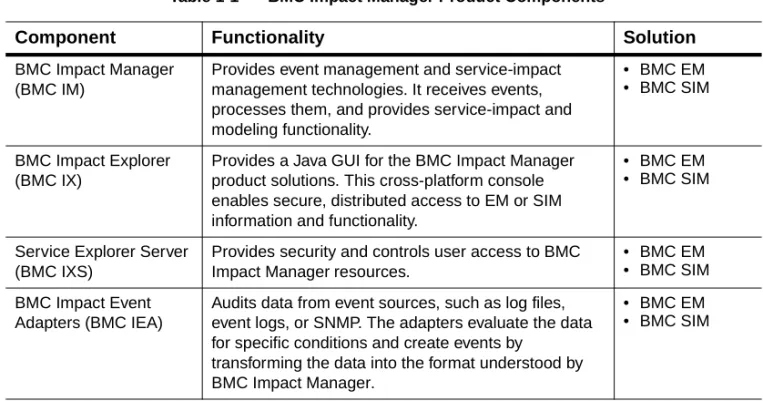
Table 1-1 lists the components that make up the BMC Impact Manager solutions and describes each component's functionality:
Table 1-1 BMC Impact Manager Product Components
Component Functionality Solution
BMC Impact Manager (BMC IM)
Provides event management and service-impact management technologies. It receives events, processes them, and provides service-impact and modeling functionality.
• BMC EM • BMC SIM
BMC Impact Explorer (BMC IX)
Provides a Java GUI for the BMC Impact Manager product solutions. This cross-platform console enables secure, distributed access to EM or SIM information and functionality.
• BMC EM • BMC SIM
Service Explorer Server (BMC IXS)
Provides security and controls user access to BMC Impact Manager resources.
• BMC EM • BMC SIM BMC Impact Event
Adapters (BMC IEA)
Audits data from event sources, such as log files, event logs, or SNMP. The adapters evaluate the data for specific conditions and create events by
transforming the data into the format understood by BMC Impact Manager.
• BMC EM • BMC SIM
About BMC Impact Manager
The BMC Impact Manager product includes these technologies that provide its event-management and service-impact-management capabilities:
• cell—the event-processing unit
• Knowledge Base—the collection of information • repository—the event storage facility
• dynamic data tables—a facility to maintain dynamic data
• command line interface (CLI)—the CLI that provides access to and execution of product functionality
BMC Impact Manager Service components
Enables customers to increase the IT assets
represented in their Service Models and to scale their needs as their service-management environment grows.
• BMC SIM
BMC Impact Integration for PATROL Enterprise Manager (BMC II for PATROL EM)
Enables the synchronized, bidirectional flow of events and data between BMC Impact Manager and PATROL Enterprise Manager.
• BMC EM • BMC SIM
BMC Impact Integration for PATROL (BMC II for PATROL)
Enables the synchronized, bidirectional flow of events and data between BMC Impact Manager and PATROL.
• BMC EM • BMC SIM
BMC Impact Integration for Remedy AR System (BMC II for AR System)
Enables the synchronized, bidirectional flow of events and data between BMC Impact Manager and Remedy AR System.
• BMC EM • BMC SIM Table 1-1 BMC Impact Manager Product Components
Cell
The cell is the basic event-processing unit within the BMC Impact Manager product. Cells provide the following event-management capabilities in both the BMC EM and BMC SIM solutions:
• Receives events—Event sources connect to the cell and send it events.
• Analyzes and processes events—A cell uses the definitions and rules in its associated Knowledge Base to determine how to process events, group events, and establish relationships between events.
• Stores events—The cell stores events in the repository maintained on a disk. The most recent events are held in memory and you can use the BMC Impact Explorer to view them.
• Responds to events—The cell can respond to events by executing actions, as defined in scripts or programs in the Knowledge Base.
• Propagates events—The cell can forward selected events to specified destinations, typically other cells. The cell maintains the currency of propagated events when those events are updated or changed at the event source.
In addition to the event-management tasks, the cell also performs the following service-management tasks:
• Builds associations—Using the definitions and rules in its Knowledge Base, the cell can relate an event to the appropriate Service-Model component.
• Stores components and relationships—The cell stores Service-Model components and their relationships in its repository.
• Computes and propagates component status—Using the designated status computation models, the cell computes the status of
Service-Model components and propagates their status to the related components automatically.
• Generates history events—The cell generates history events to record status changes of Service-Model components.
An individual cell can provide local event management or function as part of a larger distributed network of cells. When you install a cell, you also install a Knowledge Base in the cell along with the BMC Impact Manager CLI.
Knowledge Base
The Knowledge Base for the cell includes event class definitions, rules, executables, and collector definitions. The cell uses Knowledge Base data to determine which events are received and how the events are handled after receipt. The Knowledge Base is installed with a default set of rules that provide basic event processing in BMC EM and advanced service-impact management in BMC SIM.
Rules are statements that combine tests and queries that are applied to events to determine how they are processed, such as discarding unneeded events or responding to significant events, and to perform actions on the events according to the rule type in the Knowledge Base. Event analysis is organized into a series of rule phases through which an event is processed when it is received by the cell. For further information, see “Rule Phases for Event Processing” on page 1-15.
The BMC Impact Manager administrator maintains the Knowledge Base. Although many Knowledge Bases can exist within a distributed BMC Impact Manager environment, the following requirements apply:
• Each cell must contain a Knowledge Base directory structure. • Each cell can be associated with only one Knowledge Base at a time.
Repository
The repository is the persistent storage facility in which event
information is stored. Events enter the repository after they have been processed by the cell.
Dynamic Data Tables
Dynamic data is contextual reference data that is stored in a table in the repository(mc.db) and that can be updated during runtime. A dynamic data table is a set of data instances of a particular data class.
Command Line Interface (CLI)
The BMC Impact Manager CLI provides an extensive set of commands for executing product operations. For complete information on the BMC Impact Manager CLI, see the BMC Impact Manager Administrator Guide.
About BMC Impact Explorer
BMC Impact Explorer is a GUI with which you access the event data and service models for an enterprise. BMC Impact Explorer consists of the following views:
• Events View—provides the primary interface for the viewing and manipulation of event data. You can access event lists from any cell, then filter and display the events in a customized window. Within a custom event view, operators can sort, refilter, and manipulate events.
• Services View—enables organizations to organize, view, manipulate, and analyze events in the context of the Service Model. The Service Model enables real-time adaptive service management by modeling the status of IT resources, service level agreements, business services, customer groups and their interdependencies, based on correlated raw events from the IT components.
• Administration View—allows administrators to stop, pause, restart or reconfigure a remote cell. Administrators can also modify the behavior of a remote cell through changes to the Dynamic Data tables.
For complete information on BMC Impact Explorer, see the BMC Impact Explorer User Guide.
About BMC Impact Explorer Server
The BMC Impact Explorer Server is the configuration server that administrators use to manage user access to BMC Impact Manager and its resources. The BMC Impact Explorer Server component is a
Java-based Windows service or Unix daemon to which the BMC Impact Explorer connects.
The BMC Impact Explorer Server provides distributed, role-based security so that multiple departments or organizations can centralize user-management responsibilities. It provides selective access control to information and actions based on user roles, and it can leverage existing user and group definitions in enterprise Lightweight Directory Access Protocol (LDAP) directories. All BMC Impact Explorer Server communication is fully encrypted.
The BMC Impact Explorer Server also serves as the central repository for the dynamic configuration of BMC Impact Explorer. It stores BMC Impact Explorer settings for a user role, including what cells are available in BMC Impact Explorer, color settings, and custom views. A BMC Impact Explorer can obtain configuration information from one or more BMC Impact Explorer Servers, although you can connect to only one BMC Impact Explorer Server at a time.
About BMC Impact Event Adapters
The BMC Impact Event Adapters (BMC IEA) are background processes that monitor SNMP traps, log files, and event logs. The adapters also translate event data from any source into Basic Recorder of Objects in C (BAROC) language structures. The translated event data becomes a BMC Impact Manager event and the adapter forwards the event to its target cell.
The following event adapters are included with BMC Impact Manager:
• SNMP trap adapter (Windows and Unix)—listens for SNMP traps, and converts information from MIBs into compatible classes and other data used to format traps into BMC Impact Manager traps
• log file adapters (Windows and Unix)—can monitor any text file. They extract data from log files and convert the data to the BAROC language, and create events
• Windows event log adapter—reads the events generated by a Windows platform, translates the events into BAROC language structures and forwards the events to a cell. This adapter is the BMC Impact Adapter for Windows (BMC IELA)
BMC Impact Manager Concepts
The following terms have special meanings in BMC Impact Manager.
Term Definition
action An executable that can be run by a cell. Actions are called in an Execute rule. You can request the execution of actions in the BMC Impact Explorer. adapter A background process that audits data from various sources, evaluates it
for specific conditions, and creates the corresponding events. Adapters also transform event data into the format understood by BMC Impact Manager.
BAROC language Basic Recorder of Objects in C. A structured language used to create and modify class definitions. A class definition is similar to a structure in the C programming language.
BMC Impact Integration (BMC II) product
An interface that enables the synchronized, bidirectional flow of events and data between a BMC Impact Manager instance and another BMC
Software product or a specific third-party product.
cell The event-processing engine that collects, processes, and stores events within a BMC Impact Manager instance. Each cell uses the information in the associated Knowledge Base to identify the types of events to accept and how to process and distribute them.
class A BAROC-language data structure that defines a type of object used in this product. A class is made up of data fields, called slots, that define its properties.
collector An event grouping whose content is defined by its collector rule. Collectors are displayed in the BMC Impact Explorer and are defined in the BMC Impact Manager Knowledge Base.
event A structured message passed to and from cells in a BMC Impact Manager environment. It is an instance of an event class.
event propagation The act of forwarding events and maintaining their synchronization among multiple BMC Impact Managers.
Knowledge Base (KB) A collection of information that forms the intelligence of a BMC Impact Manager instance and enables it to process events and perform service-impact-management activities. This information includes event class definitions, Service-Model component definitions, record definitions, interface definitions, collector definitions, data associations, and
processing rules.
rule A conditional statement that, if determined to be true, executes actions. The cell evaluates events by comparing each event to a series of rules during event processing. Rules are grouped in phases that are processed one by one.
Service Model (SM) An extensible system for defining the various resources that combine to deliver business services, for modeling their behaviors and functional relationships, and for managing the delivery of the resulting services. Service-Model
component (SMC)
A logical or physical resource that participates in the delivery of services. There are the following types of Service-Model components: connectivity components, IT components, logical components, and service-level- agreement components. An SMC can provide services to or consume services from another component. In technical terms, a Service-Model component is any data class that is a subclass of the
MC_SM_COMPONENT base class.
slot An attribute in a BAROC class definition. A class definition consists of one or more slots. Each slot has a data type and can have specific attributes, called facets, that can control the values that the slot can have or control aspects of a class instance’s processing. A class that is a subclass to another class inherits all the slots of the parent class.
Understanding BMC Impact Manager Event
Processing
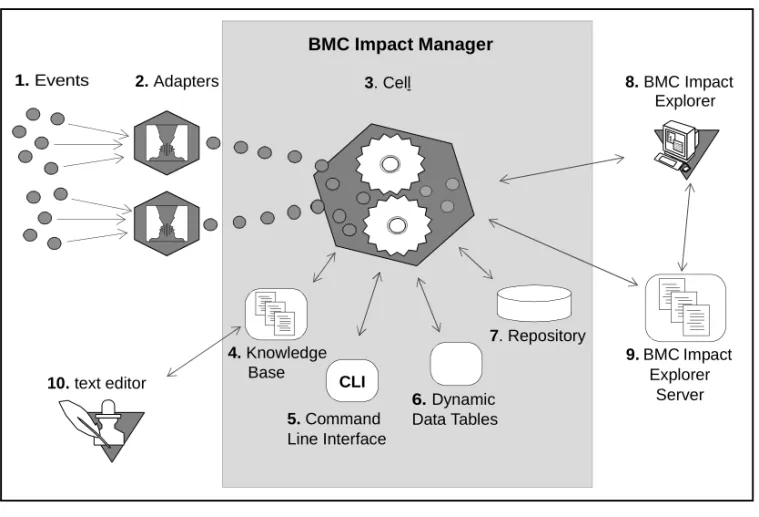
Figure 1-1 illustrates how BMC Impact Manager processes events.
Figure 1-1 Event Processing
Table 1-2 describes how the events are processed. Table 1-2 Event Processing
Step Process
1 Events occur in an enterprise.
2 Event adapters monitor files or SNMP traps and translate event data into BAROC format.
3 The cell checks whether the incoming events match the BAROC definitions in the cell’s Knowledge Base.
10. text editor
1. Events 2. Adapters 3. Cell 8. BMC Impact
4. Knowledge 9. BMC Impact
Explorer Server 7. Repository
Explorer
Base
BMC Impact Manager
CLI 5. Command Line Interface
6. Dynamic Data Tables
Event Flow Between Cells
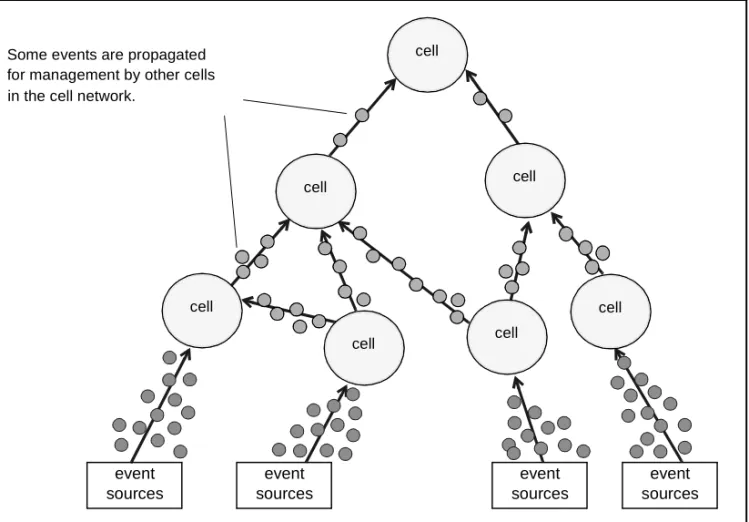
The BMC Impact Manager components that are deployed throughout your enterprise create a distributed network of cells. You can configure the cells and Knowledge Bases so that a diminishing volume of events travel upward in the cell network. As events pass through a series of cells, the cells discard unneeded events, identify and leave behind unimportant events, and resolve some of the problems reported by other events.
In deploying the BMC Impact Manager product it is important to note that a cell’s name must be unique throughout the enterprise. Cells with identical cell names on different machines within your enterprise can and will cause unexpected results.
4 The Knowledge Base determines the types of events that are received and how the events are handled once they reach the cell. 5 The Command Line Interface (CLI) allows users to issue product
commands on the OS command line for immediate execution and to automate product operations.
6 The Dynamic Data Model feature uses dynamic data classes to define configuration data about types of machines, applications, services, and equipment available in an enterprise.
7 The cell stores the events in the repository as an event class instance. 8 - 9 BMC Impact Explorer connects to cells via the BMC Impact Explorer
Server. Operators use BMC Impact Explorer to view events, change the status of events, and act on events stored in the repository. Table 1-2 Event Processing
Figure 1-2 illustrates a cell network that is collecting and processing numerous events. Based on configurable criteria, some of those events are propagated, or forwarded, for management by other cells.
Figure 1-2 Distributed Event Management
event sources
event sources
event sources
event sources
Some events are propagated for management by other cells in the cell network.
cell
cell cell
cell cell
cell
Rule Phases for Event Processing
Each cell processes events according to the rules stored in its individual Knowledge Base. The rules are statements that use an event’s BAROC data to determine whether and how to act on events, such as discarding unneeded events or responding to significant events.
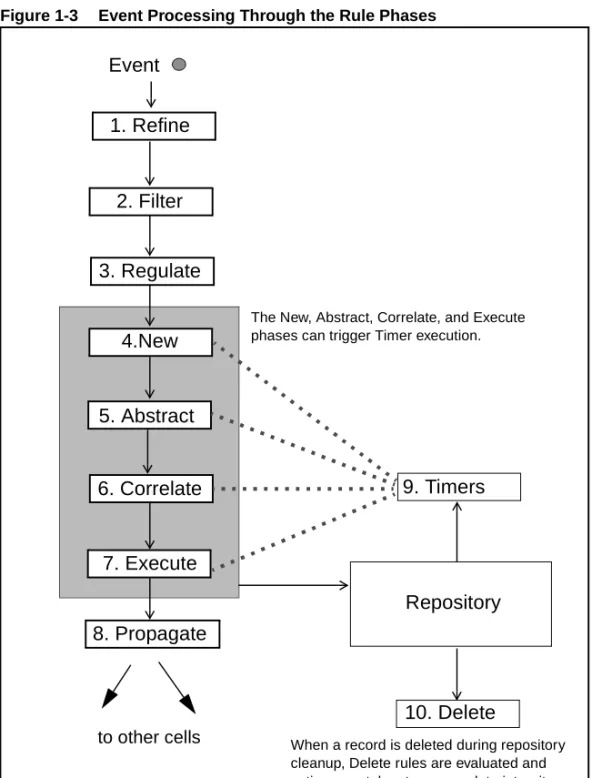
The cell processes events through a series of rule phases. As an event passes through each phase, it is acted on by every applicable rule until all the rules are exhausted or the event is discarded. See Chapter 3, “The Cell Rule Engine,” for a detailed discussion of the cell rule engine processes.
Figure 1-3 Event Processing Through the Rule Phases
8. Propagate 1. Refine
2. Filter
3. Regulate
4.New
5. Abstract
6. Correlate
7. Execute
Repository
to other cells
9. Timers
10. Delete Event
The New, Abstract, Correlate, and Execute phases can trigger Timer execution.
When a record is deleted during repository cleanup, Delete rules are evaluated and actions are taken to ensure data integrity.
The Refine, Filter, and Regulate rules can discard an event before it reaches the repository. In that case the discarded events do not appear in BMC Impact Explorer. Once an event reaches the New rule phase it is stored in the repository. Rule phases in the shaded area can trigger timers within the rule. The Delete rule is triggered for events that are deleted from the repository. Details of each rule phase is available in Chapter 5, “The Rule Phases.”
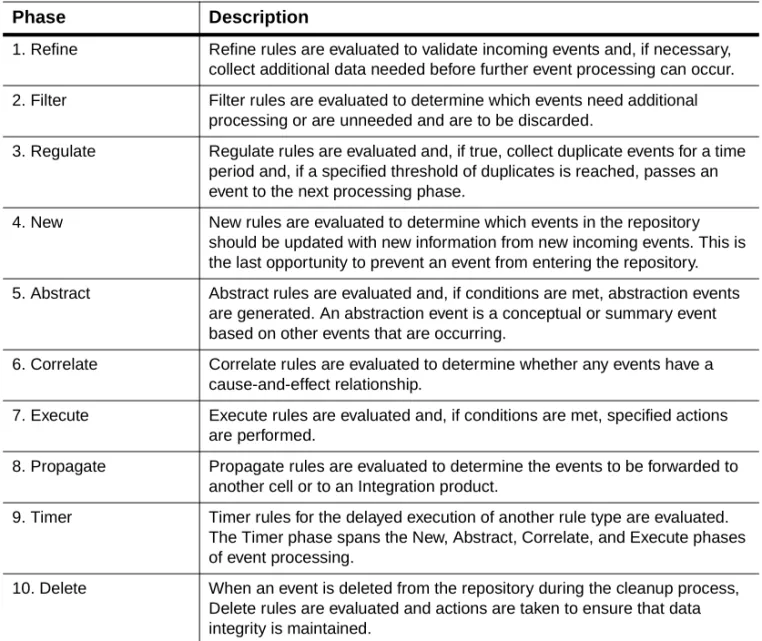
Table 1-3 Rule Phases
Phase Description
1. Refine Refine rules are evaluated to validate incoming events and, if necessary, collect additional data needed before further event processing can occur. 2. Filter Filter rules are evaluated to determine which events need additional
processing or are unneeded and are to be discarded.
3. Regulate Regulate rules are evaluated and, if true, collect duplicate events for a time period and, if a specified threshold of duplicates is reached, passes an event to the next processing phase.
4. New New rules are evaluated to determine which events in the repository should be updated with new information from new incoming events. This is the last opportunity to prevent an event from entering the repository. 5. Abstract Abstract rules are evaluated and, if conditions are met, abstraction events
are generated. An abstraction event is a conceptual or summary event based on other events that are occurring.
6. Correlate Correlate rules are evaluated to determine whether any events have a cause-and-effect relationship.
7. Execute Execute rules are evaluated and, if conditions are met, specified actions are performed.
8. Propagate Propagate rules are evaluated to determine the events to be forwarded to another cell or to an Integration product.
9. Timer Timer rules for the delayed execution of another rule type are evaluated. The Timer phase spans the New, Abstract, Correlate, and Execute phases of event processing.
10. Delete When an event is deleted from the repository during the cleanup process, Delete rules are evaluated and actions are taken to ensure that data integrity is maintained.
Understanding the BMC Impact Manager
Knowledge Base
The BMC Impact Manager Knowledge Base Knowledge Base (KB) is a collection of processing rules, class definitions, files, and executables. The cell uses the Knowledge Base to process events according to the contents of this collection. You can create more than one Knowledge Base, but only one Knowledge Base can be active at one time in a cell. The cell loads its Knowledge Base at start time.
Knowledge Base Installation and Upgrade
Installation of the BMC Impact Manager Knowledge Base is described in the BMC Impact Manager Installation Guide.
This BMC Impact Manager Knowledge Base Reference Guide focuses on one cell component, the Knowledge Base (KB). The KB resides in the cell and it must be remembered at all times that the KB functions within this context.
Event processing is configured through rules contained in the cell’s Knowledge Base. The default Knowledge Base,
MCELL_HOME\etc\<HostName>\kb, is an empty Knowledge Base that is created when you install the cell. The event analysis is organized into a series of phases through which an event is processed when it is received by the cell. Rules are statements that combine tests and queries that are applied to the events, with actions performed on the events according to the rule type in the Knowledge Base.
For simplicity, the home directory environment variable is represented throughout this document by MCELL_HOME, which identifies both the Unix platforms variable $MCELL_HOME, and the Windows platforms variable %MCELL_HOME%. This variable defines the directory in which the files for the cell reside. The default definition is /opt/mcell/ for Unix platforms and C:\Program Files\BMC Software\MasterCell\server for Windows platforms.
Components of the BMC Impact Manager
Knowledge Base
The BMC Impact Manager Knowledge Base contains the following components.
• Event class definitions are written using the BAROC language. The syntax is discussed in Chapter 2, “The BAROC Language.”
• Rules are written in the Master Rule Language (MRL) and stored in files with an .mrl extension. Compiled rules have either a .wic or .pkg
file extension.
• Collector definitions also are written in MRL. They primarily affect the console’s access to the cells. The creation of collectors is discussed in Chapter 6, “Collectors.”
• Actions, such as executables called by the cell or by an operator, are defined in MRL format and stored in the bin directory of the
Knowledge Base. Implementations, such as scripts and binaries, are stored in platform-specific subdirectories of the bin directory. Actions are discussed in Chapter 3, “The Cell Rule Engine.”
• Global record definitions, written in the BAROC language, are discussed later in Chapter 2, “The BAROC Language,” and in Chapter 4, “The Master Rule Language.”
• Data classes and instances used by the Dynamic Data feature also are part of the database and are defined in the BAROC language. They are discussed in Chapter 2, “The BAROC Language,” and in Chapter 4, “The Master Rule Language.”
Knowledge Base Files
Classes, interfaces, data definitions, and global records are written in the BAROC language and stored in files with a .baroc extension. Event, data, and interface classes are stored in the classes directory while global record declarations are stored in the records directory. Initial data instances are stored in the data directory.
Rules and collectors are written in MRL and stored in files with an .mrl
extension. Rules are stored in the rules directory while collectors are stored in the collectors directory.
Actions, such as executables called by the cell or by an operator, are stored in the bin directory. The bin directory contains action definitions written in MRL. Implementations such as scripts and binaries, are stored in platform-specific subdirectories of bin.
Each of the Knowledge Base directories contains an index file named
.load. This text file contains one entry per component to be loaded by the cell or the compiler. The .load file also determines the order in which these components are loaded.
Files
File
Extensions Directories
Classes, interfaces, data definitions
.baroc kb\classes
Global records .baroc kb\records Data instances .baroc kb\data
Rules .mrl kb\rules
Collectors .mrl kb\collector
Actions .mrl kb\bin
Compiling the Knowledge Base
The Knowledge Base must be recompiled each time a rule is added, deleted, or modified. You can compile the Knowledge Base by using the CLI command mccomp as follows:
cd %MCELL_HOME%\etc\<cell_name>\kb mccomp manifest.kb
-OR-mccomp MCELL_HOME\etc\<cell_name>\kb\manifest.kb
The mccomp command parses event, data class and global records, and compiles the rules.
Once the KB has been recompiled with the mccomp command, you can use the new mcontrol command to reload the Knowledge Base into the running cell.
mcontrol -n reconfigure kb
You also can use the mcontrol command to reload when collectors are added, deleted or modified.
mcontrol -n reconfigure collect
In prior versions of the BMC Impact Manager product the Knowledge Base compiled with the -t option could be deployed in a production environment. In the current version 3.2.00 of the BMC Impact Manager product, deploying a Knowledge Base compiled with the -t option may degrade performance by as much as 50%. It is strongly recommended that you not use the -t option when compiling the Knowledge Base.
Note
Any change to the cell’s Knowledge Base requires a recompilation of the Knowledge Base before the change is effective.
Knowledge Base Directories
The Knowledge Base employs a defined directory structure to organize files and executables. Each subdirectory under the main kb directory is named for the type of files or executables it stores. When you install or create a cell, the default files define and create an empty Knowledge Base and directory structure. The default files are updated each time you create or modify rules or collectors. You can change these files with a text editor. Executables you create for the Knowledge Base must be in the correct subdirectory, as defined by the cell, or they will not execute. The host system you use determines where the executables reside.
The Knowledge Base directories exist in two locations:
• The default Knowledge Base exists in MCELL_HOME\etc\kb on Windows platforms and in MCELL_HOME/etc/kb on Unix
platforms. The installation process copies this directory into each cell created. This Knowledge Base is the default Knowledge Base in newly created cells.
• The cell’s working Knowledge Base is located in
MCELL_HOME\etc\<CellName>\kb (Windows) or
MCELL_HOME/etc/<CellName>/kb (Unix). The cell references this is the Knowledge Base during run time.
The manifest.kb file points to directories for class events, interfaces, records, rules, libraries, and actions and its location is
The default content of the manifest.kb file is:
bin = bin
classes = classes
collectors = collectors data = data
lib = lib rules = rules records = records
Note
The manifest.kb file is used by the Knowledge Base compiler but not by the cell. It allows some flexibility when writing and testing Knowledge Bases.
The Knowledge Base directory (kb) has the following structure:
kb bin
A (Independent) h0 (HP10+)
l2 (Linux Red Hat 7.0 and 7.1) p4 (AIX 4.3)
s5 (Solaris 2.5+) w4 (Windows NT 4.0+) classes
collectors data
lib records rules
manifest.kb (file)
The bin Directory
The bin directory contains scripts and programs that execute during rule processing. The executables are in subdirectories specific to the host architecture. There is one default file, .load, in the bin directory. The .load
file specifies in what order scripts and programs should be presented to clients.
These three primitives in the bin directory execute programs.
• execute runs an executable on the cell. The executable is located in the <arch> subdirectory.
• get_external runs an executable on the cell and passes
information back to the cell by means of an interface. The executable is located in the <arch> subdirectory.
• confirm_external runs an executable on the cell and returns a boolean value. The executable is located in the <arch> subdirectory.
The classes Directory
The default installation of the cell contains a Knowledge Base with a single base, or root, EVENT class definition. You may extend this base class definition by adding additional slots for custom or localized information.
An example of the EVENT class definition is the following.
MC_EV_CLASS :
MY_EVENT ISA EVENT DEFINES {
source: default = MY_APPLICATION; my_slot: STRING,
default = ’Version 3.2.00’, parse = no;
}; END
The collectors Directory
Collectors enable you to view events in an organized manner with the console. The collectors directory contains definitions of the collectors in
.mrl files. The .load file indicates the order in which these files are loaded into the cell. You can define collectors hierarchically, which allows the console to display information that is easier to read. You also can specify the category of user who can view and act on the events in any collector.
Here is an example of a top level, or supercollector, template:
collector <CollectorName> :
{r[<Roles>]; w[<Roles>]; x[<Roles>]} END
User access to collectors is defined in the collectors.mrl file and any other
.mrl file in the collector directory, as long as the collector file name is added to the .load file without the .mrl extension. In the collectors.mrl file you define access to collectors by assigning user roles and privileges to each collector. Privileges consist of read, write, and execute.
User roles and the assignment of user roles are defined in the BMC Impact Explorer Server. See the BMC Impact Manager Administrator Guide for information on defining user roles and assigning roles to users.
The data Directory
The data directory contains instances of the base, or root, DATA class in
.baroc files. The .load file indicates the order in which the files are loaded into the cell. A data class has the same definition as an event class. Chapter 2, “The BAROC Language,” and Chapter 4, “The Master Rule Language,” contain a detailed discussion of data classes.
The lib Directory
In prior releases the lib directory contained the declaration and implementation of primitives the rules use. These declarations and implementations are now contained within the cell for the Knowledge Base rules to use. Appendix A, “Master Rule Language Reference,” for details on primitives and their usage.
The records Directory
A global record stores persistent dynamic information in .baroc files. Many rule processing phases use global records to retrieve the
information from the global record files. The .load file indicates the order in which the files are loaded into the cell.
The following is an example global record.
RECORD
test_rec DEFINES {
slot_str: STRING ; slot_int: INTEGER ;
slot_list_int: LIST_OF INTEGER ; default = [1, 2, 3] ;
} END
The rules Directory
The rules directory contains the rules definitions. The source for rules definitions are the files with an .mrl extension. The compiled versions of rules are contained in files with the .wic or .pkg extension. The .load file indicates the order in which the rules are loaded into the cell.
2
The BAROC Language
2
This chapter describes the fundamentals of the BAROC language. The following topics are discussed:
• Basic Concepts • Inheritance
• BAROC Syntax Generalities • Class Definitions
• Class Instances • Enumerations • Global Records • Product Internals
Basic Concepts
The BAROC, Basic Recorder of Objects in C, language is a highly-structured language that provides the ability to capture the semantics of the events and physical and logical IT components in a format suitable for processing. BMC Impact Manager object class definitions and their instances are written in BAROC. This section describes the BAROC language syntax and properties and root class definitions.
In the BMC Impact Manager product, the data structures (classes) that describe objects or entities are defined in the BAROC language. Classes are organized by their base internal class. Technically, a class is an instance of an internal base class.
A class defines the attributes that describe an object type. The attribute fields are called slots in BAROC terminology. Slots are typed and have certain facets, that can control the values that the slot can have or control aspects of a class instance’s processing. You might think of a class definition as an empty form with its input fields representing slots. A class instance corresponds to a completed form. A valid instance must respect slot types, and if some slot values are not specified,- they are implicitly set to their default values (which can be inherited from parent classes).
Inheritance
BAROC class definitions can be organized in a hierarchy, allowing class specialization. This means that new classes can be introduced as
subclasses of existing classes, called superclasses, and inherit automatically from the definitions of the superclasses. Inheritance implies that the structure defined for the superclass automatically applies to the subclass.
Think of a subclass as a form with additional fields, as shown in the following illustration.
A subclass inherits all the slot definitions of the parent class and can have additional new slot definitions of its own. You can create subclasses with slot definitions that override a superclass slot definition. However, when overriding a superclass slot definition, you cannot change the data type of the inherited slot, but only its facet values. Also, no subclass can inherit from more then one superclass. There is no multiple inheritance.
Any MRL rule defined for a class of object also applies to all instances of its subclasses. For example, a rule defined for the base event class
EVENT applies to all events because all event classes are children of
EVENT.
Form 1* Definition Company Name:
Location:
Form 1*
Company Name: Location: Name: County: E-Mail: Occupation:
BAROC Syntax Generalities
In this product, BAROC syntax is represented in a format similar to Backus-Naur Form (BNF).
Symbols
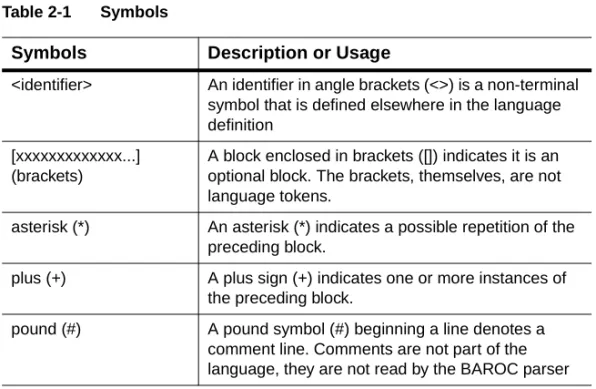
In this syntax, these symbols have special meaning:
All other symbols are tokens of the language. Table 2-1 Symbols
Symbols Description or Usage
<identifier> An identifier in angle brackets (<>) is a non-terminal symbol that is defined elsewhere in the language definition
[xxxxxxxxxxxxx...] (brackets)
A block enclosed in brackets ([]) indicates it is an optional block. The brackets, themselves, are not language tokens.
asterisk (*) An asterisk (*) indicates a possible repetition of the preceding block.
plus (+) A plus sign (+) indicates one or more instances of the preceding block.
pound (#) A pound symbol (#) beginning a line denotes a comment line. Comments are not part of the language, they are not read by the BAROC parser
Syntax Rules
These rules apply to the BAROC language:
• The BAROC language is not sensitive to the number of space, tab and line break characters, with the exception of those inside quoted strings.
• In a class definition, there must be a trailing semicolon (;) after the last curly brace (}). This is unique to class definitions. The trailing semicolon is part of all class definitions and is required.
• The END keyword must be followed by new line.
• You can add comments to a BAROC file. A comment is a line beginning with the pound character (#).
Class Definitions
The BAROC class definitions of a Knowledge Base are stored in the
classes subdirectory. The associated .load file determines the order in which the files load into the cell.
Class Definition Basic Syntax
The basic syntax for defining a class in the BAROC language is the following.
<MetaClassName> : <ClassName> [ISA <ClassName>] [DEFINES {
[ <SlotName>: <SlotType> [, <SlotFacet>]* ;]* }];
END
where
<MetaClassName> = MC_EV_CLASS | MC_DATA_CLASS | MC_INTERFACE | TEC_CLASS
<ClassName> and <SlotName> = an optionally quoted (’ or ") sequence of characters excluding blanks " ’ ; : , = ( ) [ ] { }
<SlotType> = [ SINGLE | LIST_OF] INTEGER | REAL | STRING | <Enum> <SlotFacet>=
default = <SlotValC> | parse = <YesOrNo> | dup_detect = <YesOrNo> | read_only = <YesOrNo> | key = <YesOrNo>
Additional slot types INT32 and POINTER are supported for compatibility with the Tivoli TEC product.
Note
In a class definition, there must be a trailing semicolon (;) after the last curly brace (}). The trailing semicolon is inherited from the base internal class definition, it is required.
Slots
Slot definitions delimit the values that are acceptable from an incoming event as well as some characteristics of the slot called facets. In the form analogy earlier in this chapter, slots are equivalent to blank fields on the class-defined form.
Slot Types
Slot values can be simple or a list of simple values. The keyword
SIMPLE identifies simple data type while LIST_OF identifies list data type. The keyword SIMPLE is optional and is generally omitted.
There are four simple data types:
• INTEGER: 32-bits signed value • REAL: 64-bit real value
• STRING: string (maximum 64 KB)
• <EnumName>: an enumeration whose definition must appear before the slot definition in the BAROC declaration file.
Universal Event and Data Identifiers
There are two slots that provide unique identifiers:
• mc_ueid slot—the universal event identifier • mc_udid slot—the universal data class identifier
mc_uedid Slot
The slot mc_ueid, is the BMC Impact Manager Universal Event ID, uniquely identifies the event not only for a specific cell but also for all cells of the network. The mc_ueid slot is a very convenient way to retrieve an event in a cell hierarchy. When a cell receives a syntactically valid event with a non-empty mc_ueid, it verifies that no event has been received before with that same mc_ueid. If such event has been
received, the new event is ignored. When a cell receives a syntactically valid event with an empty mc_ueid, it generates an mc_ueid of the form:
mc.<cell_name>.<event_handle>
mc_udid Slot
The slot mc_udid, BMC Impact Manager Universal Data ID, uniquely identifies the data in the cell. If not set, the cell automatically generates an mc_udid of the form:
mc.<cell_name>.<data_handle>
Use this slot when importing data from an external system, such as an asset management system for example. By carefully selecting the
mc_udid it is possible to identify the data in the cell that corresponds to a particular component defined in the external system.
Facets
Slot definitions can have slot facets that further define the slot by
controlling the values that a slot can have or controlling aspects of a class instance’s processing. Slot facets include:
Table 2-2 Slot Facets
Facet Description
default The value assigned to the slot if no value is provided in an instance. If no default facet is specified, zero (0) is the default for an INTEGER and a REAL, the empty string for a STRING and the empty list for a LIST_OF
parse A flag that indicates whether the slot is protected against updates by incoming events. In other words, the slot value cannot be set by an incoming event.
If the slot value is set by the incoming event, the cell drops the value before processing the event. Slots managed by the system usually have their parse facet set to no
dup_detect A flag that indicates whether the slot participates in the determination of duplicate events. This facet is used to determine whether two event instances are duplicates. For events to be considered duplicates, they must be of the same class and all their slots whose dup_detect facet is set to yes must have equal values.
The concept of duplicate events is used by the cell during rule processing. When the cell is searching the cache for a duplicate event, it considers only the slots with the facet dup_detect=yes.
read_only A flag that indicates whether the slot is protected against modification by a command or a rule. A slot whose read_only facet is set to yes cannot be modified by a command or a rule. However, the system can modify this slot.
key A designator that specifies that the slot value is or is part of the unique key for the data object. This facet applies only to data objects. Using this facet, you can enforce the uniqueness of a class instance over the set of all key=yes slots.
The facet key of a new slot (non-inherited) can only be set to yes if no inherited slots are already defined as key. A key is valid for the class and all its subclasses.
representation An indicator that specifies how the slot should be displayed by the BMC Impact Explorer. A possible value is date.
Class Definition Examples
Use the following class definitions as an aid when creating classes.
Class Hierarchy Definition Example
This class definition example illustrates how a class hierarchy can be developed from an internal base class. For reference in this example, see the “EVENT Root Class” on page 2-17.
Superclass Definition
The SECURITY_EVENT class inherits all the slots of the EVENT base class.
MC_EV_CLASS :
SECURITY_EVENT ISA EVENT; END
It automatically inherits the slots of the base EVENT class.
Child Class Definition with Slot Extensions
LOGIN_EVENT inherits all the slots of SECURITY_EVENT and adds two new slots, hostname and user. These two new slots are declared with facet dup_detect=yes, indicating that two event instances of this class are duplicates if they have the same values for these slots.
MC_EV_CLASS :
LOGIN_EVENT ISA SECURITY_EVENT DEFINES {
hostname: dup_detect = yes ; user: STRING,
dup_detect = yes ; };
END
Subclass Definition
The LOGIN_FAILURE class is a subclass of LOGIN_EVENT. It shares the same slots but the severity slot, inherited from the base EVENT
class, default value is set to MINOR for this class.
MC_EV_CLASS :
LOGIN_FAILURE ISA LOGIN_EVENT DEFINES {
severity: default = MINOR ; };
END
Data Class Definition Example
AppByHost is a data class. It is a table that stores the list of applications present on each host. The host slot is defined to be the unique key of this table. The system will prevent the creation of two instances of this class or a subclass of it, that have the same host slot value.
MC_DATA_CLASS :
AppByHost ISA DATA DEFINES {
host: STRING, key=yes;
applications: LIST_OF STRING; };
Interface Class Definition Example
The location class is an interface class with a single slot, site.
MC_INTERFACE : location DEFINES {
site: STRING; };
END
Class Instances
Class instances represent the “real” and logical objects that exist in the environment.
Instance Syntax
The syntax for defining a BAROC instance is very simple, as the following illustrates.
<Class>;
<Slot> = <SlotVal>;] * END
where
<SlotVal> = <SlotSmplVal> | <SlotListVal> <SlotSmplVal> =
sequence of alphanumerical or _ characters |quoted (’ or ") sequence of characters
Instance Definition Example
The following code illustrates this syntax:
LOGIN_FAILURE;
Severity =WARNING; Status = OPEN; Hostname = server4; Origin = 172.16.23.4;
Acl = [admin, troyt, samg];
Msg = ‘Failed login attempt for user admin’; END
Enumerations
An enumeration is a user-defined simple type. It is a list of symbols associated with an integer value. The symbolic values are ordered by their associated integer values. The cell uses the associated integer values in order to compare symbolic values.
Enumeration Syntax
The enumeration definition syntax is the following:
Enumeration Definition Example
This is best explained by a simple example:
ENUMERATION YESNO 10 YES
20 NO
END
Several enumerations such as STATUS and SEVERITY are built into the cell.
Global Records
A global record is a class with a single instance that acts as a persistent structured global variable. The scope of global records is the entire Knowledge Base; any other variable has a scope limited to the rule in which it occurs.
Global records are defined in the record subdirectory of a Knowledge Base. A record definition defines both the class and its unique instance at the same time.
Record Syntax
Global record syntax is the following:
RECORD <RecordName> DEFINES {
[<Slot> : <SlotType> [, default = <DefaultValue>] ;]+
} END
Record Definition Example
A simple example of a record is:
RECORD
UNDER_MAINTENANCE DEFINES { hosts: LIST_OF STRING ; }
END
Addressing Global Records
Global records are addressed by name, so you must know the name of a global record to use it. You can use global records in an expression, an assignment, or a primitive.
For example, a record called UNDER_MAINTENANCE has the following definition:
RECORD
UNDER_MAINTENANCE DEFINES { hosts: LIST_OF STRING ; }
END
In a rule, you can reference the record’s hosts slot using this syntax:
Product Internals
In the BMC Impact Manager, cells contain a certain number of internal BAROC definitions. Some of these definitions, commonly called core definitions, can be modified to some degree in each Knowledge Base. Modifying a core definition should be done with caution. Whenever possible you should avoid working directly on the base event class, and use subclasses instead.
Product Base Internal Classes
Classes are organized by their base internal class. Technically, a class is an instance of an internal base class. The BMC Impact Manager product has these base internal classes that define the different categories of classes available in the product. These definitions are provided for information purposes only. You should not load them into a Knowledge Base; these classes already exist there.
• MC_EV_CLASS classes are event classes. The base event class is
EVENT. Events are the information received and processed by the cells.
• MC_DATA_CLASS classes are data classes. The basic data class is
DATA. Data classes can hold information about the configuration and resources of the managed system. The set of data instances defined for a data class is called a table, The ability to write generic rules in the Master Rule Language (MRL) depends on using the dynamic Data tables.
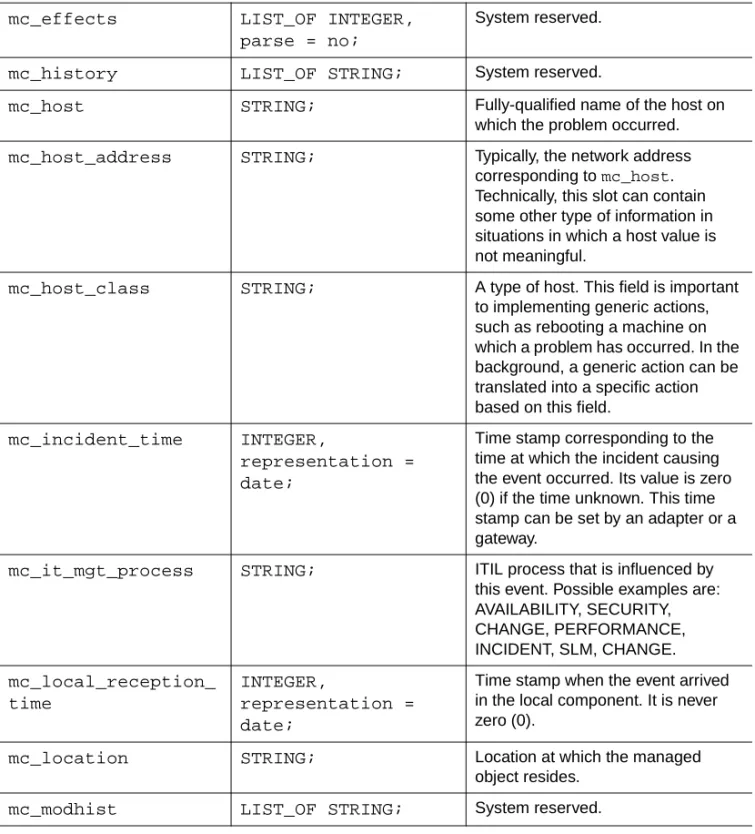
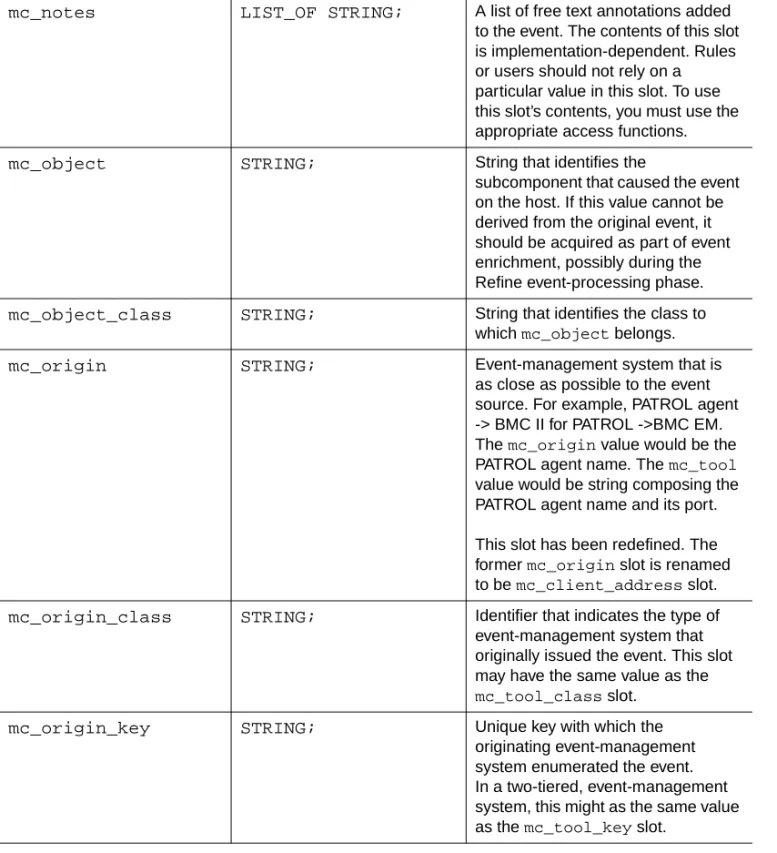
• MC_INTERFACE classes are interface classes. Interfaces are used by the get_external primitive to pass information from an external program to the cell. (It is completely internal.)
• TEC_CLASS is the Tivoli TECMetaClass. It is provided for compatibility purposes to ensure that the BMC Impact Manager and Tivoli TEC products can work together in a single environment. The MRL can process TEC_CLASS classes.