Variables and types
Subjects:
-Declaring a Variable
-What’s an int?
-Rules for declaring variables
-Different types of int
-Representing Fractions
-Handling Floating-Point Variables
-Declaring a floating-point variable
-Using the Decimal Type: Is It an Integer or a Float?
-Declaring a decimal
Declaring a Variable
The most fundamental of all concepts in programming is that of the variable. A C# variable is like a small box in which you can store things, particularly numbers, for later use. (The term variable is borrowed from the world of mathematics.)
Unfortunately for programmers, C# places several limitations on variables – limitations that mathematicians don’t have to consider. This lecture takes you through the steps for declaring, initializing, and using variables. It also introduces several of the most basic data types in C#.
When the mathematician says, “n is equal to 1,” that means the term n is equivalent to 1 in some ethereal way. For example, the mathematician may say this:
x = y2 + 2y + 1
if k = y + 1 then x = k2
Programmers must define variables in a particular way that’s more demanding than the mathematician’s style. For example, a C# programmer may write the following bit of code:
int n; n = 1;
Declaring a Variable
The mathematician says, “n equals 1”. The C# programmer says in a more precise way, “Store the value 1 in the variable n”. C# operators tell the computer what you want to do. In other words, operators are verbs and not descriptors.
The assignment operator takes the value on its right and stores it in the variable on the left.
The equals symbol (=) is called the assignment operator.
What`s an int?
In C#, each variable has a fixed type. When you allocate one of those train lockers,
you have to pick the size you need.
For the example you select a locker that’s designed to handle an integer – C# calls it an int. Integers are the counting numbers 1, 2, 3, and so on, plus 0 and the negative numbers –1, –2, –3, and so on.
Before you can use a variable, you must declare it. After you declare a variable as int, it can hold and regurgitate integer values, as this example demonstrates:
// Declare a variable named n - an empty train locker. int n;
// Declare an int variable m and initialize it with the value 2. int m = 2;
// Assign the value stored in m to the variable n. n = m;
The first line after the comment is a declaration that creates a little storage area, n, designed to hold an integer value. The initial value of n is not specified until it is assigned a value. The second declaration not only declares an int variable m but also initializes it with a value of 2, all in one shot.
What`s an int?
To initialize a variable is to assign it a value for the first time. You don’t know for sure what the value of a variable is until it has been initialized. Nobody knows.
The final statement in the program assigns the value stored in m, which is 2, to the variable n. The variable n continues to contain the value 2 until it is assigned a new value. (The variable m doesn’t lose its value when you assign its value to n. It’s like cloning m.)
// Declare a variable named n - an empty train locker. int n;
// Declare an int variable m and initialize it with the value 2. int m = 2;
// Assign the value stored in m to the variable n. n = m;
Rules for declaring variables
You can initialize a variable as part of the declaration, like this:
// Declare another int variable and give it the initial value of 1. int p = 1;
This is equivalent to sticking a 1 into that int storage locker when you first rent it, rather than opening the locker and stuffing in the value later.
Initialize a variable when you declare it. In most (but not all) cases, C# initializes the variable for you – but don’t rely on it to do that.
You may declare variables anywhere (well, almost anywhere) within a program.
However, you may not use a variable until you declare it and set it to some value. Thus the last two assignments shown here are not legal:
// The following is illegal because m is not assigned
// a value before it is used. int m;
n = m;
// The following is illegal because p has not been
// declared before it is used. p = 2;
int p;
Different types of int
Most simple numeric variables are of type int. However, C# provides a number of twists to the int variable type for special occasions.
All integer variable types are limited to whole numbers. The int type suffers from other limitations as well. For example, an int variable can store values only in the range from roughly –2 billion to 2 billion.
A distance of 2 billion inches is greater than the circumference of the Earth.
In case 2 billion isn’t quite large enough for you, C# provides an integer type called
long (short for long int) that can represent numbers almost as large as you can imagine. The only problem with a long is that it takes a larger train locker: A long
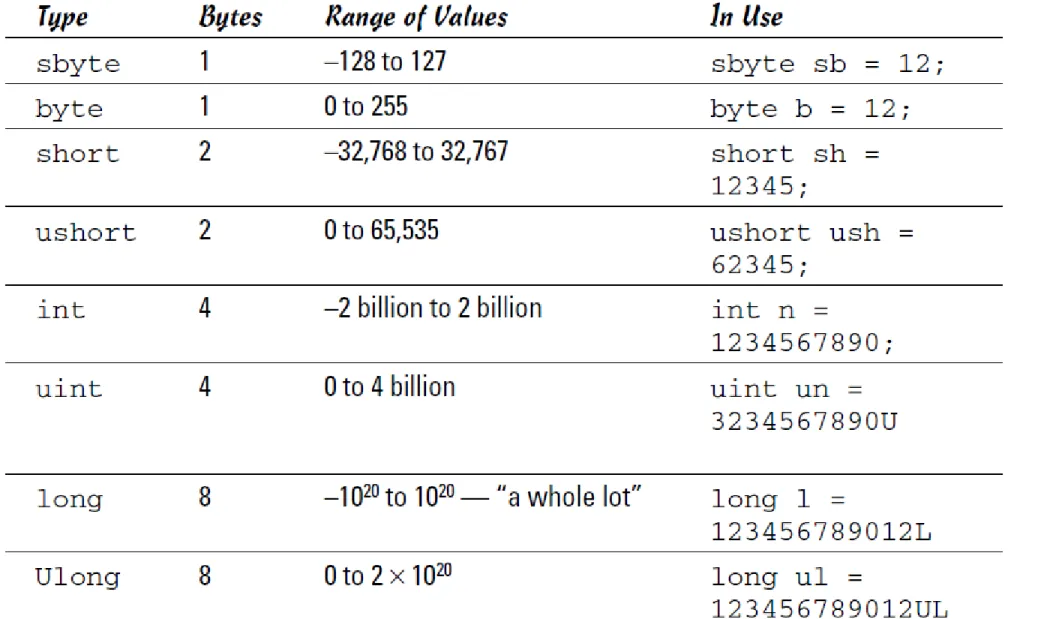
consumes 8 bytes (64 bits) – twice as much as a garden-variety 4-byte (32-bit) int. C# provides several other integer variable types, as shown in Table 1.
As you can see from Table 1, the names of most unsigned integer types start with a
u, while the signed types generally don’t have a prefix.
!
Fixed values such as 1 also have a type. By default, a simple constant such as 1 is assumed to be an int. Constants other than an int must be marked with their variable type. For example, 123U is an unsigned integer, uint.
Different types of int
Representing fractions
Integers are useful for most calculations. Many calculations involve fractions, which simple integers can’t accurately represent. The common equation for converting from Fahrenheit to Celsius temperatures demonstrates the problem, like this:
// Convert the temperature 41 degrees Fahrenheit. int fahr = 41;
int celsius = (fahr - 32) * (5 / 9)
This equation works just fine for some values. For example, 41 degrees Fahrenheit is 5 degrees Celsius. Let’s try a different value: 100 degrees Fahrenheit. Working through the equation, 100–32 is 68; 68 times 5⁄9 is 37. But the answer is 37.78. Even that’s wrong because it’s really 37.777 . . . with the 7s repeating forever.
An int can represent only integer numbers. The integer equivalent of 37.78 is 37.
This lopping off of the fractional part of a number to get it to fit into an integer variable is called integer truncation. Truncation is not the same thing as rounding. Truncation lops off the fractional part. Rounding picks the closest integer value. Thus, truncating 1.9 results in 1. Rounding 1.9 results in 2.
But integer truncation is unacceptable for many, if not most, applications.
Handling Floating-Point Variables
The limitations of an int variable are unacceptable for some applications. The range generally isn’t a problem – the double-zillion range of a 64-bitlong integer should be enough for almost anyone. However, the fact that an int is limited to whole numbers is a bit harder to swallow.
In some cases, you need numbers that can have a nonzero fractional part. Mathematicians call these real numbers.
Notice that a real number can have a nonzero fractional part – that is, 1.5 is a real number, but so is 1.0. For example, 1.0 + 0.1 is 1.1.
Fortunately, C# understands real numbers. Real numbers come in two flavors:
Declaring a floating-point variable
A floating-point variable carries the designation float, and you declare one as shown in this example:
float f = 1.0;
After you declare it as float, the variable f is a float for the rest of its natural instructions.
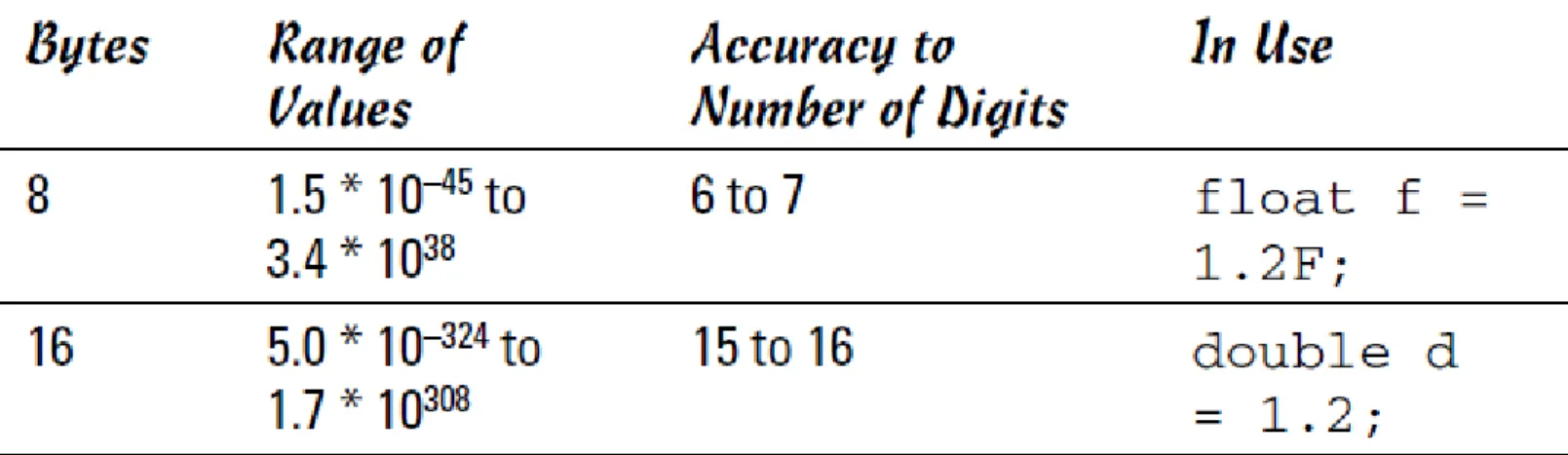
Table 2 describes the two kinds of floating-point types. All floating-point variables are signed. (There’s no such thing as a floating-point variable that can’t represent a negative value.)
Declaring a floating-point variable
You might think float is the default floating-point variable type, but actually the double is the default in C#. If you don’t specify the type for, say, 12.3, C# calls it a double.
The Accuracy column in Table 2 refers to the number of significant digits that such a variable type can represent.
The double packs a whopping 15 to 16 significant digits.
Use double variable types unless you have a specific reason to do otherwise.
Using the decimal type: is it an integer or a float?
Both the integer and floating-point types have their problems. Floating-point variables have rounding problems associated with limits to their accuracy, while int variables just lop off the fractional part of a variable. In some cases, you need a variable type that offers the best of two worlds:
•Like a floating-point variable, it can store fractions.
•Like an integer, numbers of this type offer exact values for use in computations – for example, 12.5 is really 12.5 and not 12.500001.
Fortunately, C# provides such a variable type, called decimal. A decimal variable can represent a number between 10–28 and 1028 – that’s a lot of zeros! And it does so without
Declaring a decimal
Decimal variables are declared and used like any variable type, like this:
decimal m1 = 100; // Good decimal m2 = 100M; // Better
The first declaration shown here creates a variable m1 and initializes it to a value of 100. What isn’t obvious is that 100 is actually of type int. Thus, C# must convert the int into a decimal type before performing the initialization. Fortunately, C# understands what you mean – and performs the conversion for you.
The declaration of m2 is the best. This clever declaration initializes m2 with the decimal constant 100M.
The letter M at the end of the number specifies that the constant is of type decimal. No conversion is required.
Comparing decimals, integers and floating-point types
The decimal variable type seems to have all the advantages and none of the disadvantages of int or double types. Variables of this type have a very large range, they don’t suffer from rounding problems, and 25.0 is 25.0 and not 25.00001.
The decimal variable type has two significant limitations, however.
First, a decimal is not considered a counting number because it may contain a fractional value. Consequently, you can’t use them in flow-control loops.
The second problem with decimal variables is equally as serious or even more so.
Computations involving decimal values are significantly slower than those involving either simple integer or floating-point values – and I do mean significant. On a crude benchmark test of 300,000,000 adds and subtracts, the operations involving decimal
variables were approximately 50 times slower than those involving simple int variables. The relative computational speed gets even worse for more complex operations. Besides that, most computational functions, such as calculating sines or exponents, are not available for the decimal number type.
Examining the bool type
Former C and C++ programmers are accustomed to using the int value 0
(zero) to mean false and nonzero to mean true. That doesn’t work in C#.
You declare a bool variable this way:
!
bool thisIsABool = true;
No conversion path exists between bool variables and any other types. In other words, you can’t convert a bool directly into something else. (Even if you could, you shouldn’t because it doesn’t make any sense.) In particular, you can’t convert a bool
into an int (such as false becoming 0) or a string (such as false becoming the word “false”).
Finally, a logical variable type.
The Intrinsic Data Types of C#
Short CLS System type Range Meaning in life
bool Yes System.Boolean True or false Represents truth or falsity
sbyte No System.SByte –128 to 127 Signed 8-bit number
byte Yes System.Byte 0 to 255 Unsigned 8-bit number
short Yes System.Int16 –32,768 to 32,767 Signed 16-bit number
ushort No System.UInt16 0 to 65,535 Unsigned 16-bit number
int Yes System.Int32 –2,147,483,648 to 2,147,483,647 Signed 32-bit number
uint No System.UInt32 0 to 4,294,967,295 Unsigned 32-bit number
long Yes System.Int64 –9,223,372,036,854,775,808 to
9,223,372,036,854,775,807
Signed 64-bit number
ulong No System.UInt64 0 to 18,446,744,073,709,551,615 Unsigned 64-bit number
char Yes System.Char U+0000 to U+ffff Single 16-bit Unicode char
float Yes System.Single ±1.5 10e–45 to ±3.4 5 10e38 32-bit floating-point number double Yes System.Double ±5.0 10e–324 to ±1.7 5 10e308 64-bit floating-point number decimal Yes System.Decimal ±1.0 10e–28 to ±7.9 5 10e28 96-bit signed number
string Yes System.String Limited by system memory Represents a set of
Unicode characters object Yes System.Object Can store any type in an object
variable
Variable Declaration and Initialization
When you are declaring a data type as a local variable (e.g., a variable within a member scope), you do so by specifying the data type followed by the variable’s name.
static void LocalVarDeclarations()
{
Console.WriteLine("=> Data Declarations:");
// Local variables are declared and initialized as follows:
// dataType varName = initialValue;
int myInt = 0;
string myString;
myString = "This is my character data";
// Declare 3 bools on a single line.
bool b1 = true, b2 = false, b3 = b1;
// Very verbose manner in which to declare a bool.
System.Boolean b4 = false;
Console.WriteLine("Your data: {0}, {1}, {2}, {3}, {4}, {5}",
myInt, myString, b1, b2, b3, b4);
Console.WriteLine();
“
New
-ing” Intrinsic Data Types
All intrinsic data types support what is known as a default constructor. In a nutshell, this feature allows you to create a variable using the new keyword, which automatically sets the variable to its default value:
• bool types are set to false;
• numeric data is set to 0 (or 0.0 in the case of floating-point data types); • char types are set to a single empty character.
• DateTime types are set to 1/1/0001 12:00:00 AM; • object references (including strings) are set to null.
Although it is more cumbersome to use the new keyword when creating a basic data type variable, the following is syntactically well-formed C# code:
static void NewingDataTypes() {
Console.WriteLine("=> Using new to create intrinsic data types:");
bool b = new bool();
int i = new int();
double d = new double();
DateTime dt = new DateTime();
Console.WriteLine("{0}, {1}, {2}, {3}", b, i, d, dt);
Formatting Numerical Data
If you require more elaborate formatting for numerical data, each placeholder can optionally contain various format characters.
These format characters are suffixed to a given placeholder value using the colon token
(e.g., {0:C}, {1:d}, {2:X}, and so on). To illustrate, update the Main() method to call a new helper function named FormatNumericalData().
Format Character Meaning in Life
C or c Used to format currency. By default, the flag will prefix the local cultural symbol (a dollar sign [$] for US English).
D or d Used to format decimal numbers. This flag may also specify the minimum number of digits used to pad the value.
E or e Used for exponential notation. Casing controls whether the exponential constant is uppercase (E) or lowercase (e).
F or f Used for fixed-point formatting. This flag may also specify the minimum number of digits used to pad the value.
G or g Stands for general. This character can be used to format a number to fixed or exponential format.
N or n Used for basic numerical formatting (with commas).
Formatting Numerical Data
// Now make use of some format tags. static void FormatNumericalData() {
Console.WriteLine("The value 99999 in various formats:"); Console.WriteLine("c format: {0:c}", 99999);
Console.WriteLine("d9 format: {0:d9}", 99999); Console.WriteLine("f3 format: {0:f3}", 99999); Console.WriteLine("n format: {0:n}", 99999);
// Notice that upper- or lowercasing for hex
// determines if letters are upper- or lowercase. Console.WriteLine("E format: {0:E}", 99999);
Formatting Numerical Data
Formatting Numerical Data Beyond Console Applications
static void DisplayMessage() {
// Using string.Format() to format a string literal.
string userMessage = string.Format("100000 in hex is {0:x}", 100000);
// You would need to reference System.Windows.Forms.dll // in order to compile this line of code!
Data allocation in programs and operating systems
Memory management is the act of managing computer memory. In its simpler forms, this involves providing ways to allocate portions of memory to programs at their request, and freeing it for reuse
when no longer needed. The management of main memory is critical to the computer system.
Virtual memory systems separate the memory addresses used by a process from actual physical
addresses, allowing separation of processes and increasing the effectively available amount of RAM
using disk swapping. The quality of the virtual memory manager can have a big impact on overall system performance.
Garbage collection is the automated allocation, and deallocation of computer memory resources for
a program. This is generally implemented at the programming language level and is in opposition to
manual memory management, the explicit allocation and deallocation of computer memory resources.
Stacks in computing architectures are regions of memory where data is added or removed in a last-in-first-out manner.
Dynamic memory allocation (also known as heap-based memory allocation) is the allocation of
memory storage for use in a computer program during the runtime of that program. It can be seen
also as a way of distributing ownership of limited memory resources among many pieces of data and code.
The Data Type Class Hierarchy
The primitive .NET data types are arranged in a “class hierarchy”.
The Data Type Class Hierarchy
Many numerical data types derive from a class named System.ValueType. Descendents of ValueType are automatically allocated on the stack and therefore have a very predictable lifetime and are quite efficient. On the other hand, types that do not have System.ValueType in their inheritance chain (such as System.Type, System.String, System.Array, System.Exception, and System.Delegate) are not allocated on the stack, but on the garbage-collected heap.
static void ObjectFunctionality() {
Console.WriteLine("=> System.Object Functionality:");
// A C# int is really a shorthand for System.Int32.
// which inherits the following members from System.Object. Console.WriteLine("12.GetHashCode() = {0}", 12.GetHashCode()); Console.WriteLine("12.Equals(23) = {0}", 12.Equals(23));
Console.WriteLine("12.ToString() = {0}", 12.ToString()); Console.WriteLine("12.GetType() = {0}", 12.GetType()); Console.WriteLine();
}