General
Specifications
FieldMate
Versatile Device Management Wizard
GS 01R01A01-01E
1. Features
FieldMate is used for the field device setting and ad -justment, which must be connected for all activities. Moreover off line database function for up to 500 de-vices which maintains a complete record for all device configuration and maintenance activities.
FieldMate is a PC based configuration tool that per
-forms numerous tasks, including initial setup, daily
maintenance, troubleshooting, and configuration back
-up for device replacement. These tasks are stream-lined by FieldMate’s intuitive operation and integrated environment, which is independent from communica-tion protocols and device vendors.
FieldMate incorporates the open FDT/DTM stand-ard and is compliant with DTMs per the FDT1.2 and FDT2.0 simultaneously standard. FieldMate supports by Built-in DTM interpreting the existing Device De-scription (DD) instaneously, for other vendor's devices that do not have DTMs available.
* FDT: (Field Device Tool) is a frame application that standardsizes the communication and configuration interface between all field devices and host systems. * DTM: (Device Type Manager) is the application which
defines the Graphical User Interface (GUI) specific to the device.
The FDT frame is an integral part of FieldMate. Many DTMs are included with the FieldMate application, and additional DTMs are available from most field device vendors.
2. Functional Details
Segment Viewer FieldMate Device Viewer DTM Works Parameter Manager DD Menu History 3rd Party Device DTMDevice Maintence Info Device Navigator
User Management 3rd Party COMM DTM Serial Number Acquisition Device Replacement Tool
AXF Verification PRM Synchronization
FieldMate Validator F001.ai
n Communication Function
FieldMate supports the following communication protocols:
l BRAIN
l FOUNDATIONTM fieldbus H1
l HART (HART7 is supported) l PROFIBUS
l ISA100.11a
It conforms to ISA (International Society of Automation) 100.11a which has been progressed as the standards of Wireless system for Industrial Automation.
l Modbus
n Device Interface Function
Segment Viewer: BRAIN, FOUNDATION fieldbus H1,
HART, PROFIBUS, ISA100.11a*1, Modbus
Displays a list of devices currently connected on the communication lines, grouped by protocol.
Basic device specific information is displayed de
-pending on protocol (Device ID, Manufacturer ID, address, Device type, Device revision, and status) *1 It displays either via gateway or infrared communica
-tion.
All Rights Reserved. Copyright © 2006, Yokogawa Electric Corporation GS 01R01A01-01E Dec. 4, 2015-00 Device Viewer: FOUNDATION fieldbus H1, HART
Displays the current status of the field device, includ
-ing errors, warn-ings and good status. The status display icon (red, yellow, green) clearly indicates the device’s self-diagnostic status.
Device Navigator
Shows all registered devices.
Provide a searching function by tag, device name, memo, etc.
Online registration and offline registration can directly be implemented from Segment Viewer/Device Navi-gator. (Up to approx. 500 devices can be registered) Marking it with flags to remind users of outstanding issues etc., simplifying daily maintenance.
n Configuration Function
Device parameters can be easily configured.
l DTM Works: BRAIN, FOUNDATION fieldbus H1
HART, PROFIBUS, ISA100.11a, Modbus
The DTM Works provides not only configuration, but easy setup, calibration, simulation wizards etc. as defined by the device vendors’ DTM.
l Parameter Manager: FOUNDATION fieldbus H1,
HART
The Parameter Manager is a simple parameter view-ing window, in which adjustment and field device replacement can easily be performed. Configuration files may be imported/exported from/to the device easily, and stored on the PC for future needs. l DD Menu: FOUNDATION fieldbus H1
The existing fieldbus DD is utilized to enable function block configuration.
n History Function
Logs of operations are automatically recorded. 1) Date & Time
2) Device Tag 3) Device ID 4) User
5) Source: DTM works, DD Menu, Parameter Man-ager, etc.
6) Category: Configuration (device parameter change) and System (logs of login, etc.). 7) Message: Details log of changes n 3rd Party DTM Function
This function provides device interface in compliance with FDT standard, enabling the features defined by the device vendor’s DTM.
n Field Diagnostic Function
In NAMUR recommendation NE107, alarms are standardized into four status signals (Failure, Func-tion Check, Out of SpecificaFunc-tion and Maintenance
Required), this allows for reliable operation, more effi
-cient planning of maintenance and higher confidence in the instruments operation.
The classification, configuration and status of many device alarms that conform to NE107 can be easily checked, changed and monitored by Field Diagnostic Function.
Communication Protocol:
FOUNDATION fieldbus H1, PROFIBUS
l Device Replacement Tool
Applicable device : HART EJX and EJA series : Modbus EJX910
Uploads the device parameters and converts them for use by the replacement device.
Applicable parameters: Tag, Long Tag, Descriptor,
Message, LRV, URV, Unit, Press Damp, Xfer func
-tion, etc.
n Database Function l Device Maintenance Info.
Provides advanced maintenance information consist-ing of:
- Device Information - Sticky Note - Images - History
- Parameter (All Parameters of Device, ZERO Adjust-ment Parameters of Device)
- Attachment (Memo, Document, Parameter Manager Data, DTM Data)
All information can be exported / imported. n User management
Provides simple security and activity logging by allowing users to be defined by a user name and password. The user ID is incorporated as part of the device maintenance history.
n 3rd Party COMM DTM support
Provides advanced connections and communication networking enabling:
- Access PROFIBUS-PA/DP devices - Access HART devices via PROFIBUS - Access 3rd Party multiplexers.
User defined communication topology can be saved in FDT project.
l Serial Number Acquisition
Applicable device: HART EJX and EJA series Acquires serial number of the device and updates it in the Device Maintenance Information. Also exports the following information to a file.
- Serial Number - Device Tag - Device ID - Device Revision - Model and Suffix Code
l AXF Verification Tool (/VF option)
Verifies flowmeters without having to disconnect from a process line. Standard verification and Enhanced verification are available. The Verification result can be printed and stored in the Device Maintenance Information.
Applicable device: HART Magnetic Flowmeter AXF series
Remarks : AM012 Magnetic Flow Converter, CA150
HANDY CAL (or equivalent device) and In
-sulation checker are required for Enhanced verification.
l PRM (Plant Resource Manager) Synchronization
Synchronizes information between FieldMate and PRM to make use of PRM as a master data base. Bi-directional file transfer operation is supported.
l FieldMate Validator (/VT option)
This is an option for the N-IO nodes of Yokogawa CENTUM VP/ProSafe-RS.
Validation of connection between N-IO node and the fi eld devices is possible by the FieldMate Validator without FCS (Field Control Station)/SCS (Safety Con-trol Station). The N-IO node confi guration and input/ output validation are also possible without FCS/SCS. This option enables FieldMate to communicate with fi eld devices via N-IO node. (The Device Replace-ment Tool cannot be used via N-IO node.)
* FieldMate Validator can be used only while the
communica-tion between FCS/SCS and the N-IO node is not established.
3. Connection Example (for reference)
Sample BRAIN or HART confi guration, connecting a pressure transmitter. [Required Components]
l BRAIN or HART EJA Pressure Transmitter. l 24 V DC Power supply
l Load Resistor (250Ω±10%)
l USB FieldMate Modem: BRAIN/HART
4. System Requirements
Software Operating Environment
OS Windows 8.1 / 8.1 Pro 32bit/64bit Update or later
Windows 7 Professional, Home Premium 32bit/64bit SP1 or later *7
OS Language English, Japanese, Chinese(simplifi ed), German, French, Russian *8 Hardware Operating Environment
Windows 8.1 Windows 7
PC IBM PC/AT Compatible
CPU Intel ® Core™ i5-2520M or similar specifi cation CPU
Main Memory 2GB or more
Hard Disk Drive 8GB or more
DVD-ROM Drive Windows 8.1 compatible Windows 7 compatible Display 1024×768 or better resolution
recommended Windows 8.1 compatible 1024×768 or better resolution recommended Windows 7 compatible Network port Windows 8.1 Windows 7 BRAIN
HART InterfaceModem USB FieldMate Modem: BRAIN/HART(Yokogawa Option)One USB port USB2.0 standard
FOUNDATION
fi eldbus H1 *1 InterfaceInterface board PCMCIA-FBUS Series 2 (National Instruments)One PCMCIA card slot
Driver NI-FBUS Communications Manager
5.0 or later NI-FBUS Communications Manager 4.1.1 or later FOUNDATION
fi eldbus H1 *1 InterfaceInterface board NI USB 8486 (National Instruments)One USB port USB2.0 standard
Driver NI-FBUS Communications Manager
5.0 or later NI-FBUS Communications Manager 4.1.1 or later FOUNDATION
fi eldbus H1 *1 InterfaceInterface hardware One USB port USB2.0 standardFFusb (Softing)
Driver V1.10.04.00 or later *2 V1.00.1.17 or later *2
PROFIBUS Interface One USB port USB2.0 standard
Interface card PROFIusb (Softing)
COMM DTM &
driver PROFIdtm V2.11 or laterDriver V5.46 or later PROFIdtm V2.11 or laterDriver V5.45 or later DP/PA coupler KFD2-BR-A.PA.93 (PEPPERL+FUCHS)
6ES7 157-0AC80-0XA (SIEMENS)
HART Interface Bluetooth 2.0
Modem VIATOR ® Bluetooth ®Interface: Model 010041(MACTek ®) *3 ISA100.11a *4 Interface One USB port USB2.0 standard
Modem Infrared Adapter :ACT-IR224UN-LN96-LE 9600bps (ACTiSYS) *5
Driver Version 1.7.0 or later Version 1.5.0 for Win 8 Only
ISA100.11a *6 Interface One Ethernet port
Modbus Serial Interface
Not supported
One USB port USB2.0 standard
Modem Isolated RS422/485 USB adaptor
SP390A-R2 (BLACK BOX)
Driver Version 2.0.0 or later
Login
Account Administrator privilege
* The I/O confi guration data can be exported/imported be-tween FieldMate Validator and CENTUM VP/ProSafe-RS.
For that, Microsoft Excel (Excel 2010 32bit/64bit SP2 or later) is required to be installed in the FieldMate Validator PC. And
the following software is required to be installed in CENTUM
VP/ProSafe-RS system.
CENTUM VP:
- VP6E5000 Engineering Server Function - VP6E5100 Standard Engineering Function - VP6E5210 Module-based Engineering Package ProSafe-RS:
- RS4E5000 Engineering Server Function
- RS4E5100 Safety System Engineering and Maintenance Function
- RS4E5210 I/O List Engineering Package
PC/FieldMate USB USB FieldMate MODEM Load Resistor 24VDC Power Unit SUPPLY+ - CHECK+ + -EJA F002.ai
All Rights Reserved. Copyright © 2006, Yokogawa Electric Corporation GS 01R01A01-01E Dec. 4, 2015-00 *1 Interface is selectable
*2 The package is provided complete with FieldMate driver from Softing *3 Microsoft supplied Bluetooth stack is used
*4 ISA100.11a OOB infrared communication
*5 Holder for Infrared Adapter is available (recommended): Gorillamobile Original: GM1 (JOBY, Inc). *6 ISA100.11a communication via gateway
*7 FieldMate Validator is supported with Windows 8.1 Pro 64bit and Windows 7 Professional 64bit. *8 FieldMate Validator is supported with an English OS and a Japanese OS.
5. Model and Suffix Codes
Field device management software package: FieldMate Release: R3.01 MODEL, SUFFIX CODES
Model Suffix Codes Description Remarks
FSA111 ··· FieldMate
License -S··· Single PC license License number issued — 1··· Always 1
Language 1··· Always 1 *2
Option Code /B··· USB FieldMate Modem BRAIN/HART /VF··· AXF Verification Tool
/VT··· FieldMate Validator *3 For N-IO Node CD-ROM (FieldMate Software Media): F9197DS *1
DVD-ROM (Device Files Media): F9197DT *1
USB FieldMate Modem (BRAIN and HART protocols): F9197UC *1 Replacement disk only
*2 With an English Windows OS, FieldMate English can be installed.
With the following Windows OS, either FieldMate with the following language or FieldMate English can be installed.
Japanese, Chinese (simplified), German, French, Russian
*3 FieldMate Validator software (including user’s manual) may be downloaded from Yokogawa web site. A display language of FieldMate Validator is English.
A commercially available USB cable (Connector type of N-IO node : Micro-B) is necessary to connect to N-IO node.
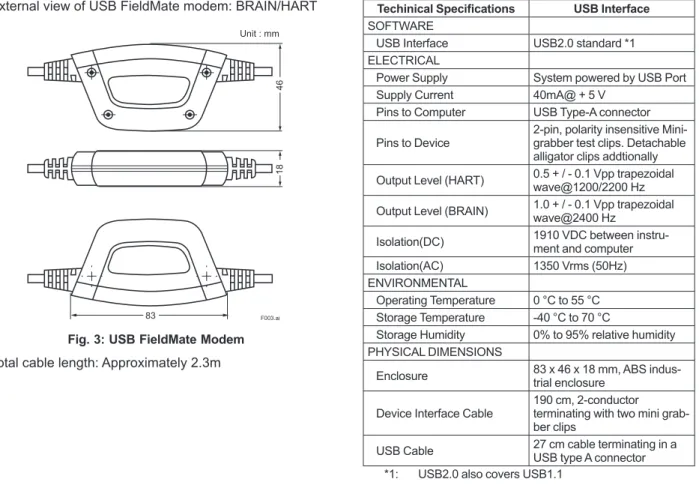
6. External View
External view of USB FieldMate modem: BRAIN/HART
46
18
83
Unit : mm
F003.ai
Fig. 3: USB FieldMate Modem Total cable length: Approximately 2.3m
Techinical Specifications USB Interface
SOFTWARE
USB Interface USB2.0 standard *1 ELECTRICAL
Power Supply System powered by USB Port
Supply Current 40mA@ + 5 V Pins to Computer USB Type-A connector
Pins to Device 2-pin, polarity insensitive Mini-grabber test clips. Detachable alligator clips addtionally
Output Level (HART) 0.5 + / - 0.1 Vpp trapezoidal wave@1200/2200 Hz Output Level (BRAIN) 1.0 + / - 0.1 Vpp trapezoidal wave@2400 Hz Isolation(DC) 1910 VDC between instru-ment and computer Isolation(AC) 1350 Vrms (50Hz) ENVIRONMENTAL
Operating Temperature 0 °C to 55 °C Storage Temperature -40 °C to 70 °C
Storage Humidity 0% to 95% relative humidity
PHYSICAL DIMENSIONS
Enclosure 83 x 46 x 18 mm, ABS indus-trial enclosure
Device Interface Cable 190 cm, 2-conductor terminating with two mini grab-ber clips
USB Cable 27 cm cable terminating in a USB type A connector *1: USB2.0 also covers USB1.1
EMC Conformity Standards , , ,
• CE Mark
EN61326-1 Class A, Table1 (Basic immunity test requirement)
• KC Mark
Registration No: KCC-REM-YHQ-EEN260
7. Included Items
FieldMate includes the following items:
* Software and User’s Manual of FieldMate Validator are not included. Please download Software and User’s Manual of
FieldMate via Yokogawa web site.
<Product>
l CD-ROM: FieldMate Software Media l DVD-ROM: Device Files Media
l USB FieldMate modem: BRAIN/HART w/ cables
(optional) <Documentation> l License number sheet l Getting Started
Please download User’s Manual via Yokogawa web site
http://www.yokogawa.com/fld/doc/manual/fld-fieldmate
-manual-01en.htm
8. Items Contained in Media
n Items contained in the Media of FieldMate R3.01: CD-ROM: FieldMate Media
l FieldMate Program
l USB modem driver
DVD-ROM: Device Files Media l Device DTM for Yokogawa devices
-BRAIN -FOUNDATION fieldbus H1 -HART -PROFIBUS -ISA100.11a -Modbus
l Device DTM for the HART devices *1
l Built-in DTMs (DTM interprets DD and works right straight.)
-FOUNDATION fieldbus H1
-HART -ISA100.11a
l DD for the FOUNDATION fieldbus H1 devices *2
l DD for the HART devices *1
*1: Devices registered with HART Communication
Foundation, some DTM or DD may not be included. *2: Devices registered with Fieldbus FOUNDATION,
some DD may not be included. Remarks:
Yokogawa certifies the quality and operability only of DD
and DTM which have been registered by Yokogawa.
9. Compatibility
Compatibility between FieldMate and Device Files is indicated on the web site at the following URL. http://www.yokogawa.com/fld/fieldmate/fld-fieldmate-systemreq-01en.htm#combi
10. User Registration
FieldMate may be installed on a single PC using the license number provided. FieldMate may be used for up to 30 days without registration.
For permanent installation, user registration is required. After registration an Activation Key is provided to the user. User registration may be done on the FieldMate User Registration web site.
https://voc.yokogawa.co.jp/PMK/
The items required for user registration are the license number and Hard Disk serial number (Volume Serial Number) of the PC to which FieldMate is installed. Installation of FieldMate Validator requires activation of FieldMate.
11. Trademarks
All brand or product names of Yokogawa Electric Cor-poration in this document are trademarks or registered trademarks of Yokogawa Electric Corporation.
All other company brand or product names in this docu-ment are trademarks or registered trademarks of their respective holders.