MPEG-4
AVC/H.264
Video Codecs
Comparison
Video group head: Dr. Dmitriy Vatolin
Project head: Dr. Dmitriy Kulikov
Measurements, analysis: Alexander Parshin,
Marat Arsaev
Report correction: Alexander Voronov
Codecs:
•
H.264
o
DivX
H.264
o
Elecard
H.264
o
Intel SandyBridge Transcoder (GPU encoder)
o
MainConcept H.264 (software)
o
MainConcept H.264 (CUDA based encoder)
o
Microsoft Expression Encoder
o
DiscretePhoton
o
x264
•
Non H.264
Contents
Contents ... 2
1
Acknowledgments ... 5
2
Overview ... 6
2.1
Sequences ... 6
2.2
Codecs ... 7
3
Objectives and Testing Rules ... 8
3.1
H.264 Codec Testing Objectives ... 8
3.2
Testing Rules ... 8
4
Comparison Results ... 10
4.1
Video Conferences ... 10
4.1.1
RD Curves ... 10
4.1.2
Encoding Speed ... 12
4.1.3
Speed/Quality Trade-Off ... 13
4.1.4
Bitrate Handling ... 16
4.1.5
Local Bitrate Handling ... 17
4.1.6
Relative Quality Analysis ... 19
4.2
Movies ... 21
4.2.1
RD Curves ... 21
4.2.2
Encoding Speed ... 30
4.2.3
Speed/Quality Trade-Off ... 33
4.2.4
Bitrate Handling ... 44
4.2.5
Relative Quality Analysis ... 50
4.3
HDTV ... 56
4.3.1
RD Curves ... 56
4.3.2
Encoding Speed ... 66
4.3.3
Speed/Quality Trade-Off ... 72
4.3.4
Bitrate Handling ... 82
4.3.5
Relative Quality Analysis ... 88
4.4
Conclusions ... 93
4.4.1
Video Conference ... 93
4.4.2
Movies ... 93
4.4.3
HDTV ... 94
4.4.4
Overall Conclusions ... 96
4.4.5
Codec Conclusions ... 96
4.4.6
Comments from Developers ... 97
5
Appendix 1. Hardware and Software Encoders Comparison ... 99
5.1
Brief Description ... 99
5.1.1
Hardware Description ... 99
6.1
x264 Comparison Over Time ... 130
6.2
WebM Comparison Over Time ... 131
7
Appendix 3. Another Quality Metrics ... 135
7.1
Movies ... 135
7.2
HDTV ... 139
7.3
Conclusion on Different Metric Usage ... 143
8
Appendix 5. Test Set of Video Sequences ... 144
8.1
Videoconference Sequences ... 144
8.1.1
“CIF” (“Deadline”) ... 144
8.1.2
“4CIF” ... 145
8.1.3
“720p” ... 146
8.2
Movie Sequences ... 147
8.2.1
“City” ... 147
8.2.2
“Indiana Jones” ... 148
8.2.3
“State Enemy” ... 149
8.2.4
“Crew” ... 150
8.2.5
“Harbour” ... 151
8.2.6
“Ice Skating” ... 152
8.2.7
“Soccer”... 153
8.2.8
“Race Horses” ... 154
8.2.9
“Party Scene” ... 155
8.2.10
“Ice Age” ... 156
8.3
HDTV Sequences ... 157
8.3.1
“Park Joy” ... 157
8.3.2
“Riverbed” ... 158
8.3.3
“Troy” ... 159
8.3.4
“Stockholm” ... 160
8.3.5
“Rush Hour” ... 161
8.3.6
“Blue Sky” ... 162
8.3.7
“Station”... 163
8.3.8
“Sunflower” ... 164
8.3.9
“Tractor” ... 165
8.3.10
“Big Buck Bunny” ... 166
8.3.11
“Elephants Dream” ... 167
9
Appendix 6. Tested Codecs and Presets ... 168
9.1
Codecs ... 168
9.1.1
DivX AVC/H.264 Video Encoder ... 168
9.1.2
Elecard AVC Video Encoder 8-bit edition, ... 169
9.1.3
MainConcept AVC/H.264 Video Encoder Console Application ... 169
9.1.4
Microsoft Expression Encoder 4 ... 169
9.1.5
x264 ... 170
11.2.1
Brief Description ... 184
11.2.2
Examples ... 185
12
List of Figures ... 188
1 Acknowledgments
The Graphics & Media Lab Video Group would like to express its gratitude to
the following companies for providing the codecs and settings used in this
report:
•
Elecard
Ltd
•
Intel
Corporation
•
MainConcept
GmbH
•
x264 Development Team
•
WebM project team
•
DiscretePhoton
team
•
Microsoft Expression Encoder
The Video Group would also like to thank these companies for their help and
technical support during the tests.
2 Overview
2.1 Sequences
Table 1.
Summary of video sequences.
Sequence
Number of
frames
Frame rate
Resolution
VideoConference
1. Videoconference
CIF
1374
30
352x288
2. VideoConference
4CIF
3600 30 640x480
3. VideoConference
720p
1500 30 1280x720
Movies (SD sequences)
4. Ice
Age
2014
24
720x480
5. City
600
60
704x576
6. Crew
600
60
704x576
7. Indiana
Jones
5000
30
704x288
8. Harbour
600
60
704x576
9. Ice
Skating
480
60
704x576
10. Soccer
600
60
704x576
11. Race Horses
300
30
832x480
12. State Enemy
6500
24
720x304
13. Party Scene
500
50
832x480
HDTV sequences
14. Park Joy
500
50
1280x720
15. Riverbed
250
25
1920x1080
16. Rush Hour
500
25
1920x1080
17. Blue Sky
217
25
1920x1080
18. Station
313
25
1920x1080
19. Stockholm
604
50
1280x720
20. Sunflower
500
25
1920x1080
21. Tractor
690
25
1920x1080
22. Bunny
600
24
1920x1080
23. Dream
600
24
1920x1080
24. Troy
300
24
1920x1072
Brief descriptions of the sequences used in our comparison are given in
Table 1. More detailed descriptions of these sequences can be found in
Appendix 5. Test Set of Video Sequences.
2.2 Codecs
Table 2.
Short codec descriptions
Codec
Developer
Version
1. DivX AVC/H.264 Video Encoder
DivX, Inc.
1.1.1.9
2. Elecard AVC Video Encoder
8-bit edition,
Elecard Ltd
2.1.022202.091207
3. MainConcept
AVC/H.264
Video
Encoder Console Application
MainConcept GmbH 1.5.0
4. Microsoft Expression Encoder 4
Microsoft Corp.
encoder_core.dll version
4.0.3205.0
mc_enc_avc.dll version
8.7.0.37256
5. x264
x264 Development
Team
x264 core:114 r1900
60ef1f8
6. XviD raw mpeg4 bitstream
encoder
XviD Development
Team
xvid-1.3.0-dev
7. Discrete
Photon
Discrete Photon
Development Team
unversioned
8. WebM vp8 Codec
WebM
v0.9.2-522-gddd260e
Brief descriptions of the codecs used in our comparison are given in Table 2.
XviD was used as a good quality MPEG-4 ASP reference codec for
comparison purposes. Detailed descriptions of all codecs used in our
comparison can be found in Appendix 6. Tested Codecs.
3 Objectives and Testing Rules
3.1 H.264 Codec Testing Objectives
The main goal of this report is the presentation of a comparative evaluation of
the quality of new H.264 codecs using objective measures of assessment.
The comparison was done using settings provided by the developers of each
codec.
The main task of the comparison is to analyze different H.264 encoders for
the task of transcoding video—e.g., compressing video for personal use.
Speed requirements are given for a sufficiently fast PC; fast presets are
analogous to real-time encoding for a typical home-use PC.
3.2 Testing
Rules
•
The entire test set was divided into two primary types of
applications. These applications differ by resolution, bitrate and
encoding speed requirements:
o
VideoConference (one pass only)
o
Movies (bitrates of 500-2000 kbps)
o
High-definition television (“HDTV”; bitrates of 0.7-10 mbps)
•
There are special presets and speed limitations for every type of
application:
o
Video Conference (one pass only, good local bitrate
handling)
Minimum 60 fps at 4CIF sequence
o
Movies (speed requirements for 750 kbps 4CIF
sequences):
Minimum 120 fps for "High Speed" preset
Minimum 80 fps for "Normal" preset Minimum 40
fps for "High Quality" preset
o
HDTV (speed requirements for 3 mbps 1280x720
sequences):
Minimum 100 fps for "High Speed" preset
Minimum 50 fps for "Normal" preset
Minimum 20 fps for "High Quality" preset
•
Each codec’s developer provided settings for each type of
application. Each setting’s individual parameters were, to a large
•
For all measurements the PRO version of the YUVsoft Video
Codec Scoring System was used
(
http://www.yuvsoft.com/technologies/vicos/index.html
).
•
The following computer configuration was used for the main tests:
o
4-cores processor: Intel Core i7 920, 2.67GHz
o
OS Name: Microsoft Windows 7 Professional 64-bit
o
Total Physical Memory: 12 GB
During the evaluation the following measures were used:
•
SSIM (Y component)
•
PSNR (Y component)
Enterprise version of report contains:
•
SSIM, Y-SSIM, U-SSIM, V-SSIM
•
PSNR, Y-PSNR, U-PSNR, V-PSNR
•
MSE
•
3-SSIM
•
MS-SSIM
More detailed information about these measures may be found on the
Internet at the following URL:
4 Comparison
Results
4.1 Video
Conferences
4.1.1 RD
Curves
Next figures show RD curves for three video conference sequences. The leader by
quality is x264. DivX H.264 is typically second.
200
400
600
800
1000
1200
1400
0.93
0.94
0.95
0.96
0.97
0.98
0.99
Average RD, Conference CIF
Bitrate, kbps
M
e
tr
ic
v
a
lu
e
,
Y
-S
S
IM
DivX H.264, Video Conference preset
Elecard, Video Conference preset
MainConcept, Video Conference preset
MS Expression Encoder, Video Conference preset
Discrete Photon, Video Conference preset
WebM VP8, Video Conference preset
x264, Video Conference preset
XviD, Video Conference preset
Figure 1.
Bitrate/quality—usage area “Video Conference,”
CIF sequence, Y-SSIM metric
Better
q
ualit
200
400
600
800
1000
1200
1400
0.91
0.92
0.93
0.94
0.95
0.96
0.97
0.98
Average RD, Conference 4CIF
Bitrate, kbps
M
e
tr
ic
va
lu
e
,
Y
-S
S
IM
DivX H.264, Video Conference preset
Elecard, Video Conference preset
MainConcept, Video Conference preset
MS Expression Encoder, Video Conference preset
Discrete Photon, Video Conference preset
WebM VP8, Video Conference preset
x264, Video Conference preset
XviD, Video Conference preset
200
400
600
800
1000
1200
1400
0.91
0.92
0.93
0.94
0.95
0.96
Average RD, Conference 720p
Bitrate, kbps
M
e
tr
ic
v
a
lu
e
,
Y-SS
IM
DivX H.264, Video Conference preset
Elecard, Video Conference preset
MainConcept, Video Conference preset
MS Expression Encoder, Video Conference preset
Discrete Photon, Video Conference preset
WebM VP8, Video Conference preset
x264, Video Conference preset
XviD, Video Conference preset
Figure 2.
Bitrate/quality—usage area “Video Conference,”
720p sequence, Y-SSIM metric
4.1.2 Encoding
Speed
Absolute speed results are presented in Figure 3 through Figure 5. All the
encoders have a similar growth rate for encoding time as the bitrate is
increased. Discrete Photon is the fastest.
0
200
400
600
800
1000
1200
1400
1600
0
100
200
300
400
500
600
Absolute encoding time, Conference CIF
Bitrate, kbps
E
n
co
d
e
in
g
s
p
eed
(
fp
s
)
DivX H.264, Video Conference preset
Elecard, Video Conference preset
MainConcept, Video Conference preset
MS Expression Encoder, Video Conference pre
Discrete Photon, Video Conference preset
WebM VP8, Video Conference preset
x264, Video Conference preset
XviD, Video Conference preset
Figure 3.
Encoding speed—usage area “Video Conference”
CIF sequence
0
200
400
600
800
1000
1200
1400
1600
0
50
100
150
200
250
Absolute encoding time, Conference 4CIF
Bitrate, kbps
E
n
c
ode
ing s
p
e
e
d
(fps
)
DivX H.264, Video Conference preset
Elecard, Video Conference preset
MainConcept, Video Conference preset
MS Expression Encoder, Video Conference preset
Discrete Photon, Video Conference preset
WebM VP8, Video Conference preset
x264, Video Conference preset
XviD, Video Conference preset
0
200
400
600
800
1000
1200
1400
1600
10
20
30
40
50
60
70
80
90
100
Absolute encoding time, Conference 720p
Bitrate, kbps
E
n
c
o
de
ing s
p
e
e
d
(fps
)
DivX H.264, Video Conference preset
Elecard, Video Conference preset
MainConcept, Video Conference preset
MS Expression Encoder, Video Conference pr
Discrete Photon, Video Conference preset
WebM VP8, Video Conference preset
x264, Video Conference preset
XviD, Video Conference preset
Figure 5.
Encoding speed—usage area “Video Conference”
720p sequence
4.1.3 Speed/Quality
Trade-Off
Detailed descriptions of the speed/quality trade-off graphs can be found in
Appendix 7. Figures Explanation. Sometimes, codec results are not present in the
particular graph owing to the codec’s extremely poor performance. The codec’s RD
curve has no intersection with the reference’s RD curve.
The speed/quality trade-off graphs simultaneously show relative quality and
encoding speed for the encoders tested in this comparison. XviD is the
reference codec, for which both quality and speed are normalized to unity for
all of the graphs. The terms “better” and “worse” are used to compare codecs
in the same manner as in previous portions of this comparison.
Please note that the method of averaging among all sequences assumes that all codecs
produced results for each sequence. When this is not the case, only existing results are
taken into account.
The three best codecs (no codec performs faster with higher quality) in terms
of speed/quality are DiscretePhoton, Elecard and x264 at average.
0.5
1
1.5
2
2.5
3
3.5
4
0.4
0.5
0.6
0.7
0.8
0.9
1
1.1
1.2
1.3
Average relative bitrate, Y-SSIM, 1 sequence (Conference CIF)
Relative Encoding Time
Average
relative
bitrate
DivX H.264, Video Conference preset
Elecard, Video Conference preset
MainConcept, Video Conference preset
MS Expression Encoder, Video Conference preset
Discrete Photon, Video Conference preset
WebM VP8, Video Conference preset
x264, Video Conference preset
XviD, Video Conference preset
Figure 6.
Speed/quality trade-off—usage area “Video Conference,”
CIF sequence, Y-SSIM metric
0.5
1
1.5
2
2.5
3
0.4
0.5
0.6
0.7
0.8
0.9
1
1.1
1.2
1.3
1.4
Average relative bitrate, Y-SSIM, 1 sequence (Conference 4CIF)
Relative Encoding Time
Average
relative
bitrate
DivX H.264, Video Conference preset
Elecard, Video Conference preset
MainConcept, Video Conference preset
MS Expression Encoder, Video Conference preset
Discrete Photon, Video Conference preset
WebM VP8, Video Conference preset
x264, Video Conference preset
XviD, Video Conference preset
Figure 7.
Speed/quality trade-off—usage area “Video Conference,”
4CIF sequence, Y-SSIM metric
Better
0.4
0.6
0.8
1
1.2
1.4
1.6
1.8
2
2.2
2.4
0.4
0.5
0.6
0.7
0.8
0.9
1
Average relative bitrate, Y-SSIM, 1 sequence (Conference 720p)
Relative Encoding Time
Average
relative
bitrate
DivX H.264, Video Conference preset
Elecard, Video Conference preset
MainConcept, Video Conference preset
MS Expression Encoder, Video Conference preset
Discrete Photon, Video Conference preset
WebM VP8, Video Conference preset
x264, Video Conference preset
XviD, Video Conference preset
Figure 8.
Speed/quality trade-off—usage area “Video Conference,”
720p sequence, Y-SSIM metric
0.5
1
1.5
2
2.5
3
0.4
0.5
0.6
0.7
0.8
0.9
1
1.1
1.2
1.3
Average relative bitrate, Y-SSIM, 3 sequences (Conference CIF, Conference 4CIF, Conference 720p)
Relative Encoding Time
Average
relative
bitrate
DivX H.264, Video Conference preset
Elecard, Video Conference preset
MainConcept, Video Conference preset
MS Expression Encoder, Video Conference preset
Discrete Photon, Video Conference preset
WebM VP8, Video Conference preset
x264, Video Conference preset
XviD, Video Conference preset
Figure 9.
Speed/quality trade-off—usage area “Video Conference,”
all sequences, Y-SSIM metric
0.5
1
1.5
2
2.5
3
0.5
0.6
0.7
0.8
0.9
1
1.1
1.2
1.3
1.4
Average relative bitrate, Y-PSNR, 3 sequences (Conference CIF, Conference 4CIF, Conference 720p)
Relative Encoding Time
Average
relative
bitrate
DivX H.264, Video Conference preset
Elecard, Video Conference preset
MainConcept, Video Conference preset
MS Expression Encoder, Video Conference preset
Discrete Photon, Video Conference preset
WebM VP8, Video Conference preset
x264, Video Conference preset
XviD, Video Conference preset
Figure 10.
Speed/quality trade-off—usage area “Video Conference,”
all sequences, Y-PSNR metric
4.1.4 Bitrate
Handling
Encoders with High Speed presets, except the XviD encoder, demonstrate
good bitrate handling for all sequences. There are some issues with bitrate
handling for DiscretePhoton encoders for CIF sequence.
0
200
400
600
800
1000
1200
1400
1600
0.5
0.6
0.7
0.8
0.9
1
1.1
1.2
1.3
1.4
Bitrate handling, Conference CIF
Bitrate, kbps
R
e
a
l b
itr
at
e/
ta
rg
et
b
itr
at
e,
t
im
e
s
DivX H.264, Video Conference preset
Elecard, Video Conference preset
MainConcept, Video Conference preset
MS Expression Encoder, Video Conference preset
Discrete Photon, Video Conference preset
WebM VP8, Video Conference preset
x264, Video Conference preset
XviD, Video Conference preset
Figure 11.
Bitrate handling—usage area “Video Conference,” CIF sequence
Better
0
200
400
600
800
1000
1200
1400
1600
0.9
0.95
1
1.05
1.1
1.15
1.2
1.25
Bitrate handling, Conference 4CIF
Bitrate, kbps
R
e
al b
it
rat
e
/tar
g
et
b
it
rat
e
, t
im
e
s
DivX H.264, Video Conference preset
Elecard, Video Conference preset
MainConcept, Video Conference preset
MS Expression Encoder, Video Conference preset
Discrete Photon, Video Conference preset
WebM VP8, Video Conference preset
x264, Video Conference preset
XviD, Video Conference preset
Figure 12.
Bitrate handling—usage area “Video Conference,” 4CIF sequence
0
200
400
600
800
1000
1200
1400
1600
0.8
1
1.2
1.4
1.6
1.8
2
2.2
2.4
2.6
Bitrate handling, Conference 720p
Bitrate, kbps
R
eal
b
itr
a
te/
ta
rg
e
t b
itr
a
te,
tim
e
s
DivX H.264, Video Conference preset
Elecard, Video Conference preset
MainConcept, Video Conference preset
MS Expression Encoder, Video Conference preset
Discrete Photon, Video Conference preset
WebM VP8, Video Conference preset
x264, Video Conference preset
XviD, Video Conference preset
Figure 13.
Bitrate handling—usage area “Video Conference,” 720p sequence
4.1.5 Local Bitrate Handling
For video conference encoding is very important not only keep average
bitrate for all the sequence but keep local bitrate for example for 1 second
window. In this part of comparison we analyze local bitrate handling by next
Figure 14.
Bitrate handling—usage area “Video Conference,” CIF sequence
Figure 15.
Bitrate handling—usage area “Video Conference,” 4CIF sequence
Better
Figure 16.
Bitrate handling—usage area “Video Conference,” 720p sequence
4.1.6 Relative Quality Analysis
Table 3 and Table 4 show relative bitrates for a fixed quality output for all
codecs and presets. Note that these tables do not include information about
the speed of the encoder.
Note that each number in the tables below corresponds to some range of bitrates (see
Appendix 7. Figures Explanation for more details). Unfortunately, these ranges can
differ significantly because of differences in the quality of compared encoders. This
situation can lead to some inadequate results when three or more codecs are
compared.
Consider the Y-SSIM results in Table 5 and Y-PSNR results in Table 4. On
average, the leader is the x264 encoder followed by DivX H.264 encoder.
Table 3.
Average bitrate ratio for the same quality.
Usage area “Video Conference”. Y-SSIM.
DivX
H.264
Elecard MainConcept
MSE
encoder
Discrete
Photon
Webm x264 XviD
DivX H.264
100%
110%
129%
117%
193%
141%
69%
157%
Elecard
91%
100%
119%
105%
167%
127%
64%
144%
MainConcept
77%
84%
100%
89%
134%
107%
55%
123%
Table 4.
Average bitrate ratio for the same quality. Usage area “Video
Conference”. Y-PSNR.
DivX
H.264
Elecard MainConcept
MSE
encoder
Discrete
Photon
Webm x264 XviD
DivX H.264
100%
109%
252%
109%
185%
125%
88%
157%
Elecard
92%
100%
214%
99%
165%
115%
81%
144%
MainConcept
40%
47%
100%
41%
74%
41%
31%
123%
MSE
encoder
92%
101%
246%
100%
177%
117%
80%
137%
Discrete
Photon
54%
60%
135%
57%
100%
62%
45%
89%
Webm
80%
87%
244%
86%
161%
100%
68%
113%
x264
113%
123%
326%
124%
224%
148%
100%
223%
XviD
63%
68%
138%
67%
112%
78%
53%
100%
Figure 17 and Figure 18 depict the data from the tables above. Each line in the figures
corresponds to one codec. Values on the vertical axis are the average relative bitrates
compared with the codecs along the horizontal axis. A lower bitrate indicates better
relative results.
20%
70%
120%
170%
220%
270%
R
e
la
ti
ve b
it
rat
e
Codec
Average bitrate ratio for the same quality. Usage area “Video
Conference”. Y-SSIM
DivX H.264
Elecard
MainConcept
MSE encoder
Discrete Photon
Webm
x264
XviD
Figure 17.
Average bitrate ratio for a fixed quality—usage area “Video Conference,”
Y-SSIM metric
Bette
20%
70%
120%
170%
220%
270%
320%
R
e
la
ti
ve b
it
rat
e
Codec
Average bitrate ratio for the same quality. Usage area “Video
Conference”. Y-PSNR
DivX H.264
Elecard
MainConcept
MSE encoder
Discrete Photon
Webm
x264
XviD
Figure 18.
Average bitrate ratio for a fixed quality—usage area “Video Conference,”
Y-PSNR metric
4.2 Movies
4.2.1 RD
Curves
4.2.1.1 High Speed Preset
Figure 19 and Figure 20 show typical situation for all encoders (except some
sequences). Figure 19 shows all encoders results and Figure 20 – only for
encoders that fit encoding speed requirements. For quality analysis we used
only encoders that fit encoding speed requirements encoders. The leader for
almost all video sequences (except Crew and Harbour) is x264. MainConcept
is typically second. Third place is for Elecard. Discrete Photon exhibited the
poorest result (even lower than XviD sometimes).
PSNR results are shown at Figure 21 and Figure 22. PSNR usage as main
metric changes results strongly for example, MainConcept shows lower
quality and MSE shows better quality at average.
MSE and WebM High Speed presets does not fit the encoding speed
requirements.
500 1000 1500 2000 0.915 0.92 0.925 0.93 0.935 0.94 0.945 0.95 0.955 0.96 0.965
Average RD, Ice Skating
Bitrate, kbps M e tr ic v a lu e , Y -S S IM
DivX H.264, High-Speed preset Elecard, High-Speed preset MainConcept, High-Speed preset MS Expression Encoder, High-Speed preset Discrete Photon, High-Quality Preset WebM VP8, High-Speed preset x264, High-Speed preset XviD, High-Speed preset
Figure 19.
Bitrate/quality—usage area “Movies,” “Ice Skating” sequence,
High Speed preset, Y-SSIM metric. All encoders
500 1000 1500 2000
0.915 0.92 0.925 0.93 0.935 0.94 0.945 0.95 0.955 0.96 0.965
Average RD, Ice Skating
Bitrate, kbps M e tr ic v a lu e , Y -S S IM
DivX H.264, High-Speed preset Elecard, High-Speed preset MainConcept, High-Speed preset Discrete Photon, High-Quality Preset x264, High-Speed preset
XviD, High-Speed preset
Figure 20.
Bitrate/quality—usage area “Movies,” “Ice Skating” sequence,
High Speed preset, Y-SSIM metric. Encoders that fit encoding speed requirements.
Better
q
ualit
500 1000 1500 2000 34 35 36 37 38 39 40 41 42
Average RD, Ice Age
Bitrate, kbps M e tric v a lu e , Y -P S N R
DivX H.264, High-Speed preset Elecard, High-Speed preset MainConcept, High-Speed preset MS Expression Encoder, High-Speed preset Discrete Photon, High-Quality Preset WebM VP8, High-Speed preset x264, High-Speed preset XviD, High-Speed preset
Figure 21.
Bitrate/quality—usage area “Movies,” “Ice Age” sequence,
High Speed preset, Y-PSNR metric. All encoders
500 1000 1500 2000
34 35 36 37 38 39 40 41 42
Average RD, Ice Age
Bitrate, kbps M e tric v a lu e , Y -P S N R
DivX H.264, High-Speed preset Elecard, High-Speed preset MainConcept, High-Speed preset Discrete Photon, High-Quality Preset x264, High-Speed preset
XviD, High-Speed preset
Figure 22.
Bitrate/quality—usage area “Movies,” “Ice Age” sequence,
High Speed preset, Y-PSNR metric. Encoders that fit encoding speed requirements.
MSE and WebM Normal presets does not fit the encoding speed
requirements.
Results for all the sequences, all metrics and all encoders are available in
Enterprise version
report only.
500 1000 1500 2000
0.65 0.7 0.75 0.8 0.85 0.9
Average RD, Race Horses
Bitrate, kbps M e tr ic v a lu e , Y -S S IM
DivX H.264, Normal preset Elecard, Normal preset MainConcept, Normal preset MS Expression Encoder, Normal preset Discrete Photon, High-Quality Preset WebM VP8, Normal preset x264, Normal preset XviD, Normal preset
Figure 23.
Bitrate/quality—usage area “Movies,” “Race Horses” sequence,
Normal preset, Y-SSIM metric. All encoders
600 800 1000 1200 1400 1600 1800
0.65 0.7 0.75 0.8 0.85 0.9
Average RD, Race Horses
Bitrate, kbps M e tr ic v a lu e , Y -S S IM
DivX H.264, Normal preset Elecard, Normal preset MainConcept, Normal preset Discrete Photon, High-Quality Preset x264, Normal preset
XviD, Normal preset
Better
q
ualit
500 1000 1500 2000 0.91
0.92 0.93 0.94 0.95 0.96 0.97 0.98
Average RD, Ice Age
Bitrate, kbps
M
e
tr
ic
v
a
lu
e
, Y
-S
S
IM
DivX H.264, Normal preset Elecard, Normal preset MainConcept, Normal preset Discrete Photon, High-Quality Preset x264, Normal preset
XviD, Normal preset
Figure 25.
Bitrate/quality—usage area “Movies,” “Ice Age” sequence,
Normal preset, Y-SSIM metric. Encoders that fit encoding speed
requirements.
400 600 800 1000 1200 1400 1600 1800 2000
0.7 0.75 0.8 0.85 0.9
Average RD, Harbour
Bitrate, kbps
M
e
tr
ic
v
a
lu
e
, Y
-S
S
IM
DivX H.264, Normal preset Elecard, Normal preset MainConcept, Normal preset Discrete Photon, High-Quality Preset x264, Normal preset
XviD, Normal preset
Figure 26.
Bitrate/quality—usage area “Movies,” “Harbour” sequence,
Normal preset, Y-SSIM metric. Encoders that fit encoding speed
600 800 1000 1200 1400 1600 1800 23 24 25 26 27 28 29 30 31 32 33
Average RD, Race Horses
Bitrate, kbps M e tric v a lu e , Y -P S N R
DivX H.264, Normal preset Elecard, Normal preset MainConcept, Normal preset Discrete Photon, High-Quality Preset x264, Normal preset
XviD, Normal preset
Figure 27.
Bitrate/quality—usage area “Movies,” “Race Horses” sequence,
Normal preset, Y-PSNR metric. Encoders that fit encoding speed
requirements.
400 600 800 1000 1200 1400 1600 1800 2000
25 26 27 28 29 30 31 32
Average RD, Harbour
Bitrate, kbps M e tric v a lu e , Y -P S N R
DivX H.264, Normal preset Elecard, Normal preset MainConcept, Normal preset Discrete Photon, High-Quality Preset x264, Normal preset
XviD, Normal preset
Figure 28.
Bitrate/quality—usage area “Movies,” “Harbour” sequence,
Normal preset, Y-PSNR metric. Encoders that fit encoding speed
four encoders show close results that vary on different sequences.
DiscretePhoton shows the lowest results.
PSNR metric:
The leader is the same, but encoders at second place
exchange their places.
MSE and WebM High Quality presets do not fit the encoding speed
requirements.
Results for all the sequences, all metrics and all encoders are available in
Enterprise version
report only.
600 800 1000 1200 1400 1600 1800
0.65 0.7 0.75 0.8 0.85 0.9
Average RD, Soccer
Bitrate, kbps
M
e
tr
ic
v
a
lu
e
, Y
-S
S
IM
DivX H.264, High-Quality preset Elecard, High-Quality preset MainConcept, High-Quality preset MS Expression Encoder, High-Quality preset Discrete Photon, High-Quality Preset WebM VP8, High-Quality preset x264, High-Quality preset XviD, High-Quality preset
Figure 29.
Bitrate/quality—usage area “Movies,” “Soccer” sequence,
High Quality preset, Y-SSIM metric. All encoders
0.8 0.85 0.9
Average RD, Soccer
v
a
lu
e
, Y
-S
S
IM
Better
q
ualit
requirements.
400 600 800 1000 1200 1400 1600 1800
0.55 0.6 0.65 0.7 0.75 0.8 0.85 0.9
Average RD, Party Scene
Bitrate, kbps M e tr ic v a lu e , Y -S S IM
DivX H.264, High-Quality preset Elecard, High-Quality preset MainConcept, High-Quality preset Discrete Photon, High-Quality Preset x264, High-Quality preset
XviD, High-Quality preset
Figure 31.
Bitrate/quality—usage area “Movies,” “Party Scene” sequence,
High Quality preset, Y-SSIM metric. Encoders that fit encoding speed
requirements.
600 800 1000 1200 1400 1600 1800
0.93 0.94 0.95 0.96 0.97 0.98 0.99
Average RD, State Enemy
Bitrate, kbps M e tr ic v a lu e , Y -S S IM
DivX H.264, High-Quality preset Elecard, High-Quality preset MainConcept, High-Quality preset Discrete Photon, High-Quality Preset x264, High-Quality preset
XviD, High-Quality preset
Figure 32.
Bitrate/quality—usage area “Movies,” “State Enemy” sequence,
High Quality preset, Y-SSIM metric. Encoders that fit encoding speed
400 600 800 1000 1200 1400 1600 1800 23 24 25 26 27 28 29 30
Average RD, Party Scene
Bitrate, kbps M e tric v a lu e , Y -P S N R
DivX H.264, High-Quality preset Elecard, High-Quality preset MainConcept, High-Quality preset Discrete Photon, High-Quality Preset x264, High-Quality preset
XviD, High-Quality preset
Figure 33.
Bitrate/quality—usage area “Movies,” “Party Scene” sequence,
High Quality preset, Y-PSNR metric. Encoders that fit encoding speed
requirements.
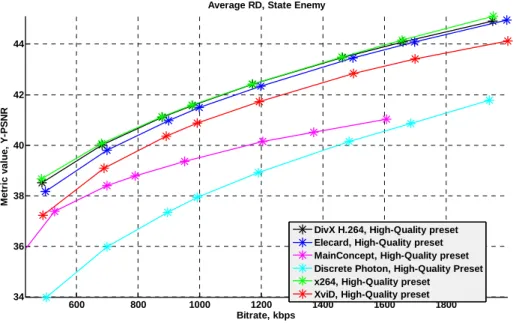
600 800 1000 1200 1400 1600 1800
34 36 38 40 42 44
Average RD, State Enemy
Bitrate, kbps M e tric v a lu e , Y -P S N R
DivX H.264, High-Quality preset Elecard, High-Quality preset MainConcept, High-Quality preset Discrete Photon, High-Quality Preset x264, High-Quality preset
XviD, High-Quality preset
Figure 34.
Bitrate/quality—usage area “Movies,” “State Enemy” sequence,
High Quality preset, Y-PSNR metric. Encoders that fit encoding speed
4.2.2 Encoding
Speed
4.2.2.1 High Speed Preset
Absolute speed results are presented in Figure 35 through Figure 36. All the
encoders except MSE have a similar growth rate for encoding time as the
bitrate is increased. XviD is the fastest.
2000 400 600 800 1000 1200 1400 1600 1800 2000 2200 50 100 150 200 250 300 350 400
Absolute encoding time, City
Bitrate, kbps E n c ode in g s p e e d (f p s )
DivX H.264, High-Speed preset Elecard, High-Speed preset MainConcept, High-Speed preset MS Expression Encoder, High-Speed preset Discrete Photon, High-Quality Preset WebM VP8, High-Speed preset x264, High-Speed preset XviD, High-Speed preset
Figure 35.
Encoding speed—usage area “Movie”
“City” sequence, “High Speed” preset
4000 600 800 1000 1200 1400 1600 1800 2000 2200 2400 50 100 150 200 250 300 350
Absolute encoding time, Race Horses
Bitrate, kbps E n c ode in g s p e e d (f p s )
Faster
time versus increasing bitrate. DiscretePhoton is the fastest encoder at
almost all the sequences.
400 600 800 1000 1200 1400 1600 1800 2000 2200
20 40 60 80 100 120 140 160 180 200 220
Absolute encoding time, Ice Age
Bitrate, kbps
En
c
o
d
e
in
g
sp
ee
d
(
fp
s
)
Figure 37.
Encoding speed—usage area “Movies”
“Ice Age” sequence, Normal preset
4000 600 800 1000 1200 1400 1600 1800 2000 2200
50 100 150 200 250
Absolute encoding time, Ice Skating
Bitrate, kbps
E
n
c
ode
in
g
s
p
e
e
d (f
p
s
)
Figure 38.
Encoding speed—usage area “Movies”
“Ice Skating” sequence, Normal preset
2000 400 600 800 1000 1200 1400 1600 1800 2000 2200 50 100 150 200 250 300
Absolute encoding time, State Enemy
Bitrate, kbps En c o d e in g sp ee d ( fp s )
Figure 39.
Encoding speed—usage area “Movies”
“State Enemy” sequence, Normal preset
4.2.2.3 High Quality Preset
Absolute speed results are presented in Figure 40 through Figure 41. The
situation is close to Normal Speed preset at average.
400 600 800 1000 1200 1400 1600 1800 2000 2200
20 40 60 80 100 120 140 160 180 200
Absolute encoding time, Ice Age
Bitrate, kbps E n c o d e in g s p e e d (f p s
) DivX H.264, High-Quality preset
Elecard, High-Quality preset MainConcept, High-Quality preset MS Expression Encoder, High-Quality preset Discrete Photon, High-Quality Preset WebM VP8, High-Quality preset x264, High-Quality preset XviD, High-Quality preset
4000 600 800 1000 1200 1400 1600 1800 2000 2200 20
40 60 80 100 120 140 160 180 200
Absolute encoding time, Race Horses
Bitrate, kbps
En
c
o
d
e
in
g
sp
ee
d
(
fp
s
)
Figure 41.
Encoding speed—usage area “Movies”
“Race Horses” sequence, High Quality preset
4.2.3 Speed/Quality
Trade-Off
Detailed descriptions of the speed/quality trade-off graphs can be found in
Appendix 7. Figures Explanation. Sometimes, codec results are not present in the
particular graph owing to the codec’s extremely poor performance. The codec’s RD
curve has no intersection with the reference’s RD curve.
The speed/quality trade-off graphs simultaneously show relative quality and
encoding speed for the encoders tested in this comparison. XviD is the
reference codec, for which both quality and speed are normalized to unity for
all of the graphs. The terms “better” and “worse” are used to compare codecs
in the same manner as in previous portions of this comparison.
Please note that the method of averaging among all sequences assumes that all codecs
produced results for each sequence. When this is not the case, only existing results are
taken into account.
4.2.3.1 High Speed Preset
Figure 42 through Figure 48 show results for the High Speed preset. The
chosen metric has an influence on results.
The five best codecs (no codec performs faster with higher quality) in terms of
speed/quality are XviD, DivX H.264, Elecard, MainConcept and x264 at
average. But there are sequences where it is not true, for example at City
1 2 3 4 5 6 7 8 9 0.2
0.3
0.4
0.5
0.6
0.7
0.8
0.9
1
Average relative bitrate, Y-SSIM, 1 sequence (City)
Relative Encoding Time Average
relative bitrate
DivX H.264, High-Speed preset Elecard, High-Speed preset MainConcept, High-Speed preset MS Expression Encoder, High-Speed preset Discrete Photon, High-Quality Preset WebM VP8, High-Speed preset x264, High-Speed preset XviD, High-Speed preset
Figure 42.
Speed/quality trade-off—usage area “Movies,” “City” sequence,
High Speed preset, Y-SSIM metric
1 1.5 2 2.5
0.2
0.3
0.4
0.5
0.6
0.7
0.8
0.9
1
Average relative bitrate, Y-SSIM, 1 sequence (City)
Relative Encoding Time Average
relative bitrate
DivX H.264, High-Speed preset Elecard, High-Speed preset MainConcept, High-Speed preset Discrete Photon, High-Quality Preset x264, High-Speed preset
XviD, High-Speed preset
Figure 43.
Speed/quality trade-off—usage area “Movies,” “City” sequence,
High Speed preset, Y-SSIM metric. Encoders that fit encoding speed requirements.
Better
1 2 3 4 5 6 7 8 9 0.55
0.6
0.65
0.7
0.75
0.8
0.85
0.9
0.95
1
Average relative bitrate, Y-SSIM, 1 sequence (Ice Skating)
Relative Encoding Time Average
relative bitrate
DivX H.264, High-Speed preset Elecard, High-Speed preset MainConcept, High-Speed preset MS Expression Encoder, High-Speed preset Discrete Photon, High-Quality Preset WebM VP8, High-Speed preset x264, High-Speed preset XviD, High-Speed preset
Figure 44.
Speed/quality trade-off—usage area “Movies,” “Ice Skating” sequence,
High Speed preset, Y-SSIM metric
1 1.2 1.4 1.6 1.8 2 2.2 2.4 2.6 2.8
0.55
0.6
0.65
0.7
0.75
0.8
0.85
0.9
0.95
1
Average relative bitrate, Y-SSIM, 1 sequence (Ice Skating)
Relative Encoding Time Average
relative bitrate
DivX H.264, High-Speed preset Elecard, High-Speed preset MainConcept, High-Speed preset Discrete Photon, High-Quality Preset x264, High-Speed preset
XviD, High-Speed preset
Figure 45.
Speed/quality trade-off—usage area “Movies,” “Ice Skating” sequence,
High Speed preset, Y-SSIM metric. Encoders that fit encoding speed requirements.
1 2 3 4 5 6 7 8 0.5
0.55
0.6
0.65
0.7
0.75
0.8
0.85
0.9
0.95
1
Average relative bitrate, Y-SSIM, 10 sequences (City, Crew, Harbour, ...)
Relative Encoding Time Average
relative bitrate
DivX H.264, High-Speed preset Elecard, High-Speed preset MainConcept, High-Speed preset MS Expression Encoder, High-Speed preset Discrete Photon, High-Quality Preset WebM VP8, High-Speed preset x264, High-Speed preset XviD, High-Speed preset
Figure 46.
Speed/quality trade-off—usage area “Movies,” All “Movie” sequences,
High Speed preset, Y-SSIM metric
1 1.5 2 2.5
0.5
0.55
0.6
0.65
0.7
0.75
0.8
0.85
0.9
0.95
1
Average relative bitrate, Y-SSIM, 10 sequences (City, Crew, Harbour, ...)
Relative Encoding Time Average
relative bitrate
DivX H.264, High-Speed preset Elecard, High-Speed preset MainConcept, High-Speed preset Discrete Photon, High-Quality Preset x264, High-Speed preset
XviD, High-Speed preset
Figure 47.
Speed/quality trade-off—usage area “Movies,” All “Movie” sequences,
High Speed preset, Y-SSIM metric. Encoders that fit encoding speed requirements.
1 2 3 4 5 6 7 8 0.55
0.6
0.65
0.7
0.75
0.8
0.85
0.9
0.95
1
Average relative bitrate, Y-PSNR, 10 sequences (City, Crew, Harbour, ...)
Relative Encoding Time Average
relative bitrate
DivX H.264, High-Speed preset Elecard, High-Speed preset MainConcept, High-Speed preset MS Expression Encoder, High-Speed preset Discrete Photon, High-Quality Preset WebM VP8, High-Speed preset x264, High-Speed preset XviD, High-Speed preset
Figure 48.
Speed/quality trade-off—usage area “Movies,” All “Movie” sequences,
High Speed preset, Y-PSNR metric
4.2.3.2 Normal
Preset
Figure 49 through Figure 62 show results for the Normal preset. The results
differ depending on the chosen metric.
All codecs that fit requirements except DivX H.264 are best (no codec
performs faster with higher quality) in terms of speed/quality at average. But
there are sequences where it is not true, for example at Indiana Jones
sequence codecs change their places. PSNR metric usage changes the
result: there are only three best codecs: XviD, Elecard and x264.
0.7
0.8
0.9
1
1.1
Average relative bitrate, Y-SSIM, 1 sequence (Crew)
Average relative bitrate
DivX H.264, Normal preset Elecard, Normal preset MainConcept, Normal preset
0.8 1 1.2 1.4 1.6 1.8 2 2.2 0.7
0.8
0.9
1
1.1
1.2
1.3
Average relative bitrate, Y-SSIM, 1 sequence (Crew)
Relative Encoding Time Average
relative bitrate
DivX H.264, Normal preset Elecard, Normal preset MainConcept, Normal preset Discrete Photon, High-Quality Preset x264, Normal preset
XviD, Normal preset
Figure 50.
Speed/quality trade-off—usage area “Movies,” “Crew” sequence,
Normal preset, Y-SSIM metric. Encoders that fit encoding speed requirements.
1 2 3 4 5 6 7
0.7
0.8
0.9
1
1.1
1.2
1.3
1.4
1.5
Average relative bitrate, Y-SSIM, 1 sequence (Indiana Jones)
Relative Encoding Time Average
relative bitrate
DivX H.264, Normal preset Elecard, Normal preset MainConcept, Normal preset
MS Expression Encoder, Normal preset Discrete Photon, High-Quality Preset WebM VP8, Normal preset x264, Normal preset XviD, Normal preset