White Paper
EMC Solutions
Abstract
This white paper explains how Verint benefits by using an EMC storage solution that includes both hardware and software solutions. This solution uses EMC VNX®, EMC VNXe®, and EMC Isilon® storage systems with VMware ESXi hosts running Verint Nextiva.
January 2015
CONFIGURATION GUIDELINES:
EMC STORAGE FOR PHYSICAL SECURITY
EMC VNX, EMC VNXe, and EMC Isilon with Verint Nextiva
Verint Nextiva performance and configuration
Configuration Guidelines: EMC Storage for Physical Security
EMC VNX, VNXe, and EMC Isilon with Verint Nextiva White Paper
2 Copyright © 2014 EMC Corporation. All Rights Reserved.
EMC believes the information in this publication is accurate as of its publication date. The information is subject to change without notice.
The information in this publication is provided as is. EMC Corporation makes no representations or warranties of any kind with respect to the information in this publication, and specifically disclaims implied warranties of merchantability or fitness for a particular purpose.
Use, copying, and distribution of any EMC software described in this publication requires an applicable software license.
For the most up-to-date listing of EMC product names, see EMC Corporation Trademarks on EMC.com.
All trademarks used herein are the property of their respective owners. Part Number H13494.1
3 Configuration Guidelines: EMC Storage for Physical Security
EMC VNX, VNXe, and EMC Isilon with Verint Nextiva White Paper
Table of contents
Executive summary ... 5
Business case ... 5
Solution overview ... 5
Key recommendations ... 5
Introduction... 6
Purpose ... 6
Scope ... 6
Audience ... 6
Terminology ... 6
Block-level storage system ... 6
File-level storage system ... 7
Solution Components ... 8
EMC arrays and clusters ... 8
Storage protocols ... 8
Verint Nextiva ... 8
Sizing the solution ... 9
EMC VNX and EMC VNXe ... 9
EMC Isilon node and cluster (SMB2) ... 9
Configuring the solution ... 11
Design options: Verint Nextiva ... 11
Design concepts and disclaimers ... 11
Design/Architecture ... 11
EMC VNX/VNXe ... 12
Flash drives (not recommended) ... 12
Disk drives ... 12
Storage pools (recommended) ... 12
VNXe3100, VNXe3150, VNXe3300 — RAID Configuration ... 12
Microsoft iSCSI initiators ... 12
VNX family sizing and configuration ... 13
Firmware at time of tests ... 14
EMC Isilon (NAS) ... 14
Isilon clustered storage system ... 14
Data protection ... 15
Best practices for file systems ... 16
NAS Write Permissions ... 18
Configuration Guidelines: EMC Storage for Physical Security
EMC VNX, VNXe, and EMC Isilon with Verint Nextiva White Paper
4
Minimum Requirements and Recommendations ... 21
Nextiva ... 21
VMware ESX/ESXi ... 21
Recommended vCPU, memory, and network ... 21
Storage adapter requirements ... 21
Testing and validation ... 23
Test objectives ... 23
Testing Parameters ... 23
Storage bandwidth and configuration test ... 23
Overview ... 23
Test procedure ... 23
Conclusion ... 25
Summary ... 25
Findings ... 25
EMC VNX arrays ... 25
EMC VNX-VSS arrays ... 25
EMC VNXe arrays ... 25
5 Configuration Guidelines: EMC Storage for Physical Security
EMC VNX, VNXe, and EMC Isilon with Verint Nextiva White Paper
Executive summary
Video surveillance is a highly competitive market not only for the Video Surveillance Manager (VSM) providers such as Verint, but also for hardware and value added companies such as EMC®.
The purpose of this white paper is to help you better understand how Verint benefits by using an EMC storage solution that includes both hardware and software
solutions.
This solution uses EMC VNX®, EMC VNXe®, and EMC Isilon® storage systems with VMware ESXi hosts running Verint Nextiva.
The guidelines provided in this white paper are based on the following specifications: Determine the recorder services maximum bandwidth for the EMC or
LenovoEMC storage arrays and clusters.
Measure sizing needs for EMC storage options to correctly size the
implementation with EMC products that match the customer’s requirements. Recommend the VNX cache configuration.
Determine the VNX/VNXe bandwidth for each LUN.
Determine the Isilon bandwidth required for each Nextiva Recorder. Calculate the Isilon system or node maximum bandwidths.
Determine the disk pool and LUN configurations. Recommend the applicable disk drive types. Business case
Solution overview
Key
Configuration Guidelines: EMC Storage for Physical Security
EMC VNX, VNXe, and EMC Isilon with Verint Nextiva White Paper
6
Introduction
You can use this document to determine the requirements for a successful Verint Nextiva installation. This document also provides guidelines for sizing the EMC storage arrays and storage clusters. The sizing recommendations are based on performance and storage protocols concluded from EMC testing.
This document focuses on guidelines for storage array positioning and sizing for a customer’s specific system design requirements. The scope of this document includes the following:
Bandwidth recommendations for Verint Nextiva release 6.4 or later and one or more EMC systems; Verint Nextiva version 6.4.1591 was tested for these guidelines
Several EMC storage system configurations that are ideal for physical security solutions with Verint Nextiva
Results summary of the EMC performance tests described in this document By using this document, you can determine the best configuration including the following:
Number of Nextiva Recorders required for a customer’s solution
Optimum mix of nodes and recorders based on the expected bandwidth in an Isilon implementation
Storage access protocol configurations for the Fibre Channel (FC), iSCSI, and network-attached storage (NAS) protocols
Load factors for building EMC storage arrays for a customer’s solution
All performance data contained in this report was obtained in a rigorously controlled environment. Performance varies depending on your specific hardware and software and may be different from what’s outlined here.
The intended audience for this document includes internal EMC sales and presales personnel.
Block-level storage system
A block-level storage system writes and reads blocks of data by using logical block addresses (LBAs), which the system translates into disk sector addresses on the drives. Storage-attached network (SAN) environments use block-level storage to provide a higher level of performance as compared with file-level storage. Block-level storage allows the host to control the assigned storage allocations (LUNs or volumes) as if they were independent disks.
Purpose
Scope
Audience
7 Configuration Guidelines: EMC Storage for Physical Security
EMC VNX, VNXe, and EMC Isilon with Verint Nextiva White Paper File-level storage system
A file-level storage system resides on a host device, and acts on proxy storage write and read functions for one or more hosts. NAS is a form of file-level storage accessed using network protocols such as SMB or network file system (NFS).
Configuration Guidelines: EMC Storage for Physical Security
EMC VNX, VNXe, and EMC Isilon with Verint Nextiva White Paper
8
Solution Components
EMC storage systems are ideal for storing video and audio data using the following storage options. This document describes tests for each of the following systems:
EMC VNX EMC Isilon EMC VNXe
All collection scenario tests were performed with at least one failed or recovered component. We1 performed our testing with both single and dual storage processors on a VNX storage system with disk recovery processes for all systems and clusters, and node failures with recovery for all clusters.
This document provides information about the following network protocols: FC
iSCSI
SMB2 (CIFS)
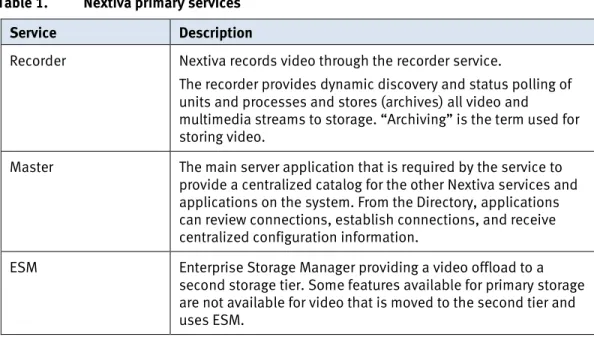
A Verint Nextiva installation can consist of a single server or multiple servers in a hierarchical structure. You can configure Nextiva to manage a few cameras or thousands of cameras. Table 1 describes three primary Nextiva services.
Table 1. Nextiva primary services
Service Description
Recorder Nextiva records video through the recorder service.
The recorder provides dynamic discovery and status polling of units and processes and stores (archives) all video and
multimedia streams to storage. “Archiving” is the term used for storing video.
Master The main server application that is required by the service to provide a centralized catalog for the other Nextiva services and applications on the system. From the Directory, applications can review connections, establish connections, and receive centralized configuration information.
ESM Enterprise Storage Manager providing a video offload to a second storage tier. Some features available for primary storage are not available for video that is moved to the second tier and uses ESM.
1 In this document, “we” represents the EMC Physical Security Lab team that tested and
validated this solution. EMC arrays and
clusters
Storage protocols
9 Configuration Guidelines: EMC Storage for Physical Security
EMC VNX, VNXe, and EMC Isilon with Verint Nextiva White Paper
Sizing the solution
You can use the statistics presented in this document to determine how to size a customer’s environment. The results are based on tests that were conducted in the EMC lab by the EMC Physical Security team.
Use the information in this section to quickly determine the correct storage system based on your customer’s bandwidth requirements. For more detailed information see Configuring the solution on page 12.
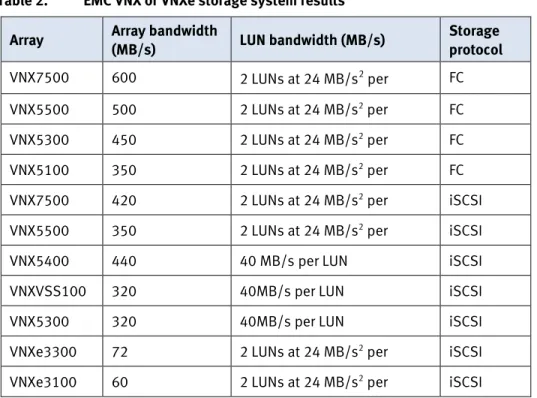
We conducted the tests to determine the maximum bandwidth for the available VNX and VNXe storage systems. The test results shown in Table 2 are based on a
conservative model to ensure constant bandwidth for video traffic that is unaffected during a single node maintenance cycle, disk rebuild, or most other events, which might slow the system or cluster.
Table 2. EMC VNX or VNXe storage system results
Array Array bandwidth
(MB/s) LUN bandwidth (MB/s)
Storage protocol
VNX7500 600 2 LUNs at 24 MB/s2 per FC
VNX5500 500 2 LUNs at 24 MB/s2 per FC
VNX5300 450 2 LUNs at 24 MB/s2 per FC
VNX5100 350 2 LUNs at 24 MB/s2 per FC
VNX7500 420 2 LUNs at 24 MB/s2 per iSCSI
VNX5500 350 2 LUNs at 24 MB/s2 per iSCSI
VNX5400 440 40 MB/s per LUN iSCSI
VNXVSS100 320 40MB/s per LUN iSCSI
VNX5300 320 40MB/s per LUN iSCSI
VNXe3300 72 2 LUNs at 24 MB/s2 per iSCSI
VNXe3100 60 2 LUNs at 24 MB/s2 per iSCSI
The tests results shown in Table 3 are also based on the same conservative model as used for the VNX and VNXe results shown in Table 2.
Table 3. EMC Isilon node and cluster (SMB2) test results
Array Ratio of recorders to nodes Per node bandwidth (MB/s) Maximum recorder bandwidth (MB/s) OneFS version
X400 1:1 40 40 7.1.1.1
2 Nextiva supports true multi-disk load balancing as opposed to round-robin load distribution.
These test were conducted using multi-disk load balancing. EMC VNX and EMC
VNXe
EMC Isilon node and cluster (SMB2)
Configuration Guidelines: EMC Storage for Physical Security
EMC VNX, VNXe, and EMC Isilon with Verint Nextiva White Paper
10 Array
Ratio of recorders to nodes
Per node bandwidth (MB/s)
Maximum recorder
bandwidth (MB/s)
OneFS version
X400 2:1 80 40 7.1.1.1
X400 3:1 120 40 7.1.1.1
X400 4:1 160 40 7.1.1.1
11 Configuration Guidelines: EMC Storage for Physical Security
EMC VNX, VNXe, and EMC Isilon with Verint Nextiva White Paper
Configuring the solution
Design concepts and disclaimers
There are many design options for a Verint Nextiva implementation. Verint offers many training courses related to design and implementation. These design details are beyond the scope of this paper.
Design/Architecture
The Nextiva VMS System Planning Guide provides the information that you need to plan a Nextiva VMS system and complements the Nextiva VMS Customer-Furnished Equipment Guide and the Nextiva VMS Verint-Supplied Equipment Guide.
These guides are intended for systems integrators and architects, network IT
planners, and system administrators. These guides assume that readers know what Nextiva Video Management Software (VMS) does and how it works, and know how to deploy and configure Windows IP networks. These documents are available from a Verint partner or through the Verint Partner network.
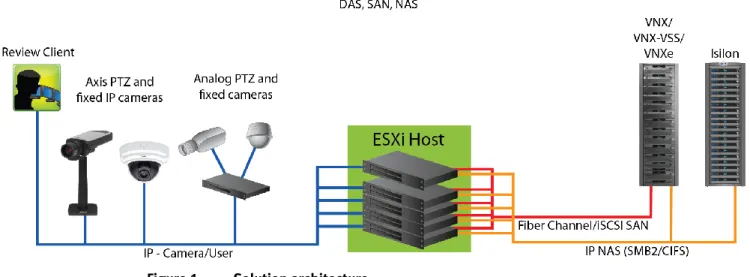
Figure 1 represents the basic configuration that was tested in our lab for this solution. In the Nextiva VMS 6.4 System Planning Guide, Verint recommends a segregated implementation. A common segregated implementation example could consist of a user network, a camera network, and a storage network.
Other considerations covered in the planning guide include multicast, third-party software, ports used by Nextiva, and other important information. This white paper is not intended to replace or supersede any Verint document.
Figure 1. Solution architecture
Design options: Verint Nextiva
Configuration Guidelines: EMC Storage for Physical Security
EMC VNX, VNXe, and EMC Isilon with Verint Nextiva White Paper
12 This section describes best practices for configuring a VNX or VNXe environment for
this solution.
Flash drives (not recommended)
Due to the high percentage of sequential large block writes, we do not recommend the use of flash drives for video storage within a surveillance application.
Disk drives
Although any supported drive will work, video surveillance systems typically rely on the density of the storage system. We recommend NL-SAS drives of the highest available density in this solution. In general, we used terabyte (TB) or multiple TB NL-SAS drives when performing tests.
Storage pools (recommended)
The tests we conducted with Verint Nextiva confirm that storage pools, defined with the maximum allowable number of disks per pool, perform as well as, or better than, traditional RAID groups. Therefore, we recommend that you use storage pools rather than RAID groups. Storage pools also reduce the required storage-system
management tasks.
Building a storage pool is a straightforward process. You can configure either RAID 5 or RAID 6 depending on the VNX family member restrictions and the risk factors that the customer is willing to accept. When configuring storage pools, use large storage pools with large-sized LUNs and configure the LUNs as “thick” instead of “thin." VNXe3100, VNXe3150, VNXe3300 — RAID Configuration
We recommend the following RAID configurations: RAID 5 or RAID 10 with SAS drives
RAID 6 with NL-SAS drives (recommended)
Note: Do not use flash drives. See the Flash drives (not recommended)section. Microsoft iSCSI initiators
We used Microsoft Windows Server 2008 64-bit iSCSI software initiators in this solution.
iSCSI software initiators are 64-bit initiators.
Microsoft Windows Server 2008 R2, or later, supports the iSCSI initiators natively in the operating system (OS).
Notes:
At the time of this publication, we had not tested the Cisco UCS unified adapter iSCSI capabilities.
This solution does not support Microsoft software initiators before Microsoft Windows Server 2008.
13 Configuration Guidelines: EMC Storage for Physical Security
EMC VNX, VNXe, and EMC Isilon with Verint Nextiva White Paper VNX family sizing and configuration
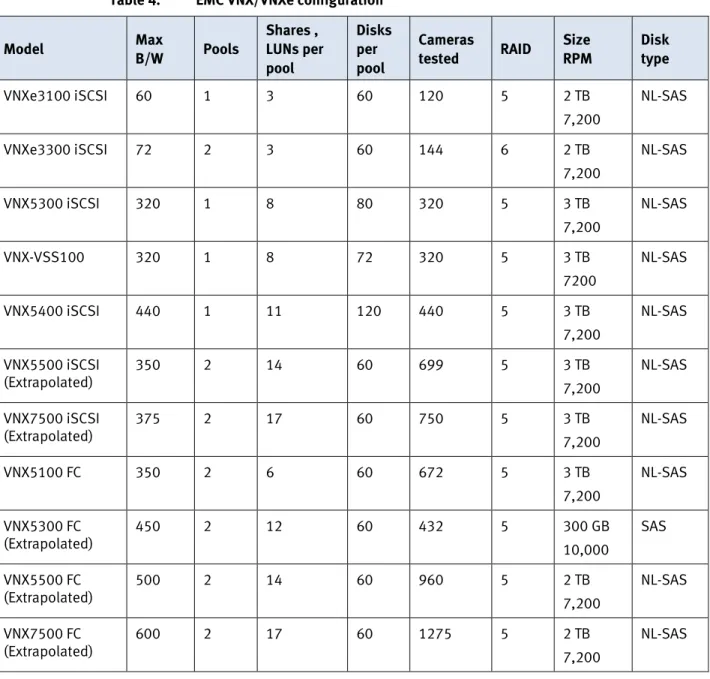
Table 4 presents various measurements taken while testing Nextiva across selected VNX family storage arrays.
Table 4. EMC VNX/VNXe configuration
Model Max B/W Pools
Shares , LUNs per pool Disks per pool Cameras
tested RAID
Size RPM
Disk type
VNXe3100 iSCSI 60 1 3 60 120 5 2 TB
7,200
NL-SAS
VNXe3300 iSCSI 72 2 3 60 144 6 2 TB
7,200
NL-SAS
VNX5300 iSCSI 320 1 8 80 320 5 3 TB
7,200
NL-SAS
VNX-VSS100 320 1 8 72 320 5 3 TB
7200
NL-SAS
VNX5400 iSCSI 440 1 11 120 440 5 3 TB
7,200
NL-SAS VNX5500 iSCSI
(Extrapolated)
350 2 14 60 699 5 3 TB
7,200
NL-SAS VNX7500 iSCSI
(Extrapolated)
375 2 17 60 750 5 3 TB
7,200
NL-SAS
VNX5100 FC 350 2 6 60 672 5 3 TB
7,200
NL-SAS VNX5300 FC
(Extrapolated) 450 2 12 60 432 5 300 GB 10,000 SAS VNX5500 FC
(Extrapolated)
500 2 14 60 960 5 2 TB
7,200
NL-SAS VNX7500 FC
(Extrapolated)
600 2 17 60 1275 5 2 TB
7,200
Configuration Guidelines: EMC Storage for Physical Security
EMC VNX, VNXe, and EMC Isilon with Verint Nextiva White Paper
14 Firmware at time of tests
Table 5 lists the firmware builds used in these tests. Expect equal or better results if you use more recent firmware or newer models of VNX and VNXe storage.
Table 5. Firmware builds
Model Firmware
VNXe3100 VNXe OE 2.1.0.14097 VNXe3300 VNXe OE 2.1.0.14097
VNX5100 VNX OE 5.31.000.5.709
VNX5300 VNX OE 5.32.000.5.206
VNX-VSS100 VNX OE 5.32.000.5.215
VNX5400 VNX OE 5.33.000.5.035
VNX5500 VNX OE 5.31.000.5.709
VNX7500 VNX OE 5.31.000.5.704
Isilon clustered storage system
Isilon designs and develops clustered storage systems specifically to address the needs of storing, managing, and accessing digital content and other unstructured data.
The number of Isilon nodes supported in a cluster is from 3 nodes to 144 nodes. Tests in this document are based on 5-node clusters
Each node is a self-contained, rack-mountable device that contains industry standard hardware, including disk drives, CPU, memory chips, and network interfaces.
Each node is also integrated with the proprietary OneFS operating system, which unifies a cluster of nodes into a single shared resource. The Isilon OneFS file system is a distributed networked file system3.
Nextiva NAS support and NAS specific configuration issues
Verint support for NAS is available starting with Nextiva 6.3 SP2 and Nextiva 6.4 SP1. Contact Verint to determine releases suitable for NAS.
The Verint publication TN1046 NAS Support for Recorders (available through a Verint partner or through the Verint Partner Network) provides NAS specific configurations, limitations, guidelines, and recommendations including the following Nextiva 6.3 SP2 and Nextiva 6.4 SP1 limitations:
Each recorder must reference a unique share name.
The Master Server must have network access to the recorders storage. On a segmented network architecture this implies that the Master Server requires a NIC per network, and/or be on multiple VLANs.
3 Reference: http://en.wikipedia.org/wiki/OneFS_distributed_file_system EMC Isilon (NAS)
15 Configuration Guidelines: EMC Storage for Physical Security
EMC VNX, VNXe, and EMC Isilon with Verint Nextiva White Paper ESM is not supported with NAS as the primary video storage.
Data protection
Isilon OneFS does not rely on hardware-based RAID for data protection.
The Isilon system uses the Reed Solomon algorithm for N+M protection. In the N+M data protection model, N represents the number of nodes, and M represents the number of simultaneous node or drive failures, or a combination of node and drive failures that the cluster can withstand without incurring data loss. N must be larger than M. OneFS supports N+1, N+2:1, N+2, N+3:1, N+3, and N+4 data protection schemes, and up to 8x mirroring.
Protection is applied at the file-level, enabling the cluster to recover data quickly and efficiently. Nodes, directories, and other metadata are protected at the same or higher level as the data blocks they reference. Because the data, metadata, and forward error correction (FEC) blocks are striped across multiple nodes, dedicated parity drives are unnecessary.
The following best practices are based on a recommended five-node minimum cluster size. You can use cluster sizes as small as a three-node cluster, but we do not
recommend this.
We tested at the recommended +2:1 protection level for solutions up to 10 nodes. The best practice for larger clusters is N+2, for up to 60 nodes, and N+3 when there are 60 or more nodes.
To enable recovery of a node failure, or manual node removal, the minimum free space must be equivalent to one complete node plus 20 percent for each node.
If recovery time duration is a concern, you can increase the protection level. Work with your Isilon team to determine the best protection level for the installation.
OneFS 6.5 and greater– Impact Policy
We encourage using OneFS 7.1 or greater. If OneFS 6.5 is used, modify the Impact Policies as explained in the following paragraphs. Avoid using OneFS versions prior to release 6.5 because they have not been tested in the EMC Physical Security lab. When using OneFS 6.5, set all jobs to an Impact Policy of Low. This setting has the following effects:
Reduces the number of background tasks or workers that the cluster allows for each job that runs in parallel
Improves performance in the unlikely event of a node failure or other recovery activities, such as disk rebuilds, because fewer CPU cycles are consumed by background jobs
Lengthens the recovery process
For best I/O performance, configure all background jobs with the Impact Policy set to Low. Do not change the priority of any job from the default setting unless it is
specified in the following sections. This configuration setting is in located at Operations > Jobs and Impact Policies.
Configuration Guidelines: EMC Storage for Physical Security
EMC VNX, VNXe, and EMC Isilon with Verint Nextiva White Paper
16
OneFS 7.1 or greater (recommended)
We recommend that you always use OneFS 7.1 or greater to maximize bandwidth and minimize video review response times. Usually, you can use the default Impact Policy with S200, X200, X400, NL400, and greater.
Priority configuration
Even if the Impact Policy is modified, for example by modifying all jobs to Low, use the default settings for the priority of the jobs.
Best practices for file systems
Cluster size
We recommend a minimum cluster size of five nodes, even if recorders will not be connected to all nodes. For example, if you implement a four node solution,
implement a five-node cluster. This recommendation also meets and, with OneFS 7.0 and greater, exceeds the best practices for data protection.
We recommend a cluster size with one or more additional nodes than calculated in bandwidth sizing, so that failover of a node allows for the redistribution of NAS connections. Include a space calculation of 20% per node overhead, plus one complete node.
Configuring SmartConnect (optional)
For Nextiva, SmartConnect is mostly used to provide failover capability for NAS/SMB connections.
With Verint, SmartConnect simplifies the implementation by allowing the use of a single UNC path for the recorders, versus requiring manual mapping of each node’s IP address in the recorder configuration. SmartConnect also uses DNS load balancing techniques to distribute each recorder’s SMB connections and provide failover capabilities.
SmartConnect Advanced also allows failovers, which reduces the effect of a node failure on video playback. When a node fails, the Microsoft Windows OS will time out the SMB session and then try to reconnect.
SmartConnect load balancing minimizes the loss of connectivity between recorders and Isilon. In our tests, load balancing avoided any loss of video playback for clients; the results of load balancing may vary based on network configuration, host models, and the types of architectures and configurations deployed.
The SMB and SM2 (CIFS) protocols deployed with Microsoft Servers are based on connection-oriented networking. This means that there is a one-to-one connection between the server’s IP address and the IP address on the Isilon that must stay active. Breaking this connection causes the hosts and SMB protocol to negotiate a new connection. This reaction causes some issues with the ability of OneFS to dynamically rebalance the load across the Isilon NIC and Isilon Nodes. We recommend that after any network break, Nextiva server restart, power outage, or node related event, you should verify that the Nextiva servers are evenly distributed across the Isilon Nodes used for this application.
To verify the load distribution on OneFS 7.0 and OneFS 7.1, you can browse to the Connection Graphical Summary from the OneFS dashboard. Find the summary in the
17 Configuration Guidelines: EMC Storage for Physical Security
EMC VNX, VNXe, and EMC Isilon with Verint Nextiva White Paper Cluster Overview panel under the Cluster Status tab. Select Client Connections to display a detailed view of the connection distribution.
To configure SmartConnect from Cluster Management:
1. Select Networking Configuration.
2. In Subnet Settings, set the SmartConnect IP address (SSIP). This is the IP address that is configured in a DNS Server as the authorative name server for the Isilon Cluster DNS name, such as videoarchive.acme.com.
3. In Pool settings:
a. Type the SmartConnect zone name to which clients will connect.
b. Select the SmartConnect subnet that has the SSIP configured on the DNS Server.
4. Set the IP failover policy.
a. Set the Connection Count policy if the cluster is used strictly for video storage.
This policy distributes IP connections evenly across all the active NICs. IP connections include not only Nextiva Recorders, but management workstations logged into the Isilon cluster, Isilon InsightIQ, or any other system that uses the cluster.
If the cluster is used for non-Nextiva storage access, use throughput instead of the connection count.
b. Select Throughput policy when Connection Count cannot be used. Because throughput policy is based on point-in-time load, we
recommend that you bring one recorder online at a time. Each recorder should include a full complement of cameras, although a minimum of one camera could be used.
After the initial load balancing, recorders are distributed more evenly across the NICs.
5. Set the IP Allocation strategy to Static.
Figure 2 shows the Static setting for the IP allocation method. This setting maintains the IP address for NIC pairing.
Configuration Guidelines: EMC Storage for Physical Security
EMC VNX, VNXe, and EMC Isilon with Verint Nextiva White Paper
18
Figure 2. Configuring SmartConnect
Configuring SmartQuotas (recommended)
SmartQuotas enables administrators to limit storage for each Verint Recorder. When correctly configured, SmartQuotas presents available storage to the
recorder based on the assigned quota. The assigned quota has the appearance of a dedicated disk or LUN.
Without SmartQuotas, the Nextiva administrator must anticipate the total write rate to the cluster and adjust the Min Free Space field on each recorder
accordingly. A miscalculation could result in lost video for the misconfigured recorder and affect other recorders on the cluster.
Enable SmartQuotas with a quota defined for each share.
To configure SmartQuotas from File System Management, select the SmartQuotas tab and perform the following steps:
1. Set the hard threshold to the recorder video file share limit.
2. Set OneFS to display the available space as the size of the hard threshold.
3. Set the usage calculation method to display the user data only.
Verint Nextiva Recorders can write to NAS storage with any user account that has write permission. When configuring storage, Verint Nextiva Control Center prompts for user credentials. Provide the credentials of a user who has write permission to NAS storage. The user can be an Isilon local user or a user of the domain to which the Isilon cluster is attached. TN1046 NAS Support for Recorders provides more information about NAS write permissions.
After you configure the Isilon cluster with the NAS share and user account, follow the instruction in the “Editing a NAS Location” section of TN1046 NAS Support for Recorders.
NAS Write Permissions
19 Configuration Guidelines: EMC Storage for Physical Security
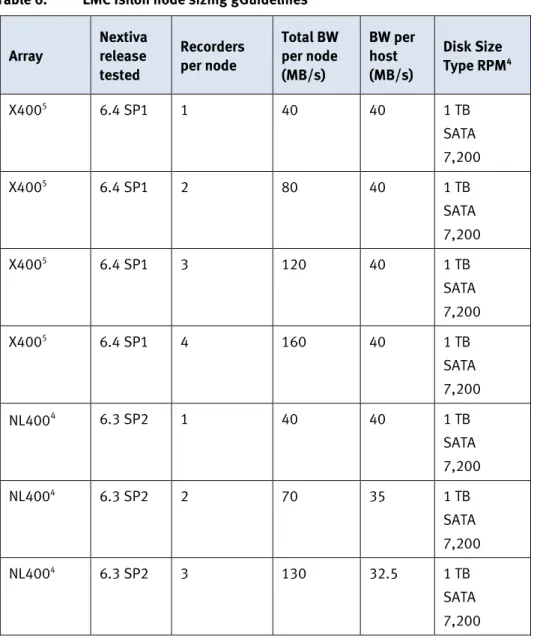
EMC VNX, VNXe, and EMC Isilon with Verint Nextiva White Paper Table 6 provides sizing guidelines based on EMC and Verint test results.
Consider the NIC bit rate of the NICs in both the Isilon nodes and the recording servers for accurate sizing calculations. Use 1 Gigabit Ethernet (GigE) or 10 Gigabit Ethernet (10GE). Recorders that use low speed NICs, such as 10BaseT (10Mb/s) or Fast Ethernet (100Mb/s) are not supported by Verint and are outside the scope of our tests.
When testing Isilon storage we primarily used a single 10 Gigabit Ethernet (10GE) interface per node for test results with more than two recorders. With OneFS 7.0 and higher, a single GigE interface was shown to support two
recording servers at the same load specification as 10GE. We suggest targeting lower per node bandwidth if GigE is utilized.
Table 6. EMC Isilon node sizing gGuidelines
Array Nextiva release tested Recorders per node Total BW per node (MB/s) BW per host (MB/s) Disk Size
Type RPM4
X4005 6.4 SP1 1 40 40 1 TB
SATA 7,200
X4005 6.4 SP1 2 80 40 1 TB
SATA 7,200
X4005 6.4 SP1 3 120 40 1 TB
SATA 7,200
X4005 6.4 SP1 4 160 40 1 TB
SATA 7,200
NL4004 6.3 SP2 1 40 40 1 TB
SATA 7,200
NL4004 6.3 SP2 2 70 35 1 TB
SATA 7,200
NL4004 6.3 SP2 3 130 32.5 1 TB
SATA 7,200
4 OneFS 7.1.0 used for this test Isilon sizing
Configuration Guidelines: EMC Storage for Physical Security
EMC VNX, VNXe, and EMC Isilon with Verint Nextiva White Paper
21 Configuration Guidelines: EMC Storage for Physical Security
EMC VNX, VNXe, and EMC Isilon with Verint Nextiva White Paper Nextiva
Refer to the Nextiva installation guide for the selected VMS version for the definitive minimum and recommended hardware specifications.
Different Nextiva server types have different hardware specifications that include the processor speed and type, memory specification based on the processor, storage concerns, and Ethernet NICs. Refer to the Nextiva installation guide for the VMS version you are implementing for software and operating system requirements. VMware ESX/ESXi
VMware vSphere minimum system requirements are as follows: VMware ESX/ESXi 4.0 or later
Four-core 1.99 GHz processors or greater.
6 GB of memory for each vSphere guest running an Nextiva server EMC PowerPath® for block storage (FC and iSCSI)
For a list of compatible hardware, refer to the VMware Compatibility Guide. Recommended vCPU, memory, and network
Our test environment had the following configuration: VMware ESXi 5.1 Update 1 or ESXi 5.5
20-core ESXi host at 2.2 GHz or greater 128 GB or greater memory per ESXi 5.1 host Each virtualized Verint host featured:
8 virtual CPUs (vCPU) 8 GB memory
Network adapter type: VMXNET3 Private VLAN for storage if not FC Dedicated vNIC for storage
This recommended ESXi virtual machine (VM) configuration provides a full-time review of 10 to 20 percent of the archived video files.
Storage adapter requirements For storage adapters:
All storage adapters must be VMware certified.
If used, FC/iSCSI adapters must be VMware and EMC certified. Table 7 shows the requirements for each of the storage types. Minimum
Requirements and Recommendations
Configuration Guidelines: EMC Storage for Physical Security
EMC VNX, VNXe, and EMC Isilon with Verint Nextiva White Paper
22
Table 7. Storage requirements
Storage type Requirements
Datastore DAS or SAN devices
A minimum of 80 GB for each VM Video
storage
SAN devices with unpartitioned space (VMware RAW):
FC-attached
iSCSI-attached
NAS-attached CIFS
23 Configuration Guidelines: EMC Storage for Physical Security
EMC VNX, VNXe, and EMC Isilon with Verint Nextiva White Paper
Testing and validation
Many factors should be taken into account when designing your solution. The EMC lab tests focus on storage-related factors with the following objectives:
Determine the bandwidth for various EMC storage systems and clusters with FC, iSCSI, and NAS (SMB2).
Determine the configuration parameters for EMC Isilon, EMC VNX, VNXe, and LenovoEMC storage.
Determine the optimal video storage performance requirements for Isilon Scale-Out storage clusters based on various failure scenarios.
Determine optimal performance requirements for use with VNX and VNXe storage arrays based on various failure scenarios.
Determine the maximum bandwidth with multiple recorders.
The following test parameters were used for performing tests of Verint Nextiva: Tests were conducted by loading each recorder at the maximum recommended
bandwidth of 40 MB/s Various per 4 CIF or H.264 (1080P) camera bandwidths were used.
Note: 40 MB/s (320 Mb/s) is the minimum recommended bandwidth.
All test measurements were based on active failure scenarios. Failure scenarios include drive failures and recovery, forced Isilon node failures, and storage processor failures. These scenarios generally caused background jobs to run, such as Isilon’s FlexProtect. Testing with these realistic scenarios helps ensure a successful implementation that is able to withstand various types of failures. The IP network is a flat (Layer 2), high availability network with plenty of
capacity, which allowed us to focus on the products we were testing. All tests assumed uniform distribution of bandwidth from the Nextiva
Recorders. Overview
The storage bandwidth test evaluated video storage and applications with a number of different EMC storage systems and nodes. Additional tests evaluated ESXi host hardware in relationship to vCPU settings and the resulting bandwidths.
These tests assumed that Verint Nextiva was configured as described by Verint’s best practices and operated within the recommended bandwidth, camera count, and other Verint maximum requirements.
Test procedure
To test the storage bandwidth and configuration, we performed the following:
1. Configured the video storage for an EMC storage system or cluster. Test objectives
Testing Parameters
Storage bandwidth and configuration test
Configuration Guidelines: EMC Storage for Physical Security
EMC VNX, VNXe, and EMC Isilon with Verint Nextiva White Paper
24
2. Configured Verint Recorders for the storage protocol to be tested (FC, iSCSI, SMB2).
3. Set up camera simulators (traffic generators) to produce a traffic load to each Verint Recorder at the recommended bandwidth.
4. Verified that motion detection was set to On for all cameras.
5. Evaluated the network and video storage to ensure an error-free environment at the induced bandwidth.
6. Introduced storage device errors, including:
Disk failures and rebuilds on VNX, VNXe, and Isilon nodes
The use of only one VNX or VNXe storage processor
Initiation of Isilon node failures and recoveries
Initiation of Isilon node removals (downsizing a cluster)
Initiation of Isilon node additions (scaling up)
7. Captured the storage system or cluster and host statistics.
8. Based on the test results:
a. If no issues were detected, incremented the bandwidth. Or if issues were detected, decremented the bandwidth.
b. Repeated previous step until the maximum, error-free, bandwidth was reached.
25 Configuration Guidelines: EMC Storage for Physical Security
EMC VNX, VNXe, and EMC Isilon with Verint Nextiva White Paper
Conclusion
We performed comprehensive testing with Verint Nextiva on a large number of EMC VNX and VNXe arrays and EMC Isilon clusters.
Depending on a customer’s requirements, you can use EMC VNX, EMC Isilon, or LenovoEMC storage systems with Verint Nextiva for this solution. The Verint architecture and product suite enables scaling from a few cameras up to tens of thousands of cameras with this solution.
EMC VNX arrays
As compared to traditional block-level storage, the use of storage pools to create LUNs within the EMC VNX storage systems greatly simplifies the configuration and increases performance. Either iSCSI or FC can be implemented for this solution. However, FC performs better than iSCSI.
EMC VNX-VSS arrays
The VNX Video Surveillance Storage (VSS) is a storage solution that is purpose built to meet the unique demands of the video surveillance environment.
We found that this high availability, low cost array performs comparable to other arrays in the VNX family.
EMC VNXe arrays
The iSCSI-connected VNXe, implemented with storage pools, provides a cost-effective implementation while maintaining expected performance levels. VNXe may be used in many midsized deployments.
A NAS-connected VNXe may be used in low bandwidth implementations. EMC Isilon scale-out storage
EMC Isilon scale-out storage is ideal for midtier customers and larger. An Isilon cluster is based on independent nodes working seamlessly together to present a single file system to all users.
Licensed SmartQuota options can be configured so each Recorder view of the storage is based on the assigned quota and not the entire file system. In our tests, we found this feature to be imperative for guaranteeing a successful disk rebuild and for various node removal tests. We recommend using SmartQuota.
The SmartConnect option can be configured to balance the load seamlessly across all nodes and leverage the existing DNS environment.
Summary