Programming
Web Applications
with Node,
Express and Pug
—
Programming Web
Applications with Node,
Express and Pug
Programming Web Applications with Node, Express and Pug Jörg Krause
Berlin, Germany
ISBN-13 (pbk): 978-1-4842-2510-3 ISBN-13 (electronic): 978-1-4842-2511-0 DOI 10.1007/978-1-4842-2511-0
Library of Congress Control Number: 2016961762 Copyright © 2017 by Jörg Krause
This work is subject to copyright. All rights are reserved by the Publisher, whether the whole or part of the material is concerned, specifically the rights of translation, reprinting, reuse of illustrations, recitation,
broadcasting, reproduction on microfilms or in any other physical way, and transmission or information storage and retrieval, electronic adaptation, computer software, or by similar or dissimilar methodology now known or hereafter developed.
Trademarked names, logos, and images may appear in this book. Rather than use a trademark symbol with every occurrence of a trademarked name, logo, or image we use the names, logos, and images only in an editorial fashion and to the benefit of the trademark owner, with no intention of infringement of the trademark. The use in this publication of trade names, trademarks, service marks, and similar terms, even if they are not identified as such, is not to be taken as an expression of opinion as to whether or not they are subject to proprietary rights.
While the advice and information in this book are believed to be true and accurate at the date of publication, neither the authors nor the editors nor the publisher can accept any legal responsibility for any errors or omissions that may be made. The publisher makes no warranty, express or implied, with respect to the material contained herein.
Managing Director: Welmoed Spahr Acquisitions Editor: Louise Corrigan
Editorial Board: Steve Anglin, Pramila Balan, Laura Berendson, Aaron Black, Louise Corrigan, Jonathan Gennick, Todd Green, Robert Hutchinson, Celestin Suresh John, Nikhil Karkal, James Markham, Susan McDermott, Matthew Moodie, Natalie Pao, Gwenan Spearing Coordinating Editor: Nancy Chen
Copy Editor: Larissa Shmailo Compositor: SPi Global Indexer: SPi Global Artist: SPi Global
Distributed to the book trade worldwide by Springer Science+Business Media New York,
233 Spring Street, 6th Floor, New York, NY 10013. Phone 1-800-SPRINGER, fax (201) 348-4505, e-mail [email protected], or visit www.springer.com. Apress Media, LLC is a California LLC and the sole member (owner) is Springer Science + Business Media Finance Inc (SSBM Finance Inc). SSBM Finance Inc is a Delaware corporation.
For information on translations, please e-mail [email protected], or visit www.apress.com.
Apress and friends of ED books may be purchased in bulk for academic, corporate, or promotional use. eBook versions and licenses are also available for most titles. For more information, reference our Special Bulk Sales–eBook Licensing web page at www.apress.com/bulk-sales.
Any source code or other supplementary materials referenced by the author in this text are available to readers at www.apress.com. For detailed information about how to locate your book’s source code, go to www.apress.com/source-code/. Readers can also access source code at SpringerLink in the Supplementary Material section for each chapter.
iii
Contents at a Glance
About the Author ��������������������������������������������������������������������������������������������������� xiii
Introduction �������������������������������������������������������������������������������������������������������������xv
Foreword ���������������������������������������������������������������������������������������������������������������xvii
■
Chapter 1: Installation Problems ��������������������������������������������������������������������������� 1
■
Chapter 2: The Components of an Application ������������������������������������������������������ 9
■
Chapter 3: Introduction to Node �������������������������������������������������������������������������� 15
■
Chapter 4: The Most Important Node Modules ���������������������������������������������������� 47
■
Chapter 5: Introduction to Express ���������������������������������������������������������������������� 71
■
Chapter 6: Introduction to Pug ���������������������������������������������������������������������������� 81
■
Chapter 7: Language Components of Pug������������������������������������������������������������ 89
■
Chapter 8: The Pug Command Line�������������������������������������������������������������������� 115
Appendix ��������������������������������������������������������������������������������������������������������������� 117
Index ��������������������������������������������������������������������������������������������������������������������� 195
v
Contents
About the Author ��������������������������������������������������������������������������������������������������� xiii
Introduction �������������������������������������������������������������������������������������������������������������xv
Foreword ���������������������������������������������������������������������������������������������������������������xvii
■
Chapter 1: Installation Problems ��������������������������������������������������������������������������� 1
Node.Js... 1
Problems with NPM ... 1
Proxy ... 1
SSL ... 2
Problems with Git ... 2
Proxy ... 4 Git protocols ... 5
Online installation ... 5
Preparation ... 5 Hard cases ... 5 Installing NpmBox ... 7 Installing Packages ... 7■
Chapter 2: The Components of an Application ������������������������������������������������������ 9
The Package Manager ... 9
Libraries and Frameworks ... 10
Basis Libraries of the Server ... 10
Client Page Libraries ... 10
vi
Principles... 11
Web Apps ... 11
Web sites ... 11
Stateless HTML ... 11
The User Experience ... 12
Summary ... 13
■
Chapter 3: Introduction to Node �������������������������������������������������������������������������� 15
Elementary in JavaScript ... 15
Installation and Configuration ... 16
Configuration in package.json ... 16
Initialize the Node Application ... 16
Approach under Linux ... 17
Start a Node Application ... 17
The first Application ... 19
Packages ... 20
Install Packages ... 20
Provide a Server Application ... 21
The simplest Server ... 22
A Server with Express ... 23
Handling Requests ... 23
Introduction to Routing ... 24
Architecture of the Application ... 27
Synchronous and Asynchronous Calls... 30
Dynamic HTML ... 32
Sending HTML Files ... 33
Restriction of Verbs ... 34
Handling Form Data ... 35
■ Contents
vii
The complete Application ... 40
The Application server.js ... 41
The Starting Script start.js ... 41
The Routing Functions router.js ... 43
The Business Logic handler.js ... 43
Template of the HTML Page home.html ... 45
Summary ... 46
■
Chapter 4: The Most Important Node Modules ���������������������������������������������������� 47
Global Modules ... 47
Timer ... 47 Global Objects ... 48HTTP and HTTPS ... 50
Basics ... 50 Fields ... 51 Methods ... 51 Classes ... 53 Class http.ClientRequest ... 57 HTTPS ... 62Handling Files and Paths ... 64
Access to the File System ... 64
Functions for the File Access ... 66
Functions for handling Streams ... 69
■
Chapter 5: Introduction to Express ���������������������������������������������������������������������� 71
Installation ... 71
Application structure ... 72
The express generator ... 73
LESS or SASS ... 73
Routing in Node application ... 75
Routing in Express ... 75
viii
An example application ... 75
Middleware – the mediator layer... 76
Basic routes ... 76
The Router Middleware (router.use()) ... 77
Structure Routes ... 78
Routes with Parameters (/hello/:id) ... 78
Router Middleware for Parameters (.param) ... 79
Several Routes (app.route()) ... 80
■
Chapter 6: Introduction to Pug ���������������������������������������������������������������������������� 81
Overview ... 81
Preparation ... 81
Application structure ... 83
Pug
views ... 84
Handling Partial Views ... 85
Handling Layout Pages ... 85
npm start ... 86
■
Chapter 7: Language Components of Pug������������������������������������������������������������ 89
Doctype ... 89
Short Spellings ... 89
Own Doctypes ... 90
Options ... 90
Attributes ... 91
Not coded Attribute ... 92
Logical Attributes ... 92
Style Attributes ... 93
& Attributes ... 93
Handling CSS Classes ... 94
The Class Attribute ... 94
The Class Literal ... 95
■ Contents
ix
Instructions ... 95
Definition by Cases (case) ... 96
Conditions (if) ... 97
Iterations... 97
JavaScript Code ... 99
Unbuffered Codes ... 99
Buffered Codes ... 99
Buffered and not coded Codes ... 99
Unbuffered Codes ... 100
Buffered Code ... 100
Buffered and not coded Codes ... 101
Comments ... 101
Comment Blocks ... 102
Caused Comments ... 102
Inherit from Templates ... 102
Detail for inherting Templates ... 103
Prepend and append Content Blocks... 105
Filter ... 105
Partial Pages ... 106
Merge Text ... 107
Combination of Filters and Partial Pages... 108
Interpolations ... 108
Coded Character String Interpolation ... 109
Not Coded String Interpolation ... 109
Tag Interpolation ... 110
Mixins (Functions) ... 110
Mixin Blocks ... 111
Mixin Attributes ... 112
x
Handling Text ... 113
Connect Text ... 113 Inline in Tag ... 113 Block in Tag ... 113 Handling Tags ... 114 Extension of Blocks ... 114 Self-Closing Tags ... 114■
Chapter 8: The Pug Command Line�������������������������������������������������������������������� 115
Installing the Command Line ... 115
Use and Options ... 115
Sample Applications for the Command Line ... 116
Appendix ��������������������������������������������������������������������������������������������������������������� 117
Configuration of the file package.json ... 117
Meaning of the Configuration Elements ... 117
description ... 118
The Default Values ... 125
Brief description ... 126
Reference Node.js Modules ... 126
HTTP ... 126 Global ... 130 Console ... 130 Timer ... 131 Module ... 132 Process ... 132 ChildProcess ... 135 Util ... 135 Events ... 136 Stream ... 137 File System ... 138
■ Contents xi Path ... 141 URL ... 142 Querystring ... 142 Assert ... 142 OS ... 143 Buffer ... 144
The API Reference for Express ... 145
Das Basic Objekt... 145
The application ... 147
Request–The Request Object ... 164
Methods ... 168
Response–The Answer Object ... 170
The API of the Router ... 181
The Router in Detail ... 181
Methods ... 182
Further libraries ... 186
Namespace Based Routing ... 186
Resource-Based Routing ... 188
The Pug API ... 190
API Options ... 190
API Functions ... 191
xiii
About the Author
Jörg Krause has been working with software and software technology since the early 1980’s, beginning with a ZX 81 and taking his first steps as a programmer in BASIC and assembly language. He studied Information Technology at Humboldt University, Berlin but left early, in the 90’s, to start his own company. He has worked with Internet Technology and software development since the early days when CompuServe and FidoNet dominated. He’s been with Microsoft technologies and software since Windows 95.
In 1998, he worked on one of the first commercial e-commerce solutions, and wrote his first book in Germany, E-Commerce and Online Marketing, published by Carl Hanser Verlag, Munich. Due to its wide success, he started working as a freelance consultant and author in order to share his experience and knowledge with others. He has written several books for Apress, Hanser, Addison Wesley and other major publishers along with several self-published books—a total of over sixty titles. He also publishes articles in magazines and speaks at major conferences in Germany. Currently, Jörg works as an independent consultant, software developer, and author in Berlin, Germany.
In his occasional spare time, Jörg enjoys reading thrillers and science fiction novels, and going on a round of golf.
xv
Introduction
Node.js is a programming environment based on JavaScript. It’s mainly used for web application
development, but not restricted to same. In conjunction with the Node Package Manager (npm), it provides a powerful environment to create platform-independent applications.
This book shows the basic parts you need to create a web application. Apart from Node itself, this includes the middleware framework Express and the template language Pug (formerly known as JADE).
The content presents Node in its elementary form, shows the programming of a simple web application, and explains the major modules. In the same style, Express and Pug are explained. The client does not have any particular role in this book. The pages served by the examples are plain HTML.
Foreword
Node.js is one of the most fascinating software environments of recent years. Today it’s in version v6.x, a quite mature version. There are two lines: one with Long Term Support (LTS) currently in version 4.x, and the one with the most recent features in version 6.x. The version 6.x has updates quite often, sometimes weekly.
It’s necessary to have a well-known language to create web applications instead of inventing just another language all the time. Think of the history of Perl, PHP, Java, Ruby, C in all it derivates, and many more. The final answer might be JavaScript.
The foundation of JavaScript on the server is the V8 engine from Chrome browser that has been extracted and made available as an executable. And it is available on all platforms, finally.
For developers with a strong background in traditional object-oriented languages such as C# or Java, it might sound odd that JavaScript has such a tremendous impact and success. It’s a weird mixture of a very simple language and a very rich and quickly expanding ecosystem.
This Book
All codes from the book are available on Github for easy testing and download.
The book is very focused on the first steps and easy examples. There is almost no advanced code and the reference parts contain only those functions required to execute a web application. The purpose is to have all this information handy in one place instead of flipping through hundreds of online sources.
The combination of Node, Express, and Pug is well-tested and the versions used here work together smoothly. There s no support for other software modules and other version combinations.
Who Should Read This Book?
This book is aimed at beginners and web developers who are new to the web world. Node serves mainly the back-end developer. Maybe you are also a web designer, who discovered Node as an excellent way to upgrade your web pages with dynamic elements.
In any case, I tried not to ask any prerequisites or conditions of the reader. You do not need to be a computer scientist, nor in perfect command of language. You don’t need to know rocket science. No matter what context you have encountered on Jade, you will be able to read this text.
What You Need In order to understand all examples, you need a working environment for creating web pages. that can be a Windows, a Linux, or even a Mac. It’s possible to use any text editor to get the stuff running, but I recommend you use one with a little support while typing the stuff. Check editors such as Visual studio Code or sublime text.
■ ForeWord
xviii
If you have accidentally found this text and cannot do anything with the term “Bootstrap,” read it anyway. You will be learning one of the most modern techniques of web development, and the future belongs to the circle of excellent developers who can be build good-looking and device-independent sites.
Examples
You can find the sample project to this book on Github:
• https://github.com/joergkrause/NodejsExpressPug-Book
As You Read This Text
I will not dictate how you should read this text. In the first draft of the structure, I have tried several variations and found that there exists no ideal form. However, readers tend today to consume smaller chunks,
independent chapters, and focused content. This book addresses this trend by reducing content to small, focused chunks, with no extraneous material.
Beginners should read the text as a narrative from the first to the last page. Those who are already somewhat familiar can safely skip certain sections.
Conventions Used in the Book
The theme is not technically easy to master, because scripts are often too extensive and it would be nice if you could support the best optical reading form. I have therefore included extra line breaks used to aid readability. In general, each program code is set to a non-proportional font. In addition, scripts have line numbers: 1 function send(){
2 // do some stuff here
3 }
If you find you need to enter something in the prompt or in a dialog box, this part of the statement is in bold:
$ bower install bootstrap
The first character is the prompt and is not entered. I use the Linux prompt and the bash shell in the book. The commands will work, without any exception, unchanged even on Windows. The only difference then is the command prompt C:> or something similar at the beginning of the line. Usually the instructions are related to relative paths or no paths at all, so the actual prompt shouldn’t matter despite the fact that you will be in your working folder.
Expressions and command lines are sometimes peppered with all types of characters, and in almost all cases, it depends on each character. Often, I’ll discuss the use of certain characters in precisely such an expression, then the “important” characters with line breaks alone, and also—in this case—line numbers. Line numbers are used to reference the affected symbol in the text exactly (note the : character in line 2): 1 a.test {
2 :hover { 3 color: red 4 }
xix The font is non-proportional, so that the characters are countable and opening and closing parentheses are always among themselves.
Symbols
To facilitate the orientation in the search for a solution, there is a whole range of symbols that are used in the text.
Tip this is a tip.
Information this is an information. Warning this is a warning.
There are no questionnaires, exercises, or self-tests. It’s just a reference, an easy-to-read text to get you on your way.
1
© Jörg Krause 2017
J. Krause, Programming Web Applications with Node, Express and Pug, DOI 10.1007/978-1-4842-2511-0_1
CHAPTER 1
Installation Problems
All instructions, which you find on the Internet about Node, NPM and other modules presuppose one thing: transparent Internet access—which at first sight is worth hardly a mention. Indeed, it represents a problem for many users. Not for the lack of Internet, but for the restrictions in enterprise networks.
Node.Js
Node itself stands as an installation package of choice and can also be installed without the Internet. Since NPM is included, it works just fine online, too. All further components of the application, like Express and Pug, can be installed with npm.
Problems with NPM
It’s possible that npm can’t access the Internet the way you expect it. This can be because of missing SSL support or local proxy servers.
Proxy
You can instruct npm to use a proxy server:
1 npm config set proxy http://proxy.company.com:8080 -g
2 npm config set https-proxy http://proxy.company.com:8080 -g
The option -g stops the changes globally. Otherwise, it is only valid for the current project and it must be located in the same folder, where a file called .npmrc exists. If this is missing, you’ll place it there, which is perhaps senseless if you don’t plan on using further npm commands.
If a username and a password are necessary, it might looks as follows:
1 npm config set proxy http://domain%5Cuser:pass@host:port Special characters must become URL encoded here:
• ” -> %22
• @ -> %40
• : -> %3A
2
SSL
Access to the Repository is standard. Go around this as follows:
1 npm config set strict-ssl false
2 npm config set registry "http://registry.npmjs.org/"
Perhaps this combination with the installation procedure can help:
1 npm --proxy http://<user>:<pwd>@<proxy>:<port> 2 --without-ssl
3 --insecure
4 -g install <paketname>
Problems with Git
Git is needed if you fetch packages via Bower or over direct connections from Github. There are two hurdles in enterprise networks:
• A local Proxy is used.
• The protocol git:// is blocked. (That is a moniker for a special port.)
Many administrators are of the opinion that HTTP and port 80 are enough. However, we developers want more. Thus, Git must be configured accordingly.
You receive the local Git installation under Linux as follows:
$ sudo apt-get install git
Under Windows you should use an installer, which can also bring along a Shell, which contains a part of the not-local function. One does not have to switch a lot mentally, and can invariably use most Linux commands this way.
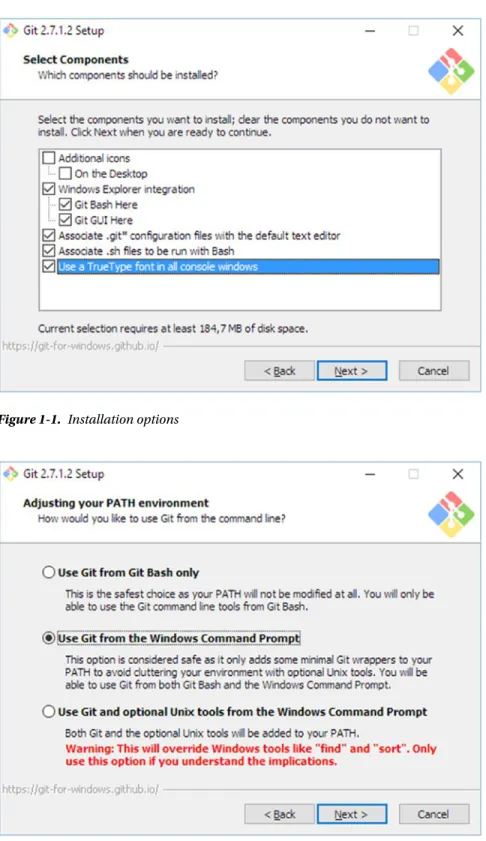
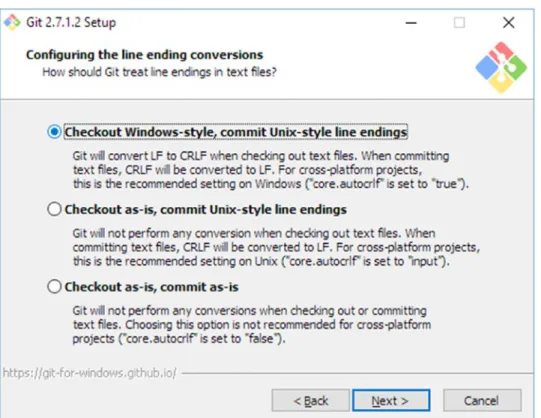
Here you find the suitable package: https://git-scm.com/download/win Configure the options as shown on the following screens:
Chapter 1 ■ InstallatIon problems
3 Figure 1-1. Installation options
4
Leave all other options unchanged.
The installation for Windows comprehensively has no graphic surface. This must be procured separately. In the long run, however, the command line is the better and faster way.
Proxy
In order to use a proxy, you enter the following command (in a line):
1 git config 2 --global 3 http.proxy
4 http://<proxyuser>:<proxypwd>@<proxy.server.com>:<port>
Replace the place holders with suitable values. <proxyuser> and <proxywd> are only necessary if the Proxy requires an authentication. The other placeholders mark the proxy.
Chapter 1 ■ InstallatIon problems
5
Git protocols
With the following command (again in a line) you can switch to https:
1 git config 2 --global
3 url."https://<username>@".insteadOf git://
The placeholder <username> marks a private Repository in Git. The quotation marks protect the name in the case of blanks:
You can omit the value for the glocal access completely and instead use Github:
1 git config 2 --global
3 url.https://github.com/.insteadOf git://
Online installation
Even if the information of a proxy is not sufficient, the online access remains. The classic way thereby exists in downloading an installation package and the local installation. For Windows users, those are the MSI packages; for Linux users, it’s usually DEB packages (Debian, Ubuntu, Mint, etc.) or RPM packages (Suse, Fedora, RedHat, etc.).
However, NPM packages are not part of package collections, but instructions over source and dependence. With the installation, the specified fragments from the Internet are downloaded.
Preparation
The dependence of an Internet connection can’t fundamentally be absolutely avoided. But it is sufficient to have “other” machines with Internet access. They can use a detour. That can be done for individual packages anyway, but many packages have dozens of hundreds of dependences, sometimes over several stages. Here it is meaningful to have something automatic.
The solution is the package npmbox. It consists of two command line tools: npmbox for downloading and packing, and npmunbox for unpacking. If you can receive brief access to the Internet on the search machine, install npmbox there. It simplifies handling substantially. Even if that cannot be done, you find more instructions for hard cases below.
First you install npmbox on the source machine with Internet access:
npm install npmbox -g
In order to check if it worked, you enter the following command:
npmbox --help
You receive a quick guide of a very simple tool.
Hard cases
So that you can access npmbox on the desired machine, you must package it yourself. That is a kind of recursive approach—npmbox packs itself:
6
The result is a file with the file extension .npmbox.
Copy the file on the desired machine. The package is a so-called tarball. npm can directly go around Tar und usually needs no other software. If you packed something before with npmbox, you need npmunbox
for unpacking.
Access to Tar
Tarball
Tar is an archives software. The name comes from “Tape of archives” (archiving on tape drive). In order to store data on volumes, one combines many small files into a large file. Contrary to ZIP, TAR is a pure combination method, which does thereby becomes a compressed file. The format receives the original meta data of the files, such as rights and link information. You can find more on Wikipedia:
https://en.wikipedia.org/wiki/Tar_(computing)
On Linux, tar is a standard device which is always available.
tar -xvf yourfile.tar
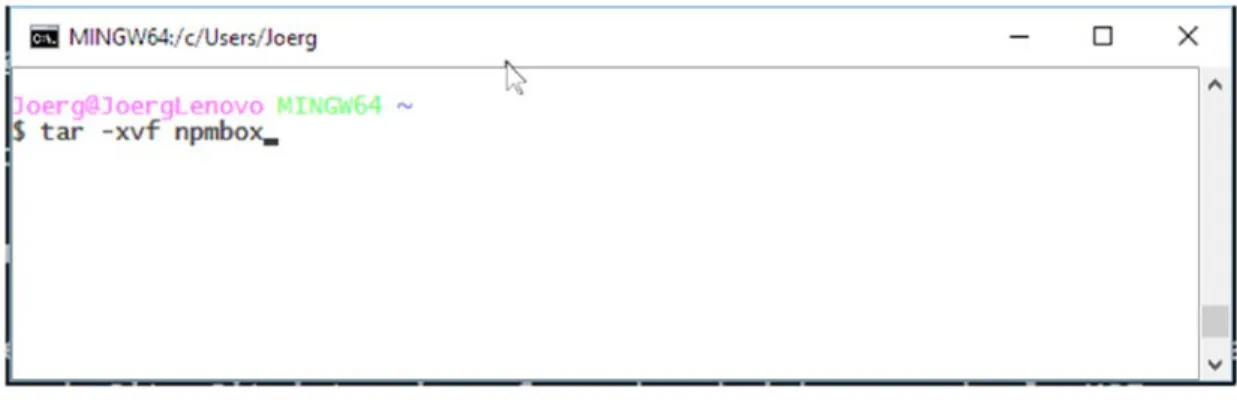
On Windows, there are several options. To the standard environments, which are used in Node installations, Git shall be included. Git is available at first as described, but also as MSI. The installer comes with a rudimentary BASH Shell. This cannot do everything as under Linux, but it can use tar. Open Bash Shell under Windows and then use the same command:
$tar -xvf yourfile.tar
Figure 1-4. Bash with tar command on Windows