Cisco Catalyst 3850 Switch
Services Guide
April 2013
Contents
Overview ... 3
Cisco Catalyst 3850 Security Policy... 3
Configuring 802.1X in Converged Access ... 3
802.1X Configuration for Wired Users ... 5
802.1X Configuration for Wireless Users ... 6
Downloadable Access Control List ... 8
Access Control List Deployment Considerations ... 9
Cisco Catalyst 3850 Quality of Service ... 10
Wired Quality of Service... 10
Cisco Catalyst 3850 Trust Behavior ... 10
Configuring Ingress Quality of Service ... 11
Egress Quality of Service ... 14
Wireless Quality of Service ... 15
Wireless Targets ... 15
Wireless: Ingress Quality of Service ... 16
Ingress Marking and Policing on Wireless Client... 16
Ingress Policies on WLAN/SSID... 18
Wireless: Egress Quality of Service ... 19
Policy on Access Point/Port ... 19
Policy on Radio ... 21
Policy on Service Set Identification ... 22
Client ... 23
Flexible NetFlow ... 23
Cisco Catalyst 3850 NetFlow Architecture (Wired and Wireless) ... 24
NetFlow Cisco Catalyst 3850 Overview ... 24
NetFlow Configuration on Cisco Catalyst 3850 Switch ... 24
Flow Record ... 24
Exporter/Collector Information ... 25
Flow Monitor ... 25
Attaching a Flow Monitor to Supported Port Types ... 26
Flexible NetFlow Outputs ... 27
Multicast Overview (Traditional and Converged Multicast) ... 30
Restrictions of IP Multicast Routing Configuration ... 30
Configuring Wireless IP Multicast on Cisco Catalyst 3850 ... 30
Multicast Mode Configuration ... 31
Multicast Show Commands... 32
Converged Access with the Cisco Catalyst 3850 ... 37
Distributed Functions Enabling Converged Access ... 37
Logical Hierarchical Groupings of Roles ... 38
Converged Access Network Design with Cisco Catalyst 3850 ... 39
Configuring Converged Access with Cisco Catalyst 3850 ... 42
Roaming in Cisco Unified Wireless Network ... 49
Understanding Roams in Converged Access ... 52
Traffic Paths in Converged Access ... 54
Relevant Outputs for Tracking Client Roams in Converged Access ... 55
Nontunneled Roam in Converged Access ... 64
Tunnel Roles in Converged Access ... 67
Overview
The Cisco® Catalyst® 3850 Switch is built on a unified access data plane (UADP) application-specific integrated circuit (ASIC). This is a state-of-the-art ASIC that has all services fully integrated in the chip and thus requires no additional modules. The ASIC is programmable and is flexible to support future requirements. It also delivers services with flexibility and visibility across wired and wireless networks.
The access layer of the network has evolved from just pushing the traffic into the network to delivering a plethora of services. The convergence of wired and wireless networks adds another level to services being applied at the access layer. Service-rich and service-aware networking platforms allow organizations to achieve not only lower total cost of ownership (TCO), but also faster time to service delivery.
This document provides an overview of the Cisco Catalyst 3850 and the steps to deploy services with the Cisco Catalyst 3850. It broadly includes the following sections:
● Security
● Quality of service
● Flexible NetFlow
● Multicast
● Mobility
Cisco Catalyst 3850 Security Policy
In today’s networking environment, it has become a challenge to manage security policies on wired and wireless networks. It is mainly due to the fact that wired and wireless users are being identified in different points on the network and are subject to different policies.
The Cisco Catalyst 3850 defines a major change in the architecture, because it brings wired and wireless networks together on an access switch. As we terminate the wireless users on the Cisco Catalyst 3850, we also get visibility to users who are getting onto the network at the access layer, similar to wired users. This change also moves the policy point to the access layer, and therefore it gets consistent with the wired endpoints.
Configuring 802.1X in Converged Access
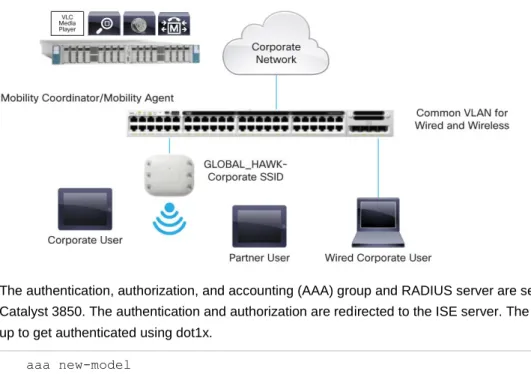
In the topology diagram shown in Figure 1, a wired corporate user and access points are connected to the Cisco Catalyst 3850. Two wireless clients are connected to the service set identification (SSID) on the Cisco Catalyst 3850. One of the wireless users is a corporate user, and the other user is a partner. Corporate users and partner users have different security policies defined on Cisco’s Identity Services Engine (ISE) server that is in the campus services block. There are other servers such as call manager, video streaming server, and the Cisco Prime™ Infrastructure server in the campus services block as well.
Figure 1. 802.1X with Converged Access
The authentication, authorization, and accounting (AAA) group and RADIUS server are set up on the Cisco Catalyst 3850. The authentication and authorization are redirected to the ISE server. The wireless clients are set up to get authenticated using dot1x.
aaa new-model
aaa authentication dot1x CLIENT_AUTH group radius aaa authorization network CLIENT_AUTH group radius !
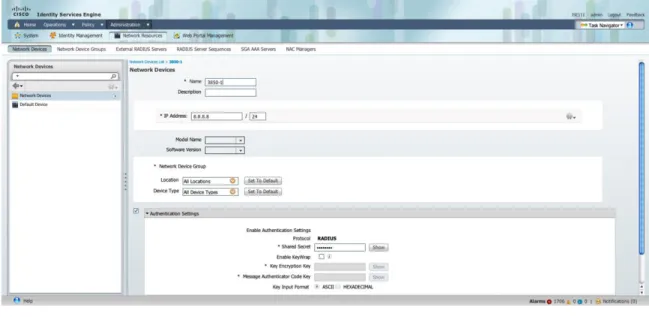
The ISE server is the RADIUS server, and the switch is defined on the ISE server as one of the network devices. The RADIUS server needs to be defined on the switch.
radius server ise
address ipv4 9.9.9.9 auth-port 1812 acct-port 1813 timeout 60
retransmit 3 key cisco123 !
To define the Cisco Catalyst 3850, on the ISE screen, navigate to Administration Network Resources
Network Devices as in Figure 2.
Figure 2. Device Definition in ISE
The dot1x needs to be enabled on the switch globally for wired and wireless clients.
dot1x system-auth-control !
802.1X Configuration for Wired Users
802.1X for wired users is configured per port. Here is the port configuration:
interface GigabitEthernet1/0/13 switchport access vlan 12 switchport mode access
access-session port-control auto access-session host-mode single-host dot1x pae authenticator
service-policy type control subscriber DOT1X
The Cisco Catalyst 3850 also introduces session-aware networking (SaNet), which is a replacement for Auth Manager that is present in current Cisco IOS® Software platforms.
The objective of having SaNet is to have no dependency between features applied to sessions or authentication method. Thus, with appropriate AAA interactions, any authentication method should derive authorization data for any feature, to be activated on a session. This can be accomplished by using a policy model similar to Modular Policy Framework (MPF), which is used in routing protocols, firewall rules, quality of service (QoS), and so on. For more details, see SaNet documentation at http://www.cisco.com/en/US/docs/ios-xml/ios/san/configuration/xe-3se/3850/san-overview.html. The following policy is an example for SaNet:
class-map type control subscriber match-all DOT1X_NO_RESP match method dot1x
!
policy-map type control subscriber DOT1X event session-started match-all
1 class always do-until-failure
2 authenticate using dot1x retries 3 retry-time 60 event authentication-success match-all
event authentication-failure match-all 5 class DOT1X_NO_RESP do-until-failure 1 authentication-restart 60
!
802.1X Configuration for Wireless Users
For wireless clients, 802.1x is configured under WLAN configuration mode. The AAA authentication method is similar to wired clients.
wlan Predator 1 Predator
security dot1x authentication-list CLIENT_AUTH
When a user provides credentials, the ISE server authenticates and authorizes the user. Upon successful authorization, the user is assigned a specific VLAN, which provides policies based on groups or device types in ISE. It also provides other policies such as QoS, downloadable access control list (dACL), and so on.
The client session is maintained on the Cisco Catalyst 3850 after authorization, until the session is terminated. The client states are controlled by the wireless control manager (WCM) process.
Any end station (wired or wireless) authenticating using dot1X is termed as a “client,” and all the policies such as dACL and QoS that are specific to this client are installed on the client entity in hardware, unlike ports in the existing 3K switches. This is one way that consistency between wired and wireless clients is achieved.
To look at the overall wired and wireless devices connected on the switch, the following command can be used:
Switch#sh access-session
Interface MAC Address Method Domain Status Fg Session ID
Gi1/0/13 0024.7eda.6440 dot1x DATA Auth 0A0101010000109927B3B90C
Ca1 b065.bdbf.77a3 dot1x DATA Auth 0a01010150f57a300000002e
Ca1 b065.bdb0.a1ad dot1x DATA Auth 0a01010150f57ac20000002f Session count = 3
Key to Session Events Status Flags:
A - Applying Policy (multi-line status for details) D - Awaiting Deletion
I - Awaiting IIF ID allocation
P - Pushed Session (non-transient state)
R - Removing User Profile (multi-line status for details) U - Applying User Profile (multi-line status for details) X - Unknown Blocker
The following output shows the detailed view of the wireless client session:
Switch#sh access-session mac b065.bdb0.a1ad details
Interface: Capwap0
IIF-ID: 0xE49A0000000008 MAC Address: b065.bdb0.a1ad IPv6 Address: Unknown
IPv4 Address: 12.0.0.2
User-Name: user1
Status: Authorized
Domain: DATA Oper host mode: multi-auth Oper control dir: both Session timeout: N/A <snip….snip>
Server Policies (priority 100)
ACS ACL: xACSACLx-IP-user1-46a243eb
Method status list:
Method State dot1x Authc Success
The following is the configuration on the wired port:
Switch#sh run int gig1/0/13 Building configuration...
Current configuration : 317 bytes !
interface GigabitEthernet1/0/13
description dot1X Wired Port in Vlan 30 switchport access vlan 30
switchport mode access load-interval 30
access-session host-mode single-host access-session port-control auto dot1x pae authenticator
spanning-tree portfast
service-policy type control subscriber 802.1x end
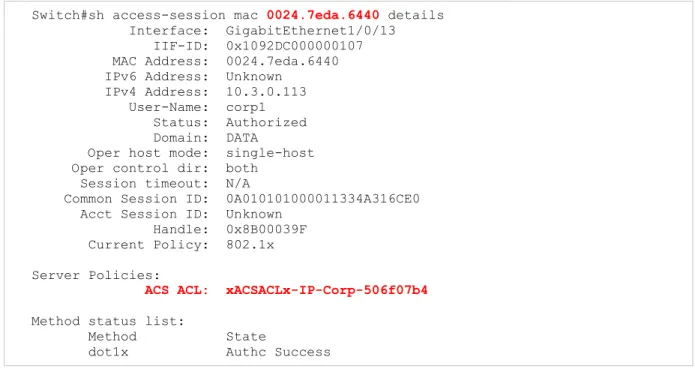
The following is the detailed output of the wired client session:
Switch#sh access-session mac 0024.7eda.6440 details
Interface: GigabitEthernet1/0/13 IIF-ID: 0x1092DC000000107 MAC Address: 0024.7eda.6440 IPv6 Address: Unknown
IPv4 Address: 10.3.0.113 User-Name: corp1 Status: Authorized Domain: DATA
Oper host mode: single-host Oper control dir: both
Session timeout: N/A
Common Session ID: 0A010101000011334A316CE0 Acct Session ID: Unknown
Handle: 0x8B00039F Current Policy: 802.1x Server Policies:
ACS ACL: xACSACLx-IP-Corp-506f07b4
Method status list:
Method State
dot1x Authc Success
Note: In the preceding output, the ACL is installed on the client entity and not on the port.
Downloadable Access Control List
The screenshot in Figure 3 shows the dACL definition in ISE.
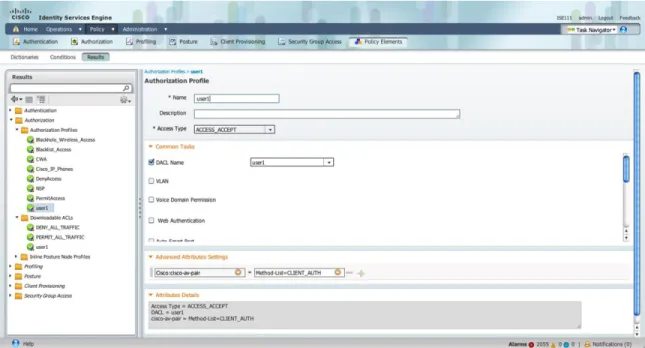
After defining ACL in ISE, it can be associated with an authorization profile, as shown in Figure 4.
Figure 4. Authorization Profile
Note: If a named authentication method-list is in place for AAA, an attribute needs to be set from ISE, as shown in 4 Method-List in this example is CLIENT_AUTH.
After successful download of ACL, the client is authorized, and the following is the output of ACL:
Switch#sh access-lists
Extended IP access list xACSACLx-IP-user1-46a243eb (per-user) 1 permit udp any any eq domain
2 permit tcp any any eq domain 3 permit udp any eq bootps any 4 permit udp any any eq bootpc 5 permit udp any eq bootpc any 6 permit ip any any
Access Control List Deployment Considerations
With the Cisco Catalyst 3850 and converged access, ACLs can now be applied to wireless clients as they are applied on wired ports/clients. The Cisco Catalyst 3850 has more ternary content-addressable memory (TCAM) space assigned for ACLs than 3K-X switches. The following paragraphs describe some of the scalability numbers. Table 1 summarizes the access control entries (ACEs) scalability.
Table 1. Scale Numbers
ACL Resources Cisco Catalyst 3850
IPv4 ACE 3000 entries
IPv6 ACE 1500 entries
The total capacity of the ACEs is an aggregate number that constitutes all types of ACEs. One type of ACE, however, can scale up to 1500. For example, the total number of Port ACL (PACL) access control entries cannot exceed 1500. But a combination of PACL and Router ACL (RACL) access control entries can scale up to 3000.
Cisco Catalyst 3850 Quality of Service
One of the primary advantages of the Cisco Catalyst 3850 is the visibility into wireless packets at the access layer. This visibility is a powerful feature and enables network administrators to apply the rich intelligent services of wired traffic and extend these services to wireless traffic as well. QoS is one of the features that can be applied on wireless traffic similar to that of being applied on wired network.
Significant QoS features have been introduced for wired as well as wireless on the Cisco Catalyst 3850. Some of them are the following and are discussed in detail later in the document:
● Modular QoS CLI (MQC)
● Approximate Fair-Drop (AFD) algorithm for bandwidth management across wireless users, providing hierarchical support across access points, radios, Basic Service Set Identifier (BSSID), and clients.
● Eight queues per port (wired) and 4 queues per port (wireless)
● Bidirectional policing support in hardware for wireless clients
● Two-level hierarchical QoS on wired ports
● Per-SSID bandwidth management; differentiated bandwidth management across SSIDs
Because of the inherent differences of wired and wireless media and transmission methods, there are differences between wired and wireless QoS.
Wired QoS on the Cisco Catalyst 3850 is explained later, followed by wireless QoS in the following section.
Wired Quality of Service
Cisco Catalyst 3850 Trust Behavior
The trust behavior on the Cisco Catalyst 3850 has changed from the that of Cisco Catalyst 3K Series switches. By default, the Cisco Catalyst 3850 trusts markings on the wired ports. For wired ports, differentiated services code point (DSCP) markings in IP packets from endpoints such as IP phones, telepresence units, cameras, and laptops are trusted and retained.
Retained markings are summarized in Table 2.
Table 2. Trust Behavior
Incoming Packet Outgoing Packet Trust Behavior
L3 L3 Preserve DSCP/precedence
L2 L2 Not applicable
Tagged Tagged Preserve DSCP and class of service (CoS)
L3 Tagged Preserve DSCP; CoS is set to 0
With the introduction of MQC, the “trust cos/dscp” CLI has been deprecated on the Cisco Catalyst 3850. However, “trust device” on the interface level is still supported. The default mode on the interface is trusted and changes to untrusted only when an untrusted device is detected. In the untrusted mode, the DSCP/precedence/CoS will be reset to 0.
Unlike wired, wireless is considered untrusted on the Cisco Catalyst 3850. The default trust setting for wireless target is untrust: that is, the packets are marked down to 0 in the absence of SSID-based policy.
The startup configuration on the Cisco Catalyst 3850 always has the following CLI:
qos wireless-default-untrust
This CLI is part of the default configuration (automatically created) and cannot be modified in the current release. That means the wireless will always be untrusted.
If trust behavior (similar to wired) is desired on wireless, table-maps need to be defined. The option of default copy can be used to protect the markings in the table-maps.
Marking on the downstream traffic is not being preserved on wireless targets. Therefore, a table-map is required in the downstream direction to retain the markings.
The following is a sample table-map that will retain the markings:
table-map dscp2dscp default copy !
Configuring Ingress Quality of Service Ingress Classification
When creating QoS classification policies, the network administrator must consider applications that are to be present at the access layer of the network (in the ingress direction). The applications present at the access edge need to be classified to mark them with appropriate marking and/or policing.
MQC offers scalability and flexibility in configuring QoS and provides consistent configuration across various Cisco switches and routers. The following sample configuration creates an extended access list for each application and then applies it under class-map configuration mode:
ip access-list extended BULK-DATA remark FTP
permit tcp any any eq ftp permit tcp any any eq ftp-data ..
.. ..
ip access-list extended DEFAULT remark EXPLICIT CLASS-DEFAULT permit ip any any
ip access-list extended MULTIMEDIA-CONFERENCING remark RTP
permit udp any any range 16384 32767 ip access-list extended SCAVENGER remark KAZAA
permit udp any any eq 1214 ip access-list extended SIGNALING remark SCCP
permit tcp any any range 2000 2002 remark SIP
permit tcp any any range 5060 5061 permit udp any any range 5060 5061
ip access-list extended TRANSACTIONAL-DATA remark HTTPS
permit tcp any any eq 443
remark ORACLE-SQL*NET permit tcp any any eq 1521 permit udp any any eq 1521
The following is the configuration for creating a class-map for each application service and applying match statements:
class-map match-any BULK-DATA match access-group name BULK-DATA class-map match-any VVLAN-SIGNALING match ip dscp cs3
class-map match-any MULTIMEDIA-CONFERENCING match access-group name MULTIMEDIA-CONFERENCING class-map match-any DEFAULT
match access-group name DEFAULT class-map match-any SCAVENGER match access-group name SCAVENGER class-map match-any SIGNALING match access-group name SIGNALING class-map match-any VVLAN-VOIP match ip dscp ef
class-map match-any TRANSACTIONAL-DATA match access-group name TRANSACTIONAL-DATA
Ingress Marking and Policing
It is important to limit the bandwidth that each class may use at the access layer in the ingress direction. To achieve proper policing, accurate DSCP marking on ingress traffic at the access-layer switch is critical. It is best to use an explicit marking command for all trusted application classes.
There are two methods for ingress marking. These are “table-map” and “set” commands. For marking down, however, table-map is the only option that can be used.
With table-maps, one can create a map of values that can be used between the same or different markings such as DSCP, CoS, and so on. The values that can be mapped are from 0 through 99 in decimal. Table-map also has a default mode of operation for values that do not have a mapping explicitly configured. If it is set to ignore, there will not be any change to the marking, unless an explicit mapping is configured. It can be configured to copy or to set a specific value.
The following is a sample table-map configuration:
table-map cos2cos default copy
policy-map cos-trust-policy class class-default
set cos cos table cos2cos
The following sample configuration shows how to configure policing for multiple classes on ingress ports in access-layer switches:
policy-map Phone+PC-Policy class VVLAN-VOIP
police 128000 8000 conform-action transmit exceed-action drop set dscp ef
class VVLAN-SIGNALING
police 32000 8000 conform-action transmit exceed-action drop set dscp cs3
class MULTIMEDIA-CONFERENCING
police 5000000 8000 conform-action transmit exceed-action drop set dscp af41
class SIGNALING
police 32000 8000 conform-action transmit exceed-action drop set dscp cs3
class TRANSACTIONAL-DATA
police 10000000 8000 conform-action transmit exceed-action set-dscp-transmit dscp table markdown
set dscp af21 class BULK-DATA
police 10000000 8000 conform-action transmit exceed-action set-dscp-transmit dscp table markdown
set dscp af11 class SCAVENGER
police 10000000 8000 conform-action transmit exceed-action drop set dscp cs1
class DEFAULT
police 10000000 8000 conform-action transmit exceed-action set-dscp-transmit dscp table markdown
Applying Ingress Policies
Like other Cisco Catalyst platforms, Cisco Catalyst 3850 Switches offer two simplified methods to apply service policies. Depending on the deployment model, either of the following methods may be used:
● Port-based QoS: Applying service policy on a per-physical port basis will force traffic to pass through QoS policies before entering the network.
● VLAN-based QoS: Applying service policy on per-VLAN basis requires the policy map to be attached to a logical Layer 3 interface or Switch Virtual Interface (SVI).
The following sample configuration shows how to deploy port-based QoS on the access-layer switches:
interface fastethernet0/4
description CONNECTED TO PHONE+PC service-policy input Phone+PC-Policy
Egress Quality of Service
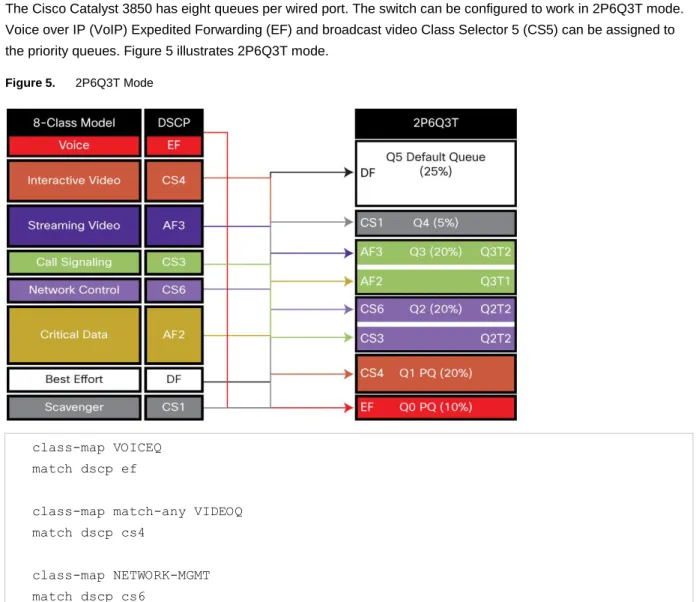
The Cisco Catalyst 3850 has eight queues per wired port. The switch can be configured to work in 2P6Q3T mode. Voice over IP (VoIP) Expedited Forwarding (EF) and broadcast video Class Selector 5 (CS5) can be assigned to the priority queues. Figure 5 illustrates 2P6Q3T mode.
Figure 5. 2P6Q3T Mode
class-map VOICEQ match dscp ef
class-map match-any VIDEOQ match dscp cs4
class-map NETWORK-MGMT match dscp cs6
class-map CALL-SIG match dscp cs3
class-map CRITICAL-DATA match dscp af21 af22 af23 class-map VIDEO-STREAM match dscp af31 af32 af33 class-map Scavenger-Q match dscp cs1
After traffic is identified using DSCP, policy bases can be applied on classifications.
policy-map 2P6Q3T class VOICEQ priority level 1 class VIDEOQ priority level 2 class NETWORK-MGMT
bandwidth remaining percent 10 class CALL-SIG
bandwidth remaining percent 10 class CRITICAL-DATA
bandwidth remaining percent 10 class VIDEO-STREAM
bandwidth remaining percent 10 class SCAVENGER
bandwidth remaining percent 1 class class-default
bandwidth remaining percent 25
The egress policy can be applied to the port or L3 interface similar to the ingress policy.
Wireless Quality of Service Wireless Targets
In wireless QoS, there are two terms: upstream and downstream. Upstream means ingressing from the access point and egressing from the wired network. Downstream means ingressing from the wired network and egressing out to the access point. The following table summarizes the QoS marking/policing and queuing capabilities on each type of target interface: access point, radio, SSID, and client.
In wireless targets, QoS policies can be applied on multiple levels. Each of these targets is discussed in the following sections.
Wireless: Ingress Quality of Service
Ingress Marking and Policing on Wireless Client
In the ingress direction, traffic can be marked and policed at client level. The following example provides differentiated marking and policing for the different class of application sourced from the client:
policy-map PER-CLIENT class VOICE
set dscp ef
police 128k 8000 exceed-action drop class SIGNALING
set dscp cs3
police 32k 8000 exceed-action drop class MULTIMEDIA-CONFERENCING
set dscp af41
police 5m 8000 exceed-action drop class TRANSACTIONAL
set dscp af21 class CLASS-DEFAULT set dscp default
The client policy can be applied directly under the SSID interface (as in the following), or it can be pushed from the policy server (ISE).
wlan open 1 Employees
The applied policy can be shown with the following CLI:
Switch# sh policy-map interface wireless client Client 000A.CC10.0001
Service-policy input: Standard-Employee Class-map: Voice (match-all)
Match: access-group name Voice police:
cir 128000 bps, bc 4000 bytes conformed 0 bytes; actions: transmit
…
QoS Set dscp ef …
Class-map: TRANSACTIONAL-DATA (match-all) Match: access-group name TRANSACTIONAL-DATA QoS Set
dscp af21
Class-map: class-default (match-any) Match: any
QoS Set
dscp default
The preceding configuration enforces the policer per wireless client that joined on the SSID. In this case the Cisco Catalyst 3850 uses microflow policers that act per client.
If the policy name is downloaded from the ISE server, the server needs to be configured as shown in Figure 6, with the AV pair ip:sub-qos-policy-in=Standard-Employee.
Figure 6. Authentication Profile
The same policy can be applied for open wired ports as well. The policy needs to be attached to the port and not to the clients. Currently QoS policies cannot be attached to wired “clients.”
Note: Wired port application is described earlier in the wired section. Ingress Policies on WLAN/SSID
Although the policy application happens at the WLAN level from a CLI standpoint, the policies are actually applied to every instance of the SSID in each of the <access point, radio> pairs in the system. This is internally referred to as the BSSID. SSID is used synonymously with BSSID in this document. At SSID level we can police and mark. However, at SSID level, marking is only possible with a table-map. In the following example only table-map with a default action of copy is defined. It retains the incoming DSCP in the IP packet.
table-map dscp2dscp default copy Policy-map TRUST Table Map dscp2dscp default copy
The QoS policy is applied under the WLAN configuration. The SSID policy is applied as shown in the following example. This results in “trusted” behavior for traffic ingressing from wireless, similar to wired.
wlan open 1 Employees service-policy input TRUST
Wireless: Egress Quality of Service
This explains the capabilities of QoS that are available on the Cisco Catalyst 3850. On the egress (downstream), QoS capabilities exist per access point, radio, SSID, and client.
Policy on Access Point/Port
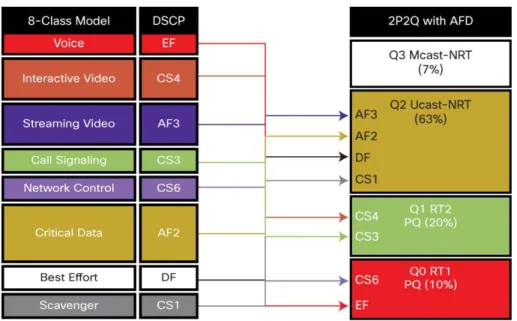
The ports that are connected to access points are termed wireless ports throughout this document. There are four queues on the wireless ports to match the four queues on the access point. The queue structure is 2P2Q3T: two priority queues, and two SRR queues, with three thresholds each. The recommended queuing configuration in a 2P2Q3T structure is shown in Figure 7.
Figure 7. 2P2Q3T Queue Model for Queuing Application Traffic
Four queues are created at the port level when a port is configured as a wireless port: real time 1 (RT1), RT2, unicast non real time (NRT), and multicast nonclient NRT.
The following is the default behavior of the four queues: Q0 (RT1): Control traffic
Q1 (RT2): None
Q2 (NRT): Everything other than multicast NRT and control traffic Q3 (multicast NRT): Multicast and nonclient traffic
Default QoS policy is applied to the wireless port in the downstream (egress) direction. On port level no policy is supported in upstream (ingress) direction. The policy on the port is applied to the CAPWAP encapsulated packets egressing out to the access point.
The default wireless port policy includes a port shaper and a child policy. The parent policy cannot be modified by user and is controlled by the WCM. This parent policy has a port shaper that is the sum of the radio rates on the access point. The child policy on the wireless port is user configurable.
The following describes default child policy configuration:
policy-map port_child_policy class non-client-nrt-class bandwidth remaining ratio 10
The following is the overall wireless port policy:
Switch#sh policy-map in gig1/0/3 GigabitEthernet1/0/3
Service-policy output: defportangn Class-map: class-default (match-any) Match: any
Queueing
(total drops) 0
(bytes output) 17633136
shape (average) cir 600000000, bc 2400000, be 2400000 target shape rate 600000000
Service-policy : port_child_policy
Class-map: non-client-nrt-class (match-any) Match: non-client-nrt
Queueing
(total drops) 0
bandwidth remaining ratio 10 Class-map: class-default (match-any) Match: any
(total drops) 0 (bytes output) 0
The “port_child_policy” can be modified by the user to queue different application traffic at the SSID level. This traffic is queued toward the appropriate queues at the port level. The following is the “port_child_policy” configuration example:
Switch#sh run policy-map port_child_policy Building configuration...
Current configuration : 227 bytes !
class non-client-nrt-class bandwidth remaining ratio 10 class voice priority level 1 police 20000 class video priority level 2 police 20000 class class-default
bandwidth remaining ratio 25
The “police 20000” statement in the “class voice” and “class video” polices aggregates multicast traffic for each class at the port/access point level. It does not police unicast traffic that is classified using the “voice” and “video” class-maps.
Policy on Radio
Radio-level policy is not user configurable. This is a rate limiter that limits all traffic going to the radio. Currently only two radios are supported per access point, and hence two rate limiters supported per access point. The Cisco Catalyst 3850 polls the access point to discover the maximum rate of the radio, and a shaper is placed in order to limit the oversubscription of the radio. Based on the discovery of maximum rate, the rate limiter can limit at 200 or 400 Mbps for 2.4G and 5G bands, respectively.
The following is the policy at radio level:
Switch#sh policy-map interface wireless radio
Radio dot11b iifid: 0x104F10000000011.0xC9CA4000000004 Service-policy output: def-11gn
Match: any
shape (average) cir 200000000, bc 800000, be 800000 target shape rate 200000000
Radio dot11a iifid: 0x104F10000000011.0xCF8F4000000005 Service-policy output: def-11an
Class-map: class-default (match-any) Match: any
shape (average) cir 400000000, bc 1600000, be 1600000 target shape rate 400000000
Although the preceding policy shows its shaping, it does not buffer or smooth out the rate. Essentially this is a rate limiter at radio level.
Policy on Service Set Identification
Policy at SSID level or at BSSID level is user configurable in both upstream and downstream directions. SSID-level policies are applied in the WLAN configuration mode.
In downstream direction, the recommended policy is a hierarchical queuing policy with table-map-based marking in the parent class default. In absence of a table-map configuration in the SSID, the packets are all remarked down to 0. The packets are sent through the NRT queue at the port level. This is because the WLAN is considered to be untrusted in the absence of a table-map.
If voice/video traffic needs to be prioritized, the child policy-maps on both the port/access point and SSID should be configured with class-maps and appropriate actions. If the child policy for voice/video differentiation is missing on either one of the targets (port/access point and/or SSID), the voice and video traffic will not be prioritized on the wireless network.
The following is an example of two SSIDs: enterprise and guest. The voice/video traffic is prioritized on the enterprise, while the guest traffic is classified as default and given the appropriate queuing treatment.
Policy-map enterprise-ssid-child Class voice Priority level 1 Police 20000 Class video Priority level 2 Police 20000 Policy-map enterprise-ssid Class class-default
bandwidth remaining percent 70 set wlan-user-priority dscp dscp2up1 set dscp dscp dscp2dscp1
Policy-map guest-ssid Class class-default
Shape average percent 20
On the enterprise SSID class-map voice and video, the policer enforces the aggregate unicast traffic at the BSSID level. The class default is configured to provide a minimum bandwidth allocation to the enterprise SSID, which is able to utilize the additional unused bandwidth in the absence of congestion.
The class default on the guest SSID, however, is shaped to 20 percent of the available bandwidth irrespective of the bandwidth utilization and congestion.
Client
Client policies can be applied in both upstream and downstream directions. Client policies are user configurable and can be applied under the WLAN configuration mode. When applied in WLAN configuration mode, all clients under SSID receive the same policy, but the policy enforcement is done on a per-user basis using microflow policing.
The client-level policy can also be applied from the AAA server. The policy is defined locally on the switch, and the name of the policy is downloaded from the AAA server at the time of client authorization. With the help of
downloadable policies, any differentiated policy can be applied for clients or client groups.
After the client policy is associated with a client, the client policy can be looked up using the client MAC address. The following is the output of a client policy-map applied in the egress (downstream) direction:
Switch#sh policy-map interface wireless client mac b065.bdbf.77a3 Client B065.BDBF.77A3 iifid:
0x1047D4000000011.0xD7E4C000000076.0xDD94000000028D.0xFCEBC000000373 Service-policy output: egress-client
Class-map: class-default (match-any) Match: any
police:
cir 500000 bps, bc 15625 bytes conformed 404432 bytes; actions: transmit
exceeded 0 bytes; actions: drop
conformed 0000 bps, exceed 0000 bps
Flexible NetFlow
Flexible NetFlow (FnF) is an integral part of Cisco IOS Software that collects and measures data, allowing all routers or switches in the network to become a source of telemetry and a monitoring device. FnF allows extremely granular and accurate traffic measurements and high-level aggregated traffic collection. FnF provides real-time network monitoring, security incident detection, and classification of flow of network traffic.
Cisco Catalyst 3850 NetFlow Architecture (Wired and Wireless) NetFlow Cisco Catalyst 3850 Overview
The Cisco Catalyst 3850 supports both ingress and egress FnF on all ports of the switch at line rate. Switch raw scalability is up to 24K cached flows, whereas it is 8K for ingress and 16K for egress per UADP ASIC. The Cisco Catalyst 3850 supports NetFlow Version 9, with IPv4, IPv6, Layer 2 flows, and sampled NetFlow. TCP flags are also exported as part of the flow information. When Cisco Catalyst 3850 switches are stacked together, each individual stack member exports its own flows to the collector. The Cisco Catalyst 3850 supports up to 16 flow monitors with eight different collectors simultaneously per flow monitor. Microflow policing is supported only for wireless clients.
The FnF feature on the Cisco Catalyst 3850 is enabled on the IP base version and earlier. The Cisco Catalyst 3850 48-port switch has two UADP ASICs per switch, and the Cisco Catalyst 3850 24-port switch has one UADP ASIC.
NetFlow Configuration on Cisco Catalyst 3850 Switch
There are three components of FnF configuration: flow record, flow exporter, and flow monitor. Flow Record
The NetFlow flow record is made up of primary fields and nonprimary fields. Primary fields are the fields from packet headers that are used for classifying and characterizing the flow. Additional information can be added to the flow record, and this information is contained in nonprimary fields. Match commands as seen in the following are used to define primary fields, while collect commands are used to define the nonprimary fields.
Configuring a Flow Record (Ingress)
flow record v4 match ipv4 tos match ipv4 protocol match ipv4 source address match ipv4 destination address match transport source-port match transport destination-port
match interface input collect interface output
collect transport tcp flags collect counter bytes long collect counter packets long collect timestamp absolute first collect timestamp absolute last collect counter bytes layer2 long
Note: “match interface output” cannot be configured in the ingress flow monitor. In order to get the egress interface information, use the “collect interface output” command in an ingress flow record.
Similarly, “match interface input” is not supported on an egress flow record; use “collect interface input” as shown in the following:
Configuring a Flow Record (Egress)
flow record v4out match ipv4 protocol match ipv4 tos
match ipv4 source address match ipv4 destination address match transport source-port match transport destination-port
match interface output collect interface input
collect transport tcp flags collect counter bytes long collect counter packets long collect timestamp absolute first collect timestamp absolute last collect counter bytes layer2 long
Exporter/Collector Information
There are two primary methods to access NetFlow data: using a CLI with show commands or using an application that receives exported NetFlow information sent periodically by the switch.
flow exporter Collector destination 10.1.1.28 dscp 48
transport udp 2055 template data timeout 30
option exporter-stats timeout 30
Flow exporter commands specify the destination IP address of the exporter/collector. DSCP specifies the DSCP value for datagrams sent to the exporter/collector. The next command specifies the L4 port on which the
exporter/collector application listens for the NetFlow export packets from the switch. Template commands enable the switch to send the NetFlow template after specified number of seconds to the exporter/collector. The Cisco Catalyst 3850 supports up to eight different exporters/collectors simultaneously per flow monitor.
Flow Monitor
Flow monitors are the FnF component that is applied to interfaces. Flow monitors consist of a record, cache parameters, and the exporter/collector. The flow monitor cache is automatically created at the time the flow monitor is configured on the first interface.
Flow monitor is the container for the following information:
● Flow record
● Flow cache parameters
flow monitor v4
exporter Collector exporter Collector 1
cache timeout active 60 cache timeout inactive 20
record v4
Attaching a Flow Monitor to Supported Port Types
Wired Port
interface GigabitEthernet1/0/1
description Interface for WIRED CLIENT in CONVERGED VLAN switchport access vlan 10
switchport mode access
ip flow monitor v4 input ip flow monitor v4out output
load-interval 30 no shutdown
!
Wireless WLAN Port
wlan SSID 1 SSID client vlan 12
ip flow monitor v4 input ip flow monitor v4out output
no shutdown !
VLAN Interface
Vlan configuration 500
ip flow monitor v4 input ip flow monitor v4out output
!
Configure Simple Network Management Protocol for Exporter
snmp-server community public RO snmp-server community private RO
Simple Network Management Protocol (SNMP) configurations enable the external collectors to read the configuration related to NetFlow on the switch and collect flows.
Flexible NetFlow Outputs
To display the status and statistics for a flexible NetFlow flow monitor, use the “Show Flow monitor” command in privileged EXEC mode.
Switch# show flow monitor Flow Monitor v4:
Description: User defined
Flow Record: v4
Flow Exporter: Collector
Cache:
Type: normal (Platform cache) Status: allocated
Size: Unknown Inactive Timeout: 15 secs Active Timeout: 60 secs Update Timeout: 1800 secs
To display the flexible NetFlow configuration status for an interface, use the “Show Flow Interface” commands in privileged EXEC mode.
Switch# show flow interface
Interface GigabitEthernet2/0/26 FNF: monitor: v4 direction: Input traffic(ip): on FNF: monitor: v4out direction: Output traffic(ip): on
To display aggregated flow statistics from a flow monitor cache, use the “Show flow monitor cache format table” command.
Switch# Show flow monitor v4 cache format table
Cache type: Normal (Platform cache) Cache size: Unknown
Current entries: 2 Flows added: 26492 Flows aged: 26490 - Active timeout ( 1800 secs) 4 - Inactive timeout ( 15 secs) 26486
IPV4-SRC-ADDR DST-ADDR SRC-PORT DST-PORT INTF-INPUT intf-output bytes-long pkts-long time-abs-first time-abs-last
=============== =============== ============= ============= ====================
19:52:12.755
10.1.22.101 10.1.1.22 51524 5060 Gi1/0/3 LIIN0 1038 3 19:52:10.755 19:52:10.755
To display top N destination aggregated flow statistics from a flow monitor cache, use the following command.
Switch# show flow monitor v4 cache aggregate ipv4 destination add sort counter bytes long top 4
Processed 4 flow Aggregated to 4 flow
Showing the top 4 flow
IPV4 DST ADDR flows bytes long pkts long =============== ========== ==================== ==================== 10.1.1.22 1 1038 3 10.1.1.92 2 1038 3 10.1.1.82 4 1038 3 10.1.1.52 9 1038 3
To display top N source address aggregated flow statistics from a flow monitor cache, use the following command.
Switch# sh flow monitor v4 cache aggregate ipv4 source address sort highest ipv4 source address top 2
Processed 2 flows Aggregated to 2 flows
Showing the top 2 flows
IPV4 SRC ADDR flows bytes long pkts long =============== ========== ==================== ==================== 10.1.22.102 1 1038 3 10.1.22.101 1 1038 3
To display the status and statistics for IPv6 flexible NetFlow flow monitor, use the “Show Flow monitor” command in privileged EXEC mode.
Switch# show flow moni v6_m1 cache format table
Cache type: Normal (Platform cache) Cache size: Unknown
Current entries: 12 Flows added: 30 Flows aged: 18 - Inactive timeout ( 15 secs) 18
IPV6 SRC ADDR IPV6 DST ADDR TRNS SRC PORT TRNS DST PROT bytes long pkts long ============================================= ================== 2322::2 FF02::1:FF00:1 0 34560 58 72 1 2322::2 2201::2 1024 1026 17 9166290 43649 2322::2 2201::2 1024 1027 17 9166290 43649 2322::2 2201::2 1024 1024 17 9166500 43650
To display top N IPv6 destination address aggregated flow statistics from a flow monitor cache, use the following command:
Switch# show flow monitor v6_m1 cache aggregate ipv6 destination address sort counter bytes long top 2
Processed 10 flows Aggregated to 2 flows Showing the top 2 flows
IPV6 DESTINATION ADDRESS: 2322::2
counter flows: 5
counter bytes long: 3278889600 counter packets long: 15613760
IPV6 DESTINATION ADDRESS: 2201::2
counter flows: 5
counter bytes long: 3221137920 counter packets long: 15338752
To display top N source address aggregated flow statistics from a flow monitor cache, use the following command:
Switch# show flow monitor v6_m1 cache aggregate ipv6 source address sort highest ipv6 source address top 2
Showing the top 2 flows
IPV6 SOURCE ADDRESS: 2322::2
counter flows: 5
counter bytes long: 3919704180 counter packets long: 18665258
IPV6 SOURCE ADDRESS: 2201::2
counter flows: 5
counter bytes long: 3913954800 counter packets long: 18637880
Multicast Overview (Traditional and Converged Multicast)
Efficient and intelligent use of bandwidth is paramount, particularly with the advent of video, mobility, and cloud technologies. It is also critical considering the surge in related one-to-many or many-to-many communication-based applications. Multicast helps to fulfill the requirement of such bandwidth-intensive applications with its inherent ability to replicate a single stream when and where necessary.
In today’s network, replication for wired clients is performed at the network switches. There are two methods that multicast works in wireless. Either the controller replicates to the access points that have interested clients, or the controller replicates one packet to the multicast group address to which all access points are joined, offloading the replication to the multicast-enabled network infrastructure. Hence there is a duplication of one multicast source stream: one for wired, one for wireless.
With the Cisco Catalyst 3850 and the wired/wireless convergence, there is only one multicast source stream in the network. The Cisco Catalyst 3850 replicates this stream to both wired and wireless clients. This helps in reducing the number of streams from the same source, thus conserving bandwidth and enhancing overall network performance.
The wired multicast configuration is the same as that of existing Cisco Catalyst 3K Series switches. Refer to the IP Multicast Configuration Guide for configuring IP multicast on the wired network.
Restrictions of IP Multicast Routing Configuration
The following are the restrictions for configuring IP multicast routing:
● IP multicast routing is not supported on switches running the LAN Base feature set.
● Multicast Flexlink is not supported on the switch.
● Layer 3 IPv6 multicast routing is not supported on the switch.
Configuring Wireless IP Multicast on Cisco Catalyst 3850
There are two modes in which wireless multicast works on the Cisco Catalyst 3850. In the basic mode, the switch replicates individual packets to only those ports where the access point has interested clients. In this mode, the replication of packets occurs before the CAPWAP encapsulation is added to the packet, destined to each interested access point. This increases the recirculation on the switch since each packet to each access point is passed through the recirculation block. However, this leads to efficient use of bandwidth in the switch since the replicated packets are only sent to those access points that have interested clients.
In multicast-multicast mode, the switch and all the access points connected to it join one unique multicast group that is not used anywhere else in the network. The ingress source stream from the campus network is replicated once and encapsulated in CAPWAP with the destination address of this multicast group (formed between the switch and all access points). In this mode, the replication happens only once for the group - hence only one recirculation for CAPWAP encapsulation - and this packet is transmitted to all the connected access points. In this mode, number of packets being switched by the UADP ASIC is optimized over the cost of switch bandwidth. The switch always uses the management interface IP address as the source for sending these CAPWAP-encapsulated multicast packets. The access point decapsulates the outer CAPWAP header and sends the original multicast packets as broadcast at the lowest data rate on all BSSID and radio.
The videostream mode is a further enhancement of the preceding. Instead of sending the multicast as broadcast at the lowest data rate, the access point converts the original multicast packet as unicast and sends it only to the interested client at the highest available data rate. This works the same way as it works in today’s Cisco Unified Wireless Network as the function is performed at the access point level.
The following commands enable wireless multicast on the Cisco Catalyst 3850 Switch:
Switch#conf t
Switch(config)#ip multicast-routing Switch(config)#wireless multicast Switch(config)#wireless broadcast
Switch(config)#Wireless multicast non-ip
Switch(config)#interface interface-id
Switch(config-if)# ip pim {dense-mode | Sparse-Mode | Sparse-dense-mode} Switch(config)#vlan configuration <id>
Switch(config-vlan)#ipv6 nd suppress Switch(config-vlan)#ipv6 snooping Switch(config-vlan)#end
Switch#copy running-config startup-config
Irrespective of multicast routing being enabled, Internet Group Management Protocol (IGMP) snooping must be enabled on the client VLAN for wireless clients to receive IP multicast traffic.
To enable multicast routing on a Cisco Catalyst 3850 Switch, the “ip multicast-routing” command is used. To send multicast on wireless to all clients (interested in multicast or not), the “wireless-multicast” command is used. “Wireless-broadcast” command enables broadcasting of packets on wireless data plane of switch.
To enable multicast flooding on wireless, the “wireless multicast non-ip” command can be used.
Multicast Mode Configuration
Wireless multicast packets are required to be sent to the access point as CAPWAP encapped packet in a unicast tunnel or a multicast tunnel. When multicast mode is enabled, WCM creates a multicast CAPWAP tunnel in Cisco IOS Software and converts the access point tunnels to multicast mode pointing to the multicast tunnel.
When an access point is in multicast mode, the multicast/broadcast packets to the client behind this access point are sent to this access point in an outer multicast tunnel.
All the access points in the multicast mode must watch for the multicast group, which is specified while creating the multicast tunnel. Following is a multicast mode configuration:
Switch# conf t
Following is the basic configuration of wireless multicast:
● Configure IGMP snooping and querier:
Switch(config)#ip igmp snooping
Switch(config)#ip igmp snooping querier
● Configure wireless multicast and access point CAPWAP mode:
Switch(config)#wireless multicast
Switch(config)#ap capwap multicast 234.5.6.7
● Configure multicast routing (3850 only):
Switch(config)#ip multicast-routing Switch(config)#interface vlan 100
Switch(config)# ip pim sparse-dense-mode
Multicast Show Commands
You can display information to learn resource usage and solve network problems. You can also display information about node reachability and discover the routing path that packets of your device are taking through the network. You can use any of the privileged EXEC commands in the following table to display various routing statistics. To display wireless multicast status on switch and access point multicast mode and each VLAN’s broadcast and non-IP multicast status, use the “Show Wireless Multicast” command in privileged EXEC mode.
Switch#show wireless multicast
show wireless multicast
Multicast : Enabled AP Capwap Multicast : Unicast Wireless Broadcast : Disabled Wireless Multicast non-ip-mcast : Disabled
Vlan Non-ip-mcast Broadcast MGID --- 1 Enabled Enabled Disabled 410 Enabled Enabled Disabled 411 Enabled Enabled Enabled 412 Disabled Disabled Enabled 413 Disabled Disabled Enabled 414 Enabled Enabled Disabled
To display all (S,V,G) list and the corresponding MGID value, use the “Show wireless multicast group summary” command in privileged EXEC mode.
Switch#show wireless multicast group summary IPv4 groups
---
MGID Source Group Vlan ---
4160 0.0.0.0 239.255.67.250 412
4162 0.0.0.0 239.255.255.250 412
4163 0.0.0.0 224.0.1.60 412
Switch#show ip igmp snooping wireless mgid
Total number of L2-MGIDs = 3 Total number of MCAST MGIDs = 3
Wireless multicast is Enabled in the system
Vlan bcast nonip-mcast mcast mgid Stdby Flags 1 Disabled Disabled Enabled Disabled 0:0:1:0 410 Disabled Disabled Enabled Disabled 0:0:1:0
411 Disabled Disabled Enabled Enabled 0:0:1:0
412 Disabled Disabled Enabled Enabled 0:0:1:0
413 Disabled Disabled Enabled Enabled 0:0:1:0
Index MGID (S, G, V)
---
160 4163 (0.0.0.0, 224.0.1.60, 412) 409 4162 (0.0.0.0, 239.255.255.250, 412) 409 4160 (0.0.0.0, 239.255.67.250, 412)
To display IP IGMP snooping tracking by VLAN on a switch with SVG to client mapping, use the “Show ip igmp snooping igmpv2-tracking” command in privileged EXEC mode.
Switch#show ip igmp snooping igmpv2-tracking Client to SGV mappings
---
Client: 10.33.170.4 Port: Ca1
Group: 239.255.255.250 Vlan: 412 Source: 0.0.0.0 blacklisted: no
Client: 10.33.170.33 Port: Ca7
Group: 239.255.255.250 Vlan: 412 Source: 0.0.0.0 blacklisted: no
Client: 10.33.170.75 Port: Ca1
Group: 239.255.67.250 Vlan: 412 Source: 0.0.0.0 blacklisted: no SGV to Client mappings
---
Group: 224.0.1.60 Source: 0.0.0.0 Vlan: 412
Client: 10.33.170.101 Port: Ca10 Blacklisted: no
Group: 239.255.67.250 Source: 0.0.0.0 Vlan: 412
Client: 10.33.170.75 Port: Ca1 Blacklisted: no
Group: 239.255.255.250 Source: 0.0.0.0 Vlan: 412 Client: 10.33.170.75 Port: Ca1 Blacklisted: no
Client: 10.155.156.71 Port: Ca1 Blacklisted: no
To display the detailed information on a particular multicast group with client association, use the “show wireless multicast group vlan” command in privileged EXEC mode.
Switch#show wireless multicast group 239.255.255.250 vlan 412 Source : 0.0.0.0
Group : 239.255.255.250 Vlan : 412
MGID : 4162
Number of Active Clients : 4
Client List ---
Client MAC Client IP Status
---
2477.0336.e574 10.33.170.4 MC_ONLY 2477.035e.d848 10.33.170.109 MC_ONLY 6033.4b24.fa89 10.33.170.33 MC_ONLY 7cd1.c391.c674 10.33.170.75 MC_ONLY
To display the IP IGMP snooping groups on a switch, use the “show ip igmp snooping groups” command in privileged EXEC mode.
Switch#show ip igmp snooping groups
Vlan Group Type Version Port List ---
412 224.0.1.60 igmp v2 Ca10 412 239.255.67.250 igmp v3 Ca1 412 239.255.255.250 igmp v2,v3 Ca1, Ca7
To display the multicast groups that are directly connected to the switch and that were learned through IGMP, use the “show ip igmp groups” command in privileged EXEC mode.
Switch#show ip igmp groups IGMP Connected Group Membership
Group Address Interface Uptime Expires Last Reporter
239.255.255.255 Vlan413 4d18h 00:02:42 10.32.104.1
239.255.255.255 Vlan412 4d18h 00:01:39 10.33.170.1
239.255.255.250 Vlan412 01:27:18 00:02:45 10.33.170.75
To display the reachability to the multicast group with ICMP echo request, use the “Ping” command in privileged EXEC mode.
Switch#ping 239.255.255.255 Type escape sequence to abort.
Sending 1, 100-byte ICMP Echos to 239.255.255.255, timeout is 2 seconds:
Reply to request 0 from 10.32.104.1, 20 ms Reply to request 0 from 10.33.170.1, 20 ms Reply to request 0 from 10.32.104.1, 20 ms
To display multicast-related information of an interface, use the “Show ip igmp interface vlan” command in privileged EXEC mode.
Switch#show ip igmp interface vlan412 Vlan412 is up, line protocol is up Internet address is 10.33.170.1/24
IGMP is enabled on interface Current IGMP host version is 3 Current IGMP router version is 3
IGMP query interval is 60 seconds
IGMP configured query interval is 60 seconds IGMP querier timeout is 120 seconds
IGMP configured querier timeout is 120 seconds IGMP max query response time is 10 seconds Last member query count is 2
Last member query response interval is 1000 ms Inbound IGMP access group is not set
IGMP activity: 43 joins, 38 leaves
Multicast routing is enabled on interface
Multicast TTL threshold is 0
Multicast designated router (DR) is 10.33.170.1 (this system)
IGMP querying router is 10.33.170.1 (this system)
Multicast groups joined by this system (number of users): 224.2.127.254(1) 239.255.255.255(1)
To display the IP IGMP membership status of all multicast groups on a switch, use the “show ip igmp membership all” command in privileged EXEC mode.
Switch#show ip igmp membership all Flags: A - aggregate, T - tracked
L - Local, S - static, V - virtual, R - Reported through v3 I - v3lite, U - Urd, M - SSM (S,G) channel
1,2,3 - The version of IGMP, the group is in Channel/Group-Flags:
/ - Filtering entry (Exclude mode (S,G), Include mode (G)) Reporter:
<mac-or-ip-address> - last reporter if group is not explicitly tracked <n>/<m> - <n> reporter in include mode, <m> reporter in exclude Channel/Group Reporter Uptime Exp. Flags Interface
*,239.255.255.255 10.32.104.1 4d18h 02:05 3LA Vl413
*,239.255.255.255 10.33.170.1 4d18h 02:59 3LA Vl412
*,239.255.255.250 10.33.170.33 01:32:53 02:59 2A Vl412
To display the statistics of a particular multicast group, use the “show ip igmp membership” in privileged EXEC mode.
Switch#show ip igmp membership 239.255.255.255 Flags: A - aggregate, T - tracked
L - Local, S - static, V - virtual, R - Reported through v3 I - v3lite, U - Urd, M - SSM (S,G) channel
1,2,3 - The version of IGMP, the group is in Channel/Group-Flags:
/ - Filtering entry (Exclude mode (S,G), Include mode (G)) Reporter:
<mac-or-ip-address> - last reporter if group is not explicitly tracked <n>/<m> - <n> reporter in include mode, <m> reporter in exclude Channel/Group Reporter Uptime Exp. Flags Interface
*,239.255.255.255 10.32.104.1 4d18h 00:39 3LA Vl413
Converged Access with the Cisco Catalyst 3850
The Cisco Catalyst 3850 Switch offers scalable, resilient, and future-proofed wired and wireless services. It serves as an integrated wireless LAN controller for up to 50 Cisco access points and 2000 clients per stack. The Cisco Catalyst 3850 can form the basis of a deployment in which the access points and clients can scale up to 250 Cisco access points and 16,000 clients, respectively. The converged access deployment mode builds on an existing Cisco Unified Wireless Network. For deployments scaling beyond 250 access points and 16k clients, the Cisco Catalyst 3850 can be used with the Cisco 5760 Wireless LAN Controller and can scale up to 72k access points and 864k clients.
The converged access deployment is achieved by distributing some of the functions from the wireless LAN controllers (WLCs) down to the Cisco Catalyst 3850 Switches in the access. The access switches terminate the CAPWAP encapsulated wireless traffic locally, converting the wireless traffic into Ethernet frames. This includes the added advantage of unifying wired and wireless traffic on the switch and makes it possible to apply the rich and intelligent wired services on wireless traffic.
This section explains the converged access deployment with the Cisco Catalyst 3850 Switches.
Before the details are explored, it is important to understand the functions that are distributed down to the access switches.
Distributed Functions Enabling Converged Access
There are two important software functions among others that enable wireless services on WLC. Mobility Agent
This software function manages CAPWAP tunnel terminations from access points and builds a database of client stations (endpoints) that are served locally as well as roamed from an anchor WLC. The mobility agent also serves the function of 802.1x authenticator, proxy IGMP, and proxy ARP for locally served clients.
Mobility Controller
This complements software functions of the mobility agent and manages mobility (roaming) for client stations from one WLC to another, and provides guest access functionality by building a CAPWAP tunnel with the guest anchor controller in the DMZ. The mobility controller manages the access point licenses as well. It also provides a central way of managing the RF spectrum residing outbound of the access points. This is called radio resource
management (RRM) and includes rogue detection, dynamic channel assignment, transmit power on the access points, coverage hole detection, and CleanAir®. In addition, the mobility controller builds a database of client stations across all the mobility agents. The mobility controller is also responsible for caching the pairwise master key (PMK) of all clients on all the mobility agents, enabling fast roaming of the clients within its subdomain and mobility group.
Because of the preceding important functions, a mobility controller is a mandatory element in the converged access deployment. The mobility controller software function runs in the active member of a Cisco Catalyst 3850 Switch stack and can be failed over to the standby member in the stack in the event of an active failover. A switch stack hosting the mobility controller function can also run the mobility agent function on the active member for all the locally connected Cisco access points.
The mobility controller’s area of responsibility lies in the mobility subdomain it controls. All the mobility agents in the subdomain form CAPWAP mobility tunnels to the mobility controller and report local and roamed client states to the mobility controller. The mobility controller builds a database of client stations across all the mobility agents.
By distributing these functions in the Cisco Catalyst 3850 Switches in the access, converged access provides scalable, resilient, feature-rich wireless services in conjunction with wired services and features.
Mobility Oracle
This is a software function that is responsible for client station visibility across the mobility controllers (mobility subdomains) in its mobility domain. The mobility oracle is an optional entity in the hierarchy of mobility agent-mobility controller-agent-mobility oracle. The advantage of configuring a agent-mobility oracle for a converged access
deployment is that it scales and reduces control events that occur for initial client joins and client roams, especially in a multi-mobility controller environment. This function cannot be hosted on the Cisco Catalyst 3850, and can only be hosted on software-upgraded Cisco 5508 WLC, WiSM2, or Cisco 5760 WLC. Typically the mobility oracle is hosted on a controller appliance running the mobility controller function.
Logical Hierarchical Groupings of Roles Mobility Group
Today’s Cisco Unified Wireless Network defines mobility group as a logical group of mobility controllers to enable fast roaming of clients within the mobility controllers of a mobility group.
Switch Peer Group (SPG)
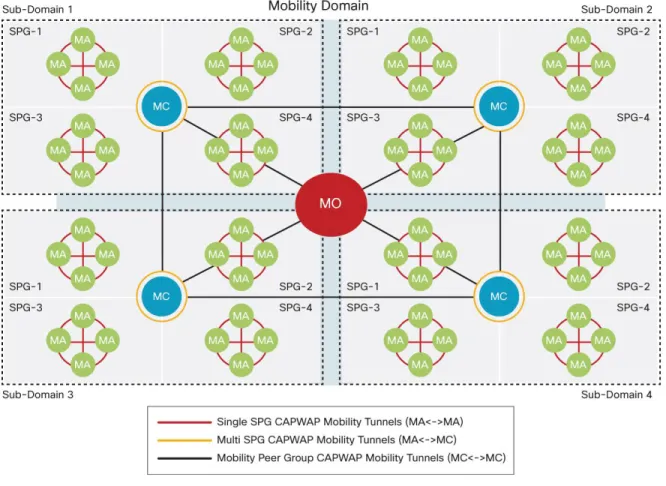
The converged access deployment defines a switch peer group (SPG) as a logical group of mobility agents within one mobility controller (or mobility subdomain). The main advantage of configuring SPGs is to constrain the roaming traffic to switches that form the SPG. When the mobility agents are configured in one SPG on the mobility controller, the software automatically forms full mesh CAPWAP tunnels between the mobility agent switches These CAPWAP tunnels can be formed in a multilayer network design (where the mobility agent switches are L2 adjacent on a VLAN spanned across) or a routed access design (where the mobility agent switches are L3 adjacent). (See Figure 8.)
Figure 8. Hierarchical Roles in Converged Access
The SPGs are designed as a group of mobility agent switches to where the users frequently roam. It is important that roams within an SPG are local to the SPG and need not involve the mobility controller, whereas roams across an SPG require traffic to traverse the mobility controller.
Converged Access Network Design with Cisco Catalyst 3850
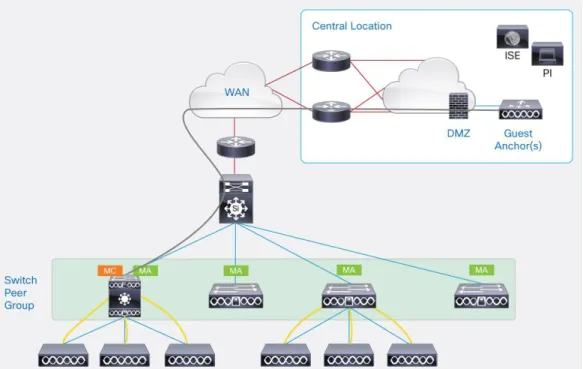
If the wireless deployment consists of one Cisco Catalyst 3850 Switch operating as mobility controller as well as mobility agent, which might be suited for a small branch type deployment, 50 Cisco access points and 2000 clients are supported, as seen in Figure 9.
Figure 9. Single Cisco Catalyst 3850 Stack for Wired/Wireless in Small Branch
If the wireless deployment consists of only a Cisco Catalyst 3850 Switch running as a mobility controller with several other switches operating as mobility agents, 16 mobility agents can be grouped together in one SPG under one mobility controller. The access point and client scale remain at 50 Cisco access points and 2000 clients, as seen in Figure 10. Only the Cisco 5508, 5760 controller appliances, or the WiSM2 service module supports the guest access controller functionality in the DMZ. The guest access controller functionality is not supported on the Cisco Catalyst 3850.
For medium campus wireless deployments scaling up to 250 Cisco access points and 16,000 clients, 7 mobility controller switches (with other mobility agent switches operating as mobility agents in their SPG) can be grouped together in a mobility group with guest access provided by guest anchor controller in the DMZ, as seen in Figure 11. If there is no guest access operational, 8 mobility controller switches can be grouped together in a mobility group.
Figure 11. Multiple Mobility Controllers with Cisco Catalyst 3850 Switches for Wired/Wireless in Medium/Large Campus
For typical large campus wireless deployments scaling beyond 250 Cisco access points and 16,000 clients, the converged access allows the option of operating the Cisco Catalyst 3850 Switches as mobility agents, peering with a software upgraded Cisco 5508 or WiSM2 Wireless LAN Controller, or a Cisco 5760 WLC operating as mobility controller, as seen in Figure 12.
Figure 12. 5508/WiSM2/5760 Controller Appliances with Cisco Catalyst 3850 Switches for Large Campus
Configuring Converged Access with Cisco Catalyst 3850
This section explains how to configure the wireless services on the Cisco Catalyst 3850. Consider a large branch or a small campus that has a deployment scale of up to 250 access points and 16,000 clients that can be
implemented only using Cisco Catalyst 3850 Switches. The converged access deployment will be explained using a case study starting from a small branch in the initial phase growing to a large branch/medium campus
deployment. (See Figure 13.)