ISSN 2250-3153
Common Login (with ASP.NET)
Sanjeet Singh
*
R&D Dept., Syscom Corporation Ltd.
\Abstract-
This paper talks about
•Why Common Login?
•Features of Common Login?
•How to use?
Index Terms
- Why Common Login, Windows authentication, how to use;
INTRODUCTION
Hello Readers,
First of all, I would say this paper is just for ASP.net developers.
Common login as the name implies, providing single interface for login into multiple websites. Are you an employee? Are you
working in an organizing where you need to move from one website to another for completing your task? Are you fed up with keeping
track of your Username and password for every website? If you say yes than this is for you. No need to remember password for
website.
No need to type URL of every other website. Everything is present at one place.
This is best for intranet network like in an organization and now is the right time to move to common login.
You just need to use your System credential to move around multiple websites.
Now in this paper I have talked about common login and how to use them. I have also included code for the same.
Features of Common Login:
•
Everything is present at one place. You can place all your websites in Common Login websites from where user can
directly access their point of interest.
•
User don’t need to remember password or username you just needed your System credential.
•
On your first login if you choose remember. Now you don’t even need to type your credentials on accessing common
login website.
•
Common Login is based on Windows authentication which provide more security compare to others.
•
Overhead on database will be reduced. Now the responsibility of authentication lies over windows not on database.
•
No need to maintain that many user that we used for different portals. Database Maintenance is reduced.
•
Database Administrator work load will be reduced, due to reduction in number of accounts. Managing those many
accounts and their activities is hectic.
How to Use:
Step 1: First you need to create a website which is going to act as an interface for your other websites. Let’s create a website name it
CommonLogin. Now add an aspx page.
ISSN 2250-3153 <tr>
<td>
<asp:ImageButton runat="server" ID="imgTravelling" ImageUrl="Images/Travelling.jpg" Width="300" Height="300" OnClick="imgTravelling_Click" /> </td>
<td>
<asp:ImageButton runat="server" ID="imgSports" ImageUrl="Images/Football.jpg" Width="300" Height="300" OnClick="imgSports_Click" /> </td>
<td>
<asp:ImageButton runat="server" ID="imgMovies" ImageUrl="Images/Movies.jpg" Width="300" Height="300" OnClick="imgMovies_Click" /> </td>
</tr>
Step 2: In your CommonLogin.cs define the URL of the websites that you have included
protected void imgTravelling_Click(object sender, EventArgs e) {
if (User.IsInRole("Travelling")) {
string strURL = "http://localhost:63464/TravellingHome.aspx"; AccessPortal(strURL, UserName);
} else {
lblMessage.Text = "You are not aothorized for Travelling Portal"; }
}
protected void imgSports_Click(object sender, EventArgs e) {
if (User.IsInRole("Sports")) {
string strURL = "http://localhost:18782/SportsHome.aspx"; AccessPortal(strURL, UserName);
} else {
lblMessage.Text = "You are not authorized for Sports"; }
}
protected void imgMovies_Click(object sender, EventArgs e) {
if (User.IsInRole("Movies")) {
string strURL = "http://localhost:63839/MoviesHome.aspx"; AccessPortal(strURL, UserName);
} else {
lblMessage.Text = "You are not authorized for Movies Portal"; }
}
private void AccessPortal(string strURl, string UserName) {
RemotePost myremotepost = new RemotePost(); myremotepost.Url = strURl;
myremotepost.Add("UserName", UserName); myremotepost.Post();
} }
public class RemotePost {
private System.Collections.Specialized.NameValueCollection Inputs = new System.Collections.Specialized.NameValueCollection();
public string Url = ""; public string Method = "post"; public string FormName = "form1";
ISSN 2250-3153
Step 3: In your WebConfig define authentication and define roles which can access the websites. You can also use Membership users
and roles functionality of sql server for authorization. I have used Active directory user and roles.
<authentication mode="Windows"> </authentication>
<authorization>
<allow roles="Sports,Movies,Travelling"/> <deny users="*"/>
</authorization>
Step 4: Host your websites on IIS and choose authentication mode Windows.
Figure 1: Hosting on IIS
public void Post() {
System.Web.HttpContext.Current.Response.Clear();
System.Web.HttpContext.Current.Response.Write("<html><head>");
System.Web.HttpContext.Current.Response.Write(string.Format("</head><body onload=\"document.{0}.submit()\">", FormName));
System.Web.HttpContext.Current.Response.Write(string.Format("<form name=\"{0}\" method=\"{1}\" action=\"{2}\" >", FormName, Method, Url)); for (int i = 0; i < Inputs.Keys.Count; i++)
{
System.Web.HttpContext.Current.Response.Write(string.Format("<input name=\"{0}\" type=\"hidden\" value=\"{1}\">", Inputs.Keys[i], Inputs[Inputs.Keys[i]]));
}
System.Web.HttpContext.Current.Response.Write("</form>"); System.Web.HttpContext.Current.Response.Write("</body></html>"); System.Web.HttpContext.Current.Response.End();
ISSN 2250-3153
Step 5: I have created three roles Sports, Travelling and movies and assigned to users. When I run the website windows authentication
pop up will be shown. On entering the correct information user will be redirected to Commonlogin website.
Figure 2: Windows Authentication
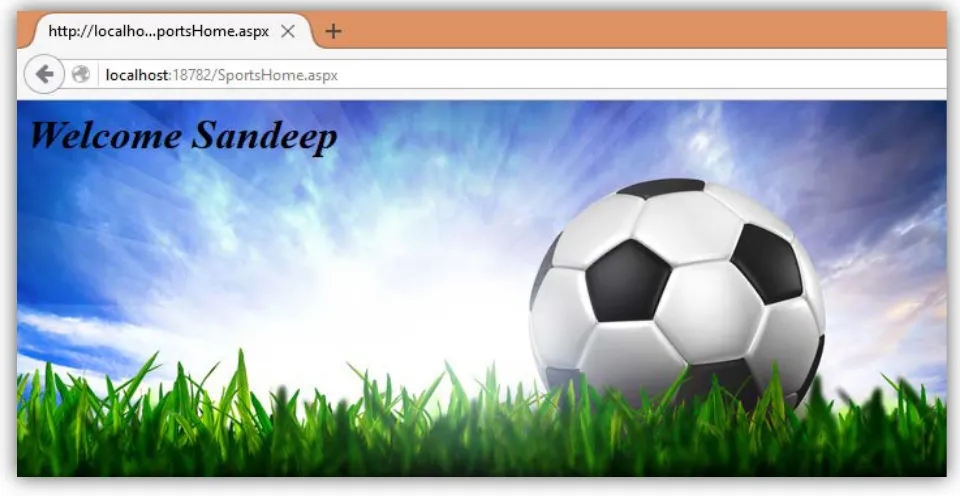
Step 6: I have provided the credentials of Sandeep who has the Sports roles.
Figure 3: Windows Authentication
ISSN 2250-3153
Figure 4: Common login
Step 8: When Sandeep will try to access portal other than Sports. You are not authorized message will be shown.
Figure 5: Unauthorized Access
ISSN 2250-3153
Figure 6: Sports home
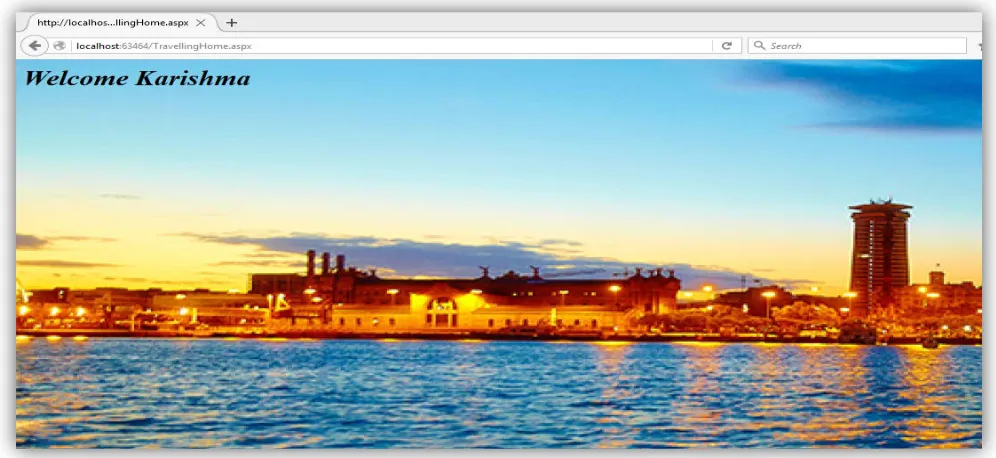
[image:6.612.43.523.65.313.2]Step 11: same goes with the other user they are only able to access that portal, which they are authorized of. Reena will only able to
access movies portal while karishma will only able to access travelling portal.
ISSN 2250-3153
Figure 8: Movies Homepage
[image:7.612.66.567.369.598.2]ISSN 2250-3153
Figure 10: Karishma Homepage
IV. CONCLUSION
Common login is best fitted for intranet network. Provides single interface to access multiple portals/websites using their
windows credentials.
Provides windows based security. Burden on database is reduced.
More user friendly, now user can roam around multiple websites using single interface. They don’t have to take care of their
different account for different websites.
Database maintenance will be reduced, now you don’t have to take care of that many Users. Database Administrator work load
of maintaining users, keeping track of their activities will be reduced.
At last it worth implementing in an organization.
A
CKNOWLEDGMENTThis work was supported by Syscom Corporation Ltd.
R
EFERENCES[1] https://www.iis.net/configreference/system.webserver/security/authentication/windowsauthentication
[2] http://www.codeproject.com/Articles/94612/Windows-Authentication