CP/M-86
®
Operating System
[!QJ
DIGITAL
RESEARCHTM
CP/M-86®
Operating System
COPYRIGHT
Copyright © 1981, 1982, and 1983 by Digital Research. All rights reserved. No part of this publication may be reproduced, transmitted, transcribed, stored in a retrieval system, or translated into any language or computer language, in any form or by any means, electronic, mechanical, magnetic, optical, chemical, manual or otherwise, without the prior written permission of Digital Research, Post Office Box 579, Pacific Grove, California, 93950.
This manual is, however, tutorial in nature. Thus, the reader is granted permission to include the example programs, either in whole or in part, in his own programs.
DISCLAIMER
Digital Research makes no representations or warranties with respect to the contents hereof and specifically disclaims any implied warranties of merchantability or fitness for any particular purpose. Further, Digital Research reserves the right to revise this publication and to make changes from time to time in the content hereof without obligation of Digital Research to notify any person of such revision or changes.
TRADEMARKS
CP 1M and CP IM-86 are registered trademarks of Digital Research. ASM-86, DDT-86, and TEX-80 are trademarks of Digital Research. Intel is a registered trademark of Intel Corporation. Z80 is a registered trademark of Zilog, Inc.
The CPIM-86 Operating System Programmer's Guide was prepared using the Digital Research TEX-80 text formatter and printed in the United States of America.
Foreword
This manual assists the 8086 assembly language programmer working in a CP/M-86® environment. It assumes you are familiar with the CP/M-86 implementa-tion of CP/M and have read the following Digital Research publicaimplementa-tions:
• CP/M 2 Documentation
• CP IM-86 Operating System User's Guide
The reader should also be familiar with the 8086 assembly language instruction set, which is defined in Intel®'s 8086 Family User's Manual.
The first section of this manual discusses ASM-86™ operation and the various assembler options which may be enabled when invoking ASM-86. One of these options controls the hexadecimal output format. ASM-86 can generate 8086 machine code in either Intel or Digital Research format. These two hexadecimal formats are described in Appendix A.
The second section discusses the elements of ASM-86 assembly language. It defines ASM-86's character set, constants, variables, identifiers, operators, expressions, and statements.
The third section discusses the ASM-86 directives, which perform housekeeping functions such as requesting conditional assembly, including multiple source files, and controlling the format of the listing printout.
The fourth section is a concise summary of the 8086 instruction mnemonics accepted by ASM-86. The mnemonics used by the Digital Research assembler are the same as those used by the Intel assembler except for four instructions: the intra-segment short jump, and inter-segment jump, return and call instructions. These differences are summarized in Appendix B.
The fifth section of this manual discusses the code-macro facilities of ASM-86. Code-macro definition, specifiers and modifiers as well as nine special code-macro directives are discussed. This information is also summarized in Appendix H.
Table of Contents
1 Introduction
1. 1 Assembler Operation ... 1
1.2 Optional Run-time Parameters ... 3
1. 3 Aborting ASM-86 ... 5
2 Elements of ASM-86 Assembly Language 2.1 ASM-86 Character Set ... 7
2.2 Tokens and Separators ... 7
2.3 Delimiters. . . .. 7
2.4 Constants. . . .. 9
2.4. 1 Numeric Constants ... 9
2.4.2 Character Strings ... 10
2.5 Identifiers. . . .. 11
2.5. 1 Keywords. . . .. 11
2.5.2 Symbols and Their Attributes ... 13
2.6 Operators ... 14
2.6.1 Operator Examples ... 18
2.6.2 Operator Precedence ... 20
2.7 Expressions. . . .. 22
2.8 Statements. . . .. 23
3 Assembler Directives 3.1 Introduction ... 25
3.2 Segment Start Directives ... 25
3.2.1 The CSEG Directive ... 26
3.2.2 The DSEG Directive ... 26
3.2.3 The SSEG Directive ... 27
3.2.4 The ESEG Directive ... 27
3.3 The ORG Directive ... 28
3.4 The IF and ENDIF Directives ... 28
3.5 The INCLUDE Directive ... 29
3.6 The END Directive ... 29
3.7 The EQU Directive ... 29
Table of
Contents
(continued)
3.11 The RS Directive ... 32
3.12 The RB Directive ... 32
3. 13 The R W Directive ... 32
3. 14 The TITLE Directive ... 33
3.15 The PAGESIZE Directive ... 33
3.16 The PAGEWIDTH Directive ... 33
3.17 The EJECT Directive ... 33
3.18 The SIMFORM Directive ... 34
3.19 The NOLIST and LIST Directives ... 34
4 The ASM-86 Instruction Set 4. 1 Introduction. . . .. 35
4.2 Data Transfer Instructions ... 37
4.3 Arithmetic, Logical, and Shift Instructions ... 40
4.4 String Instructions ... 45
4.5 Control Transfer Instructions ... 47
4.6 Processor Control Instructions ... 51
5 Code-Macro Facilities 5.1 Introduction to Code-macros ... 53
5.2 Specifiers ... 55
5.3 Modifiers ... 56
5.4 Range Specifiers ... 56
5.5 Code-macro Directives ... 57
5.5.1 SEGFIX. . . .. 57
5.5.2 NOSEGFIX ... 57
5.5.3 MODRM ... 58
5.5.4 RELB and REL W ... 59
5.5.5 DB, DW and DD ... 59
5.5.6 DBIT ... 60
6 DDT-86 6.1 DDT-86 Operation ... 63
6.1.1 Invoking DDT-86 ... 63
Table of Contents
(continued)
6.1.5 DDT-86 Operation with Interrupts ... 65
6.2 DDT-86 Commands ... 66
6.2.1 The A (Assemble) Command ... 66
6.2.2 The D (Display) Command ... 66
6.2.3 The E (Load for Execution) Command ... 67
6.2.4 The F (Fill) Command ... 68
6.2.5 The G (Go) Command ... 68
6.2.6 The H (Hexidecimal Math) Command ... 69
6.2.7 The I (Input Command Tail) Command ... 69
6.2.8 The L (List) Command ... 70
6.2.9 The M (Move) Command ... 71
6.2.10 The R (Read) Command ... 71
6.2.11 The S (Set) Command ... 71
6.2.12 The T (Trace) Command ... 72'
6.2.13 The U (Untrace) Command ... 73
6.2.14 The V (Value) Command ... 73
6.2.15 The W (Write) Command) ... 74
6.2.16 The X (Examine CPU State) Command ... 74
6.3 Default Segment Values ... 76
6.4 Assembly Language Syntax for A and L Commands ... 78
Table of Contents
(continued)
Appendixes
A ASM-86 Invocation 93
B Mnemonic Differences from the Intel Assembler ... 95
C ASM-86 Hexadecimal Output Format ... 97
D Reserved Words ... 101
E ASM-86 Instruction Summary ... 103
F Sample Program ... 107
G Code-Macro Definition Syntax ... 113
H ASM-86 Error Messages 115
Section 1
Introduction
1.1 Assembler Operation
ASM-86 processes an 8086 assembly language source file in three passes and pro-duces three output files, including an 8086 machine language file in hexadecimal format. This object file may be in either Intel or Digital Research hex format, which are described in Appendix C. ASM-86 is shipped in two forms: an 8086 cross-assembler designed to run under CP/M® on an Intel 8080 or Zilog Z80® based
system, and a 8086 assembler designed to run under CP/M-86 on an Intel 8086 or
8088 based system. ASM-86 typically produces three output files from one input file as shown in Figure 1-1, below.
I
LIST FILEI
1 SOURCE 1 - 1
-~!'----_~---!-~L--_---'
<file name> .A86 - contains source <file name> .LST - contains listing
I
SYMBOL FILE 1<file name> .H86 - contains assembled program in
hexadecimal format
<file name> .SYM - contains all user-defined symbols
Figure 1-1. ASM-86 Source and Object Files
1.1 Assembler Operation CP/M-86 Programmer's Guide
Figure 1-1 also lists ASM-86 filename extensions. ASM-86 accepts a source file with any three letter extension, but if the extension is omitted from the invoking command, it looks for the specified filename with the extension .A86 in the directory.
If the file has an extension other than .A86 or has no extension at all, ASM-86 returns an error message.
The other extensions listed in Figure 1-1 identify ASM-86 output files. The .LST file contains the assembly language listing with any error messages. The .H86 file contains the machine language program in either Digital Research or Intel hexadeci-mal format. The .SYM file lists any user-defined symbols.
Invoke ASM-86 by entering a command of the following form:
ASM86 <source filename> [ $ <optional parameters> ]
Section 1.2 explains the optional parameters. Specify the source file in the following form:
[<optional drive>:] <filename> [.<optional extension>]
where
<optional drive>
<filename>
<optional extension>
is a valid drive letter specifying the source file's location. Not needed if source is on current drive.
is a valid CP/M filename of 1 to 8 characters.
is a valid file extension of 1 to 3 characters, usu-ally.A86.
Some examples of valid ASM-86 commands are:
A}A8M8B 13:1310888
A}A8M8B 1310S88,A8B $F1
AA
H13 P13 813A}A8M8B D:TEST
CP/M-86 Programmer's Guide 1.1 Assembler Operation
where x.x is the ASM-86 version number. ASM-86 then attempts to open the source file. If the file does not exist on the designated drive, or does not have the correct extension as described above, the assembler displays the message:
NO FILE
If an invalid parameter is given in the optional parameter list, ASM-86 displays the message:
PARAMETER ERROR
After opening the source, the assembler creates the output files. Usually these are placed on the current disk drive, but they may be redirected by optional parameters, or by a drive specification in the source file name. In the latter case, ASM-86 directs the output files to the drive specified in the source file name.
During assembly, ASM-86 aborts if an error condition such as disk full or symbol table overflow is detected. When ASM-86 detects an error in the source file, it places an error message line in the listing file in front of the line containing the error. Each error message has a number and gives a brief explanation of the error. Appendix H
lists ASM-86 error messages. When the assembly is complete, ASM-86 displays the message:
END OF ASSEMBLY. NUMBER OF ERRORS: n
1.2 Optional Run-time Parameters
The dollar-sign character, $, flags an optional string of run-time parameters. A parameter is a single letter followed by a single letter device name specification. The parameters are shown in Table 1-1, below.
Parameter
I
A
H
P
Table 1-1. Run-time Parameters
To Specify
I
Valid Argumentssource file device hex output file device list file device
1.2 Optional Run-time Parameters CP/M-86 Programmer's Guide
All parameters are optional, and can be entered in the command line in any order. Enter the dollar sign only once at the beginning of the parameter string. Spaces may separate parameters, but are not required. No space is permitted, however, between a parameter and its device name.
A device name must follow parameters A, H, P and S. The devices are labeled:
A, B, C, ... P or X, Y, Z
Device names A through P respectively specify disk drives A through P. X specifies the user console (CON:), Y specifies the line printer (LST:), and Z suppresses output
(NUL:).
If output is directed to the console, it may be temporarily stopped at any time by typing a control-So Restart the output by typing a second control-S or any other character.
The F parameter requires either an I or a D argument. When I is specified, ASM-86 produces an object file in Intel hex format. A D argument requests Digital Research hex format. Appendix C discusses these formats in detail. If the F parameter is not entered in the command line, ASM-86 produces Digital Research hex format.
Table 1-2. Run-time Parameter Examples
Command Line
ASM8610
ASM86 10.ASM $ AD SZ
ASM86 10 $ PY SX
ASM86 10 $ FD ASM86 10 $ FI
I
ResultAssemble file 10.A86, produce 10.HEX, 10.LST and 10.SYM, all on the default drive.
Assemble file 10.ASM on device D, produce 10.LST and 10.HEX, no symbol file.
Assemble file 10.A86, produce 10.HEX, route listing directly to printer, output symbols on console.
CP/M-86 Programmer's Guide 1.3 Aborting ASM-86
1.3 Aborting ASM-86
You may abort ASM-86 execution at any time by hitting any key on the console keyboard. When a key is pressed, ASM-86 responds with the question:
USER BREAK. OK(Y/N)?
A Y response aborts the assembly and returns to the operating system. An N response continues the assembly.
Section 2
Elements of ASM-86 Assembly
Language
2.1 ASM-86 Character Set
ASM-86 recognizes a subset of the ASCII character set. The valid characters are the alphanumerics, special characters, and non-printing characters shown below:
ABCDEFGHIJKLMNOPQRSTUVWXYZ a b c d e f g h i j k l m n o p q r s t u v w x y z
o
1 2 3 4 5 678 9+ -
* / = ( ) [ ] ; ' ! , _ : @ $ space, tab, carriage-return, and line-feedLower-case letters are treated as upper-case except within strings. Only alphanu-merics, special characters, and spaces may appear within a string.
2.2 Tokens and Separators
A token is the smallest meaningful unit of an ASM-86 source program, much as a word is the smallest meaningful unit of an English composition. Adjacent tokens are commonly separated by a blank character or space. Any sequence of spaces may appear wherever a single space is allowed. ASM-86 recognizes horizontal tabs as separators and interprets them as spaces. Tabs are expanded to spaces in the list file. The tab stops are at each eighth column.
2.3 Delimiters
2.3 Delimiters CP/M-86 Programmer's Guide
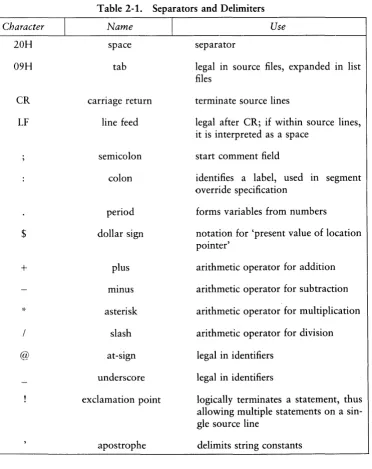
Table 2-1 describes ASM-86 separators and delimiters. Some delimiters are also operators and are explained in greater detail in Section 2.6.
Character
I
[image:17.469.44.416.96.565.2]20H 09H CR
LF
$+
/ @Table 2-1. Separators and Delimiters
Name
space
tab
carriage return
line feed
semicolon colon period dollar sign plus mmus asterisk slash at-sign underscore exclamation point
I
Useseparator
legal m source files, expanded in list files
terminate source lines
legal after CR; if within source lines, it is interpreted as a space
start comment field
identifies a label, used in segment override specification
forms variables from numbers
notation for 'present value of location pointer'
arithmetic operator for addition
arithmetic operator for subtraction
arithmetic operator for multiplication
arithmetic operator for division
legal in identifiers
legal in identifiers
CP/M-86 Programmer's Guide 2.4 Constants
2.4
Constants
A constant is a value known at assembly time that does not change while the assembled program is executed. A constant may be either an integer or a character string.
2.4.1 Numeric Constants
A numeric constant is a 16-bit value in one of several bases. The base, called the radix of the constant, is denoted by a trailing radix indicator. The radix indicators are shown in Table 2-2, below.
Table 2-2. Radix Indicators for Constants
Indicator B
a
Q
D HI
Constant Type binary octal octal decimal hexadecimalI
Base2
8 8
10 16
ASM-86 assumes that any numeric constant not terminated with a radix indicator is a decimal constant. Radix indicators may be upper or lower case.
A constant is thus a sequence of digits followed by an optional radix indicator, where the digits are in the range for the radix. Binary constants must be composed of O's and l's. Octal digits range from
a
to 7; decimal digits range from 0 to 9. Hexadecimal constants contain decimal digits as well as the hexadecimal digits A (10D), B (11D), C (12D), D (13D), E (14D), and F (15D). Note that the leading character of a hexadecimal constant must be either a decimal digit so that ASM-86 cannot confuse a hex constant with an identifier, or leading 0 to prevent this prob-lem. The following are valid numeric constants:2.4 Constants CP/M-86 Programmer's Guide
2.4.2 Character Strings
ASM-86 treats an' ASCII character string delimited by apostrophes as a string constant. All instructions accept only one- or two-character constants as valid argu-ments. Instructions treat a one-character string as an 8-bit number. A two-character string is treated as a 16-bit number with the value of the second character in the low-order byte, and the value of the first character in the high-order byte.
The numeric value of a character is its ASCII code. ASM-86 does not translate case within character strings, so both upper- and lower-case letters can be used. Note that only alphanumerics, special characters, and spaces are allowed within strings.
A DB assembler directive is the only ASM-86 statement that may contain strings longer than two characters. The string may not exceed 255 bytes. Include any apos-trophe to be printed within the string by entering it twice. ASM-86 interprets the two keystrokes" as a single apostrophe. Table 2-3 shows valid strings and how they appear after processing:
Table 2-3. String Constant Examples
'a'->a .IAb"Cd' ->Ab.'Cd 'I lU,e CP/M' -> I li.'e CP/M
" " - > '
CP/M-86 Programmer's Guide 2.5 Identifiers
2.5 Identifiers
Identifiers are character sequences which have a special, symbolic meaning to the assembler. All identifiers in ASM-86 must obey the following rules:
1. The first character must be alphabetic (A, ... Z, a, ... z).
2. Any subsequent characters can be either alphabetical or a numeral (0,1, ... 9). ASM-86 ignores the special characters @ and _, but they are still legal. For example, a_b becomes abo
3. Identifiers may be of any length up to the limit of the physical line.
Identifiers are of two types. The first are keywords, which have predefined mean-ings to the assembler. The second are symbols, which are defined by the user. The following are all valid identifiers:
NOllST
WORD
AH
Third street How are - - YOU - today
l) a ria b 1 e@n I.UT1 be r@1234587890
2.5.1 Keywords
A keyword is an identifier that has a predefined meaning to the assembler. Key-words are reserved; the user cannot define an identifier identical to a keyword. For a complete list of keywords, see Appendix D.
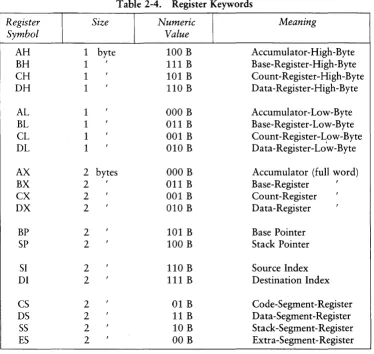
ASM-86 recognizes five types of keywords: instructions, directives, operators, reg-isters and predefined numbers. 8086 instruction mnemonic keywords and the actions they initiate are defined in Section 4. Directives are discussed in Section 3. Section 2.6 defines operators. Table 2-4 lists the ASM-86 keywords that identify 8086 registers.
2.5 Identifiers CP/M-86 Programmer's Guide
Table 2-4. Register Keywords
Register Size Numeric Meaning Symbol Value
AH 1 byte 100 B Accumulator-High -Byte
BH 1 , 111 B Base-Register-High-Byte
CH 1 , 101 B Count-Register-High-Byte
DH 1 , 110 B Da ta -Register-High-Byte
AL 1 , 000 B Accumulator-Low-Byte
BL 1 , 011 B Base-Register-Low-Byte
CL 1 , 001 B Count-Register-Low-Byte
DL 1 , 010 B Data-Register-Lo'w-Byte
AX 2 bytes 000 B Accumulator (full word)
BX 2 , 011 B Base-Register
,
CX 2
,
001 B Count-Register ,DX 2 , 010 B Data-Register
,
BP 2
,
101 B Base PointerSP 2
,
100 B Stack PointerSI 2 , 110 B Source Index
DI 2
,
111 B Destination IndexCS 2 , 01 B Code-Segment-Register
DS 2
,
11 B Data-Segment-RegisterSS 2
,
10 B Stack-Segment-Register [image:21.469.41.415.51.405.2]CP/M-86 Programmer's Guide 2.5 Identifiers
2.5.2 Symbols and Their Attributes
A symbol is a user-defined identifier that has attributes which specify what kind of information the symbol represents. Symbols fall into three categories:
• variables • labels • numbers
Variables identify data stored at a particular location in memory. All variables have the following three attributes:
• Segment-tells which segment was being assembled when the variable was defined.
• Offset-tells how many bytes there are between the beginning of the segment and the location of this variable.
• Type-tells how many bytes of data are manipulated when this variable is referenced.
A Segment may be a code-segment, a data-segment, a stack-segment or an extra-segment depending on its contents and the register that contains its starting address (see Section 3.2). A segment may start at any address divisible by 16. ASM-86 uses this boundary value as the Segment portion of the variable's definition.
The Offset of a variable may be any number between 0 and OFFFFH or 65535D. A variable must have one of the following Type attributes:
• BYTE • WORD
• DWORD
BYTE specifies a one-byte variable, WORD a two-byte variable and DWORD a four-byte variable. The DB, DW, and DD directives respectively define variables as these three types (see Section 3). For example, a variable is defined when it appears as the name for a storage directive:
2.5 Identifiers CP/M-86 Programmer's Guide
A variable may also be defined as the name for an EQU directive referencing another label, as shown below:
VARIABLE
EQU
ANOTHER VARIABLE
Labels identify locations in memory that contain instruction statements. They are referenced with jumps or calls. All labels have two attributes:
• Segment • Offset
Label segment and offset attributes are essentially the same as variable segment and offset attributes. Generally, a label is defined when it precedes an instruction. A colon, :, separates the label from instruction; for example:
LABEL:
ADD A}-{ , B>{A label may also appear as the name for an EQU directive referencing another label; for example:
LABEL
EQU
ANOTHER_LABEL
Numbers may also be defined as symbols. A number symbol is treated as if you had explicitly coded the number it represents. For example:
NUMber five
EQU
5
MOV
AL,NuMber_five
is equivalent to:
MOl)
AL ,5
Section 2.6 describes operators and their effects on numbers and number symbols.
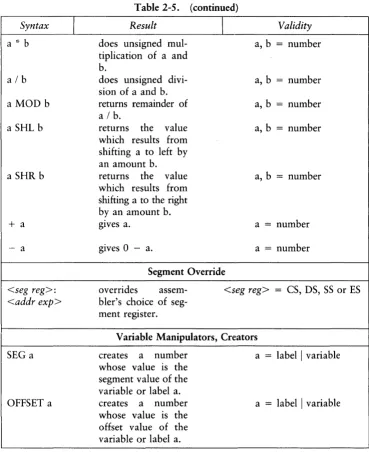
2.6 Operators
CP/M-86 Programmer's Guide 2.6 Operators
Syntax
I
aXOR b
a OR b
a AND b
NOTa
a EQ b
a LT b
aLE b
a GT b
aGE b
a NE b
a
+
ba -
b
Table 2-5. ASM-86 Operators
Result
Logical Operators
bit-by-bit logical EXCLUSIVE OR of a and b.
bit-by-bit logical OR of a and b.
bit-by-bit logical AND of a and b. logical inverse of a: all O's become 1's, 1 's become O's.
Relational Operators
returns 0 FFFFH if a
= b, otherwise O. returns 0 FFFFH if a
<
b, otherwise O. returns 0 FFFFH if a<
= b, otherwise O. returns 0 FFFFH if a>
b, otherwise O. returns 0 FFFFH if a>
= b, otherwise O. returns OFFFFH if a< >
b, otherwise O.Arithmetic Operators
arithmetic sum of a
and b.
arithmetic difference of a and b.
I
Validitya, b = number
a, b = number a, b
=
numbera = 16-bit number
a, b = unsigned number a, b = unsigned number a, b = unsigned number
a, b = unsigned number a, b = unsigned number a, b = unsigned number
2.6 Operators
Syntax
alb
a MOD b
a SHL b
a SHR b
+
a - a <seg reg>: <addr exp> SEG a OFFSET aI
Table 2-5. (continued)
Result
does unsigned mul-tiplication of a and
b.
does unsigned divi-sion of a and b. returns remainder of a I b.
returns the value which results from shifting a to left by an amount b. returns the value which results from shifting a to the right by an amount b. gIves a.
gives 0 - a.
I
Segment Override
CP/M-86 Programmer's Guide
Validity
a, b = number
a, b = number a, b = number a, b = number
a, b
=
numbera = number a = number
overrides assem-bler's choice of seg-ment register.
<seg reg> = CS, DS, SS or ES
Variable Manipulators, Creators
creates a number whose value is the segment value of the variable or label a. creates a number whose value is the offset value of the variable or label a.
a = label I variable
[image:25.469.39.408.46.498.2]CP/M-86 Programmer's Guide
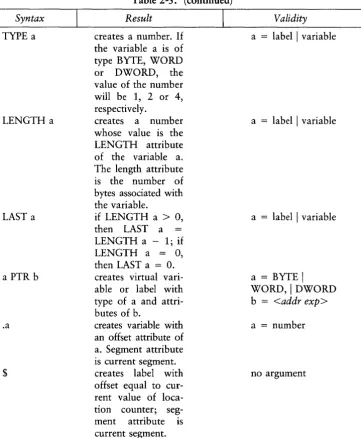
Syntax
TYPE a
LENGTH a
LAST a
a PTR b
.a
$
[image:26.471.62.424.55.494.2]I
Table 2-5. (continued)
Result
creates a number. If
the variable a is of type BYTE, WORD or DWORD, the value of the number
will be 1, 2 or 4,
respectively.
creates a number whose value is the LENGTH attribute of the variable a. The length attribute is the number of bytes associated with the variable.
if LENGTH a
>
0,then LAST a LENGTH a - 1; if LENGTH a
=
0,then LAST a = 0.
creates virtual vari-able or label with type of a and attri-butes of b.
creates variable with an offset attribute of a. Segment attribute is current segment. creates label with offset equal to cur-rent value of loca-tion counter; seg-ment attribute is current segment.
2.6 Operators
Validity
a = label I variable
a = label
I
variablea = label
I
variablea = BYTE
I
WORD,I
DWORDb = <addr exp>
a
=
number2.6 Operators CP/M-86 Programmer's Guide
2.6.1 Operator Examples
Logical operators accept only numbers as operands. They perform the boolean logic operations AND, OR, XOR, and NOT. For example:
OOFC MASK EQU OFCH 0080 SIGNBIT EQU 80H
0000 B180 MOl.' CLfMASK AND SIGNBIT 0002 B003 MOl.' ALfNOT MASK
Relational operators treat all operands as unsigned numbers. The relational opera-tors are EQ (equal), LT (less than), LE (less than or equal), GT (greater than), GE (greater than or equal), and NE (not equal). Each operator compares two operands and returns all ones (OFFFFH) if the specified relation is true and all zeros if it is not. For example:
OOOA 0018
0004 B8FFFF 0007 B80000
LIMITl EQU LIMIT2 EQU
10 25
AXfLIMITl LT LIMIT2 AXfLIMITl GT LIMIT2
Addition and subtraction operators compute the arithmetic sum and difference of two operands. The first operand may be a variable, label, or number, but the second operand must be a number. When a number is added to a variable or label, the result is a variable or label whose offset is the numeric value of the second operand plus the offset of the first operand. Subtraction from a variable or label returns a variable or label whose offset is that of first operand decremented by the number specified in the second operand. For example:
0002 0005 OOOA FF
OOOB 2EAOOBOO OOOF 2E8AOEOFOO
CP/M-86 Programmer's Guide 2.6 Operators
The multiplication and division operators
*, /,
MOD, SHL, and SHR accept only numbers as operands. * and / treat all operators as unsigned numbers. For example:0018 6E5500 0019 6310
0050 0016 68AOOO
MOl) MOl) 6UFFERSIZE
MOl)
SI t258/3 6Lt84/4
EQU 80
AXt6UFFERSIZE
*
2 Unary operators accept both signed and unsigned operators as shown below:001E 6123 0020 6007 0022 62F4
MOV MOl) MOl) CLt+35 ALt2--5 OLt-12
When manipulating variables, the assembler decides which segment register to use. You may override the assembler's choice by specifying a different register with the segment override operator. The syntax for the override operator is <segment regis-ter> : <address expression> where the <segment regisregis-ter> is CS, DS, SS, or ES.
For example:
0024 38864720 0028 28860E5600
MOl) MOl)
AXtSS:WOR06UFFER[6X] CXtES:ARRAY
A variable manipulator creates a number equal to one attribute of its variable operand. SEG extracts the variable's segment value, OFFSET its offset value, TYPE its type value (1, 2, or 4), and LENGTH the number of bytes associated with the variable. LAST compares the variable's LENGTH with
°
and if greater, then decre-ments LENGTH by one. If LENGTH equals 0, LAST leaves it unchanged. Variable manipulators accept only variables as operators. For example:0020 000000000000 WOR06UFFER 0033 0102030405 6UFFER
0038 680500 MOV
0036 680400 MOV
003E 680100 MOV
0041 680200 MOV
OW 06
OtOtO
1t2t3t4t5
2.6 Operators CP/M-86 Programmer's Guide
The PTR operator creates a virtual variable or label, one valid only during the execution of the instruction. It makes no changes to either of its operands. The temporary symbol has the same Type attribute as the left operator, and all other attributes of the right operator as shown below.
001i1i C80705 00117 8A07 00118 FFOli
MOl.) MOl.)
INC
BYTE PTR [BX] t 5 AL tBYTE PTR [B)-{] WORD PTR [51]
The Period operator, ., creates a variable in the current data segment. The new variable has a segment attribute equal to the current data segment and an offset attribute equal to its operand. Its operand must be a number. For example:
OOliB Al0000 OOliE 288B1EOOliO
MOl.! MOl.!
A)·(t .0
B)-{ t E5: .1l000H
The Dollar-sign operator, $, creates a label with an offset attribute equal to the current value of the location counter. The label's segment value is the same as the current code segment. This operator takes no operand. For example:
0053 E8FDFF JMP $ 0058 EBFE JMPS $
0058 E8FD2F JMP $+3000H
2.6.2 Operator Precedence
Expressions combine variables, labels or numbers with operators. ASM-86 allows several kinds of expressions which are discussed in Section 2.7. This section defines the. order in which operations are executed should more than one operator appear in an expression.
CP/M-86 Programmer's Guide 2.6 Operators
Parentheses can override normal rules of precedence. The part of an expression enclosed in parentheses is evaluated first. If parentheses are nested, the innermost expressions are evaluated first. Only five levels of nested parentheses are legal. For example:
15/3 + 18/8
=
5 + 2=
715/(3 + 18/8)
=
15/(3 + 2)=
15/5=
3Table 2-6. Precedence of Operations in ASM-86
Order
I
Operator TypeI
Operators1 Logical XOR, OR
2 Logical AND
3 Logical NOT
4 Relational EQ, LT, LE, GT, GE,
NE
5 Addition/subtraction
+ -
,
6 Multiplication/division '~, /, MOD, SHL, SHR
7 Unary
+ -
,
8 Segment override <segment override>:
9 Variable manipulators, SEG, OFFSET, PTR,
creators TYPE, LENGTH, LAST
10 Parentheses/brackets ( ), [ ]
2.7 Expressions CP/M-86 Programmer's Guide
2.7 Expressions
ASM-86 allows address, numeric, and bracketed expressions. An address expres-sion evaluates to a memory address and has three components:
• A segment value • An offset value • A type
Both variables and labels are address expressions. An address expression is not a number, but its components are. Numbers may be combined with operators such as PTR to make an address expression.
A numeric expression evaluates to a number. It does not contain any variables or labels, only numbers and operands.
Bracketed expressions specify base- and index- addressing modes. The base regis-ters are BX and BP, and the index regisregis-ters are DI and 51. A bracketed expression may consist of a base register, an index register, or a base register and an index register.
Use the
+
operator between a base register and an index register to specify both base- and index-register addressing. For example:MOlyl \) a ria b 1 e [ b x J ,0
MOV A}-{,[B}{+DIJ
CP/M-86 Programmer's Guide 2.8 Statements
2.8 Statements
Just as 'tokens' in this assembly language correspond to words in English, so are statements analogous to sentences. A statement tells ASM-86 what action to perform. Statements are of two types: instructions and directives. Instructions are translated by the assembler into 8086 machine language instructions. Directives are not trans-lated into machine code but instead direct the assembler to perform certain clerical functions.
Terminate each assembly language statement with a carriage return (CR) and line feed (LF), or with an exclamation point, !, which ASM-86 treats as an end-of-line. Multiple assembly language statements can be written on the same physical line if separated by exclamation points.
The ASM-86 instruction set is defined in Section 4. The syntax for an instruction statement is:
[label:] [prefix] mnemonic [ operand(s)] [;comment]
where the fields are defined as:
label:
prefix
mnemonIc
operand(s)
comment
A symbol followed by':' defines a label at the current value of the location counter in the current segment. This field is optional.
Certain machine instructions such as LOCK and REP may prefix other instructions. This field is optional.
A symbol defined as a machine instruction, either by the assembler or by an EQU directive. This field is optional unless preceded by a prefix instruction. If it is omitted, no operands may be present, although the other fields may appear. ASM-86 mnemonics are defined in Section 4.
An instruction mnemonic may require other symbols to rep-resent operands to the instruction. Instructions may have zero, one or two operands.
2.8 Statements CP/M-86 Programmer's Guide
ASM-86 directives are described 10 Section 3. The syntax for a directive
state-ment is:
[name] directive operand(s) [;comment]
where the fields are defined as:
name
directive operand(s)
comment
Unlike the label field of an instruction, the name field of a directive is never terminated with a colon. Directive names are legal for only DB, DW, DD, RS and EQU. For DB, DW, DD and RS the name is optional; for EQU it is required. One of the directive keywords defined in Section 3.
Analogous to the operands to the instruction mnemonics. Some directives, such as DB, DW, and DD, allow any operand while others have special requirements.
Exactly as defined for instruction statements.
Section 3
Assembler Directives
3.1 Introduction
Directive statements cause ASM-S6 to perform housekeeping functions such as assigning portions of code to logical segments, requesting conditional assembly, defining data items, and specifying listing file format. General syntax for directive statements appears in Section 2.S.
In the sections that follow, the specific syntax for each directive statement is given under the heading and before the explanation. These syntax lines use special symbols to represent possible arguments and other alternatives. Square brackets, [], enclose optional arguments. Angle brackets,
<>,
enclose descriptions of user-supplied argu-ments. Do not include these symbols when coding a directive.3.2 Segment Start Directives
At run-time, every SOS6 memory reference must have a 16-bit segment base value and a 16-bit offset value. These are combined to produce the lO-bit effective address needed by the CPU to physically address the location. The 16-bit segment base value or boundary is contained in one of the segment registers CS, DS, SS, or ES. The offset value gives the offset of the memory reference from the segment boundary. A 16-byte physical segment is the smallest relocatable unit of memory.
3.2 Segment Start Directives CP/M-86 Programmer's Guide
Instruction statements must be assigned to the Code Segment. Directive statements may be assigned to any segment. ASM-86 uses these assignments to change from one segment register to another. For example, when an instruction accesses a memory variable, ASM-86 must know which segment contains the variable so it can generate a segment override prefix byte if necessary.
3.2.1 The CSEG Directive
CSEG <numeric expression>
CSEG CSEG $
This directive tells the assembler that the following statements belong in the Code Segment. All instruction statements must be assigned to the Code Segment. All direc-tive statements are legal within the Code Segment.
Use the first form when the location of the segment is known at assembly time; the code generated is not relocatable. Use the second form when the segment location is not known at assembly time; the code generated is relocatable. Use the third form to continue the Code Segment after it has been interrupted by a DSEG, SSEG, or ESEG directive. The continuing Code Segment starts with the same attributes, such as location and instruction pointer, as the previous Code Segment.
3.2.2 The DSEG Directive
DSEG <numeric expression>
DSEG DSEG $
This directive specifies that the following statements belong to the Data Segment. The Data Segment primarily contains the data allocation directives DB, DW, DD and RS, but all other directive statements are also legal. Instruction statements are illegal in the Data Segment.
CP/M-86 Programmer's Guide
3.2.3 The SSEG Directive
SSEG <numeric expression>
SSEG SSEG $
3.2 Segment Start Directives
The SSEG directive indicates the beginning of source lines for the Stack Segment. Use the Stack Segment for all stack operations. All directive statements are legal in the Stack Segment, but instruction statements are illegal.
Use the first form when the location of the segment is known at assembly time; the code generated is not relocatable. Use the second form when the segment location is not known at assembly time; the code generated is relocatable. Use the third form to continue the Stack Segment after it has been interrupted by a CSEG, DSEG, or ESEG directive. The continuing Stack Segment starts with the same attributes as the previous Stack Segment.
3.2.4 The ESEG Directive
ESEG <numeric expression>
ESEG ESEG $
This directive initiates the Extra Segment. Instruction statements are not legal in this segment, but all directive statements are.
3.3 The ORG Directive CP/M-86 Programmer's Guide
3.3 The ORG Directive
ORG <numeric expression>
The ORG directive sets the offset of the location counter in the current segment to the value specified in the numeric expression. Define all elements of the expression before the ORG directive because forward references may be ambiguous.
In most segments, an ORG directive is unnecessary. If no ORG is included before the first instruction or data byte in a segment, assembly begins at location zero relative to the beginning of the segment. A segment can have any number of ORG
directives.
3.4 The IF and ENDIF Directives
IF <numeric expression> <source line 1
>
<source line 2
>
<source line n >
ENDIF
The IF and END IF directives allow a group of source lines to be included or excluded from the assembly. Use conditional directives to assemble several different versions of a single source program.
CP/M-86 Programmer's Guide 3.5 The INCLUDE Directive
3.5 The INCLUDE Directive
INCLUDE <file name>
This directive includes another ASM-86 file in the source text. For example:
INCLUDE
EQUALS.AB8
Use INCLUDE when the source program resides in several different files. INCLUDE directives may not be nested; a source file called by an INCLUDE directive may not contain another INCLUDE statement. If <file name> does not contain a file type,
the file type is assumed to be .A86. If no drive name is specified with <file name>,
ASM-86 assumes the drive containing the source file.
3.6 The END Directive
END
An END directive marks the end of a source file. Any subsequent lines are ignored by the assembler. END is optional. If not present, ASM-86 processes the source until it finds an End-Of-File character (lAH).
3.7 The EQU Directive
symbol EQU <numeric expression>
symbol EQU <address expression>
symbol EQU <register>
symbol EQU <instruction mnemonic>
3.7 The EQU Directive CP/M-86 Programmer's Guide
The first form assigns a numeric value to the symbol, the second a memory address. The third form assigns a new name to an 8086 register. The fourth form defines a new instruction (sub)set. The following are examples of these four forms:
0005 FIl,JE EQU 2*2+1
0033 NE}{T EQU BUFFER
0001 COUNTER EQU C}{
MOl')l.,H,J EQU MOt)
0050 8BC3 M o l.) l.) l,J
3.8 The
DB
Directive
[symbol] DB <numeric expression>[,<numeric expression> .. ]
[symbol] DB <string constant>[,<string constant> ... ]
The DB directive defines initialized storage areas in byte format. Numeric expres-sions are evaluated to 8-bit values and sequentially placed in the hex output file. String constants are placed in the output file according to the rules defined in Section 2.4.2. A DB directive is the only ASM-86 statement that accepts a string constant longer than two bytes. There is no translation from lower to upper case within strings. Multiple expressions or constants, separated by commas, may be added to the definition, but may not exceed the physical line length.
Use an optional symbol to reference the defined data area throughout the program. The symbol has four attributes: the Segment and Offset attributes determine the symbol's memory reference, the Type attribute specifies single bytes, and Length tells the number of bytes (allocation units) reserved.
The following statements show DB directives with symbols:
005F 43502F4D2073 TE}{T DB 'CP/M S}'stefrl'tO 797374656DOO
0066 E1
AA
DB ' a ' + 80HCP/M-86 Programmer's Guide 3.9 The DW Directive
3.9 The DW Directive
[symbol] DW <numeric expression>[,<numeric expression> .. ]
[symbol] DW <string constant> [,<string constant> ... ]
The DW directive initializes two-byte words of storage. String constants longer than two characters are illegal. Otherwise, DW uses the same procedure to initialize storage as DB. The following are examples of DW statements:
0074 0000 CNTR
OW
00076 63C166C168C1 JMPTAB
OW
SUBR1,SUBR2,SUBR3 007C 010002000300OW
l,2,3,4,5t8040005000800
3.10 The DD Directive
[symbol] DD <numeric expression>[,<numeric expression> .. ]
The DD directive initializes four bytes of storage. The Offset attribute of the address expression is stored in the two lower bytes, the Segment attribute in the two upper bytes. Otherwise, DD follows the same procedure as DB. For example:
1234
0000 8CC134128FC1 LONG JMPTAB 3412
0008 72C1341275C1 3412
DO
DO
ROUT1,ROUT2
3.11 The RS Directive CP/M-86 Programmer's Guide
3.11 The RS Directive
[symbol] RS <numeric expression>
The RS directive allocates storage in memory but does not initialize it. The numeric expression gives the number of bytes to be reserved. An RS statement does not give a byte attribute to the optional symbol. For example:
0010 0080 4080
BUF
3.12 The RB Directive
RS RS RS
[symbol] RB <numeric expression>
80
llOOOH
1
The RB directive allocates byte storage in memory without any initialization. This directive is identical to the RS directive except that it does give the byte attribute.
3.13 The RW Directive
[symbol] RW <numeric expression>
The RW directive allocates two-byte word storage in memory but does not initial-ize it. The numeric expression gives the number of words to be reserved. For example:
4081 4181 C181
BUFF
RW
RW
RW
128
llOOOH
CP/M-86 Programmer's Guide 3.14 The TITLE Directive
3.14 The TITLE Directive
TITLE <string constant>
ASM-86 prints the string constant defined by a TITLE directive statement at the top of each printout page in the listing file. The title character string should not exceed 30 characters. For example:
TITLE
'CP/M
Monitor'3.15
The PAGESIZE Directive
PAGESIZE <numeric expression>
The P AGESIZE directive defines the number of lines to be included on each print-out page. The default pagesize is 66.
3.16 The PAGEWIDTH Directive
P AGEWIDTH <numeric expression>
The P AGEWIDTH directive defines the number of columns printed across the page when the listing file is output. The default pagewidth is 120 unless the listing is routed directly to the terminal; then the default pagewidth is 79.
3.17 The EJECT Directive
EJECT
3.18 The SIMFORM Directive CP/M-86 Programmer's Guide
3.18 The SIMFORM Directive
SIMFORM
The SIMFORM directive replaces a form-feed (FF) character in the print file with the correct number of line-feeds (LF). Use this directive when printing out on a printer unable to interpret the form-feed character.
3.19 The NOLIST and LIST Directives
NOLIST LIST
The NOLIST directive blocks the printout of the following lines. Restart the listing with a LIST directive.
Section 4
The ASM-86 Instruction Set
4.1 Introduction
The ASM-86 instruction set includes all 8086 machine instructions. The general syntax for instruction statements is given in Section 2.7. The following sections define the specific syntax and required operand types for each instruction, without reference to labels or comments. The instruction definitions are presented in tables for easy reference. For a more detailed description of each instruction, see Intel's MCS-86 Assembly Language Reference Manual. For descriptions of the instruction bit pat-terns and operations, see Intel's MCS-86 User's Manual.
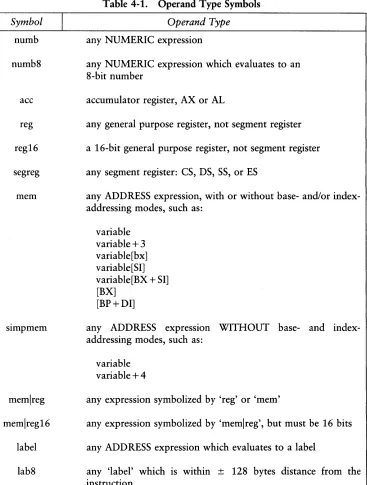
The instruction-definition tables present ASM-86 instruction statements as combi-nations of mnemonics and operands. A mnemonic is a symbolic representation for an instruction, and its operands are its required parameters. Instructions can take zero, one or two operands. When two operands are specified, the left operand is the instruction's destination operand, and the two operands are separated by a comma.
4.1 Introduction
Symbol
I
numb
numb8
ace
reg
reg16
segreg
mem
memlreg
memlreg16
label
lab8
CP/M-86 Programmer's Guide
Table 4-1. Operand Type Symbols
Operand Type
any NUMERIC expression
any NUMERIC expression which evaluates to an 8-bit number
accumulator register, AX or AL
any general purpose register, not segment register
a 16-bit general purpose register, not segment register
any segment register: CS, DS, SS, or ES
any ADDRESS expression, with or without base- and/or index-addressing modes, such as:
variable variable+3 variable[bx] variable[SI] variable[BX + SI] [BX]
[BP+DI]
any ADDRESS expression WITHOUT base- and index-addressing modes, such as:
variable variable +4
any expression symbolized by 'reg' or 'mem'
any expression symbolized by 'memlreg', but must be 16 bits
any ADDRESS expression which evaluates to a label
[image:45.468.44.411.53.538.2]CP/M-86 Programmer's Guide 4.1 Introduction
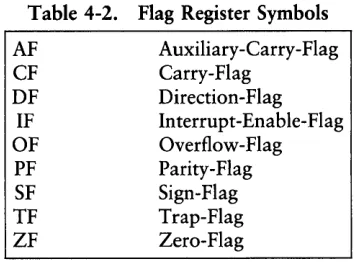
[image:46.468.151.328.134.265.2]The 8086 CPU has nine single-bit Flag registers which reflect the state of the CPU. The user cannot access these registers directly, but can test them to determine the effects of an executed instruction upon an operand or register. The effects of instruc-tions on Flag registers are also described in the instruction-definition tables, using the symbols shown in Table 4-2 to represent the nine Flag registers.
Table 4-2. Flag Register Symbols
AF CF DF IF OF PF SF TF ZF
4.2 Data Transfer Instructions
Auxiliary-Carry-Flag Carry-Flag
Direction-Flag Interrupt-Enable-Flag Overflow-Flag Parity-Flag Sign-Flag Trap-Flag Zero-Flag
4.2 Data Transfer Instructions CP/M-86 Programmer's Guide
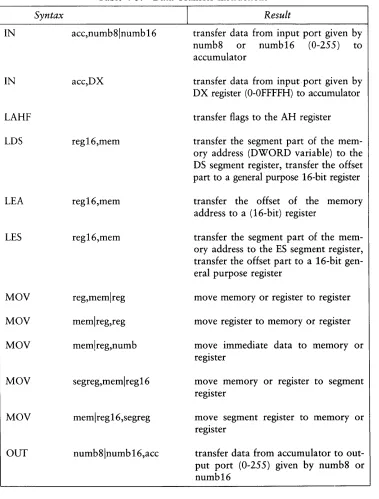
Table 4-3. Data Transfer Instructions
Syntax
I
ResultIN acc,numb8lnumb16 transfer data from input port given by numb8 or numb16 (0-255) to accumulator
IN acc,DX transfer data from input port given by DX register (O-OFFFFH) to accumulator
LAHF LDS LEA LES MOV MOV MOV MOV MOV OUT reg16,mem reg16,mem reg16,mem reg,memlreg memlreg,reg memlreg,numb segreg,memlreg16 memlreg16,segreg numb81numb 16,acc
transfer flags to the AH register
transfer the segment part of the mem-ory address (DWORD variable) to the DS segment register, transfer the offset part to a general purpose 16-bit register
transfer the offset of the memory address to a (16-bit) register
transfer the segment part of the mem-ory address to the ES segment register, transfer the offset part to a 16-bit gen-eral purpose register
move memory or register to register
move register to memory or register
move immediate data to memory or register
move memory or register to segment register
move segment register to memory or register
[image:47.468.41.420.54.553.2]CP/M-86 Programmer's Guide 4.2 Data Transfer Instructions
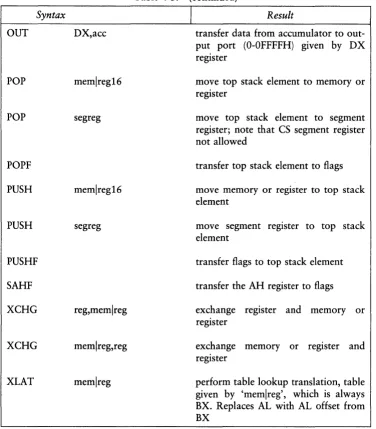
Table 4-3. (continued)
Syntax
I
ResultOUT DX,acc transfer data from accumulator to
out-put port (O-OFFFFH) given by DX register
POP memlreg16
POP segreg
POPF
PUSH memlreg16
PUSH segreg
PUSHF
SAHF
XCHG reg,memlreg
XCHG memlreg,reg
XLAT memlreg
move top stack element to memory or register
move top stack element to segment register; note that CS segment register not allowed
transfer top stack element to flags
move memory or register to top stack element
move segment register to top stack element
transfer flags to top stack element
transfer the AH register to flags
exchange register and memory or register
exchange memory or register and register
[image:48.469.54.430.56.485.2]4.3 Arithmetic, Logic, and Shift CP/M-86 Programmer's Guide
4.3 Arithmetic, Logical, and Shift Instructions
The 8086 CPU performs the four basic mathematical operations in several differ-ent ways. It supports both 8- and 16-bit operations and also signed and unsigned arithmetic.
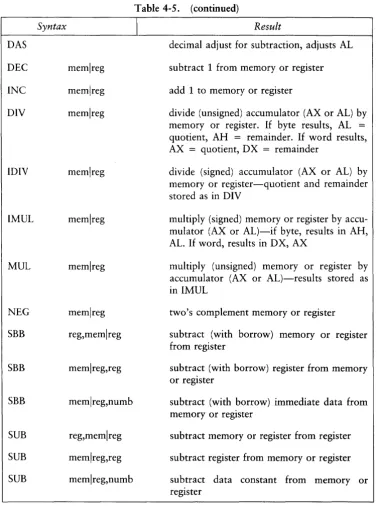
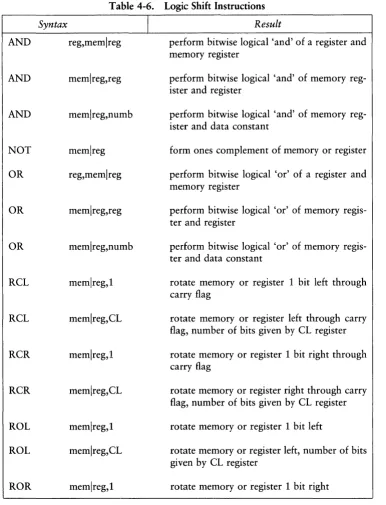
Six of the nine flag bits are set or cleared by most arithmetic operations to reflect the result of the operation. Table 4-4 summarizes the effects of arithmetic instruc-tions on flag bits. Table 4-5 defines arithmetic instrucinstruc-tions and Table 4-6 logical and shift instructions.
Table 4-4. Effects of Arithmetic Instructions on Flags
CF is set if the operation resulted in a carry out of (from addition) or a borrow into (from subtraction) the high-order bit of the result; other-wise CF is cleared.
AF is set if the operation resulted in a carry out of (from addition) or a borrow into (from subtraction) the low-order four bits of the result; otherwise AF is cleared.
ZF is set if the result of the operation is zero; otherwise ZF is cleared.
SF is set if the result is negative.
PF is set if the modulo 2 sum of the low-order eight bits of the result of the operation is 0 (even parity); otherwise PF is cleared (odd parity).
CP/M-86 Programmer's Guide 4.3 Arithmetic, Logic, and Shift Syntax AAA AAD AAM AAS ADC ADC ADC ADD ADD ADD CBW CWD CMP CMP CMP
Table 4-5. Arithmetic Instructions
reg,memlreg memlreg,reg memlreg,numb reg,memlreg memlreg,reg memlreg,numb reg,memlreg memlreg,reg memlreg,numb
I
Resultadjust unpacked BCD (ASCII) for addition-adjusts AL
adjust unpacked BCD (ASCII) for division-adjusts AL
adjust unpacked BCD (ASCII) for
mUltiPlica-1 tion-adjusts AX
adjust unpacked BCD (ASCII) for subtrac-tion-adjusts AL
add (with carry) memory or register to register
add (with carry) register to memory or register
add (with carry) immediate data to memory or register
add memory or register to register
add register to memory or register
add immediate data to memory or register
convert byte in AL to word in AH by sign extension
convert word in AX to double word in DXI
AX by sign extension
compare register with memory or register
compare memory or register with register
4.3 Arithmetic, Logic, and Shift CP/M-86 Programmer's Guide
Syntax
DAS
DEC
memlregINC
memlregDIY memlreg
IDIV
memlregIMUL memlreg
MUL memlreg
NEG
memlregSBB reg,memlreg
SBB memlreg,reg
SBB memlreg,numb
SUB reg,memlreg
SUB memlreg,reg
SUB memlreg,numb
Table 4-5. (continued)
I
Resultdecimal adjust for subtraction, adjusts AL
subtract 1 from memory or register
add 1 to memory or register
divide (unsigned) accumulator (AX or AL) by memory or register. If byte results, AL =
quotient, AH
=
remainder. If word results, AX = quotient, DX = remainderdivide (signed) accumulator (AX or AL) by memory or register-quotient and remainder stored as in DIY
multiply (signed) memory or register by accu-mulator (AX or AL)-if byte, results in AH, AL. If word, results in D X, AX
multiply (unsigned) memory or register by accumulator (AX or AL)-results stored as in IMUL
two's complement memory or register
subtract (with borrow) memory or register from register
subtract (with borrow) register from memory or register
subtract (with borrow) immediate data from memory or register
subtract memory or register from register
subtract register from memory or register
[image:51.470.38.415.50.555.2]CP/M-86 Programmer's Guide 4.3 Arithmetic, Logic, and Shift
Table 4-6. Logic Shift Instructions
Syntax
AND reg,memlreg
AND memlreg,reg
AND memlreg,numb
NOT memlreg
OR reg,memlreg
OR memlreg,reg
OR memlreg,numb
RCL memlreg,l
RCL memlreg,CL
RCR memlreg,l
RCR memlreg,CL
ROL memlreg,l
ROL memlreg,CL
I
Resultperform bitwise logical 'and' of a register and memory register
perform bitwise logical 'and' of memory reg-ister and regreg-ister
perform bitwise logical 'and' of memory reg-ister and data constant
form ones complement of memory or register
perform bitwise logical 'or' of a register and memory register
perform bitwise logical 'or' of memory regis-ter and regisregis-ter
perform bitwise logical 'or' of memory regis-ter and data constant
rotate memory or register 1 bit left through carry flag
rotate memory or register left through carry flag, number of bits given by CL register
rotate memory or register 1 bit right through carry flag
rotate memory or register right through carry flag, number of bits given by CL register
rotate memory or register 1 bit left
4.3 Arithmetic, Logic, and Shift CP/M-86 Programmer's Guide
Syntax
ROR memireg,CL
SAL memireg,l
SAL memireg,CL
SAR memireg,l
SAR memireg,CL
SHL memireg,l
SHL memireg,CL
SHR memireg,l
SHR memireg,CL
TEST reg,memireg
Table 4-6. (continued)
Result
rotate memory or register right, number of bits given by CL register
shift memory or register 1 bit left, shift III
low-order zero bits
shift memory or register left, number of bits given by CL register, shift in low-order zero bits
shift memory or register 1 bit right, shift in high-order bits equal to the original high-order bit
shift memory or register right, number of bits given by CL register, shift in high-order bits equal to the original high-order bit
shift memory or register 1 bit left, shift in low-order zero bits-note that SHL is a dif-ferent mnemonic for SAL
shift memory or register left, number of bits given by CL register, shift in low-order zero bits-note that SHL is a different mnemonic for SAL
shift memory or register 1 bit right, shift in high-order zero bits
shift memory or register right, number of bits given by CL register, shift in high-order zero bits
[image:53.470.37.423.40.540.2]CP/M-86 Programmer's Guide 4.3 Arithmetic, Logic, and Shift
Table 4-6. (continued)
Syntax
I
TEST memlreg,reg
TEST memlreg,numb
XOR reg,memlreg
XOR memlreg,reg
XOR memlreg,numb
4.4 String Instructions
Result
perform bitwise logical 'and' of memory reg-ister and regreg-ister-set condition flags but do not change destination
perform bitwise logical 'and' -test of mem-ory register and data constant-set condition flags but do not change destination
perform bitwise logical 'exclusive OR' of a register and memory or register
perform bitwise logical 'exclusive OR' of memory register and register
perform bitwise logical 'exclusive OR' of memory register and data constant
[image:54.469.56.431.50.289.2]4.4 String Instructions CP/M-86 Programmer's Guide
Table 4-7. String Instructions
Syntax
I
ResultCMPS memlreg,memlreg subtract source from destination, affect flags, but do not return result.
LODS
MOVS
SCAS
STOS
memlreg
memlreg,meml reg
memlreg
memlreg
transfer a byte or word from the source operand to the accumulator.
move 1 byte (or word) from source to destination.
subtract destination operand from accu-mulator (AX or AL), affect flags, but do not return result.
transfer a byte or word from accumulator to the destination operand.
[image:55.469.42.414.51.278.2]Table 4-8 defines prefixes for string instructions. A prefix repeats its string instruc-tion the number of times contained in the CX register, which is decremented by 1 for each iteration. Prefix mnemonics precede the string instruction mnemonic in the statement line as shown in Section 2.8.
Table 4-8. Prefix Instructions
Syntax I Result
REP repeat until CX register is zero
REPZ repeat until CX register is zero and zero flag (ZF) is not zero
REPE equal to 'REPZ'
REPNZ repeat until CX register is zero and zero flag (ZF) is zero.
CP/M-86 Programmer's Guide 4.5 Control Transfer Instructions
4.5 Control Transfer Instructions
There are four classes of control transfer instructions:
• calls, jumps, and returns • conditional jumps • iterational control • interrupts
[image:56.471.58.429.246.543.2]All control transfer instructions cause program execution to continue at some new location in memory, possibly in a new code segment. The transfer may be absolute or depend upon a certain condition. Table 4-9 defines control transfer instructions. In the definitions of conditional jumps, 'above' and 'below' refer to the relationship between unsigned values, and 'greater than' and 'less than' refer to the relationship between signed values.
Table 4-9. Control Transfer Instructions
Syntax
I
CALL label
CALL memlreg16
CALLF label
CALLF mem
INT numb8
Result
push the offset address of the next instruc-tion on the stack, jump to the target label
push the offset address of the next instruc-tion on the stack, jump to locainstruc-tion indicated by contents of specified memory or register
push CS segment register on the stack, push the offset address of the next instruction on the stack (after CS), jump to the target label
push CS register on the stack, push the offset address of the next instruction on the stack, jump to location indicated by contents of specified double word in memory