OWS-E Operator Workstation
Administrator's Guide
SG-30792.0
Copyright © 1991, 1992 Cray Research, Inc. All Rights Reserved. This manual or parts thereof may not be reproduced in any form unless permitted by contract or by written permission of Cray Research, Inc.
Autotasking, CRAY, Cray Ada, CRAY Y-MP, CRAY-I, HSX, SSD, UniChem, UNICOS, and X-MP EA are federally registered trademarks and CCI, CF77, CFT, CFT2, CFT77, COS, Cray Explorer, CRAY S-MP, CRAY X-MP, CRAY XMS, CRAY-2, CraylREELlibrarian, CRlnform, CRIITurboKiva, CSIM, CVT, Delivering the power ... , Docview, lOS, MPGS, OLNET, RQS, SEGLDR, SMARTE, SUPER CLUSTER, SUPERLINK, Trusted UNlCOS, Y-MP, and Y-MP C90 are trademarks of Cray Research, Inc.
AnswerBook, NeWS, NeWSprint, OpenWindows, SPARCstation, Sun, Sun-4, Sun Microsystems, SunOS, Sun View, Sun Workstation, XlllNeWS, and XView are trademarks of Sun
Microsystems, Inc. Ethernet is a trademark of Xerox Corporation. HYPERchannel and NSC are trademarks of Network Systems Corporation. OPENLOOK and UNIX are trademarks of UNIX System Laboratories, Inc. X Window System is a trademark of Massachusetts Institute of Technology.
The UNlCOS operating system is derived from the UNIX System Laboratories, Inc. UNIX System V operating system. UNICOS is also based in part on the Fourth Berkeley Software Distribution (BSD) under license from The Regents of the University of California.
Because of space restrictions, the following abbreviations are used in place of specific system names:
CX Includes all models of CRAYX-MP computer systems
CEA Includes all models of the Extended Architecture (EA) series, including CRAY Y-MP and CRAY X-MP EA computer systems
CRAY-2 Includes all models of CRAY-2 computer systems
CXJCEA Includes all models ofCRAYX-MP computer systems plus all models of CRAY Y-MP and CRAY X-MP EA computer systems
Requests for copies of Cray Research, Inc. publications should be sent to the following address: Cray Research, Inc.
Distribution Center 2360 Pilot Knob Road Mendota Heights, MN 55120 USA
r1
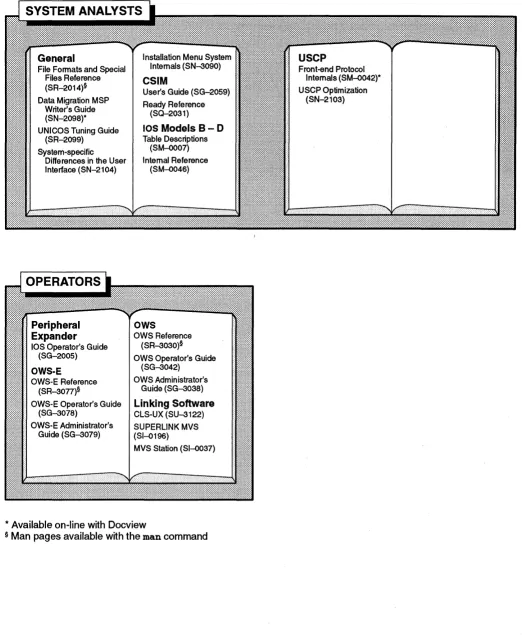
Cray Research Software Documentation Map ..
; - - - -...
The illustration on the following pages highlights the major body of documentation available for Cray Research (CRI) customers. The illustration is organized into categories by audience designation: Audience General users Application and system programmers System administrators System analysts Operators Description
Those who use the UNICOS operating system, products, applications, or linking software
Those who write or modify program code on a CRI system for the purpose of solving computer system, scientific, or engineering problems
Those who perform system administration tasks, such as installation, configuration, and basic troubleshooting Those who p~rform advanced troubleshooting, tuning, and customization
Those who perform operational functions, such as performing system dumps, and those who administer an operator workstation To use the map, find the audience designation closest to your specific needs or role as a CRI system user. Note that manuals under other audiences may also be of interest to you; manuals are listed only once, underneath the audience to which they most directly apply. Some manual titles are abbreviated. The date in the footer tells you when the information was last revised.
For more information
In addition to the illustration, you can use the following publications to find documentation specific to your needs:
• Software Documentation Ready Reference, publication SO-2122, serves as a general index to the CRI documentation set. The booklet lists documents and man pages according to topic.
• Software Overview for Users, publication SG-2052, introduces the UNICOS operating system, its features, and its related products. It directs you to documentation containing user-level information.
• User Publications Catalog, publication CP-0099, briefly describes all CRI manuals available to you, including some not shown on the map, such as release notices and training workbooks.
Ordering
To obtain CRI publications, order them by publication number from the Distribution Center: Cray Research, Inc.
User Commands Ready Text Editing Reference (SO-2056)
Docview Guide Text Editors Primer
UNICOS Shells Ready {SG-21 09)* (SG-2050)
Software Overview Reference (SO-2116) Visual Interfaces Guide vi Reference Card
(SG-2052)* UNICOS Environment (SG-3094)* (SO-2054)
Variables Ready
Tape Subsystem Guide ed Reference Card
Reference (SO-2117) Software Documentation
Index for CRAY-2 Man (SG-2051)* (SO-2055)
Ready Reference*
Pages (SR-2048) TCP/IP and OSI Network
(SO-2122) Guide (SG-2009)*
UNICOS Message Index for CRAY Y-MP, NOS Guide (SG-2105)*
CRAY X-MP EA, and Reference (SR-2200)
CRAY X-MP Man Pages Security (MLS) Guide
User Commands (SR-2049) (SG-2111)
Reference (SR-2011)§
MVS Link ROS User's Guide VM Link
SUPERLINK General (SG-2405) SUPERLINK User's Guide ROS VM User's
Information Manual NOSNE Link (SV-3153) Guide (SI-0170)
(SI-0194)
NOSNE Reference ROS User's Guide Station Primer (SI-0167)
SUPERLINK Messages (SC-0270) (SV-3151) Station Reference
(SI-0176)
UNIX Link Station Primer (SV-0361) (SI-0168) SUPERLINK User's
ROS User's Guide Station Reference Station Messages and
Guide (SI-0195)
(SG-2119) (SV-0020) Codes (SI-O 165)
MVS Station Messages
CLS-UX User's Guide Station Ready Reference Station Reference
(SI-0108)
(SU-3121) (SV-0102) Summary (SI-0169)
Station Reference (SI-2066)
* Available on-line with Docview
§ Man pages available with the man command
APPLICATION AND SYSTEM PROGRAMMERS
Cray Standard C Reference (SR-2074)* Cray Standard C Ready
Reference (SO-2076)
Ada
Cray Ada Reference (SR--3014)
Cray Ada Programming Guide (SR--3082)
Pascal
Pascal Reference (SR-0060)*
CAL Reference (S
CAL for CRAYY-MP
and CRAY Y-MP C90
Reference (SR--3108) Symbolic Machine Instructions (SR--3109) Ready Reference {SQ-3110) UNICOS Installation Guide (SG-2112) UNICOS System Administration (SG-2113)* Administrator Commands Reference (SR-2022)§
Defining and Compiling Terminal Definitions (SN-2067)
CF77 Fortran Reference (SR--3071)*
CF77 Compiler Message Manual (SR--3072) CF77 Vectorization
Guide (SG--3073)* CF77 Parallel Processing
Guide (SG--3074)* CF77 Ready Reference
(SO--3070)
Macros and Opdefs Reference (SR-0012) Symbolic Machine
Instructions (SR-0085) Ready Reference
(SO-0083)
CAL for CRAY-2
CAL Ready Reference (SO-2002) Macros and Opdefs
Reference (SR-2082)§
lOS Messages (SR-2240)
MVS Link
Station Installation (SI-0078) SUPER LINK MVS
Installation, Tuning, & Customization (SI-0188) ROS Administrator's
Guide (SG-2406)
* Available on-line with Docview
§ Man pages available with the man command
Fortran Library (SR-2079)§
C Library (SR-2080)§
Math & Scientific Library (SR-2081)§
Specialized Libraries (SR-2057)§
1/0 User's Guide
(SG--3075)*
Advanced 1/0 Guide
(SG--3076)*
Linking Software
SUPERLINK MVS AAC Reference (SI-0197) VAXlVMS Station Common Access Facilities (SN-0362) SUPER LINK Programmer's Guide VAXlVMS (SV--3155) Source Control
USM User's Guide (SG-2097)*
Networking
RPC Reference
Station Installation & Maintenance (SI-0162) SUPER LINK
Administrator's Guide (SI-0171)
VAXNMS Link
Station Installation (SV-0100) Station Administration (SV-0363) ROS Administrator's Guide (SV--3152) Loader Reference (SR-0066)*
SEGLDR Reference Card (SO-0303) Performance Utilities Performance Utilities Reference (SR-2040)* Oebuggers COBX Debugger Reference (SR-2091)*
UNICOS X Window System Reference (SR-2101)*
Other
Support Tools Guide (SG-2016)* UNICOS Message
System Programmer's Guide (SG-2121)* Compiler Information File (CIF) Reference (SM-2401) SUPERLINK Installation (SG-5091) SUPERLINK Administrator's Guide (SV--3154)
UNIX Link
RQS Administrator's Guide (SG-2120) CLS-UX Installation &
Configuration (SU--31
NOSNE Link
NOSNE Operator and Administrator Guide (SC-0271)
File Fonnats and Special Files Reference (SR-2014)§ Data Migration MSP
[image:6.613.40.562.42.678.2]Writer's Guide (SN-2098)* UNICOS Tuning Guide
(SR-2099) System-specific
Differences in the User Interface (SN-21 04)
Peripheral
· Expander
• lOS Operator's Guide (SG-2005)
·OWS-E
• OWS-E Reference
· (SR-3077)§
• OWS-E Operator's Guide (SG-3078)
• OWS-E Administrator's Guide (SG-3079)
Installation Menu System Internals (SN-3090)
CSIM
User's Guide (SG-2059) Ready Reference
(SO-2031)
lOS Models B - D
Table Descriptions (SM-0007) Internal Reference (SM-0046) OWS Reference (SR-3030)§
OWS Operator's Guide (SG-3042) OWS Administrator's Guide (SG-3038) Linking Software CLS-UX (SU-3122) SUPERLINK MVS (SI-0196)
MVS Station (SI-0037)
* Available on-line with Docview
§ Man pages available with the man command
Front-end Protocol Internals (SM-0042)* USCP Optimization
(SN-2103)
New. Features
OWS-E Operator Workstaion Administrator's Guide 80-30792.0
This rewrite of OWS-E Operator Workstation Administrator's Guide supports the 2.0 release of
OWS-E. It contains the following changes: • The new edump(8) file format is explained.
• The bootios, booteiop, bootmux,and bootall scripts have been deleted.
• You can now use /etc/lapfile to set line arbitration priorities.
• Many parameters have been added and deleted in/etc/configfile; additions are noted in
the "System Configuration File" section. Other changes are noted.
• Various changes due to the new fy driver are noted. (The cy and c z drivers are no longer supported).
Record of Revision
The date of printing or software version number is indicated in the footer. In reprints with revision, changes are noted by revision bars along the margin of the page.
Version
1.0 1.1
2.0
SG-30792.0
Description
April 1991. Original printing.
September 1991. Reprint with revision to include OWS-E release 1.1 changes.
May 1992. Reprint with revision to include OWS-E release 2.0 changes.
Assumptions
Conventions
SG-30792.0
Preface
This guide provides an overview of the Cray Research, Inc. (CRI) OWS-E operator workstation software and tells you how to perform OWS-E administrative duties for a Cray Research computer system with an 110 subsystem model E (IOS-E).
This guide was written for administrators of the OWS-E operator workstation. Readers should have a minimum of 16 hours training in either the UNICOS or the UNIX operating system; if you have no experience with UNICOS or UNIX, you should complete the CRI UNICOS Command Language (UCL-I) course. It is assumed that you are running UNICOS operating system release 6.0 or later.
The following typographic conventions are used throughout this manual:
Convention Description
[ ] Brackets enclose optional elements in syntax lines.
typewri ter font Typewriter font denotes literal items such as command names, file names, routines, directory names, path names, signals, messages, and programming language structures.
italic font Italic font denotes variable entries and words or concepts being defined.
Preface OWS-E Administrators Guide
Man page
references
vi
Convention Description
bold typewri ter In screen drawings of interactive
font sessions, bold typewriter font denotes literal items entered by the user. Output is shown in nonbold typewriter font.
I KEY I Boxed words indicate keys on the
keyboard, such as I DELETE I.
In this publication, Cray Research, CRI, and Cray refer to Cray Research, Inc. and/or its products.
Note
In this manual, CRAYY-MP always refers to a CRAYY-MP
mainframe with an I/O subsystem model E (IOS-E).
Throughout this document, reference is made to the on-line man pages available through the man command. A man page is a discussion of a particular element of the software.
Each man page includes a general description of one or more commands, routines, or other topics and provides details of their usage (command syntax, routine parameters, system call
arguments, and so on). If more than one topic appears on a page, the entry will appear in the printed manual alphabetized only under its major name.
You can access a man page by entering the following: man subject
For example, to access the Is man page, enter the following: man Is
Man pages are grouped into numbered sections; each section contains entries of a particular type. Types of entries include user commands, administrator commands, system calls, library routines, file formats, and device descriptions.
OWS-E Administrator's Guide Preface
Section
1
5
7
8
SG-30792.0
Subject
The following table lists the type of entry associated with each section number shown and the manual in which the section is published.
Publication
SunOS user commands SunOS Reference Manual (Vol. I)
UNICOS user commands UNICOS User Commands Reference Manual
(SR-2011)
Simple Network Management OWS-E Operator Workstation Reference
Protocol (SNMP) user commands Manual (SR-3077)
OWS-E file formats OWS-E Operator Workstation Reference Manual (SR-3077)
OWS-E topics OWS-E Operator Workstation Reference Manual (SR-3077)
OWS-E administrator commands OWS-E Operator Workstation Reference Manual (SR-3077)
SunOS administrator commands SunOS Reference Manual (Vol. III)
UNICOS administrator commands UNICOS Administrator Commands Reference Manual (SR-2022)
Section numbers appear in parentheses after man page names. Man pages are referenced in text by entry name and section number, as shown in the following example:
1b take a system dump, enter the durnpsys(8) command in an OWS-E window.
Cray Research, Inc. vii
Preface
For more
information
Topic Operator training OWS-E commands OWS-E installation SunOS user informationSunOS system
administrator information
Open Windows
UNICOS operating system, user information
viii
OWS-E Administrator's Guide
The following table lists related publications by topic; assume that a manual is a CRI publication unless it is otherwise identified.
Sources of information
UNICOS Operator Training (TR-UOT)
UNICOS Command Language (TR-UCL-l)
Cray Research Software Training Catalog for Customers
(TR-CUSTCAT)
OWS-E Operator Workstation Reference Manual (SR-3077)
OWS-E Operator Workstation Ready Reference (SQ-3080)
OWS-E 2.0 Release and Installation Notes (RN-5060)
SunOS 4.1 User's Guides, order number 851-1028-01 (Sun
Microsystems, Inc.); also available on-line through AnswerBook.
SunOS Reference Manual (Vol. I), order number 825-1244-01
(Sun Microsystems, Inc.)
Using AnswerBook, order number 800-6908-10 (Sun
Microsystems, Inc.)
System Network Administration (Vois. II and III), order
number 800-3805-10 (Sun Microsystems, Inc.); also available on-line through AnswerBook.
SunOS Reference Manual (Vols. II and III), order number
825-1244-01 (Sun Microsystems, Inc.)
Sun OpenWindows 'Version 3 End User's Manuals, order
number 851-1035-01 (Sun Microsystems, Inc.); also available on-line through AnswerBook.
UNICOS User Commands Reference Manual (SR-2011)
(
UNICOS User Commands Ready Reference (SQ-2056)
UNICOS Message Reference Manual (SR-2200)
OWS-E Administrator's Guide Preface
Topic
UNICOS operating system, administrator information
IOS-E administration
Sources of information
UNICOS System Administration (SG-2113)
UNICOS Administrator Commands Reference Manual (SR-2022)
I/O Subsystem Model E (I~S-E) Guide, (SD-2107)§
IOS-E 3.0 Release and Installation Notes (RN-5045)
§ This document is CRAY RESEARCH PRIVATE. It can be distributed to non-CRI personnel only with approval of the appropriate Cray Research manager.
Ordering
publications
SG-30792.0
For a more detailed list of Sun Microsystems, Inc.,
documentation, see OWS-E Release and Installation Notes.
The User Publications Catalog, publication CP-0099, lists all Cray Research hardware and software manuals that are available to customers.
To order a manual, either call the Distribution Center in Mendota Heights, Minnesota, at (612) 681-5907 or send a facsimile of your request to fax number (612) 681-5920. Cray Research employees may choose to send electronic mail to order. desk (UNIX system users) or order desk (HPDesk users).
Cray Research, Inc. ix
Preface
Reader comments
x
OWS-E Administrator~ Guide
If you have comments about the technical accuracy, content, or organization of this manual, please tell us. You can contact us in any of the following ways:
• Send us electronic mail from a UNICOS or UNIX system, using the following UUCP address:
uunet!cray!publications
• Send us electronic mail from any system connected to Internet, using the following Internet addresses:
[email protected](comments specific to this manual)
[email protected]. com (general comments) • Contact your Cray Research representative and ask that a
Software Problem Report (SPR) be flied. Use PUBLICATIONS
for the group name, PUBS for the command, and NO-LICENSE
for the release name.
• Call our Software Information Services department in Eagan, Minnesota, through the North American Support Center, using either of the following numbers:
(800) 950-2729 (toll free from the United States and Canada)
(612) 683-5600
• Send a facsimile of your comments to the attention of
"Software Information Services" in Eagan, Minnesota, at fax number (612) 683-5599.
• Use the postage-paid Reader's Comment form at the back of this manual.
We value your comm~nts and will respond to them.promptly.
Page
V
Preface
V Assumptions V Conventionvi Man page references
viii For more information
ix Ordering publications x Reader comments
1
Introduction [1]
1 What is the OWS-E?
1 What tasks can be done with the OWS-E?
2 What information is in this guide?
2 Where can I find more information?
3
Hardware Environment [2]
3 Hardware components 5 Tapes
5 Compact disk (CD)
5 Hardware connections
9 OWS-E
Software System
Overview [3]
9 Software components
10 Disk partitions
11 Directory structure
Contents
Page
13
Initialization Files [4]
13 Required files
14 Changed files
15 Environment variable settings
17
System Configuration File [5]
17 How does /etc/configfile work?
18 How can I make changes to /etc/configfile?
18 Order of parameters in /etc/configfile
18 Tokens
23 Configurable parameters set during installation
35 Configurable parameters set at release time
39
Security [6]
39 Passwords
39 User and group identification
40 OWS-E permissions file
43
Setting Line Arbitration
Priorities [7]
45 edump(8)
File Format
[8]47 File header structure
48 Section header structure
49 Register section structure
Contents
Page
51
Customizing
CRITemplate
Scripts [9]
52 cpupanic
52 iophalt
53 OWS-E backup scripts: dumpdly and dumpwkly
55
Shutting Down and Halting the
OWS·E
[10]
55 Normal circumstances
57 When the system is hung
59 If all else fails: forcing a halt and reboot of the OWS-E
61
Manually Dumping the
IOS·Eand Mainframe [11]
63 CPU
Monitors [12]
63 What do the CPU monitors do? 63 How can I use the CPU monitors? 65 How do the CPU monitors work?
67
Network Monitor [13]
67 What is xsnmpmon?
67 Background information on SNMP
69 How can I invoke xsnmpmon(8)?
70 What does the xsnmpmon(8) monitor look like?
71 Buttons
71 Entering text
72 Synopsis information
72 ~essageline
72 ~odifying the monitor environment with the Setup button
74 Obtaining an overview with the System Info button
7 4 Using the statistics buttons
OWS-E Administrator's Guide
Page
74 I/F Stats
74 Media Stats
7.5 ICMP Stats
75 IP Stats
75 TCP Stats 75 uop Stats 75 EGP Stats
75 SNMP Stats
76 Table buttons 76 AT Table 76 Net/Media Tbl
76 lP Addr Tbl
77 IP Route Tbl
77 TCP Connection 77 UOP Listeners
77 EGP Neigh Tbl
77 FOOl SMT
77 FDDl MAC
77 FOOl PORT
78 FOOl Attach
78 Using the Error Log button
78 Displaying messages with the Trap Log button
79 Displaying messages with the State Chg Log button
79 Creating a network with the Create Net button
80 Create Network Configuration window
81 Create Network Configuration buttons
84 Example
84 Scenario
85 Steps to create a network map 94 Loading process
96 Scanning with the Net Status button
OWS-E Administrator's Guide Contents
Page Page
97 Network Status ~ndow 73 Figure 13. Setup ~ndow buttons 98 Buttons in the Network Status 80 Figure 14. Create Network
~ndow Configuration ~ndow
98 Statuses 85 Figure 15. Displayingthe Create
99 Agent status Network Configuration
~ndow
99 Interface status
86 Figure 16. Selecting the Area button 100 Area status
87 Figure 17. Dialog box 101 Mouse button functions
88 Figure 18. bldg. net map 102 Displaying performance information ~th
90 Figure 19. firstfloor. net map the Perf Moni tor button
102 Using the Notification button 91 Figure 20. lab.net map
104 Using the Telnet button 93 Figure 21. secondfloor . net map
104 Log files 94 Figure 22. Interrelationships among the
files (maps)
105
Index
97 Figure 23. Network Status window 103 Figure 24. Event NotificationFigures
~ndow sho~ng normal status103 Figure 25. Event Notification 4 Figure 1. Hardware components window sho~ng a change in
Figure 2. Example connection of status
6
CRAY Y-MP computer systems
Tables
7 Figure 3. OWS-ElIOS-E interaction
8 Figure 4. OWS-E backplane connections 19 Table 1. Tokens
10 Figure 5. Disk partitions 23 Table 2. Configurable parameters set
11 Figure 6. Directory structure during the installation process 35 Table 3. Configurable parameters set at
46 Figure 7. edump file format release time
51 Figure 8. Interrelationships among scripts and commands
56 Figure 9. Shutting down and halting the
OWS-E under normal circumstances
58 Figure 10. Shutting down and rebooting the OWS-E when it is hung 64 Figure 11. Monitor output for idle, user,
system-wait, and
system time averages for all CPUs
70 Figure 12. SNMP Network Monitor
~ndow
..
What is
the
OWS-E?
1.1
What tasks can be
done with the
OWS-E?
1.2
SG-30792.0
Introduction
[1]
This section describes the OWS-E, lists operational tasks that can be performed with it, and explains where to find
information.
The OWS-E is a workstation that enables you to operate,
administrate, and monitor your CRAYY-MP mainframe and 110 subsystem model E (lOS-E). It uses the SunOS operating system, the Open Windows graphical user interface, and the OWS-E software provided by CRI.
If your site has a maintenance contract with CRI, you will also have an MWS-E maintenance workstation; this machine is owned by CRI and is used to maintain and monitor the CRI computer system. The MWS-E and OWS-E cabinets look similar, but they have different hardware components and serve
different purposes.
You or the operator can perform the following tasks from the OWS-E:
• Boot the IOS-E and the mainframe • Dump the IOS-E and the mainframe • Back up and restore files on the OWS-E
(
• Use the CPU and network monitors • Respond to messages
Details for performing these tasks are provided in OWS-E
Operator Workstation Operator's Guide.
I
Introduction [1]
What information
is in this guide?
1.3Where can
I
find
more information?
1.4
2
OWS-E Administrator's Guide
If you are a new administrator of the OWS-E, you will want to read through sections 2 through 5, which describe the following:
• Hardware and software environment
• Changes that CRI has made to the initialization files required for support of the Open Windows environment (this is for your information only and may be of interest if you are familiar with OpenWindows)
• Contents of the system configuration file, which allows
changes to machine dependencies to be set at execution rather than at compile time
Sections 6 through 13 discuss the administrative tasks specific to the OWS-E:
• Determining user access to sensitive commands, and other security issues
• Setting line arbitration priorities
• Customizing the template scripts and system configuration file provided by CRI
• Shutting down and halting the OWS-E
• Manually dumping the IOS-E and mainframe
• Using the CPU and network monitors
This guide discusses only topics specific to administration of the OWS-E. OWS-E Operator Workstation Operator's Guide discusses
operational tasks. OWS-E Operator Workstation Reference Manual discusses the OWS-E commands in detail.
Refer to System and Network Administration, provided by Sun
Microsystems, Inc., for information about adding and deleting users, maintaining network files, and other tasks that you must perform as an administrator of a Sun system. For a detailed list of stock numbers, see OWS-E 2.0 Release and Installation Notes.
For information about OWS-E installation, see OWS-E 2.0 Release and Installation Notes.
Hardware
components
2.1SG--3079 2.0
Hardware Environment
[2]
This section describes the OWS-E hardware environment.
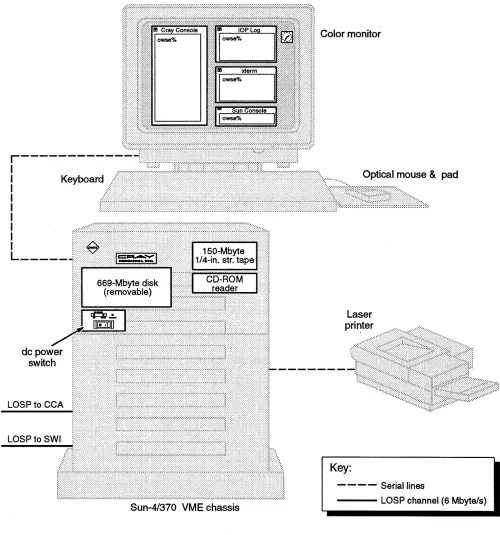
The OWS-E contains the following hardware components:
• Sun-4/370 Workstation (SPARCstation) with 16-Mbyte memory - VME chassis
- Color graphics monitor - Keyboard
- Optical mouse and pad
- CPU board that contains memory, Ethernet controller, SCSI controller, and serial ports
- Removable 669-Mbyte hard disk drive (SCSI)
- Compact-disk read-only memory (CD-ROM) reader (SCSI) - 150-Mbyte 1I4-in. streaming tape drive (SCSI)
- 2 FEI -3 board sets • Laser printer
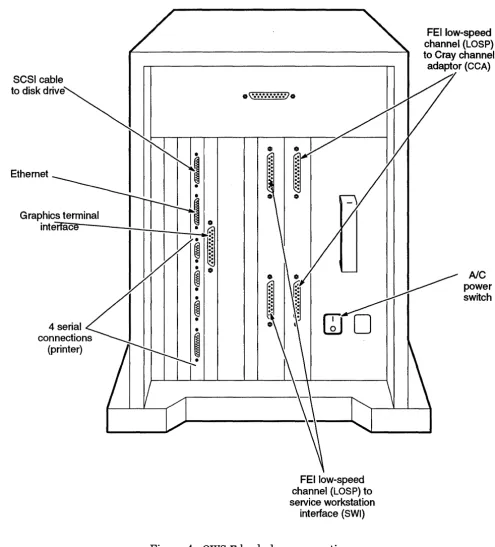
Figure 1 and Figure 4 show the hardware components.
Note
If your site has a maintenance contract with CRI, you will also have an MWS-E maintenance workstation. The MWS-E and OWS-E cabinets look similar, but they have some different hardware components and serve different purposes. The MWS-E is owned by CRI and is used to maintain and monitor the CRI computer system; the OWS-E is owned by your site and is used to operate and administrate the CRI computer system.
Hardware Environment [2]
r---I
I I I I I
I
I I
L---I:fi
.
~~~ii:i,i',~~::J1
LOSPto CCA
Sun-4/370 VME chassis
OWS-E Administrators Guide
Color monitor
Optical mouse & pad
Key:
- - - - Serial lines
- - - LOSP channel (6 Mbyte/s)
Figure 1. Hardware components
[image:28.612.44.544.104.639.2]OWS-E Administrator's Guide
Tapes
2.2
Compact disk (CD)
2.3
Hardware
connections
2.4S~0792.0
Hardware Environment [2]
The OWS-E uses 1I4-in. streaming tapes. It writes QIC-150 format tapes and reads both QIC-150 and QIC-24 format tapes. The tape device is usually /dev/rstO.
The OWS-E is equipped with a compact-disk, read-only memory (CD-ROM) drive. The SunOS operating system,Open Windows, NEWSprint, AnswerBook, and OWS-E software are released on CD.
Note
All CDs must be loaded by use of the CD caddy. For more information, see OWS-E 2.0 Release and Installation Notes.
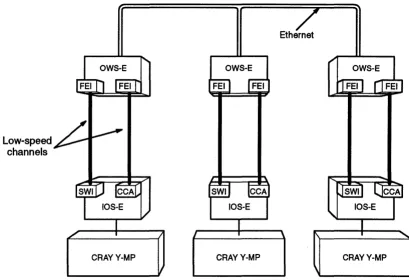
Each CRI mainframe has its own OWS-E. If there are several OWS-E machines and they are connected by Ethernet, you can view the messages from all of the systems and perform functions from any of the OWS-E machines 'by logging into the other
machines. The OWS-E is connected to the 110 subsystem model E (IOS-E) through two front-end interfaces (FE Is) to the service workstation interface (SWI) and to the Cray channel adaptor (CCA). For example, if your site has three CRI computer systems, they might be connected as shown in Figure 2.
Cray Research, Inc. 5
I
Hardware Environment [2]
6
Low-speed channels
OWS-E Administrators Guide
Ethernet
OWS-E
CRAYY-MP CRAYY-MP CRAYY-MP
Figure 2. Example connection of CRAYY-MP computer systems
The 10S-E consists of up to 16 110 clusters, each with up to five 110 processors: one MUXIOP and one to four EIOPs. A MUXIOP communicates with the mainframe by sending response packets across the low-speed channel after request packets have been received and processed by the lOS-E. The MUXIOP also controls the high-speed data transfer channels to mainframe central memory and the SSD-E. An EIOP supports peripheral devices through channel adapters.
For more information about the 10S-E, see I/O Subsystem
Model E (IDS-E) Guide§ and IOS-E 3.0 Release and Installation Notes.
§ This document is CRAY RESEARCH PRIVATE. It can be
distributed to non-CRI personnel only with approval of the appropriate Cray Research manager.
[image:30.613.127.536.105.385.2]OWS-E Administrator~s Guide
OWS-E
OWS-E
software I - - - fy driver I
-SG-30792.0
Hardware Environment [2]
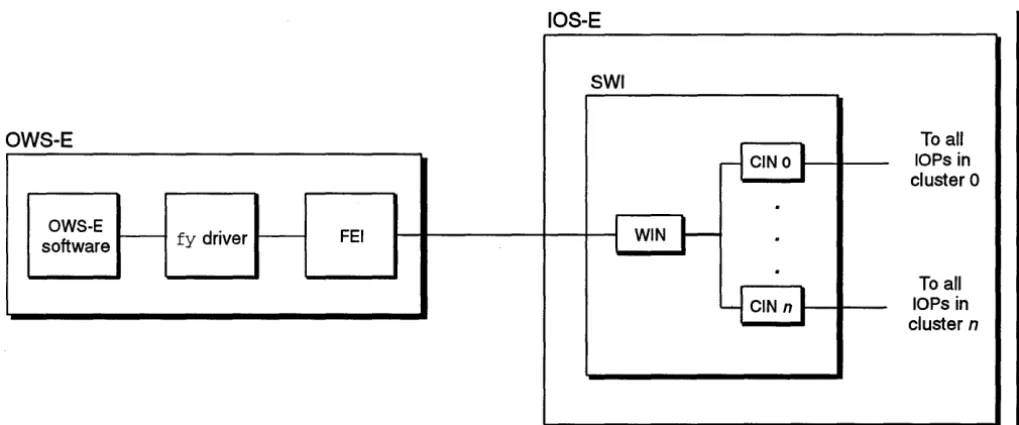
The OWS-E software communicates with the IOS-E software
through the fy driver, the front-end interface (FEI), and the
I
service workstation interface (SWI), which is composed of aworkstation interface (WIN) for the OWS-E and a cluster interface (CIN) for each cluster. Figure 3 illustrates the interaction between the OWS-E software and the I~S-E.
IOS-E
SWI
To a" CINO ~ lOPs in
cluster 0
·
FEI I I WIN ~
·
·
To a"Y
CIN n~
lOPs in [image:31.618.67.577.201.414.2]cluster n
Figure 3. OWS-EIIOS-E interaction
As shown in Figure 2, page 6, the second FEI connects to the
CCA, in order to support TCPIIP.
Figure 4 shows the OWS-E backplane connections.
Hardware Environment [2]
8
SCSI cable to disk drive
Ethernet
Graphics terminal intenace
4 serial connections
(printer)
o
0\·.·.·.·.·.·.·.·.·.·)0
01
FEllow-speed channel (LOSP) to service workstation
interface (SWI)
Figure 4. OWS-E backplane connections
Cray Research, Inc.
OWS-E Administrator's Guide
FEI low-speed channel (LOSP) to Cray channel adaptor (eCA)
AlC
power switch
[image:32.617.44.539.99.646.2]OWS-E Software System Overview
[3]
Software
components
3.1
SG--3079 2.0
This section provides an overview of the OWS-E software system.
The OWS-E runs the following software:
• SunOS, the Sun Microsystems, Inc., operating system based on the UNIX operating system
• Open Windows, a graphical user interface based on the OPEN LOOK standard
• NeWSprint, Sun Microsystems, Inc., printer formatting software
• AnswerBook, the Sun Microsystems, Inc., on-line documentation
• OWS-E software provided by CRI
The following subsections describe the OWS-E disk partitions and directory structure.
Cray Research, Inc. 9
I
OWS-E Software System Overview [3] OWS-E Administrator$ Guide
Disk partitions
3.2
10
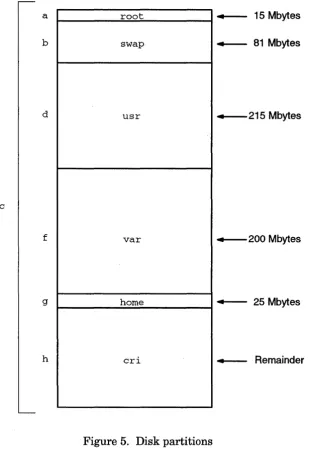
The OWS-E disk contains a total of 669 Mbytes. Figure 5 shows the partition names and sizes; it gives a graphic representation of size, although it is not drawn exactly to scale. The letters at the left correspond to the names of the various partitions, in the form /dev/sdOn; the whole disk is /dev/sdOc. There is no e
partition.
a root + - - 15 Mbytes
b swap + - - 81 Mbytes
d usr +--215 Mbytes
c
f var +--200 Mbytes
9 home + - - 25 Mbytes
h cri 4 - - Remainder
Figure 5. Disk partitions
[image:36.615.229.539.218.690.2]OWS-E Administrator's Guide
Directory
structure
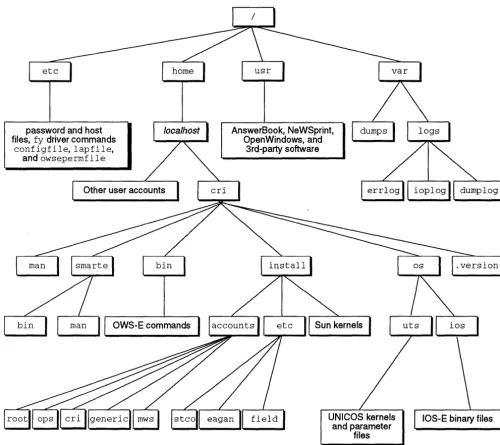
3.3password and host files, fy driver commands
configfile,lapfile,
and owseperrnfile
[image:37.618.64.564.175.620.2]OW8-E Software System Overview [3]
Figure 6 shows some of the important files and directories in the OWS-E software. Most OWS-E commands are located under cri. The. version file contains the version number of the OWS-E software loaded on your system.
AnswerBook, NeWSprint, OpenWindows, and
3rd-party software
OWS-E commands
Figure 6. Directory structure
Required files
4.1SG-30792.0
Initialization Files [4]
The default graphical user interface for the OWS-E is
Open Windows from Sun Microsystems, Inc. The components of this software include an X11INeWS merged server, the XView toolkit, and the OPEN LOOK window manager (olwm).
This section describes the initialization files required by the Open Windows environment and changes that have been made by CRI to other files and variables in order to support the Open Windows environment.
The following files are required for support of the Open Windows environment:
File
.openwin-init
.openwin-menu
Descri ption
Provides the Open Windows system with information about which windows should be displayed initially, where they are placed, and other window-specific details. If you do not have a . openwin-init fue in your login directory, Open Windows will use a generic one from its library.
Specifies session environment aspects, such as the entities that appear in the root menu. This file is read by the OPEN LOOK window manager (01 wm).
Initalization Files [4]
Changed files
4.214
OWS-E Administrators Guide
The following SunOS files have been changed to support the OpenWindows environment:
File
.cshrc (C shell)
. login (C shell)
.profile (Bourne shell)
.xinitrc
.Xdefaults
Description of changes
Sets the OPENWINHOME variable to the directory in which the Open Windows software is installed and adds the following path names to the PATH
variable:
$OPENWINHOME/bin
$OPENWINHOME/bin/xview
Executes openwin, which then proceeds to read the .xinitrc file in setting up the user session environment.
Performs the same actions as . login and
· cshrc combined.
Reads the. Xdefaults file to the resource database, starts the 01 WID window manager,
and then calls and executes the
· openwin-init file to start the user's default display configuration. Normally, the operator should have the following line set in the
· xini trc file:
craymon &
This specifies that craymon(8) will execute in the background for as long as the operator is logged in.
Specifies various environmental aspects for the window manager, such as how many lines should be saved when scrolling. Several items not required for a pure Xll environment have been added for the Open Windows system environment. For example, the
OpenWindows . Set Input attribute is set so that the cursor follows the mouse as it moves across the screen; the alternative would be a click to focus option.
OWS-E Administrator's Guide
Environment
variable settings
4.3SG-30792.0
Initialization Files [4]
By default, the following environment variable is set to the value shown in. cshrc (for the C shell) or .profile (for the Bourne shell):
Value Variable
MANPATH /usr/man:/usr/contrib/man:/usr /man/mann:$OPENWINHOME/share/man: /home/$HOST/cri/man
For more information about these environment variables and settings, see the SunOS manual pages for openwin(l) and
xnews(l) in SunOS Reference Manual.
How does
/etc/configfile
work?
5.1
80-30792.0
System Configuration File [5]
The system configuration file, /etc/configfile, contains the system parameter labels and their corresponding values used by the OWS-E software. This file was created to allow changing machine dependencies at the time of execution. This file also contains other volatile variables, such as path names to the various binary and log files.
Whenever the OWS-E system needs to know the value ofa particular variable that is supplied in /etc/configfile (such as the default path name to the UNICOS kernel), it calls a library routine. The config routine searches /etc/configfile for the label and then returns the associated string value. The
getconf ig(8) command is the shell interface to the conf ig
routine.
For more information about these commands, see OWS-E
Operator Workstation Reference Manual.
I
System Configuration File [5]
How can I make
changes to
/etc/configfile?
5.2Order of
parameters in
/etc/configfile
5.3Tokens
5.4 18OWS-E Administrators Guide
Before making changes to /etc/configfile permanent, you should test those changes. To do this, follow these steps:
1. Copy /etc/configfile to a temporary location, such as your home directory.
2. Edit the file in this new location.
3. Set the OWSECONFIG environment variable to be the full path name of this edited configuration file.
The config routine checks the environment variable and uses the new configuration file when answering system parameter requests; other users (who do not have the OWSECONFIG variable set) continue to get their defaults from the original
/etc/configfile. When you are satisfied that your changes work properly, you can replace the original /etc/configfile
with your edited version and unset OWSECONFIG.
The system configuration file /etc/configfile is divided into two sections, as follows:
1. Configurable parameters set during the install process to site-specific values
2. Configurable parameters set at release time
The parameters are described here in Table 1, Table 2, and Table 3 in the order in which they are found in
/ etc/ configfile.
The term lOP refers to either an EIOP or a MUXIOP.
Many of the parameters contain tokens that are changed during the installation process to reflect the specific machine being installed. These tokens are designated by
_token_
(that is, they are preceded and followed by underscores). If any of these tokens remain in /etc/configfile following completion of the installation, they should be changed as instructed in Table 1, which lists the tokens in the order in which they appear in the file.OWS-E Administrator's Guide System Configuration File [5]
Table 1. Tokens
Token Description
_HOSTNAME_ Replace this token with the name of the OWS-E. For example, if the serial number of the mainframe were 1600, _HOSTNAME_ could be
ows1600.
_SERIALNUMBER_ Replace this token with the serial number of the CRI mainframe to which the OWS-E is attached. For example, if the mainframe serial number were 1600, _SERIALNUMBER_should be 1600.
_DUMPTYPE_ Replace this token with the number that specifies the type of the disk to which the mainframe memory will be dumped. The disk drives and their valid numbers are as follows:
Disk device Number
DD-40 6
DD-41 9
DD-42 13
DD-49 3
DD-50 7
DD-60 10
DD-61 11
DD-62 12
_DUMP I 0 Replace this token with a 4-digit octal number specifying the cluster,
lOP, and channel path down which the memory will proceed to the disk. For example, 0130 specifies that the dump will be transferred to disk through cluster 0, lOP 1, and channel 30. The disk attached to the specified channel must be of the type specified in _DUMPTYPE_.
System Configuration File [5] OWS-E Administrator$ Guide
'lbken
_DUMPUNIT_
_DSTARTBL_
_DUMPLEN_
_MAINFRAME_
20
Description
Table 1. 'lbkens (continued)
Replace this token with the default dump device unit number. DD-40s, DD-42s, DD-60s, and DD-62s have unit numbers; everything else uses
o.
Disk drive Valid unit numbers
DD-40 0, 1
DD-41 0, 1
DD-42 0, 1
DD-49 0
DD-50 0
DD-60 0, 1, 2, 3, 4, 5, 6, 7
DD-61 0, 1, 2, 3, 4, 5, 6, 7
DD-62 0, 1, 2, 3, 4, 5, 6, 7
Replace this token with the start of the slice on the disk to which the memory will be dumped. This value is designated in decimal blocks.
Replace this token with the length of the slice on the disk to which the memory will be dumped. This value is designated in decimal blocks.
Replace this token with the number that specifies the type of the mainframe to which the OWS-E is attached. The mainframe types and their respective numbers are as follows:
Mainframe type Number
CRAY Y-MP C90 (1 to 16 CPUs) 100
CRAY Y-MP 81 (1 to 8 CPUs) 7 CRAY Y-MP 8E (1 to 8 CPUs) 8 CRAYY-MP 4E (1 to 4 CPUs) 9
CRAY Y-MP 2E (1 or 2 CPUs) 6
CRAY Y-MP (8 CPUs) 0
(only certain serial numbers)
OWS-E Administrator's Guide
Token
_MEMORY_
S~0792.0
System Configuration File [5]
Table 1. Tokens
(continued)
Description
Replace this token with the number that specifies the memory size of the mainframe to which the OWS-E is attached. The numbers are as follows:
Memory size Number 4 Mwords 4
8 Mwords 8
16 Mwords 16
32 Mwords 32
64 Mwords 64
128 Mwords 128
256 Mwords 256
512 Mwords 512
1024 Mwords 1024
2048 Mwords 2048
4096 Mwords 4096
System Configuration File [5]
Token Description
Table 1. Tokens
(continued)
OWS-E Administrator's Guide
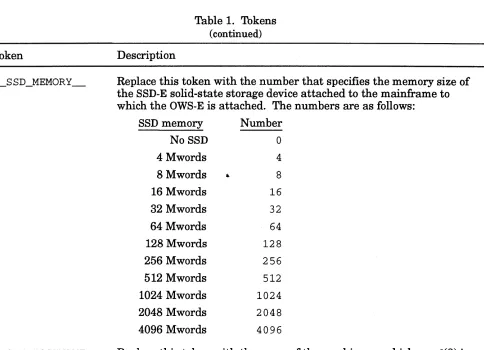
_SSD_MEMORY Replace this token with the number that specifies the memory size of the SSD-E solid-state storage device attached to the mainframe to which the OWS-E is attached. The numbers are as follows:
SSD memory Number NoSSD 0
4 Mwords 4
8 Mwords
..
816 Mwords 16
32 Mwords 32
64 Mwords 64
128 Mwords 128
256 Mwords 256
512 Mwords 512
1024 Mwords 1024
2048 Mwords 2048
4096 Mwords 4096
_CPUDHOSTNAME_ Replace this token with the name of the machine on which cpud(8) is running. This passive CPU monitor normally executes on the OWS-E. For example, if the serial number of the mainframe were 1600, _CPUDHOSTNAME_could be replaced with ows1600.
[image:52.612.59.543.93.443.2]OWS-E Administrator's Guide
Configurable
parameters set
during
installation
5.5
System Configuration File [5]
This subsection describes the parameters that are set during the installation process (see the OWS-E 2.0 Release and Installation Notes for more information). Parameters that you should not change are noted. Parameters are listed in the order in which they appear in the file.
Table 2. Configurable parameters set during the installation process
Parameter
ROOTDIR
S~0792.0
Description
Defines the base directory that scripts use to find the CRI commands that they execute during processing. At release, this directory is the cr i home directory:
Ihome/ __ HOSTNAME __ /cri
Note
Do not change this parameter. The location of the c r i directory is used by many different pieces of the OWS-E software, and it should not be changed.
Defines the login name to which mail is sent if a CPU panics. At release, this parameter is set to c r i. To specify more than one user, use the SunOS al iases(5) file.
Defines the login name to which mail is sent if an lOP halts. At release, this parameter is set to cri. To specify more than one user, use the SunOS al iases(5) file.
System Configuration File [5] OWS-E Administrator's Guide
Table 2. Configurable parameters set during the installation process
(continued)
Parameter Description
DEFAULTUKERNFILE Defines the path name to the default UNICOS binary. This
parameter is used by the system start utility, boot sys(8), when the default UNICOS kernel is to be started on the mainframe. At release, this parameter is set to the name of the default UNICOS binary initially installed:
/home/ __ HOSTNAME __ /cri/os/uts/unicos
It is likely that you will change this parameter. Although the kernel file should reside under the cri home directory, it is likely that the actual name of the default kernel to be booted will change from site to site. For example, ifunicos .prod.day were the name of the default kernel at your site, this parameter would be set to the following:
/home/ __ HOSTNAME __ /cri/os/uts/unicos.prod.day
DEFAULTUPARAMFILE Defines the path name to the default UNICOS parameter file. This parameter is used by the bootsys(8) command when the default parameter file is requested. At release, this parameter is set to the name of the default UNICOS parameter file:
24
/home/ __ HOSTNAME __ /cri/os/uts/param
It is likely that you will change this parameter. Although the
parameter file should reside under the cri home directory, the actual name of the default parameter file will change from site to site. For example, ifparam.prod. day were the name of the default parameter file at your site, this parameter would be set to the following:
/home/ __ HOSTNAME __ /cri/os/uts/param.prod.day
OWS-E Administrator's Guide System Configuration File [5]
Table 2. Configurable parameters set during the installation process
(continued)
Parameter
DEFAULTIKERNDIR
CPUPANIC
80-30792.0
Description
Defmes the path name to the directory in which all the IOS-E binary files are kept. This parameter is used by the bootsys(8) command upon a request that the default IOS-E binary flies be started. At release, this parameter is set to the following:
/home/ __ HOSTNAME __ /cri/os/ios
Note
Do not change this parameter. 1b ensure consistency and the availability of support, you should not change the directory structure underneath the cr i home directory.
Defines the path name of the cpupanic(8) script. The rcpud(8) command executes this script when it receives a panic packet. This script checks the dump lock file, described under the ADUMPDIR and
DUMP parameters (page 27); if the lock is set, the cpupanic script proceeds to boot the IOS-E and take a dump image of the mainframe, using mfdump(8). At release, this parameter is set to the following:
/home/ __ HOSTNAME __ /cri/bin/cpupanic
You should change this parameter if you create a different panic script or if you change the name of the script. You should keep all scripts and commands in the following directory:
/home/ __ HOSTNAME __ /cri/bin
System Configuration File [5] OWS-E Administrator$ Guide
Parameter
lOPHALT
Table 2. Configurable parameters set during the installation process
(continued)
Description
Defmes the path name of the iophalt(8) script. This script is
executed by the hbeat(8) command whenever it detects an lOP halt or failure. This script checks the dump lock file, described under the ADUMPDlR and DUMP parameters (page 27); if the lock is set, the
iophalt script proceeds to get dumps of the lOPs. At release, this parameter is set to the following:
/home/ __ HOSTNAME __ /cri/bin/iophalt
You should change this parameter if you create a different halt script or if you change the name of the script. You should keep all scripts and commands in the following directory:
/home/ __ HOSTNAME __ /cri/bin
SERlALNUMBER Defmes the serial number of the CRI mainframe to which the OWS-E is attached.
DEFAULT lOP
26
This parameter is used by the shell scripts. At release, this parameter is set to the __ SERlALNUMBER __ token and is replaced during the installation. If this token has not been replaced after completion of the installation, proceed with the directions for replacing the
__ SERlALNUMBER __ token (see page 19) .
Note
You should change this parameter only if a change is made to the serial number of the mainframe to which the OWS-E is attached.
Defmes the default lOP through which the IOS-E is booted. This parameter is used by the bootsys(8) command and shell scripts. At release, it is set to lOP O.
This parameter may be set to any of the configured lOPs within the cluster specified by DEFAULTCLSTR, as long as the specified lOP has the deadstart capability.
OWS-E Administrator's Guide System Configuration File [5]
Table 2. Configurable parameters set during the installation process
( continued) Parameter DEFAULTIDUMPDIR ADUMPDIR DUMP ERRLOGD SMDEMON SG-30792.0 Description
Defines the default dump directory path in which the dump shell script is created. This parameter is used by the bootsys(8) command. At release, this parameter is set to the following:
/var/dumps
This parameter may be set to any existing directory desired; however, it is important to organize all dump information into a coherent directory structure.
Defines the path name of the directory holding the dump lock file mentioned in the descriptions of the CPUPANIC and IOPHALT
parameters. The dump lock file indicates to the cpupanic(8) and iophalt(8) scripts whether or not they should automatically take dumps upon receipt of halts or panics. The autodump(8) command uses this parameter when setting the lock file on or off. At release, this parameter is set to the following:
/home/ __ HOSTNAME __ /cri/bin/adm
Defines the name of the dump lock file mentioned in the descriptions of the ADUMPDIR, CPUPANIC, and IOPHALT parameters. The dump lock file indicates to the cpupanic and iophalt scripts whether or not they should automatically take dumps upon receipt of halts or panics. The aut o dump (8) command uses this parameter when setting the lock file on or off. At release, this parameter is set to the following:
dump. on
Defines the path name of the error logging daemon. This daemon serves as the hardware error log program for the lOS-E. It opens up an error channel, sends the messages it reads to the console, and also logs them. At release, this parameter is set to the following:
/home/ __ HOSTNAME __ /cri/bin/errlogd
Defmes the path name of the daemon that monitors the OWS-E for
SMARTE. At release, this parameter is set to the following: /home/ __ HOSTNAME __ /cri/smarte/bin/smdemon
System Configuration File [5] OWS-E Administrators Guide
Parameter
HBEAT
RCPUD
CPUD
EDIAG
EBOOT
AUTODUMP
28
Table 2. Configurable parameters set during the installation process
( continued)
Description
Defines the path name of the lOP monitor. This monitor opens up a heartbeat channel to the IOS-E, polls for halted or hung lOPs, and invokes the iophalt script. Messages are logged and sent to the console for operator intervention. At release, this parameter is set to the following:
/home/ __ HOSTNAME __ /cri/bin/hbeat
Defines the path name of the remote CPU request daemon. This daemon handles requests from the mainframe to perform workstation functions on behalf of the mainframe. It opens up a CPU channel and receives requests in the form of 0 packets. This command invokes the cpupanic(8) script. At release, this parameter is set to the following:
/home/ __ HOSTNAME __ /cri/bin/rcpud
Defines the path name of the command that gathers data and
disperses CPU time statistics. At release, this parameter is set to the following:
/home/ __ HOSTNAME __ /cri/bin/cpud
Defines the path name of the command that boots deadstart
diagnostics into a specified lOP. At release, this parameter is set to the following:
/home/ __ HOSTNAME __ /cri/smarte/bin/ediag
Defines the path name of the command that boots an lOP from the OWS-E. At release, this parameter is set to the following:
/home/ __ HOSTNAME __ /cri/bin/eboot
Defines the path name of the command that controls automatic dumping of the mainframe and the lOS-E. At release, this parameter is set to the following:
/home/ __ HOSTNAME __ /cri/bin/autodump
OWS-E Administrator's Guide System Configuration File [5]
Parameter
ECON
HCON
MFINIT
MFSTART
IOSDPATH
IOSCPATH
8G-30792.0
Table 2. Configurable parameters set during the installation process
( continued)
Description
Defines the path name of the command that configures a
MUXIOP-to-EIOP low-speed channel up or down. At release, this parameter is set to the following:
/home/ __ HOSTNAME __ /cri/bin/econ
Defines the path name of the command that configures a MUXIOP high-speed channel up or down. At release, this parameter is set to the following:
/home/ __ HOSTNAME __ /cri/bin/hcon
Defines the path name of the command that runs a mainframe and 10S-E initialization and confidence test. At release, this parameter is set to the following:
/home/ __ HOSTNAME __ /cri/bin/mfinit
Defines the path name of the command that starts the mainframe CPU from the OWS-E. At release, this parameter is set to the following:
/home/ __ HOSTNAME __ /cri/bin/mfstart
Defines the path name of the lOP deadstart diagnostic. The ediag(8) command uses this parameter when booting dsdiag into a specified lOP. At release, this parameter is set to the following:
/home/ __ HOSTNAME __ /cri/os/ios/dsdiag
Defines the path name of the 110 clear diagnostic. The ediag(8) command uses this parameter when booting cleario into a specified lOP. At release, this parameter is set to the following:
/home/ __ HOSTNAME __ /cri/os/ios/cleario
.
System Configuration File [5] OWS-E Administrator'S Guide
Parameter
IOPDEBUG
IOPSAVE
30
Table 2. Configurable parameters set during the installation process
( continued)
Description
Defines the path name of a temporary file that the ecrash(8) utility uses during its processing. At release, this parameter is set to the following:
/home/ __ HOSTNAME __ /cri/os/ios/iopdebug
Note
Do not change this parameter. To ensure consistency and the availability of support, you should not change the directory structure underneath the cri home directory. Also, this file is an internal holder that is visible here only because of its dependency on the specific host name of the OWS-E at each specific site.
Defines the path name of a temporary file used by the edump(8) utility during its processing. At release, this parameter is set to the
following:
/home/ __ HOSTNAME __ /cri/os/ios/iopsave
Note
Do not change this parameter. To ensure consistency and the availability of support, you should not change the directory structure underneath the cri home directory. Also, this file is an internal holder that is visible here only because of its dependency on the specific host name of the OWS-E at each specific site .
•
OWS-E Administrator's Guide System Configuration File [5]
Parameter
MFSYSDMP
MFBOOT
SG-30792.0
Table 2. Configurable parameters set during the installation process
( continued)
Description
Defines the path name of the CPU -resident program used by the mfdump(8) command. mfdump loads this program onto the mainframe to save the exchange package registers and any other requested memory types. At release, this parameter is set to the following:
/home/ __ HOSTNAME __ /cri/os/uts/mfsysdmp
Note
Do not change this parameter. To ensure
consistency and the availability of support, you should not change the directory structure underneath the cri home directory. This program is placed in its directory during the installation process.
Defines the path name of the bootstrap loader program used by the mfdump(8) command. At release, this parameter is set to the following:
/home/ __ HOSTNAME __ /cri/os/uts/mfboot
Note
Do not change this parameter. To ensure
consistency and the availability of support, you should not change the directory structure underneath the cri home directory. This program is placed in its directory during the installation process.
System Configuration File [5] OWS-E Administrator's Guide Parameter MF1PATH DEF_MFCHAN DTYPE D10PATH 32
Table 2. Configurable parameters set during the installation process
(continued)
Description
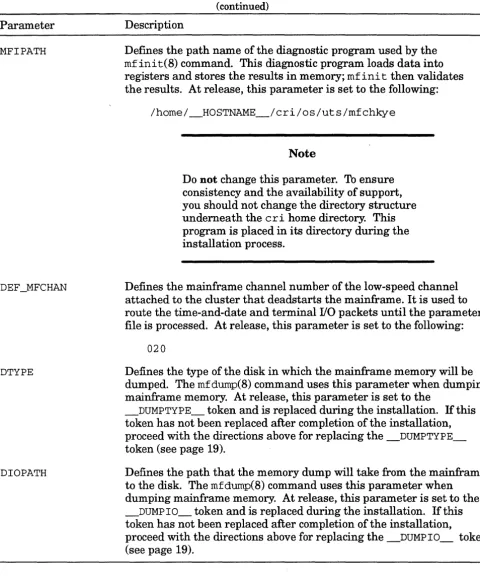
Defines the path name of the diagnostic program used by the
mfinit(8) command. This diagnostic program loads data into registers and stores the results in memory; rof ini t then validates the results. At release, this parameter is set to the following:
/home/ __ HOSTNAME __ /cri/os/uts/mfchkye
Note
Do not change this parameter. To ensure consistency and the availability of support, you should not change the directory structure undernea th the c r i home directory. This program is placed in its directory during the installation process.
Defines the mainframe channel number of the low-speed channel attached to the cluster that deadstarts the mainframe. It is used to route the time-and-date and terminal I/O packets until the parameter file is processed. At release, this parameter is set to the following:
020
Defines the type of the disk in which the mainframe memory will be dumped. The mfdurop(8) command uses this parameter when dumping mainframe memory. At release, this parameter is set to the
__ DUMPTYPE __ token and is replaced during the installation. If this token has not been replaced after completion of the installation, proceed with the directions above for replacing the __ DUMPTYPE __
token (see page 19).
Defines the path that the memory dump will take from the mainframe to the disk. The mfdump(8) command uses this parameter when dumping mainframe memory. At release, this parameter is set to the
_DUMP 10 __ token and is replaced during the installation. If this token has not been replaced after completion of the installation,
proceed with the directions above for replacing the __ DUMP10 __ token (see page 19).
[image:62.617.54.535.122.702.2]OWS-E Administrator's Guide System Configuration File [5] Parameter DUNIT DSTART DLEN DOFWA DOLWA D1FWA D1LWA D2FWA D2LWA D3FWA D3LWA MAINFRAME 8G-30792.0
Table 2. Configurable parameters set during the installation process
(continued)
Description
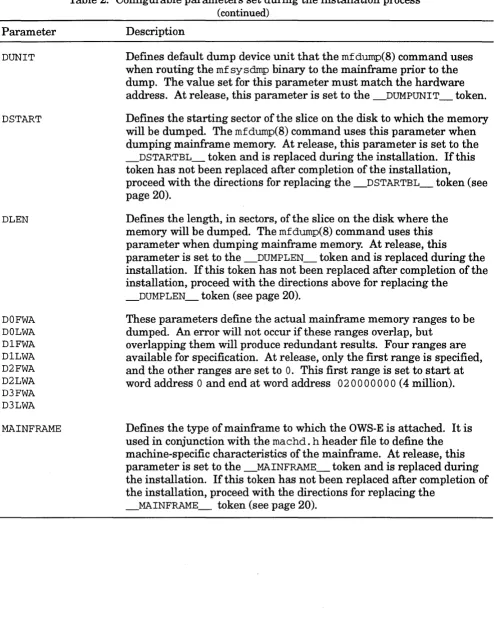
Defines default dump device unit that the mfdump(8) command uses when routing the mf sysdmp binary to the mainframe prior to the dump. The value set for this parameter must match the hardware address. At release, this parameter is set to the _DUMPUNIT_ token. Defines the starting sector of the slice on the disk to which the memory will be dumped. The mfdump(8) command uses this parameter when dumping mainframe memory. At release, this parameter is set to the _DSTARTBL_ token and is replaced during the installation. If this token has not been replaced after completion of the installation,
proceed with the directions for replacing the _DSTARTBL_token (see page 20).
Defines the length, in sectors, of the slice on the disk where the memory will be dumped. The mfdump(8) command uses this parameter when dumping mainframe memory. At release, this
parameter is set to the _DUMPLEN_ token and is replaced during the installation. If this token has not been replaced after completion of the installation, proceed with the directions above for replacing the
_DUMPLEN_ token (see page 20).
These parameters define the actual mainframe memory ranges to be dumped. An error will not occur if these ranges overlap, but
overlapping them will produce redundant results. Four ranges are available for specification. At release, only the first range is specified, and the other ranges are set to
o.
This first range is set to start at word address 0 and end at word address 02 0000000 (4 million).Defines the type of mainframe to which the OWS-E is attached. It is used in conjunction with the machd. h header file to define the machine-specific characteristics of the mainframe. At release, this parameter is set to the _MAINFRAME_ token and is replaced during the installation. If this token has not been replaced after completion of the installation, proceed with the directions for replacing the
_MAINFRAME_ token (see page 20).
[image:63.613.71.565.116.744.2]System Configuration File [5] OWS-E Administrator's Guide
Parameter
SSD_MEMORY
Table 2. Configurable parameters set during the installation process
( continued)
Description
Dermes the memory size of the mainframe to which the OWS-E is attached. It is used in conjunction with the machd. h header file to define the machine-specific characteristics of the mainframe. At release, this parameter is set to the _MEMORY_ token and is replaced during the installation. If this token has not been replaced after completion of the installation, proceed with the directions for replacing the _MEMORY_ token (see page 21).
Defines the memory size of the SSD attached to the mainframe to which the OWS-E is attached. It is used in conjunction with the
machd. h header file to define the machine-specific characteristics of the SSD. At release, this parameter is set to the _SSD_MEMORY_ token and is replaced during the installation. If this token has not been replaced after completion of the installation, proceed with the directions for replacing the _SSD_MEMORY_ token (see on page 22). CPUD_HOSTNAME Denotes the name of the machine to which the CPU monitor, cpud(8),
is running. The gr aphs(8) utility uses this parameter as a default host name when the -h option is not specified on the command line. At release, this parameter is set to the _CPUDHOSTNAME_token and is replaced during the installation. If this token has not been replaced after completion of the installation, proceed with the directions for replacing the _CPUDHOSTNAME_ token (see page 22).
34
Note
Do not change this parameter. This parameter should always be the name of the OWS-E
attached to the mainframe. cpud must execute on the OWS-E because it must use the low-speed channel (from the OWS-E to the lOS-E) for viewing mainframe memory when gathering statistics.
[image:64.612.43.554.127.695.2]OWS-E Administrator's Guide System Configuration File [5]
Configurable
parameters set at
release time
This subsection describes the parameters that are set at release time but are configurable if changed with caution. Parameters that you should not change are noted. Parameters are listed in the order in which they appear in the file.
5.6
Parameter
UPDATESECS
BASEPORT
SSTBACKUP
SG-30792.0
Table 3. Configurable parameters set at release time
Descri ption
Dermes (in seconds) the polling rate for the passive CPU monitors. Every UPDATESECS seconds, the pw kernel data structure is read from mainframe memory across the MUXIOP. At release, this rate is set to 5 seconds.
Note
This value must be set to at least 1 second.
Defines the starting port value used by the cpud(8) daemon, which adds 2 to the value for BASEPORT and uses that value as its port on which to listen. At release, BASEPORT is set to the following:
4370
This value would be changed if the particular range that the ports are using is already designated for a different use by the site. Changing
BASEPORT to an acceptable starting port value will move all ports used into that range.
Specifies the back-up hbea t(8) status table. At release, this parameter is set to the following:
/var/logs/sstbackup