http://www.scirp.org/journal/jis ISSN Online: 2153-1242
ISSN Print: 2153-1234
DOI: 10.4236/jis.2019.102004 Mar. 26 2019 69 Journal of Information Security
Associated Risks in Mobile Applications
Permissions
Mohammed Al Jutail
1,2, Mousa Al-Akhras
1,3, Abdulaziz Albesher
11College of Computing and Informatics, Saudi Electronic University, Riyadh, KSA
2E-Government Program, Riyadh, KSA
3King Abdullah II School of Information Technology, The University of Jordan, Amman, Jordan
Abstract
Mobile applications affect user’s privacy based on the granted application’s permissions as attackers exploit mobile application permissions in Android and other mobile operating systems. This research divides permissions based on Google’s classification of dangerous permissions into three groups. The first group contains the permissions that can access user’s private data such as reading call log. The second group contains the permissions that can modify user’s data such as modifying the numbers in contacts. The third group con-tains the remaining permissions which can track the location, and use the microphone and other sensitive issues that can spy on the user. This research is supported by a study that was conducted on 100 participants in Saudi Ara-bia to show the level of users’ awareness of associated risks in mobile applica-tions permissions. Associaapplica-tions among the collected data are also analyzed. This research fills the gap in user’s awareness by providing best practices in addition to developing a new mobile application to help users decide whether an application is safe to be installed and used or not. This application is called “Sparrow” and is available in Google Play Store.
Keywords
Mobile Permission, Android, Privacy, Attack, Security, Association, Apriori
1. Introduction
The power of the developer is different from one operating system to another due to the differences in development limitation, execution, and the communi-cation between the hardware and software. Android was chosen in the current investigation as it is the most widely used mobile operating system in the world. In the first quarter of 2017, more than 85% of mobiles used Android operating
How to cite this paper: Al Jutail, M., Al-Akhras, M. and Albesher, A. (2019) Associated Risks in Mobile Applications Permissions. Journal of Information Secu-rity, 10, 69-90.
https://doi.org/10.4236/jis.2019.102004
Received: January 27, 2019 Accepted: March 23, 2019 Published: March 26, 2019 Copyright © 2019 by author(s) and Scientific Research Publishing Inc. This work is licensed under the Creative Commons Attribution-NonCommercial International License (CC BY-NC 4.0).
DOI: 10.4236/jis.2019.102004 70 Journal of Information Security
system [1]. Figure 1 shows the smartphones operating system worldwide market share from 2014 until 2017 according to the IDC Quarterly Mobile Phone Tracker. Therefore, focusing on Android covers the largest sector of mobile us-ers to maximize the benefits of this research.
Mobile applications permissions were introduced in Android version 3.0 and were intended to help applications become more dynamic and automatic in their functionality. The permissions were introduced to help applications retrieve certain information from a user’s device, and in turn use the information to help the user carry out transactions and services in the background to benefit the user and update their accounts [2].
Permissions inform the user that an application requests access to some in-formation which might be dangerous to personal data [3]. If an application pos-es danger to the requpos-ested information, the user can decline its installation or running, after that, the application exits. This ensures protection of user’s data and information.
[image:2.595.209.537.522.706.2]This study is geared at finding out the dangers associated with mobile applica-tions permissions that can affect user’s privacy. Google helps users identifying the list of dangerous permissions which can affect user’s privacy. However, it is difficult for the normal user to understand technical terms for these permissions and also it is impractical to check this list each time that the user installs new application. One of the possible remedies is to develop a mobile application with the capability of scanning all program codes of all applications in a mobile phone to give a detailed and systematic report on specific dangers or concerns inherited in applications’ permissions in a simple way to be understood by the normal user. This increases the awareness of mobile users and allows them to determine whether an application can affect their privacy or not. If yes, the effect is at which level. Such review helps users assess and analyze whether an applica-tion is safe for use or not and help them make sound decisions on whether to in-stall an application or not, thus providing an effective and long-lasting solution
DOI: 10.4236/jis.2019.102004 71 Journal of Information Security
to the dangers associated with mobile phone application permissions. A specia-lized mobile application called “Sparrow” was developed as part of this research to scan the device for dangers associated with permissions given to other appli-cations.
The rest of this paper is organized as follows. Section 2 presents some prelim-inary information needed to understand many of the topics tackled in this re-search. Many of the previous efforts related to mobile permissions were catego-rized and reviewed in Section 3. Section 4 gives details about the used metho-dology. Results are analyzed in Section 5 to find any association among the col-lected data. Implementation details of the developed application are presented in Section 6. Section 7 gives recommendations and best practices to control and compact the dangers associated with mobile permissions. Conclusions and ave-nues for future work are given in Section 8.
2. Preliminaries
Since mobile applications use technology that cannot be easily understood by the end user. Android application developers with malicious intents exploit this op-portunity to collect users’ information and monitor their activities. This section explains the concept of permissions, explores the capabilities a developer can perform in a device, and the different permission phases of different Android versions.
2.1. The Concept of Permission
Application developers used to have access to device’s hardware or another ap-plication’s data without user’s knowledge. Examples of such access include switching on the camera in the device and spying on the user. Consequently, the concept of permission came to organize and control the accessibility and the transactions that are outside the application’s boundary.
Mobile applications permissions aim at helping applications become more dynamic and automatic in their functionality. For example, a recording applica-tion will be not funcapplica-tion properly if it does not have the permission to access the microphone in the device. Consequently, permissions came to resolve the rela-tion between the developer and the user.
2.2. What a Developer Can Do in Your Device?
Exceeding the granted mobile application permissions have caused serious breach of security of information and data for many users; and continue to cause problems for mobile phone users. According to Doherty, Android permissions can be used to carry out many things including spying, stealing of information and data, corrupting data, tracking users, and even stealing of personal data and passwords [4].
DOI: 10.4236/jis.2019.102004 72 Journal of Information Security
to unaware individuals. These permissions can have adverse effects on the user if the application has malicious code that accesses confidential personal informa-tion such as passwords, logins and email addresses. Such informainforma-tion can lead to impersonation, loss of money and confidential data. Additionally, sending and receiving SMS and/or MMS usually cost the user and can be diverted into the malicious developer’s account [5].
Another dangerous mobile application permission is tracking. Such applica-tions pose risk to a user since attackers can track user’s location which in turn affects their privacy and in some occasions their personal safety [5].
Another most abused and least understood permission by users is the permis-sion to read phone status and identity. This permispermis-sion is usually related to calls and allows a mobile user to make calls even amid playing games or engaging in other activities. It allows a user’s handset to prioritize phone calls above all other applications and operations. This permission allows an application to know the device ID, the device applications and the user setting. Such identify information can uncover one’s ID card number, name, and address [6]. This is because each device’s unique ID is identifiable through the network, making it easy to know who has a particular phone since they are managed by the manufacturer.
Through Mobile permissions, Android developers can track users, erase users data, steal users personal and confidential information such as passwords and emails, steal money from users, as well as use unwarranted service payments to drain money from users. Moreover, they can listen to and watch the user through the device, and track user’s location. Consequently, there is a need to come up with an effective method to guide users on whether an application is dangerous or not [5].
2.3. Phases of Android Permissions
Since the implementation of Android version 1 in 2008, Android phones used applications without permission requests. This extended from Android version 1 to 2.3.7 in 2010. However, in 2011, Google implemented Android version 3.0 (honeycomb), utilizing API 11, which disallowed applications from having write access to outside application’s directory in the secondary storage. They, however, allowed full access to the primary storage outside the application’s directory.
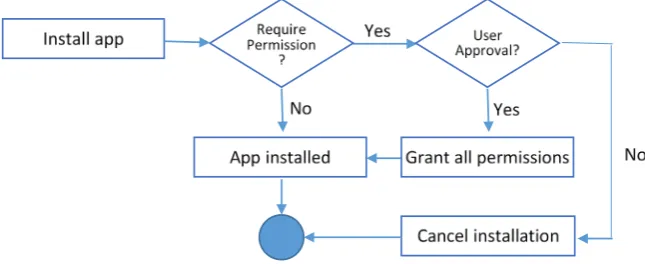
The most developed and well-rounded Android permission system was in-troduced in Android version 4.4 (KitKat), released in October 2013 and ran on APIs 19 and 20. This version required each application to request its needed permissions during installation time. This was in a bid to ensure that users are aware of the areas an application will need access to such as the device’s SD card or internal storage before offering the needed services [4]. It should be noted that in this version, an application is either granted full access as requested or installation is aborted as shown in Figure 2.
DOI: 10.4236/jis.2019.102004 73 Journal of Information Security Figure 2. Requesting permission in Android Version 4.4 before installation.
Figure 3. The application shows all permissions needed to access before installation.
of Google photos, which requires permission to access identity, contacts, loca-tion, photos and others.
[image:5.595.297.451.329.572.2]in-DOI: 10.4236/jis.2019.102004 74 Journal of Information Security
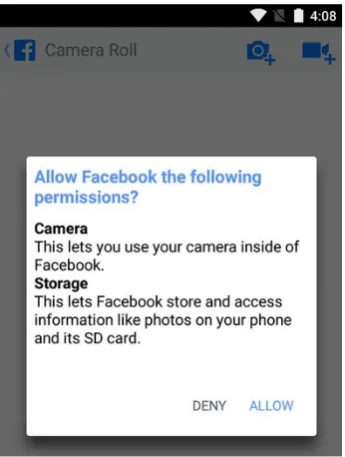
stallation and runtime as shown in Figure 4. This feature helps users uniquely identify and manage applications, thus helping them know how best to manage permissions requested by different applications. This version also allowed users to revoke an application’s permissions at any time from the application’s settings
[7]. However, this version mostly implemented its permission requests during runtime and not at installation time. Dangerous applications and those that re-quire permissions during runtime ask for permissions when the application runs for the first time.
[image:6.595.212.533.384.537.2]In Android version 6.0 Google also introduced the two main major categories of permissions that are normal and dangerous. Normal permissions are the permissions that need to access data outside the application or to use another application operation but that data or use is not risky. While dangerous permis-sions need to access user’s private information, affecting the operation of anoth-er application or use sensitive features in the device [7]. Table 1 lists normal permissions that cannot be denied by the user [7]. Table 2 lists dangerous per-missions [7].
Figure 5 shows how the permission grant works before installation
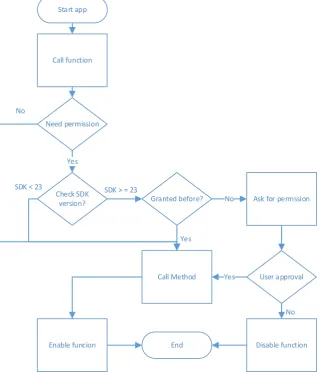
[image:6.595.212.535.573.705.2]sion requests from API 19 until API 22. When the user declines giving permis-sion to an application, the installation of the application is aborted. Figure 6 shows how API 23 and above offers runtime as well as startup permission requests
Figure 4. Permissions granted separately during runtime in Android V 6.0.
DOI: 10.4236/jis.2019.102004 75 Journal of Information Security Table 1. Normal Android permissions [7].
ACCESS_LOCATION_EXTRA_COMMANDS FOREGROUND_SERVICE REQUEST_COMPANION_RUN_IN_BACKGROUND ACCESS_NETWORK_STATE GET_PACKAGE_SIZE REQUEST_COMPANION_USE_DATA_IN_BACKGROUND ACCESS_NOTIFICATION_POLICY INSTALL_SHORTCUT REQUEST_DELETE_PACKAGES
ACCESS_WIFI_STATE INTERNET REQUEST_IGNORE_BATTERY_OPTIMIZATIONS BLUETOOTH KILL_BACKGROUND_PROCESSES SET_ALARM
BLUETOOTH_ADMIN MANAGE_OWN_CALLS SET_WALLPAPER BROADCAST_STICKY MODIFY_AUDIO_SETTINGS SET_WALLPAPER_HINTS CHANGE_NETWORK_STATE NFC TRANSMIT_IR CHANGE_WIFI_MULTICAST_STATE READ_SYNC_SETTINGS USE_FINGERPRINT
CHANGE_WIFI_STATE READ_SYNC_STATS VIBRATE DISABLE_KEYGUARD RECEIVE_BOOT_COMPLETED WAKE_LOCK EXPAND_STATUS_BAR REORDER_TASKS WRITE_SYNC_SETTINGS
Table 2. Dangerous Android permissions [7].
Permission Group Description Example Permissions CALENDAR Runtime permissions related to user’s calendar. •• READ_CALENDAR WRITE_CALENDAR
CALL_LOG Permissions that are associated telephony features.
• READ_CALL_LOG
• WRITE_CALL_LOG
• PROCESS_OUTGOING_CALLS
CAMERA Permissions that are associated with accessing camera or capturing images/video from the device.
• CAMERA
CONTACTS Runtime permissions related to contacts and profiles on this device.
• READ_CONTACTS
• WRITE_CONTACTS
• GET_ACCOUNTS
LOCATION Permissions that allow accessing the device location. •• ACCESS_FINE_LOCATION ACCESS_COARSE_LOCATION
MICROPHONE Permissions that are associated with accessing microphone audio from the device.
• RECORD_AUDIO
PHONE Permissions that are associated telephony features.
• READ_PHONE_STATE • READ_PHONE_NUMBERS • CALL_PHONE • ANSWER_PHONE_CALLS • ADD_VOICEMAIL • USE_SIP SENSORS Permissions that are associated with accessing body or environmental sensors. • BODY_SENSORS
SMS Runtime permissions related to user’s SMS messages.
• SEND_SMS
• RECEIVE_SMS
• READ_SMS
• RECEIVE_WAP_PUSH
• RECEIVE_MMS
[image:7.595.188.535.318.741.2]DOI: 10.4236/jis.2019.102004 76 Journal of Information Security Figure 6. How function calling works before and after API 23.
whereas lower API versions only offer permission requests before installation of the application.
Android version 8.0 (Oreo), that was released in 2017 and used API 26 en-hanced the applications installation process by removing the old “Unknown Sources” setting and replaced it with a permission that you have to grant to indi-vidual applications. Prior to Oreo, any application in your phone can install other applications. This can even be initiated by a trusted application that is downloaded from Google Play Store. It can install another application such as a malware that was not scanned by Google’s Play Store malware detection system. Starting from Oreo until current Android version 9.0 (Pie) that uses API 28 and was released in 2018, the user has to grant the permission to install applications on a per-application basis. Therefore, applications can no longer sneak malware into your device as they need your permission to install anything.
3. Literature Review
The current research finds solutions to the future work suggested by following Start app
Check SDK version?
SDK < 23 SDK > = 23
Granted before? No Ask for permssion
User approval Yes
Call Method
No
Disable function
Enable funcion End
Need permission
Yes No
DOI: 10.4236/jis.2019.102004 77 Journal of Information Security
three research studies. Pelet [8] explains that Android system permission model has three major categories; one of them is the dangers categorization. The cur-rent study aligns with Pelet study by finding a solution for this dangers categori-zation. Ayed [9] concluded that there is a need to come up with a solution to help users know when applications use their personal information, the current study also tackles this issue. Felt [10] noted that the permission requested by an application do not indicate whether the permission guidelines have other unno-ticeable accesses to other more sensitive information or not. Felt recommended finding automated solution to cover this gap which supports this study regard-ing the dangers associated with mobile application permissions.
Android system permission model has three major categories [8] as discussed in Section 3.1. Certain permissions can be requested by malicious applications
[9]; this will be discussed in Section 3.2. User awareness and differentiation of risky and less risky permission requests are discussed in Section 3.3.
3.1. Permission Categorization
Pelet [8] noted that Android system permission model grants permission to cer-tain areas of a mobile phone to cercer-tain applications, while denying others access to other areas of the system. Pelet [8] states that Android system permission model has three major categories: normal permissions, dangerous permissions and signature or system permissions. Normal permissions are not harmful to users, and are granted to any application that requests them. These deal with things like wallpaper management, ringtone management and other related func-tionalities.
Dangerous permissions, on the other hand are only granted with the user’s consent during installation [9]. Signature or system permissions are only per-mitted after scrutiny of the requesting application to ensure it meets the required criteria. These permissions are only granted to applications that have also been signed by the developer that defined and initiated the permission [11]. These permissions are considered the most dangerous and with high vulnerability be-cause they access and manipulate crucial information on a handset.
3.2. Hidden Permissions
Pelet [8] revealed that Android phone application permissions pose some of the most eminent contemporary dangers to mobilephone users. Pelet argued that although permissions have a predefined set of access levels, there is need to de-termine whether an applications can have hidden permissions, accessing certain areas on the mobile handset could mean more vulnerability and security issues for users.
DOI: 10.4236/jis.2019.102004 78 Journal of Information Security
notified on how such permitted data would be used. Applications can use granted accesses to collect further information or keystrokes carried out on a user’s hand-set, which poses serious security issues.
Felt et al.[10] noted that permission requests of applications do not indicate whether the permission guidelines have other unnoticeable accesses to other more sensitive information on a mobile device including passwords, private in-formation, personal information and other sensitive information. Such threats to information security like spyware programs pose high risks to users’ data and information.
3.3. User Awareness of Permission Risks
Applications requesting users’ permissions to certain areas of the mobile handset before application installation, gives the user the chance to either accept or de-cline the installation [11].
High-risk application permissions should indicate more alarming messages as compared to less risky permission requests. This would help users know which applications are user friendly and which ones are dangerous. This argument ori-ginates from the fact that most application permission alerts are presented in the same style, only showing a warning sign without further guidance and details of the nature of the associated dangers [11]. This may mislead many users to think that such messages are norm to all applications, something that continues to drive users into granting access to all application permission requests.
Felt et al.[10] also cited that most users do not spend time to examine and understand the nature and dangers of accesses requested by applications. Some users, however, think that this is a standard procedure that is followed or used by all applications. This trend has seen many users allow access to their personal data, which could pose serious security breaches. Some applications also have inherited mechanisms to send user’s data to other users, something that might not be indicated in the permission alerts [9].
Felt et al.[10] noted that there is a need to come up with a mechanism to ena-ble users to know when applications use their personal information. This would ensure that users are notified when the application uses, accesses, sends, or ma-nipulates personal information. Research also needs to be conducted to find a mechanism that can identify if an application has spyware or other malware programs that could pose a danger to personal data [9]. Additionally, research needs to be conducted to identify if an application has hidden permissions that are not notified to users during installation.
4. Methodology
ana-DOI: 10.4236/jis.2019.102004 79 Journal of Information Security
lyzed and the relation between the answers is investigated for any interesting re-lations.
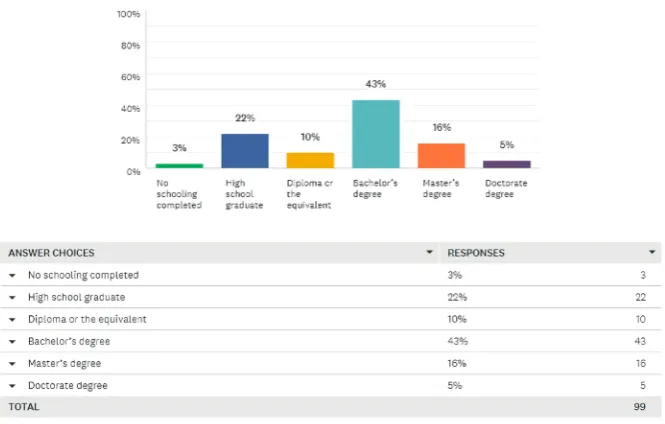
The study covered 100 participants, gender distribution in the study is almost the same with 53% female and 47% male participants, 98% of the participants were aged from 18 to 40 as shown in Figure 7 which means they are mature people knowing what is good and bad for them. 64% of them are educated people that have at least a Bachelor degree as shown in Figure 8, therefore, most likely, they at least heard about permissions and privacy.
[image:11.595.203.537.229.440.2]An astonishing statistic reveals that 56% of the participants do not read the
Figure 7. Participants statistics according to their age.
[image:11.595.204.537.498.710.2]DOI: 10.4236/jis.2019.102004 80 Journal of Information Security
application’s permissions before installation. If this is the case with responsible and educated people, how about kids and uneducated people. These statistics emphasize the need of increasing the awareness of the dangers associated with application’s permissions.
The study shows that only 42% of the participants attempt to find an alterna-tive application if they noticed that sensialterna-tive permissions are required by their first choice. A question was asked to check the participant’s knowledge of pa-rental control in Google Play Store that controls downloading applications to the kid’s device. 26% of the participants used it, 63% know about it but did not use it while 11% of them never heard about it.
Only 32% of the participants installed applications from outside Google Play Store. According to the distributed questionnaire, 53% of participants do not know that most of the applications that are installed from outside Google Play Store are dangers and have critical access to their data without their permissions. 65% of participants are aware of the high probability that they have installed ap-plications with dangerous permissions and that apap-plications can read or modify their contacts or images. 65% of participants are interested to have a copy of this study’s findings.
5. Results & Analysis
After data were collected from participants through online questionnaire, this section aims to find if there are any interesting relations among different data attributes by discovering some hidden patterns. For this purpose, association rules were used. The term association rule was introduced by Apriori algorithm in the context of market basket analysis. Nowadays, association rules algorithm is one of the most frequently used data mining techniques for finding hidden re-lationships among data base attributes [12].
An association rule is a relation between two sides in the form: A B, A is
the antecedent and B is the consequent. A and B are either one variable or set of variables. Usually A is a number of attributes describing a data item and B is the target/output class. A priori is the most widely used association rules mining al-gorithm. Its aim is to structure a rule-based classifier based on high quality asso-ciation rules mined from existing transactions on a set of items [12].
WEKA which is data mining tool with graphical user interface was used to apply association rule classification [13]. Weka has a ready implementation of Apriori algorithm. The default settings are used when Apriori was applied on the collected dataset. The most promising discovered association rule is:
DOI: 10.4236/jis.2019.102004 81 Journal of Information Security
6. Implementation
A new mobile application is developed to help users decide whether an applica-tion is safe to be installed and used or not. This applicaapplica-tion is called “Sparrow” and is available in Google Play Store by searching for “Sparrow Protect” or through the link https://play.google.com/store/apps/details?id=sa.es.sparrow.
Sparrow application is designed to improve Google categorizations of permis-sions to help users identify dangerous applications in an easy and simple way. Using this application, a user is able to decide which application is safe for use and which one is not.
Google classified permissions into Normal, Dangerous, and Signature or Sys-tem. Even if Google website listed the 26 dangerous permissions, it is difficult for the end user to understand what do they mean and hard to memorize them. Sparrow application simplifies that for the user by classifying applications to three new categories which are:
• Applications that can read user’s private data: any application that has one of dangerous permissions labeled with READ (7) as shown in Figure 9.
• Applications that can modify user’s private data: any application that has one of dangerous permissions labeled with WRITE (5) as shown in Figure 10. • Applications that can spy on user: any application that has one of the
re-maining dangerous permissions (14) as shown in Figure 11.
6.1. Mechanism of Sparrow Application
The use of Sparrow application is simple for the user. The user does not need to memorize what are the dangerous permissions and does not need to have tech-nical background about the permissions. By one click, the user can know what the dangerous applications in the device are.
[image:13.595.213.533.504.596.2] [image:13.595.208.527.626.705.2]Applications are classified into two types in user’s device. Either system
Figure 9. Dangerous permissions that can read user’s data.
DOI: 10.4236/jis.2019.102004 82 Journal of Information Security Figure 11. Dangerous permissions that can spy and affect user’s privacy.
application or normal application. System applications come built in with the device. System applications cannot be removed/uninstalled the usual way. Nor-mal applications can be installed/uninstalled by the user. Both system and nor-mal applications have dangerous permissions. Sparrow offers a configurable op-tion to the user to show/hide system applicaop-tions from the scan results if they have dangerous permissions because users cannot uninstall these applications anyway. When a user opens Sparrow, the home page is displayed as shown in
Figure 12.
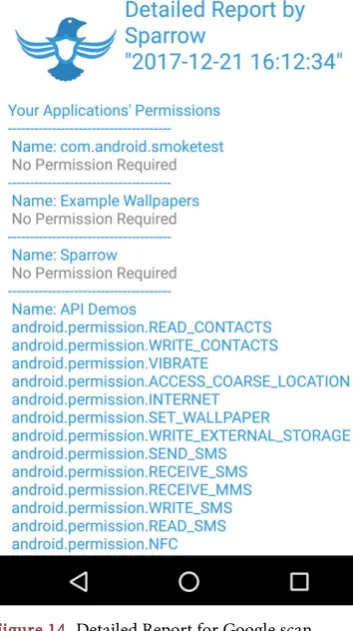
Two types of scan are available. The first one is sparrow scan and the other is Google-based scan. In Google scan, Sparrow application scans the device and checks the permissions for installed applications. If there is no application re-quiring dangerous permissions, the user will see a message “Congratulation you do not have risky app”. If any application has any permission from the danger-ous permissions list, as classified by Google, the name of that application will be displayed in the summary report of risky applications as shown in Figure 13. The summary report displays the number of applications in the device, number of risky applications and how many dangerous permission in user’s device. In addition to the mobile type, date/time, scan type and scan mode to facilitate re-port sharing. At the end of the rere-port there is a button for detailed rere-port to scan the permissions for each application and display all permissions under each ap-plication as shown in Figure 14. If an application contains one of dangerous permissions, that application will be flagged in red color as a risky application.
In the home page, when the user clicks sparrow scan, the application scans the device and checks the permissions of installed applications. If an application has any permission from any of the three defined groups (read, write, spy), the name of that application will be listed under its group in the result page as shown in
Figure 15 with the mode “Hide System Apps” or Figure 16 with the mode “Show
System Apps”. Some applications can be in more than one group, some applica-tions can have permissions but not dangerous and some applicaapplica-tions can have no permissions.
DOI: 10.4236/jis.2019.102004 83 Journal of Information Security Figure 12. Sparrow app home page.
[image:15.595.295.448.77.368.2]DOI: 10.4236/jis.2019.102004 84 Journal of Information Security Figure 14. Detailed Report for Google scan.
DOI: 10.4236/jis.2019.102004 85 Journal of Information Security Figure 16. Summary report result for sparrow scan with mode “Show System Apps”.
in the device, number of applications that can read user’s private data, change user’s private data and spy on user and how many dangerous permissions in us-er’s device. In addition to the mobile type, date/time, scan type and scan mode. At the end of the report, there is a button for detailed report to scan and display the permissions for each application.
6.2. Clarification
Sparrow works by reading installed applications’ permissions, which means it needs permission to access another application’s data. However, Sparrow does not require any permission to work. How it comes? Actually, when the user in-stalls any application in his/her device, the information for that application will be saved in the following system file “data/system/packages.xml”. Sparrow reads from this public file, not from files inside the other application’s directory. Moreover, the information in this file is not private information; it is public in-formation about the applications, which is available for anyone. Therefore, this information does not affect the user’s privacy. Thus, sparrow does not require any permission to work.
6.3. Limitations
DOI: 10.4236/jis.2019.102004 86 Journal of Information Security
with the aim that “Sparrow does not require any permission to work”. Other-wise, if a dangerous permission such as read or write is added to Sparrow, it will report itself as a dangerous application to the user and recommend removing it-self.
7. Recommendations
Although non-installation of applications can be thought as a clever move to avoid the disadvantages of permissions of Android applications, individuals cannot ultimately use their mobile phones effectively without the use of mobile applications. This section presents some recommendations to deal with the risks of mobile permissions. First, educate users on the importance of reviewing ap-plication’s permissions before deciding to grant a permission [14]. Second, use “parental control” tool provided by Google to allow parents monitor and control their kids’ devices [15]. Third, it is recommended to consult experts in the field when needed. Finally, use “Sparrow” application, which is the outcome of this research, to help users identify risky applications in a device in an easy and sim-ple way to the normal user.
7.1. Awareness
Users need to be sensitized and educated about the potential dangers of mobile application permissions. According to Ali et al. [14], most users are unaware of the dangers inherited in mobile application permissions. Some of the users do not even read the permission requested by applications, blindly allowing access to personal information and data, something that could turn dangerous for them. Educating users on the importance of reviewing and assessing the permis-sion requests of an application before deciding to grant or revoke permispermis-sion request is a key in improving mobile security.
7.2. Use Parental Control
Google provides a powerful tool that allows parents to control their kids’ devices. This tool can control the content in searching, and time for using the device, and restrict downloading applications and many other features [15]. To activate this service, devices for the parents and the kids must be running Android 7 or above. Parents need to create a Google account for their kids, specify the age, parents need also to create an account in Family Link application, and then fol-low the instructions to add kids under the parent’s account. Then in the parent filters they decide what kind of needed restrictions to apply. When the kids log-in to his/her device, the restrictions and rules will be applied to the device.
Figure 17 shows the logo of this application.
7.3. Ask Expert
DOI: 10.4236/jis.2019.102004 87 Journal of Information Security Figure 17. Google Family Link App.
a user meet fellow users that have suffered while using an application, thus ad-vising a user on the best approach to take in disabling an application [16]. This is based on the fact that some applications can have malicious code that is retained in mobile devices, even after uninstalling the application. Asking experts can al-so help one to gain technical knowledge on how to access the manifest files of applications and disable malicious code.
7.4. Automated Application
The most effective solution to handle the threat of mobile permissions is by de-signing a master application with the capability of scanning and accessing the contents of the manifest files of mobile applications, which can have malicious code. The master application will also give the user a detailed report on whether there are any risky applications in the handset or not. The detailed report in-forms the user on whether an application needs uninstallation or not. It also guides a user on what areas of permission access are deemed dangerous for each application and helps the user to decide whether the application is dangerous or
not [5]. Apart from that, the master application will continue running in the
background, monitoring any updates to the applications. If an application gets updated with a malicious code, the master application notifies the user of the level of threat the update has caused and the possible corrective actions, includ-ing revokinclud-ing certain permissions or uninstallinclud-ing the application altogether. This application deemed to offer full control and security for the user’s mobile hand-set, enhancing security and privacy for the user, “Sparrow” has many of these functions.
7.5. Best Practices
In addition to the previous recommendations, some of best practices that help users protect their privacy include.
1) Read and understand the required permissions before installing an applica-tion.
DOI: 10.4236/jis.2019.102004 88 Journal of Information Security
sensitive data without requesting permissions.
3) Find alternative application if possible when you see a dangerous permis-sion is requested.
4) Remove the application after finishing from using it. For example, if you are in travel and you downloaded an application for booking hotels. Remove this application after you come back from your travel. This limits the application’s use of system resources as well as personal information and data, thus safe-guarding user’s information. This saves the user incase applications are updated regularly, adding malicious code or other spying codes that sabotage the security of the user [17].
5) If it is necessary to install an application with dangerous permissions, you can revoke sensitive permissions from the application if you do not use the ap-plication for few days and grant that permission again when you need it. The application can work perfectly even if you revoke the permission, but when it needs a permission, the application will ask you to grant the permission.
6) Search the history of the application’s developer or company to assess whether the application can be trusted or not. This ensures if the application has had previous instances of criminal activity or not. This guides a user into either revoking or granting application access to the system’s resources.
7) There is also a need to install a general trusted application that scans other applications’ permissions to assess whether the manifest files have any malicious code. This will help in identifying applications that have high-risk status, thus eliminating such applications from the system to safeguard user’s data and in-formation. Revocation of permission has been termed as the alternative best so-lution to safeguarding personal data apart from using a master application to scan the system for malicious codes [14].
8) Attempt not to keep sensitive information in your device, otherwise, en-crypt sensitive documents.
8. Conclusions and Future Work
Mobile applications permission is relatively a new security topic that needs ex-tensive research to find out all the inherited challenges. Research suggests ways of ensuring that mobile application permissions are straight forward, enabling the user to make sound decisions on whether to install an application or not by reviewing the permissions requested by mobile applications before granting access to the areas they seek. The result of this study showed the participants are more than 18 in age and around 64% of them have at least a Bachelor degree which means they are responsible and educated users. However, more than 50% of them do not read the application’s permissions before installing it. This raises concerns about the security of younger and less uneducated users. Based on the aforementioned reasons, there is need to develop an easy solution to solve this problem.
DOI: 10.4236/jis.2019.102004 89 Journal of Information Security
support this classification, “Sparrow” application was developed to help users identify risky applications. Sparrow does not require the user to memorize what the dangerous permissions are and does not require the user to have technical background about the permissions. The advantages of Sparrow application are:
1) Does not require any permission to work. 2) Does not require technical knowledge. 3) Easy to use.
4) Available freely in Google Play Store.
Research also suggests recommendations and best practices about what a user should do if s/he needs to use an application with dangerous permissions.
Conflicts of Interest
The authors declare no conflicts of interest regarding the publication of this pa-per.
References
[1] Mass, F. (2017) Coming off a Slow 2016, Smartphone Shipment Volume Expected to Recover in 2017 and Gain Momentum into 2018, According to IDC. (IDC) Worldwide Quarterly Mobile Phone Tracker.
[2] Chen, L., McGrew, D. and Mitchell C. (2016) Security Standardisation Research. Springer International, New York. https://doi.org/10.1007/978-3-319-49100-4 [3] Carrascosa, I.P., Kalutarage, H.K. and Huang, Y. (2017) Data Analytics and
Deci-sion Support for Cybersecurity: Trends, Methodologies and Applications. Springer International Publishing, Cham. https://doi.org/10.1007/978-3-319-59439-2
[4] Doherty, J. (2016) Wireless and Mobile Device Security. Jones & Bartlett Learning, Burlington.
[5] Elenkov, N. (2015) Android Security Internals: An In-Depth Guide to Android’s Security Architecture. No Starch Press, San Francisco.
[6] Six, J. (2012) Application Security for the Android Platform. O’Reilly Media, Sebas-topol.
[7] Android Developer (2017) Request App Permissions
https://developer.android.com/guide/topics/permissions/requesting.html
[8] Pelet, J.-E. (2016) Mobile Platforms, Design, and Apps for Social Commerce. Ad-vances in E-Business Research Series, IGI Global, New York.
[9] Ayed, A.B. (2015) A Literature Review on Android Permission System. Internation-al JournInternation-al of Advanced Research in Computer Engineering & Technology, 4, 1520-1523.
[10] Felt, A.P., Ha, E., Egelman, S. and Haney, A. (2012) Android Permissions: User At-tention, Comprehension, and Behavior. Computer Science Department, University of California, Oakland, 1-14. https://doi.org/10.1145/2335356.2335360
[11] Mukherjea, S. (2017) Mobile Application Development, Usability, and Security. In-formation Science Reference, Hershey. https://doi.org/10.4018/978-1-5225-0945-5 [12] Agrawal, R. and Srikant, R. (1994) Fast Algorithms for Mining Association Rules.
Proceedings of the 20th Very Large Data Bases (VLDB) Conference, Santiago, 12-15 September 1994, 487-499.
Ap-DOI: 10.4236/jis.2019.102004 90 Journal of Information Security pendix for “Data Mining: Practical Machine Learning Tools and Techniques”. 4th Edition, Morgan Kaufmann,Burlington.
[14] Ali, S.S., Danger, J.-L. and Eisenbarth, T. (2017) Security, Privacy, and Applied Cryptography Engineering. 7th International Conference, SPACE 2017, Goa, 13-17 December 2017. https://doi.org/10.1007/978-3-319-71501-8
[15] Google Family Link. Google LLC. http://www.google.com/familylink
[16] Garcia-Alfaro, J., Lioudakis, G., Cuppens-Boulahia, N., Foley, S. and Fitzgerald, W.M. (2017) Data Privacy Management and Autonomous Spontaneous Security.
DPM 2013, 6th International Workshop, SETOP 2013, Egham, 12-13 September 2013, 213-231.
![Figure 1. Smartphones operating system worldwide marketshare 2014-2017 [1]](https://thumb-us.123doks.com/thumbv2/123dok_us/9084780.405257/2.595.209.537.522.706/figure-smartphones-operating-system-worldwide-marketshare.webp)
![Table 2. Dangerous Android permissions [7].](https://thumb-us.123doks.com/thumbv2/123dok_us/9084780.405257/7.595.65.530.87.288/table-dangerous-android-permissions.webp)