THEORY AND PROBLEMS
of
PROGRAMMING
WITH
c++
JOHN R. HUBBARD, Ph.D. Professor of Mathematics and Computer Science
University of Richmond
SCHAUM’S OUTLINE SERIES
MCGRAW-HILL
University of Michigan (1973) and has been a member of the Richmond faculty since 1983. His primary interests are in numerical algorithms and database systems. Dr. Hubbard is the author of several other books, including A Gentle Introduction to the VAX System and The VAX Book.
Schaum’s Outline of Theory and Problems of
PROGRAMMING WITH C++
Copyright 0 1996 by The McGraw-Hill Companies, Inc. All rights reserved. Printed in the United States of America. Except as permitted under the Copyright Act of 1976, no part of this publication may be reproduced or distributed in any form or by any means, or stored in a data base or retrieval system, without the prior written permission of the publisher.
2 3 4 5 6 7 8 9 1 0 1 1 1 2 1 3 1 4 1 5 1 6 1 7 1 8 1 9 2 0 P R S P R S 9 0 1 0 9 8 7 6
ISBN o-07-030837-3
Sponsoring Editors: John Aliano and Arthur Biderman Production Supervisor: Donald F. Schmidt
Editing Supervisor: Maureen Walker
Library of Congress Cataloging-in-Publication Data
Hubbard, J. R. (John Rast), date
Schaum’s outline of theory and problems of programming with C++ / John Hubbard.
P* cm. - - (Schaum’s outline series) Includes index.
ISBN o-07-030837-3
1. C++ (Computer program language) I. Title. QA76.76.Cl5H835 1996
005.13’3 - - dc20 96-13964
CIP
McGraw-Hill
Like all Schaum’s Outline Series books, this is intended to be used primarily for self study, preferably in conjunction with a regular course in C++ Programming. The book covers nearly all aspects of ANSI/IS0 Standard C++. It includes over 200 examples and solved problems. The author firmly believes that programming is best learned by practice, following a well-constructed collection of examples with complete explanations. This book is designed to provide that support.
C++ was created by Bjarne Stroustrup in the 1980s. Based upon C and Simula, it has become the most popular language for object-oriented programming. The final ANSI/IS0 Standard was just recently completed, so some of the standard features described in this book may not yet be available on all compilers. In particular, the powerful Standard Template Library is just now becoming available from some vendors.
Although most people who undertake to learn C++ have already had some previous program-ming experience, this book assumes none. It approaches C++ as one’s first programprogram-ming language. Therefore, those who have had previous experience may need only skim the first few chapters.
C++ is a difficult language for at least two reasons. It inherits from the C language economy of expression that novices often find cryptic. And as an object-oriented language, widespread use of classes and templates presents a formidable challenge to those who have thought in those terms before. It is the intent of this book to provide the assistance necessary first-time programmers to overcome these obstacles.
an its not for
Readers may download the source code for the examples and solved problems in this book from the author’s World Wide Web home page: http : / /WWW. richmond. edu/-hubbard/
I wish to thank all my friends, colleagues, students, and McGraw-Hill staff who have helped me with the critical review of this manuscript, including John Aliano, Arthur Biderman, Peter Dailey, Chris Hanes, Walker Holt, John B. Hubbard, Arni Sigurjonsson, Andrew Somers, Maureen Walker, and Nat Withers. Their debugging skills are gratefully appreciated.
Finally I wish to express my gratitude to my wife and colleague, Anita Hubbard, who reviewed the complete manuscript and worked through most of the problems, including many that she contributed herself. I am greatly in her debt.
JOHN R. HUBBARD
Richmond, Virginia
13.
14.
15.
1.6
1.7
18.
19.
1.10
1.11
1.12
1.13
1.14
1.15
1.16
1.17
1.18
CHARACTERS AND STRING LITERALS ... 3
STRING LENGTH ... 4
COMMENTS ... 5
VARIABLES, OBJECTS, AND THEIR DECLARATIONS ... 7
KEYWORDS AND IDENTIFIERS ... 9
INITIALIZING IN THE DECLARATION ... 10
CHAINED ASSIGNMENTS ... 1 1 THE SEMICOLON ... 12
PROGRAM STYLE ... 12
INTEGER TYPES ... 1 3 SIMPLE ARITHMETIC OPERATORS ... 14
OPERATOR PRECEDENCE AND ASSOCIATIVITY... 16
THE INCREMENT AND DECREMENT OPERATORS ... 1 7 COMPOUND ASSIGNMENT EXPRESSIONS ... 20
INTEGER OVERFLOW AND UNDERFLOW ... 20
THE char TYPE ... 21
2.1 INPUT . . . 31
2 2. THE if STATEMENT . . . 33
2 3. THE if.. . else STATEMENT . . . 34
2 4. RELATIONAL OPERATORS . . . 35
2 5. COMPOUND STATEMENTS . . . 36
2 6. KEYWORDS . . . 37
2 7. COMPOUND CONDITIONS . . . 38
2 8. BOOLEAN EXPRESSIONS . . . 40
2 9. NESTED CONDITIONALS . . . . ..*... 41
2.10 THE switch STATEMENT . . . 43
2.11 THE CONDITIONAL EXPRESSION OPERATOR . . . 44
2.12 SCOPE ... 44
2.13 ENUMERATION TYPES ... 45
2.14 INTEGER TYPE CONVERSIONS ... 47
Chapter 3 Iteration and Floating Types oeeeeeeeeeeeeeeeeeeeeeeeeeeeeeeeeeeeeeeeeeeeeeeeeeeeeeeeeeeeeeeeeeeeeeeeeeeeeee 57 31.
3 2. 3 3. 3 4. 3 5. 3 6. 3 7. 3 8. 3 9 3’10 3’11 3’12.
THE while STATEMENT ... 57
THE do . . .while STATEMENT ... 58
THE for STATEMENT ... 59
THE break STATEMENT ... 61
THE cant inue STATEMENT ... 62
THE goto STATEMENT .... 63
REAL NUMBER TYPES ... 66
TYPE CONVERSIONS ... 68
ROUNDOFF ERROR ... 69
THE E-FORMAT FOR FLOATING-POINT VALUES ... 70
CONSTANTS, VARIABLES, AND OBJECTS ... 70
GENERATING PSEUDO-RANDOM NUMBERS ... 71
Chapter 4 Functions eeeeeeeeeeeeeeeeeeeeeeeeeeeeeeeeeeeeeeeeeeeeeeeeeeeeeeeeeeeeeeeeeeeeeeeeeeeeeeeeeeeeeeeeeeeeeeeeeeeeeeeeeeeeeee 89 4 1. 4 2. 4 3. 4 4. 4 5. 4 6. 4 7. 4 8. 4 9 4’10 4’11 4’12 4’13 4’14 4’15 4’16. STANDARD C LIBRARY FUNCTIONS . . . 89
USER-DEFINED FUNCTIONS . . . 92
TEST DRIVERS . . . 92
FUNCTION DECLARATIONS AND DEFINITIONS . . . 94’
SEPARATE COMPILATION . . . 96
LOCAL VARIABLES AND FUNCTIONS . . . 97
void FUNCTIONS . . . 99
BOOLEAN FUNCTIONS . . . ..*... 100
I/O FUNCTIONS . . . 103
PASSING BY REFERENCE . . . 105
PASSING BY CONSTANT REFERENCE . . . 108
INLINE FUNCTIONS . . . 109
SCOPE . . . 110
OVERLOADING . . . 111
THE main( ) AND exit () FUNCTIONS . . . 112
DEFAULT ARGUMENTS. . . 113
Chapter 5 Arrays eeeeeeeeeeeeeeeeeeeeeeeeeeeeeeeeeeeeeeeeeeeeeeeeeeeeeoeeeeeeeeeeeeeeeeeeeeeeeeeeeeeeeeeeeeeeeeeeeeeeeeeeeeeeeeeeee 127 51. 5 2. 5 3. 5 4. 5 5. 5 6. 5 7. 5 8. 5 9 5’10 5’11. INTRODUCTION ... 127
PROCESSING ARRAYS ... 127
INITIALIZING AN ARRAY ... 129
PASSING AN ARRAY TO A FUNCTION ... 131
C++ DOES NOT CHECK THE RANGE OF AN ARRAY INDEX.. ... 132
THE LINEAR SEARCH ALGORITHM... 133
THE BUBBLE SORT ALGORITHM ... 134
THE BINARY SEARCH ALGORITHM ... 136
USING ARRAYS WITH ENUMERATION TYPES ... 137
TYPE DEFINITIONS ... 139
Chapter 6 Pointers and References eeeeeeeeeeeeeeeeeeeeeeoeeeeeeeeeeeeeeeeeeeeeeeeeeeeeeeeeeeeeeeeeeeeeoeeeeeeeeeeeeeee 157 61. 62. 63. 64. 65. 66.
6 7. 6 8. 6 9 6’10 6’11 6’12 6’13 6’14 6’15.
INTRODUCTION ... 157
REFERENCES ... 158
POINTERS ... 159
DERIVED TYPES ... 161
OBJECTS AND LVALUES ... 161
RETURNING A REFERENCE... 162
ARRAYS AND POINTERS ... 163
THE new OPERATOR ... 166
THE delete OPERATOR... 167
DYNAMIC ARRAYS ... 167
USING const WITH POINTERS ... 169
ARRAYS OF POINTERS AND POINTERS TO ARRAYS ... 169
POINTERS TO POINTERS ... 170
POINTERS TO FUNCTIONS ... 171
NUL, NULL,mD void ... 172
Chapter 7 Strings eeeeeeeeeeeeeeeeeeeeeeeeeeeeeeeeeeeeeeeeeeeeeeeeeeeeeeeeeeeeeeeeeeeeeeeeeeeeeeeeeeeeeeeeeeeeeeeeeeeeeeeeeeeeeeeee 185 71. INTRODUCTION . . . 185
7 2. REVIEW OF POINTERS . . . ..*...*...*... 185
7 3 7:4 STRINGS . . . 188
STRING I/O . . . 189
7 5 7:6 SOME tin MEMBER FUNCTIONS . . . ..*... 190
CHARACTER FUNCTIONS DEFINED IN ectype . h> . . . 194
7.7 ARRAYS OF STRINGS . . . ..*... 195
7 8. THE C-STRING HANDLING LIBRARY . . . 198
Chapter 8 Classes eeeeeeeeeeeeeeeeeeeeeeeeeeeeeeeeeeeeeeeeeeeeeeeeeeeeeeeeeeeeeeeeeeeeeeeeeeeeeeeeeeeeeeeeeeeeeeeeeeeeeeeeeeeeeeeee 220 81. 8 2. 83. 8 4. 85. 86. 8 7. 8 8. 8 9 8’10 8’11 8’12 8’13. INTRODUCTION ... 220
CLASS DECLARATIONS ... 220
CONSTRUCTORS ... 223
CONSTRUCTOR INITIALIZATION LISTS ... 225
ACCESS FUNCTIONS ... 226
PRIVATE MEMBER FUNCTIONS ... 227
THE COPY CONSTRUCTOR ... 227
THE CLASS DESTRUCTOR ... 230
CONSTANT OBJECTS... 231
STRUCTURES ... 231
POINTERS TO OBJECTS ... 232
STATIC DATA MEMBERS ... 234
Chapter 9 Overloading Operators bbbbbbebeobobbbbbob*bbbbob*bbbb*bb*obbbbbbbbbbbbbob**bbbbbbbbbbbbbbbbbbbb**bbbbbbbbbbb 249 91. 92. 93. 94. 95. 96. 97. 98. 99 9'10.
INTRODUCTION ... 249
OVERLOADING THE ASSIGNMENT OPERATOR ... 249
THE this POINTER ... 250
OVERLOADING ARITHMETIC OPERATORS ... 251
OVERLOADING THE ARITHMETIC ASSIGNMENT OPERATORS.. ... .253
OVERLOADING THE RELATIONAL OPERATORS ... 254
OVERLOADING THE STREAM OPERATORS ... 254
CONVERSION OPERATORS ... 256
OVERLOADING THE INCREMENT AND DECREMENT OPERATORS.. ... .258
OVERLOADING THE SUBSCRIPT OPERATOR ... 260
Chapter 10 A String Class bb*bb*b**bo*b**b*bbbbbbbbbbbbbb*bbbbbbbbbbb*bbbb*bbbbbbb*b*oob*obo*bb***bbbbbbbb*bbbbbbbbbbbbbb 271 10.1 INTRODUCTION ... 271
10.2 THE String CLASS INTERFACE ... 271
10.3 THE CONSTRUCTORS AND DESTRUCTOR... 272
10.4 THE COPY CONSTRUCTOR ... 275
10.5 THE ASSIGNMENT OPERATOR ... 276
10.6 THE ADDITION OPERATOR ... 279
10.7 AN APPEND OPERATOR ... 281
10.8 ACCESS FUNCTIONS ... 282
10.9 THE COMPARISON OPERATORS ... 284
10.10 STREAM OPERATORS ... 285
Chapter 11 Composition and Inheritance ***************..***********.****************.*********.******************** 295
11.1 INTRODUCTION ... 295
11.2 COMPOSITION ... 295
11.3 INHERITANCE ... 298
11.4 protected CLASS MEMBERS ... 299
11.5 OVERRIDING AND DOMINATING INHERITED MEMBERS ... .30 1 11.6 private ACCESS VERSES protected ACCESS ... 304
11.7 virtual FUNCTIONS AND POLYMORPHISM ... 305
11.8 VIRTUAL DESTRUCTORS ... 308
11.9 ABSTRACT BASE CLASSES ... 310
11.10 OBJECT-ORIENTED PROGRAMMING ... 313
Chapter 12 Stream I/O ***.***********.************.******.*******************.*.**************************m********************* 328 12.1 12.2 12.3 12.4 12.5 12.6 12.7 12.8 STREAM CLASSES ... ....328
THE ios CLASS ... 328
ios FORMAT FLAGS ... 332
ios STATE VARIABLES ... 336
THE istreamAND ostream CLASSES ... 339
UNFORMATTED INPUT FUNCTIONS ... 340
UNFORMATTED OUTPUT FUNCTIONS ... 345
Chapter 13 Templates and Iterators *b***bbbbbbbbbbbbbbbbbbbbbbbbbbo*bbbb*bbbbb*****bbb**bbb**b**bo****b***bb*bbbbo****b 355
13.1 13.2 13.3 13.4 13.5 13.6 13.7 13.8
INTRODUCTION . . . 355
FUNCTION TEMPLATES . . . 355
CLASS TEMPLATES . . . 358
CONTAINER CLASSES . ..*...*... 360
SUBCLASS TEMPLATES . . . 362
PASSING TEMPLATE CLASSES TO TEMPLATE PARAMETERS . . . 364
A CLASS TEMPLATE FOR LINKED LISTS . . . 365
ITERATOR CLASSES . . . 369
Chapter 14 Librariesb**b**b***bbbbb*b****b******bbbb*********bbbbb*bbbo****bbb**bbbb*bb***b**b**bbb*bbb*****b**bbb*bbb**bb*****bb* 386 14.1 INTRODUCTION . . . 386
14.2 THE STANDARD C++ LIBRARY . . . ..**...*..*....386
14.3 PROPRIETARY LIBRARIES . . . 388
14.4 CONTENTS OF THE STANDARD C HEADERS . . . 389
14.5 STRING STREAMS . . . 393
14.6 FILE PROCESSING . . . 395
14.7 THE STANDARD TEMPLATE LIBRARY~~..~~~~~.~...~~~~....~~... 399
Appendix A The ASCII Code b**ob*b*obbbboob*bboo*bbbbbbb*bb**o*bb***bb*bb***bbbbbbb**b*bbb**bb***bb***bb**bb**bbb*b*bbb*bbb* 405
Appendix B C++ Keywords bbbbbb****oo*obbo**bbbb***bbobo*bbb***bb*****b**bbbbb*bbb*o*bbbbbbbbb*bbb**b*b**bb*bbbbbbb****bbbb*b 409
Appendix C C++ Operators bobbbbbo*bbbo**bbbbbbbbbbbbbbob**bbbbbbbbbb*b**mo**bb**bbeb*b*bb*****b*bbb*b*beb*ee**ee**bbb*bb***b* 411
Appendix D C++ Types *e***e*bbbbe*bbebb***bebe*bb*b*eb**eee**bbb***beee**ee**beebbbbbb****eb*bbbb*bbbb*bbb**ee***b**b*****e** 413
Appendix E References *bbb******bbbe**b*bb****b*b*bbb****bbe**bbbb*bbbb*bb**ee****e*bbbbbb**ee***ee***e**bb***e********bbbb**ee** 414
Appendix F Pre-Defined Functions beebbbbbbbb**beeeee*bbbebbb*be****eee*ebebeeeeee*beebbbbbbb*bbbe**ee*e*e**bbbbbbb**bee* 41s
Appendix G Hexadecimal Numbers b**bbbb*bbb*b*bbbb****b*b****b***bbb***bbbbbbbbb***bbbb*bbb*bbbbbbb*****b**bb*b***e***b 423
Chapter
1
Introduction to Programming in
C++
A program is a sequence of instructions for a computer to execute. Every program is written
in some programming language. The C++ (pronounced “see-plus-plus”) language is one of the newest and most powerful programming languages available. It allows the programmer to write efficient, structured, object-oriented programs.
This chapter introduces some of the basic features of C++. You should compile and run each example in this chapter.
1.1 SIMPLE PROGRAMS
Our first example illustrates the main parts of a C++ program.
EXAMPLE 1.1 The Hello World Program
#include <iostream.h>
// This program prints "Hello, World." main0
1
tout CC "Hello, World.\n";
return 0;
T h e #include directive on the first line is necessary for the program to have output. It refers to an external file named i o s t ream. h where information about the cou t object is provided. Note that the angle brackets < and > are not part of the file name; they are used to indicate that this is a Standard C++ Library file.
The second line is a comment, identified by the double slashes / /. Comments are included in pro-grams to provide explanations for human readers. They are ignored by the compiler.
The third line contains the function header main ( ) . This is required for every C++ program. It tells the compiler where the program begins. The parentheses ( > following main are also required.
The fourth and seventh lines contain only the braces { and }. These enclose the body of the
main ( > function and are also required for every C++ program.
The fifth line contains the statement
tout << "Hello, World.\n";
This tells the system to send the message II He1 lo, War Id. \n " to the tout (“see-out”) object. That object is the standard output stream which usually represents the computer display screen. The name
cou t stands for “console output.” The output should look like this:
The \n symbol is the newline symbol. Note that this single symbol is formed from the two characters ‘ \ ’
and ‘n'. Putting this symbol at the end of the quoted string tells the system to begin a new line after
print-ing the precedprint-ing characters, thus endprint-ing the current line.
The sixth line contains the statement return 0. That terminates the execution of the program and returns control to the computer’s operating system. The number 0 is used to signal that the program has ended successfully.
The output statement on the fifth line includes several common C++ symbols. The symbol <C is called the output operator or the insertion operator. It inserts the message into the output stream. The symbol \n included at the end of the message stands for the newline character. Whenever it appears in an output message, it causes the current line of output to be terminated, thereby starting a new line. Note that both of these symbols (< < and \n) require two characters, side-by-side, with no space between them.
Note the semicolon ; at the ends of the fifth and sixth lines. C++ requires every statement to end with a semicolon. It need not be at the end of a line. We may put several statements on the same line, and we may have one statement extend over several lines. But no matter how it is positioned on one or more lines, every statement must end with a semicolon.
We can imagine the relationship of the tout obiect to the program and the displav screen like this:
Hello, World.
I#include <iostream.h> main0
.{
tout << "Hello, World.\n"; >
The output stream cou t acts as a conduit, piping the output from the program to the display screen (or printer or other output device), byte by byte.
The program in Example 1.1 is not minimal. Only some of its parts are required for every program. In fact, a C++ program need not have any statements. Of course, such an “empty
pro-gram” will not do anything. The next example shows the shortest possible C++ program.
EXAMPLE 1.2 The Shortest C++ Program
main0 0
This “empty program” does nothing. It simply reveals the required skeleton for every C++ program.
The return 0; statement is not required by most compilers. Some compilers will issue a
warning if it is omitted. We include it in each example in this first chapter.
1.2 THE OUTPUT OPERATOR
The symbol C< is called the insertion operator or the output operator. It inserts objects into the output stream named on its left. We usually use the tout output stream, which ordinarily refers to the computer screen. So cou t -CC 6 6 would display the number 66 on the screen.
An operator is something that performs an action on one or more objects. The output opera-tor C-C performs the action of sending the value of the expression listed on its right to the output stream listed on its left. Since the direction of this action appears to be from right to left, the symbol << was chosen to represent it. It should remind you of an arrow pointing to the left.
The reason tout is called a stream is that output sent to it flows like a stream. If several things are sent to tout, they fall in line, one after the other as they are dropped into the stream. Then they are displayed on the screen in that order.
EXAMPLE 1.3 The Hello World Program Again
This version of our Hello World program has the same output as the other:
#include <iostream.h>
// This program illustrates the sequential ouput of several strings. main0
tout << "Hello, ' << "War" CC "ld.\n";
return 0;
Helko, TEJorZd: ,
Here the message has been split into three pieces. As the line is executed from left to right, each piece is dropped into the output stream: first II He1 lo, “ , then II War", and finally II Id. \n". Since there are no newline characters or other symbols added to the stream between these three pieces, they all come out concatenated into a single line, just as before.
The output stream tout is usually used with the insertion operator << in this general form:
tout c-c expression cc expression -cc . . . << expression;
This syntax statement says that cou t is followed by one or more pairs, where each pair consists of the insertion operator C< followed by some expressi on. In Example 1.3, there are three such pairs.
1.3 CHARACTERS AND STRING LITERALS \
The symbol II He1 10, II is called a string literal. It consists of a sequence of characters
delimited by quotation marks.
The newline character 1\n ' is one of the nonprinting characters. It is formed using the backslash \ and the letter n. There are several other characters formed this way, including the
horizontal tab character I \ t I that moves to the next tab stop on the line the alert character
I \a 1 that produces the system beep when printed. The backslash is also used to denote the two
printing characters that could not otherwise be used within a string literal: the quote character
\ II and the backslash character itself \ \.
Characters can be used in a program statement as part of a string literal, or as individual objects. When used individually, they must appear as character constants. A character constant
is a character enclosed in single quotes. As individual objects, character constants can be output the same way string literals are.
EXAMPLE 1.4 Another Version of the Hello World Program
This version of our Hello World program has the same output as the other versions:
#include ciostream.h>
// This program illustrates the ouput of strings and characters: main0
1
tout CC "Hello, ' CC 'WI -CC lo' CC "rfl C-C "ld" C-C '.' << '\n'; return 0;
Hello, World.
The single statement in this program sends seven objects to tout: the 2 string literals II He 11 o and 1’ld1’,andthe5characterconstants 'w', IO’, 'r', I. l,and '\n'.
Of course, an individual character can also be used to form a string. The single statement above could be replaced by
tout CC "Hello, " CC "W"
This statement sends 7 string literals to separate objects, it is more efficient differently and require some overhead.
<< ” 0
tout. But when to use character:
II
< < 1' r " << " Id"
dealing wi constants.
<< ‘I. ” << 11 \nll ;
th individual characters as String literals are stored
The string that contains zero characters is called the empty string and is denoted by II II. We could print our message using the empty string, like this:
tout << "Hello, Wo" CC "" << '2-1" << "" << " -CC "d.\n";
But there’ ‘s not much point in using the empty string this way.
1.4 STRING LENGTH
The length of a string literal is the number of characters it contain. The string literal " ABCDE "
has length 5.
C++ provides a special predefined function named s trlen ( > that you can use to obtain the
EXAMPLE 1.5
This program prints the lengths of several string literals:
#include <iostream.h>
#include <string.h>
// This program tests the strlen() function: main0
1
tout << strlen("Hello, World.\n") << '\n';
tout cc strlen("Hello, World.") << '\n';
tout << strlen("Hello, ") << '\n'; tout << strlen("H") << '\n';
tout << strlen("") << '\n';
return 0;
>
2.4 ,. ,,
13 : !
7
I'.. Ij
o-.
The s t rl en ( ) function simply counts the number of characters in the specified string. The first two outputs, 14 and 13, reveal that the nedine character \n counts as a single character. The string
"Hello, II has length 7, the string II H II has length 1, and the empty string II II has length 0.
The s tr len ( > function (pronounced “stir-1en”) is declared in the separate file s tring . h
which comes with the C++ programming environment. So when your program needs to use the
s trl en ( > function it should include the # include directive
#include <string.h>
on a line somewhere above the main ( > program block.
1.5 COMMENTS
You can include messages in your program that will be ignored by the compiler. Such a message, intended only to be read by humans, is called a comment.
There are two kinds of comments in C++. The Standard C comment begins with the combi-nation slash-star symbol / * and ends with the star-slash symbol * /. Anything written between these two symbols will be ignored by the compiler. For example, this is a comment:
/* This is a C style comment */
The Standard C+ + comment begins with a double-slash / / and extends to the end of the line. For example, this is a comment:
// This is a C++ style comment
EXAMPLE 1.6 Using The Two Types of Comments
Here is our Hello World program with six comments added:
/******************************************************************\
* Program to demonstrate comments *
* Written by J. R. Hubbard *
* June 10, 1996 *
* Version 1.5 *
\******************************************************************/
#include <iostream.h> // This directive is needed to use tout
// This prints message: "Hello, World.": main0
tout << /* now printing */ "Hello, World.\n"; /* change? */
return 0; // Some compilers will complain if you omit this line
1 /* end of program */
This is a good example of an “overly documented” program. But it does illustrate some of the main uses of comments.
The first comment is a 6-line header that identifies the program and programmer. Notice that the first two characters (at the beginning of line 1) are the slash-star / * and the last two characters on line 6 are the star-slash * /. The second comment begins with the double-slash on line 7. It illustrates a standard in-line comment, positioned to the right of the statement that it describes. The third comment occupies all of line 8. It precedes the main ( > block and briefly describes what the program does. The fourth comment is imbedded inside the output statement. This is not recommended. The fifth comment is at the end of the output statement. It illustrates a common technique of software maintenance: the programmer leaves a message to himself to suggest a possible modification at a later date. The sixth comment, at the end of the program, has little value.
The next example shows our “Hello, World.” program with only C++-style comments:
EXAMPLE 1.7 Using Only Double-Slash Comments
This version shows how all the important comments are easily written using the double-slash:
//---// Program to demonstrate comments // Written by J. R. Hubbard
// June 11, 1996
// V e r s i o n 1.6
//
---_---_---#include <iostream.h> // This directive is needed to use tout
// Prints message: "Hello, World.": main0
1
tout << "Hello, World.\n"; // change?
Note that comments delimited by the double-slash extend only to the end of the line; they cannot span
sev-eral lines unless each line begins with another double-slash. .
1.6 VARIABLES, OBJECTS, AND THEIR DECLARATIONS
A variable is a symbol that represents a storage location in the computer’s memory. The information that is stored in that location is called the value of the variable. The most common way that a variable obtains a value is by means of an assignment. This has the syntax
variable = expression;
The expression is first evaluated, and then its resulting value is assigned to the variable. The equals sign “=” is the assignment operator in C++.
EXAMPLE 1.8
Here is a simple C++ program with an integer variable named n:
#include <iostream.h>
// A simple example to illustrate assignment:
main0
{
int n; n = 66;
tout << n << endl; return 0;
66; r
The first line between the braces { } declares n to be a variable of type int . The statement in the sec-ond line assigns the value 66 to n. The statement on the third line prints the value of n.
Note the use of the symbolic constant endl. This is a predefined iostream manipulator. Sending this
to cou t is equivalent to the endline character I \n I and then “flushing” the output buffer.
In the previous example, the variable n has the value 66. That value is actually stored in the
computer’s memory as a sequence of bits (OS and 1s). The computer interprets that sequence of bits as an integer because the variable was declared to be an integer.
A declaration of a variable is a statement that gives information about the variable to the C++ compiler. Its syntax is
type variable;
where type is the name of some C++ type. For example, the declaration int n;
tells the compiler two things: (1) the name of the variable is n, and (2) the variable has type int.
Every variable must have a type. Its type tells the compiler how the variable’s values are to be stored and used. We can characterize a type by the set of all possible values. that could be assigned to a variable of that type. On some computers, the int type set consists of all the
integers in the range from -32,768 to 32,767.
are represented by variables in the computer program. So variables are often referred to as objects themselves and are visualized as self-contained entities endowed with certain capabili-ties. In this context we say that the declaration creates the object. The variable being declared
then is the name of the object. 6
We can visualize the effect of the declaration int n like this:
n
I? ?
int
The declaration creates the object shown here. Its name is n and its type is int. The shaded box
represents that area of memory that has been allocated to the object to store its value. The question marks indicate that no value has been given to the object yet.
An assignment is one way that an object’s value can be changed. For example,
n = 66;
changes the value of n to 66. We can visualize the effect of this assignment as
n 66I
.
In C++, a declaration may appear anywhere within the program, as the next example shows.
EXAMPLE 1.9
This example shows that a variable may be declared anywhere in a C++ program:
#include ciostream.h>
// This program illustrates variable declarations: main0
t
int x, yl; // declares the variables x and yl
X = 77;
Yl = 88;
int y2 = 55; // declares the variable y2, initializing it to 55
tout << x << ", " << yl << II, 'I -C-C y2 -C-C endl;
return 0;
>
77, 88, 55
The variable y2 is declared and initialized after the assignment for yl. We can visualize these three objects like this:
x 77
I Yl188] Y2 155]
int int int
Note that a variable cannot be used before it is declared.
In this book, we use boldface in a program to emphasize the part(s) of the program that are being illustrated by the example. When you copy the program to run it, ignore the boldface.
The last example also shows how more than one variable may be declared within the same declaration statement. The statement
declares both x and ~1 to be integer variables. In general, any number of variables may be
declared within the same declaration statement, if they are all declared to have the same type. The more general syntax is
type varl, var2, . . . . varN;
The variables are simply listed after their type. Commas separate the variables in the list.
1.7 KEYWORDS AND IDENTIFIERS
In any programming language, a program is made up of individual syntactic elements, called
tokens. These include variable names, constants, keywords, operators, and punctuation marks.
EXAMPLE 1.10
#include -&ostream.h>
// A simple program to illustrate tokens: main0
-t
int n = 66;
tout C-C n CC endl; return 0;
66 t
This program shows 15 tokens: main, (, ), {, int, n, =, 66, ;, tout, CC, endl, return, 0,
and } . The token n is a variable; the tokens 6 6, 0, and end1 are constants; the tokens int and
return are keywords; tokens = and CC are operators; the tokens ( , > , { , ; , and } are punctuation
marks. The first two lines, containing a preprocesser directive and a comment, are not really part of the program.
Keywords are also called reserved guage for special purposes and cannot
words because they are words that are reserved by the lan-be redefined for use as variables or for any other purpose.
An identifier is a string of alphanumeric characters that begins with an alphabetic character. There are 53 alphabetic characters: the 52 letters and the underscore character . There are 63 alphanumeric characters: the 53 alphabetic characters and the 10 digits (0, ly2, . . . , 9). so
main(), int, n, count, and end1 are identifiers. So are Stack, xl, ~4, LastName, and
the-day-after-tomorrow. Note that C++ is case-sensitive: it distinguishes uppercase letters
from lowercase letters, so stack and stack are different identifiers.
Identifiers are used to name things, like variables and functions. In the program above, main
is the name of a function, int is the name of a type, n and tout are names of variables, and
end1 is the name of a constant. Some identifiers like int are called keywords because they are
an intrinsic part of the programming language itself. (The 48 keywords that define the C++ programming language are shown in Appendix B.) Other identifiers like n are defined in the
1.8 INITIALIZING IN THE DECLARATION
A variable is initialized by assigning it a value when it is declared.
EXAMPLE 1.11 Initializing Variables
This simple program illustrates two ways that a variable can be initialized within its declaration:
#include <iostream.h>
// This shows how to initialize variable as they are declared: main0
int george = 44; int martha = 33;
int sum = george + martha;
tout C-C george -CC ' + ' CC martha C-C ' = ' -CC sum << endl; return 0;
The variables george and martha are initialized to 44 and 33 within their declarations. Then within the declaration of the variable sum, the expression george + martha is evaluated as 44 + 33, and the resulting value 77 is assigned to sum.
An initialization is nearly the same by an expression. The expression is first the left of the assignment operator.
as an assignment. Both use the equal sign evaluated, and then its value is assigned to
followed object on
In general, it is better to initialize variables when they are declared.
Initialization may also be used in compound declarations, as the next example shows.
EXAMPLE 1.12 Initializing Variables
#include <iostream.h>
// This shows how to initialize variables as they are declared: main0
-t
int nl, n2 = 55, n3, n4, n5 = 44, n6;
tout << n2 << ', N -CC n5 CC endl;
return 0;
>
The six variables nl through n6 are all declared to have type int, but only the two variables n2 and
n 5 are initialized.
1.9 CHAINED ASSIGNMENTS
An assignment itself is an expression with a value. The value of the expression
x = 22
is 22. And like any other value, the value of an assignment can be used in another assignment:
y = (x = 22) ;
This is a chained assignment. First it assigns 22 to X, and then it assigns 22 to y. Compound assignments are usually written without the parentheses:
y = x = 22;
In general, the value of an assignment is the last value that it assigned.
EXAMPLE 1.13 Embedded Assignments
This shows how an assignment can be used within an expression:
#include <iostream.h>
// This shows that an assignment can be part of a larger expression: main0
-i
int m, n;
m = (n = 66) + 9; // (n = 66) is an assignment expression
tout << m return 0;
<< -cc n -CC endl;
75, 66
The compound assignment first assigns the value 66 to n. Then it evaluates the expression (n = 6 6 ) +
9 obtaining the value 75. Then it assigns that value to m.
Embedded assignments can usually be avoided. For example, the first two lines in the pro-gram above would be better written as
int n = 66;
int m = n + 9;
This also illustrates the preferred practice of initializing variables as they are declared.
There are some situations in which embedded assignments do make a program more readable. For example, this single statement is better than 8 separate statements:
nl = n2 = n3 = n4 = n5 = n6 = n7 = n8 = 65535;
We will see other common examples of embedded assignments in Chapter 3. A chained assignment cannot be used as an initialization in a declaration: ,
int x = y = 22; // ERROR
The reason this is wrong is that initializations are not assignments. They are similar, but the compiler handles them differently. The correct way to do what was attempted above is
1.10 THE SEMICOLON
In C++, the semicolon is used as a statement terminator. Every statement must end with a semicolon. This is different from other languages, notably Pascal, which use the semicolon as a statement separator. Note that lines that begin with the pound symbol # such as
#include <iostream.h>
do not end with a semicolon because they are not statements; they are preprocessing directives. We saw in the previous section that C++ statements can be interpreted as expressions. The converse is also true: expressions can be used as stand-alone statements. For example, here are two perfectly valid C++ statements:
x + y;
2 2 ;
These statements perform no actions, so they are completely useless. Nevertheless they are valid statements in C++. We shall see some useful expression statements later.
The semicolon acts like an operator on an expression. It transforms an expression into a statement. It is not a true operator because its result is a statement, not a value. But this transfor-mational point of view helps explain the difference between an expression and a statement.
1.11 PROGRAM STYLE
The C++ programming language is a free form language: it has no requirements about where program elements must be placed on the line or on the page. Consequently the programmer has complete freedom of program style. But experienced programmers know that the tasks of writing, debugging, and maintaining successful software are greatly facilitated by using a consis-tent, readable programming style. Moreover, others will find your programs easier to read if you conform to standard style conventions. Here are some simple rules that most C++ programmers follow:
.Put all your #include directives at the beginning of your file.
l Put each statement on a new line.
l Indent all statements within a block.
l Leave a space on either side of an operator, like this: n = 4.
These rules are followed nearly everywhere in this book.
Another worthwhile convention to follow is to choose your variable names carefully. Use short names to minimize the chances for typographical errors. But also pick names that describe what the variable represents. This is called self-documenting code. Nearly all C++ programmers follow the convention of using exclusively lowercase letters in variable names, except when a name is composed of several words where the first letter of each appended word is capitalized. For example:
char middleInitial;
unsigned maxUnsignedInt;
These names are easier to read than middleini tial and maxunsignedint. As an
alterna-tive, some programmers use a underscore to simulate blanks, like this:
char middle-initial;
1.12 INTEGER TYPES /
An integer is a whole number: 0 , 1, -1, 2 , -2, 3 , -3, etc. An unsigned integer is an integer that is not negative: 0, 1, 2, 3, etc. C++ has the following nine integer types:
char
signed char unsigned char
short int
int long int
unsigned short int
unsigned int unsigned long int
The differences between these nine types is the range of values that they allow. These ranges depend, to some extent, upon the computer system being used. For example on most DOS PCs,
int ranges between the values -32,768 and 32,767, while on most UNIX workstations it ranges
between the values -2,147,483,648 and 2,147,483,647. The “int" part may be omitted from the type names short int, long int, unsigned short int, unsigned int,and unsigned
long int.
The program in the example below prints the ranges of all the integer types on your machine. These limits, named SCHAR MIN,- L O N G-MAX, etc., are constants stored in the header file
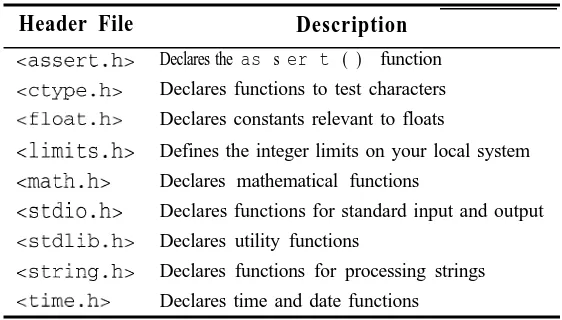
c 1 imi t s . h>, so the following preprocessor directive
#include climits.h>
is needed to read them.
EXAMPLE 1.14 Integer Type Ranges
This program prints the limits to the ranges of the various integer types:
#include <iostream.h> #include <limits.h>
// Prints the constants stored in 1imits.h:
main0
1
tout << "minimum char = ' cc CHAR-MIN CC endl;
tout << "maximum char = ' << CHAR-MAX cc endl;
tout << "minimum short = ' << SHRT-MIN << endl;
tout << "maximum short = ' cc SHRTJAX << endl;
tout << "minimum int = ' cc INT-MIN << endl;
tout << "maximum int = ' << INTJLAX CC endl;
tout << "minimum long = ' cc LONG-MIN << endl;
tout -cc "maximum long = 'I << LONG-MAX << endl;
tout << "minimum signed char = ' cc SCHAR MIN << endl;
-tout << "maximum signed char = ' -cc SCHARJAX << endl;
tout << "maximum unsigned char = ' cc UCHARJAX << endl;
tout << "maximum unsigned short = ' c-c USHRTJAX << endl;
tout << "maximum unsigned = << UINT-MAX << endl;
tout << "maximum unsigned long = ' << ULONGJAX << endl;
This output is from a UNIX workstation. It shows that, on this system, there are really only six distinct integer types:
char short int
unsigned char unsigned short u n s i g n e d
range -128 to 127 (1 byte) range -32,768 to 32,767 (2 bytes)
range -2,147,483,648 to 2,147,483,647 (4 bytes) range 0 to 255 (1 byte)
range 0 to 65,535 (2 bytes)
range 0 to 4,294,967,295 (4 bytes)
You can tell, for example, that short integers occupy 2 bytes (16 bits) on this machine, because the
range 32,768 to 32,767 covers 65,536 = 216 possible values. (Recall that a byte is 8 bits, the standard stor-age unit for characters.)
On a PC running Borland C++, this program produces the same ranges except for int and
unsigned which have
int u n s i g n e d
range -32,768 to 32,767 (2 bytes) range 0 to 65,535 (2 bytes)
1.13 SIMPLE ARITHMETIC OPERATORS
An operator is a symbol that “operates” on one or more expressions, producing a value that can be assigned to a variable. We have already encountered the output operator << and the assignment operator =.
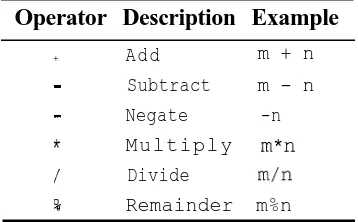
Some of the simplest operators are the operators that do arithmetic: +, -, *, /, and %. These operate on integer types to produce another integer type: m + n produces the sum m plus
n, m - n produces the difference m minus n, -n produces the negation of n, m*n produces
the product m times n, m/n produces the integer quotient when m is divided by n, and m%n
produces the integer remainder when m is divided by n. These six operators are summarized in
Table 1.1 Integer Arithmetic Operators Operator Description Example
+ A d d m + n
- Subtract m - n
- Negate -n
* M u l t i p l y m*n
/ Divide m/n
90 Remainder m%n
EXAMPLE 1.15 Integer Operators
This program illustrates the use of the six arithmetic operators:
#include <iostream.h>
// Tests arithmetic operators: main0
{
int m = 38, n = 5;
tout << m << ' + fl << n << 11 = ' << (m + n) << endl;
tout << m << ' - u << n CC fl = n CC (m - n) << endl;
tout << II - ” cc n << ' = 'I << (-n) << endl;
tout << m << ' * ' << n << ' = ' << (m * n) << endl; tout << m << ' / ' << n << ' = ' << (m / n) << endl; tout << m << ' % ' << n << ' = ' << (m % n) << endl; return 0;
1
38 -I- 5 r 43
38’ - 5 = 3-3 - 5 z -5
38 * 5 = I$0 38 i” 5 = 7
38 % 5 =r 3 i
Note that 3 8 / 5 = 7 a n d 3 8 %5 = 3. These two operations together provide complete information about the ordinary division of 38 by 5: 38 + 5 = 7.6. The resulting integer part is 35+5 = 7, and the frac-tional part is 3+5 = 0.6. The integer quotient 7 and the integer remainder 3 can be recombined with the dividend 38 and the divisor 5 in the following relation: 7 x 5 + 3 = 3 8 .
The integer quotient and remainder operators are more complicated if the integers are not positive. Of course, the divisor should never be zero. But if either m or n is negative, then m/n
and m%n may give different results on different machines. The only requirement is that q*n + r == m
where q = m/n and r = m%n.
For example, -14 divided by 5 is -2.8. For the integer quotient, this could be rounded to -3 or to -2. If your computer rounds the quotient g to -3, then the integer remainder r will be 1.
EXAMPLE 1.16 Division with Negative Integers
This program is used to determine how the computer handles the division of negative integers:
#include ciostream.h>
// Tests quotient and remainder operators: main0
int m = -14, n = 5, q = m/n, r = m%n;
tout << "rn = ' C-C m CC endl;
tout << '92 = u -CC n C-C endl;
tout CC "q = " << q CC endl;
tout CC 'r = ' << r C-C endl;
tout << “q*n + r = ‘1 << ‘1 (” << q << ")*('I << n CC ") + '
<< r << " = ' << q*n + r CC ' = ' -CC m CC endl;
return 0;
m = -14 . .
n’a5 :
q s ‘-2 :
.’
IT = -4 .’
cpn + r .= (-2]“(5) + -4 t= -24 == 44 : ‘.
This shows the same results both from a UNIX workstation using a Motorola 68040 processor and from a DOS PC using an Intel Pentium processor.
1.14 OPERATOR PRECEDENCE AND ASSOCIATIVITY
C++ has a rich repertoire of operators. (Appendix C lists all 55 of them.) Since an expression
may include several operators, it is important to know in what order the evaluations of the
opera-tors occurs. We are already familiar with the precedence of ordinary arithmetic operaopera-tors: the *,
/, and % operators have higher precedence than the + and - operators; i.e., they are evaluated first. For example,
4 2 - 3*5
is evaluated as
42 - (3*5) = 42 - 15 = 27
Moreover, all the arithmetic operators have higher precedence than the assignment and output operators. For example, the statement
n = 42 - 3*5;
will assign the value 27 to n. First the operator * is invoked to evaluate 3 * 5, then the operator - is invoked to evaluate 4 2 - 15, and then the operator = is invoked to assign 2 7 to n.
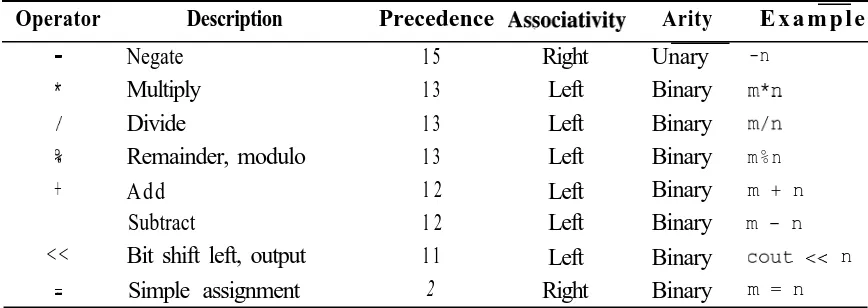
Table 1.2 Some C++ Operators
Operator Description Precedence Associativity Arity E x a m p l e ’
- Negate * / 90 + -< -< = Multiply Divide Remainder, modulo Add Subtract
Bit shift left, output Simple assignment 1 5 1 3 1 3 1 3 1 2 1 2 1 1 2 Right Left Left Left Left Left Left Right Unary Binary Binary Binary Binary Binary Binary Binary -n m*n m/n
m % n
m + n
m - n
tout << n
m = n
It lists 8 operators that apply to integer variables. They fall into five distinct precedence levels. For example, the unary negate operator - has precedence level 15, and the binary multiply operator * has precedence level 13, so negative is evaluated before multiply. Thus the expression m* - n is evaluated as m* ( -n) . Assignment operators have lower precedence than
nearly all other operators, so they are usually performed last.
The column labeled “Associativity” tells what happens when several different operators with the same precedence level appear in the same expression. For example + and - both have precedence level 12 and are left associative, so the operators are evaluated from left to right. For example, in the expression
8 - 5 + 4
first 5 is subtracted from 8, and then 4 is added to that sum:
(8 -5)+4=3+4=7
The column labeled “A&y” lists whether the operator is unary or binary. Chary means that the operator takes only one operand. For example, the post-increment operator + + is unary: n + +
operates on the single variable n. Binary means that the operator takes two operands. For
example, the add operator + is binary: m + n operates on the two variables m and n.
1.15 THE INCREMENT AND DECREMENT OPERATORS
EXAMPLE 1.17 Increment and Decrement Operators
This shows how the increment and decrement operators work:
#include ciost ream.h> // Tests the i n c r e m e n main0
t and decrement operators:
int m = 44, n = 66;
tout CC Nrn = ' CC m
++m;
IIw
tout CC "m = U CC m
I-n ;
tout << flrn = u CC m
return 0;
<<
<<
<<
endl;
endl;
endl;
Both the pre-increment operator + +m and the post-increment operator m+ + have the same effect here: they add 1 to the value of m. Similarly, both the pre-decrement operator - -n and the post-decrement operator n- - have the same effect here: they subtract 1 from the value of n.
When used as a stand-alone expression statement, ++m and m++ are both equivalent to the
assignment
m = m + 1;
they simply increase the value of m by 1. Similarly, the expression statements --n and
n--are both equivalent to the assignment
n = n - 1 ;
they simply decrease the value of n by 1. (The increment operator ++ was used in the name
“C++” because it “increments” the original C programming language; it has everything that C has, and more.)
However, when used as subexpressions (i.e., expressions within expressions), the pre-incre-ment operation ++m is different from the post-increment operation m+ +. The pre-increment
increases the variable first before using it in the larger expression, whereas the post-increment increases the value of the variable only after using the prior value of the variable within the larger expression.
EXAMPLE 1.18 Pre-Increment and Post-Increment Operators
This shows the difference between the pre-increment and the post-increment:
#include <iostream.h>
// Tests the increment and decrement operators: main0
int m = 66, n; n = ++m;
tout <<
n = m++;
tout << tout <<
I’m =
-x m << '1,
m
n =
n =
C-C n C-C endl;
cc n << endl;
m cc endl;
tout -x I'm = '1 C-K ++m << endl;
return 0;
In the first assignment, m is pre-incremented, increasing its value to 67, which is then assigned to n. In the second assignment, m is post-incremented, so 67 is assigned to n and then m is increased to 68.
In the third output statement, m is post-incremented, so the current valueof m (68) is dropped into the output stream and then m is increased to 69. In the last output statement, m is pre-incremented, so m
is increased to 70 firstandthen that value is dropped into the output stream.
Use of the increment and decrement operators as subexpressions can be tricky and should be used with caution. For example, the order of evaluations of expressions that involve them is not defined by the language and consequently can be unpredictable:
EXAMPLE 1.19 The Unpredictablilty of the Order of Evaluation of Subexpressions
#include <iostream.h>
main0
int n = 5, x;
x = ++n * --n;
tout << "n = ' << n <=c ', x = ' C-K x -CC endl;
tout << ++n << u '1 << ++n << 'I ' << ++n << endl;
left. The left associativity of the output operator CC is irrelevant because there are no other operators involved that have the same precedence level.
1.16 COMPOUND ASSIGNMENT EXPRESSIONS
Increment and decrement operators abbreviate certain kinds of assignments. C++ also allows the assignment to be combined with other operators. The general syntax for these combined assignments is
variable op= expression
where OP is a binary operator. The effect of the combined assignment is the same as
variable = variable op expression For example, the combined assignment
n += 8;
has the same effect as the simple assignment
n=n+8;
It simply adds 8 to n.
EXAMPLE 1.20 Assignment Operators
This shows how to use some of the combined oDerators:
#include ciostream.h>
// Tests combined operators: main0
-C
int n = 44;
n +=9;
tout C-C n CC endl;
n II- 5 ;
tout CC n CC endl;
n *= 2;
tout << n CC endl; return 0;
1
53 1
&lj.-~,..s ‘, ‘. _
f-36
,
-The statement n += 9 adds 9 to n, the statement n -=
n *= 2 multiplies n by 2.
1.17 INTEGER OVERFLOW AND UNDERFLOW
5 subtracts 5 from n, and the statement
EXAMPLE 1.21 Testing for Overflow
This program shows what happens when an object of type short overflows:
#include ciostream.h> #include climits.h>
// Tests for overflow for type short: main0
short n = SHRT MAX - 1;
-tout CC n++ CC endl; tout CC n++ CC endl; tout CC n++ CC endl; tout CC n++ CC endl;
return 0;
The values “wrap around” the endpoints of 32,767 and -32,768. In other words, the value that results when 1 is added to 32,767 is -32,768. This is obviously wrong!
Most computers handle overflow this way. The values wrap around, so that the number that comes after the maximum value is the minimum value. This is the worst kind of error that can occur on a computer because normally there is no outside evidence that anything has gone wrong. As we shall see later, C++ fortunately provides mechanisms to help the programmer han-dle this problem.
Overflow is one kind of a run-time error. Another common example is division by zero. But this is not as great a problem because you will know when it happens: the program crashes! Numeric overflow is like an internal hemorrhage: you may not be aware that you are in grave danger.
1.18 THE char TYPE
In C++, the character type char is one of the integer types. This means that any variable of
type char may be used in integer expressions just like any other integer. For example, the
integer arithmetic operators apply to char variables:
char c = 54; char d = 2*c - 7; c += d%3;
The name “char” is short for “character.” The name char is used because when variables of this
type are input or output, they are interpreted as characters. Whenever a character is input, the system automatically stores its ASCII code (see Appendix A) as the value of the integer type
char. And whenever a variable of type char is output, the system automatically sends the
C++ defines three &bit integer types: char, signed char, and unsigned char. Butonly
two of these are distinct. The type char will be either signed char or unsigned char,
depending upon the computer. Use type char for ordinary characters. Use the type unsigned
char for very short bit-string. The type signed char is not explicitly used very often; it
would be a good choice if you needed to store a large quantity of very short integers that would not have to be output by means of the standard output operator <<.
EXAMPLE 1.22 Character Output
This shows how char variables are output:
#include <iostream.h>
// Tests output of type char: main0
char c = 64;
tout << c++ << " "; tout << c++ << " "; tout << c++ << " "; tout << c++ << endl; c = 96;
tout << c++ << " "; tout << c++ << " I'; tout << c++ << " "; tout << c++ << endl; return 0;
// prints Y' and increments c to 65
// prints 'A' and increments c to 66
// prints 'B' and increments c to 67
// prints 'Cl and increments c to 68
// prints "I and increments c to 97
// prints 'a' and increments c to 98
// prints 'b' and increments c to 99
// prints 'c' and increments c to 100
The first output statement inserts the character variable c into the output stream. Since it has the integer value 64, it is output as the character ‘W”. (The ASCII code for the “at” symbol is 64.) Then c is imme-diately incremented to 65 which causes the character “A” to be output next. (The ASCII code for the letter A is 65.) The rest of the program continues in a similar way. (Note that on computers that use the EBCDIC code, the output here will be different.)
The complete ASCII code is shown in Appendix A.
EXAMPLE 1.23 Obtaining the ASCII Code
#include <iostream.h>
// Tests output of type char:
main0
-t
char c = 'A';
tout << c++ << " " << int(c) c< endl; // prints 'A' and 65
tout << c++ << "/ " <C int(c) C< endl; // prints 'B' and 66
tout << c++ << " ' << int(c) << endl; // prints 'C' and 67
As this program executes, c takes the values 65, 66, 67, and 68. But since character variables are printed as characters, the first thing printed on each line is the character whose ASCII code is stored in c . Thus, A, B, and C are printed. We use int ( c ) to print the numeric value of the character c.
The expression int (c) is called a cast. It converts c from char type to int type. This
allows us to print the ASCII code of a character.
Review Questions
1 1.
1.2
Describe the two ways to include comments in a C+-t I program.
What is wrong with the following “comment”:
tout -CC "Hello, /* change? */ World.\n ,” .
1.3 What does a declaration do?
1.4 What is the purpose of the preprocessing directive:
#include <iostream>
1.5 Is this a valid C++ program? Explain:
main0 { 22; }
1.6 Where does the name of the language “C++” come from?
1.7 What’s wrong with these declarations:
int first = 22, last = 99, new = 44, old = 66;
1.8 What’s wrong with these declarations:
int x = y = 22;
1.9 What’s wrong with this program:
main0
n = 22;
1.10 For each of the following expressions, either evaluate it or explain why it is not a valid expression:
a. 37/ (5*2)
6. 37/5/2
c. 37(5/2)
d. 37%(5%2)
e. 37%5%2
$ 3 7 - 5 - 2
g, (37-5)2
1.11 Evaluate each of the following expressions, assuming in each case that m has the value 24
and n has the value 7:
a . m - 8 - n
b.m=n=3
c. m%n
d. m%n++
e. m%++n
f. ++m -
n--g . m += n -= 2
1.12 Determine which of the following is a valid identifier. If it is not valid, tell why:
a. r2d2
b. H20
C. secondCousinOnceRemoved
d. 2ndBirthday
e. the-United_States-of-America
f.
-TIME-g. -12345
h. x(3)
i . cost-in-$
Solved Problems
1.13 What is the output from the following program:
#include <iostream.h> main0
// tout << "Hello, World.\n";
1.14 What is wrong with the following program:
#include <iostream.h>
// This program prints "Hello, World.": main0
{
tout << "Hello, World.\n"
return 0;
The required semicolon is missing from the end of the output statement.
1.15 Write four different C++ statements that each subtract 1 from the integer variable n.
n = n - 1 ;
n - 1 ;
-- -- n; n--;
1.16 Write a single C++ statement that subtracts the sum of x and Y from z and then increments y.
-z - (x + y++);
1.17 Write a single C++ statement that decrements the variable n and then adds it to total.
total += --n;
1.18 In each of the following, assume that m has the value 5 and n has the value 2 before the
statement executes. Tell what the values of m and n will be after the statement executes
the following:
a. m *= n++;
b. m += --n;
a. n will be 3 and m will be 10.
b. n will be 1 and m will be 6.
1.19 Identify and correct the error in each of the following:
a. tout >> count;
b. m = ++n += 2;
a. The output object cou t requires the output operator CC. The statement should be cou t << count ;
b. The expression + +n cannot be on the left side of an assignment.
1.20 Trace the following code fragment, showing the value of each variable each time it changes:
int x, y, z;
X = y = z = 6;
x *= y += z -= 4;
1.21 On most UNIX workstations, the int type ranges from -2,147,483,648 to 2,147,483,647. How many bytes will an object of this type occupy in memory?
The range from -2,147,483,648 to 2,147,483,647 covers 4,294,967,296 values. This number is exactly 232,so each int requires 32 bits which is 4 bytes of memory.
1.22 How do the following two statements differ:
char ch = 'A';
char ch = 65;
Both statements have the same effect: declare ch to be a char and initialize it with the value 65. Since this is the ASCII code for I A I , that character constant can also be used to initialize ch to 65.
1.23 What code could you execute to find the character whose ASCII code is lOO?
char c = 100; tout << c;
1.24 How could you determine
char on your computer?
Run a program like that in
and UCHARJWX:
whether char is the same as signed char or unsigned
Example 1.14 and compare the constants CHAR M A X ,- SCHAR-MAX,
Solved Programming Problems
1.25 Write a program that prints the first sentence of the Gettysburg Address.
Essentially, all that we need to do here is use a sequence of output statements, sending pieces of the sentence to the cou t object:
#include <iostream.h>
// Prints the first sentence of the Gettysburg Address: main0
-t
tout << "\tFourscore and seven years ago our fathers\n"; tout << "brought forth upon this continent a new nation,\n"; tout << "conceived in liberty, and dedicated to the\n"; tout << "proposition that all men are created equal.\n"; return 0;
We could’also have done this by chaining the pieces with a single reference to cou t, like this:
tout CC "\tFourscore and seven years ago our fathers\n" C-K "brought forth upon this continent a new nation,\n" << "conceived in liberty, and dedicated to the\n" << "proposition that all men are created equal.\n";
If you want the output lines to be longer (or shorter) than stream, simply adjust your placement of the endline characters
the individual pieces sent to the 6
\n‘. .
#include <iostream.h>
// Prints the first sentence of the Gettysburg Address: main0
output
tout << "\tFourscore and seven years ago our fathers ";
tout << "brought forth upon\nthis continent a new nation, ";
tout << "conceived in liberty, and dedicated\nto the ";
tout << "proposition that all men are created equal.\n";
return 0;
Don’t forget to put a blank after the last word on each line that doesn’t end with an endline character.
1.26 Write a program that prints the sum, difference, product, quotient, and remainder of two integers. Initialize the integers with the values 60 and 7.
After declaring integers m and n andi nitializing them with the values 60 and 7, we use statement to print their values, and then one output statement for each of the five operations:
one ouput
#include <iostream.h>
// Prints sum, difference, product, and quotient of given integers:
main0
{
int m = 60, n = 7;
tout << "The integers are " -KC m CC ' and ' C-C n << endl;
tout << "Their sum is II
< < (m + n) << endl;
tout << "Their difference is ' << (m - n) C-C endl;
tout << "Their product is II << (m * n) C-C endl;
tout << "Their quotient is ' << (m / n) << endl;
tout << "Their remainder is ' << (m % n) << endl;
return 0;
1.27 Write a program that prints the block letter “B” in a 7 x 6 grid of stars like this:
.*.**-k*
. .
*.:. - : *. 1’ ‘.
‘* ..: .*. ‘: 2
t _ * ik *&C
: _
*k: *
_ .:
*. ‘. .‘I+
***&*. -*
We use one output statement for each row in the block letter:
#include ciostream.h>
// Prints the block letter 'B' in a 7 x 6 grid: main0
1
tout CC '*****' CC endl;
tout cc '* *' CC endl;
tout cc '* *I CC endl;
tout CC "*****' CC endl;
tout cc '* *' CC endl;
tout cc '* *' CC endl;
tout CC '*****' CC endl;
return 0;
Instead of adding the end 1 object endline character ‘\n' like this:
to each output, we could have quoted string with the
tout CC "*****\n';
Supplementary Problems
1.28 Trace the following code fragment, showing the value of each variable each time it changes:
int x, y, z;
x=y=z=5;
x *= y += z -= 1;
1.29 On most systems, the unsigned char type ranges from 0 to 255. How many bytes will
an object of this type occupy in memory?
Supplementary Programming Problems
1.30 Write and run a program that prints your name and address.
1.32 Run the program in Example 1.11 on your system. Use the output to determine what dif-ferent integer types are available and how many bytes each requires.
1.33 Modify the program shown in Example 1.16 to see how your computer handles the integer division of 20 divided by -7. Try to predict what the quotient and remainder will be. Then run your program to see if you were right:
1.34 Write and run a program that prints the first letter of your last name as a block letter in a 7 x 7 grid of stars.
1.35 Write and run a program that prints the first four lines of Shakespeare’s Sonnet 18:
Shall I compare thee to a summer's day?
Thou art more lovely and more temperate.
Rough winds do shake the darling buds of May,
And summer's lease hath all too short a date.
1.36 To find out what your system does about uninitialized variables, write and run a test pro-gram that contains the following two lines:
int n;
tout -CC n C-C endl;
1.37 Write and run a program that causes negative overflow of an variable of type short int.
1.38 Write and run a program that causes overflow of an variable of type int.
1.39 Write and run a program like the one in Example 1.22 that prints the ASCII codes for only the 10 digits and the last 5 lowercase letters. Use Appendix A to check your output.
1.40 Write and run a program like the one in Example 1.22 that prints the ASCII codes for only the 10 uppercase and lowercase vowels. Use Appendix A to check your output.
Answers to Review Questions
1.1
1.2
1 3.
1.4
One way is to use the Standard C style comment:
/* like this */
The other way is to use the C++ style comment:
// like this
The first begins with a slash-star and ends with a star-slash. The second begins with a double-slash and ends at the end of the line.
t
Everything between the double quotes will be printed, including the intended comment.
A declaration tells the compiler the name and type of the variable being declared. It also may be initial-ized in the declaration.
It includes the header file i o s t r earn . h into the source code. This includes declarations needed for input and output; e.g., the output operator <<.