Diving in at the Deep End: The Value of Alternative In-Situ
Approaches for Systematic Library Search
Uta Hinrichs
†Simon Butscher
∗Jens M ¨uller
∗Harald Reiterer
∗†
SACHI Group, University of St Andrews, UK
∗HCI Group, University of Konstanz, Germany
[email protected]
{simon.butscher, jens.mueller, harald.reiterer
}@uni-konstanz.de
ABSTRACT
OPAC interfaces, still the dominant access point to library catalogs, support systematic search but are problematic for open-ended exploration and generally unpopular with vis-itors. As a result, libraries start subscribing to simplified search paradigms as exemplified by web-search systems. This is a problem considering that systematic search is a cru-cial skill in the light of today’s abundance of digital informa-tion. Inspired by novel approaches to facilitating search, we designed CollectionDiver, an installation for supporting sys-tematic search in public libraries. The CollectionDiver com-bines tangible and large display direct-touch interaction with a visual representation of search criteria and filters. We con-ducted an in-situ qualitative study to compare participants’ search approaches on the CollectionDiver with those on the
OPAC interface. Our findings show that while both
sys-tems support a similar search process, the CollectionDiver (1) makes systematic search more accessible, (2) motivates proactive search approaches by (3) adding transparency to the search process, and (4) facilitates shared search experi-ences. We discuss the CollectionDiver’s design concepts to stimulate new ideas toward supporting engaging approaches to systematic search in the library context and beyond.
Author Keywords
search, public library, tangible interfaces, multi-display environment, in-situ study.
ACM Classification Keywords
H.5.m. Information Interfaces and Presentation (e.g. HCI): Miscellaneous
INTRODUCTION
The role of public libraries has changed from a pure provider of information to an institution of lifelong learning which pro-vides access to global information resources and a local learn-ing settlearn-ing for guidance and trainlearn-ing in media literacy [6]. It is often libraries where critical (re)search skills are taught— crucial capabilities in today’s world of ever-increasing infor-mation resources of varying quality.
Today’s public libraries offer access to a vast range of media in physical and digital form. Interfaces to electronic library
Permission to make digital or hard copies of all or part of this work for personal or classroom use is granted without fee provided that copies are not made or distributed for profit or commercial advantage and that copies bear this notice and the full citation on the first page. Copyrights for components of this work owned by others than the author(s) must be honored. Abstracting with credit is permitted. To copy otherwise, or republish, to post on servers or to redistribute to lists, requires prior specific permission and/or a fee. Request permissions [email protected].
CHI ’16, May 07–12, 2016, San Jose, CA, USA ACM 978-1-4503-3362-7/16/05. . . $15.00
DOI:http://dx.doi.org/10.1145/2858036.2858549
catalogs (known as OPACs: Online Public Access Catalogs) can be therefore considered as key mediators between visi-tors’ information needs on one side and physical and digital library resources on the other. Much research has been done to understand search practices in physical and digital infor-mation spaces [1, 13, 25, 30, 36, 37, 38] and how to sup-port these through interface design (e.g., [16, 46]). However, the question of how to impart media literacy through the sup-port ofsystematicandin-situsearch in public libraries is still underexplored. Our research aims to fill this gap by investi-gating alternative approaches to, still typically text- and list-centered, library catalog interfaces (e.g., see Fig. 2) in order to promote systematic in-situ media search at public libraries. While OPAC interfaces provide convenient access to library resources and are commonly used outside and within pub-lic libraries, it is well-known that they are not without diffi-culties. Early studies found that while targeted, known-item searches are well-supported, open-endedsubject searchesare problematic [2, 26, 29, 45]. More recent studies confirm that this still holds true: people still often find OPAC inter-faces difficult to use, in particular compared to canonical web search engines which support more free-form queries [18, 23]. Studying book search strategies in public libraries, Mikkonen and Vakkari found the catalog to be the least popu-lar tactic [30]. This trend is problematic as libraries still host information resources that are not necessarily represented in common search engines [3]. Current trends in OPAC inter-face design go toward search paradigms as exemplified by canonical web-search engines. While this approach accom-modates visitors’ expectations who are typically experienced in using such search engines, it does not mediate systematic information seeking skills, such as the specification and ad-justment of search criteria along different facets.
[image:1.612.358.530.584.712.2]We describe the design and study of an alternative library search system—CollectionDiver—which supports systematic in-situ search comparable to traditional OPAC interfaces
while applying a fundamentally different approach to infor-mation and interaction design (see Fig. 1). Inspired by previ-ous research [21], the CollectionDiver combines large display technology with tangible and direct-touch interaction, and vi-sual with textual elements to make systematic library search accessible and transparent. A qualitative study which com-pared library search activities on the CollectionDiver and on a common OPAC interface revealed that both systems similarly support systematic search processes. However, the Collec-tionDiver (1) makes systematic media searches easier to un-derstand and, therefore, more accessible, (2) promotes active approaches to search by (3) catering for a transparent search process, and (4) facilitates shared search experiences, an im-portant aspect in public libraries that are often visited, for ex-ample, by small families. Our discussion of the design con-cepts manifested in the CollectionDiver stimulates new ideas toward supporting more engaging approaches to systematic search in the library context and beyond.
DESIGNING (LIBRARY) SEARCH INTERFACES
A large body of work has investigated general search behav-iors and processes [1, 13, 25], and, more specifically, search processes in library catalogs (e.g., [4, 10, 18, 23, 27, 42]), public libraries [30, 36, 37, 38], and book stores [7]. When designing our in-situ search system, we followed design-centered models of the search process [40], as well as contem-porary guidelines toward designing search interfaces [16, 46]. Hearst and Wilson, for example, both highlight the need of supporting the fluid adjustment of search criteria, and estab-lishing a close connection between search criteria and the re-sult list [16, 46]. Hearst in particular stresses the importance of visual aesthetics in the design. Focusing on exploratory approaches to search, White and Roth highlight the impor-tance of promoting an understanding of the search process to facilitate the active adjustment of search criteria [43]. To our knowledge, alternative approaches to systematic search of library catalogsin-situare underexplored. The few exceptions to this are (book) search interfaces that have been designed with young audiences in mind [11, 12, 14, 19]. While our work is inspired by approaches which incorporate the use of novel technology such as direct-touch displays [15, 39], RFID sensing [8], tangible tokens [11], or interactive floor systems [14] to promote engagement, we focus on alter-native search systems that support systematic, faceted search. Previous work has discussed alternative solutions to gen-eral search interfaces. Advances in supporting collaborative search, for example, typically incorporate large displays to in-crease awareness of the search processes among group mem-bers and to facilitate shared interactions [21, 31, 32, 33]. Our work does not focus on collaborative search, but we seek to enable and promote shared search experiences through the use of large displays where visitors can casually browse the library catalog with their friends or family.
Interfaces have been built that provide a more visual approach to search which integrates search and result navigation. With
InfoGallery, Grønbæk et al. present the idea of showing
library-related information on large surface displays through-out the library [15]. Kleiner et al. introduced Blended Shelf, a digital book exploration system that borrows its design from
typical physical bookshelves [24]. Thudt et al. introduced the Bohemian Bookshelf, a visualization-based system de-signed for exploratory book search that enables the naviga-tion of a book collecnaviga-tion along several qualitative perspec-tives [39]. Their findings from an in-situ study highlight the importance of providing multiple access points to the collec-tion and enabling playful interaccollec-tions to motivate more elabo-rate exploration [39]. Our approach to systematic search sys-tems for libraries is inspired by this previous work and the design considerations that follow from it.
Other visual approaches have been applied to facilitate an un-derstanding of the search process itself, for example, by visu-alizing Boolean queries [47, 28]. This has been taken a step further, making use of tangible tokens to facilitate the search process in a more hands-on way [21, 41]. However, none of these approaches have been studied in a library context. In our work we expand on the idea of Facet-Streams [21] mak-ing it suitable for use in a public library and studymak-ing how this design approach compares to a common OPAC interface in terms of visitors’ search processes and experiences.
RESEARCH BACKGROUND
Our research was conducted at the main branch of the Public Library Cologne in Germany which, with over 937.000 vis-itors per year, is highly frequented. Across six floors, this main branch offers a large spectrum of topics (e.g., chil-dren’s books, fiction and non-fiction), media types (e.g., books, eBooks, DVDs), and interactive systems (e.g., inter-net workstations, search terminals, and a 3D printer) to sup-port (re)search, learning, and (creative) thinking. Our collab-oration was driven by the library’s motivation to explore dig-ital technology as a means to promote search and exploration activities in a systematic yet engaging way.
Contextual Inquiry
Figure 2. The Online Catalog library search interface.
one or several search terms have to be specified before any media or additional filters are shown. The Quicksearch fea-tures a single text field for specifying queries, while the Ad-vanced Search supports the combination of several search terms through logical AND or OR connections. If a search term has been specified, a result list is shown with related keywords to the left-hand side of the interface which can be applied to further filter the result list (see Fig. 2, right).
Design Goals
From our contextual inquiry and previous findings we derived a list of goals that guided the design of the CollectionDiver.
Support Systematic Media Search through Novel Interaction Prompted by visitors’ limited engagement with the Online Catalog as a library exploration tool, and by the problems of OPAC interfaces previously discussed [2, 26, 29, 45], we envisioned an alternative search system that would make the library catalog moreaccessibleand systematic search a more
engagingendeavor. Inspired by previous work [21, 39], we aimed at exploring tangible interaction mechanisms to spec-ify search requests in order to provide a distinct counterpart to the mouse-and-keyboard interaction paradigm offered by the Online Catalog and to, potentially, allow people to approach their search in more playful ways.
Promoting a Proactive Approach to Search
Our contextual inquiry revealed visitors’ difficulties of com-ing up with adequate search terms and/or of understandcom-ing how the result list (which can be lengthy or empty) is influ-enced by individual search criteria or filters. Our goal was to address this lack oftransparencyin the search process, while, at the same time, making different types of filter mechanisms easily adjustable to enable a proactive search approach.
Bridging Physical and Digital Information Spaces
We can consider an OPAC interface as a mediator between physical and digital information spaces: It is the shelfmark listed in the OPAC interface which connects the digital to the physical information space. Inspired by the idea ofblended interaction [22], we aimed at exploring interaction mecha-nisms to bridge digital media search and shelf browsing.
Facilitating Shared Search Experiences
Search in public libraries is defined by individual and shared explorations (e.g., among family members or as part of con-sultations with library staff). Yet, the canonical OPAC inter-face is mostly designed for single users. Inspired by previous work on collaborative search [21, 31, 32, 33], we aimed at supporting casual shared search experiences in-situ.
COLLECTIONDIVER: DESIGN & FUNCTIONALITY
Guided by these design goals the CollectionDiver expands the idea of “Facet-Streams” [21]. With a public library context in
mind, we simplified some interaction techniques and modi-fied the visualization of the Boolean logic to ensure intuitive use. Physical setup and interactive features were designed for shared rather than collaborative search experiences.
The CollectionDiver (see Fig. 7) is permanently installed at the Public Library Cologne, running on the same back-end as the Online Catalog, that is, it represents the library cat-alog in its entirety. It consists of two direct-touch displays
(1920×1080), controlled by a single PC (I7-4770K, 8GB
Ram, GTX 760, Win 7). The tabletop display (MultiTac-tion MT420S; 42”) uses an optical camera system built into a LCD backlit display to enable limitless multi-touch tracking and marker sensing. This enables the formulation of search queries through tangible tokens. The vertical display (Cit-ron dreaMTouch; 55”) uses an infra-red frame to detect up to 32 simultaneous touches. It allows for browsing and assess-ing search results. Both displays are conceptually and visu-ally linked, as described below.
Horizontal Search Display
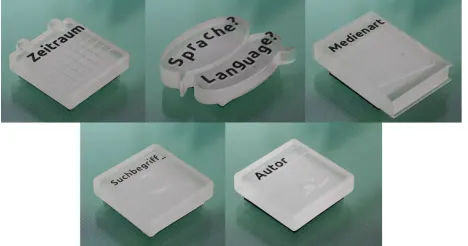
The horizontal display offers five types of physical tokens to assemble a search query. Similarly as in Facet-Streams, each token can be considered as a filter to the library catalog [21]. However, each token type represents particular query param-eters: three tokens are available to specifysearch termsand one token each to specify anauthor,publication yearrange,
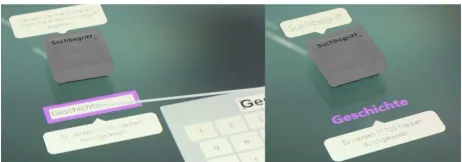
media type(s), or language. The design of physical tokens (custom-built acryl blocks equipped with optical markers) directly reflects on the query parameters they represent and makes them distinguishable from each other (see Fig. 3). To initiate a search, a visitor places a token on the display which brings up additional options to be adjusted via direct-touch. For example, the media token enables filtering the cat-alog for particular media types (e.g., books, DVDs, maga-zines, or eBooks). Several options can be selected simulta-neously (see Fig. 4, left). The year range token can be used to find media published in a particular time span: start and end year can be specified using the arrow buttons (see Fig. 4, right). Placing the search term or author token on the dis-play, evokes a text field and direct-touch keyboard that allows visitors to specify terms or names of interest (see Fig. 5). As soon as a token is placed on the display, a search query is executed and results (if there are any) appear on the vertical display (see Fig. 7). A tool tip is always visible below the to-ken to show the number of media that match the toto-ken’s cri-teria (see Fig. 4, left). If there are no matching media found,
[image:3.612.327.561.579.702.2]Figure 4. Media type token (left), the year range token (right).
Figure 5. The search term token allows the visitor to specify a search term of interest via touch-typing.
this tool tip turns red and a text indicates that the criteria have to be adjusted (see Fig. 4, right). In this way, the influence of each token on the result list is always visible. To highlight the conceptual link between the search and the result display, a stream of digital bubbles floats from the token that was last placed on the table up onto the vertical display.
Placing multiple tokens on the table enables complex media searches (see Fig. 6). The order of placement determines the order in which the different filters are applied to the library catalog. Moving tokens on the table does not change this order. However, lifting a token up and placing it somewhere else, will cause this particular token filter to be executed last. A stream of bubbles indicates the order of filter execution. Placing tokens onto the tabletop surface automatically links them into a logical conjunction; their relative position to each other does not matter. One exception are the search term to-kens, which can be linked by a logical conjunction or dis-junction, depending on their physical proximity to each other. When far apart, the search term tokens form a logical disjunc-tion, visible by their individual bubbles which indicate that each search term is treated as a separate filter in the search query (see Fig. 6, left). Moving the two tokens together changes the shape of the bubble, indicating that a potential connection can be established (see Fig. 6, left). The bubbles will eventually merge as the tokens come close to each other (see Fig. 6, right). With this merge, the corresponding search terms are connected with an ampersand “&” to indicate their logical conjunction. Only a single stream of bubbles emerges from this combination of search terms to further highlight the conjunction (see Fig. 6, right). Spatially separating conjoined search term tokens will break up their conjunction, and they will be linked as a disjunction instead. Any desired number of search terms can be joined or disjoined in this way, given that enough search term tokens are provided.
Vertical Result Display
Query results as specified by the tokens are presented on a vertical display in list form, similarly as in the Online Cata-log (see Fig. 2). Media items are listed by their title, author, and shelfmark, with a cover image (if available) displayed to the left. Visitors can browse the list by sliding their finger
Figure 6. Three filter tokens forming a conjunction of three search terms. The resulting number of items is shown below each token.
up or down the display. A touch-tap on a media item flu-idly expands it into a detailed view which includes the items’ indexed keywords, an enlarged cover image and a floorplan showing its location at the library (see Fig. 7, middle). In con-trast to the Online Catalog, these details are revealed within the context of the result list; no additional information layer opens up (cf. [16, 20]). Visitors can print a slip with all in-formation necessary to find the item at the library using the item’s print button (see Fig. 7, middle & right). Five buttons below the list allow the sorting of results by relevance (se-lected by default), title, author, year, or media type.
The CollectionDiver provides an alternative way of searching the library catalog in-situ. With our approach we aim to (1) support different search approaches, (2) provide a bridge be-tween the digital and physical information spaces inherent in a public library, (3) promote transparency of the search pro-cess, and (4) facilitate shared search experiences by making the system accessible to multiple visitors at the same time. The differences between the design concepts manifested in the Online Catalog and the CollectionDiver are summarized in Table 1. We conducted a semi-controlled study at the pub-lic library to investigate how these differences effect visitors’ search approach, process, and experience.
PUBLIC LIBRARY STUDY
Our study follows a within subject design where recruited participants conducted searches based on given open-ended search tasks using the CollectionDiver and the Online Cat-alog, which runs on terminals throughout the library (see Fig. 2) . Favoring this semi-controlled setup over an in-the-wild study ensured that participants worked on comparable search tasks and provided similar attention to both systems.
Participants
[image:4.612.60.291.63.239.2] [image:4.612.60.291.155.236.2]Figure 7. Participant browsing the result list (left), bringing up details of a media item (middle), and printing an information splip (right).
Online Catalog CollectionDiver
Information Structure Layered/Nested Flat
Search & Results Integrated in one view Visually and physically separated Interaction Design Mouse & keyboard Combination of tangible + direct-touch Display Hardware Small display Large vertical + horizontal display
Presentation of Search Criteria Textual approach Combination of tangible, textual, and visual elements
Table 1. Design concepts of the Online Catalog and the CollectionDiver in comparison.
high-school (4) and university students (4), artists, photogra-phers, social workers, academics, technicians, managers, re-tired, and currently unemployed people. This diversity in age and background is typical for the audience of large public li-braries. Four participants were first-time library visitors and two visit the library everyday. The majority come to the li-brary at least once a week (14 participants) or once a month (four participants). Eight participants visit “occasionally”. Six participants stated to not use the Online Catalog; three of those were first-time users. 12 participants stated to use the Online Catalog both at home and at the library, while eight/six use it from home/at the library exclusively. Only three partic-ipants had noticed the CollectionDiver prior to the study and only one had very briefly tried it once in passing.
Study Setup & Procedure
To mimic a realistic library search scenario as closely as pos-sible, our study took place during the library’s opening hours on the floor where the CollectionDiver is permanently in-stalled. This floor hosts mostly non-fiction text books, study spaces, and terminals featuring the Online Catalog. Partici-pants therefore interacted in a realistic setting alongside other library visitors who looked for books themselves.
Participants filled out a questionnaire about their age, back-ground, frequency of their library visits and use of the On-line Catalog. Participants were then given six search sce-narios from which they chose two. The scesce-narios described open-ended search tasks focusing on a different topic each (Art & Culture, Health & Sport, Travel, Literature, Children’s books, and Technology). For example, the Health & Sport scenario puts participants into the role of someone who has recently acquired an interest in running and is now looking for media about training methods and nutrition advice. Par-ticipants were encouraged to interpret the task based on their own interests and to find suitable media given the scenario, rather than going for quantity. In order to avoid learning ef-fects, each participant/group worked on two different tasks, one using the Online Catalog and another using the Collec-tionDiver. Participants picked the first scenario themselves, before knowing which system they would start with. The
or-der in which participants used the two systems was counter-balanced. Participants received a 2 min. introduction to the search system in focus, regardless of their prior experience with it. They were then given a maximum of 15 min. for their search tasks, but could finish earlier. Group participants worked together on the tasks, sharing each search system. We conducted an interview with participants after each search task, asking them about their general approach, any problems they had encountered using the search system, and their satis-faction regarding the supported search process and the found media. At the end of the study we conducted a final interview, asking participants to characterize the two systems in compar-ison, for example, regarding supported search features, inter-face design and interaction mechanisms, and personal expe-rience. Dyads were also asked to reflect on their shared ap-proaches using both systems. Each participant was compen-sated with 15 Euros for their time.
Data Collection & Analysis
Two researchers were present throughout the study to observe and take written notes of participants’ interactions with the two search systems. All interactions were video recorded us-ing a sus-ingle camera for the Online Catalog and two cameras for the CollectionDiver, to capture interactions with both the tabletop and the vertical display.
[image:5.612.93.524.183.253.2]GENERAL APPROACHES TO MEDIA SEARCH
Previous research has characterized search strategies in dig-ital systems as a combination of querying, assessment, and selection activities [1, 13, 40]. We found our participants’ search workflow on both search systems to be consistent to these previous findings. Although they follow quite differ-ent design concepts (see Table 1), our video and interview analysis revealed that both systems support a similar search approach. Participants spent the same time with their search tasks on either system (both 11:30 min. in avg.; Collection-Diver SD 3:25 min.; Online Catalog SD 3:35 min.), discov-ered comparable amounts of suitable media items within this time (Tiefenrausch: 5 items in avg., SD 2; Online Catalog: 4 items in avg., SD 1.7), and were generally satisfied with the found items. However, participants were less confident with media items found using the CollectionDiver because it does not provide enough details about items’ content.
Search on the Online Catalog
The Online Catalog requires the specification of search terms to initiate a query, so all participants started their media search by entering terms that they identified from the task de-scription into either the “Quicksearch” (in 14 of the 22 study sessions) or “Advanced Search” feature (eight sessions). Par-ticipants then typically scanned the result list, assessing me-dia items first based on their title, author, or cover and then, as part of a more low-level assessment, based on the item’s content summary or table of contents. The latter involved se-lecting individual items from the result list which opened a new detail view. If an item was deemed as suitable to the task description, participants wrote down its shelf signature. The search filters offered on the left-hand side of the inter-face, which allow narrowing the result list based subject head-ings, publication year, or media type, were used in all but two study sessions. This type of filtering was applied in partic-ular in combination with the Quicksearch feature. Four par-ticipants explicitly expressed a preference forgradually nar-rowingtheir results, first using the Quicksearch to get an idea about the character of available items, and then applying the suggested filters. In contrast, eight participants/groups chose the Advanced Search directly to get less but more specific re-sults right away:“I like to directly narrow my search. I don’t want to get 600 books that I have to scroll through.”[g22.A]. Each search task featured a number of different aspects, and participants adjusted their search criteria frequently through-out the task: they experimented with the filters mentioned above and changed their search terms (8.8 term adjustments on avg.; SD 5.24). Six of the 22 participants/groups switched between the Quick- and the Advanced Search feature at least
once. These switches were typically triggered by an
un-satisfyingly long- (switch to Advanced Search) or short re-sult list (switch to Quicksearch). In particular the latter oc-curred frequently—50% of Advanced Searches did not re-turn results (18% of Quicksearches for comparison), leading to frustration: “Via the Advanced Search, nothing came up at all.”[i12]. Participants were often not aware of the dif-ference between indexed keywords (as expected by the Ad-vanced Search) and free-form search terms. Half of them ex-pressed confusion why even common search terms would not
retrieve any results. This may be one of the reasons why 34% of our participants found the Online Catalog“cumbersome”
to use, even though all but three had prior experience with it.
Search on the CollectionDiver
Participants initiated their search on the CollectionDiver typ-ically via the search term token. In two study sessions, how-ever, participants started with the media type and one with the language token before specifying a search term. In contrast to the Online Catalog, the CollectionDiver supports these dif-ferent entry points into searching the library catalog. The me-dia type was used in combination with the search token(s) in 19 of the 22 study sessions; the year was used in nine ses-sions and the language token in in five. The author token was not used, probably because of the search tasks’ character. In 19 study sessions at least two search term tokens were com-bined in conjunction/disjunction depending on the result list; four participants/groups combined three term tokens. In fact, 46% of participants explicitly stated that Boolean AND/OR operations were easier to understand in the CollectionDiver than on the Online Catalog: “I think it is easier to get the AND/OR search. Because [...] you see immediately: you put them together and now I search for both terms. [...] I think it is faster to understand.”[g22.A].
Participants’ frequent manipulation of search criteria on the table (13.9 term adjustments in avg., SD 10.5) was inter-twined with an assessment of the results on the vertical dis-play. Here, participants’ strategies compare to those on the Online Catalog: they scrolled through the result list, visually assessing media based on their title or covers, either directly or via the detail view. One major complaint about this assess-ment process was the lack of additional information about media items (content summary and availability information) which are currently not shown due to structural problems of the library catalog. This information was considered as cru-cial and its absence a reason to not use the system. Further-more, several participants bemoaned the absence of keyword suggestions that the Online Catalog provides in form of filters alongside the result list. All participants found the feature of printing a slip with an item’s details very useful.
en-ter a en-term into a search field does not make much of a dif-ference.”[i17]. Even a participant who felt less enthusiastic about the CollectionDiver stated:“Using the CollectionDiver did not feel worse than the normal search system.”[g6.A]. The fact that the CollectionDiver supports a similar search process than the Online Catalog is remarkable considering its differing and, to participants, initially unfamiliar design concept. Going one step further, our findings suggest that these design concepts, in combination, positively influenced participants’ search experience. 18 participants indicated a clear preference for the CollectionDiver as a search system and stated that they would“definitely”use it as part of future library visits for reasons that we will discuss in detail in the next section: “It is a huge advantage that it does the same thing, but in a quite different way and with a more positive appearance.”[g15.B]. Eight participants generally preferred the search process through the CollectionDiver and would use it at the library, if the usability issues with the touch keyboard get fixed and additional information about media items and their availability are shown. Of the six participants who ex-pressed a clear preference for the Online Catalog some gen-erally prefered using a physical keyboard. Others (frequent users of the Online Catalog) did not see enough benefits in the CollectionDiver search or were thrown off by the fact that it is currently only installed on the third floor of the library.
EXPERIENCED DIFFERENCES BETWEEN THE SYSTEMS
Below we discuss how the different design concepts of the two systems influenced participants’ experience of the search process and their overall preferences.
Design & Aesthetics
Independent of their general preferences, all participants commented on the CollectionDiver’s “visually pleasing”,
“modern looking”, and“inviting”appearance. Three partic-ipants even described the design as visually“calming”, com-menting on the constant movement of bubbles from the hori-zontal to the vertical display:“It is not grey and boring [com-pared to the Online Catalog]. I find the bubble effect very calming.”[i13]. In contrast, the Online Catalog was described as“old fashioned”or even“boring”, and participants com-plained about its visual layout which, as they stated, features a lot of information but in a slightly overwhelming, uninvit-ing way. However, while the CollectionDiver’s visual appear-ance positively impacted participants’ overall impression of the system, our interviews show that visual aesthetics are not the deciding element in visitors’ preferences; effective input mechanism play an important role—a weakness of the current version of the CollectionDiver:“It looks pretty. It is prettier [than the Online Catalog], but if you have to constantly re-type, and it doesn’t work, it becomes unnerving.”[i2].
Tangible Interaction & Playfulness
Participants generally enjoyed interacting with the physical tokens and the direct-touch displays which, as they stated, promotes an approach to search which combines physical ac-tivity, tangibility, and direct manipulation:“You are in it with your whole body. Your are somewhat more physically in-volved.”[i8]. One participant pointed out how much he ap-preciated“this direct handling and touching, directly
commu-nicating with the system.”[g22.B], another commented on the physical movement involved when manipulating the tokens:
“Personally, I find it positive, because I think that movement stimulates the brain.”[i21].
The tangible tokens and the interface design of the Collec-tionDiver were experienced as playful, illustrated in the fol-lowing two statements:“It was fun using the CollectionDiver because of the physical tokens. Because it is a little bit play-ful.”[g1.B] and“This haptic aspect is very appealing. That you can move these cubes around. In that way this is some-how fun.”[g7.A]. This playful aspect was a deciding element for many participants’ preference of the CollectionDiver over the Online Catalog: “It is just more fun with these tokens. If you have a little bit practice, and this goes very fast, it is simply more fun. Much nicer.”[i18]. Some participants even pointed out that there is a motivating element in the playful interaction to further explore the library catalog:“It is in par-ticular the playfulness of the CollectionDiver that motivates me to really search for more.”[g15.B].
Interestingly, however, the playful aspect put off other par-ticipants who described the CollectionDiver as“gimmicky”:
“I just want to find a book. I don’t want to play some games.”[g11.B] and“I find it too gimmicky. I am thinking of the adult visitors. This one is suitable and very good for the children’s section. But I think adults would expect a per-fectly normal direct-touch display.”[g4.A].
Overview & Transparency of the Search Process
While Online Catalog and CollectionDiver provide similar search and filter mechanisms, their presentation of these fea-tures differs. Our findings suggest that the CollectionDiver’s large display and its tangible/visual approach to specifying search criteria provides a better overview of the search pro-cess and makes the influence of applied filters on search re-sults transparent. This, in turn, not only promotes a better understanding of how results are generated but also an active approach to adjusting criteria throughout the search process.
Visibility of Filter Options and Specified Criteria
some-thing new, and you have to specify the term. And in this way, you do not have everything in one view.”[i21].
The visibility of specified search criteria in the Collection-Diver paired with tangible interaction helped participants to fluidly adjust their search criteria without much effort:“Yeah, it is easier to search. Simply the question if you want an OR or AND-connection. It’s much easier, you can just do it and look what comes around.”[g6.A]. In contrast, adjusting search cri-teria in the Online Catalog was experienced as“cumbersome. I do get all the information, but I cannot search for so many aspects at the same time, as here [the CollectionDiver].”[i3]. That being said, the keyword filter options that are targeted toward the specified search term(s) are a strong advantage of the Online Catalog. The CollectionDiver lacks this feature, as stated earlier: “We did not have any suggestions for key-words. That was a little bit disadvantageous.”[g4.B]. Transparency
The CollectionDiver’s tangible and visual representation of filters in one view added transparency to the search process:
“You better understand what the program currently ‘thinks’ that it should do. You can better restructure your search re-quest.[...] In the Online Catalog you enter something and the thing spits out something. You have no indication of how the algorithm actually works.”[g6.A].“You can understand ‘How does it narrow down things?’ For me, that was interest-ing to see.”[i12]. Participants mentioned that even more com-plex search processes, such as conjunctions and disjunctions of search terms, became easy to understand using the Collec-tionDiver. The bubbles that connect the tangible tokens also added to this transparency which promotes a flexible adjust-ment of search criteria, if necessary:“The course of the bub-bles shows you as well how the program connects things; the way of filtering.”[g6.A].“I like that you get things visualized, with these bubbles, how the search is executed, and what you have available. And that you can see this in one view, how to narrow things, and how to type in things and how to remove things [search criteria].”[i13].
Display of Search Results: Large vs. Small Display
While the CollectionDiver’s tabletop display helps to provide an overview of the search process, there were mixed opinions about the presentation of search results on a large vertical play. 22 participants indicated a preference for the large dis-play approach because visual information (e.g., book covers) can be shown on a larger scale, and items in the result list are more readable. “You don’t need glasses.”[g7.B], as a more senior participant pointed out. Another participant explained:
“You can see more details at once.”[g9.A]. However, some participants had quite the opposite opinion:“The problem is, that this display does not provide a good overview. It is much too large and much too close. [...] If I stand half a meter in front of a 1.5 meter display, I can see nothing if I have 200 results there.”[g11.B]. Three participants also criticized the presentation of search options and results on two sepa-rate screens: “This looking back and forth between top and bottom is a bit troublesome.”[g6.A].
With its small display and layered information design, five participants thought that the Online Catalog provides a better overview of search results: “You can see things
bet-ter on a smaller, more constraint area, and you are not distracted, because you can focus on just that particular area.”[i21]. That being said, navigating media items and adjusting search criteria was found to be more problematic:
“It was difficult with the back and forth navigation. This was better here [in the CollectionDiver] because it all stays visi-ble.”[g7.A].
Another concern about the CollectionDiver’s large result dis-play is that of privacy. 30% of our participants mentioned that they were well aware of their search results being visible to other people and stated that they would be cautious of using the CollectionDiver for more sensitive search topics.
Shared Experiences during Search
Analyzing the search strategies of our 10 groups (e.g., choice of search features and sequences) did not reveal major dif-ferences to those of our individual participants, although ad-ditional discussions of search criteria and media selections naturally took place. With the Online Catalog, one group member typically controlled the keyboard and mouse while the other supported the search process verbally. On the Col-lectionDiver we observed more turn taking and equal activ-ity of both group members. This is also reflected in partici-pants’ statements. When asked if they noticed differences in their search process, all but one group felt that, in contrast to the Online Catalog, the CollectionDiver facilitated shared interactions more. The large displays provide an awareness of the partner’s interactions and space for more collaborative search processes where both group members can be actively involved in specifying and modifying search criteria: “You can better see what the partner is doing. [...] I think, you can work together in a better way. [...] Because it is big-ger, you can stand next to each other and everyone can also type a little bit.”[g7.A].“On the computer, one has control of the mouse. On this system [CollectionDiver], you can walk up with two or three people and everyone can do something. The other one is more like ‘I do, and you watch’.”[g20.A]. The shared specification of search criteria can be particularly important if both group members have different ideas about the topic or the search strategy. One group stated that their search approaches at the library differ: one partner likes to specify their search criteria, the other applies a more open-ended approach, narrowing results more gradually. Using the Online Catalog, one partner took control of mouse and key-board and therefore decided how they would approach the search. She explained: “I took over the keyboard and that was it. You don’t tend to say: ‘Now I will type in a word, and then you can type a word again’. There [with the Collection-Diver], you do this really together.”[g22.A]. Another advan-tage of the shared access to search tokens is that visitors can help each other if interaction problems arise: “I mistyped a word a couple of times. I would have deleted the whole word, and re-typed it, because I found it to finicky. But she just touched it [the text field] and deleted the letter that was wrong and corrected it. And that went relatively well.”[g22.B]. These findings indicate that the CollectionDiver facilitates
shared media searches among small groups. However,
separation of search criteria on one display and results on the other can cause interfering interactions between group mem-bers:“It can be easier on the PC [Online Catalog], because there is only one display that you are focusing on. While with the other system [CollectionDiver], if one is looking at the upper display, and the other does something on the lower dis-play [the table], you are not really aware of it.”[g19.B]. For public libraries that are often frequented by families promoting shared search experiences is particularly impor-tant. Our observations and participants’ statements suggests that the CollectionDiver is child-friendly and supports shared searches among small families. When the group with the 4-year-old searched for media items on the CollectionDiver [the parents deliberately chose the children’s book scenario], the young girl was actively involved in the assessment and se-lection process, pointing out media items that she liked and she wanted her parents to print out (see Fig. 1). While her parents were reading out the titles for her, she was able to see the cover images and therefore could participate in the assessment process. In contrast, when her parents searched for child-oriented travel books on the Online Catalog, she showed no interest in participating. While this disinterest may be topic-dependent, the computer terminal, which was difficult for her to see or reach, did not raise her curiosity. She clearly showed more interest in the CollectionDiver’s touch displays and the tangible tokens. Her parents stated that they would definitely continue to use the CollectionDiver when searching for books together with their daughter in the library. While these observations are promising, future studies need to further investigate the suitability of the CollectionDiver for children, including different age groups.
Learning How to Search Systematically
As discussed, participants found the representation of the search process on the CollectionDiver to be more transpar-ent and“accessible”[i17], compared to the Online Catalog. Nine participants explicitly explained that they thought the system would be, potentially, more suitable for children who are just learning to systematically search for books or other media:“I deem it for more suitable for children. It is simply fascinating to see: I put the token here and it goes from 100 down to 20. And then I take it away, and I have all options again. [...] I think if you make that clear on the Collection-Diver, you can also say: ‘And the same happens here in the catalog, you just have to do it like this and like that.’ ”[i17]. Three of our participants (2 adults and one 13-year-old) had no experience with either search system. All three of them thought that both systems require some instructions and prac-tice, but all stated their preference of the CollectionDiver and that they would use it in the future. The girl explained: “I knew what I had to do, but I like this one better. [...] It is more fun the way I can take this [a token] into my hand and place it [on the display].”[g9.B]. We need to further investi-gate this potential of the CollectionDiver to teach novices the principles of systematic search in the future.
Table 2 summarizes the strengths (+) and weaknesses (–) of the Online Catalog and the CollectionDiver. The strengths of one system implicitly point to weaknesses of the other. Addi-tional information about media items, more efficient text
in-Online Catalog
+ Additional information about media items + Efficient input mechanisms
+ Rich filter suggestions CollectionDiver
+ Appealing design & visual aesthetics * Tangible tokens promote playful interactions + Overview of search criterial & process + Flexible adjustment of search + Transparency of search process
* Overview of search results through (split) large displays + Support of shared search experiences
[image:9.612.337.556.61.235.2]* Suitable for children + Ability to print item info – Privacy concerns
Table 2. Listed strengths (+) of the Online Catalog can be considered as weaknesses of the CollectionDiver and vice versa. The (*) marks contro-versial aspects.
put mechanisms, and additional filter suggestions would fur-ther improve the current design of the CollectionDiver. The use of large display technology supports shared search expe-riences well but also evokes privacy concerns. Tangbile inter-action techniques to promote playful interinter-action were deemed as advantageous by all but three participants, which is why we marked it as a controversial aspect (*). Similarly, future re-search has to investigate the impact of (split) large displays to present search results as well as the suitability of the Collec-tionDiver for younger children and families.
DISCUSSION
We set out to explore how an alternative in-situ library search system could be designed to support systematic media search in an accessible and transparent way to promote a proactive approach to search and to facilitate shared search experiences among small visitor groups. In the following we discuss the CollectionDiver’s design concepts (see Table 1) in the light of these goals and the questions this case study raises for the integration of alternative search systems in public libraries. Making Systematic Media Search Accessible
increased some participants’ motivation to explore the library collection, others clearly prefered a more pragmatic approach which is more in line with the design of the Online Catalog.
Promoting Proactive Approaches to Search
Previous work and our contextual inquiry revealed that library visitors, in-situ, do not use traditional OPAC interfaces for ex-tensive searches but quickly branch off to the shelves which promote more pleasurable exploration experiences [30]. In contrast, our findings suggest that the CollectionDiver pro-motes an enthusiastic and proactive approach to systematic in-library search. Again, the flat information structure which facilitates navigating the information space spanned by the li-brary catalog plays a key role here:“The interface is directly manipulable. You don’t have to click around, everything is on one surface.”[g22.B]. Similarly the presentation of search criteria as discussed above helps people to understand how search results are generated which, paired with the playful interaction design, can motivate people to adjust or expand their search:“I definitely found it motivating. [...] ‘Ok, I will look further here, and here, too’. On the Online Catalog, I was rather glad that I could get away to the shelves where I can look at the books.”[g15.B]. However, detail information about selected media is crucial—a feature that the Collection-Diver currently lacks, though it could be easily integrated.
Promoting Transparency of the Search Process
Transparency of the search process is not only important to promote more proactive and in-depth searches; it is also crucial when it comes to teaching people how to search systematically—a key skill to critically engage with today’s vast information sources. Despite of participants’ familiar-ity with the Online Catalog, our findings show that the Col-lectionDiver, through combined visual and textual presenta-tion of filters, better provides an understanding of media fil-tering. This transparency is further supported by a the flat in-formation structure which keeps currently active search cri-teria and filters visible at all times and allows to open de-tails of media items within the wider context of the result list, enabling a lightweight assessment process. We found that it is the visual representation of the search process, rather than the tangible interaction design, that is key when promot-ing transparency. Therefore, other types of interface design, that are, e.g., based on visual, non-tangible representations of search filters and/or using smaller direct-touch displays (see, e.g., [34]) may present alternative solutions. Participants’ ex-perience of the two large displays to present search criteria and results separately were diverse. Some thought this layout led to an improved overview, while some preferred the inte-grated view provided by the Online Catalog. Furthermore, the large displays raised privacy concerns among 34% of partici-pants. Future design iterations should investigate the combi-nation of different display sizes and technology (e.g., capaci-tive displays to improve the text input mechanisms [9]).
Facilitating Shared Experiences
We have shown that the CollectionDiver’s large displays and decentralized interaction design facilitate shared search ex-periences among small groups and, potentially, even among parents and their young children. As suggested by previous work on co-located, collaborative work [35] and search [21,
31, 33], presenting search criteria and filters as well as search results on a large display helps group members to equally par-ticipate and to maintain a general awareness of the search pro-cess. Furthermore, providing interaction techniques that en-able the individual and independent control of search crite-ria and filters facilitates a shared approach to specifying and modifying these, which can, in turn, promote active participa-tion and discussions. The visual presentaparticipa-tion of connecparticipa-tions between search criteria and filters and how these effect the re-sult list leads to transparency which further facilitates shared experiences. However, the impact of using multiple displays for presenting the search process and results remains an area for further research as it can also lead to a lack of awareness and, in turn, interfering interactions among group members. Another question that our case study raises is if the design concepts manifested in the CollectionDiver can facilitate me-dia search among younger audiences. Our observations of one family with a young child indicate the potential of the CollectionDiver to support the active participation of young children in the search process. This is supported by previ-ous studies which suggest a flat information design for child-friendly book search systems [19]. Future studies need to in-vestigate in more detail how small families experience the CollectionDiver, and if/how the system can help teaching children and other novices the concepts of systematic search.
CONCLUSION
With the CollectionDiver we have presented a new approach to supporting systematic, in-situ library search by combin-ing tangible and large display direct-touch interaction with visual representations of filter connections. Our qualitative, comparative study shows that, while the CollectionDiver en-ables a similar search process as a typical OPAC interface, it positively influences participants’ experience and engage-ment. The design concepts, namely a flat information de-sign, playful tangible interaction, the visual, and textual rep-resentation of search criteria, and the large display technology (1) makes systematic search more accessible, (2) motivates proactive approaches by (3) adding transparency to the search process, and (4) facilitates shared experiences. Weaknesses of our current design approach include the lack of detail in-formation about media items, the inefficient direct-touch text entry mechanisms, the lack of filter suggestions, and potential privacy concerns that search on a large display system raises. The playful interaction design and the display layout that sep-arates search criteria and result space came out as controver-sial aspects. Our discussion of the CollectionDiver’s design concepts stimulate new ideas toward supporting engaging ap-proaches to systematic search in the library context and be-yond. Future studies could explore how these concepts apply to other public information spaces such as museums.
ACKNOWLEDGEMENTS
REFERENCES
1. Marcia J. Bates. 1989. The design of browsing and berrypicking techniques for the online search interface.
Online Information Review13, 5 (1989), 407–431.
http://comminfo.rutgers.edu/˜tefko/Courses/ e530/Readings/Bates_Berrypicking.pdf
2. Christine L. Borgman. 1996. Why Are Online Catalogs
StillHard to Use.Journal of American Society for Information Science47, 7 (1996), 493–503.DOI: http://dx.doi.org/10.1002/(SICI)
1097-4571(199607)47:7<493::AID-ASI3>3.3.CO;2-Y
3. Christine L. Borgman. 2003. The invisible library: paradox of the global information infrastructure.Library Trends51, 4 (2003), 652–674.DOI:
http://dx.doi.org/10.1.1.224.6721
4. Christine L. Borgman, Ra G. Hirsh, Virginia A. Walter, and Andrea L. Gallagher. 1995. Children’s searching behavior on browsing and keyword online catalogs: the science library catalog project.Journal of the American Society for Information Science46 (1995), 663–684.
DOI:http://dx.doi.org/10.1002/(SICI)
1097-4571(199510)46:9<663::AID-ASI4>3.0.CO;2-2
5. Richard. E. Boyatzis. 1998.Transforming Qualitative Information: Thematic Analysis and Code Development. Sage Publications.
6. Britt Marie H¨aggstr¨om (editor). 2012.The Role of Libraries in Lifelong Learning. Technical Report. International Federation of Library Associations and
Institutions (IFLA).http://archive.ifla.org/VII/
s8/proj/Lifelong-LearningReport.pdf
7. George Buchanan and Dana Mckay. 2011. In the Bookshop : Examining Popular Search Strategies, In Proceedings of the ACM/IEEE Joint Conference on Digital Libraries (JCDL 2011).Proceedings of the ACM/IEEE Joint Conference on Digital Libraries (JCDL 2011)(2011), 269–278.DOI:
http://dx.doi.org/10.1145/1998076.1998127
8. George Buchanan and Jennifer Pearson. 2010. An Archtecture for Supporting RFID-Enhanced Interactions in Digital Libraries. InProceedings of European Conference on Digital Libraries (ECDL), M. Lalmas et al. (Ed.). 92–103.DOI:
http://dx.doi.org/10.1007/978-3-642-15464-5_11
9. Christian Cherek, Simon Voelker, Jan Thar, Rene Linden, Florian Busch, and Jan Borchers. 2015. PERCs Demo: Persistently Trackable Tangibles on Capacitive Multi-Touch Displays. InProceedings of the 2015 International Conference on Interactive Tabletops & Surfaces (ITS’15). 389–392.DOI:
http://dx.doi.org/10.1145/2817721.2823474
10. Shirley Anne Cousins. 1992. In their own words: an examination of catalogue users’ subject queries.Journal of Information Science18, 5 (1992), 329–341.DOI: http://dx.doi.org/10.1177/016555159201800503
11. Karen Detken, Carlos Martinez, and Andreas Schrader. 2009. The Search Wall: Tangible Information Searching for Children in Public Libraries. InProceedings of the 3rd International Conference on Tangible and
Embedded Interaction (TEI ’09). ACM, New York, NY,
USA, 289–296.DOI:
http://dx.doi.org/10.1145/1517664.1517724
12. Allison Druin. 2005. What Children can Teach Us: Developing Digital Libraries for Young Children.
Library Quarterly75, 1 (2005), 20–41.DOI: http://dx.doi.org/10.1.1.590.5340
13. David Ellis. 1989. A behavioural approach to
information retrieval design.Journal of Documentation
45, 3 (1989), 171–212.DOI:
http://dx.doi.org/10.1108/eb026843
14. Eva Eriksson and Andreas Lykke-Olesen. 2007. StorySurfer: A Playful Book Browsing Installation for Children’s Libraries. InProceedings of the 6th International Conference on Interaction Design and Children (IDC ’07). ACM, New York, NY, USA, 57–64.
DOI:http://dx.doi.org/10.1145/1297277.1297289
15. Kaj Grønbæk, Anne Rohde, and Sidsel Bech-Petersen. 2006. InfoGallery: Interactive Art Services for Physical Library Spaces. InProceedings of Joint Conference on Digital Library (JCDL’06). 21–30.DOI:
http://dx.doi.org/10.1145/1141753.1141757
16. Marti A. Hearst. 2009.Search User Interfaces. Cambridge University Press.
17. Christian Heath, Jon Hindmarsh, and Paul Luff. 2010.
Video in Qualitative Research. Sage.
18. Annika Hinze, Dana McKay, Nicholas Vanderschantz, Claire Timpany, and Sally Jo Cunningham. 2012. Book Selection Behavior in the Physical Library: Implications for Ebook Collections. InProceedings of the 12th ACM/IEEE-CS Joint Conference on Digital Libraries (JCDL ’12). ACM, New York, NY, USA, 305–314.
DOI:http://dx.doi.org/10.1145/2232817.2232874
19. Hillary Browne Hutchinson, Allison Druin, and Benjamin B. Bederson. 2007. Supporting
Elementary-Age Children’s Searching and Browsing: Design and Evaluation Using the International Children’s Digital Library.Journal of the American Society for Information Science and Technology58, 1
(2007), 1618–1630.DOI:
http://dx.doi.org/10.1002/asi.v58:11
20. Hans-Christian Jetter, Jens Gerken, Werner K¨onig, Christian Gr¨un, and Harald Reiterer. 2006. HyperGrid Accessing Complex Information Spaces. InPeople and Computers XIX The Bigger Picture, Tom McEwan, Jan Gulliksen, and David Benyon (Eds.). Springer London,
349–364.DOI:
http://dx.doi.org/10.1007/1-84628-249-7_22
Materializing the Query with Facet-streams: A Hybrid Surface for Collaborative Search on Tabletops. In
Proceedings of the SIGCHI Conference on Human Factors in Computing Systems (CHI ’11). ACM, New
York, NY, USA, 3013–3022.DOI:
http://dx.doi.org/10.1145/1978942.1979390
22. Hans-Christian Jetter, Harald Reiterer, and Florian Geyer. 2014. Blended Interaction: Understanding Natural Human-Computer Interaction in Post-WIMP Interactive Spaces.Personal and Ubiquitous Computing
18, 5 (2014), 1139–1158.DOI:
http://dx.doi.org/10.1007/s00779-013-0725-4
23. Elahe Kani-Zabihi, Gheorghita Ghinea, and Sherry Y. Chen. 2008. User Perceptions of Online Public Library Catalogues.International Journal of Information Management28 (2008), 492–502.DOI:http: //dx.doi.org/10.1016/j.ijinfomgt.2008.01.007
24. Eike Kleiner, Roman R¨adle, and Harald Reiterer. 2013. Blended Shelf: Reality-based Presentation and
Exploration of Library Collections. InCHI EA ’13: CHI ’13 Extended Abstracts on Human Factors in Computing Systems. 577–582.DOI:
http://dx.doi.org/10.1145/2468356.2468458
25. Carol C. Kuhlthau. 1991. Inside the search process: Information seeking from the user’s perspective.Journal of the American Society for Information Science42, 5
(June 1991), 361–371.DOI:
http://dx.doi.org/10.1002/(SICI)
1097-4571(199106)42:5<361::AID-ASI6>3.0.CO;2-#
26. Andrew Lange and Jamshid Beheshti. 1997. OPACs: A
Research Review.LISR19 (1997), 111–133.DOI:
http://dx.doi.org/10.1016/S0740-8188(97)90039-6
27. Eng Pwey Lau and Dion Hoe-Lian Goh. 2006. In search of query patterns: A case study of a university{OPAC}.
Information Processing & Management42, 5 (2006),
1316 – 1329.DOI:
http://dx.doi.org/10.1016/j.ipm.2006.02.003
28. Bongshin Lee, Greg Smith, George G. Robertson, Mary Czerwinski, and Desney S. Tan. 2009. FacetLens: Exposing Trends and Relationships to Support Sensemaking Within Faceted Datasets. InProceedings of the SIGCHI Conference on Human Factors in Computing Systems (CHI ’09). ACM, New York, NY,
USA, 1293–1302.DOI:
http://dx.doi.org/10.1145/1518701.1518896
29. Gary Marchionini. 2006. Exploratory Search: From finding to understanding.Commun. ACM49, 4 (2006),
41–46.DOI:
http://dx.doi.org/10.1145/1121949.1121979
30. Anna Mikkonen and Pertti Vakkari. 2012. Readers’ Search Strategies for Accessing Books in Public Libraries. InProceedings of the 4th Information Interaction in Context Symposium (IIIX’12). 214–223.
DOI:http://dx.doi.org/10.1145/2362724.2362760
31. Meredith Ringel Morris, Andreas Paepcke, and Terry Winograd. 2006. TeamSearch: Comparing Techniques for Co-Present Collaborative Search of Digital Media. In
Proceedings of the First IEEE International Workshop on Horizontal Interactive Human-Computer Systems (TABLETOP ’06). IEEE Computer Society, Washington,
DC, USA, 97–104.DOI:
http://dx.doi.org/10.1109/TABLETOP.2006.32
32. Roman R¨adle, Hans-Christian Jetter, and Harald Reiterer. 2013.Distributed User Interfaces: Usablity and Collaboration. Springer London, Chapter TwisterSearch: A Distributed User Interface for
Collaborative Web Search, 53–67.DOI:
http://dx.doi.org/10.1007/978-1-4471-5499-0_5
33. Roman R¨adle, Andreas Weiler, Stephan Huber, Hans-Christian Jetter, Svetlana Mansmann, Harald Reiterer, and Marc H. Scholl. 2012. eBook meets Tabletop: Using Collaborative Visualization for Search and Serendipity in On-line Book Repositories. InProc. of BooksOnline’12.DOI:
http://dx.doi.org/10.1145/2390116.2390120
34. Jeffrey M. Rzeszotarski and Aniket Kittur. 2014. Kinetica: Naturalistic Multi-touch Data Visualization. In
Proceedings of the 32Nd Annual ACM Conference on Human Factors in Computing Systems (CHI ’14). ACM,
New York, NY, USA, 897–906.DOI:
http://dx.doi.org/10.1145/2556288.2557231
35. Stacey D. Scott, Karen D. Grant, and Regan L. Mandryk. 2003. System Guidelines for Co-located, Collaborative Work on a Tabletop Display. In
Proceedings of the Eighth Conference on European Conference on Computer Supported Cooperative Work (ECSCW’03). Kluwer Academic Publishers, Norwell,
MA, USA, 159–178.http:
//dl.acm.org/citation.cfm?id=1241889.1241898
36. Catherine Sheldrick Ross. 1999. Finding without seeking: the information encounter in the context of reading for pleasure.Information Processing & Management35, 6 (Nov. 1999), 783–799.DOI: http://dx.doi.org/10.1016/S0306-4573(99)00026-6
37. Catherine Sheldrick Ross. 2000. Making Choices: What Readers Say About Choosing Books to Read for Pleasure.The Acquisitions Librarian13, 25 (2000),
5–21.DOI:
http://dx.doi.org/10.1300/J101v13n25_02
38. David Spiller. 1980. The provision of fiction for public libraries.Journal of Librarianship and Information Science12, 4 (1980), 238–266.DOI:
http://dx.doi.org/10.1177/096100068001200404
39. Alice Thudt, Uta Hinrichs, and Sheelagh Carpendale. 2012. The Bohemian Bookshelf: Supporting
Serendipitous Discoveries through Information
1461–1470.DOI:
http://dx.doi.org/10.1145/2207676.2208607
40. Alice Thudt, Uta Hinrichs, and Sheelagh Carpendale. 2015. A Modular Approach to Promote Creativity and Inspiration in Search. InProceedings of the 2015 ACM SIGCHI Conference on Creativity and Cognition.
245–254.DOI:
http://dx.doi.org/10.1145/2757226.2757253
41. Brygg Ullmer, Hiroshi Ishii, and Robert J. K. Jacob. 2003. Tangible Query Interfaces: Physically Constrained Tokens for Manipulating Database Queries. In
Proceedings of Interact03. 279–286.DOI: http://dx.doi.org/10.1.1.13.1780
42. Patricia M. Wallace. 1993. How Do Patrons Search the Online Catalog When No One’s Looking? Transaction Log Analysis and Implications for Bibliographic Instruction and System Design.RQ33, 2 (1993), pp.
239–252.http://www.jstor.org/stable/20862411
43. Ryen W. White and Resa A. Roth. 2009. Exploratory Search: Beyond the Query-Response Paradigm.
Synthesis Lectures on Information Concepts, Retrieval, and Services1, 1 (Jan. 2009), 1–98.DOI:http: //dx.doi.org/10.2200/S00174ED1V01Y200901ICR003
44. Mitchell Whitelaw. 2015. Towards Generous Interfaces for Archival Collections.Digital Humanties Quarterly
9, 1 (2015).http://www.digitalhumanities.org/dhq/
vol/9/1/000205/000205.html
45. Barbara M. Wildemuth and Ann L. O’Neill. 1995. The “Known” in Known-Item Searches: Empirical Support for User-Centered Design.College & Research Libraries56 (1995), 265–281.DOI:
http://dx.doi.org/10.5860/crl_56_03_265
46. Max L. Wilson. 2011.Search-User Interface Design. Morgan & Claypool Publishers.DOI:
http://dx.doi.org/10.1.1.29.2605
47. Degi Young and Ben Shneiderman. 1993. A Graphical Filter/Flow Representation of Boolean Queries: A Prototype Implementation and Evaluation.Journal of the American Society for Information Science44 (1993),