Tool
Daniel Rough SACHI Research Group School of Computer Science
University of St Andrews [email protected]
Aaron Quigley SACHI Research Group School of Computer Science
University of St Andrews [email protected]
Ubiquitous mobile technology affords clinicians new opportunities to enhance personalised, patient-centric care remotely, easing the burden on both patient and clinician. The Experience Sampling Method (ESM) involves the repeated assessment of patients on their symptoms or behaviours, and their external contexts, as they go about their everyday lives, enhancing ecological validity and minimising recall bias. While previously conducted with paper diaries, ESM smartphone applications are now being employed, that have a range of benefits over paper-based methods including the ability to scale to many more patients. However, development of such applications is time-consuming and requires considerable programming knowledge. This has prompted the development of ESM creation tools that alleviate a researcher from the burden of programming an ESM application from scratch. This paper presents our work on Jeeves, a visual environment for creating secure ESM Android applications, and a usability evaluation we conducted with health psychology students.
Experience Sampling Method, mHealth, End-User Development, Visual Programming
1. INTRODUCTION
The Experience Sampling Method (ESM), also known as Ecological Momentary Assessment (EMA), or Ambula-tory Assessment, describes a means of allowing clinicians to collect data from patients in their natural settings, as they go about their everyday lives. This has a number of benefits over traditional retrospective self-report, in particular:
• A high degree of ecological validity is retained by assessing patients in their natural settings. ESM aims to eliminate the possibility of response bias caused by an unfamiliar setting, or talking face-to-face with a clinician.
• ESM mitigates “recall bias” - patients are asked about their behaviours or contexts as they are experiencing them, reducing the need to rely on memory.
• The repeated assessment of patients over a period of time allows for within-patient changes to be observed, including how time and context influence variables of interest.
ESM and EMA evolved as separate methodologies in the fields of psychology and medicine respectively, however the terms are now considered to be largely synonymous. For the purposes of this paper, we use ‘ESM’ to refer to
both. ESM has emerged as an important research method, with a number of studies and systematic reviews that detail its advantages and applications, for example Shiffman et al. (2008) list a range of relevant material, as well as the variety of domains in which ESM has been applied. Systematic literature reviews have also been conducted that validate the accuracy of real-time data collection over retrospective self-report methods [Ebner-Priemer and Trull (2009)]. Further, a search on Google Scholar for “ecological momentary assessment” OR “experience sampling method” returns 4,760 results from the past two years alone, demonstrating the prevalence of ESM in research literature.
Traditionally, ESM studies had patients complete paper diaries at particular times of day, or when particular events occurred. Patients were sometimes provided with an electronic signalling device that would prompt them to complete a diary entry [Csikszentmihalyi and Larson (1987)]. Today, widespread adoption of sophisticated mobile technology has made ESM applications or ‘apps’ feasible. These apps enable more complex signalling schedules to be implemented, as well as computerised surveys that can collect and upload answers to a centralised server for real-time analysis.
Jeeves - An Experience Sampling Study Creation Tool Rough•Quigley
Researchers in different fields may not have the expertise nor the incentive to program an ESM app from scratch. Instead, they often rely on existing ESM study Creation Tools (which we refer to as ESMCTs). A number of free and proprietary options are available, but our review of the literature highlights that there is a marked lack of usability evaluation of these ESMCTs. Indeed, from publications describing such tools it is often difficult to determine the process through which a clinician can create an ESM study application.
It is our view that the usability of a creation tool is of primary importance for adoption by non-programmers. We present our ongoing iterative design and evaluation process of ‘Jeeves’ (Java End-User Environment for Visual Experience Sampling). Jeeves is a ‘visual programming environment’ ESMCT that enables clinicians to design, deploy and monitor their own smartphone-based ESM studies. We describe the various components of Jeeves that have been influenced by our review of ESM literature in medicine and psychology, and an evaluation we conducted of its usability.
2. RELATED WORK
In this section, we discuss examples of how smartphones have been effectively used in ESM studies, and a short summary of previous and current ESMCTs.
2.1. Smartphone ESM
Smartphone technology provides a host of benefits over traditional paper-based ESM methods. Using patients’ own smartphones as a platform reduces the burden imposed by carrying paper diaries or a bulky signalling device. Social acceptability of smartphones can also mitigate potential embarrassment of completing a survey in a public place [Trull and Ebner-Priemer (2013)].
Smartphones now include a host of sensors that can track GPS location, WiFi networks, movement, and noise levels, to name but a few. Data from these sensors can be used to augment subjective self-report with additional contextual information, or be used to trigger a self-report survey request based on a specific context. This context-contigent strategy is described in the literature as ‘Context Aware Experience Sampling’, and can enhance both the quality and quantity of patient responses [ Intille et al. (2003)]. As an example, Wang et al. (2014) used their ‘StudentLife’ app to automatically sense and classify a variety of sensor data, showing significant correlations between classified data and student self-report of stress. Using the GPS capabilities of smartphones in conjunction with ESM self-report data can reveal how behaviours correlate with particular locations, as proposed by Freisthler et al. (2014). Additionally, Poppinga et al. (2014) show how surveys can be triggered based on analysis of sensor data, maximising the probability of
capturing useful data without burdening the patient with excessive prompting.
As well as their scope to enhance compliance, ESM apps can also enhance the validity of self-report data, by limiting the time of survey availability following its notification. Paper-based diary compliance can be easily faked, as was effectively demonstrated by Stone et al. (2003), thus smartphone-based ESM data validity is less dependent on the honesty of the patient. Of course, data validity is also dependent on the patient’s honest responses to survey questions.
In addition to subjective assessment, mobile technology also allows ‘just-in-time’ intervention strategies to be delivered to patients, described as ‘ecological momentary interventions (EMIs)’ by Heron and Smyth (2010). EMIs can deliver supportive resources and coping strategies to patients at specific times or other relevant contexts, to maximise their utility. Mobile devices have also been successfully used like this in the administration and monitoring of treatment [Trull and Ebner-Priemer (2013)].
2.2. Other ESMCTs
A detailed survey of ESMCTs is part of our ongoing work. Here we briefly discuss some exemplar tools, and their limitations from the perspective of a clinician.
ESP (Experience Sampling Platform) was the first ESMCT to be developed for researchers with no programming experience [Barrett and Barrett (2001)]. Study configurations were downloaded onto Pocket PCs, which were distributed to study participants, and returned to the researcher at the end of the study for data collection and analysis. The hardware itself brought many issues that have been resolved by modern smartphones, but this work laid the foundations for further research on the authoring of ESM apps.
MyExperience is one of the first examples of a system that allowed researchers to configure context-aware experience sampling studies [Froehlich et al. (2007)]. Various types of sensor data could be captured, and used to trigger surveys. However, configuration required manual editing of XML files, which increases the probability of syntactical errors. Moreover, with both these ESMCTs, checking participant compliance was not possible until devices were returned at the end of a study.
Today, commercial systems such as SurveySignal1,
MoviSensXS2 and mEMA3 are available to clinicians conducting ESM studies. However, their high price makes them impractical for many clinicians, particularly those collecting data from small numbers of patients. Despite
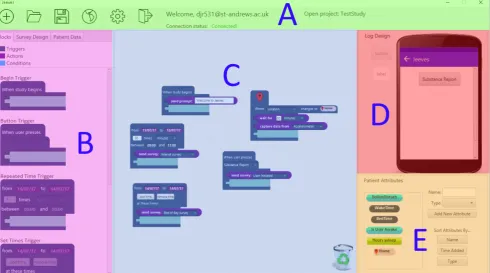
Figure 1:Screenshot of the Jeeves desktop application
the expense, they also lack features of contextual sampling and patient personalisation that could be beneficial for maintaining compliance and capturing useful data.
In summary, the background literature shows the utility of smartphone-based experience sampling, and how an appropriately designed ESMCT could provide a solution to the problem of ESM software development for clinicians and researchers. Our survey of existing tools, including those described here, suggests that they lack necessary features, and furthermore lack evaluation of their particular configuration approaches. We propose that systems providing high functionality in turn sacrifice usability, and those that promote ease-of-use are inflexible in the configuration possibilities that they allow. Furthermore, new ESMCTs should aim for a low barrier to entry, as well as a ‘high ceiling’ of what can be accomplished.
3. DESIGN OF JEEVES
To overcome the limitations of existing work, we have developed ‘Jeeves’ (Java End-user Environment for Visual Experience Sampling). Jeeves allows clinicians to create ESM study configurations, which are then downloaded and run on patients’ smartphones. Jeeves supports clinicians to configure sampling schedules, create surveys and basic user interface elements, and also monitor and respond to patient compliance in real-time. In particular, Jeeves has the following advantages over existing tools in both research and commercial domains:
• an intuitive means to trigger surveys, notifications and other actions based on classification of smartphone sensor data.
• a means to configure ‘combination’ triggers that can have multiple different conditions.
• a means to automatically tailor a study app to an individual.
• a user-friendly ‘visual programming’ paradigm, modelling triggers, conditions, patient attributes and actions as visual blocks, which has been empirically evaluated with non-programmers.
Our first prototype of the Jeeves desktop application and a preliminary usability study are described in our previous work [Rough and Quigley (2015)], which validated the feasibility of a visual programming environment for configuring ESM studies. Following feedback from this study, and a review of recent ESM literature, we derived further requirements for Jeeves. A description of each part of the application and its justification is given in this section. Given the space constraints, we have limited the description of Jeeves to an overview of its fundamental components. For a more comprehensive overview, a video tutorial is available online4, as well as the current application source code5.
Jeeves - An Experience Sampling Study Creation Tool Rough•Quigley
3.1. Block-based configuration
The study configuration pane (Figure 1, Section C) acts as a ‘canvas’ on which clinicians can drag, drop and rearrange the components in the block library (Section B). This is where the main logic of the study is defined. In our survey of existing ESMCTs, we found that an HTML form or text-based interface either limited configuration to simple study protocols, or limited the usability of the interface itself. Similar to MovisensXS, we use a ‘visual programming’ approach, allowing clinicians to configure studies by dragging and dropping graphical components. Unlike the flowchart-based representation of MovisensXS, we adopt a jigsaw puzzle, block-based approach, employed in popular environments such as Scratch [Maloney et al. (2010)]. Empirical evaluations of block-based languages have shown their successful application to teaching programming, demonstrating their ability to act well as introductory tools, while also allowing sophisticated applications to be created.
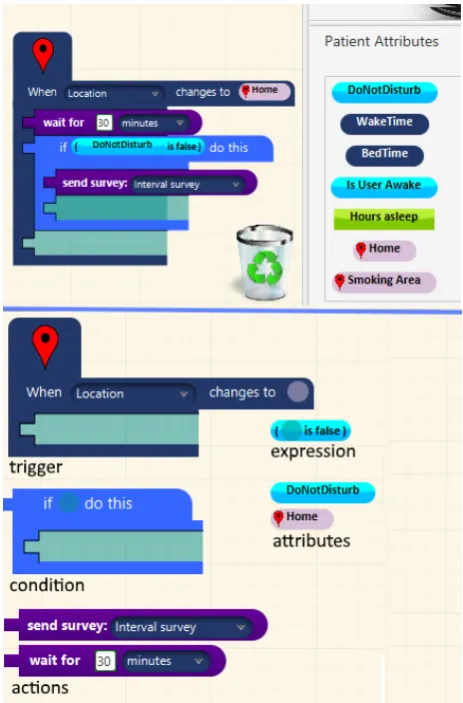
Examples of each block are shown in the lower part of Figure 2, and a brief description of each follows.
3.1.1. Triggers
Our events are represented by Trigger blocks, the design of which we derived from the three primary types of ESM sampling strategy [Wheeler and Reis (1991)].
• Interval-contingent sampling prompts patients at regular intervals, such as every 3 hours or at the end of each day.
• Signal-contingent sampling prompts patients at random times throughout the day. Often these prompts are spaced by a minimum duration to minimise excessive prompting.
• Event-contingent sampling has patients self-report when particular events occur. Smartphone technol-ogy can now enable certain events to be automati-cally detected.
Our selection of Trigger blocks allow these three strategies to be employed. Triggers execute functions when their constraints are met. For example, in Figure 2, the Trigger ‘fires’ when the Location sensor detects the patient is in their ‘Home’ location. As well as events contingent on time, we consider patient-initiated events and externally sensed events. We provide a ‘Button Trigger’ allowing actions to be performed when the patient presses an on-screen button, and a ‘Sensor Trigger’ that performs actions based on sensor data classification.
3.1.2. Actions
[image:4.595.313.545.63.415.2]Action blocks nest inside Trigger blocks, and are used to visually represent functions that the app should perform when its Trigger constraints are met. There are blocks to send surveys, or prompts can also be sent for providing information, resources, compliance encouragement or
Figure 2: Attributes used to individualise a trigger (top). Decomposed blocks labelled with their type (bottom)
intervention messages. This provisionally allows Jeeves to be used for a variety of purposes beyond ESM, including aforementioned EMIs. ‘Capture Data’ Action blocks can be used to log additional context with a patient’s completed survey results.
3.1.3. Conditions
In combination with Triggers, Condition blocks specify additional constraints under which to execute an action. A Condition block’s constraints are represented by an Expression block. Rather than a discrete event, the Expression block represents an ongoing state, and evaluates to true or false to determine whether the Actions nested within the Condition are executed. For example, the ‘send survey’ Action in Figure 2 only executes if, when the Trigger fires, the Condition’s constraint expression is true. Expressions are composed of Boolean operators, as well as Patient Attribute blocks, which are explained in Section 3.2 below.
3.2. Attribute Creation Pane
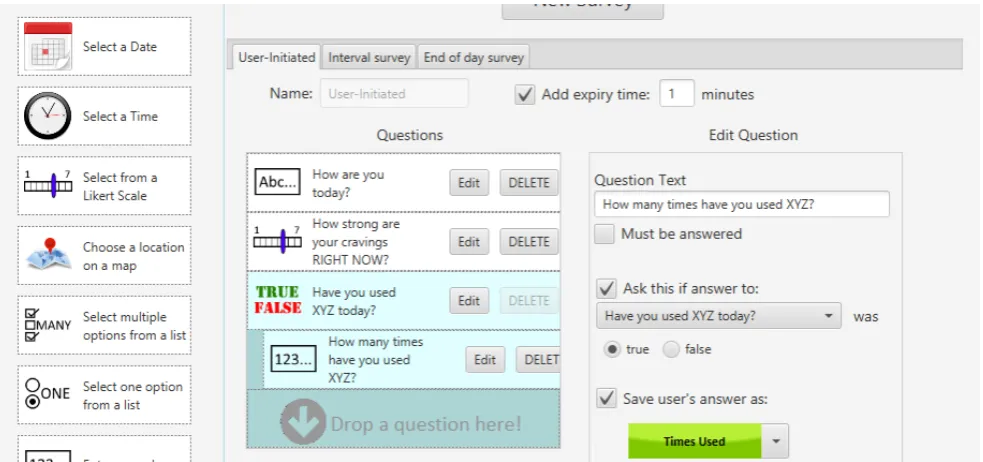
Figure 3:An example survey configured in the Survey Creation Pane
patient’s waking hours, for example. Indeed, with previ-ous ESMCTs, personal schedules were programmed sep-arately for each patient - a tedious process and inflexible if the patient wishes to change their schedule. Another use case for storing personal information could be to detect a ‘semantic context’, such as a patient’s home address, rather than just a change in GPS location. Since this information is specific to each patient, such attributes need to be represented in the interface.
The ‘Attribute Creation’ pane (Figure 1,Section E) is a novel feature of Jeeves that can be used to specify personal attributes of a patient, in order to tailor an application to them. Attributes specific to a patient can be primitive types such as numbers and true/false values. In addition, attributes can also be times, dates, locations, WiFi networks, and Bluetooth devices, which can then be used to personalise study configurations. For example, in Figure 2, a Trigger is fired based on a patient’s Home location. This is further personalised based on whether the patient’s ‘Do Not Disturb’ attribute is true or false.
3.3. Survey Creation Pane
[image:5.595.314.546.336.484.2]Separate from the block-based configuration, but still an integral part of Jeeves, is the Survey Creation Pane, shown in Figure 3. Other ESMCTs have clinicians create surveys with text or XML files, which is prone to syntactical errors. From our review of existing ‘state of the art’ ESMCTs, as well as online tools for survey creation such as SurveyMonkey and Qualtrics, we designed a drag-and-drop user interface for creating new surveys. Different question types can be customised with a simple form. Our current implementation supports conditional branching on previous answers, and the ability to store a patient’s
Figure 4:Buttons on the Log Design pane with corresponding Triggers
question response as the value of an ‘Attribute’ for further customisation.
3.4. Log Design Pane
Although Jeeves supports automatic triggering based on sensed events, patients should also be able to log events of interest themselves. We implemented a ‘Log Design’ pane (Figure 1, Section D) that enables the clinician to customise buttons and labels that appear on the patient’s app home screen, then use Triggers and Actions to define the behaviour of these buttons. Clinicians can configure various actions to be taken on a button press. For example, surveys can be sent, or passive data can be captured (see Figure 4 for an example).
3.5. Patient Monitoring Pane
Jeeves - An Experience Sampling Study Creation Tool Rough•Quigley
Figure 5:A section of patient information provided by Jeeves
sampling. The Patient Monitoring pane provides details on compliance of each individual patient, as well as particular surveys, and allows collected survey data to be downloaded for either. The pane also provides a means of two-way communication with a patient, in order to facilitate problem resolution and compliance motivation. A section of this pane is shown in Figure 5.
4. IMPLEMENTATION 4.1. Clinician client
The Jeeves desktop application runs on any machine with the latest version of Java. It is a native application, which has afforded customisation opportunities beyond that available with a web app, as well as simple offline functionality (although an Internet connection must be available to upload to the server).
4.2. Patient client
The patient client is a native Android app that downloads a study configuration from the server and runs it locally. Survey responses and patient feedback are uploaded whenever a suitable Internet connection is available. While web apps provide interoperability between different operating systems, a native app provides access to all native features of the device, increasing the flexibility of data capture and triggering possibilities.
Implementing a native Android app has also allowed us to utilise the EmotionSense framework - a set of open source libraries for sensor data capture, classification, and trigger scheduling [Lathia et al. (2013)].
4.3. Firebase server
Firebase6 is a platform for developing mobile apps, with a real-time database that allows data to be synchronised across multiple devices on different platforms. Study configurations and patient data are stored in a secure online database, and transferred between clinician and
[image:6.595.315.542.66.301.2]6https://firebase.google.com/
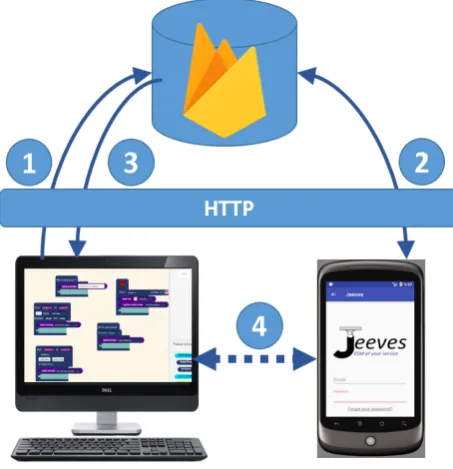
Figure 6:Overview of Jeeves architecture
patient clients using secure HTTP. Additionally, data can be made available while offline.
The basic steps of study deployment are illustrated in Figure 6.
1. Clinician designs study and uploads configuration to Firebase.
2. Patient selects study from list of available studies, which downloads study configuration onto phone.
3. Patient information is sent to the clinician’s application.
4. New data is now synchronised between patient and clinician clients in real-time.
This architecture has a number of advantages. Firstly, the clinician and patient have a two-way communication mechanism that allows issues on either side to be resolved. Also, the Android client automatically receives updates to the study configuration in real-time, so patients do not have to return to a clinic to have their software updated if issues arise. Finally, patient compliance can be monitored remotely.
5. EVALUATION
Jeeves, and showed no significant difference in task time or error rate between the two groups, and validated the feasibility of a block-based language.
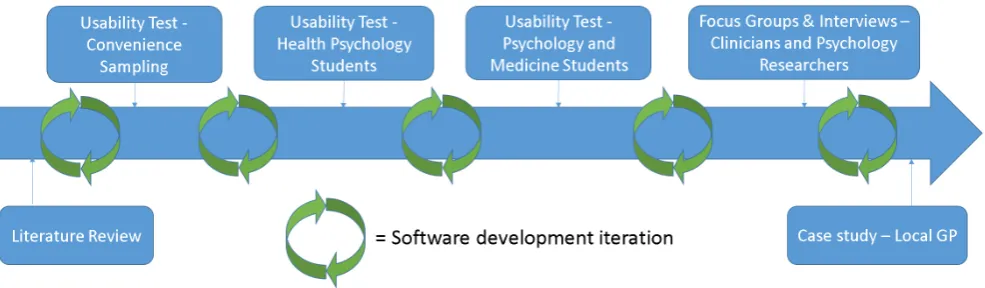
Feedback from this study informed our second implemen-tation iteration of Jeeves. To confirm that previous design issues had been corrected, and to highlight possible undis-covered issues, we ran a workshop with local Master’s students. The methodology and results of our evaluation are described in this section, with implications for further research.
5.1. Participants
Participants in this workshop were six Masters students in the School of Medicine at the University of St Andrews, taking a Health Psychology module. Four participants had no prior programming experience, and two had limited experience. Unlike the participants in the previous study, we reasoned that these students had an active interest in monitoring patient behaviour, making them potential users of Jeeves.
5.2. Workshop structure
Participants completed a questionnaire on their computer usage and programming experience, as well as demo-graphic information such as gender and spoken languages. Following this, they received a presentation that described both ESM and Jeeves in more detail, then started the main part of the workshop, which was a task-based study.
5.2.1. Task 1 - Walkthrough
The first task provided participants with real-world usage context, by guiding them through the creation of a basic Jeeves ESM application. As participants in our previous study struggled with static, paper-based instructions, webpages with GIF animations were used to demonstrate instructions. These pages are available online7.
5.2.2. Task 2 - Study replication
In this task, five publications that described ESM studies, taken from medicine and psychology journals, were provided to the participants. The task asked them to create a Jeeves configuration from the study description in each publication.
5.2.3. Task 3 - Interface comparison
In this task, participants use the MovisensXS online application referenced in our Related Work section. Participants were asked to configure the study described in the first publication of the five examples given in the previous exercise, using MovisensXS.
The purpose of this task was not to make an empirical comparison between Jeeves and MovisensXS, but simply to get insight into the intuitiveness of the flowchart construction technique. Considerable additional work
7http://sachi.cs.st-andrews.ac.uk/walkthrough-part-1/
would have been required in order to make a formal comparison, including a balanced introduction to both applications, and measures to minimise learning effects.
5.2.4. Task 4 - Freeform design task
Participants were asked, based on their acquired knowledge of ESM and experience with Jeeves, to design and implement a study of their own conception from scratch. The purpose of this exercise was to assess the participants’ understanding of Jeeves as a tool for real-world research and clinical practice. If they could conceive and implement their own idea for an ESM study given their limited experience, this would be a promising result for Jeeves.
Finally, an end-of-workshop questionnaire was completed online by the participants, including the System Usability Scale [Brooke (1996)], as well as more targeted questions on specific environment features, and space for open comments and feedback.
5.3. Results
The results of the workshop are based both on the questionnaire responses from participants, as well as direct observation of their progress with the tasks.
5.3.1. Quantitative results
We acknowledge that, with only six participants, our quantitative results lack statistical power. With this in mind, we do not aim to assess whether these results were statistically significant, only to gather a holistic impression of Jeeves’s usability. It was also noted that one of the participants in the study was a significant outlier. English was his third language and it was clear from discussion with him, and observation of his progress and results, that he struggled with the basic reading and writing skills that were required. His struggle highlights that although Jeeves is a visual language, its ‘learnability’ relies on the user having adequate verbal skills.
The average System Usability Scale score for the participants was 75.7, a notable increase from that of 67.2 reported by non-programming participants in the previous study. Indeed, removing the aforementioned outlier, the average SUS score was 82.3, suggesting that the more prevalent usability issues highlighted in the previous study had been accounted for. Average Likert scale scores for each of the 10 questions are shown in Figure 7.
As previously stated, we included targeted questions on specific interface elements that we wished to assess. These questions, and participants’ Likert scale score are listed below:
• I found the Jeeves survey creation pane easy to understand(3.83/5.00)
• I dislike the appearance of the visual components
Jeeves - An Experience Sampling Study Creation Tool Rough•Quigley
• I think the block-based layout is intuitive
(3.83/5.00)
• I don’t think I could create basic applications on my own(3.83/5.00)
System Usability Scale (SUS) Questions
Q1. I think that I would like to use this system frequently
Q2.I found the system unnecessarily complex Q3. I thought the system was easy to use
Q4.I think that I would need the support of a technical person to be able to use this system
Q5. I found the various functions in this system were well integrated
Q6.I thought there was too much inconsistency in this system
Q7. I would imagine that most people would learn to use this system very quickly
Q8.I found the system very cumbersome to use Q9. I felt very confident using the system
[image:8.595.54.283.112.618.2]Q10.I needed to learn a lot of things before I could get going with this system
Table 1:SUS questions
Figure 7:Average Likert scale scores for each SUS question
In line with the format of the SUS, the questions alternated between positive and negative phrasing. In the two negative cases, we have reversed the score polarity so that, as with the other results, a high score equates to a positive response. Thus, it can be seen that a generally positive response was given to all four questions.
It was important to question the intuitiveness of the survey pane separately, as it was not related to the block-based specification design. However, it can be seen that
form-based survey creation and block-based specification creation were rated as equally intuitive.
Other quantitative objective results such as task comple-tion time or error rate were not observed in this study. As mentioned, this study was an exploratory usability study and not a controlled statistical study.
5.3.2. Open feedback results
Two open feedback questions were given - the first asked participants to provide feedback on their experience with MovisensXS, and the second asked them to give more general feedback on the environment and workshop.
Participants all returned informative and positive feed-back, with the exception of the aforementioned outlier, who skipped the first question and simply wrote “need more training in order to use that properly” in the second.
While no prior introduction was given to the MovisensXS environment, its built-in walkthrough provides a summary of all its features, enabling a new user to understand its concepts quickly. Participants were allowed to engage in this walkthrough, thus each environment was introduced fairly. Responses regarding MovisensXS included the terms: ‘less intuitive’, ‘complicated’, and ‘confusing’. Additionally, Jeeves was described as “easier to use for beginners” and “more easy to understand and use”. One participant described positive features in MovisensXS that were not present in Jeeves, including the ability to switch question order around, to schedule a specific number of prompts within a given time, and to have blocks ‘snap into place’ for layout purposes.
General feedback from the second question was also largely positive, although the inability to reorder questions was again mentioned. Another potential feature suggested by a participant was the “Ability to add triggers together to tidy look of visual UI up”. This related to the lack of any organisation feature such as a ‘snapping’ function for blocks. Although the Jeeves canvas has pan and zoom functionality, this was apparently underused by participants, who found the interface to be cluttered when adding multiple triggers.
5.3.3. Participant specifications
[image:8.595.54.281.378.600.2]Figure 8:Our planned iterative development cycle
Participants also appeared to struggle with the free-form design task. The constraints of the workshop meant that participants generally had very little time to conceive a design, but we expect that this was also partly due to their previous inexperience with ESM. Nevertheless, one participant’s feedback clearly indicated her enthusiasm for the potential utility of Jeeves.
“Personally, if there could be a way for the user to view his/her own information regarding emotion regulation, I think that would be very useful. I think it’s really useful to keep track of personal behaviors that trigger depressive states, and Jeeves provides an easy, hassle free way of keeping observational records”.
Another participant’s suggestion to “link users to webpages or phone emergency services from the interface” was also encouraging. This highlighted the potential of Jeeves to act as more than a simple ESMCT. In addition, Jeeves could be used to create simple Ecological Momentary Interventions [Heron and Smyth (2010)], or used by patients themselves to create personal self-monitoring apps.
5.4. Lessons learned
The workshop served well as a preliminary insight into the usability and efficacy of Jeeves in a real-world application. However, there are some limitations to the results obtained.
Firstly, it was clear that attempting to create a study from a relatively basic description in a research publication proved difficult for participants. However, it is not clear whether this was due to participants’ inexperience with ESM terminology, an issue with the clarity of Jeeves’s components, or inadequate description of the study protocols. For example, participants were confused when the study descriptions did not provide specific questions and they were asked to create their own ideas for sensible questions.
Although a fairer comparison between the block-based layout of Jeeves and the flowchart layout of MovisensXS
would have been insightful, this would require giving participants an equally thorough walkthrough of a MovisensXS application, which we did not have time to do, and thus any noted differences between the two are informal findings only.
6. DISCUSSION
Our design and implementation has been an iterative process, which has thus far focused on the feasibility of our blocks-based language for configuring study logic. Our quantitative user study and workshop have validated this approach with non-programmers. However, in order to answer our research question “How can end-user development strategies best support clinicians to conduct their own ESM studies?”, more evaluation is necessary.
At the time of writing this paper, we are currently conducting a qualitative usability study, which is a task-based, think-aloud study focused on the interface design, patient compliance, and attribute creation panes, which were not implemented at the time of the first study. We have recruited students with an interest in conducting data collection studies in their research, thus potential end-users of Jeeves. Preliminary results have shown that participants can understand and apply attribute and button creation, as well as correctly observe and react to patient compliance, after just a short tutorial. This is a promising result, and a more detailed analysis of the qualitative data gathered will be used to further refine the design of Jeeves.
7. FUTURE WORK
Jeeves - An Experience Sampling Study Creation Tool Rough•Quigley
clinicians and psychology researchers, in order to address technical and organisational requirements for uptake of Jeeves. Following this, we are planning to arrange a real-world case study with a local GP in order to evaluate Jeeves in its intended use setting. Our full evaluation plan is shown in Figure 8.
From a patient perspective, it is also important to address the functionality and usability of the ESM applications that can be created with Jeeves. We plan to conduct a field study with a number of Android smartphone owners who will provide feedback on the usability of the Jeeves Android app over the course of a five day study period. We will use Jeeves to create a number of ‘benchmark’ ESM study configurations from existing literature, to confirm that the patient client functions as intended.
REFERENCES
Barrett, L. F. and D. J. Barrett (2001, May). ESP: An Introduction to Computerized Experience Sampling in Psychology. Social Science Computer Review 19(2), 175–185.
Brooke, J. (1996). SUS-A quick and dirty usability scale.
Usability evaluation in industry 189(194), 4–7. Csikszentmihalyi, M. and R. Larson (1987, Sep). Validity
and reliability of the Experience-Sampling Method.
The Journal of nervous and mental disease 175(9), 526–36.
Ebner-Priemer, U. W. and T. J. Trull (2009). Ecological momentary assessment of mood disorders and mood dysregulation. Psychological Assessment 21(4), 463– 475.
Freisthler, B., S. Lipperman-Kreda, M. Bersamin, and P. J. Gruenewald (2014). Tracking the When, Where, and With Whom of Alcohol Use: Integrating Ecological Momentary Assessment and Geospatial Data to Examine Risk for Alcohol-Related Problems.
Alcohol research : current reviews 36(1), 29–38. Froehlich, J., M. Y. Chen, S. Consolvo, B. Harrison, and
J. A. Landay (2007). MyExperience: A system for in situ tracing and capturing of user feedback on mobile phones. pp. 57–70.
Heron, K. E. and J. M. Smyth (2010, Feb). Ecological mo-mentary interventions: Incorporating mobile technol-ogy into psychosocial and health behaviour treatments.
British Journal of Health Psychology 15(1), 1–39. Intille, S. S., E. M. Tapia, J. Rondoni, J. Beaudin,
C. Kukla, S. Agarwal, L. Bao, and K. Larson (2003). CAES: Tools for studying behavior and technology in natural settings. 2864, 157–174.
Lathia, N., K. Rachuri, C. Mascolo, and G. Roussos (2013). Open source smartphone libraries for
computational social science. In Proceedings of the 2013 ACM conference on Pervasive and ubiquitous computing adjunct publication - UbiComp ’13 Adjunct, New York, New York, USA, pp. 911–920. ACM Press.
Maloney, J., M. Resnick, N. Rusk, B. Silverman, and E. Eastmond (2010, Nov). The Scratch Programming Language and Environment. ACM Transactions on Computing Education 10(4), 1–15.
Poppinga, B., W. Heuten, and S. Boll (2014). Sensor-Based Identification of Opportune Moments for Trig-gering Notifications.IEEE Pervasive Computing 13(1), 22–29.
Rough, D. and A. Quigley (2015). Jeeves - A Visual Programming Environment for Mobile Experience Sampling. Visual Languages and Human-Centric Computing (VL/HCC), 2015 IEEE Symposium on, 121– 129.
Shiffman, S., A. A. Stone, and M. R. Hufford (2008). Ecological Momentary Assessment. Annu. Rev. Clin. Psychol 4, 1–32.
Stone, A. A., S. Shiffman, J. E. Schwartz, J. E. Broderick, and M. R. Hufford (2003). Patient compliance with paper and electronic diaries. Controlled Clinical Trials 24(2), 182–199.
Trull, T. J. and U. Ebner-Priemer (2013). Ambulatory assessment. Annual review of clinical psychology 9, 151–76.
Wang, R., F. Chen, Z. Chen, T. Li, G. Harari, S. Tignor, X. Zhou, D. Ben-Zeev, and A. T. Campbell (2014). Studentlife: Assessing mental health, academic performance and behavioral trends of college students using smartphones. In Proceedings of the 2014 ACM International Joint Conference on Pervasive and Ubiquitous Computing, UbiComp ’14, New York, NY, USA, pp. 3–14. ACM.
Wheeler, L. and H. T. Reis (1991, Sep). Self-Recording of Everyday Life Events: Origins, Types, and Uses.