© 2019, IRJET | Impact Factor value: 7.211 | ISO 9001:2008 Certified Journal | Page 4597
Online Programming Assessment and Evaluation Platform
In Education System
Aatisha Cyrill
1,
Dr. R. Subhashini
21
Dept. of IT, Sathyabama Institute of Science and Technology, Chennai, India.
Email: [email protected]
2
Professor, Dept. of IT, Sathyabama Institute of Science and Technology, Chennai, India.
Email: [email protected]
---***---Abstract -
In the present time, providing an online platformin educational institutions for compiling codes of various programming languages is a much efficient and convenient option. It is easy to use and can be accessed from anywhere. The proposed system is developed to make a faster platform and provides a platform to write and compile codes. It is designed with a three user access consisting of HOD, faculty and students. The HOD allocates a specific batch to a faculty, who on being notified creates programming assessment with test cases and sample test cases. The students from their login do the assignment. It acts as an interface between different categories in the institution. It also reduces the effort of ensuring that offline software and editor is installed in every system in the lab. It also provides the performance of students in an assessment wise manner. Additional features of chat bot and forum are likely to be available to help students clear their doubts and discuss among each other. The chat bot is built using dialogflow.
Key Words: Angular, Spring Boot, Plagiarism Detection, Forum, chat bot
1. INTRODUCTION
Why do we actually need an online platform for coding and performance evaluation? First of all, let us focus on the generation we live in. We now live in era where everything is digitalized, so why not the mode of education too. Also, the way of learning has become interactive and more practical where hands on session are given more priority. This change brought by the digitalization is also of great use for the students. It helps in excelling in their fields and improves their skills as well.
Once a student enters an institution, it is very important for him/her to actively take part in this interactive learning. For students in engineering with Computer Science and Information Technology as speciality, tend to be more creative and inclined towards coding. Coding is nothing but the process to solve everyday problems with the help of computers. It is best learnt from everyday practice and hard work. But it has always been considered a boring task by
most of the students. Hence, it is important that we find better ways to make this process more likeable among the students. This can be done by taking the help of the wonderful gifts that the advanced network of technology provides.
In the present days, in educational institutions the faculty prepares the problem statement for coding assessments. Stu- dents solve the problems students and submit their solutions keeping in mind the test cases, in any programming languages.
These codes are evaluated in a manual manner. It takes a lot of time. To check for the efficiency and accuracy of the solution it has to be tested against multiple test cases. It acts as an interface between different categories in the institution i.e. the Head of Department, faculty and students. The solutions from the students are saved online. So there is data security too. It also reduces the effort and time which is taken in checking and ensuring that every system in lab is installed with the offline software and compilers. It also evaluates the performance of students based on the assessments. This can help a lot in improving the coding skills of students. Additional features of chat bot and forum are likely to be available to help students clear their doubts and discuss among each other. The application works on two ends namely the client end and the cloud end:
1) The Client End: Head of Department, teachers and
students are the part of the client end. At the Client End, the head of department has the authority to assign batches to teachers. Thereafter, teachers can create the coding assignments and deploy these coding assignments on the web platform and students after doing the assignment submit their solutions to the compiler which gets stored in the database. They can later see their results and access previously submitted solutions.
2) The Cloud End: The code submitted by the students is
© 2019, IRJET | Impact Factor value: 7.211 | ISO 9001:2008 Certified Journal | Page 4598
2. NEED FOR PROJECT
Nowadays, seeing to the involvement of computer science in our day to day lives, the project is developed. Students are familiar with computer programming with which they build software to solve our day to day problems in a very easy way. Some of the popular programming languages are C, C++, Java, HTML etc. C is the basic of all the programming languages. The starting of programming concepts begins with this language. It is easy to learn because the concepts of C are easy and the syntax used in programming are simple too. The other programming languages like C++, PHP, JAVA etc. are extensions of C. C++ and JAVA are objected oriented programming languages where everything thing is considered as an object. Whereas, HTML is a scripting language which is used in web development to design webpages.
So learning C is the first step in improving programming skills. In educational institutions, the grading of coding assessments are done manually. Teachers inspect the code of each and every student which is a time consuming task. The codes of the students are distributed over different systems and cannot be accessed from one place. The codes submitted by the students are then graded manually. Because of this a number of distinct and multiple test cases are not taken into consideration. Sophisticated softwares have to be installed to write and compile the programs. For example, for the execution of C programs we need, (a) Text Editor and (b) The C Compiler.
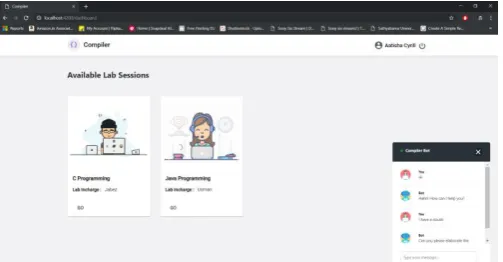
Fig -1: Options for Programming Languages with chat bot
3. SYSTEM IMPLEMENTATION AND ARCHITECTURE
The system is implemented using three roles: HOD, teachers and students.
1) HOD: The head of department has privilege to add different labs and assign teachers to it.
2) Faculty: The teacher’s job is to create new tasks for the lab assigned. They can specify the programming language in which the assignment has to be done. They can monitor the performance of students and their status. They can also update and edit the assignments.
3) Students: Students are supposed to solve the assigned
questions. They can compile, run and debug their codes based on the results. They can submit when they get 100 per cent completion. So they can edit their codes multiple times.
The architecture of the proposed system is an Angular system. Angular is chosen because it is much faster and easy to implement. It has an Angular front end which will be triggered by the client. For all the events in the application like login or sign up, the respective APIs are created. These APIs are created in Spring Boot. For example, data can be fetched using an API. APIs are called respective of the action performed. For student login, the student login API will be called. After the sign up process, all the data gets stored in the database. So there is sign up API for the sign up process too. When login is called, the further step is taken depending on the role. Based on the role the control is given to the triggered dashboard.
Hence, the communication is: Front end is at one server and the backend is at another server. These two can be at the same server too. Front end calls an API for example, XYZ, on which a certain task is assigned. When this API is called, the required data has to be sent. The data sent is displayed accordingly. API call is for cross policy. It has to be followed where the cross origin has to be switched on.
For compilation, the backend is called along with which the data is sent. Backend also calls an API for compilation. The data sent thereby is displayed to the user. The compilation part is present on the cloud.
Fig -2: System Architecture
[image:2.595.37.289.456.587.2] [image:2.595.316.552.467.621.2]© 2019, IRJET | Impact Factor value: 7.211 | ISO 9001:2008 Certified Journal | Page 4599
There is one run button given to compile and execute andtest the code against the test cases specified. The platform also contains a chat bot which helps students with simple doubts. It is developed using dialog flow. It has multiple intents based on situation which helps with several doubts. After training the bot more with user data and expressions, it will become more responsive with time.
Fig -3: Creation of assignment
Questions can be created by filling out a form where the following details are needed: question heading, question, programming language, sample cases and test cases. Teachers can use this to create assignments and then click on create button.
3.1 Working Space
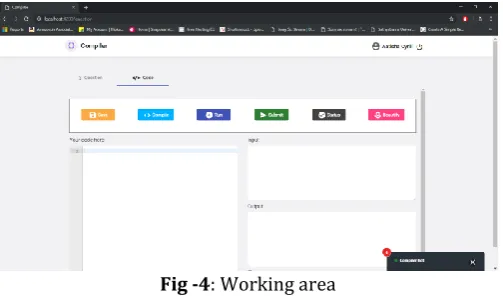
The working space consists of the text editor space to type the code. It is on the left side of the screen. The input is taken and output is displayed on the right side of the screen. The screen also contains options for save, compile, run, submit and status. The code needs to be saved at regular intervals. Then it can be compiled. If there are errors, then they should be debugged. After the code is free of errors, it can be executed and then submitted. Status can be checked for the accepted percentage.
Fig -4: Working area
All of these provide a very user-friendly interface for coding and learning. The option of chat bot is available at every page
and can be anytime referred too for clearing any simple doubts.
3.2 List of Questions
The list of questions can be viewed. All the questions are saved and displayed. There is an option for creating new question. There are options for editing the question, viewing the question and also for seeing the responses.
Fig -5: List of questions
3.3 Dashboard
The dashboard is the place where everything thing is segregated based on the programming languages. Details like which teacher is assigned to which programming language lab can easily be seen. The year and section of students can be seen. The particular existing assignments can be edited too. The dashboard looks like this:
Fig -6: Dashboard
[image:3.595.35.288.195.337.2] [image:3.595.309.561.495.641.2] [image:3.595.37.289.571.722.2]© 2019, IRJET | Impact Factor value: 7.211 | ISO 9001:2008 Certified Journal | Page 4600
3.4 Output
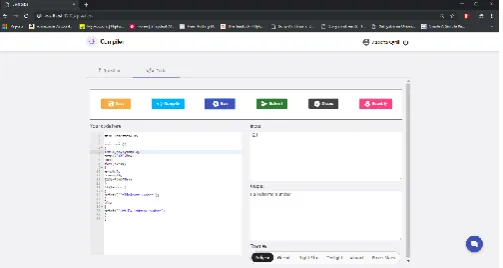
The following image shows the output for a code written in C language. The output can be seen by first compiling the code and then executing it through run button.
Fig -7: Output Screen
4. ADVANTAGES
The platform being a web application has a lot of benefits. Also it is user friendly and easy to use and provides an interactive platform for learning coding and programming skills. Some of the advantages are:
1) Centralized method of learning: It provides an
interactive method of learning. Since it is a web platform all the actions are controlled from the same source. Multiple activities can be carried out under that source.
2) Progress Checker: The progress of students’
performance can be checked, tracked and stored for telling the overall performance of the students.
3) Simple Learning: The platform provides a simple
learning platform. Everything is easy to use and learn. It provides a good user-friendly interface. New users can easily learn how to use it.
4) Chat Bots and Forums: It also provides additional
features of chat bot and forums. Both are designed to solve students’ problems and doubts either by the system or among each other.
5. DISADVANTAGES
Every advancement brings with it some disadvantages. Here in the project which is online prevents student from direct interaction with other students and teachers. Also each and every student cannot get separate attention, since the process is centralized.
1) Internet connection is mandatory: Since the
application is a web application, no internet connection will stop the application i.e. the application cannot run without internet connection. So Internet connection is mandatory.
2) Submission of malicious code: There is a probability that the data stored in the database may be deleted if a user submits some malicious code. So, for security, the codes are checked before sending to the server.
3) Security attack: The system is prone to cyber-attack since it is web implemented. These attacks include eavesdropping, data medication and denial-of-service.
6. USE OF SYSTEM
The main purpose of the system is to improve the quality of teaching and make it interesting. It also helps to reduce the extra efforts done by students and teachers. It can be used as tool to monitor the performance of students.
7. CONCLUSION
The main purpose of this system is to make coding web oriented and interesting. The grading of programming assignments is done in a more efficient manner. It provides teachers with the ability to create their own test cases. Detailed analysis of students’ performance will be made. The whole system takes much less time as compared to the offline method.
REFERENCES
[1] Danic, M., Radosevic, D., Orehovacki, ”Evaluation of Student Programming Assignments in Online Environments”, Proceedings of the 22nd Central European Conference on Information and Intelligent Systems (Ceciis 2011), Faculty of Organization and Informatics, Varadin, 21.-23.09.2011, pp. 111-116.
[2] Shalini Sharma, Chandra Shekhar Sharma, Veena Tyagi, “Plagiarism Detection Tool Parikshak”,2015 International Conference on Communication, Information Computing Technology (ICCICT), Jan. 16-17, Mumbai, India.
[3] Shruti Adhav, Sagar Tambe, Sachin Korde Patil, “Hybrid Compiler”, International Journal of Scientific and Technology Research Volume 3, ISSUE 3, March 2014
[4] Georgina Cosma, Mike Joy,”An Approach to Source-Code Plagiarism Detection and Investigation Using Latent Semantic Analysis”, IEEE Transactions on Computers, VOL. 61, NO. 3, MARCH 2012
[5] Mike Joy, Michael Luck, Plagiarism in Programming Assignments, IEEE Transactions on Education, VOL. 42, NO. 2, MAY 1999
[image:4.595.37.289.176.310.2]© 2019, IRJET | Impact Factor value: 7.211 | ISO 9001:2008 Certified Journal | Page 4601
Science and Information Engineering (ISIE), 2011International Conference on 20-21 Aug. 2011
[7] Vijayprakash, Jayarajuporeddy,”Web Based Interface for C, C++, JAVA”, International Journal of Computer Science and Engineering (IJCSE) ISSN(P): 9960; ISSN(E): 2278-9979 Vol. 4, Issue 4, Jun - Jul 2015, 1-8
[8] https://en.wikipedia.org/wiki/Plagiarism-detection