MINDSET
Certified Developer Program ISV Toolkit Useris Guide
1 October 1984
MINDSET Corporation 617 N. Mary Avenue Sunnyvale, CA 94086
Certified Developer Program ISV Toolkit User's Guide
Version 1.0
1 October 1984
Information in this document is subject to change without notice and does not represent a commitment on the part of Mindset Corporation. It is against the law to copy the Mindset ISV Toolkit in part or in whole on magnetic tape, disk, or any other medium for any purpose other than the purchaser's licensed use.
MINDSET is a trademark of Mindset Corporation.
Copyright (C) 1984, Mindset Corporation All rights reserved.
ISV Toolkit Guide Table of Contents
Section 1 INTRODUCTION
Table of Contents
General Information . . . • . . . • . . . • . • . . . • . • • • • • 1- 1 Purpose of User's Guide . . . • . . . • . . • . • . • • • . . • . • • • • . 1- 2 Overview of Library Use • . . . • . . . • . . . • . . • • . . . . • . . • • . . • • . • 1- 3 Guide to User's Guide . . . • • . . • . . . • . . • • . • • • 1- 4 Preparing the ISV Toolkit . . . • . . . • . . . • • . • 1- 5 Program Development Sequence . . • . • . . . • . . . • . . . • . • • • • . 1- 6 Current Library . • . • • . . . • . . . • . . . • • . 1- 7 User F e e d b a c k . . . 1- 8 Future Library Development . . . . • . . . • • • 1- 8
Section 2
ASSEMBLY LANGUAGE ROUTINES
Reasons for Using Assembly Language Routines . . . • . . . . • • . . 2- 1 Use of Assembly Language Routines . . . • . . . • . . . • • . • . • . • • . . . 2- 1 Assembly Language Routine Library . . . • . . . • . . . • • • • . . • . . . 2- 2
Section 3
COMPILERS/LINKER
Function of L i n k e r . . . 3- 1 Overview of Linker Use . . . • . . . • . . • . . . . • . . . • • • . . . • • • 3- 1 Examples for
'c'
Library . • • . . . • . . • • . . . • . . . • . • . 3- 2 Examples for PASCAL Library . • • . . • . • . . . • . . . • . . • . . . • . . . . • 3- 4Section 4
LANGUAGE LIBRARY
Section 5
APPLICATION NOTES
Table of Contents
ISV Toolkit Guide Table of Contents
Application Notes . . . • . . . • . • . . . • . . . 5- 1 Interactive Design Aid (IDA) . . . • . • . • . . • . • . . . • . . . • . . . 5- 2 IBM PC Compatibility Guidelines • • . . . . • . . • . . . • • . . . • . . . . 5-14 Serial Communications (RS-232C) . . . • • . . . • • . . . . • . • . . • . . • • . . . . 5-43 Sound Editor . . . • . . . • . . . • . . . . 5-53
Appendix A USEFUL TABLES
List of T a b l e s . . . A- 1 Documentation Guide . . . • . . . A- 3 Hardware Configuration . • . . . • . . . • . . . A- 4
'c'
Program Development Environment Diskette Directory . . . • . . . . A- 5 PASCAL Program Development Environment Diskette Directory . . • . . . . A- 7 MINDSET Program Development Tools Diskette Directory . . . A-10 Cross Reference of Graphical Shapes to Library Routines . . . A-11 ASCII Character Set and MINDSET Keyboard Scan Codes . . . • . . . A-12 Numeric List of Library Routines . . . A-14 Appendix BEXAMPLE C PROGRAMS
POINT.C - Draws single point on screen
COLORO.C - Displays framed 16 color palette on screen COLOR1.C - Displays framed 2-color dither w/16 colors DC.C - Sets foreground/background colors of display DRAW.C - Draws colored dots on screen with mouse FRUIT.C - Displays pre-stored IDA file on screen TEXT.C - Displays text message on screen using font Appendix C
EXAMPLE PASCAL PROGRAMS
POINT.PAS - Draws single point on screen
Section 1 Introduction
General Information
ISV Toolkit Guide General Information
Mindset has established the Certified Developer Program (CDP) to promote the development of software titles for the Mindset personal computer. Qualified Independent Software Vendors (ISV) participating in the COP receive direct assistance from Mindset for software development Mindset has made available the following software devlopment
documentation:
1. Introductory Guide to MS-DOS
2. ~rogrammer's Development Library (PDL) Software Developer's Guide (SDG) MS-DQS Programmer's Reference Manual Macro Assembler Reference Manual 3. ISV Toolkit
License for Toolkit bse
Independent Software Vendor (ISV) Toolkit Guide
Three diskettes containing the ISV Toolkit Libraries The Introductory Guide to MS-DOS is a non-technical document
intended to familiarize the reader with the Microsoft MS-DOS operating system. The Guide describes the function .and use' of most commands and utilities provided by MS-DOS. A more technical description of MS-DOS may be found in the PDL, MS-DOS Programmer's Reference Manual.
The PDL consists of documentation and program diskettes containing the most recent MS-DOS release and Mindset system utilities.
The SDG is a technical document describing the Mindset BIOS
interrupt routines, and interface to the Mindset hardware. The ISV Toolkit program language libraries implement subroutine calls to these BIOS functions from high-level languages (C or PASCAL).
The MS-DOS Programmer's Reference Manual is a technical document describing the application program interface to the operating system.
The Macro Assembler Reference Manual is a technical document
describing the assember pr~g~am used on the Mindset computer system. The Certified Developer Program kit contains the Mindset ISV Toolkit license and the ISV Toolkit.
ISV Toolkit Guide General Information
The ISV Toolkit consists of the ISV Toolkit User's Guide, and three diskettes; containing the C and PASCAL language Toolkit libraries, the Interactive Drawing Aid (IDA) and a Sound Editor. The libraries each contain high-level language routines to access Mindset and MS-DOS
interrupt functions. See Appendix A, Toolkit Diskette Configuration for a description of the contents of each of the three diskettes. Included on the C and PASCAL language library diskettes are all files required to develop C and PASCAL programs.
Example programs are supplied demonstrating the use of the ISV Toolkit and the capabilities of the Mindset computer system.
Purpose of User's Guide
Since the Toolkit is intended for use by experienced programmers, this Guide assumes a knowledge of, and makes frequent reference to, the Mindset documents listed previously. Additionally, the following language reference manuals may be required:
1) Microsoft/Lattice C Language Reference Manual 2) Microsoft PASCAL Language Reference Manual
It is assumed that the user has copies of the License, POL and SDG, and appropriate language reference manual, as these documents are integral to the use of the Toolkit.
Two types of reference are provided by this Guide:
1) Detailed descriptions (by reference or example) of ho~ to use MINDSET unique BIOS interru?t functions with C and PASCAL. 2) Appendix A, containing Useful Tables of frequently referenced
Overview of Library Use
ISV Toolkit Guide Overview of Library Use
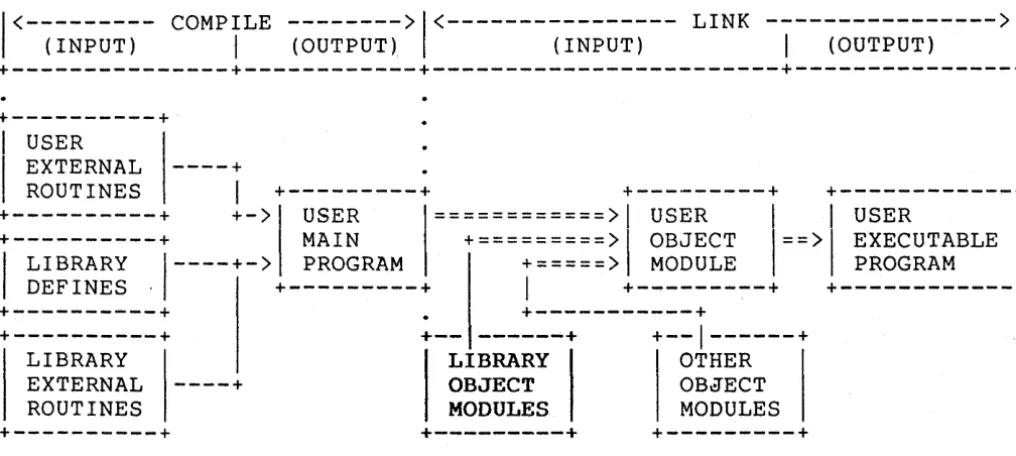
The Toolkit libraries (C and PASCAL) allow development of programs in a high-level language while providing access to specific BIOS-level functions. Library routines are written in the high-level language
(C and PASCAL) and are included in program modules in the same manner as any external routine. This is shown graphically in Figure 1-1.
+---+
I
USER1
EXTERNAL
ROUTINES
----+
I
+---+
+---+
+---+
+---+
+->
USER============>
USERI
I
USERI
+---+
MAIN+=========>
OBJECT1==>1
EXECUTABLE1
1
LIBRARY DEFINES .1----+->
+---+
PROGRAM+=====>
I
+---+
MODULE+---+
PROGRAM+---+
+---+
LIBRARY
EXTERNAL
----+
ROUTINES+---+
+---+
+-- ---+
+--1---+
LIBRARY OTHER
OBJECT OBJECT
MODULES MODULES
+---+
+---+
Figure 1-1 Context of Language Library
There are two primary steps for using the Toolkit library routines: 1) Compile the user program, including any external procedure
references (to user OF library routines) and the proper
library define file. Refer to the examples in this guide, or to documentation provided with the C or PASCAL compiler in use.
2) Link the resultant user program object module with the supplied library object modules. This step will resolve all external procedu~e references included in the user main program. The output of the linker will be an executable user program. Refer to the examples in this guide, or to the Microsoft Linker
[image:7.617.64.572.153.381.2]ISV ToOlkit GU~de
Guide to User's Guide
Guide to User's Guide
This ISV Toolkit Guide provides spec~fic information on each
l~brary routine and includes appropriate references to other Mindset documents as required.
·The first four sections in this Guide are ordered according to normal prog~am development sequence;
Chapter 1 provides general information about the Certified Developer Program (Cbp) ~nd describes the format of this User's Guide.
Chapter 2 describes the reasons for using assembly language routines in a high-level language environment. Additional information on the Assembler is available in the Macro Assembler Manual in the POL volume.
Chapter 3 presents the function of the Linker pro~ram and the significance of the Linker to the high-level language library.
Additional documentation on the Linker is available in the Introductory Guide to MS-DOS in the POL volume.
Chapter 4 describes the "how-to" of compiling high-level languages and linking the ISV Toolkit library to these programs. Additional information is available in the Microsoft/Lattice C Language Reference Manual, and the f1icrosoft PASCAL Language Reference .Manuals .
. The remaining chapters in this Guide are provided as references for high level language program development.
Chapter 5 contains documentation for each available high level language routine contained in the·ISV Toolkit. Library routines are listed numerically within functional groups according to the
corresponding interrupt function code associated with each routine. The Useful Tables in Appendix A contain an alphabetical list of all routines and a cross-reference of each routine to the corresponding BIOS function. The SDG in the POL volumne describes each BIOS
function in detail.
Chapter 6 contains Mindset Application Notes describing various system-level topics in detail. Tutorial in nature, each Application Note provides additional reference during program development. ISV requests for detailed information will determine topics addressed in
fut~re appplication notes.
Appendix A, Useful Tables, summarizes various groups of data in a concise table form. These tables are intended to provide quick
reference during high level language program development. See the Table of Contents for a list of these tables.
Preparing the ISV Toolkit
ISV Toolkit Guide Preparing the ISV Toolkit
Before you can begin program development, the ISV Toolkit must be prepared for use. Preparation consists of two major activities:
1) make copies of the ISV Toolkit Library diskettes, 2) create the Program Development Environment diskette.
A CO?y of each of the two ISV Toolkit Language Library diskettes should be made from the originals in the ISV Toolkit. These copies will be used for program development. The original diskettes should be stored, and used only to create new copies as required. The
following steps demonstrate the sequence for copying these diskettes. 1) Boot the Mindset computer system, using the MS-DOS system
diskette supplied with the POL.
2) Format a double-sided, double-density diskette using the
Mindset FORMAT utility program on the MS-DOS system diskette. 3) Place this formatted diskette in drive B: (right-hand drive) . 4) Place the C Toolkit Library diskette in drive A: (left-hand
drive) .
5) Select drive A: as the default drive by entering: .n>A: <return>
A>
where n> is the MS-DOS prompt, and may appear as A) or B), and <return> means the key labelled return is to be
pressed.
6) Copy the contents of the C Toolkit Library diskette in drive A: to the formatted diskette in drive B: with the COpy command:
A>COPY A:*.* B: <return> A>
}) Repeat steps 2 - 6 to make a copy of the PASCAL Toolkit Library diskette.
This completes the process for creating copies of the ISV Toolkit
ISV Toolkit Guide
Preparing the ISV Toolkit
Creating the Program Development with the ISV Toolkit requires two diskettes:
1) copy of appropriate ISV Toolkit Language Library diskette,
2) a Program Development Environment diskette.
The Program Development Environment diskette contains the compiler for the language you are using (C or PASCAL), the Microsoft Linker, and a text editor program for creating and editing programs. This diskette may be created similarly to the Toolkit Library diskettes; FORMAT a double-sided, double-density diskette with the Mindset FORMAT utility, then copy the recommended files from your diskettes to the Program Development Environment diskette.
Refer to the Program Development Environment table in Appendix A for the recommended list of files that should be placed on this diskette.
You do not have to create the Program Development Environment
diskette, although doing so will reduce the number of times you need' to exchange diskettes in drive A: while developing a program (as you switch between the ~ditor and compiler).
If you choose NOT to make this diskette, you may use the compile link and go batch files (CC.BAT and PASCAL.BAT) , ONLY if the compiler and linker are on the same diskette.
Program Development Sequence
This Guide assumes that you have created a Program Development Environment diskette. Throughout program development, this diskette will remain in drive A: (left-hand drive), while Toolkit Library copy diskette will remain in drive B: (right-hand drive). The following
steps demonstrate how to use a batch file to compile, link and run one of the example programs.
1) Type in the compile, link and go batch file for the example program POINT. Listings of the DOPOINT.BAT, POINT.C (and POINT.PAS) are included in this Guide (see Appendix B and C) . POINT.C (and POINT.PAS) are included with the ISV Toolkit.
ISV Toolkit Guide Program Development Sequence
3) After successfully completing step 2, copy the source file for POINT to a new source file named CIRCLE (eg. CIRCLE.C or CIRCLE.PAS). Modify CIRCLE to display a hollow, white circle
(refer to Useful Tables, Snapes to find the proper Mindset library function for drawing a hollow circle). Hint, replace the call to bIt polypoint with a call to bIt heIIipses
making sure that you establish the correct arguments.
4) Type in the generic compile, link and go batch file (eg.' CC.BAT or PASCAL.BAT) , as shown in'this User's Guide, Examples. Test this batch file by using i t 'to execute CIRCLE eg. B) CC
CIRCLE) .
5) If steps 1 - 4 have been accomplished without frustration, then proceed with the development of MINDSET software. If any
problems are encountered, then please call MINDSET immediately at (408)737-8555, and 'mention that you are in the Certified Developer Program. The CDP is intended to provide timely support for ISV program development efforts.
6) Revie\~ the printed copies of all example programs (Appendix B or C), for ideas in the use of more complex library routines.
Current Library
The Numeric and Alphabetic lists in Appendix A provide a complete list of MINDSET, IBM and MS-DOS interrupts and the corresponding name of the Toolkit Library routine. Notice that not all of the listed interrupt functions have accompanying library routines. There are two possible reasons:
1) The interrupt function is provided in the high level language (eg. file operations).
2) The current release of the ISV Toolkit does not contain a library routine for this interrupt. This situation may occur when ISV interest in this interrupt is insufficient to justify implementing a library routine. Part of the CDP is to elicit response from ISV's with respect to implementing additional interrupt library routines and higher level functional library routines.
As a further note, there are 4 versions of the C library object
modules. Refer to the Microsoft (or Lattice) C reference documentation on these program and data memory size models to determine which model is correct for a particular progra~. The current ISV Toolkit C
ISV Toolkit Guide User'Feedback
User Feedback
An ISV participating in the COP has agreed in the License to report any defects discovered in'MINOSET supplied utility software. ISV's are also encouraged to inform Mindset of the following:
1) Requirement(s) for high-level language routines with higher' functionality than current library routines. It is the intent of MINOSET to develop and provide such routines.
2) Incomplete or misleading documentation. Mindset wishes to provide accurate support to maximize ISV productivity. 3) Any technical questions or possible topics for application
notes. Mindset wishes to provide the information necessary for successful 'completion of ISV products.
Future Library Development
Future additions to the Toolkit library are planned, including implementation of more BIOS interrupt functions, and higher-level fUnctions. Currently, graphics is assigned the highest priority, with communications and mouse applications following.
ISV Toolkit Guide
Assembly Language Routines
Section 2
Assembly Language Routines
Reasons for Using Assembly Language Routines
There are two major reasons for using assembly language routines with high-level language interface routines:
1) minimize code segment size, for speed (see item 2) or due to memory constraints for a particular application,
2) shorten execution time, for overall code performance or due to existing constraints (eg. collision detect, vertical retrace time, and display interrupt routines are constrained by fixed time periods in which to execute) .
The time constraints in item 2 are particularly important for
animation routines and user-controlled cursor applications (eg. a mouse pointer). Routines performing animation or using the entire display screen must synchronize with the display interrupt (refer to Useful Tables, Toolkit Cross Reference) to avoid flickering of the display. The display interrupt is generated every 1/60 second by the Mindset video display processor.
Refer to the SDG, Section 4, in the section on VBLANK Operations for additional technical details and timing information relating to the display interrupt.
Use of, Assembly Language Routines
Assembly language routines included in the ISV Toolkit are provided in source and object form. Each source routine has been assembled with the Microsoft Assembler (MASM) to obtain the corresponding object
module. Any high-level language program requiring an assembly language routine must have the routine defined as external. The program is then compiled in the normal manner (see the Examples or Section 4). After succesful compilation, the program is linked with the assembly routine to complete the executable program image (see Appendices Band C, or Section 3 in this Guide).
Reasons for Assembly Language Routines Assembly Language Routine Library
Assembly Language Routine Library
The following assembly language routines are provided with the ISV Toolkit:
1) callbios - C language interface to BIOS
2) bios_interrupt - PASCAL language interface to BIOS 3) evbinit
4) stopevb
5) bltchar
- turns on the system interrupt
generated at each vertical retrace - turns off the vertical retrace
interrupt
Reasons for Assembly Language Routines Assembly Language Routine Library
Assembly Language Routines
NAME
callbios -- C language library interface routine to Mindset BIOS SYNOPSIS
C Language
int mindset_interrupt; Mindset function interrupt (either EE or EF)
int *mindset_registers; Pointer to structure defining Mindset register structure. This structure is myregs, and is defined in <cuser.inc> callbios(mindset_interrupt,&mindset_registers) ;
REFERENCE
See the MINDSET SDG for BIOS functions. CAUTIONS
See the References for possible error conditions not returned. REVISION
Version Date Comments
- - - -
Reasons for Assembly Language Routines Assembly Language Routine Library
Assembly Language Routines
NAME
bios_interrupt - PASCAL language interface routine to Mindset BIOS
SYNOPSIS
PASCAL Language
var interrupt: integer; Interrupt number to be used. (Mindset unique are EE and EF) . var reg: reg_block; Pointer to structure defining
Mindset registers. bios_interrupt(interrupt,reg);
REFERENCE
See the MINDSET SDG document for BIOS functions. CAUTIONS
See the References for possible error conditions not returned. REVISION
Version Date' Comments
Reasons for Assembly Language Routines Assembly Language Routine Library
Assembly Language Routines
NAME
evbinit -- Enables interrupt generated by video vertical retrace. SYNOPSIS
C Language PASCAL Language
eVbinit( ); evbinit( );
REFERENCE
See the MINDSET SDG Section 4, Display Interrupt Control and VBLANK operations.
CAUTIONS
See the References for possible error conditions not returned. REVISION
Version Date Comments
Assembly Language Routines
NAME
Reasons for Assembly Language Routines Assembly Language Routine Library
stopevb -- disables generation of interrupt by vertical retrace.
SYNOPSIS
REFERENCE
C Language stopevb( );
PASCAL Language stopevb( );
See the MINDSET SDG Section 4, Display Interrupt Control and VBLANK Operations
CAUTIONS
See the References for possible error conditions not returned. REVISION
Version Date Comments
Reasons for Assembly Language Routines Assembly Language Routine Library
Assembly Language Routines
NAME
bltchar -- performs bit block move from character font to display memory_
SYNOPSIS
char int int int int int
C Language *text; size; color; xorigin; yorigin; fontdesc;
pointer to text to display length of text
palette index of color to display text pixel location of upper-left-hand point of first character in text on x-axis·
pixel location of first character on y-axis offset of memory containing font description x
=
bltchar(*text, size, color, xorigin, yorigin, fontdesc);x-axis location of next character block is returned
REFERENCE
See the MINDSET SDG Section 4, Custom Character Set Operations. CAUTIONS
See the References for possible error conditions not returned. REVISION
Version Date Comments
section 3 LINKER/COMPILERS
Function of Linker
ISV Toolkit Guide Linker/Compilers
The function of the Linker is to resolve external routine and variable references in a program. A routine or variable is said to be external to a program if the routine or variable is not defined in the program. Program development is made easier by developing routines individually, then using these routines to develop a program.
Such a structured approach is the basis for the ISV Toolkit. Each routine has been separately developed, then assembled into an object module suitable for linking. High-level language user programs may call these routines to perform specific functions by defining the
routines as external to the main program and linking them with the main program after successful compilation of the user program.
Overview of Linker Use
To simplify the use of Linker with the ISV Toolkit, all routines have been assembled into a single place, a link library. Each
library has a filename extension of .LIB (eg. BIOS.LIB is the name of the PASCAL and C link library). The link library simplifies the use of the Linker by reducing the number of arguments given to the Linker
(refer to the example sections in this chapter).
When a link library name is given to the Linker, the Linker
searches for all external routine references. Those external routines which are found by this search are linked to the main program. If an external routine is not found in the link library, then a separate object module must exist for that routine and the name of the object module must be included with the main program name as an argument to the Linker.
Any external routine not found in one of these two places will cause an 'Unresolved External' error message to be displayed by the Linker.
As shown in Appendix Band C, using a link library allows for one simple batch file for compiling and linking of all user programs.
********************
IMP 0 R TAN T* NOT E
********************
*
*
*
ISV Toolkit Guide
Example with C Library
Example with C Library
The example program POINT.C may be compiled and linked with the following batch file. Note that each external routine is named
individually with the main program in the first Linker argument list. POINT.C is listed in Appendix B, and is contained on Diskette 1 of 3.
BATCH FILE LINE le1 point -n
le2 point
COMMENT
---Invoke Lattice C compiler, Pass #1. Compile the C program POINT.C (compiler assumes .C filename extension). The -n allows variable names longer
tha~ 8 characters (maximum of 32). Invoke Lattice C compiler,
Pass #2. The object module POINT.OBJ is output from this pass.
link cs point points getkey setmode setibmmode,point"lcs;
The first Linker argument is a list of object modules to link. CS is the Lattice C small model; code and data occupy less than 64Kbytes. Point is the main program object module from the second pass of the compiler. Points, getkey, setmode, setibmmode "are all separately
compiled (if written in C) object modules which are called by POINT. The second Linker argument (after the comma, is the executable code name (POINT.EXE) in this case.
The third Linker argument is blank, since no map file is desired. LCS is the Lattice small model link library.
Another approach is to use a generic batch file (CC.BAT in the ISV Toolkit), and the MINDSET link library (BIOS.OBJ). The generic batch file is intended to compile, link and run a single C language source file.
The generic batch file (CC.BAT) is as follows: B>TYPE CC.BAT
le1 %1 -n
Ic2 %1
link cs %l,%l"lcs bios %1
ISV Toolkit Guide Linker/Compilers
Refer to Appendix A, Program Development Environment for addit~nal details on what the con~ents of diskettes in drive,A: and B: sho~d be. See the Introductory GU1de to MS-DOS for more deta1ls on batch f~\es. To effect the compilation of POINT.C, enter: '
B> CC POINT
This command invokes CC.BAT to compile, link and run POINT. This has the same effect as the previous example. Note the major difference
is in the last Linker argument; LCS is accompanied by BIOS (C language link library). All routines called by POINT are included in BIOS (the full filename is BIOS.OBJ).
Similarly, any single C language program may be compiled, linked and run, by entering;
B> CC <filename>
where <filename> is the name of a C program. Filename may be entered as <filename).C, but this is not required.
See the Microsoft/Lattice C compiler reference manual for detail description of the 4 memory models which are supported.
ISV Toolkit Guide
Example with PASCAL Library
Example with PASCAL Library
The example program POINT. PAS may be compiled and linked with the following batch file. Note that each external routine is named
individually with the main program in the first Linker argument list. Appendix C lists POINT.PAS, and Diskette 2 of 3 contains the source.
BATCH FILE LINE COMMENT
---
---pas1 point - Invoke PASCAL compiler,
Pass #1. Compile the PASCAL program POINT.PAS (compiler assumes .PAS filename extension).
pas2 Invoke PASCAL compiler,
Pass #2. The object module POINT.OBJ is output from this
pass. Pass 2 does not require any arguments, since PASIBF.BIN and PASIBF.SYM are assumed to exist from Pass 1 of the compiler. These files are used by Pass 2.
link point points getkey setmode setibmmode,point"pascal;
The first Linker argu~ent is a list of object modules to link.
Point is the main program object module from the second pass of the compiler. Points, getkey, setmode, setibmmode are all separately
~ompiled PASCAL program modules which are called by POINT.
The second Linker argument (after the comma, is the executable code name (POINT.EXE) in this case.
The third Linker argument is blank, since no map file is desired.
Pascal is the PASCAL language runtime link library.
Alternatively, you may use a generic batch file (PASCAL. BAT in
the ISV Toolkit), and the MINDSET link library (BIOS.OBJ). The generic file is intended to compile, link and run a single PASCAL language
Source program file. .
The generic batch file (PASCAL.BAT) is as follows: B>TYPE PASCAL. BAT
pas1 %1 pas2
link %l,%l"pascal bios %1
ISV Toolkit Guide Example with PASCAL Library
Refer to Apendix A, Recommended Development Environment for more details on what the contents of diskettes in drive A: and B: should be. Additional information about batch files and parameters may be obtained in the Introductory Guide to MS-DOS in the PDL volume.
To effect the compilation of POINT.PAS, enter: B> PASCAL POINT
This command invokes PASCAL.BAT to compile, link and run POINT, with the same effect as the previous example. Note the major difference is in the last Linker argument; PASCAL is now accompanied by BIOS (the MINDSET link library). All routines called by POINT are included in BIOS (the full filename is BIOS.OBJ).
Similarly, any single PASCAL language program may be compiled, linked and run by entering,
B> PASCAL <filename>
where <filename> is the name of a PASCAL language program, and may be entered as <filename).PAS, but this is not required.
Refer to the Microsoft PASCAL compiler reference manual for additional detail.
Section 4 Language Library
Language Librar~
The ISV Toolkit contains two language libraries; 1) C language library
2) PASCAL language library
lSV Toolkit Guide Language Library
for use in developing application programs for the MINDSET cor~uter. Both libraries have identical contents, one compiled in C, the other compiled in PASCAL.
Both libraries have the same name, BIOS.OBJ (refer to Section 3
in this document for a discussion on the use of BIOS.OBJ and the Linker program).
Corresponding routines in each library have been given the same name for traceability and field support purposes. Therefore, the same
results should be obtained by calling the routine from either C or PASCAL. If any deviations are noted, Mindset should be informed immediately, as stipulated in the License (see Section 1 in this document) .
A brief explanation of procedures for compiling, linking and running source programs is provided in Section 3 of this document.
ISV Toolkit Guide Library Format
Library Format
NAME
The following format is used to describe each routine in the BIOS link library. The format is designed to provide a functional and narrative description. The BIOS link library routines are listed in numerical order. Appendix A contains an index of all routines in alphabetical order and cross reference to BIOS functions.
Routine name -- brief description (1 line)
INTERRUPT #= nn VALUE OF AH= nn
SYNOPSIS
C Language extern
int
arg1;
arg2,arg3;
type var
PASCAL arg1;
arg2, arg3;
routine(argl,arg2 ... argn) routine(arg1,arg2 ... argn) ; REFERENCE
References to the MINDSET SDG or MS-DOS documents for basic function. DESCRIPTION
Long description of routine, including typical usage and references to include files, model being used, etc.
CAUTIONS
Specific precautions applicable to routine. REVISION
Revision history of routine. Version Date Comments Original
VO.1
dd/mm/yy DD/MM/YY
Original version
Library
ISV Toolkit Guide Library
The remainder of this chapter contains descriptions (see the previous section) of all library routines. Four sUbsections are provided, each containing those library routine descriptions corresponding to the functional area covered in the subsection.
In this chapter, the routines are ordered numerically according to the following functional groups:
1) Mindset Unique Routines (INT EE) 2) Mindset Graphics Routines (INT EF) 3) IBM Compatible Routines
4) MS-DOS Function Routines (INT 21)
For cross reference purposes, Appendix A contains a complete
ISV Toolkit Guide Library
**********************
IMP 0 R TAN T*
NOT E
***********************
*
*
*
*
*
*
*
*
*
*
*
*
*
*
*
*
*
*
*
All C language programs must include the MINDSET library structures definitions. This file is named COSER.INC, on Diskette 1 of 3. For example:
/*
This is the first line in the C language program file*/
'include <cuser.inc> /* include structures *//*
The remainder of the program followsmain() (
)
*/
/* This is the last line in the C language program file */
*
*
*
*
*
*
*
**
*
*
*
*
*
*
*
**
**************************************************************************
**********************
IMP 0 R TAN T NOT E***********************
*
*
*
*
*
*
**
*
*
*
**
*
**
*
*
*
*
*
*
*
*
*
All PASCAL programs must include the MINDSET library structures definitions. This file is BIOS.TYP on Diskette 2 of 3.
For example:
(PROG.PAS - Any PASCAL program.) program prog(input,output);
const
CONST = 1; type
TYPED
=
( Set up constants)
( Set up types)
($include:'bios.typ') var
varO byte; [ Set up variables.}
(Remainder of program)
set ibm mode
NAME Interrupt # = 10
Value of (AH)= 00 set ibm mode - Sets video display mode via industry standard function. SYNOPSIS
--- C PASCAL
---char video_mode; IBM-compatible video mode video mode: byte; 0 - 40 x 25 Black/White
1 - 40 x 25 Color
2 - 80 x 25 Black/White 3 - 80 x 25 Color
4 -320 x 200 Color
5 -320 x 200 Black/White 6 -640 x 200 Black/White
7 - 80 x 25 Black/White (Monochrome adapter)"
REFERENCE
MINDSET SDG Section 3 (Video I/O -- Interrupt 10H). DESCRIPTION
This routine selects the desired IBM-compatible video display mode. CAUTIONS
Whenever the video display mode is changed, the display buffer is cleared by filling i t with spaces (character modes), or with zeroes
(graphics modes).
The display page is set to page O.
The cursor is initialized to lines 6 and 7 (in an 8 x 8 pixel cell). Register AL in the 80186 is altered by this routine.
REVISION
Version Date Comments
NAME' Interrupt #
=
10 Value of (AH)= 02 set_cursor_position - Sets new cursor page, row and column position.SYNOPSIS
C ---char page; char row; char column;
Cursor displays at new position.
Set display page cursor on Select row cursor is on Select column cursor is in
PASCAL ---page: byte: row: byte: column: byte: set_cursor_pos(page, row, column):
REFERENCE
MINDSET SDG Section 3 (Video I/O -- Interrupt 10H). DESCRIPTION
This routine specifies the page, column and row for the cursor. The cursor appears at the specified (column,row) when the specified page is displayed. A (column,row) specification of (O,O) indicates the upper left corner of display screen.
CAUTIONS
In all modes, the display processor masks the specified page to a legal value for the current display mode (See SDG Section 3, Character Mode Operation and Graphics Mode Operation).
The value for row is automatically limited to the maximum for the current display mode (See SOG Section 3, Video I/O Interrupt lOR, Set Mode). The minimum row value is always
O.
The value for column is automatically limited to the maximum for the current display mode (See SDG Section 3, Video I/O - Interrupt 10H, Set Mode). The minimum column value is always O.
See also, get_cursor_position (Interrupt #
=
10, Value of (AH)=
03). Registers AL,BH,DX in the 80186 are altered by this routine.REVISION
Version Date Comments
---bAME Interrupt # = 10 Value of (AH)= 03 get_cursor_position - Get current cursor page, row and column position. SYNOPSIS
--- C
char page; char *row; char *column;
Set display page for cursor Return row cursor is on Return column cursor is in
PASCAL ---page: byte; var row: byte; var column: byte; get_cursor_position(page, row, column);
REFERENCE
MINOSET SOG Section 3 (Video I/O -- Interrupt 10H). DESCRIPTION
This routine returns the current column and row for the cursor on the page specified.
A (column,row) specification of (0,0) indicates the upper left corner of display screen.
See also, set cursor_position (Interrupt #
=
10, Value of (AH) = 02). CAUTIONSIn all modes, the display processor masks the specified page to a legal value for the current display mode (See SDG Section 3, Character Mode Operation and Graphics Mode Operation) .
Registers AL,BH,CX,OX in the 80186 are altered by this routine. REVISION
Version Date Comments
NAME Interrupt # = 10 Value of (AH)= 09 write_char_only - Write a character with attributes to the current
cursor position. SYNOPSIS
C
---char page; char chr; char color; char count;
Set display page for cursor ASCII character to display Character color palett~ index Number of times character is written on the row
PASCAL ---page: byte; chr: byte; color: byte; count: byte;
write_char_only(page, chr, color, count); REFERENCE
MINOSET SOG Section 3 (Video I/O -- Interrupt 10H). DESCRIPTION
Write char only displays the ASCII character at the current cursor
positIon (See SOG Section 3, Video I/O -' Interrupt 10,SET CURSOR POSITION). If the value of count is greater than 1, then the character is duplicated count times. All characters must remain on the same row.
If the value of color is 128 or greater (eg. 128 + color palette index), then the color palette index specified is exclusive-ORed (XOR) with the current color at the current cursor position. This applies only in graphics modes.
CAUTIONS
In all modes, the display processor masks the specified page to a legal value for the current display mode (See SOG Section 3, Character Mode Operation and Graphics Mode Operation) .
Registers AL,BH,CX in the 80186 are altered by this routine. REVISION
Version Oate Comments
write char cursor
6AME Interrupt # = 10
Value of (AH)= OA write char cursor - Writes character at the current cursor position. SYNOPSIS
C ---char page; char chr; char color; int count;
Set display page for cursor ASCII character to display Character color palette index Number of characters to be written on row
PASCAL ---page: byte; chr: byte; color: byte; count; integer;
write_char_cursor(page, chr, color, count); REFERENCE
MINDSET SDG Section 3 (Video I/O -- Interrupt 10H). DESCRIPTION
Write char cursor displays the ASCII character at the current cursor
positIon (See SDG Section 3, Video I/O - Interrupt 10,SET CURSOR POSITION) . If the value of count is greater than 1, then the character is duplicated count times. All characters must remain on the same row.
If the value of color is 128 or greater (eg. 128 + color palette index), then the color palette index specified is exclusive-ORed (XOR) with the current color at the current cursor position. This applies only in graphics modes.
CAUTIONS
In all modes, the display procesSor masks the specified page to a legal value for the current display mode (See SDG Section 3, Character Mode Operation and Graphics Mode Operation) .
Registers AL,BH,CX in the 80186 are altered by this routine. REVISION
Version Date Comments
write dot
NAME Interrupt # = 10
Value of (AH)= OC write dot - Writes a dot (single pixel) with specified color at the
SYNOPSIS
C ---int row; int column; char color;
REFERENCE
the specified row and column.
Set pixel row to display dot Set pixel column to display dot Dot color palette index
write_dot(row, column, color);
PASCAL ---row: integer; column: integer; color: byte;
MINDSET SDG Section 3 (Video I/O -- Interrupt 10H). DESCRIPTION
Write dot displays a single pixel at the specified pixel row and
column position. See SDG Section 3, Graphics Mode Operation, for details on graphics modes and color palette use.
If the value of color is 128 or greater (eg. 128 + color palette index), then the color palette index specified is exclusive-ORed (XOR) with the current color at the current cursor position. This applies only in graphics modes.
See also, read dot (Interrupt # = 10, Value of (AH)
=
00). CAUTIONSRegisters AL,CX,DX in the 80186 are altered by this routine. REVISION
Version Date Comments
read dot
~AME Interrupt # = 10
Value of (AH)= 00 read dot - Returns the color of the dot (single pixel) at the
SYNOPSIS
C
int row; int column; char color;
specified pixel row and column position.
Set pixel row to display dot Set pixel column to display dot Color of dot returned in PASCAL
--- PASCAL row: integer; column: integer; var color: byte;
color
=
read_dot(row,column); read_dot (row,column,color) REFERENCEMINDSET SOG Section 3 (Video I/O -- Interrupt 10H). DESCRIPTION
Read dot routine returns the color palette index of the pixel specified
by the pixel row and column position.
See also, write dot (Interrupt # = 10, Value of (AH) = OC).
~AUTIONS
This routine has no effect in character modes (See SOG Section 3, Character Mode Operation) .
Registers AL,CX,DX in the 80186 are altered by this routine. REVISION
Version Date Comments
NAME
write_teletype
Interrupt # = 10 Value of (AH)= OE write_teletype - Writes an ASCII character at the current cursor
position with the specified color palette index. The cursor position is updated by this routine. SYNOPSIS
C ---char page; char chr; char color;
REFERENCE
Set page for character display ASCII character to display Character color palette index write_teletype(page, chr, color);
--- PASCAL page: byte; chr: byte; color: byte;
MINDSET SDG Section 3 (Video I/O -- Interrupt 10H). DESCRIPTION
Write teletype displays the ASCII character at the current cursor
positIon. The cursor position is updated as required before, and after the character is displayed.
Normally, the updated cursor position is the next column on the current row of the display_
If the cursor is at the maximum column position for the current display mode, then the cursor is advanced to the next row, in column 0, where the ASCII character is then displayed.
If the ASCII character is a line feed, and the cursor is at the maximum row position for the current display mode, then the entire display is scrolled up one line. The new line is filled with blanks (in character modes) or zeroes (in graphics modes).
This routine implements 4 control characters (carriage return, line feed, bell, and backspace).
See SDG Section 3, Video I/O -- Interrupt 10H, WRITE TELETYPE, for more detail on this routine.
CAUTIONS
Contrary to industry standard, this routine will work for any valid page on the MINDSET.
~AME Interrupt # = 16 Value of (AH)= 00 get_kb_char - Read the next keystroke from the keyboard.
SYNOPSIS --- C
char chr; Character from keystroke char *scancode; Scan code of keystroke chr = get_kb_char(scancode);
REFERENCE
PASCAL ---var chr: char;
var scan code: byte;
MINDSET SDG Section 3 (Video I/O -- Interrupt 16H). DESCRIPTION
Get kb char routine returns the keyboard scancode and ASCII value of the first keystroke after the routine is called. See Useful Tables, Keyboard Scan Codes for the corresponding keystrokes, scan codes and ASCII values. CAUTIONS
Register AX in the 80186 is altered by this routine. REVISION
Version Date Comments
NAME
test kb buffer
test kb buffer
Interrupt #
=
16 Value of (AH)= 01 Indicates if an ASCII character is available to be read from the keyboard.SYNOPSIS
C --- PASCAL
---char chr_presenti Zero if buffer empty chr present: boolean; ASCII character chr: chari
Scan code of character scan_code: byte;
test kb buffer(chr ~resent,
- - chr~scan_code}
REFERENCE
MINDSET SDG Section 3 (Video I/O -- Interrupt 16H). DESCRIPTION
Test kb buffer routine test the keyboard I/O processor for an available scan-code. If scan code is available, then a value of 1 is returned,
otherwise a value of 0 (no scan code available). A scan code is avai.1able when a key has been pressed on the keyboard, but has not-been read by the 80186
cpu.
See SDG Section 3, Keyboard I/O - Interrupt 16H. CAUTIONS
Register AX in the 80186 is altered by this routine. REVISION
Version Date Comments
ftAME Interrupt # = 16 Value of (AH)= 02 get_kb_shift_status - Returns the current status of several keys on
the keyboard. SYNOPSIS
C --- PASCAL
---char kb_flag; Bit(s) set for certain keys var kb_flag: byte; kb_flag
=
get_kh_shift_status();REFERENCE
MINDSET SDG Section 3, Keyboard I/O -- Interrupt 16H. DESCRIPTION
Get kb shift status returns a bitmap describing the current status of several keys-on the keyboard.
Bit(s) 0,1,2
3 4 5 6
7
Bit Name N/A Hold State Scroll State Num Shift Caps Shift
Ins Shift
Meaning (if Bit = 1) (unused)
PAUSE key has been toggled. SCROLL LOCK key is depressed. NUM LOCK key is depressed. CAPS LOCK key is depressed. INSERT KEY is depressed.
In the above table, the bit position is set to '1' if the key is currently depressed. The PAUSE key bit is set whenever the PAUSE key is pressed, since this key does not latch in the depressed position.
CAUTIONS
Register
AX
in the 80186 is altered by this routine. REVISIONVersion Date Comments
dos file create
NAME Interrupt #
=
21Value of (AH)= 3C dos file create - create a new MS-DOS file, by entering the name in
SYNOPSIS
C ---int offset; int segment; int attrib; int result;
the current directory and setting the file length to
o.
Offset of pointer to path name (drive, directory, file name) Segment of pointer to path name Bits indicate file attributes Value indicating MS-DOS result
o -
failure-3 - path not found
-4 - too many open files -5 - access denied
>0 - file handle of file
PASCAL ---offset: word; segment: word; attrib: integer; var result: integer;
result = dos file create(offset, -segment, attrib);
dos file create(offset, segment, attrib, result); REFERENCE
MINDSET MS-DOS Programmers Reference Manual, Section 1, Create a File. DESCRIPTION
Dos file create issues a request to MS-DOS to make a new directory entry with the specified pathnarne and attributes.
If the specified pathname is already in the current directory, then the file length for that pathname is set to O.
The routine indicates failure by returning a O.
If dos file create is successful then the handle (from MS-DOS) is returned with the file opened for read/write access.
CAUTIONS
Registers AX,CX,DX,DS in the 80186 are altered by this routine. REVISION
Version Date Comments
NAME Interrupt #
=
21 Value of (AH)= 3D dos_file_open - Open the specified file with the requested accessrights. The MS-DOS file handle is returned for the file. SYNOPSIS
c ---
PASCAL---int offset; Offset of pointer to path name offset: word; int segment; Segment of pointer to path name segment: word; int access; Code for file access rights access: integer;
Code
o
1
2
Access Read file Write file
Read and write file int result; Result of MS-DOS operations
o -
failure-2 - file not found
-4 - too many open files -5 - access denied
-12 - invalid access
>0 - file handle of file result
=
dos file open(offset,segment, access); REFERENCE
var result: integer;
dos file open(offset,
segment, access, result)i
MINDSET MS-DOS Programmers Reference Manual, Section 1, Open a File. DESCRIPTION
Dos file open issues a request to MS-DOS to open the pathname with the-requested access rights.
If~the specified pathname is already in the current directory, then the file handle is returned.
dos_file_open
CAUTIONS
Registers AX,CX,DX,DS in the 80186 are altered by this routine.
REVISION
Version Date Comments
dos file close
NAME Interrupt # = 21
Value of (AH)= 3E dos file close - Close the file specified by the MS-DOS file handle. SYNOPSIS
c
int handle; int result;
file handle to be closed Result of MS-DOS operations
o -
failure-6 - invalid handle result
=
dos_file_close(handle); REFERENCEPASCAL ---handle: integer; var result: integer;
dos_file __ close (handle, result);
MINDSET MS-DOS Programmers Reference Manual, Section 1, Close a File. DESCRIPTION
Dos file close issues a request to MS-DOS to close the file with the-specTfied file handle.
All MS-DOS buffers for the file are flushed. CAUTIONS
Register AX in the 80186 is altered by this routine. REVISION
Version Date Comments
dos file read
-
-NAME Interrupt # = 21
. Value of (AH) = 3F dos file read - Read the specified number of bytes from the given
file handle. SYNOPSIS
C'--- PASCAL
---int handle;File handle to read from handle: integer; int offset;Pointer to destination buffer offset: integer; int segment;Segment of destination buffer segment: integer; int nbytes; Number of bytes to read nbytes: integer: int result; Result of MS-DOS operations var result: integer;
o -
tried to read end of file -5 - access denied-6 - invalid handle
result
=
dos file read(handle, offset, segment, nbytes);REFERENCE
dos file read(handle, offset, -segment, nbytes, result);
MINDSET MS-DOS Programmers Reference Manual, Section 1, Read from File. DESCRIPTION
Dos file read issues a reauest to MS-DOS to read the specified number of bytes-from the given file handle. The bytes read are stored in the buffer pointed to by segment and offset.
If possible, the number of bytes specified will be read. CAUTIONS
Registers AX,BX,CX,DX,DS in the 80186 are altered by this routine. REVISION
Version Date Comments
dos file write
NAME Interrupt # = 21
Value of (AH)= 40 dos file write - Write the specified number of bytes to the given
SYNOPSIS
C
---int handle; int offset; int segment: int nbytes; int result;
file handle.
File handle to write Pointer to source buffer Segment of source buffer Number of bytes to write
Resul~ of MS-DOS operations
o -
failure-5 - access denied -6 - invalid handle
result = dos.file write (handle, offset, segment, nbytes);
REFERENCE
PASCAL ---handle: integer; offset: word; segment: word; nbytes: integer; var result: integer;
dos file write(handle, offset, -segment, nbytes, result);
MINDSET MS-DOS Programmers Reference Manual, Section 1, Read from File. DESCRIPTION
Dos file write issues a request to MS-DOS to write the specified number of bytes to the given file handle. The bytes to be written are stored in the buffer pointed to by segment and offset.
Issuing a dos file write with the number of bytes set to 0 will set the file size-to the current position (update the file size).
CAUTIONS
Registers AX,BX,CX,DX,DS in the 80186 are altered by this routine. REVISION
Version Date Comments
dos file delete
NAME Interrupt # = 21
Value of (AH)= 41 dos file delete - Delete the specified file from the specified path. SYNOPSIS
C
int offset; int segment; int result;
Pointer to source buffer Segment of source buffer Result of MS-DOS operations
o -
failure-2 - file not found -5 - access denied result
=
dos file delete(offset,segment; REFERENCE
PASCAL ---offset: word; segment: word;
var result: integer;
dos file delete(offset, segment, result);
MINDSET MS-DOS Programmers Reference Manual, Section 1, Delete a Directory Entry.
DESCRIPTION
Dos file delete issues a request to MS-DOS to delete the specified file from the specified directory and path.
CAUTIONS
Registers AX,BX,CX,DX,DS in the 80186 are altered by this routine. REVISION
Version Date Comments
dos file lseek
~AME Interrupt # = 21
Value of (AH)= 42 dos file lseek - position the read/write pointer in the file with
SYNOPSIS
C ---int handle; int method;
the specified handle.
PASCAL ---File handle for file handle: integer; Method used for positioning method: integer;
o -
Absolute move to offset 1 - Relative move from current2 - Move to end of file plus offset int lo_offset; Low 16 bits of offset offset: word;
segment: word; int hi offset; High 16 bits of offset
int result; Result of MS-DOS operations
o -
failure-1 - invalid function -6 - invalid handle
result
=
dos file lseek(handle, method, 10 offset, hi_offset);REFERENCE
var result: integer;
dos file delete(offset, method, 10 offset, hi_offset, result);
MINDSET MS-DOS Programmers Reference Manual, Section 1, Delete a Directory Entry.
DESCRIPTION
Dos file lseek issues a request to MS-DOS to position the read/write pointer In the file from the specified directory and path.
Lo offset and hi offset constitute a 32-bit integer for specifying the total number of bytes offset the pointer is to be moved.
CAUTIONS
Registers AX,BX,CX,DX,DS in the 80186 are altered by this routine. REVISION
Version Date Comments
NAME Interrupt # = EE Value of (AH)= 02 set_display_device - Set display device to television (composite)
or monitor (RGB) and reloads the color palette. SYNOPSIS
c
---char device_code; value for device code device code device
REFERENCE
o
1
2 3
television monitor television monitor
PASCAL ---device code: byte; color/B&W
color N/A B&W N/A
MINDSET SDG Section 4 (Descriptions of Display Processor BIOS commands). DESCRIPTION
This routine changes the current display setup for either a color monitor/television or a black and white television (B&W). The color palette is reloaded (according to current display mode - see Reference) according to the device selected.
CAUTIONS
Register AL in the 80186 is altered by this routine. REVISION
Version Date Comments
~ME Interrupt # = EE Value of (AH)= 06 set_sync_mode - Enables or disables the use of genlock for transparent
colors; enables or disables interlaced sync display, and enables or disables fixed-phase display.
SYNOPSIS
c ---
--- PASCALchar sync_mode; bits set for desired sync sync_mode: byte;
REFERENCE
bit value features
o
1
2
3
o
1
o
1
o
1
Disable genlock Enable genlock Unused
Disable interlaced sync Enable interlaced sync Disable fixed phase Enable fixed phase
MINDSET SDG Section 4 (Display Interrupt Control and VBLANK Operations) . DESCRIPTION
Set sync mode enables the user to enable and disable certain video signal inputs.
Genlock is normally disabled. When enabled, those palette entries with the key bit set (Refer to set palette, Interrupt # EF, Value of (AH) = OA) are transparent, allowing a second video signal to be displayed.
Interlaced sync display is normally disabled. When enabled, this mode displays 200 scan lines of display data, but displays using an even/odd scan line pair to dis?lay 400 lines of data for a more filled-in look on the display.
Fixed-phase synchronization is normally disabled. When enabled, i t gives more flexibility in pixel-by-pixel color mixing and prevents flashing on the display.
set_sync_mode
CAUTIONS
Enabling fixed-phase synchronization may cause the television display to be distorted.
Registers AL and BL in the 80186 are altered by this routine.
REVISION
Version Date Comments
~AME Interrupt # = EE Value of (AH)= 07 set_display_int - Specifies the scan line at which the read processor
performs an interrupt. This command also enables and disables a diagnostic marker which appears on the specified scan line.
SYNOPSIS
C --- PASCAL
---char linenumi decimal value of scan line linenum: byte; where interrupt occurs (0 - 399)
set_display_int{linenum)i
REFERENCE
MINDSET SDG Section 4 (Display Interrupt Control and VBLANK Operations). DESCRIPTION
Set display int enables the user to synchronize animation with the drawing of the display screen by the display processor.
To enable the diagnostic marker, insert the following line just prior to the set_display_int call;
myregs.bx = 1;
set_display_int(linenum)i
See Mindset SDG Section 4, Descriptions of Display Processor BIOS Commands, Set Display Interrupt Address (Interrupt # = EF, Value of (AH) = OF).
CAUTIONS
The display interrupt operates only in the graphics modes of the MINDSET computer.
If no value for linenum is given, then a default value of 199 (decimal) is used.
Registers AL and BL in the 80186 are altered by this routine. REVISION
Version Date Comments
joystick
NAME Interrupt # = EE
Value of (AH)= 1F joystick - Returns the position and buttons status of two joystick/mouse
devices. SYNOPSIS
c ---
PASCAL---char *a_switch, *b switch; var a switch: byte; var b-switch: byte;
REFERENCE
joystick switch variables contain button sense (pushed/not-pushed), where pushed buttons have a bit value of 0, not-pushed buttons are 1.
Joystick switches bitmap bit # meaning
°
1 23
4
5
up direction switch down direction switch left direction switch right direction switch button #1 (left side) button #2 (right side)
var a x,a y: integer; var b X,b y: integer; (X,Y) position change for device a,b
MINDSET SDG Section 10 (Miscellaneous BIOS Commands). DESCRIPTION
Joystick enables the use of 1 or 2 joystick/mouse devices as input. Variables a switch and b switch contain bits corresponding to switches indicating the direction-of movement of the joystick.
Variables a x, a y, b x, b y contain the X-axis and Y-axis values for joysticks wIth decoder inputs. These X and Y values reflect the change in each axis since the last time this routine was called (relative
joystick
CAUTIONS
Registers AX,BX,CX,DX,SI in the 80186 are altered by this routine.
REVISION
Version Date Comments
set led
NAME Interrupt # = EE
Value of (AH)= 22 set led - Turns the MINDSET computer front panel LED's on/off.
SYNOPSIS
C
---char on_off; bit pattern for setting LED's bit# 1 0 value yellow
- - - - -
---0 0 0 off
0 1 1 on
1 0 2 off
1 1 3 on
set led(on_off);
REFERENCE
PASCAL
---LED -- green off off on on
MINDSET SDG Section 10 (Miscellaneous BIOS Commands) . DESCRIPTION
The front betzel of the MINDSET computer base unit (with power cord) contains two user-programmable Light Emitting Diodes (LED). These LED's are both located just right of the center of the betzel. The left-hand LED is yellow and is designated LED O. LED 0 is turned on/off by setting the value of bit 0 in the on off variable to 1 or 0 respectively.
The right-hand LED is green and is designated LED 1. LED 1 is
turned on/off by setting the value of bit 1 in the on off variable to 1 or 0 respectively.
LED 0 and 1 remain in the state set by the last call to set led. CAUTIONS
Register AL in the 80186 is altered by this routine. REVISION
Version Date Comments
sound mode
NAME Interrupt # = EE
Value of (AH)= 24 sound mode - Sets operation mode of 1 or 2 Custom Sound Processors (CSP) SYNOPSIS
C --- - PASCAL
--char mode; CSP mode from table (below) mode: byte; CSP mode
1
2
4 8
type of sound
4 musical voices, some special effects 3 voices, special music/noise effects 6 voices with limited controls
Direct access to digital-analog (D/A) converter
char module_bits; Select on-board or stereo (module) mode
module bits: byte;
CSP module CSP enabled 1 On-board CSP
2 Module CSP (in optional stereo module) 3 Both CSP'