$3.00
TABLE OF CONTENTS
An EPROM Programmer for the Big Board ... 4
. Do
It
Yourself Character Set ... 8
A 5 elf-
Load~ngROM ... 10
FORTH Reviews ...
14
Updated Double Density ... 19
REGULAR FEATURES
Letters ... 2
Designer's Corner ... 10
FORTHwords ... 12
NEW PRICES EFfECTIVE ON THE 1ST DAY OF THE COVER MONTH OF THIS MAGAZINE_
"THE BIG BOARD"
OEM - INDUSTRIAL- BUSINESS - SCIENTIFIC
INGLE BOARD COM'PUTER KIT!
Z-80 CPU! 64K RAM!
THE BIG BOARD PROJECT: Three years In the works, and maybe too good to be true. A tribute to hard headed, no compromise, high performance, American engineering! The Big Board gives you all the most needed computing features on one board at a very reasonable cost. The Big Board was designed from scratch to run the latest version of CP/M*. Just imagine all the off-the-shelf software that can be run on the Big Board without any modifications needed! Take a Big Board, add a couple of 8 inch disc drives, power supply, an enclosure, C.R.T., and you have a total Business System for about 1/3 the cost you might expect to pay.
SIZE: 8'12 x 13'" IN.
(64K KIT BASIC I/O) SAME AS AN 8 IN. DRIVE. REQUIRES: +5V @ 3 AMPS
FULLY SOCKETED! FEATURES: (Remember, all this on one board!) + - 12V @ .5 AM PS. '
64K RAM
Uses Industry standard 4116 RAM·S. AII64K is available to the user, our VIDEO and EPROM sections do not make holes In system RAM. Also, very special care was taken In the RAM array PC layout to eliminate potential noise and glitches.
Z-80 CPU
Running at 2.5 MHZ. Handles all 4116 RAM refresh and supports Mode 2 INTERUPTS. Fully buffered and runs 8080 software.
SERIAL 1/0 (OPTIONAL)
Full 2 channels using the Z80 SIO and the SMC 8116 Baud Rate Generator. FULL RS232! For synchronous or asynchronous communication. In synchronous mode, the clocks can be transmitted or received by a modem. Both channels can be set up for either data-communication or data-terminals. Supports mode 21nt. Price for all parts and connectors: $49
BASIC 1/0
Consists of a separate parallel port (Z80 PIO) for use with an ASCII encoded keyboard for Input. Output would be on the 80 x 24 Video Display.
BLANK PC BOARD - $149
24 x 80 CHARACTER VIDEO
With a crisp, flicker-free display that looks extremely sharp even on small monitors. Hardware scroll and full cursor control. Composite video or spill video and sync. Character set Is supplied on a 2716 style ROM, making customized fonts easy. Sync pulses can be any desired length or polarity. Video may be
inverted or true. 5 )( 7 Matrix - Upper & Lower Case
FLOPPY DISC CONTROLLER
Uses WD1771 controller chip with a TTL Data Separator for enhanced reliability. IBM 3740 compatible. Supports up to four 8 inch disc drives. Directly compatible with standard Shugart drives such as the SA800 or SA801. Drives can be configured for remote AC off-on. Rlins CP/M" 2.2.
TWO PORT PARALLEL 1/0 (OPTIONAL)
Uses Z-80 PIO. Full 16 bits, fully buffered, bi-dlrectional. User selectable hand shake polarity. Set of all parts and connectors for parallel I/O: $19.95
REAL TIME CLOCK (OPTIONAL)
Uses Z-80 CTC. Can be configured as a Counter on Real Time Clock. Set of all parts: $9.95
CP/M· 2.2 FOR BIG BOARD
The blank Big Board PC Board comes complete with full documentation (including schematics), the character ROM, the PFM 3.3 MONITOR ROM, and a diskette with the source of our BIOS, BOOT, and PFM 3.3 MONITOR.
The popular CP/M" D.O.S. to run on Big Board Is available for $159.00.
PRICE CUT!
PFM 3.3 2K SYSTEM MONITOR
The real power of the Big Board lies In Its PFM 3.3 on board monitor. PFM commands Include: Dump Memory, Boot CP/M", Copy, Examine, Fill Memory, Test Memory, Go To, Read and Write I/O Ports, Disc Read (Drive, Track. Sector). and Search. PFM occupies one of the four 2718 EPROM locations provided. . ' Z-BO Is a Trademark of Zilog.
Digital
R~s~!~~~
Computers
P.O. BOX 401565. GARLAND, TEXAS 75040 • (214) 271-3538
TERMS: Shipments will be made approximately 3 to 6 weeks after we receive your order. ViSA, MC, cash accepted. We will accept CQD's (for the Big Board only) with a $75deposit. BalanceUPS COD. Add$4.00shipping.
USA AND CANAOA ONLY
o
-*TRADEMARK OF DIGITAL RESEARCH. NOT ASSOCIATED WITH DIGITAL RESEARCH OF CALIFORNIA, THE ORIGINATORS OF CPM SOFTWARE
c
~
:.
z
C m C
::m
o 'V
!!'
n
o z
~
n -t < Z n
m
o
::m
C
r--t
~
~
g
o
r-C ::a::
c
::m
~ -t
m
::m ::m
:. n m
r-o z c o z
MICRO CORNUCOPIA 11740 N.W. West Road
Portland, Oregon 97229
503-645-3253
Editor & Publisher David J. Thompson
Technical Editor Ruth Fredine-Burt
Graphic Design Sandra Thompson
Typography
Patti Morris & Martin White Irish Setter
Cover Illustration Gerald Torrey
MICRO CORNUCOPIA is pub-lished six times a year by Micro Cor-nucopia of Oregon, 11740 N.W. West Road, Portland, Oregon 97229.
SUBSCRIPTION RATES: 1 yr.(6 issues)
1 yr. (Canada & Mexico) 1 yr.(other foreign)
$16.00 $20.00 $26.00 All subscription orders payable in United States funds only, please. ADVERTISING RATES: Available on request.
CHANGE OF ADDRESS:Please send old label and new address. SOFnWARE, HARDWARE, AND BOOK VENDORS: Micro Cornu-copia is establishing a group of re-viewers. We would very much like to review your Big Board compatible products for Micro C. Please send material to Review Editor, Micro Cornucopia.
WRITER'S GUIDELINES: All items should be typed, double-spaced on white paper or better yet, on disk. (Your disk will be returned promptly.) Payment is in contribu-tor's copies.
LETTERS TO THE EDITOR: Please sound off.
CP/M is a trademark of Digital Research, Inc.
Copyright 1981 by Micro Cornucopia. All rights reserved.
II~aD ~Da.U~D'11
June 1982
The Journal of the Big Board Users
No.6
Spare
a Dime?
New Job
With the economy hanging on by its fingernails (and slipping), and water walkers treading the unem-ployment lines, it might seem crazy for anyone to quit a good-paying engineering job in order to spend full time editing and publishing a small user group journal.
It is crazy, but the hours I was put-ting in trying to do both the job and Micro C were even crazier. So, forced to choose between the secu-rity and the dream, I chose the dream.
A Little History. On April 8 1981,
we distributed 1800 flyers
announc-ing Micro Cornucopia (the one most of you received with your boards) at the Computer Faire in San Francis-co. Thirty days later we had received a total of three subscriptions.
At this year's Computer Faire (March 19, 1982) we had a meeting of Micro C subscribers and we had over 50 folks (our meeting followed the Northstar user group and we out-numbered them at least two-to-one). Quite a difference.
So now I'm on my own, free of the job with . its biweekly check, free in-surance, cheap parts, retirement benefits, and immediate access to some really fine fellow engineers. It's awfully hard to go out on your own when you realize all the cords you are cutting. (And I'm sure that Tektronix and other large companies know that.)
Sandy and I (plus Jennifer and Erin) figured we'd be living on a bare minimum for a while, so we had a dentalling and doctoring spree just before the health insurance turned into a pumpkin.
Of course, Sandy has been work-ing full time on Micro C for over a year so this hasn't been a big change for her, but it's certainly a big (and good) change for me.
Stick around, we've got great things coming up. And, please feel free to tell others about us.
Get together
Announcing the first annual, semi official, international, Micro C get together. It will be held here at the house, Saturday, July 24. You are all welcome to come and spend the day (from 10 a.m. to midnight) helping us celebrate the first anniversary of Micro C. Bring yourselves, families (including children), friends, and grubbies, for a day of fun and games and eating and relaxing and compu-tering and talking and FORTH and so forth.
We hope to have one of the new systems running by then along with, of course, my two Big Boards and . the ROM burner.
Feel free to bring your specialty for the potluck lunch (if it's convenient) or some other healthful munchies. Of course, please let us know if you're planning to come and how many you'll be bringing so we won't
be totally unprepared. If you're
go-ing to need lodggo-ing we may be able to suggest some places, or if you need a ride from the airport, just give u.s some warning.
If folks want to hang around
Sun-day we might all go down to the beach and build sand computers (without floppy drives).
Do You Need to Renew?
Check the subscription form sta-pled in the center of the magazine. If it's on colored stock and has RENEW emblazoned across the top then you
definitely need to renew. If you
aren't expiring now but want to know when you are going to expire, check your address label.
Letters
Dear Editor,
Finding an 8116 baud rate genera-tor can be a real problem so it might pay to mention that this chip is func-tionally the same as the far more common COM 5016. The only differ-ence is that pin 9 on the COM 5016 must be tied to plus 12V. This pin is not connected on the 8116.
The COM 5016 is available from Advanced Computer Products for $15.95.
Gary Kaufman
206 South 13th St. Apt 810 Philadelphia, P A 19107
Editor's note:
Western Digital is also making pin-for-pin equivalents of both the 8116 and the COM 5016. The WD 1943 matches the 8116 and the WD 1941 matches the 5016. I understand that the WD 1941
lists for about $9.95.
Dear Editor,
I might be interested in setting up a modem based bulletin board for Big Board users in this area for software exchange. I have an auto-answer modem by US Robotics hooked up to automatically turn the system on and off with the carrier detect. This way the system can be run remotely.
My Big Board comes up clean with the disk doors closed, so I can leave it set up and run it from the office by modem. I also have a separate phone line which I use for the mo-demonly.
W.N. Reese 2202 Campbell Rd Houston TX 77080
Editor's note:
Those of you interested in getting to-gether by computer should drop Mr Reese a note and see if you can set some-thing up.
Any of you wanting to establish a bul-letin board for folks in your area should let me know and maybe we can coordi-nate things from here. And we can cer-tainly let people know what you are do-ing.
Dear Editor,
I finally got my board running (hours of tracing to find one un-soldered pin) and now am strug-gling with software.
My distribution disk contains a bios that I can't assemble and I have been trying to add the printer driver from Issue #2 but it is also Z80 code. The FORMAT.COM program re-turns 'DISK ERROR' without even looking at drive B. I have tried to re-locate my BIOS to E800 to be com-patible with other users with abso-lutely no success. The article in Issue 2 is not detailed enough. It just says 'Now reassemble the mess ... ' How about a step-by-step set of instruc-tions on how to change the BIOS to E800? In all the CP/M stuff I have purchased I have yet to find this kind of information. Might be a good article for us novices. Would also ap-preciate a parallel printer driver in 8080 code from anyone who has done it.
Do you plan any more regional user group meetings in Portland? I would like to attend to share infor-mation with other users.
Dave Knight PO Box 334
Chehalis, W A 98532
Editor's note:
Excellent idea for an article, Dave. If more people knew how to get in and muck around in the BIOS then there would be more custom BIOS's. You ordered user disk #1 so you now have the Crowe Z80 assembler. (If you are going to learn to write assembly code you may as well use the easiest mnemonics.)
See the editorial for the announcement of the first annual, international, Micro C get together here in Portland. It
should be great fun.
Dear Editor,
I write from Iluka as one of your satisfied subscribers. To date I have only been able to contact two Aus-tralian Big Board users (two pro-spective new subscribers).
Iluka is a small, mainly fishing vil-lage 50 mile~ from the nearest
coun-try town and about 2/3 of the way from Sydney to Brisbane.
I am retired on a small cattle farm (100 head). I spent 30 years working in Sydney as an industrial, electrical, and electronic technician. My inter-ests are still electronics and amateur radio. I would like to contact a U.S. Big Board user with similar interests. Some computer parts are difficult to obtain here because they are too small to be worth ordering from a commercial U.S. supplier. I would like to contact someone who could occasionally purchase electronic parts for me. I would arrange to send a cash advance to cover the cost of the parts.
I enclose cash payment for the user disk because cash is easier to obtain than a bank draft. The nearest bank is 28 miles away and the slight risk of losing $20 is better than trav-elling 56 miles.
Ray Evans PO Box 36 Iluka NSW 2460 Australia
Dear Editor,
I'm making a 5 1/4" (single den-sity) Big Board floppy interface package available for $40. The price includes the modified PFM and BIOS routines, copying CP/M and all utilities to mini-disk, plus docu-mentation on connecting the mini to the Big Board. Anyone interested must send an original CP/M disk plus PFM ROM or Big board serial number. The format is 18 sectors/ track and 35 or 40 tracks/drive.
A note on your review on text edi-tors. I've been using Compuview's VEDIT for about a year. It is one of the best text editors I know of. Lately I've been evaluating word process-ors, both for internal use and for sale with systems. If you like I can fur-nish you with my findings when I'm done.
I've also just received a copy of TURBODOS and will be evaluating it for use on the BB. It is a CP/M re-placement that promises a 25-35%
ANNOUNCING
THE BIG BOARD ADD--ON
•••• FEATURES ••••
Program
2108, 2116, 2732, and 2164 type EPROHS. With four programming
sockets you can program lots of memory at once. Programs EPROMS sequentially
or in parallel for small production runs.
Second bank (64K) of memory will allow fast screen swaps, larger EPROM
program storage, etc. Memory is fully-static 6116 CMOS type RAMS which will
allow RAMIEPROM intermixing. Battery back-up for CMOS RAM.
More goodies.
Sixteen channels of both 8-bi t
AIDand
DIA conversion.
Connect any of the FCC approved modems by NOVATION directly into the board.
Plus, there's an S-100 connector which will allow you to connect an S-100
card directly or interface with an S-100 motherboard.
And speaking of
features, voice output with the on-board VOTRAX phoneme generator chip.
All this plus: four serial channels, four parallel ports, everything
socketed, and it runs at 4 MHz. (In fact, with all this, you may just forget
about the Big Board altogether!)
This is the board you have been waiting
Cor.
This board is intended for
the serious builder and the novice alike.
It will be available in bare
board, full kit, partial kits, and assembled and tested.
The board has the
same dimensions as the BIG BOARD so it piggy-backs into the same space.
Available
3/20/82.Bare board ••••••••••••••••••••••••••••••••••••••••••••••••• $
Complete package
...
-... .
All Prices Plus Postage
•••• OTHER BIG BOARD ACCESSORIES ••••
99.00
CALL
Big Board power supply kit (BB
+ 2DRIVES
+ ) ••••••••••••••
$ 85.00
Big Board power supply A&T ••••••••••••••••••••••••••••••••• 135.00
C.ITOH 8510 9xN matrix, graphics, 5 char sets printer (ser.) 645.00
C.ITOH 8510 same as above but par. interface •••••••••••••••• 595.00
4Mhz mod that WORKS •••• $1.50
BIG BOARD PARTS...
CALL
E.C.R.L.,INC.
P.O. BOX 387
CANBY, OREGON 97013-0387
An EPROM Programmer for the Big Board
By
Jim Monesmith
Introduction
By
David Thompson
The following article by Jim Monesmith will probably become the most thumb-worn piece of text in Micro C's history. After all, con-necting a ROM burner to a system as powerful as the Big Board gives you a tool that will compare favorably with any DATA I/O-PDP 11 com-bination.
When I built the programmer, I did some fiddling with the hardware and with the software. I am includ-ing the fiddled and unfiddled ver-sions so you can pick the system that is in tune with your own needs.
As you will see, Jim did a super job designing both the hard ware and the software to read and program 2708s, 2716s and 2732s. I didn't need to read or program 2708s so I re-moved that part from both the circuit and from the software. I also re-duced board complexity by getting 5 V and unregulated 30 V from the Big Board supply. Again, both circuits and versions of software are availa-ble.
I also got a bad case of software feature-itis and added a few little ex-tras such as the CCITT standard CRC (cyclic-redundancy-check) so that you can tell whether or not the ROM or .COM file has loaded into memory correctly, and a check that verifies that the ROM you are about
to burn has been completely erased (you can override the check to do a reburn).
CRCK3.COM (on user disk #3) contains the same CRC algorithm I used in the modified ROM program so a CRC check on EPROM. COM generates the same CRC number as a CRC check on the original ROM. This way you can verify (to 1 part in 65,000) that the disk data matches the ROM. Not even the DATA I/O can do all this.
In both versions, the software reads ROMs into memory, com-pares the contents of a ROM with memory (byte by byte, reporting any differences), and programs ROMs. They will read a . COM file into the programming part of RAM so that you can burn the data into ROM. Plus, of course, you can enter the PFM monitor and shift, shuffle, and twiddle bits to your heart's content before going back into the program-ming routine and casting your work in silicon. (Are you drooling yet? Better crank up the old soldering iron.)
All of the software (complete source, .com, and documentation files for both versions) is on user disk #3.
Jim Chamberlain, PO Box 81, Pittsford NY 14534, 716-377-0369, is laying out a circuit board for the 2716-2732 version of the ROM
pro-grammer. • • •
Power supply for the original EPROM programmer
2.5.2 "
ACIN
fl.bV
ACIN
+28.5
rA.LL <:'APAc:.ITO~S sov 1
LUIIIL.US MARKED DIFFERE""TLyJ
[1.uF CAPACITORS ~ ;;\NTI'L.I.IMS]
438 Patterson Road Dayton, OH 45419
If you need to program a 2708, 2716, or 2732 EPROMs then this arti-cle is for you. The artiarti-cle covers con-struction, bigboard jumpers, and operation.
CONSTRUCTION
Following the schematic, con-struct the programmer on a wire wrap board of your choice. Don't forget to use decoupling capacitors between Vcc and ground (one .01 micro farad cap. per IC) even though they are not shown on the sche-matic. Also use three or four 15 mfd tantalum capacitors between the plus five volt supply and ground.
Observe polarity with the
+
leadconnected to V cc and the other lead connected to ground. Keep these leads as short as possible.
Using connectors of your choice, construct a cable to attach the pro-grammer to the bigboard connector J5 as follows:
Port A
Name
BB J5
DATA BIT 0
-
PIN 6
DATA BIT 1
-
PIN 8
DATA BIT 2
-
PIN 10
DATA BIT
3-
PIN 12
DATA BIT 4
-
PIN 14
DATA BIT 5
-
PIN 16
DATA BIT 6
-
PIN 18
DATA BIT
7-
PIN 20
Port B
Name
BB J5
CLOCK --- PIN 26
PGM --- PIN 30
PROG --- PIN 32
VERIFY --- PIN
34
RESET --- PIN
36GROUND (ALL ODD PINS)
Power Supply. Be sure to observe polarity of the electrolytic capaci-tors. For the positive supplies, the
+
lead must go to the positive side of the supply, and the other lead toground. For the -5 volt supply the
+
sure and mount LM340T -5 plus five volt regulator and the LM317T ad-justable positive voltage regulator / on heat sinks, using heat sink grease. The LM340T-12 twelve volt· regulator and the LM320T-5 minus five volt regulator do not require heat sinks.
Personality Modules. Now you
need to fabricate the personality modules. On separate 16 pin "dip headers make the following jumper connections for the personality modules:
Editor's note: on the modified circuit, the +5 V is supplied by the Big Board's sup-ply. Only the +25 V is regulated on the programmer board and the LM317 does
not require heat sinking. The other volt-ages are not required.
2716 Personality Module
pin 1 to pin 16 pin 2 to pin 15 pin 3 to pin 14
2732 Personality Module
pin 4 to pin 13 pin 6 to pin 11 pin 7 to pin 10
Next mount the 24 pin textool zero insertion force sockets to two 24 pin dip headers. This will make their at-tachment to the rest of the circuit simpler.
EPROM programmer for 2708's, 2716's, and 2732's (original)
~22:UA • TP-2
... +2SV
'+1!i'.5V
~
i.
""TCHOD3 .> .1)If TP-3
I( ---4
I
TP-I2Nll:llA
---1<:'.L
'A~O-1+'7
'71
t·" ... ,
-T·
+2b 12. A~1K'2.N'3906 ... '3!
~ y y
~
PG-M 7407 50
A
+5 > ~
.100+
>50 I
-Ii
I
-~IOK
f?
-=
--Ii.
15~/O
--7407 2.N3904
lj
~
-=
r - - b II14- .~f-liI -'Ii
3
4-·'~:F
II', ' t-~
.-
SW-2.>
~
-=
l.
0":Of
710
: limo"
~ • III<.
... 13 101<.
is?
" ,
12 7400 II AAA
+S
~i'
2N3904~
9 7 b 5 3 2 4/3 121415::- " ,0 8,0 Q, o"Ql a ... Qs Q(. Q7Qg q, Q,o Q"
rt .. ,·
- ~tv
~.'lK > ,0 .8 101<.
Me
1404-0A
I~
"- 9 7+00
. ti
Q,,.~lt :l.N3904 ~ 740+
,
3."
I}A~
74~4
K-=
::-::- s
~b
~Micro Cornucopia, Number 6, June 1982
Finally, adjust the programming voltage. Adjust R19 while the pro-gram is running menu selection number 6 with no EPROMs in the programming sockets! Set R19 so that the voltage between test point TP-1 and ground is exactly 25.5 volts. Use an accurate high-impe-dance voltmeter. This voltage will work for programming 2708s, 2716s, and standard 2732s.
CAUTION: To program Intel
2732A parts you will have to lower the programming voltage from 25.5 V to 21 V. Otherwise you will dam-age the 2732A. You have been warned!
(continued next page)
120 18
CS/WE PGf>
g Ao
7 A,
OofL-6 A-z. o,~-5
10.3 Dz. II
4- 13
3 A+ 2708 D3
14-2
,
1\5 Dt ISA~ Ds 16
23 A7 Db 17
22 A~ "
A9
VCC:(',ND
r*7.r~lt
1-5 -5 +1'2. +5 _
12,
124T,2
vpp Ve, GNo~ Ao All
7 A, Do~ b A '2, D,~_
5 A3 01 II
4 Ai 27/6 D3 13
3 14
2 As $ 0i- lS 1 A" Ds 1/6 . 23 A7 2732Oi-17
22 Ai D7 19 A9
A,o
~ ~,
18 20
~ I 2 34 56 78 .LotS .oVIT At! A, A2.A3 ~ A51\ A<r .12....
-=
~T V7 8286h
9./0r
N'f'f'r'I1f
1
-wI
::-D$f D7
(EPROM Programmer continued)
BIGBOARD JUMPERS
I assume that your bigboard has the PIa parallel option installed in it. You will also need two 74LS243 LC.s installed in sockets U90 and U92 of the PIa section. On two separate 14 pin headers, jumper the following pins, and install the headers in sock-ets U91, and U93:
pin 6 to pin 8 pin 5 to pin 9 pin 4 to pin 10 pin 3 to pin 11
Also jumper JB3 pin 16 to JB3 pin 14 now, jumper JB3 pin 14 to J5 pin 40. This last connection uses bit 7 on PIa port B to control the direction of
the bidirectional buffers in U90and U92. The EPROM data is output and input on port A of the general pur-pose PIa. The general purpur-pose PIa port B is used to control the pro-grammer, with the following control signal designations:
Bit Data
0- Clock (active high)
1- Not used
2- Programming pulse (active low)
3- Programming mode (active low)
4- Verify mode (active low)
5- Reset (active low)
6- Notused
7- Buffer direction (O=out l=in)
SOFTWARE
The program, available on user
EPROM programmer for 2716's and 2732's (modified)
.... 3 +
,
71-0+
~2
7~O+~
» 5VSUPPLY +s ...L
~
7407 pin ''''' pi,,?7400 pill Ii pi"7
740f pill Ii pill7 TEST
POltIT
:1.s·sv
~
l~2.:l.2:l.AI.M ,
~~F
3111
2J:f Y T
~I)AF _
T
,?I
::-
5K8
I
-=
3Kdisk #3, is very heavily commented, and should be self-explanatory. The program has been in use for quite some time now, and I believe it to be bug free.
Editor's note: The follDwing is a descrip-tion of the unmodified programmer rou-tine but the operation of both is very similar. Both are menu driven and self-explanatory .
OPERATION
First, place the correct personality module (not used in the modified circuit) in the personality socket, and put the EPROM in the correct ROM socket. Then to do a:
2708 READ
Enter 1/1". The program will then
Ig 24
,I
+5
CSjPGM
8 Ao
7 A,
DorL-(., A'1 o'~f-5 As D1 II4 A+ 1>.3 13
; As 271 b ~ 14-Ie;
1 A" A7 D.; Il,
0, 17 2.3 Ag Dr
~~ A~ A,.
vpp cs (',.'10
2\
201';b.
•
.-111 SW2~
.'p'~
2N2222.A::-lsi
~j5
=-
J,;.OI..,.c:::!::'A
:r:
I 20-,t>07 J.6A'J.~ ::-
-=
v,., Co/:::.:1 2.
.
RA. PI'i-fI\
lO'J'F
7,-
(, A,r2-:l7K:> A'1 Do
5 A3 0, 10
4
~I-=-
A~ In13
::- 3
~: 2732~3
2. 1+
t 15
~:~2K
2.3 A7 ~ IE>22. Ag A~ Db ~ 17
19 A,o
21
All
P~OGr
.... 13 G-NJ)
,
/2. "7+00 /I '~
+5
I - - -
e,,~
9 7 b 5' 3 2. 413 12.14 15 1 2. 3 45 b 7 g 9f9'4
/I 10 1 G, Q. a3~Q5~Q1Q8Q,Q .. QIIQ,1. ~+5 A. A, A2 A3 ~f\A7 ~:2.2.1<';>
~. 74LS2fS ~
> L 10 7+0 .... Me /4040
V~RIFY
9 7foO R
"
... 13 ~"
~
HHff'f'f"=
... , ~
'Pft
ReS£T 7+0+~b
Dfl D7I I
;t ...
"C'\~"---read the contents of the eprom into memory starting at location 4000 hex.
2708 COMPARE
Enter "2". The program will read the contents of the eprom and do a byte-by-byte compare with the data in memory. It reports any differ~ ences, and their addresses, to the console.
2708 PROGRAM
Enter "3". The routine will will program the 2708 with memory data starting at memory location 4000 hex. When the programming is com-plete (about two minutes) the rou-tine will do a compare (see above).
2716 READ
Enter "4". The program will tell you to make sure that the 2716 per-sonality module is in the perper-sonality socket and wait for you to type a space. When the program receives a space, it reads the 2716's data into memory starting at location 4000 hex.
2716 COMPARE
Enter "5". The program will tell
you to make sure that the 2716 per-sonality module is in the perper-sonality socket and wait for you to type a space. When the program receives a space, it will read the contents of the eprom and do a byte-by-byte
com-pare with the data in memory. It
re-ports any differences, and their ad-dresses, to the console.
2716 PROGRAM
Enter "6". The program will tell you to make sure that the 2716 per-sonality module is in the perper-sonality socket and wait for you to type a space. When the program receives a space, it will program the 2716 with . memory data starting at memory
lo-cation 4000 hex. When the program-ming is complete (about two min-utes) the routine will do a compare
2732 READ
Enter "7". The program will tell you to make sure that the 2732 per-sonality module is in the perper-sonality socket and wait for you to type a space. When the program receives a space, it reads the 2732's data into memory starting at location 4000 hex.
Micro Cornucopia, Number 6, June 1982
2732 COMPARE
Enter "8". The program will tell you to make sure that the 2732 per-sonality module is in the perper-sonality socket and wait for you to type a space. When the program receives a space, it will read the contents of the eprom and do a byte-by-byte
com-pare with the data in memory. It
re-ports any differences, and their ad-dresses, to the console.
2732 PROGRAM
Enter "9". The program will tell you to make sure that the 2732 per-sonality module is in the perper-sonality socket and wait for you to type a space. When the program receives a space, it will tell you to turn on the programming voltage, and will wait for another space. After the program receives the second space, it pro-grams the 2732 with memory data starting at memory location 4000 hex. When the programming is com-plete (about four minutes) the rou-tine will do a compare (see above).
READ A .COM FILE Enter ":" at the console. The pro-gram will then ask you for the file name. Enter X:FILENAME.COM (the drive character IX:' is optional).
If it doesn't find the file the program displays an error message. The file must fit between 4000H and D3FFH, or be broken up into smaller pieces.
MOVE BLOCK OF DATA Enter "0". The program will ask what size block of data to move down to 4000H. The size of the block will depend on the eprom being used. Type 1 for a 2708 eprom, 2 for a 2716 eprom, and 3 for a 2732 eprom.
SAVING THE CONTENTS OF EPROM
Read the eprom into memory us-ing the programmer and the appro-priate menu selection. Next type "C. This will take you back to CP/M. Now get into DDT.COM and use it to move the data at 4000 hex down to 0100 hex.
After moving the data from 4000 hex to 0100 hex type" C and use the SAVE command to put the eprom image on disk.
EXAMPLE:
DDT
M4000,5000,0100 GOO
SAVE XX EPROM. COM
XX depends on the size of the eprom.
2708 XX = 4 2716 XX
=
8 2732 XX = 16•••
(Letters continued)
increase in disk storage, faster pro-gram loading and execution, print spooling, no-fault disk changes, pipes, and better error recovery. The entire I/O system has to be rewritten for it to run though. I'll let you know how it turns out.
I'll have a PFM replacement pretty soon which will include such addi-tions as: auto boot, reverse video highlighting, status line with timet date and error reporting, plus inter-rupt driven SIO and PIO ports. Andrew Beck
PO Box 339
Princeton Junction, NJ 08550
Editor's note:
Yes, I'm sure a lot of people would be interested in your obseroations on text editors and on TURBODOS. Plus, I've talked to a number of folks interested in a 5" drive interface. I'm glad you're mak-ing it available.
Dear Editor,
I have interfaced my BB to a pair of used Shugart 901s. They work quite well though a bit slower than the newer ones. So I have to put in an extra delay for the stepper motor. To do this I have to set SPEED (at OFF6AH) to 03. This means I have to make this change with PFM each time I do a hardware reset (a pain). Is
it possible to get a modified PROM?
I am using a text editor called
MI-cRo-WYL. It acts almost exactly like
(continued on page 11)
Do It Yourself Character Set
By
Ron Drafz
Here is a way to double the num-ber of characters the Big Board can display and design your own special characters to the Big Board. Hard-ware wise, it is very simple, replace the 2716 character ROM with a 2732 and change one jumper.
By replacing the original 2716-1 (350 ns) EPROM with an Intel 2732A-3 (300 ns) you double the ROM space. To save the original character set just copy the contents of the 2716 into the lower half of the 2732.
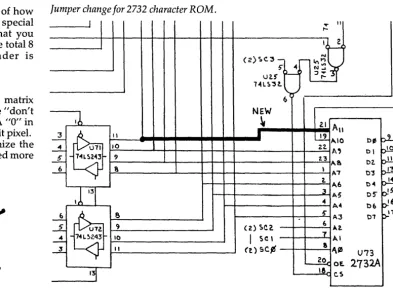
The Big Board is shipped with a jumper from U73 pin 21, to U73 pin 24. Remove that jumper and add a new one from U73 pin 21 to U71 pin 11. This upgrades the display from 128 characters to 256 characters by using 8 bits (DOb through D7b) to se-lect the displayed character. See Fig-ure3.
Generating a character
A3 through All specify which character is displayed and AO through A2 identify which horizon-tal line of that character to display. See Figure 1 to compute the ROM addresses.
Following is a description of how you can create your own special characters. Keep in mind that you can only use 5 by 8 out of the total 8 by 8 matrix, the remainder is blanked.
Down to the nits
First start with an 8 by 8 matrix (Figure 2). Bits 5, 6, and 7 are "don't cares", we'll set those to 1. A "0" in bits 0 through 4 becomes a lit pixel.
Note that you can customize the
present ROM if you don't need more
than 128 characters.
•••
8
4820 Westgrove #2707 Dallas TX 75248
Figure 1
Compute the 8 ROM addresses for "F" (46H)
A11 A10 A9 AB A7 A6 A5 A4 A3 A2 A1 AO ROM Address Lines D7B B D6B D5B D4B D3B D2B D1B DOB -- SCAN --
=
Input Data Nameso 1 0 0 0 1 1 0 = 46H = "F" (0100,0110)
=
Blanking bit (must be 1)' X=
Select B bytes (000-111)which make up a character
-O-=----:--~--::O:.---:O;:---=-O --::----:---::O:.---:O:.---O::---=-O -=- 630 H (Add ress 0 f 1 s t byte)
X X
o
0 0 0 0 1 1 1=
637H (Address of 8th byte) , All ROM locations 000H-3FFH and 800H-BFFH should contain OFFH to blank thescreen when this bit is O.
Figure 2
Putting an F into addresses 630H -637H. Addr. Data D7 D6 D5 D4 D3 D2 D1 DO
630H EOH
=
1 1 1 0 0 0 0 0* • , , •
631H EFH
=
1 1 1 0 1 1 1 1*
632H EFH=
1 1 1 0 1 1 1 1•
633H E1H
=
1 1 1 0 0 0 0 1=
·
.
,
.
634H EFH=
1 1 1 0 1 1 1 1•
635H EFH
=
1 1 1 0 1 1 1 1•
636H EFH=
1 1 1 0 1 1 1 1•
637H' FFH=
1 1 1 1 1 1 1 1DON'T 5/B MATRIX CARES
*
This row is reserved for lower case descenders on Char ROM V 2.XJumper change for 2732 character ROM.
I
I
T"
l
-I
~)
(2)~C.3- 10:::
5' <4 C\J ~
UH L-J :J~
1~L~.,t
~ ...
~ NEW
16
~ 2.1 All2-
1\•
~"10
~
.~
10 2.2.A'
L 7"L~2~3 9 2.'3
APt
~ 8 , A7
2.
A.6
J
13
13 A5 .. A",
-..!.
a
~ A3.J... <) (2) sc,2. 6 10.2.
~
7-±. 7"L.~l43 10
I
set A.I2- II (t) 5C.P! a f\~
~ OEo
I~ 1& c.s
ell!
PL-OJ p!!L
oz. elL
01
oIL
0",
pli-O~ p!5"
06
p!6
01 ~l
U73
2732A
[image:10.620.233.573.154.242.2] [image:10.620.182.575.454.746.2]"0 .,
"1"c:::::::J-- • c:::::::::2 • • c:::J.
.
-
.
- -
- "ENCLOSURES
Four piece high-impact thermoplastic enclosure
con-sisting of base, keyboard mounting plate, shroud and
tinted plexiglas screen. Can be cut and drilled with
ordinary hand tools. Ample room inside for a Big
Board, keyboard, power supply, 12" monitor, and a
mini-floppy disk drive. Lots of ventilation holes with a
space for mounting a 4" muffin fan. Available with
blank keyboard panel or precut for Cherry PRO and
auxilliary keyboards. PLEASE SPECIFY.
Color-Blue. SIZE: 21" D x 19" W x 16" H.
LIST $105
NOW ONLY
$89
plus $7 shipping
I/O PANELS
Give your computer that professional look with these
silk screened 12" x 3" aluminum panels. Cutouts for
disk, PIO, two RS-232 connectors, convenience outlet
and line cord.
LIST $12
NOW ONLY
$9
plus $1.50 shipping
MONITORS
These 12" Motorola monitors provide sharp, clean
characters in an 80 x 24 format. Wide 15 Mhz
band-width with 800 line resolution, excellent geometry
and separate video and sync inputs. Open frame
de-sign. Requires 12 VDC at 1.2 amps.
LIST $200
NOW ONLY
$150
plus $4 shipping
SUPER SAVINGS
ENCLOSURE, MONITOR AND PANEL -
$235
plus $9 shippingOCTATRACE
This dandy little gadget will make just about any
scope display 8 channels of TTL level signals.
Invalu-able for troubleshooting computers. Bandwidth is
greater than 3 M Hz. Power supplied by circuit under
test. Kit includes P.C. board, case, decal and
compre-hensive manual with parts list.
LIST $25
NOW ONLY
$20
plus $1.50 shipping
AD
COMP(]TER
PRODUCTS
P.o. BOX 571 Jackson, N.J. 08527 (201) 370-9889A Self-Loading ROM
By
Rob DeVoe
3850 SE GrantPonland, OR 97214
When Dave and I started t,alking about offering ROM FORTH, we decided that one of the most important design goals was that it be easy to use. In fact, we first discussed adding an 'F' command to PFM which would load FORTH into RAM. However, that would have meant modifying PFM and then selling four ROMs instead of three.
So we decided a more economical approach was to use the 'G' command along with the monitor's little-known 16 byte feature. You see, when the monitor loads itself into high memory it also loads the first 16 bytes of the following ROM space into RAM (beginning at F7FO). All we had to do was create a loader that selected the ROM bank, loaded the ROMs into RAM, and then transferred control to the code in RAM; all in 16 bytes.
To set the PIO bit 7 (select the ROM bank) I had to load the A register and output it to the PIO. The block move entails loading three 16-bit registers followed by an LDIR instruction. And finally, the control transfer is a JP to a 16 bit address.
So we normally have: LD
OUT LD LD LD LDIR JP
A,OCEH (1C),A HL,0810H DE,4000H BC,1800H 4000H
2 bytes - load CE into the A register
2 bytes - output CE to port 1C (select ROM bank) 3 bytes - HL gets address of source
3 bytes - DE gets address of destination 3 bytes - BC gets byte count
2 bytes - move code from ROM to RAM
3 bytes - transfer control to 4000
18
bytes totalHowever, you can reduce this to 16 bytes if you use the data in the C and E
registers twice.
So we now have: LD HL,0810H LD DE,40CEH
LD BC,181CH
OUT (C),E
LDIR
JP 40CEH
3 bytes - HL gets address of source 3 bytes - DE gets destination, making sure
that E contains CE (destination can be anywhere in upper RAM) 3 bytes - BC gets byte count (since it can be
anything over 1800 we will put 1C in C for double duty)
2 bytes - write CE to port 1C, this is where we save the two bytes by using the contents of the C and E registers.
2 bytes - move 181C bytes from 0810 to 40CE
3 bytes - transfer control to 40CE
16 bytes (perfect)
Now we have transferred the code from ROM into RAM and if the code is happy to run at 40CE, we're done. However, for FORTH I needed to relocate the whole chunk into low RAM between OOOOH and 1800H. So the first bytes at 40CEH relocate FORTH again.
LD OUT LD LD LD LDIR JP
A,04EH (1CH),A BC,1800H DE,OOOOH HL,40EOH OOOOH
load A with 4E to reset bit 7 on port 1C output it to select the ram side in low memory BC gets byte count
DE gets destination
HL gets source addr, 1st byte past this code move it
jump to new location
So, all the user needs to do to call FORTH is enter GF7FO and in no time there appears:
10
Z80 fig-FORTH 1.1 BIGBOARD 1.0
•••
Designer's
Corner
I finally got tired of listening to my disk drives grind on and on and decided to do something. So I dug out the article on disk drive motor control and my junk box and put something
togeth-er.
Initially I had the problem mentioned in the article, a huge transient on the SV line which sent the CPU off picking daisies. The transient was caused by arc-ing across the relay points. I added a .22 mfd SOOV capacitor across the points and whoopee, the transient was gone.
The relay in my spare parts box had a 24 V DC coil so I added a simple circuit to turn it on and off from the 4 V TTL line.
TO DR'VE MOTORS
I
.,..v~
.22~:--T
I
+J2.4V=[)c==:::::::.__ I
I
S.2/<'
L.. A
... YV
TBl PIN7
(on Sis 8OQf'd)
24VDC. RELAY
(.OIL
2N.l.l9
The -5V provides a reverse bias for the transistor so it turns off. The relay is a Guardian IR-122S-2C-24D.
Jim Showker User's Software 7812 White Oak Ave Northridge, CA 91325
Editor's note, just about any small
DC relay should work in this appli-cation. You can use a 12 VDC relay by simply substituting the +12 V
line for the +24 V or use a 6 VDC relay (they usually pull down at 4 V)
by substituting the +5 V line. Oth-erwise the circuit is the same. Also, just about anyone-watt or greater
20% -40%
off retail.
A~hton Tate dBa~e II
Condor I (entry level data ba~e ~ys.)
Condor II (relational dba~e sy~.)
Condor III (relational, wI report writer)
Di~ital Re~earch
MAC (macro a~~embler)
ZSID (~ymboLic debu~~er for ZBO) PL/1-BO
CBASIC 2
CB 80 (true compiler for CBASIC 2) PASCAL MT+ VERSION 5.5
Ecosoft Micro~tat (advanced ~tati~tic~)
Supervyz (~implifies CP/M)
Faircom Micro B+ (keyed file acce~sing)
Quickscreen (screen builder) Graham Dorian (requires CBASIC 2)
per module
interactive-per module I.S.A. Spell~uard (~pelling checker) Ithaca Intersy~tems Pascal Z
Key Bits Wordsearch (spelling checker)
Lexi~oft Spellbinder (word processor)
Microtax Level I (red./individual) Level I I " "
Level III (fed./partnership) Micro Pro
WORDSTAR (most popular word processor) MAILMERGE
WORDSTAR/MAILMERGE
DATA STAR (data entry, ret. & update) WORDMASTER (text editor)
SUPERSORT I (sort/merge) SPELLSTAR (spell check/diet.) CALCSTAR (electronic ~pread sheet)
CPIM
software for
BIG BOARD USERS
list 700.00 295.00 595.00 995.00 90.00 100.00 500.00 150.00 500.00 475.00 + 295.00 95.00 + 260.00 + 149.00
600.00 1000.00 295.00 395.00 195.00 495.00 250.00 1000.00 750.00 495.00 150.00 645.00 350.00 150.00 250.00 250.00 295.00 users 517.00 21B.00 440.00 735.00 7B.00 86.00 431.00 105.00 431.00 409.00 255.00 62.00 20B.00 12B.00 443.00 738.00 21B.00 340.00 169.00 277.00 154.00 615.00 462.00 304.00 93.00 396.00 216.00 93.00 154.00 154.00 IB5.00 Microsoft BASIC 80 BASIC COMPILER FORTRAN 80 COBOL 80 MACRO BO
Northwest Analytical Statpak
Oa~i~ "The Word" (spell check & diet.)
Sorcim PascallM Supercalc
Structured Systems IJl'r modu It'
Super~ort
DIGNOSTIC II (hardware checker) FORTH (~pecify ZBO or B080) SSS FORTRAN
RATFOR (language enhancer Fortran) SUPER M-LIST (mai 1 1 i~t prugram) TINY PASCAL
DISK DOCTOR (lo~t data recovery) UTILITIES I or II
STAR EDIT (text editor) NEMESIS
DUNGEON MASTER ANALIZA ANALIZA II Systems Plus
FMS BO
ACCOUNTING PLUS 1 module
2 module~
3 modules 4 modules
+ specify language
list 350.00 395.00 500.00 750.00 200.00 495.00 75.00 ·395.00 295.00 1250.00 100.00 200.00 250.00 100.00 75.00 85.00 100.00 60.00 225.00 40.00 35.00 35.00 50.00 995.00 users 259.00 292.00 369.00 554.00 160.00 366.00 56.00 292.00 218.00 738.00 80.00 160.00 200.00 BO.OO 59.00 6B.00 BO.OO 4B.00 lBO.OO 32.00 27.00 27.00 40.00 735.00 431.00 BOO.OO 1169.00 1538.00
Please specify computer and disk format. Enclose $2.50 for shipping and handling. For 24 hr. ~ervice
send cashier's check or money order. Personal checks take two weeks. Complete catalog-$I, included with each order. Ca. residents include 6% sales tax. COD OK, call 213-708-B537 after bu~iness hours.
USER'S SOFTWARE 7B12 White Oak Ave., Northridge, ca. 91325
(Letters continued)
the WYLBUR editor I am used to. Since editors are controlled by the fingers, not the head, that is a signif-icant advantage. The price is $250 so it is not cheap but it is very powerful. The electronics division at Argonne National Laboratory has done extensive modifications to
MODEM7, and renamed it
MO-DEM7.5. It will handle half duplex systems, and file transfers with line by line protocols (appears to be a ter-minal session to an editor). The com-ment section in the assembly listing grants anyone permission to use the package but not permission to mar-ket. I wonder if it wouldn't be a good candidate for a user disk if it falls within the copyright permission. Dale Koelling
5400 Webster
Downers Grove, IL 60515
Editor's note:
Yes, I'll be glad to burn a modified ROM for anyone on the same basis that I'm doing the fast monitor ROMs and character ROMs. Just send your board number, a ROM, and a self addressed stamped envelope along with $5.00. Or
Micro Cornucopia, Number 6, June 1982
send just the board number and $25.00 and I'll return a custom fast ROM pre-paid. Of course, include the information on the modifications (please specify the ROM address rather than the destina-tion address, the ROM address for SPEED is OOFCH).
About the public domain software, we're operating as a non-commercial user group. $15 per disk is more than CPMug but about half as much as some other groups charge for copies of public domain software.
Dear Editor,
I'm using a Persci 277 dual drive. It has a single spindle and head car-riage which leads to problems unless you make the following changes to the head position table:
Original:
F6C3 2806 JR Z,SEL2-$
;CONTINUE IF NEW DRIVE IS READY
New:
F6C3 2824 JR Z,HOME-$
;HOME HEAD IF NEW DRIVE IS READY
This homes the head when chang-ing drives. The mod may also be needed for double-sided drives. John Ballenthin
2 Vine St.
Lexington, MA 02173
Dear Editor,
Thank you for reviewing our L YNC data communications pro-gram in your February issue. We es-pecially appreciate your printing the initialization parameters required to get L YNC running on the Big Board. We have expanded our manual to 12 pages so it's easier to use.
Since many of your readers have a limited budget we are offering a spe-cial price of $80 ($15 off the regular price) to anyone mentioning Micro Cornucopia when placing an order.
Also, enclosed is a check for $16 for a one year subscription to Micro Cornucopia; it's a great publication! Eric Randall
COMPUTER-AID 1122 De La Vina
Santa Barbara, CA 93101
•••
FORTHwords
A Column
by
Arne A. Henden
Because Hampton Miller is re-viewing two FORTHs in this issue, I am handling the column myself. Hampton will be back in force next issue. (May the force be with him. Ed)
In this column I'll cover some hap-penings in the FORTH world. Fol-lowing this I'll present a terminal emulator.
Benchmark Update
I've run the floating point tests us-ing Big Board UNIFORTH. Z80 software executes basic math opera-tions about as quickly as the 9511 processor. However, for sines, co-sines and other transcendental func-tions the 9511 is about 20 times fast-er. One of the reasons that the software is so slow is that it is written in high-level FORTH. I have a com-plete timing breakdown that in-cludes the LSI-11123 and 8086 ver-sions of UNIFORTH available for anyone who sends an SASE.
If you want fast floating point that is IEEE compatible, you are pres-ently limited to the 2MHz 9512 or its cousin the 4MHz 8232A. These do not have the trig functions built in. It might be possible to interface the In-tel 8087 co-processor to the Big Board for some super speed advan-tages, but the chip costs as much as the Big Board!
In the Journals
I plan to cover some of the more interesting FORTH utilities pre-sented in various journals. Two of these are listed below, and others will be covered in subsequent col-umns.
"A Disk Operating System for FORTH, An In-depth Look at How a DOS Operates" (by Peter Reece,
Byte, April 1982). Reece has devel-oped FORTHDOS, a very useful file-oriented disk utility for FORTH. It provides all of the usual directory, random and sequential record ac-cess, file locking, etc. routines and should be seriously considered for your system. It is about 27 screens long and shouldn't be difficult to im-plement. Extensions to FORTHDOS could include variable-length
rec-12
ords and fixed-length records of more than one size.
"A Screen-oriented Editor in
FORTH" (by Henry Laxon, Dr.
Dobb's Journal, September 1981). This is a public-domain editor that is very nice and has a lot of features. Commands are similar to Wordstar. It is 63 screens long and therefore will take a while to enter.
Laxon is a good writer, and you should at least look at the editor; it is an excellent example of how to
doc-ument FORTH properly. If you
don't already have a video editor, I recommend this one highly.
Leo Brodie, who wrote "Starting FORTH", has moved from FORTH, Inc. to Inner Access Corporation (Belmont CA). lAC offers many FORTH classes and consulting ser-vices (not cheap). Brodie is also now the editor of FORTH Dimensions, and promises to publish more appli-cations and less system program-ming.
SCR it 70
7415 Leahy Road New Carrollton, MD 20784 (301) 552-1295
The Allen Group of Kalamazoo MI. is using FORTH to control its SMART SCOPE automotive diag-nostic analyzers. Aregon Systems, Inc. of Anaheim CA. is using FORTH in its product, Data Ace, a relational data base management system. David Beers is giving a talk on Data Ace at the 1982 Rochester FORTH Conference in May. Data Ace is a commercial product and is definitely not within reach of the hobbyist's pocketbook.
A Programming Preamble
I'll be presenting a FORTH cation in every column. These appli-cations will follow FORTH-79 con-ventions wherever possible. Readers are encouraged to submit their own applications for inclusion, but are asked to keep non-standard
words to a minimum. (Watch your
language folks.)
However, there is no standard for machine-language words. I will
o A simple terminal emulation program in FORTH) HEX 1 Using the SIO-B port and the PFM monitor interface) 2 Note: use either the UNIFORTH or ROM-FORTH versions) 3 of the 3 primitives, but not both!)
4 Written 1982 by A. Henden)
5
!***
UNIFORTH versions of the primitives**** )
6 OF012 CONSTANT SERSTAT ( serial status routine)7 OF015 CONSTANT SERIN (serial input routine) 8 OF018 CONSTANT SEROUT (serial output routine)
9 CODE ?SIO ( - - - t / f ••• is any data at serial port?) 10 SEP.STAT CALL, A L LD, 0 H LD, HPUSH, END-CODE 11 CODE SKEY ( - - - c ••• bring in one char from serial) 12 SERIN CALL, A L LD, 0 H LD, HPUSH, END-CODE 13 CODE SEMIT ( c --- ••• emit char to serial port) 14 HL POP, L A LD, SEROUT CALL, NEXT, END-CODE
15 DECIMAL ;S SCR tt 71
o (
Terminal emulator , screen 2) HEX1 (
****
ROM-FORTH form of the 3 primitives**** )
2 PSCODE (pseudo CODE defining word)3 <BUILDS HERE 2+ , DOES) EXECUTE ;
4 PSCODE ?TERMINAL ( - - - t/f ••• has a terminal key been struck?) 5 06CD , 6FFO , 0026 , 2BC3 , 0000 ,
6 PSCODE ?SIO ( - - - t/f ••• is any data at serial port?) 7 12CD , 6FFO , 0026 , 2BC3 , 0000 ,
8 PSCODE SKEY ( - - - c . . . bring in one char from serial)
9 15CD , 6FFO , 0026 , 2BC3 , 0000 ,
10 PSCODE SEMIT ( c --- ••• emit char to serial port) 11 7DEl , 18CD , C3FO , 002C ,
12 DECIMAL ;8
13 14 15
usually use the UNIFORTH Z-80 as-sembler because it's simple. Its mne-monic conventions are straight re-verse polish: "source, destination, opcode." I will present as few CODE words as possible to keep confusion
down. If you have any problems
converting the UNIFORTH CODE words to your FORTH's assembler, drop me a line and I'll try to help.
Z80 FORTH and ROM FORTH users can minimize the conversion by purchasing the Z-80 assembler and cursor-addressed screen editor
from Unified Software Systems (was
Unisoft). The price is $25 including shipping.
The listings for the last issue were kindly printed by Dave Thompson. Unfortunately, his printer did not have 'greater than' and 'less than' signs, and printed fractions instead. Replace every '1/4' that you see with a 'less than' and every '1/2' with a 'grea ter than. '
SCR :It 72
o ( Terminal emulator, screen 3)
A Simple Terminal Emulator The terminal emulator shown in the screens below is presented as an example of how to interface with a simple I/O device.
Think of writing in FORTH as "top-down design, bottom-up pro-gramming." You first decide what you want the final application to be and flowchart the program. Then,
use CODE words (if you must!) to do
the most primitive interfacing with the I/O device and test these words. Finally, build on these primitives with high-level FORTH to finish the application.
For our case, the words ?SIO, SKEY and SEMIT need to be ma-chine-language to call the PFM monitor routines that perform I/O and status checks for serial port B. You cannot call the PFM routines di-rectly from high-level FORTH be-cause you cannot fill the necessary registers, and the PFM routines won't return to the FORTH "inner
1 SIMP-EM (basic emulation loop •.. half duplex t i l l infinity) 2 BEGIN ?TERMINAL IF KEY SEMIT THEN 7SIO IF SKEY EMIT
3 THEN 0 UNTIL ;
4
5 6 7 8 9
10
11
12
13
GETNUM (bring in number from console, interactive) PAD 20 BLANKS PAD 1+ 17 EXPECT PAD NUMBER DPL @ O( IF DROP THEN ;
SEND-FILE (send file to computer, interactive) ." Starting block:lt: " GETNUM CR ." Ending block#: " GETNUM 1+ SWAP 13 ( cr) SEMIT DO (loop over blocks)
I BLOCK 1024 0 DO (loop over chars w/in block) DUP I + C@ SEMIT LOOP
DROP LOOP ;
14 --> 15
SCR :It 73
o ( Terminal emulator, screen 4)
1
2 A more compilicated emulator. CTRL-A drops out of the) 3 emulation, CTRL-B calls SEND-FILE)
4
5 EMULATE (endable loop. of half-duplex termulation) 6 BEGIN ?SIO IF SKEY EMIT THEN ?TERMINAL ( term I/O 7) 7 IF KEY DUP 1 = (CTRL-A?)
8 IF DROP 1 ELSE DUP 2 = (CTRL-B?)
9 IF DROP SEND-FILE ELSE SEMIT THEN 0 ( continue flag) 10 THEN
11 ELSE 0 THEN 12 UNTIL ;
13 ;S
14
15
Micro Cornucopia, Number 6, June 1982
interpreter" (NEXT).
However, once defined, these three primitive words give you full access to the serial port. The first screen shows the UNIFORTH form for these primitives, followed by the ROM FORTH form. Because ROM FORTH does not have a built-in as-sembler, the words are much more obscure, essentially being hard coded.
The word SIMP-EM is a high-level FORTH word that polls both inputs and performs output accordingly. SIMP-EM uses an infinite loop, and so will emulate a terminal until you reset your system. This basic loop is so simple that it could be entered by
hand (hard-coded) with the PFM 'M'
command. However, by program-ming in FORTH, you can add many features to the basic loop.
EMULATE is a more complex ver-sion of the emulator. It adds two functions: a means of exiting the emulator and returning to FORTH (CTRL-A from the console), and a simple terminal-to-computer file transfer (CTRL-B from the console). The file transfer routine, SEND-FILE, asks the user to enter the mass storage region to be transferred, and then sends a carriage return to the serial port (ending the last line you sent to the port), followed by the contents of all requested mass stor-age blocks.
For this version, you are required to have the necessary CR/LF's im-bedded in the text, and some sort of file terminator at the end of the text.
No handshaking, such as XON 1
XOFF, is included. EMULATE at least gives you an idea of how you would go about adding features.
The UNIFORTH version of the terminal emulator is far more exten-sive, and includes port A functions, paging, baud rate selection, etc. In addition, a small turnkey FORTH terminal emulator is currently being developed that will fit in 1-2 ROMs. This application will be discussed in greater detail in the next column.
(continued next page)
FORTH Reviews
By
Hampton Miller
FORTH in ROM
Author: Type: Distributor: Price: Requires: Manual:
Rob DeVoe 8080 fig-FORTH Micro Cornucopia $65.00 - 2716 $80.00 - 2716-1 Big Board 14 pg glossary 4 pg examples and implementation notes
Have a Big Board and want to run fig-FORTH right now? Then FORTH in ROM is for you. Just plug in the three ROMs, tell PFM 'GF7FO', and
presto, you're running FORTH~
Rob DeVoe has been fiercely faith-ful to the 8080 fig model with only a few departures. And these depar-tures have all been in the right direc-tion. This fidelity is both the major strength and weakness of ROM FORTH.
The strength is that your 8080 fig programs will certainly run with lit-tle, if any, modification. The weak-ness is that the disk is accessed on a sector by sector basis so you may
(FORTHwords continued)
Letters
Comments from readers are be-ginning to come in, and I greatly ap-preciate them. While most have been highly favorable, there are some dissenters. Remember, FORTH is an excellent instrument control and interfacing language. It was not designed for data-crunch-ing, where you should use FOR-TRAN or PASCAL instead.
Next column
Cross-compiling FORTH to create small kernels dedicated to a single task is a common practice, and one ideally suited to the Big Board. Cross-compiling is the process of generating on one system (the host) a FORTH that is to be executed on a another system (the target). The MetaFORTH cross-compiler is used with UNIFORTH and will be dis-cussed in detail. Hampton will present a simple FORTH applica-tion. Good luck and smooth
pro-gramming~ • • •
14
load and unload the head as many as eight times each time you read a screen of data (depends on how long it takes to process each sector of da-ta). While there is no easy hardware fix for this, software enhancements (in FORTH) are certainly possible. Watch for these in Micro C.
No application software (editors, assemblers, etc.) were delivered with my pre-release copy but David Thompson tells me that a FORTH users disk is in the making. My above-mentioned enhancements will probably find their way onto it.
Conclusion
Despite the head banging, I have to admit that ROM FORTH is the FORTH that I use on my own sys-tem. The price is right, the media never crashes and it meets its speci-fications with grace and honor.
UNIFORTH
Author: Type: Distributor:
Price: Floating pt: Requires: Manual:
Arne Henden Z80 FORTH-79 Arne Henden PO Box 2644 New Carrollton, MD 20784
$50.00
$35.00 additional Big Board
68 pg spiral bound
The hardest thing about using UNIFORTH is getting it out of the packing materials. Arne Henden does an excellent job making sure that you get this FORTH undam-aged.
The manual
Included with the disk is a really substantial and excellent manual. It includes step-by-step descriptions liberally sprinkled with superb ex-amples. It's like being taught by a very knowledgeable long-time friend.
UNIFORTH is very easy to use. First you make a working copy of the distribution disk and then boot it up. A simple SYSGEN procedure allows you to tailor the package to your sys-tem. Arne has done a lot of work
PO Box 816
Carpinteria, CA 93013
making sure that you can customize the system for your own needs. For instance, most of the UNIFORTH source (in FORTH) is included on the distribution disk. The source for the machine language kernel is available to purchasers at an addi-tional charge.
FORTH-79 Standard
UNIFORTH is an implementation of the proposed 79 standard. Users should note that most fig FORTHs are not 79 standard. Arne's manual carefully details which words are FORTH 79 standard, fig compatible, and which are unique to UN-IFORTH. The glossary specifies which screen holds the FORTH source for each word (unless the word is defined in the machine lan-guage kernel).
Editor
The basic price includes a rela-tively easy to use editor optimized for FORTH programming. It also can be used as a general purpose text editor.
The editor supports a number of different video terminals. While most users will probably use their built-in ADM-3s, UNIFORTH also knows about H-19s and even the
IBM ASCII terminal. Bravo~ The
edi-tor alone is worth the price of admis-sion.
Special features
UNIFORTH is custom fitted to the Big Board. Disk II 0 is optimized, and the CTC, if present, is used to keep time and date. These added features make UNIFORTH a pleas-ure to use.
Conclusion
UNIFORTH is an excellent imple-mentation of FORTH. It is easy to use, has many useful features and utilities, and is a real bargain. I haven't used the assembler or float-ing point but they appear to be of the same high caliber. More goodies are on the way from Arne which will in-crease the value of UNIFORTH.
UNIFORTH
You've heard about FORTH's interactiveness, speed and versatility. NOW HERE'S YOUR CHANCE TO OWN THE BEST! UNIFORTH is a stand-alone FOR TH for the Big Board. No operating system is needed - - save your bucks for more important purchases - - but if you have CP
1M,
there is a utility available for file transfer.UNIFORTH is FORTH-79 standard, with the double precision integer and assembler extensions. Don't get stuck with the 128 -byte "blocks II and slow disk access of fig-FORTH! All code is FULLY OPTIMIZED for the Z-80, and all Big Board devices are supported, such as the CTC for listings with date and time. Included with UNIFORTH are:
- All SOURCE CODE except for a 5K byte kernel, so you can easily modify the system. The kernel source will be available in June as part of the Programmer's Manual.
- An interactive CURSOR-ADDRESSED EDITOR (the best around!). Others charge the price of UNIFORTH for just this alone. All keystroke commands are logical, and include string search and replacement, even across block boundaries. Forget a command? Just inspect the omnipresent menu.
- Full Z-80 ASSEMBLER, using Zilog mnemonics, with completely logical syntax; and it supports the undocumented index register instructions.
- Full IEEE-compatable single-precision FLOATING POINT software. Eight-bit signed exponents yield Illore range than the AMD-95ll. All functions are included, such as sines, cosines and 10garithIlls. COIllpare with the other FOR THs and see the difference!
- A l36-page USER'S MANUAL. Broken into logical function divi-sions, it includes Illany exaIllples and leads you step-by- step through the learning process.
Pricing:
Version 1 (without floating point) $50 Version 2 (with floating point) $85
Own Version I? You can upgrade to Version 2 for only $35. All versions distributed on IBM 3740 standard eight-inch single-density floppy disk. Postage is prepaid within the continental U. S.
UNIFIED SOFTWARE SYSTEMS P. O. Box 2644
HIGH
FOR A
RESOLUTION MONITOR
LOW RESOLUTION PRICE
SUPER DEALS ON HIGH RESOLUTION TECO MONITORS.
Like Leedex or Zenith monitors, these 12 in.
Teco monitors are
complete, ready to connect to the Big Board's composi t video output.
Unlike the Leedex or the Zenith, however, the top of the line Teco
features a 20 MHz bandwidth for unmatched resolution and P31 fast green
phosphor.
This
model
is
crystal
sharp
even
when
displaying
132-characters pel" line.
However, if you insist on a display that our competition can match,
we also have standard 15 MHz models with either P31 green or B&W
phosphor.
These monitors are regular stock and include a complete money back
guarantee.
If you have any problems within three months, simply return
the monitor for exchange or refund.
Also, ask about our quantity discounts on monitors and about our
prices on Scientific, I-Ching, and game software.
CHECK THESE PRICES
20 MHz, green phosphor ••• $138
15 MHz, green phosphor ••• $128
15 MHz, B&W ••••••••