SOFTWARE DEVELOPMENT METHODS AND TOOLS: A NEW ZEALAND STUDY
Chris Phillips, Elizabeth A. Kemp, Duncan Hedderley Institute of Information Sciences and Technology
College of Sciences Massey University
Palmerston North
Email: [email protected], [email protected], [email protected]
ABSTRACT
This study is a more detailed follow-up to a preliminary investigation of the practices of software engineers in New Zealand. The focus of this study is on the methods and tools used by software developers in their current organisation. The project involved detailed questionnaires being piloted and sent out to several hundred software developers. A central part of the research involved the identification of factors affecting the use and take-up of existing software development tools in the workplace. The full spectrum of tools from fully integrated I-CASE tools to individual software applications, such as drawing tools was investigated. This paper describes the project and presents the findings.
Keywords: Software development methods, CASE tools, software engineers, New Zealand INTRODUCTION
There are few studies that attempt to model the activities of software engineers. Singer et al. (1997) commented on the paucity of studies in this area noting that little effort had been expended in understanding how software engineers work. In regard to New Zealand, Groves et al. (2000) carried out a survey of software requirement specification practices, but were primarily concerned with the requirements gathering activity. They concluded that there was a wide range of types and organisations engaged in software development. In addition many kinds of applications were being built. Whilst this made it difficult to identify meaningful patterns from the data collected, some tentative conclusions were put forward. The most significant factor when determining the practices employed appeared to be the size of the software development group. Such groups tended to have better defined development processes, spent more time on requirements capture and had more rigorous testing regimes.
This study has a wider focus which includes the software development methods adopted, and the tools and notations used to support these methods. A central part of the research has involved an investigation to identify factors affecting the use and take-up of existing software development tools in the workplace. The full spectrum of tools from fully integrated I-CASE tools to individual software applications, such as drawing tools, has been investigated, with the purpose of determining what tools are currently being used to support software development activities. The research has been undertaken in two phases:
A preliminary study of the practices of software engineers in New Zealand. This involved a review of relevant literature on software engineering and CASE tools, the development and testing of an interview protocol, and structured interviews with five software engineers. Kemp, Phillips and Alam (2003) describe this phase of the project, present an analysis of the data, and examine the results in the context of the theory described in the literature. The results of this study will be summarised later in this paper.
has been on the software development methods and tools used by each developer in their current organisation. Specific information has been sought on the usefulness and take-up of tools, and on how well I-CASE tools meet claimed benefits for this type of tool.
The goals of the research are improved software engineering processes and methods, better computer-aided software engineering (CASE) tool support, and improved training of software engineers. Close links have been established with major software development companies in New Zealand, and part of the research has been conducted at selected sites.
This paper continues by briefly reviewing software development methods and CASE tools. The main results from the preliminary study are then outlined. The research method adopted in this study is next described, and the results presented in detail. Following a discussion of the results some conclusions are drawn. The questionnaire used in the research is presented in full in the Appendix.
SOFTWARE DEVELOPMENT METHODS
Those who write about the discipline of software engineering describe the lifecycle activities that should be undertaken (Lending and Chervany, 1998; Pfleeger, 1998; Schach, 1999; Sharma and Rei, 2000; Pressman, 2001; Sommerville, 2001). Life cycle activities depend upon the software development method followed such as the waterfall, data-centred, prototyping or evolutionary approaches. At a practical level, the activities undertaken may vary depending upon the size and nature of a given project. Tool support may also vary, as discussed in the next section. These variables were explored through the questionnaire used in the research.
The traditional lifecycle or waterfall model is typically described in a sequential fashion moving from stage to stage involving requirements specification, software design, coding and testing, each requiring a set of deliverables (Sommerville, 2001). Iterations between phases are required however, to enable revisions to be made whilst an application is under development. In the data centred approach the focus is on the data rather than function and the specific method of entity relationship modelling (Sallis et al., 1995).
Prototyping an application begins with some requirements gathering and moves on to the development of some part of the system. It assumes that the customer can communicate their requirements more effectively once there is something to look at (Yourdon, 1994). The developer may undertake prototyping when there are no clearly stated requirements. It is also appropriate when the developer has little experience of the application domain or of the tools and languages that will be used to develop the system (Yourdon, 1994). The subsequent prototype can be discarded as in throw away prototyping or retained as the basis for further development as in evolutionary or incremental prototyping (Schach, 1999; Pressman, 2001). Problems can arise if the prototype is taken to be a working version of the application.
Once a life cycle has been selected a software engineer has to make a decision about what notations to use to model and document the system. These make it easier to understand a problem and shape a solution (Robillard et al., 2003). A large number of notations are available including entity relationship, data flow and data structure diagrams (Jordan and Machesky, 1990) and the nine notations specified in the Unified Modelling Language: use case, class, sequence, collaboration, activity, state, component, deployment and package diagrams (Booch et al., 1999). Robillard et al. (2003) observe that gains in uniformity, reliability and productivity are made when notations are consistent across the various phases of the lifecycle. It is important though that staff have tools to support them and are trained in their use.
A further decision relates to the programming language (or languages) used to implement the software. The choice of language will depend upon the nature of the system, and may be constrained by company standards and by the range of tools available to support the language. Many systems now incorporate the use of graphical user interfaces and the Web, which further extends the range of possibilities. A wide range of programming support environments is available, including integrated development environments (IDEs), 4GL workbenches, web development tools, and data base management tools.
The level of training provided for development staff in methods and tools may impact their effectiveness. A further issue is whether it is better for staff to learn tool use before, during or after they learn the method. These issues will also be explored through the questionnaire.
CASE TOOLS
CASE tools are available which can assist software engineers carry out activities at all stages of the lifecycle (Pressman, Somerville). At one end of the spectrum there are tools which support one activity and at the other complete environments which support many lifecycle activities. These are referred to as integrated CASE (ICASE) tools. A complete taxonomy is provided by Pressman (Table 1). The benefits of CASE tools are said to include: a smooth transfer of information, greater productivity, an increase of project control and improved co-ordination. There may though be an initial decrease in productivity when CASE tools are introduced. There are also tools known as metaCASE tools which allow you to specify your own CASE tool (Aldersen, 1991) This is to enable a fit between the organisations’ development process and the tool.
Business process engineering Analysis and design
Process modelling and management PRO/SIM
Project planning Interface design and development
Risk analysis Prototyping
Project management Programming
Requirements tracing Web development
Metrics and management Integration and testing
Documentation Static analysis
System software Dynamic analysis
Quality assurance Test management
Database management Client/server testing
Software configuration management Re-engineering
Table 1: Classification of CASE tools (based on Pressman, 2001)
those 350 who returned the questionnaire adopted CASE tools. Overall 60% of activities performed by the departments surveyed were supported to some degree by CASE. There was a very high CASE tool adoption rate for activities such as the representation of objects, relationships and processes (95% of the respondents) with a much smaller proportion of adopters using CASE for testing and validation purposes (39%). They found that as the size of the Information Systems department grew larger, the proportion of adopters was almost twice as large as the non-adopters. In another study, Gray et al. (2000) concluded that it was hard to provide evidence of productivity gains or increases in the quality of the product from the use of CASE tools, and that further research into the practices of software engineers was required in order that more usable tools might be provided. The research being reported here represents a step along this road.
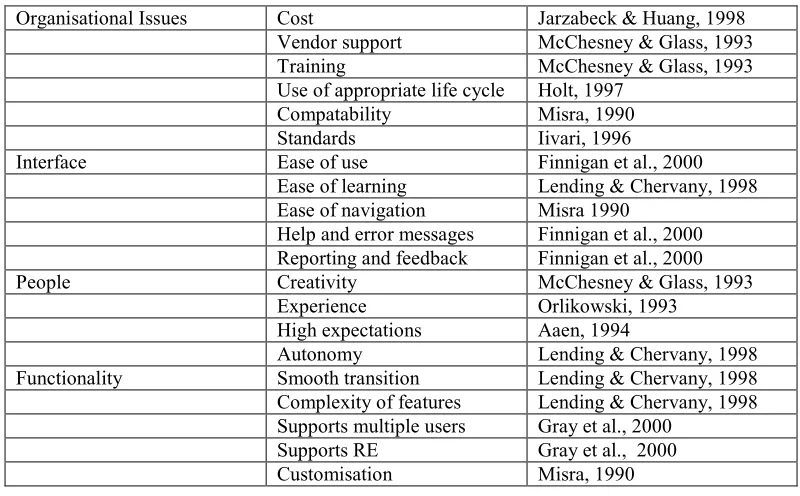
Organisational Issues Cost Jarzabeck & Huang, 1998
Vendor support McChesney & Glass, 1993
Training McChesney & Glass, 1993
Use of appropriate life cycle Holt, 1997
Compatability Misra, 1990
Standards Iivari, 1996
Interface Ease of use Finnigan et al., 2000
Ease of learning Lending & Chervany, 1998
Ease of navigation Misra 1990
Help and error messages Finnigan et al., 2000 Reporting and feedback Finnigan et al., 2000
People Creativity McChesney & Glass, 1993
Experience Orlikowski, 1993
High expectations Aaen, 1994
Autonomy Lending & Chervany, 1998
Functionality Smooth transition Lending & Chervany, 1998
Complexity of features Lending & Chervany, 1998 Supports multiple users Gray et al., 2000
Supports RE Gray et al., 2000
Customisation Misra, 1990
Table 2: Factors involved in CASE adoption
There is a large literature on the adoption of CASE tools which focuses on the factors that play a role in whether they are accepted or not. Table 2 shows the main issues involved. These factors are explored through the questionnaire.
Some key problems relating to the adoption of CASE tools are as follows:
1. Developers with considerable investment of time and experience of traditional software development practices are more reluctant to use CASE tools than those with less experience (Orlikowski, 1993).
2. People do not find CASE tools easy to use even when happy with the provision of help, navigation facilities etc (Finnegan et al).
3. Users find notations and editors inadequate for their purpose, seeing them as an obstacle (Gray et al., 2000).
when using CASE tools (Lending and Chervany, 1998).
6. The complexity of CASE tools is seen as an obstacle to their use by developers (Iivari, 1996, Gray et al. 2000). Lending and Chervany (1998) also found the use of CASE tools to be time-consuming and difficult.
7. Training is not often seen as a worthwhile activity by IT managers (Schwarzkopf et al 2004) who have limited budgets. Training is also seen having a limited shelf life (Arnold and Niederman, 2001).
The above difficulties suggest that current CASE tools may not be providing claimed benefits. The take-up of CASE tools, including ICASE, is one of the issues explored through the questionnaire used in the study being reported in this paper.
PRELIMINARY STUDY
This earlier study (Kemp, Phillips and Alam, 2003) was a preliminary investigation of the practices of software engineers within New Zealand, with particular reference to their use of development tools. It was decided to employ a qualitative research approach using structured interviews, rather than a quantitative method such as a questionnaire, because of the exploratory nature of the study and the complex processes involved. Once the research objectives were determined, the relevant literature on Software Engineering practice and the use of CASE tools was reviewed. This was used as the basis for developing the interview protocol which was subsequently revised after testing it out in a pilot interview. The focus was on determining the activities of the developer and other members of the team on a current project. Five participants were selected, who it was anticipated, would provide rich data about working as software engineers. All of them were required to be currently developing software and using tools. It was also seen as important to cover different environments rather than interview several developers from an organisation. The people selected were working on quite different kinds of projects and for companies of different types and sizes.
Results
The companies studied varied in size from large to small and worked on projects of various kinds. Project planning and management was undertaken by all the developers studied using appropriate software. In 60% of cases this was Microsoft Project. Structured analysis and design, object oriented analysis and design, prototyping and data-centred approaches were used by the developers when building systems. In three cases there was a mix of software development methods used, tailored to the requirements of the organization
In all of the organisations well-accepted notations were used on the projects described by the developers to model the system: entity relationship, data flow diagrams, class diagrams, state charts etc. Some but not all of these were used on any given project. Generally tools were used to draw the diagrams and models but in one case some models were hand-drawn. Visio was used as a drawing tool in three of the organisations.
company’s requirements, such as performance tracking software and a defect management tool . With respect to CASE adoption only two of the firms had purchased an I-CASE tool (Rational Rose). In neither case was it used to integrate models but more as a drawing tool. Cost, complexity and other organisational issues such as introducing I-CASE when a team was under pressure to develop systems were seen as obstacles to investment in this area. There was also a concern expressed by one developer that the introduction of such a tool would slow down the production of code. The functionality and usability of I-CASE tools were also seen as an obstacle. The preference seemed to be for flexible, light-weight tools.
Despite the various differences reported, all of the participants in this study followed appropriate procedures for developing software. There was no instance where the process was ad hoc. Perhaps this was because no one was involved in small projects. Many factors appeared to play a part in accounting for the differences reported: the project type, the kind of development, the financial situation of the company, the culture of the organisation, the size of the project, the experience of staff, and the developer’s preference. None of the organisations used an Agile methodology (Fowler, 2001).
THIS STUDY
The findings reported in the above study were the result of only five case studies. Exploratory studies of this type are required so that the software engineering community can start to find out how practitioners actually work. However more comprehensive research is seen as necessary.
The study being reported in this paper is a more substantial one involving a questionnaire sent to several hundred developers. The focus has been on the software development methods and tools used by developers in their current organisation. Specific information has been sought on the background and experience of the participants, on the software development methods and tools being used, on the usefulness and take-up of available tools, and on how well I-CASE tools meet claimed benefits for this type of tool. Finally, through a number of open-ended questions, participants have been asked to present their views on a number of issues relating to current and future software tools. The questionnaire is discussed in detail in the next section.
The broad goals of the research are a better understanding of software development methods and tools from the viewpoint of software developers. We also wish to investigate whether there is any relationship between the survey results and the size of organisation, the type of company, the length of project or the type of application developed. It is hoped that the research will lead to improved software engineering processes and methods, better computer-aided software engineering (CASE) tool support, and improved training of software engineers.
RESEARCH METHOD
The study involved detailed questionnaires being piloted and sent out to several hundred software developers in New Zealand. The developers were randomly selected from addresses in a business directory.
The questionnaire
The focus of the questionnaire was on the software development methods and tools used by each developer in their current organisation. The seven-page questionnaire, made up of 25 questions, appears in full in the Appendix. It contains a mix of general, open-ended, scalar, multi-choice and ranked questions. Prior to being sent out, it was piloted with three local developers, and modified accordingly.
Section A (questions 1-7) gathered background information on the respondent and their organisation, including job title, length of time with the organisation, the nature of the business, the size of the organisation, the size of the software development section and the types of applications developed. The intention here was to build a picture of the respondent and their working environment.
The questions in the main body of the questionnaire (Section B) fell into three broad groups. The first group (questions 8-16) asked the respondent to select a recent (or current) software project with which they were involved, and answer questions relating to the project, and the development methods and tools used. In regard to the project, information was gathered on the duration, the size of the project team, and the development methods, modelling notations, and programming languages used. The names of the operating systems used to support the project were also elicited. In regard to tool use, a total of 20 software development life cycle activities under four main categories, were listed on the questionnaire. Specific information was sought on the tools used to support each of the life cycle activities, the usefulness of these tools, and whether their use was compulsory. The categories were requirements analysis, design, coding and testing, and project management. Respondents could define additional activities in each category.
With regard to I-CASE tools (questions 17-19), information was gathered on how well they met claimed benefits for this type of tool, and how well they met a range of functional and non-functional requirements, including those relating to usability. Where I-CASE tools were not being used, respondents were asked to provide any insights as to why they had not been adopted.
In a series of open-ended questions to complete the questionnaire (questions 20-25), respondents were asked to state what features and facilities they did not use in current tools, whether they had tried and rejected tools (and for what reasons), what new tools if any were being considered for adoption in their organisation, and what they would like to have in an ideal set of software development support tools. Information was also elicited on the amount of formal training on software development tools being provided within their organisation.
THE RESULTS
Background information (questions 4 to 7)
Over half of the respondents worked in small firms (20 or fewer employees), 9% in medium (21 to 50 employees) and 36% in large firms (greater than 50 employees). Seventy six percent of the respondents worked in organisations with small software development/maintenance teams (up to 10 people). Only 16% were working in organisations with large software development units (over 50 people).
Respondents were asked to state what types of applications were most commonly developed in their organisation (Table 3). If we consider first and second rankings then Management Information Systems (MIS) and Transaction Processing (TP) systems are most likely to be developed, with embedded and systems software least common. If we consider all rankings for systems developed within an organisation then web based systems are almost as likely to be developed as MIS and TP systems. Nine companies were only involved in one type of development – 5 of them building MIS. For each of real time, web, system and embedded software, there was only one specialist organisation. On the other hand, there were 12 companies involved in building at least 4 kinds of software.
MIS TP RT Web System Embedded
First and second
rankings 38 36 14 23 10 8
All rankings 45 42 24 38 14 14
Table 3: Types of applications commonly developed Project, methods and tools (questions 8 to 16)
The respondents were asked to specify the length of the project on which they worked before answering questions on methods and tools. Sixty percent worked on a project that lasted between 3 months and 1 year. Only a small number worked on a very small (<3 months) or very large project (>3 years). Eighty six percent of those who replied to this question worked on projects where the number of participants was less than ten. Only 7% worked on projects where more than 20 people were involved.
Respondents were asked which software development methods were used on the project. They could mention more than one. Two people used no formal development approach whatsoever although they explained that some thought went into the process. The other responses indicated that structured, object-oriented analysis and design, and prototyping (more than 40% in each case) were widely used. There were also 6 people using methods not mentioned in the questionnaire such as Xtreme Programming, Functional Definitions and REP. Table 4 shows the percentage of the 73 respondents using each software development method.
Structured Prototyping
Object-Oriented Data-Centred Other
Number 33 33 31 16 10
Percentage 45.0% 45.0% 42.5% 22.0% 14.0%
Of the 73 who used development methods, 33 people (45%) used only one approach with 28 choosing from the methods listed. The most favoured single method was object-oriented analysis and design used by 10 respondents. There were 7 people who used each of the structured and prototyping approaches. This left 40 people who used various combinations of methods, 35 of whom (48% of the respondents) used two or more of the listed development methods. The figures for these combinations in order of their popularity are shown in Table 5.
Combination Number
Structured analysis & design/prototyping 16 Structured analysis & design/Object-Oriented 11
Data-centred/prototyping 8
Structured analysis & design/data-centred 7
Object-Oriented/prototyping 4
Object-Oriented/data centred 4
Table 5: Software development methods used in combination
Only 66 people answered the question concerning whether tools were introduced before, at the same time or after the software development method. If we ignore the 9 respondents who chose not to answer, then in 43% of cases a tool to support the method followed was introduced first. In another 43% of cases the tool and method were introduced at the same time. Only in a small proportion of cases was the tool introduced after the method.
Respondents were asked about the value of notations used on a scale of 1 to 5 (1 represented not useful and 5 very useful). Only ERDs had a mean above 3.5 which shows a reasonable though not high rating for usefulness (Table 6).
Notation N Mean
ERDs 44 3.6
DFDs 43 3.3
Flowcharts 42 3.3
Sequence diagrams 34 3.0
Structure Charts 38 2.9
Detailed UC specs 34 2.8
Activity diagrams 32 2.7
Class diagrams 37 2.7
State diagrams 32 2.5
Use case diagrams 30 2.4
Table 6: Perceived usefulness of notations
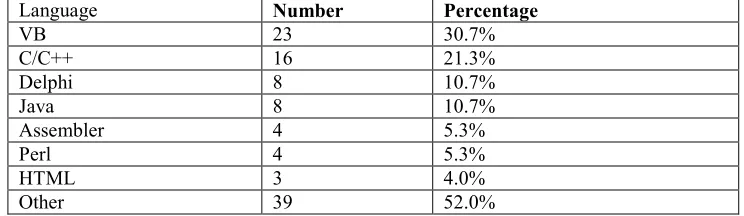
Language Number Percentage
VB 23 30.7%
C/C++ 16 21.3%
Delphi 8 10.7%
Java 8 10.7%
Assembler 4 5.3%
Perl 4 5.3%
HTML 3 4.0%
Other 39 52.0%
Table 7: Programming language used
Overwhelmingly the Operating system of choice was Windows (used by 84% of respondents) although nearly 19% of respondents used Unix or an associated version. Both of these obviously were used on some projects.
With regard to life cycle activities, respondents were asked to check those they carried out and name the support tool used (if any). Table 8 shows the number of respondents and percentage of the sample who carried out an activity. It also shows the number who used a tool to support them. Percentage* shows the proportion of those performing an activity who used a tool.
The most frequently carried out activities were requirements gathering, software coding and software testing. Modelling activities were often omitted, many being undertaken by less than 40% of the respondents. In the case of object modelling this figure was as low as 16%.
Performed by
Using Tool
Activity Number Percentage Number Percentage*
Requirements Gathering 58 77.3% 28 48.3%
Software Coding 55 73.3% 38 69.1%
Software Testing 53 70.7% 29 54.7%
Software Documentation 49 65.3% 32 65.3%
User Interface Design 46 61.3% 26 56.5%
Project
Planning/Scheduling/Review
46 61.3% 33 71.7%
Data Base Design 43 57.3% 24 55.8%
Software Design 39 52.0% 16 41.0%
User Interface Prototyping 36 48.0% 23 63.9%
Design Specification 35 46.7% 21 60.0%
Architecture 32 42.7% 17 53.1%
Data Structure Design 32 42.7% 15 46.9%
Data Modelling 28 37.3% 15 53.6%
Test Plan Specification 28 37.3% 15 53.6%
Process Modelling 23 30.7% 12 52.2%
Task Modelling 18 24.0% 10 55.6%
Workflow Modelling 17 22.7% 9 52.9%
Object Modelling 12 16.0% 8 66.7%
Capturing Of Design Rationale 6 8.0% 5 83.3%
Table 8: Activities performed and tool support
Whilst requirements gathering was the activity most frequently performed, less than half of those who carried it out were supported by a tool. Some respondents mentioned their use of a whiteboard for such purposes. The only other activity where less than 50% of users were assisted by a tool was data structure design. Some activities that were both frequently carried out and supported by a tool included software coding, software documentation and project management. The activity “capturing design rationale” was only carried out by 6 people but tool support was 83.3%. Over 60 tools were used by the respondents but those mentioned most frequently are shown in Table 9.
Tool Number Tool Number
Microsoft Word 33 Microsoft Excel 10
Microsoft Project 22 Rational products 8
VB 14 Access 7
Visio 13 Delphi 7
Table 9: Most commonly used tools
An analysis of the results of this question by phase shows that Visio was used most frequently for activities in the software requirements analysis phase, Microsoft Word for most activities during software design, coding and testing (e.g. for specifying test cases) and VB was the most commonly employed tool for prototyping and coding. MS Project was the piece of software most widely used for project management.
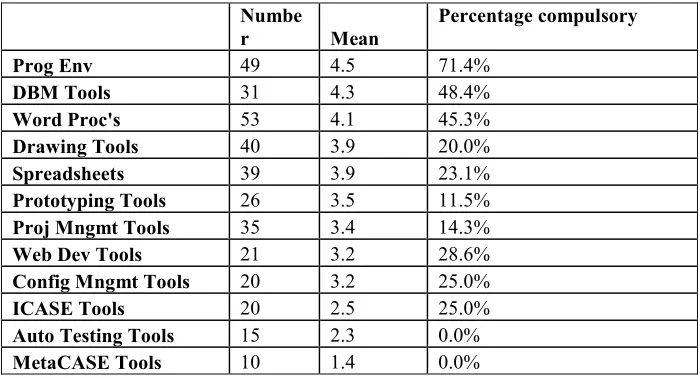
The respondents were asked to rate the usefulness of different kinds of tools on a scale from 1 to 5 where 1 represented not useful and 5 very useful. More respondents answered this question on the general usefulness of the different kinds of tools than specified their use on the project.
Table 10, which shows the usefulness of the different categories of tools is sorted by the mean obtained. Programming environments were seen as most useful and MetaCASE tools least. Other types of tools that scored quite highly (> 3.5) were DB Management tools, Word Processors, Drawing Tools and Spreadsheets. CASE tools (ICASE and MetaCASE fared badly). The means for programming environments, DBM tools, Word Processors, Drawing Tools and Spreadsheets were statistically significant (using Tukey’s HSD) from those for ICASE tools, auto testing tools and MetaCASE tools.
The “Percentage Compulsory” figure was worked out by dividing the number who stated that they used a tool of a particular type by the number who stated its usage was compulsory. Only in one case – for Programming Environments (71.4%) - was the “use compulsory” figure greater than 50%. There were then only 2 cases where the figure was greater than 40% - for DB Management Tools (48.4%) and Word Processors (45.3%). Spreadsheets, drawing tools and project management software were all used by reasonably large numbers but in none of these cases did the percentage compulsory figure reach 24%.
could, but did not have to, use any CASE tools. Only three used none at all. Ten people (13%) reported that usage of all the tools they rated for usefulness was compulsory. In no case when tool usage was compulsory did the number of tools used on the project exceed five. Finally for the remaining 28 (37%), some tools had to be used whilst others were optional.
Numbe
r Mean
Percentage compulsory
Prog Env 49 4.5 71.4%
DBM Tools 31 4.3 48.4%
Word Proc's 53 4.1 45.3%
Drawing Tools 40 3.9 20.0%
Spreadsheets 39 3.9 23.1%
Prototyping Tools 26 3.5 11.5%
Proj Mngmt Tools 35 3.4 14.3%
Web Dev Tools 21 3.2 28.6%
Config Mngmt Tools 20 3.2 25.0%
ICASE Tools 20 2.5 25.0%
Auto Testing Tools 15 2.3 0.0%
MetaCASE Tools 10 1.4 0.0%
Table 10: Usefulness of tools
Overall, people who had to use tools rated the usefulness of tools on average 1 point higher than people who did not have to use tools. This applied across the board, not just for some tools.
ICASE (questions 17 to 19)
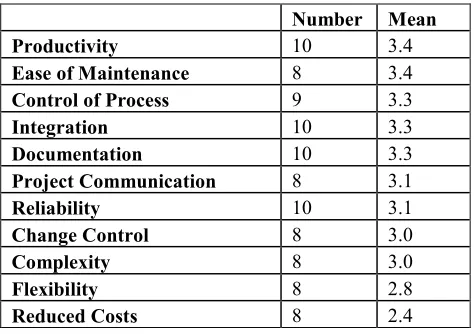
Number Mean
Productivity 10 3.4
Ease of Maintenance 8 3.4
Control of Process 9 3.3
Integration 10 3.3
Documentation 10 3.3
Project Communication 8 3.1
Reliability 10 3.1
Change Control 8 3.0
Complexity 8 3.0
Flexibility 8 2.8
Reduced Costs 8 2.4
Table 11: ICASE Tools: perception of benefits
ICASE users were also asked to rate how well the tool met 23 specified requirements (Table 12). The same scale was used as that in the previous question.
Numb
er Mean
Consistency 10 3.7
Documentation 10 3.7
Support RE 10 3.7
Reliability 9 3.6
Integration/Langs 8 3.5
Support Re-Use 10 3.5
Transit Models 9 3.4
Effective Editing 10 3.4
Smooth Navig 9 3.3
Efficient Working 9 3.3 Transit Activities 8 3.1
Support Methods 8 3.1
Performance 9 3.1
Interface 10 3.1
Integration/Tools 8 3.0
Integration/SW 9 3.0
Support Group 9 3.0
Reporting &
Feedback 9 2.9
Help 9 2.9
Vendor Support 9 2.9
Easy to Learn 10 2.8
Cost 9 2.6
Table 12: ICASE Tools: perception of how well they meet requirements
There were six requirements where the mean was equal to or greater than 3.5 – consistency, documentation, support for reverse engineering, high reliability, support for re-use and transition between models. The conclusion can be drawn, therefore, that these requirements on the whole are met by ICASE tools. This type of tool though was seen as failing to meet the requirement for acceptable cost – with a mean of 2.6 and for ease of use (easy to learn, support, feedback). The means for consistency and documentation were statistically different from that for cost.
Fifty two people answered the question about why ICASE tools were not employed in their organisation. Some of the respondents gave more than 1 reply. The principal reasons given for not employing ICASE are shown in Table 13. Almost half the respondents (46%) saw ICASE tools as unsuited to current projects, while high cost was seen as a significant factor by 27% of those who replied. Nineteen percent saw ICASE tools as unfit for purpose, and a similar number considered the learning curve to be too great.
Category Number Percent of
respondents Cost (of product, time to make changes, extra lifecycle costs ) 14 27%
Not required (not needed yet, size or type of project ) 24 46%
Unsuitable for purpose i.e. not useful (inadequate features, too restrictive)
10 19%
Time – learning curve, pressure to deliver constraints 10 19%
Unaware of ICASE 6 11.5%
Not integrated with other tools 2 4%
Requirement for champion 2 4%
Table 13: ICASE Tools: reasons for non-adoption Open ended questions (20 to 25)
Only twenty two people answered the question about which features or facilities of tools available to them were not used. The name of the tool was not always given and no tool was mentioned more than twice. The respondents rarely specified the facility not used. What is of interest, however, are the principal reasons given by the respondents for not using features of a tool. Forty percent of those who replied stated that they did not have the knowledge to use all the appropriate features. For almost 25% there was insufficient time for training. A study by Huff et al (1995) confirmed that many users fail to apply the technology to anywhere near its potential.
Forty one people answered the question about what new software tools, if any, were being considered within the organisation. Overall, more than forty different tools were mentioned. Seven respondents, a sixth of those who answered this question, mentioned Rational Rose as being under consideration. Visual Studio was mentioned almost as many times (by 6 people, that is in a seventh of the cases). Otherwise there was little commonality. There was a trend, though, for tools to be under consideration for web related development. Some of the languages and tools mentioned in this regard were XML, HTML, and Dreamweaver.
giving more than one reason for this. A variety of tools were mentioned although the only one to be rejected by more than 2 organisations was Rational Rose which was no longer employed in four cases. ICASE tools, it should be noted, were rejected on at least 7 occasions (in about 20% of cases.) The principal reasons given for rejection were: cost (8), unsuitability for purpose (8) and practical issues such as performance and portability (6).
Twenty six people mentioned one or more features that they would like to see incorporated into tools. A wide range of suggestions was made and there was little overall agreement about what was required. The need for integration was mentioned by seven respondents in total (representing about a quarter of those who answered this question.) and not only in the context of version control. One person requested better integrated regression testing, whilst another was concerned with a feature that provided integrated project and task management. People see the need to integrate tools whilst still rejecting a single integrated tool on the ground of cost, complexity etc.
Seventy two people answered the question about the days of formal training provided per annum on development tools (Table 14). Forty percent of the respondents received less than 1 day’s training per year at most with 29.5% percent getting between 1 and 3 days training. The remainder received more than 4 days. Large companies with large software development groups tended to provide more training than other company structures.
<1 1-3 4-10 >10
Number 29 19 16 7
Percentage 40.0% 29.5% 11.5% 11.5% Table 14: days of formal training per annum
Fifty nine people answered the question on whether the number of days training per year was adequate. It was clear from an analysis of the answers that they were discussing the effectiveness of the training they received whether informal or not. It was not an issue for five people. Of the rest, twenty five replied that the training provided was adequate whilst twenty six thought that it was insufficient. Three people stated that it was good in some circumstances but not in others eg “Enough for the capable developers but insufficient for new developers.”
Sixteen people were happy with formal training. For two of the latter, training was seen as an ongoing process eg “this organisation promotes constant learning.” Six people, though, were quite scathing about the value of formal training e.g. “I have had no training at all for ten years. The little I did have was a waste of time.” There were also a group of nine people who were satisfied with the informal training they received. “On-project training is more useful.”
Twenty five percent of those who replied that their training was inadequate cited time constraints as a reason for the lack of training. Almost as large a percentage (23%) quoted budgetary constraints. For a little more than 10% the lack of local provider was a problem. This factor was closely associated with cost. Three people mentioned that their organisation could not afford the cost involved in sending people overseas to train. For about 8%, their organisation did not realise the necessity for training. If we consider days training in association with the compulsory usage of tools, 13 out of the 30 people who did not have to use any tools had less than 1 days training per year.
software. They tended to focus on the issue of process rather than tools with two people specifically stating this was more important eg “I believe we should be concentrating more on processes and documentation than tools”. Three others in this group referred to the importance of understanding the business and two to meeting end user requirements. For one respondent, successful communication with users was vital to effective user involvement. Three people described the main features of their process with one person mentioning their quality management system. Finally there were three respondents who advocated the use of agile processes eg the tool is only a small part of the software development process. A quality, agile SDLC is far more important.
Other issues mentioned by the respondents included the need for specialized tools, real world constraints on the use of tools and the lack of a design culture. Some particularly thoughtful comments were made about real world constraints: “Tools – In my experience you need to be very committed to using a CASE tool and put a lot of effort into using it properly, otherwise it’s just a specialised drawing tool”, and “Methodologies are great, but you have to pick and choose and customise, which means many of the supporting tools over or under deliver.”
DISCUSSION
The response rate for this survey (26%) is similar to that in the Sharma and Rei study (23%). Only 75 of the respondents were employed in the software industry and they worked for many different types of organisations both large and small. A large variety of application types were being developed by the companies for which the respondents worked. MIS, transaction processing and web systems, though, were each being developed by more than 50% of the sample. Given the importance of the web, this finding was not unexpected. Overwhelmingly most respondents had been involved in software development for many years. This was a very experienced group who could provide a great deal of information about current practices. Seventy three of the respondents compared to 46 in the Sharma and Rei (2000) study worked on projects where CASE tools were used.
Using the Chi-square test, we found few associations between the results of the survey and either the size of the organisation, the type of company, the length of the project or the type of applications developed. The strong association (P<.0001) was between sector and size of company/software development team with manufacturing companies tending to be large but with small software development groups and Telecoms companies tending to be large with large software development groups. Software development companies, however, were usually on the small side.
The more people were involved on the project, irrespective of project size, the more likely ICASE was to be used. Generally this involved large companies with large software development groups (although the data set was too small to be statistically significant). Such companies also tend to provide more training (p=.0026). Groves et al. indicated that the size of the software development group seems of some importance when determining practices. Here the evidence suggests that this was true with regard to investment in ICASE and training. Otherwise methods on projects, project lengths etc tended to be similar..
Structured systems analysis and design (usually associated with the waterfall model) and prototyping were the most commonly used development approaches followed closely by object-oriented analysis and design. Given the greater longevity of the first two of these, it was interesting to note the wide use of the OO paradigm. It should also be noted that more than one method was employed on a large number of projects. The same mix of results was found in the preliminary study (Kemp et al. 2003).
used by more than 50% of the respondents and in almost 50% of cases 3 notations or less were used on a project. Only ERDS, a notation of long standing, had a mean above 3.5 (which can be seen to represent somewhat useful). Surprisingly, given that 40% of the respondents stated that they used an object oriented analysis and design approach, class, state and use case diagrams all had low means with the difference being statistically significant. Sequence diagrams though were seen as more useful than the other UML notations.
With regard to activities and tools used to support them, it should be noted that there was no activity performed on 100 % of projects. One reason for this relates to the fact that not all organisations involved in the survey were in the business of developing the complete product. Some companies for example were involved with requirements gathering but not coding.
The activity that was most frequently performed was that of requirements gathering followed by software coding and testing both of which were carried out on more than 70% of the selected projects. Modelling activities fared badly overall coming 13, 15, 17, 18 and 19 (out of 20) in the table. Object modelling, carried out on only 16% of the projects, scored very poorly. This is consistent though with the poor opinion of class diagrams as a notation. There were only two activities that were widely performed where the use of a tool was compulsory, software coding and project planning activities. The lack of compulsion was something of a surprise. For instance, in only 20% of cases, was the use of drawing tools made compulsory. This fits in of course with the lack of interest in modelling activities. Design activities fared somewhat better.
With regard to the perceived usefulness of CASE tools, more respondents evaluated tools than used them on the project referenced. This could be for two reasons. Firstly, they did not write down all the tools that they used on a project. Secondly they are accustomed to using tools of this kind on other projects and felt that they could evaluate their usefulness. The discrepancy between the totals for usage is particularly marked for spreadsheet usage .
At a detailed level, three kinds of tools (programming environments, DB Management tools and Word Processors) had a mean greater than 4 indicating that these were seen as really useful. ICASE and MetaCASE, the most complex tools, performed particularly badly. It was interesting that in less than half of the cases tools to support new methodologies were introduced before the methodology was used. It was as likely for both tools and methodologies to be introduced together. It is not surprising given that staff might be struggling to learn a methodology as well as a tool that that many tools were not perceived as useful.
When considering the tools overall, the percentage using each one was not very high with only 4 used by more than 50% of the sample. Nonetheless, on all but 2 projects a CASE tool was used. The results cannot confirm or refute Orlikowski’s contention that developers with considerable investment of time and experience of traditional software development practices are more reluctant to use CASE tools than those with less experience (Orlikowski, 1993). The results do indicate though that a large group (83%) of predominantly experienced developers chose to use one or more CASE tools.
Those people who were made to use a tool rated them on average 1 point higher than people who did not have to. This applied to all tools and suggests that once people have to use the tool then they perceive its benefits. Lending and Chervany (1998) believe that extrinsic motivation (tool is useful) is low when using CASE tools, but perhaps when compulsion is taken into account the level of extrinsic motivation increases. This may be because people have to come to grips with features that they otherwise would not use and appreciate their value. It may also be because people who have to use tools are given some training. The data in the questionnaire on training did not relate to specific tools so could it was not possible to determine if there was any effect of this kind.
meant to be used at several stages of the life cycle. There were also two tools, Visio and Word, that were used for several activities. Many readers might not consider Word to be a typical CASE tool but it was included by several respondents. In particular it was seen as useful for specifying test cases.
As in the preliminary study ICASE tools were not widely used. In this study they were only used by 10 people. Most (but not all) respondents were aware of what they were. Forty eight people were able to explain why ICASE was currently not used in their organisation or on the project (not required, unsuitable, time constraints). ICASE tools were also being considered by 7 more organisations. Given that no benefit had a mean above 3.5 then clearly no-one perceived ICASE tools as having any outstanding benefits. Productivity which is often mentioned (Pressman, 2001) only had a mean of 3.4. The use of ICASE was not seen as reducing development costs
The situation was somewhat improved with regards to ICASE tools meeting requirements. Four requirements had a mean higher than 3.5: consistency, documentation, support for reverse engineering and reliability. An acceptable cost, however, scored very poorly with a mean of 2.6. If the requirements are divided into five groups – those related to Artefacts, Support, Performance Integration, and Human Computer Interaction (HCI), - and the means of each group compared, it can be seen that there was no mean greater than 3.5. The mean for the HCI group of requirements is the lowest, thus indicating usability of the system was not found to be satisfactory (Finnegan et al, 2000) (Figure 1 and Table 15).
2.7 2.8 2.9 3 3.1 3.2 3.3 3.4 3.5
Artefacts Support Perfomance Integration HCI
M
e
a
n
Group name Components
Artefacts Consistency of work products
Effective drawing/editing of diagrams Good documentation of work products Smooth Navigation of diagrams Smooth transition between activities Smooth transition between models
HCI Customisation
Easy to learn
Efficient Working Interface Help
Interface
Reporting & Feedback
Integration Integration with other software
Integration with programming languages Integration with tools
Support Support for multiple methods
Support for reverse engineering Support for re-use
Support for group working
Performanceissues Performance
Reliability Vendor Support Note Cost was not included in any of these categories.
Table 15: ICASE Tools: category components
With regard to CASE tool acquisition and rejection overall, the picture which emerges is a dynamic one. Despite criticisms of tools, many organisations (40) are investigating the purchase of further CASE tools. Given the fact that more than half of the companies were developing web-based systems, it was no surprise that several of the tools under consideration were specifically for building web applications. On the other hand tools were also being discarded. In 34 organisations previously purchased tools were being rejected for reasons of cost or unsuitability.
When people were asked to state why they did not use features or facilities in tools that were available to them, the principle reason given was lack of knowledge. Ignorance of the capabilities of tools probably relates to their complexity (Iivari, 1996 and Gray et al, 2000). Shortage of time was also reported as an obstacle to people improving their skills (Lending and Chervany, 1998). When considering features that could be incorporated into tools, the main request was for better integration. It appeared that people see the need to integrate tools whilst still rejecting a single integrated tool on the basis of cost.
Forty percent of the respondents received less than 1 day of formal training per year. With regard to training in tool use, cost (Schwarzkopf, 2004) and time constraints were again mentioned as the main reason for the failure to deliver appropriate training. As a result, practitioners may not be using tools to their full potential (Huff, 1995).
the preliminary study. In this questionnaire, cost is clearly a key reason for not purchasing ICASE tool as well as for the failure to provide training in CASE tools of all kinds. Given the small size of many of the software development companies this is not surprising. The lack of time and complexity were also important factors. The appropriateness of a tool though for its intended purpose also emerged as an issue in this questionnaire. This relates to a tool not meeting requirements i.e. being too cumbersome/restrictive.
The last question, which was open ended, asked people to add any further comments. A surprisingly large percentage of the 29 respondents (45%) considered their philosophical approach to software development, the issue of process, to be more important for software development than the tools used. This attitude may well relate not only to the complexity and unsuitability of tools but also to their lack of support for problem solving( Jarzabeck and Huang, 1998 ). There could also be, overall, little intrinsic and extrinsic motivation as hypothesised by Lending & Chervany (1998). The value of tools may only be fully appreciated if people are fully trained in their use and have to use them.
CONCLUSIONS
The work reported here is a follow-up study to an earlier investigation into the practices of software engineers in New Zealand. The study involved a detailed questionnaire being piloted and sent out to several hundred software developers, and focussed on the software development methods and tools used by each developer in their current organisation. Specific information was sought on the usefulness and take-up of tools, and on how well I-CASE tools meet claimed benefits for this type of tool.
Most of the respondents had been involved in software development for many years, and were an experienced group who could provide significant insights into current practices. Few associations were found between the size of the organisation, the type of company, the length of the project or the type of applications developed. It appeared that developers see the need to integrate tools whilst still rejecting a single integrated tool on the basis of cost and complexity - ICASE and MetaCASE, the most complex tools, scored particularly badly for usability. Notations and conceptual modelling do not appear to be seen as especially useful. Despite criticisms of tools however, many organisations are investigating the purchase of further tools. A significant finding was that close to half the respondents who answered the final open-ended question, considered the issue of process to be more important for software development than the tools used.
ACKNOWLEDGEMENT
The authors gratefully acknowledge funding from the New Zealand Foundation for Research, Science and Technology to carry out part of this research.
REFERENCES
Aaen, I. (1994) Problems in CASE introduction: experiences from user organisations, Information and Software Technology, 36, 11, pp 634-654.
Arnold, D. & Niederman, F. ( 2001)The global IT work force. Communications of the ACM 44, 7, pp 31- 33
Beck, K. (1999) EXtreme programming eXplained: embrace change, Reading, MA: Addison-Wesley.
Boehm, B (1988) A Spiral Model for Software Development and Enhancement, Computer, Vol. 21, 5, pp 61-72.
Booch, G., Rumbaugh, J. & Jacobson, I. (1999) Unified modeling language user guide, Reading Mass: Addison-Wesley.
Dix, A., Finlay, J., Abowd, G., & Beale, R. (1998): Human-Computer Interaction, Prentice Hall, Hemel Hempstead.
Finnigan, D., Kemp, E. & Mehandjiska, D. (2000) Towards an ideal CASE tool, SMT 2000, Wollongong, IEEE Computer Society Press, pp 189-197.
Fowler, M. (2001) The new methodology,
http://www.martinfowler.com/articles/newMethodology.html, updated Nov 2001.
Gray, J.P., Liu, A. & Scott, L. (2000) Issues in software engineering tool construction. Information and Software Technology. 42, pp 73-77.
Groves, L., Nickson, R., Reeve, G., Reeves, S. & Utting, M. (2000) A survey of software requirements specification practices in the New Zealand software industry, Proceedings ASWEC 2000: Australian Software Engineering Conference 2000. (ed.) D. D. Grant. IEEE Computer Society. pp 189-201.
Holt, J. (1997) Current Practice in software engineering: a survey, Computing and Control Engineering Journal, 8 (4), pp 167– 172.
Huff, S.L., Munro, M.C., Marcolin, B.L. & Compeau, D.R. (1995): Understanding and Measuring End User Sophistication, Proc. Of 14th New Zealand Computer Conference, Wellington, 23-25 August.
Iivari, J. (1996) Why are CASE tools not used?, 39, 10, pp 94-103.
Jacobson, I., Booch, G. & Rumbaugh, J. (1999) The Unified Software Development Process, Reading, Mass : Addison-Wesley.
Jarzabek, S. & Huang, R. (1998) The CASE for user-centered CASE tools, Comms of the ACM, 41, 8, pp 93-99.
Jordan, E.W. & Machesky, J.J. (1990) Systems Development: Requirements, Evaluation, Design, andImplementation, Boston: PWS-KENT Publishing Company.
Kemp, E.A., Phillips, C.H.E. & Alam, J. (2003): Software Engineering Practices and Tool Support: An Exploratory Study in New Zealand, Australian Journal of Information Systems, Vol 11 No 1, 37-54.
Kruchten, P. (1999) The Rational Unified Process, An Introduction (2nd Edition), Reading, Mass: Addison-Wesley.
McChesney, I.R. & Glass, D. (1993) Post-Implementation management of CASE methodology, European Journal of Information Systems, 2, 3, pp 201-209.
Misra, S.K. (1990) Analyzing CASE system characteristics: evaluative framework, Information & Software Technology, 32, 6, pp 415-422.
Orlikowski, W. J. (1993) CASE Tools as Organizational Change: Investigating Incremental and Radical Changes in Systems Development, MISQ, Vol. 17, No.3, pp 309-340.
Pressman, R. S (2001) Software Engineering: A Practitioner’s Approach, 5th Ed., Singapore: McGraw-Hill.
Robillard, P., D’Astous, P., & Kruchten, P. ( 2003) Software Engineering process with the UPEDU, Boston: Pearson Education.
Sallis P., Tate, G., & MacDonnell, S. (1995) Software Engineering Practice, Management, Improvement, Sydney: Addison-Wesley.
Schach, S. (1999) Classical and Object-oriented Software Engineering, New York: McGraw-Hill.
Scott, C.A., Clayton, J.E. and Gibson, E.L. (1991) A Practical Guide to Knowledge Acquisition, Reading, Mass: Addison-Wesley.
Schwarzkopf, A., Mejias, R., Jasperson, J., Saunders, C., & Gruenwald H. (2004) Effective practices for IT skills staffing, Communications of the ACM, 47, 1, pp 83-88.
Sharma, S. & Rei, A. (2000) CASE deployment in IS organisations, Communications of the ACM, 43, 1, pp 80-88.
Shneiderman, B. (1998): Designing the User Interface: Strategies for Effective Human Computer Interaction, (3rd ed.). Addison-Wesley, Reading, MA.
Singer, J., Lethbridge, T., Vinson, N. & Anquetil, N. (1997) An Examination of Software Engineering Work Practices, Proceedings of CASCON '97, Toronto, pp 209-223. Sommerville, I. (2001) Software Engineering, Reading, Mass: Pearson.
APPENDIX QUESTIONNAIRE
Software Development Methods and Tools
Note: The focus is on the software development methods and tools which are used in your present organisation. The questionnaire is in two parts, and should take about 20 minutes to complete.
A. Background Information
1. What is your job title? _______________________________________
2. How long have you been with your present organisation? <1 year 1-3 years 4-10 years >10 years
3. How long have you been involved with software development? <1 year 1-3 years 4-10 years >10 years
4. How is your organisation best described?
Software Development Telecommunications
Consulting Banking/Finance/Insurance
Wholesale/Retail Trade Manufacturing
Education Public Service/Local Government
Health Central Government
Research Military
Other (please specify) __________________________________________
5. How many people are employed in your organisation? <5 5-20 21-50 51-150 >150
6. How many people are engaged in software development/maintenance? <3 3-10 11-20 21-50 >50
7. What type(s) of applications are developed in your organisation? (please rank: 1 most common, 2 next….., leave blank if not applicable) Management information systems (e.g. decision support)
Transaction processing systems (e.g. payroll, POS, accounting, inventory) Real time applications (e.g. process control, manufacturing)
E-commerce/web applications
Embedded systems (e.g. software running in consumer devices or vehicles) Systems software (e.g. telecommunications software)
B. Software Development Methods & Tools
Choose a recent (or current) software project in your present organisation, with which you were involved, and answer questions 8-16 in relation to this project.
8. What was the length of the project (from inception to an operational system)? Please estimate if the project is a current one.
<3 months 3-6 months 7-12 months 1-3 years >3 years
9. How many people were involved with the project? <3 3-9 10-20 >20
10. Which software development methods were used on the project? You may check more than one box.
Structured Analysis and Design Object-oriented Analysis and Design
Data-centred design
Prototyping
Other (please specify) __________________________________________ ____________________________________________________________
11. In relation to the principal method used on the project, were the tools which support it introduced:
Before the method?
At the same time as the method?
After the method?
12. For each modelling notation used on the project, indicate on the following scale how useful it was:
Not useful……….Very useful
1 2 3 4 5
entity-relationship diagrams (ERDs)
data flow diagrams (DFDs)
structure charts
class diagrams
use case diagrams
detailed use case specifications
activity diagrams
state diagrams
flowcharts
sequence diagrams
Other (please specify):____________________
13. List the major programming languages used on the project:
______________________________________________________________ ______________________________________________________________
14. List the major operating systems used to support the project: ______________________________________________________________ ______________________________________________________________
15. Indicate by checking the boxes which of the following software development life cycle activities were undertaken on the project. Enter the name(s) of any software development tool(s) used to support each activity.
Activity Development tool(s) used Software Requirements Analysis
- requirements gathering
- task modelling
- process modelling
- object modelling
- data modelling
- workflow modelling
- user interface prototyping
- test plan specification
- other (specify) ________________
___________________________
Software Design
- architecture
- algorithm/component design
- data structure design
- data base design
- user interface design
- capturing of design rationale
- design specification
- other (specify) ________________
___________________________
Software Coding & Testing
- software coding
- software testing
- software documentation
- other (specify) ________________
___________________________
Project Management
- project planning/scheduling/review
16. For each of the following tools used on the project, indicate on the scale how useful it was, and check the final box if its use was compulsory.
Not useful………..Very useful Compulsory
1 2 3 4 5
integrated CASE tools
metaCASE tools
web development tools
drawing tools
database management tools
prototyping tools
programming environments
automated testing tools
project management tools
configuration management tools
word processors
spreadsheets
Other (please specify):_______________
_______________________________
_______________________________
_______________________________
Questions 17-25 are more general questions relating to tool use in your present organisation If Integrated CASE (ICASE) Tools (e.g Rational Rose, Oracle) are used, please answer questions 17 and 18. If not, please proceed to question 19.
17. Indicate on the following scale how well the ICASE tool used in your organisation meets each of the following claimed benefits for this type of development tool. Please name the tool.
ICASE tool: ___________________
Very Poorly……….Very Well
1 2 3 4 5
improved software reliability
improved productivity
greater control of development process
easier software maintenance
greater integration of system models
better system documentation
improved project communication
better change control
greater flexibility
reduced complexity
18. Indicate on the following scale, how well the above ICASE tool meets the following requirements:
Very Poorly……….….……... Very Well
1 2 3 4 5
smooth transition between activities
smooth transition between models
effective drawing/editing of diagrams
smooth navigation of diagrams
consistency of work products*
good documentation of work products*
integration with other tools
integration with programming languages
integration with other software
support for group working
support for re-use
support for reverse engineering
support for multiple methods
ease of learning
good reporting and feedback
good help and error messages
good customisation facilities
efficient working
good user interface
good performance
high reliability
acceptable cost
good vendor support
*Work Products refers to any artefacts produced along the way (models, documents, code etc):
19. If your organisation does not employ ICASE tools, please briefly indicate why not: ______________________________________________________________