M.S. in I.S degree. April, 2014. 29 pages. Advisor: Dr. Christopher A. Lee
Digital forensics methods and tools have many useful applications in the curation of digital materials in libraries, archives and museums (LAMs). Recent research efforts have shown that open source digital forensics tools can help LAM professionals to extract digital contents from born-digital media and make more informed preservation decisions. Most of these tools have ways to display the metadata of the digital media, but few provide file-level access without having to mount the device or download the files. This paper describes a project to develop a tool that supports access to the contents of digital media without having to mount or download the entire image. The work examines two approaches in creating this tool: First, a graphical user interface, running on a local machine. Second, a version in which the tool is deployed as a web-based application. The project incorporates off-the-shelf, open source forensics tools and libraries including The Sleuth Kit and libewf along with Python scripts and Flask[10] templates to generate HTML content for browsing media images.
Headings:
FILE-LEVEL ACCESS TO DISK IMAGES WITHIN A WEB BROWSER
by Sunitha Misra
A Master’s paper submitted to the faculty of the School of Information and Library Science of the University of North Carolina at Chapel Hill
in partial fulfillment of the requirements for the degree of Master of Science in
Information Science. Chapel Hill, North Carolina
April 2014
Approved by
Acknowledgements
I would like to thank Dr. Christopher A. Lee for his valuable guidance, feedback and constant support throughout the process of working on this project and writing the paper. My very special thanks to Dr. Kam Woods for being a wonderful mentor. He was
Table of Contents
Acknowledgements...1
Introduction...3
Background...4
Literature Review...5
Rationale...7
Methodology...8
Evolution...8
Functional Specification and User Interface ...10
BitCurator (Command-line and GUI) interface...10
Web Interface – Disk Image Access (DIMAC)...14
Simple Command-Line tool for content-viewing...17
Design and Implementation...18
Unit/Feature Test...21
Discussion and Future Work...21
Conclusion...23
Introduction
Background
The technical challenges presented by the curation of born-digital collections have given rise to several initiatives which use digital forensic techniques at various stages of
curation. A number of open source tools exist which address these challenges. BitCurator is a project that integrates several digital forensics tools to extract and analyze metadata from digital media as well as supporting triage tasks and making preservation decisions at collection facilities. BitCurator is a collaborative effort led by the School of
Information and Library Science (SILS) at the University of North Carolina at Chapel Hill and Maryland Institute for Technology in the Humanities (MITH) at the University of Maryland; it addresses two fundamental needs and opportunities for collecting institutions: (1) integrating digital forensics tools and methods into the workflows and collection management environments of LAMs and (2) supporting properly mediated public access to forensically acquired data [5].
The BitCurator software environment integrates digital forensics tools into curation workflows in LAMs. This includes open source tools like fiwalk, bulk_extractor,
is likely to be useful for ongoing curation efforts conducted by LAMs including triage tasks and preservation actions.
Literature Review
The authors of [3] have introduced the field of digital forensics to the professionals in the cultural heritage field giving an extensive list of the terminology, explaining each of them as applicable to the archival field. It also explores some points of convergence between the two seemingly unrelated fields: archival study and law. The report was published by the Council on Library and Information Resources (CLIR) in 2010. While the authors remind readers not to consider it a training manual, it does make a good reference handbook for archivists learning to understand the concepts and evolution of digital forensics used in cultural heritage contexts.
The report in [5] introduces the BitCurator project. It describes a number of open source tools including fiwalk, bulk_extractor and The Sleuth Kit (TSK) which form the backbone of the project. It also mentions the important roles played by technologies like AFFLIB (The Advanced Forensic Format library) and DFXML (Digital forensics XML).
the tools we will use assume that the disk image of the medium is available. Triage is the process in which things are ranked in terms of importance or priority. The process of data triage concerns identifying and analyzing potentially recoverable data. Data triage
Rationale
The purpose of this project is to provide a method to access the contents and metadata of raw and forensically packaged disk images. Users can browse through the files and contents of media images and reduce the time spent on analysis and making preservation decisions while dealing with born-digital assets. Another important contribution of this project is facilitating access to collections across collecting institutions using a web-accessible application. The tool may also be used to mask certain information that needs to be hidden from public viewing and display only what is needed at a particular time. For example, certain disk images may contain sensitive information which should not be exposed to the public, or to users who are not named in a particular permissions or access profile. A future enhancement of this tool might provide the ability to hide such
information from users with no access permission for such material. Details on access permissions are out of scope of this paper.
There exist several tools that may be similar to DIMAC or could coexist with it. OSFMount [18] is a commercially available tool, which allows the user to mount any digital image in Windows with a drive letter. While it takes care to not alter the original image, and allows free download of the software, the image has to be mounted and the software is proprietary. It also does not support web-based browsing.
addition to doing this, also helps at an earlier stage, in selecting or deselecting a digital object from a digital image. The two can work in conjunction where DIMAC can extract the digital objects from the digital media and if it is chosen to be a candidate for curation, Archivematica can be used to apply the micro-services based workflow to ingest the object into the preservation system.
Another related tool is Gumshoe Jr.[19]. It provides searching and sorting on metadata of the files contained in an image. It uses fiwalk to read disk images, populates Solr1 index
with file-level metadata, to provide searching and sorting on metadata. However, it does not allow for navigation of a disk image file independent of its extracted metadata.
Methodology
The tool was developed in two interfaces. The first is a graphical user interface running on the local machine. The the second is a web service that provides access to the functions of the tool from within a web browser. There is also a command-line tool that can be invoked to list the contents of a viewable file.
Evolution
This work evolved from earlier software development for the BitCurator project. As mentioned in an earlier section, BitCurator provides a set of tools to extract information out of digital media and generates reports containing technical metadata about the contents of the disk images. An extension of these features would be to provide the user with a tool that extracts the contents of the files in addition to the metadata. As a first
step, a command-line option was developed which took a filename as an argument to output its contents. It used the pytsk3 [11] APIs to extract such information. In order to use this tool, one needed to know the filenames and their respective inodes that the disk image contained. To extract such information, one had to first generate the DFXML file using the fiwalk utility. In order to automate this process, as an extension to the
BitCurator reporting tool, a new tab on the GUI was provided, which would take the user to a new interface where user had to provide the path to the DFXML file. Using this DFXML file, the inode of the given file was extracted to run the tool to extract the file contents. The tab was further refined to just use the disk image, run the fiwalk utility internally, and then launch another GUI that displayed the file structure of the disk image pictorially, so the user could click on the files to select them to download or display the contents.
Functional Specification and User Interface
This section presents a framework of the tool from user's perspective. It gives an
explanation of the tool, how it is used, how it is invoked, and the settings required before invoking the tool.
DIMAC provides a tool to analyze digital materials intended to be accessed in a variety of contexts – online, in reading rooms or in other specialized circumstances. The user does not have to mount the device or the image in order to access it, nor does one need to execute any special procedure for analyzing the contents of the media. However, the tool expects a disk image as a starting point. The BitCurator environment provides several tools for generating disk images, including Guymager2, which has a graphical user
interface.
Three kinds of interfaces are provided: (1) A graphical user interface which is invoked through the BitCurator reporting tool or through a command line, (2) a web browser interface to navigate through the file structure and (3) a command line tool to display the contents of a specified file. Each interface is explained in detail in the subsequent
sections.
BitCurator (Command-line and GUI) interface
User can invoke the tool on the command-line in a terminal in the BitCurator environment by providing the path to the disk image and an output directory name indicating where to download the files.
Executing the following command in the directory where the Python script bc_disk_access.py exists3, launches the file-access GUI. Providing the argument dfxmlfile is optional. If not provided, it generates it internally by invoking the fiwalk
command. If the image is big, this step would take some time to generate the DFXML file, during which time a spinning rectangle on the GUI indicates that it is being generated.
python3 bc_disk_access.py –image <image_name> [ --dfxmlfile <dfxmlfile>] --outdir <output directory> --listfiles
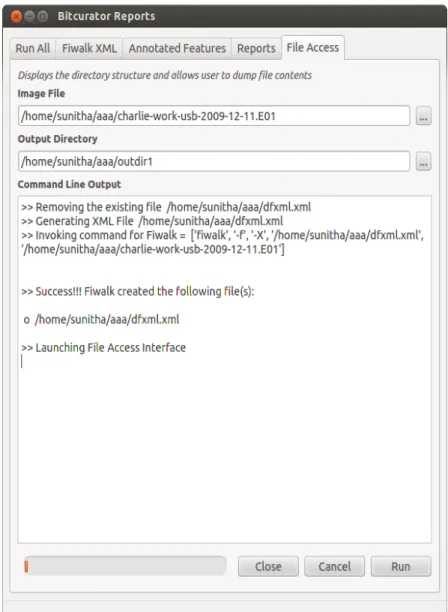
Another way to launch the GUI is to use the BitCurator reporting tool and click on the “File Access” tab and choose the image name and the export directory in the slots provided. Figure-1 shows the BitCurator reporting tool when the disk access GUI is successfully launched.
The File Access GUI outputs a directory structure listing the directories and files present in the specified disk image and a checkable box next to each element. A directory can be expanded by clicking on the arrow next to the directory name. The complete directory tree can be viewed by clicking on these arrows and expanding the depth of the tree. One can navigate through the directory structure by expanding and collapsing the subtrees as needed. This can be useful to professionals processing digital collections to quickly navigate through the files to see what is in the image. By clicking or double-clicking the check-box against a file, a user can select or deselect the files he/she needs to view or download. All the files can be selected or deselected by selecting the “select all” or
“deselect all” options respectively from the drop down menu from the window. Clicking on the “Export” button at the bottom of the tool downloads and displays the selected files. Log messages appear on the text-edit window on the right side of the interface.
Web Interface – Disk Image Access (DIMAC)
A Web-interface, separate from the BitCurator tool, shows a simple file structure
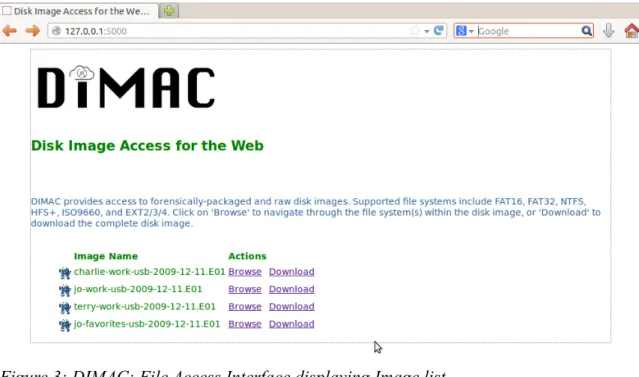
displaying the disk images, directories and the files they contain. The main page displays the disk images found in the configured directory. Using the Flask[10] configuration file, the directory containing the disk images can be specified before running the tool. The main page (see Figure-3) displays the list of the disk images found in this directory.
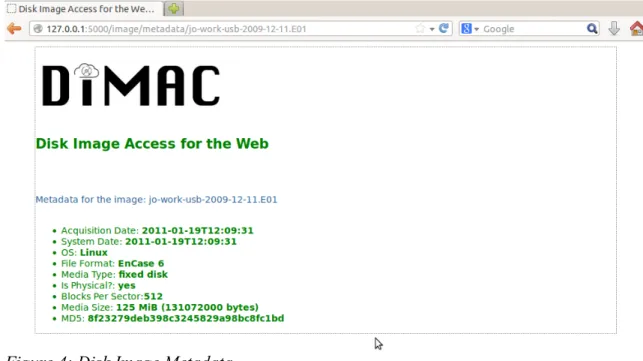
Clicking on the icon on the left side of each image name displays the metadata associated with that image (see Figure-4).
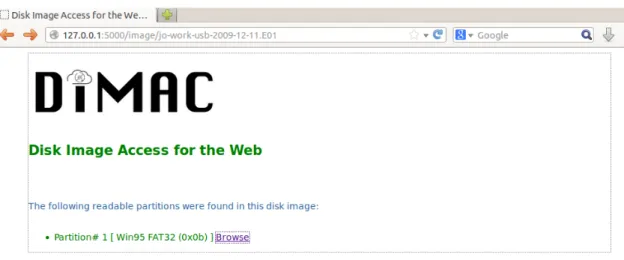
The main page (Figure-3) provides two clickable options on the right side of each image: Browse and Download. Clicking on the “Download” option downloads that image to the specified directory. Clicking on the “Browse” option of a particular disk image displays the partition information along with the file-system type (see Figure-5).
Clicking on a specific partition takes the user to a URL that displays the file names present in the image (see Figure-6). For each file listed, it displays the file type - whether it is a directory (indicated by the letter “d”) or a regular file (indicated by the letter “f”), size, modified time and whether it is deleted or allocated (indicated by “Yes” or “No”).
Figure 5: File Access Interface displaying partition Information
Clicking on a directory displays the file hierarchy under that directory. Clicking on a particular file downloads the contents of the file to the designated location. A future enhancement will display the contents of that file in a separate window, if appropriate rendering software is available on the user's machine.
Simple Command-Line tool for content-viewing
As an alternative, a user can choose to display the contents of a specific file within the media, by providing the name of the file as a parameter in the command-line tool. Following is an example of the command displaying the contents of the specified file and the output of the command:
$ python3 bc_disk_access.py image ~/aaa/charlieworkusb2009 1211.aff filename Email/Charlie_20091204_0941_Sent.txt cat >> Generating XML File /home/sunitha/aaa/dfxmlfile.xml
>> Invoking command for Fiwalk = ['fiwalk', 'f', 'X', '/home/sunitha/aaa/dfxmlfile.xml', '/home/sunitha/aaa/charlie workusb20091211.aff']
>>> Generated the file /home/sunitha/aaa/dfxmlfile.xml >> Dumping Contents of the file : Email/Charlie_200912 04_0941_Sent.txt
Subject: I Found Something From: Charlie <[email protected]>
Date: Fri, 04 Dec 2009 09:41:47 0800 To: [email protected]
Andy,
Design and Implementation
The goal of the system design was to use open source software that was simple and had relatively low overhead.
Our original idea was to use Apache and web.py4 to develop the web access. But the libtsk3 APIs had some issues working with web.py, which would delay our design and implementation. Hence we chose the Flask [10] framework, which turned out to be a good alternative.
The block diagram in Figure-7 gives an overview of the software infrastructure of the Disk Image Analysis Tool (DIMAC). The main script written in Python runs on the host system running Linux. The script interacts with Flask[10], pytsk[11] and PostgreSQL to extract information out of the disk image and present it in a web browser where the user
4 Web framework for Python (www.webpy.org)
Templates
Web Browser
HTML5
The Sleuth Kit (TSK)
Database Host
SQLAlchemy PostgreSQL Python
Flask Jinja PyTSK
can navigate through the web pages to view the metadata and the contents of the disk image. The Sleuth Kit (TSK)[9] is a complete file-system analysis tool. It provides a general purpose library, libtsk3, which is written in C++. This software library provides APIs to export functions including listing all the partitions of an image, files in a given directory, and dumping the contents of a specified file under a directory tree. pytsk3[11] is a Python binding wrapped around libtsk3 shared object, and provides the same interface APIs in Python.
Flask[10] is a Web development framework for Python, and is based on the Web Server Gateway Interface (WSGI) and Jinja2[12], which is a templating language for Python. Using the Flask framework, three important concepts are defined: an explicit application object, the routing system and the template engine. There is one Flask application object defined for this tool, which is an instance of the Flask class. Each invocation of the tool will invoke an instance of this object. The routing system provides a framework to pass arguments and invoke a particular template. Web pages are dynamically generated for the purpose specified in the routing routine. Templates are written in the Jinja2 templating framework, which mimics Python language and is very flexible in dynamically creating web pages. The routing routine calls the API render_template with the relevant
arguments to invoke the given template.
an extension for Flask that adds support for SQLAlchemy for an application. In order to store the metadata of the disk images and the files that they contain, the design uses
Unit/Feature Test
All three options listed in the Methodology section on page-8 were tested using four disk images with one partition each and one image with four partitions5. For the BitCurator
GUI option, various combinations of files and directories were checked and were downloaded. DIMAC was tested for proper directory structure, file downloads and navigation through the directory structure. In both cases, the downloaded files were examined for proper directory structure, total size of the files downloaded and whether the time taken to download the files was within reasonable limits. For the command-line option to view individual files, various viewable files were chosen from different
directories and tested them for the integrity of their contents. The software successfully completed all the tasks mentioned.
Discussion and Future Work
doesn't need the image to be mounted nor does it demand high technical expertise from the user. It is also a simple tool written with just a few hundred lines of code, is open source and has been designed to be easy to maintain and use.
DIMAC could be used in two distinct applications in LAMs. A typical use-case could involve a curator going through the digital media to make a preservation decision. If it is selected to be made part of the collection, it is placed in the appropriate location for access. Another use-case could involve a patron browsing through the LAM database looking for a particular item. He or she will find the image, browse through the
directories and download what is necessary. This latter use-case is similar to that in [1] where patrons go through the virtual CDROM collections using web interface, looking for intended material. Similar to [1] LAMs could use standard virtual machine (VM) technologies in place of or as a supplement to existing workstations.
Making curation decisions will get easier if an archivist can view certain files. Listing very big files in that manner could use up computer resources quickly, affecting performance. To address this issue, one could adopt some strategies that fetch only a small chunk of data to be displayed at a time.
Another enhancement that could be part of DIMAC is redaction - removing or masking selected information from public view. Using this feature, the content provider could mask out specific contents from the database. For example, certain files or a specific portion of a directory tree which are identified to be carrying sensitive information could be tagged to be masked. As an alternative a redaction utility could be invoked to create a redacted disk image before listing the directory tree. This would automatically exclude files that carry sensitive information or mask off such information within the files. The database support is limited at this time as it handles a minimal set of metadata extracted from TSK APIs. It could be extended to store in the database the feature-level data generated by bulk_extractor. This information can then be extracted on demand from within the web browser. This would give a lot more data visibility and control to the user trying to make sense of the digital data during the curation process.
Conclusion
Bibliography
1. Woods, Kam and Brown, Geoffery, “Creating Virtual CD-ROM Collections”, International Journal of Digital Curation , 2/No-4 (2009)
2. Woods, Kam and Brown, Geoffery, “From Imaging to Access – Effective Preservation of Legacy Removable Media.“, Archiving (2009): Preservation Strategies and Imaging Technologies for Cultural Heritage Institutions and Memory Organizations: Final Program and Proceedings, pages 213-218.
3. Kirschenbaum, Matthew G., Ovenden, Richard, Redwine, Gabriela and research assistance from Rachel Donahue, “Digital forensics and Born-Digital Content in Cultural Heritage Collections.”, Washington, DC: Council on Library and Information Resources (2010).
5. Lee, Christopher A., Kirschenbaum, Matthew, Chassanoff , Alexandra, Olsen, Porter, Woods, Woods. (2012). “BitCurator: Tools and Techniques for Digital Forensics in Collecting Institutions”, D-Lib Magazine May/June 2012 18/No 5/6. 6. Woods, Kam, Lee, Christopher A., Misra, Sunitha, “Automatic Analysis and
Visualization of disk images and File systems for preservation.”, Proceedings of Archiving 2013 (Springfield, VA: Society for Imaging Science and Technology, 2013), 239-244.
7. Woods, Kam and Lee, Christopher A., “Acquisition and Processing of Disk Images to further archival goals”, Proceedings of Archiving 2012, Springfield, VA, Society for Imaging Science and Technology, pg. 147-152.
8. Gengenbach, Martin J., “The Way We Do it Here: Mapping Digital Forensics Workflows in Collecting Institutions” Master's paper, UNC, Chapel Hill, 2012. 9. “The Sleuth Kit (TSK)” Last Modified March 21, 2014.
http://www.sleuthkit.org/sleuthkit/
10. “Flask – Web development, one drop at a time.” Accessed February 14, 2014.
http://flask.pocoo.org
11. “pytsk: Python bindings for The Sleuth Kit.” Last Modified 28 May, 2012.
https://code.google.com/p/pytsk/wiki/OverView
12. “Jinja2: Template Designer Documentation” Accessed February 14 2014.
http://jinja.pocoo.org/docs/templates/
13. The Sleuth Kit, “Overview,” Last Modified 21 March 2014.
14. SQLAlchemy, “The Python SQL Toolkit and Object Relational Mapper” Last Modified February 8, 2014
http://www.sqlalchemy.org
15. “Flask-SQLAlchemy” Last Modified May 28, 2012.
http://pythonhosted.org/Flask-SQLAlchemy
16. Mennerich, Don and Matienzo, Mark A, “Pitfall! Working with Legacy Born Digital Materials in Special Collections”, Presented at Code4Lib 2013, Chicago, Illinois.
17. “Archivematica” Last Modified February 19 2014.
https://www.archivematica.org/wiki/Main_Page
18. PassMark Software, “OSFMount” Last Modified February 9, 2014.
http://www.osforensics.com/tools/mount-disk-images.html
19. “Gumshoe Jr.” Accessed March 2014. https://github.com/anarchivist/gumshoe
20. Matienzo, Mark, “fiwalk With Me: Building Emergent Pre-Ingest Workflows for Digital Archival Records using Open Source Forensic Software”, Feb 09,
2011,Last Modified August 2, 2013.
http://www.slideshare.net/anarchivist/fiwalk-