1
Remote Assistance for Elderly to Find Hidden Objects in
a Kitchen
Zeeshan Asghar
1,2, Niina Keränen
3,4,5, Goshiro Yamamoto
6, Takafumi Taketomi
2, Christian Sandor
2,
Hirokazu Kato
2, Petri Pulli
11Department of Information Processing Science, University of Oulu, 90014, Oulu, Finland
2Graduate School of Information Science, Nara Institute of Science and Technology, 8916-5 Takayama, Ikoma, Nara, Japan 3
Research Unit of Medical Imaging, Physics and Technology, University of Oulu, 90014, Oulu, Finland 4Medical Research Center Oulu, Oulu University Hospital and University of Oulu, 90014, Oulu, Finland 5Infotech Oulu, 90014, Oulu, Finland
6Kyoto University Hospital, Shogoin Kawahara-cho 54, Sakyo-ku, Kyoto, Japan
Abstract
We present a design and preliminary evaluation of novel visual guidance of a remote assistive system for the elderly to find hidden objects in a kitchen. Our system has two essential functions; 1) to update a list and corresponding location information of objects concealed in a shelf with at all times, and 2) to display images and texts about the objects on the corresponding area of the door of the shelf. We aim to realize assistive visual guidance to elderly for overcoming the deficits of initiation, planning, attention and memory deficits while performing kitchen-based activities of daily living such as finding items for cooking. In this study, we focus on hidden objects because there is an increased possibility for the elderly with cognitive impairments to forget where and what the object is due to the non-visibility. The paper shows the prototype system that uses RFID and projection technology. We conducted a user study with twelve elderly participants to evaluate the usability of the system using the System Usability Scale (SUS). Additionally, we also investigate the acceptability of the system by applying the Unified Theory of Acceptance and Use of Technology (UTAUT). The results demonstrate that the elderly participants found the system useful and easy to use. Finally, we conclude that a remote assistive system can be used to assist elderly to storing and retrieving objects from cabinet and shelves during a kitchen task but need more studies to make the system more efficient and effective.
Keywords: Remote assistance, elderly, caregiver, RFID, projection
Received on 22 October 2016, accepted on 05 September 2017, published on 07 September 2017
Copyright © 2017 Zeeshan Asghar et al., licensed to EAI. This is an open access article distributed under the terms of the Creative Commons Attribution licence (http://creativecommons.org/licenses/by/3.0/), which permits unlimited use, distribution and reproduction in any medium so long as the original work is properly cited.
doi: 10.4108/eai.7-9-2017.153065
1. Introduction
The world population is aging, and the number of people aged over 65 is increasing faster in numbers than any other age group [1]. In general, people of this age group prefer to live at home independently as long as possible [15]. In fact, more than 31% people older than 65 or above living alone within the European Union (EU) [19]. As people grow older, it is difficult for them to live independently without assistance because of different
cognitive and physical impairments. Cognitive impairment can diminish a person’s memory, orientation and attentional skills [21], and leads to a need for assistance in activities of daily living (ADL) and instrumental ADL (IADL) [25]. Caregivers reported the most common IADL associated with decreased initiation in people with mild cognitive impairment (MCI) were cooking, using a telephone and taking medication [8]. Individuals with MCI receive prompts or cues from their spouses or family members to guide them to complete or initiate the IADL accurately [7]. Innovative assistive technologies have been developed to assist the person
on
Pervasive Health and Technology
Research Article
EAI Endorsed Transactions onPervasive
2 with cognitive impairment with ADLs around the home and improving the quality of life of elderly and decreasing caregiver burden [14]. Assistive technologies such as smart homes use different prompts to guide senior to complete a task independently. Prompts in smart homes are hints, suggestions, and reminders and main categories are Auditory, visual and audio [23].
The focus of our study is to develop a system to assist an elderly in a kitchen environment where they spent most of the time doing different activities. These events are vital for their autonomy such as cooking, preparing food, storing provisions, etc. [3]. A task comprises a set of step-by-step instructions and to complete each step requires a different kind of objects. An object can find in open and closed places. Ikeda et al. [12] and Uranishi et al. [22] have developed an assistive system to support the elderly by visually assisting using projection technology. These systems help to locate and working with various cooking objects located in an open place such as a table top. Wherton and Monk [26] described that people with memory impairments require assistance in finding items that are out of view and also in plain view. Therefore, in this work, we improve the efficiency of the elderly and caregivers by adding locating support for hidden places such as closed cabinets or drawers.
Usually, a person defines the position of an object to stored, but it’s hard to keep it in the same place and remember the location of an object especially for persons with memory impairment. It is also difficult for the remote caregiver to express positions and appearances of objects located in hidden places by verbal communication. Especially, when a remote caregiver is guiding an elderly in an unfamiliar environment, explanations with only verbal communication took caregiver’s time and increased the burden.
In this paper, we present the design of visual guidance with a prototype of a remote assistive system for elderly to find objects from hidden places required during various tasks. We conducted a user study to evaluate the usability of the proposed system with twelve old participants.
To find objects it is important is to know “location” and “appearance” i.e. where the object is and what it resemble. Our design aims to provide two essential features 1) to update a list of the objects used during a task at all times 2) to display image of the object at the exact location of the cabinet. For the implementation, we utilized Radio Frequency Identification Technology (RFID) and projection technology. Our system challenge to minimize the cognitive overhead of old users while storing and retrieving objects from the cabinet and shelves during a task. It can also make the job more efficient, simple and reduce the workload of the caregivers. This activating and encouraging the elderly in to succeed in daily activities would promote independent living.
When designing a remote assistive system, it is important to know elderly users’ usability and acceptability of a system in their home. We confirm the effectiveness and efficiency of our system using the System Usability Scale (SUS) [17]. Moreover, we used
the well-documented Unified Theory of Acceptance and Use of Technology (UTAUT) [24] for the acceptability of our system by intended users.
2. Related Work
There are several related works to keep track of a person or object locations indoors. Active Bats [11] is a high accuracy ultrasound positioning system that uses ultrasonic tags on objects or a person for tracking, but as a disadvantage, it requires a significant number of ultrasound receivers on the ceiling. Another indoor location monitoring system RADAR [2] uses radiofrequency signals Received Signal Strength Information (RSSI). This system is easy to setup with existing Wi-Fi network with few base stations, but RSSI approaches provide a rough estimate for smaller spaces like a kitchen environment.
RFID is a contactless technology locating objects in an atmosphere and more accurate than ultrasound and infrared-based tracking. Moreover, battery-free passive RFID tags offer cheap tagging option for everyday objects such as cups, plates, and bowls in a kitchen [20].
In addition to tracking technologies, we also discuss research work on assistive kitchen systems. Ficocelli et al. [10] developed an assistive kitchen with two-way speech communication and automated cabinet system to help the users to store and retrieve items, and obtain recipes for meal preparation. RFID tags keep track of the locations of the required items, but this system lacks the visual guidance. Sato et al. [16] used a projector and a depth camera to design a Shadow Cooking system to guide users with step-by-step information projected on a counter. A Smart Kitchen [3] that provides ambient assisted living services, a smart environment that increases the autonomy of elderly and disabled people in their daily activities. Bonani et al. [4] used augmented reality techniques in a traditional kitchen with the projection of information on objects and surfaces to help people cook more quickly and safely. We combined these RFID and projection technologies to help the elderly with cognitive impairment to carry out the regular activities independently such as finding and identifying objects. Our system also has a remote application for the caregivers that can assist elderly remotely whenever needed.
3. Remote Assistive System
We designed a remote assistive system using projection technology that presents visual prompts in an augmented environment. By using projection method, a user doesn’t need to wear or carry any devices compared to smartphones, tablets or smart glasses. Moreover, it can display information on any surface such as cabinet doors, tables, walls and other indoor surfaces or objects. The
EAI Endorsed Transactions onPervasive
3 design of the remote assistive system consists of two sites: A local site and a remote site. The former is where the assisted senior citizen is performing the task and in a kitchen. The latter is where from the remote caregiver is assisting the user. An overview of the system illustrates in Figure 1.
The assistance starts when a senior at the local site is looking for an object needed in a task, and the object concealed in the cabinet. The caregiver at the remote location uses an application to selectrequired object from a list of objects. The application retrieves the stored objects from a database. The projection system then displays the image of the selected object at the cabinet at the local site. Location of the object is obtained automatically via RFID tags and the reader. The elderly can pick up the required object easier, and they do not need to search all of the shelves of a cabinet.
Figure 1. Overview of the whole system: a local site where RFID and projection technology are installed
to assist a person and a remote site where a caregiver using an application gives step-by-step
instructions to that person via the Internet.
3.1 . Local Site
The local site consists of a simulated kitchen environment with a projector, a camera, speaker, microphone and a RFID reader system. The camera and the projector attached to the ceiling and face toward the cabinet. The projector displays the visual information on the cabinet door surface, and the camera provides a live view to the remote caregiver. Each shelf in the cabinet has a reader that continuously updates the tag information. When objects with RFID tags puts on these shelves; the objects detected with the RFID readers. As an example, if a cup enters or leaves the cabinet, a RFID reader detects the object status automatically for location tracking purposes and updates the database accordingly.
3.2 . Remote Site
The remote site contains an interactive graphical user interface that shows all the required objects needed in any tasks to the caregivers for assistive purposes. This application connected via the Internet to the remote site application. The live view from the camera helps the remote caregiver to see the real environment and the senior task progress. A remote caregiver provides step-by-step instruction to the elderly using an audio and video connection. He/she selects the required object from the remote application, and the projection system displays the image of the requested object on the cabinet door.
4. Implementation
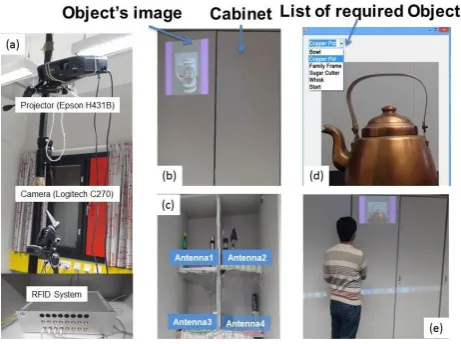
Our prototype consists of a camera (Logitech C210 640 x480 pixels), a projector (Epson H431B LCD 1280 x 768 pixels) and a RFID system (Takaya TR3-LN003FW4-16). We setup the system in a laboratory environment that has a cabinet with four shelves. We placed RFID antennas’ on each shelf. RFID reader and antennas work together to read tags.
Figure 2. (a) Our prototype system consists of a camera and a projector on the pole and a RFID system is placed inside the cabinet, (b) the scene of
the local site with the projected image, (c) four shelves of the cabinet with RFID antennas, (d) application interface used by the remote caregiver,
(e) live view of the local site
The implementation of this system has two processes: offline and online process. During the offline process, a RFID tag attached to each object and registers each object to the database. For registration, an image of each item has taken and saved it to the database along with the tag information using a local application. After registration, the geometry between the camera, the projector, and the door surface calibrated. The local application then
EAI Endorsed Transactions onPervasive
4 connected to the remote application via the Internet. This method helps the user to speed up the process of locating individual objects throughout the kitchen. Figure 2 (a) displays the camera and projector on a pole, while the RFID system placed inside the cabinet. Figure 2 (b) shows the scene from the local site with the projected image at the cabinet door. The cabinet with four shelves provided in Figure 2 (c).
The online process has a remote application and develops using OpenCV and MySQL database. The database is used to store the tag information attached to every kitchen object. Figure 2 (d) shows the interface utilized by the remote caregiver. After this instruction, the system will display the required object at the cabinet that makes the object retrieval process straightforward. Figure 2 (e) shows the real scene where a person at the local site is picking an item from the cabinet.
5. User Study
The aim of the user study is to evaluate the usability of the system. Additionally, we also investigate the acceptance of proposed system among the senior citizen. Twelve elderly participants performed this user study. The subjects were eight women and four men with a median age of 74 (range 64-84). One subject self-reported a memory disorder of undetermined severity and correspondingly scored 20 points in MMSE. The other topics scored 25 or above, indicating low risk of memory disorder. All the participants lived at home independently or with a spouse, and could independently perform all regular daily activities. The study conducted in an experimental room at the University of Oulu. Before meeting at the place, the users were contacted and were requested to bring five kitchen or other household items to use in the test.
The test protocol consisted of four visits. The first visit was used to inform the test subject of the study protocol, gather background information, perform the MMSE memory test, attain written consent, and photograph the items to use. Before the actual task, we informed each participant that system’s primary purpose is to assist them in finding and locating items from the unknown place i.e. cabinet. Furthermore, we explained to them that we put all the elements in the cabinet shelves and the system will provide the visual guidance during the task.
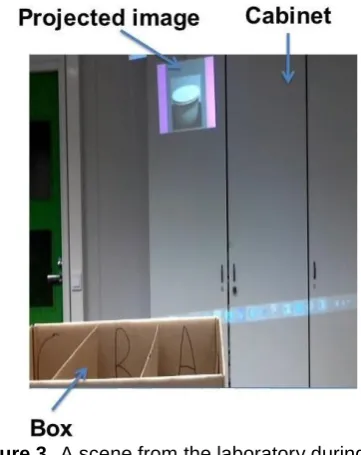
The task was to “Find and locate an object from the cabinet and put that object into the box behind.” The idea behind this task was to engage each participant in a simple activity. Each participant followed the following step-by-step instructions given over headphones by a researcher located at the remote site a) Open the cabinet door b) Pick up the object from the shelf c) Close the cabinet door d) Put the object onto the correct location of the box (A, B, C).The box visible in figure 3, and each session was video recorded.
Figure 3
.
A scene from the laboratory during the task.
After the final session, we asked each participant to fill a feedback form and free-form feedback to measure the usability of our system. The feedback form consisted of the scale P-SUS questionnaire listed in Appendix A and a modified version of UTAUT scale listed in Appendix B
P-SUS is a variant of the quick and dirty system usability scale (SUS) [5] with questions modified to include positive statements only, rather than both positive and negative ones. The results are as reliable as the original SUS, but the questionnaire is easier to fill [20]. We used the translation by Jokela [13]. SUS and P-SUS use a standardised form with ten questions to assess the product’s usability. The benefits of using SUS include that it is a very easy scale to administer to participants, it gives reliable results with small sample size, and it can differentiate between usable and unusable systems.
On the other hand, the UTAUT model [17] predicts the use of a technological system. This system investigates user’s performance Expectancy/Perceived Usefulness (PE/PU), Social Influence (SI), and Facilitating Conditions (FAC) as well as the constructs for Attitude (ATT), Anxiety (ANX), Trust (TU), and Social Presence (SP) developed for smart kitchens [10].
For all question excluding 16, the participant was asked to imagine that they have a memory disorder, and answer questions for this hypothetical scenario. Questions were customized to account for the demonstration environment and this situation. Effort Expectancy /Perceived Ease of Use (EE/PEOU) was considered unnecessary due to the inclusion of the SUS. The questions regarding PU were changed to assess the potential uses of the system, and overall PU assessed with only one question. The seven revised UTAUT constructs assessed with a questionnaire of 22 questions on a 5-point Likert scale ranging from 1 (completely agree) to 5 (completely disagree). For all but the ANX scale, 1 was
EAI Endorsed Transactions onPervasive
5 the most active response option. The constructs and similar questions presented in Appendix 1. The subjects were requested to answer the questions for the hypothetical scenario that they had diagnosed with a memory disorder.
6. Results of User Study
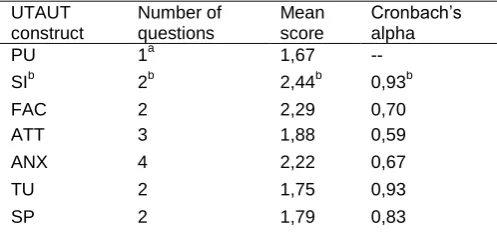
All of the twelve subjects performed the tasks successfully. The usability of the system evaluated positively. SUS scores ranged 52.5-95, median 77.5, with ten subjects rating the system above 68 (average usability in studies of various systems) and four subjects rated above 80 (suggesting excellent usability) [17]. In particular, low scores were attained in response to statements “I think that I could use the system without the support of a technical person” and “I could use the system without having to learn anything new”; whereas “I found the system to be simple” and “I thought the system was easy to use” were evaluated very positively. The modified UTAUT questionnaire performed adequately. Question 6 that added for this study and not part of the previous scales performed poorly (Table 1) and not used in subsequent analyses. Cronbach’s alpha values determined for all the constructs and also presented in Table1. The ATT, ANX, TU, FAC and SP constructs had acceptable values of 0.6 or greater. In Table 2 we discuss the results for the PU in more detail.
Table 1. Results of the modified UTAUT
questionnaire. Responses scored on a scale of 1-5, where one is most positive. (Original ANX scale reversed.)
UTAUT construct
Number of questions
Mean score
Cronbach’s alpha
PU 1a 1,67 --
SIb 2b 2,44b 0,93b
FAC 2 2,29 0,70
ATT 3 1,88 0,59
ANX 4 2,22 0,67
TU 2 1,75 0,93
SP 2 1,79 0,83
a
Only including the general question (13).
b
Question 6 removed. With question 6 included, α=0.48
Different potential uses asked as parts of perceived usefulness. Summaries of these responses shown in Table 2.
Table 2. Perceived usefulness in different aspects. Responses scored on a scale of 1-5, where one is most positive (completely agree).
Potential use Mean
score
Agree or completely agree
Locating items 1,33 11/12
Guide and help in kitchen 1,42 12/12 Keeping in touch with family 2,17 7/12
Memory refreshment 1,42 12/12
Caring for remote family member
2,08 9/12
Free-form feedback was mostly positive, though several participants noted that they do not have the need for such a device and that refinements are still needed; what these refinements should be, they could not say.
7. Discussion
The system is intended to help elderly living independently to locate and recognize objects from hidden places in a kitchen. The initial results show that by combining RFID technology along with the projection technology can increase the efficiency and decrease the burden of caregivers taking care of seniors with different disabilities via the Internet.
Overall, the participants found the remote assistive kitchen to be useful and easy to use. The perceived usefulness in household assistance or as a memory reminder surpassed the expected value in social activity, but both evaluated primarily positively. Participants also showed a positive attitude towards the technology that is a significant predictor of use of a new technology [9]. Other UTAUT constructs also evaluated positively.
Multiple changes to the UTAUT questionnaire had to be made to account for both the preliminary demonstration version of the system and the speculative nature of use situation. Behavioural intention was not measured, as these factors would have confounded the results
Although the current prototype system uses only one projector that covers only a small area of the kitchen, we can expand the projection area with multiple projectors. As a result of our observation, there are some limitations such as the registration of a new object when it arrives in the kitchen environment. Currently, we attached a RFID tag to each item and saved it to the database before starting the actual system. To make an efficient system in the future, it needs to scan all the tags and register the new tag automatically. The camera can take pictures of new objects, and the pictures along with the new tags can save to the database.
In the future, we would like to compare the efficiency of our proposed system with central projection mode and with Searchlight [6] system. We plan to integrate our system into a creative environment or with other systems such as Ikeda [12] and Uranishi [22] designs to form a complete smart kitchen environment.
8. Conclusion
EAI Endorsed Transactions onPervasive
6 In this paper, we have designed, developed and evaluated a remote assistive system that helps senior citizens find objects in hidden places during a kitchen task. We implemented a prototype system with a RFID system to locate the objects from unknown places and a projector to display the image of the required object. Additionally, a user study has been conducted with twelve elderly participants in a laboratory environment to investigate the acceptance and usability of the proposed system.
Results from P-SUS and UTUAT questionnaire showed that, in general, the elderly participant found the system useful and easy to use. Although, none of the participants in our study had any prior experience of using the assistive system. They majority did not perceive any difficulty while using the system. The results from perceived usefulness suggest that projection guidance helps the elderly to locate and find items from hidden places during a task and may encourage adoption of this new technology by old users with or without technological experience in their homes.
The overall results of this study shown promise for the use of the system for other kitchen activities, although the user study was focusing on a small sample of older adults. Our future work will consist of adding more features to the prototype to conduct longer studies with larger user groups.
Appendix A. SUS questionnaire
1. I think that I would like to use this system frequently. 2. I found the system to be simple
3. I thought the system was easy to use.
4. I think that I could use the system without the support of a technical person.
5. I found the various functions in the system were well integrated.
6. I thought there was a lot of consistency in this system.
7. I would image that most people would learn to use this system very quickly.
8. I found the system very intuitive. 9. I felt very confident using the system. 10. I could use the system without having to learn
anything new.
Appendix B. Modified UTAUT constructs
and questionnaire
Attitude (ATT):
1. It is a good idea to use projection guidance. 2. Projection guidance would make my life more
interesting
3. It is pleasant to use projection guidance.
Social Influence (SI):
4. My friends and family think that I should use the system
5. The people I respect think that I should use the system.
6. I think it would give a good impression if I should use projection guidance.
Facilitating conditions (FC):
7. I have the knowledge necessary to use projection guidance.
8. The system would fit in my home.
Anxiety (ANX):
9. I feel apprehensive about using the projection guidance.
10. When using projection guidance, I am afraid to break something
11. When using the projection guidance, I am afraid to make mistakes with it.
12. Projection guidance is frightening.
Perceived Usefulness (PU):
13. Projection guidance would be useful to me.
14. Projection guidance would be convenient for locating items in my house.
15. Projection guidance would be a convenient guide and helper in the kitchen.
16. Projection guidance would be convenient for being in touch with my family member.
17. Projection guidance would be convenient for looking after my family member at a distance.
18. Projected hints would refresh my memory.
Trust (TU):
19. I would trust the instructions of the system
20. I would follow the guidance the projection guidance system gives me
Social Presence (SP):
21. Conversation through the system feels natural 22. Conversation through the system makes me feel like I
am not alone
Acknowledgements.
Academy of Finland and JST jointly funded ASTS project. The collaborative European Union and Ministry of Internal Affairs and Communication, Japan, Research and Innovation action: iKaaS. Key personspersous: Timo Jämsä, Maarit Kangas, Eeva Leinonen, Jaakko Hyry, Yuichiro Fujimoto, Iikka Paajala
.
EAI Endorsed Transactions onPervasive
7
References
[1] World Population Ageing (2013). Available Online http://www.un.org/en/development/desa/population/public ations/pdf/ageing/WorldPopulationAgeing2013.pdf. (accessed on 15 May 2016)
[2] BAHL P., PADMANABHAN, V (2000) RADAR: An In-Building RF-Based User Location and Tracking System. In Proceedings of Nineteenth Annual Joint Conference of the IEEE Computer and Communications Societies, Tel Aviv, 26-30 March (IEEE).
[3] BLASCO, R., MARCO, A., CASAS, R., CIRUJANO, D., PICKING, R (2014) A Smart Kitchen for Ambient Assisted Living. Sensors 14(1), 1629-1653
[4] BONANNI, L., LEE, C.H., SELKER, T (2005) Counterintelligence: Augmented reality kitchen. In Proceedings of the Computer Human Interaction (CHI), Portland, April 2-7 (New York, ACM press)
[5] BROOKE, J. (1996) SUS: a quick and dirty usability scale. In: Jordan, P.W., Thomas, B., Weerdmeester, B.A., McClelland, I.L. (eds.) Usability Evaluation in Industry. Taylor and Francis, London
[6] BUTZ, A., SCHNEIDER, M., SPASSOVA, M (2004) Searchlight–A Lightweight Search Function For Pervasive Environments. In Proceedings of Pervasive Computing, Vienna, April 21-23 (Heidelberg, Springer)
[7] CHU, Y., CHOL, SONG Y., LEVINSON, R., KAUTZ, H (2012) Interactive activity recognition and prompting to assist people with cognitive disabilities. Journal of Ambient Intelligence and Smart Environments, 4:5, 443-459.
[8] COOK, C., FAY, S., ROCKWOOD, K (2008) Decreased Initiation of Usual Activities in People with Mild-to-Moderate Alzheimer's disease: a descriptive analysis from the VISTA clinical trial. International Psychogeriatric, 20(05), 952-963.
[9] CZAJA, SJ., CHARNESS, N., FISK, AD., HERTZOG, C., NAIR, SN., ROGERS, WA., SHARIT, J. (2006) Factors Predicting the Use of Technology: Findings From the Center for Research and Education on Aging and Technology Enhancement (CREATE). Psychology and Aging, 21(2), 333–352.
[10] FICOCELLI, M. NEJAT, G (2012) The Design of an Interactive Assistive Kitchen System. Assistive Technology: The Official Journal of RESNA, 24:4, 246-258.
[11] HAZAS, M., WARD, A (2002) A Novel Broadband Ultrasonic Location System. In Proceedings of 4th international conference on Ubiquitous Computing, GÖTEBORG, September 29-October 1 (London, Springer-Verlag).
[12] IKEDA, S., ASGHAR, Z., HYRY, J., PULLI, P., PITKANEN, A., KATO, H (2011) Remote Assistance Using Visual Prompts for Demented Elderly in Cooking. In Proceedings of 4th International Symposium on Applied Sciences in Biomedical and Communication Technologies, Barcelona, October 26 - 29, 2011 (New York, NY, USA: ACM).
[13] JOKELA, T(2013). P-SUS (positiviinen SUS) -kysely suomeksi: uusi versio. Available Online http://hankikaytettavyytta.blogspot.fi/2013/05/p-sus-positiviinen-sus-kysely-suomeksi.html. accessed on 29 August 2016)
[14] LAPOINTE, J., VERREAULT, A., BOUCHARD B., BOUCHARD, L., POTVIN, A., BOUZOUANE, A (2013). How to Maximize the Effectiveness of Prompts in Assistive Technologies According to the Particular Cognitive Profile of People with Alzheimer’s disease? International Journal of Smart Home. 7:5, 19-38.
[15] MAREK, KD., RANTZ, M (2000) Aging in place: A New Model for Long-Term Care. Nursing Administration Quarterly 24(3), 1–11.
[16] SATO, A., WATANABE, K., REKIMOTO, J (2014) Shadow cooking: situated guidance for a fluid cooking experience. Universal Access in Human-Computer Interaction. Aging and Assistive Environments, Part III (Heidelberg, Springer).
[17] SAURO. J. (2011) Measuring Usability with the System Usability Scale (SUS). Available Online http:// http://www.measuringu.com/sus.php.
[18] SAURO. J., LEWIS, JR. (2012) Quantifying the user experience: Practical statistics for user research. Ist ed (USA: Elsevier).
[19] STULA, S. (2012) Living in Old Age in Europe-Current Developments and Challenges. German Association for Public and Private Welfare (DV), Berlin.
[20] SURIE, D., BAYDAN, B., LINDGREN, H (2013) Proxemics Awareness in Kitchen As-A-Pal: Tracking Objects and Human in Perspective. In Proceedings of the 9th International Conference on Intelligent Environments (IE), Athens, 16-17 July (IEEE).
[21] TATEMICHI, TK., DESMOND, DW., STERN Y., PAIK, M., SANO, M., Bagiella, E (1994) Cognitive impairment after stroke: frequency, patterns, and relationship to functional abilities. Journal of Neurology, Neurosurgery & Psychiatry.57:2, 202-207
[22] URANISHI, Y., YAMAMOTO, G., ASGHAR, Z., PULLI, P., KATO, H., OSHIRO, O (2013) Work Step Indication with Grid-Pattern Projection for Demented Senior People. In Proceedings of 35th Annual International Conference of the IEEE Engineering in Medicine and Biology Society, Osaka, July 3-7 (IEEE).
[23] VAN TASSEL, M., BOUCHARD, J., BOUCHARD, B., BOUZOUANE, A (2011) Guidelines for increasing prompt efficiency in smart homes according to the resident’s profile and task characteristics. In International Conference on Smart Homes and Health Telematics, Berlin, 20th June (Springer)
[24] VENKATESH, V., MORRIS, M., DAVIS, G., DAVIS, F. (2003). User Acceptance of Information Technology: Toward a Unified View. MIS Quarterly, 27(3), 425-478 [25] WHERTON, JP., MONK, AF (2008) Technological
opportunities for supporting people with dementia who are living at home. International Journal of Human-Computer Studies. 66:8, 574-586
[26] WHERTON, JP., MONK, AF (2010) Problems people with dementia have with kitchen tasks: The challenge for pervasive computing. Interacting with Computers, 22:4 253-266.
[27] YAMAMOTO, G., HYRY, J., KRICHENBAUER, M., TAKETOMI, T., SANDOR, C., KATO, H., PULLI, P (2015) A user interface design for the elderly using a projection tabletop system. In Proceedings of 3rd IEEE VR International Workshop on Virtual and Augmented Assistive Technology (VAAT), Arles, 23-23 March (IEEE)
EAI Endorsed Transactions onPervasive