Journal of Digital Forensics,
Journal of Digital Forensics,
Security and Law
Security and Law
Volume 13 Number 1 Article 7
3-31-2018
Testing Memory Forensics Tools for the Macintosh OS X
Testing Memory Forensics Tools for the Macintosh OS X
Operating System
Operating System
Charles B. Leopard
U.S. Naval Postgraduate School, [email protected]
Neil C. Rowe
U.S. Naval Postgraduate School, [email protected]
Michael R. McCarrin [email protected]
Follow this and additional works at: https://commons.erau.edu/jdfsl
Part of the Computer Law Commons, and the Information Security Commons
Recommended Citation Recommended Citation
Leopard, Charles B.; Rowe, Neil C.; and McCarrin, Michael R. (2018) "Testing Memory Forensics Tools for the Macintosh OS X Operating System," Journal of Digital Forensics, Security and Law: Vol. 13 : No. 1 , Article 7.
DOI: https://doi.org/10.15394/jdfsl.2018.1491
Available at: https://commons.erau.edu/jdfsl/vol13/iss1/7
This Article is brought to you for free and open access by the Journals at Scholarly Commons. It has been
accepted for inclusion in Journal of Digital Forensics, Security and Law by an authorized administrator of Scholarly Commons. For more information, please contact [email protected].
Testing Memory Forensics Tools for the Macintosh OS X Operating System
Testing Memory Forensics Tools for the Macintosh OS X Operating System
Cover Page Footnote Cover Page Footnote
The views expressed are those of the authors and do not represent the U.S. Government. A shortened version of this paper appeared in the Proceedings of the Ninth EAI International Conference on Digital Forensics and Computer Crime, Prague, Czech Republic, October 2017.
Testing Memory Forensics Tools for the Macintosh ... JDFSL V13Nl
TESTING Jv.IEMORY FORENSICS TOOLS FOR
THE MACINTOSH OS X OPERATING SYSTEM
Charles B. Leopard, Neil C. Rowe, and Michael R. McCarrin U.S. Naval Postgraduate School, Computer Science Department
Monterey, California, 93940 US (831) 656-2462, fax (831) 656-2814
[email protected], [email protected], [email protected]
ABSTRACT
Memory acquisition is essential to defeat anti-forensic operating-system features and investigate cyberattacks that leave little or no evidence in secondary storage. The forensic community has developed tools to acquire physical memory from Apple's Macintosh computers, but they have not much been tested. This work tested three major OS X memory-acquisition tools. Although the tools could capture system memory accurately, the open-source tool OSXPmem appeared advantageous in size, reliability, and support for memory configurations and versions of the OS X operating system.
Keywords: digital forensics; acquisition; main memory; Macintosh; OSX; testing
l.
INTRODUCTION
As Recent Macintosh OS X operating systems incorporate many anti-forensic features, most notably in cloud storage and encryption. Users can fully encrypt many things, including entire volumes of the secondary storage, making it impossible to recover forensic evidence from storage in a reasonable period of time without passwords. Because of this, forensics on the main memory of such systems is increasingly valuable. Memory forensics can recover running processes, network packets, communications artifacts, encryption keys, and injected code from volatile memory. It is helpful to compare available tools for memory forensics.
2.
PREVIOUS WORK
Memory acquisition is a challenge for digital forensics because memory is volatile, and a tool
JDFSL V13Nl Testing Memory Forensics Tools for the Macintosh ...
Most research on memory acquisition has focused on developing new techniques, with only a few projects testing tools. Carvajal et al. (2013) compared six Windows tools in their
ability to extract memory quickly without leaving artifacts. Kamal et al. (2016) also
tested six Windows tools ( two different from the previous work) and focused on the artifacts left by the tools. Ahmed and Aslam (2015) compared six Windows tools ( four different from Carvajal et al) and found a few differences in performance between them,
especially when anti-forensics measures were taken on the target machines.
The abovementioned tools provide
software-based acquisition, in contrast to tools such as Inception and Passware's Firewire Memory Imager that are hardware-supported. Hardware support can circumvent password protection, but there must be different tool versions for different hardware and they can be limited in how much memory they can acquire.
Modern software-based tools generally require
a kernel to be installed on the target system,
must deal with memory compression, and must be careful to avoid interfering with reserved
areas of memory as discussed in Libser and
Kornblum (2008). Memory-acquisition tools
can be distinguished from memory-analysis tools such as the open-source Volatility (2015)
and Rekall (2015) that allow inspection of specific artifacts, and analysis tools require detailed knowledge of where an operating system keeps things, so they require frequent updates.
For Macintosh machines, software-based acquisition tools available are MacQuisition (www.blackbagtech.com/
software-products / macquisi tion. html), Google /Rekall OSXPMem (releases. rekall-forensic. com),
Sumuri Forensics RECON
(sumueri.com/software/recon), Mandiant Mac
Memoryze (www.fireeye.com/
services/ freeware / memoryze. html), and
Volafox ( code.google.com/p/volafox).
Volatility and VMWARE Fusion
(www.vmware.com/products/fusion.html) after
version 10. 7 also provide some Macintosh memory-forensic capabilities.
3.
lVlETHODOLOGY
This work tested the three Macintosh memory
-acquisition tools: MacQuisition version 2014Rl, OSXPMem version RC3, and Sumuri Forensics RECON version 1.0.11. We evaluated the tools on (1) ability to write a physical-memory capture without crashing the target computer system, (2) obtrusiveness (what its memory footprint was and how long it took to run), and (3) ability to produce a capture from which standard forensic artifacts could be recovered using the Volatility Framework and the Rekall Memory Forensic Framework. The Rekall plugins used were arp ( ARP tables), ifconfig ( network interface), lsof ( open files), mount (mount points), netstat (network connections), psaux (processes), and route ( routing tables). The Volatility plugins used were mac_arp, mac_bash (Bash shell history), mac-ifconfig, mac lsof, mac-mount, mac netstat, mac_psaux, and mac route. We were particularly interested in comparing memory snapshots of tools in similar states
since they could indicate functional differences or coverage gaps.
This work first tested the OSX Mavericks (10.9.5) operating system, and then retested after upgrading to Yosemite 10.10.1 and
10.10.2 (more details are given in Leopard, 2015). Each tool was directed to write a
memory capture to an external USB 3 hard drive of 7200RPM. In total, 450 captures were performed: 50 machines, 3 operating systems,
and 3 forensic tools.
Testing Memory Forensics Tools for the Macintosh ... JDFSL V13Nl
comparing outputs between tools, and (5) comparing with output for a non-virtual environment. In all these experiments, we ran the operating systems with no additional modifications, software, or tasks.
The rate at which memory changes affects the memory dumps acquired by tools. To analyze the systems more accurately, as well obtain flexibility in the setup, we created a virtual machine as in Zhang et al. (2010). We used VMware Fusion Professional version 7 .1.1 and took a series of snapshots. The virtual machine ran the Mavericks operating system and was configured to use two processor cores and 8 GiB of memory. The host machine was a MacBook Pro (Retina, 15-inch, 2014) with a 2.8 GHz Intel i7 processor and 16 GiB of 1600 MHz DDR3 memory. Our specific procedure was: (1) log into the virtual machine and take a snapshot every minute for the first fifteen minutes, and then at 20, 25, and 30 minutes; (2) use the Volatility plugin to decompress the snapshots; (3) create MD5 hashes for every 4 KiB block; and ( 4) compare the MD5 hashes with the original hashes and note differences. We compared memory captured by each of our tools against the virtual machine snapshot that completed at a time closest to when each capture completed. We then compared the memory captures taken with the tools.
Memory acquisition can be assessed in terms in its correctness (whether it captures what is stored in memory at some time), its atomicity ( whether it shows concurrent activity), and its integrity (its persistence in correctness for some guaranteed time period), as suggested in Vomel and Freiling (2012). The current work addressed correctness and (in a simple way) integrity, but not atomicity since analyzing that requires more precise tools.
4.RESULTS
4 .1 Ability to Recover Merr1.ocy
All three tools successfully acquired memory. Acquisition speeds were within 7% for the three. Physical memory sizes were 67.45 MiB for MacQuisition, 0.944 MiB for OSXPmem, and 206.7 MiB for RECON. Shared memory and private memory sizes were proportional. OSXPmem had a size advantage as a command-line tool without a graphical user interface.
We observed several crashes caused by tools. Valuable forensic data can be permanently lost in a crash, so crash danger is important. No machine crashed more than once, and after a crash, a second acquisition attempt was often successful after the machines restarted, with one exception. The exception was when RECON was used to acquire memory from the Mac Pros with 64 GiB of RAM; all the machines crashed, and additional attempts also failed. Nonetheless, examination of the results confirmed that if a memory capture was completed without a crash, the capture contained all forensic artifacts found by the other tools.
4. 2
I..ocalizingEncryption Keys
JDFSL V13Nl Testing Memory Forensics Tools for the Macintosh ...
running Yosemite. MacQuisition did not
support Yosemite at the time.
Passware located the encryption keys in all of the memory captures and successfully decrypted the File Vault2 volumes. The OS X user's login password was located within all the memory captures using the hex editor iBored by searching for the term "longname"
which we found frequently near a user's
password. The password remained in the same
block of memory during the thirty-minute period on all captures.
M
..
,
5
..
-5
..
~ lOi 100 991 g 91 96 95 93 92 IA
1·~ ... _.._ __ .., _.._.,. . . .
'!"-:-.,.~-~~~---\
\
"l
.
\
'!' "!' ''!" '!" ''!"
I 2 3
s
16 7, io
11n n
:
1s
4.3
Observing Memory
ChangesoverThne
Memory captures (snapshots) were taken over a period on a virtual machine with Mac OS version Mavericks installed. A Python script counted the 4 KiB blocks whose hash values
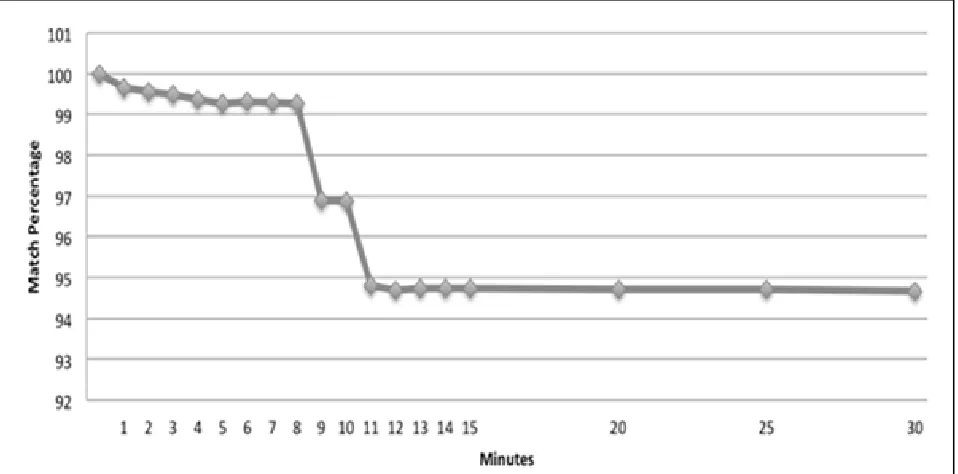
changed from the original snapshot. Typically, the virtual machine used 1.35 GiB of memory ran 110-120 processes during tests. Results showed that on average only 5.33% of the blocks had changed after 30 minutes when running only default processes, and not
smoothly (Figure 1).
·'!" ''!'
,,.
20 ~ I
Figure 1. Average block hash match percentage over time on OSX Mavericks.
Memory captures were larger than the
allocated physical memory due to the presence of reserved areas. The datasheet for Fourth Generation Intel Core Processor Address Map describes reserved areas below 4GiB that do not belong to the dynamic random-access memory (see Intel, 2012). Because of this, when the vmem files containing the memory in the virtual-machine snapshots were converted
to raw images, each vmem file was 9 GiB in size, though the virtual-machine configuration
allocated 8 GiB to physical memory. Stuttgen
Testing Memory Forensics Tools for the Macintosh ... JDFSL V13Nl
reserved for this, and the chipset routes memory access around these reserved regions.
4.4
Comparing Tools
All three tools captured the same range of null values in the first half of the memory graphs. The MacQuisition device log did report "bad
addresses" were padded with zeroes beginning
at block 786432 and ending at block 1048575. Each block contained 4096 bytes resulting in
approximately 1 GiB of null characters. We inspected the block range in all three tool memory captures with a hex editor and confirmed that all the tools padded the same
block range with zeroes.
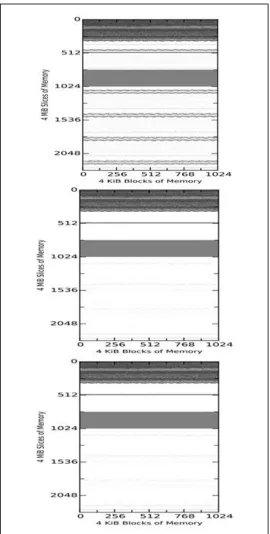
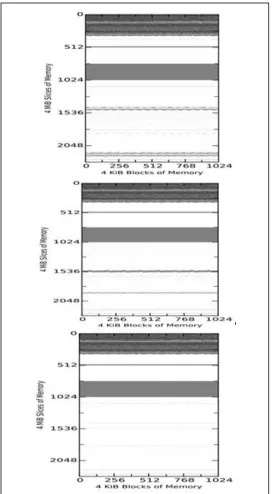
Figure 2 shows example 4-KiB block matches between the tool-acquired memory
captures of the virtual machine and the virtual-machine snapshot SVl taken 1 minute
after start. Figure 3 shows matches among the tool images themselves at the same times. The vertical axis represents slices of 4MiB, so each
diagram shows around 9GiB of memory. The three plots in both Figures show MacQuisition,
OSXPmem, and RECON in order. The darker
areas represent matches to the initial memory
state without null (zero) characters; grey blocks represent blocks that match but contain
null characters; and the white blocks represent blocks that have changed and do not match. The top of the diagram represents the beginning of memory. The waviness of the boundaries is intended to make them easier to
see and does not indicate uncertainty.
Overall, we saw similar regions of non-null matches ( the white areas) in all comparisons. However, the tool memory captures showed
that most of the null characters observed in
the virtual-machine snapshots were overwritten with data when the acquisition tools
themselves acquired the memory. This would suggest as the memory-capture tools run, blocks of memory containing null characters get changed while other blocks remain mostly unchanged. Since these regions are large and
outside the memory space used by the tools, it is unlikely that the tools themselves are
changing the data directly. Rather, we
JDFSL V13Nl Testing Memory Forensics Tools for the Macintosh ...
~---...
~ ~
-1 4"-
---~
0
- - - -
-
-
--
-- -
-
---
-
-
-
--..--2 -- - - -
---1024~
---
--.:.1
Figure 2. Virtual Machine Comparisons of MacQuisition
(Upper Left), OSXPmem (Upper Right), and RECON (Lower
Left) to the Snapshot after 1 Minute on Each Machine
Testing Memory Forensics Tools for the Macintosh ...
0
- -
~----
--- ---
~~~-~~~---2 e
- -
-Figure 3. Comparison of the Three Tools on Analogous States of a Virtual Machine
JDFSL V13Nl
Figure 3 also shows that each tool is
capturing the same matched blocks and the
same reserved region as the virtual-machine
snapshot. But the tools differ in how they
capture blocks of memory that do not match
the blocks from snapshot. This suggests not
only that the tools are introducing change to
the memory space during the acquisition
process, but also that each is changing the
space in a unique way, so the changes from
JDFSL V13Nl Testing Memory Forensics Tools for the Macintosh ...
randomizing of memory locations on reboots,
as described in Gu and Lin (2016), at this level
of granularity.
4. 5
Comparing
toa Non-Virtual
Environment
To control for possible effects due solely to
VMware's environment, we tested the tools in
a non-virtual environment of a physical Mac
Mini (late 2014) with a 2.6 GHz Intel i7
processor, 8 GiB of 1600 MHz DDR3 memory,
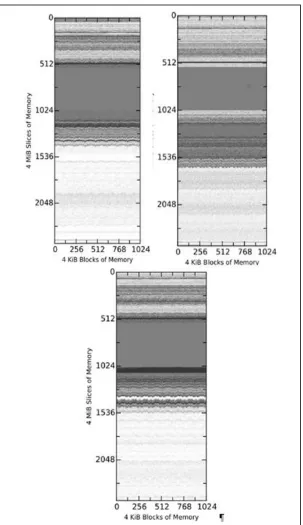
and running Mavericks. Each tool acquired a
9.74 GiB raw file (Figure 4). There were
nonmatching blocks in the first 2GiB of the
memory that had not been observed before,
but they were not clustered, causing the gray
shading. All tools captured the same range of
null values 2GiB to 4GiB with some small
differences in the claimed boundaries, and
overall this reserved area appeared to be larger
than in the virtual-machine memory images.
Analysis with a hex editor determined that the
reserved region began at 2.17 GiB and
continued until 4 GiB. It is clear there are
more changes to memory on a real machine.
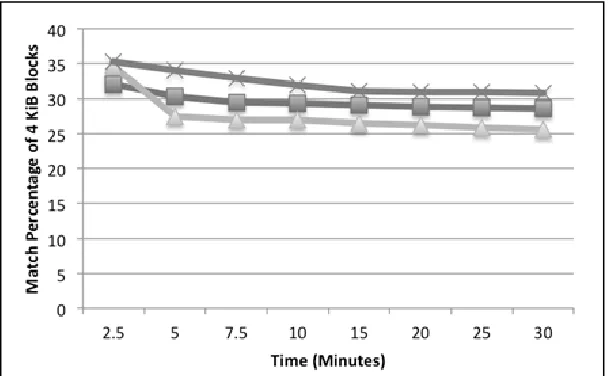
Data also showed that the block matches
containing non-null characters were initially
around 30% of the total captured material, but
remained relatively stable, declining by less
than 10% over a 30-minute period (Figure 5).
The match percent was less than what was
observed in the virtual environment as Figure
3 also suggests.
5.
CONCLUSION
MacQuisition, RECON, and OSXPmem were
all successful in capturing memory from OSX
on Macintosh computers. However, OSXPmem
bettered its proprietary counterparts in its size,
reliability, and support for memory
configurations and versions of the OSX
operating system. Volatility and Rekall could
use the memory captures from all three tools
to obtain artifacts such as File Vault2
encryption keys. Nonetheless, we observed
crashes. Ligh et al. (2015) acknowledges that
all memory-acquisition tools can cause system
crashes since the tool may access a reserved
region at the wrong time or interfere with a
system-critical function. Interference may be
hard to anticipate because of variations
Testing Memory Forensics Tools for the Macintosh ...
~
1024 -.,.
-~-I . .
-
I-
-~-.. ,
·--
___ _,---·
1536 ~ ~ z . , - ~
2048 2048
0 256 512 768 1024 0 12 768 1024
morv
4 KlB Sloe ks of M
512
i
1024X
0
y,
'
.
-
--
....
··•-
·-
..~
2048
0 256 512 768 1024
4 ,s Bloc of M mory
Figure 4. Comparison of Snapshots on a Real Machine over 30 Minutes
JDFSL V13Nl Testing Memory Forensics Tools for the Macintosh ...
40
.,, ,_,,
....
j 35 ~ , ,
m ' , ' ,
!a 30
~ I
:.::
-
--
~: 25
--
..
r;==::::::,.___,';-_,-,o
t
20ft!
c
8
...
15 ,a,~ 10
,u
...
,,,,s
:l: 0
2.S 5 7.5 10 15 20 25 30 Time (Minutes)
Figure 5. Match Percentage Comparison over Time (Top is RECON, Middle is MacQuisition, Bottom is OSXPmem)
Our results showed that size of the memory
capture was constant over the tools. Memory dumps were larger than the amount of physical memory (17.99 GiB versus 16 GiB for MacBook Pro was typical) due to reserved regions.
Comparison of the virtual-machine
snapshots taken over thirty minutes showed that with running only the default processes, memory did not change much. Though
significant regions of memory did not match between the tool-acquired dumps and the virtual-machine snapshots, these regions
contained nulls in the baseline snapshot. Because of this, our analysis of forensic
artifacts using Volatility and Rekall failed to detect any situations in which the non
-matching regions corresponded to a loss of forensic evidence.
The experiments with a non-virtual
environment showed the memory captures
from all three tools appeared similar in the blocks that matched but did not match as well for the blocks containing null characters. The results also agree with the results of our tests in the virtual environment in that the regions
of memory that match between comparisons
did not change much over time.
Future work will examine in more detail the exact changes in files over time and the discrepancies between different tools. Discrepancies suggest, without having to analyze the operating system, where volatile memory stores key operating-system
parameters and links. Future work will also
investigate the effects of simultaneously
running additional software on the operating
-system memory images.
ACKNOWLEDGElVlENTS
The views expressed are those of the authors
Testing Memory Forensics Tools for the Macintosh ... JDFSL V13Nl
REFERENCES
Ahmed W., Aslam B. (2015). A Comparison of Windows Physical Memory Acquisition Tools. Proc. IEEE Military Communications Conference, Tampa, Florida, US, October, pp. 1292-1297.
BlackBag Technologies. ( 2017). Mac RAM Imaging and Analysis. Retrieved November 14, 2017 from www.blackbagtech.com/blog/
2017 /02/24/mac-ram-imaging-analysis, February 24.
Carvajal L., Varol C., Chen L. (2013). Tools for Collecting Volatile Data: A Survey Study. Proc. IEEE Conf. on Technological Advances in Electrical, Electronics, and Computer Engineering, Konya, Turkey,
May.
Gu Y., Lin Z. (2016). Derandomizing Kernel Address Space Layout for Memory Introspection and Forensics. Proc. Sixth ACM Conf. on Data and Application Security and Privacy, New Orleans,
Louisiana, US, March, pp. 62-72.
Intel Corporation. (2012). Desktop 4th Generation Intel Core Processor Family,
Desktop Intel Pentium Processor Family,
and Desktop Intel Celeron Processor Family. Retrieved from May 25, 2015 from www.intel.com/
content/ dam/www /public/us/en/ documen ts/ datasheets / 4th-gen-core-family-desktop-vol-2-datasheet. pdf.
Kamal K., Alfadel M., Munia M. (2016).
Memory Forensics Tools: Comparing Time
and Left Artifacts on Volatile Memory.
Proc. Intl. Workshop on Computational Intelligence, Dhaka, Bangladesh,
December, pp. 84-90.
Leopard, C. (2015). Memory Forensics and the Macintosh OS X Operating System. M.S.
thesis, U.S. Naval Postgraduate School, June. Retrieved June 15, 2015 from
faculty.nps.edu/
ncrowe / oldstudents / cleopard _thesis. htm. Li Z., Xi B., and Wu S. (2016). Digital
Forensics and Analysis for Android Devices. Proc. 11th Intl. Conf. on Computer Science and Education, Nagoya, Japan, August, pp. 496-500.
Libser E., Kornblum J. (2008) A Proposal for
an Integrated Memory Acquisition
Mechanism. ACM SIGOPS Operating
Systems Review, Vol. 42, No. 3, April, pp. 14-20.
Ligh M., Case A., Levy J., Walters A. (2014). Art of Memory Forensics. Indianapolis, IN: Wiley.
Neetha J., Sherina S., Dija S., Thomas K. (2014). Volatile Internet Evidence Extraction from Windows Systems. Proc. IEEE Intl. Conf. on Computational Intelligence and Computing Research, Coimbatore, India, September.
Pan L., Savoldi A., Gubian P., and Batten L. (2008). Measure of Integrity Leakage in Live Forensic Context. Proc. Intl. Conf. on Intelligence Information Hiding and Multimedia Signal Processing, August,
Harbin, China.
Rekall Team. (2015). Rekall Memory Forensic Framework: About the Rekall Memory Forensic Framework. Retrieved March 13,
2015 from www.rekall-forensic.com/
about.html.
JDFSL V13Nl Testing Memory Forensics Tools for the Macintosh ...
Sutherland, I., Evans, J., Tryfonas, T., Blyth A. (2008). Acquiring Volatile Operating System Data Tools and Techniques. ACM SIGOPS Operating Systems Review, Vol. 42, No. 3, April, pp. 65-73.
Volatility Foundation. (2015). The Volatility Foundation Open Source Memory Forensics. Retrieved March 13, 2015 from www.volatilityfoundation.org/#!about/cmf 3.
Vomel, S., Freiling, F. (2012). Correctness, Atomicity, and Integrity: Defining Criteria for Forensically-Sound Memory Acquisition. Digital Investigation, Vol. 9,
pp. 125-137.