The University of Toledo
The University of Toledo Digital Repository
Theses and Dissertations2013
The separation principle : a principle for
programming language design
Kris A. Armstrong The University of Toledo
Follow this and additional works at:http://utdr.utoledo.edu/theses-dissertations
Recommended Citation
Armstrong, Kris A., "The separation principle : a principle for programming language design" (2013).Theses and Dissertations.Paper 16.
A Thesis entitled
The Separation Principle – A Principle for Programming Language Design by
Kris A. Armstrong
Submitted to the Graduate Faculty as partial fulfillment of the requirements for the Master of Science Degree in Engineering
_________________________________________ Dr. Henry Ledgard, Committee Chair
_________________________________________ Dr. Jackson Carvalho, Committee Member
_________________________________________ Dr. Devinder Kaur, Committee Member
_________________________________________ Dr. Patricia R. Komuniecki, Dean
An Abstract of
The Separation Principle – A Principle for Programming Language Design by
Kris A. Armstrong
Submitted to the Graduate Faculty as partial fulfillment of the requirements for the Master of Science Degree in Engineering
The University of Toledo August 2013
This thesis explores a novel and exciting new principle for programming language design. This is called the “Separation Principle”. It is derived from a language and language environment called VisiSoft [1], [2].
The exploration of this principle takes place through a small example. The example is a text based question and answer quiz program. The original program is object oriented and was developed in a book on data structures [3]. The program is then redone three times, once in a simplified object oriented form, once in C++ using the separation principle, and once directly using a pseudo language.
The use of the separation principle allows one to use a graphical approach to modular design, reduces program complexity and considerably reduces scope-rules. The use of an “English-like” syntax is also inspired by VisiSoft. In our final example we use
Dedicated to my folks .
Acknowledgements
Table of Contents
Abstract ... iii
Acknowledgements ...v
Table of Contents ... vi
List of Figures ... vii
1 Motivation ... 1
2 Example ... 5
3 Object Oriented Version Using Java... 10
4 The Separation Principle Using C++ ... 18
5 The Separation Principle Using Pseudo-Code ... 27
6 Conclusion ... 39
List of Figures
2-1 This output of an interactive session of the trivia quiz game. ... 6
2-2 The file format for the trivia quiz game. ... 7
2-3 The program flow and variables for all of the programs.in this thesis ... 9
3-1 The Java source code for the object oriented program ... 17
4-1 The C++ code using the separation principle. ... 26
5-1 Process to resource connection diagram. ... 28
5-2 The connection diagram showi ng the architecture of the quiz game ... 29
5-3 The iteractive use of files and graphic elements... 30
5-4 A hierarchical view using modules ... 31
Chapter 1
Motivation
The motivation for developing this thesis stems primarily from the lack of productivity gains using current software languages [4]. While computer hardware development has seen tremendous strides in computational power, software development productivity has stagnated [5], [6]. With the advent of multi-core processing, the
problem of producing reliable bug-free software would only seem to increase. Here we explore a new design principle for programming languages. This is called the “Separation Principle” [1]. The separation principle is the separation of code (instructions) from data.
The principle used here was developed by Visual Software International in their programming environment VisiSoft [2]. VisiSoft has developed an architectural
approach to software development. The use of architectural drawings allows the engineer to work on their program in a hierarchical and visual manner. VisiSoft’s idea takes insight from other engineering disciplines. Today most engineers use some form of CAD software as a primary development tool. At the top level a broad overview of the entire
from PCB to memory to gate to transistor to spice code as necessary. The same type of visual and interactive system could be applied to software development.
Not only does the graphical approach allow hierarchical development, but it can also be used to show the design of the software. The design of the software is visually apparent by the connections between the software modules. Using an interactive graphical environment the programmer should be able to reduce the complexity of the software. The reduction in complexity should, according to VisiSoft, lead to more reusability, maintainability, reliability and parallelization.
VisiSoft has also suggested that the separation of code from data allows modules to be independent. By restricting access to the data modules, modules can be designed to be independent. The restriction on data access also helps control namespace issues. Independent modules can be built into hierarchical structures. Independence may lead to easier parallelization as independent modules may be able to run as separate tasks.
From the early years of computers, we came from machine language to assembly language to FORTRAN like languages and then to C++ and Java, with each generation bringing new capabilities. Two of the dominant programming languages in use today are C++ and Java [7]. Both of these are based on the idea of object oriented programming (OOP) and were designed some years ago. They have were great achievements (C++:
programming and higher productivity through encapsulation and inheritance. It eases the creation of objects similar to those in the real world, but not all systems follow this model. The construction of objects and their interconnections can become complicated. Inheritance can be used to extend programs even when the source code is not available (provided the original code allows it), but in other situations simple cut and paste may be adequate.
When OOP was first developed it came with the claim of easier programming and higher productivity through encapsulation and inheritance. Unfortunately OOP has failed to bring productivity gains to software development [5].
The more recent past as brought us several other languages. These include Python, JavaScript, Perl, PHP, and Ruby along with others. All of five of these languages are usually run on interpreters, which limits their use in some situations (embedded programming).
While JavaScript, Perl, and PHP can be used as general purpose languages there foundation lies in specific uses. All three of them are syntactically similar to C. The three of them are used primarily for web applications and system scripting.
Python was designed to be general purpose languages with a more prose (English) style syntax. Both Python and Ruby are designed to make programming less complex and their popularity continues to grow.
The languages in use are generally cryptic, require extensive training and do not use some of the elementary principles of design. I support the idea that we need a new
separation principle. The separation principle allows us a simple metaphor. It dispenses with notions of scope rules, OOP, public and private, yet retains a solid foundation.
Chapter 2
Example
The example is derived from an excellent program developed in a programming book written by Dale et al. [3]. The program implements a simple question and answer quiz called a trivia game. The quiz has a fixed number of short answer questions. Each question may have one or more answers, mainly to allow for different spellings and shorthand versions. The user is allowed a fixed number of guesses in which to complete the quiz. If the user is allowed more guesses than there are questions, any question that was answered incorrectly may be repeated.
The game ends when the user answers all of the questions correctly or when the allowed number of guesses is exceeded. The results are then displayed in the console window. The total number of questions asked (including repeats) is given along with the number of questions answered correctly.
Here is a complete quiz, with four questions. The user has six chances to answer the four questions.
Hello, welcome to the trivia quiz game.
You will be given up to 6 chances to answer 4 questions. Category: Golf
Question: What is a score of three below par called? Answer: albatross
Correct!
Category: Computer Science
Question: Who was the principal developer of the COBOL programming language?
Answer: Ritchie Incorrect
Category: Golf
Question: What club is the modern equivalent to a Mashie Niblick? Answer: driver
Incorrect
Category: Computer Science
Question: What is usually the first message printed when learning a new programming language?
Answer: Hello World! Correct!
Category: Computer Science
Question: Who was the principal developer of the COBOL programming language?
Answer: Hopper Correct!
Category: Golf
Question: What club is the modern equivalent to a Mashie Niblick? Answer: 7 iron
Correct!
It took you 6 tries to answer 4 questions.
Figure 2-1:.This output of an interactive session of the trivia quiz game. The program asks a question which the user answers. The program then displays whether the answer was answered correctly.
Each quiz contains:
A Title
One or more categories
Questions for each category
Answers for each question
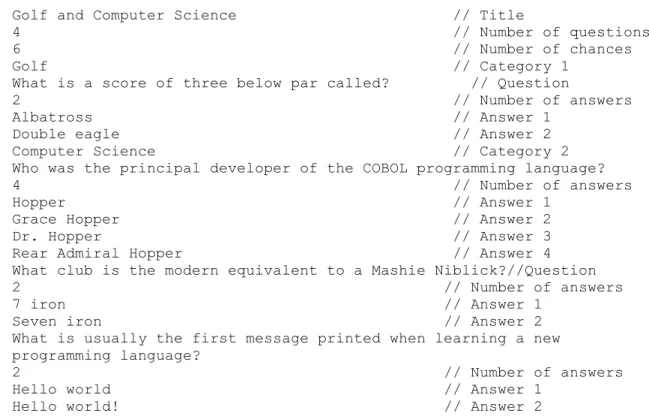
The information for the quiz is contained in a text file. One game file is read in at the beginning of each game. The files are formatted as shown in Figure 2-2.
Golf and Computer Science // Title
4 // Number of questions 6 // Number of chances Golf // Category 1
What is a score of three below par called? // Question
2 // Number of answers Albatross // Answer 1
Double eagle // Answer 2 Computer Science // Category 2
Who was the principal developer of the COBOL programming language? 4 // Number of answers
Hopper // Answer 1 Grace Hopper // Answer 2 Dr. Hopper // Answer 3 Rear Admiral Hopper // Answer 4 What club is the modern equivalent to a Mashie Niblick?//Question 2 // Number of answers 7 iron // Answer 1
Seven iron // Answer 2 What is usually the first message printed when learning a new programming language?
2 // Number of answers Hello world // Answer 1
Hello world! // Answer 2
Figure 2-2: The file format for the trivia quiz game. The information in this file is loaded at the beginning of the game in order to initialize the game. The ‘//text’ sections are not part of the file, but are included for clarification.
The listing in
Figure 2-3 gives the control flow of the trivia quiz game as well as the specific names of the data and instructions that are used. All of the programs developed in this thesis follow the control flow in this listing and use the same names.
1. The user starts the quiz.
2. The quiz begins at main in PlayGame. 3. The program calls loadGame.
a. The game text file is opened for reading. The file format can be seen in Figure 2-2.
b. The values of the following variables are read from the file:
quizName - the name of the quiz
numQuestions - the number of questions in the game
numChances - the number of chances available to the user to answer the questions
c. A new questionInfo is created for every question in the game file. i. The following variables’ values are read from the game file:
category – the category of the question
question – the trivia question to ask the user
numAnswers – the number of possible answers for each question
ii. A new stringLog named answers is created for every questionInfo. 1. An answer is read from the game file and added to the
stringLog by calling addAnswer
2. The number of answers read from the file and added to the stringLog is determined by the value of numAnswers. iii. The number of questionInfos created is equal to the value of
6. The user types in their answer and it is displayed in the console window. The user’s answer is stored in the variable userAnswer.
7. The programcalls checkAnswer to check if the user’s answer is correct or incorrect.
a. The user’s answer is compared to each possible correct answer available for that question as necessary. The correct answers for each question are stored in a data structure called a stringLog which is named answers. b. Control of the program returns to main
8. If the user answered correctly, isCorrect is called. The following variables are updated:
numCorrect – the number of answers that have been answered correctly up this point in the quiz
isCorrect[] – stores whether or not that question has been answered correctly
numChances – the number of chances available to answer the questions 9. If the user answered incorrectly, isIncorrect is called. The variables that are
updated are as follows:
numIncorrect - the number of incorrectly answered questions
numChances – the number of chances available to answer the questions 10.The program checks stillPlaying to determine if the game is over.
a. If the game is over the program continues at number 11in this list. The game is over when one of the following happens:
i. The user has answered all of the questions correctly.
ii. The user has run out of available chances to answer the questions. b. If the game is not over, the program continues at number 5in this list by
asking the user another question.
11. The results of the quiz are displayed in the console window. The values of the following variable are displayed:
numCorrect – the number of questions that the user answered correctly
numChances – the number of times the user tried to answer the questions Figure 2-3: A listing that shows the program flow and variables for all of the
Chapter 3
Object
Oriented
Version Using Java
The object oriented version of the trivia game program was derived from a program in the book “Object-Oriented Data Structures Using Java” [3]. A modified version was written as some features of the original program are not used. The
modifications also allow the names of classes, methods and variables to be changed to reflect the other programs used in this thesis. A complete listing of the source code is given in Figure 3-1at the end of this chapter.
One of the features of the original program was the use of a nicely designed type of data structure. The data structure is used to store the correct answers for the trivia game. The original data structure is defined in an interface called the StringLogInterface and is implemented in a class called the ArrayStringLog. All of the subsequent versions of the program also implement a StringLog data structure. The use of the StringLog data
StringLog --- A data structure used to store the correct trivia game answers.
QuestionInfo – Contains the category, question and answers for each question.
GameInfo --- Primarily contains the current state of a running trivia game.
For an overview of how the program interacts with the user see in the game flow overview in
Figure 2-3. Figure 2-1shows the console window at the end of a game.
The PlayGame object implements just one static method, namely main, and has no fields. The main method is where the quiz starts and it controls the execution of the trivia game program.
The main things to note about the PlayGame object are as follows:
It contains the main method.
The main method contains the code that controls the game flow, user interaction and printing to the console.
It creates a GameInfo object.
It calls the loadGame method of the static class FileInfo to read data into the GameInfo object.
It uses the variable questionNum to keep track of which question is currently being used.
It uses a do-while loop to determine which question to ask next.
Figure 2-3, it corresponds to the outer sections (i.e. 1-11).
The StringLog objects are used to store the all of the correct answers for each question. Each QusetionInfo object contains one StringLog object named answers.
The main things to note about a StringLog object are as follows:
It is primarily used as a data structure.
Its entries are implemented as Strings.
The add method is called by QuestonInfo.addAnswer to store the answers read from the file.
The matches method is called by QuestonInfo.checkAnswer to determine if the user answered the question correctly.
In the game flow overview in
Figure 2-3, it is used in section 3.c.ii and section 7.
The QuestionInfo objects are used to store and access information about each question. The GameInfo game object contains as many QuestionInfo objects as there are questions in the game.
The main things to note about a QuestionInfo object are as follows:
The checkAnswer method is used by the main method tovalidate the users answer.
In the game flow overview in
Figure 2-3, it is used in section 3.c and section 7.
The GameInfo ogject contains the questions and the current state of the game. The main method calls its methods to get the next question and to update and check the current state of the game.
The main things to note about the GameInfo object are as follows:
It contains the method named loadGame
The loadGame method opens the game text file for reading (Technically it opens an InputStream on a resource, but this is just needed so that the text file can be located in the executable JAR file).
The loadGame method reads the name of the game, the number of questions, and the number of chances into the GameInfo game object.
The loadGame method creates a new QuestionInfo qInfo object for every question in the game file.
The loadGame method reads the category, the question and the answers into each qInfo object.
Each qInfo objet is added to the game object.
It contains the questions for the game in an array of QuestionIfo objects. It has one QuestionIfo object for every user question.
The main method uses it to keep track of the which question to ask, the number of questions answered correctly and the number of chances still left.
The main method uses its stillPlaying method to determine if the game is over.
In the game flow overview in
//--- package triviaobj;
import java.util.Scanner;
public class PlayGame {
public static void main(String[] args) { int questionNum = 0;
String userAnswer;
Scanner userInput = new Scanner(System.in); QuestionInfo qInfo;
GameInfo game = new GameInfo();
game.loadGame(game, "game.txt"); //Welcome user
System.out.println("Welcome to the trivia quiz: " + game.getGameName());
System.out.println("You will have " + game.getNumChances() + "chances to answer " + game.getNumQuestions() + questions."); while (game.stillPlaying()){ do{ if (questionNum == game.getNumQuestions()) questionNum = 1; else questionNum++;
}while (game.isCorrect(questionNum - 1) == true); qInfo = game.getQuestion(questionNum - 1); System.out.println(qInfo.getCategory()+ ": " + qInfo.getQuestion()); userAnswer = userInput.nextLine(); if (qInfo.checkAnswer(userAnswer)){ System.out.println("Correct!\n"); game.updateCorrectAnswer(questionNum); } else { System.out.println("Incorrect\n"); game.updateIncorrectAnswer(); } } System.out.println("\nGame Over"); System.out.println("\nResults:");
System.out.print(" Chances used: " + (game.getNumChances()- game.getRemainingChances())); System.out.println(" Number Correct: " + game.getNumCorrect()); System.out.println("\nThank you.\n");
} }
//--- package triviaobj;
public class StringLog { private String[] entry; private int numEntries;
public StringLog(){
entry = new String[10]; numEntries = 0;
}
public void add(String newEntry){ entry[numEntries] = newEntry; numEntries++;
//--- package triviaobj;
public class QuestionInfo { private String category; private String question; private StringLog answers;
public QuestionInfo(String category, String question){ this.category = category;
this.question = question; answers = new StringLog(); }
public void addAnswer(String str){ answers.add(str);
}
public boolean checkAnswer(String str){ return answers.matches(str);
}
public String getCategory() { return category; } //--- package triviaobj; import java.io.InputStream; import java.util.Scanner;
public class GameInfo { private String gameName; private int numQuestions; private int numChances;
private QuestionInfo[] questions; private int questionNum = 0; private boolean[] isCorrect; private int numCorrect = 0; private int numIncorrect = 0; private int remainingChances;
public GameInfo(){ }
public void loadGame(String fileName){ String category; String question; int numAnswers; String answer; QuestionInfo qInfo; InputStream is = PlayGame.class.getResourceAsStream(fileName); Scanner input = new Scanner(is);
setGameName(input.nextLine()); numQuestions = input.nextInt();
public void addQuestion(QuestionInfo qi){ questions[questionNum] = qi;
isCorrect[questionNum] = false; questionNum++;
}
public void updateCorrectAnswer(int questionNum){ isCorrect[questionNum - 1] = true;
numCorrect++; remainingChances--; }
public void updateIncorrectAnswer(){ numIncorrect++;
remainingChances--; }
public boolean stillPlaying(){
if ((numCorrect == numQuestions) || (remainingChances <= 0)) return false;
else
return true; }
public QuestionInfo getQuestion(int questionNum) { return questions[questionNum];
}
public boolean isCorrect(int questionNum) { return isCorrect[questionNum];
}
public void initialize(int numQuestions) { this.numQuestions = numQuestions;
questions = new QuestionInfo[numQuestions]; isCorrect = new boolean[numQuestions]; }
public String getGameName(){ return gameName;
}
public int getNumQuestions() { return numQuestions; }
public int getNumChances() { return numChances; }
public int getNumCorrect() { return numCorrect; }
public int getRemainingChances() { return remainingChances; }
public void setGameName(String gameName) { this.gameName = gameName;
}
public void setNumChances(int numChances) { this.numChances = numChances;
remainingChances = numChances; }
}
Figure 3-1: The complete source code listing of the object oriented version of the program written in Java.
Chapter 4
The Separation Principle Using C++
The C++ version implements the trivia game using the separation principle as applied to the C++ programming syntax. The program is executable and uses the same user interaction as the listing given in Figure 2-3. This section will focus on specific implementation details of the C++ version. The separation principle will be discussed more thoroughly later in this document. Although the program uses C++ input/output, the program makes no use of object orientation and could be implemented in standard C. The full source code listing is given at the end of this chapter.
The separation principle is based on separating the data (resources) from
instructions (processes). To do this is in C++ requires moving the definition of variables out of the object files where they would normally be located. This requires creating additional files. A first attempt was to place all variable declarations and defines in
In the separation principle some variables (data) are used by more than one process (set of instructions). These shared variables are placed in shared memory, called a resource that is accessible only to those processes that require them. Here is typical shared, if small, resource that is contained in the file ANSWERS_Resource.cpp.
// RESOURCE USERANSWER shared by CHECKANSWER, PLAYGAME processes
int questionNum = 0; char userAnswer[80]; bool isCorrectAnswer = 0;
In order to achieve this effect in C++ the definitions for the shared variables were placed in separate source files. They were placed in source files instead of header files in order to keep the C++ linker from issuing errors. The instructions (processes) that make use of these variables (data) do so by declaring the variables using the extern keyword. The extern keyword tells the C compiler/linker that a variable is located in a different file. Here is a code snippet that shows what a typical process looks like in C++.
// Process: PLAYGAME
//****************************************************************************** //This area contains information needed to keep the C++ compiler/linker happy
#include <iostream>
#include "GAMEINFO_Resource_types.h" #include "PLAYGAMEVARS_Resource.h" using namespace std;
// prototypes of rules used in this process void playGame(); void welcomeUser(); void askAnotherQuestion(); void getNextUnasweredQuestionNum(); void updateCorrectAnswer(); void updateIncorrectAnswer(); void displayResults();
// prototypes for calls to other processes extern void checkAnswer();
extern void loadGame();
// shared variables defined in GAME_INFO_Resource extern char quizName[];
extern int numQuestions; extern int numChances;
extern questionStruct* questionInfo[];
// shared variables defined in USERANSWER_Resource extern int questionNum;
extern char userAnswer[]; extern bool isCorrectAnswer;
Notice the large number of variables that are declared externally. These external variables are shared by more than one process and are defined in separate resource files. In the above code there is a comment as to which process shares the variable with this process (PlayGame).
The separation principle also separates data (variables) that are local to a process from shared variables. In this C++ version local variables are located in header files. These header files are only included by the process that uses those variables. Local resources use the same name as there processes with ‘vars’ appended to them (e.g., PlayGame, PlayGameVars). Here is a typical local resource contained in the file
// RESOURCE PLAYGAMEVARS //local to PLAYGAME process bool stillPlaying;
int remainingChances; int numCorrect; int numIncorrect; bool isCorrect[10];
The C/C++ version also uses a form of programming that is not a requirement of the separation principle, but one that the separation principle allows. The developers of VisiSoft advocate this form of programming. Each process is subdivided into rules that are called internally from the same process. These rules can be placed and executed in any order. In the C/C++ version of the program the rules take the form of function calls with no parameters and no return values. The following code snippet demonstrates this
welcomeUser(); stillPlaying = true; while (stillPlaying) askAnotherQuestion(); } void displayResults(){
cout << endl << "Game Over" << endl << endl; cout << "Results:" << endl;
cout << " Chances used: " << numChances - remainingChances; cout << " Number Correct: " << numCorrect << endl << endl; cout << "Thank You." << endl;
}
The main function calls three other functions. The first call, LoadGame, is to another process and is external to the PlayGame process. The other two funtions calls, playGame and displayResults, and are called rules in separation principle style of programming. Notice how the code for the rules is contained in the same process as the calling function.
Although the C/C++ version is executable, to be useful for regular programming it would still require an external data structure to alleviate name space clashes (e.g. two variables with the same name). C/C++ introduces syntax and execution issues. It suggests the need for a programming language that is more suitable to the separation principle as in the VisiSoft case [2]. An implementation of this program using a pseudo-code is given in Figure 5-5 where more of the separation principle is discussed.
The C++ version of the program is composed of six resources and four processes. They are contained in 11 files (four header files and seven source files). The GameInfo resource is in two files (one header file and one source file). The C++ version follows the same outline as the pseudo-code program in chapter 5, so the details of the code execution won’t be explored here. The full source code listing is given at the end of this chapter. Please take note of how closely the processes follow the game flow overview in
Figure 2-3. Notice how the rules in the PlayGame process follow the numbered sections of the listing (e.g. 4. A welcome message is displayed… and the rule
welcomeUser).
//****************************************************************************** // RESOURCE ANSWERS shared by LOADGAME, INSERTANSWER processes
char answer[80]; int answerNum = 0; int questionNumber = 0;
//****************************************************************************** // RESOURCE CHECKANSWERVARS local to CHECKANSWER process
int currAnswerNum = 1;
bool checkingAllAnswers = false; int charNum = 0;
bool checkingThisAnswer = false; char correctAnswer[80] = ""; int diff; char userChar; char correctChar; //****************************************************************************** // RESOURCE GAMEINFO #ifndef _INC_GAME_INFO #define _INC_GAME_INFO typedef struct { char text[80]; int size; }stringLog; typedef struct { char category[80]; char question[80]; stringLog answer[10]; } questionStruct;
// variables shared by CHECKANSWER, INSERTANSWER, // LOADGAME, PLAYGAME processes char quizName[80];
int numQuestions = 0; int numChances = 0;
questionStruct* questionInfo[6];
//****************************************************************************** // RESOURCE LOADGAMEVARS local to LOADGAME process
//****************************************************************************** // Process: PLAYGAME
//****************************************************************************** //This area contains information needed to keep the C++ compiler/linker happy
#include <iostream>
#include "GAMEINFO_Resource_types.h" #include "PLAYGAMEVARS_Resource.h" using namespace std;
// prototypes of rules used in this process void playGame(); void welcomeUser(); void askAnotherQuestion(); void getNextUnasweredQuestionNum(); void updateCorrectAnswer(); void updateIncorrectAnswer(); void displayResults();
// prototypes for calls to other processes extern void checkAnswer();
extern void loadGame();
// shared variables defined in GAME_INFO_Resource extern char quizName[];
extern int numQuestions; extern int numChances;
extern questionStruct* questionInfo[];
// shared variables defined in USERANSWER_Resource extern int questionNum;
extern char userAnswer[]; extern bool isCorrectAnswer;
//******************************************************************************
int main() {
LoadGame(); //CALL to process LOADGAME playGame();
displayResults();
while(true); //keeps console window open after end of game } void playGame(){ remainingChances = numChances; questionNum = -1; welcomeUser(); stillPlaying = true; while (stillPlaying) askAnotherQuestion(); } void displayResults(){
cout << endl << "Game Over" << endl << endl; cout << "Results:" << endl;
cout << " Chances used: " << numChances - remainingChances; cout << " Number Correct: " << numCorrect << endl << endl; cout << "Thank You." << endl;
}
void welcomeUser(){
cout << "Welcome to the trivia quiz: " << quizName << endl; cout << "You will have " << numChances << " chances to answer "
<< numQuestions << " questions." << endl << endl; }
void askAnotherQuestion(){ do
getNextUnasweredQuestionNum(); while (isCorrect[questionNum] == true);
stillPlaying = ((numCorrect != numQuestions) && (remainingChances > 0)); } void getNextUnasweredQuestionNum(){ if (questionNum == numQuestions - 1) questionNum = 0; else questionNum = questionNum + 1; } void updateCorrectAnswer(){
cout << "Correct!" << endl << endl; isCorrect[questionNum] = true; numCorrect = numCorrect + 1;
remainingChances = remainingChances - 1; }
void updateIncorrectAnswer(){
cout << "Incorrect" << endl << endl; numIncorrect++; remainingChances--; } //****************************************************************************** // Process LOADGAME //****************************************************************************** //This area contains information needed to keep the C++ compiler/linker happy
#include <iostream> #include <fstream> #include <string> #include "GAMEINFO_Resource_types.h" #include "LOADGAMEVARS_Resource.h" using namespace std;
// prototypes of rules used in this process void getNextQuestionInfo();
void saveAnswer();
// prototype for call to INSERTANSWER process extern void insertAnswer();
// shared variables defined in ANSWER resource extern char answer[];
extern int answerNum; extern int questionNumber;
// shared variables defined in GAMEINFO resource extern char quizName[];
extern int numQuestions; extern int numChances;
extern questionStruct* questionInfo[];
//****************************************************************************** void LoadGame(void){ gameFile.open("game.txt", ifstream::in); gameFile.getline(quizName,80); gameFile.getline(currLine, 80); numQuestions = stoi(currLine); gameFile.getline(currLine, 80); numChances = stoi(currLine);
}
void saveAnswer(){
gameFile.getline(answer, 80);
insertAnswer(); // CALL to INSERTANSWER process answerNum++;
}
//****************************************************************************** // Process INSERTANSWER
//****************************************************************************** //This area contains information needed to keep the C++ compiler/linker happy
#include <cstring>
#include "GAMEINFO_Resource_types.h" // shared variables from ANSWER extern char answer[];
extern int answerNum; extern int questionNumber; // shared variables from GAMEINFO extern questionStruct* questionInfo[];
//****************************************************************************** void insertAnswer(){ strcpy(questionInfo[questionNumber-1]->answer[answerNum-1].text, answer); questionInfo[questionNumber-1]->answer[answerNum-1].size = answerNum; } //****************************************************************************** // Process CHECKANSWER //****************************************************************************** //This area contains information needed to keep the C++ compiler/linker happy
#include <string>
#include "CHECKANSWERVARS_Resource.h" #include "GAMEINFO_Resource_types.h" // rules used in this process void compareAnswerStr(); void compareAnswerChar(); void checkIfCorrectAnswer(); void foundWrongAnswer(); void foundCorrectAnswer();
extern questionStruct* questionInfo[]; // shared variables
extern int questionNum; extern char userAnswer[]; extern bool isCorrectAnswer;
//******************************************************************************
void checkAnswer(){ currAnswerNum = 0;
checkingAllAnswers = true;
while ((checkingAllAnswers == true) &&
(currAnswerNum <questionInfo[questionNum]->answer[currAnswerNum].size)) compareAnswerStr(); } void compareAnswerStr(){ strcpy(correctAnswer, questionInfo[questionNum]->answer[currAnswerNum].text); charNum = 0; checkingThisAnswer = true;
while (checkingThisAnswer == true) compareAnswerChar();
currAnswerNum++; }
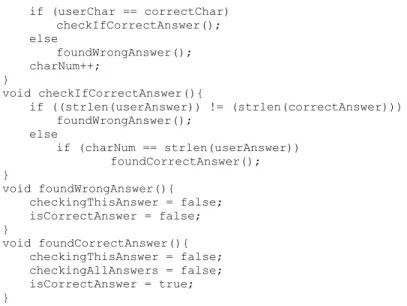
if (userChar == correctChar) checkIfCorrectAnswer(); else foundWrongAnswer(); charNum++; } void checkIfCorrectAnswer(){ if ((strlen(userAnswer)) != (strlen(correctAnswer))) foundWrongAnswer(); else if (charNum == strlen(userAnswer)) foundCorrectAnswer(); } void foundWrongAnswer(){ checkingThisAnswer = false; isCorrectAnswer = false; } void foundCorrectAnswer(){ checkingThisAnswer = false; checkingAllAnswers = false; isCorrectAnswer = true; }
Figure 4-1: The code listing of the trivia quiz game written in C++ using the separation principle.
Chapter 5
The Separation Principle Using Pseudo-Code
The separation principle approach is not only a major paradigm shift in how programs are written but also in the way programs are designed. The separation principle is based on separating the data (resources) from instructions (processes). The principle eliminates the complex notion of scope and allows a graphical approach to program design. The connections between these modules will visually show the architecture and the complexity of the software system. The graphical design is integrated into the software language and is used as the software system is created. That is not to say that this is a purely graphical system, code will be entered using a text editor as in most programming environments. The architecture of the software system is always visually apparent and is interactively updated by the programmer as the program is developed (Figure 5-2).
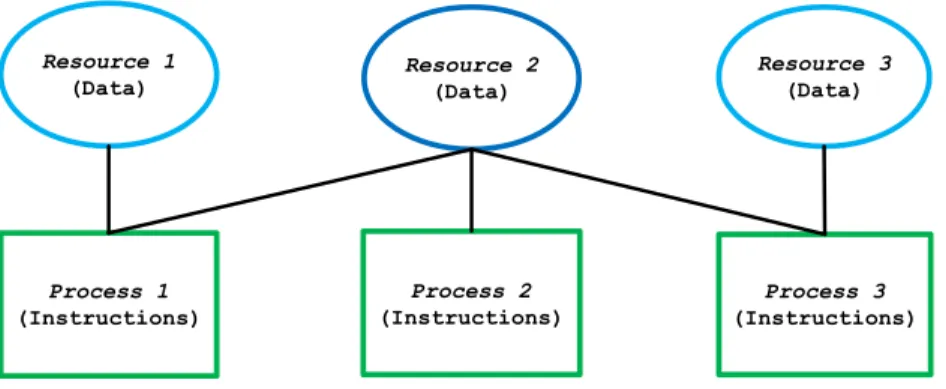
There are three elements that constitute the software architecture (Figure 5-1). 1. Resources - resources are data modules (ellipses in Figure 5-1).
A process only has access to resources (memory) to which it is directly connected. Because of this, complex scoping issues are eliminated. In order to share data, two
processes must be connected to the same resource.
Process 3 (Instructions) Resource 2 (Data) Process 1 (Instructions) Resource 1 (Data) Process 2 (Instructions) Resource 3 (Data)
Figure 5-1: A process to resource connection diagram. A resource can either be shared by two or more processes or it can be local to a single process.
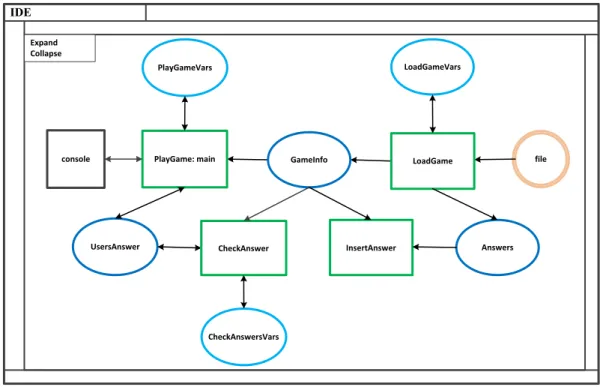
To illustrate how the separation principle might be utilized a pseudo-code version of the quiz game has been developed. A complete program listing is given in Figure 5-5 at the end of this chapter. As part of the separation principle coding style, a diagram showing the connections between the processes and resources has also been created (Figure 5-2). This diagram represents the architecture of the software. Under normal programming conditions the diagram and source code would be developed interactively (Figure 5-3).
file LoadGame PlayGame: main PlayGameVars GameInfo LoadGameVars InsertAnswer Answers UsersAnswer CheckAnswer console CheckAnswersVars IDE Expand Collapse
Figure 5-2: This diagram shows how processes and resources are connected and thus the architecture of the trivia quiz program.
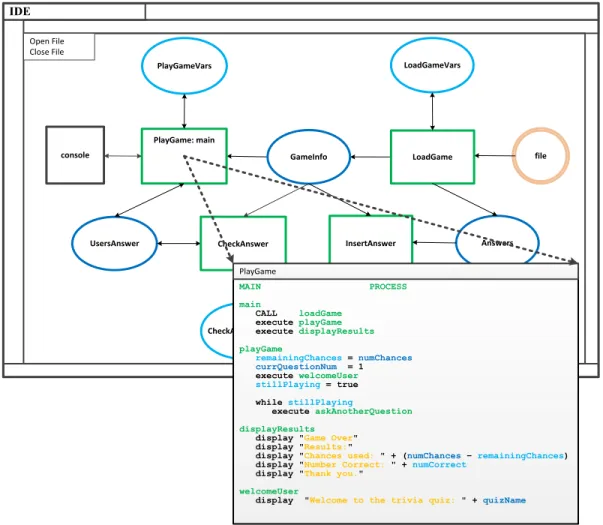
By selecting a process or resource in the diagram a file containing the source code for that process or resource will be opened for editing (Figure 5-3). Likewise if a new process or resource is created in the diagram new files will be created. As the processes and resources are connected in the diagram, a table of connections is updated to track shared data (memory). According to VisiSoft, by manipulating both the diagram and source code iteratively the complexity of the program can be reduced [8].
file LoadGame PlayGame: main PlayGameVars GameInfo LoadGameVars InsertAnswer Answers UsersAnswer CheckAnswer console CheckAnswersVars IDE Open File Close File MAIN PROCESS main CALL loadGame execute playGame execute displayResults playGame remainingChances = numChances currQuestionNum = 1 execute welcomeUser stillPlaying = true while stillPlaying execute askAnotherQuestion displayResults
display "GameOver" display "Results:"
display "Chancesused: " + (numChances– remainingChances) display "Number Correct: " + numCorrect
display "Thankyou."
welcomeUser
display "Welcome to the trivia quiz: " + quizName
PlayGame
Figure 5-3: This figure shows how the connection diagram and the source files are used interactively. As the process or resource object in the diagram is accessed a window opens allowing the source code to be edited
Visisoft has also created a programming environment that allows a hierarchal style of software development. By grouping the process and resources into modules, the
. file LoadGame PlayGame: main PlayGameVars GameInfo LoadGameVars InsertAnswer Answers UsersAnswer CheckAnswer console CheckAnswersVars IDE Expand Collapse IDE file console PlayGame: main PlayGameVars GameInfo LoadGame LoadGameVars Answers InsertAnswer UsersAnswer CheckAnswer CheckAnswerVars Expand Collapse file PlayGame: main PlayGameVars GameInfo console IDE Expand Collapse Answers InsertAnswer UsersAnswer CheckAnswer CheckAnswerVars LoadGame LoadGameVars
The pseudo-code version of the trivia quiz game follows the same game flow as given in Figure 2-3. This is the same as for the other versions of this program developed in this thesis. A complete program listing is given in Figure 5-5The pseudo-code version of the trivia quiz game is made up of four processes and six resources. The resources are as follows:
Answers – contains shared variables related to the possible correct answers
CheckAnswerVars - contains the local variables of the CheckAnswer process.
GameInfo – contains the shared variables for the state of the game.
LoadGameVars –contains local variables for the LoadGame process.
PlayGameVars –contains the local variables for the PlayGame process.
UserAnswer –contains the shared variables needed for the user’s answer. The processes are as follows:
CheckAnswer –is used to check if the answer given by the user is correct.
InsertAnswer –is used to add to the correct answers into the stringLog.
LoadGame –reads the game text file to initialize the game.
Note that the connections between the resources and processes are not given in resource or process files. The connections are shown visually in the connection diagram. The use of diagrams is an integral part of the language.
A typical process is given by PlayGame take rom figure Figure 5-5. A snippet of code from the PlayGame process is as follows:
MAIN PROCESS main CALL loadGame execute playGame execute displayResults playGame remainingChances = numChances currQuestionNum = 1 execute welcomeUser stillPlaying = true while stillPlaying execute askAnotherQuestion displayResults display "Game Over" display "Results:"
display "Chances used: " + (numChances – remainingChances) display "Number Correct: " + numCorrect
display "Thank you."
The PlayGame process is controls the flow and user interaction of the game. The game begins at main rule. The CALL statement causes execution to go to the LaodGame process which loads the game and returns. The execute statements jump to local rules which execute and then return. The separation principle allows this coding style as there are no parameters or return values that have to be stored, loaded , or type checked. This allows the details of the code blocks to be moved. By giving names to the codes blocks, the code becomes more readable.
Notice that remianingChances is a local variable stored in the PlayGameVars resource. The numChances variable is shared between the PlayGame and LoadGame processesand is located in the GameInfo resource. The LoadGame accesses the same variable in the loadGame rule in the line.
read numChances
The use of getter and setter methods is not required. Only processes connected to a resource in the connections diagram can access a variable, which helps control name space issues.
Another programming style advocated by VisiSoft and made possible by the separation principle is given in the following lines of code taken from above.
while stillPlaying
execute askAnotherQuestion
In this style of coding no code blocks are allowed in looping structures. Only a single line of code is allowed. The code block is turned into a rule instead and given a name. This moves the details of the code elsewhere which make the cod easier to follow. The separation principle supports this style because of the low overhead of execution statements as discussed above.
--- ANSWERS RESOURCE answer string questionNum integer answerNum integer numAnswers integer --- CHECKANSWERVARS RESOURCE charNum integer checkingAllAnswers boolean checkingThisAnswer boolean correctAnswer string currAnswerNum integer --- GAMEINFO RESOURCE quizName string numQuestions integer numChances integer stringLog text string size int questionInfo category string question string answer stringLog[10] --- LOADGAMEVARS RESOURCE
gameFileName string c:\game.txt"
gameFile file currLine string --- PLAYGAMEVARS RESOURCE stillPlaying boolean remainingChances integer isCorrect boolean[10] numCorrect integer numIncorrect integer --- USERANSWER RESOURCE questionNum integer userAnswer string isCorrectAnswer Boolean
MAIN PROCESS main CALL loadGame execute playGame execute displayResults playGame remainingChances = numChances currQuestionNum = 1 execute welcomeUser stillPlaying = true while stillPlaying execute askAnotherQuestion displayResults display "Game Over" display "Results:"
display "Chances used: " + (numChances – remainingChances) display "Number Correct: " + numCorrect
display "Thank you."
welcomeUser
display "Welcome to the trivia quiz: " + quizName
display "You will have " + numChances + " chances to answer " +
numQuestions + " questions."
askAnotherQuestion
while isCorrect[questionNum] == true execute getNextUnansweredQuestionNum
display category from questionInfo[questionNum] display question from questionInfo[questionNum] read userAnswer from input
CALL checkAnswer
if isCorrectAnswer
execute updateCorrectAnswer
else
execute updateIncorrectAnswer
stillPlaying = ((numCorrect == numQuestions) or (remainingChances <= 0))
getNextUnansweredQuestionNum if (questionNum == numQuestions) questionNum = 1 else questionNum = questionNum + 1 updateCorrectAnswer display "Correct!"
isCorrect[questionNum] = true numCorrect = numCorrect + 1
---
LOADGAME PROCESS loadGame
open gameFile using gameFileName
read quizName read numQuestions
read numChances
questionNum = 1
while questionNum <= numQuestions
execute getNextQuestionInfo
close gameFile
getNextQuestionInfo
create new questionInfo[questionNum]
read category into questionInfo[questionNum] read question into questionInfo[questionNum] read numAnswers
answerNum = 1
while answerNum <= numAnswers
execute saveAnswer questionNum = questionNum + 1 saveAnswer read answer CALL insertIntoStringLog answerNum = answerNum + 1 --- CHECKANSWER PROCESS checkAnswer answerNum = 1 checkingAllAnswers = true
while (checkingAllAnswers == true) and (answerNum <= possibleAnswers[answerNum]length) execute compareAnswerStr
compareAnswerStr
stringLogAnswer = possibleAnswers[answerNum] from questionInfo[questionNum] charNum = 1
checkingThisAnswer = true
while checkingThisAnswer == true
execute compareAnswerChar
answerNum = answerNum + 1
compareAnswerChar
if userAnswer[charNum] matches {'A'...'Z'} userAnswerChar = lowercase userAnswer[charNum]
if stringLogAnswer[charNum] matches {'A'...'Z'}
stringLogAnswerChar = lowercase stringLogAnswer[charNum]
if userAnswerChar matches stringLogAnswerChar execute checkIfCorrectAnswer
else
execute foundWrongAnswer charNum = charNum + 1
checkIfCorrectAnswer
if (charNum >= userAnswer length) execute foundCorrectAnswer
---INSERTINTOSTRINGLOG PROCESS
insertIntoStringLog {
copy answer into possibleAnswers[answerNum] in questionInfo[questionNum]
Figure 5-5: The code listing for the pseudo-code version. This is a programming language developed for use with the separation principle.
Chapter 6
Conclusion
This thesis explored a new idea in programming design, namely the “Separation Principle”. The separation principle has been championed by the developers of the VisiSoft programming environment [2].
The idea of the separation principle was examined through the use of three different programming strategies. The three programs were all based on a trivia quiz game derived from the book by Dale, et al., given in [3]. The three program styles are as follows:
An object oriented version written in Java.
A separation principle design using C++ syntax.
A separation principle design using a pseudo code.
The object oriented program was used as a basis for comparison with the
separation principle style of programming. With the C++ version of the program, it was proven that the separation principle could be applied using a current programming language. Although the C++ version is executable, it required a considerable amount of
A pseudo code language was examined to show that a programming language could use the separation principle directly. The language also uses two other techniques that VisiSoft promotes.
The use of an “English” style of syntax.
The use of rules to move code blocks for easier understandability.
If one examines the general program listing given in Figure 2-3, it can be seen how closely the separation style follows the outline compared to the object oriented version. The separation principle allows a very top down style of programming without hiding the implementation details.
Although the programs in this thesis were written using today’s style of programming environment, the separation principle style of programming would
normally be written in a graphical environment. The use of visual representations of the resources, processes, and their connections allows one to visualize and manipulate the architecture of the program. It should be noted that the graphical representation is an integral part of the programming environment and it interacts with editing of source code.
References
[1] W. Cave, Software Survivors, Software Developer & Publisher , 1996. [2] Visual Software International, "VisiSoft," 2013. [Online]. Available:
www.visisoft.us/Page_SWD.htm. [Accessed 2013].
[3] N. Dale, D. Joyce and C. Weems, Object-Oriented Data Structures Using Java, Jones & Bartlett, 2011, pp. 85-88;128-143.
[4] D. Anselmo, "Why Hasn't Software Productivity Improved?," in Software Summit, Washington, D.C., 2004.
[5] R. Groth, "Is the Software Industry's Productivity Declining?," Software Magazine, IEEE, vol. 21, no. 6, 2004.
[6] D. Anselmo and H. Ledgard, "Measuring Produtivity in the Software Industry," Communications of the ACM, vol. 46, no. 11, 2003.
[7] TIOBE, "TIOBE Software," TIOBE Software BV, June 2013. [Online]. Available: www.TIOBE.com. [Accessed July 2013].
[8] Visual Software International, "The VisiSoft CAD Approach.pdf," [Online]. Available: http://www.visisoft.us/PDF_Files/The VisiSoft CAD Approach.pdf. [Accessed 2013].