Software AG webMethods Business Process
Management Suite 8.2 SP2 Security Target
Version 0.6
11/08/13
Prepared for:
Software AG USA, Inc.
11700 Plaza America Drive, Suite 700 Reston, VA 20190
Prepared By:
Leidos, Inc.
Common Criteria Testing Laboratory
6841 Benjamin Franklin Drive Columbia, MD 21046
1. SECURITY TARGET INTRODUCTION ... 5
1.1 SECURITY TARGET,TOE AND CCIDENTIFICATION ... 5
1.2 CONFORMANCE CLAIMS ... 5
1.3 CONVENTIONS AND TERMINOLOGY ... 6
1.3.1 Conventions ... 6
1.3.2 Acronyms ... 6
1.3.3 Terminology ... 7
2. TOE DESCRIPTION ... 8
2.1 WEBMETHODS BPMSPRODUCT OVERVIEW ... 8
2.2 TOEOVERVIEW ... 11
2.2.1 Designer ... 11
2.2.2 Integration Server with Process Engine ... 11
2.2.3 webMethods Broker ... 12
2.2.4 My webMethods Server with Task Engine ... 12
2.3 TOEARCHITECTURE ... 13
2.3.1 Physical Boundaries ... 14
2.3.2 Logical Boundaries ... 17
2.4 TOEDOCUMENTATION ... 19
3. SECURITY PROBLEM DEFINITION ... 20
3.1 ORGANIZATIONAL POLICIES ... 20
3.2 THREATS ... 20
3.3 ASSUMPTIONS ... 20
4. SECURITY OBJECTIVES ... 21
4.1 SECURITY OBJECTIVES FOR THE TOE ... 21
4.2 SECURITY OBJECTIVES FOR THE ENVIRONMENT ... 21
5. IT SECURITY REQUIREMENTS ... 23
5.1 EXTENDED COMPONENT DEFINITION ... 23
5.2 TOESECURITY FUNCTIONAL REQUIREMENTS ... 23
5.2.1 Security audit (FAU) ... 24
5.2.2 Cryptographic Support (FCS)... 25
5.2.3 User data protection (FDP) ... 25
5.2.4 Identification and authentication (FIA) ... 28
5.2.5 Security management (FMT) ... 29
5.2.6 Protection of the TSF (FPT) ... 31
5.2.7 Trusted path/channels (FTP) ... 31
5.3 TOESECURITY ASSURANCE REQUIREMENTS ... 32
5.3.1 Development (ADV) ... 32
5.3.2 Guidance documents (AGD) ... 33
5.3.3 Life-cycle support (ALC) ... 34
5.3.4 Tests (ATE) ... 35
5.3.5 Vulnerability assessment (AVA) ... 35
6. TOE SUMMARY SPECIFICATION ... 36
6.1 TOESECURITY FUNCTIONS ... 36
6.1.1 Security audit ... 36
6.1.2 Cryptographic support ... 37
6.1.3 User data protection ... 37
6.1.4 Identification and authentication ... 41
6.1.5 Security management ... 42
6.1.6 Trusted path/channels ... 44
8. RATIONALE ... 47
8.1 SECURITY OBJECTIVES RATIONALE ... 47
8.1.1 Security Objectives Rationale for the TOE and Environment ... 47
8.2 SECURITY REQUIREMENTS RATIONALE ... 50
8.2.1 Security Functional Requirements Rationale... 50
8.3 SECURITY ASSURANCE REQUIREMENTS RATIONALE ... 52
8.4 REQUIREMENT DEPENDENCY RATIONALE ... 52
8.5 TOESUMMARY SPECIFICATION RATIONALE ... 54
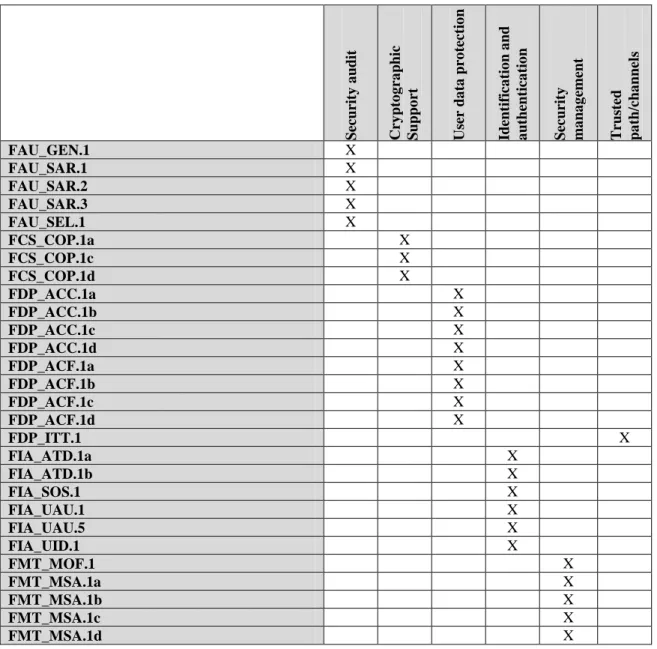
LIST OF TABLES Table 1 TOE Security Functional Components ... 24
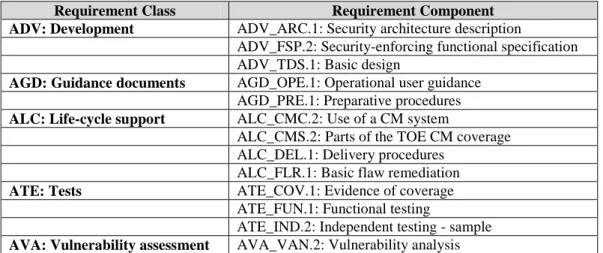
Table 2 EAL 2 augmented with ALC_FLR.1 Assurance Components ... 32
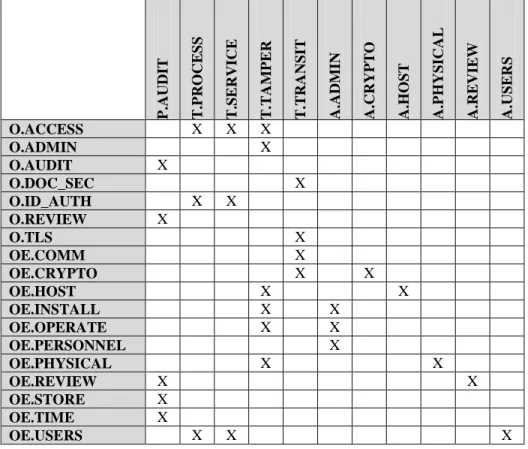
Table 3 Environment to Objective Correspondence ... 47
Table 4 Objective to Requirement Correspondence ... 51
Table 5 Requirement Dependencies ... 54
DOCUMENT HISTORY
Version Date Contributors Change
0.1 23 August 2011 Tim Bond Nelson de la Cruz Gary Grainger
Version submitted for CC evaluation
0.2 8 September 2011
Tim Bond Gary Grainger
Updates in response to evaluation team findings
0.3 9 September 2011
Tim Bond Gary Grainger
Updated to address residual evaluation team findings and comments
0.4 21 June 2012 Tim Bond Gary Grainger
Updated to address issues raised at Initial Validation Oversight Review
0.5 21 August 2013 Tim Bond Updates for tVOR
0.6 8 November 2013
1. Security Target Introduction
This section identifies the Security Target (ST) and Target of Evaluation (TOE), and presents ST conventions, ST conformance claims, and the ST organization. The TOE type is a business process management platform.
The TOE is webMethods Business Process Management Suite 8.2 SP2 (BPMS) produced by Software AG USA, Inc. webMethods BPMS unites business processing management and service-oriented architecture capabilities to provide a comprehensive set of fully integrated tools for automating and managing processes. The webMethods BPMS TOE security features include assuring identification of users, controlling access to services, and auditing of user activity.
The Security Target contains the following additional sections:
• TOE Description (Section 2)
• Security Problem Definition (Section 3)
• Security Objectives (Section 4)
• IT Security Requirements (Section 5)
• TOE Summary Specification (Section 6)
• Protection Profile Claims (Section 7)
• Rationale (Section 8).
1.1
Security Target, TOE and CC Identification
ST Title – Software AG webMethods Business Process Management Suite 8.2 Security Target
ST Version – Version 0.6
ST Date – 11/08/2013
TOE Identification – Software AG webMethods Business Process Management Suite 8.2 SP2
TOE Developer – Software AG
Evaluation Sponsor – Software AG
CC Identification – Common Criteria for Information Technology Security Evaluation, Version 3.1, Revision 3, July 2009
PP Conformance Claims – None
1.2
Conformance Claims
This TOE is conformant to the following CC specifications:
• Common Criteria for Information Technology Security Evaluation Part 2: Security functional components, Version 3.1, Revision 3, July 2009.
• Part 2 Conformant
• Common Criteria for Information Technology Security Evaluation Part 3: Security assurance components, Version 3.1 Revision 3, July 2009.
• Part 3 Conformant
1.3
Conventions and Terminology
This section specifies the formatting information used in the Security Target.
1.3.1
Conventions
The following conventions have been applied in this document:
• Security Functional Requirements – Part 2 of the CC defines the approved set of operations that may be applied to functional requirements: iteration, assignment, selection, and refinement.
o Iteration: allows a component to be used more than once with varying operations. In the ST, iteration is indicated by a letter placed at the end of the component. For example FDP_ACC.1a and FDP_ACC.1b indicate that the ST includes two iterations of the FDP_ACC.1 requirement, a and b.
o Assignment: allows the specification of an identified parameter. Assignments are indicated using bold and are surrounded by brackets (e.g., [assignment]). Note that an assignment within a selection would be identified in italics and with embedded bold brackets (e.g., [ [selected-assignment]]).
o Selection: allows the specification of one or more elements from a list. Selections are indicated using bold italics and are surrounded by brackets (e.g., [selection]).
o Refinement: allows the addition of details. Refinements are indicated using bold, for additions, and strike-through, for deletions (e.g., “… all objects …” or “… some big things …”).
• Other sections of the ST – Other sections of the ST use bolding to highlight text of special interest, such as captions.
1.3.2
Acronyms
API Application programming interface
BPEL Business Process Execution Language
BPM Business process management
BPMS Business process management suite
DSP Dynamic server page
ESB Enterprise service bus
FTP File Transfer Protocol
FTPS File Transfer Protocol over TLS
HTTP Hypertext Transfer Protocol
HTTPS Hypertext Transfer Protocol Secure
IMAP Internet Message Access Protocol
JDK Java Development Kit
JKS Java Key Store
JMS Java messaging service
JRE Java Runtime Environment
POP Post Office Protocol
RDBMS Relational Database Management System
SAML Security Assertion Markup Language
SMTP Simple Mail Transfer Protocol
SOA Service-oriented architecture
SSL Secure Sockets Layer
TLS Transport Layer Security
WS Web Services
WSDL Web Services Description Language
W3C World Wide Web Consortium
XSD XML Schema Document
XSLT Extensible Stylesheet Language Transformations
1.3.3
Terminology
Adapter Connects an enterprise resource to the webMethods Integration Server. An adapter transforms data from resource-specific format into the format used within the webMethods product suite, and vice versa.
Business Process
A series of business activities that are performed in a specific order, by a variety of applications, systems, end users, and external businesses, according to defined business rules.
Broker High-speed message router that provides publish-subscribe and point-to-point messaging.
Broker/local trigger
A trigger that subscribes to and processes documents published/delivered locally or to webMethods Broker.
Client Group Represents a particular group or category of webMethods Broker client (for example, administrators, customers, or Integration Server processes). Client groups are used for access control.
Designer A graphical tool for developing business process and developing supporting services, business rules, and tasks.
Document A structured message (containing data) that flows through the Integration Server system
Document type
Schema-like definition that describes a document’s structure.
Element An object in Integration Server that may have an ACL placed on it (e.g. service)
Enterprise resource
An application or system and that is managed and protected by the organization responsible for the TOE. Examples of this are a CRM system, application database, or custom HR system.
Integration Server
The webMethods Integration Server is the central run-time component of the webMethods suite and supports integration with Web services, packaged applications, mainframe and legacy applications, databases, and more. Integration Server's function in integration solutions is the execution of services.
JMS trigger A trigger that receives messages from a destination (queue or topic) on a JMS provider and then processes those messages.
Portlet A user interface component that generates dynamic content. My webMethods Server provides a container for portlets and aggregates dynamic content for presentation.
Security realm
A collection of server resources (such as pages and portlets) that share the same ACL.
Server verb An operation (such as publishing, deleting, updating, subscribing, and setting permissions), which is available through the My webMethods Server API.
Service A service is an Integration Server-resident unit of functionality that clients can invoke. (A service might be an entire application or used as part of a larger application.)
Task A business process activity managed by Task Engine and performed by an end user.
Trigger An object that establishes a subscription to publishable document types and specifies services that will process documents received by the subscription.
Web service A collection of functions that are packaged as a single unit and published to a network for use by other software programs.
2.
TOE Description
The Target of Evaluation (TOE) is webMethods Business Process Management Suite 8.2 SP2, which consists of Integration Server with Process Engine, webMethods Broker, My webMethods Server with Task Engine, and Designer. webMethods BPMS is part of the larger webMethods Product Suite. The BPMS product provides application services together with business process management (BPM) in a service-oriented architecture (SOA). The TOE encompasses the security functions of the BPMS. This section introduces the webMethods BPMS product and describes the parts of the product that make up the TOE. Section 2.1 provides a brief overview of relevant BPMS product components while section 2.2 describes the security functions of the TOE.
2.1
webMethods BPMS Product Overview
A business process is a series of business activities that are performed in a specific order, by a variety of
applications, systems, employees, and external businesses, according to defined business rules. An example of a business process includes handling a purchase order from receipt through fulfillment.
BPMS provides business process management, which enables an enterprise to automate business processes. Also, business processes typically involve many variables and conditions, and the longer they run, the more likely the variables and conditions are to change. For example, a supplier might temporarily run out of parts needed to fill orders. Business process management enables users to act on running processes in response to such changes; in the example above, a user could suspend order fulfillment processes until parts are available again.
A variety of users interact with the BPMS. Administrators install and configure the BPMS. Developers and business analysts define business processes including services that each process presents. A service is an Integration Server-resident unit of functionality that users or processes can invoke. Service users initiate a business process through the services it presents. For example, a customer would initiate an order fulfillment process by invoking a service for submitting a purchase order, which the service would enter into the BPMS as a document (a structured message). The BPMS performs the activities of a business process when it receives a document through a service. Business process activities may include tasks, which are activities managed by Task Engine and performed by people. Hence, users also interact with running business processes. Continuing the example, a customer representative would perform a task to approve a customer’s purchase order. Other users are enterprise resources (applications and systems managed by the organization responsible for the BPMS) that send documents and messages to a business process as well as external systems that send messages. For example, a backend system might send a document to notify the order fulfillment process when an order has been shipped. BPMS also can send information to systems and applications (such as updating a database). BPMS uses an adapter to transform BPMS documents into a format used by a system or application.
webMethods BPMS includes Designer, Integration Server with Process Engine, webMethods Broker, and My webMethods Server with Task Engine. Other products that are part of BPMS and the webMethods Product Suite are not included in the evaluation.
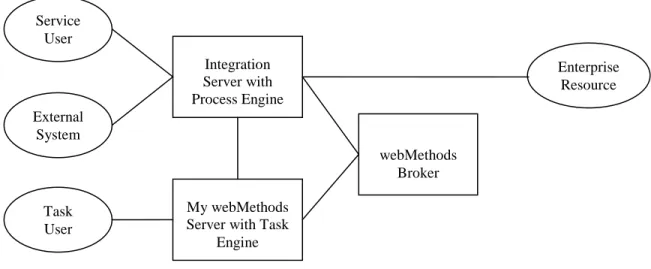
Figure 1 shows interaction with BPMS components in the context of a business process. The figure illustrates a minimal deployment of the BPMS. Integration Server presents the services that a user invokes to initiate a business process. Process Engine transitions the business process from activity to activity using services and documents. Documents are used in business process activities (and to synchronized Process Engines in deployments with multiple Integration Servers). Process Engine passes control to the Task Engine on My webMethods server for tasks. The Task Engine handles presenting information to a user as well as accepting user input. Task Engine returns control to Process Engine once a task is complete. An activity may use information from enterprise resources and external systems. Enterprise resources and external systems can send information to Integration Server as Java Message Service (JMS) messages. Enterprise resources can send JMS messages via webMethods Broker, which is a message router that transfers messages among BPMS components and enterprise resources. Integration Server can monitor enterprise resource using adapters.
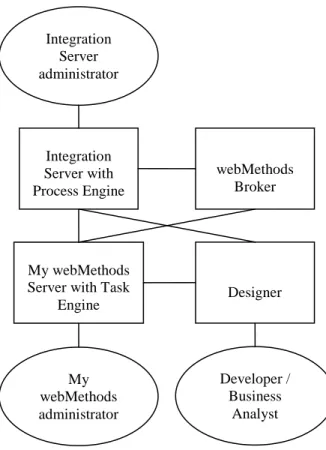
The BPMS components must be installed and configured before the BPMS can provide services and business processes. Figure 2 shows interactions with BPMS components at design time. An administrator can configure Integration Server using the web Administration interface built in to Integration Server. An administrator can configure My webMethods Server and webMethods Broker using My webMethods Server. A developer or business analyst uses Designer to develop services on Integration Server and to define business processes on Integration Server and My webMethods Server.
Task User
My webMethods Server with Task
Engine Integration Server with Process Engine webMethods Broker Enterprise Resource Service User External System
My webMethods administrator My webMethods Server with Task
Engine Integration Server with Process Engine webMethods Broker Designer Developer / Business Analyst Integration Server administrator
2.2
TOE Overview
The webMethods BPMS TOE encompasses the security functions of the webMethods BPMS. The products that make up the TOE are:
• Integration Server with Process Engine,
• webMethods Broker, and
• My webMethods Server with Task Engine.
• Designer
2.2.1
Designer
Designer is an Eclipse-based graphical development application. It provides tools for developing services and designing business processes including tasks. A service is not available in the run-time environment until it is built and deployed to Integration Server. Similarly, a business process is not available in the run-time environment until it is published to Integration Server and a task is not available until published to My webMethods servers. Integration Server and My webMethods Server authenticate Designer users. In the run-time environment, they control access to objects as described in sections 2.2.2 and 2.2.4. Integration Server and My webMethods Server can be configured to deny Designer access in the run-time environment.
Designer uses the operational environment to support TLS connections to Integration Server and My webMethods Server.
2.2.2
Integration Server with Process Engine
Integration Server listens for user requests on one or more ports. A user submits a request as a file or through a web service. The Integration Server provides the following mechanisms for a user to submit a file:
• Post a file via HTTP or HTTPS,
• Transfers a file via FTP or FTPS,
• Place a file in a file system directory that the Integration Server monitors (file polling), and
• Email a file as an attachment via POP or IMAP.
Integration Server uses a FIPS 140-2 validated cryptographic module in the operational environment for cryptographic functions.
Integration Server provides web services defined through Web Service Description Language (WSDL), including WS-Security signed and encrypted messages.
A system can provide information to Integration Server through documents and triggers. A trigger is an object that establishes a subscription to publishable document types and specifies services that will process documents received by the subscription. An adapter translates information it receives from a system into an adapter notification document, which it publishes to Integration Server. A triggersubscribes to an adapter notification document type. The trigger invokes a service to process each document it receives.
A service developer chooses whether to implement a service with an insecure or secure protocol (for example, HTTP or HTTPS). The choice depends on an organization’s security policy, the type of service, and the operational environment. For example, an insecure protocol for a service that publishes publically-available information while a secure protocol would be appropriate for information deemed sensitive under the organization’s security policy. Integration Server can restrict access to services by origin (that is, IP address), port, requested service, and identity of the user making the request. It can limit access to services internal to a business process, if configured to do so. Integration Server can be configured to authenticate the identity of a user requesting a service. It can maintain and store user definitions (user name, password, and other user attributes). The Integration Server can authenticate using the user database it maintains or using a user database maintained by a My webMethods Server or using an external LDAP server. A service or business process may entail documents received from enterprise resources (for example, databases). Integration Server controls the services invoked when it receives such a document.
Users develop business processes with Designer. Integration Server authenticates a Designer user before granting access to services, business processes, and other Integration Server resources. Integration Server can restrict access to services, business processes, and other Integration Server resources.
Integration Server provides an interface to manage security functions through Integration Server Administrator. Integration Server Administrator allows monitoring server activity, management of user accounts, and setting operating parameters. It is a browser-based application that uses services to accomplish its work.
The Integration Server audits security-relevant requests and events.
Process Engine controls the run-time execution of business processes on Integration Server. However, Process Engine does not provide any security functionality.
2.2.3
webMethods Broker
webMethods Broker is a message router for asynchronous publish-subscribe messaging and point-to-point messaging. For publish-subscribe messaging, a messaging client connects to webMethods Broker and publishes a document. Broker queues the document for all subscribers. It sends the document to each subscriber when a messaging client for the subscriber connects to Broker. webMethods Broker supports two messaging protocols: a webMethods-proprietary messaging protocol and the JMS protocol.
Messaging clients are enterprise resources, My webMethods Server, and Integration Server. Enterprise resources use webMethods Broker’s message routing capabilities. TOE administrators manage webMethods Broker through Broker User Interface1, a graphical user interface presented by My webMethods Server. Instances of Integration Server exchange documents through webMethods Broker (for example, to perform services or triggers).
webMethods Broker can authenticate messaging clients. It provides two authentication mechanisms: password-based authentication and two-way TLS authentication with X.509 certificates. In addition, TLS supports secure communication for sessions including sessions initiated with password-based authentication.
A messaging client connecting to webMethods Broker provides a client group, which represents a particular group or category of client (for example, administrators, customers, Integration Server processes). webMethods Broker uses the identity of the client and access control lists (ACLs) to determine whether the client is a member of the identified client group. If the client is a member, webMethods Broker grants the client access to documents that have a document type associated with the client group. In addition, webMethods Broker uses client groups to restrict access to its management functions.
webMethods Broker audits security relevant events. It stores audit records in files in the local file system.
2.2.4
My webMethods Server with Task Engine
webMethods BPMS components contain web applications for using and managing the components. These applications are called webMethods applications. My webMethods Server is a run-time container for functions made available by webMethods applications. The user interface for these functions is called My webMethods. My webMethods provides a ready-made environment in which users can perform functions on webMethods applications, and administrators can manage access to those functions. In particular, users access business process tasks through My webMethods. Task Engine on My webMethods Server works with Process Engine on Integration Server to control the tasks presented to users. My webMethods Server authenticates users before granting access. It maintains a database of users, which it may share with Integration Server. Like Integration Server, My webMethods Server supports authentication using an external LDAP server. My webMethods Server supports secure communication (HTTPS) with My webMethods clients and other TOE components using a FIPS 140-2 validated cryptographic module from the operational environment.
Task Engine controls the run-time execution of tasks on My webMethods Server. However, Task Engine does not provide any security functionality.
1
webMethods Broker provides command-line utilities for some management tasks: create and configure a Broker Server, backup/restore metadata for a Broker Server, manage Broker and Broker Monitor (internal components of webMethods Broker).
2.3
TOE Architecture
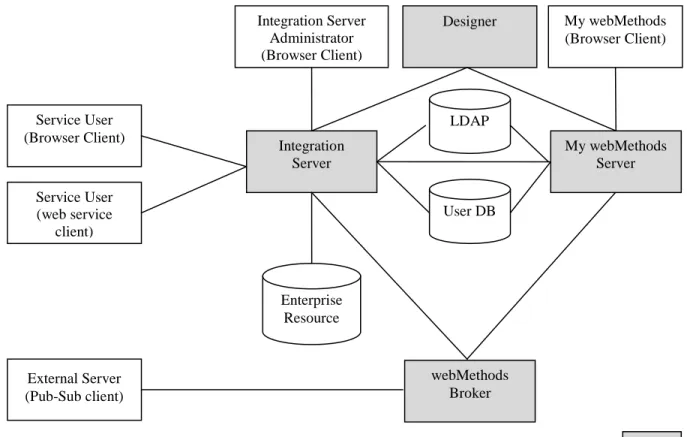
The TOE is a distributed application. Figure 3 shows the general network architecture for webMethods BPMS. One or more Integration Server(s) presents services to users. One or more Integration Servers provide access to enterprise resources. Business analysts and IT developers develop services and business processes with Designer. Users perform business process tasks through My webMethods. Administrators manage a deployment, including security, through Integration Server Administrator and My webMethods graphical user interfaces. One or more webMethods Brokers provides messaging between the Integration Servers and My webMethods Server.
Organizations deploy webMethods BPMS in a variety of operational environments. In some deployments, the operational environment strictly controls access by untrusted users to TOE components (for example, with firewalls) and protects communication between TOE components (for example, through isolated networks). In other deployments, internal users (for example, users performing tasks through My webMethods) may work on the same internal network as TOE components.
Consequently, the evaluated configuration includes a range of deployments. Some restrictions apply in all deployments. The TOE would be configured to protect its external interfaces. The TOE relies on the operational environment to restrict network access from public networks (for example, the Internet) to the TOE. The operational environment would be configured to protect TOE resources stored in the environment (that is, TOE executables and TOE data) as well the resources the TOE relies upon (that is, cryptographic modules, JVMs, LDAP server, RDBMS server, and application server).
In an environment where TOE communication and intra-TOE interfaces are visible to untrusted users (that is, end users, external servers, and non-administrative My webMethods users), the TOE would be configured to protect
Figure 3 TOE and Its Operational Environment Service User (web service client) Service User (Browser Client) Integration Server Administrator (Browser Client) My webMethods (Browser Client) My webMethods Server Integration Server User DB webMethods Broker Enterprise Resource Designer LDAP TOE External Server (Pub-Sub client)
TOE communication (including management sessions from Integration Server Administrator and My webMethods Server) and intra-TOE interfaces. The TOE would be configured to use cryptographic functions of the operational environment to protect communication between TOE components from disclosure and undetected modification. TOE components and the environment would be configured to protect communication between the components and the browsers and servers the TOE uses in the operational environment (for example, LDAP and RDBMS servers). In addition, each instance of webMethods Broker would be configured to authenticate all clients.
In an operational environment where TOE communication and intra-TOE interfaces are not visible to untrusted users, the TOE may rely on the operational environment for protection. TOE network communication may be in plain text where the operational environment prevents modification and disclosure. webMethods Broker need not authenticate clients, since no unauthorized clients would have access to Broker interfaces.
2.3.1
Physical Boundaries
2.3.1.1 TOE Components The TOE consists of:
• One or more instances of Integration Server version 8.2 (including Process Engine),
• One or more instances of webMethods Broker version 8.2, and
• One or more instances of My webMethods Server 8.2 (including Task Engine), and
• One or more instances of Designer.
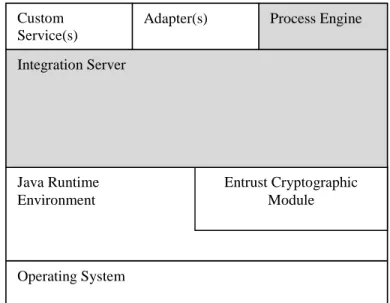
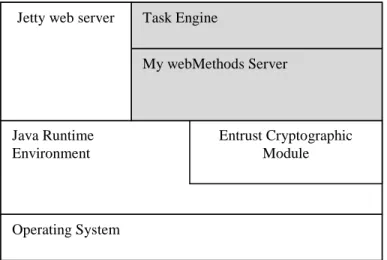
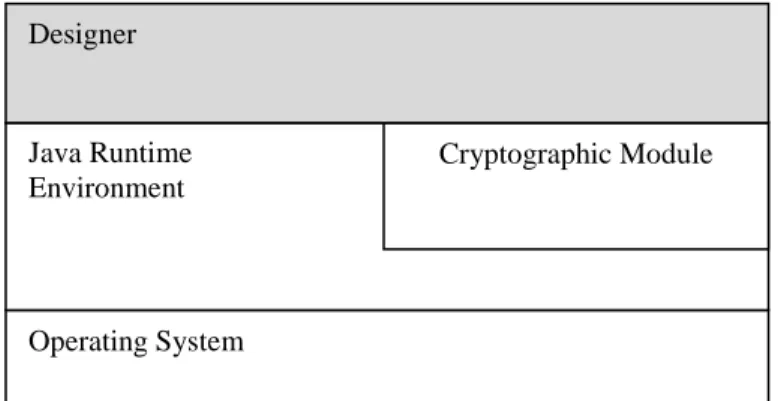
Each Integration Server, webMethods Broker, and My webMethods Server runs on a separate host. The physical boundary of the TOE is the boundary of the TOE software within each host platform. Figure 4, Figure 5, Figure 6, and Figure 7 illustrate the boundary between each TOE component and its operational environment.
Operating System Java Runtime Environment Entrust Cryptographic Module Integration Server Process Engine Custom Service(s) Adapter(s) TOE
Operating System Java Runtime Environment Entrust Cryptographic Module My webMethods Server Task Engine TOE Jetty web server
Figure 5 My webMethods Server Architecture
Operating System OpenSSL webMethods Broker
TOE
2.3.1.2 Operational Environment
The TOE requires host platforms including operating systems, Java Development Kit (JDK), and relational database management system (RDBMS). A JDK includes the Java Runtime Environment (JRE), in which TOE components execute. Suitable combinations of operating system, JDK, and RDBMS are described in webMethods System Requirements 8.22.While there are some restrictions on combinations, in general the TOE components run with the following operating systems, JDK, and RDBMS.
Operating systems:
• Windows Server 2003 Standard and Enterprise Edition (x86 and x86-64)
• Windows Server 2008 Standard and Enterprise Edition (x86 and x86-64)
• Windows Server 2008 R2 Standard and Enterprise Edition (x86-64)
• SUSE Linux Enterprise Server 11 SPx (x86 and x86-64)
• Red Hat Enterprise Linux Server 5.x (x86 and x86-64)
• Red Hat Enterprise Linux Server 6.x (x86-64)
• Solaris 10 (64 Ultra SPARC and x86-64)
• HP-UX 11i v3 (PA-RISC64 and IA64)
• AIX 6.1 (Power 64-bit) JDK:
• Oracle Java 1.6.0_24 or later (Windows, Linux, Solaris)
• HP Java 1.6.0.09 or later (PA-RISC 64)
• HP Java 1.6.0.07 or later (IA64)
• IBM Java 1.6.0 SR9 or later (AIX)
• Oracle Java 1.7.0_13 or later (Windows, Linux, Solaris) RDBMS 2 http://documentation.softwareag.com/webmethods/wmsuites/wmsuite8-2_ga/SysReqs_Installation_and_Upgrade/8-2_System_Requirements.pdf Operating System Java Runtime Environment Cryptographic Module Designer TOE
• Oracle 11g (R1 and R2)
• DB2 9.7 LUW
• SQL Server 2003 and 2008
The operational environment contains commodity PC and browsers for Integration Server Administrator and My webMethods. Support browsers are:
• Microsoft Internet Explorer 7.x and 8.x
• Mozilla Firefox 3.x
The TOE may use an LDAP Directory server in the operational environment.
The operational environment includes components provided by Software AG and installed with the TOE. These components are:
• Entrust Authority™ Security Toolkit 7.2 for the Java© Platform,
• OpenSSL FIPS Object Module, and
• Jetty web server.
The Integration Server and My webMethods Server TOE components rely on Entrust Authority™ Security Toolkit 7.2 for the Java® Platform for cryptographic functions it provides. This toolkit is a FIPS 140-2 validated cryptographic module (certificate #802). webMethods Broker relies on OpenSSL FIPS Object Module 1.2.3 for cryptographic functions (FIPS 140-2 certificate #1051). My webMethods Server relies on the Jetty web server to present the My webMethods graphical user interface. Integration Server uses a file system to maintain its user database as well as an Apache Derby to store non-security-relevant databases. In the evaluated configuration, Integration Server may be configured to use an external RDBMS in place of the embedded database server for the user database.
2.3.1.3 Excluded Functionality
The TOE does not include the following aspects of the webMethods BPMS:
• Custom services built on the platform (services and packages added by end consumer)
• WmTomcat package
• Broker Access Labels (not enabled by default)
Other products in the webMethods Product Suite (such as webMethods Adapters, EntireX, ApplinX, Blaze Advisor, and CentraSite) complement and supplement the capabilities of webMethods BPMS. Other products in the webMethods Product Suite are distinct from webMethods BPMS. They are not included in the evaluation, which consequently provides no information about their security features. Other products in the webMethods Product Suite may be used with an evaluated TOE.
2.3.2
Logical Boundaries
This section summarizes the security functions provided by webMethods BPMS:
• Security audit
• Cryptographic support
• User data protection
• Identification and authentication
• Security management
• Trusted path/channels 2.3.2.1 Security audit
The TOE records security-relevant events in audit records. Integration Server, webMethods Broker, and My webMethods Server generate audit records, which are stored in distinct audit trails. Security-relevant events include TOE configuration changes made by administrators, business process changes made by business analysts and IT developers, and service access by users. The set of audited events is configurable. Each audit record contains
information suitable for analysis including date and time of the event, type of event, responsible identity, and event outcome.
The TOE provides tools to select Integration Server’s audit records by time or number of records and view the subset in chronological or reverse chronological order. The TOE limits access to these tools. The Integration Server stores the audit records in a database, which the operational environment protects.
The TOE webMethods Broker and My webMethods Server store their audit trails in local operating system files, which the operating system protects. The TOE relies on the operational environment (for example, using a text editor) for review of webMethods Broker and My webMethods Server audit records. My webMethods Server also provides ability to view audit trails via its web interface.
In addition, the TOE relies on the operational environment for reliable time stamps.
2.3.2.2 Cryptographic support
Integration Server built-in services include services to digitally sign documents and verify digital signatures and to encrypt and decrypt documents. Business analysts and IT developers can use the built-in cryptographic services to present end users with digital signature and secure hash functions. These services rely on the operational environment, specifically JDK cryptographic providers and cryptographic functions of the Entrust FIPS 140-2 validated cryptographic module. The JDK cryptographic providers implement World Wide Web Consortium (W3C) XML standards. The cryptographic module provides cryptographic algorithms (RSA, AES, and Triple DES). The built-in services use the operational environment to make the cryptography capabilities available for use with documents.
The TOE supports secure communication with users and between TOE components with TLS. The TOE configuration determines which ports require TLS. The TOE relies on the operational environment for key management and cryptographic functions, which are provided by the JDK (for example, TLS session establishment) and FIPS 140-2 validated cryptographic modules (for example, AES encryption and decryption). Cipher suites used by the TOE include Triple DES, AES, DSA, and RSA using common key sizes (192 bits, 128 to 256 bits, 1024 bits, and 1024 to 4096 bits, respectively).
By default, JDK limits cryptographic key sizes. The defaults can be changed with a jurisdiction policy file. In order to allow use of longer keys (for example, 256-bit AES), the JVM in the operational environment must have an unlimited strength jurisdiction policy file.
2.3.2.3 User data protection
The TOE provides services to end users and provides development tools to business analysts and IT developers. The TOE enforces policies to limit access to services, tools, information, and resource to authorized users. The policy can limit service requests based on group membership, location (that is, source IP address), and service requested. It can limit access to other resources based on user name, group membership, role membership, owner of the resource, and operation requested. Administrators can configure access control policies and user permissions. Business analysts and IT developers may set user permissions on a limited basis (for example, on resources they own).
2.3.2.4 Identification and authentication
Both access control policy enforcement and security audit depend on assured identity of users. The TOE provides password-based authentication and supports cryptographic authentication. In addition, the TOE supports use of an external LDAP server for authentication. The TOE enforces password composition rules. The TOE associates security attributes with each authenticated user. These attributes may include user name, group membership, role membership, password, and X.509 public key certificate. The TOE authentication policy is configurable so that some services and operations would require authentication while others would not.
2.3.2.5 Security management
The TOE uses roles to manage privileges. Several Integration Server, webMethods Broker, and My webMethods Server roles have privilege to manage security functions. Collectively, these roles are identified with the Authorized Administrator role defined in this ST. The TOE also uses roles to enforce its access control policy.
The TOE includes tools needed to manage its security functions and limits their use to Authorized Administrators. An Authorized Administrator can configure security audit, network port restrictions, user accounts, groups, roles, access control policy, and password policy rules.
2.3.2.6 Trusted path/channels
The TOE supports secure communication for service requests and responses. The TOE can be configured to use a FIPS 140-2 validated cryptographic module to present services through HTTPS and, for Integration Server, FTPS. In addition, the TOE can be configured to use TLS version 1.0 to protect communication among TOE components and between webMethods Broker and its clients. The TOE supports LDAPS (LDAP over TLS) for connections with LDAP directories in the operational environment. The TOE relies on the operational environment for secure communication with RDBMSs.
2.4
TOE Documentation
Software AG offers a series of documents that describe the installation of webMethods BPMS as well as guidance for subsequent use and administration of the applicable security features.
• Using the Software AG Installer
• Understanding the webMethods Product Suite
• Working with My webMethods
• Installing webMethods Products
• Administering Integration Server
• Integration Server Build-In Services Reference
• Dynamic Server Pages and Output Template Developer’s Guide
• Publish-Subscribe Developer’s Guide
• Web Services Developer’s Guide
• Administering Process Engine
• Working with BPM Tasks
• Administering webMethods Broker
TOE guidance documents are available from the Software AG documentation web site (http://documentation.softwareag.com/).
3.
Security Problem Definition
The TOE security environment describes the security aspects of the intended environment in which the TOE is to be used and the manner in which it is expected to be employed. The statement of the TOE security environment defines the following:
• Organizational Policies that the TOE and the environment of the TOE fulfill
• Threats that the TOE and the environment of the TOE counters
• Assumptions made about the operational environment and the intended method of use for the TOE
Furthermore, the TOE is intended to be used in environments where the relative assurance that its security functions are enforced is commensurate with EAL 2 augmented with ALC_FLR.1 as defined in the CC.
The assets the TOE directly protects are the services and business processes it provides. The TOE indirectly protects resources used by services and business processes (for example, backend databases and mainframes).
3.1
Organizational Policies
P.AUDIT A product that provides security functions must be capable of producing an audit trail of security-relevant events.
3.2
Threats
T.PROCESS A user may view, read, or write business process information without permission using BPMS interfaces.
T.SERVICE A user may invoke a service, web page, or business process task without permission. T.TAMPER A user may modify the BPMS or its configuration in order to access services or business
process information without permission.
T.TRANSIT A user may capture network traffic in order to observe or alter service invocation or business process information of another user.
3.3
Assumptions
A.ADMIN Those responsible for the TOE are trusted to correctly configure and operate the TOE according to the instructions provided by the TOE documentation.
A.CRYPTO The operational environment must provide key management and underlying cryptographic functions to support TOE cryptographic operations.
A.HOST There is no untrusted software on the servers hosting the TOE. A.PHYSICAL The TOE is protected from physical attack.
A.REVIEW The operational environment must provide text processing tools to supplement the TOE capability to review the security audit trail.
4.
Security Objectives
This section defines the security objectives for the TOE and its supporting environment. The security objectives are intended to counter identified threats, comply with defined organizational security policies, and address applicable assumptions.
4.1
Security Objectives for the TOE
O.ACCESS3 The TOE must allow a user to access only those services, Integration Server resources, webMethods Broker documents, and My webMethods Server resources for which the user is authorized.
O.ADMIN The TOE must provide functions to manage the security functions of the TOE and restrict the use of these functions to authorized administrators.
O.AUDIT The TOE must provide the capability to produce audit trail of security-relevant events. O.DOC_SEC The TOE must provide capabilities to digitally sign documents, verify digital signatures on
documents, encrypt documents, and decrypt documents for documents exchanged during service invocation.
O.ID_AUTH The TOE must be able authenticate the identity of a user requesting access to security
management functions or restricted services, Integration Server resources, webMethods Broker documents, or My webMethods Server resourcesbefore allowing access.
O.REVIEW The TOE must provide authorized users with the capability to review the Integration Server security audit trail.
O.TLS The TOE must provide the capability to secure communications via TLS between a user and the TOE and among TOE components.
4.2
Security Objectives for the Environment
OE.COMM The operational environment must protect communications among TOE components and between users and the TOE.
OE.CRYPTO The JDK and FIPS 140-2 validated cryptographic modules must provide key management and underlying cryptographic functions to support TOE TLS and document cryptographic operations. OE.HOST Those responsible for the TOE must ensure that there is no untrusted software on the servers
hosting the TOE.
OE.INSTALL Those responsible for the TOE must ensure that the TOE is delivered and installed in a secure manner as outlined in supplied guidance.
OE.OPERATE Those responsible for the TOE must manage and operate the TOE in a secure manner as outlined in the supplied guidance.
OE.PERSONNEL Personnel working as authorized administrators of the TOE must be carefully selected and trained for proper operation of the system.
OE.PHYSICAL Those responsible for the TOE must ensure that the TOE is protected from physical attack. OE.REVIEW The operational environment must provide tools to review the My webMethods Server and
webMethods Broker text audit trails.
OE.STORE The operational environment must provide the capability to store and protect the security audit trail produced by the TOE.
OE.TIME The operational environment must provide the TOE with reliable time stamps.
OE.USERS Those responsible for the TOE must instruct users to protect authentication data in their possession.
5.
IT Security Requirements
The security requirements for the TOE have all been drawn from Parts 2 and 3 of the Common Criteria. The security functional requirements have been selected to correspond to the actual security functions implemented by the TOE while the assurance requirements have been selected to offer a low to moderate degree of assurance that those security functions are properly realized.
5.1
Extended Component Definition
This ST contains no extended components. All security functional requirements are drawn from CC Part 2. All security assurance requirements are drawn from CC Part 3.
5.2
TOE Security Functional Requirements
The following table describes the SFRs that are candidates to be satisfied by webMethods BPMS.
Requirement Class Requirement Component
FAU: Security audit FAU_GEN.1: Audit data generation
FAU_SAR.1: Audit review
FAU_SAR.2: Restricted audit review
FAU_SAR.3: Selectable audit review
FAU_SEL.1: Selective audit
FCS: Cryptographic support FCS_COP.1a: Cryptographic operation – AES, TDES FCS_COP.1c: Cryptographic operation – Digital Signature FCS_COP.1d: Cryptographic operation – Secure Hash
FDP: User data protection FDP_ACC.1a: Subset access control – Service
FDP_ACC.1b: Subset access control – Trigger
FDP_ACC.1c: Subset access control – Integration Server Resources
FDP_ACC.1d: Subset access control – My webMethods Server Resources
FDP_ACF.1a: Security attribute based access control – Service
FDP_ACF.1b: Security attribute based access control – Trigger
FDP_ACF.1c: Security attribute based access control – Integration Server Resources
FDP_ACF.1d: Security attribute based access control – My webMethods Server Resources
FDP_ITT.1: Basic internal transfer protection
FIA: Identification and authentication FIA_ATD.1a: User attribute definition – Integration Server FIA_ATD.1b: User attribute definition – My webMethods Server
FIA_SOS.1: Verification of secrets
FIA_UAU.1: Timing of authentication
FIA_UAU.5: Multiple authentication mechanisms
FIA_UID.1: Timing of identification
FMT: Security management FMT_MOF.1: Management of security functions behavior
FMT_MSA.1a: Management of security attributes – Service
FMT_MSA.1b: Management of security attributes – Trigger
FMT_MSA.1c: Management of security attributes – Integration Server Resources
FMT_MSA.1d: Management of security attributes – My webMethods Server Resources
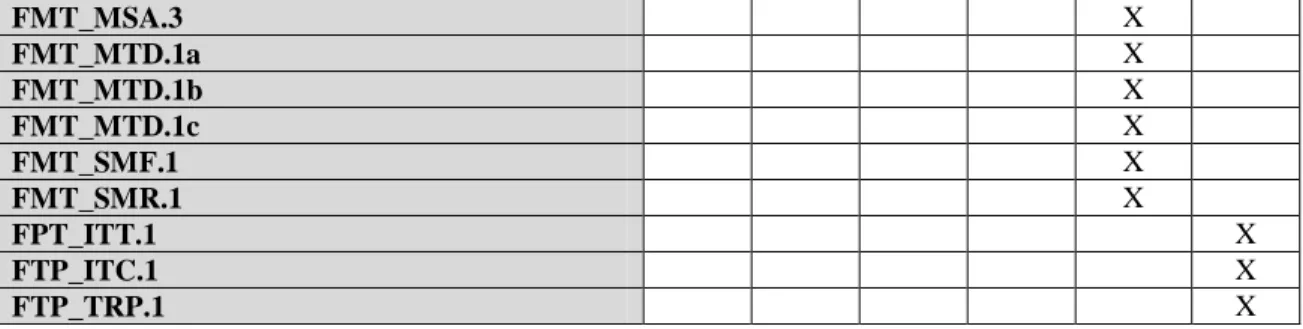
FMT_MSA.3: Static attribute initialization
FMT_MTD.1a: Management of TSF data
FMT_MTD.1b: Management of TSF data
FMT_MTD.1c: Management of TSF data
FMT_SMF.1: Specification of Management Functions
FMT_SMR.1: Security roles
FPT: Protection of the TSF FPT_ITT.1: Basic Internal TSF Data Transfer Protection
FTP: Trusted path/channels FTP_ITC.1: Inter-TSF trusted channel FTP_TRP.1: Trusted path
Table 1 TOE Security Functional Components
5.2.1
Security audit (FAU)
5.2.1.1 Audit data generation (FAU_GEN.1)
FAU_GEN.1.1 The TSF shall be able to generate an audit record of the following auditable events: a) Start-up and shutdown of the audit functions;
b) All auditable events for the [not specified] level of audit; and c) [the following auditable events:
• Modification of the audit configuration that occur while the audit collection functions are operating
• All requests to perform an operation on an Integration Server resource (that is, package, folder, service, file, specification, schema, document type, or trigger)
• All requests to perform an operation on a My webMethods Server resource (that is, folder, page, portlet, link, document, file, server verb, webMethods application, Task, Workspace, Content Object, Portlet Type, and Security Realm)
• Modification of the behaviour of the functions in the TSF
• Modification of the values of security attributes
• Modification of the default setting of permissive or restrictive rules
• Modification of the initial values of security attributes ].
FAU_GEN.1.2 The TSF shall record within each audit record at least the following information:
a) Date and time of the event, type of event, subject identity (if applicable), and the outcome (success or failure) of the event; and
b) For each audit event type, based on the auditable event definitions of the functional components included in the PP/ST, [none].
5.2.1.2 Audit review (FAU_SAR.1)
FAU_SAR.1.1 The TSF shall provide [Authorized Administrator] with the capability to read [all information]
from the audit records.
FAU_SAR.1.2 The TSF shall provide the audit records in a manner suitable for the user to interpret the information.
5.2.1.3 Restricted audit review (FAU_SAR.2)
FAU_SAR.2.1 The TSF shall prohibit all users read access to the audit records, except those users that have been granted explicit read-access.
5.2.1.4 Selectable audit review (FAU_SAR.3)
• Selection: Time range of audit data or number of audit records or both or
• Ordering: Chronological or reverse chronological order or
• Both selection and ordering ].
5.2.1.5 Selective audit (FAU_SEL.1)
FAU_SEL.1.1 The TSF shall be able to select the set of events to be audited from the set of all auditable events based on the following attributes:
a) [event type]; b) [none].
5.2.2
Cryptographic Support (FCS)
5.2.2.1 Cryptographic operation – TLS (FCS_COP.1a)
FCS_COP.1a.1 The TSF shall perform [encryption, decryption] in accordance with a specified cryptographic algorithm [AES and TDES operating in CBC mode] and cryptographic key sizes [
• AES: 128, 256
• TDES: 168
] that meet the following: [FIPS 197 and FIPS 46]. 5.2.2.2 Cryptographic operation – Digital Signature (FCS_COP.1c)
FCS_COP.1c.1 The TSF shall perform [digital signature] in accordance with a specified cryptographic algorithm
[RSA, DSA] and cryptographic key sizes [
• RSA: 1024, 2048, 3072, 4096
• DSA: 1024
] that meet the following: [FIPS 186-3 for RSA and FIPS 180-3 for DSA]. 5.2.2.3 Cryptographic operation – Secure Hash (FCS_COP.1d)
FCS_COP.1d.1 The TSF shall perform [cryptographic Hashing] in accordance with a specified cryptographic algorithm [SHA-1] and cryptographic key sizes [160-bits
] that meet the following: [FIPS 180-3].
5.2.3
User data protection (FDP)
5.2.3.1 Subset access control – Service (FDP_ACC.1a)
FDP_ACC.1a.1 The TSF shall enforce the [Service SFP] on [ Subjects: connections on behalf of users Objects: services and files
Operations: execute service and request file ].
5.2.3.2 Subset access control – Trigger (FDP_ACC.1b)
FDP_ACC.1b.1 The TSF shall enforce the [Trigger SFP] on [ Subjects: triggers on behalf of enterprise resources Objects: services
Operations: execute ].
5.2.3.3 Subset access control – Integration Server Resources (FDP_ACC.1c)
FDP_ACC.1c.1 The TSF shall enforce the [Integration Server Resources SFP] on [ Subjects: connections on behalf of users
Objects: Integration Server resource (that is, package, folder, file, service, specification, schema, document type, or trigger)
Operations: list, read, and write ].
5.2.3.4 Subset access control – My webMethods Server Resources (FDP_ACC.1d)
FDP_ACC.1d.1 The TSF shall enforce the [My webMethods Server Resources SFP] on [ Subjects: users
Objects: My webMethods Server Resources presented at the My webMethods user interface: Workspace and workspace content (including tasks
Operation: Read, write, execute ].
5.2.3.5 Security attribute based access control – Service (FDP_ACF.1a)
FDP_ACF.1a.1 The TSF shall enforce the [Service SFP] to objects based on the following: [ Subject attributes:
• User name
• Group membership
• Presumed source IP address
• Destination port Object attributes:
• Service URL path
• Execute ACL
• Enforce Execute ACL property ].
FDP_ACF.1a.2 The TSF shall enforce the following rules to determine if an operation among controlled subjects and controlled objects is allowed: [If execution is not explicitly authorized by FDP_ACF.1a.3 or explicitly denied by FDP_ACF.1a.4, then
a) If the user name belongs to at least one group allowed by the execute ACL and the user name does not belong to any group denied by the execute ACL, then the TSF allows the operation; else
b) The TSF denies execution ].
FDP_ACF.1a.3 The TSF shall explicitly authorise access of subjects to objects based on the following additional rules: [If execution is not explicitly denied by FDP_ACF.1a.4, then
a) If the service is not a top-level service and the Enforce Execute ACL property is set to “When top-level service only”, then the TSF allows execution.
].
FDP_ACF.1a.4 The TSF shall explicitly deny access of subjects to objects based on the following additional rules:
[
a) If the presumed source IP address is not in the list of IP addresses allowed for the destination port, then the TSF denies execution or
b) If the service is a top-level service (that is, directly invoked by a client or dynamic server page (DSP)) and the service URL path is not in the list of services allowed for the destination port, then the TSF denies execution
].
5.2.3.6 Security attribute based access control – Trigger (FDP_ACF.1b)
FDP_ACF.1b.1 The TSF shall enforce the [Trigger SFP] to objects based on the following: [ Subject attributes:
• User name
• Group membership Object attributes:
• Execute ACL
• Enforce Execute ACL property ].
FDP_ACF.1b.2 The TSF shall enforce the following rules to determine if an operation among controlled subjects and controlled objects is allowed: [if execution is not explicitly authorized by FDP_ACF.1b.3, then
a) If the user name belongs to at least one group allowed by the execute ACL and the user name does not belong to any group denied by the execute ACL, then the TSF allows execution; else
b) The TSF denies execution ].
FDP_ACF.1b.3 The TSF shall explicitly authorise access of subjects to objects based on the following additional rules: [
a) If the service is internal (that is, invoked by another service) and the Enforce Execute ACL property is not set, then the TSF allows execution.
].
FDP_ACF.1b.4 The TSF shall explicitly deny access of subjects to objects based on the following additional rules:
[none].
5.2.3.7 Security attribute based access control - Integration Server Resources (FDP_ACF.1c)
FDP_ACF.1c.1 The TSF shall enforce the [Integration Server Resources SFP] to objects based on the following: [ Subject attributes: • User name • Group membership Object attributes: • List ACL • Read ACL • Write ACL ].
FDP_ACF.1c.2 The TSF shall enforce the following rules to determine if an operation among controlled subjects and controlled objects is allowed: [
a) If the user name belongs to at least one group allowed by the ACL corresponding to the operation and the user name does not belong to any group denied by that ACL, then the TSF allows the operation; else
b) The TSF denies the operation ].
FDP_ACF.1c.3 The TSF shall explicitly authorise access of subjects to objects based on the following additional rules: [none].
FDP_ACF.1c.4 The TSF shall explicitly deny access of subjects to objects based on the following additional rules:
[none].
5.2.3.8 Security attribute based access control - My webMethods Server Resources (FDP_ACF.1d)
FDP_ACF.1d.1 The TSF shall enforce the [My webMethods Server Resources SFP] to objects based on the following: [
Subject attributes:
• User name
• Group membership
Object attributes:
• Owner
• ACL ].
FDP_ACF.1d.2 The TSF shall enforce the following rules to determine if an operation among controlled subjects and controlled objects is allowed: [
1. Users are allowed to access a workspace if they are members of a role that is listed on workspace ACL
2. Users are allow to access workspace content if they are members of a group listed on the ACL of the workspace content
3. Users are allowed to execute a task if their name is listed on the ACL of the task or they are part of a group that is listed on the ACL of the task
].
FDP_ACF.1d.3 The TSF shall explicitly authorize access of subjects to objects based on the following additional rules: [Authorized administrators have read access to all resources accessible via the My webMethods Interface;
The owner of a workspace content have full access to the resource ].
FDP_ACF.1d.4 The TSF shall explicitly deny access of subjects to objects based on the following additional rules:
[No additional deny rules].
.
5.2.3.9 Basic internal transfer protection (FDP_ITT.1)
FDP_ITT.1.1 The TSF shall enforce the [Service SFP, Trigger SFP, Integration Server Resources SFP, and My webMethods Server Resources SFP] to prevent the [disclosure and modification] of user data when it is transmitted between physically-separated parts of the TOE.
5.2.4
Identification and authentication (FIA)
5.2.4.1 User attribute definition – Integration Server (FIA_ATD.1a)
FIA_ATD.1a.1 The TSF shall maintain the following list of security attributes belonging to individual
Integration Server users:
[User name,
Group membership, Password, and X.509 certificate].
Application Note: The TSF maintains the attributes specified in FIA_ATD.1a for internally-defined users. For users defined in an external LDAP directory, the LDAP directory maintains the same security attributes.
5.2.4.2 User attribute definition – My webMethods Server (FIA_ATD.1b)
FIA_ATD.1b.1 The TSF shall maintain the following list of security attributes belonging to individual My webMethods Server users:
[User name,
Group membership, Role membership, and Password].
Application Note: The TSF maintains the attributes specified in FIA_ATD.1b for internally-defined users. For users defined in an external LDAP directory, the LDAP directory maintains the same security attributes.
Application Note: webMethods Broker does not maintain user attributes. For users defined in an external LDAP directory, the LDAP directory maintains the user name and password attributes. For users defined using X.509 certificates, webMethods broker uses key stores and trust stores maintained with OpenSSL.
5.2.4.3 Verification of secrets (FIA_SOS.1)
FIA_SOS.1.1 The TSF shall provide a mechanism to verify that secrets meet [the following minimums for local Integration Server passwordsas specified by an Authorized Administrator:
a) Number of characters (alphabetic characters, digits, and special characters combined), b) Number of upper case alphabetic characters,
c) Number of lower case alphabetic characters, d) Number of digits, and
e) Number of special characters (neither alphabetic nor digits) ].
5.2.4.4 Timing of authentication (FIA_UAU.1)
FIA_UAU.1.1 The TSF shall allow [triggers, anonymous services, scheduled services, and anonymous Broker client sessions] on behalf of the user to be performed before the user is authenticated.
FIA_UAU.1.2 The TSF shall require each user to be successfully authenticated before allowing any other TSF-mediated actions on behalf of that user.
5.2.4.5 Multiple authentication mechanisms (FIA_UAU.5)
FIA_UAU.5.1 The TSF shall provide [password-based, X.509 certificate-based, and external LDAP mechanisms] to support user authentication.
FIA_UAU.5.2 The TSF shall authenticate any user's claimed identity according to the [component providing authentication:
a) Integration Server applies one or more of the following mechanisms as configured and in the order configured by an Authorized Administrator: password-based, X.509 certificate-based, and external LDAP,
b) My webMethods Server applies either password-based or external LDAP mechanism as configured by an Authorized Administrator;
c) When the TSF applies the external LDAP mechanism, the TSF presents user name and password to an external LDAP directory and uses the directory’s decision;
d) When the TSF applies the external LDAP mechanism with multiple directories, the TSF queries each LDAP directory until authentication succeeds or all attempts fail
].
5.2.4.6 Timing of identification (FIA_UID.1)
FIA_UID.1.1 The TSF shall allow [triggers, anonymous services, scheduled services, and anonymous Broker client sessions] on behalf of the user to be performed before the user is identified.
FIA_UID.1.2 The TSF shall require each user to be successfully identified before allowing any other TSF-mediated actions on behalf of that user.
5.2.5
Security management (FMT)
5.2.5.1 Management of security functions behaviour (FMT_MOF.1)
FMT_MOF.1.1 The TSF shall restrict the ability to [enable, disable, and determine the behaviour of] the functions [
Running Integration Server, webMethods Broker, and My webMethods Server and Security audit log function
Application Note: The TSF restricts the ability to start (that is, enable), shut down (that is, disable), and query the status of (that is, determine the behavior of) TOE components to Authorized Administrators.
5.2.5.2 Management of security attributes – Service (FMT_MSA.1a)
FMT_MSA.1a.1 The TSF shall enforce the [Service SFP] to restrict the ability to [query and modify] the security attributes [service URL path, execute ACL, and Enforce Execute ACL property] to
[Authorized Administrator] and users authorized under the Integration Server Resources SFP.
5.2.5.3 Management of security attributes – Trigger (FMT_MSA.1b)
FMT_MSA.1b.1 The TSF shall enforce the [Trigger SFP] to restrict the ability to [query and modify] the security attributes [service URL path, execute ACL, and Enforce Execute ACL property] to
[Authorized Administrator] and users authorized under the Integration Server Resources SFP.
5.2.5.4 Management of security attributes – Integration Server Resources (FMT_MSA.1c)
FMT_MSA.1c.1 The TSF shall enforce the [Integration Server Resource SFP] to restrict the ability to [query and
modify] the security attributes [list ACL, read ACL, and write ACL] to [Authorized Administrator] and users authorized under the Integration Server Resources SFP. 5.2.5.5 Management of security attributes – My webMethods Server Resources
(FMT_MSA.1d)
FMT_MSA.1d.1 The TSF shall enforce the [My webMethods Server Resource SFP] to restrict the ability to
[query and modify] the security attributes [ACL] to [Authorized Administrators] and users authorized under the My webMethods Server Resources SFP.
5.2.5.6 ** Removed **
5.2.5.7 Static attribute initialisation (FMT_MSA.3)
FMT_MSA.3.1 The TSF shall enforce the [Service SFP, Trigger SFP, Integration Server Resources SFP, My webMethods Server Resources SFP, and Broker Message SFP] to provide [[constraining
(allow access only by authenticated users)]] default values for security attributes that are used to enforce the SFP.
FMT_MSA.3.2 The TSF shall allow the [Authorized Administrator] to specify alternative initial values to override the default values when an object or information is created.
5.2.5.8 Management of TSF data (FMT_MTD.1a)
FMT_MTD.1a.1 The TSF shall restrict the ability to [query, delete, and [create]] the [ a) User accounts,
b) Groups, and c) Roles,
] to [Authorized Administrator]. 5.2.5.9 Management of TSF data (FMT_MTD.1b)
FMT_MTD.1b.1 The TSF shall restrict the ability to [query and modify] the [ a) Audit event type selection,
b) User attributes except My webMethods Server passwords, c) Port configuration, and
d) Password policy
5.2.5.10 Management of TSF data (FMT_MTD.1c)
FMT_MTD.1c.1 The TSF shall restrict the ability to [modify] the [ a) My webMethods Server user’s password
] to [Authorized Administrator and the My webMethods Server user associated with the password].
5.2.5.11 Specification of Management Functions (FMT_SMF.1)
FMT_SMF.1.1 The TSF shall be capable of performing the following management functions: [ a) Review security audit data,
b) Enable, disable, and determine the behavior of the running of TOE components and security audit log,
c) Query and modify object attributes defined in the Service SFP, d) Query and modify object attributes defined in the Trigger SFP,
e) Query and modify object attributes defined in the Integration Server Resources SFP, f) Query and modify object attributes defined in the My webMethods Server Resources
SFP,
g) Query, delete, and create user accounts, groups, and roles, and
h) Query and modify audit event type selection, user attributes, port configuration, and password policy
].
5.2.5.12 Security roles (FMT_SMR.1)
FMT_SMR.1.1 The TSF shall maintain the roles [Authorized Administrator].
FMT_SMR.1.2 The TSF shall be able to associate users with roles.
5.2.6
Protection of the TSF (FPT)
5.2.6.1 Basic Internal TSF Data Transfer Protection (FPT_ITT.1)
FPT_ITT.1.1 The TSF shall protect TSF data from [disclosure and modification] when it is transmitted between separate parts of the TOE.
5.2.7
Trusted path/channels (FTP)
5.2.7.1 Inter-TSF trusted channel (FTP_ITC.1)
FTP_ITC.1.1 The TSF shall provide a communication channel between itself and another trusted IT product that is logically distinct from other communication channels and provides assured identification of its end points and protection of the channel data from modification or disclosure.
FTP_ITC.1.2 The TSF shall permit [the TSF and another trusted IT product] to initiate communication via the trusted channel.
FTP_ITC.1.3 The TSF shall initiate communication via the trusted channel for [sessions with external LDAP Directories as configured by an Authorized Administrator].
5.2.7.2 Trusted path (FTP_TRP.1)
FTP_TRP.1.1 The TSF shall provide a communication path between itself and [remote] administrative users that is logically distinct from other communication paths and provides assured identification of its end points and protection of the communicated data from [modification and disclosure].
FTP_TRP.1.2 The TSF shall permit [remote users] to initiate communication via the trusted path.