A Review of User Interface Design for Interactive Machine
Learning
JOHN J. DUDLEY,
University of Cambridge, United KingdomPER OLA KRISTENSSON,
University of Cambridge, United KingdomInteractive Machine Learning (IML) seeks to complement human perception and intelligence by tightly integrating these strengths with the computational power and speed of computers. The interactive process is designed to involve input from the user but does not require the background knowledge or experience that might be necessary to work with more traditional machine learning techniques. Under the IML process, non-experts can apply their domain knowledge and insight over otherwise unwieldy datasets to find patterns of interest or develop complex data driven applications. This process is co-adaptive in nature and relies on careful management of the interaction between human and machine. User interface design is fundamental to the success of this approach, yet there is a lack of consolidated principles on how such an interface should be implemented. This article presents a detailed review and characterisation of Interactive Machine Learning from an interactive systems perspective. We propose and describe a structural and behavioural model of a generalised IML system and identify solution principles for building effective interfaces for IML. Where possible, these emergent solution principles are contextualised by reference to the broader human-computer interaction literature. Finally, we identify strands of user interface research key to unlocking more efficient and productive non-expert interactive machine learning applications.
CCS Concepts: •Human-centered computing→HCI theory, concepts and models;
Additional Key Words and Phrases: Interactive machine learning, interface design
ACM Reference Format:
John J. Dudley and Per Ola Kristensson. 2018. A Review of User Interface Design for Interactive Machine Learning.ACM Trans. Interact. Intell. Syst.1, 1, Article 1 (March 2018),37pages.https://doi.org/10.1145/3185517 1 INTRODUCTION
Machine Learning (ML) supports the construction of mathematical models that can describe and exhibit complex behaviour without the need for explicit programming. These techniques have demonstrated advanced functionality in a wide variety of tasks such as recognising speech, classifying images and playing games. This functionality is built through a process of training that is not dissimilar from the human process of learning. In general terms, the algorithm learns to recognise or represent a concept through repeated exposure to samples of that concept. A mathematical model that accurately represents a concept for some functional purpose is the goal product of a machine learning algorithm.
Despite the success of these techniques, their use as a development tool remains largely confined to expert practitioners. However, the ability for these approaches to deliver functionality without Authors’ addresses: John J. Dudley, Department of Engineering, University of Cambridge, Cambridge, United Kingdom, [email protected]; Per Ola Kristensson, Department of Engineering, University of Cambridge, Cambridge, United Kingdom, [email protected].
Permission to make digital or hard copies of all or part of this work for personal or classroom use is granted without fee provided that copies are not made or distributed for profit or commercial advantage and that copies bear this notice and the full citation on the first page. Copyrights for components of this work owned by others than the author(s) must be honored. Abstracting with credit is permitted. To copy otherwise, or republish, to post on servers or to redistribute to lists, requires prior specific permission and/or a fee. Request permissions from [email protected].
© 2018 Copyright held by the owner/author(s). Publication rights licensed to the Association for Computing Machinery. 2160-6455/2018/3-ART1 $15.00
explicit programming makes them attractive to a broad group of potential users. The recent explosion in broad interest in machine learning further exacerbates the shortfall in intuitive systems that allow non-experts to apply these techniques. Interactive Machine Learning (IML) has attracted interest among human-computer interaction (HCI) researchers due to the unique aspects of establishing effective human interactions under this paradigm.
IML (defined in detail in Section2) makes machine learning techniques more accessible by careful framing of the training process as an HCI task. The IML process involves the user in the training process by, at the simplest level, using human input in the example selection, creation and labelling process. A machine learning practitioner may be required to deploy the underlying algorithm for use in the IML system but is not essential to the training process. In an ideal implementation, the machine learning-naïve end user can construct their own learned concepts by creating or collecting training data according to their need. In practice, constructing such a system is a major challenge for both the machine learning practitioner and for the user interface designer. This article focuses primarily on the interface design challenge but does highlight points of intersection with the technical challenges for the machine learning practitioner.
Early efforts byWare et al.[2001] andFails and Olsen[2003] demonstrated that typical machine learning tasks could be framed to take advantage of human input, and over the past decade and a half the IML process has seen increasing attention within the HCI community. The user providing input to the IML system need not possess any deep understanding of the models with which they are interacting. The value of the approach is perhaps most evident when one considers the potential to allow a domain expert to train a model. Researchers have demonstrated IML systems that leverage
domain expertise in a range of specific applications including animal behaviour annotation [Kabra
et al. 2013], insurance claims auditing [Ghani and Kumar 2011] and conducting systematic reviews of published medical evidence [Wallace et al. 2012]. In these applications, the effort required by the user is significantly reduced as the model improves its understanding of the concept being trained.
Wallace et al.[2012] achieved a reduction in user workload of approximately 40% by exploiting the predictions of the trained model to mark particular research papers as irrelevant. In this way, IML seeks to apply the complementary strengths of humans and computers.
The IML workflow is inherently co-adaptive in that the user and the target model directly influence each other’s behaviour. It is important to recognise that it is in fact the interactions, as an emergent property of the interface, that must actually accommodate the changing behaviour of the user in response to the model. Appropriate design of the interface iscriticalto the success
of such systems and this presents a unique user interface design challenge. The approach relies on the transformation of the data inspection and correction task into an intuitive and productive dialogue between human and machine. Achieving this is non-trivial.
Designing the interface for an Interactive Machine Learning application exposes four key chal-lenges. First, users can be imprecise and inconsistent. A user may not strictly adhere to a concept during the training process or may introduce their own errors and biases into the learning process. Poor training leads to poor models but unless users perceive their own deficiencies, this failure is attributed to the system.
Second, there is a degree of uncertainty when relating user input and user intent. Users may assign training data based on features that they perceive in an example which the system does not or cannot model. In addition, the fact that a user did not assign an example to a concept does not necessarily imply that it is a counter example.
Third, interacting with a model is not like interacting with a conventional information structure through a user interface. The machine learning model evolves in response to user input but not necessarily in a way that is perceived as intuitive or predictable by the user.
Fourth, training is open ended. For example, if a user is designing a part in a Computer-Aided Design (CAD) system, the state of completion is more or less binary: the task is complete when the part is fully specified. By contrast, training a model to be 100% accurate may be both undesirable and impossible. Furthermore, IML has seen extensive use in exploratory and creative applications where the actual model is perhaps of secondary importance to the process itself.
These four key challenges in aggregate make human-centred machine learning, and the IML process specifically, a design challenge that is far more complicated than simply integrating the relevant components.
1.1 Guidance for the designer
This paper consolidates research findings related to interface design for IML with the objective of providing guidance to designers. It seeks to bring a binocular perspective to the challenge of building an effective Interactive Machine Learning system: a unified consideration of the application of intelligent algorithms and the design of the user interface. We present both a structural and behavioural breakdown of an IML system based on our synthesis of the literature. The structural breakdown divides the system into its constituent components (the user, the interface, the data and the model) with the objective of helping designers think about how they might architect such a system. The IML interface is further decomposed into four distinct interface elements that serve different functions within the broader procedure. Awareness of these distinct interface elements can help designers think about how they present information to users and what interactions they promote.
The behavioural breakdown separates the process of interactively building a model into sub-tasks. It is important to note, however, that these tasks may overlap and/or be performed iteratively. The structural and behavioural breakdowns are not intended to serve as blueprints, but rather to support rich discussion of design considerations with clearly defined terminology. This formalisation of the design space will contribute to a better foundation for exchange of concepts in this emerging field. A further contribution of this paper is the identification of emergent solution principles that can help guide IML interface designers more generally. The six solution principles identified and described in detail in Section 6, are:
(1) Make task goals and constraints explicit
(2) Support user understanding of model uncertainty and confidence (3) Capture intent rather than input
(4) Provide effective data representations
(5) Exploit interactivity and promote rich interactions (6) Engage the user
1.2 Outline
The remainder of the article is organised as follows. Section2provides a detailed definition of
Interactive Machine Learning, and seeks to highlight its similarities and distinctions from related techniques. An overview of prominent efforts at making machine learning techniques and advanced analytics more accessible to non-experts is presented in Section3, categorised by underlying data type. Section4presents a structural characterisation of the key interface elements of a generalised IML system. An abstracted description of the typical IML process is presented in Section5. Section
6is an attempt to consolidate recent efforts by identifying a number of common solution principles. We highlight that tackling user interface design challenges and advancing the state-of-the-art requires further research in several key areas. We therefore propose four distinct strands of research
in Section7for enhancing the performance of Interactive Machine Learning applications from a user interaction perspective. Finally, we summarise the key findings in this article in Section8.
2 CONTEXT AND DEFINITIONS
This article examines Interactive Machine Learning from a user interface design perspective. Developing an effective IML system is an interdisciplinary effort that draws on both the machine learning and HCI domains. In order to meet the objectives of this article, we concentrate primarily on IML studies that present user evaluations and offer suggestions for design of the interaction component. Limited attention is given to the underlying technical requirements for the machine learning component of the system beyond their implications for user interaction. In this section we first seek to establish clear definitions for the terminology used throughout this article.
2.1 Interactive Machine Learning Definition
Interactive Machine Learningis an interaction paradigm in which a user or user group iteratively
builds and refines a mathematical model to describe a concept through iterative cycles of input and review. Model refinement is driven by user input that may come in many forms, such as providing indicative samples, describing indicative features or otherwise selecting high-level model parameters. Interactive Machine Learning is distinct from classical machine learning in that human intelligence is applied through iterative teaching and model refinement in a relatively tight loop of “set-and-check”. In other words, the user provides additional information to the system to update the model and the change in the model is reviewed against the user’s design objective. Under this workflow, the change in the model at each iteration may be relatively small. This is in contrast to more traditional machine learning approaches where the workflow requires wholesale pre-selection
of training data and significant changes in the model per execution step.Amershi et al.[2014]
present a detailed discussion of the distinction between IML and classical machine learning as well as a series of cases studies that highlight the value of the technique. The IML process is characterised by the user being the principle driver of the interaction to deliver desired behaviour in the system. This does not mean that the computer has no influence on the process or does not make independent decisions. Indeed, the application may, for example, intelligently select a subset of data for review. The notion of the user being the principle driver is more reflected in the fact that the IML application seeks to provide the user with control over the high level behaviour of the system. This may or may not necessarily be exercised in each discrete interaction.
Fails and Olsen[2003] introduced the concept of IML in the interactive image processing tool Crayons, as being chiefly focused on the review and correction of classifier errors. Crayons allows the user to draw directly on images to guide the training of an image classifier. The user reviews the current classifier performance based on its classification of image regions and provides more feedback by drawing on the image if necessary. ReGroup [Amershi et al. 2012] is a tool leveraging the Interactive Machine Learning paradigm to assist users in creating custom contact groups in a social network context. The system trains a model to classify contacts according to their likelihood of membership to the contact group being created. The system takes a selection of a contact for inclusion as a positive sample and the skipping of a contact in an ordered list as an implied negative sample. The user receives feedback in the form of an ordered list of suggested contacts after each selection. Just like Crayons, the user refines the behaviour of the model with incremental improvements derived through iteratively applied user input.
The at-completion model behaviour in the Crayons and ReGroup systems described above could of course be replicated using a standard machine learning approach that takes the collection of user inputs as a batch of labelled data. However, in the applications discussed, it is the process of refining the model itself that helps elicit the user input. These two examples help highlight the
fact that the benefit of Interactive Machine Learning is observable in situations where the precise design objectives of the user are unclear and/or data labels cannot be obtaineda priori.
More recent work extends the application of the interactive component beyond just review and correction of classifier errors to other stages of the model construction exercise, i.e. the choice of features, the choice of models, debugging and the evaluation of performance. In the context of this article, we refer to acomprehensiveIML process as one in which the system delivers all of the
necessary functionality to allow a user to configure then train a model on their data and deploy it in the target application (this full generalised workflow is described in detail in Section5).
During the iterative refinement stage, the user drives the IML process in a tightly coupled arrangement between human and machine. The key elements and flow of information under
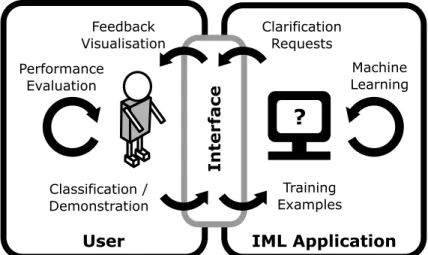
this methodology are illustrated in Figure1. The user’s interaction may be viewed as a form of
pseudo-programming in that the user builds functionality through demonstration and labelling
samples rather than by directly writing code [Gillies et al. 2016]. As an interaction paradigm,
Interactive Machine Learning exists at the overlap between tool and
computer-as-partner as described byBeaudouin-Lafon[2004]. An IML application certainly provides a tool in
that it supports the user in building a model fit for their purposes. At the same time, the user and computer engage in an interaction that is a partnership where both sides must respond to input and to some extent, infer desired actions. The metaphor of moving an object with high and/or variable inertia along a desired trajectory provides a very high level interaction model for IML. This interaction model captures the fact that inputs may produce marginal or no response in the object and that a sequence of inputs is required to drive change.
The Interactive Machine Learning approach is likely to see initial adoption at the two extremes of user-data interaction tasks: at the lower complexity end, users selecting examples of things that they do and do not like; and at the higher complexity end, users (and even developers) applying their domain expertise to refine a classifier or build some other intelligent functionality [Groce et al. 2014].
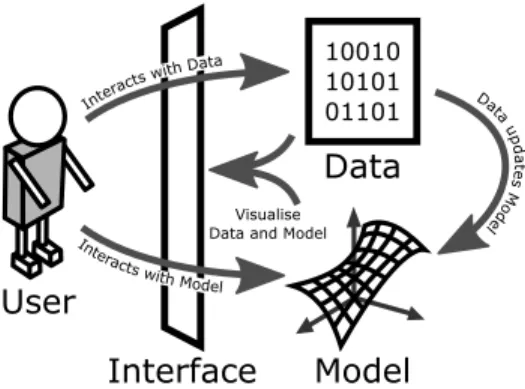
From a structural perspective, we separate an IML system into four key components: these are 1) the user; 2) the model; 3) the data; and 4) the interface. These components are summarised in Figure
User
Interface
IML Application
?
Training Examples Clarification Requests Classification / Demonstration Feedback Visualisation Performance Evaluation Machine LearningFig. 1. The user plays a central role in Interactive Machine Learning by actively training the model in an iterative fashion. The user interface is a critical component of this interaction.
2. The user drives the process by providing feedback and steering model training. The model is the component being trained. The data is a collection of the pre-existing and newly created points upon which the model is trained. The interface is the bridge between the user and the model and data and provides the basis for interaction. The interface component is the primary focus of this article and will be dissected further in Section4. We briefly define the role of each of these components within the IML process below.
2.1.1 User.As has been reiterated several times already, the user is the main driver of the
IML process. An assumption is made that the user possesses no deep understanding of machine learning techniques. Furthermore, it is unreasonable to expect a typical end-user to appreciate the subtleties of probabilistic inference. The user may possess significant domain expertise relevant to interpretation of the data and evaluation of model outputs. It is also worthwhile highlighting that the “user” may in fact be multiple users interacting with the system serially or in parallel.
The user is a dynamic and potentially unreliable component of the process. A single user’s concept may drift over time [Kulesza et al. 2014] and inter-user variability in subjective annotations
may be high [Curran et al. 2012]. Unaddressed, these deficiencies are likely to have a negative
effect on trained model quality. Fortunately, careful design of the interface, both in terms of the information presented and the guidance provided, can help to improve the consistency of users.
2.1.2 Model.The model is the component of the system that takes inputs and determines
appropriate outputs based on its current understanding of the concept/process the user is seeking to capture. The high-level goal in machine learning generally, is to build a model that accurately describes the relationship between input and output for a given concept based on data indicative of that concept. In machine learning, this model may be implemented using a wide variety of different algorithms and architectures. In interactive machine learning, it is the model that the user is ultimately seeking to refine through their interactions. The user may manipulate the model directly, i.e. by adjusting parameters, or indirectly, i.e. by relabelling or adding new data. The machine learning community provides an extensive range of modelling techniques, each with their corresponding advantages and disadvantages. It is important to note too that certain models, like certain users, may be unreliable in that their behaviour is not necessarily deterministic.
Model
User
10010 10101 01101Data
Interface
Interacts with Model Intera cts with Dat a Data upd at es M od el VisualiseData and Model
Fig. 2. Structural breakdown of a generic IML system. Theusersteers themodeltowards a desired concept by assigning or creating trainingdata. Theinterfacemay also support direct interaction with themodelby exposing parameters, editable structures and choice in alternative techniques. Not independently represented in this figure but encompassed by the interface component, is the conceptual model for the system that frequently provides an abstraction layer between the user and the manipulated objects.
Model/algorithmic agnosticism is a design objective for IML systems but not readily achievable. An IML system which allows the user to switch between different model structures and algorithms while maintaining the same or similar interfaces and interactions provides greater flexibility without a significant re-familiarisation cost. Certain machine learning techniques are more suited to direct interaction and partial inspection than others. The machine learning community is hard at work developing new and more powerful techniques. There is growing interest in probabilistic machine
learning methods that better capture and represent uncertainty [Ghahramani 2015]. However,
techniques such as deep neural networks (which have recently made significant advances) deliver functionality without any clear way to support inspection or interaction.
An IML process may also leverage multiple models, either to deliver ensembled functionality or for comparative evaluation purposes. An ideal IML system architecture would allow for state-of-the-art techniques to be introduced with minimal adjustment.
2.1.3 Data.The data component in an IML system is analogous to the source code in a
conven-tional program. The user selects, describes or generates data in order to indicate how the model should behave in response to certain inputs. It can be useful to think of such a labelled data point as a training sample. Unlabelled data may also contribute to the construction of a model by inferring its association with other data points. Data type agnosticism is also a design objective for IML systems but similarly difficult to achieve. Users are likely to value the ability to apply a familiar IML system to whatever data type is dictated by the problem domain. IML systems have been developed targeting a range of data types including images, text and motion data. Section3provides a survey of IML applications across different data types. The features relevant to each data type may vary considerably. Early studies in IML typically avoided user involvement at the feature level but there has been a recent shift towards greater transparency and even user involvement in feature selection. It does indeed seem desirable to apply domain expertise at the feature selection level in certain circumstances provided effective interfaces and interaction methods exist.
2.1.4 Interface.The userinterfaceand its interplay with the user is the central focus of this
article. A further decomposition of the interface into its potential sub-elements is presented in
Section4. Although this section presents a structural breakdown of an IML system, it is useful
to highlight the distinction between the interface component and the actual interactions that it supports. The interactions available to a user are dictated by the interface, but as a designer, it is of course useful to think in terms of interactions when building an interface. Our discussion of the user interface design for IML thus encompasses the design of corresponding interaction techniques, and these two aspects are distinguished where possible.
The interface component is responsible for the bidirectional feedback between the user and the model/data. It must support both the input and output mechanisms necessary to provide this functionality. Constraints imposed on the richness of the labelling or demonstration process represent an efferent filter on the user’s intent which may have negative consequences for user satisfaction and model quality. Limitations of the visual representation of sample points for review represent an afferent filter on the user’s perception and understanding which may also degrade performance and satisfaction.
A central argument in this article is that the interface design is critical to the success of the IML process. Careful management of the user workflow and interactions can address the four key challenges raised in Section1: i) users can be imprecise and inconsistent; ii) there is typically a degree of uncertainty in the relation between user input and user intent; iii) interacting with a model is not like interacting with a conventional information structure through an interface; and iv) training is open ended.
2.2 Related domains
The machine learning community has sought to make its techniques more accessible to end users.
There are a growing number of packaged toolkits (e.g. WEKA [Hall et al. 2009] and Scikit-learn
[Pedregosa et al. 2011]) and automated functionality (e.g. The Automatic Statistician [Lloyd et al. 2014]). Fiebrink’s thesis introduces Wekinator [Fiebrink 2011], a stand-alone application for applying supervised machine learning to real-time data streams and particularly suited to music composition and performance.
The concept of “Machine Learning as a Service” (MLaaS) has also recently emerged in response
to the demand for advanced analytics and data driven applications within industry [Ribeiro et al.
2015]. Many service oriented machine learning platforms now exist including those offered by
major companies such as Google, Microsoft, Amazon and IBM. While these services do provide access to machine learning functionality paired with powerful computing back-ends, they still require familiarity with the techniques for their effective use.
Exposure of machine learning techniques to non-experts has occurred only more recently through applications such as email filters and recommender systems. Recommender systems are a form of Interactive Machine Learning in that the model of the user’s preferences is iteratively constructed through interpreting their actions such as liking, disliking, purchasing and reviewing. However, in many of these applications the user may be unaware that they are interacting with an algorithm that is learning in response to their inputs. Some recommender systems do explicitly inform users that they can influence the behaviour of their preference model and/or provide an interface to do so, but even in these cases, the interaction typically focusses more on data capture than on a bipartite process of closed-loop model refinement. In this article, we specifically focus on Interactive Machine Learning from an interface design perspective. While the algorithmic backends of recommender systems and their considered approach to implicit and explicit user input is certainly relevant to understanding Interactive Machine Learning more generally, the lack of focus given to the process excludes them from broader discussion in Section 3.
It is useful to explicitly highlight the distinction between Interactive Machine Learning and the related concept of Active Learning. Active Learning is a machine learning technique that focuses on selecting new points for labelling by the user. The key distinction from IML is that point selection is driven by the learner rather than the user. IML may also leverage learner driven point selection strategies but not to the exclusion of user driven input. For a survey of Active
Learning, see [Settles 2010]. Reinforcement Learning is a machine learning technique that guides
the learner towards a desired behaviour based on simple reward feedback. Research has examined the potential for humans to be positioned inside this loop as a means to steering the Reinforcement
Learning algorithm.Knox and Stone[2015] provide a detailed overview of a series of experiments
on reinforcement learning based on human derived reward feedback.
Beyond computer interactions, IML related concepts have also been explored in human-robot interaction research ([Losing et al. 2015], [Javdani et al. 2016], [Gopinath et al. 2016]).Gopinath et al.[2016] are motivated by the need to adjust levels of robotic assistance to accommodate the user’s requirements. A motor impairment injury or illness may result in dynamic levels of capability even among a single user through the stages of recovery or degeneration. Supporting user-driven customisation of the level of assistance is a prime application for IML. There is also some overlap
between IML and aspects of Knowledge Discovery in Databases (KDD) (see [Holzinger 2013]) and
Interactive Optimisation (see [Meignan et al. 2015]). IML differs from these fields in the emphasis given to the role of the user and the process rather than the end goal.
3 SURVEY OF IML APPLICATIONS
Interactive Machine Learning has been applied over a diverse range of data types for a variety of end use applications. In this section we present a survey of existing approaches and applications in Interactive Machine Learning. This paper does not claim to provide an exhaustive survey of research in Interactive Machine Learning or its applications. The literature discussed herein is that which: i) helps to illustrate the different dimensions of the IML paradigm and/or, ii) gives special emphasis to the interface design considerations of IML systems. A provisional list of literature was obtained by performing a Scopus search on the quote-enclosed phrase, ‘Interactive Machine Learning’. The full set of search results was reviewed and culled based on its contribution to i) and/or ii) above. Literature referenced by that in the result set is also included where relevant.
The categorisation employed here is based on the underlying data type explored in the application. It is important to note, however, that many of the interface features and algorithmic methods used are common across data types. An effort is made to highlight the unique requirements of developing an IML system for each data type while extracting the common features that generalise across application areas.
3.1 Text
Machine learning techniques are well suited to application on textual data. Text in specific domains can typically be obtained in high volumes and often already incorporates some degree of manual labelling. Modern spam filters are one example of effective machine learning based on textual data to improve the user experience.
Interactive Machine Learning systems have been developed to target use cases where a more con-strained or custom categorisation is desired. Such categorisations and the features that characterise them may be difficult to tease out from domain experts and/or may be difficult to express program-matically.Wallace et al.[2012] present abstrackr, an online tool to support screening for systematic reviews of published medical evidence. The system can iteratively improve its classification of relevant citations as the user works through the provisional list, starting their manual evaluation with publications of highest relevance. In pilot evaluations, the system was able to reduce workload by approximately 40% by successfully reclassifying publications in the provisional list as irrelevant.
The similarly laborious task of statutory analysis is targeted byŠavelka et al.[2015].Šavelka et al.deploy an IML system to facilitate the process of reviewing regulatory frameworks to identify provisions relevant to a given topic (preparedness and response to public health emergencies in the case of the study). The user is presented with a classification of provisions and can modify the label assigned. They may also suggest terms that are important to this classification. At any time, the user may request that the model be re-trained based on their most recent feedback iteration. Interestingly,Šavelka et al.demonstrate that the model trained in one jurisdiction, i.e. Kansas, can be advantageously reused in another jurisdiction, i.e. Alaska, for the same topic analysis. This system is a prime example of the potential for IML to assist the user in completing a highly problem-specific task while also allowing the expended effort to be leveraged on related datasets.
Kim et al.[2015a] demonstrate an interactive interface for building and editing classifications of student code submissions. The approach was successfully applied to grading of coding tasks by allowing teachers to choose class exemplars and thereby generate a classification of different
student answer types.Yimam et al.[2015] apply an interactive learning process to the task of
annotating medical abstracts.Huang et al.[2013] show the potential of IML to assist restaurant
review authoring and reading. Through an interactive process, the system can learn to highlight and suggest summary sentiment in the three categories of food, service and price. The study found that providing these suggestions during authoring can motivate users to correct erroneous predictions.
Endert et al.[2012] introduce the concept of semantic interaction in text analytics. They make use of the information embedded in interactions such as word search, highlighting, annotations, and adjustment of document pin locations to iteratively refine a model of document associations. This information is used to update a spatial visualisation of document associations.
Applying an IML process to textual data is challenged by the difficulty of providing succinct representations of documents that facilitate rapid user review.Kim et al.[2015b] compare a variety of machine learning techniques to the task of document feature compression. Their aim is to identify representations that improve the speed of categorisation assessment by users. Several of the discussed studies exploit term highlighting that indicates features relevant to the categorisation result. Giving salience to indicative keywords is hypothesised to speed up the assessment process. In terms of feature labelling,Raghavan et al.[2006] observe that users take up to five times longer to label one document, i.e. assign a document to a topic, than to label one feature, i.e. assign a word as an important term for a topic.
3.2 Images
The categorisation of images is a very popular application area within the machine learning community. The availability of suitable techniques for image based classification has encouraged the examination of the potential pairing of user input through IML. As for the application of IML to textual data, the usefulness of the technique is seen when more subtle concept discrimination capabilities are desired.
At the inter-image level, applications have sought to allow users to train models to understand
their own, sometimes obscure, concepts.Fogarty et al.[2008] introduce CueFlik, an interactive
application that allows users to create their own concepts to incorporate into image search. The user may define a new search rule by assigning a collection of images to describe a desired concept, e.g. scenic. The user may then apply this rule to their search so that only results consistent with that concept are provided.Fogarty et al.[2008] found that providing a visualisation of both the most-confident positive and most-confident negative samples led to higher quality and faster concept learning than providing the full ranking of images.Amershi et al.[2011a] extend CueFlik by adding features to the interface that better allow users to model changes and visualise the current model state.Amershi et al.also introduced a visualisation of historical model quality (expressed in terms of model reliability and snapshots in time of ranked images) and the ability to revert back to previous model states.Guo et al.[2016] present an IML system for clustering medical images based on the underlying condition, and attempt to specifically incorporate expert constraints. Users can drag images apart to indicate that they should be disconnected in the model.
Other applications of IML have sought to train systems to recognise specific objects at the
intra-image level. Crayons [Fails and Olsen 2003] is the often cited formative paper in IML that
demonstrates an interface whereby users can incrementally train a classifier by directly drawing on
an image. This approach has also been leveraged byTsutsumi and Tateda[2009] to help measure
the amount of leaf debris flowing on a river as well as for analysis of satellite, medical and material science images ([Porter et al. 2011], [Porter et al. 2013],[Harvey and Porter 2016],[Kreshuk et al. 2011]).
IML is well suited to use with images as there is a rich repository of features that have already been established and the user can quickly review a large number of images. The ability to provide pixel or region level feedback by directly sketching on images is an interaction technique successfully exploited in several applications.
3.3 Time series data: speech, audio, video and motion
The transcription of speech into text can be a laborious task when performed manually but there are an increasing number of systems that can autonomously perform this task at very low error rates.
Sanchez-Cortina et al.[2012] pair an automatic speech recogniser system with an IML interface that facilitates error correction. The acceptable word error rate can be adjusted to vary how many uncertain cases are shown to the user.
Kabra et al.[2013] employ an Interactive Machine Learning approach to allow non expert users to build classifiers for recognising distinct animal behaviours. The user reviews video footage of the animal and assigns behaviour labels to segments of the video. When a label is added, the user may initiate re-training of the model and the classifier will be applied over the duration of the video. Upon encountering a behaviour that has been incorrectly classified, the user may correct the sample to incrementally improve model quality. The classifiers constructed through this process then allow for rapid and accurate annotation of animal behaviour in recorded datasets: a task that is very slow if performed manually and highly error prone if performed autonomously
using less advanced methods.Versino and Lombardi[2011] apply an IML process to the filtering
of surveillance streams for safeguarding a nuclear processing facility. Users assign positive and negative samples of safeguard-relevant events and the trained model can thus help identify potential hazards.
The challenging task of separating individual sources from a recorded audio track is explored byBryan et al.[2014].Bryan et al.use a paint on approach (similar to that employed byFails and Olsen[2003] on images) to train a classifier to recognise the desired source from within an audio file. The user ‘paints’ on regions of a time-frequency visualisation of an audio recording to separate out sources.
BeatBox [Hipke et al. 2014] allows users to train a system to recognise different percussive
vocalisations. Having established a custom vocabulary of vocalisations, users can then create a track that recognises and labels the vocalisations employed. The interface separates distinct vocalisation classes into different virtual pads and colour codes recorded vocalisations for a pad according to their recognised class. This colour coding provides a simple to interpret sense of the quality of a particular vocalisation class. A pad that contains recorded samples that are not accurately classified quickly attracts the attention of the user. They can then target a new class with greater discriminative power.
Motivated by relieving the prohibitive challenges people with disabilities face when playing
conventional musical instruments,Katan et al.[2015] apply Interactive Machine Learning to the
creation of gesture controlled instruments.Katan et al.enabled users to build a gesture vocabulary and customise the relationship between gestures and sounds.Sarasua et al.[2016] show the potential for customised gesture recognition to control music articulations, as a conductor might control an orchestra with a baton. Similar approaches have demonstrated the potential for IML to support unique forms of music composition ([Fiebrink et al. 2011], [Tsandilas et al. 2009]) and interactive experiences ([Kleinsmith and Gillies 2013], [Brenton et al. 2014], [Gillies et al. 2015b]). These studies highlight that the goal in IML is not necessarily just about making a task more efficient or productive, but potentially about extending human creativity.
Others have sought to produce intelligent functionality in response to data streams such as for seizure detection ([Chua et al. 2011]) and for office task automation (Dey et al.[2004]). IML has also been applied in training of brain computer interfaces ([Kosmyna et al. 2015]).
Gesture Script [Lü et al. 2014] is an interactive tool for creating 2D gesture recognisers. The application allows users to generate feature level descriptions and combine these together to
supplement training data.Hartmann et al.[2007] present an interaction authoring tool based on recognising patterns in generic sensor data.
As with textual data, the application of IML to time series data can also be challenging in terms of providing summative representations of sample points: it can be difficult to succinctly represent the dynamic contents of an image stream or the temporal relationship between time and position that represents a gesture. There is a risk that the requirement for serial review of samples leads to a highly serialised process that does not scale well. Interfaces designed for this purpose must find ways to allow users to quickly inspect and review samples.
3.4 Assisted processing of structured information
The IML systems discussed in this section exploit structured data to train models that enhance user capabilities. These examples in particular highlight the application of domain or user-specific expertise to the training process.Amershi et al.[2012] present a social networking assistance tool based on the Interactive Machine Learning paradigm. The system builds a probabilistic model based on a Naïve Bayes classifier of contacts likely to be relevant to a particular group and makes suggestions and provides new filters for identifying new members.
Ghani and Kumar[2011] apply an IML process to greatly assist the work of auditors processing health insurance claims. In addition to learning to highlight fields of likely interest to support the auditor, the classification method can also help by grouping similar claims in the processing queue to reduce inefficiencies of context switching. This later strategy is estimated to reduce time spent per claim by 27%.
CueT ([Amershi et al. 2011c], [Amershi et al. 2011b]) is an IML system that supports network
alarm triage. The system can learn from the actions of operators to suggest alarm groupings.
Kose et al.[2015] apply IML to facilitate the process of fraud detection in electronic claims data. The dynamic nature of the underlying data, and the potentially subtle relations that must be
identified motivate the use of a human-in-the-loop approach. AppGrouper [Chang et al. 2016]
assists in the process of delivering topically coherent application clusters in an online application store. Users may directly edit clusters and encourage more or fewer clusters to be generated. In evaluation, the approach was shown to improve the quality of clustering results over algorithm-generated clusters. AppGrouper highlights the potential value in pairing human judgement with computational intelligence through a carefully designed interface. Human input is applied only at the stages where it is most useful.
The assisted processing applications discussed here highlight that certain domains will require highly specialised interface design. In many cases however, the system level architecture may not require modification. Similarly, we hypothesise that the interaction and task level strategies that are effective are likely to remain consistent.
3.5 Raw numerical data
In an effort to demonstrate complete data type agnosticism, several studies have applied the IML process to numerical data that is abstracted from any particular application. There are parallels that can be drawn between Interactive Machine Learning and the uptake of spreadsheet applications that placed basic statistical and data representation tools in the hands of non-expert users. Indeed,
Sarkar et al.[2015] have even demonstrated the capabilities of BrainCel which adds machine learning functionality to a typical spreadsheet type interface. The user can select rows as training data then click a ‘guess’ button to make model predictions based on those rows.
Holzinger et al.[2016] incorporate human feedback with an Ant Colony Optimisation (ACO) framework to solve a traveling salesman problem. Users can select the path joining two cities and adjust the pheromone levels assigned using a slider.Ware et al.[2001] present an interactive
Model
Inspection
Sample
Review
Assignment
Feedback
Overview
Task
Visualization of output sample(s) to assess
how well desired concept operates at the
instance level.
Assignment or correction of labels and/or creation
of new samples to improve match with
desired concept.
View of overall model quality and converage to evaluate
how well concept is captured.
View of current task status contexualized by coverage of training data and improvement potential
relative to cost.
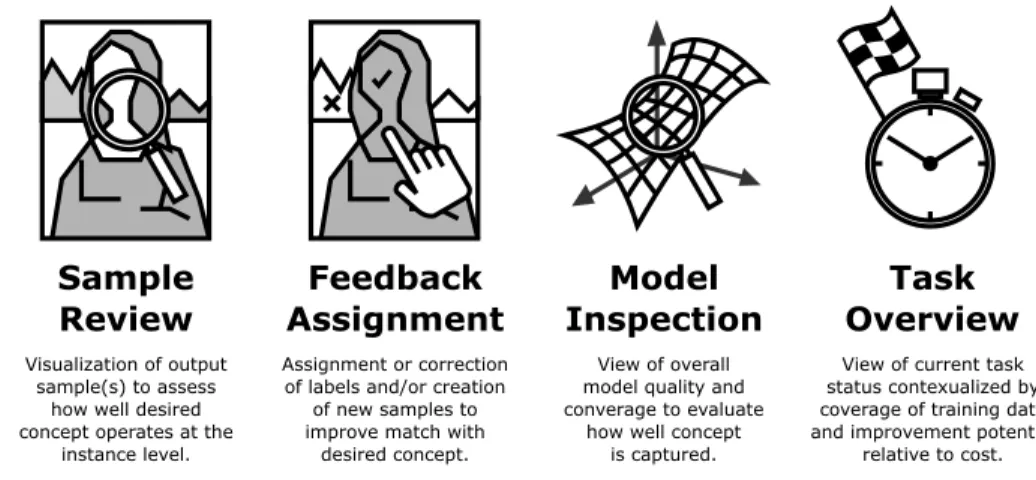
Fig. 3. Distinct interface elements in the IML process.
tree-based classification application targeted at non-experts. Users create decision branches to build their own classifiers.Brown et al.[2012] present an iterative approach for learning user preferred distance functions in a multidimensional scaling projection visualisation interface. The user may drag one or many points within a scatterplot visualisation window then initiate the learning step to identify a new distance function that better reflects the user’s desired data arrangement. This process can be performed iteratively, while preserving the user’s interaction history, to incrementally find the most suitable distance function.
These studies illustrate that data independent IML systems can be developed and effectively used. This is not to say that abstracting data to a simplified representation is a preferable strategy and in many cases this approach may be undesirable as it can limit the application of domain expertise. Nevertheless, what these approaches lose in terms of domain relevance they gain in flexibility.
4 COMPOSITION OF AN IML INTERFACE
In this section we describe the structural composition of a generalised Interactive Machine Learning interface. The design of an IML system may, of course, vary considerably depending on the nature of the data, the intended application of the model, and the user experience desired, as well as many other factors. Nevertheless, an understanding of the commonality can help inform the establishment of design principles.
The interface elements presented are based on an identification of the commonality among the broad range of IML systems reviewed. We are also guided by the requirements and desired attributes suggested by others.Amershi et al.[2011a] highlight three important aspects of an IML process that can be thought of as desired attributes of the interface: 1) illustrating the current state of the learned concept; 2) guiding the user to provide input that improves concept quality; and 3) providing revision mechanisms that allow the user to explore the model space.Stumpf et al.[2009] identify three activities relevant to the productive integration of the human user and machine learning techniques: 1) conveying system reasoning to the user; 2) conveying user reasoning to the system; and 3) ensuring both system and user profit from this feedback cycle. We split the third
activity identified byStumpf et al.into inspecting the model and reviewing task progress. The
four key interface elements are then: sample review, feedback assignment, model inspection and
task overview. These four interface elements are summarised in Figure3. We do not suggest that
example, the sample review and feedback assignment interfaces may often be merged as in Crayons [Fails and Olsen 2003] and ad hoc implementations contrived for a one-time only custom task may have limited or no use for the model inspection or task overview interfaces. Rather, these elements represent distinct functionality that the interface must typically support to deliver a comprehensive IML workflow. Each of these interface elements are discussed in detail below.
4.1 Sample review
The sample review interface is the channel upon which individual or collections of model outputs are presented for review by the user. Sample instances may be requested manually by the user or chosen automatically based on model properties. Automatic selection of samples for review does not negate the principle of the user being in control. Ultimately, it is the user feedback provided on these samples (whether they are chosen manually or suggested) that will influence subsequent changes in the model. The literature highlights a challenge in managing the competing objectives of eliciting the necessary information to enhance the learner while avoiding excessive querying of the user. Users are unwilling to judge large numbers of test cases and this has been the motivation behind efforts that select representative and non-redundant samples for review [Ribeiro et al. 2016], [Groce et al. 2014]. In addition, the human input required, while of potential value to the model, may not be deemed worthwhile by the user [Amershi et al. 2014].Wong et al.[2011] observe that labelling data is a tedious exercise and that users may need to invest significant effort before a change in the learned model is noticeable.
Presenting samples or posing queries to the user such that they promote understanding rather than distrust is also difficult to achieve. The challenge of appropriately framing input requests is thus also dependent upon the level of understanding possessed by the user.
The timing of user input requests is also critical as revealed byLosing et al.[2015] in their application of online user-in-the-loop labelling of obstacles encountered by a robot. The study highlights challenges around capturing training instances when they are relevant to the user versus the impact this may have on violating independent and identically distributed (i.i.d.) assumptions in the model.
The most appropriate means of succinctly displaying output samples for review may vary based both on data and application type. For example, the interface in an inter-image classification system might show the best and worst samples for a given classification. Alternatively, an intra-image classification system might show the regions of the image that belong to a given classification.
A guiding principle for the design of the sample review interface is that representations should, to the extent possible, allow the user to assess the current state of the learned concept. There is a distinction here between assessing the performance as reflected in a specific sample instance versus the generalised model performance as a whole. This latter assessment of the model as a whole is
described in Section4.3. Evaluating concept performance on an individual sample instance may
require the provision of additional information on the reasoning behind the state shown.Kulesza
et al.[2015] present an intuitive interface for model debugging involving generated explanations for the basis of particular predictions that are human readable with accompanying explanatory plots. For example, the classification of a particular message as being related to the topic ‘hockey’ might be accompanied by the text, “This message has more important words about Hockey than about Baseball” [Kulesza et al. 2015]. AsLü et al.[2014] observe, people want to understand why specific instances fail. Understanding why the model fails for a given sample may help the user determine the most appropriate feedback strategy, independent of broader model performance considerations. This suggests avoiding overly abstract or condensed representations of output samples.
4.2 Feedback assignment
The feedback assignment interface is the channel employed by the user to assign labels, select features and/or generate new samples. It is this interface that perhaps requires the most careful design in terms of both the interface elements and the interaction techniques provided. User interaction at the point of describing a classification or performing a demonstration can take many forms.Porter et al.[2013] make a useful distinction betweentraining vocabularyandtraining dialog. Porter et al.suggest that the training vocabulary in IML has expanded from just being labels to include constraints and structures. Similarly, the training dialog is no longer exclusively a batch process but can be highly interactive and dynamic. Generally, the preference from the user’s point of view is for more complete and more specific feedback assignment methods. There is, however, an inevitable trade off asHartmann et al.[2007] note in terms of balancing the desire for user control over behaviour versus overwhelming users with machine-centric ‘knobs’.
BrainCel [Sarkar et al. 2015] obtains user input through standard spreadsheet paradigms while
other studies have captured raw gestures inputs [Katan et al. 2015], [Sarasua et al. 2016].Kim et al.[2015a] found that users wish to describe high level attributes (such as code structure) that are difficult to encode as features. Constraining the labelling or demonstration process may have a filtering effect on the user’s intent which may ultimately be detrimental to user satisfaction and model quality. Similarly, subjecting users to poorly implemented or confusing interaction techniques is likely to degrade overall performance.
One difficulty faced in the collection of input from users is the fact that the concept they are
trying to train may shift over time [Kulesza et al. 2014]. This has motivated efforts to improve
the structure and guidance provided around how people are requested for, and supply input.
Rosenthal and Dey[2010] investigate what information can be provided to improve quality of labels (amounts of context, level of context, uncertainty, prediction, and requests for user feedback). Certain constructions can also make it more engaging for the user and promote higher quality input. For example,Huang et al.[2013] motivate users to fix errors in sentiment analysis of restaurant reviews by providing current predictions of the categories which their reviews cover.
Shilman et al.[2006] introduce five design principles for correction interfaces: 1) minimise decision points by choosing appropriate operators; 2) design seamless transitions between modes; 3) provide reachability of all states; 4) appropriately scope cascading changes; and 5) promote clear user models.Shilman et al.[2006] also summarise possible correction strategies:n-best selection,
transformation, user-driven hints, and user-driven constraints.
Amershi et al.[2012] note that the ability to model a concept is dependent upon the quality of the data. Various studies have sought novel methods for transforming both explicit and implicit user input into data for consumption by the learner. The system described in [Amershi et al. 2012] takes advantage of users skipping instances (contacts in a social network) as an indicator for labelling negative samples.Javdani et al.[2016] seek to make use of user resistance to robot actions under shared autonomy as a means for identifying undesirable actions. The potential for feature labelling rather than just instance labelling is also being exploited in IML studies (e.g. [Wong et al. 2011]) but does require that the learning algorithm can exploit these identified distinctions among features. In some applications, however, the features themselves may be too abstract for users to interpret or exploit effectively [Gillies et al. 2015a].
4.3 Model inspection
In addition to review of individual sample instances, a comprehensive IML process will typically also support some form of inspection at the model level. This summative view of model quality is referred to here as themodel inspectioninterface. The assessment of model quality is not necessarily
limited to prediction accuracy, and may also incorporate other metrics such as coverage and confidence. Several studies have shown the potential for user interaction with parameters (e.g. [Kapoor et al. 2010]) and/or emergent structures (e.g. [Chang et al. 2016]) as part of the model inspection interface. GaussBox [Françoise et al. 2016] provides a tangible and interactive tool for inspecting HMMs trained for gesture recognition.
The quality of predictions is ultimately dependent on the quality of the constructed model. Various sources of error may affect model quality.Amershi et al.[2015] identify three main causes of model errors: 1) mislabelled data; 2) feature deficiencies; and 3) insufficient data. Mislabelled data is data the user incorrectly assigned some value. Feature deficiency errors result when the model does not have sufficient samples of a given feature to make a distinction. Insufficient data errors result when there are gaps in the data in areas relevant to model prediction. A comprehensive model inspection interface should thus support the user in identifying such errors to facilitate debugging and improve model quality.
Receiver Operating Characteristic (ROC) and cost curves are commonly used in the machine learning community to support evaluation of model performance, and have been incorporated into IML systems. Alternatively, model performance may be assessed in a more involved manner through targeted testing.Groce et al.[2014] suggest three requirements for test methods: algorithmic agnosticism, sufficiently fast to run in an interactive environment, and able to support effective detection of failures using comparatively small test suites. However, constructing tests to obtain an encompassing metric of model quality is not a simple task, especially for end users.Fiebrink et al.
[2011] highlight that evaluating based on training set partitioning may not be meaningful and end users in IML may be particularly ill suited to choosing a test set that represents anticipated future data.
Recent work has given more attention to the quality assessment and debugging task in Interactive Machine Learning. While rapid visual inspection of model performance may be possible in certain applications, such as with image data, doing so with other data formats (e.g. documents) is more
complicated. This difficulty grows with increasing dataset size.Amershi et al. [2015] present
ModelTracker, a concise visual representation of model performance for use in debugging exercises. The representation allows for the rapid assessment of where labelled samples are correctly or incorrectly predicted and the relative confidence of that prediction.
The model inspection interface provides user visibility of the global task, i.e. typically minimising prediction error. This interface allows users to apply strategies that iteratively work towards desired levels of model quality. We argue later, however, that framing task completion criteria purely in terms of model quality is undesirable. Focusing an end user on model prediction accuracy alone is
likely to promote overfitting. For this reason, we make a distinction between themodel inspection
andtask overviewinterfaces. 4.4 Task overview
A self-contained IML system may additionally require information advising the user on task status and termination conditions. In most experimental IML systems, this interface is not included as the interaction is managed through other means such as timed exercises or constrained datasets. In reality, however, there are non-trivial task related decisions that users require guidance on that may be independent of instantaneous model quality.
Yimam et al.[2015] highlight the fact that a text classification system is likely to reach a point
of diminishing returns for user annotations.Ghani and Kumar[2011] also argue for a distinction
between system performance and classification accuracy. The task overview interface should provide visibility of the global objectives, but also contextualise these with other information relevant to the task such as the target application of the model and the availability of training data.
For commercial applications of IML in particular, the goal of the exercise is typically to increase the efficiency of expert users. Investing significant time to improve classification accuracy may not always correlate well with this goal. The task overview interface should help guide the machine learning-naïve user in making these task-level assessments.
5 A GENERALISED WORKFLOW FOR A COMPREHENSIVE IML PROCESS
The previous section presents a structural breakdown of a generalised IML interface. Here we present a discussion of the task related behaviours associated with a generalised Interactive Machine
Learning workflow. The workflow proposed byFails and Olsen[2003] attaches a feedback loop
to the training stage of the algorithm. In this workflow, the user interprets the feedback provided then applies a correction. This workflow model is satisfactory if one constrains the scope of an IML system to just the training stage, but has its limitations if one is interested in developing a
comprehensive IML process.Aodha et al.[2014] propose a 15 step ‘data understanding pipeline’
motivated by supporting scientists in capitalising on advances in machine learning. This pipeline begins with ‘hypothesis formation’ and ends with ‘publicizing of results’ and provides a thorough
breakdown of the intermediary tasks. The 15 step pipeline offered byAodha et al.is comprehensive
and informative but includes steps that occur both before and after the actual interaction with an IML application. It is thus, not particularly well aligned to the key interaction stages of the IML process that have distinct interface requirements.Girardi et al.[2015] presents a process model for domain-expert-in-the-loop knowledge discovery in biomedical research which removes the understanding the domain and understanding the data from the generic knowledge discovery process model. It includes six stages: 1) data modelling; 2) data acquisition; 3) data validation; 4) data preparation; 5) data analysis; and 6) evaluation. This process model highlights the key stages relevant to the knowledge discovery domain but does not adequately capture the interactive nature of IML.
We propose a generalised workflow that extends upon the model ofFails and Olsen[2003] but
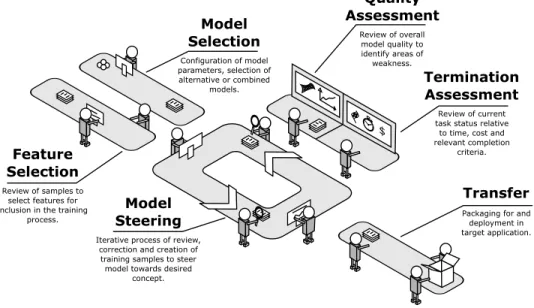
is more concise thanAodha et al.’s ‘pipeline’. We take some inspiration fromChang et al.[2016], who make a distinction between the types of user input captured at the early (initialising the algorithm), mid (steering the algorithm) and late (cluster editing) stages of the process. The six workflow activities we propose are: 1) feature selection; 2) model selection; 3) model steering; 4) quality assessment; 5) termination assessment; and 6) transfer. This workflow is intended to serve as a useful reference for designers as they consider the task transitions and distinct interactions relevant to interface design for IML. It is formulated to be closely aligned with the key interaction stages and to be interpreted in combination with the structural breakdown of the IML interface presented in Section 4. This workflow is illustrated in Figure4.
The model steering task is the core activity and where the user is likely to spend the majority of their time. The sub-tasks that occur inside this activity are essentially those described in Figure1. The majority of studies in IML focus on this task alone, eliminating the need to examine the outer activities by appropriately initialising the system and constraining the scope of the experimental task. Indeed, certain application types may render some of these outer activities unnecessary. The workflow activities are not necessarily undertaken in a serial or ordered fashion. For example, model or feature selection may typically occur early in the process though not necessarily. Similarly, quality and termination assessment may typically occur only after several cycles of model steering have been completed. The transfer activity, however, will only occur upon completion of all previous activities. We discuss each of the workflow activities in the remainder of this section.
$ Quality Assessment Feature Selection Model Steering Termination Assessment Review of samples to select features for inclusion in the training
process.
Iterative process of review, correction and creation of training samples to steer model towards desired
concept. Review of overall model quality to identify areas of weakness. Review of current task status relative
to time, cost and relevant completion criteria. Model Selection Configuration of model parameters, selection of alternative or combined models. Transfer Packaging for and deployment in target application.
Fig. 4. The IML workflow as a behavioural breakdown into distinct user activities. Themodel steeringactivity is the iterative feedback-and-review cycle most commonly associated with the pure IML process. The user may initialise or reconfigure the process by engaging inmodel selectionandfeature selection.Quality assessment
andtermination assessmentare depicted beside the main loop rather than within it. The intent here is to highlight thatmodel steeringis the primary activity but that this loop may be suspended temporarily, at any time, to undertake quality assessment and termination assessment. Upon successfully training the model to represent their desired concept, the user engages intransferto deploy the developed model into the target application.
5.1 Feature selection
Fails and Olsen[2003] suggest that the need for explicit feature selection can be removed thanks to the IML process by incorporating a very large number of features and allowing the classifier to indirectly perform the filtering. While the feature selection activity may indeed be unnecessary in many applications where an appropriate repository of features exist, a more generalised workflow model for IML benefits from its inclusion.
Allowing users to select features has been found to deliver both efficiency [Raghavan et al. 2006] and quality [Brooks et al. 2015] gains.Patel et al.[2008] suggest there is value in integrating data collection and feature creation tools.Kim et al.[2015a] observe a desire among users to introduce higher level features (such as code structure). The fact that human curated features are, by nature,
more interpretable [Brooks et al. 2015] may also serve to improve user understanding in other
activities in the process.
For other reasons too, the features themselves may be more relevant to users than the classification
they produce [Calderon et al. 2015]. For example, rather than identifying how sentiment towards
an administration is clustered, it may be more important to explore where and for what reasons this sentiment occurs.
Recent research has given more focus to the potential for human involvement in feature selection
facilitate novel feature generation. Aggregating crowd features achieved better performance than just asking the crowd for a prediction or using a standard set of typical machine learning features. The Flock interface prompts users to think of discriminatory features by presenting contrasting
samples. FeatureInsight [Brooks et al. 2015] is a tool that enables feature selection in website
classification. Users are prompted to consider new dictionary features by being shown misclassified documents.
The studies discussed above suggest that end users are capable of, and indeed enjoy, identifying useful features for incorporation in the training process. Designing the IML system and interface to accommodate the feature selection activity may thus be desirable, though not always practical. Certain data types and applications are better suited to end user feature selection than others.
5.2 Model selection
Studies in IML typically demonstrate the procedure using a machine learning technique specifically chosen by the authors for its applicability to the target data. This approach is entirely reasonable for application areas where the data and feature structures are knowna priorior can be determined.
However, in instances where an IML process is sought but the ideal machine learning technique is undetermined, it may be useful to allow the user to make this selection or perform a comparative evaluation. Furthermore, if one credits the proposition that an ideal IML system be agnostic to the underlying model and algorithm then there is value in considering model selection as an activity the user may perform.
The combination of multiple models through ensemble methods has also proven an effective
strategy for the machine learning community. EnsembleMatrix [Talbot et al. 2009] demonstrates
an interface that allows users to create combinations of classifiers trained on different features. It is not unreasonable to expect the user to weigh up the potential benefits and disadvantages of different models provided these can be concisely expressed for a given domain.
The selection of the most appropriate model (or their parameters) may also be influenced by the target application. For example,Fiebrink et al.[2011] comment in the context of gesture based music generation that the shape and smoothness of the decision boundaries may be more important to the user than their specific location.
It is perhaps overly optimistic to imagine an IML architecture in which the underlying learning techniques are completely modular and easily changed. Nevertheless, supporting the model selection activity by allowing the model to be configured by the user, even to a limited extent, can help to reduce the burden on machine learning practitioners. If the user can experiment with multiple different machine learning techniques within the same IML application, then the user can develop their own, albeit potentially naïve, sense of the relative advantages and disadvantages without the involvement of a practitioner.
5.3 Model steering
The model steering activity is the stage in the workflow where most user effort is expended and with which the concept of IML is most traditionally associated. The majority of user focused research in IML examines this particular activity. While engaged in the steering task, the user is seeking to train the model to understand a given concept by iteratively refining the training data. This interaction will typically involve some combination of correcting existing erroneous samples, assigning labels to new samples or generating completely new samples. The emphasis, however, is generally on
providing just enough feedback per iteration to push the model in the right direction.Fails and
Olsen[2003] hypothesise that “having a very fast training algorithm is more important than strong induction”. This is based on the assumption that users will apply an iterative strategy that will eventually deliver the necessary predictive power.