James E. Prewett
The Center for High Performance Computing at UNM (HPC@UNM)
Abstract. Logsurfer is a log file analysis tool that simplifies cluster maintenance by aiding in the identification and resolution of problems. Logsurfer examines messages in a log file in terms of how they relate to other messages. Logsurfer is also capable of modifying its ruleset at run–time. These capabilities allow Log-surfer to detect complex patterns in log files and act based on what it finds. Large clusters require this sort of log file analysis to enable the system admin-istrators to efficiently do their job. Complex interactions within the cluster are common. Logsurfer puts the pertinent information right at the administrator’s fingertips when she needs it to analyze the problem. Acting on this information on behalf of the administrators frees them up to work on more important issues. This paper examines the uses of Logsurfer in a cluster environment. The reader of this article should be able to configure Logsurfer to meet the needs of their particular environment.
1
Introduction
The individual nodes in a cluster report on the operation of their hardware and software by sending messages to their system log server. Recorded in the log files maintained by the system log server are indications of problems and of the various components functioning properly[1]. Analysis of the messages left by all of the nodes in the cluster together make it easier for administrators to maintain the cluster1.
A log file analysis program, such as Logsurfer[2], may be used to identify and, if possible, correct problems found within a cluster. In this role, the log analysis tool becomes something of a “virtual system administrator”. The larger the cluster is, the more likely that one or more of its components will fail and, therefore, the more valuable these virtual administrators become[3].
Log file analysis programs detect problems by looking for symptoms of the prob-lem to manifest in the log files. Symptoms that can be explained unambiguously by a particular problem are known as a signature. What is to be done with a particular line or set of lines from the log file depends upon the particular signature.
Log analysis programs capable of detecting complex signatures are of particular interest in cluster environments where interactions among nodes are often complex. Problems within the cluster are often not apparent when looking at these symptoms individually. Furthermore, certain messages should be acted upon only in response to other messages; a message is treated differently when its context indicates that it should
1
It is common to gather all of the messages together by using a centralized system log host running a system log daemon such as the BSD syslog daemon.
be. Log analysis programs capable of making use of contextual information are able to detect and respond to more signatures[4].
Logsurfer is a log file analysis program designed to detect signatures of complex interactions and react accordingly. It is able to do this by virtue of its dynamic ruleset and its ability to collect related messages into structures known as “contexts”. When a problem is detected, an external program is called to report on and potentially repair the problem. Logsurfer is very dynamic and powerful because of these features.
Logsurfer is very valuable for monitoring the interactions between the compute nodes during a job (see Figures 8 and 9). The launch of a compute job can be rather complex. Job launch generally involves several ssh sessions (between the front–end nodes and the head–node of the job, and between the head-node of the job and the other compute nodes involved in the job), authentication processes, job execution daemons and job prologue scripts2.
Logsurfer is written in the C programming language using the GNU regular ex-pression library3. Logsurfer is very fast, but due to its dynamic nature, Logsurfer can consume a large amount of CPU and memory resources. HPC@UNM uses 1221 rules in its largest Logsurfer configuration file. In this case, Logsurfer is run on a dual 733MHz Pentium III machine with 1Gb of RAM; however this machine is still able to function as a syslog server, DHCP server and TFTP server for a 256 node cluster without utilizing all of its resources.
Logsurfer is usually run continuously by “following” a file or reading UNIX-style pipe4. However, Logsurfer can also be run in a mode where it looks at each message in a file (or from a pipe) and quits when it reaches the end of the file. By running continuously, Logsurfer is able to alert administrators mere moments after an event has occurred!
1.1 Note on the Examples
The examples use the ’\’ character before the end of the line to indicate that the next line is a continuation of the current line. Logsurfer does not recognize this convention. This was done to allow the examples to fit properly in the page.
The examples also use simplified versions of the regular expressions that should be used in actual configuration files. The regular expressions given in the examples are correct, yet they are not as specific as they could be. This is done for the sake of space and readability. It is better practice to be as specific as possible with regular expressions in Logsurfer configuration files so that rules such as the one shown in Figure 2 will be more useful in reporting anomalies. Excellent examples of Logsurfer syntax can be found online[5][6] and in the manual pages included in the Logsurfer distribution[2].
2
I send any error messages from the execution of the prologue and epilogue scripts to my centralized syslog server so that those failures can be taken into account by Logsurfer. 3
These two attributes allow Logsurfer to be compiled and run on many platforms. 4
This is, unfortunately, not the default mode of operation. The-foption must be specified for Logsurfer to follow a file.
2
Logsurfer Components
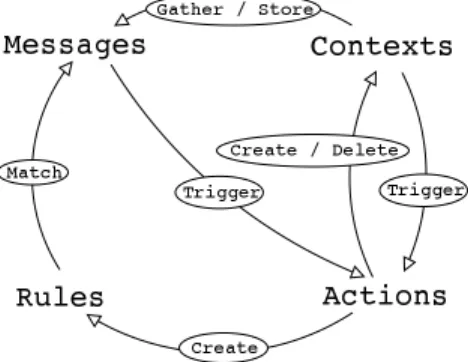
The four different Logsurfer components (shown in Figure 1) are messages, rules, ac-tions, and contexts. Messages are pieces of incoming data from a single data source5. Rules match messages and trigger actions based on those matches. Actions are trig-gered when a rule matches a message or when a context is closed6and have the ability to create new rules, create new contexts, and delete unneeded contexts. Contexts gather and store messages in memory. These four pieces support and depend upon one another, comprising a log analysis program capable of detecting complex signatures of behavior.
Fig. 1. Logsurfer Components
2.1 Logsurfer Rules
Logsurfer rules match messages and trigger actions as the result of the match. A rule specification consists of six or seven fields. The first field specifies a regular expression that indicates which messages the rule matches. The second field specifies a regular ex-pression that indicates exceptions to the first field (messages are not matched by the rule if they match this regular expression). The third field specifies a regular expression that indicates when the rule should be deleted. The fourth field specifies a regular expres-sion that indicates exceptions to the third field (rules should not be deleted when they match this regular expression). The fifth field specifies the amount of time in seconds that the rule can be active (Logsurfer uses the value “0” to specify that a rule should be active forever). The sixth (optional) field may use the keyword “continue” to indicate that when the rule matches a message, subsequent rules should also try to match the message; when this field is not specified, messages that match the rule are not checked by subsequent rules. The seventh field specifies the action (See Figure 7 for a list of action types) that is to be taken when the rule matches a message.
5
I often combine multiple data sources using other tools such as the Free Software Foundation’s version of the “tail” program.
A Simple Rule: The simple Logsurfer rule shown in Figure 2 prints every message it
sees. This rule matches the regular expression ’.*’. This rule never times out. In this example, when any message is seen, it is “piped”7to the external command/bin/cat.
# m a t c h e v e r y l i n e ’.*’− # n e v e r d e l e t e t h i s r u l e − − # n e v e r t i m e o u t 0 # e x e c u t e / b i n / c a t w i t h t h e m a t c h i n g l i n e a s i t s i n p u t p i p e ’/bin/cat’
Fig. 2. A simple Logsurfer rule that prints every line.
Although this rule is simple, it should always be the last rule in a Logsurfer config-uration file. It denotes when none of the other rules match the particular message, and helps one know to add matches for those messages to a later version of the configuration file.
When used in conjunction with a relatively complete Logsurfer configuration, this rule can be used tell when something anomalous has occurred. Take for example the messages left by the exploit of an input validation vulnerability in rpc.statd as pub-lished by the CERT Coordination CenterR in CERTR Advisory CA-2000-17[7]. The messages recorded as a byproduct of the attack are many bytes of (primarily) non– printable characters, mostly consisting of the code for the exploit itself. These lines are difficult to match explicitly unless you’ve previously seen them or large pieces of them verbatim. By having a failsafe rule like this as the last in the ruleset, these messages will be noticed.
Logsurfer As a Filter: Logsurfer can be used to filter out innocuous lines from your
log file. In Figure 3 messages that confirm the fact that the compute node has two processors are discarded.
# o u r c l u s t e r n o d e s e a c h h a v e two p r o c e s s o r s . # i g n o r e m e s s a g e s t h a t c o n f i r m t h i s
’l.* kernel: Processors: 2’ − − − 0
i g n o r e
Fig. 3. An example of filtering out unnecessary messages.
A Logsurfer Rule to Alert the Administrator of a Hardware Failure: In Figure 4,
Logsurfer detects a machine reporting the wrong number of processors. Messages that report the correct number of processors have already been filtered out by the rule in Figure 3, so any messages that this rule matches are reporting errors. In response to these errors, Logsurfer will invoke a program to alert the system administrators.
# r e p o r t t h e p r o b l e m when a m a c h i n e d o e s n ’ t r e p o r t t h e # r i g h t number o f p r o c e s s o r s on b o o t .
’(l.*) kernel: Processors: ([0-9]+)’ − − −0
e x e c ‘ ‘ / u s r / adm / b i n / a l e r t \"Wrong number of \ processors: $3 detected on node: $2 \"’’
Fig. 4. An example that, when used following the example in Figure 3, will inform an adminis-trator which node is reporting the wrong number of processors. In this example, the names of the compute nodes are matched and extracted by the regular expression “(l.*)”.
A Logsurfer Rule that Invokes a Program to Correct a Problem: When a message
matches a Logsurfer rule, Logsurfer is able to, among other things (see 2.2 for a com-plete list of action types), execute programs on your behalf. Thus, Logsurfer may be configured to respond to routine problems without requiring human intervention.
The Logsurfer configuration shown in Figure 5, causes Logsurfer to respond to the message left by an sshd process that is unable to record a user logging in in the lastlog file, because it does not exist, by calling a shell script designed to correct the problem. The SSH daemon (in this case, OpenSSH version 3.4 from the portable series) is not capable of creating the file on its own. Logsurfer can take care of that job, freeing the administrators to work on other issues.
’(l.*) lastlog_get_entry: Error reading \
from /var/log/lastlog: No such file or directory’
− − −0
e x e c ‘ ‘ / u s r / adm / b i n / f i x l a s t l o g $2’’
Fig. 5. A more complex Logsurfer rule that pulls out the name of a host that is missing the /var/log/lastlog file. Logsurfer executes an external program in response.
Logsurfer Dynamic Rules: Rules in Logsurfer are dynamic in that they may be
cre-ated or superseded by another rule at run–time. Rules are also able to delete themselves at run–time. Dynamic rules are used when the response to a given message needs to change for some reason.
A rule may only need to be active until a particular message is seen. This is often the case for rules that gather the contents of a session. Once the session has ended, the rule is no longer needed.
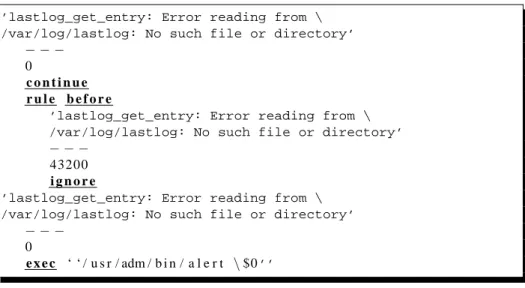
Another use for dynamic rules is to limit the rate at which certain messages are reported. If a rule is to send an email to the administrator prompting her to fix an issue that represents a minor annoyance as opposed to a serious problem, it is generally best to limit the number of email messages that are sent8. Figure 6 shows a simple example of limiting the rate at which messages are reported on by dynamically creating and removing rules from the ruleset.
’lastlog_get_entry: Error reading from \ /var/log/lastlog: No such file or directory’
− − −
0
c o n t i n u e r u l e b e f o r e
’lastlog_get_entry: Error reading from \ /var/log/lastlog: No such file or directory’
− − −
43200 i g n o r e
’lastlog_get_entry: Error reading from \ /var/log/lastlog: No such file or directory’
− − −
0
e x e c ‘ ‘ / u s r / adm / b i n / a l e r t \$0’’
Fig. 6. An example set of rules that limit the number of emails an administrator is sent by Log-surfer to one every 12 hours (43200 seconds).
2.2 Logsurfer Actions
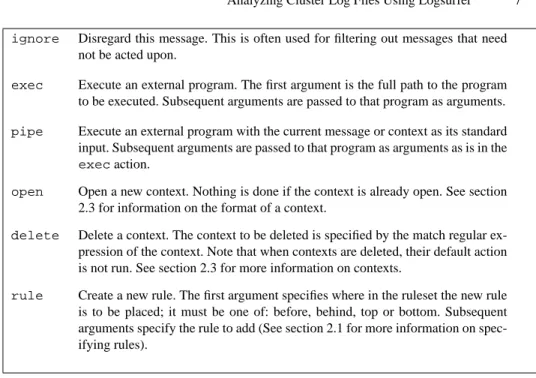
Actions define what is to be done with a particular message or context of messages. An action is triggered either by a rule matching a message or by a context exceeding one of its limits: the absolute timeout, the relative timeout, and the limit on the number of messages that can be stored in the context (See section 2.3 for more information). The specification of the action consists of an action type (See Figure 7 for the complete list of action types) and optional arguments.
Often, an action ends up running an external program with the particular message or context of messages as its input. By using an external program in this way, Logsurfer may be extended to do whatever sort of reporting or automatic problem resolution may
ignore Disregard this message. This is often used for filtering out messages that need not be acted upon.
exec Execute an external program. The first argument is the full path to the program to be executed. Subsequent arguments are passed to that program as arguments.
pipe Execute an external program with the current message or context as its standard input. Subsequent arguments are passed to that program as arguments as is in the
execaction.
open Open a new context. Nothing is done if the context is already open. See section 2.3 for information on the format of a context.
delete Delete a context. The context to be deleted is specified by the match regular ex-pression of the context. Note that when contexts are deleted, their default action is not run. See section 2.3 for more information on contexts.
rule Create a new rule. The first argument specifies where in the ruleset the new rule is to be placed; it must be one of: before, behind, top or bottom. Subsequent arguments specify the rule to add (See section 2.1 for more information on spec-ifying rules).
Fig. 7. The types of actions supported by Logsurfer
be necessary at your site. Also, by using external programs to do most of the work beyond problem detection, Logsurfer itself can remain fairly simple.
2.3 Logsurfer Contexts
Contextual information is key when analyzing a log file. A single symptom is often not enough information to tell whether there is a problem. Log file analysis tools that examine individual messages alone leave the task of discovering issues whose signature is made up by more than one symptom to the system administrators. Messages in a log file may be related if they come from the same process on the same host (eg. sshd on host cluster0001 with process ID 234), or they may also have more complex relationships to each other. Logsurfer addresses this problem with structures known as “contexts”.
Logsurfer contexts collect and store related messages. A pair of regular expressions determine which messages are added to the context. The first regular expression in this pair specifies the messages to add to the context; the second specifies exceptions to the first. Contexts limit the number of messages they can hold and the amount of time before a context calls its default action and is destroyed.
Logsurfer’s contexts collect all the relevant data for diagnosing a particular problem into one location, a structure stored in memory, for reporting later if necessary. When this data is needed, a report action will specify which contexts it needs to report on and have those contexts fed into the external program it specifies.
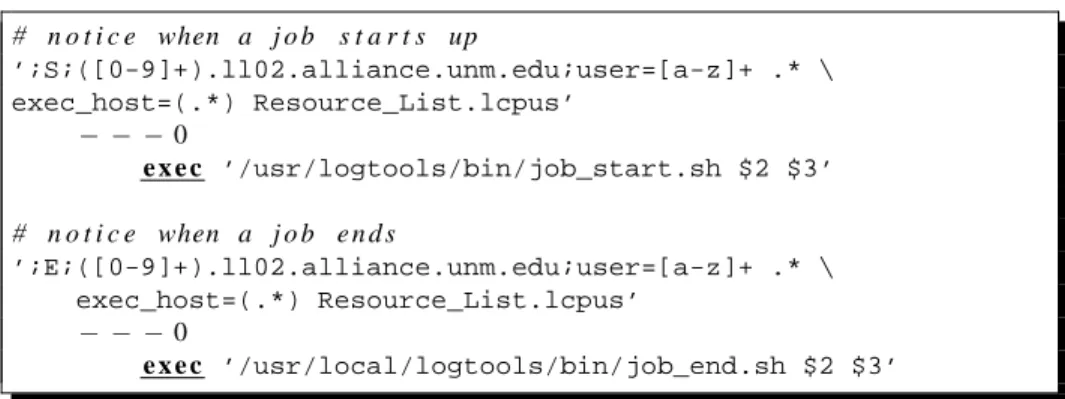
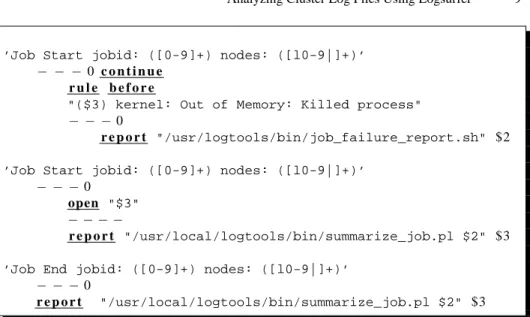
Figures 8 and 9 demonstrate rules used to collect all of the messages from the com-pute nodes involved in a job over its duration. Figure 8 reports when a Portable Batch
System (PBS) job starts or finishes. It invokes a program to syslog the necessary data to the main log server9 in a format that it can digest easily10. The rules in Figure 9 collectively gather all of the messages sent to the log server by the compute nodes par-ticipating in the job into a context11. When the second rule in Figure 9 receives the notification that the job is done, it passes the ID of the job and all of the messages in the context created by the first rule in Figure 9 to a Perl script that stores these messages to a file so that they can be used when helping a user determine what went wrong with a failed job. If instead Logsurfer notices that processes on the node have died due to lack of available memory, it calls a different program to report the problem. Logsurfer makes it easy to extract the necessary information and act on it when necessary..
# n o t i c e when a j o b s t a r t s up ’;S;([0-9]+).ll02.alliance.unm.edu;user=[a-z]+ .* \ exec_host=(.*) Resource_List.lcpus’ − − −0 e x e c ’/usr/logtools/bin/job_start.sh $2 $3’ # n o t i c e when a j o b e n d s ’;E;([0-9]+).ll02.alliance.unm.edu;user=[a-z]+ .* \ exec_host=(.*) Resource_List.lcpus’ − − −0 e x e c ’/usr/local/logtools/bin/job_end.sh $2 $3’
Fig. 8. A pair of Logsurfer rules that identify compute jobs starting and finishing.
3
Making use of Logsurfer in Log File Analysis
Logsurfer allows us to detect complex signatures of behavior. The examples shown in the following sub–sections show how Logsurfer can be used to help manage a cluster:
3.1 Using Logsurfer to Detect a Complex Security Exploit on a Single Machine
Logsurfer’s value is clearly seen when we look at the messages left by a complex secu-rity exploit. These messages, left as byproducts of the attack, can be used to determine if the attack was successful. However, none of these messages by themselves are very
9
We keep our PBS log files on a separate machine from our syslog log server. 10
These examples point out a shortcoming in Logsurfer; it is very difficult to pick out an un-known number of fields from a message. This example uses a shell script to feed the data to Logsurfer in a way that it can easily use.
11There is a race condition in this example! It is possible that the syslog server won’t receive notification that the job is starting until after relevant messages have already gone by. These messages are lost!
’Job Start jobid: ([0-9]+) nodes: ([l0-9|]+)’
− − − 0 c o n t i n u e r u l e b e f o r e
"($3) kernel: Out of Memory: Killed process"
− − −0
r e p o r t "/usr/logtools/bin/job_failure_report.sh" $2
’Job Start jobid: ([0-9]+) nodes: ([l0-9|]+)’
− − −0
open "$3"
− − − −
r e p o r t "/usr/local/logtools/bin/summarize_job.pl $2" $3
’Job End jobid: ([0-9]+) nodes: ([l0-9|]+)’
− − −0
r e p o r t "/usr/local/logtools/bin/summarize_job.pl $2" $3
Fig. 9. A pair of Logsurfer rules to create a context for the nodes in a compute job when the job starts and to report on that context when the job has finished.
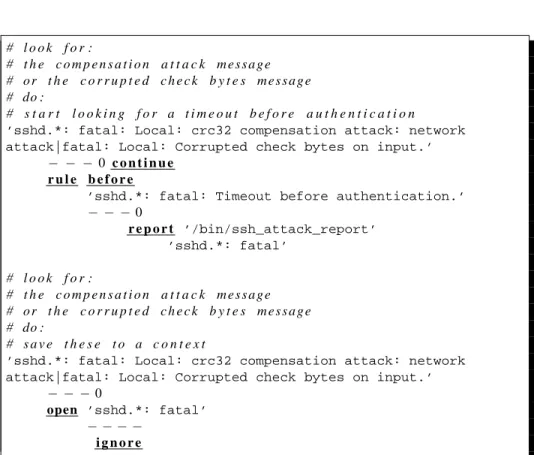
alarming. Each one of them can be considered normal without contextual information. When these messages are examined as a whole, we can tell that the machine was com-promised by exploiting a vulnerability in ssh[8]. The signs that a bug in the CRC32 attack compensator has been exploited are:
– The CRC32 attack compensator being used – Corrupted check bytes on input
– A timeout before authentication
Logsurfer can help us find the relevant contextual information to detect this exploit. By using dynamic rules and contexts, we can gather this information and send it to an external program that determines if all three lines are present12. Figure 10 gives an example of a Logsurfer configuration that is capable of collecting all of the pertinent information and sending it to such a program.
3.2 Reporting a Service that has been down for too long
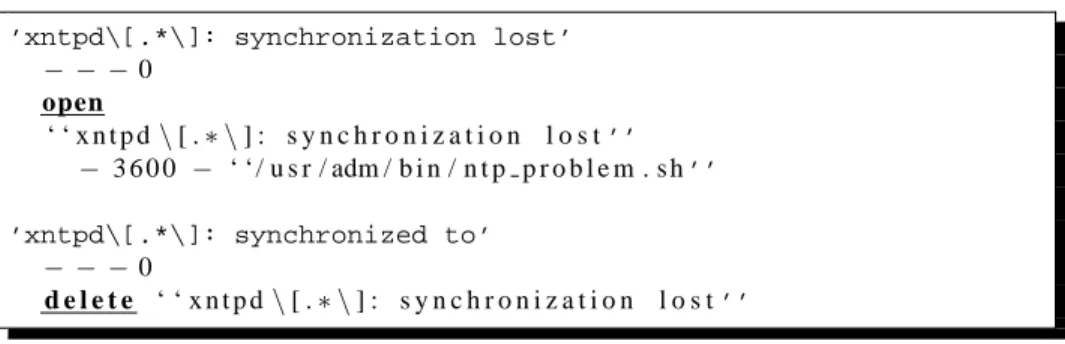
In some cases, errors reported to the system log daemon indicate a failure that is only of interest if the problem is not corrected within a certain period of time. An excellent example of this is when an NTP daemon13is unable to contact its server as the system clock will not, in general, diverge from the correct time very quickly. The rules in Figure 11 detect an NTP daemon that is unable to synchronize with its server. They utilize a context with a timeout value to gather messages that indicate the failure and notify 12It is possible for Logsurfer do do this independently, but the configuration is rather complex. 13The NTP daemon is responsible for synchronizing the system clock to the current time.
# l o o k f o r :
# t h e c o m p e n s a t i o n a t t a c k m e s s a g e # o r t h e c o r r u p t e d c h e c k b y t e s m e s s a g e # do :
# s t a r t l o o k i n g f o r a t i m e o u t b e f o r e a u t h e n t i c a t i o n
’sshd.*: fatal: Local: crc32 compensation attack: network attack|fatal: Local: Corrupted check bytes on input.’
− − −0 c o n t i n u e r u l e b e f o r e
’sshd.*: fatal: Timeout before authentication.’
− − −0 r e p o r t ’/bin/ssh_attack_report’ ’sshd.*: fatal’ # l o o k f o r : # t h e c o m p e n s a t i o n a t t a c k m e s s a g e # o r t h e c o r r u p t e d c h e c k b y t e s m e s s a g e # do : # s a v e t h e s e t o a c o n t e x t
’sshd.*: fatal: Local: crc32 compensation attack: network attack|fatal: Local: Corrupted check bytes on input.’
− − −0
open ’sshd.*: fatal’
− − − −
i g n o r e
the administrator when the problem has existed for an hour. However, if there is an indication that the problem is resolved, the context is deleted and no report is sent.
’xntpd\[.*\]: synchronization lost’ − − −0 open ‘ ‘ x n t p d\[ .∗ \] : s y n c h r o n i z a t i o n l o s t’’ − 3 6 0 0 − ‘ ‘ / u s r / adm / b i n / n t p p r o b l e m . s h’’ ’xntpd\[.*\]: synchronized to’ − − −0 d e l e t e ‘ ‘ x n t p d\[ .∗ \] : s y n c h r o n i z a t i o n l o s t’’
Fig. 11. Rules to react to a NTP daemon not being able to synchronize with its server for an hour.
4
Conclusion
Logsurfer simplifies running a cluster by correcting problems without human inter-vention and providing detailed reports containing information relevant to the problem. Many of the problems that surface in a cluster are non–trivial to detect due both to the nature of the problems and the nature of cluster computing; that is why a tool like Log-surfer is needed. LogLog-surfer’s power stems from its dynamic ruleset and its ability to evaluate messages in terms of their contextual information. When Logsurfer is config-ured to detect and react to problems with a cluster, the administrators are able to make better use of their time.
References
1. Anton Chuvakin, Ph.D, GCIA. Advanced Log Processing, August 2002. Available from World Wide Web:http://online.securityfocus.com/infocus/1613. 2. DFN-CERT Zentrum f¨ur sichere Netzdienste GmbH. DFN-CERT: Logsurfer Homepage,
December 2000. Available from World Wide Web:http://www.cert.dfn.de/eng/ logsurf/.
3. T. Roney, A. Bailey, and J. Fullop. Cluster Monitoring at NCSA, June 2001. Available from World Wide Web:http://www.ncsa.uiuc.edu/Divisions/CC/systems/ LCI-Cluster-Monitor.html.
4. sasha. Holistic Approaches to Attack Detection, August 2001. Available from World Wide Web:http://www.phrack.org/show.php?p=57&a=11.
5. emf. emf’s logsurfer configuration page, March 2003. Available from World Wide Web:
http://www.obfuscation.org/emf/logsurfer.html.
6. Installing, Configuring, and Using Logsurfer 1.5 To Analyze Log Messages on Systems Running Solaris 2.x, January 2001. Available from World Wide Web:http://www.cert.
7. CERT/CC. CERT Advisory CA-2000-17 Input Validation Problem in rpc.statd, Septem-ber 2000. Available from World Wide Web:http://www.cert.org/advisories/ CA-2000-17.html.
8. David A. Dittrich. Analysis of SSH crc32 compensation attack detector exploit, Nov 2001. Available from World Wide Web: http://staff.washington.edu/dittrich/ misc/ssh-analysis.txt.