DASH-IF Interoperability Points
April 7, 2015
DASH Industry Forum
The scope of the interoperability points defined in this document is to provide support for high-2
quality video distribution for over the top services using H.264/AVC and H.265/HEVC. Both live 3
and on-demand services are supported. The features address relevant use cases for live ser-4
vices, ad insertion, trick modes, content protection and subtitling. Extensions for multi-channel 5
audio are defined. 6
Disclaimer
1
This is a document made available by DASH-IF. The technology embodied in this document may 2
be covered under patents, including patents owned by such companies. No patent license, either 3
implied or express, is granted to you by this document. This draft specification is provided on an 4
as-is basis without any warranty whatsoever. 5
In addition, this document may include references to documents and/or technologies controlled 6
by third parties. Those documents and technologies may be subject to third party rules and li-7
censing terms. No intellectual property license, either implied or ex-press, to any third party ma-8
terial is granted to you by this document or DASH-IF. DASH-IF makes no any warranty whatso-9
ever for such third party material. 10 11 12 13 14 15 16 17
Contents
1
GUIDELINES FOR IMPLEMENTATION: DASH-IF INTEROPERABILITY POINTS ... I
2 SCOPE ...1 3 DISCLAIMER ...2 4 CONTENTS ...3 5 LIST OF FIGURES ...7 6 LIST OF TABLES ...8 7
ACRONYMS, ABBREVIATIONS AND DEFINITIONS ...9
8
REFERENCES ... 11
9
1. INTRODUCTION ...1
10
2. CONTEXT AND CONVENTIONS ...2
11
2.1. RELATION TO MPEG-DASH AND OTHER DASH SPECIFICATIONS ... 2 12
2.2. COMPATIBILITY AND EXTENSIONS TO EARLIER VERSIONS ... 3 13
2.2.1. Summary of Version 3 Modifications ... 3
14 2.2.2. Backward-Compatibility Considerations ... 4 15 2.3. USE OF KEY WORDS ... 4 16 2.3.1. Background ... 4 17 2.3.2. Key Words ... 4 18
2.3.3. Mapping to DASH-IF Assets ... 5
19
2.4. DEFINITION AND USAGE OF INTEROPERABILITY POINTS ... 6 20
2.4.1. Profile Definition in ISO/IEC 23009-1 ... 6
21
2.4.2. Usage of Profiles... 6
22
2.4.3. Interoperability Points and Extensions ... 7
23 3. DASH-RELATED ASPECTS ...7 24 3.1. SCOPE ... 7 25 3.2. DASHFORMATS ... 8 26 3.2.1. Introduction ... 8 27
3.2.2. Media Presentation Description constraints for v1 & v2 Clients ... 10
28
3.2.3. Segment format constraints ... 11
29
3.2.4. Presence of Attributes and Elements ... 11
30
3.2.5. MPD Dimension Constraints ... 12
31
3.2.6. Generic Metadata ... 12
32
3.2.7. DASH Timing Model ... 13
33
3.2.8. Bandwidth and Minimum Buffer Time ... 15
34
3.2.9. Trick Mode Support ... 16
35
3.2.10. Adaptation Set Constraints ... 16
36
3.2.11. Media Time Information of Segment ... 17
37
3.2.12. Content Offering with Periods ... 20
38
3.3. CLIENT IMPLEMENTATION REQUIREMENTS AND GUIDELINES ... 20 39
3.3.1. Overview ... 20
3.3.2. DASH Client Guidelines ... 20
1
3.3.3. Seamless switching ... 21
2
3.3.4. DASH Client Requirements ... 22
3
3.4. TRANSPORT AND PROTOCOL-RELATED ISSUES ... 22 4
3.4.1. General ... 22
5
3.4.2. Server Requirements and Guidelines ... 22
6
3.4.3. Client Requirements and Guidelines ... 22
7
3.5. SYNCHRONIZATION CONSIDERATIONS ... 23 8
3.6. CONSIDERATIONS FOR LIVE SERVICES... 23 9 3.7. CONSIDERATIONS ON AD INSERTION ... 23 10 4. LIVE SERVICES ... 23 11 4.1. INTRODUCTION ... 23 12
4.2. OVERVIEW DYNAMIC AND LIVE MEDIA PRESENTATIONS ... 24 13
4.3. DYNAMIC SEGMENT DOWNLOAD ... 27 14
4.3.1. Background and Assumptions ... 27
15
4.3.2. Preliminaries ... 27
16
4.3.3. Service Offering Requirements and Guidelines ... 33
17
4.3.4. Client Operation, Requirements and Guidelines ... 43
18
4.3.5. Additional DVB-DASH alignment aspects ... 48
19
4.4. SIMPLE LIVE SERVICE OFFERING INCLUDING MPDUPDATES ... 48 20
4.4.1. Background and Assumptions ... 48
21
4.4.2. Preliminaries ... 49
22
4.4.3. Service Offering Requirements and Guidelines ... 51
23
4.4.4. MPD-based Live Client Operation based on MPD ... 54
24
4.5. MPD AND SEGMENT-BASED LIVE SERVICE OFFERING ... 55 25
4.5.1. Preliminaries ... 55
26
4.5.2. Service Offering Requirements and Guidelines ... 57
27
4.5.3. Client Requirements and Guidelines ... 61
28
4.6. PROVISIONING OF LIVE CONTENT IN ON-DEMAND MODE ... 63 29
4.6.1. Scenario ... 63
30
4.6.2. Content Offering Requirements and Recommendations ... 63
31
4.6.3. Client Behavior ... 64
32
4.7. AVAILABILITY TIME SYNCHRONIZATION BETWEEN CLIENT AND SERVER ... 64 33
4.7.1. Background ... 64
34
4.7.2. Service Provider Requirements and Guidelines ... 65
35
4.7.3. Client Requirements and Guidelines ... 65
36
4.8. ROBUST OPERATION ... 66 37
4.8.1. Background ... 66
38
4.8.2. Tools for Robust Operations ... 66
39
4.8.3. Synchronization Loss of Segmenter ... 67
40
4.8.4. Encoder Clock Drift ... 67
41
4.8.5. Segment Unavailability ... 67
42
4.8.6. Swapping across Redundant Tools ... 68
43
4.8.7. Service Provider Requirements and Guidelines ... 68
44
4.8.8. Client Requirements and Guidelines ... 68
45
4.9. INTEROPERABILITY ASPECTS ... 68 46
4.9.1. Introduction ... 68
1
4.9.2. Simple Live Operation ... 68
2
4.9.3. Main Live Operation ... 69
3 5. AD INSERTION IN DASH ... 70 4 5.1. INTRODUCTION ... 70 5 5.1.1. General ... 70 6 5.1.2. DASH Concepts ... 70 7 5.2. ARCHITECTURES ... 74 8
5.3. SERVER-BASED ARCHITECTURE ... 75 9 5.3.1. Introduction ... 75 10 5.3.2. Mapping to DASH ... 76 11 5.3.3. Workflows ... 78 12 5.3.4. Examples ... 83 13 5.4. APP-BASED ARCHITECTURE ... 85 14 5.4.1. Mapping to DASH ... 85 15 5.4.2. Workflows ... 88 16
5.5. EXTENSIONS FOR AD INSERTION ... 89 17 5.5.1. Asset Identifiers ... 89 18 5.5.2. Remote Periods ... 89 19 5.5.3. User-defined events ... 90 20 5.6. INTEROPERABILITY ASPECTS ... 90 21 5.6.1. Server-based Ad insertion ... 90 22 5.6.2. App-based Ad Insertion ... 90 23
6. MEDIA CODING TECHNOLOGIES ... 91
24 6.1. INTRODUCTION ... 91 25 6.2. VIDEO ... 91 26 6.2.1. General ... 91 27
6.2.2. DASH-specific aspects for H.264/AVC video ... 92
28
6.2.3. DASH-specific aspects for H.265/HEVC video ... 92
29
6.2.4. Video Metadata ... 93
30
6.2.5. Adaptation Sets Constraints ... 93
31
6.3. AUDIO ... 95 32
6.3.1. General ... 95
33
6.3.2. DASH-specific aspects for HE-AACv2 audio ... 96
34 6.3.3. Audio Metadata ... 96 35 6.4. AUXILIARY COMPONENTS ... 97 36 6.4.1. Introduction ... 97 37
6.4.2. Subtitles and Closed Captioning ... 97
38
6.4.3. CEA-608/708 in SEI messages ... 97
39
6.4.4. SMPTE Timed Text ... 101
40
6.4.5. Annotation of Subtitles ... 102
41
7. CONTENT PROTECTION RELATED ASPECTS ... 102
42
7.1. INTRODUCTION ... 102 43
7.2. BASE TECHNOLOGIES SUMMARY ... 102 44
7.3. ISOBMFFSUPPORT FOR COMMON ENCRYPTION AND DRM ... 104 45
7.3.1. Box Hierarchy ... 104
7.3.2. ISO BMFF Structure Overview ... 106
1
7.4. MPD SUPPORT FOR ENCRYPTION AND DRMSIGNALING ... 107 2
7.4.1. Use of the Content Protection Descriptor ... 107
3
7.5. ADDITIONAL CONTENT PROTECTION CONSTRAINTS ... 109 4
7.5.1. ISO BMFF Content Protection Constraints ... 109
5
7.5.2. MPD Content Protections Constraints ... 109
6
7.5.3. Other Content Protections Constraints ... 110
7
7.5.4. Encryption of Different Representations ... 111
8
7.5.5. Encryption of Multiple Periods ... 111
9
7.5.6. DRM System Identification... 112
10
7.5.7. Protection of Media Presentations that Include SD, HD and UHD Adaptation Sets ... 112
11
7.6. WORKFLOW OVERVIEW ... 114 12
7.7. COMMON ENCRYPTION TEST-DRMSIMULATION ... 117 13
7.7.1. Introduction ... 117
14
7.7.2. Test of Common Encryption ... 118
15
7.7.3. ContentProtection descriptor ... 118
16
7.7.4. Test Scenarios... 119
17
8. DASH-IF INTEROPERABILITY POINTS ... 120
18 8.1. INTRODUCTION ... 120 19 8.2. DASH-AVC/264 MAIN ... 120 20 8.2.1. Introduction ... 120 21 8.2.2. Definition ... 120 22 8.3. DASH-AVC/264 HIGH ... 121 23 8.3.1. Introduction ... 121 24 8.3.2. Definition ... 121 25
8.4. DASH-IFIOP SIMPLE ... 122 26
8.4.1. Introduction ... 122
27
8.4.2. Definition ... 122
28
8.5. DASH-IFIOPMAIN... 123 29
8.5.1. Introduction ... 123
30
8.5.2. Definition ... 123
31
9. MULTI-CHANNEL AUDIO EXTENSION ... 123
32
9.1. SCOPE ... 123 33
9.2. TECHNOLOGIES ... 124 34
9.2.1. Dolby Multichannel Technologies ... 124
35
9.2.2. DTS-HD ... 124
36
9.2.3. MPEG Surround ... 125
37
9.2.4. MPEG-4 High Efficiency AAC Profile v2, level 6 ... 125
38
9.3. CLIENT IMPLEMENTATION GUIDELINES ... 126 39 9.4. EXTENSIONS ... 127 40 9.4.1. General ... 127 41 9.4.2. Dolby Extensions ... 127 42 9.4.3. DTS-HD Interoperability Points ... 128 43
9.4.4. MPEG Surround Interoperability Points ... 129
44
9.4.5. MPEG HE-AAC Multichannel Interoperability Points ... 130
45 46
ANNEX B LIVE SERVICES - USE CASES AND ARCHITECTURE ...2
1
B.1 BASELINE USE CASES ... 2 2
B.1.1 Use Case 1: Live Content Offered as On-Demand ... 2
3
B.1.2 Use Case 2: Scheduled Service with known duration and Operating at live edge ... 2
4
B.1.3 Use Case 3: Scheduled Service with known duration and Operating at live edge and time
5
shift buffer ... 2
6
B.1.4 Use Case 4: Scheduled Live Service known duration, but unknown Segment URLs ... 2
7
B.1.5 Use Case 5: 24/7 Live Service ... 2
8
B.1.6 Use Case 6: Approximate Media Presentation Duration Known ... 2
9
B.2 BASELINE ARCHITECTURE FOR DASH-BASED LIVE SERVICE ... 3 10
B.3 DISTRIBUTION OVER MULTICAST ... 3 11
B.4 TYPICAL PROBLEMS IN LIVE DISTRIBUTION ... 4 12
B.4.1 Introduction ... 4
13
B.4.2 Client Server Synchronization Issues ... 4
14
B.4.3 Synchronization Loss of Segmenter ... 5
15
B.4.4 Encoder Clock Drift ... 5
16
B.4.5 Segment Unavailability ... 5
17
B.4.6 Swapping across Redundant Tools ... 6
18
B.4.7 CDN Issues ... 6
19
B.4.8 High End-to-end Latency ... 6
20
B.4.9 Buffer Management & Bandwidth Estimation ... 7
21
B.4.10 Start-up Delay and Synchronization Audio/Video ... 7
22
B.5 ADVANCED USE CASES ... 7 23
B.5.1 Introduction ... 7
24
B.5.2 Use Case 7: Live Service with undetermined end ... 7
25
B.5.3 Use Case 8: 24/7 Live Service with canned advertisement ... 7
26
B.5.4 Use case 9: 24x7 live broadcast with media time discontinuities ... 7
27
B.5.5 Use case 10: 24x7 live broadcast with Segment discontinuities ... 8
28 29
List of Figures
30
Figure 1 Overview Timing Model ... 14 31
Figure 2 DASH aspects of a DASH-AVC/264 client compared to a client supporting the union of 32
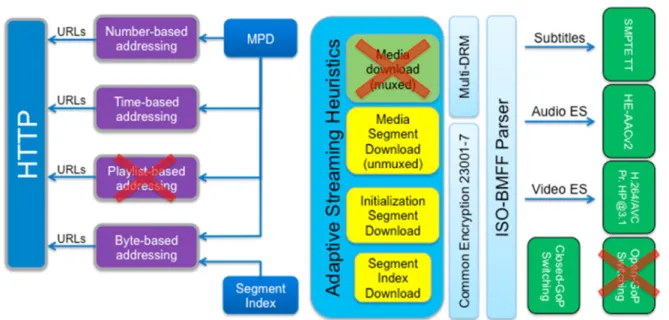
DASH ISO BMFF live and on-demand profile. ... 21 33
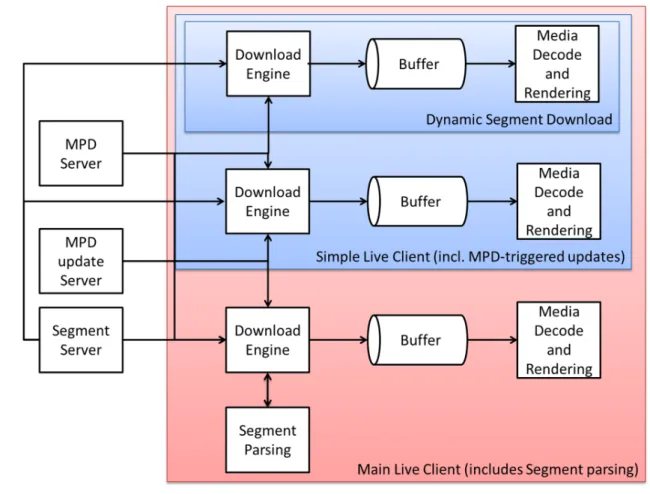
Figure 3 Different Client Models ... 26 34
Figure 4 Segment Availability on the Server for different time NOW (blue = valid but not yet 35
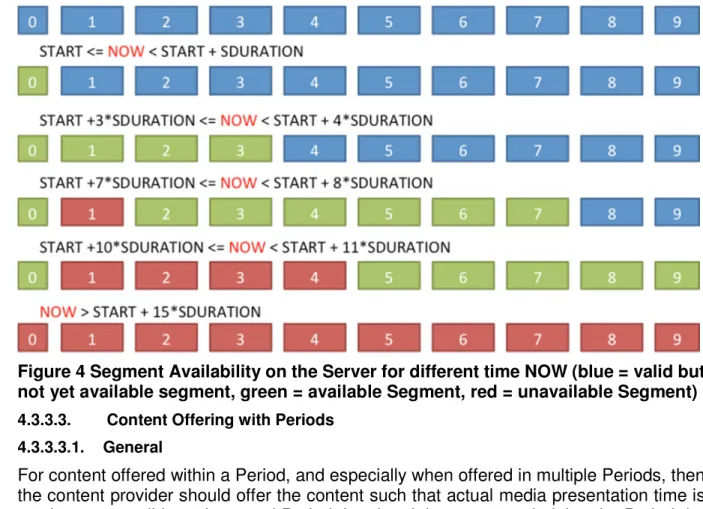
available segment, green = available Segment, red = unavailable Segment) ... 38 36
Figure 5 Simple Client Model ... 43 37
Figure 6 Advanced Client Model ... 61 38
Figure 7: XLink resolution ... 71 39
Figure 8: Server-based architecture ... 75 40
Figure 9: Using an asset identifier ... 77 41
Figure 10: Live Workflow ... 78 42
Figure 11: Ad Decision ... 81 1
Figure 12: Example of MPD for "Top Gun" movie ... 84 2
Figure 13: App-based architecture ... 85 3
Figure 14 Inband carriage of SCTE 35 cue message ... 86 4
Figure 15: In-MPD carriage of SCTE 35 cue message ... 87 5
Figure 16: Linear workflow for app-driven architecture ... 88 6
Figure 17: Visualization of box structure for single key content ... 105 7
Figure 18: Visualization of box structure with key rotation ... 106 8
Figure 19 Logical Roles that Exchange DRM Information and Media ... 114 9
Figure 20 Example of Information flow for DRM license retrieval ... 116 10
Figure 21 Typical Deployment Scenario for DASH-based live services ... 3 11
Figure 22 Typical Deployment Scenario for DASH-based live services partially offered through 12
MBMS (unidirectional FLUTE distribution) ... 4 13
List of Tables
14
Table 1 DASH-IF Interoperability Points ... 1 15
Table 2 DASH-IF Interoperability Point Extensions ... 2 16
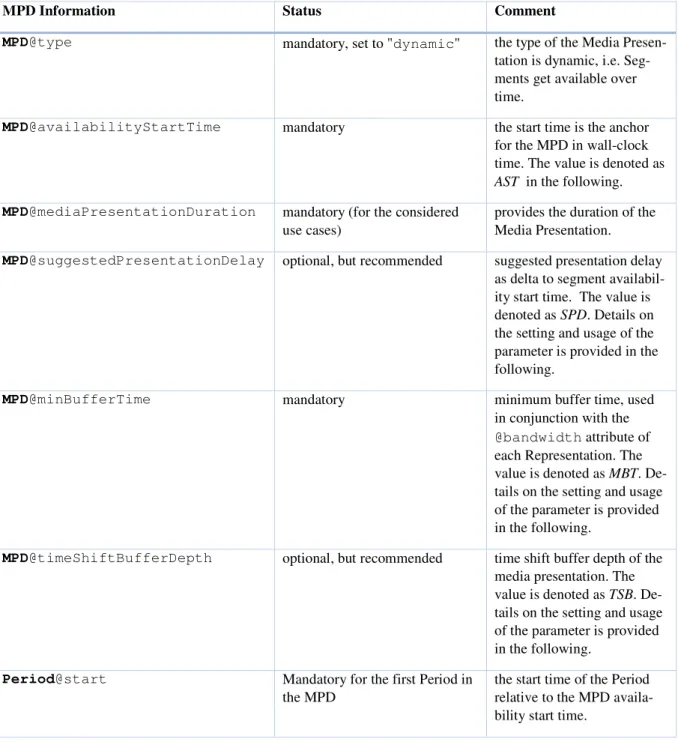
Table 3 -- Information related to Segment Information and Availability Times for a dynamic service 17
... 28 18
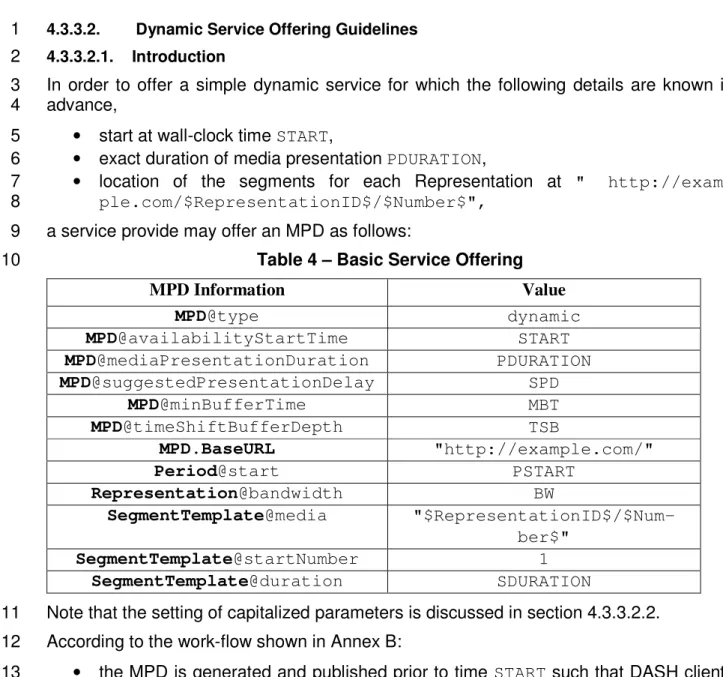
Table 4 – Basic Service Offering ... 34 19
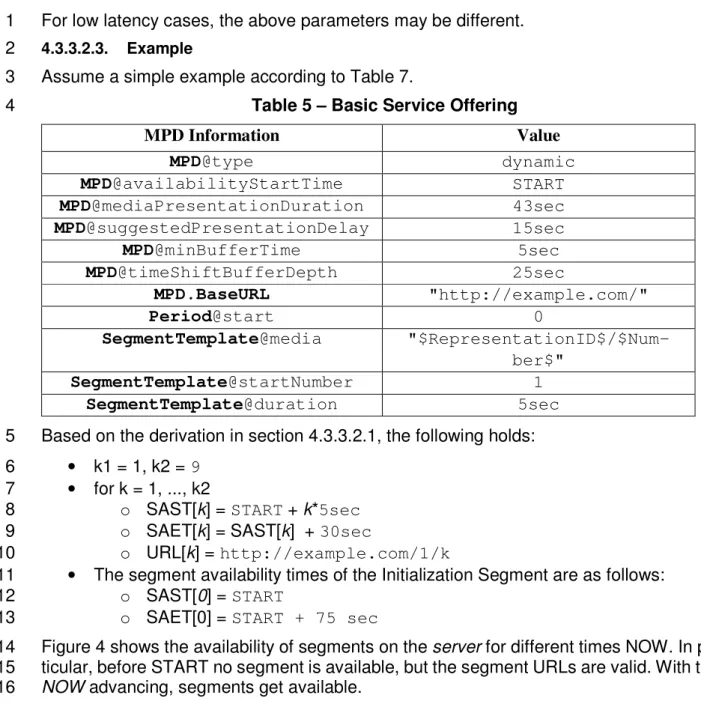
Table 5 – Basic Service Offering ... 37 20
Table 6 Multi-Period Service Offering ... 38 21
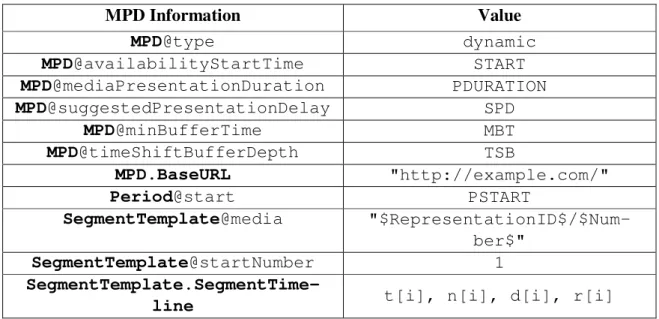
Table 7 – Service Offering with Segment Timeline ... 41 22
Table 8 – Information related to Live Service Offering with MPD-controlled MPD Updates ... 49 23
Table 9 – Basic Service Offering with MPD Updates ... 51 24
Table 10 – Service Offering with Segment Timeline and MUP greater than 0 ... 53 25
Table 11 – Service Offering with MPD and Segment-based Live Services ... 56 26
Table 12 InbandEventStream@value attribute for scheme with a value
27
"urn:mpeg:dash:event:2012"... 58 28
Table 13 – Basic Service Offering with Inband Events ... 60 29
Table 14 H.264 (AVC) Codecs parameter according to RFC6381 [11] ... 92 30
Table 15 Codecs parameter according to ISO/IEC 14496-15 [10] ... 93 31
Table 16 HE-AACv2 Codecs parameter according to RFC6381 [11] ... 96 32
Table 17 Subtitle Codecs parameter according to RFC6381 [11] ... 101 33
Table 18 Boxes relevant for DRM systems ... 106 34
Table 19 Dolby Technologies: Codec Parameters and ISO BMFF encapsulation ... 124 35
Table 20: DTS Codec Parameters and ISO BMFF encapsulation ... 124 36
Table 21 Codecs parameter according to RFC6381 [11] and ISO BMFF encapsulation for MPEG 37
Surround codec ... 125 38
Table 22 Codecs parameter according to RFC6381 [11] and ISO BMFF encapsulation ... 126 39
1
Acronyms, abbreviations and definitions
2
For acronyms, abbreviations and definitions refer to ISO/IEC 23009-1 [4]. 3
In addition, the following definitions are used in this document: 4
Ad Break: A location or point in time where one or more ads may be scheduled for delivery; same as 5
avail and placement opportunity. 6
Ad Decision Service: functional entity that decides which ad(s) will be shown to the user. It 7
interfaces deployment-specific and are out of scope for this document. 8
Ad Management Module: logical service that, given cue data, communicates with the ad decision 9
service and determines which advertisement content (if at all) should be presented during the ad 10
break described in the cue data. 11
Cue: indication of time and parameters of the upcoming ad break. Note that cues can indicate a 12
pending switch to and ad break, pending switch to a next ad within an ad break, and pending switch 13
from an ad break to the main content. 14
CDN node: functional entity returning a segment on request from DASH client. There are no 15
assumptions on location of the node. 16
Packager: functional entity that processes conditioned content and produces media segments suitable 17
for consumption by a DASH client. This entity is also known as fragmenter, encapsulater, or 18
segmenter. Packager does not communicate directly with the server – its output is written to the 19
origin. 20
Origin: functional entity that contains all media segments indicated in the MPD, and is the fallback if 21
CDN nodes are unable to provide a cached version of the segment on client request. 22
Splice Point: point in media content where 23
MPD Generator: functional entity returning an MPD on request from DASH client. It may be 24
generating an MPD on the fly or returning a cached one. 25
XLink resolver: functional entity which returns one or more remote elements on request from 26
DASH client. 27
In addition, the following abbreviations and acronyms are used in this document: 28
AAC Advanced Audio Coding 29
AVC Advanced Video Coding 30
DRM Digital Rights Management 31
DTV Digital Television 32
FCC Federal Communications Commission 33
GOP Group-of-Pictures 34
HD High-Definition
HDMI High-Definition Multimedia Interface 1
HE-AAC High Efficiency AAC 2
HEVC High-Efficiency Video Coding 3
KID common Key IDentifier
4
IDR Instantaneous Decoder Refresh 5
MPEG Moving Pictures Experts Group 6
PCM Pulse Code Modulation 7
PPS Picture Parameter Set 8
PS Parametric Stereo
9
SBR Spectral Band Replication 10
SD Standard Definition
11
SEI Supplemental Enhancement Information 12
SMPTE Society of Motion Picture and Television Engineers 13
SPS Sequence Parameter Set 14
TT Timed Text
15
TTML Timed Text Markup Language 16
1
References
2
[1] DASH-IF DASH-264/AVC Interoperability Points, version 1.0, available at 3
http://dashif.org/w/2013/06/DASH-AVC-264-base-v1.03.pdf
4
[2] DASH-IF DASH-264/AVC Interoperability Points, version 2.0, available at 5
http://dashif.org/w/2013/08/DASH-AVC-264-v2.00-hd-mca.pdf 6
[3] ISO/IEC 23009-1:2012/Cor.1:2013 Information technology -- Dynamic adaptive stream-7
ing over HTTP (DASH) -- Part 1: Media presentation description and segment formats. 8
Note: this document is superseded by reference [4], but maintained as the initial version of 9
this document is provided in the above reference. 10
[4] ISO/IEC 23009-1:2014/Cor.1:2015/Amd.1:2015 Information technology -- Dynamic 11
adaptive streaming over HTTP (DASH) -- Part 1: Media presentation description and 12
segment formats. 13
Note: ISO/IEC 23009-1:2014/Amd.1:2015 is expected to be published shortly. The latest 14
document is available in the MPEG output document w14860. 15
[5] ISO/IEC 23009-2:2015/Amd.3 Information technology -- Dynamic adaptive streaming 16
over HTTP (DASH) -- Part 1: Media presentation description and segment formats. 17
Note: ISO/IEC 23009-1:2014/Amd.3:2015 is expected to be published by end of 2015. The 18
latest document is available in the MPEG output document w15219. 19
[6] ISO/IEC 23009-2:2014: Information technology -- Dynamic adaptive streaming over 20
HTTP (DASH) -- Part 2: Conformance and Reference. 21
[7] ISO/IEC 23009-3:2014: Information technology -- Dynamic adaptive streaming over 22
HTTP (DASH) -- Part 3: Implementation Guidelines (Study of ISO/IEC PDTR, available 23
as w13514). 24
[8] ISO/IEC 14496-12:2015 Information technology -- Coding of audio-visual objects -- Part 25
12: ISO base media file format. 26
Note: ISO/IEC 14496-12:2015 is expected to be published shortly. The latest document is 27
available in the MPEG output document w15177. 28
[9] ITU-T Recommendation H.264 (01/2012): "Advanced video coding for generic audiovis-29
ual services" | ISO/IEC 14496-10:2010: "Information technology – Coding of audio-vis-30
ual objects – Part 10: Advanced Video Coding". 31
[10] ISO/IEC 14496-15:2014/Cor 1:2015: Information technology -- Coding of audio-visual 32
objects -- Part 15: Carriage of network abstraction layer (NAL) unit structured video in 33
ISO base media file format. 34
[11] IETF RFC 6381, The 'Codecs' and 'Profiles' Parameters for "Bucket" Media Types, Au-35
gust 2011. 36
[12] ISO/IEC 14496-3:2009 - Information technology -- Coding of audio-visual objects -- Part 1
3: Audio with Corrigendum 1:2009, Corrigendum 2:2011, Corrigendum 3:2012, Amend-2
ment 1:2009, Amendment 2:2010, Amendment 3:2012, and Amendment 4:2014. 3
[13] ISO/IEC 14496-14:2003/Amd 1:2010 Information technology -- Coding of audio-visual 4
objects -- Part 14: The MP4 File Format 5
[14] 3GPP (2005-01-04). "ETSI TS 126 401 V6.1.0 (2004-12) - Universal Mobile Telecom-6
munications System (UMTS); General audio codec audio processing functions; Enhanced 7
aacPlus general audio codec; General description (3GPP TS 26.401 version 6.1.0 Release 8
6)" 9
[15] CEA-708-D: Digital Television (DTV) Closed Captioning, August 2008 10
[16] 3GPP TS 26.245: "Transparent end-to-end Packet switched Streaming Service (PSS); 11
Timed text format" 12
[17] W3C Timed Text Markup Language (TTML) 1.0, November 2010. 13
[18] SMPTE ST 2052: "Timed Text" 14
[19] W3C WebVTT - W3C Web Video Text Tracks, Living Standard — 15
http://dev.w3.org/html5/webvtt/ 16
[20] ITU-T Recommendation H.265 (07/2013): "Advanced video coding for generic audiovis-17
ual services" | ISO/IEC 23008-2:2013: " High Efficiency Coding and Media Delivery in 18
Heterogeneous Environments – Part 2: High Efficiency Video Coding", downloadable 19
here: http://www.itu.int/rec/T-REC-H.265 20
[21] EBU Tech 3350, "EBU-TT, Part 1, Subtitling format definition", July 2012, 21
http://tech.ebu.ch/docs/tech/tech3350.pdf?vers=1.0 22
[22] IETF RFC2616, Hypertext Transfer Protocol -- HTTP/1.1, June 1999. 23
Note: DASH-IF is aware of the recent updates of HTTP/1.1 in the IETF with the new RFCs 24
723[0..5]. The group is currently investigating the detailed required changes to update the 25
references. A revised version 3.1 addressing this issue is expected to be published within a 26
short time. 27
[23] Recommended Practice (Conversion from CEA 608 to SMPTE-TT) RP 2052-10-2012 28
https://www.smpte.org/sites/default/files/rp2052-10-2012.pdf
29
[24] Recommended Practice (Conversion from CEA 708 to SMPTE-TT) RP 2052-11-2013 30
https://www.smpte.org/sites/default/files/RP2052-11-2013.pdf 31
[25] ISO/IEC DIS 14496-30:2014, "Timed Text and Other Visual Overlays in ISO Base Media 32
File Format". 33
[26] ISO/IEC 23001-7:2015: "Information technology -- MPEG systems technologies -- Part 34
7: Common encryption in ISO base media file format files". 35
Note: ISO/IEC 23001-7:2015 is expected to be published shortly. The latest document is 36
available in the MPEG output document 14425. 37
[27] DASH Industry Forum, "Guidelines for Implementation: DASH-AVC/264 Test Cases 38
and Vectors". 39
[28] DASH Industry Forum, "Guidelines for Implementation: DASH-AVC/264 Conformance 1
Software", http://dashif.org/conformance.html. 2
[29] DASH Identifiers Repository, available here: http://dashif.org/identifiers 3
[30] DTS 9302J81100, “Implementation of DTS Audio in Media Files Based on ISO/IEC 4
14496”, http://www.dts.com/professionals/resources/resource-center.aspx
5
[31] ETSI TS 102 366 v1.2.1, Digital Audio Compression (AC-3, Enhanced AC-3) Standard 6
(2008-08) 7
[32] MLP (Dolby TrueHD) streams within the ISO Base Media File Format, version 1.0, Sep-8
tember 2009. 9
[33] ETSI TS 102 114 v1.3.1 (2011-08), “DTS Coherent Acoustics; Core and Extensions with 10
Additional Profiles” 11
[34] ISO/IEC 23003-1:2007 - Information technology -- MPEG audio technologies -- Part 1: 12
MPEG Surround 13
[35] DTS 9302K62400, “Implementation of DTS Audio in Dynamic Adaptive Streaming over 14
HTTP (DASH)”, http://www.dts.com/professionals/resources/resource-center.aspx
15
[36] IETF RFC5905, "Network Time Protocol Version 4: Protocol and Algorithms Specifica-16
tion," June 2010. 17
[37] IETF RFC 6265: "HTTP State Management Mechanism", April 2011. 18
[38] DVB Document A168: "MPEG-DASH Profile for Transport of ISO BMFF Based DVB 19
Services over IP Based Networks", July 2014, available here: https://www.dvb.org/re-20
sources/public/standards/a168_dvb-dash.pdf 21
[39] ANSI/SCTE 128-1 2013: " AVC Video Constraints for Cable Television, Part 1 - Cod-22
ing", available here: http://www.scte.org/documents/pdf/Stand-23
ards/ANSI_SCTE%20128-1%202013.pdf 24
[40] IETF RFC 2119, "Key words for use in RFCs to Indicate Requirement Levels", April 25
1997. 26
[41] ISO: “ISO 639.2, Code for the Representation of Names of Languages — Part 2: alpha-3 27
code,” as maintained by the ISO 639/Joint Advisory Committee (ISO 639/JAC), 28
http://www.loc.gov/standards/iso639-2/iso639jac.html; JAC home page: 29
http://www.loc.gov/standards/iso639-2/iso639jac.html; ISO 639.2 standard online: 30
http://www.loc.gov/standards/iso639-2/langhome.html.
31
[42] CEA-608-E, Line 21 Data Service, March 2008. 32
[43] IETF RFC 5234, “Augmented BNF for Syntax Specifications: ABNF”, January 2008. 33
[44] SMPTE ST 2086:2014, “Mastering Display Color Volume Metadata Supporting High 34
Luminance And Wide Color Gamut Images” 35
[45] ISO/IEC 23001-8:2013, “Information technology -- MPEG systems technologies -- Part 36
8: Coding-independent code points”, available here:
http://standards.iso.org/ittf/Public-37
lyAvailableStandards/c062088_ISO_IEC_23001-8_2013.zip
[46] IETF RFC 7164, “RTP and Leap Seconds”, March 2014 1
[47] DASH Industry Forum, "Guidelines for Implementation: DASH264 Interoperability 3 2
Points", http://dashif.org/w/2013/08/DASH-AVC-264-v2.00-hd-mca.pdf . 3
[48] IAB Video Multiple Ad Playlist (VMAP), http://www.iab.net/media/file/VMAPv1.0.pdf 4
[49] IAB Video Ad Serving Template (VAST), http://www.iab.net/media/file/VASTv3.0.pdf
5
[50] ANSI/SCTE 35 2014, Digital Program Insertion Cueing Message for Cable 6
[51] ANSI/SCTE 67 2014, Recommended Practice for SCTE 35 Digital Program Insertion 7
Cueing Message for Cable 8
[52] SCTE DVS 1202, MPEG DASH for IP-Based Cable Services, Part 1: MPD Constraints 9
and Extensions 10
[53] SCTE DVS 1208, MPEG DASH for IP-Based Cable Services, Part 3: DASH/FF Profile 11
Note: SCTE DVS 1202 and 1208 are expected to be published shortly as ANSI/SCTE 12
standards. 13
[54] EIDR ID Format - EIDR_ID_Format_v1.02_Jan2012-1.pdf, www.eidr.org 14
[55] Common Metadata, TR-META-CM, ver. 2.0, January 3, 2013, available at 15
http://www.movielabs.com/md/md/v2.0/Common_Metadata_v2.0.pdf
16
[56] IETF RFC 4648, "The Base16, Base32, and Base64 Data Encodings", October 2006. 17
1. Introduction
2
This document defines DASH-IF's interoperability points. The document includes interoperability 3
points for only this version of the document. For earlier versions, please refer to version 1 [1] and 4
version 2 of this document. DASH-IF recommends to deprecate the Interoperability Points in pre-5
vious versions and deploy using one of the Interoperability Points and extensions in this document. 6
As a historical note, the scope of the initial DASH-AVC/264 interoperability point as issued in 7
version 1 of this document [1] was the basic support high-quality video distribution over the top. 8
Both live and on-demand services are supported. 9
In the second version of this document [2], HD video (up to 1080p) extensions and several multi-10
channel audio extensions are defined. 11
In this third version this document, only two DASH-264/AVC IOP are defined as well as two 12
extensions to support HEVC [20] are defined. Detailed refinements and improvements for DASH-13
IF live services and for ad insertion were added. The main differentiations are, that one IOP adds 14
additional requirements on the client to support segment parsing. 15
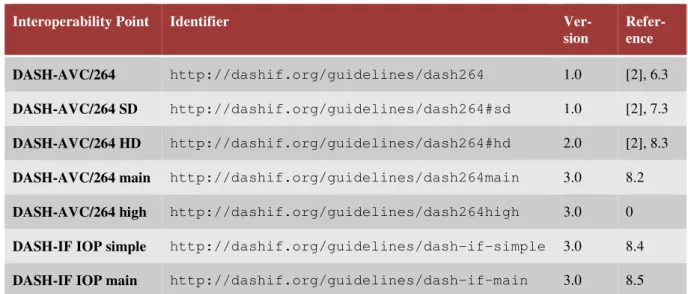
This document defines the Interoperability Points as documented in Table 1 and Extensions as 16
defined in Table 2. The version in which each Interoperability Point and Extension was added is 17
also provided in the tables. 18
Note that all version 1 IOPs are also defined in version 2 and therefore referencing version [2] is 19
considered sufficient. 20
Table 1 DASH-IF Interoperability Points
21
Interoperability Point Identifier Ver-sion Refer-ence DASH-AVC/264 http://dashif.org/guidelines/dash264 1.0 [2], 6.3 DASH-AVC/264 SD http://dashif.org/guidelines/dash264#sd 1.0 [2], 7.3 DASH-AVC/264 HD http://dashif.org/guidelines/dash264#hd 2.0 [2], 8.3
DASH-AVC/264 main http://dashif.org/guidelines/dash264main 3.0 8.2
DASH-AVC/264 high http://dashif.org/guidelines/dash264high 3.0 0
DASH-IF IOP simple http://dashif.org/guidelines/dash-if-simple 3.0 8.4
DASH-IF IOP main http://dashif.org/guidelines/dash-if-main 3.0 8.5
Note that all extensions defined in version 2 of this document are carried over into version 3.0 22
without any modifications. In order to maintain a single document, referencing in Table 2 is re-23
stricted to this document. 24
Table 2 DASH-IF Interoperability Point Extensions
1
Extension Identifier Ver
sio n
Section
DASH-IF multichannel audio extension with Enhanced AC-3
http://dashif.org/guidelines/dashif#ec-3
2.0 9.4.2.3
DASH-IF multichannel exten-sion with Dolby TrueHD
http://dashif.org/guide-lines/dashif#mlpa
2.0 9.4.2.3
DASH-IF multichannel audio extension with DTS Digital Surround
http://dashif.org/guide-lines/dashif#dtsc
2.0 9.4.3.3
DASH-IF multichannel audio extension with DTS-HD High Resolution and DTS-HD Mas-ter Audio
http://dashif.org/guide-lines/dashif#dtsh
2.0 9.4.3.3
DASH-IF multichannel audio extension with DTS Express
http://dashif.org/guide-lines/dashif#dtse
2.0 9.4.3.3
DASH-IF multichannel exten-sion with DTS-HD Lossless (no core)
http://dashif.org/guide-lines/dashif#dtsl
2.0 9.4.3.3
DASH-IF multichannel audio extension with MPEG Sur-round
http://dashif.org/guidelines/dashif#mps 2.0 9.4.4.3
DASH-IF multichannel audio extension with HE-AACv2 level 4
http://dashif.org/guide-lines/dashif#heaac-mc51
2.0 9.4.5.3
DASH-IF multichannel audio extension with HE-AACv2 level 6
http://dashif.org/guide-lines/dashif#heaac-mc71
2.0 9.4.5.3
Test cases and test vectors for DASH-AVC/264 Interoperability Points are provided in [27]. The 2
conformance and reference software for DASH-AVC/264 Interoperability Points is provided in 3
[28] (based on the MPEG conformance software [6]). DASH Identifiers for different categories 4
can be found online [29]. 5
2. Context and Conventions
6
2.1. Relation to MPEG-DASH and other DASH specifications
7
Dynamic Adaptive Streaming over HTTP (DASH) is initially defined in the first edition of 8
ISO/IEC 23009-1 which was published in April 2012 and some corrections were done in 2013 [1]. 9
In May 2014, ISO/IEC published the second version of ISO/IEC 23009-1 [5] that includes addi-1
tional features and provide additional clarifications. The initial two versions of this document 2
where based on the first edition of ISO/IEC 23009-1. This version is based on the second edition 3
of ISO/IEC 23009-1, i.e. ISO/IEC 23009-1:2014 including Cor.1 and Amd.1 [5]. This means that 4
also for all interoperability points that were initially defined in earlier versions of the document, 5
also now the second edition serves as the reference. Backward-compatibility across different edi-6
tion is handled by MPEG-DASH in ISO/IEC 23009-1 [5]. 7
This document was generated in close coordination with DVB-DASH [38]. The tools and features 8
are aligned to the extent considered reasonable. To support implementers, this document attempts 9
to highlight any differences and/or further restrictions or extensions when compared to DVB-10
DASH. However, as a disclaimer, this coverage is not considered complete. 11
2.2. Compatibility and Extensions to Earlier Versions
12
2.2.1. Summary of Version 3 Modifications
13
Version 3 of this document applies the following modifications compared to version 2 [2]: 14
• Reference to the second edition of ISO/IEC 23009-1 including amendment 1 and cor.1 [4],
15
as well as well as Amendment 3 [5]. 16
• Add an explicit statement in DASH-264/AVC to forbid time code wrap around
17
• Definition on the usage of key words in section 2.3.
18
• Add more constraints on the usage of Trick Modes for improved interoperability in section
19
3.2.9. 20
• Add more constraints on the Representations in one Adaptation Set in section 3.2.10,
es-21
pecially when the bitstream switching is true. 22
• Add additional details on the usage of HTTP in section 3.4.
23
• Add H.265/HEVC as a codec and create IOPs for inclusion of this codec.
24
• Add CEA-608/708 closed captioning in SEI messages in section 6.4.3. 25
• Detailed description of simple and main live operation, with the latter including segment
26
parsing in section 4. 27
• Detailed description of server-based and app-based ad insertion in section 5
28
• General editorial updates and clarifications
29
• Updates and clarification to section 7 on DRM and common encryption.
30
• Update to references 31
• Relaxation of the audio encoding requirements in section 6.3.2.
32
• Add clarification on the usage of the minimum buffer time and bandwidth in section 3.2.8.
33
• Add an informative section on the timing model of DASH in section 3.2.7.
34
• Relax the use of the 'lmsg' brand for signaling the last segment in section 3.6.
• Simplification of the codecs table
1
2.2.2. Backward-Compatibility Considerations
2
Generally, content can be offered such that it can be consumed by version 2 and version 3 clients. 3
In such a case the restricted authoring should be used and it should be accepted that version 2 4
clients may ignore certain Representations and Adaptation Sets. Content Authors may also con-5
sider the publication of two MPDs, but use the same segment formats. 6
In terms of compatibility between version 2 and version 3, the following should be considered: 7
• The backward-compatibility across MPEG editions is handled in the second edition of
8
ISO/IEC 23009-1 [5]. 9
• General clarifications and updates are added
10
• Further restrictions on content authoring compared to version 2 are:
11
o forbid time code wrap around 12
o the usage of DRM, especially the Content Protection element 13
o constraints on trick mode usage 14
o additional constraints on the usage of HTTP 15
o Adaptation Set constraints 16
• Relaxations are:
17
o Permit usage of additional subtitling format based on CEA-608/708 18
o the audio encoding requirements for HE-AACv2 19
o the use of the 'lmsg' brand for signaling the last segment 20
o the ability to signal bitstream switching set to true 21
o the use of remote elements with Xlink 22
23
2.3. Use of Key Words
24
2.3.1. Background
25
DASH-IF generally does not write specifications, but provides and documents guidelines for im-26
plementers to refer to interoperability descriptions. In doing so, the DASH-IF agreed to use key 27
words in order to support readers of the DASH-IF documents to understand better how to interpret 28
the language. The usage of key words in this document is provided below. 29
2.3.2. Key Words
30
The key word usage is aligned with the definitions in RFC 2119 [40], namely: 31
• SHALL: This word means that the definition is an absolute requirement of the
specifica-32
tion. 33
• SHALL NOT This phrase means that the definition is an absolute prohibition of the
spec-1
ification. 2
• SHOULD This word means that there may exist valid reasons in particular circumstances
3
to ignore a particular item, but the full implications must be understood and carefully 4
weighed before choosing a different course. 5
• SHOULD NOT This phrase means that there may exist valid reasons in particular
cir-6
cumstances when the particular behavior is acceptable or even useful, but the full implica-7
tions should be understood and the case carefully weighed before implementing any be-8
havior described with this label. 9
• MAY: This word means that an item is truly optional. One vendor may choose to include
10
the item because a particular marketplace requires it or because the vendor feels that it 11
enhances the product while another vendor may omit the same item. 12
These key words are attempted to be used consistently in this document, but only in small letters. 13
2.3.3. Mapping to DASH-IF Assets
14
If an IOP document associates such a key word from above to a content authoring statement then 15
the following applies: 16
• SHALL: The conformance software provides a conformance check for this and issues an
17
error if the conformance is not fulfilled. 18
• SHALL NOT: The conformance software provides a conformance check for this and issues
19
an error if the conformance is not fulfilled. 20
• SHOULD: The conformance software provides a conformance check for this and issues a
21
warning if the conformance is not fulfilled. 22
• SHOULD NOT: The conformance software provides a conformance check for this and
23
issues a warning if the conformance is not fulfilled. 24
• SHOULD and MAY: If present, the feature check of the conformance software documents
25
a feature of the content. 26
If an IOP document associates such a key word from above to a DASH Client then the following 27
applies: 28
• SHALL: Test content is necessarily provided with this rule and the reference client
imple-29
ments the feature. 30
• SHALL NOT: The reference client does not implement the feature.
31
• SHOULD: Test content is provided with this rule and the reference client implements the
32
feature unless there is a justification for not implementing this. 33
• SHOULD NOT: The reference client does not implement the feature unless there is a
jus-34
tification for implementing this. 35
• MAY: Test content is provided and the reference client implements the feature if there is a
36
justification this. 37
2.4. Definition and Usage of Interoperability Points
1
2.4.1. Profile Definition in ISO/IEC 23009-1
2
MPEG DASH defines formats for MPDs and Segments. In addition MPEG provides the ability to 3
further restrict the applied formats by the definition of Profiles as defined on section 8 of ISO/IEC 4
23009-1 [5]. Profiles of DASH are defined to enable interoperability and the signaling of the use 5
of features. 6
Such a profile can also be understood as permission for DASH clients that implement the features 7
required by the profile to process the Media Presentation (MPD document and Segments). 8
Furthermore, ISO/IEC 23009-1 permits external organizations or individuals to define restrictions, 9
permissions and extensions by using this profile mechanism. It is recommended that such external 10
definitions be not referred to as profiles, but as Interoperability Points. Such an interoperability 11
point may be signalled in the @profiles parameter once a URI is defined. The owner of the 12
URI is responsible to provide sufficient semantics on the restrictions and permission of this in-13
teroperability point. 14
This document makes use of this feature and provides a set of Interoperability Points. Therefore, 15
based on the interoperability point definition, this document may be understood in two ways: 16
• a collection of content conforming points, i.e. as long as the content conforms to the
re-17
strictions as specified by the IOP, clients implementing the features can consume the con-18
tent. 19
• a client capability points that enable content and service providers for flexible service
pro-20
visioning to clients conforming to these client capabilities. 21
This document provides explicit requirements, recommendations and guidelines for content au-22
thoring that claims conformance to a profile (by adding the @profiles attribute to the MPD) as 23
well as for clients that are permitted to consume a media presentation that contains such a profile. 24
2.4.2. Usage of Profiles
25
A Media Presentation may conform to one or multiple profiles/interoperability points and con-26
forms to each of the profiles indicated in the MPD@profiles attribute is specified as follows: 27
When ProfA is included in the MPD@profiles attribute, the MPD is modified into a profile-28
specific MPD for profile conformance checking using the following ordered steps: 29
1. The MPD@profiles attribute of the profile-specific MPD contains only ProfA. 30
2. An AdaptationSet element for which @profiles does not or is not inferred to in-31
clude ProfA is removed from the profile-specific MPD. 32
3. A Representation element for which @profiles does not or is not inferred to include 33
ProfA is removed from the profile-specific MPD. 34
4. All elements or attributes that are either (i) in this Part of ISO/IEC 23009 and explicitly 35
excluded by ProfA, or (ii) in an extension namespace and not explicitly included by 36
ProfA, are removed from the profile-specific MPD. 37
5. All elements and attributes that “may be ignored” according to the specification of ProfA 1
are removed from the profile-specific MPD. 2
An MPD is conforming to profile ProfA when it satisfies the following: 3
1. ProfA is included in the MPD@profiles attribute. 4
2. The profile-specific MPD for ProfA conforms to ISO/IEC 23009-1 5
3. The profile-specific MPD for ProfA conforms to the restrictions specified for ProfA. 6
A Media Presentation is conforming to profile ProfA when it satisfies the following: 7
1. The MPD of the Media Presentation is conforming to profile ProfA as specified above. 8
2. There is at least one Representation in each Period in the profile-specific MPD for ProfA. 9
3. The Segments of the Representations of the profile-specific MPD for ProfA conform to 10
the restrictions specified for ProfA. 11
2.4.3. Interoperability Points and Extensions
12
This document defines Interoperability Points and Extensions. Both concepts make use of the pro-13
file functionality of ISO/IEC 23009-1. 14
Interoperability Points provide a basic collection of tools and features to ensure that content/service 15
providers and client vendors can rely to support a sufficiently good audio-visual experience. Ex-16
tensions enable content/service providers and client vendors to enhance the audio-visual experi-17
ence provided by an Interoperability Point in a conforming manner. 18
The only difference between Interoperability Points and Extensions is that Interoperability Points 19
define a full audio-visual experience and Extensions enhance the audio-visual experience in typi-20
cally only one dimension. 21
Examples for the usage of the @profiles signaling are provided in Annex A of this document. 22
3. DASH-Related Aspects
23
3.1. Scope
24
DASH-IF Interoperability Points use ISO base media file format [8] based encapsulation and pro-25
vide significant commonality with a superset of the ISO BMFF On-Demand and the ISO BMFF 26
Live profile as defined in ISO/IEC 23009-1 [4], sections 8.3 and 8.4, respectively. DASH-IF IOPs 27
are intended to provide support for on-demand and live content. The primary constraints imposed 28
by this profile are the requirement that each Representation is provided in one of the following two 29
ways 30
• as a single Segment, where Subsegments are aligned across Representations within an
Ad-31
aptation Set. This permits scalable and efficient use of HTTP servers and simplifies seam-32
less switching. This is mainly for on-demand use cases. 33
• as a sequence of Segments where each Segment is addressable by a template-generated 34
URL. Content generated in this way is mainly suitable for dynamic and live services. 35
In both cases (Sub)Segments begin with Stream Access Points (SAPs) of type 1 or 2 [8], i.e. regular 1
IDR frames in case of video. In addition, (Sub)Segments are constrained so that for switching 2
video Representations within one Adaptation Set the boundaries are aligned without gaps or over-3
laps in the media data. Furthermore, switching is possible by a DASH client that downloads, de-4
codes and presents the media stream of the come-from Representation and then switches to the go-5
to Representation by downloading, decoding and presenting the new media stream. No overlap in 6
downloading, decoding and presentation is required for seamless switching of Representations in 7
one Adaptation Set. 8
Additional constraints are documented for bitstream switching set to true as well as special case 9
such as trick modes, etc. 10
3.2. DASH Formats
11
3.2.1. Introduction
12
This section introduces the detailed constraints of the MPD and the DASH segments in a descrip-13
tive way referring to ISO/IEC 23009-1 [4]. The DASH-based restrictions have significant com-14
monality with the ISO BMFF Live and On-Demand profiles from the MPEG-DASH specification. 15
Specifically: 16
• Segment formats are based on ISO BMFF with fragmented movie files, i.e. (Sub)Segments 17
are encoded as movie fragments containing a track fragment as defined in ISO/IEC 14496-18
12 [8], plus the following constraints to make each movie fragment independently de-19
codable: 20
• Default parameters and flags shall be stored in movie fragments (‘tfhd’ or ‘trun’ 21
box) and not track headers (‘trex’ box) 22
• The ‘moof’ boxes shall not use external data references, the flag ‘
default-base-23
is-moof’ shall also be set (aka movie-fragment relative addressing) and data-24
offset shall be used, i.e. base-data-offset-present shall not be used (fol-25
lows ISO/IEC 23009-1 [4]). 26
• Alignment with ISO BMFF Live & On-Demand Profiles, i.e. within each Adaptation Set 27
the following applies 28
• Fragmented movie files are used for encapsulation of media data 29
• (Sub)Segments are aligned to enable seamless switching 30
Beyond the constraints provided in the ISO BMFF profiles, the following additional restrictions 31
are applied. 32
• IDR-like SAPs (i.e., SAPs type 2 or below) at the start of each (Sub)Segment for simple 33
switching. 34
• Segments should have almost equal duration. The maximum tolerance of segment duration 35
shall be ±50% and the maximum accumulated deviation over multiple segments shall be 36
±50% of the signaled segment duration (i.e. the @duration). Such fluctuations in actual 37
segment duration may be caused by for example ad replacement or specific IDR frame 38
placement. Note that the last segment in a Representation may be shorter according to 1
ISO/IEC 23009-1 [4]. 2
Note: If accurate seeking to specific time is required and at the same time a fast 3
response is required one may use On-Demand profile for VoD or the Seg-4
mentTimeline based addressing. Otherwise the offset in segment duration com-5
pared to the actual media segment duration may result in a less accurate seek posi-6
tion for the download request, resulting in some increased initial start-up. 7
• If the SegmentTimeline element is used for the signaling of the Segment duration, the 8
timing in the segment timeline shall be media time accurate and no constraints on segment 9
duration deviation are added except the maximum segment duration as specified in the 10
MPD. However, despite the usage of the the SegmentTimeline, it is not encouraged to 11
use varying Segment durations. The SegmentTimeline element should only be used 12
in order to signal occasional shorter Segments (possibly caused by encoder processes) or 13
to signal gaps in the time line. 14
• only non-multiplexed Representations shall be used, i.e. each Representation only contains 15
a single media component. 16
• Addressing schemes are restricted to 17
• templates with number-based addressing 18
• templates with time-based addressing 19
• Subsegments with Segment Index. In this case either the @indexRange attribute shall 20
be present or the RepresentationIndex element shall be present. Only a single 21
sidx box shall be present. 22
Note 1: the external Representation Index was only added in the second edition [4]. 23
If compatibility to v2.0 or earlier of this document is necessary, the external Rep-24
resentation Index shall not be used. 25
Note 2: The latter restriction was introduced in version 3 of this document based on 26
deployment experience and to enable alignment with DVB DASH. 27
• In case multiple Adaptation Sets with @contentType='video' are offered, exactly 28
one video Adaptation Set shall be signaled as the main one unless different Adaptation Sets 29
contain the same content with different quality or different codecs. In the latter case, all 30
Adaptation Sets with the same content shall be signaled as the main content. Signalling as 31
main content shall be done by using the Role descriptor with @schemeIdUri=" 32
urn:mpeg:dash:role:2011" and @value="main". 33
• The content offering shall adhere to the presence rules of certain elements and attributes as 34
defined section 3.2.4. 35
It is expected that a client conforming to such a profile is able to process content offered under 36
these constraints. More details on client procedures are provided in section 3.3. 37
3.2.2. Media Presentation Description constraints for v1 & v2 Clients
1
3.2.2.1. Definition according to ISO/IEC 23009-1
2
This section follows a description according to ISO/IEC 23009-1. In section 3.2.2.2, a restricted 3
content offering is provided that provides a conforming offering. 4
NOTE: The term "ignored" in the following description means, that if an MPD is provided 5
and a client that complies with this interoperability point removes the element that may be 6
ignored, then the MPD is still complying with the constraints of the MPD and segments as 7
defined in ISO/IEC 23001-9, section 7.3. 8
The MPD shall conform to the ISO Base Media File Format Common profile as defined on 9
ISO/IEC 23009-1:2014/Amd.1:2015 [4], section 8.9, except for the following issues: 10
• Representations with @mimeType attribute application/xml+ttml shall not be
ig-11
nored. 12
In addition, the Media Presentation Description shall conform to the following constraints: 13
Representation elements with a @subsegmentStartsWithSAP value set to 14
3 may be ignored. 15
Representation elements with a @startsWithSAP value set to 3 may be 16
ignored. 17
If a Period contains multiple Adaptation Sets with @contentType="video" then at
18
least one Adaptation Set shall contain a Role element <Role schemeI-19
dUri="urn:mpeg:dash:role:2011" value="main"> and each Adaptation 20
Set containing such a Role element shall provide perceptually equivalent media 21
streams. 22
3.2.2.2. Simple Restricted Content Offering
23
A conforming MPD offering based on the ISO BMFF Live Profile shall contain 24
• MPD@type set to static or set to dynamic. 25
• MPD@profiles includes urn:mpeg:dash:profile:isoff-live:2011
26
• One or multiple Periods with each containing one or multiple Adaptation Sets and
27
with each containing one or multiple Representations. 28
• The Representations contain or inherit a SegmentTemplate with $Number$ or
29
$Time$ Identifier. 30
• @segmentAlignment set to true for all Adaptation Sets
31 32
A conforming MPD offering based on the ISO BMFF On-Demand Profile shall contain 33
• MPD@type set to static. 34
• MPD@profiles includes urn:mpeg:dash:profile:isoff-ondemand:2011 35
• One or multiple Periods with each containing one or multiple Adaptation Sets and
1
with each containing one or multiple Representations. 2
• @subSegmentAlignment set to true for all Adaptation Sets
3 4
3.2.3. Segment format constraints
5
Representations and Segments referred to by the Representations in the profile-specific 6
MPD for this profile, the following constraints shall be met: 7
Representations shall comply with the formats defined in ISO/IEC 23009-1, section
8
7.3. 9
In Media Segments, all Segment Index ('sidx') and Subsegment Index ('ssix') 10
boxes, if present, shall be placed before any Movie Fragment ('moof') boxes. 11
Note: DVB DASH [38] permits only one single Segment Index box ('sidx') for the entire Segment. As
12
this constraints is not severe in the content offering, it is strongly recommended to offer content
follow-13
ing this constraint.
14
If the MPD@type is equal to "static" and the MPD@profiles attribute includes 15
"urn:mpeg:dash:profile:isoff-on-demand:2011", then 16
Each Representation shall have one Segment that complies with the Indexed
Self-17
Initializing Media Segment as defined in section 6.3.5.2 in ISO/IEC 23009-1. 18
Time Codes expressing presentation and decode times shall be linearly increasing
19
with increasing Segment number in one Representation. In order to minimize the fre-20
quency of time code wrap around 64 bit codes may be used or the timescale of the 21
Representation may be chosen as small as possible. In order to support time code 22
wrap around, a new Period may be added in the MPD added that initiates a new 23
Period in order to express a discontinuity. 24
3.2.4. Presence of Attributes and Elements
25
Elements and attributes are expected to be present for certain Adaptation Sets and Representations 26
to enable suitable initial selection and switching. 27
Specifically the following applies: 28
• For any Adaptation Sets with @contentType="video" the following attributes shall 29
be present 30
o @maxWidth (or @width if all Representations have the same width) 31
o @maxHeight (or @height if all Representations have the same height) 32
o @maxFrameRate (or @frameRate if all Representations have the same 33
frame rate) 34
o @par 35
Note: The attributes @maxWidth and @maxHeight should be used such that 1
they describe the target display size. This means that they may exceed the ac-2
tual largest size of any coded Representation in one Adaptation Set. 3
• For any Representation within an Adaptation Set with @contentType="video" 4
the following attributes shall be present: 5
o @width, if not present in AdaptationSet element 6
o @height, if not present in AdaptationSet element 7
o @frameRate, if not present in AdaptationSet element 8
o @sar 9
Note: @width, @height, and @sar attributes should indicate the vertical and
hori-10
zontal sample count of encoded and cropped video samples, not the intended display 11
size in pixels. 12
• For Adaptation Set or for any Representation within an Adaptation Set with @con-13
tentType="video" the attribute @scanType shall either not be present or shall 14
be set to "progressive". 15
• For any Adaptation Sets with value of the @contentType="audio" the following at-16
tributes shall be present 17
o @lang 18
• For any Representation within an Adaptation Set with value of the @con-19
tentType="audio" the following elements and attributes shall be present: 20
o @audioSamplingRate, if not present in AdaptationSet element 21
o AudioChannelConfiguration, if not present in AdaptationSet ele-22
ment 23
3.2.5. MPD Dimension Constraints
24
No constraints are defined on MPD size, or on the number of elements. However, it should be 25
avoided to create unnecessary large MPDs. 26
Note: DVB DASH [38] adds MPD dimension constraints in section 4.5 of their specification. In order to
27
conform to this specification, it is recommended to obey these constraints.
28
3.2.6. Generic Metadata
29
Generic metadata may be added to MPDs based on DASH. For this purpose, the Essential Property 30
Descriptor and the Supplemental Property Descriptor as defined in ISO/IEC 23009-1 [4], clause 31
5.8.4.7 and 5.8.4.8. 32
Metadata identifiers for content properties are provided here: http://dashif.org/iden-33
tifiers. 34
However, it is not expected that DASH-IF clients support all metadata at 35
http://dashif.org/identifiers unless explicitly required. 36
3.2.7. DASH Timing Model
1
3.2.7.1. General
2
According to ISO/IEC 23009-1, DASH defines different timelines. One of the key features in 3
DASH is that encoded versions of different media content components share a common timeline. 4
The presentation time of each access unit within the media content is mapped to the global com-5
mon presentation timeline for synchronization of different media components and to enable seam-6
less switching of different coded versions of the same media components. This timeline is referred 7
as Media Presentation timeline. The Media Segments themselves contain accurate Media Presen-8
tation timing information enabling synchronization of components and seamless switching. 9
A second timeline is used to signal to clients the availability time of Segments at the specified 10
HTTP-URLs. These times are referred to as Segment availability times and are provided in wall-11
clock time. Clients typically compare the wall-clock time to Segment availability times before 12
accessing the Segments at the specified HTTP-URLs in order to avoid erroneous HTTP request 13
responses. For static Media Presentations, the availability times of all Segments are identical. For 14
dynamic Media Presentations, the availability times of segments depend on the position of the 15
Segment in the Media Presentation timeline, i.e. the Segments get available over time. 16
Figure 1 provides an overview of the different timelines in DASH and their relation. The diagram 17
shows three Periods, each of the Periods contains multiple Representations (for the discussion it is 18
irrelevant whether these are included in the same Adaptation Set or in different ones). 19
Specifically, the following information is available in the MPD that relates to timing: 20
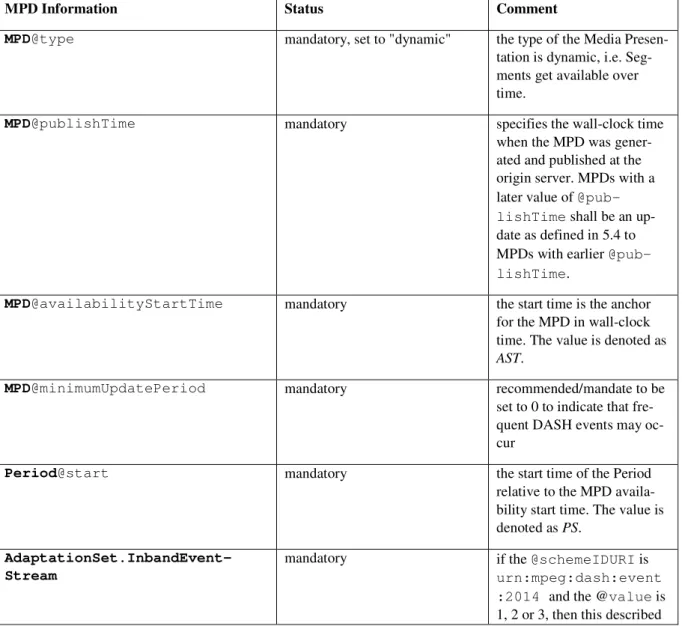
• MPD@availabilityStartTime: the start time is the anchor for the MPD in
wall-21
clock time. The value is denoted as AST. 22
• Period@start: the start time of the Period relative to the MPD availability start time. 23
The value is denoted as PS. 24
• Representation@presentationTimeOffset: the presentation time offset of the 25
Representation in the Period, i.e. it provides the time of the presentation that is supposed 26
to be rendered at the start of the Period. Note that typically this time is either earliest presen-27
tation time of the first segment or a value slightly larger in order to ensure synchronization. 28
If larger, this Representation is presented with short delay with respect to the Period start. 29
In addition, with the use of the Representation@duration or Representation.Seg-30
mentTimeline the MPD start time for each segment and the MPD duration for each segment 31
can be derived. For details refer to ISO/IEC 23009-1. 32
According to Figure 1, the AST is a wall-clock time. It provides an anchor to all wall-clock time 33
computation in the MPD. The sum of the Period@start of the first Period and the AST provides 34
the PST1 value in wall-clock time of the first Period. Each Representation is assigned a presenta-35
tion time offset, either by the value of the attribute Representation @presentation-36
TimeOffset or by default set to 0. The value of this attribute is denoted as PTO. 37
1
Figure 1 Overview Timing Model
2
Within a Representation, each segment is assigned an MPD start time and MPD duration according 3
to ISO/IEC 23009-1. These two values can be computed from the MPD and provide approximate 4
times for each segment that are in particular useful for random access and seeking. 5
In addition, each segment has an internal sample-accurate presentation time. Therefore, each seg-6
ment has a media internal earliest presentation time EPT and sample-accurate presentation dura-7
tion DUR. 8
For each media segment in each Representation the MPD start time of the segment should approx-9
imately be EPT - PTO. Specifically, the MPD start time shall be in the range of EPT - PTO - 10
0.5*DUR and EPT - PTO + 0.5*DUR according to the requirement stated above. 11
Each Period is treated independently. Details on processing at Period boundaries are provided in 12
ISO/IEC 23009-1. One example is, that for time code wrap-around a new Period is added, that 13
restarts at presentation time 0. 14
3.2.7.2. Static Media Presentations
15
For static media presentations, all Segments shall be available at time AST. This means that a 16
DASH client may use the information in the MPD in order to seek to approximate times. 17
3.2.7.3. Dynamic Media Presentations
18
For dynamic media presentations, segments get available over time. The latest time they shall be 19
available is at the sum of PST (which is AST + Period@start), MPD start time and MPD 20
duration. The latter is added in order to take into account that at the server a segment typically 21
needs to be completed prior to its availability. 22
3.2.8. Bandwidth and Minimum Buffer Time
1
The MPD contains a pair of values for a bandwidth and buffering description, namely the Mini-2
mum Buffer Time (MBT) expressed by the value of MPD@minBufferTime and bandwidth (BW) 3
expressed by the value of Representation@bandwidth. The following holds: 4
• the value of the minimum buffer time does not provide any instructions to the client on
5
how long to buffer the media. The value however describes how much buffer a client 6
should have under ideal network conditions. As such, MBT is not describing the burstiness 7
or jitter in the network, it is describing the burstiness or jitter in the content encoding. To-8
gether with the BW value, it is a property of the content. Using the "leaky bucket" model, 9
it is the size of the bucket that makes BW true, given the way the content is encoded. 10
• The minimum buffer time provides information that for each Stream Access Point (and in 11
the case of DASH-IF therefore each start of the Media Segment), the property of the stream: 12
If the Representation (starting at any segment) is delivered over a constant bitrate channel 13
with bitrate equal to value of the BW attribute then each presentation time PT is available 14
at the client latest at time with a delay of at most PT + MBT. 15
• In the absence of any other guidance, the MBT should be set to the maximum GOP size
16
(coded video sequence) of the content, which quite often is identical to the maximum
17
segment duration for the live profile or the maximum subsegment duration for the On-18
Demand profile. The MBT may be set to a smaller value than maximum (sub)segment du-19
ration, but should not be set to a higher value. 20
In a simple and straightforward implementation, a DASH client decides downloading the next 21
segment based on the following status information: 22
• the currently available buffer in the media pipeline, buffer
23
• the currently estimated download rate, rate
24
• the value of the attribute @minBufferTime, MBT
25
• the set of values of the @bandwidth attribute for each Representation i, BW[i]
26
The task of the client is to select a suitable Representation i. 27
The relevant issue is that starting from a SAP on, the DASH client can continue to playout the 28
data. This means that at the current time it does have buffer data in the buffer. Based on this model 29
the client can download a Representation i for which BW[i] ≤ rate*buffer/MBT without emptying
30
the buffer. 31
Note that in this model, some idealizations typically do not hold in practice, such as constant bitrate 32
channel, progressive download and playout of Segments, no blocking and congestion of other 33
HTTP requests, etc. Therefore, a DASH client should use these values with care to compensate 34
such practical circumstances; especially variations in download speed, latency, jitter, scheduling 35
of requests of media components, as well as to address other practical circumstances. 36
One example is if the DASH client operates on Segment granularity. As in this case, not only parts 37
of the Segment (i.e., MBT) needs to be downloaded, but the entire Segment, and if the MBT is 38
smaller than the Segment duration, then rather the segment duration needs to be used instead of 39
the MBT for the required buffer size and the download scheduling, i.e. download a Representation 1
i for which BW[i] ≤ rate*buffer/max_segment_duration.
2
3.2.9. Trick Mode Support
3