FRAMEWORK FOR SELECTING LEADING PERFORMANCE TOOLS FOR ACHIEVING LEED 3.0 CREDITS
A Thesis by
RUTUPARNA PATHAK
Submitted to the Office of Graduate Studies of Texas A&M University
in partial fulfillment of the requirements for the degree of MASTER OF SCIENCE
August 2010
Framework for Selecting Leading Performance Tools for Achieving LEED 3.0 Credits Copyright 2010 Rutuparna Pathak
FRAMEWORK FOR SELECTING LEADING PERFORMANCE TOOLS FOR ACHIEVING LEED 3.0 CREDITS
A Thesis by
RUTUPARNA PATHAK
Submitted to the Office of Graduate Studies of Texas A&M University
in partial fulfillment of the requirements for the degree of MASTER OF SCIENCE
Approved by:
Chair of Committee, José L. Fernández-Solís Committee Members, Sarel Lavy
Liliana O. Beltran Head of Department, Joe Horlen
August 2010
ABSTRACT
Framework for Selecting Leading Performance Tools for Achieving LEED 3.0 Credits. (August 2010)
Rutuparna Pathak, B.Arch, Nagpur University Chair of Committee: Dr. José L. Fernández-Solís
When working on United States Green Building Council’s (USGBC) Leadership in Energy and Environmental Design LEED® projects, architects, designers, and
engineers involved in a sustainable design project often require information and tools beyond energy simulation software. They may require resources (tools) to support their decisions and to assess the risk involved in decision making. This research has presented a framework that links building performance assessment tools with the LEED rating system. It aims at bridging a gap between Architects, engineers, contractors, facility managers and LEED professionals. This work provides information about performance tools that can be used for different phases during design, construction and operation of a LEED rated building.
A simple logic of the transitive property of equality i.e. if a = b, b = c then a = c was used to link the LEED credits requiring decision support with the tools that have capabilities to achieve it. This research presents a 3-dimensional matrix of “Right tool for right job at right time” by linking LEED credits, software tools and phases of building design, construction and operation.
Overall the findings of the research demonstrated that the framework developed can be used for achieving 21% of total possible LEED 3.0 credits by providing about 36% of total possible points.
ACKNOWLEDGEMENTS
I would like to thank my committee chair, Dr. José L. Fernández-SolÍs, and my committee members, Dr. Sarel Lavy and Dr. Liliana Beltran, for their guidance and support throughout the course of this research.
Thanks also go to my friends and colleagues and the department faculty and staff for making my time at Texas A&M University a great experience.
Finally, thanks to my mother, father and sister for their encouragement, patience and love.
NOMENCLATURE
AEC Architects, Engineers and Contractors BPS Building Performance Simulation
BREEAM British Research Establishment Environmental Assessment Matrix DSTs Decision Support Tools
LEED® Leadership in Energy and Environmental Design USGBC United States Green Building Council
TABLE OF CONTENTS
Page
ABSTRACT ... iii
ACKNOWLEDGEMENTS ... v
NOMENCLATURE ... vi
TABLE OF CONTENTS ... vii
LIST OF FIGURES ... ix LIST OF TABLES ... x CHAPTER I INTRODUCTION ... 1 II LITERATURE REVIEW ... 4 Background ... 4
Decision support tools ... 6
LEED® 3.0 rating system ... 9
Performance tools and LEED rating system ... 10
III RESEARCH PROBLEM ... 12
Problem statement ... 12 Research aim ... 12 Research objectives ... 12 Assumptions ... 13 Limitations ... 13 IV RESEARCH METHOD ... 14 Data collection ... 14 Data analysis ... 20
CHAPTER Page
V FINDINGS ... 23
Overview of software tools ... 24
VI CONCLUSIONS ... 48
REFERENCES ... 52
APPENDIX A ... 57
APPENDIX B ... 62
LIST OF FIGURES
FIGURE Page
1 Research method ... 15
2 Transitive property of equality ... 20
3 Comparative analysis ... 21
4 Three dimensional matrix for effective tool selection ... 22
5 Output from Autodesk Ecotect Analysis showing, sunlight entering window, day lighting model and shadows and reflections ... 24
6 Output from HEED (2010) ... 27
7 Output from Energy-10 (2010) ... 30
8 Output from DesignBuilder ... 31
9 Output from eQUEST ... 32
10 Output from IES <VE> showing day-lighting and comfort analysis ... 35
11 LEED credits achievable with help of performance decision support tools 45 12 Distribution of LEED credits achievable with the help of performance decision support tools ... 46
LIST OF TABLES
TABLE Page
1 LEED credit requiring decision support ... 17
2 Software tools features and capabilities (Crawly et.al. 2005) ... 19
3 Right tools for right job ... 21
4 Software expressed capabilities ... 38
5 Findings ... 40
6 Right tool for right job at right time ... 47
CHAPTER I INTRODUCTION
Green building assessment systems are anticipated to foster more sustainable building design. According to Retzlaff (2008) better integration of environmental concerns with cost and decision criteria leads to better construction and operation. Building assessment systems approach this task from different perspectives, but with certain elements in common. The majority of assessment systems typically address:
• Site selection criteria
• Efficient use of energy and water resources during building operations,
• Waste management during construction and operations,
• Indoor environmental quality,
• Demands for transportation services, and
• Selection of environmentally preferable materials.
These assessment systems claim to foster and facilitate integrated design
practices and a holistic approach. The US Department of Energy (DOE) defines a rating system as “a system of rules for comparing the performance of a whole building or building system to benchmarks”. Green building rating systems form a subset of building assessment system whose primary role is to provide a valuation of the environmental characteristics of a building (Cole 1999).
The development of green building rating systems such as BREEAM (British Research Establishment Environmental Assessment Matrix), GB Tool and LEED® (Leadership in Energy and Environmental Design) has provided a basis for rating buildings and has required designers to consider several aspects of design not addressed by building codes.
According to Keysar and Pearce (2009), there is a growing trend towards the designing of high performance buildings with the least environmental impact and that provides the highest level of occupant comfort. Also, researchers like Gowri (2005) have suggested that the growing trend and consciousness towards high performance buildings has led to an increase in the number of resources for design. This growing trend is based on the fact that informed choices made in the early phase of a design regarding energy efficiency, cost, and selection of environmentally preferably materials, etc., have proven to be advantageous. According to Keysar and Pearce (2009), “Architects and Engineers are looking for information on sustainable building materials, guidelines, case study information, database, resources to evaluate the life cycle assessment, and resources to obtain environmental impact analysis, or green building rating.” Several resources such as ASHRAE design guidelines, whole building design guidelines and building
performance simulation tools (BPS) etc. have emerged during the 1980’s, helping architects and engineers to create more energy efficient and sustainable buildings. Harputlugil (2009) explain how building performance modeling/simulation tools have become gradually more important for assessing design decisions and subsequently building performance during the design process.
According to Robinson 1996 there is a parallel between the early years of
building commissioning and green assessment systems. In the early stages, both showed potential for making construction more reliable and efficient, but the tools became numerous and complex. A framework that organizes the tool aim and performance has become essential in achieving a reliable decision support system (Vafaie et al. 2006).
CHAPTER II LITERATURE REVIEW
Background
Energy and environment conscious design is a developing field of knowledge, which helps implement design strategies and assess them through the use of software applications. According to Gowri (2005), this pool of knowledge is constantly evolving with improved technology and user comfort; the resources available that aid design professionals in making quality designs can be termed as tools. “A substantial pool of green building tool has emerged, and challenge associated with finding right tool for right job is significant” (Vafaie et al. 2006). According to Keysar and Pearce (2009), “the designers who are new to the concept of green buildings need assistance to reduce the overhead effort required to find the right tool for achieving project sustainability goals.” Moreover, Retzlaff (2008) states, “Building assessment systems allow planners to examine whether buildings and developments meet sustainability goals, but no framework exists to help planners choose among them.”
Flanders et al. (2001) state that one problem in decision making for LEED credit achievements is inefficiency in accessing the resources or tools available and a lack of knowledge about their potential and capability to deliver the existing knowledge in a manner that facilitates its use. “There is a knowledge deficit regarding what tools are available and potential benefits associated with their use; this deficit is slowing the
adoption of green building rating systems” (Mackley et al. 2000). Notably, the literature review revealed that the software tools available have issues such as multiple
capabilities, interoperability, etc., that give rise to confusion for their usability (Hopfe. et. al 2005). Also, most building performance simulation (BPS) tools are developed by technical researchers, building scientist or HVAC engineers, but are primarily used by architects and engineers. During development the developers are mainly concerned with empirical validation, analytical verification and calibration of uncertainty as defined by International Energy Agency Building Energy Simulation Test (IEA BESTEST) (Hong, Chou, and Bong 2000). Thus there is a growing gap between the software tools
developed and their users (Attia, Beltran, Herde and Hensen, 2009).
“ In order to bridge this gap there is a need to understand that decision making is also a human, psychological and social discipline because it directly involves man-computer interaction and human knowledge processing, while enriching human experience” (Attia, Beltran, Herde and Hensen, 2009). Therefore, it is important to understand architects, facility managers and LEED professionals’ problems in
interacting with such tools. According to Attia, Beltran, Herde and Hensen (2009), every professional has a different background, different knowledge processing methods and they are visually oriented. In addition the integration of energy codes and rating systems such as LEED, ASHRAE 90.1 etc., are proving that disciplines are merging.
In order to optimize the dynamic interaction between different building systems and components, it is necessary to improve the integration and alliances between engineers, architects and constructers. Thus, to improve the differences between the
logical model and the realities of the Architecture, Engineering and Construction (AEC) industry it is important to bring everyone to a common platform.
Decision support tools
Webster’s dictionary defines tool as “a device that aids in accomplishing a task or something that is used in performing an operation or something necessary in the practice of work.” Broadly a tool can be defined as an entity used to interface between two or more domains that facilitate more effective action of one domain upon the other. Kapelan et al. (2005) define decision support tools (DSTs) as any resource used as a part of the formal or informal decision process. Also, Canada Mortgage and Housing
Corporation (CMHC, 2004) defines DSTs as, any resource that “informs the decision making process by helping actors understand the consequences of different choices.” DSTs are resources used by decision makers to help answer questions, foresee problems and probable solutions, and support and refute conclusions. DSTs assist with the use of data, models, and a structured decision process in decision-making; for example, tools used may be websites, publications, software, databases and check-lists/matrix etc. Keysar and Pearce (2009), state that the main purpose of DSTs is to help make
appropriate decisions. A large number of DSTs for sustainable design and construction are available on the internet. These range from online design manuals, case-study information, databases and software tools. A typical internet search for sustainable building design tools identifies more than 700,000 documents containing some sort of reference to a sustainable building design tool (Gowri 2005). This overwhelming
interest in sustainability makes it difficult for designers to identify the appropriate tools or information (Gowri 2005). According to Gowri, the available resources are classified under following categories:
• Knowledge-based tools
• Performance evaluation tools
• Green building rating tools
Knowledge-based tools
Knowledge-based tools typically provide both qualitative as well as quantitative performance indicators. According to a study conducted by Ding (2007), quantitative criteria is comprised of annual energy use, water consumption, greenhouse gas emissions, etc., whereas qualitative criteria include impact on ecological value of the site, impact on local wind patterns, and so on. For example, knowledge design manuals and information sources, such as reference guides and peer reviewed journals, can be used by designers as reference materials for design strategies, new technologies, material properties, cost data or case study information; can be reference guides, peer reviewed journals etc.
Performance evaluation tools
Performance evaluation tools provide quantitative performance indicators for various design alternatives (Ding 2007). Performance evaluation tools include life-cycle impact assessment, new technology assessment tools used for selection of materials and
technologies, as well as analysis and simulation tools for calculating energy
consumption, lighting and indoor environmental quality. According to Milne (2008) and Gowri (2005), these tools are mostly used in the preliminary design stages and in the whole building performance evaluation process.
Green building rating tools
The primary role of a green building rating tool is to provide a valuation of the environmental characteristics of a building (Cole 1999). The green building rating tools are resources available to determine the performance requirements and level of energy efficiency and environmental consciousness. Every green building rating system, as of this date, has a format or a spreadsheet to help designers track design criteria, documents proposed, and design performance and calculate the number of credits that can be
obtained toward an overall rating. They use a common and verifiable set of criteria and targets for building owners and designers to achieve higher environmental standards. These tools play a vital role in laying down fundamental regulations and providing a path for the building industry to move toward environment protection and the goal of sustainability (Ding 2007).
LEED® 3.0 rating system
Since its inception in 1998, the U.S. Green Building Council’s Leadership in Energy and Environmental Design (LEED) has established strong credibility among experts and has also increased the number of affiliates (Ding and Langston 2002). According to Bowyer (2007), the LEED® system is comprised of 7500 companies and organization members; this in itself validates its importance as the standard
environmental performance measure of a building and reference system for the design, construction, and operation of Green Buildings (GBs), even beyond the U.S. (Muse and Plaut 2006). Adaptations of the LEED® system have been applied or are in the process of implementation in Brazil and Mexico, two of the largest developing economies in the Western hemisphere (Lockwood 2006). Furthermore, the LEED® system is used as a reference framework for green building assessment in countries where there is no current method of building environmental assessment (Lockwood 2006). According to
Lacouture, Sefair, Florez and Medaglia, (2008), the LEED® rating system is based on credits and points; through each credit, the system evaluates the building’s performance and awards points if the requirements in different categories like sustainable sites, indoor environmental quality, and materials and resources are satisfied.
LEED v.3 is the first major change to LEED since version 1.0 was released in 1999. In this new version, the USGBC has made some major changes that the green building industry has been demanding. For example, cleaning up a brown field site
involves far more effort and resources than using a low-emitting carpet, but in the previous system, both received one point.
According to USGBC, LEED v.3 rating system contains a greater emphasis on energy and climate because of acknowledgement that the energy consumed in buildings is a leading cause of global climate change. Currently, a project can achieve LEED Gold, for example, with minimal energy savings compared to a non-LEED building. It is up to the project team to choose which strategies make sense for that project. According to Sturgeon (2009), the ability for project teams to pick and choose from LEED’s menu based system is one reason why it has been readily adopted in the marketplace. The essential essence of the menu based system does not change with LEED 2009. What changes, is a weighting of the points toward a series of priority issues. According to Sturgeon (2009), the two main issues that surfaced during USGBC’s extensive life cycle assessment analysis process were climate change and energy efficiency. In order to accommodate this weight revision, the possible points available increased to 110, as compared to the 69 previously available in LEED-NC. Another criticism of LEED has been that it was not regionally based. For example, issues of humidity and natural cooling are different in various climates. LEED 2009 addresses this issue by providing four new points for regional issues in the new LEED v.3 rating system.
Performance tools and LEED rating system
A number of decisions must be made during the LEED process. The majority of LEED credits are outcomes of site context, design exploration, and brainstorming;
therefore, they are difficult to support by performance assessment tools (Harputlugil 2009). However, there are LEED credits that typically require performance assessment, calculations, verifications or detailed reports; this requires the comparison of a set of well-defined challenging decision options (alternatives). The fitness of an option is typically expressed in terms of its efficiency in different performance categories. The combination of all performance measures of a tested option quantifies the fitness of that option to meet or exceed the requirements as expressed in the LEED set of requirements. Through simulation, performance tools calculate a variety of outcomes of the proposed design, such as energy consumption, performance of heating and cooling systems, visual and thermal comfort, dynamic control scenarios, smoke and fire safety, distribution of airborne contaminants, and the growth of molds (Augenbroe and Hensen, 2004).
CHAPTER III RESEARCH PROBLEM
Problem statement
The current multiplicity of performance assessment tools available for particular tasks is large and growing. Selecting the right tool for right task is made complex by this multiplicity of tools. Researchers, such as Retzlaff (2008),Vafaie et al. (2006), Mackley et al. (2000), Gowri (2005), and Keysar and Pearce (2009), indicate that there is a need for a decision support framework (DFS) that links the best tools for the task of finding LEED 3.0 prerequisites and credits.
Research aim
The aim of this research is to assemble existing tool kits and create a matrix for the LEED® 3.0 rating system which will help in making decisions for LEED® projects.
Research objectives
• Identify the performance tool that can support architects/engineers who are new to the field of sustainable construction and are involved in making LEED® credit decisions.
• Create a decision support framework for LEED® 3.0, with the use of tool kits for new architects/engineers that can be used in different phases of design and construction.
Assumptions
• Since the development of software tools is dynamic in nature, the potential and capabilities of the tools will be based on the software tools’ features available at the time of the study.
Limitations
Time and resource constraints require limiting the set of tools to eight. These eight were selected from two published papers by Attia, Beltran, Herde and Hensen (2009) and Hopfe et al. (2005). Three of the eight selected tools were also found in the USGBC list of recommended tools for energy simulation. This set of tools appears to be most used tools in the industry at this time. The two papers cited above establish
rationality for choosing these eight tools that appears valid at this time. Other tools, such as DaySim, Radiance, DOE-2, BSim, Ener-Win, are not included in this research.
CHAPTER IV RESEARCH METHOD
The research was carried out in two parts. The first part dealt is a literature review on DSTs and the LEED® 3.0 rating system and its categorization. The review identified LEED 3.0 credits that require decision support and provided data regarding the capabilities of the software tools. The second part is a characterization of DSTs for different phases of construction and the creation of a 3-dimensional matrix involving phases of construction, LEED® categories and DSTs.
The major components of the research methods are:
• Data collection
• Data interpretation
• Data analysis
Data collection
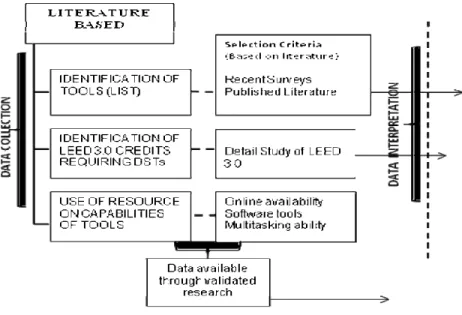
The data collection was undertaken as follows (see Figure 1):
• Collecting literature regarding DSTs;
• Identifying LEED® 3.0 credits requiring DSTs; and
FIGURE 1 Research method
Collecting literature available regarding the DSTs
The information regarding DSTs was collected through a literature search of peer reviewed journals, books, research reports, dissertations, reference guides, and online software tools available through search engines and recently published surveys. The search was limited to readily accessible tools and resources via internet with a particular focus on software development and websites. The primary identification method was a web search on the terms “Decision support tool” and “Green building tool.” The criterion was that tools must be related to green building in order to be included in the database. Once the data regarding relevant DSTs was collected, an inventory was created. The list was prepared in Microsoft Excel and was updated from time to time.
The information collected on DSTs included the name of the organization that created the DST; the web link to the tool; cost, if any, to access the tool and a brief description (see Appendix B for detail information).
Identification of LEED 3.0 credits requiring DSTs
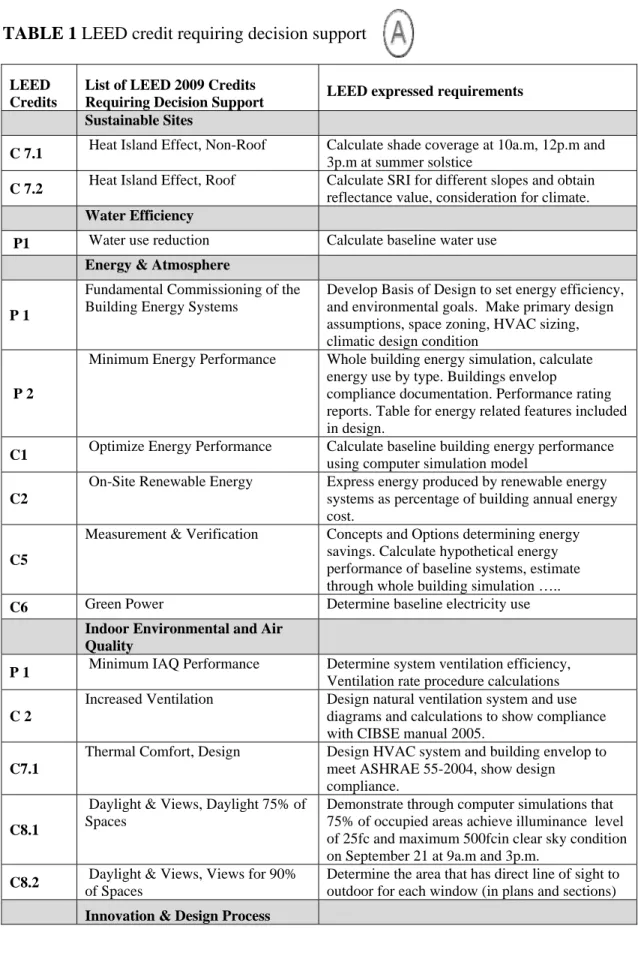
LEED® credits along all the LEED® categories (namely, Sustainable sites, Water efficiency, Energy and atmosphere, Material resources and Indoor environment and air quality) were identified, based on the requirement of decision making, i.e. those credits that require decision support or assessment of the context in the form of exact numbers, minimum performance or performance verification. Through each credit, the proposed rating system evaluates the performance of a building in terms of the
characteristics of LEED® categories, such as contribution to minimum energy performance, indoor environmental air quality, day lighting, water efficiency and emissions of indoor pollutants. These credits were identified through a detailed study of the LEED® 3.0 reference guide by United States Green Building Council (USGBC). All those credits which require either verification of minimum performance or performance assessments in their set of requirements were identified and included in the list. A list of LEED® credits that require decision support was prepared and compiled (see Table 1).
TABLE 1 LEED credit requiring decision support
LEED Credits
List of LEED 2009 Credits
Requiring Decision Support LEED expressed requirements Sustainable Sites
C 7.1 Heat Island Effect, Non-Roof Calculate shade coverage at 10a.m, 12p.m and 3p.m at summer solstice
C 7.2 Heat Island Effect, Roof Calculate SRI for different slopes and obtain reflectance value, consideration for climate. Water Efficiency
P1 Water use reduction Calculate baseline water use Energy & Atmosphere
P 1
Fundamental Commissioning of the Building Energy Systems
Develop Basis of Design to set energy efficiency, and environmental goals. Make primary design assumptions, space zoning, HVAC sizing, climatic design condition
P 2
Minimum Energy Performance Whole building energy simulation, calculate energy use by type. Buildings envelop
compliance documentation. Performance rating reports. Table for energy related features included in design.
C1 Optimize Energy Performance Calculate baseline building energy performance using computer simulation model
C2
On-Site Renewable Energy Express energy produced by renewable energy systems as percentage of building annual energy cost.
C5
Measurement & Verification Concepts and Options determining energy savings. Calculate hypothetical energy performance of baseline systems, estimate through whole building simulation ….. C6 Green Power Determine baseline electricity use Indoor Environmental and Air
Quality
P 1 Minimum IAQ Performance Determine system ventilation efficiency, Ventilation rate procedure calculations C 2
Increased Ventilation Design natural ventilation system and use diagrams and calculations to show compliance with CIBSE manual 2005.
C7.1
Thermal Comfort, Design Design HVAC system and building envelop to meet ASHRAE 55-2004, show design
compliance.
C8.1
Daylight & Views, Daylight 75% of Spaces
Demonstrate through computer simulations that 75% of occupied areas achieve illuminance level of 25fc and maximum 500fcin clear sky condition on September 21 at 9a.m and 3p.m.
C8.2 Daylight & Views, Views for 90% of Spaces
Determine the area that has direct line of sight to outdoor for each window (in plans and sections) Innovation & Design Process
Study of software capabilities and features based on available resource
Based on a study of recent surveys (Attia, Beltran, Herde and Hensen 2009; Hopfe et al. 2005) and a list of tools suggested by USGBC for energy simulation (http://www.usgbc.org/ShowFile.aspx?DocumentID=3478), eight leading tools were identified and selected for the research. As per the sourced cited, the selected tools appear to be the most used tools in the industry, capable of making detailed analysis and calculations in different phases of building design and construction. Following is the list of selected tools:
• Autodesk Ecotect Analysis (2010)
• HEED
• Energy 10 (E10)
• Design Builder (DB)
• e-QUEST
• Green Building Studio (GBS)
• IES VE
• Energy Plus Sketch Up (EPSU)
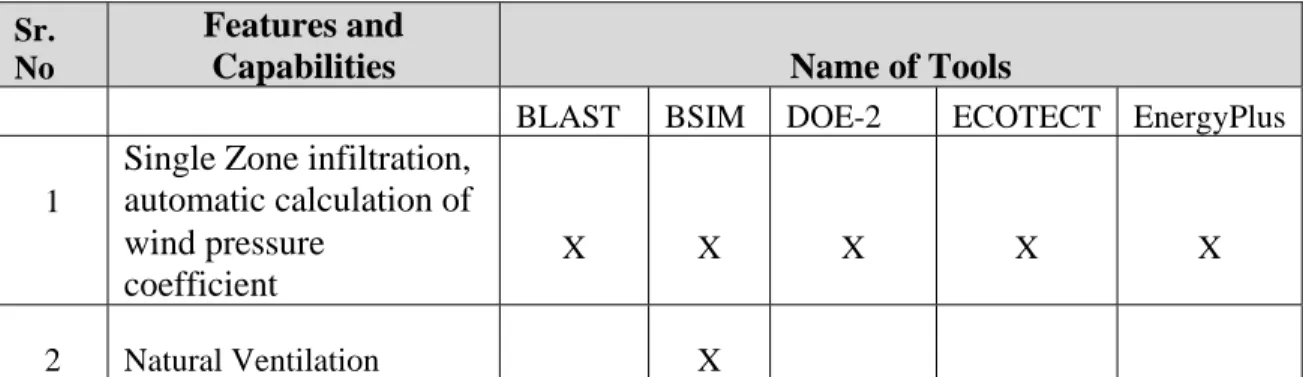
The detailed information about the software tools’ feature, capabilities and potential was collected from the software manuals and reference guides available with the software tools. In addition to the data from software manuals, a database regarding the capabilities and potential of these software tools is available in the form of a research paper (Crawley, Hand, Kummert and Griffith 2006) (see table 2).
TABLE 2 Software tools features and capabilities (Crawly et.al. 2006)
Sr. No
Features and
Capabilities Name of Tools
BLAST BSIM DOE-2 ECOTECT EnergyPlus
1
Single Zone infiltration, automatic calculation of X X X X X wind pressure coefficient 2 Natural Ventilation X
NOTE: Abbreviations in the table
X
Features or capability available (i.e. well supported in documentation /interface and examples) and in use with the software application
P
Feature or capability that is partially implemented (i.e. address part of an issue, does not have ability to fully resolve the issue)
Data analysis
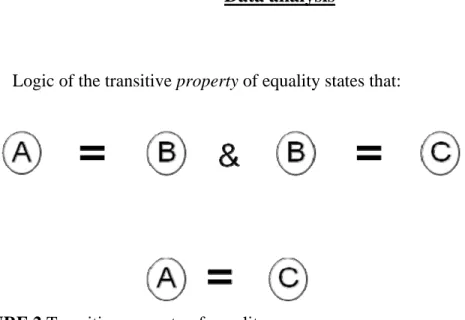
Logic of the transitive property of equality states that:
FIGURE 2 Transitive property of equality
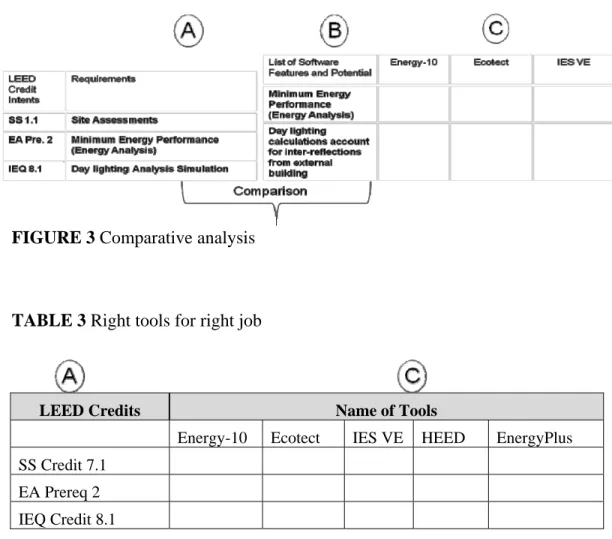
This logic (See Figure 2) can be used to link the set of selected performance tools with LEED credits requiring decision support. With reference to the above equation, assume Table 1 is “A,” the software expressed capabilities section of Table 3 is “B,” and the list of tools is “C”. As explained earlier, the software expressed capabilities were selected based on LEED requirements and hence they are similar in nature. So “A” is similar to “B,” i.e. since the LEED expressed requirements and software expressed capabilities are similar, then “B” and “C” are compatible. Therefore, it can be inferred that “A” (LEED expressed requirements) and “C” (software tools) are compatible. The selected software tools have the capability to make informed choices for a particular LEED credit requirement (see figure 3 and table 3).
FIGURE 3 Comparative analysis
TABLE 3 Right tools for right job
LEED Credits Name of Tools
Energy-10 Ecotect IES VE HEED EnergyPlus
SS Credit 7.1
EA Prereq 2
IEQ Credit 8.1
The data from the above comparative analysis can be used to create a three dimensional matrix involving the phases in building construction and design, LEED categories and software tools used for decision making. Based on the LEED reference manual and requirements of LEED credits for different categories, the phase of a particular credit in the process of design or construction can be determined. The LEED credits are already linked with the tools as shown in table 3 i.e. Right tool for right job. The matrix can cross-reference LEED categories with the standard phases of building
design and construction, thereby highlighting appropriate software tools for a particular phase of work (see figure 4).
Within the matrix, there are horizontal headings for the five typical LEED® categories: site, water, energy, materials, and indoor environment. Vertically listed are design phases: pre-design, schematic design, design development, construction, and post construction/post occupancy. At the intersection of topics and phases lie the software tools particular to that condition (see figure 4). Thus, this matrix or template can be termed as the “Right tool for the right job at the right time.”
CHAPTER V FINDINGS
Once the list of LEED credits requiring decision support and the list of software tools was finalized, the similarities between features and potential of the software and LEED requirements were noted. Software features similar to LEED credit requirements were sought in the software reference manuals. This was conducted by simply searching for keywords from LEED credit requirements in software reference manuals. For
example, if a credit requires energy analysis done for the annual building performance, a search was conducted in every software manual of selected tools using the keyword “energy analysis.” The generated information from each reference manual was checked against the set of requirements for that particular LEED credit. Thus, the features that were similar to LEED requirements were selected to form a list of “software expressed capabilities” (see Table 4). The following is the over view of software features and potentials followed by the table showing software expressed capabilities.
Overview of the software tools
Autodesk Ecotect Analysis 2010 (www.autodesk.com/ecotect-analysis)
Autodesk Ecotect Analysis is conceptual building performance analysis software that can be used in early design phases or for developing Basis of Design (BOD) for LEED.
Features include:
• Solar analysis
• Lighting analysis
• Thermal analysis
• Renewable energy calculations
• Ventilation and Airflow
FIGURE 5 Output from Autodesk Ecotect Analysis 2010 showing, sunlight entering window, day lighting model and shadows and reflections
Shadows and reflections
The sun’s position and path relative to the model at any date, time, and location can be displayed along with shadows over the model. Individual shadows from selected objects can be isolated and assigned colors in order to differentiate the effects of
different objects or buildings. This feature can be used for LEED SS 7.1credit which involves the calculation of shaded areas. Ecotect also allows viewing how sunlight enters through windows and moves around within a space. It also analyzes site projection angles, assesses obstructions, calculates vertical sky components for any point or surface, and visualizes the no-sky line in any space. Additionally, it can
physically project and color exactly which parts of a structure are infringing (see Figure 5). This feature helps to make decisions about LEED (Indoor Environment and Air Quality) IEQ 8.2 credit which involves introduction of daylight and views.
Photovoltaic array sizing and load matching
Ecotect can calculate the solar radiation incident on any solar collector and estimate its likely energy production throughout the year. This feature can be used for decision making regarding LEED EA credit 2, which requires recognizing increasing levels of on-site renewable energy self-supply to reduce environmental and economic impacts associated with fossil fuel energy use.
Day-lighting design
Ecotect has the capability to model (i.e., to generate) the geometry of the space for day lighting calculations (see Figure 5). Also, it can export the model (geometry) to other accurate programs like Radiance and DaySim to run accurate simulation results
for calculations of illuminance and other requirements for achieving LEED IEQ credit 8.1 for daylight calculations. However, Ecotect calculates daylight factors and
luminance levels at any point in the model or over the analysis grid. Thus, Ecotect has the partial capability to achieve daylighting design credits for LEED.
Thermal analysis
Ecotect can calculate heating and cooling loads for models with any number of zones or type of geometry. Also, it can be used to assign detailed material properties to all objects, as well as annual hourly operational schedules to occupancy, internal gains, infiltration, and individual items of equipment. In addition, it can run annual energy simulations and the output reports of this feature can be used for LEED (Energy and Atmosphere) EA credit 1 and for EA prerequisite 2.The model from Ecotect can be exported to other programs to run accurate simulation results. Thus, the LEED EA credit 1 can be partially achieved with the help of this program. For more information regarding software features, please see Appendix A.
HEED (www.aud.ucla.edu/heed)
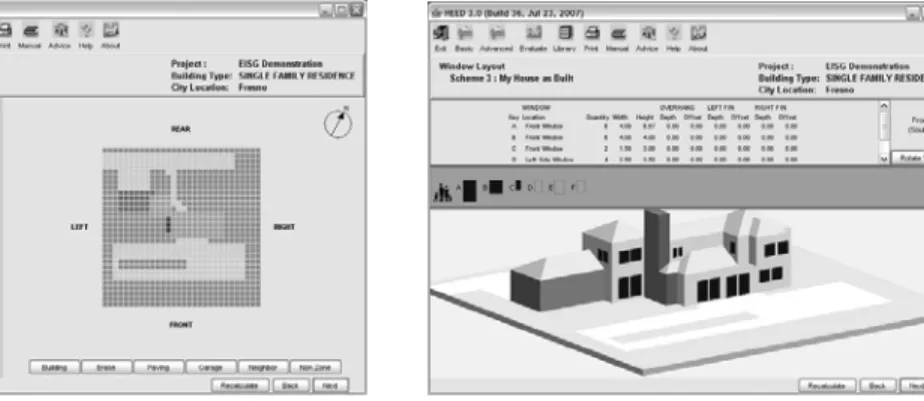
HEED (Home Energy Efficient Design), as the name suggests, provides a detailed set of analysis from a very simple model for home design. HEED can be downloaded at no cost. The construction of a model or geometry is only allowed in as 4'x4'x4' cubes (see Figure 6) making it rigid and inflexible to use for complex forms. Organic shapes and complex designs cannot be achieved. HEED provides in-depth
analysis about energy use and other types of consumption and hence can be used for LEED credits for energy analysis.
FIGURE 6 Output from HEED (Source: US Department of Energy, 2010)
Features include:
• Annual energy consumption
• Lighting analysis
• Thermal analysis
• Renewable energy calculations
HEED has the ability to compare several schemes at once. Additional results are available for a fee. The major advantage of using HEED is the clarity of the results and the ability to compare several schemes at once.
However, the most important drawback is the complete lack of accurate modeling system. This leads to questions about how reliable HEED actually is. According to the reference manual, for simple projects, HEED can be reliable, but for more complicated applications, it is recommended that the user move on to another,
more complex program. For economic purposes, regardless of the shape of the building, HEED may prove better for use at the very beginning of the design process, when most of the decisions are made that ultimately impact the energy performance of envelope-dominated buildings. Thus, HEED could be helpful when developing the basis of design (BOD) for owners during the LEED process, i.e. for EA credits and prerequisites.
HEED requires just four project inputs: floor area, number of stories, location (zip code), and building type. HEED uses this information to design two base case buildings: scheme 1 meets California’s Title 24 Energy Code, and scheme 2, which is 30% more energy efficient. HEED automatically manages up to 9 schemes for up to 25 different projects. HEED’s strengths are ease of use, simplicity of input data, a wide array of graphic output displays, computational speed, and the ability to quickly compare multiple design alternatives (US Department of Energy, 2010). For detailed information regarding HEED features and capabilities refer Appendix A.
Energy-10 (www.nrel.gov/buildings/energy10)
Energy-10 is a tool for analyzing buildings early in the design process with a focus on smaller buildings. Energy-10 is most suitable for smaller (i.e. 10,000 ft2 (1000 m2) or less), simpler commercial and residential buildings. It is one of the software tools recommended by USGBC for energy analysis for LEED specific requirements
Features include:
• Passive solar heating and cooling
• Natural ventilation
• Well-insulated building envelopes
• High-performance windows
• High-performance lighting systems
• High-performance mechanical equipment
The software performs hour-by-hour calculations and produces graphic reports depicting building's thermal and HVAC, performance over a full year of operation (see figure 7). This feature of Energy-10 can be used for LEED EA prerequisite 2 and credit1. Energy-10 uses actual energy and demand charges to track operating costs; evaluate hourly, monthly, or annual energy use; and track peak loads projects. The feature of tracking operating costs can be beneficial for facility managers and can be beneficial for making decisions in the early design stages.
Another feature of Energy-10 that can be used for LEED decision making is the photovoltaic module. This feature provides the ability to model and simulate the
performance of a PV system that is either stand-alone or integrated with the
building. This feature can be helpful in selecting an appropriate photovoltaic module for achieving LEED EA credit 2, which requires designers to “recognize increasing levels of on-site renewable energy self-supply to reduce environmental and economic impacts associated with fossil fuel energy use.”
FIGURE 7 Output from Energy-10
Energy-10 can also run detail simulation for HVAC sizing calculations and ventilation rates which make it helpful in achieving LEED IEQ prerequisite 1 and credit 1. Additionally Energy-10 also takes a baseline simulation and automatically applies a number of predefined strategies ranging from building envelope (insulation, glazing, shading, thermal mass, etc.) and system efficiency options (HVAC, lighting, day
lighting, solar service hot water and integrated photovoltaic electricity generation). Also life-cycle cost is an integral part of the software. For detailed information regarding Energy-10 features and capabilities refer Appendix A.
DesignBuilder v.2.2 (http://www.designbuildersoftware.com)
DesignBuilder is a building energy simulation and visualization tool. It can be used at all stages of building design.
Features include:
• Calculating building energy use (see figure 8).
• Evaluating façade options for overheating and visual appearance.
• Thermal simulation of naturally ventilated buildings.
• Calculating heating and cooling equipment sizes.
FIGURE 8 Output from DesignBuilder (Source: US Department of Energy, 2010)
DesignBuilder features allow even complex buildings to be modelled accurately (see figure 8); also it uses the EnergyPlus simulation engine that gives fairly accurate results for energy analysis used for LEED credits under Energy and Atmosphere. For detailed information on DesignBuilder features and capabilities refer Appendix A.
eQUEST (version 3.6) (www.doe2.com/equest)
eQUEST is a predominantly building energy analysis tool. It provides accurate results by combining a building creation wizard and an energy efficiency measure (EEM) wizard. eQUEST is one of the nine energy simulation software recommended by USGBC for LEED specific energy simulation requirements. This software has a user friendly and linear interface, that provides detailed building envelop construction.
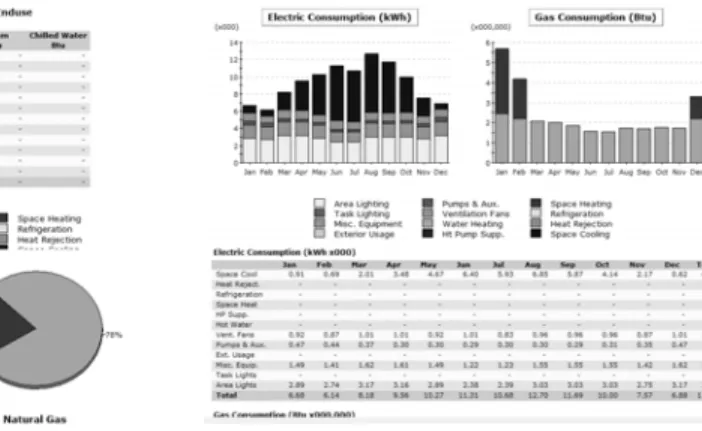
FIGURE 9 Output from eQUEST
eQUEST provides graphical results display module (see figure 9) with an enhanced DOE-2.2- derived building energy use simulation program.
eQUEST, uses DOE-2.2 as a simulation engine that performs hourly simulation of the building based on walls, windows, glass, people, plug loads, and ventilation. DOE-2.2 also simulates the performance of fans, pumps, chillers, boilers, and other energy-consuming devices. These features make it one of important LEED specific decision making tool.
A photovoltaic algorithm has recently been added to DOE-2.2 that can calculate potential for renewable energy generation which is of the important LEED requirement. eQUEST offers energy cost estimating, day lighting and lighting system control, and automatic implementation of energy efficiency measures (by selecting preferred measures from a list). Recent feature of DWG import in eQUEST enables it to “trace” the shape of building footprint and zoning in drawing module. For detailed information regarding eQUEST features and capabilities refer Appendix A.
Autodesk Green Building Studio
(http://usa.autodesk.com/adsk/servlet/pc/index?siteID=123112&id=11649086)
Green Building Studio links architectural building information models (BIM) and 3-D CAD building designs with energy, water, and carbon analysis. Output includes:
• Estimated Energy & Cost Summary (annual, lifecycle)
• Renewable energy potential (photovoltaic and wind)
• Weather data summary and user defined graphics
• Building and site specific natural ventilation potential
• US EPA Energy Star comparison
• Water and day lighting preliminary analysis for LEED
• Energy End-Use Charts
• DOE-2.2 file for import to eQUEST Whole building energy analysis
Green Building Studio calculates a virtual building’s total annual energy use, including all electrical and fuel uses, which are broken down into lighting, HVAC, and other equipment, with hourly analysis simulations using the DOE-2.2 simulation engine. This feature is very close to LEED credit requirements for Energy and Atmosphere. Water usage and costs evaluation
To obtain Water Efficiency LEED credits, adjustments can be made to fixtures, and immediate results in water use calculations can be determined using this program. The water usage analysis allows the user to apply a variety of water savings measures, including efficient fixtures, water catchments, and native vegetation.
In addition to above features Autodesk Green Building Studio can be used to calculate the operational and energy implications of early design decisions. This can be beneficial for developing the basis of design by the commissioning agent during the early design stage for LEED certification. The Autodesk Green Building Studio web service automatically generates geometrically accurate, detailed input files for major energy simulation programs
(http://usa.autodesk.com/adsk/servlet/pc/index?siteID=123112&id=11649086). Green Building Studio uses the DOE-2.2 simulation engine to calculate energy performance and also creates geometrically accurate input files for EnergyPlus, the feature that can be used for Energy Analysis for LEED. Green Building Studio web service enables users to eliminate redundant data entry and dramatically reduce the time and expense
traditionally associated with whole-building energy simulation analyses.
IES <VE> Version 6.1, (VE-Toolkit for LEED) (December 2009) (www.iesve.com) The IES <Virtual Environment> (IES <VE>) is an integrated suite of
applications linked by a common user interface and a single integrated data model. It has Toolkits designed specifically for different rating system around the world like VE-Toolkit for LEED, VE-VE-Toolkit for LEED-INDIA, VE-VE-Toolkit for Green Star etc. This program provides detailed evaluation of building and system designs, allowing them to be optimized with regard to comfort criteria and energy use across LEED V 2.2/V3.
The VE-Tool kit for LEED covers:
• day-lighting analysis
• comfort analysis
• water efficiency
• renewable energy analysis
FIGURE 10 Output from IES <VE> showing day-lighting and comfort analysis (Integrated Environment Solutions)
Day-lighting
Covers LEED credit requirements of IEQ 8.1 and has ability to define what spaces are included in the analysis. Output includes indicative pass/fail result, previous run comparison, visual floor-by-floor (see figure 10) movie and tabular results to enable easy identification of marginal fail rooms (Integrated Environment Solutions).
Comfort analysis
Covers LEED credit EQ7.1. ASHRAE 55 – 2004 compliant assessment method occupied area must meet predicted mean vote (PMV) +0.5 to -0.5 (see figure 10). Output
includes indicative pass/fail result, previous run comparison, fly round movie and room by room table to enable easy identification of rooms that fail (Integrated Environment Solutions).
Water efficiency
Covers LEED credits WE2, 3.1, 3.2 (V2.2) and WE Pre 1, 2, 3 (200; water use reduction calculation and innovative waste water technology (option 1). Output includes indicative pass/fail result, water stress significance, and reduction achieved with
breakdown (Integrated Environment Solutions). Renewable energy analysis
Covers LEED credits EA2 & 6. Carbon reduction based on simulation data and user selected low/zero-carbon technology. Output includes indicative pass/fail results, CO2 breakdown by end-use and proposed contribution of technology to emissions reduction. Although not part of EA2 credit, low carbon technologies are included, as in some scenarios they may be more effective at reducing CO2 emissions (Integrated Environment Solutions).
OpenStudioVersion 1.0.5, EnergyPlus plugin for SketchUp (June 2010) (http://apps1.eere.energy.gov/buildings/energyplus/openstudio.cfm)
According to National renewable Energy Laboratory (NERL), Open Studio is a free plugin for Google SketchUp 3D program. The plugin is used to create and edit building geometry in EnergyPlus input file. Energy plus is one of the recommended energy simulation software by USGBC. EnergyPlus is energy simulation software based
on the best features and capabilities of BLAST and DOE-2.1E. It is a simulation engine with input and output of text files. The plugin adds the building energy simulation capabilities of EnergyPlus to the SketchUp environment.
Features include:
• Whole Building Energy Analysis
• Internal gains and simple outdoor air for load calculations
• HVAC system for load calculations
• Day-lighting controls and illuminance map
The above features are important for decisions regarding LEED Energy and Atmosphere Credits. Although the plugin makes modeling simpler to work with
EnergyPlus according to NERL for the U.S. Department of Energy, the plugin does not yet handle all critical input objects. Some editing of the input file will usually be required outside of SketchUp
TABLE 4 Software expressed capabilities (Software reference manuals and Crawley, Hand, Kummert and Griffith. 2006)
LEED
CATEGORIES SOFTWARE EXPRESSED CAPABILITIES Ecotect HEE
D
Energy 10 Design Build
er
eQU
EST
Green Building Studio IES VE Energy Plus (Sketch Up)
Sustainable Site Weather data provided climatic consideration for rainfall & temp. X X X X X X X
Visualization of site layouts and solar shading calculations X X X X X
Water
Efficiency Baseline water analysis for LEED X X
Energy and Atmosphere
Primary design Assumption like HVAC sizing, strategies for energy
efficiency, space zoning, climate based design strategies X X X X X X X X
Estimated Energy & Cost Summary (annual), Energy use by type X X X
Baseline energy load analysis for HVAC , lighting, electric etc. X X X X X X X
Calculations for Energy enduse, Peak demand, Consumption X X X
On-site generation and utility electricity management P X X X X X
including demand, Renewable power, photovoltaic & wind power
Energy end use reports, Consumption of energy by source
X X X X X X X
Peak demand , Individual reports for electric, heating etc
Indoor Building models for HVAC simulation P X X X
Environment Ventilation rate per occupant floor area, Ventilation air flow X X X X P
and Air Quality schedule, User defined ventilation control strategy
Heat balance calculations, Human thermal comfort P X X X X X
Day lighting simulation for calculating hourly illuminance levels
P X P
Beam solar radiation reflection from outside and inside window reveals X X
The findings of this research lead to several observations about the tools and also about LEED 3.0 credits. The tools performed well on some attributes, but not on all of them. Tools like Autodesk Ecotect Analysis and DesignBuilder can perform a partial task for credits, like day-lighting design calculation and energy analysis. They can be helpful for creating the 3D model of the building, but these depend heavily on other tools to run simulations for day-lighting design calculations and whole building energy analysis. Modeling 3D geometry of the space is fairly simple with these tools, but the outputs are not exactly what are required by LEED. Also some of the features or
capabilities of the tools are in the development stages, according to some researchers and software manuals; thus, the results of the simulations or analysis may be approximate but not exact. None of the tools selected are specialized for making choices about materials for the Material and Resources category of LEED.
The data from the table 5 shows the LEED credit intents and the list of software that has potential to achieve it.
TABLE 5 Findings CREDITS LEED 2009 CREDITS REQUIRING DECISION SUPPORT LEED EXPRESSED REQUIREMENTS SOFTWARE EXPRESSED
CAPABILITIES Ecotect HEE
D
Energy 10 Design Build
er
eQU
EST
Green Building Studio IES VE Energy Plus (Sketch Up)
Sustainable Sites 26 Points Credit 7.1
Heat Island Effect, Non-Roof 1
To reduce heat island to minimize impacts on microclimates and human and wildlife habitats
Calculation of effective shaded areas. Visualization of site layouts X X X X Credit 7.2
Heat Island Effect, Roof 1
To reduce heat island to minimize impacts on microclimate and habitats
Material reflectance Climatic consideration P P P Water Efficiency 10 Points
Prereq 1 Water use reduction To increase water
efficiency in buildings. Baseline water consumption X X Energy & Atmosphere 35 Points 40
TABLE 5 Continued CREDITS LEED 2009 CREDITS REQUIRING DECISION SUPPORT LEED EXPRESSED REQUIREMENTS SOFTWARE EXPRESSED
CAPABILITIES Ecotect HEE
D
Energy 10 Design Build
er
eQU
EST
Green Building Studio IES VE Energy Plus (Sketch Up)
Prereq 1
Fundamental
Commissioning of the Building Energy
Systems Required.
To verify that the project energy-related systems are installed, calibrated and perform according to owner's project req., basis of design & construction. Develop energy and environmental goals Develop energy efficiency goals, Conceptual HVAC sizing calculations, Primary design assumptions X X X X X X X X Prereq 2 Minimum Energy Performance: Required To establish minimum level of energy efficiency for the proposed bldg. and systems to reduce
environment & economic impacts associated with excessive energy use
Baseline energy load analysis, energy related features in design P X X X X X X X Credit 1 Optimize Energy Performance 1 to 19 To achieve increasing levels of energy
performance beyond the prerequisite standard to reduce environment and impacts associated with excessive energy use
Calculations for Energy enduse, Peak demand, Consumption P X X X X X X X 41
TABLE 5 Continued CREDITS LEED 2009 CREDITS REQUIRING DECISION SUPPORT LEED EXPRESSED REQUIREMENTS SOFTWARE EXPRESSED
CAPABILITIES Ecotect HEE
D
Energy 10 Design Build
er
eQU
EST
Green Building Studio IES VE Energy Plus (Sketch Up)
Credit 2
On-Site Renewable Energy 1 to 7
To encourage and recognize increasing levels of on-site renewable energy self-supply to reduce environmental and economic impacts
associated with fossil fuel energy use On-site generation and electricity management demand, Renewable power, photovoltaic & wind power P X X P X P Credit 5 Measurement and Verification 3
To provide for ongoing accountability of building energy consumption over time (Need Calibrated simulations). Calculations for anticipated annual energy cost, concepts and options determining energy savings.
Energy end use reports, Consumption of energy by source Peak demand , individual metering for lighting, heating etc X X X X X X X X Credit 6
Green Power 2 To encourage the
development and use of grid-source, renewable energy technologies on a net zero pollution basis.
Calculations for annual electricity
use P X X X X X X P
TABLE 5 Continued CREDITS LEED 2009 CREDITS REQUIRING DECISION SUPPORT LEED EXPRESSED REQUIREMENTS SOFTWARE EXPRESSED
CAPABILITIES Ecotect HEE
D
Energy 10 Design Build
er
eQU
EST
Green Building Studio IES VE Energy Plus (Sketch Up)
Indoor Environmental Quality 15 Points Prereq 1 Minimum IAQ Performance Required To establish minimum indoor air quality (IAQ) performance to enhance indoor air quality in buildings, thus contributing to the comfort and well being of the occupants Ventilation rate for HVAC system. P X X X Credit 7.1 Thermal Comfort, Design 1 To provide a comfortable thermal environment that promotes occupant productivity and well being. Design HVAC
Heat balance calculations, Human thermal
comfort P X X X X X X P
Credit 2
Increased Ventilation 1 To provide additional
outdoor air ventilation to improve indoor air quality (IAQ) and promote occupant comfort well being and productivity
Ventilation rate per occupant floor area, Ventilation air flow schedule, User defined control strategy
X X X
44 TABLE 5 Continued CREDITS LEED 2009 CREDITS REQUIRING DECISION SUPPORT LEED EXPRESSED REQUIREMENTS SOFTWARE EXPRESSED
CAPABILITIES Ecotect HEE
D
Energy 10 Design Build
er
eQU
EST
Green Building Studio IES VE Energy Plus (Sketch Up)
Credit 8.1
Daylight & Views, Daylight 75% of Spaces 1
To provide for the building occupant with a connection between indoor spaces and outdoor through introduction of daylight and views into the regularly occupied areas of the building
Day-Lighting calculations, hourly simulation for Day- Lighting illuminance levels P P X P Credit 8.2
Daylight & Views, Views for 90% of Spaces 1
To provide building occupants a connection to the outdoors through the introduction of daylight and views into the regularly occupied areas of building
Beam solar radiation reflection from outside and inside
window reveals X X
NOTE: Abbreviations in the table
X
Features or capability available (i.e. well supported in documentation /interface and examples) and in use with the software application P
Feature or capability that is partially implemented (i.e. address part of an issue, does not have ability to fully resolve the issue)
Out of total possible 59 LEED credits, excluding credits for innovation in design there are 10 credits and four prerequisites that can use the matrix developed for decision support or performance verification, in this research (approximately 20% of total number of LEED credits) (see figure 11).
10
49
Credits addressed by tools (36 points)
Credits that does not require performance verification or decision support (74 points)
FIGURE 11 LEED credits achievable with help of performance decision support tools
These credits can help to gain about 37 points out of a total 110 maximum possible points, i.e. approximately 35% of total points. As seen in Table 5, these tools basically cover points from three LEED categories, i.e. Sustainable Site, Energy and Atmosphere, and Indoor Environment and Air Quality.
FIGURE 12 Distribution of LEED credits achievable with help of performance decision support tools
2
31
4
0
Sustainable Site (2 points)
Energy and Atmosphere (31 points and 2
prerequisites)
Indoor Environment and Air Quality (4 points and 1 prerequisite)
Water Effeciency (1 prerequisite)
The performance tools contribute most greatly in the area of Energy and
Atmosphere where it can help to make decisions to achieve intents of two prerequisites and four credits making a total of 31 possible points. In the category of Indoor
Environment and Air Quality and Sustainable Sites the tools can help to make decisions for achieving 4 points and 2 points respectively (see figure 12). Table 6 below provides information regarding the set of tools that can be used in different phase in building design and construction and for different categories under LEED rating system.
TABLE 6 Right tool for right job at right time Phases in Building Construction LEED 3.0 Categories Sustainable Site Water Efficiency Energy and Atmosphere Indoor Environment and Air Quality
Energy Plus (Sketch Up) Schematic Design
Ecotect Ecotect Ecotect
HEED HEED
Energy10
Design
Builder Design Builder Design Builder
eQUEST eQUEST
Green Building Studio Green Building Studio
IES VE IES VE IES VE
Energy Plus (Sketch Up) Energy Plus (Sketch Up) Design Development Ecotect HEED Energy 10 eQUEST eQUEST
Green Building Studio
IES VE IES VE Energy Plus (Sketch Up) Energy Plus (Sketch Up) Construction Ecotect Energy 10 HEED Design Builder eQUEST IES VE IES VE Post Construction Ecotect HEED Energy10 Energy 10 eQUEST eQUEST IES VE Energy Plus (Sketch Up) Energy Plus (Sketch Up) Note: LEED category “Materials and resources” have no performance tools at this point.
CHAPTER VI CONCLUSIONS
Recent developments in the building industry have moved increasingly toward making design performance evaluations compulsory, from the beginning of the design process to the operation life cycle (Augenbroe and Hensen, 2004; Hopfe et al., 2005). New and re-developed performance assessment tools may help designers make informed choices for other LEED specific requirements like selecting materials for the Material and Resources category or code compliance as required by LEED credits. However, the knowledge deficit regarding what tools are available and the potential benefits associated with their use will always slow down the adoption of performance assessment tools for green building rating systems (Mackley et al. 2000).
This research has presented a framework that links building performance
assessment tools with the LEED rating system. It aims to bridge a gap between the AEC industry, facility managers and LEED professionals by providing information about performance tools that can be used for different phases during design, construction and operation of a LEED rated building.
A simple logic of the transitive property of equality, i.e. if a = b, b = c then a = c, was used to link the LEED credits requiring decision support with the tools that have the capability to achieve it. Once LEED credits were linked with software tools, the LEED reference manual was used to determine the phase when the decision regarding a particular credit needs to be made. Thus, LEED credits, software tools and phases of
building design, construction and operation were tied to develop a 3-dimensional matrix of the “Right tool for the right job at the right time.”
Overall, the findings of the research demonstrated that the framework developed can be used for achieving 20% of total possible LEED 3.0 credits, providing about 35% of total possible points. The findings also reflect that tools play a very important role in decision making for the LEED category of Energy and Atmosphere. Out of a total 35 possible points, the tools can help achieve 31 points (almost 90%) in this category. LEED’s goal is to address sustainability across a project’s service life; this research will help facility managers, operators and financial decision-makers to make informed choices at every phase of the project. Virtually every aspect of the LEED Rating System is related to issues that fall under the scope of facility management. These include:
• Ongoing indoor air quality
• Energy efficiency
• Water efficiency
• Systems upgrades to meet green building energy, water, IAQ, and lighting performance standards.
In addition to this, the study can be mutually beneficial for the fields of facility management and software development, as noted below:
• The study will help to orient facility managers visually;
• Graphic interface of tools will help perform job better;
• The study will generate recommendations for software companies to promote features that are important for facility management;
• The study will generate a list of tools for the post-construction phase, which is not available predominantly for LEED projects;
• Reducing building operating cost streams increases profits.
• Communicating the need for good ongoing building O&M to decision makers.
• The well defined graphic outputs and results from the software may motivate organizational leaders to make sustainability part of their organization's culture. Conveying the environmental achievements of organizations to customers and
communities through graphic outputs and technical support of software tools will have an ongoing impact.
The contribution or significance of the research can be better explained in the context of a scenario. For example, assume an architect who has never been involved in a LEED related project is responding to a request of proposal (RFP) to design and build a 200,000 sq. ft. commercial space that meets LEED silver requirements. Being new to the field of green building design, obviously this person will look for help regarding LEED specific requirements during the initial stages of design. In order to make informed choices for proposing the basis of design (BOD), this person could use the proposed framework in this research, which offers ready access to the user friendly tools for Architects, Engineers, Consultants and Facility Managers. Also, this will help save initial effort and reduce the time and cost involved in trying different software tools for achieving LEED specific goals.
This research explores a new way to structure information available about tools that can be applied by novice project teams pursuing LEED certification. The database