The Real-Time Publish-Subscribe Middleware
Getting Started Guide
Version 4.5c
This Guide describes how to download and install RTI Data Distribution Service®. It also lays out the core value and concepts behind the product and takes you step-by-step through the creation of a simple example application. Developers new to RTI should read this document.
© 2010 Real-Time Innovations, Inc. All rights reserved. Printed in U.S.A. First printing. June 2010.
Trademarks
Real-Time Innovations and RTI are registered trademarks of Real-Time Innovations, Inc. All other trademarks used in this document are the property of their respective owners.
Copy and Use Restrictions
No part of this publication may be reproduced, stored in a retrieval system, or transmitted in any form (including electronic, mechanical, photocopy, and facsimile) without the prior written permission of Real-Time Innovations, Inc. The software described in this document is furnished under and subject to the RTI software license agreement. The software may be used or copied only under the terms of the license agreement.
Technical Support
Real-Time Innovations, Inc. 385 Moffett Park Drive Sunnyvale, CA 94089 Phone: (408) 990-7444 Email: [email protected]
1 Welcome to RTI Data Distribution Service!
1.1 Why Choose RTI Data Distribution Service? ...1-2 1.1.1 Reduce Risk Through Performance and Availability ...1-2 1.1.2 Reduce Cost through Ease of Use and Simplified Deployment ...1-3 1.1.3 Ensure Success with Unmatched Flexibility ...1-3 1.1.4 Connect Heterogeneous Systems ...1-4 1.1.5 Interoperate with Databases, Event Engines, and JMS Systems...1-4 1.2 What Can RTI Data Distribution Service Do? ...1-5
2 Installing RTI Data Distribution Service
2.1 Installing RTI Data Distribution Service ...2-1 2.1.1 Installing on a UNIX-Based System ...2-2 2.1.2 Installing on a Windows System...2-3 2.2 License Management ...2-4 2.2.1 Obtaining a License File...2-4 2.2.2 Loading the License File ...2-4 2.2.3 Adding or Removing License Management ...2-5 2.3 Navigating the Directories ...2-5 2.4 Selecting a Development Environment...2-6 2.4.1 Using the Command-Line Tools on UNIX-based Systems ...2-7 2.4.2 Using the Command-Line Tools on Windows Systems ...2-7 2.4.3 Using Microsoft Visual Studio ...2-8
3 Getting Started with RTI Data Distribution Service
3.1 Building and Running “Hello, World”...3-1 3.1.1 Step 1: Set Up the Environment ...3-2 3.1.2 Step 2: Compile the Hello World Program...3-6 3.1.3 Step 3: Start the Subscriber ...3-8 3.1.4 Step 4: Start the Publisher ...3-8
3.2 Data Distribution Service (DDS) 101 ... 3-10 3.2.1 An Overview of DDS Objects...3-11 3.2.2 DomainParticipants ...3-11 3.2.3 Publishers and DataWriters ... 3-15 3.2.4 Subscribers and DataReaders ... 3-16 3.2.5 Topics ... 3-19 3.2.6 Keys and Samples ... 3-20
4 Capabilities and Performance
4.1 Automatic Application Discovery ... 4-2 4.1.1 When to Set the Discovery Peers ... 4-3 4.1.2 How to Set Your Discovery Peers ... 4-3 4.2 Customizing Behavior: QoS Configuration... 4-4 4.3 Compact, Type-Safe Data: Programming with Data Types... 4-7 4.3.1 Using Built-in Types ... 4-10 4.3.2 Using Types Defined at Compile Time ...4-11 4.3.3 Running with Dynamic Types... 4-16
5 Design Patterns for Rapid Development
5.1 Building and Running the Code Examples ... 5-2 5.2 Subscribing Only to Relevant Data ... 5-5 5.2.1 Content-Based Filtering... 5-5 5.2.2 Lifespan and History Depth ... 5-7 5.2.3 Time-Based Filtering ...5-11 5.3 Accessing Historical Data When Joining the Network... 5-13 5.3.1 Implementation ... 5-14 5.3.2 Running & Verifying... 5-15 5.4 Caching Data Within the Middleware... 5-15 5.4.1 Implementation ... 5-16 5.4.2 Running & Verifying... 5-19 5.5 Receiving Notifications When Data Delivery Is Late... 5-19 5.5.1 Implementation ... 5-20 5.5.2 Running & Verifying... 5-22
6.2 Reliable Messaging...6-4 6.2.1 Implementation ...6-6 6.3 High Throughput for Streaming Data...6-9 6.3.1 Implementation ... 6-11 6.3.2 Running & Verifying...6-12 6.4 Streaming Data over Unreliable Network Connections ...6-13 6.4.1 Implementation ...6-14
7 The Next Steps
e
Chapter 1
Welcome to RTI Data Distribution
Service!
Welcome to RTI® Data Distribution Service, the highest-performing DDS-compliant mes-saging system in the world. RTI Data Distribution Service makes it easy to develop, deploy, and maintain distributed applications. It has been proven in hundreds of unique designs for life- and mission-critical applications across a variety of industries. RTI Data Distribution Service provides:
❏
Ultra-low latency, extremely-high throughput messaging❏
Industry-leading reliability and determinism❏
Connectivity for heterogeneous systems spanning thousands of applications RTI Data Distribution Service is flexible; extensive quality-of-service (QoS) parameters adapt to your application, assuring that you meet your real-time, reliability, and resource usage requirements.This chapter introduces basic concepts and summarizes how RTI Data Distribution Ser-vice addresses your high-performance needs. After this introduction, we'll jump right into building distributed systems. The rest of this guide covers:
❏
First steps: Installing RTI Data Distribution Service and creating your first simple application.❏
Learning more: An overview of the APIs and programming model with a special focus on the communication model, data types and qualities of service.❏
Towards real-world applications: An introduction to meeting common real-world requirements.1.1
Why Choose RTI Data Distribution Service?
RTI Data Distribution Service implements publish/subscribe networking for high-perfor-mance distributed applications. It complies with the Data Distribution Service (DDS) standard from the Object Management Group (OMG). Developers familiar with JMS and other middleware will see similarities, but will also find that DDS is not just another MOM (message-oriented middleware) standard! Its unique peer-to-peer architecture and unprecedented flexibility delivers much higher performance and adaptation to challenging applications. DDS is the first truly real-time networking technology stan-dard. RTI Data Distribution Service is by far the market leading implementation of DDS.
1.1.1
Reduce Risk Through Performance and Availability
RTI Data Distribution Service provides top performance, whether measured in terms of latency, throughput, or real-time determinism1. One reason is its elegant peer-to-peer architecture.
Traditional messaging middleware requires dedicated servers to broker messages— introducing throughput and latency bottlenecks and timing variations. Brokers also increase system administration costs and represent single points of failure within a dis-tributed application, putting data reliability and availability at risk.
RTI doesn’t use brokers. Messages flow directly from publishers to subscribers with minimal overhead. All the functions of the broker, including discovery (finding data sources and sinks), routing (directing data flow), and naming (identifying data types and topics) are handled in a fully-distributed, reliable fashion behind the scenes. It requires no special server software or hardware.
1. For up-to-date performance benchmarks, visit RTI on the web at http://www.rti.com/products/dds/ benchmarks-cpp-linux.html.
Traditional message-oriented middleware implementations require a broker to forward every message, increasing latency and decreasing determinism and fault tolerance. RTI's unique peer-to-peer architecture eliminates bottlenecks and single points of failure.
lcom
e
The design also delivers high reliability and availability, with automatic failover, config-urable retries, and support redundant publishers, subscribers, networks, and more. Publishers and subscribers can start in any order, and enter and leave the network at any time; the middleware will connect and disconnect them automatically. RTI Data Dis-tribution Service provides fine-grained control over failure behavior and recovery, as well as detailed status notifications to allow applications to react to situations such as missed delivery deadlines, dropped connections, and slow or unresponsive nodes.
The User's Manual has details on these and all other capabilities. This guide only pro-vides an overview.
1.1.2
Reduce Cost through Ease of Use and Simplified Deployment
RTI Data Distribution Service helps keep development and deployment costs low by:
❏
Increasing developer productivity—Easy-to-use, standards-compliant DDS APIsget your code running quickly. DDS is the established middleware standard for real-time publish/subscribe communication in the defense industry and is expanding rapidly in utilities, transportation, intelligence, finance, and other commercial industries.
❏
Simplifying deployment—RTI Data Distribution Service automatically discovers connections, so you don't need to configure or manage server machines or pro-cesses. This translates into faster turnaround and lower overhead for your deployment and administration needs.❏
Reducing hardware costs—Traditional messaging products require dedicated servers or acceleration hardware in order to host brokers. The extreme efficiency and reduced overhead of RTI's implementation, on the other hand, allows you to achieve the same performance using standard off-the-shelf hardware, with fewer machines than the competition.1.1.3
Ensure Success with Unmatched Flexibility
Out of the box, RTI is configured to achieve simple data communications. However, when you need it, RTI provides a high degree of fine-grained, low-level control over the middleware, including:
❏
The volume of meta-traffic sent to assure reliability.❏
The frequencies and timeouts associated with all events within the middleware.❏
The amount of memory consumed, including the policies under whichRTI’s unique and powerful Quality-of-Service (QoS) policies can be specified in configu-ration files so that they can be tested and validated independently of the application logic. When not specified, the middleware will use default values chosen to provide good performance for a wide range of applications.
The result is simple-to-use networking that can expand and adapt to challenging appli-cations, both current and future. RTI eliminates what is perhaps the greatest risk of com-mercial middleware: outgrowing the capability or flexibility of the design.
1.1.4
Connect Heterogeneous Systems
RTI Data Distribution Service provides complete functionality and industry-leading per-formance for a wide variety of programming languages and platforms, including:
❏
C, C++, .NET, and Java development platforms❏
Windows, Linux, Solaris, AIX, and other enterprise-class systems❏
VxWorks, INTEGRITY, LynxOS, and other real-time and/or embedded systems Applications written in different programming languages, running on different hard-ware under different operating systems, can interoperate seamlessly over RTI Distribu-tion Service. RTI can connect disparate applicaDistribu-tions that must work together in even very complex systems.1.1.5
Interoperate with Databases, Event Engines, and JMS Systems
RTI provides connections between its middleware core and many types of enterprise software. Simple-but-powerful integrations with databases, Complex Event Processing (CEP) engines, and other middlewares ensure that RTI can bind together your real-time and enterprise systems.
RTI also provides a Java Message Service (JMS) application programming interface. RTI Data Distribution Service directly interoperates at the wire-protocol level with RTI Mes-sage Service, the world’s highest-performing JMS implementation1. RTI Message Service, with its standard JMS interface, then provides integration with a wide range of enter-prise service busses and application gateways.
For more information about interoperability with other middleware implementations, including IBM MQ Series, please consult your RTI account representative.
1. For more information about RTI Message Service, visit on RTI the web at http://www.rti.com/products/ jms/index.html. For performance benchmark results, see http://www.rti.com/products/jms/latency-throughput-benchmarks.html.
lcom
e
1.2
What Can RTI Data Distribution Service Do?
Under the hood, RTI Data Distribution Service goes beyond basic publish-subscribe com-munication to target the needs of applications with high-performance, real-time, and/or low-overhead requirements. It features:
❏
Peer-to-peer, publish-subscribe communications—The most elegant, flexible data communications model.•
Simplified distributed application programming•
Time-critical data flow with minimal latency•
Clear semantics for managing multiple sources of the same data.•
Customizable Quality of Service and error notification.•
Guaranteed periodic messages, with minimum and maximum rates set by subscriptions•
Notifications when applications fail to meet their deadlines.•
Synchronous or asynchronous message delivery to give applications con-trol over the degree of concurrency.•
Ability to send the same message to multiple subscribers efficiently, including support for reliable multicast with customizable levels of posi-tive and negaposi-tive message acknowledgement.❏
Reliable messaging—Enables subscribing applications to customize the degree of reliability required. Reliability can be tuned; you can guarantee delivery no matter how many retries are needed or try messages only once for fast and deter-ministic performance. You can also specify any settings in between. No other middleware lets you make this critical trade off on a per-message stream basis.❏
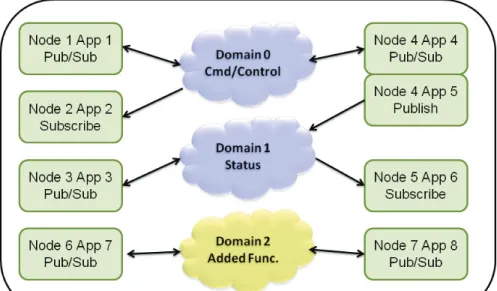
Multiple communication networks—Multiple independent communicationnet-works (domains), each using RTI Data Distribution Service, can be used over the same physical network to isolate unrelated systems or subsystems. Individual applications can participate in one or multiple domains.
❏
Symmetric architecture—Makes your application robust. No central server or privileged nodes means your system is robust to application and/or node fail-ures.❏
Dynamic—Topics, subscriptions, and publications can be added or removed from the system at any time.❏
Multiple network transports—RTI Data Distribution Service includes support for UDP/IP (IPv4 and IPv6)—including, for example, Ethernet, wireless, and Infini-band networks—and shared memory transports. It also includes the ability to dynamically plug in additional network transports and route messages over them. It can be configured to operate over a variety of transport mechanisms, including backplanes, switched fabrics, and other networking technologies.❏
Multi-platform and heterogeneous system support—Applications based on RTIData Distribution Service can communicate transparently with each other regard-less of the underlying operating system or hardware. Consult the Release Notes to see which platforms are supported in this release.
❏
Vendor neutrality and standards compliance—The RTI Data Distribution Service API complies with the DDS specification. On the network, it supports the open DDS Interoperability Protocol, Real-Time Publish Subscribe (RTPS), which is also an open standard from the OMG.lcom
e
Am I Better Off Building My Own Middleware?
Sometimes application projects start with minimal networking needs. So it’s natural to consider whether building a simplified middleware in-house is a better alternative to purchasing a more-complex commercial middleware. While doing a complete Return on Investment (ROI) analysis is outside the scope of this document, with RTI Data Distribution Service, you get a rich set of high-performance networking features by just turning on configuration parameters, and often, without writing a single line of additional code.
RTI has decades of experience with hundreds of applications. This effort created an integrated and time-tested architecture that seamlessly provides the flexibility you need to succeed now and grow into the future. Many features require fundamental support in the core of the middleware and cannot just be cobbled onto an existing framework. It would take many man-years of effort to duplicate even a small subset of the functionality to the same level of stability and reliability as delivered by RTI.
For example, some of the middleware functionality that your application can get by just enabling configuration parameter include:
❏
Tuning reliable behavior for multicast, lossy and high-latency networks.❏
Supporting high data-availability by enabling redundant data sources (forexample, “keep receiving data from source A. If source A stops publish-ing, then start receiving data from source B”), and providing notifications when application enter or leave the network.
❏
Optimizing network and system resources for transmission of periodic data by supporting time-based filtering of data (example: “receive a sam-ple no more than once per second”) and deadlines (examsam-ple: “expect to receive a sample at least once per second”).Writing network code to connect a few nodes is deceptively easy. Making that code scale, handle all the error scenarios you will eventually face, work across platforms, keep current with technology, and adapt to unexpected future requirements is another matter entirely. The initial cost of a custom design may seem tempting, but beware; robust architectures take years to evolve. Going with a fire-tested, widely used design assures you the best performance and functionality that will scale with your distributed application as it matures. And it will minimize the profound cost of going down the wrong path.
tion
Chapter 2
Installing RTI Data Distribution Service
RTI Data Distribution Service is delivered as static and dynamic libraries with develop-ment tools, examples, and docudevelop-mentation that will help you use the libraries.
This chapter includes:
❏
Installing RTI Data Distribution Service❏
License Management❏
Navigating the Directories❏
Selecting a Development EnvironmentNext Chapter —> Getting Started with RTI Data Distribution Service
2.1
Installing RTI Data Distribution Service
RTI Data Distribution Service is available for installation in the following forms, depend-ing on your needs and your license terms:
❏
In a single package as part of RTI Professional Edition, which includes both host (development) and target (deployment) files. If you downloaded an evaluation of RTI Data Distribution Service from the RTI web site at no cost, this is the distribu-tion you have.•
For Windows users: Your installation package is an executable installer application that installs a specific Windows architectures.•
For Linux users: Your installation package is a .sh file that installs a specific Linux architecture.❏
In separate host and target packages. This distribution is useful for those cus-tomers who develop and deploy on different platforms, or who deploy on multi-ple platforms. RTI also delivers support for embedded platforms this way. To request access to additional RTI host or target platforms, please contact your RTI account representative.•
For Windows users: You have at least two .zip archives: one for your host platform and at least one target platform. Expand them into the same directory, a directory of your choice.•
For users of other operating systems: You have at least two .tar.gz archives: one for your host platform and at least one target platform. Expand them into the same directory, a directory of your choice.2.1.1
Installing on a UNIX-Based System
If you are using the RTI Data Distribution Service, Professional Edition installer, please see the RTI Data Distribution Service, Professional Edition Getting Started Guide for details. If you are installing RTI Data Distribution Service independently (not part of RTI Profes-sional Edition), the distribution is packaged in two or more .tar.gz files (a host archive containing documentation, header files, and other files you need for development, and one or more target archives containing the libraries and other files you need for deploy-ment). Unpack them as described below. You do not need to be logged in as root during installation.
1. Make sure you have GNU’s version of the tar utility (which handles long file names). On Linux systems, this is the default tar executable. On Solaris systems, use gtar.
2. Create a directory for RTI Data Distribution Service. We will assume that you want to install under /opt/rti/ (you may replace references to /opt/rti/ with the direc-tory of your choice).
3. Move the downloaded file(s) into your newly created directory. We assume your distribution file is named rtidds45x-i86Linux2.6gcc3.4.3.tar.gz. Your filename will be different depending on your architecture.
4. Extract the distribution from the uncompressed files. For example:
gunzip rtidds45x-i86Linux2.6gcc3.4.3.tar.gz gtar xvf rtidds45x-i86Linux2.6gcc3.4.3.tar
Repeat this step as necessary if you have additional archive files. The names of these files will differ based on the name of your target platform(s).
2. Inst
alla
tion
Using our example path, you will end up with /opt/rti/ndds.4.5x. (Note: If you have a license-managed distribution of RTI Data Distribution Service, the direc-tory will be /opt/rti/ndds.4.5x_lic.)
5. Optional—If you want to use the TCP transport included with RTI Data Distribu-tion Service in a secure configuraDistribu-tion, you also need to install RTI TLS Support and OpenSSL. To purchase RTI TLS Support, please contact your RTI account repre-sentative.
6. Read License Management (Section 2.2).
2.1.2
Installing on a Windows System
Depending on your needs and license terms, you may have an installer for RTI Data Dis-tribution Service, Professional Edition or a two or more .zip archives (a host archive con-taining documentation, header files, and other files you need for development, and one or more target archives containing the libraries and other files you need for deploy-ment).
If you are using the RTI Data Distribution Service, Professional Edition installer, please see the RTI Data Distribution Service, Professional Edition Getting Started Guide for details. If you are installing RTI Data Distribution Service independently (not part of RTI Profes-sional Edition), unpack the .zip files as described below. Depending on your version of Windows and where you want to expand these files, your user account may or may not require administrator privileges.
1. Create a directory for RTI Data Distribution Service. We will assume that you want to install under C:\Program Files\RTI (you may replace references to
C:\Pro-gram Files\RTI with the directory of your choice).
2. Move the downloaded files into your newly created directory.
3. Extract the distribution from the uncompressed files. You will need a zip file util-ity such as WinZip® to help you.
Using our example path, you will end up with C:\Program Files\RTI\ndds.4.x. 4. Optional—If you want to use the TCP transport included with RTI Data Distribu-tion Service in a secure configuraDistribu-tion, you also need to install RTI TLS Support and OpenSSL. To purchase RTI TLS Support, please contact your RTI account repre-sentative.
2.2
License Management
Some distributions of RTI Data Distribution Service require a license file in order to run (for example, those provided for evaluation purposes or on a subscription basis). A sin-gle license file can be used to run on any architecture and is not node-locked. You are not required to run a license server.
2.2.1
Obtaining a License File
If your RTI Data Distribution Service distribution requires a license file, you will receive one from RTI via email after you download the software. If you did not receive one, please email [email protected] or contact your RTI account representative.
Save the license file in any location of your choice (the locations checked by the middle-ware are listed below).
If you have licenses for both RTI Data Distribution Service and RTI Message Service, you can concatenate both of them into the same file.
If your version of RTI Data Distribution Service is licensed managed, the software will not operate without a properly installed license file.
2.2.2
Loading the License File
Each time your RTI Data Distribution Service application starts, it will look for the license file in the following locations until it finds a valid license:
1. In your application’s current working directory, in a file called rti_license.dat. 2. In the location specified in the environment variable RTI_LICENSE_FILE,
which you may set to point to the full path of the license file, including the file-name (for example, C:\RTI\my_license_file.dat).
3. In the RTI Data Distribution Service installation, in the file ${NDDSHOME}/
rti_license.dat.
As RTI Data Distribution Service attempts to locate and read your license file, you may (depending on the terms of the license) see a printed message with details about your license.
If the license file cannot be found or the license has expired, your application may be unable to initialize RTI Data Distribution Service, depending on the terms of the license. If that is the case, your application’s call to
2. Inst
alla
tion
2.2.3
Adding or Removing License Management
If you are using an RTI software distribution that requires a license file in order to oper-ate, and your license file changes—for example, you receive a new license for a longer term than your original license—you do not need to reinstall RTI Data Distribution Ser-vice.
However, if you decide to migrate from a license-managed distribution of RTI Data Dis-tribution Service to one of the same version that does not require license management, or visa versa, RTI recommends that you first uninstall your original distribution before installing your new distribution. Doing so will prevent you from inadvertently using a mixture of libraries from multiple installations.
2.3
Navigating the Directories
Once you have installed RTI Data Distribution Service, you can access the example code used in this document under $(NDDSHOME}/example. RTI supports the C, C++, C++/ CLI, C#, and Java programming languages. While we will examine the C++ and Java examples in the following chapters, you can access similar code in the language of your choice.
The RTI Data Distribution Service directory tree is as follows:
${NDDSHOME} Root directory where RTI Data Distribution Service is installed
/class Java library files
/doc Documentation in HTML and PDF format
/example Example code in C, C++, C++/CLI, C# and Java
/C /CPP /CPPCLI /CSHARP /JAVA
/QoS Quality of Service (QoS) configuration files for the example code. These configuration files do not depend on the language bindings, and largely do not depend on the operating system either.
/include Header files for C and C++ APIs
/jre Java runtime environment files used by the rtiddsgen tool (you do not need to use this JRE to run your own Java applications)
/lib Library files
/ReadMe.html Start page for accessing the HTML documentation
/resource Document format definitions and template files used by
rtiddsgen
/scripts RTI tools (this directory should be in your path)
The two most important directories for learning RTI Data Distribution Service are exam-ple and doc. The doc directory contains the RTI Data Distribution Service library informa-tion in PDF and HTML formats. You may want to bookmark the HTML directory since you will be referring to this page a lot as you explore the RTI technology platform. All the example code is shipped in C, C++, Java, and C#. You can access the example code in a language of your choice from the respective locations under the example direc-tory. These examples include:
❏
Hello_simple: This example demonstrates one of the simplest applications you can write with RTI Data Distribution Service: it does nothing but publish and sub-scribe to short strings of text. This example is desub-scribed in detail in Chapter 3: Getting Started with RTI Data Distribution Service.❏
Hello_builtin, Hello_idl, Hello_dynamic: These examples are also very simple to run but demonstrate some of the unique capabilities of RTI Data Distribution Ser-vice: strongly typed data, QoS-based customization of behavior, and industry-leading performance. These examples are described in Chapter 4: Capabilities and Performance and Chapter 6: Design Patterns for High Performance.❏
News: This example demonstrates a subset of the rich functionality RTI Data Dis-tribution Service offers, including flexible support for historical and durable data, built-in data caching, powerful filtering capabilities, and tools for working with periodic data. This example is described in Chapter 5: Design Patterns for Rapid Development.2.4
Selecting a Development Environment
You can develop applications with RTI Data Distribution Service either by building and executing commands from a shell window, or by using a development environment like Microsoft® Visual Studio® or Eclipse™.
2. Inst
alla
tion
2.4.1
Using the Command-Line Tools on UNIX-based Systems
For Java-based applications, you can use the following script files to build and execute:
❏
example/JAVA/<example>/build.sh—Builds your Java source files; noparame-ters are needed.
❏
example/JAVA/<example>/run.sh—Runs the main program in either Publisheror Subscriber mode. It accepts the following parameters:
•
[pub|sub]—Run as publisher or subscriber•
–verbose—Increases output verbosity(This script accepts other options, which we will discuss in later chapters.) For C and C++ applications for UNIX-based systems, you can use the make command with this makefile:
❏
example/[C|CPP]/<example>/make/Makefile.<architecture>where <architecture> reflects the compiler, OS and processor combination for your development environment. If you do not see your architecture listed, see Generating Code with rtiddsgen (Section 4.3.2.1) for instructions on how to gen-erate an example makefile.
2.4.2
Using the Command-Line Tools on Windows Systems
For Java-based applications, you can use the following script files to build and execute:
❏
example\JAVA\<example>\build.cmd—Builds Java source files; noparame-ters are needed.
❏
example\JAVA\<example>\run.cmd—Runs the main program, Hello, in eitherPublisher or Subscriber mode. It accepts the following parameters:
•
[pub|sub]—Run as publisher or subscriber•
–verbose—Increases output verbosity(This script accepts other options, which we will discuss in later chapters.) For Java users: The native libraries used by the RTI Java API require the Visual Studio 2005 service pack 1 redistributable libraries on the target machine. You can obtain this package from Microsoft or RTI.
For C, C++, and C# users: Please use Microsoft Visual Studio 2005, service pack 1 or later1, or Visual Studio 2008 to build and run the examples.
1. If you are using an earlier version of Visual Studio, you can obtain a no-cost edition of Visual Studio 2005 or 2008 from Microsoft's web site.
2.4.3
Using Microsoft Visual Studio
RTI Data Distribution Service includes solutions and project files for Microsoft Visual Stu-dio in example\[C|CPP|CSHARP]\<example>\win32.
To use these solution files: 1. Start Visual Studio.
2. Select File, Open, Project/Solution.
3. In the File dialog, select the solution file for your architecture; the solution file for Visual Studio 2005 for 32-bit platforms is
3
. Hello W
o
rld
Service
This chapter gets you up and running with RTI Data Distribution Service. First, you will build and run your first RTI Data Distribution Service-based application. Then we'll take a step back to learn about the general concepts in the middleware and show how they are applied in the example application you ran.
This chapter includes:
❏
Building and Running “Hello, World”❏
Data Distribution Service (DDS) 101Next Chapter —> Chapter 4: Capabilities and Performance
3.1
Building and Running “Hello, World”
Let’s start by compiling and running Hello World, a basic program that publishes infor-mation over the network.
For now, do not worry about understanding the code (we start covering it in Chapter 4: Capabilities and Performance). Use the following instructions to run your first middle-ware program using RTI Data Distribution Service.
3.1.1
Step 1: Set Up the Environment
There are a few things to take care of before you start working with the example code. 3.1.1.1 Set Up the Environment on Your Development Machine
a. Set the NDDSHOME environment variable.
Set the environment variable NDDSHOME to the RTI Data Distribution Service install directory. (RTI Data Distribution Service itself does not require that you set this environment variable. It is used in the scripts used to build and run the example code because it is a simple way to locate the install directory. You may or may not choose to use the same mechanism when you create scripts to build and/or run your own applications.)
•
On UNIX-based systems: This location may be /opt/rti/ndds.4.5x.•
On Windows systems: This location may be C:\Program Files\RTI\ndds.4.5x. (The installer gave you the option to set this environment variable automati-cally as part of the installation process.)If you have multiple versions of RTI Data Distribution Service installed: As men-tioned above, RTI Data Distribution Service does not require that you have the environment variable NDDSHOME set at run time. However, if it is set, the middleware will use it to load certain configuration files. Additionally, you may have previously set your path based on the value of that variable. Therefore, if you have NDDSHOME set, be sure it is pointing to the right copy of RTI Data Distribution Service.
b. Update your path.
Add RTI Data Distribution Service's scripts directory to your path. This will allow you to run some of the simple command-line utilities included in your distribu-tion without typing the full path to the executable.
•
On UNIX-based systems: Add the directory to your PATH environment vari-able.•
On Windows systems: Add the directory to your Path environment variable. (The installer gave you the option to set this environment variable automati-cally as part of the installation process.)c. Make sure Java is available.
If you plan to develop in a language other than Java, you do not need Java installed on your system and can safely skip this step.
3
. Hello W
o
rld
If you will be going through the examples in Java, ensure that appropriate java
and javac executables are on your path. They can be found within the bin
direc-tory of your JDK installation. The Release Notes list the Java versions that are sup-ported.
On Linux systems: Note that GNU java (from the GNU Classpath project) is not supported—and will typically not work—but is on the path by default on many Linux systems.
d. Make sure the preprocessor is available.
Check whether the C preprocessor (e.g., cpp) is in your search path. This step is optional, but makes code generation with the rtiddsgen utility more convenient. Chapter 4: Capabilities and Performance describes how to use rtiddsgen.
On Windows systems:
•
If you have Microsoft Visual Studio installed: Running the scriptvcvars32.bat, vsvars32.bat, or vcvarsall.bat (depending on your version of
Visual Studio) will update the path for a given command prompt. If the Visual Studio installer did not add cl to your path already, you can run this script before running rtiddsgen.
•
If you do not have Microsoft Visual Studio installed: This is often the case with Java users. You can either choose not to use a preprocessor or to obtain a no-cost version of Visual Studio from Microsoft's web site. e. Get your project files ready.If you installed RTI Data Distribution Service in a directory that is shared by mul-tiple users (for example, in C:\Program Files on a Windows system, or /opt or
/local on a UNIX-based system), you may prefer to build and edit the examples
in a directory of your own so you do not interfere with other users. (Depending on your file permissions, you may have to copy them somewhere else.) If you would like, copy the directory ${NDDSHOME}/example to a location of your choice. Where you see ${NDDSHOME}/example mentioned in the instructions below, substitute your own copied directory instead.
•
On Windows systems: If you chose to install RTI Data Distribution Service inC:\Program Files or another system directory, Microsoft Visual Studio
may present you with a warning message when you open a solution file from the installation directory. If you see this dialog, you may want to copy the example directory somewhere else, as described above.
•
On UNIX-based systems: The makefiles that RTI provides with the example code are intended to be used with the GNU distribution of the make util-ity. On modern Linux systems, the make binary typically is GNU make. On other systems, GNU make is called gmake. For the same of clarity, the name gmake is used below. Make sure that the GNU make binary is on your path before continuing.3.1.1.2 Set Up the Environment on Your Deployment Machine
Some configuration has to be done for the machine(s) on which you run your applica-tion; the RTI installer can’t do that for you, because those machines may or may not be the same as where you created and built the application.
a. Make sure Java is available.
3
. Hello W
o
rld
b. Make sure the dynamic libraries are available.
Make sure that your application can load the RTI Data Distribution Service dynamic libraries. If you use C or C++ with static libraries (the default configura-tion in the examples covered in this document), you can skip this step. However, if you plan to use dynamic libraries, or if you use Java or .Net (which always use dynamic libraries), you will need to modify your environment as described here. To see if dynamic libraries are supported for your machine’s architecture, see the RTI Data Distribution Service Platform Notes1.
For more information about where Windows looks for dynamic libraries, see: http://msdn.microsoft.com/en-us/library/ms682586.aspx.
•
The dynamic libraries needed by C or C++ applications are in the directory${NDDSHOME}/lib/<architecture>.
On UNIX-based systems: Add this directory to your LD_LIBRARY_PATH environment variable.
On Windows systems: Add this directory to your Path environment variable or copy the DLLs inside into the directory containing your executable.
•
The native dynamic libraries needed by Java applications are in the directory${NDDSHOME}/lib/<architecture>. Your architecture name ends in jdk, e.g.
i86Linux2.6gcc3.4.3jdk. (The gcc part—only present on UNIX-based
architec-tures—identifies the corresponding native architecture that relies on the same version of the C runtime library.)
On UNIX-based systems: Add this directory to your LD_LIBRARY_PATH environment variable.
On Windows systems: Add this directory to your Path environment variable.
•
Java .jar files are in the directory ${NDDSHOME}/class. They will need to beon your application’s class path.
•
On Windows systems: The dynamic libraries needed by .Net applications are in the directory %NDDSHOME%\lib\i86Win32dotnet2.0. You will need to either copy the DLLs from that directory to the directory containing your exe-cutable, or add the directory containing the DLLs to your Path environment variable2. (If the .Net framework is unable to load the dynamic libraries at run time, it will throw a System.IO.FileNotFoundException and your application may fail to launch.)1. In the Platform Notes, see the “Building Instructions...” table for your target architecture.
2. The file nddsdotnet.dll (or nddsdotnetd.dll for debug) must be in the executable directory. Visual Stu-dio will, by default, do this automatically.
3.1.2
Step 2: Compile the Hello World Program
Java on Windows Systems: To build the example appli-cations:
1. From your command shell, go to
%NDDSHOME%\example\JAVA\
Hello_simple\.
2. Type:
Java on UNIX-based Systems: To build the example applications:
1. From your command shell, go to
${NDDSHOME}/example/JAVA/Hello_simple.
2. Type:
The same example code is provided in C, C++, C#, and Java. The following instructions cover C++ and Java in detail; the procedures for C and C# are very similar. The same source code can be built and run on different architecture.
The instructions also focus on Windows and UNIX-based systems. If you use an embedded platform, see the Embedded Systems Addendum (RTI_DDS_GettingStarted_ EmbeddedSystemsAddendum. pdf) for more instructions especially for you.
> build
3
. Hello W
o
rld
C++ on Windows Systems:To build the example applications:
1. In the Windows Explorer, go to
%NDDSHOME%\exam-ple\CPP\Hello_simple\win32 and open the Microsoft Visual Studio solution
file for your architecture. For example, the file for Visual Studio 2005 for 32-bit platforms is Hello-i86Win32VS2005.sln.
2. The Solution Configuration combo box in the toolbar indicates whether you are building debug or release executables; select Release. Select Build Solution from
the Build menu.
C++ on UNIX-based Systems:To build the example applications:
1. From your command shell, go to ${NDDSHOME}/example/CPP/Hello_simple/. 2. Type:
where <architecture> is one of the supported architectures; see the contents of the make directory for a list of available architectures. (If you do not see a makefile for your architecture, please refer to Section 4.3.2.1 to learn how to generate a makefile or project files for your platform). This command will build a release executable. To build a debug version instead, type:
> gmake -f make/Makefile.<architecture>
3.1.3
Step 3: Start the Subscriber
Java: To start the subscribing application:
(As described above, you should have already set your path appropriately so that the example application can load the native libraries on which RTI Data Distribution Service depends. If you have not, you can set the variable RTI_EXAMPLE_ARCH in your com-mand shell—e.g., to i86Win32jdk or i86Linux2.6gcc4.1.1.jdk—and the example launch scripts will use it to set your path for you.)
❏
On a Windows system: From your command shell, go to%NDDSHOME%\example\JAVA\Hello_simple and type:
❏
On a UNIX-based system: From your command shell, go to${NDDSHOME}/example/JAVA/Hello_simple and type:
C++: To start the subscribing application:
❏
On a Windows system: From your command shell, go to%NDDSHOME%\example\CPP\Hello_simple and type:
where <architecture> is one of the supported architectures; see the contents of the
win32 directory for a list of available architectures. For example, the Windows
architecture name corresponding to 32-bit Visual Studio 2005 is i86Win32VS2005.
❏
On a UNIX-based system: From your command shell, go to${NDDSHOME}/example/CPP/Hello_simple and type:
where <architecture> is one of the supported architectures; see the contents of the make directory for a list of available architectures. For example, the Linux archi-tecture corresponding to Red Hat Enterprise Linux 5 is i86Linux2.6gcc4.1.1.
3.1.4
Step 4: Start the Publisher
RTI Data Distribution Service interoperates across all of the programming languages it supports, so you can choose whether to run the publisher in the same language you chose for the subscriber or a different language.
> runSub
> ./runSub.sh
> objs\<architecture>\HelloSubscriber.exe
3
. Hello W
o
rld
Java: To start the publishing application:
(As described above, you should have already set your path appropriately so that the example application can load the native libraries on which RTI Data Distribution Service depends. If you have not, you can set the variable RTI_EXAMPLE_ARCH in your com-mand shell—e.g., to i86Win32jdk or i86Linux2.6gcc4.1.1.jdk—and the example launch scripts will use it to set your path for you.)
❏
On a Windows system: From a different command shell, go to%NDDSHOME%\example\JAVA\Hello_simple and type:
❏
On a UNIX-based system: From a different command shell, go to${NDDSHOME}/example/JAVA/Hello_simple and type:
C++: To start the publishing application:
❏
On a Windows system: From a different command shell, go to%NDDSHOME%\example\CPP\Hello_simple and type:
where <architecture> is one of the supported architectures; see the contents of the
win32 directory for a list of available architectures. For example, the Windows
architecture name corresponding to 32-bit Visual Studio 2005 is i86Win32VS2005.
❏
On a UNIX-based system: From a different command shell, go to${NDDSHOME}/example/CPP/Hello_simple and type:
where <architecture> is one of the supported architectures; see the contents of the make directory for a list of available architectures. For example, the Linux archi-tecture corresponding to Red Hat Enterprise Linux 5 is i86Linux2.6gcc4.1.1.
> runPub
> ./runPub.sh
> objs\<architecture>\HelloPublisher.exe
If you typed "Hello, World" in the publishing application, you should see output similar to the following:
Congratulations! You’ve run your first RTI Data Distribution Service program!
3.2
Data Distribution Service (DDS) 101
RTI Data Distribution Service is network middleware for real-time distributed applica-tions. It provides the communications service that programmers need to distribute time-critical data between embedded and/or enterprise devices or nodes. RTI Data Distribu-tion Service uses a publish-subscribe communicaDistribu-tions model to make data-distribuDistribu-tion efficient and robust.
RTI Data Distribution Service implements the Data-Centric Publish-Subscribe (DCPS) API of the OMG’s specification, Data Distribution Service (DDS) for Real-Time Systems. DDS is the first standard developed for the needs of real-time systems, providing an efficient way to transfer data in a distributed system. With RTI Data Distribution Service, you begin your development with a fault-tolerant and flexible communications infrastruc-ture that will work over a wide variety of computer hardware, operating systems, lan-guages, and networking transport protocols. RTI Data Distribution Service is highly configurable, so programmers can adapt it to meet an application’s specific communica-tion requirements.
3
. Hello W
o
rld
3.2.1
An Overview of DDS Objects
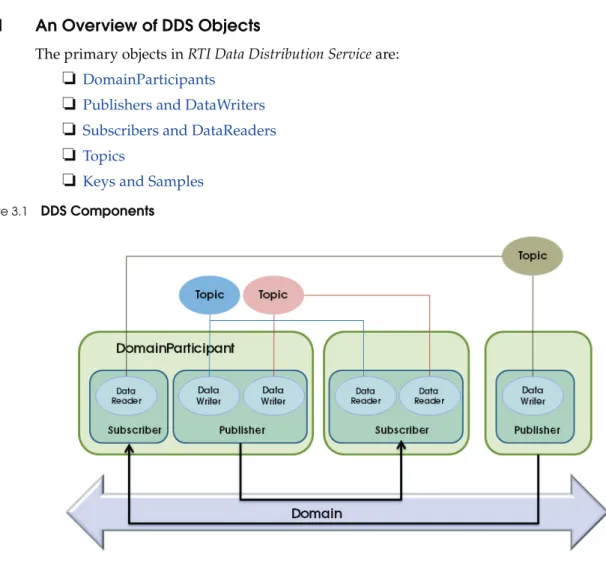
The primary objects in RTI Data Distribution Service are:
❏
DomainParticipants❏
Publishers and DataWriters❏
Subscribers and DataReaders❏
Topics❏
Keys and Samples3.2.2
DomainParticipants
A domain is a concept used to bind individual applications together for communication. To communicate with each other, DataWriters and DataReaders must have the same Topic of the same data type and be members of the same domain. Each domain has a unique integer domain ID.
Applications in one domain cannot subscribe to data published in a different domain. Multiple domains allow you to have multiple virtual distributed systems on the same physical network. This can be very useful if you want to run multiple independent tests Figure 3.1 DDS Components
of the same applications. You can run them at the same time on the same network as long as each test runs in a different domain. Another typical configuration is to isolate your development team from your test and production teams: you can assign each team or even each developer a unique domain.
DomainParticipant objects enable an application to exchange messages within DDS domains. An application must have a DomainParticipant for every domain in which the application will communicate. (Unless your applica-tion is a bridging applicaapplica-tion, it will typically participate in only one domain and have only one DomainParticipant.)
DomainParticipants are used to create Topics, Publishers, DataWriters, Subscribers, and DataReaders in the corresponding domain.
A DDS DomainParticipant is analogous to a JMS Connection.
3
. Hello W
o
rld
The C++ Hello_simple example application contains the following code, which instanti-ates a DomainParticipant. You can find more information about all of the APIs shown in the online documentation.
As you can see, there are four pieces of information you supply when creating a new DomainParticipant:
❏
The ID of the domain to which it belongs.❏
Its qualities of service (QoS). The discussion on Page 3-14 gives a brief introduc-tion to the concept of QoS in DDS; you will learn more in Chapter 4: Capabilities and Performance.❏
Its listener and listener mask, which indicate the events that will generate call-backs to the DomainParticipant. You will see a brief example of a listener callback when we discuss DataReaders below. For a more comprehensive discussion of the DDS status and notification system, see Chapter 4 in the User’s Manual.Here is the same logic in Java:
participant = DDSDomainParticipantFactory::get_instance()-> create_participant( 0, /* Domain ID */ DDS_PARTICIPANT_QOS_DEFAULT, /* QoS */ NULL, /* Listener */ DDS_STATUS_MASK_NONE); participant = DomainParticipantFactory.get_instance().create_participant( 0, // Domain ID DomainParticipantFactory.PARTICIPANT_QOS_DEFAULT, null, // Listener StatusKind.STATUS_MASK_NONE);
What is QoS?
Fine control over Quality of Service (QoS) is perhaps the most important feature of RTI Data Distribution Service. Each data producer-consumer pair can establish independent quality of service (QoS) agreements—even in many-to-many topologies. This allows DDS designs to support extremely complex and flexible data-flow requirements.
QoS policies control virtually every aspect of the DDS model and the underlying communications mechanisms. Many QoS policies are implemented as "contracts" between data producers (DataWriters) and consumers (DataReaders); producers offer and consumers request levels of service. The middleware is responsible for determining if the offer can satisfy the request, thereby establishing the communication or indicating an incompatibility error. Ensuring that participants meet the level-of-service contracts guarantees predictable operation. For example:
❏
Periodic producers can indicate the speed at which they can publish by offering guaranteed update deadlines. By setting a deadline, a producer promises to send updates at a minimum rate. Consumers may then request data at that or any slower rate. If a consumer requests a higher data rate than the producer offers, the middleware will flag that pair as incompatible and notify both the publishing and subscribing applications.❏
Producers may offer different levels of reliability, characterized in part by the number of past data samples they store for retransmission. Consumers may then request differing levels of reliable delivery, ranging from fast-but-unreliable "best effort" to highly reliable in-order delivery. This provides per-data-stream reliability control. A single producer can support consumers with different levels of reliability simultaneously.Other QoS policies control when the middleware detects nodes that have failed, set delivery order, attach user data, prioritize messages, set resource utilization limits, partition the system into namespaces, control durability (for fault tolerance) and much more. The DDS QoS policies offer unprecedented flexible communications control. The RTI Data Distribution Service User's Manual contains details about all the QoS policies offered by DDS.
3
. Hello W
o
rld
3.2.3
Publishers and DataWriters
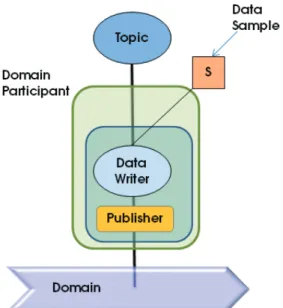
An application uses a DataWriter to publish data into a domain. Once a DataWriter is created and configured with the correct QoS settings, an application only needs to use the DataWriter’s “write” operation to publish data.
A Publisher is used to group individual DataWriters. You can specify default QoS behavior for a Publisher and have it apply to all the DataWriters in that Publisher’s group.
The following code from the C++ Hello_simple example demonstrates creating a DataWriter: A DDS DataWriter is analogous to a JMS TopicPublisher. A DDS Publisher is analogous to the producing aspect of a JMS TopicSession.
Figure 3.3 Entities Associated with Publications
data_writer = participant->create_datawriter( topic,
DDS_DATAWRITER_QOS_DEFAULT, /* QoS */ NULL, /* Listener */
As you can see, each DataWriter is tied to a single topic. All data published by that DataWriter will be directed to that Topic.
As you will learn in the next chapter, each Topic—and therefore all DataWriters for that Topic—is associated with a particular concrete data type. The write operation, which publishes data, is type safe, which means that before you can write data, you must per-form a type cast:
Here is the analogous code in Java:
Note that in this particular code example, you will not find any reference to the Publisher class. In fact, creating the Publisher object explicitly is optional, because many applica-tions do not have the need to customize any behavior at that level. If you, like this exam-ple, choose not to create a Publisher, the middleware will implicitly choose an internal Publisher object. If you do want to create a Publisher explicitly, create it with a call to
par-ticipant.create_publisher (you can find more about this method in the online
documen-tation) and then simply replace the call to participant.create_datawriter with a call to
publisher.create_datawriter.
3.2.4
Subscribers and DataReaders
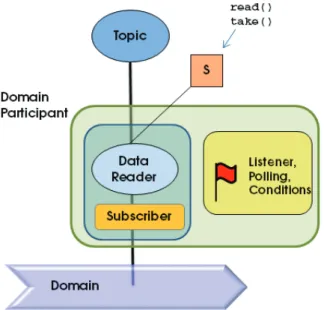
A DataReader is the point through which a subscribing application accesses the data that it has received over the network.
Just as Publishers are used to group DataWriters, Subscribers are used to group DataReaders. Again, this allows you to configure a default set of QoS parameters and event han-dling routines that will apply to all DataReaders in the Sub-scriber's group. string_writer = DDSStringDataWriter::narrow(data_writer); StringDataWriter dataWriter = (StringDataWriter) participant.create_datawriter( topic, Publisher.DATAWRITER_QOS_DEFAULT, null, // listener StatusKind.STATUS_MASK_NONE); A DDS DataReader is analogous to a JMS TopicSubscriber. A DDS Subscriber is analogous to the consuming aspect of a JMS TopicSession.
3
. Hello W
o
rld
The following code from the C++ Hello_simple example demonstrates creating a DataReader:
As you can see, each DataReader is tied to a single topic. A DataReader will only receive data that was published on its Topic.
Here is the analogous code in Java: Figure 3.4 Entities Associated with Subscriptions
data_reader = participant->create_datareader( topic, DDS_DATAREADER_QOS_DEFAULT, /* QoS */ &listener, /* Listener */ DDS_DATA_AVAILABLE_STATUS); StringDataReader dataReader = (StringDataReader) participant.create_datareader( topic, Subscriber.DATAREADER_QOS_DEFAULT, // QoS new HelloSubscriber(), // Listener StatusKind.DATA_AVAILABLE_STATUS);
RTI Data Distribution Service provides multiple ways for you to access your data: you can receive it asynchronously in a listener, you can block your own thread waiting for it to arrive using a helper object called a WaitSet, or you can poll in a non-blocking fash-ion. This example uses the former mechanism, and you will see that it passes a non-NULL listener to the create_datareader method. The listener mask
(DATA_AVAILABLE_STATUS) indicates that the application is only interested in
receiving notifications of newly arriving data. Let’s look at the callback implementation in C++:
The take_next_sample() method retrieves a single data sample (i.e., a message) from the
DataReader, one at a time without blocking. If it was able to retrieve a sample, it will return DDS_RETCODE_OK. If there was no data to take, it will return
DDS_RETCODE_NO_DATA. Finally, if it tried to take data but failed to do so because
it encountered a problem, it will return DDS_RETCODE_ERROR or another
DDS_ReturnCode_t value (see the online documentation for a full list of error codes).
RTI Data Distribution Service can publish not only actual data to a Topic, but also meta-data indicating, for example, that an object about which the DataReader has been receiv-ing data no longer exists. In the latter case, the info argument to take_next_sample() will have its valid_data flag set to false.
This simple example is interested only in data samples, not meta-data, so it only pro-cesses “valid” data:
retcode = string_reader->take_next_sample( ptr_sample, info); if (retcode == DDS_RETCODE_NO_DATA) { /* No more samples */ break;
} else if (retcode != DDS_RETCODE_OK) {
cerr << "Unable to take data from data reader, error " << retcode << endl;
return; }
if (info.valid_data) {
// Valid (this isn't just a lifecycle sample): print it cout << ptr_sample << endl;
3
. Hello W
o
rld
Let’s see the same thing in Java:
Note that in this particular code example, you will not find any reference to the Sub-scriber class. In fact, as with Publishers, creating the SubSub-scriber object explicitly is optional, because many applications do not have the need to customize any behavior at that level. If you, like this example, choose not to create a Subscriber, the middleware will implicitly choose an internal Subscriber object. If you do want to create a Subscriber explicitly, create it with a call to participant.create_subscriber (you can find more about this method in the online documentation) and then simply replace the call to
partici-pant.create_datareader with a call to subscriber.create_datareader.
3.2.5
Topics
Topics provide the basic connection points between DataWriters and DataReaders. To communicate, the Topic of a DataWriter on one node must match the Topic of a DataReader on any other node.
A Topic is comprised of a name and a type. The name is a string that uniquely identifies the Topic within a domain. The type is the structural definition of the data contained within the Topic; this capability is described in Chapter 4: Capabilities and Performance. The C++ Hello_simple example creates a Topic with the following code:
try {
String sample = stringReader.take_next_sample(info); if (info.valid_data) {
System.out.println(sample); }
} catch (RETCODE_NO_DATA noData) { // No more data to read
break; } catch (RETCODE_ERROR e) { // An error occurred e.printStackTrace(); } topic = participant->create_topic(
"Hello, World", /* Topic name*/ DDSStringTypeSupport::get_type_name(), /* Type name */ DDS_TOPIC_QOS_DEFAULT, /* Topic QoS */ NULL, /* Listener */ DDS_STATUS_MASK_NONE);
Besides the new Topic’s name and type, an application specifies three things:
❏
A suggested set of QoS for DataReaders and DataWriters for this Topic.❏
A listener and listener mask that indicate which events the application wishes to be notified of, if any.In this case, the Topic’s type is a simple string, a type that is built into the middleware. Let’s see the same logic in Java:
3.2.6
Keys and Samples
The data values associated with a Topic can change over time. The different values of the Topic passed between appli-cations are called samples.
An application may use a single Topic to carry data about many objects. For example, a stock-trading application may
have a single topic, "Stock Price," that it uses to communicate information about Apple, Google, Microsoft, and many other companies. Similarly, a radar track management application may have a single topic, "Aircraft Position," that carries data about many different airplanes and other vehicles. These objects within a Topic are called instances. For a specific data type, you can select one or more fields within the data type to form a key. A key is used to uniquely identify one instance of a Topic from another instance of the same Topic, very much like how the primary key in a database table identifies one record or another. Samples of different instances have different values for the key. Sam-ples of same instance of a Topic have the same key. Note that not all Topics have keys. For Topics without keys, there is only a single instance of that Topic.
Topic topic = participant.create_topic( "Hello World", StringTypeSupport.get_type_name(), DomainParticipant.TOPIC_QOS_DEFAULT, // QoS null, // Listener StatusKind.STATUS_MASK_NONE); A DDS sample is analogous to a message in other publish-subscribe middleware.
4. Ca pa bilities and Pe rfo rm a n c e
In the previous chapter, you learned the basic concepts in RTI Data Distribution Service and applied them to a simple "Hello, World" application. In this chapter, you will learn more about some of the powerful and unique benefits of RTI Data Distribution Service:
❏
A rich set of functionality, implemented for you by the middleware so that you don't have to build it into your application. Most of this functionality—including sophisticated data filtering and expiration, support for durable historical data, and built-in support for periodic data and deadline enforcement—can be defined partially or even completely in declarative quality-of-service (QoS) poli-cies specified in an XML file, allowing you to examine and update your applica-tion's configuration without rebuilding or redeploying it. See Customizing Behavior: QoS Configuration (Section 4.2) for more information about how to configure QoS policies. Chapter 5: Design Patterns for Rapid Development describes how to reduce, filter, and cache data as well as other common func-tional design patterns.❏
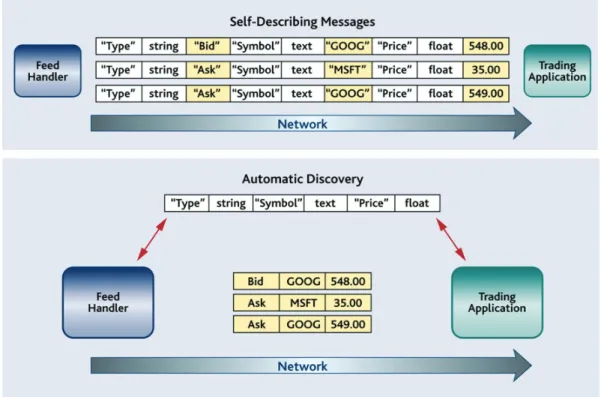
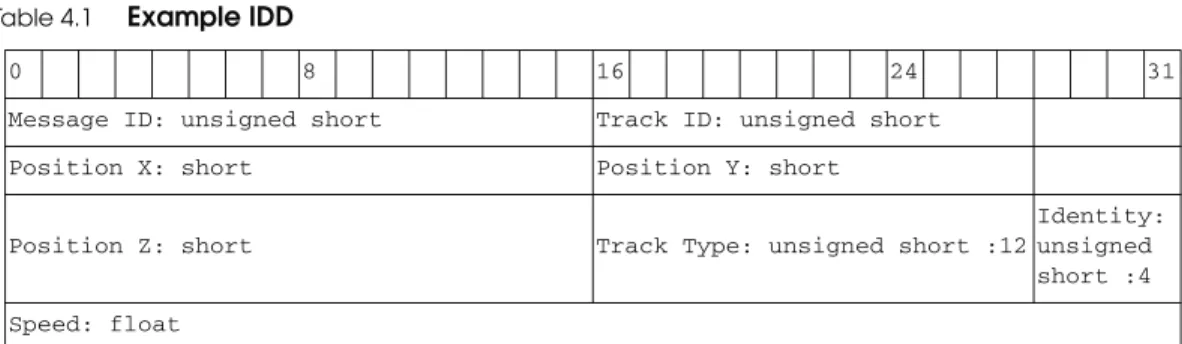
Compact, type-safe data. The unique and expressive data-typing system built into RTI Data Distribution Service supports not only opaque payloads but also highly structured data. It provides both static and dynamic type safety—without the network overhead of the "self-describing" messages of other networking middleware implementations. See Compact, Type-Safe Data: Programming with Data Types (Section 4.3) for more information.❏
Industry-leading performance. RTI Data Distribution Service provides industry-leading latency, throughput, and jitter performance. Chapter 6: Design Patterns for High Performance provides specific QoS configuration examples to help you get started. You can quickly see the effects of the changes you make using the code examples described in that chapter. You can benchmark the performance of RTI Data Distribution Service on your own systems with the RTI ExamplePerfor-mance Test. You can download the test from the RTI Public Knowledge Base, http://www.rti.com/kb/. Search for ‘Example Performance Test for RTI Data Distribution Service.’ (For more information about this test, see Chapter 7).
❏
You can also review the data from several performance benchmarks here: http://www.rti.com/products/dds/benchmarks-cpp-linux.html.
Next Chapter —> Chapter 5: Design Patterns for Rapid Development
4.1
Automatic Application Discovery
As you’ve been running the code example described in this guide, you may have noticed that you have not had to start any server processes or configure any network addresses. Its built-in automatic discovery capability is one important way in which RTI Data Distribution Service differs from other networking middleware implementations. It is designed to be low-overhead and require minimal configuration, so in many cases there is nothing you need to do; it will just work. Nevertheless, it’s helpful to under-stand the basics so that you can decide if and when a custom configuration is necessary. Before applications can communicate, they need to “discover” each other. By default, RTI Data Distribution Service applications discover each other using shared memory or UDP loopback if they are on the same host or using multicast1 if they are on different hosts. Therefore, to run an application on two or more computers using multicast, or on a single computer with a network connection, no changes are needed. They will dis-cover each other automatically! The chapter on Disdis-covery in the RTI Data Distribution Service User’s Manual describes the process in more detail.
If you want to use computers that do not support multicast (or you need to use unicast for some other reason), or if you want to run on a single computer that does not have a network connection (in which case your operating system may have disabled your net-work stack), there is a simple way to control the discovery process—you won’t even have to recompile. Application discovery can be configured through the NDDS_DISCOVERY_PEERS environment variable or in your QoS configuration file.
1. With the exception of LynxOS. On LynxOS systems, multicast is not used for discovery by default unless NDDS_DISCOVERY_PEERS is set.