ISSN (Online): 2319-8753 ISSN (Print) : 2347-6710
I
nternational
J
ournal of
I
nnovative
R
esearch in
S
cience,
E
ngineering and
T
echnology
(A High Impact Factor, Monthly, Peer Reviewed Journal)Visit: www.ijirset.com
Vol. 8, Issue 3, March 2019
SQL Server Development Best Practices
Sourav Mukherjee
Senior Database Administrator & PhD Student, University of the Cumberlands Chicago, United States
ABSTRACT: Following best practices, while writing SQL code is important. In most of the cases, the coding has not met the standard and database script computer agendas are deserted. Those who are beginners in SQL server and the experts, following the best practices would be highly benefited. Coding is always a fun but challenging job. It is not only about producing the desired result as required by the business requirement but also a mandatory requirement to maintain the correct coding standards by using the optimum requirement of variable size, indexes and other key parameters to maintain the best coding practices. This article gives an overview of best practices in SQL server and guidelines. Many of us already have been following the best practices but the document will narrate the salient points to be considered while developing any code to get the optimum results to keep the Microsoft defined standards intact.
KEYWORDS: Data, SQL, Server, Code, SQL, Procedural language, Cursor
I. INTRODUCTION
Is SQL Server a Structured Query Language??
The Standard query language for requesting information from the database using insert/update/delete and select statement.
Follows ANSI standards.
Set based approach. Remember! Not a procedural approach. What is Set based approach?
o The Optimizer generates an execution plan first.
o Execution engine executes the plan to retrieve the data from physical storage o Processes the output in an efficient manner.
What is Procedural approach?
o We query the database to obtain the result set.
o We write data operational and manipulation logic using loops, conditions and processing statements to produce the results. Same, as like Cursor!
SQL Server Edition: Developers use Developer Edition. Not SQL Express because of limitations. 1 GB Max SQL Server Memory used by DB Engine
10 GB Max size of each relational database No SQL Agent
Buffer Cache limit for each instance 1 MB of RAM
Relational DB engine is restricted to lesser of 1 socket/4 cores.
Steps to Identify a Long Running Query:
ISSN (Online): 2319-8753 ISSN (Print) : 2347-6710
I
nternational
J
ournal of
I
nnovative
R
esearch in
S
cience,
E
ngineering and
T
echnology
(A High Impact Factor, Monthly, Peer Reviewed Journal)Visit: www.ijirset.com
Vol. 8, Issue 3, March 2019
Execute the script.
Explain Plan Analysis:
1. Once a query which is long running has been identified, take the explain plan to understand the query plan and take remedial action to improve the query.
Select the below-highlighted option to run the query with the Actual Execution Plan. If you can’t run the query under the Actual Execution Plan (Screen Shot #1), use another option as “Display Estimated Execution Plan”.
Pic 1: Screen Shot#1 (Actual Execution Plan)
Pic 2: Screen Shot#1 (Estimated Execution Plan)
Things to look for in an explain plan:
1. If the query goes for a full table scan or picks up right indexes
2. If the memory used for sort/aggregation is within limits of the Postgres memory size and not going to disk 3. If the join condition is inefficient and taking time - try to review indexes, statistics and rewrite the query 4. How much total memory used in terms of buffer reads
5. Understand if parallelism is triggered and if not, analyze the reason for it
SQL Best Practices:
1. Use select count judiciously as this is not efficient in SQL Server 2. Use columns with indexes in where clause
3. Use only columns of relevance in the select statement
4. Use columns of fixed width when performing aggregate functions
ISSN (Online): 2319-8753 ISSN (Print) : 2347-6710
I
nternational
J
ournal of
I
nnovative
R
esearch in
S
cience,
E
ngineering and
T
echnology
(A High Impact Factor, Monthly, Peer Reviewed Journal)Visit: www.ijirset.com
Vol. 8, Issue 3, March 2019
DB Level Best Practices:
1. Shared Buffer/Memory: Set shared buffer & memory space to accommodate at least 2 partitions data 2. Accommodate sort memory requirements - Need to be cautious as this is set for every connection and hence would occupy more space as the number of connections increases.
3. Partition tables based on the predicate to restrict the rows read for the table
Database Design:
Maintain Referential Integrity at all times. Primary Key Foreign Key
Choose the narrowest size of the columns you can. Choose the smallest and required Datatype. • Remember Varchar is not nvarchar.
• Nvarchar uses 2 bytes/character and Varchar uses 1 byte • Varchar stores ASCII Data
• Nvarchar stores UNICODE Data.
Database Configuration Settings: Create appropriate Database File Sizes • Initial DB size
• Equal data file sizes under the database. Filegroups use a proportional fill strategy.
• Appropriate database DB file growth value (use in MB, avoid %). Such as 64 MB and in its multiple. • BEST OPTION: Increase DB file appropriately so that SQL Engine will not busy allocating size. Maintain the same configuration across different environment.
Index:
Prefer creating a unique index over Non-Unique Index.
SQL Server can often search through a unique index faster than the other. Avoid adding Clustered Indexes to a GUID column. It takes 16-bytes storage!!
More than an Identity column. Makes it very larger, increases I/O reads, hurts performance. Keep the “width” of the indexes as narrow as possible.
This reduces the size of the index, reduces I/O reads and also index maintenance. Use appropriate Naming Convention to avoid creating duplicate indexes. Use appropriate column sequence/Precedence while you create Indexes. DO NOT Create duplicate index. It hurts performance.
Identify Missing, unused indexes. Create and discard as needed. Test thoroughly in Non-Prod before taking to PROD.
Put heavily accessed tables and the non-clustered indexes that belong to those tables on different filegroups.
This Improves Performance!
Data Purging/Cleanup
Remove old data from your tables if the application does not need to display old records such as older than 90 days or 120 days.
Create an appropriate strategy to write your own script to clean up the records from tables.
Identify the base table and delete the records from other child tables using the primary key. Use the Primary key as the cleanup condition.
ISSN (Online): 2319-8753 ISSN (Print) : 2347-6710
I
nternational
J
ournal of
I
nnovative
R
esearch in
S
cience,
E
ngineering and
T
echnology
(A High Impact Factor, Monthly, Peer Reviewed Journal)Visit: www.ijirset.com
Vol. 8, Issue 3, March 2019
Before you initiate cleanup to ensure you have correct indexes, if not create accordingly based on delete condition column.
If needed create appropriate Non-Clustered Index on a temp table. Think of Table Partition as one other Best Practice.
Database Objects:
Use user-defined constraint names, rather using system-generated names. While creating your own procedure make it start using “Usp_” rather using “sp_”
User objects to go to their respective filegroups. Do not create user objects and data to sit in the system/primary filegroup. All system tables are allocated to primary filegroup.
This naming convention is very much standard in that it first searches in the master database the specific object if the specific database name is not specified where the object is really sitting in and SQL Server will first search the master database to see if the object exists there and then it will search the user database.
Transact-SQL
Regular join statements in two/more tables in your query will be performed faster using proper indexes are present.
Do not over-index your OLTP tables.
Use appropriate Begin Tran. Commit/ Rollback Tran inside the code block. Use TRY...Catch blocks. Find the key columns which really required to be encrypted. Do not Overdo!
Create a Non-Clustered covering index on frequently performing the same queries. Choose the correct fill factor. Page Split hurts the performance!
Version/Source Control
Maintain all code in a source control system. Update the source control always for all type of changes done in the code.
Queries/Stored Procedures Keep a smaller transaction.
Avoid using *. Instead, choose the right columns.
Avoid using the query hint when you are not exactly sure. Use SET NOCOUNT ON/OFF
Do not use unnecessary SELECT statement in the CODE. Carefully choose UNION, UNION all and Distinct clauses
Avoid using RTRIM() and LTRIM(). Instead of that correct the data. Avoid unnecessary use of the DISTINCT operator.
Use WHERE Clause always.
Design your system to fetch records using the TOP operator. Avoid accidental SELECT *
Remove temporary tables from the database after the operation. Those consume space, increase maintenance time.
Carefully choose special characters. If not, may change the execution plan and lead to bad performance. Parameter Sniffing!
Avoid SQL Server to do Implicit type conversion. Instead, use correct data types.
II. PROCESS IMPROVEMENT
ISSN (Online): 2319-8753 ISSN (Print) : 2347-6710
I
nternational
J
ournal of
I
nnovative
R
esearch in
S
cience,
E
ngineering and
T
echnology
(A High Impact Factor, Monthly, Peer Reviewed Journal)Visit: www.ijirset.com
Vol. 8, Issue 3, March 2019
III. CONSULTATION
It can be both Internal and External
Check with your in-house developers, DBAs for any advice related to Microsoft SQL Server Best Practices they are following.
You can seek training from any good external training providers.
Another good option is to use good third-party tools such as RedGate, FogLight, Idera, SQLSentry, SolarWinds and check the performance of the environment by monitoring the scripts.
Process Improvement
Document common mistakes in the Lessoned Learned page per the PMP best practice guidelines. Do check out the new upcoming editions and try to align your code accordingly.
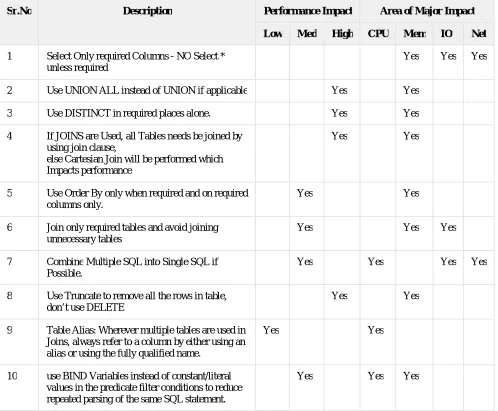
SQL Best Practices with Areas of Performance Impact:
Sr.No Description Performance Impact Area of Major Impact
Low Med High CPU Mem IO Net
1 Select Only required Columns - NO Select * unless required
Yes Yes Yes
2 Use UNION ALL instead of UNION if applicable Yes Yes
3 Use DISTINCT in required places alone. Yes Yes
4 If JOINS are Used, all Tables needs be joined by using join clause,
else Cartesian Join will be performed which Impacts performance
Yes Yes
5 Use Order By only when required and on required columns only.
Yes Yes
6 Join only required tables and avoid joining unnecessary tables
Yes Yes Yes
7 Combine Multiple SQL into Single SQL if Possible.
Yes Yes Yes Yes
8 Use Truncate to remove all the rows in table, don’t use DELETE
Yes Yes
9 Table Alias: Wherever multiple tables are used in Joins, always refer to a column by either using an alias or using the fully qualified name.
Yes Yes
10 use BIND Variables instead of constant/literal values in the predicate filter conditions to reduce repeated parsing of the same SQL statement.
ISSN (Online): 2319-8753 ISSN (Print) : 2347-6710
I
nternational
J
ournal of
I
nnovative
R
esearch in
S
cience,
E
ngineering and
T
echnology
(A High Impact Factor, Monthly, Peer Reviewed Journal)Visit: www.ijirset.com
Vol. 8, Issue 3, March 2019
11 Don’t Use Functions in the columns used in where Clause. As required consider creating a Function Based Index.
Yes
12 RETURNING use this Clause to fetch the Updated Value instead of using Select after an Update.
Yes Yes
13 For Upsert requirements consider using MERGE Statements.
Yes Yes Yes
14 Use WITH Clause if the same subquery is used multiple times in where Clause
Yes
15 Function Usage in SQL: If functions are used in queries, use it in the Outermost SQL, so that it will be applied only on the required rows
Yes Yes
16 Create INDEXES on Columns used in Where Clause and Join conditions and Aggregation and Order Clause as applicable
Yes Yes Yes
17 If it is required to use a Composite Index, try to use the “Leading” column in the “WHERE” clause.
Yes
18 The Order of Columns in Concatenated Index needs to be in the higher Cardinality as the first and lowest Cardinality in the Last.
Yes Yes
19 Use BITMAP Indexes on columns with less Cardinality only on Read Only tables. This needs to be mostly used in OLAP Environments.
Yes Yes
20 Create concatenated indexes to facilitate full index scans without scanning Table.
Yes Yes
21 Use Built-In Functions they are efficient than Customer Code
Yes
22 Keep Database Object STATISTICS up to date. Yes Yes Yes Yes
23 Do Not collect statistics on GLOBAL Temporary Tables,If required and the volume is constant collect STATISTICS and Lock it.
Yes Yes Yes Yes
24 Used De-Normalized Table structure for Reporting SQL's
ISSN (Online): 2319-8753 ISSN (Print) : 2347-6710
I
nternational
J
ournal of
I
nnovative
R
esearch in
S
cience,
E
ngineering and
T
echnology
(A High Impact Factor, Monthly, Peer Reviewed Journal)Visit: www.ijirset.com
Vol. 8, Issue 3, March 2019
25 Normalization should be done by keeping Performance in Mind.
26 Use PARALLELISM in OLAP Environments with required Degree of Parallelism.
Yes Yes Yes
27 Never Use PARALLELISM in Multi user Environments i.e. OLTP
Yes
28 Create Materialized View in OLAP environments wherever applicable and use the QUERY
REWRITE to use this Mat-view whenever Possible
Yes
29 Create PARTITIONS on Tables and Indexes as Applicable
Yes
30 While querying on a partitioned table try to use the partition key in the “WHERE” clause if possible.
Yes Yes
31 Use Proper Partitioning Techniques so that each partition will get almost equal number of Records
Yes Yes
32 Partition Based Joins will improve the Performance if the Join condition columns are Partition in Both of the Joined Tables
Yes Yes
33 Use SEQUENCE CACHE whenever batch of records gets inserted with sequence Values
Yes
34 Use the Analytic Functions instead of Regrouping and write multiple level of queries Ex: GROUP SET, ROLLUP, CUBE
Yes
35 Use COPY command for bulk inserts Yes Yes
IV. CONCLUSIONS AND FUTURE STUDY
Any successful database application is confined to good database design to provide great performance and provide a greater level of security. For that purpose, it is an essential choice to maintain code base in a proper repository such as TFS or any third-party utility so that the code history can be well maintained. For a healthy database terrain, it requires appropriate coding and design methodologies. Consider taking the furnished tips and best practices to apply them to the project when you engage the database professionals to help to make your client’s project successful and to add a solid value add to the environment.
REFERENCES
[1] Author Jimmy Spencer, July 6, 2018, retrieve from https://securityfirstcorp.com/why-is-cyber-security-important/ [2] Cisco, retrieved from https://www.cisco.com/c/en/us/products/security/what-is-cybersecurity.html
ISSN (Online): 2319-8753 ISSN (Print) : 2347-6710
I
nternational
J
ournal of
I
nnovative
R
esearch in
S
cience,
E
ngineering and
T
echnology
(A High Impact Factor, Monthly, Peer Reviewed Journal)Visit: www.ijirset.com
Vol. 8, Issue 3, March 2019
[4] Mukherjee, S. (2019). Popular SQL Server Database Encryption Choices. arXiv preprint
arXiv:1901.03179.
[5] Mukherjee, S. (2019). Benefits of AWS in Modern Cloud. arXiv preprint arXiv:1903.03219.
[6] Mukherjee, S. (2019). How IT allows E-Participation in Policy-Making Process. arXiv
preprint arXiv:1903.00831.
[7] Mukherjee, S. (2019). Indexes in Microsoft SQL Server. arXiv preprint arXiv:1903.08334.
[8] Fig1: Author Tony Perez, OCTOBER 31, 2015, retrieve from https://perezbox.com/2015/10/website-security-is-not-an-absolute/ [9] Fig2: Author Susan Ranford, Mar 29, 2018, retrieve from https://www.ittropolis.com/physical-security-just-important-online-security/
BIOGRAPHY