Distributed Client Tracking Solution for Providing
Dynamic Topology Adaptation and High Relay
Throughput for Client Mobility
Divya Mallela
1; Mr.Deena Babu Mandru
2& Prof.Dr.G.Manoj Someswar
31. M.Tech.(CSE) from Narasimha Reddy Engineering College, Affiliated to JNTUH, Hyderabad, Telangana, India
2. M.Tech. (CSE), Assistant Professor, Department of CSE, Narasimha Reddy Engineering College, Affiliated to JNTUH, Hyderabad, Telangana, India
3. B.Tech., M.S.(USA), M.C.A., Ph.D., Principal & Professor, Department Of CSE, Anwar-ul-uloom College of Engineering & Technology, Affiliated to JNTUH, Vikarabad, Telangana, India
ABSTRACT:
Mobile ad hoc networks (MANETs) are ideal for situations where a fixed infrastructure is unavailable
or infeasible. Today’s MANETs, however, may suffer from network partitioning. This limitation makes MANETs unsuitable for applications such as crisis management and battlefield communications, in which team members might need to work in groups scattered in the application terrain. In such applications, intergroup communication is crucial to the team collaboration. To address this weakness, we introduce in this paper a new class of ad-hoc network called Autonomous Mobile Mesh Network (AMMNET). Unlike conventional mesh networks, the mobile mesh nodes of an AMMNET are capable of following the mesh clients in the application terrain, and organizing themselves into a suitable network topology to ensure good connectivity for both intra- and intergroup communications. We propose a distributed client tracking solution to deal with the dynamic nature of client mobility, and present techniques for dynamic topology adaptation in accordance with the mobility pattern of the clients. Our simulation results indicate that AMMNET is robust against network partitioning and capable of providing high relay throughput for the mobile clients.
KEYWORDS: Digital Audio Broadcasting (DAB), Global System for Mobile communications (GSM),
Global Positioning System (GPS), Peer-To-Peer (P2P), Structured Group Mobility Model (SGMM), Wireless Mesh Networks (WMNs)
INTRODUCTION
Mobile computing is the discipline for creating an information management platform, which is free from spatial and temporal constraints. The freedom from these constraints allows its users to access and process desired information from anywhere in the
sufficient processing power are available on the spot, where as in reality they may be located far away. Otherwise Mobile computing is a generic term used to refer to a variety of devices that allow people to access data and information from where ever they are.[1]
Figure 1: Structure of mobile computing
Different types of devices used for the mobile computing:
1. Personal digital assistant/enterprise digital assistant
2. Smartphones 3. Tablet computers 4. Netbooks
5. Ultra-mobile PCs 6. Wearable computers
7. Palmtops/pocket computers[2] Applications of Mobile Computing:
1. Vehicles:
Tomorrow’s cars will comprise many
wireless communication systems and mobility aware applications. Music, news, road conditions, weather reports, and other broadcast information are received via digital audio broadcasting (DAB) with 1.5 M-bits/s. For personal communication, a global system for mobile communications (GSM) phone might be available offering voice and data connectivity with 384 k-bits/s. For remote areas satellite communication can be used, while the current position of the car is determined via global positioning system (GPS). Additionally, cars driving in the same area build a local ad-hoc network for fast information exchange in
emergency situations or to help each other keeping a safe distance. In case of an accident, not only will the airbag be triggered, but also an emergency call to a service provider informing ambulance and police. Cars with this technology are already available. Future cars will also inform other cars about accidents via the ad hoc network to help them slow down in time, even before a driver can recognize the accident. Buses, trucks, and train are already transmitting maintenance and logistic information to their home base, which helps o improve organization (fleet management), and thus save time and money.[3]
2. Emergency:
Just imagine the possibilities of an ambulance with a high quality wireless connection to a hospital. After an accident, vital information about injured persons can be sent to the hospital immediately. There, all necessary steps for this particular type of accident can be prepared or further specialists can be consulted for an early diagnosis. Furthermore, wireless networks are the only means of communication in the case of natural disasters such as hurricanes or earthquakes.
3. Business:
Today’s typical traveling salesman
needs instant access to the company’s database: to
ensure that the files on his or her laptop reflect the actual state, to enable the company to keep track of all activities of their traveling employees, to keep databases consistent etc., with wireless access, the laptop can be turned into a true mobile office.[4] Benefits of Mobile Computing:
· Improve business productivity by streamlining interaction and taking advantage of immediate access
optimizing logistics and accelerating processes
· Strengthen customer relationships by creating more opportunities to connect, providing information at their fingertips when they need it most
· Gain competitive advantage by creating brand differentiation and expanding customer experience
· Increase work force effectiveness and capability by providing on-the-go access · Improve business cycle processes by
redesigning work flow to utilize mobile devices that interface with legacy applications[5]
Advantages of Mobile Computing:
Mobile computing has changed the complete landscape of human being life. Following are the clear advantages of Mobile Computing:
1. Location flexibility:
This has enabled user to work from anywhere as long as there is a connection established. A user can work without being in a fixed position. Their mobility ensures that they are able to carry out numerous tasks at the same time perform their stated jobs.
2. Saves Time:
The time consumed or wasted by travelling from different locations or to the office and back, have been slashed. One can now access all the important documents and files over a secure channel or portal and work as if they were on their computer. It has enhanced telecommuting in many companies. This also reduces unnecessary expenses that might be incurred.[6]
3. Enhanced Productivity:
Productive nature has been boosted by the fact that a worker can simply work efficiently and effectively from which ever location they see
comfortable and suitable. Users are able to work with comfortable environments.
4. Ease of research:
Research has been made easier, since users will go to the field and search for facts and feed them back to the system. It has also made it easier for field officer and researchers to collect and feed data from wherever they without making unnecessary trip to and from the office to the field.[7]
5. Entertainment:
Video and audio recordings can now be streamed on the go using mobile computing. It's easy to access a wide variety of movies, educational and informative material. With the improvement and availability of high speed data connections at considerable costs, one is able to get all the entertainment they want as they browser the internet for streamed data. One can be able to watch news, movies, and documentaries among other entertainment offers over the internet. This was not such before mobile computing dawned on the computing world.
6. Streamlining of Business Processes: Business processes are now easily available through secured connections. Basing on the factor of security, adequate measures have been put in place to ensure authentication and authorization of the user accessing those services.[8]
Some business functions can be run over secure links and also the sharing of information between business partners. Also it's worth noting that lengthy travelling has been reduced, since there is the use of voice and video conferencing.
Meetings, seminars and other informative services can be conducted using the video and voice conferencing. This cuts down on travel time and expenditure.
LITERATURE SURVEY
environments characterized by very long delay paths and frequent network partitions. These problems are exacerbated by end nodes with limited power or memory resources. Often deployed in mobile and extreme environments lacking continuous connectivity, many such networks have their own specialized protocols, and do not utilize IP. To achieve interoperability between them, we propose a network architecture and application interface structured around optionally-reliable asynchronous message forwarding, with limited expectations of end-to-end connectivity and node resources. The architecture operates as an overlay above the transport layers of the networks it interconnects, and provides key services such as in-network data storage and retransmission, interoperable naming, authenticated forwarding and a coarse-grained class of service.[9]
Querying in the context of moving objects environments has been largely studied. Extensive research effort has also been dedicated to exploring different techniques of handling uncertainty, an issue intrinsic to the nature of node mobility. Current trends in moving object database-related applications impose the need to consider uncertainty from different perspectives. In this paper, we examine the case in which the exact locations of moving objects are never reported to the central database server. Instead, deductions about the objects positions are based on data gathered from the readings of mobile sensors.[10] With this arrangement in mind, we introduce and study approximate rank queries, where a mobile object is in the answer set of a query with probability p and is assigned a rank with probability P. The rank reflects the objects approximate distance from the query point. Queries are evaluated based on different pruning techniques and ranking heuristics. Our work is backed with an extensive simulation study, which examines the
effectiveness of the algorithm with varied numbers of mobile sensors and objects.[11]
In the performance evaluation of a protocol for an ad hoc network, the protocol should be tested under realistic conditions including, but not limited to, a sensible transmission range, limited buffer space for the storage of messages, representative data traffic models, and realistic movements of the mobile users (i.e., a mobility model). This paper is a survey of mobility models that are used in the simulations of ad hoc networks. We describe several mobility models that represent mobile nodes whose movements are independent of each other (i.e., entity mobility models) and several mobility models that represent mobile nodes whose movements are dependent on each other (i.e., group mobility models). The goal of this paper is to present a number of mobility models in order to offer researchers more informed choices when they are deciding upon a mobility model to use in their performance evaluations. Lastly, we present simulation results that illustrate the importance of choosing a mobility model in the simulation of an ad hoc network protocol. Specifically, we illustrate how the performance results of an ad hoc network protocol drastically change as a result of changing the mobility model simulated.[12]
parameterizes group structure and generates movement sequences for use in simulations. We define the model and demonstrate how such a model of node mobility may be used in creating simulations of several MANET scenarios. We compare simulations using the SGMM with other models using various routing algorithms. Our preliminary results indicate that accurate representation of group structure has a significant effect on the overall simulation, particularly in the area of link stability. The results also imply the need for routing algorithms that take group structure into account.[14]
Anonymity has received increasing attention in the literature due to the users' awareness of their privacy nowadays. Anonymity provides protection for users to enjoy network services without being traced. While anonymity-related issues have been extensively studied in payment-based systems such as e-cash and peer-to-peer (P2P) systems, little effort has been devoted to wireless mesh networks (WMNs). On the other hand, the network authority requires conditional anonymity such that misbehaving entities in the network remain traceable. In this paper, we propose a security architecture to ensure unconditional anonymity for honest users and traceability of misbehaving users for network authorities in WMNs. The proposed architecture strives to resolve the conflicts between the anonymity and traceability objectives, in addition to guaranteeing fundamental security requirements including authentication, confidentiality, data integrity, and nonrepudiation. Thorough analysis on security and efficiency is incorporated, demonstrating the feasibility and effectiveness of the proposed architecture.[15] SYSTEM STUDY
FEASIBILITY STUDY
The feasibility of the project is analyzed in this phase and business proposal is put forth with a
very general plan for the project and some cost estimates. During system analysis the feasibility study of the proposed system is to be carried out. This is to ensure that the proposed system is not a burden to the company. For feasibility analysis, some understanding of the major requirements for the system is essential.
Three key considerations involved in the feasibility analysis are
¨ ECONOMICAL FEASIBILITY
¨ TECHNICAL FEASIBILITY
¨ SOCIAL FEASIBILITY
ECONOMICAL FEASIBILITY This study is carried out to check the economic impact that the system will have on the organization. The amount of fund that the company can pour into the research and development of the system is limited. The expenditures must be justified. Thus the developed system as well within the budget and this was achieved because most of the technologies used are freely available. Only the customized products had to be purchased.
TECHNICAL FEASIBILITY
This study is carried out to check the technical feasibility, that is, the technical requirements of the system. Any system developed must not have a high demand on the available technical resources. This will lead to high demands on the available technical resources. This will lead to high demands being placed on the client. The developed system must have a modest requirement, as only minimal or null changes are required for implementing this system.
SOCIAL FEASIBILITY
the methods that are employed to educate the user about the system and to make him familiar with it. His level of confidence must be raised so that he is also able to make some constructive criticism, which is welcomed, as he is the final user of the system.
SYSTEM DESIGN
SYSTEM ARCHITECTURE:
Figure 2: System Architecture DATA FLOW DIAGRAM:
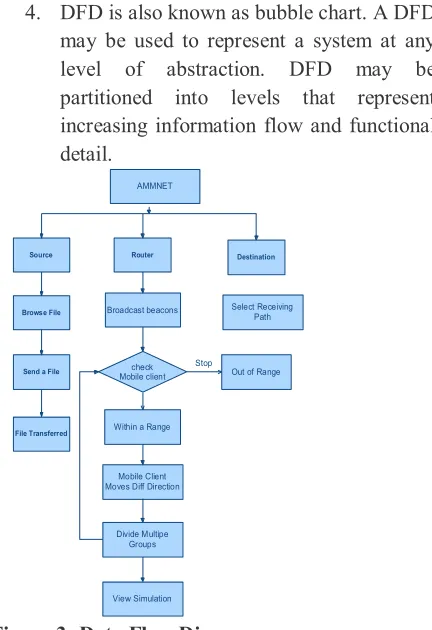
1. The DFD is also called as bubble chart. It is a simple graphical formalism that can be used to represent a system in terms of input data to the system, various processing carried out on this data, and the output data is generated by this system.
2. The data flow diagram (DFD) is one of the most important modeling tools. It is used to model the system components. These components are the system process, the data used by the process, an external entity that interacts with the system and the information flows in the system.
3. DFD shows how the information moves through the system and how it is modified by a series of transformations. It is a graphical technique that depicts information flow and the transformations that are applied as data moves from input to output.
4. DFD is also known as bubble chart. A DFD may be used to represent a system at any level of abstraction. DFD may be partitioned into levels that represent increasing information flow and functional detail.
check Mobile client
Within a Range AMMNET
Source Router
Stop
Out of Range Destination
Browse File
Send a File
File Transferred
Broadcast beacons
Mobile Client Moves Diff Direction
Divide Multipe Groups
View Simulation
Select Receiving Path
Figure 3: Data Flow Diagram UML DIAGRAMS
UML stands for Unified Modeling Language. UML is a standardized general-purpose modeling language in the field of object-oriented software engineering. The standard is managed, and was created by, the Object Management Group.
The goal is for UML to become a common language for creating models of object oriented computer software. In its current form UML is comprised of two major components: a Meta-model and a notation. In the future, some form of method or process may also be added to; or associated with, UML.
software system, as well as for business modeling and other non-software systems.
The UML represents a collection of best engineering practices that have proven successful in the modeling of large and complex systems.
The UML is a very important part of developing objects oriented software and the software development process. The UML uses mostly graphical notations to express the design of software projects.
GOALS:
The Primary goals in the design of the UML are as follows:
1. Provide users a ready-to-use, expressive visual modeling Language so that they can develop and exchange meaningful models. 2. Provide extendibility and specialization
mechanisms to extend the core concepts. 3. Be independent of particular programming
languages and development process. 4. Provide a formal basis for understanding
the modeling language.
5. Encourage the growth of OO tools market. 6. Support higher level development concepts
such as collaborations, frameworks, patterns and components.
7. Integrate best practices. USE CASE DIAGRAM:
A use case diagram in the Unified Modeling Language (UML) is a type of behavioral diagram defined by and created from a Use-case analysis. Its purpose is to present a graphical overview of the functionality provided by a system in terms of actors, their goals (represented as use cases), and any dependencies between those use cases. The main purpose of a use case diagram is to show what system functions are performed for which actor. Roles of the actors in the system can be depicted.
Mobile Client
Split up a group
Sink File Tranferrred
View Simulation
Send Beacons Message
Moves Different Direction
View Different Groups File Received
Select Destination Path
Browse a file
Router
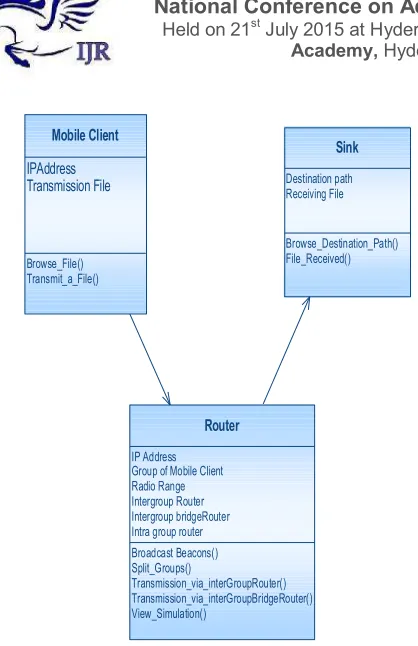
Figure 4: Use Case Diagram CLASS DIAGRAM:
Mobile Client
IPAddress Transmission File
Browse_File() Transmit_a_File()
Router
IP Address Group of Mobile Client Radio Range Intergroup Router Intergroup bridgeRouter Intra group router
Broadcast Beacons() Split_Groups()
Transmission_via_interGroupRouter() Transmission_via_interGroupBridgeRouter() View_Simulation()
Sink
Destination path Receiving File
Browse_Destination_Path() File_Received()
Figure 5: Class Diagram SEQUENCE DIAGRAM:
A sequence diagram in Unified Modeling Language (UML) is a kind of interaction diagram that shows how processes operate with one another and in what order. It is a construct of a Message Sequence Chart. Sequence diagrams are sometimes called event diagrams, event scenarios, and timing diagrams.
Source Router
Sink
IP Address
Browse a File
File Transferred
Browse Deatination Path
Broadcast Beacons
Check Mobile Clients are within Radio Range
Split Groups
Transmission done by Routers Repeat
View Simulation
File Received
Figure 6: Sequence Diagram ACTIVITY DIAGRAM:
Transmit file to Sink
Broadcast Beacons
IP Address Mobile client
Split Mobile Clients to different Groups
Browse a File
AMMNET
Router
Check Range of Mobile Client
Mobile Clients are Moves Different Direction
File Received to Sink
Figure 7: Activity Diagram
INPUT DESIGN
The input design is the link between the information system and the user. It comprises the developing specification and procedures for data preparation and those steps are necessary to put transaction data in to a usable form for processing can be achieved by inspecting the computer to read data from a written or printed document or it can occur by having people keying the data directly into the system. The design of input focuses on controlling the amount of input required, controlling the errors, avoiding delay, avoiding extra steps and keeping the process simple. The input is designed in such a way so that it provides security and ease of use with retaining the privacy. Input Design considered the following things:
Ø What data should be given as input?
Ø How the data should be arranged or coded?
Ø The dialog to guide the operating personnel in providing input.
Ø Methods for preparing input validations and steps to follow when error occur. OBJECTIVES
1.Input Design is the process of converting a user-oriented description of the input into a computer-based system. This design is important to avoid errors in the data input process and show the correct direction to the management for getting correct information from the computerized system.
2. It is achieved by creating user-friendly screens for the data entry to handle large volume of data. The goal of designing input is to make data entry easier and to be free from errors. The data entry screen is designed in such a way that all the data manipulates can be performed. It also provides record viewing facilities.
screens. Appropriate messages are provided as when needed so that the user
will not be in maize of instant. Thus the objective of input design is to create an input layout that is easy to follow
OUTPUT DESIGN
A quality output is one, which meets the requirements of the end user and presents the information clearly. In any system results of processing are communicated to the users and to other system through outputs. In output design it is determined how the information is to be displaced for immediate need and also the hard copy output. It is the most important and direct source information to the user. Efficient and intelligent
output design improves the system’s relationship to
help user decision-making.
1. Designing computer output should proceed in an organized, well thought out manner; the right output must be developed while ensuring that each output element is designed so that people will find the system can use easily and effectively. When analysis design computer output, they should Identify the specific output that is needed to meet the requirements.
2.Select methods for presenting information. 3.Create document, report, or other formats that contain information produced by the system. The output form of an information system should accomplish one or more of the following objectives.
v Convey information about past activities, current status or projections of the
v Future.
v Signal important events, opportunities, problems, or warnings.
v Trigger an action.
v Confirm an action. SYSTEM ANALYSIS EXISTING SYSTEM:
In a standard wireless mesh network, stationary mesh nodes provide routing and relay capabilities. They form a mesh-like wireless network that allows mobile mesh clients to communicate with each other through multihop communications. Such a network is scalable, flexible, and low in maintenance cost. When a mesh node fails, it can simply be replaced by a new one; and the mesh network will recognize the new mesh node and automatically reconfigure itself.
DISADVANTAGES OF EXISTING SYSTEM: · Difficult to design robust MANETs
for minimize network partitions. PROPOSED SYSTEM:
Ø In this paper, we introduced a mobile infrastructure called AMMNET. Unlike conventional mobile ad hoc networks that suffer network partitions when the user groups move apart, the mobile mesh routers of an AMMNET track the users and dynamically adapt the network topology to seamlessly support both their intragroup and intergroup communications.
Ø Since this mobile infrastructure follows the users, full connectivity can be achieved without the need and high cost of providing network coverage for the entire application terrain at all time as in traditional stationary infrastructure.
ADVANTAGES OF PROPOSED SYSTEM:
Ø AMMNET can forward data for mobile clients along the routing paths built by any existing ad hoc routing protocols.
Ø AMMNET is robust against network partitioning and capable of providing high relay throughput for the mobile clients. SYSTEM TESTING
provides a way to check the functionality of components, sub assemblies, assemblies and/or a finished product It is the process of exercising software with the intent of ensuring that the
Software system meets its requirements and user expectations and does not fail in an unacceptable manner. There are various types of test. Each test type addresses a specific testing requirement. TYPES OF TESTS
Unit testing
Unit testing involves the design of test cases that validate that the internal program logic is functioning properly, and that program inputs produce valid outputs. All decision branches and internal code flow should be validated. It is the testing of individual software units of the application .it is done after the completion of an individual unit before integration. This is a structural testing, that relies on knowledge of its construction and is invasive. Unit tests perform basic tests at component level and test a specific business process, application, and/or system configuration. Unit tests ensure that each unique path of a business process performs accurately to the documented specifications and contains clearly defined inputs and expected results.
Integration testing
Integration tests are designed to test integrated software components to determine if they actually run as one program. Testing is event driven and is more concerned with the basic outcome of screens or fields. Integration tests demonstrate that although the components were individually satisfaction, as shown by successfully unit testing, the combination of components is correct and consistent. Integration testing is specifically aimed at exposing the problems that arise from the combination of components.
Functional test
Functional tests provide systematic demonstrations that functions tested are available as specified by the business and technical requirements, system documentation, and user manuals.
Functional testing is centered on the following items:
Valid Input : identified classes of valid input must be accepted.
Invalid Input : identified classes of invalid input must be rejected.
Functions : identified functions must be exercised.
Output : identified classes of application outputs must be exercised.
Systems/Procedures: interfacing systems or procedures must be invoked.
Organization and preparation of functional tests is focused on requirements, key functions, or special test cases. In addition, systematic coverage pertaining to identify Business process flows; data fields, predefined processes, and successive processes must be considered for testing. Before functional testing is complete, additional tests are identified and the effective value of current tests is determined.
System Test
System testing ensures that the entire integrated software system meets requirements. It tests a configuration to ensure known and predictable results. An example of system testing is the configuration oriented system integration test. System testing is based on process descriptions and flows, emphasizing pre-driven process links and integration points.
White Box Testing
software, or at least its purpose. It is purpose. It is used to test areas that cannot be reached from a black box level.
Black Box Testing
Black Box Testing is testing the software without any knowledge of the inner workings, structure or language of the module being tested. Black box tests, as most other kinds of tests, must be written from a definitive source document, such as specification or requirements document, such as specification or requirements document. It is a testing in which the software under test is treated,
as a black box .you cannot “see” into it. The test
provides inputs and responds to outputs without considering how the software works.
Unit Testing:
Unit testing is usually conducted as part of a combined code and unit test phase of the software lifecycle, although it is not uncommon for coding and unit testing to be conducted as two distinct phases.
Test strategy and approach
Field testing will be performed manually and functional tests will be written in detail.
Test objectives
· All field entries must work properly.
· Pages must be activated from the identified link.
· The entry screen, messages and responses must not be delayed.
Features to be tested
· Verify that the entries are of the correct format
· No duplicate entries should be allowed
· All links should take the user to the correct page.
Integration Testing
Software integration testing is the incremental integration testing of two or more integrated software components on a single
platform to produce failures caused by interface defects.
The task of the integration test is to check that components or software applications, e.g. components in a software system or – one step up –
software applications at the company level –
interact without error.
Test Results: All the test cases mentioned above passed successfully. No defects encountered. Acceptance Testing
User Acceptance Testing is a critical phase of any project and requires significant participation by the end user. It also ensures that the system meets the functional requirements.
Test Results: All the test cases mentioned above passed successfully. No defects encountered. IMPLEMENTATION
MODULES: 1. AMMNET.
2. Adapting to Intragroup Movement 3. Reclaiming Redundant Routers 4. Interconnecting Groups 5. Topology adaptation. MODULES DESCRIPTION: AMMNET
An AMMNET is a mesh-based infrastructure that forwards data for mobile clients. The roles in this network:
Intra-group routers: A mesh node is an intra-group router if it detects at least one client within its radio range and is in charge of monitoring the movement of clients in its range. Intra-group routers that monitor the same group of clients can communicate with each other via multi-hop routing. For example, routers r1and r2 are intra-group routers that monitor groupG1.
intergroup router that can communicate with any intra-group routers of that group via multi-hop forwarding as the bridge router, for example, routerb1for groupG1.
Free routers: A mesh node is a free router if it is neither an intra-group router nor an intergroup router.
Adapting to Intra-group Movement
Each client continuously broadcasts beacon message to notify its present within the ratio range of an intra-group router. When this router no longer hears the expected beacon messages, one of two possible scenarios might have happened. The first scenario is client moves out of the communication range of router into the communication range of an adjacent router in the same group. The second scenario is the missing client moves from the communication range of router to a space not currently covered by any of the routers in the group.
Reclaiming Redundant Routers
When the intra- and intergroup routers are no longer required due to client mobility, the AMMNET should reclaim them for future use. Interconnecting Groups
Given a set of intra-group routers that provide communication coverage for a group of mobile users, these mobile users might move out of this coverage area in smaller groups. To avoid network partitioning, each of the new groups must be supported by their local intra--group routers; and intergroup routers must organize themselves into a sub-network of bridges to support the intergroup communications.
Topology adaptation
In this Module, we use two topology adaptation schemes, namely local adaptation and global adaptation, each with a different resolution of location information to shorten the relay paths between groups.
RESULTS & CONCLUSION
number of users for most applications and AMMNET is effective for most practical scenarios. There are still many interesting issues not yet examined in our study such as searching for disappearing mobile clients, minimizing routing paths, and utilizing non overlapping channels. We leave these changes for future research.
REFERENCES
[1] E. Dahlman, S. Parkvall, and J. Sko¨ ld, 4G LTE/LTE-Advanced for Mobile Broadband. Academic, 2011.
[2] L. Nuaymi, WiMAX: Technology for Broadband Wireless Access. John Wiley & Sons, 2007.
[3] K. Fall, “A Delay-Tolerant Network
Architecture for Challenged Internets,” Proc. ACM
Special Interest Group on Data Comm., 2003.
[4] A. Petkova, K.A. Hua, and S. Koompairojn,
“Processing Approximate Rank Queries in a Wireless Mobile Sensor Environment,” Proc. 11th Int’l Conf. Mobile Data Management (MDM),
2010.
[5] “Quadrocopter LLC,” http://quadrocopter.us/,
2013.
[6] R. Roy, Handbook of Mobility Models and Mobile Ad Hoc Networks. Springer, 2010.
[7] Y.-C. Chen, E. Rosensweig, J. Kurose, and D.
Towsley, “Group Detection in Mobility Traces,”
Proc. Sixth Int’l Wireless Comm. And Mobile
Computing Conf. (IWCMC ’10), 2010.
[8] T. Camp, J. Boleng, and V. Davies, “A Survey
of Mobility Models for Ad Hoc Network
Research,” Wireless Comm. and Mobile
Computing, vol. 2, no. 5, pp. 483-502, 2002.
[9] X. Hong, M. Gerla, G. Pei, and C. Chiang, “A
Group Mobility Model for Ad Hoc Wireless
Networks,” Proc. Second ACM Int’l Workshop
Modeling, Analysis and Simulation of Wireless and
Mobile Systems (MSWiM ’99), 1999.
[10] K. Blakely and B. Lowekamp, “A Structured
Group Mobility Model for the Simulation of
Mobile Ad Hoc Networks,” Proc. Second Int’l
Workshop Mobility Management & Wireless Access Protocols (MobiWac), 2004.
[11] Y. Zhang and Y. Fang, “ARSA: An Attack
-Resilient Security Architecture for Multihop
Wireless Mesh Networks,” IEEE J. Selected Areas
in Comm., vol. 24, no. 10, pp. 1916-1928, Oct. 2006.
[12] J. Sun, C. Zhang, and Y. Fang, “A Security
Architecture Achieving Anonymity and
Traceability in Wireless Mesh Networks,” Proc.
IEEE INFOCOM, 2008.
[13] B. Salem and J. Hubaux, “Securing Wireless
Mesh Networks,” IEEE Wireless Comm., vol. 13,
no. 2, pp. 50-55, Apr. 2006.
[14] T. Shuai and X. Hu, “Connected Set Cover Problem and Its Applications,” Proc. Second Int’l
Conf. Algorithmic Aspects in Information and Management, pp. 243-254, 2006.
[15] R. Gandhi, S. Khuller, and A. Srinivasan,
“Approximation Algorithms for Partial Covering Problems,” Proc. 28th Int’l Colloquium Automata,