ALCATEL-LUCENT
OPENTOUCH
BUSINESS EDITION
The Alcatel-Lucent OpenTouch™ Business Edition, Release 2.0, delivers a range of
communica-tion services on a single platform, from world-class business telephony to the most advanced
multimedia collaboration and mobility services.
In a competitive marketplace, enterprises need their IT tools to have the same advanced functionality, reliability and sophistication as that of their larger competitors. At the same time, they need to optimize their costs and simplify implementation and maintenance.
OpenTouch Business Edition addresses the communication requirements of enter-prises of up to 1500 employees and 3000 devices by providing advanced business communications, multimedia collaboration at the office and on the go, contact center functionality and management services. OpenTouch Business Edition delivers all these services on a single platform to improve the total cost of ownership (TCO). Employees who primarily work on company premises and make extensive use voice communications benefit from OpenTouch Connection, the advanced busi-ness communications experience available on reliable desk phones, sturdy DECT or WLAN mobile handsets, and on software clients for PCs, tablets or smartphones. Users can pick the telephony features that suit their office work style from the comprehensive list of telephony features offered by the embedded Alcatel-Lucent OmniPCX™ Enterprise Communication Server.
Office workers enjoy high-quality, wideband voice communications with easy audio and visual guidance, and ultra-fast directory look-up from the phone keyboard.
Employees who need powerful interactive visual communication will benefit from OpenTouch Conversation, the multi-device, multiparty, multimedia experience for easy collaboration at the office and on the go.
OpenTouch Conversation sessions feature voice, video, instant messaging (IM), pre-sentation sharing and natural conferencing capabilities to help users better engage with customers, partners and colleagues. Users can shift their sessions between devices when they move to another location. They can also turn a two person session into a multiparty and multimedia conference in a few clicks.
The platform also offers a scalable and reliable contact center application. This application efficiently supports the organization’s interaction with current and potential customers.
OpenTouch Business Edition can be provided as pre-installed appliances or as a software-only version running on VMware®. Its single-server design is ideal for enterprises that want to reduce the cost and effort of provisioning, testing and managing new servers and don’t want to install additional software with every new communication application deployment.
2
Alcatel-Lucent OpenTouch
ALCATEL-LUCENT ENTERPRISE DATA SHEET
ORGANIZATIONAL NEED OPENTOUCH BUSINESS EDITION APPROACH BENEFITS
OpenTouch Connection experience Enterprise-grade communication services, including state-of-the-art telephony and a wide range of professional terminals
Comprehensive advanced business telephony services, including flexible auto-attendant, screening, group, routing and messaging services
Instant business response: all important calls are identified and answered.
Rapid directory lookup and speed-dial Save time when dialing contacts
Multi-platform support: desk phones, mobile handsets, and PC, tablet and smartphone software clients
Flexible options: business continuity with always-on desk phones and with robust handsets for roaming employees, supports BYOD policies with software clients OpenTouch Conversation experience
Innovative multimedia collaboration solutions that boost productivity, facilitate mobility and decrease travel costs
Single business identity with multi-device routing profiles and rapid session shift between desk phones, smartphones, tablets and PCs
Employees are reachable anywhere and on the device best suited for their location
Easy access to multiparty conferences with audio, video, IM and content sharing
Efficient interactions between
geographically-dispersed teams and reduced travel expenses
Easy addition of multimedia, including IM, voice, video and content sharing
Instant business response with multitasking between IM and voice sessions. Better engagement with contextual video and content sharing interactions
Web conferencing with customers, partners and colleagues New ways to communicate with customers,
partners and colleagues
Integrated conferencing capabilities easily accessible from any phone or browser. Shared documents stay within the enterprise premises
Customers, partners and colleagues can easily and securely join OpenTouch voice and content-sharing sessions from outside the enterprise firewall
Integrated customer service applications Best-of-breed customer interaction services to increase sales and customer loyalty
Professional welcome services, from greeting and group calls, to centralized attendant applications
Increased customer satisfaction by answering all calls – centrally or in branch offices
Contact center services, including a patented visual distribution matrix
Accelerate first call resolution with a call distribution logic that can be adapted within days to evolving needs
Unified platform and operations Decrease TCO while maximizing service continuity
Ready-to-use, pre-installed applications Improved installation time when deploying
the server or mobility and collaboration applications
Unified user management Improved daily move, add, change and
delete operations
Advanced, real-time thresholds and alerts Instant notification of changes to
communications quality, service availability and service-level-agreements
High-availability options Improved business continuity for
communication services during network outages or server failures
Proven multi-site support with bandwidth control
Improved voice-over IP quality in multi-site organizations, with centralized communications to improve operational expenditure
TECHNICAL SPECIFICATIONS
User experience
OpenTouch Conversation services • Wideband VoIP, HD video and IM
communications
• Ad-hoc and scheduled audio, video, IM and web conferencing using voice-activated video switching: set up and join instantly • Whiteboard and webinar presentation
modes with annotation • Enterprise presence, including
conversation status
• Desktop phone and mobile phone control from PC
• Universal directory access • Call by name or by skill
• Favorites list unified across devices • Unified call and messaging history across
devices
• Single identity using routing profiles ¬ User-defined routing rules ¬ Route to one or several devices • Rapid session shift between devices • Visual voice-mail
Conversations on the go and at the desk
Alcatel-Lucent OpenTouch Conversation for PC
• Place, answer and manage voice and video calls and conferences
• Remote call control
• Background-mode notifications • View contact presence and availability • Start with a simple one-to-one chat and
add people, voice, video and content • Manage call routing profiles
• Present a single business identity across devices
• Wideband audio
• Listen to voice mail messages • Schedule meetings on-the-go • View, deliver presentations
• Multi-party audio, presentation, video conferences
• VPN-less connectivity through reverse proxy and OpenTouch Session Border Controller
• Microsoft® Windows™ 7, Windows 8
Alcatel-Lucent OpenTouch Conversation for iPad
• Place, answer and manage voice and video calls
• Background-mode notifications • View contact presence and availability • Start with a simple one-to-one chat and
add people, voice, video and content
• Manage call routing profiles
• Present a single business identity across devices
• Listen to voice mail messages • Schedule meetings on-the-go
• View, deliver and annotate presentations • Multi-party audio, presentation, video
conferences
• VPN-less connectivity through reverse proxy and OpenTouch Session Border Controller
• Download from the Apple® App Store
Alcatel-Lucent OpenTouch Conversation for iPhone
• Software client with intuitive GUI • Single identity, routing profile selection • Dual cellular/enterprise VoIP mode • Directory lookup, contact presence and
availability
• Business caller name presentation, communication history, on-call access to business services
• View and join meetings easily • Download from the Apple App Store
Alcatel-Lucent OmniTouch™ 8600 My Instant Communicator Mobile
• Software client with intuitive GUI • Single identity, directory lookup, business
caller name presentation, communication history, and on-call access to business services on:
¬ Google® Android™
Alcatel-Lucent OpenTouch Conversation for Web
• Web conferencing user interface ¬ Secure access for guests outside the
enterprise firewall
¬ OpenTouch Conversation or Connection users schedule meetings from Microsoft® Outlook™
¬ Dial-in or dial-out to any phone ¬ See who is talking
¬ Mute / unmute ¬ Share documents ¬ Exchange IMs
• Multi-platform technology
¬ Microsoft Windows 7, Windows 8 ¬ Google Android tablets
¬ Apple® iPad™
• Web-based zero-touch client: ¬ Microsoft® Internet Explorer™ ¬ Google® Chrome™
¬ Mozilla® Firefox™
Conversations at the desk
Alcatel-Lucent OmniTouch 8082 My IC Phone
• 7 in. (17.78 cm) capacitive and haptic touch screen
• Media player, screensaver and pictures • Microsoft Outlook contacts sync • Conversation services
¬ Wideband audio ¬ Video escalation ¬ Unified directory ¬ Session history ¬ Visual messaging ¬ Favorites
¬ Call supervision and pick-up ¬ Session shift
¬ Routing profiles
• Presence-based manager/assistant conversations
• SIP and web services • SIP and SRTP encryption • 10/100/1000 Ethernet • Bluetooth® or corded handset • 802.3 AF PoE (class 3)
Alcatel-Lucent 8002/8012 DeskPhone
• Essential SIP telephony services ¬ Multi-line support
¬ Display of names and contextual feature keys
• Unified directory • Routing profiles • Hands-free loudspeaker
OpenTouch Connection: Business telephony services
Alcatel-Lucent OmniPCX Enterprise Communication Server (software embedded in OTBE appliances)
• Centralized directory with call by name • Multi-line telephony
• Call options, including speed dial • Audio conferencing
• Personal and enterprise call routing and forwarding
• Call-back and call history features • Contextual voice prompts • Informal group features • Desk-sharing for shared offices
Manager/assistant • Teams
• Filtered lines and private lines
• Text messaging, IM and voice messaging • Discreet listening
4
Alcatel-Lucent OpenTouch
ALCATEL-LUCENT ENTERPRISE DATA SHEET
Teams and groups
• Hunting groups and queues • Supervision
Telephony at the desk
Alcatel-Lucent Premium DeskPhones, Alcatel-Lucent IP Touch 8 Series Extended Edition IP Phones, Alcatel-Lucent IP Touch 9 Series Digital Phones
• Business telephony services • Embedded alpha keyboard
• Display of names and contextual feature keys
• Wideband audio (IP)
• Headset capability, such as Bluetooth • Alcatel-Lucent NOE protocol, SIP or NOE
over SIP
• Add-on supervision modules • XML kit/library for developers
Alcatel-Lucent 8002/8012 DeskPhone
• Essential SIP telephony services ¬ Multi-line support
¬ Display of names and contextual feature keys
• Unified directory • Hands-free loudspeaker
Telephony on the go and at the desk
Alcatel-Lucent OmniTouch 8118/8128 WLAN, 500/500EX DECT and 8232 DECT handsets
• Business communication services • Hands-free option
• Headset capability
• Integration with notification and location-based services through Alcatel-Lucent Application Partner Program (AAPP)
Alcatel-Lucent IP Desktop Softphone
• Premium Deskphone user interface ¬ Microsoft Windows 7, Windows 8 ¬ Apple® Mac™ computer, Apple iPad
and Apple® iPhone™
¬ Android tablets and smartphones
Alcatel-Lucent OpenTouch Connection for PC
• Remote call control • VoIP softphone
¬ Wideband audio ¬ Unified directory ¬ Session history ¬ Visual messaging • PC desktop integration
• Microsoft Windows 7, Windows 8 • Citrix® XenApp™, Microsoft® Windows
Server™ 2008 R2 Remote Desktop Services support for remote call control
Alcatel-Lucent OmniTouch 8600 My Instant Communicator Mobile
• Software client with intuitive GUI • Single identity, directory lookup, business
caller name presentation, communication history, and on-call access to business services on:
¬ Apple iPhone ¬ Google Android
Attendant services
Greeting services • Call queuing services • Alarm indication • Attendant group features • Busy lamp field
• Multi-tenant services • Record online
• Trunk and charging features • VIP line features
• User management features • Add-on module
• Headset capability Attendant positions
• PC-based Alcatel-Lucent 4059 Extended Edition Attendant Console
¬ Directory and presence look-up ¬ Busy Lamp Field
• Alcatel-Lucent IP Touch 4068 Extended Edition, 8068 Premium DeskPhone
Messaging
Messaging services
• Integrated or unified messaging ¬ Local storage
¬ IMAP servers
• Extended recording and playback control • Message waiting indication and visual
control
• Automated attendant • Personal automated attendant • Record online
• Shared mailbox Fax services • Embedded software
• SIP, SIP/TLS, T.38 Fax over IP and SMTP • Microsoft Outlook and Microsoft®
Exchange™
• Microsoft desktop integration • IBM® Lotus™ and IBM® Domino™ 8.5 • Web access
Customer services
Alcatel-Lucent OmniTouch Contact Center Standard Edition
(software embedded in OTBE appliances)
• Inbound voice distribution ¬ Patented visual tool to manage
configuration and design routing, to check call flow in real time and update ¬ Advanced routing and distribution • Outbound voice distribution
¬ Preview, progressive, predictive modes ¬ Visual Agent Scripting
• Architecture
¬ High availability (HA) and branch survivability
¬ Business, home and mobile agents • Voice announcement
¬ External/internal voices guides ¬ From audio station or IP Touch phones • Agent features
¬ Agent contextual keys in Premium DeskPhones, IP Touch 8 and 9 Series, IP Desktop Softphone
¬ Supervisor help/monitoring ¬ CCA: agent desktop PC toolbar • Supervision and statistics
¬ Real-time statistics
¬ Customizable alarms and reports ¬ Discrete call listening and monitoring ¬ Microsoft® Excel™-based statistics and
reporting
¬ Wallboard display control for LED and TV
¬ Openness to workforce management
Operations
Alcatel-Lucent OmniVista™ 8770 Network Management System (NMS)
• Centralized, hosted or distributed management using Alcatel-Lucent OmniVista 8770 NMS
¬ Meta-profiles: simplified user creation ¬ Microsoft® Active Directory™ integration • Real-time performance monitoring,
including MOS and R-factor
• Advanced proactive real-time thresholding and alerting, with versatile reporting capabilities
• Tailored and animated topology maps • Multi-carrier metering
• Unified Web and LDAP corporate directory • Company directory
Serviceability toolkit
Infrastructure
Architecture
• Industry-standard 19-in (48.26 cm) rack-based appliance server
• Software delivery over VMware ESXi/ vSphere 5.1
¬ OmniPCX Enterprise Media Services ¬ OpenTouch Session Border Controller • Open SIP-communication architecture • Centralized multi-site setup, with up to
32 media gateways and 5 network nodes
Security and high availability • Redundancy through VMware HA • Spatial redundancy or remote-site
survivability with Passive Communication Server (PCS)
• Dual-Ethernet, dual power supply (on OpenTouch Business Edition 1500), dual HDD (RAID1)
• Encryption/PKI server
Complete openness
• SIP, G711, G723.1, G.729, G722, G722.2 and H.264 standards support
• Web services: REST APIs
• Ticket-collector and management API
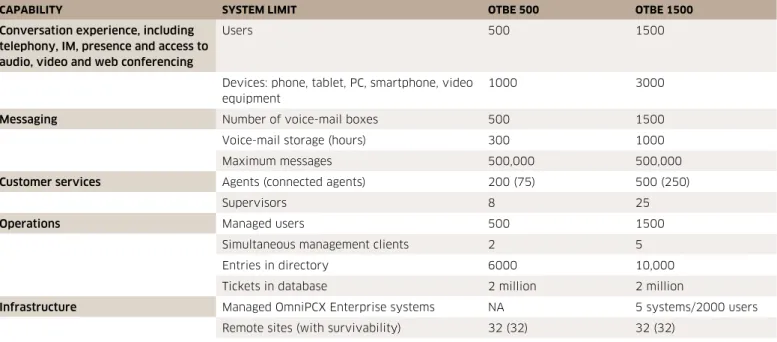
Table 1. Platform capabilities
CAPABILITY SYSTEM LIMIT OTBE 500 OTBE 1500
Conversation experience, including telephony, IM, presence and access to audio, video and web conferencing
Users 500 1500
Devices: phone, tablet, PC, smartphone, video equipment
1000 3000
Messaging Number of voice-mail boxes 500 1500
Voice-mail storage (hours) 300 1000
Maximum messages 500,000 500,000
Customer services Agents (connected agents) 200 (75) 500 (250)
Supervisors 8 25
Operations Managed users 500 1500
Simultaneous management clients 2 5
Entries in directory 6000 10,000
Tickets in database 2 million 2 million
Infrastructure Managed OmniPCX Enterprise systems NA 5 systems/2000 users