Panel Design Configurator
The modular planning software for
low voltage distribution systems
www.striebelundjohn.com
Panel Design Configurator
an all-round solution for project planning
Panel Design Configurator is a modular planning and calculation software program which is versatile and open-ended. The software is just the thing for the complete planning and design of electrical distribution systems and switchgear. You can use efficient offer documentation including parts lists, design and wiring diagrams. With Panel Design Configurator you can work faster, better, and more efficiently.
It all revolves around Panel Design Configurator-Basis. The free basic version makes it easy to draw up offers, produce graphic layouts and do much more. The add-on modules expand your areas of expertise. Panel Design Configurator-SLP is ideal for drawing perfect wiring diagrams. Panel Design Configurator-EXP can be used to export data to various applications and Panel Design Configurator-GEN for generat-ing user-defined symbols. Panel Design Configurator-CPM for customer management rounds out the software package.
Project manager
The project manager allows you to easily enter project data and manage documents.
Management of projects and favourites –
Copying and moving of projects and favourites –
Custom sorting into folders –
Packing of projects –
Printing of full documentation directly from –
the project manager
Navigator
The product navigator consists of a multi-level tree, sorted according to product groups, which allows you to quickly find the correct article. You also have the option of making a selection according to the article type. The product naviga-tor also includes a plausibility check. This prevents users from using incompatible product areas in their distribution board plan and thus ensures that it is configured correctly.
Selection of articles with product navigator –
Direct selection of articles by article number and type –
Plausibility check –
Selection of articles based on technical properties –
Accessory selection assistant
Panel Design Configurator assists the user in selecting the correct accessories. When an article is entered, the software automatically displays the compatible accessories and assigns them to the main article.
Finding compatible accessories –
Clear assignment of accessories to main articles –
Automatic determination of the number of accessories –
Panel Design Configurator-Basis
Enclosure selection assistant
The enclosure selection assistant helps you get from the parts list to a fully equipped switchgear enclosure in a maximum of five steps.
The enclosure selection assistant supports you in: Reserve dimensioning
–
Enclosure selection –
Module system selection –
Module equipment –
And displaying results with accessory support –
Optionally, the software can design the switchgear enclosure automatically. The complete distribution system is added to the graphic layout with or without devices and can be further processed there.
Profile calculation
Panel Design Configurator takes care of all aspects of planning. For a planned distribution system, the software automatically calculates the required profiles for holding CombiLine-M mod-ules. The configuration of the profiles is shown in the figure, and the profiles are automatically added to the parts list for ordering. You can make changes at any time and the profiles will be recalculated. For assembling the modules, the corresponding assembly instructions are displayed with the push of a button.
Profile calculation for the CombiLine-M modules –
Assistance with individual parts selection for –
CombiLine-M modules
Integration of the assembly instructions for –
CombiLine-M modules
New layer management for switching profiles and –
busbars on and off
Panel Design Configurator-Basis
Automatic plinth plan
When planning floor-standing or switchgear cabinets, an i nteractive plinth plan is generated. By graphically displaying and dimensioning the plinth, it simplifies the processes of planning the spatial arrangement of the intermediate floors, resulting in considerable time savings.
Plinth plan is created automatically –
Sequence is adopted from the parts list/CAD –
Switch between different plinth dimensioning –
Project views
With Panel Design Configurator, projects can be displayed and processed in the article list or in the graphic layout. The levels, data or figures located in the background are always updated automatically. The easy-to-use product navigator allows you to select the articles and paste them in using Drag & Drop. The parts list is automatically created in the background. The articles selected in the list are transferred to a device list and can be added to the figure from there.
Graphical project planning –
List-based project planning –
Automatic synchronisation of figure and list –
Panel Design Configurator-Basis
SMISSLINE designer
The SMISSLINE designer expands Panel Design Configurator for the planning and calculation of all SMISSLINE products. After the pluggable devices are added and the system is divided into segments, the power loss and the load on the individual busbars are calculated for each socket base.
Selection of cabinets and modules especially for –
SMISSLINE socket bases
Components are fitted to the socket base in –
a graphical environment
Full range of SMISSLINE products for selection –
Configuration of accessories –
Automatic equipping of devices –
Support for positioning the power supply –
Information on:
Incoming and outgoing power –
Checking and display of space units, power and power loss –
Technical specifications of the devices including price –
c alculation
Printing/exporting of parts lists, construction drawings –
Calculation
All articles are calculated online to give a project price and a price for the distribution system. The calculation can be performed to give either a gross price or a net price. In the background, the number of space units required for devices per distribution system is calculated.
Online calculation –
Gross and net prices –
Determination of space units required –
Calculation of the temperature rise –
Printout and interfaces
In addition to the graphical distribution system view, Panel Design Configurator also provides order and parts lists in various formats. An interface to StrieCal is also integrated for further processing.
Graphic layout – Order list – StrieCal interface – Parts list –
Panel Design Configurator-Basis
Panel Design Configurator-CPM – customer management
The Panel Design Configurator-CPM add-on module provides all the necessary information and activities for project planning with the Panel Design Configurator. The software comprises address data, contacts, customer-specific discounts, documents, notes and all customer-specific projects. The customer management offers you a sort function and a search function to allow you to
Panel Design Configurator add-on modules
Export data, generate symbols and manage customers
Panel Design Configurator-EXP – data exports in various formats
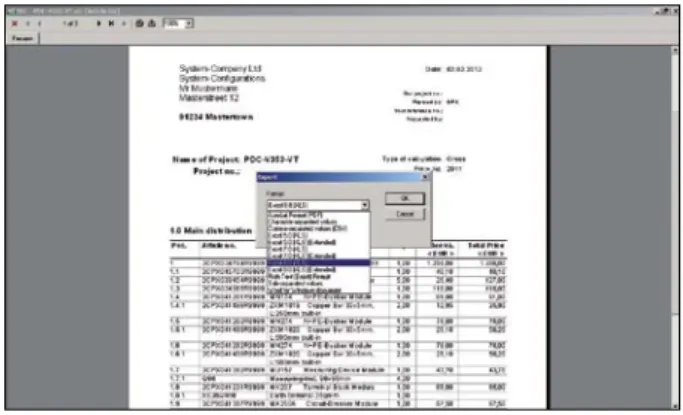
As an add-on module to the free basic version, Panel Design Configurator-EXP is available for exporting data to other applica-tion programs. Offers, parts lists, wiring diagrams and graphic layouts can be transmitted in various formats. Wiring diagrams and graphic layouts are exported in DXF format. Offers and parts lists are exported in Acrobat PDF, RTF, Word, Excel or Text formats.
Panel Design Configurator-GEN – generate your own s ymbols
You can produce your own symbols using the symbol generator module. The free basic version of Panel Design Configurator comes with over 5,000 graphical symbols. Another 1,500 symbols are contained in the add-on module Panel Design Configurator-SLP. If you wish to add other vital symbols to your designs, the symbol generator is the tool you need to create them.
Panel Design Configurator add-on modules
Compiling wiring diagrams is simplicity itself
Panel Design Configurator-SLP – create wiring diagrams
The Panel Design Configurator-SLP add-on module is optimised for creating wiring diagrams. The modern user interface and easy operation offers you an abundance of useful functions. A comprehensive macro library for 1-pole and 3-pole wiring diagrams is already included. When a macro is added, for example, the circuit grid actively adapts to its size and a signal cross reference is created in the background for the busbars contained in the wiring diagram. With the help of the symbol and macro navigator, selecting components is a snap. Optionally, the circuits, components and terminals can be automatically numbered and the connections and any open connections can be checked. With the integrated revision management, you can protect the state of your existing installation against unwanted changes. Panel Design Configurator-SLP also provides optimal support of contact and signal cross references.
Comprehensive symbol and macro library –
Project planning in 1-pole and 3-pole displays –
Active adaptation of the circuit grid –
Automatic signal cross references for the busbars –
Automatic numbering of the circuits, components and –
t erminals
Automatic contact and signal cross references –
Integrated revision management –
Interface for labelling systems –
Export of technical documentation –
The clear and easy-to-use symbol and macro management using navigators allows you to optimally select the desired symbols and macros with a graphical preview.
Flexible and clear
Article management is already integrated in Panel Design Configurator-SLP. The individual components have been preas-signed article data and can be changed at any time using an article database, the customer’s own user database or through manual input. The parts list of Panel Design Configurator-SLP also provides the article origin status in the wiring diagram, in the graphic layout or an entry directly in the parts list. You can also directly access the parts lists of other distribution systems within the same project for transferring data or for comparing articles to ensure that materials are uniform within the entire project.
Contact cross references – complete overview in cross reference window
When contactors or contacts are entered, the “Contact cross reference” dialog window automatically opens. An additional description makes the management of the contact and signal cross references even clearer. Contact diagrams with automatic numbering can be freely positioned.
Flexible planning
Panel Design Configurator-SLP offers you the greatest possible freedom in planning a project. You can begin with the parts list, the graphic layout or with the wiring diagram. Regardless of which mode you are working in, articles only ever need to be selected once. Use the mode which allows you to most quickly achieve your desired result.
Parts list Wiring diagram Graphic layout
Regardless of whether you are working with the parts list, the wiring diagram or the graphic layout, the individual areas are always automatically synchronised. The components used in the parts list or in the graphic layout can be processed directly in the wiring diagram. The reverse is also possible, i.e. working from the wiring diagram to the graphic layout and the parts list.
Panel Design Configurator-Basis
Software for creating all offer documentation from the graphic view of the distribution panels to the order and parts list; aids in selecting the right product and compatible accesso-ries; Panel Design Configurator is the basis program for all other modules.
Panel Design Configurator-SMISSLINE – Module for easy project planning and calculation of the SMISSLINE socket base system
Panel Design Configurator-Basis
Panel Design Configurator-SLP
CAD module for creating wiring diagrams, including symbol and macro libraries, and for transferring parts lists to and from Panel Design Configurator
Panel Design Configurator-EXP
Export module for exporting DXF drawings and project lists to PDF, RTF, TXT or XLS formats.
Panel Design Configurator-GEN
Symbol generator module for creating your own symbol libraries for overview plans and graphic layouts
Panel Design Configurator-CPM
Module for managing customer and project data
Panel Design Configurator
Service and information
As a special service, we also offer you:
A free symbol and macro library with over 5,000 elements –
for the Panel Design Configurator system
A prepared article database with technical specifications –
for Panel Design Configurator and its continued maintenance
Periodic updating of the article and product data –
Customer service
We take care of our users by continuously improving our software. Once you have chosen Panel Design Configurator, you are not alone. Our team is always at your service to answer your questions – all you have to do is call.
Interactive help
Demo films are available for all Panel Design Configurator functions. They will help introduce you to the software.
Easy handling
After only a brief introduction, the user can already design, calculate, archive and carry out project planning. No special CAD skills are required. The software operates based on dialog boxes. The user is led through the program.
Training
In our training centre, you can familiarise yourself with the software while receiving expert instruction. Ask for information on our training programs.
Documentation
A clearly organised manual, which was created as a reference tool to be used in combination with our training, quickly introduces you to the software. The full functions of all menu items are explained. The software is continuously improved through exchange with the users, whose opinions we rely on to help keep our software user friendly and market oriented.
System requirements
Processor Pentium 1 GHz and higher
Memory 500 MB
Hard disk at least 300 MB free
Screen Resolution of 1024 x 768 pixels or higher Drives CD drive required
Operating system Microsoft Windows XP, Vista, 7 Output medium All printers available in Windows
STRIEBEL & JOHN GmbH & Co. KG Abteilung “Software Tools”
Am Fuchsgraben 2-3 77880 Sasbach, Germany Phone: +49 7841 609 - 615 Fax: +49 7841 609 - 524
Free information available upon request
Component library –
Article master record –
Text blocks for creating “invitations –
Contact us
STRIEBEL & JOHN GmbH & Co. KG
Am Fuchsgraben 2 - 3 77880 Sasbach, Germany Phone: + 49 7841 609 0 Fax: + 49 7841 609 545 E-mail: [email protected]
www.striebelundjohn.com
K-0191-NI-04/2012-V1 · 2CPC 000 191 L0201
We reserve the right to make technical changes or modify the contents of this document without prior notice. With regard to purchase orders, the agreed particulars shall prevail. STRIEBEL & JOHN does not accept any responsibility whatsoever for potential errors or possible lack of information in this document.
We reserve all rights in this document and in the subject matter and illustrations contained therein. Any reproduction, disclosure to third parties, or utilisation of its contents - in whole or in part – is forbidden without the prior written consent of STRIEBEL & JOHN.
Copyright © 2012 STRIEBEL & JOHN All rights reserved