Design of Smart Grid Using Interactive Home Automation and
Security Based on Raspberry Pi Micro-Controller
1
V.Kiran,
2B.Praveen Kumar,
3S.Raja Gopal
123Assistant Professor, Aditya College of Engineering, Surampalem
Abstract:
Computerized innovation that takes into consideration two ways correspondence between the utility and its clients, and the detecting along the Transmission lines is the thing that makes the Grid Smart. Like the Internet the savvy Grid will comprise of controls, Computers, computerization, and new innovations and gear cooperating, yet for this situation, these advances will work with the electrical network to react digitally to our rapidly changing electrical interest. Electronic force molding and control of the generation and conveyance of power are essential parts of the shrewd matrix. Home robotization is an imperative point of reference in accomplishing shrewd network and is continually energizing field that has blasted in the course of recent years. In this examination article we planned a focal, yet particular and expandable home mechanization framework. Headway in advances have made homes more helpful, effective and significantly more secure. Acquainting the Raspberry Pi with the universe of home mechanization gives various customizations to transform a normal home into a savvy home. Raspberry Pi gives a minimal effort stage to interconnecting electrical/electronic gadgets and different sensors in a home through the web system. The main objective of present work is to, many of your appliances will be networked together allowing you to access and operate them using Internet of Things (IoT). This will help the home owners to provide a simple, fast and reliable way to automate their environment. This paper focuses on two aspects of smart home i.e. home security and home automation. Home security system, capable of motion & disturbance detection at entry points and creating an alarm system with website notification alerts having picture, was implemented to allow real time monitoring for the house. The home automation system was also implemented around the same Raspberry Pi, which includes a smart doorbell with LED Indication, an automated lighting system and a temperature & humidity controller that turns an air-condition unit or fan on/off automatically under given conditions and control of Electrical/Electronic Loads through the Website.
INTRODUCTION
:The smart Grid represents an unprecedented opportunity to move the energy industry into a new era of reliability, availability, and efficiency that will contribute to our economic and environmental health. During the transition period, it will be critical to carry out testing, technology, improvement, consumer education, developments of standards and regulations, information sharing between projects to ensure that the benefits we envision from the Smart Grid becomes a Reality. The benefits associate with the Smart Grid include Improved Home Automation and Security, Better integration of customer-owner power
generation systems, Reduced peak demands which will also help lower electricity rates, more efficient transmission of electricity, Increased integration of Renewable energy sources. Home Automation can be considered as an act of using electronic systems/devices and programming them to replace a number of human interactions for the control of basic home functions. This operates on the base of connecting sensors and devices to the IoT. IoT can be considered as a network of physical objects which can be accessed via the Internet. For objects to considered IoT based, networks need to be converted to an IP-based network for proprietary protocols. The object being connected to the internet can represent itself digitally thereby being controlled from anywhere there is an internet connection and WIFI Hotspot. These objects have ability to transmit and receive data over a network without human-to-human or human to computer interaction. This also means that more data can be gathered from these objects, even at a number of places with real time information being presented from the objects. This super task can increase efficiency, safety and security.
.The Raspberry Pi and the subject of home automation is a remarkable one. The Raspberry Pi can be used to automate a home at relatively low cost. It operates on the concept as the IoT. There are numerous things that make the Raspberry Pi essential for home automation but the one that stands out the most has to be the remarkably affordable cost. The vast amount of sensors at extremely low cost makes it’s superb for home automation. A security system to be installed into a house can be very costly from security companies, however with some skills and time the Raspberry Pi can be programmed to be a security system with as much sensors as you desire, for a fraction of the cost. Figure 1 shows the Raspberry Pi B model with its specifications.
Fig. 1: Raspberry Pi B Model
In the present study an IP-based network was established, Python codes were written for the sensors, which were connected to the Pi, a command was then carried out from the network website which was processed by the Pi and reacted with the connected sensors. The purpose of present study is to build a system of interconnected devices and sensors, which allow the user to control and monitor certain electrical/electronic devices in their home via the internet website from the Raspberry Pi. This means implementing a system which allows real time monitoring of the home, also forwarding website notification to the user when certain devices are triggered.
2. EXPERIMENTAL DETAILS
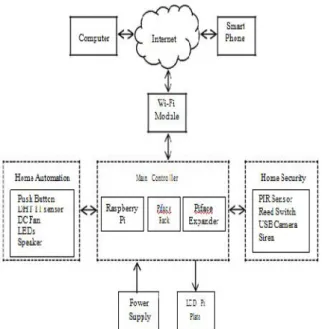
Block diagram of a Raspberry pi based smart home is shown in Figure 2. Main controller unit was built around Raspberry Pi, Piface rack and Piface digital expander. Controller was attached with Wi-Fi module, smart phone, computer, LCD module, power supply and various sensors for home automation and home security features.
The Raspberry Pi operates on a LINUX based open source operating system called Raspbian OS. This allows more control and flexibility in the software therefore making it easy to program the Pi. The Raspberry Pi communicates with the attached devices and sensors through PYTHON codes to control their functions. The Raspbian operating system was installed onto Raspberry pi, which was obtained by downloading NOOBS onto the SD card from the manufacturer’s website.
PiFace Rack, which is an expansion board with 4 set of 26 GPIO pins, was used to connect Piface digital
expander and Adafruit LCD Pi plate with the Raspberry Pi. Piface digital expander was used to increase number of digital I/Os and LCD Pi plate was used to display the status of Raspberry Pi.
All the sensors for home automation and security applications e.g. PIR infrared motion sensor, magnetic contact switch (Reed switch), siren, speaker, LEDs, push buttons, DHT 11 sensor, DC fan etc. were connected to Raspberry Pi through PiFace digital board.
Main controller was also connected to the Wi-Fi module to obtain the access of internet and html page using smart phone/computer so as to control/access sensors and devices of the home anytime, anywhere.
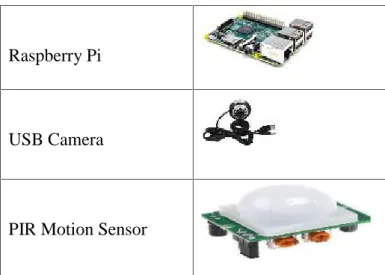
Table 1 shows the list of major components used during this study. A prototype of smart home was also developed, which is shown in Figure 3 along with controller unit.
Table 1. List of Major Components
Raspberry Pi
USB Camera
Fig2: Block diagram of Raspberry Pi based
Smart Home
Fig 3 : Prototype of smart Home.
3. RESULTS AND DISCUSSION
Implementation details and results related to the two aspects of smart home i.e. home security and home automation are discussed here.
3.1 Home Security
Home security system, capable of motion & disturbance detection at entry points along with security alarm system having website notification alerts containing picture, was implemented to allow real time monitoring of the home anywhere and anytime.
The Raspberry Pi based home security system was built using Adafruit RGB positive 16x2 LCD Pi plate, Wi-Fi module, PIR sensor, USB camera (web cam), Reed switch and internet access point and WIFI Hotspot. To activate the security system, keypad of the LCD Pi plate was used. Security alarm can be armed or disabled by pressing up or left keys of keypads for 3 seconds. Figure 4 indicates the status of alarm on LCD Pi plate. Upon activating the alarm, an audio output is sent to 3.5mm audio jack of Raspberry pi and then “System is Breaked” sound can be heard via self-powered audio speaker. All the devices mentioned above will also become active.
When an object moves within the range of PIR sensor, a signal is sent to the controller, which initiates the webcam. Webcam snaps a photo which is stored onto memory card of Raspberry Pi. The stored photo is then forwarded via web notification to the owner with the title “Motion Detected” as shown inFigure 5.
Fig 4 : Home security Alarm system Status
Fig. 5 Website notification upon motion detection
Fig. 6 Entry detection using Reed Switch
switch is opened as shown in Figure 6, the alarm system detects it as a breach, which turns ON the siren and a message “Theft Entered” is heard on the speaker. At the same time web notification is sent to the owner with title “Door Open” and picture around the door. Messages, notification titles, website etc. were entered into system through python scripts.
3.2 Home Automation
The home automation system was also implemented around the same Raspberry Pi, which includes a smart doorbell, an web based automated lighting system and a temperature & humidity controller that turns an air-condition unit or fan on/off automatically under given conditions.
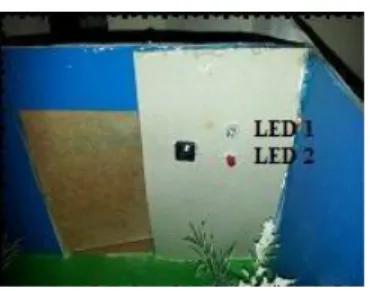
Figure 7 shows smart door bell, which was built using a push button, LEDs and a speaker. When the push button is pressed, LED 1 will turn ON for 15 seconds and voice message
“Someone will attend you shortly” will be heard through speaker. After LED 1 cutoff, LED 2 will be ON for 10 sec. and voice message “Sorry, no one is at home, please come again later” will be heard.
Fig. 7 Smart door bell
Home automated light system was designed using HTML and LEDs. A webpage was developed to control the lights in the home automatically from an internet using a computer, tablet or even a cell phone. This system uses a server address hosted by the Raspberry Pi itself, which is displayed on the LCD Pi plate during start up. Figure 8 shows the web page, which was created to control/check the status of lights and other sensors discussed earlier.
Fig. 8 Webpage to control the smart home
Each button on the webpage is clickable. Buttons on the input section senses signals from the controller. According to which input channel/sensor is in use, the respective button will show ON and its color will get changed from grey to sky blue. When any button of the output section is pressed, the respective output would show ON in red.
To control temperature and humidity inside the home i.e. to control air conditioner (we have used DC fan here), DHT 11 sensor was used. We configured select button of LCD Pi plate, which when pressed displays the temperature and humidity of room/house for 60 seconds as shown in Figure 9 and then returns to its home screen. When the temperature crosses threshold, 28oC in our case, the fan/AC will be turned on automatically or also can be turned ON/OFF remotely through the website by pressing Fan button. When the temperature drops down to 28oC, the fan/AC will cut back off and the process is repeated.
Fig. 9 Temperature/Humidity display
4. CONCLUSION
Very soon in near future, the traditional grids of today will evolve into a robust, effective, environment friendly and energy efficient system known as the Smart Grid. Even our home will undergo its own transformation towards the smart homes that will be in constant interaction with the grid in an effort for better energy management and full home automation to ensure comfort, security and privacy.
Present paper sought to design a smart home using various sensors to be controlled and monitored by the Raspberry Pi via the IoT. It is focused on two aspects of smart home i.e. home security and home automation. For home security, the Raspberry Pi is programed to operate as an alarm system in which it detects intrusion at entry points along with motion within the home and where website notification alerts can be sent with pictures to allow real time monitoring of the home. Home automation included a smart door bell, humidity and temperature control via a fan or air-conditioning system of the home. This system is also equipped with automated lights and virtual switches for controlling lights and appliances in the home remotely using external and / or internal networking with the Raspberry Pi via an HTML page.
devices like Raspberry Pi can play very important role in designing smart home of the future at very low cost. An energy aware smart home can be developed using Raspberry Pi and other sensors.
Future Scope: Automation and electricity demand
In the near future, home automation systems may be linked to the electricity utility in a number of ways. The utility may convey varieties in power costs to a "keen" power meter, which interfaces with the home robotization controller (see Smart meters, in-home shows and brilliant apparatuses).
Householders can then program machines to diminish power, spare vitality or switch off through and through amid high value periods.
On the other hand householders could enter a supply get that permits the power supplier to send a sign to gear controlled by the home computerization framework, (for example, aeration and cooling systems) to kill certain hardware for brief periods.
The householder may take an interest and acquire lower power costs or other money related motivating forces as an exchange off for permitting the power supplier to have this control.
Rather than focusing on the straightforward things like lights or mechanized blinds, elecronichamsters bets everything. With his framework you can screen for water spills, check whether the carport entryway is open, check for new mail, look for development, sense for gas, and even perceive how the canine is getting along. The framework utilizes Raspberry Pi nearby a huge amount of different sensors to screen the house. You can set up the framework to send you alarms when something happens or simply screen everything from your telephone.
The Raspberry Pi can likewise be utilized to give the more processor-serious assignments, for example, climate bringing, discourse union, a web interface, voice recognition,
media center/server, becoming the home of my iTunes and Movie/TV Show library, allowing me to upgrade my laptop to a lean, mean SSD. The Raspberry Pi can run RaspBMC, that provides great media library management as well as network file hosting built right in.
5. REFERENCES
[1] X. Fang et. Al. , “ Smart grid- The new and improved power grid: A Survey”, IEEE Communication Surveys & Tutorials, , 2012, Vol. 14, No.4, 944-980.
[2] H. Gharavi and R. Ghafurian, “Smart grid: The electric energy system of the future”, Proceedings of the IEEE, 2011, Vol. 99, No. 6, 917–921.
[3] A. Ipakchi and F. Albuyeh, “Grid of the future”, IEEE Power & Energy Magazine, 2009, Vol. 7, No. 2, 52–62. [4] Bassi, Alessandro. Enabling Things to Talk: Designing
IoT Solutions with the IoT Architectural Reference Model, 2013, Vol. 1 No. 1, 1-12.
[5] N. Komninos, E. Philippou and A. Pitsillides, “Survey in smart grid and smart home security: issues, challenges and countermeasures”, IEEE Communication Surveys &
Tutorials, 2014, Vol. 16, No. 4, 1933-1954. [6] Dennis, A. K. 2013. Raspberry Pi Home
Automation with Arduino. Packt Publishing. [7] Wei, L. Wei, L. Xin, L. 2013. Design and
implement on smart home system. In proceedings of the Fourth International Conference on Intelligent Systems Design and Engineering Applications.
[8] European Smart Homes Market by Products (Security, Access, Lighting, Entertainment, Energy Management Systems, HVAC, and Ballast & Battery Pack), Services (Installation & Repair, Renovation & Customization) & Country - Global Forecasts and Analysis 2013–2020.
[9] Upton, E. Halfacree, G. 2014 Raspberry Pi User Guide, 3rd. Ed. Wiley.
[10] Richardson, M. Wallace, S. 2014 Getting Started with Raspberry Pi, 2nd. Ed. Maker Media Inc.
[11] Bradbury, A. Everard, B. 2014 Learning Python with Raspberry Pi. Wiley.
[12] FOUNDATION, RASPBERRY PI. 2014. NOOBS SETUP. Accessed 11 21, 2014. http://www.raspberrypi.org/help/noobs-setup/.
V.Kiran, working as
Assistant Professor in Department of Electronics & Communication Engineering. Having an experience of 5 years in Teaching. Completed M.Tech with specialization in Embedded Systems.
B.Praveen Kumar, working
as Assistant Professor in Department of Electronics & Communication Engineering. Having an experience of 6 years in Teaching. Completed M.Tech with specialization in Embedded Systems.
S.Raja Gopal, working as Assistant
Professor in Department of Electronics & Communication Engineering.