by Hetna Naik
A Master's paper submitted to the faculty of the School of Information and Library Science of the University of North Carolina at Chapel Hill
in partial fulfillment of the requirements for the degree of Master of Science in
Information Science.
Chapel Hill, North Carolina November, 2003
Approved by:
Advisor: Barbara Wildemuth.
Many instructors and faculty members make use of course management software for teaching traditional/hybrid classes as well as distance education classes. The software provides various features like putting up course documents; online tests and grading; discussion forum, virtual chat, etc. This study describes interviews with twelve faculty members at the School of Nursing at the University of North Carolina at Chapel Hill who have made use of Blackboard course management software. The interviews explored the benefits and drawbacks of the various features in providing education and reaching teaching objectives; and how the usage affects the teaching process and student-faculty communication. The student-faculty communication in the online environment was found to be a very different experience from the traditional classroom setting. Selection and use of the appropriate features depends on the instructor’s teaching objectives.
Headings:
Educational Technology Courseware
Distance Education
I am thankful to Mr. Kevin Morgan, the webmaster of the Center for Instructional Technology and Educational Support at the SON at UNC-CH, who helped me in
TABLE OF CONTENTS
Section Page
INTRODUCTION 3
LITERATURE REVIEW 4
Paradigm shifts in pedagogy 4
Faculty attitudes 6
Course management software and teaching objectives 9
RESEARCH QUESTION 12
PROCEDURES 13
Recruiting the faculty participants 13
Interviews 14
Analysis of Interviews 14
RESULTS FROM THE INTERVIEWS 15
The features, their benefits and disadvantages 16 Announcements 16 Uploading/putting up course documents 16
Online Testing and Grading 17
Gradebook 18
Digital Dropbox 19
Sending mass emails through Blackboard 20
Discussion Forum 21
Lightweight Chat 23
Virtual Classroom 24
Additional Faculty Perceptions 24
Student interaction, participation 24
and relationship with faculty
Overall work load, time, effort and challenges 25
Continue Usage 26
New or additional features 26
DISCUSSION AND CONCLUSION 28
REFERENCES 33
INTRODUCTION :
Many instructors and faculty members make use of course management software (CMS) for teaching traditional/hybrid classes as well as distance education classes. The software provides various features like putting up the course documents; online tests and grading; discussion forum, virtual chat etc. There are many faculty members at the
University of North Carolina at Chapel Hill who make use of the Blackboard software for teaching their courses. The university supports and encourages the use of this software and wants more instructors to make use of it. Thus it will be worthwhile to find out the reactions of faculty who have made use of this software. Knowledge of their attitudes will help other faculty members and the university to make better decisions regarding the use of this CMS. The purpose of the study is to find out how useful are the various features in providing education and reaching teaching objectives. Does the use of these features make it easy or difficult to deliver course instruction? The study will find out the faculty responses/attitudes towards the usage of these features. The study will also
LITERATURE REVIEW :
There has been so much studied and written regarding the use of technology in education around the world, particularly about internet technologies; and the same
technology has made it possible to have access to so many research papers and articles. I will first discuss how, with the advent of the internet, there have been paradigm shifts in teaching and learning. Next will be the discussion about faculty members’ changing attitudes/opinions in general towards the use of technology in providing instruction. Lastly will be a discussion of some studies conducted where course management software (CMS) was used to teach a course and to achieve teaching objectives. Paradigm shifts in pedagogy :
With the advent of the internet, many components of a traditional classroom have been replaced by virtual/online features. Karber (2002) says that changes in life-style; increased demands and insufficient funding; and advancements in technology are some forces that are causing the shift from traditional classroom learning to on-line learning. By changes in lifestyle he means the need of today’s student to study while working and supporting their families which causes constraints in their schedules. There is an increase in the number of students who want to take advantage of education with emphasis on life-long learning but there is a shortage of funds to provide “bricks and mortar” (i.e.,
We are also facing a veritable “culture change”, with the increased use of resource-based learning, computer-aided learning and computer-mediated
communication. This paradigm shift has caused a change in the characteristics of both the students and the teacher. Both are faced with the new challenges of teaching and learning. Commenting on this, Scott (2002) says that “the students need to become self-organized and autonomous learners and teachers need to become reflective practitioners, prepared to research and evaluate their own practice” (p. 24).
A lot of literature has been written on how these challenges of paradigm shift can be met. O’Sullivan (1999) describes the steps needed to create a successful instructional website. She says that it’s a four level hierarchy process: informational, supplemental, dependent and fully online. To explain this she says, “Often the development of a website is a progression from creating a web page with a syllabus, reading materials, and
assignments; to adding conferencing and discussion groups; to linking these conferences to web page assignments, adding testing and course management tools, and providing for evaluation” (p. 65). She further comments that successful online course creation does not depend on the technical skill level of the instructor but on the pedagogical framework used by the instructor. Thus she emphases the point that useful instruction using
No doubt students and teachers have to face challenges due to the shift but these can be advantageous too. This is very well explained by Rosie (2000) when he discusses the approach of “surface-learning” and “deep-learning” used both by student and teacher in a learning environment. He says, “Deep learning addresses ways in which people can stand back and conceptualize, seek out inter connection between concepts and data while reflecting on their learning. The deep learner is able to both retain information and organize materials in a variety of ways” (p. 109). He further demonstrates how online learning helps in the promotion of “deep-learning”, with the example of a political science course which was taught under the new paradigm of internet technology. The web resources, online discussions and strategies adopted by the instructor helped in deep learning. To sum it all up, he says that this use of online approaches made possible positive reconceptualization, emergence of an interesting synthesis of knowledge and personal learning.
Faculty attitudes :
As it happens with any new technology and its use, the users always have apprehensions. Leron et al. (2000) list some of the apprehensions shown by faculty members and tries to answer them. I will just discuss a few of them. The instructors feel that the computer will mechanize instruction and take away the human touch. In
why would they spend extra time on teaching through technology. The answer to this was that there needs to be a “cultural revolution” in the value system of the universities and this was thought to be a long term goal, but for the immediate future the aim was to target a small number of dedicated faculty and then well publicize their success to convince more faculty to try the new technologies.
The faculty members were curious to know if there was any scientific basis or evidence for the theory that teaching through technology helps. In answer the team said, “Teaching and learning are extremely complex phenomena, which depend on so many variables, that it is virtually impossible to prove scientifically that a certain method is better than another. No teaching situation is ever repeated in exactly the same way. Still there is much qualitative research that at least demonstrates the power of the new methods. In view of this state of affairs, one should proceed cautiously to afford a pluralistic approach and insure constant feedback and gradual improvement based on what has been learned in previous stages” (Leron et al., 2000, p. 244).
majority of staff interviewed were in favor of educational technology becoming a part of their own teaching and learning strategies, both in terms of the perceived added value that technology brings for teaching and in terms of the benefits to their students-flexibility, vocational, resource opportunities and the enrichment of learning through various media”(Steel and Hudson, 2000, p.109).
The purpose of a similar study (Mitra et al., 2000) was to find out which internet tools were promptly adopted by faculty and which tools showed a slow rate of
acceptance. The authors say that “computer use is a multidimensional construct, the rate of change of computer use differs depending on the use category and a small set of attitudes might change over a short period of time”(p.199). The study results indicated that tools like email, using the internet to get information or other web resources, preparing PowerPoint slides for presentations, and desktop publishing were widely adopted at a fast rate, and the more traditional tasks of database management and statistical computing showed a slow rate of acceptance. Faculty members used the “networking” capabilities of computers more than the “computing” capabilities for pedagogic purposes. Mitra et al. conclude that providing access can lead to increased use, but adequate training and infrastructure support needs to be provided to sustain use.
These studies indicate that, though there may be many apprehensions initially regarding the use of technology, faculty members have always made use of new
Course management software and teaching objectives :
Various software like Blackboard, WebCT and CourseInfo are used by faculty to teach traditional hybrid as well as online courses. Studies have been conducted to find out how helpful are these software and its tools. The seven principles of Good Practice in Undergraduate Education (Chickering and Gamson, 1991) have often served as a
reference point for educators who desire to improve their teaching skills. The principles are student-faculty contact, cooperation among students, active learning, prompt
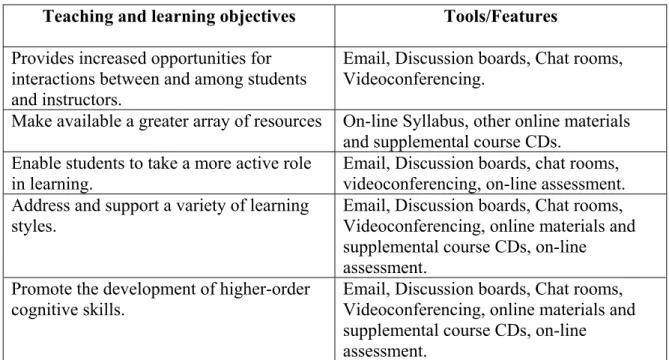
Table 1. Objectives and the tools that assist in achieving them (adopted from Sherer and Shea, 2000).
Teaching and learning objectives Tools/Features
Provides increased opportunities for interactions between and among students and instructors.
Email, Discussion boards, Chat rooms, Videoconferencing.
Make available a greater array of resources On-line Syllabus, other online materials and supplemental course CDs.
Enable students to take a more active role in learning.
Email, Discussion boards, chat rooms, videoconferencing, on-line assessment. Address and support a variety of learning
styles.
Email, Discussion boards, Chat rooms, Videoconferencing, online materials and supplemental course CDs, on-line assessment.
Promote the development of higher-order cognitive skills.
Email, Discussion boards, Chat rooms, Videoconferencing, online materials and supplemental course CDs, on-line assessment.
Another learning approach discussed in the literature on education is the Concrete Active Learning (CAL) approach. This promotes long term retention, develops leadership skills, develops critical thinking skills, reinforces writing skills and helps students
“students liked using the CMS as a record of their grades, course outlines, and other pertinent course information. They did not have any papers to lose, and they could not say that they forgot an assignment since the assignments remain posted on the system” (Figueroa and Huie, 2001, p. 8).
No doubt a CMS can be a great help in meeting teaching objectives, but as human expectations are high, there is a need to get more from the software. Faculty would like a new generation of software with added advantages. This is very well described by Lemone (1997), who talks about a unique CMS developed at her university. Besides the regular features, this CMS had some unique features: the course can be designed to suit different levels of students by use of appropriate tags, hypertext link check to ensure that all internal and external hypertext references are valid, search facilities, content update tools to allow global updating of course pages (e.g., changing the term and date headers, course icons, etc.), map generator to create a semi-static map of the pages to allow a student a bird’s-eye view of where they are in the course pages and allow instructor to quickly update organizational changes.
RESEARCH QUESTION :
The purpose of the current study is to find out how the various features of a CMS help in providing education and reaching teaching objectives. The study will find out faculty attitudes towards the usage of these features and how their usage affect the teaching process and student-faculty communication in today’s world of technology and the internet. As discussed in the literature review, there have been similar studies
conducted to discover faculty reactions towards the use of various technological tools and studies also indicate that the use of a CMS does help in achieving various teaching
PROCEDURES :
Data for the study was gathered via semi-structured interviews with twelve faculty members at the University of North Carolina at Chapel Hill (UNC-CH), who are using Blackboard for teaching various courses. The faculty members were asked to answer a set of questions and there were more follow-up questions based on their responses. Notes were taken during the interviews and also the interviews were audiotaped. Based on the notes and the analysis of tapes, themes and important issues were identified and are reported in this paper. Thus a qualitative research approach was used for the study.
Recruiting the faculty participants
The School of Nursing (SON) at UNC-CH has its own support center for instructional technology and the faculty members have been making extensive use of Blackboard for more than five years to teach their traditional in-classroom courses as well as online courses. The Webmaster of the center works closely with the faculty to solve various technical problems. He helped me in identifying the participants, as he is knowledgeable regarding the members using Blackboard at the SON. Care was taken to include in the study instructors with a wide range of length of experience with
study and asked to schedule an interview at a convenient time. The first twelve participants who responded and were interested were then interviewed.
Interviews
Each faculty member was interviewed individually and was asked about his/her teaching experience; level of comfort using computer technology and various features of Blackboard that they made use of in their teaching; benefits and drawbacks of those features; effect of using these features on their interaction and relationship with students; effect on student participation; ideas for additional features; etc. The complete interview schedule is included in Appendix A. Each interview typically lasted for thirty to forty minutes.
Analysis of Interviews
RESULTS FROM THE INTERVIEWS :
The twelve faculty members who were interviewed had varied length of teaching experience through Blackboard. The length of experience ranged from over a year to five years. All of them had used it for their traditional in-class courses; some of them also had used it for hybrid (partly online and partly the traditional way) of courses. And some used it totally for online courses. The number of students in a class ranged from six to one hundred and forty four. When faculty members were asked to describe their comfort level using computer technology and Blackboard, everyone said that they were pretty
All the twelve members had used the following features of Blackboard –
announcements, uploading course documents, sending mass emails, and creating external links. Nine members had used discussion forums, four had used a digital dropbox, ten had used online tests and a gradebook, two had used lightweight chat and none had used the virtual classroom. The remainder of the results will be presented in relation to the themes present in the participants’ comments.
THE FEATURES, THEIR BENEFITS AND DISADVANTAGES :
Announcements :
This feature is used to keep the students well informed of everything and one can view announcements posted from one to many weeks, all through a single web page when they log into the CMS. The announcement feature was the one most liked by every faculty member and they thought it was extremely useful. Commenting on this feature, one member said, “announcements that I have made in class, I can write that down and students can go back to it, as many times they don’t remember and this is a way to remember and remind”. Another member said, “I absolutely love, love it because of the access, ease of communicating with students primarily through announcements which before the use of Blackboard, I didn’t have any way to do it”. None found any
disadvantage of using this feature.
Uploading/putting up course documents :
very convenient and helpful when any changes were to be made and when one semester’s course materials were used for another semester. One member noted that as the syllabus can be displayed as one single document or as components, adding value as it is now an easy file system and one doesn’t have to look through the whole thing to fix any changes. Commenting on this the person said, “the archiving and retrieval components are really useful to me”. It was also observed that now the students write less in class, as they don’t make notes because everything is available and can be downloaded. Instructor viewed this positively because they don’t have to stop in the middle of the class and wait while the students are writing down their notes. Now the students spend more class time on thinking and asking questions. Another reason for asking more questions is that “the students now come more prepared to class as they have downloaded the stuff before class”.
One drawback noted by members was when the technology breaks down and the students can’t have access to it or can’t get materials as their computer may not be compatible (very rare). Another disadvantage noted by one faculty member was that “Students now have more expectations of what they get, now they want everything in PowerPoint which is not possible”.
Online Testing and Grading :
essay, etc. The grading for objective type of questions is directly done by the computer program and not by the instructor.
Faculty members said that this was a useful tool particularly when one have objective tests because the instructor doesn’t have to spend time grading. But with short and essay type of questions the tool doesn’t work except that the test can be made available electronically at a given specified time. Another advantage noted was that the instructor now doesn’t have to go through the laborious process of typing the text and then giving it to a secretary, getting the copies printed and then finding an error or a page missing. As one member commented, “I just sit here and type in the question and I can think as I am working and change points and it’s a very efficient process”. Another member, speaking in terms of students convenience, said that, “the stress level is much less if they can sit in their bedroom slippers and take the exam”.
As one drawback, many members didn’t like the interface - “getting the questions in there is really pain in the neck, until you get used to the clunkiness of the interface”. Members also felt that sometimes the students understand a question differently than the instructor and give a different but correct answer. In this case the online grading is no longer helpful and the instructor has to print the copies of each students’ answers and correct it manually. One technical problem was also noted : when the students get kicked off by their internet service providers while taking the test, their accounts then have to be cleared and the test has to be made available again.
Gradebook :
the student can’t view any other student’s grade. The instructor or the teaching assistant can view all the records anytime.
The biggest perceived advantage of this tool can be reflected through just one member’s response, “I love the gradebook, I love the idea that a student can check any day of the semester and find what their grade is without making an appointment and coming and seeing me or emailing me”. Faculty members really liked the security and accessibility aspect of the gradebook as now time and effort for calculating grades, displaying them physically on the wall, or emailing them individually to the students is saved.
The disadvantage noted was an interface issue. If there were large number of students in a class and large number of assignments then, as the screen is scrolled down on the body of the spreadsheet on Blackboard, when you get in the middle of the sheet, one can no longer see the name of the student or the assignment number. Thus the visualization is not good and there should be a way of freezing the row and column headings on the screen. Another disadvantage was that the university has to give letter grades as final grades and Blackboard doesn’t allow that, as the grades calculated are numeric.
Digital Dropbox :
phenomenal, the weekly grades keep students on track”. As a course coordinator she also would know which faculty member is not receiving work from students and turning it back and, from this, she can know whether the problem was with student or the faculty member.
In describing the disadvantages one member said, “I stopped using dropbox because it took me about four mouse clicks per student assignment to get it into Word, save it, where I could respond, and about another four mouse clicks to save it and send it back and I was getting worn out of mouse clicking”. Another perceived disadvantage was that, when there was a large number of students in a class, the students often cannot drop the assignments because the memory/capacity gets full (Blackboard has a limit on information it can hold). This memory limitation creates a lot of problems.
External Links :
Via this feature of the course management software, the instructor can make other web resources available via hyperlinks. Everyone used this feature. Most of them used it to access library resources and some used it for links to other sites and resources. As one professor said “you no doubt have to find these electronic reserves in advance prior to the start of semester. But now you don’t have to worry about students buying course packs and if any new things are available during the semester, you can just update and make a link which is pretty neat”. None of the members had to say anything negative about this feature.
Sending mass emails through Blackboard :
the email goes into the student’s mailbox whereas announcements remain posted on Blackboard and can be only accessed when one is logged into the CMS. All the twelve faculty members used this feature and liked the convenience that it offered. One member said that, “It is very very helpful. I use it several times a week. It’s easy, flexible, seems accurate, no drawbacks at all”. This is a very convenient feature as the instructor can communicate with the students in an easy manner without going through the hassle of copying and pasting email addresses of the students. The email addresses of students in the class are directly plugged in. No drawbacks of this feature were seen at all by any members.
Discussion Forum :
The discussion forum tool allows messages to be posted to a web page where others can read and respond to them. Responses to a message are threaded (i.e., they’ve indented and placed directly under the original message, establishing a logical hierarchy or “thread” of discussion).
on a discussion board far surpasses anything that I have ever seen in class because they have time to think about it, research it and reference it”. Peer pressure is also an acting force for students to write better on discussion boards. Another person had a different viewpoint and had experienced that students feel freer to disclose examples of situations or stories that they might not have shared if they were in class and the reason for that in her own words is that, “Being able to write it at the computer and not see other people and their non-verbal reactions makes them feel safer”. One member said that with the discussion forum you get a wealth of data - far more than you ever would hope to have in class. She further said that this is very helpful, as one can go back to the postings and look them and use them to see whether the course objectives were mirrored in the discussions. This type of reflection is not possible in face-to-face discussion unless it’s audio or video taped. Another member said “students who have English as a second language do much better on participating online rather than in class, because I think processing the discussion that’s going on, they’ve got to work much harder at it, but if they have to sit in front of a computer, read it and respond, it becomes much easier”.
reflected in the statement, “ I will be on Blackboard all the time, seven days a week, no way I am going to use it”. Also the tool was found to be cumbersome when the class had a large number of students and the postings went over eight hundred in number. One member reflecting on this said “students typically go to the first five or ten postings and all the others go overlooked, so you had a disadvantage if your intent was for the students to interact with one another”. As suggested by one member, this problem could be
resolved by creating groups and one can give a generic response to the entire group summarizing what has to be said and “that takes less time and you kind of achieve your goal”. Some members are of the view that students responding to someone else’s posting is not all that meaningful because they can’t think of anything to add to what the person has already said.
Lightweight Chat :
“pain in neck” and so had never tried it or wanted to try it. A few had a very different opinion and said that they would like to try it out sometime. As one said “I just haven’t had time to play around with it yet”.
Virtual Classroom :
Via this tool a real classroom kind of environment is created where people can view and hear each other on their computer screen by making use of web cameras and other devices. None of the twelve members had used this feature but one had experienced video conferencing and had the following comment, “I can see their reactions and if I told a joke, I would know if the joke bombed as eventually they will laugh and I really liked it because of spontaneity”. Members didn’t feel the need to use it and also felt it difficult to handle with large number of students.
ADDITIONAL FACULTY PERCEPTIONS :
Next will the presentation of faculty reactions towards the student interaction, participation and their relationship with students. Has the use of CMS increased or decreased the interaction and participation? Is there a change in their relationship with students due to the use of the software? Also has the use of CMS increased the work load and challenges for faculty? The responses to these questions are presented as well as their views on the continuation of the use of this software and suggestions for new additional features.
Student interaction, participation and relationship with faculty :
Many members didn’t view that there was any change in the students’
face-to-face interaction and I am still sort of mourning the loss while online”. Faculty members said that the frequency or quantity of interaction and participation had definitely increased but they were not sure about quality. A member commented, “ I love teaching because I am in the classroom learning from other people” and the online character of the course doesn’t allow this. In face-to-face interaction and participation there may be times when a few students will monopolize the class and one can’t embarrass that student in front of whole class but while online can send a private email explaining the situation. Also some members were of the opinion that online interaction enhanced students’ writing skills because “they were forced to interact longitudinally and write and present again and again over a long time and so one can see the improvement not only in quantity but quality too”. Talking about the relationship with their students, many observed that it remained the same while a few said that when the assignments were submitted through emails they see pleasantries like “hope you have a good start of summer” or “have a nice weekend” or something more personalized like “I am late in submission as my 12 year old had a soccer tournament”. Faculty said that the students became freer in their communication while online.
Overall work load, time, effort and challenges :
any more seconds or minutes, but the time you spend is active, and active time seems to last longer”. Also because the class notes were available to students in advance, they came prepared to class and asked lot of questions, which posed challenges to faculty but they really enjoyed it. Also the faculty felt that the preparation time for the class
increased but it was fulfilling to teach through course management software. Tasks like printing had vanished and more time was spent doing other productive useful things, “I spend more time searching on web which is good!” .
Continue Usage :
When asked if they will continue to use the software, everyone answered positively. They also felt that, since they now know how to use it, they will continue it. One person said, “it’s fine with me and I am already familiar with it which is a selling point”. Another shared a sentiment, “I would be lost if you take Blackboard away”. This will be because teaching will be a lot more work if they don’t have course management software. One member had a different opinion and indicated that new software always come up in the market and the strategies adopted by the university in terms of financial cost and other things will decide the continued usage of the CMS; the views of faculty become trivial in making this decision. She said “I don’t think we have a choice as the market is going to drive it whether we think it’s effective or not”.
New or additional features :
DISCUSSION AND CONCLUSION :
The responses of the faculty members indicated that the usage of a CMS helped a great deal in teaching traditional in-class as well as online courses. However the results also indicate that some of the tools of Blackboard are hot favorites but that not all the tools of Blackboard were being used and liked. The announcement feature, the external links feature and the sending mass emails feature were found to be extremely useful and members did not find any disadvantages of them. Members couldn’t think of any better way than the announcement feature to keep the students well informed and make sure they don’t forget the important things. With this feature, the announcement is always there when they log on to Blackboard. The external links feature was a way to keep all the online resources available and organized at one place. Sending mass emails was very convenient and a handy tool to pass information around, without the work of copying and pasting the individual email addresses of students. If the students didn’t log on to
Blackboard to check announcements, then email can be used as another way to send information to students; it directly goes into the students’ mail boxes and students check their emails more often than logging into Blackboard.
Features like uploading course documents, online testing and grading, and the electronic gradebook were also found to be beneficial. However, there were a few
for the faculty in terms of preparation time and in-class interaction with students. Students came well prepared to class and asked more questions. The additional benefits of rolling one semester’s course materials to another cannot be neglected and many members appreciated the increase in student involvement in class.
Online testing and grading was beneficial when the test had objective questions, since the test could be graded automatically and the instructor didn’t have to worry about manual grading. For subjective questions the grading had to be done manually, but the software still saved the effort of making printed copies of the test and distributing them. There were some technical problems seen with this tool in terms of the user interface to create the test and the students getting stuck in the middle of the exam due to the problems with the internet service. The online gradebook was found to be very convenient and a secure manner to access grades at any time; however there was a drawback in terms of the visual appearance of the grade sheet.
The digital dropbox tool was not viewed as helpful and many members discontinued its usage after an initial trial.
The discussion forum tool was seen to be more or less helpful, depending on the teaching objectives. If the aim was to develop critical thinking, writing skills and
participation, then this tool was very beneficial. Some faculty members thought that it did not support their teaching objectives and some were overwhelmed about the tool and apprehensive of using it.
since they didn’t know much about them or its usefulness and setup, they never tried to use these tools.
Faculty members did not feel any improvement or degradation in their
relationship with students because of the use of Blackboard. However it was noted that it was a qualitatively different experience. Workload in terms of time, effort and challenge seemed to have increased but there were also benefits to using the software. Faculty would like to continue to use the software and some would also like to have additional features.
Since the study was conducted involving only twelve members at the school of nursing, strong conclusions cannot be drawn. If there were more participants, then it would have been easier to make out the trends and issues would have been more evident. Also the views of nursing faculty could be different from those teaching business classes or social sciences classes or mathematics classes. Thus one cannot generalize the results to other disciplines. The study participants were also a mixture of those teaching online as well as those teaching traditional in-class courses. Thus the views presented were mixed reactions from both. If their responses had been analyzed separately, then differences in their viewpoints may have been discovered.
listing various benefits; providing good examples of previous courses taught using a CMS; solving other technical problems and teaching how to use various tools. Faculty members might have different levels of needs. Some members might be interested in learning only advanced features like chat or the virtual classroom and some may need to learn simple things like uploading documents or making hyperlinks. So technical support should cater to these different needs.
Faculty members thus are encouraged to use this software but at the same time they need to know that Blackboard is not a course design software but a course
management software. Each faculty member needs to set their own teaching objectives for a course and select the tools that should be used to achieve those objectives. Usage of all the tools may not be helpful, so the instructor should find out which tool will be appropriate and will best suit their needs and make use of only those tools. The faculty member should also strategically in such a way that it helps in the teaching-learning process and not hinders it.
Many of the issues that came up in the interviews were related to the user interface. The interface or the interactivity involved while putting up the online test was found to be very clumsy and difficult, and the steps involved were not very intuitive. The software should be modified to allow more than one answer for multiple-choice
provided by the members in the study should be incorporated. All of these criticisms of Blackboard should be addressed by its designers.
REFERENCES:
O’Sullivan, M. F. (1999). Worlds within which we teach: issues for designing World Wide Web course material. Technical Communication Quarterly, 8(1), 61-72.
Rosie, A. (2000). Online Pedagogies and the Promotion of “Deep Learning”. Information Services & Use, 20(2-3), 109-116.
Scott, B. (2002). The Pedagogy of On-Line Learning: A Report from the University of the Highlands and Islands Millennium Institute. Information Services & Use, 22(1), 19-26.
Karber, D. J. (2001). Comparisons and Contrasts in Traditional versus On-Line Teaching in Management. Higher Education in Europe, 26(4), 533-536.
Lim, C. P. (2001). A Holistic Approach towards the Use of an Integrated Online Delivery and Management System. Journal of Educational Media, 26(1), 19-33.
Sherer, P., & Shea, T. (2002). Designing Courses outside the Classroom: New Opportunities with the Electronic Delivery Toolkit. College Teaching, 50(1), 15-20. Mitra, A., Steffensmeier, T., Lenzmeier, S., Massoni, A. (1999). Changes in Attitudes toward Computers and Use of Computers by University Faculty. Journal of Research on Computing in Education, 32(1), 189-202.
Leron, U., Hazzan, O. (2000). IT in Higher Education: Why Is It So Hard and Why There Is Still Hope After All? British Journal of Educational Technology, 31(3), 243-245. Steel, J., & Hudson, A. (2001). Educational Technology in Learning and Teaching: The Perceptions and Experiences of Teaching Staff. Innovations in Education and Teaching International, 38(2), 103-111.
Figueroa, S., & Huie, C. (2001). The use of Blackboard in computer information systems courses. Paper contributed to the Teaching in the Community College Online
Crawford, M., & Thomas-Maddoz (2000). Engaging the Students--Online. Paper presented at the Annual Meeting of the National Communication Association (86th, Seattle, WA, November 9-12, 2000). ERIC Document ED 449532.
Chickering, A. W. and Gamson, A. F. (Eds.) (1991). “Applying the seven principles for good practice in undergraduate education,” San Francisco : Jossey-Bass Inc.
Gillespie, F. (1998). Instructional design for the new technologies. New Directions for Teaching and Learning, 76, 39-52.
Hiltz, S. R. (1997). Impacts of College-Level Courses Via Asynchronous Learning Networks : Some Preliminary Results. Journal of Asynchronous Learning Networks, 1(2).
Lemone, K. A. (1997). Experiences in virtual teaching. Paper in WebNet 97 World Conference of WWW, Internet & Intranet Proceedings (2nd, Toronto, Canada, November 1-5, 1997). ERIC Document ED 429539.
Bailey, Y. S., & Wright, V. H. (2000). Innovative Uses of Threaded Discussion Groups. Paper presented at the Annual Meeting of the Mid South Educational Research
APPENDIX A: Interview Schedule
1. What are your areas of research interests? 2. How long have you been teaching?
3. How long have you been using the course management software Blackboard to teach courses?
4. How would you describe your level of comfort using computers, the internet and Blackboard?
5. What classes have you taught using Blackboard? Were they online(distance education) classes or traditional classroom courses?
6. What features/tools of Blackboard have you used in your classes and to what extent?
a. Uploading/putting up course documents b. Setting up online tests/quizzes
c. Online grading d. Discussion forum e. Lightweight chat f. Virtual classroom g. Sending mass emails
h. Putting up other course web pages and making them available through Blackboard as external links.
7. For each feature used what are some of its benefits? 8. For each feature used what are some of its drawbacks?
9. Has the use of these features made it easy or difficult to deliver course instruction?
10. Have you found the quality of student participation via Blackboard to be better or worse than their in-class participation?
11. Has the use of these features increased or decreased the amount of interaction you have had with your students?
12. Have these features improved or degraded your relationship with students? 13. Overall, has the use of Blackboard features helped in reaching your teaching
objectives?
14. Did the use of the various features increase or decrease the overall work load in preparation for classes? Do you think that the features/tools added value equal to the effort?
15. Do you plan to continue using course management software in your future classes?