PORTAL RESOURCES INFORMATION SYSTEM:
THE DESIGN AND DEVELOPMENT OF AN ONLINE DATABASE FOR TRACKING WEB RESOURCES
by Richard Spinks
A Master’s paper submitted to the faculty of the School of Information and Library Science of the University of North Carolina at Chapel Hill
in partial fulfillment of the requirements for the degree of Master of Science in
Information Science
Chapel Hill, North Carolina April, 2003
Approved by:
_________________________________
April, 2003. 27 pages. Advisor: Gary J. Marchionini
This paper describes the design and development of a Web-based information system for
collecting and organizing information pertaining to Web resources. In particular, the
system is intended to support a team of technical writers who are tracking Web resources
that are related to the portal software product they document. The system enables the
team to identify a resource of interest and evaluate its content, including categorizing the
resource, while also denoting various characteristics of the resource, such as its media
format or type.
For data input, the proposed system presents Web-based forms constructed with PHP that
the user can access from any typical Web browser, and the system stores the collected
information in a MySQL database, thereby enabling users to easily query the data at any
time and even perform additional analysis of the data, if desired. The system also
presents various views of the information in the database, according to selectable criteria,
and provides for sorting query results and previewing resources.
Headings:
Web--Databases
Online--Databases
Databases
Table of Contents
Table of Contents... 1
Project Summary... 2
Problem... 2
Original Approach ... 2
User Description ... 3
Proposed System... 3
User and Task Information ... 4
User Roles... 4
User Requirements... 6
Use Cases and Scenarios... 7
System Description ... 19
Logical Design for the Database... 19
Data Dictionary... 20
Schema... 20
System Architecture... 21
Security ... 23
Project Summary
Problem
A team of technical writers is faced with the job of evaluating several hundred online
resources that pertain to the product that they are documenting. In particular, the writers
need to assess the following for each resource:
• Whether the resource contains essential material that should be included in the
product documentation
• The expense of maintaining the information, were it to be included in the product
documentation. For example, this estimate could reflect whether the information
would require frequent updates to remain current or pose any particular problems
for translation.
• Which keywords best describe the resource. These keywords can be selected
from a pre-defined list, or the evaluator can enter a new keyword not in the
original list.
Original Approach
The list of resources that need to be evaluated had already been compiled, but the original
approach that the team intended to take was essentially manual. Subsets of the resource
list were to be e-mailed to subject-matter experts on the team, who then would be
expected to provide all of the above information in a return e-mail. Once received, the
evaluations would have to be manually collated. While this approach might have yielded
significant amount of labor required. In addition, the benefits attained from the exercise
could not easily be leveraged, as any comparison or analyses of the keyword assignments
(or other aspects of the data) would also have to be performed by hand.
User Description
The users for this system are technical writers employed by a large software company.
As such, members of the user group tend to be experienced with common office software,
such as word processing products and e-mail programs, as well as a variety of more
specialized software, including HTML authoring tools, document formatting software,
graphics programs, and Web browsers.
Proposed System
The proposed system provides for two primary activities pertaining to the Web resources
that the users will be evaluating: a general classification exercise and content evaluation.
These same activities would be performed even if the users followed the original
approach of sending e-mail surveys and manually collating the responses. However, the
proposed system goes further by storing the collected information in an SQL database,
thereby enabling users to easily query the data at any time and even perform additional
analysis of the data, if desired.
For data input, the system presents Web-based forms that the user can access from any
typical Web browser. The user can enter information for a Web resource in the form
format and type of resource) from drop-down lists and the like. Entries in such selectable
controls are pulled directly from lookup tables in the database, ensuring that the Web
form displays accurate choices to the user and preventing inadvertent errors in data entry.
When the user submits the information for the resource, one or more SQL queries are
executed to add the information directly to the database.
The system also presents various views of the information in the database, according to
selectable criteria, and provides for sorting query results and previewing resources. To
facilitate maintenance, the system also provides Web forms enabling an administrative
user to manage the elements in the lookup tables by adding, deleting, or modifying
elements as appropriate.
User and Task Information
User Roles
The user set for this system is restricted (at least in theory) to technical writers in a
software company who are familiar with a specific software product. However, because
the tasks performed by the user can vary in regard to how much specialized product
knowledge is required, it is useful to consider the user set in terms of several roles. The
different requirements of the roles also affect what the system presents to the user and
when. Of course, it is not expected that the user will be confined to a single role but that
The user roles include:
• Resource evaluator
• Resource consumer
• Administrator
Resource evaluator
The resource evaluator adds data to the system, specifically by entering information for a
Web resource and specifying certain classifying information. When the user interacts
with the system as a resource evaluator, the user has a specialized purpose, in that he is
trying to bring to bear his domain knowledge regarding the software product to which the
Web resource pertains. The resource evaluator will likely have a good understanding of
the resource’s content but may not be knowledgeable about the system. Moreover, it is
possible that a resource evaluator could be recruited strictly for the evaluation exercise
and not interact with other parts of the system.
Resource consumer
The resource consumer can be thought of as a more general-purpose user, in that the
resource consumer interacts with the system largely to access the information for the
Web resources. Although the resource consumer might not actually enter new resources,
he is interested in views of the data and wants to use the system to search or browse for
Administrator
The administrator’s main concern is maintenance of the system. A user acting as an
administrator is knowledgeable about the database and its structure. The administrator
needs to make updates to the lookup tables that are used to build select lists in the Web
forms, as well as delete resource entries that are incorrect or no longer pertinent.
User Requirements
The system addresses the following requirements:
• Support entry of pertinent data for Web resources, such as URL, description, and
essential information (resource evaluator)
• Provide selection mechanism for pre-defined data, such as category keyword
(resource evaluator)
• Display summary of information before submission (resource evaluator)
• Provide mechanism to request edit or deletion of resource (resource evaluator,
resource consumer)
• Search for resources in database, according to keywords or other criteria (resource
consumer)
• Sort results according to date, format, and other criteria (resource consumer)
• Preview selected resource (resource consumer)
• Browse resources (resource consumer)
• Edit capability for existing resources (administrator)
• Edit capability for contents of lookup tables to add, change, delete entries
(administrator)
Use Cases and Scenarios
This section describes the primary task areas for the system, including task hierarchy
diagrams for the task areas. For each task area, essential use cases are described, along
with relevant scenarios for the use cases.
To simplify their presentation, the tasks are organized into related groups. Note,
however, that the task grouping used here does not necessarily indicate how tasks are
presented on the user interface. The task areas are:
• Resource evaluator tasks, such as adding new resources to the system or
indicating if a resource contains essential information.
• Resource consumer tasks, such as searching for resources or previewing a
resource.
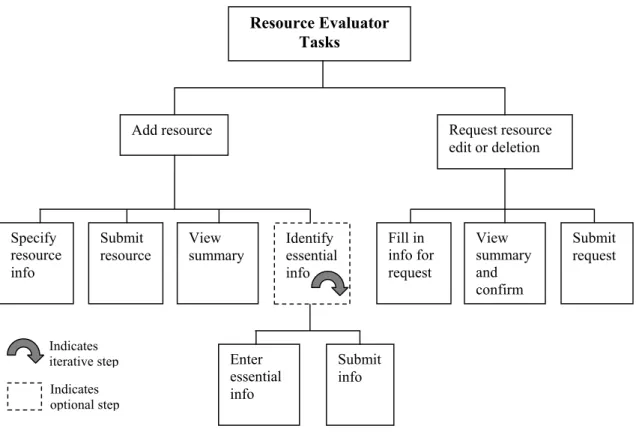
Figure 1. Resource evaluator tasks. Indicates optional step Indicates iterative step Submit request Identify essential info View summary and confirm Fill in info for request Submit info Enter essential info Submit
resource View summary Specify
resource info
Request resource edit or deletion Add resource
Resource Evaluator Tasks
Use Case: Add Resource
User Intention System Responsibility
Present Add Resource page Supply information for new resource.
Present summary of information to be added and confirmation message Accept confirmation and submit
information
Validate resource information Present confirmation of submission Indicate intention to specify essential
information for resource
Present Essential Information page Identify essential information
Validate information
Scenario 1: Add Resource
[John has been assigned a set of Web resources to evaluate to see if they contain any
information that would be a useful addition to their product documentation. He starts
with the first URL on his list, which turns out to be a technical article on an external Web
site for developers who use the product. Although John considers the article well written
and thorough, he determines that its subject is too specialized and not appropriate for the
product documentation. Even so, he needs to add the resource to the database.]
John accesses the main page for the system with a browser and selects a link indicating
that he wants to add a new resource. He is presented with the Add Resource page (a Web
form) where he enters various pieces of information on the resource, such as its URL, a
brief description of the resource’s contents, and so forth. In addition he selects
identifying characteristics from drop-down lists, such as the type of resource and its
format. Finally he selects one or more category labels that he believes apply to the
resource. When he is satisfied with the information, he clicks the Add Resource button to
submit the information and is presented with a summary page, confirming the resource
was added. He then repeats the process for the other resources he is evaluating.
Scenario 2: Add Resource
[John is in the process of adding several new resources to the system. After successfully
adding the first two, he proceeds to the third.]
While filling in the information for the third resource (an online presentation), John
realizes that there are two points from the presentation that would be good additions to
page, John clicks the “Identify essential information” link, whereupon he is presented
with the Identify Essential Information page. He enters a description of the first point
and indicates how much labor would be involved in maintaining the information, if it
were added to the product documentation. Then he clicks the Submit Information button,
and the page is updated with a list of items added as essential information. John then
repeats this for the next point and the list is again updated to show the two items John has
specified. When he is done, he clicks the Done button to return to the Add Resource
page.
Use Case: Request Edit or Deletion
User Intention System Responsibility
Present Edit or Deletion Request page Specify whether to edit or delete resource
Specify which resource to affect Submit request
Present summary page with confirm option Accept confirmation and submit request
Present confirmation that request has been logged
Scenario: Request Edit or Deletion
[Maggie has just finished adding a new resource to the system but has realized that the
URL she specified is incorrect.]
From the start page Maggie selects the “Request resource edit or deletion” link and is
presented with the Edit or Deletion Request Page. She selects the “Edit” option and then
enters the URL of the resource she previously entered into the system to identify the
resource. In a text box she describes the change that she needs made, namely to replace
box. Satisfied with her information, she clicks the Continue button. She is presented
with a summary page listing the change being requested, and she clicks the Submit
Request button. The system displays a page confirming that Maggie’s edit request has
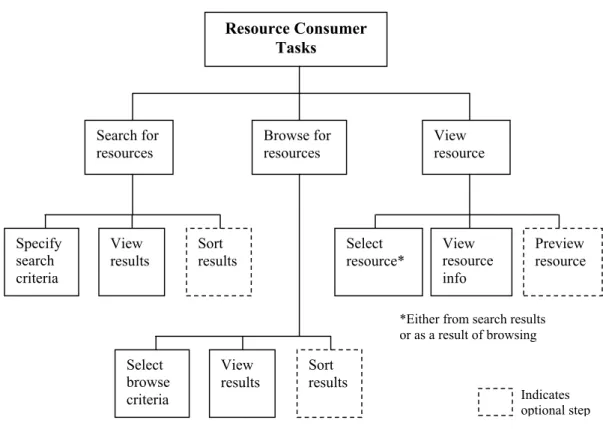
been logged. View results Sort results Select browse criteria
*Either from search results or as a result of browsing Browse for resources Indicates optional step Preview resource View resource info Select resource* View
results Sort results Specify search criteria View resource Search for resources Resource Consumer Tasks
Figure 2. Resource consumer tasks.
Use Case: Search for Resources
User Intention System Responsibility
Present Search page Select the attributes with which to scope
the search
Present list of search results View search results
Select column in results to change sort order
Scenario: Search for Resources
[Jennifer is a writer on the team who wants to see how many Web resources deal with
how to implement security with their software product. Although she hasn’t been
involved in evaluating resources previously, she is aware of the system and the resource
information it contains.]
Jennifer accesses the main page for the system with a browser and selects a link
indicating that she wants to search the resources in the system. She is presented with the
Search page, where she can select from several attributes that will be used to scope the
search. From the category drop-down list, she selects “Security” and from the version
drop-down list, she selects the most recent product version. She leaves the other search
attributes at their default values. She then clicks the Search button and receives a page
listing the resources that pertain to the latest version of the product and are associated
with the security category. She is interested in the types of resources, such as
presentations or tutorials, so she clicks on the “Type” column header to cause the results
list to be sorted according to resource type, where she can more easily scan the resources.
Use Case: Browse Resources
User Intention System Responsibility
Present main page (browse links available from top level)
Select the attribute of interest
Present list of results View results
Select column in results to change sort order
Scenario: Browse Resources
[Ted is a first-time user of the system and is curious about the kind of information stored
in the system.]
From the start page Ted sees the browse links describing the resources in the system. He
scans them to get an idea of how the resources are organized and then clicks the “Portlet
development” link under the category list. The system presents a list of resources that are
associated with the portlet development category.
Use Case: View Resource
User Intention System Responsibility
Present list of resources (via either previous browse or search)
Select the resource
Present detailed information for resource Select to show preview
Present preview of resource in preview space
Scenario: View Resource
[Continuing from the Browse Resources scenario above, Ted has generated a list of
resources he is interested in.]
Ted identifies one resource in particular that he wants to know more about and clicks on
that resource from the list. A detailed summary page for the resource is displayed, listing
all the information about the resource. Ted then clicks the “Preview resource” link,
causing a preview area to be displayed in the browser window and the URL of the
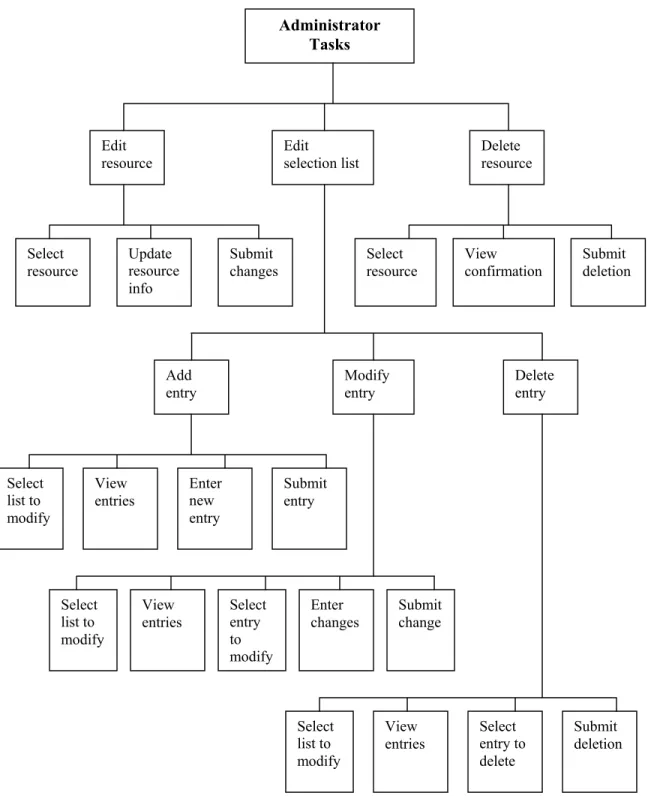
Tasks Submit deletion Select entry to delete View entries Select list to modify Delete entry Modify entry Add entry Delete resource Submit entry Enter new entry View entries Select list to modify Submit change Enter changes View entries Select list to modify Submit deletion View confirmation Select resource Submit changes Update resource info Select resource Edit selection list Edit resource Administrator Select entry to modify
Use Case: Edit Resource
User Intention System Responsibility
Present Edit Resource page Select the attributes with which to scope
the search
Present list of search results View search results
Select resource to edit
Display page with resource information Enter changes to resource information
Submit changes
Validate resource information Present confirmation of update
Scenario: Edit Resource
[Laura is performing some maintenance on resource information in the system. She has
received a request to modify the category entry for a resource that John has recently
added to the system.]
Laura opens the Edit Resource page in a browser, which contains essentially the same
fields (to start with) as the Search page. Although she could restrict her search by date or
other attribute, she elects to take the defaults, since the results will be sorted by date by
default and recent entries will be near the top of the list. A list of resources is displayed,
and Laura locates and selects the link for the resource John indicated. A detail summary
page for the resource is displayed, with entry fields and drop-down lists enabling editing
of the resource’s information. Laura changes the category selection as John requested,
and then clicks the Update Resource button. A confirmation page is displayed indicating
Use Case: Delete Resource
User Intention System Responsibility
Present Delete Resource page Select the attributes with which to scope
the search
Present list of search results View search results
Select resource to delete
Display warning page Submit deletion
Present confirmation of deletion
Scenario: Delete Resource
[Laura has received a deletion request from Ted regarding a resource that is in the system
but is no longer needed.]
Laura opens the Delete Resource page in a browser, which contains essentially the same
fields (to start with) as the Search page. Because Ted has provided her with the URL of
the resource to be deleted, Laura enters the URL in a search field and clicks the Search
button. A list of resources is displayed, in this case containing one entry. Laura clicks
the entry, and a warning page is displayed asking if she wants to delete the resource. She
clicks the Delete Resource button, and a confirmation page is displayed indicating that
the resource has been deleted.
Use Case: Edit Selection List
User Intention System Responsibility
Present Edit Selection List page Select the selection list to be modified
Present list of elements in list Select element in list (if modifying or
User Intention System Responsibility Select whether to add, modify, or delete
element
Present add/modify element page or warning page (if deleting)
Enter/Modify element information (if adding or modifying)
Submit change
Validate information (if necessary) Present confirmation page
Scenario 1: Edit Selection List – Add New Element
[The software product the team of writers supports has recently delivered a new release,
and although it is still too early for external Web resources specific to that release, Laura
decides to go ahead and update the lookup table so that the system will be prepared when
such resources are available.]
Laura opens the Edit Selection List page in a browser, which by default lists the current
lookup tables in the database (the lookup tables are rendered in the interface as
drop-down selection lists). She selects the product version list and clicks the Add Entry
button. A page is displayed that lists the elements in the product version list and provides
an entry field for new entries. Laura enters the name of the new version and clicks the
Add button. The element list is updated and a confirmation message is displayed
indicating the change. Because Laura has no other entries to add, she clicks the Done
button, which returns her to the Edit Selection List page.
Scenario 2: Edit Selection List – Modify Element
[After adding a new entry to a selection list (see previous scenario), Laura realizes that
From the Edit Selection List page, Laura selects the product version list again and clicks
the Modify Entry button. A page is displayed that lists the elements in the product
version list. Laura selects the incorrect entry from the list, and the entry field is updated
with entry’s value. Laura makes her changes to the entry in the field and clicks the
Modify button. The element list is updated and a confirmation message is displayed
indicating the change. Laura clicks the Done button to return to the Edit Selection List
page.
Scenario 3: Edit Selection List – Delete Element
[Finally Laura decides to delete an obsolete entry from the format lookup table, because
they have since discovered that the format in question is not applicable.]
From the Edit Selection List page, Laura selects the format list and clicks the Delete
Entry button. A page is displayed that lists the elements in the format list. Laura selects
the entry that she wants to delete and clicks the Delete button. A warning page is
displayed verifying that the deletion is intended. Laura clicks the Continue with Delete
button. The element list page is displayed again, with the list updated and a confirmation
message displayed indicating the change. Laura clicks the Done button to return to the
System Description
The system is composed of an SQL database that the user interacts with through a
Web-based interface. This section describes the components of the system, including:
• Logical design of the database
• Data dictionary
• Database schema
• System architecture
Logical Design for the Database
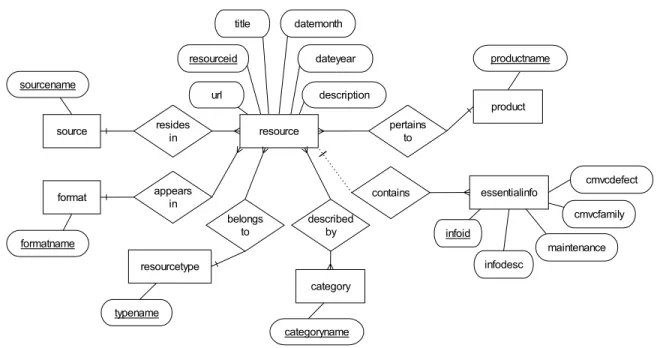
The ER diagram in Figure 4 presents the entities and relationships that the database
supports.
resource source residesin
format appearsin
sourcename formatname resourceid url title datemonth description dateyear belongs to resourcetype typename described by category categoryname pertains to product productname contains essentialinfo infoid infodesc maintenance cmvcfamily cmvcdefect
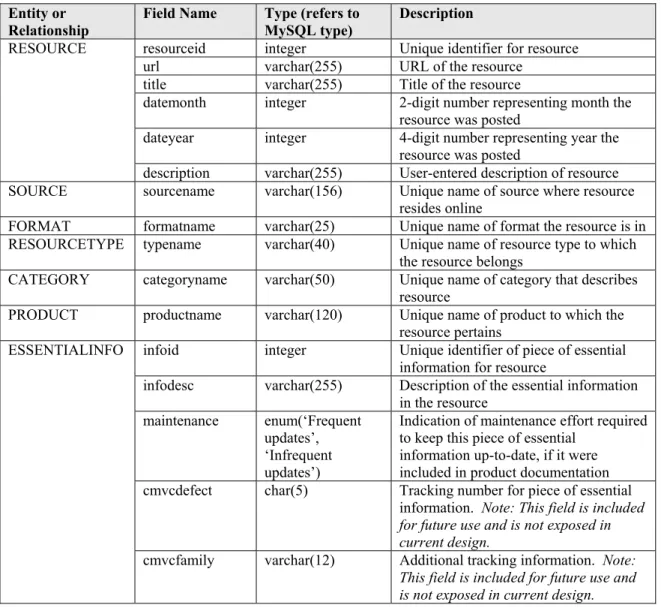
Data Dictionary
Table 1 displays the data dictionary information for the database.
Table 1. Data dictionary for database. Entity or
Relationship Field Name Type (refers to MySQL type) Description
resourceid integer Unique identifier for resource url varchar(255) URL of the resource
title varchar(255) Title of the resource
datemonth integer 2-digit number representing month the resource was posted
dateyear integer 4-digit number representing year the resource was posted
RESOURCE
description varchar(255) User-entered description of resource SOURCE sourcename varchar(156) Unique name of source where resource
resides online
FORMAT formatname varchar(25) Unique name of format the resource is in RESOURCETYPE typename varchar(40) Unique name of resource type to which
the resource belongs
CATEGORY categoryname varchar(50) Unique name of category that describes resource
PRODUCT productname varchar(120) Unique name of product to which the resource pertains
infoid integer Unique identifier of piece of essential information for resource
infodesc varchar(255) Description of the essential information in the resource
maintenance enum(‘Frequent updates’,
‘Infrequent updates’)
Indication of maintenance effort required to keep this piece of essential
information up-to-date, if it were included in product documentation cmvcdefect char(5) Tracking number for piece of essential
information. Note: This field is included for future use and is not exposed in current design.
ESSENTIALINFO
cmvcfamily varchar(12) Additional tracking information. Note: This field is included for future use and is not exposed in current design.
Schema
The database schema used for the system is presented below:
SOURCE (sourcename)
FORMAT (formatname)
CATEGORY (categoryname)
PRODUCT (productname)
FK ESSENTIALINFO (infoid, infodesc, maintenance, cmvcdefect, cmvcfamily, resource)
RESOURCE (resourceid, url, title, datemonth, dateyear, description, source, format, FK FK
resourcetype, product) FK FK
RESOURCE_CATEGORY (resourceid, categoryname)
FK FK
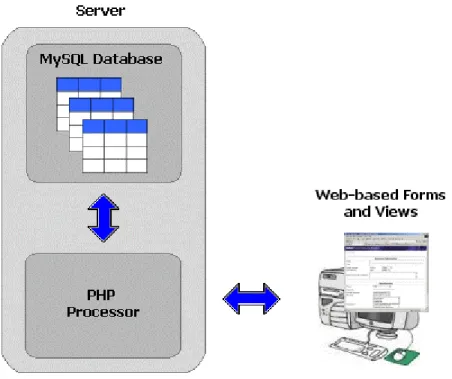
System Architecture
The overall architecture of the system is shown in the Figure 5. The primary elements
are an SQL database, a PHP Hypertext Preprocessor, and a set of Web-based forms and
views.
SQL Database
All information for the resources is gathered and stored in an SQL database. Because of
its open source status and widespread availability, the MySQL database is utilized for the
system. The version of MySQL used is 11.18 Distribution 3.23.55, running on a
Windows NT machine.
PHP Hypertext Preprocessor
To provide direct access to the MySQL database through a Web-based interface, PHP is
used to create HTML pages that can contain elements that are generated dynamically
from the contents of the MySQL database. In addition, PHP has the capability to perform
SQL queries and process the results, making it especially suited for integrating the
database with a Web-based interface. The version of PHP used is 4.3.1, running on a
Windows NT machine (co-resident with the MySQL database).
Web-based Forms and Views
The user interface for the proposed system is entirely Web-based, composed of HTML
forms and pages to display information on the resources in the database. As described
above, some portion of the code for these pages is in the PHP scripting language to
provide for real-time communication with the database and to enable direct manipulation
of its contents.
The browser requirement for the system is Internet Explorer 5.5 or later, Netscape 6 or
later, or Opera 5 or later. Although there is no intention to rely much (if at all) on
from the detailed view page (as described in the use cases and scenarios), which are
implemented through the use of the <IFRAME> tag. Because the users of the system
must use up-to-date browsers as part of their day-to-day activities, this requirement is not
expected to pose any problems.
Security
After consideration, it was determined that no real security (at least in terms of
authorization and authentication) be implemented for this initial implementation of the
proposed system. The system itself runs on an internal network that is not accessible to
users outside the software company where the users work. To help minimize the chance
of data being lost or deleted, the Web pages that are accessed by resource evaluators and
resource consumers do not provide the capability to delete resources or otherwise alter
their contents once they’re created. To do this, the user must use the online form to send
the request to the system administrator.
However, the pages designed for the administrator do have full edit and delete capability.
The initial plan to “protect” these pages is simply to not publicize their URLs to any user
who is not an administrator (and to mask the directories where these files reside on the
Web server). The next iteration of the system would provide for a login mechanism for
the administrator when he attempts to access these pages. Although the initial approach
is hardly a secure one, the expectation is that there is a low risk of contamination given
the team’s insulated environment and, frankly, that there is little interest in the contents of
Reflections on the Project
As is evident from this design document, the development of the use cases and the
scenarios in this project occupied a significant portion of the design phase. There was a
temptation to rush through the task analysis process and begin building the system
outright, largely because working with the technical pieces of a project can convey a
sense of progress quickly. However, knowing that the building phase would require a
large investment of time in and of itself, I determined that appropriate time applied to the
use cases and scenarios would likely limit unnecessary rework and churn later,
particularly changes caused by an inadequate understanding of the tasks the interface
needed to support. One of the largest benefits that the use cases provided for this project
was that they helped to identify issues early on in the process; the scenarios described the
user’s interaction with the system, while the system response tables described what the
system needed to do and when it needed to do it. Knowing the relationship between the
user actions and the system responses influenced my approach to the PHP code, for
example helping me decide when a single PHP page or multiple PHP pages should be
used for a particular interaction. In addition, the use cases and scenarios lent themselves
to the use of pseudocode, short phrases in readable text that are used to explain the
specific tasks involved in approaching a programmatic problem. This pseudocode was an
important element in implementing the PHP code for the system, making the
programming easier.
It is worth noting that this system is a small-scale application. Even with the
cases and scenarios proved valuable to improving the efficiency of the development
phase. For large and complicated systems, the inclusion of use cases and scenarios
becomes even more important, as they can help highlight where functions and