Local content in a Europeana cloud
D4.2: Live Support Portal
Authors
:
Stein Runar Bergheim (AVINET)
Stavros Angelis (Athena RC, DCU)
Dimitra- -Nefeli Makri (Athena RC, DCU)
Dimitris Gavrilis (Athena RC, DCU)
Revision History
Revision Date Author Organisation Description
1.0 28.08.2014 S.R. Bergeim AVINET Initial draft for internal review 1.1 07.09.2014 S. Angelis ATHENA Revisions, user guide, Appendix 1.2 09.09.2014 S.Angelis, D.
Gavrilis, D.N. Makri
ATHENA Revisions, user guide, Appendix
1.4 12.09.2014 S. Angelis ATHENA Integration of internal review comments from Kate Fernie and Marcin Werla, final edit.
Statement of originality:
This deliverable contains original unpublished work except where clearly indicated otherwise. Acknowledgement of previously published material and of the work of others has been made through appropriate citation, quotation or both.
Contents
Executive Summary ... 4
1. Introduction ... 5
2. Support requirements analysis ... 6
3. Overview of the live support portal ... 9
Content ... 10
Tiki Wiki CMS ... 11
4. System architecture ... 12
5. Overview of help desk system ... 14
6. Overview of the Question and Answer system ... 15
7. Present Status -‐ Next steps ... 20
8. References ... 21
Appendix A: Tiki Wiki CMS documentation ... 22
Executive Summary
The LoCloud Live Support Portal (http://support.locloud.eu) is a gateway for all components of the LoCloud support mechanism provided through Work Package 4. The support portal gives LoCloud partners and other interested parties unrestricted public access to:
1. Descriptions of services and applications
2. Technical and end-‐user documentation for all services and applications, and training materials
3. Frequently asked questions that are of relevance to the wider community
4. Help-‐desk functionality for requests not covered by available documentation (D4.1)
In deliverable 4.2 the support requirements analysis is presented including all factors that were taken into account as part of the design procedure of the support portal. These requirements were then implemented in the support portal and concern both functionalities and user workflows.
Specific user groups are identified and both what the appropriate information for each user group is and how this information will be added/updated to the portal, by whom and how this
information will be delivered to the end user is presented.
For the cases that existing information is not sufficient to cover user needs for support, a help-‐desk service is outlined where technical supports tickets may be raised and subsequently answered by LoCloud technical partners and is better described in deliverable 4.1 Documentation & Help Desk.
The support portal will also be a gateway to the e-‐learning courses once they are ready in 2015.
Technically, the support portal is implemented using a Wiki software -‐ Tiki Wiki CMS (Appendix A) where all textual information resources, screenshots and binary file downloads are stored. The Wiki is home to all technical and end-‐user documentation for services and applications developed in Work Package 3. “Behind“ the Wiki, two other systems provide key functionality:
• Frequently asked questions • Help-‐desk
The support portal is continuously updated with support resources and new versions of
documentation for the various services and applications, according tot he workflows presented in this deliverable. The content that is on the portal will at any given time reflect the current
development status of the project outputs.
1.
Introduction
The LoCloud support portal is a dedicated web site that is the focal point that provides a single entry point for documentation about LoCloud services and applications, training materials, a Question and Answer service, a help desk and can be accessed though the following url:
http://support.locloud.eu.
The target audience for the support portal is LoCloud partners, data providers and 3rd parties who
would like to utilize LoCloud services and applications to provide additional functionality for their own applications and systems. All information in the portal is made publicly available with some additional services made available to registered users.
The LoCloud partnership consists of a broad range of different organization whereof some have a strictly technical focus whereas others are heritage professionals. The purpose of the support portal is to give easy access to all documentation and know-‐how about the LoCloud outputs to facilitate the adoption of services and applications by both groups; i.e. both (1) the heritage professionals who are not necessarily very technically sophisticated as well as (2) the programmers and “techies” who would like to implement the various public APIs.
The support-‐portal end-‐user interface is implemented using the software “Tiki Wiki CMS”, this software is described in greater detail in Chapter 3 and in Appendix A. In the support portal a brief introduction to different components of the support centre is presented. Furthermore user and technical documentation about each of the LoCloud service and application is provided.
Apart from the Tiki Wiki CMS a Q&A service is available as shown in chapter 3 and better described in detail in Appendix B and a support ticket system as described in detail in D4.1.
2.
Support requirements analysis
The technical partners responsible for implementing the LoCloud support mechanism are:
• PSNC (Poland)
• Athena RC, DCU (Greece)
• AVINET (Norway)
All three organizations have previously been involved in projects like Athena, CARARE, Europeana Local, and others, where providing a support mechanism was part of the scope of work. Based on the experiences gained through those projects, as well as an assessment of the capabilities and capacity of the LoCloud partnership the support requirements where determinded as follows. Single entry point for all support related information
It was decided that a single public entry point should be established for all support related material and activities. The technical partners considered that a series of different web applications serving different support purposes would be confusing for the end-‐users.
Interactive documentation
Owing to the evolving nature of the systems being developed in LoCloud it was felt to be greatly beneficial to maintain all documentation in a Wiki. This will allow for incremental additions and improvements by both the authors and users over time.
For example it was felt that the technical documentation provided by software engineers for services and applications often omits contextual information that is useful for readers to fully understand what is meant by instructions in user manuals. By maintaining the documentation in a Wiki and permitting the end-‐users to interact with the authors, it will be easy to identify
weaknesses in the documentation and provide enhancements accordingly. Integration with help-desk
The LoCloud help-‐desk is a mechanism whereby LoCloud partners are able to raise technical support requests related to either LoCLoud processes (metadata extraction/mapping/ingestion) or specific services or applications such developed through Work Package 3.
The help-‐desk is specified as a separate deliverable in the LoCloud Description of Work (DoW) but from the point of view of users it is presented as part of the support portal and the single access point. The help-‐desk is described in deliverable D4.1.
Frequently asked questions
Throughout the preceding projects, technical partners have observed that many questions are of a generic and recurring nature. It is possible to treat such questions as regular support tickets and handle them in a direct, private communication line between the user and the support staff – but this is not beneficial to anyone else.
It was therefore determined necessary to include a frequently asked questions section in the support portal. This is provided through the software application “Question2Answer” which allows community interaction; i.e. other users may choose to share their knowledge by providing an
answer to a question through an attractive end-‐user interface. Technical support staff provide the answers to questions and support tickets raised in the help-‐desk.
Importance of serving both “technical users” and “end-users”
The support portal is meant to serve both technical and non-‐technical users (end-‐users). Thus it was determined that the navigation structure and all written documentation must distinguish clearly between the target groups.
The main navigation structure in the support portal distinguishes between technical documentation and end-‐user documentation, providing one-‐click access to both from the front-‐page of the user interface.
Updating the content
The support portal contains documentation provided by several different LoCloud partners that targets different systems and different user groups. Three parties (PSNC, ATHENA, AVINET) maintain the portal and a clear definition on how content is updated is imperative. In general all LoCloud partners can update the information contained in the support portal. Each technical partner contributing applications and services in LoCloud is responsible for providing and updating the necessary documentation about their contribution as needed.
Developer support
It is important that information about individual LoCloud services is presented to developers in a way that is homogeneous across (bearing in mind that the services are developed using different technologies and by different partners). This can be achieved by presenting all documentation in the exact same way and by making links to relevant information such as metadata schema
information. Furthermore, it is important that simple examples of GET / POST requests and XML / JSON responses are presented.
External providers support
LoCloud makes it possible for non-‐project partners to use the various services in order to enrich and deliver their content to Europeana. This means that a separate section should be devoted to
external partner so that they can be brought up to speed in the various workflows and schemas and protocols that are considered known. These include:
• The overall workflow
• The main systems / components that can be found and what service they provide (MINT,
MORE, LDL)
• Possible IPR issues that they should be aware of
Handling of support tickets
The use of support tickets within the LoCloud help-‐desk should follow a un-‐succesfull attempt to locate the desired information. This implies that the user should be able to easily locate the specific parts that could give him/her answers. In the event of a new support ticket, this should be
answered by a group of experts that:
• Have extensive knowledge in the contents of the support portal so that they can
immediately guide the user to the right information (if the information already exists)
• Can decide whether the question should be forwarded to a specialist
• LoCloud Collections and Metadata specialist • Expert in MINT
• Expert in MORE
• Expert in each micro-‐service • Expert in LDL
The specialist should explain / solve the issue and make the solution available to the persons responsible for handling the tickets. This has the advantage that similar future questions may be replied immediately.
If 2-‐3 tickets are received that contain a similar question, the person responsible for handling this should consider adding either a relevant section in the documentation and/or a respective FAQ entry.
3.
Overview of the live support portal
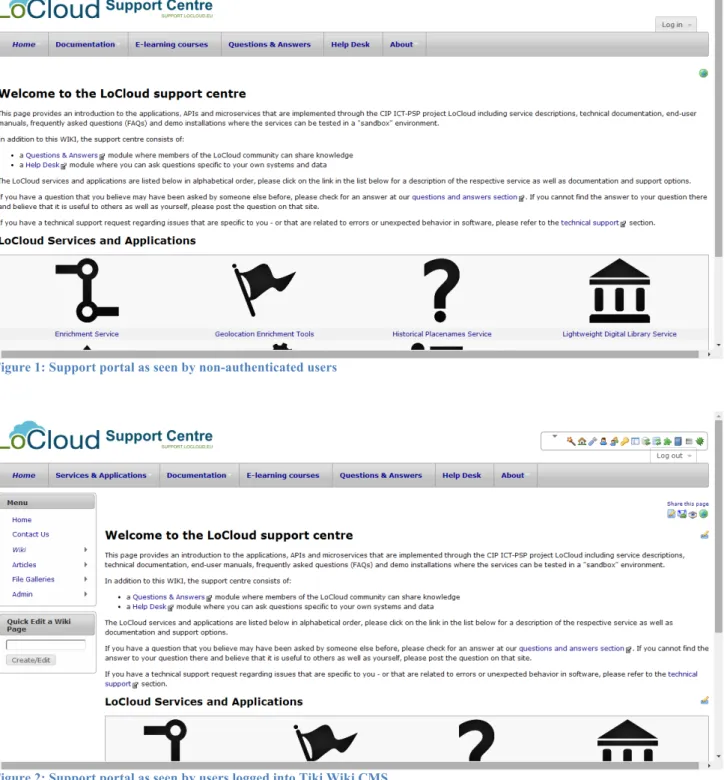
The support-‐portal end-‐user interface is implemented using the software “Tiki Wiki CMS”, as described in greater detail in Appendix A. The user interface is divided into two or three content areas depending on whether the user is logged in or not:
Figure 1: Support portal as seen by non-authenticated users
Figure 2: Support portal as seen by users logged into Tiki Wiki CMS
1. A header with the project logo, site title and a horizontal navigation bar (menu) that provides access to the primary sections of the help-‐desk
b. Services & Applications (provides one-‐click access to detailed info about each service or application)
c. Documentation (provides access to pages where links to all technical and end-‐user documentation for all services is collected)
d. E-‐learning courses (provides access to information about (future) e-‐learning courses and concepts that will be made available through LoCloud
e. Questions & Answers (an interactive FAQ where anyone may ask and answer questions of public interest, this module is implemented using the software “Question2Answer” and is described in greater detail in Chapter 3, below.) f. Link to the help-‐desk (described in greater detail in D4.2)
2. For authenticated users, a left-‐margin area contains a menu that gives access to administrative functions of Tiki Wiki CMS
a. Administrative functions include articles administration, maintenance and access to galleries of uploaded files etc.
3. For all users, the main part of the screen is reserved for content. Here information sections corresponding to the selected menu-‐item are displayed accordingly.
The start-‐up page gives a brief introduction to the different components of the support centre and explains how and when to use them. It also provides direct links to in-‐depth information pages about each of the LoCloud services and applications.
Content
The live support portal of LoCloud contains a variety of information that targets different systems and multiple users.
The support related content is split into the following categories/groups:
• User related documentation
o Information on MINT2 usage
o Information on MORE2 usage
o Information on LDL usage
o Information on the usage of the various micro-‐services
• Metadata schema related documentation
o Information regarding intermediate and target schemas
o Information on mapping guidelines
• IPR related documentation
o License rights and comparison
o Minimum acceptance criteria (IPR)
• Aggregation related information
o Information on the aggregation workflows. o Information on acceptance & quality criteria
• Developer related documentation
o Technical documentation on installing various services
o Developer documentation on using/extending various micro-‐services
The above categories should be reflected in the support portal with simple and comprehensive guides. In most cases, simple examples can be of significant importance. At the time of writing documentation about Metadata schemata, IPR and Aggregation content is pending and will be added during autumn-‐winter 2014.
It is important that all documentation that enters the support portal is homogenous in appearance. This is not always obvious when three different partners are responsible for that. In order to
overcome this issue, various styling guidelines are exchanged and decided among three partners so that the following are achieved:
• Content that is added / updated appears homogeneous • Workload is evenly splitted among partners
• Content is updated faster and more thoroughly
Tiki Wiki CMS
Tiki is a very feature rich Free and Open Source Web Application. While many Wikis and CMS software systems have only a small set of "core" features and rely on third-‐party extensions, Tiki uses an all-‐in-‐one model that incorporates all features into the main code base.
This design was attractive for the LoCloud support mechanism in order to be able to extend the support portal as demand arises without having to resort to other, 3rd party software.
Main features of Tiki Wiki CMS:
• Wiki pages • Blogs
• Forums
• RSS Syndication
• WYSIWYG Editing
• Calendars and Events • Database Tracking System • File and Image Galleries
• User and Group Management
• Surveys, Quizes, and Polls
Link: https://info.tiki.org
A detailed description and documentation about the current implementation of Tiki Wiki CMS may be found in Appendix A.
4.
System architecture
In order to implement the support portal three different software products were used. Two of them are described here, the third, the help-‐desk system, is described in deliverable D4.1 “Documentation & Help-‐Desk”.
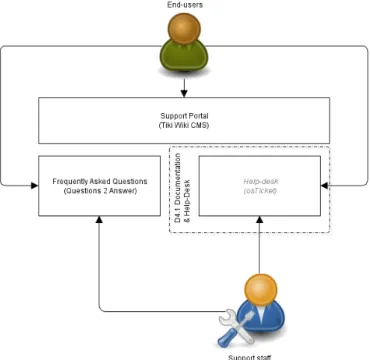
The principle behind the support portal is that it will act as the storage area for all system documentation as well as be a gateway for underlying systems such as the frequently asked questions system and the help-‐desk (not described in this deliverable, please see D4.1).
The user groups identified are the following:
• End-‐users: include unregistered end-‐users and registered partners that require information
about LoCloud’s applications, APIs and microservices and support
• Support staff: include technical partners that contribute applications, APIs and microservices
to LoCloud and are responsible for adding the appropriate information and provide support to end-‐users
End-‐users through the support portal will be able to:
• Get “self-‐service access” to all documentation and facility to contribute where
documentation is not sufficient
• Ask questions, and contribute knowledge and answers, to the frequently asked questions
application
• Raise support tickets (see D4.1)
Support staff through the support portal will be able to:
• Upload and edit documentation and information about each service or application • Anonymize and transfer resolutions to support-‐tickets from the help-‐desk into the
frequently asked questions section
• Provide answers to questions raised via the frequently asked questions section • Respond to raised support tickets (see D4.1)
A general principle is to have a uniform way for adding support documentation to the support centre and is explained in detail in Appendix A. In Locloud each technical partner that contribute applications, APIs and microservices is responsible to provide the appropriate documentation that accompanies their contribution. This documentation is divided in two major categories, i) User Documentation and ii) Technical Documentation.
User documentation contains a general description of a specific LoCloud application or service, as well as step by step access and use instructions for end-‐users.
Technical documentation involves general description and technical information for technical end-‐ users that require information about interacting programmatically with the appropriate
applications and services.
Registered users of the Support Portal are able to update the documentation, as seen in Appendix A.
5.
Overview of help desk system
This section gives a brief overview of the help-‐desk system, which is described in deliverable D4.1 “Documentation & Help-‐Desk”.
The help desk system is based on a popular open source ticket system osTicket1. With osTicket end-‐
users can submit questions and requests for support. Requests are automatically directed to the appropriate support staff and are assigned with unique ticket numbers for tracking purposes. Requests are private between the end-‐user that submit them and the staff personnel responsible for processing. The complete request archive is always at the disposal of the end-‐user.
The main features of osTicket include:
• Custom Fields • Rich Text • Ticket Filters • Help Topics
• Agent Collision Avoidance • Assign and Transfer
• Auto-‐Responder • Customer Portal • Dashboard Reports Link: https://support.locloud.eu/osticket/ 1 http://osticket.com
6.
Overview of the Question and Answer system
The Question and Answer is based on the open source platform Question2Answer2 for PHP/MySQL, currently running on more than 13000 servers in 40 languages. Q2A allows people to ask and answer questions in an open environment. The system furthermore permits commenting, voting, notifications, points and rankings that contribute to build a more comprehensive information resource over time.
End-‐users enjoy the interactivity that Q&A offers, and may for this reason visit the site more regularly. In addition, many web searches through regular main-‐stream search engines like Google, Bing and Yahoo are questions, for this reasons, «questions» will attract search engine traffic.
The main features of Q2A include:
• Ease of installation and deployment • Easy styling with CSS themes
• Supports translation into any language. • Custom sidebar, widgets, pages and links.
• SEO features such as XML Sitemap and neat URLs • Fast integrated search engine.
• Categories (up to four levels deep) and/or tagging. • Voting, comments, follow-‐on and closed questions. • Points-‐based reputation management.
• RSS, email notifications and personal news feeds.
Implementation of Q2A for LoCloud
The Questions & Answers service is a community-‐oriented service. In Q&A all members of the LoCloud may participate, contribute and share knowledge. Members can ask questions or provide answers to the best of their knowledge. All this information remains open and available to all members of the community for reference or further contribution. If the question is specific for a particular institution’s system or data, or specific technical assistance is required, then this question should be submitted to the Support Ticket System.
The Q&A may be accessed through the following URL “http://support.locloud.eu/qna/”. General Functionalities
In Q&A a user can browse through existing questions, check on unanswered questions, browse through questions categories, ask new questions or answer to existing ones. Questions and
Answers can be up-‐voted or down-‐voted, thus helping the community locate the most meaningful questions and answers. Also questions may be added to the users favorite list in order to follow updates easier. In Q&A users have profiles that contain information about them and their activity. Registration
In order to use Q&A a user must register for a new account. This can be done either from the top right link “Register” or through this URL “http://support.locloud.eu/qna/register” (Image 3).
To register the user must provide a Username, a Password and a valid Email address.
Image 3. Registration form
Question Views
In Q&A questions may be accessed through the navigation menu following the “Questions” link or through this URL “http://support.locloud.eu/qna/questions”. The Questions view (Image 4) allows users to browse through existing questions. The user may sort the questions by most recent, most voted, most answered or most viewed.
In the questions list a user can see several information about each question. Specifically a user can see the title of the question, when it was asked and by whom, the category under which the question falls, the number of answers and the number of votes casted on this question. Also the user can locate questions by browsing the questions’ categories.
The question view (Image 5) allows the user to view the details of the question. Besides the information from the questions list view, the user can additionally view more information and perform several functionalities. Firstly the user can view answers to the question or provide an answer. Users can also add the question to their favorites, flag the question or share them to social media. A flag works as a quick notification about an answer a user finds important.
Image 4. Questions View
Image 5. Question View
Adding a new Question
To add a new question a user the link “asking a question” from the Questions list view or follow this URL “http://support.locloud.eu/qna/ask” (Image 6).
To create a new question the user must complete a simple form with the following information:
• The question in one sentence: Provide here the question as it will appear in the questions
list.
• Category: Select from a dropdown list the appropriate Category the list falls under.
• More information for the question: The user must provide further information about the
Image 6. Ask a Question
7.
Present Status -‐ Next steps
The support portal is live and functional.
End-‐user documentation about LoCloud’s applications and services already exists about the following:
• MINT service • MORE service • Enrichment Service • Geocoding Microservice • Historical Placenames Service • Vocabulary Service
End-‐user documentation is pending about the following:
• Crawler-‐ready Tagging Tools • Lightweight Digital Library Service
Technical documentation about LoCloud’s applications and services already exists about the following:
• MINT service • MORE service • Enrichment service
• Geocoding web service API technical reference
• Historical Placenames web service API technical reference • Lightweight Digital Library Service
Technical documentation is pending about the following:
• Crawler-‐ready Tagging Tools
Documentation is pending about the following:
• Aggregation related information, Metadata schemata, and IPR
Currently several questions and answers have been added to the Q&A section. These will be the basis for the further development of the Q&A content. The engagement of the LoCloud community is still needed for the further development of the Q&A.
Next steps include completing the documentation pending from the technical partners and encouraging contributions from end users to both the Q&A and the documentation.
Documentation will be added until the end of month 22 so that it may reflect on feedback gained from the regional training workshops.
E-‐learning courses will be added in the middle of 2015.
8.
References
• LoCloud D4.1 Documentation and Help Desk:
http://www.locloud.eu/Resources/Deliverables
• Tiki: https://info.tiki.org
• Question2Answer: http://www.question2answer.org/
Appendix A: Tiki Wiki CMS documentation
Introduction
The Live Support Portal is implemented taking into account the support requirement analysis, using the software “Tiki Wiki CMS”, which provides many features, described in Chapter 3. In this
appendix, a more detailed description of the Tiki Wiki CMS will be presented and how it has been used in order to meet the needs of the project. The Live support Portal is accessible through the following url: http://support.locloud.eu/.
This section is divided into the following parts:
• A description of the system for all users. • A description of the system for registered users • A description of the system for administrators.
Functionalities for all users
The homepage of the support portal (Image 1) gives general information about the applications, APIs and microservices offered to the LoCloud project.
More specifically, the menu is composed of the following tabs:
• Home; this tab leads to the homepage of the support portal,
• Documentation; this tab contains 2 separate tabs leading to the “User” and the “Technical”
documentation of LoCloud services and applications,
• E-‐learning courses; LoCloud e-‐learning courses will be available in the middle of 2015, • Questions and Answers; this tab leads to the Questions2Answer service,
• Help Desk; this tab leads to the Help desk system which is described in detail in the
deliverable D4.1 “Documenation & Help Desk”.
The user can browse the documentation of each service either from the homepage or from the tab “Documentation” choosing the user documentation link or the technical documentation link to view the information of the corresponding service.
Image 1: Homepage of support portal
From the tab “Documentation", the user can browse either to the user (Image 2) or to the technical documentation (Image 2) for all micro-‐services and applications.
In both cases, by clicking to one of the applications or micro-‐services, the user will be lead to the corresponding guidelines.
Image 2: User documentation of all micro-services and applications
Image 3: Technical documentation of all micro-services and applications
Functionalities for registered users
A registered user has the ability to browse the support portal as described in the previous section while he/she is able to manage the content of the support portal. In other words, a registered user can add, edit or delete content in one or more articles. Moreover, the user can upload files such as
After logging into the system, the user can choose the topic that he/she wants to edit. If for example the user wants to make some changes in the “user documentation” of the MORE service, the user must follow the following steps. In the page of the User documentation, by clicking in the MORE service a new page will be displayed (Image 4).
Image 4: MORE end-user documentation
The user is able to edit all the content or part of it. In the first case the user chooses the “Edit” button in the right-‐margin of the page (Image 5) while in the second case the user chooses the “Edit” button of a special part of the page (Image 6).
In the scenario the user wants to edit all of the content, by clicking the Edit button, an editor is shown a content edit page (Image 7).
Image 5
Image 6
Image 7: Edit of MORE end-ser documentation
The user can make changes in the format of the content, as for:
• making “bold” or “italic” or “underline” some words or a part of the text; • adding headings in parts of the text;
• changing the foreground color or adding lists in parts of the text; • adding links (internal or external);
• uploading files; in this case, a new window appears (Image 8) that the user can upload the
Image 8: Upload file
By browsing, the user can find the desirable image and after choosing it, the user has to click on the “Upload file” button. The file will be uploaded (Image 9).
Image 9: File is uploaded
The user has to click on the “Click here to use the file” and automatically the file will be included in the text. The format of the image inside the text looks uses a pseudocode similar to the following “{img fileId="4" thumb="y" rel="box[g]" width="400" class="fixedSize"}”.
The user can make any change to the content and preview the updated content through the button “Preview” in the center-‐margin of the page (image 7). By completing all the changes, the user can save the changes through the button “Save” (Image 7) and the updated version of MORE service appears.
The procedure is the same for adding new content in an article while for deleting a part of the text, the user has simply to delete this part in the editor.
Functionalities for adminitrators
An administrator has access to all the functionalities mentioned above but is also able to manage accounts and has other administrative tools at his/her disposal. In the left-‐margin of the page, there is a more choice in the menu bar, the “Admin” tab (Image 9).
Image 9: Admin menu
An administrator can manage users and user groups, edit menus, toolbars and modules, give permissions to groups and check components of Tiki CMS like logs and cache. All these
functionalities are displayed as icons in the right part of the page, from where the administrator can have direct access to a module.
It should be mentioned that the administrator can monitor the changes of the system through “Wiki” -‐> “Last changes”.