Cumulus: Filesystem Backup to the Cloud
Michael Vrable
,
Stefan Savage
,
and Geoffrey M. Voelker
Department of Computer Science and Engineering
University of California, San Diego
Abstract
In this paper we describe Cumulus, a system for effi-ciently implementing filesystem backups over the Inter-net. Cumulus is specifically designed under athin cloud
assumption—that the remote datacenter storing the back-ups does not provide any special backup services, but only provides a least-common-denominator storage in-terface (i.e., get and put of complete files). Cumulus aggregates data from small files for remote storage, and uses LFS-inspired segment cleaning to maintain storage efficiency. Cumulus also efficiently represents incremen-tal changes, including edits to large files. While Cumulus can use virtually any storage service, we show that its ef-ficiency is comparable to integrated approaches.
1 Introduction
It has become increasingly popular to talk of “cloud com-puting” as the next infrastructure for hosting data and de-ploying software and services. Not surprisingly, there are a wide range of different architectures that fall un-der the umbrella of this vague-sounding term, ranging from highly integrated and focused (e.g., Software As A Service offerings such as Salesforce.com) to decom-posed and abstract (e.g., utility computing such as Ama-zon’s EC2/S3). Towards the former end of the spectrum, complex logic is bundled together with abstract resources at a datacenter to provide a highly specific service— potentially offering greater performance and efficiency through integration, but also reducing flexibility and in-creasing the cost to switch providers. At the other end of the spectrum, datacenter-based infrastructure providers offer minimal interfaces to very abstract resources (e.g., “store file”), making portability and provider switching easy, but potentially incurring additional overheads from the lack of server-side application integration.
In this paper, we explore this thin-cloud vs. thick-cloudtrade-off in the context of a very simple applica-tion: filesystem backup. Backup is a particularly attrac-tive application for outsourcing to the cloud because it is relatively simple, the growth of disk capacity relative to tape capacity has created an efficiency and cost inflection point, and the cloud offers easy off-site storage, always a key concern for backup. For end users there are few backup solutions that are both trivial and reliable (espe-cially against disasters such as fire or flood), and
ubiq-uitous broadband now provides sufficient bandwidth re-sources to offload the application. For small to mid-sized businesses, backup is rarely part of critical business pro-cesses and yet is sufficiently complex to “get right” that it can consume significant IT resources. Finally, larger en-terprises benefit from backing up to the cloud to provide a business continuity hedge against site disasters.
However, to price cloud-based backup services attrac-tively requires minimizing the capital costs of data cen-ter storage and the operational bandwidth costs of ship-ping the data there and back. To this end, most exist-ing cloud-based backup services (e.g., Mozy, Carbonite, Symantec’s Protection Network) implement integrated solutions that include backup-specific software hosted on both the client and at the data center (usually using servers owned by the provider). In principle, this ap-proach allows greater storage and bandwidth efficiency (server-side compression, cleaning, etc.) but also reduces portability—locking customers into a particular provider. In this paper we explore the other end of the de-sign space—the thin cloud. We describe a cloud-based backup system, called Cumulus, designed around a min-imal interface (put,get,delete,list) that is triv-ially portable to virtually any on-line storage service. Thus, we assume that any application logic is imple-mented solely by the client. In designing and evaluat-ing this system we make several contributions. First, we show through simulation that, through careful design, it is possible to build efficient network backup on top of a generic storage service—competitive with integrated backup solutions, in spite of having no specific backup support in the underlying storage service. Second, we build a working prototype of this system using Amazon’s Simple Storage Service (S3) and demonstrate its effec-tiveness on real end-user traces. Finally, we describe how such systems can be tunedfor costinstead of for band-width or storage, both using the Amazon pricing model as well as for a range of storage to network cost ratios.
In the remainder of this paper, we first describe prior work in backup and network-based backup, followed by a design overview of Cumulus and an in-depth descrip-tion of its implementadescrip-tion. We then provide both simula-tion and experimental results of Cumulus performance, overhead, and cost in trace-driven scenarios. We con-clude with a discussion of the implications of our work
and how this research agenda might be further explored.
2 Related Work
Many traditional backup tools are designed to work well for tape backups. The dump, cpio, and tar [16] utilities are common on Unix systems and will write a full filesys-tem backup as a single stream of data to tape. These utili-ties may create a full backup of a filesystem, but also sup-portincrementalbackups, which only contain files which have changed since a previous backup (either full or an-other incremental). Incremental backups are smaller and faster to create, but mostly useless without the backups on which they are based.
Organizations may establish backup policies specify-ing at what granularity backups are made, and how long they are kept. These policies might then be implemented in various ways. For tape backups, long-term backups may be full backups so they stand alone; short-term daily backups may be incrementals for space efficiency. Tools such as AMANDA [2] build on dump or tar, automating the process of scheduling full and incremental backups as well as collecting backups from a network of comput-ers to write to tape as a group. Cumulus supports flexible policies for backup retention: an administrator does not have to select at the start how long to keep backups, but rather can delete any snapshot at any point.
The falling cost of disk relative to tape makes backup to disk more attractive, especially since the random ac-cess permitted by disks enables new backup approaches. Many recent backup tools, including Cumulus, take ad-vantage of this trend. Two approaches for comparing these systems are by the storage representation on disk, and by the interface between the client and the storage— while the disk could be directly attached to the client, of-ten (especially with a desire to store backups remotely) communication will be over a network.
Rsync [22] efficiently mirrors a filesystem across a network using a specialized network protocol to identify and transfer only those parts of files that have changed. Both the client and storage server must have rsync in-stalled. Users typically want backups at multiple points in time, so rsnapshot [19] and other wrappers around rsync exist that will store multiple snapshots, each as a separate directory on the backup disk. Unmodified files are hard-linked between the different snapshots, so stor-age is space-efficient and snapshots are easy to delete.
The rdiff-backup [7] tool is similar to rsnapshot, but it changes the storage representation. The most re-cent snapshot is a mirror of the files, but the rsync al-gorithm creates compact deltas for reconstructing older versions—these reverse incrementals are more space ef-ficient than full copies of files as in rsnapshot.
Another modification to the storage format at the server is to store snapshots in a content-addressable
stor-age system. Venti [17] uses hashes of block contents to address data blocks, rather than a block number on disk. Identical data between snapshots (or even within a snapshot) is automatically coalesced into a single copy on disk—giving the space benefits of incremental back-ups automatically. Data Domain [26] offers a similar but more recent and efficient product; in addition to per-formance improvements, it uses content-defined chunk boundaries so de-duplication can be performed even if data is offset by less than the block size.
A limitation of these tools is that backup data must be stored unencrypted at the server, so the server must be trusted. Box Backup [21] modifies the protocol and stor-age representation to allow the client to encrypt data be-fore sending, while still supporting rsync-style efficient network transfers.
Most of the previous tools use a specialized protocol to communicate between the client and the storage server. An alternate approach is to target a more generic inter-face, such as a network file system or an FTP-like pro-tocol. Amazon S3 [3] offers an HTTP-like interface to storage. The operations supported are similar enough be-tween these different protocols—get/put/delete on files and list on directories—that a client can easily support multiple protocols. Cumulus tries to be network-friendly like rsync-based tools, while using only a generic storage interface.
Jungle Disk [13] can perform backups to Amazon S3. However, the design is quite different from that of Cu-mulus. Jungle Disk is first a network filesystem with Amazon S3 as the backing store. Jungle Disk can also be used for backups, keeping copies of old versions of files instead of deleting them. But since it is optimized for random access it is less efficient than Cumulus for pure backup—features like aggregation in Cumulus can improve compression, but are at odds with efficient ran-dom access.
Duplicity [8] aggregates files together before age for better compression and to reduce per-file stor-age costs at the server. Incremental backups use space-efficient rsync-style deltas to represent changes. How-ever, because each incremental backup depends on the previous, space cannot be reclaimed from old snapshots without another full backup, with its associated large up-load cost. Cumulus was inspired by duplicity, but avoids this problem of long dependency chains of snapshots.
Brackup [9] has a design very similar to that of Cu-mulus. Both systems separate file data from metadata: each snapshot contains a separate copy of file metadata as of that snapshot, but file data is shared where possi-ble. The split data/metadata design allows old snapshots to be easily deleted. Cumulus differs from Brackup pri-marily in that it places a greater emphasis on aggregating small files together for storage purposes, and adds a
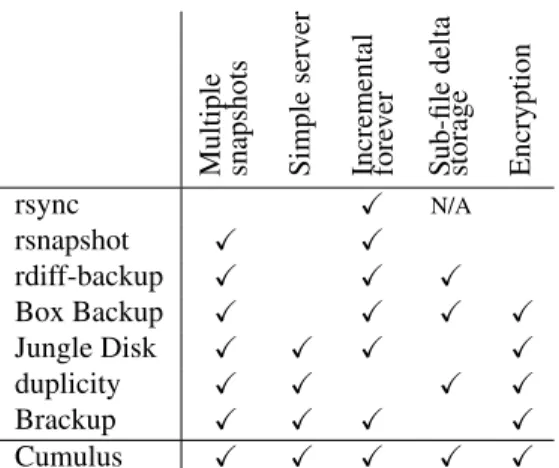
seg-Multiple snapshots Simple serv er Incremental fore ver Sub-file delta storage Encryption rsync N/A rsnapshot rdiff-backup Box Backup Jungle Disk duplicity Brackup Cumulus
Multiple snapshots:Can store multiple versions of files at dif-ferent points in time;Simple server:Can back up almost any-where; does not require special software at the server; Incre-mental forever: Only initial backup must be a full backup; Sub-file delta storage: Efficiently represents small differences between files on storage; only relevant if storing multiple snap-shots; Encryption: Data may be encrypted for privacy before sending to storage server.
Table 1: Comparison of features among selected tools that back up to networked storage.
ment cleaning mechanism to manage the inefficiency in-troduced. Additionally, Cumulus tries to efficiently rep-resent small changes to all types of large files and can share metadata where unchanged; both changes reduce the cost of incremental backups.
Peer-to-peer systems may be used for storing back-ups. Pastiche [5] is one such system, and focuses on the problem of identifying and sharing data between differ-ent users. Pastiche uses contdiffer-ent-based addressing for de-duplication. But if sharing is not needed, Brackup and Cumulus could use peer-to-peer systems as well, simply treating it as another storage interface offering get and put operations.
While other interfaces to storage may be available— Antiquity [24] for example provides a log append operation—a get/put interface likely still works best since it is simpler and a single put is cheaper than multi-ple appends to write the same data.
Table 1 summarizes differences between some of the tools discussed above for backup to networked storage. In relation to existing systems, Cumulus is most similar to duplicity (without the need to occasionally re-upload a new full backup), and Brackup (with an improved scheme for incremental backups including rsync-style deltas, and improved reclamation of storage space).
3 Design
In this section we present the design of our approach for making backups to a thin cloud remote storage service.
3.1 Storage Server Interface
We assume only a very narrow interface between a client generating a backup and a server responsible for storing the backup. The interface consists of four operations:
Get: Given a pathname, retrieve the contents of a file from the server.
Put: Store a complete file on the server with the given pathname.
List: Get the names of files stored on the server.
Delete: Remove the given file from the server, reclaim-ing its space.
Note that all of these operations operate on entire files; we do not depend upon the ability to read or write arbi-trary byte ranges within a file. Cumulus neither requires nor uses support for reading and setting file attributes such as permissions and timestamps. The interface is simple enough that it can be implemented on top of any number of protocols: FTP, SFTP, WebDAV, S3, or nearly any network file system.
Since the only way to modify a file in this narrow in-terface is to upload it again in full, we adopt a write-once storage model, in which a file is never modified after it is first stored, except to delete it to recover space. The write-once model provides convenient fail-ure guarantees: since files are never modified in place, a failed backup run cannot corrupt old snapshots. At worst, it will leave a partially-written snapshot which can garbage-collected. Because Cumulus does not modify files in place, we can keep snapshots at multiple points in time simply by not deleting the files that make up old snapshots.
3.2 Storage Segments
When storing a snapshot, Cumulus will often group data from many smaller files together into larger units called
segments. Segments become the unit of storage on the server, with each segment stored as a single file. Filesys-tems typically contain many small files (both our traces described later and others, such as [1], support this ob-servation). Aggregation of data produces larger files for storage at the server, which can be beneficial to:
Avoid inefficiencies associated with many small files:
Storage servers may dislike storing many small files for various reasons—higher metadata costs, wasted space from rounding up to block boundaries, and more seeks when reading. This preference may be expressed in the
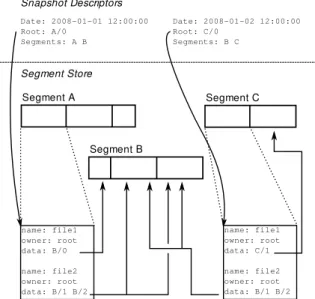
Segment A Segment B Segment Store name: file1 owner: root data: B/0 name: file2 owner: root data: B/1 B/2 Date: 2008-01-01 12:00:00 Root: A/0 Segments: A B Segment C name: file1 owner: root data: C/1 name: file2 owner: root data: B/1 B/2 Date: 2008-01-02 12:00:00 Root: C/0 Segments: B C Snapshot Descriptors
Figure 1: Simplified schematic of the basic format for storing snapshots on a storage server. Two snapshots are shown, taken on successive days. Each snapshot contains two files. file1changes between the two snapshots, but the data forfile2is shared between the snapshots. For simplicity in this figure, segments are given letters as names instead of the 128-bit UUIDs used in practice. cost model of the provider. Amazon S3, for example, has both a per-request and a per-byte cost when storing a file that encourages using files greater than 100 KB in size.
Avoid costs in network protocols:Small files result in relatively larger protocol overhead, and may be slower over higher-latency connections. Pipelining (if sup-ported) or parallel connections may help, but larger seg-ments make these less necessary. We study one instance of this effect in more detail in Section 5.4.5.
Take advantage of inter-file redundancy with segment compression: Compression can be more effective when small files are grouped together. We examine this effect in Section 5.4.2.
Provide additional privacy when encryption is used:
Aggregation helps hide the size as well as contents of individual files.
Finally, as discussed in Sections 3.4 and 4.3, changes to small parts of larger files can be efficiently repre-sented by effectively breaking those files into smaller pieces during backup. For the reasons listed above, re-aggregating this data becomes even more important when sub-file incremental backups are supported.
3.3 Snapshot Format
Figure 1 illustrates the basic format for backup snap-shots. Cumulus snapshots logically consist of two parts: ametadata logwhich lists all the files backed up, and the
file data itself. Both metadata and data are broken apart into blocks, orobjects, and these objects are then packed together intosegments, compressed as a unit and option-ally encrypted, and stored on the server. Each segment has a unique name—we use a randomly generated 128-bit UUID so that segment names can be assigned without central coordination. Objects are numbered sequentially within a segment.
Segments are internally structured as a TAR file, with each file in the archive corresponding to an object in the segment. Compression and encryption are provided by filtering the raw segment data through gzip, bzip2,
gpg, or other similar external tools.
A snapshot can be decoded by traversing the tree (or, in the case of sharing, DAG) of objects. The root object in the tree is the start of the metadata log. The metadata log need not be stored as a flat object; it may contain pointers to objects containing other pieces of the meta-data log. For example, if many files have not changed, then a single pointer to a portion of the metadata for an old snapshot may be written. The metadata objects even-tually contain entries for individual files, with pointers to the file data as the leaves of the tree.
The metadata log entry for each individual file speci-fies properties such as modification time, ownership, and file permissions, and can be extended to include addi-tional information if needed. It includes a cryptographic hash so that file integrity can be verified after a restore. Finally, it includes a list of pointers to objects containing the file data. Metadata is stored in a text, not binary, for-mat to make it more transparent. Compression applied to the segments containing the metadata, however, makes the format space-efficient.
The one piece of data in each snapshot not stored in a segment is a snapshot descriptor, which includes a timestamp and a pointer to the root object.
Starting with the root object stored in the snapshot de-scriptor and traversing all pointers found, a list of all segments required by the snapshot can be constructed. Since segments may be shared between multiple snap-shots, a garbage collection process deletes unreferenced segments when snapshots are removed. To simplify garbage-collection, each snapshot descriptor includes (though it is redundant) a summary of segments on which it depends.
Pointers within the metadata log include cryptographic hashes so that the integrity of all data can be validated starting from the snapshot descriptor, which can be dig-itally signed. Additionally, Cumulus writes a summary file with checksums for all segments so that it can quickly check snapshots for errors without a full restore.
3.4 Sub-File Incrementals
If only a small portion of a large file changes between snapshots, only the changed portion of the file should be stored. The design of the Cumulus format supports this. The contents of each file is specified as a list of objects, so new snapshots can continue to point to old objects when data is unchanged. Additionally, pointers to objects can include byte ranges to allow portions of old objects to be reused even if some data has changed. We discuss how our implementation identifies data that is unchanged in Section 4.3.
3.5 Segment Cleaning
When old snapshots are no longer needed, space is re-claimed by deleting the root snapshot descriptors for those snapshots, then garbage collecting unreachable segments. It may be, however, that some segments only contain a small fraction of useful data—the remainder of these segments, data from deleted snapshots, is now wasted space. This problem is similar to the problem of reclaiming space in the Log-Structured File System (LFS) [18].
There are two approaches that can be taken to seg-ment cleaning given that multiple backup snapshots are involved. The first, in-place cleaning, is most like the cleaning in LFS. It identifies segments with wasted space and rewrites the segments to keep just the needed data.
This mode of operation has several disadvantages, however. It violates the write-once storage model, in that the data on which a snapshot depends is changed after the snapshot is written. It requires detailed book-keeping to determine precisely which data must be re-tained. Finally, it requires downloading and decrypting old segments—normal backups only require an encryp-tion key, but cleaning needs the decrypencryp-tion key as well.
The alternative to in-place cleaning is to never mod-ify segments in old snapshots. Instead, Cumulus avoids referring to data in inefficient old segments when creat-ing a new snapshot, and writes new copies of that data if needed. This approach avoids the disadvantages listed earlier, but is less space-efficient. Dead space is not re-claimed until snapshots depending on the old segments are deleted. Additionally, until then data is stored re-dundantly since old and new snapshots refer to different copies of the same data.
We analyzed both approaches to cleaning in simula-tion. We found that the cost benefits of in-place cleaning were not large enough to outweigh its disadvantages, and so our Cumulus prototype does not clean in place.
The simplest policy for selecting segments to clean is to set a minimum segment utilization threshold,α, that triggers cleaning of a segment. We define utilization as the fraction of bytes within the segment which are
ref-erenced by a current snapshot. For example, α = 0.8 will ensure that at least 80% of the bytes in segments are useful. Settingα= 0disables segment cleaning al-together. Cleaning thresholds closer to1 will decrease storage overhead for a single snapshot, but this more ag-gressive cleaning requires transferring more data.
More complex policies are possible as well, such as a cost-benefit evaluation that favors repacking long-lived segments. Cleaning may be informed by snapshot re-tention policies: cleaning is more beneficial immediately before creating a long-term snapshot, and cleaning can also consider which other snapshots currently reference a segment. Finally, segment cleaning may reorganize data, such as by age, when segments are repacked.
Though not currently implemented, Cumulus could use heuristics to group data by expected lifetime when a backup is first written in an attempt to optimize seg-ment data for later cleaning (as in systems such as WOLF [23]).
3.6 Restoring from Backup
Restoring data from previous backups may take several forms. Acomplete restoreextracts all files as they were on a given date. Apartial restorerecovers one or a small number of files, as in recovering from an accidental dele-tion. As an enhancement to a partial restore, all available versions of a file or set of files can be listed.
Cumulus is primarily optimized for the first form of restore—recovering all files, such as in the event of the total loss of the original data. In this case, the restore pro-cess will look up the root snapshot descriptor at the date to restore, then download all segments referenced by that snapshot. Since segment cleaning seeks to avoid leaving much wasted space in the segments, the total amount of data downloaded should be only slightly larger than the size of the data to restore.
For partial restores, Cumulus downloads those seg-ments that contain metadata for the snapshot to locate the files requested, then locates each of the segments containing file data. This approach might require fetch-ing many segments—for example, if restorfetch-ing a directory whose files were added incrementally over many days— but will usually be quick.
Cumulus is not optimized for tracking the history of individual files. The only way to determine the list of changes to a file or set of files is to download and process the metadata logs for all snapshots. However, a client could keep a database of this information to allow more efficient queries.
3.7 Limitations
Cumulus is not designed to replace all existing backup systems. As a result, there are situations in which other systems will do a better job.
The approach embodied by Cumulus is for the client making a backup to do most of the work, and leave the backup itself almost entirely opaque to the server. This approach makes Cumulus portable to nearly any type of storage server. However, a specialized backup server could provide features such as automatically repacking backup data when deleting old snapshots, eliminating the overhead of client-side segment cleaning.
Cumulus, as designed, does not offer coordination be-tween multiple backup clients, and so does not offer fea-tures such as de-duplication between backups from dif-ferent clients. While Cumulus could use convergent en-cryption [6] to allow de-duplication even when data is first encrypted at the client, several issues prevent us from doing so. Convergent encryption would not work well with the aggregation in Cumulus. Additionally, server-side de-duplication is vulnerable to dictionary at-tacks to determine what data clients are storing, and stor-age accounting for billing purposes is more difficult.
Finally, the design of Cumulus is predicated on the fact that backing up each file on the client to a sepa-rate file on the server may introduce too much overhead, and so Cumulus groups data together into segments. If it is known that the storage server and network protocol can efficiently deal with small files, however, then group-ing data into segments adds unnecessary complexity and overhead. Other disk-to-disk backup programs may be a better match in this case.
4 Implementation
We discuss details of the implementation of the Cumu-lus prototype in this section. Our implementation is rel-atively compact: only slightly over 3200 lines of C++ source code (as measured by SLOCCount [25]) imple-menting the core backup functionality, along with an-other roughly 1000 lines of Python for tasks such as re-stores, segment cleaning, and statistics gathering.
4.1 Local Client State
Each client stores on its local disk information about recent backups, primarily so that it can detect which files have changed and properly reuse data from previous snapshots. This information could be kept on the stor-age server. However, storing it locally reduces network bandwidth and improves access times. We do not need this information to recover data from a backup so its loss is not catastrophic, but this local state does enable vari-ous performance optimizations during backups.
The client’s local state is divided into two parts: a local copy of the metadata log and an SQLite database [20] containing all other needed information.
Cumulus uses the local copy of the previous metadata log to quickly detect and skip over unchanged files based
on modification time. Cumulus also uses it to delta-encode the metadata log for new snapshots.
An SQLite database keeps a record of recent snapshots and all segments and objects stored in them. The table of objects includes an index by content hash to support data de-duplication. Enabling de-duplication leaves Cumulus vulnerable to corruption from a hash collision [11, 12], but, as with other systems, we judge the risk to be small. The hash algorithm (currently SHA-1) can be upgraded as weaknesses are found. In the event that client data must be recovered from backup, the content indices can be rebuilt from segment data as it is downloaded during the restore.
Note that the Cumulus backup format does not specify the format of this information stored locally. It is entirely possible to create a new and very different implementa-tion which nonetheless produces backups conforming to the structure described in Section 3.3 and readable by our Cumulus prototype.
4.2 Segment Cleaning
The Cumulus backup program, written in C++, does not directly implement segment cleaning heuristics. In-stead, a separate Cumulus utility program, implemented in Python, controls cleaning.
When writing a snapshot, Cumulus records in the local database a summary of all segments used by that snap-shot and the fraction of the data in each segment that is actually referenced. The Cumulus utility program uses these summaries to identify segments which are poorly-utilized and marks the selected segments as “expired” in the local database. It also considers which snapshots re-fer to the segments, and how long those snapshots are likely to be kept, during cleaning. On subsequent back-ups, the Cumulus backup program re-uploads any data that is needed from expired segments. Since the database contains information about the age of all data blocks, segment data can be grouped by age when it is cleaned.
If local client state is lost, this age information will be lost. When the local client state is rebuilt all data will appear to have the same age, so cleaning may not be op-timal, but can still be done.
4.3 Sub-File Incrementals
As discussed in Section 3.4, the Cumulus backup format supports efficiently encoding differences between file versions. Our implementation detects changes by divid-ing files into smallchunksin a content-sensitive manner (using Rabin fingerprints) and identifying chunks that are common, as in the Low-Bandwidth File System [15].
When a file is first backed up, Cumulus divides it into blocks of about a megabyte in size which are stored indi-vidually in objects. In contrast, the chunks used for sub-file incrementals are quite a bit smaller: the target size is
4 KB (though variable, with a 2 KB minimum and 64 KB maximum). Before storing each megabyte block, Cumu-lus computes a set of chunk signatures: it divides the data block into non-overlapping chunks and computes a (20-byte SHA-1 signature, 2-byte length) tuple for each chunk. The list of chunk signatures for each object is stored in the local database. These signatures consume 22 bytes for every roughly 4 KB of original data, so the signatures are about 0.5% of the size of the data to back up.
Unlike LBFS, we do not create a global index of chunk hashes—to limit overhead, we do not attempt to find common data between different files. When a file changes, we limit the search for unmodified data to the chunks in the previous version of the file. Cumulus com-putes chunk signatures for the new file data, and matches with old chunks are written as a reference to the old data. New chunks are written out to a new object. However, Cumulus could be extended to perform global data de-duplication while maintaining backup format compati-bility.
4.4 Segment Filtering and Storage
The core Cumulus backup implementation is only capa-ble of writing segments as uncompressed TAR files to local disk. Additional functionality is implemented by calling out to external scripts.
When performing a backup, all segment data may be filtered through a specified command before writing it. Specifying a program such asgzip can provide com-pression, orgpgcan provide encryption.
Similarly, network protocols are implemented by call-ing out to external scripts. Cumulus first writes segments to a temporary directory, then calls an upload script to transfer them in the background while the main backup process continues. Slow uploads will eventually throttle the backup process so that the required temporary stor-age space is bounded. Upload scripts may be quite sim-ple; a script for uploading to Amazon S3 is merely 12 lines long in Python using the boto [4] library.
4.5 Snapshot Restores
The Cumulus utility tool implements complete restore functionality. This tool can automatically decompress and extract objects from segments, and can efficiently extract just a subset of files from a snapshot.
To reduce disk space requirements, the restore tool downloads segments as needed instead of all at once at the start, and can delete downloaded segments as it goes along. The restore tool downloads the snapshot de-scriptor first, followed by the metadata. The backup tool segregates data and metadata into separate segments, so this phase does not download any file data. Then, file contents are restored—based on the metadata, as each
segment is downloaded data from that segment is re-stored. For partial restores, only the necessary segments are downloaded.
Currently, in the restore tool it is possible that a seg-ment may be downloaded multiple times if blocks for some files are spread across many segments. However, this situation is merely an implementation issue and can be fixed by restoring data for these files non-sequentially as it is downloaded.
Finally, Cumulus includes a FUSE [10] interface that allows a collection of backup snapshots to be mounted as a virtual filesystem on Linux, thereby providing random access with standard filesystem tools. This interface re-lies on the fact that file metadata is stored in sorted order by filename, so a binary search can quickly locate any specified file within the metadata log.
5 Evaluation
We use both trace-based simulation and a prototype im-plementation to evaluate the use of thin cloud services for remote backup. Our goal is to answer three high-level sets of questions:
• What is the penalty of using a thin cloud service with a very simple storage interface compared to a more sophisticated service?
• What are the monetary costs for using remote backup for two typical usage scenarios? How should remote backup strategies adapt to minimize monetary costs as the ratio of network and storage prices varies?
• How does our prototype implementation compare with other backup systems? What are the additional benefits (e.g., compression, sub-file incrementals) and overheads (e.g., metadata) of an implementa-tion not captured in simulaimplementa-tion? What is the perfor-mance of using an online service like Amazon S3 for backup?
The following evaluation sections answer these ques-tions, beginning with a description of the trace workloads we use as inputs to the experiments.
5.1 Trace Workloads
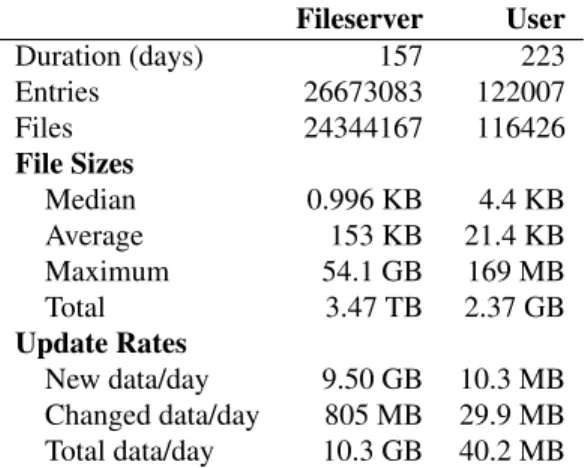
We use two traces as workloads to drive our evaluations. Afileservertrace tracks all files stored on our research group fileserver, and models the use of a cloud service for remote backup in an enterprise setting. Ausertrace is taken from the Cumulus backups of the home directory of one of the author’s personal computers, and models the use of remote backup in a home setting. The traces contain a daily record of the metadata of all files in each setting, including a hash of the file contents. The user
Fileserver User Duration (days) 157 223 Entries 26673083 122007 Files 24344167 116426 File Sizes Median 0.996 KB 4.4 KB Average 153 KB 21.4 KB Maximum 54.1 GB 169 MB Total 3.47 TB 2.37 GB Update Rates New data/day 9.50 GB 10.3 MB Changed data/day 805 MB 29.9 MB Total data/day 10.3 GB 40.2 MB
Table 2: Key statistics of the two traces used in the eval-uations. File counts and sizes are for the last day in the trace. “Entries” is files plus directories, symlinks, etc. trace further includes complete backups of all file data, and enables evaluation of the effects of compression and sub-file incrementals. Table 2 summarizes the key statis-tics of each trace.
5.2 Remote Backup to a Thin Cloud
First we explore the overhead of using remote backup to a thin cloud service that has only a simple storage inter-face. We compare this thin service model to an “optimal” model representing more sophisticated backup systems.
We use simulation for these experiments, and start by describing our simulator. We then define our optimal baseline model and evaluate the overhead of using a sim-ple interface relative to a more sophisticated system.
5.2.1 Cumulus Simulator
The Cumulus simulator models the process of backing up collections of files to a remote backup service. It uses traces of daily records of file metadata to perform back-ups by determining which files have changed, aggregat-ing changed file data into segments for storage on a re-mote service, and cleaning expired data as described in Section 3. We use a simulator, rather than our prototype, because a parameter sweep of the space of cleaning pa-rameters on datasets as large as our traces is not feasible in a reasonable amount of time.
The simulator tracks three overheads associated with performing backups. It tracks storage overhead, or the total number of bytes to store a set of snapshots com-puted as the sum of the size of each segment needed. Storage overhead includes both actual file data as well as wasted space within segments. It tracks network over-head, the total data that must be transferred over the net-work to accomplish a backup. On graphs, we show this overhead as a cumulative value: the total data transferred from the beginning of the simulation until the given day.
Since remote backup services have per-file charges, the simulator also tracks segment overhead as the number of segments created during the process of making backups. The simulator also models two snapshot scenarios. In thesingle snapshotscenario, the simulator maintains only one snapshot remotely and it deletes all previous snapshots. In the multiple snapshotscenario, the sim-ulator retains snapshots according to a pre-determined backup schedule. In our experiments, we keep the most recent seven daily snapshots, with additional weekly snapshots retained going back farther in time so that a total of 12 snapshots are kept. This schedule emulates the backup policy an enterprise might employ.
The simulator makes some simplifying assumptions that we explore later when evaluating our implementa-tion. The simulator detects changes to files in the traces using a per-file hash. Thus, the simulator cannot detect changes to only a portion of a file, and assumes that the entire file is changed. The simulator also does not model compression or metadata. We account for sub-file changes, compression, and metadata overhead when evaluating the prototype in Section 5.4.
5.2.2 Optimal Baseline
A simple storage interface for remote backup can incur an overhead penalty relative to more sophisticated ap-proaches. To quantify the overhead of this approach, we use an idealizedoptimal backupas a basis of comparison. For our simulations, the optimal backup is one in which no more data is stored or transferred over the net-work than is needed. Since simulation is done at a file granularity, the optimal backup will transfer the entire contents of a file if any part changes. Optimal backup will, however, perform data de-duplication at a file level, storing only one copy if multiple files have the same hash value. In the optimal backup, no space is lost to frag-mentation when deleting old snapshots. Cumulus could achieve this optimal performance in this simulation by storing each file in a separate segment—that is, to never bundle files together into larger segments. As discussed in Section 3.2 and as our simulation results show, though, there are good reasons to use segments with sizes larger than the average file.
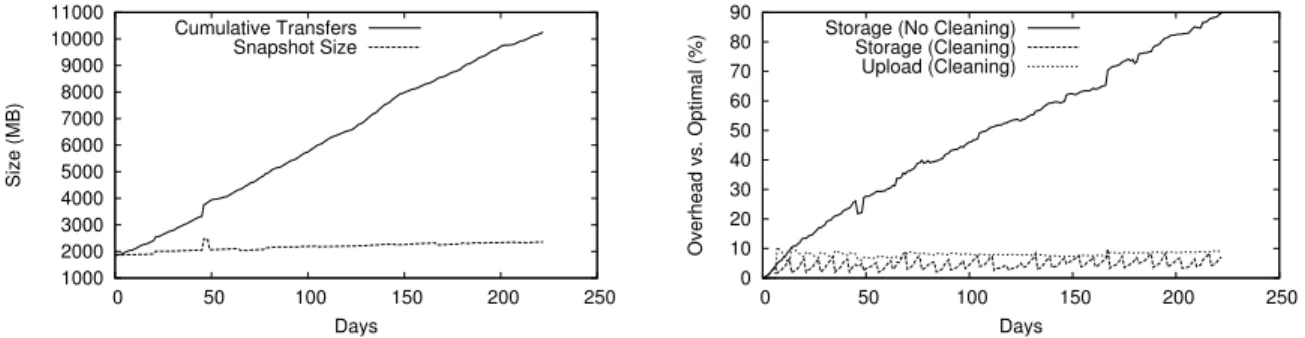
As an example of these costs and how we measure them, Figure 2(a) shows the optimal storage and upload overheads for daily backups of the 223 days of the user trace. In this simulation, only a single snapshot is re-tained each day. Storage grows slowly in proportion to the amount of data in a snapshot, and the cumulative net-work transfer grows linearly over time.
Figure 2(b) shows the results of two simulations of Cu-mulus backing up the same data. The graph shows the overheads relative to optimal backup; a backup as good as optimal would have 0% relative overhead. These
1000 2000 3000 4000 5000 6000 7000 8000 9000 10000 11000 0 50 100 150 200 250 Size (MB) Days Cumulative Transfers Snapshot Size 0 10 20 30 40 50 60 70 80 90 0 50 100 150 200 250 Overhead vs. Optimal (%) Days Storage (No Cleaning)
Storage (Cleaning) Upload (Cleaning)
Figure 2: (a) Storage and network overhead for an optimal backup of the files from the user trace. (b) Overheads with and without cleaning; segments are cleaned at 60% utilization. Only storage overheads are shown for the no-cleaning case since there is no network transfer overhead without cleaning.
sults clearly demonstrate the need for cleaning when us-ing a simple storage interface for backup. When seg-ments are not cleaned (only deleting segseg-ments that by chance happen to be entirely no longer needed), wasted storage space grows quickly with time—by the end of the simulation at day 223, the size of a snapshot is nearly double the required size. In contrast, when segments are marked for cleaning at the 60% utilization thresh-old, storage overhead quickly stabilizes below 10%. The overhead in extra network transfers is similarly modest.
5.2.3 Cleaning Policies
Cleaning is clearly necessary for efficient backup, but it is also parameterized by two metrics: the size of the seg-ments used for aggregation, transfer, and storage (Sec-tion 3.2), and the threshold at which segments will be cleaned (Section 3.5). In our next set of experiments, we explore the parameter space to quantify the impact of these two metrics on backup performance.
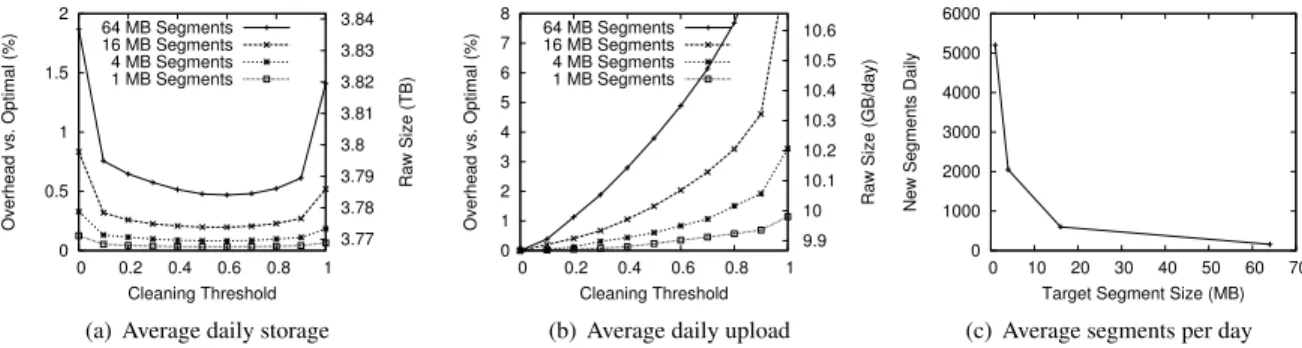
Figures 3 and 4 show the simulated overheads of backup with Cumulus using the fileserver and user traces, respectively. The figures show both relative over-heads to optimal backup (lefty-axis) as well as the abso-lute overheads (righty-axis). We use the backup policy
of multiple daily and weekly snapshots as described in Section 5.2.1. The figures show cleaning overhead for a range of cleaning thresholds and segment sizes. Each fig-ure has three graphs corresponding to the three overheads of remote backup to an online service. Average daily storageshows the average storage requirements per day over the duration of the simulation; this value is the total storage needed for tracking multiple backup snapshots, not just the size of a single snapshot. Similarly,average daily uploadis the average of the data transferred each day of the simulation, excluding the first; we exclude the first day since any backup approach must transfer the en-tire initial filesystem. Finally,average segments per day
tracks the number of new segments uploaded each day to account for per-file upload and storage costs.
Storage and upload overheads improve with decreas-ing segment size, but at small segment sizes (<1 MB) backups require very large numbers of segments and limit the benefits of aggregating file data (Section 3.2). As expected, increasing the cleaning threshold increases the network upload overhead. Storage overhead with multiple snapshots, however, has an optimum cleaning threshold value. Increasing the threshold initially de-creases storage overhead, but high thresholds increase it again; we explore this behavior further below.
Both the fileserver and user workloads exhibit simi-lar sensitivities to cleaning thresholds and segment sizes. The user workload has higher overheads relative to op-timal due to smaller average files and more churn in the file data, but overall the overhead penalties remain low.
Figures 3(a) and 4(a) show that there is a cleaning threshold that minimizes storage overheads. Increasing the cleaning threshold intuitively reduces storage over-head relative to optimal since the more aggressive clean-ing at higher thresholds will delete wasted space in seg-ments and thereby reduce storage requireseg-ments.
Figure 5 explains why storage overhead increases again at higher cleaning thresholds. It shows three curves, the 16 MB segment size curve from Figure 3(a) and two curves that decompose the storage overhead into individual components (Section 3.5). One is overhead due to duplicate copies of data stored over time in the cleaning process; cleaning at lower thresholds reduces this component. The other is due to wasted space in seg-ments which have not been cleaned; cleaning at higher thresholds reduces this component. A cleaning threshold near the middle, however, minimizes the sum of both of these overheads.
5.3 Paying for Remote Backup
The evaluation in the previous section measured the over-head of Cumulus in terms of storage, network, and seg-ment resource usage. Remote backup as a service, how-ever, comes at a price. In this section, we calculate
0 0.5 1 1.5 2 0 0.2 0.4 0.6 0.8 1 3.77 3.78 3.79 3.8 3.81 3.82 3.83 3.84 Overhead vs. Optimal (%) Raw Size (TB) Cleaning Threshold 64 MB Segments 16 MB Segments 4 MB Segments 1 MB Segments
(a) Average daily storage
0 1 2 3 4 5 6 7 8 0 0.2 0.4 0.6 0.8 1 9.9 10 10.1 10.2 10.3 10.4 10.5 10.6 Overhead vs. Optimal (%)
Raw Size (GB/day)
Cleaning Threshold 64 MB Segments 16 MB Segments 4 MB Segments 1 MB Segments
(b) Average daily upload
0 1000 2000 3000 4000 5000 6000 0 10 20 30 40 50 60 70
New Segments Daily
Target Segment Size (MB) (c) Average segments per day
Figure 3: Overheads for backups in the fileserver trace.
0 5 10 15 20 25 0 0.2 0.4 0.6 0.8 1 2.7 2.8 2.9 3 3.1 3.2 3.3 Overhead vs. Optimal (%) Raw Size (GB) Cleaning Threshold 16 MB Segments 4 MB Segments 1 MB Segments 512 KB Segments 128 KB Segments
(a) Average daily storage
0 5 10 15 20 25 30 35 40 0 0.2 0.4 0.6 0.8 1 38 40 42 44 46 48 50 52 Overhead vs. Optimal (%)
Raw Size (MB/day)
Cleaning Threshold 16 MB Segments 4 MB Segments 1 MB Segments 512 KB Segments 128 KB Segments
(b) Average daily upload
0 20 40 60 80 100 120 140 160 180 0 2 4 6 8 10 12 14 16
New Segments Daily
Target Segment Size (MB) (c) Average segments per day
Figure 4: Overheads for backups in the user trace.
0 0.1 0.2 0.3 0.4 0.5 0.6 0.7 0.8 0.9 0 0.2 0.4 0.6 0.8 1 Overhead vs. Optimal (%) Cleaning Threshold Total Overhead Duplicate Data Overhead Wasted Segment Space
Figure 5: Detailed breakdown of storage overhead when using a 16 MB segment size for the fileserver workload.
monetary costs for our two workload models, evaluate cleaning threshold and segment size in terms of costs in-stead of resource usage, and explore how cleaning should adapt to minimize costs as the ratio of network and stor-age prices varies. While similar, there are differences be-tween this problem and the typical evaluation of cleaning policies for a typical log-structured file system: instead of a fixed disk size and a goal to minimize I/O, we have no fixed limits but want to minimize monetary cost.
We use the prices for Amazon S3 as an initial point in the pricing space. As of January 2009, these prices are (in US dollars):
Fileserver Amount Cost
Initial upload 3563 GB $356.30 Upload 303 GB/month $30.30/month
Storage 3858 GB $578.70/month
User Amount Cost
Initial upload 1.82 GB $0.27 Upload 1.11 GB/month $0.11/month
Storage 2.68 GB $0.40/month
Table 3: Costs for backups in US dollars, if performed optimally, for the fileserver and user traces using current prices for Amazon S3.
Storage: $0.15 per GB·month
Upload: $0.10 per GB
Segment: $0.01 per 1000 files uploaded
With this pricing model, thesegmentcost for upload-ing an empty file is equivalent to theuploadcost for loading approximately 100 KB of data, i.e., when up-loading 100 KB files, half of the cost is for the band-width and half for the upload request itself. As the file size increases, the per-request component becomes an in-creasingly smaller part of the total cost.
Neglecting for the moment the segment upload costs, Table 3 shows the monthly storage and upload costs for each of the two traces. Storage costs dominate ongo-ing costs. They account for about 95% and 78% of the
0 0.5 1 1.5 2 0 0.2 0.4 0.6 0.8 1 610 612 614 616 618 620
Cost Increase vs. Optimal (%)
Cost ($) Cleaning Threshold 64 MB Segments 16 MB Segments 4 MB Segments 1 MB Segments
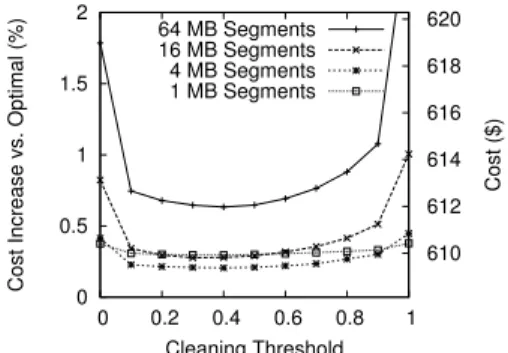
Figure 6: Costs in US dollars for backups in the fileserver assuming Amazon S3 prices. Costs for the user trace differ in absolute values but are qualitatively similar. monthly costs for the fileserver and user traces, respec-tively. Thus, changes to the storage efficiency will have a more substantial effect on total cost than changes in bandwidth efficiency. We also note that the absolute costs for the home backup scenario are very low, indi-cating that Amazon’s pricing model is potentially quite reasonable for consumers: even for home users with an order of magnitude more data to backup than our user workload, yearly ongoing costs are roughly US$50.
Whereas Figure 3 explored the parameter space of cleaning thresholds and segment sizes in terms of re-source overhead, Figure 6 shows results in terms of over-all cost for backing up the fileserver trace. These sults show that using a simple storage interface for re-mote backup also incurs very low additional monetary cost than optimal backup, from 0.5–2% for the fileserver trace depending on the parameters, and as low as about 5% in the user trace.
When evaluated in terms of monetary costs, though, the choices of cleaning parameters change compared to the parameters in terms of resource usage. The cleaning threshold providing the minimum cost is smaller and less aggressive (threshold =0.4) than in terms of resource usage (threshold=0.6). However, since overhead is not overly sensitive to the cleaning threshold, Cumulus still provides good performance even if the cleaning thresh-old is not tuned optimally. Furthermore, in contrast to resource usage, decreasing segment size does not always decrease overall cost. At some point—in this case be-tween 1–4 MB—decreasing segment size increases over-all cost due to the per-file pricing. We do not evalu-ate segment sizes less than 1 MB for the fileserver trace since, by 1 MB, smaller segments are already a loss. The results for the user workload, although not shown, are qualitatively similar, with a segment size of 0.5 MB to 1 MB best.
The pricing model of Amazon S3 is only one point in the pricing space. As a final cost experiment, we
0 0.2 0.4 0.6 0.8 1 0.1 1 10
Estimated Optimal Cleaning Threshold
Storage / Network Cost Ratio Fileserver
User
Figure 7: How the optimal threshold for cleaning changes as the relative cost of storage vs. network varies. plore how cleaning should adapt to changes in the rel-ative price of storage versus network. Figure 7 shows the optimal cleaning threshold for the fileserver and user workloads as a function of the ratio of storage to net-work cost. The storage to netnet-work ratio measures the relative cost of storing a gigabyte of data for a month and uploading a gigabyte of data. Amazon S3 has a ra-tio of 1.5. In general, as the cost of storage increases, it becomes advantageous to clean more aggressively (the optimal cleaning threshold increases). The ideal thresh-old stabilizes around 0.5–0.6 when storage is at least ten times more expensive than network upload, since clean-ing too aggressively will tend to increase storage costs.
5.4 Prototype Evaluation
In our final set of experiments, we compare the overhead of the Cumulus prototype implementation with other backup systems. We also evaluate the sensitivity of com-pression on segment size, the overhead of metadata in the implementation, the performance of sub-file incre-mentals and restores, and the time it takes to upload data to a remote service like Amazon S3.
5.4.1 System Comparisons
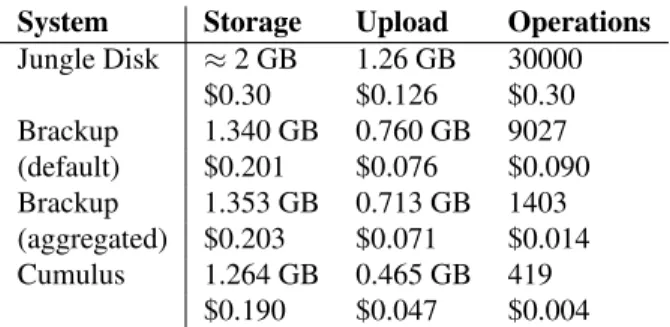
First, we provide some results from running our Cumulus prototype and compare with two existing backup tools that also target Amazon S3: Jungle Disk and Brackup. We use the complete file contents included in the user trace to accurately measure the behavior of our full Cu-mulus prototype and other real backup systems. For each day in the first three months of the user trace, we extract a full snapshot of all files, then back up these files with each of the backup tools. We compute the average cost, per month, broken down into storage, upload bandwidth, and operation count (files created or modified).
We configured Cumulus to clean segments with less then 60% utilization on a weekly basis. We eval-uate Brackup with two different settings. The first uses themerge_files_under=1kB option to only aggregate files if those files are under 1 KB in size
System Storage Upload Operations Jungle Disk ≈2 GB 1.26 GB 30000 $0.30 $0.126 $0.30 Brackup 1.340 GB 0.760 GB 9027 (default) $0.201 $0.076 $0.090 Brackup 1.353 GB 0.713 GB 1403 (aggregated) $0.203 $0.071 $0.014 Cumulus 1.264 GB 0.465 GB 419 $0.190 $0.047 $0.004 Table 4: Cost comparison for backups based on replaying actual file changes in the user trace over a three month period. Costs for Cumulus are lower than those shown in Table 3 since that evaluation ignored the possible bene-fits of compression and sub-file incrementals, which are captured here. Values are listed on a per-month basis. (this setting is recommended). Since this setting still results in many small files (many of the small files are still larger than 1 KB), a “high aggregation” run setsmerge_files_under=16kBto capture most of the small files and further reduce the operation count. Brackup includes the digest database in the files backed up, which serves a role similar to the database Cumulus stores locally. For fairness in the comparison, we sub-tract the size of the digest database from the sizes re-ported for Brackup.
Both Brackup and Cumulus usegpgto encrypt data in the test;gpgcompresses the data withgzipprior to encryption. Encryption is enabled in Jungle Disk, but no compression is available.
In principle, we would expect backups with Jungle Disk to be near optimal in terms of storage and upload since no space is wasted due to aggregation. But, as a tradeoff, Jungle Disk will have a much higher operation count. In practice, Jungle Disk will also suffer from a lack of de-duplication, sub-file incrementals, and com-pression.
Table 4 compares the estimated backup costs for Cu-mulus with Jungle Disk and Brackup. Several key points stand out in the comparison:
• Storage and upload requirements for Jungle Disk are larger, owing primarily to the lack of compres-sion.
• Except in the high aggregation case, both Brackup and Jungle Disk incur a large cost due to the many small files stored to S3. The per-file cost for uploads is larger than the per-byte cost, and for Jungle Disk significantly so.
• Brackup stores a complete copy of all file metadata with each snapshot, which in total accounts for 150–
200 MB/month of the upload cost. The cost in Cu-mulus is lower since CuCu-mulus can re-use metadata. Comparing storage requirements of Cumulus with the average size of a full backup with the venerable tar
utility, both are within 1%: storage overhead in Cumu-lus is roughly balanced out by gains achieved from de-duplication. Using duplicity as a proxy for near-optimal incremental backups, in a test with two months from the user trace Cumulus uploads only about 8% more data than is needed. Without sub-file incrementals in Cumu-lus, the figure is closer to 33%.
The Cumulus prototype thus shows that a service with a simple storage interface can achieve low overhead, and that Cumulus can achieve a lower total cost than other existing backup tools targeting S3.
While perhaps none of the systems are yet optimized for speed, initial full backups in Brackup and Jungle Disk were both notably slow. In the tests, the initial Jungle Disk backup took over six hours, Brackup (to local disk, not S3) took slightly over two hours, and Cumulus (to S3) approximately 15 minutes. For comparison, simply archiving all files withtarto local disk took approxi-mately 10 minutes.
For incremental backups, elapsed times for the tools were much more comparable. Jungle Disk averaged 248 seconds per run archiving to S3. Brackup averaged 115 seconds per run and Cumulus 167 seconds, but in these tests each were storing snapshots to local disk rather than to Amazon S3.
5.4.2 Segment Compression
Next we isolate the effectiveness of compression at re-ducing the size of the data to back up, particularly as a function of segment size and related settings. We used as a sample the full data contained in the first day of the user trace: the uncompressed size is 1916 MB, the com-pressed tar size is 1152 MB (factor of 1.66), and files individually compressed total 1219 MB (1.57×), 5.8% larger than whole-snapshot compression.
When aggregating data together into segments, we found that larger input segment sizes yielded better com-pression, up to about 300 KB when usinggzipand 1– 2 MB forbzip2where compression ratios leveled off.
5.4.3 Metadata
The Cumulus prototype stores metadata for each file in a backup snapshot in a text format, but after compression the format is still quite efficient. In the full tests on the user trace, the metadata for a full backup takes roughly 46 bytes per item backed up. Since most items include a 20-byte hash value which is unlikely to be compressible, the non-checksum components of the metadata average under 30 bytes per file.
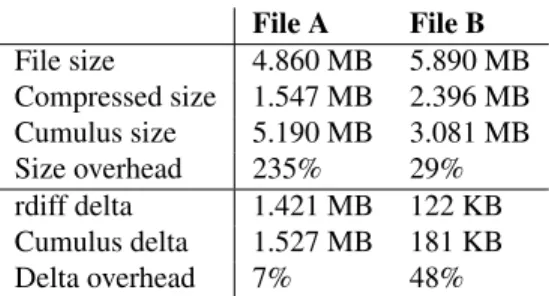
File A File B File size 4.860 MB 5.890 MB Compressed size 1.547 MB 2.396 MB Cumulus size 5.190 MB 3.081 MB Size overhead 235% 29% rdiff delta 1.421 MB 122 KB Cumulus delta 1.527 MB 181 KB Delta overhead 7% 48%
Table 5: Comparison of Cumulus sub-file incrementals with an idealized system based on rdiff, evaluated on two sample files from the user trace.
Metadata logs can be stored incrementally: new snap-shots can reference the portions of old metadata logs that are not modified. In the full user trace replay, a full metadata log was written to a snapshot weekly. On days where only differences were written out, though, the av-erage metadata log delta was under 2% of the size of a full metadata log. Overall, across all the snapshots taken, the data written out for file metadata was approximately 5% of the total size of the file data itself.
5.4.4 Sub-File Incrementals
To evaluate the support for sub-file incrementals in Cu-mulus, we make use of files extracted from the user trace that are frequently modified in place. We extract files from a 30-day period at the start of the trace. File A is a frequently-updated Bayesian spam filtering database, about 90% of which changes daily. File B records the state for a file-synchronization tool (unison), of which an average of 5% changes each day—however, unchanged content may still shift to different byte offsets within the file. While these samples do not capture all behavior, they do represent two distinct and notable classes of sub-file updates.
To provide a point of comparison, we userdiff[14] to generate an rsync-style delta between consecutive file versions. Table 5 summarizes the results.
Thesize overhead measures the storage cost of sub-file incrementals in Cumulus. To reconstruct the latest version of a file, Cumulus might need to read data from many past versions, though cleaning will try to keep this bounded. This overhead compares the average size of a daily snapshot (“Cumulus size”) against the average compressed size of the file backed up. As file churn in-creases overhead tends to increase.
Thedelta overheadcompares the data that must be up-loaded daily by Cumulus (“Cumulus delta”) against the average size of patches generated by rdiff (“rdiff delta”). When only a small portion of the file changes each day (File B), rdiff is more efficient than Cumulus in repre-senting the changes. However, sub-file incrementals are still a large win for Cumulus, as the size of the
incre-mentals is still much smaller than a full copy of the file. When large parts of the file change daily (File A), the efficiency of Cumulus approaches that of rdiff.
5.4.5 Upload Time
As a final experiment, we consider the time to upload to a remote storage service. Our Cumulus prototype is capable of uploading snapshot data directly to Amazon S3. To simplify matters, we evaluate upload time in iso-lation, rather than as part of a full backup, to provide a more controlled environment. Cumulus uses the boto [4] Python library to interface with S3.
As our measurements are from one experiment from a single computer (on a university campus network), they should not be taken as a good measure of the overall per-formance of S3. For large files—a megabyte or larger— uploads proceed at a maximum rate of about 800 KB/s. According to our results there is an overhead equivalent to a latency of roughly 100 ms per upload, and for small files this dominates the actual time for data transfer. It is thus advantageous to upload data in larger segments, as Cumulus does. More recent tests indicate that speeds may have improved.
The S3 protocol, based on HTTP, does not support pipelining multiple upload requests. Multiple uploads in parallel could reduce overhead somewhat. Still, it re-mains beneficial to perform uploads in larger units.
For perspective, assuming the maximum transfer rates above, ongoing backups for the fileserver and user work-loads will take on average 3.75 hours and under a minute, respectively. Overheads from cleaning will increase these times, but since network overheads from cleaning are generally small, these upload times will not change by much. For these two workloads, backup times are very reasonable for daily snapshots.
5.4.6 Restore Time
To completely restore all data from one of the user snap-shots takes approximately 11 minutes, comparable to but slighly faster than the time required for an initial full backup.
When restoring individual files from the user dataset, almost all time is spent extracting and parsing metadata—there is a fixed cost of approximately 24 sec-onds to parse the metadata to locate requested files. Ex-tracting requested files is relatively quick, under a second for small files.
Both restore tests were done from local disk; restoring from S3 will be slower by the time needed to download the data.
6 Conclusions
It is fairly clear that the market for Internet-hosted backup service is growing. However, it remains unclear
what form of this service will dominate. On one hand, it is in the natural interest of service providers to pack-age backup as an integrated service since that will both create a “stickier” relationship with the customer and al-low higher fees to be charged as a result. On the other hand, given our results, the customer’s interest may be maximized via an open market for commodity storage services (such as S3), increasing competition due to the low barrier to switching providers, and thus driving down prices. Indeed, even today integrated backup providers charge between $5 and $10 per month per user while the S3 charges for backing up our test user using the Cu-mulus system was only $0.24 per month. (For example, Symantec’s Protection Network charges $9.99 per month for 10GB of storage and EMC’s MozyPro service costs $3.95 + $0.50/GB per month per desktop.)
Moreover, a thin-cloud approach to backup allows one to easily hedge against provider failures by backing up to multiple providers. This strategy may be particu-larly critical for guarding against business risk—a lesson that has been learned the hard way by customers whose hosting companies have gone out of business. Provid-ing the same hedge usProvid-ing the integrated approach would require running multiple backup systems in parallel on each desktop or server, incurring redundant overheads (e.g., scanning, compression, etc.) that will only increase as disk capacities grow.
Finally, while this paper has focused on an admit-tedly simple application, we believe it identifies a key research agenda influencing the future of “cloud com-puting”: can one build a competitive product economy around a cloud of abstract commodity resources, or do underlying technical reasons ultimately favor an inte-grated service-oriented infrastructure?
7 Acknowledgments
The authors would like to thank Chris X. Edwards and Brian Kantor for assistance in collecting fileserver traces and other computing support. We would also like to thank our shepherd Niraj Tolia and the anonymous re-viewers for their time and insightful comments regard-ing Cumulus and this paper. This work was supported in part by the National Science Foundation grant CNS-0433668 and the UCSD Center for Networked Systems. Vrable was further supported in part by a National Sci-ence Foundation Graduate Research Fellowship.
References
[1] AGRAWAL, N., BOLOSKY, W. J., DOUCEUR, J. R., AND
LORCH, J. R. A five-year study of file-system metadata. ACM Trans. Storage 3, 3 (2007), 9.
[2] The Advanced Maryland Automatic Network Disk Archiver.
http://www.amanda.org/.
[3] AMAZONWEB SERVICES. Amazon Simple Storage Service.
http://aws.amazon.com/s3/.
[4] boto: Python interface to Amazon Web Services. http:// code.google.com/p/boto/.
[5] COX, L. P., MURRAY, C. D.,ANDNOBLE, B. D. Pastiche:
Making backup cheap and easy. InProceedings of the 5th Sympo-sium on Operating Systems Design and Implementation (OSDI)
(2002), USENIX, pp. 285–298.
[6] DOUCEUR, J. R., ADYA, A., BOLOSKY, W. J., SIMON, D., ANDTHEIMER, M. Reclaiming space from duplicate files in a serverless distributed file system. Technical Report MSR-TR-2002-30.
[7] ESCOTO, B. rdiff-backup. http://www.nongnu.org/ rdiff-backup/.
[8] ESCOTO, B., AND LOAFMAN, K. Duplicity. http:// duplicity.nongnu.org/.
[9] FITZPATRICK, B. Brackup. http://code.google.com/ p/brackup/, http://brad.livejournal.com/tag/ brackup.
[10] FUSE: Filesystem in userspace. http://fuse. sourceforge.net/.
[11] HENSON, V. An analysis of compare-by-hash. Proceedings of HotOS IX: The 9th Workshop on Hot Topics in Operating Systems
(2003).
[12] HENSON, V. The code monkey’s guide to cryptographic hashes
for content-based addressing, Nov. 2007. http://www. linuxworld.com/news/2007/111207-hash.html. [13] Jungle disk.http://www.jungledisk.com/. [14] librsync.http://librsync.sourcefrog.net/. [15] MUTHITACHAROEN, A., CHEN, B.,AND MAZI`ERES, D. A
low-bandwidth network file system. In Proceedings of the 18th ACM Symposium on Operating Systems Principles (SOSP)
(2001), ACM, pp. 174–187.
[16] PRESTON, W. C.Backup & Recovery. O’Reilly, 2006. [17] QUINLAN, S.,ANDDORWARD, S. Venti: a new approach to
archival storage. InProceedings of the 1st USENIX Conference on File and Storage Technologies (FAST)(2002), USENIX Asso-ciation.
[18] ROSENBLUM, M.,ANDOUSTERHOUT, J. K. The design and implementation of a log-structured file system.ACM Trans. Com-put. Syst. 10, 1 (1992), 26–52.
[19] rsnapshot.http://www.rsnapshot.org/. [20] Sqlite.http://www.sqlite.org/.
[21] SUMMERS, B.,ANDWILSON, C. Box backup.http://www. boxbackup.org/.
[22] TRIDGELL, A.Efficient Algorithms for Sorting and Synchroniza-tion. PhD thesis, Australian National University, Feb. 1999. [23] WANG, J.,ANDHU, Y. WOLF–A novel reordering write buffer
to boost the performance of log-structured file systems. In Pro-ceedings of the 1st USENIX Conference on File and Storage Tech-nologies (FAST)(2002), USENIX Association.
[24] WEATHERSPOON, H., EATON, P., CHUN, B.-G.,ANDKUBI
-ATOWICZ, J. Antiquity: Exploiting a secure log for wide-area
distributed storage. InEuroSys ’07: Proceedings of the 2nd ACM SIGOPS/EuroSys European Conference on Computer Sys-tems 2007(New York, NY, USA, 2007), ACM, pp. 371–384. [25] WHEELER, D. A. SLOCCount. http://www.dwheeler.
com/sloccount/.
[26] ZHU, B., LI, K.,ANDPATTERSON, H. Avoiding the disk bottle-neck in the data domain deduplication file system. InProceedings of the 6th USENIX Conference on File and Storage Technologies (FAST)(2008), USENIX Association, pp. 269–282.